
CDX-MG6056ZH - Car stereo PIONEER - Free user manual and instructions
Find the device manual for free CDX-MG6056ZH PIONEER in PDF.


| Product Type | Car stereo with 6-disc CD changer |
| Brand | Pioneer |
| Model | CDX-MG6056ZH |
| Dimensions (approx.) | 20 cm × 10 cm × 15 cm (W × H × D) |
| Weight (approx.) | 1.5 kg |
| Power supply | 12 V DC (vehicle battery) |
| Main functions | 6-disc CD changer, remote control via audio system, individual ejection, selection via keys 1-6, adjustable white or orange lighting |
| Disc compatibility | Standard audio CDs (CD logo), 12 cm circular discs, new discs with burrs to be deburred |
| Operating temperature | -10 °C to 60 °C |
| Care and cleaning | Clean the unit with a soft, dry cloth; for discs, wipe from the center outward with a soft cloth or mild detergent. Do not use solvents. |
| Safety | Do not insert objects other than discs; do not force the tray; avoid liquids; keep the volume at a level that allows you to hear traffic; do not use cracked, warped, or irregularly shaped discs. |
| Spare parts and repairability | Consult an authorized Honda dealer or Pioneer service center for parts and repairs. |
| General information | Compliant with EU directives (89/336/EEC, 92/31/EEC, 93/68/EEC). "CLASS 1 LASER PRODUCT" label on the back. Serial number on the bottom plate. |
Frequently Asked Questions - CDX-MG6056ZH PIONEER
User questions about CDX-MG6056ZH PIONEER
0 question about this device. Answer the ones you know or ask your own.
Ask a new question about this device
Download the instructions for your Car stereo in PDF format for free! Find your manual CDX-MG6056ZH - PIONEER and take your electronic device back in hand. On this page are published all the documents necessary for the use of your device. CDX-MG6056ZH by PIONEER.
USER MANUAL CDX-MG6056ZH PIONEER
Thank you for purchasing this product. Before attempting operation, be sure to read this manual.
Nosyouremercionsd'avoirechetecappareil. AvantdeI'utiliser,prendere soin delirece manuel.
Precautions 3
Proper Care of Your CDs 5
CDChangerOperation 7
Installation 13
In Case of Difficulty 14
Switching the address setting 17
Please write the serial number (on the bottom of the unit) in the space below.
Keep this booklet as a record of your purchase to help identify the unit if it's stolen.
Serial No.:
This product complies with the EMC Directives (89/336/EEC, 92/31/EEC) and CE Marking Directive (93/68/EEC).
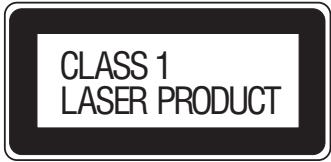
Note:
A "CLASS 1 LASER PRODUCT" label is affixed to the rear of the player.
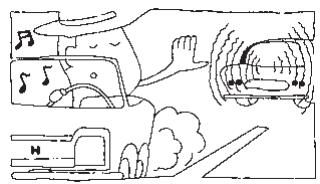
VOLUME
For your driving safety, keep the volume low enough to be aware of road and traffic conditions.
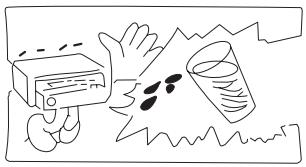
LIQUIDS
Do not place drinks or water on or near the unit, cassettes or CDs.
If liquids drop on the unit cassettes or CDs, it can cause damage.
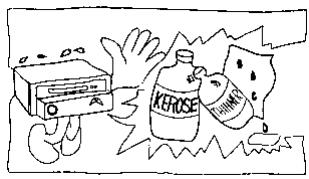
OUTSIDE CLEANING
Use a soft cloth to clean the radio.
Do not use kerosene, thinner or any other type of solvent.
FOR DRIVING SAFETY
Do not insert or eject a CD while driving as it is dangerous and may result in an accident.
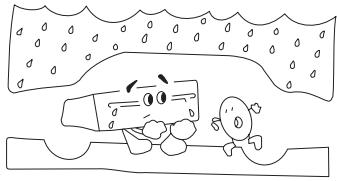
MOISTURE CONDENSATION
You may notice the playback sound wavering. When this happens, remove the CD from the player and wait about an hour or until the moisture evaporates.
CAUTIONS DURING PLAYBACK
Playing a CD while driving on a very bumpy road may result in skips. This will not scratch the CD or damage the player. The noise level on CDs is much lower than on analog-type records or tapes. Therefore, before playing a CD, turn the volume down all the way then adjust the level by gradually turning the volume up once playback begins. Do not turn the volume up too abruptly as this could damage the speakers.
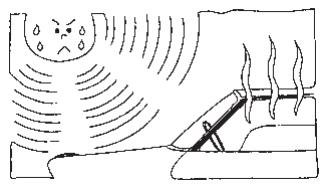
TEMPERATURE IN THE
VEHICLE
In order to ensure proper performance, be sure the temperature in your vehicle is between -10^ and 60^ before turning your player on. Good air circulation is essential to prevent heat build-up in the unit (especially in hot weather).

COMPACT DISC TYPE
Only compact discs containing the mark shown can be used.
PRECAUTIONS WHEN OPERATING THIS PRODUCT
- Do not press on the CD loading slot door when it opens or closes.
- The CD loading slot door opens and closes automatically. Do not force it open or closed manually.
- When loading multiple CDs in this product, insert a single CD each time the CD loading slot door opens. Do not insert more than one CD at a time.
- Do not press on a CD when you have ejected it.
- Do not insert anything other than a CD in the CD loading slot.
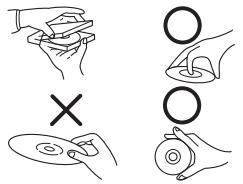
PROPER HANDLING
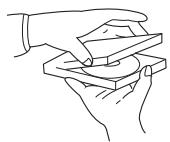
Handle CDs as shown. Do not drop CDs.
Hold CDs so you will not leave fingerprints on the surface. If the surface is scratched, it may cause the pickup to skip signal tracks.
Do not put tape, paper, or gumed labels on the CD. Do not write on the CD.
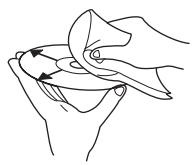
- KEEP YOUR CDS CLEAN
Fingerprints, dust or soil on the surface could cause the pickup to skip signal tracks. For routine cleaning, wipe the playing surface with a clean, soft, dry cloth from the center of the CD to the outer edge. If the surface is heavily soiled, dampen a clean soft cloth in a solution of mild neutral detergent before cleaning the CD.
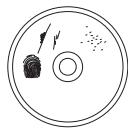
- DAMAGED CDS
Do not attempt to play cracked, warped, or otherwise damaged CDs. Playing a bad CD could severely damage the playback mechanism.
STORAGE
When not in use, place your CDs in their individual cases and store them in a cool place away from the sun, heat, and dust.
Proper Care of Your CDs
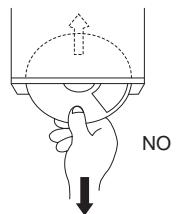
Do not grip or pull out the CD while it is being pulled back into the player by the automatic reloading mechanism.
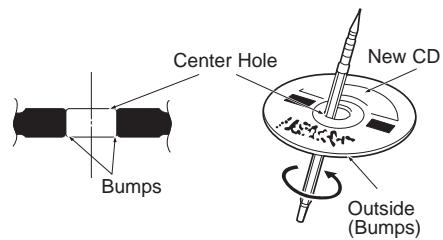
- CAUTION FOR NEW CDS
When a new CD is inserted into the player, the CD may fail to play after initial loading. This is caused by small bumps around the center hole and outside of CD that prevent proper loading. To remove the bumps, rub the inside edge of the hole and outside edge of the CD with a ball-point pen or other such instrument, then insert the CD again.
NOTE:
The mechanism automatically prevents a CD with this problem from playing as a protective measure. This is not an indication of faulty operation.
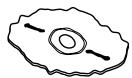
- IRREGULAR SHAPED CDS
Be sure to use round shape CD's only. Special shape CD's may cause damage to the mechanism.
EXPLANATION OF THE HAND MARKS

Press momentarily.

3SEC
Press and hold for at least 3 seconds.
LOADING THE CD (1 of 2)
The CD Changer operates with the same controls used for the audio system. For operation, refer to the audio system section of the Owner's Manual for your radio.
1
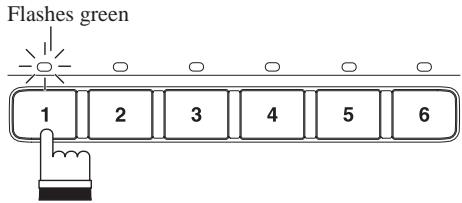
Press one of the buttons (1-6) to select the desired disc number for the CD you want to load.
- LED flashes green.
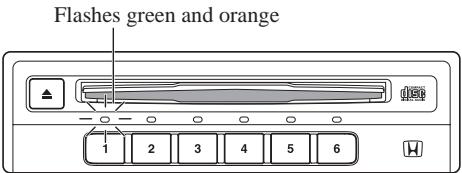
After a few seconds the CD loading slot door opens, and the LED flashes green and orange. (Green Orange Green Orange)
- If you do not load a CD within about 15 seconds, the door will close. Pressing the same disc number button again or pressing the eject button will cause the door to close.
| LOADING THE CD (con't) You can load a CD under a selected disc number. The system will automatically playback when the CD is loaded. | ||
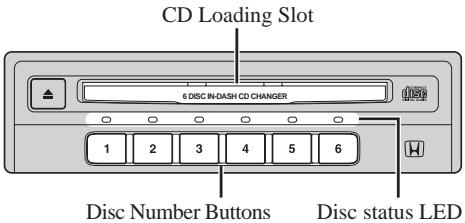
| CD Loading Slot Disc status LED | 2 | Insert the CD with the label side up. • When loading is complete, LED will stop flashing and remain lit. Note: This unit is not designed to handle 8 cm CD's. Do not attempt to load it alone or with adapter. It may cause the unit to malfunction. |
| Notes: • Repeat steps 1 and 2 to load CDs in other disc numbers. • The unit may go into CD eject mode when it detects improper CD loading. Wait 2 seconds before inserting the CD for loading. | ||
SELECTING A CD

Disc Number Buttons
Disc status LED
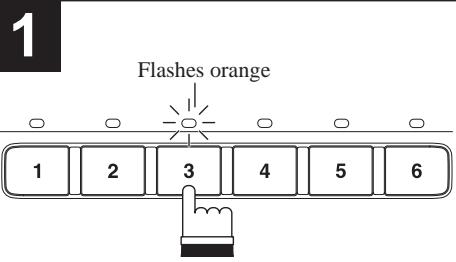
Press one of the buttons (1-6) to select a desired CD for play.
- Green LED indicates CDs are stored and orange LED indicates currently selected CD.
While CDs are being changed, the LED flashes orange until CD changing has been completed, then it lights orange. - You can also select a desired CD by using preset buttons or upward button on the radio.
| EJECTING THE CD (1 of 2) | ||
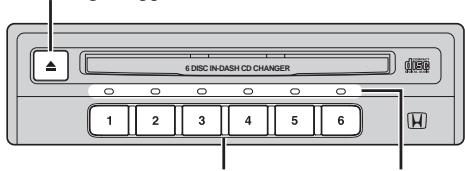
| Eject Button 6 DISC IN-DASH CD CHANGER Disc Number Buttons Disc status LED | 1 Lights green ↓ Flashes orange ↓ Lights orange 1 2 3 4 5 6 | Press one of the buttons (1-6) to select the disc number for the CD you want to eject. |
| 2 | Then press eject button to eject the CD. · The LED flashes green and the CD is ejected. | |
EJECTING THE CD (con't)
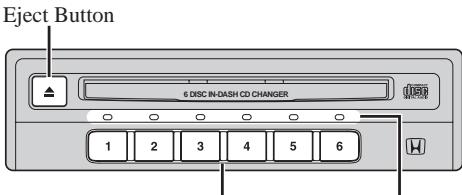
Disc Number Buttons
Disc status LED
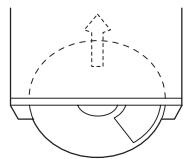
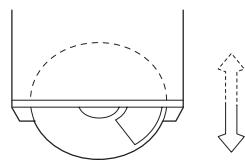
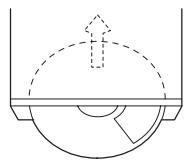
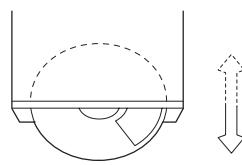
Note: If you do not remove the ejected CD from the CD loading slot within about 15 seconds, it is automatically reloaded. If you press the eject button, or press the ejected CD's disc number button (the Disc status LED that's flashing green), the CD is immediately reloaded.
Note: If you leave the ejected CD in the CD loading slot, and press the disc number button for a CD that's loaded (the Disc status LED is lit green), the ejected CD is reloaded and the CD loaded in the disc number you selected is ejected instead. This function is convenient when the ejected CD is different from the one you want to eject.
Notes: • Pull the CD out. The LED flashes green and orange, and this product switches to the CD loading standby mode.
- You can eject CDs even if the ignition is switched OFF. In this case, you cannot perform step 1 to select a CD. When you press the eject button, the currently selected CD is ejected.
Also, when you pull a CD out, the door immediately closes. (This unit does not switch to the CD loading standby mode.)
ILLUMINATION
This product is equipped with two illumination colors, white and orange. You can select the desired illumination color.
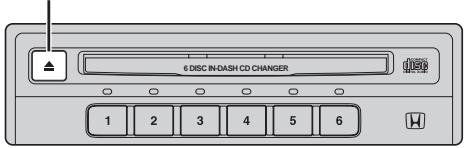
Eject Button
1
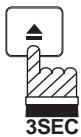
The illumination color changes each time you press and hold the eject button for 3 seconds or longer.
SHIPPING BRACKET
A bracket have been attached to the top of the Changer for protection during shipment.
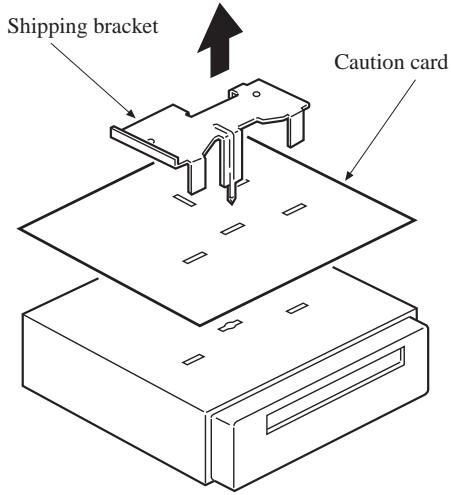
A bracket is attached to this unit to protect it from shocks during shipment. Be sure to remove this bracket before installing this unit in your car (before connecting). Be careful not to injure yourself on the edges or other parts of the bracket when removing it. Also, do not reinsert the shipping bracket once you have operated this unit as this will result in damage.
In Case of Difficulty
If you encounter a problem, please review the items in the guide. This guide will help you isolate the problem if the unit is
at fault. Otherwise, make sure the rest of your system is properly connected or consult your authorized HONDA dealer.
INITIAL POWER UP
| SYMPTOM | CAUSE | SOLUTION |
| No Function | Car's ignition is off. | Turn the ignition on. This unit will not operate with ignition off. |
| Power off. | Turn on the control unit. | |
| Improper connection of bus. | Reconnect the bus cable. | |
| Functions OK but no sound. | Volume level too low. | Turn the volume control clockwise to increase volume. |
| Inoperative (no output) | Temperature inside vehicle is over 60°C. | Wait until temperature inside the vehicle is lower than 60°C. |
| Moisture condensation. | Wait until moisture condensation evaporates. | |
| Sound skips from vibration. | Improper installation. | Check installation and tighten any bracket screws that are loose. |
| Dirty CD. | Clean CD. See “Proper Care of Your CDs”. | |
| Scratched CD. | Change CD. | |
| Disc Stuck. | Disc change mechanism malfunction. | Press the eject button. If the CD cannot eject, consult your HONDA dealer. |
| No play. | The CD mode is not activated. | Press the CD mode button on the radio unit. |
| The CD is loaded upside down. | Eject the CD and reload it with the label side up. |
ERROR MODE
| INDICATION | CAUSE | SOLUTION |
| E-O-I | CD Changer malfunction. | Press the eject button, press one of the disc number buttons (1-6), switch the control unit source OFF once, or switch to another source other than CD and then switch back to CD. If performing any of these operations does not cancel the E-01 indication, consult your HONDA dealer. |
| - - - H | High temperature. | Will disappear when the temperature returns to operation range. |
| E-EE | Miss connection or disconnection of CD Changer. | Check connection between CD Changer and control unit. See your HONDA dealer. |
| - - - | No CD in the CD Changer. | Insert the CD. |
In Case of Difficulty
| SYMPTOMS |
| ■ Skips.■ Stuck on one track.■ CD ejects during play. |
| CAUSE |
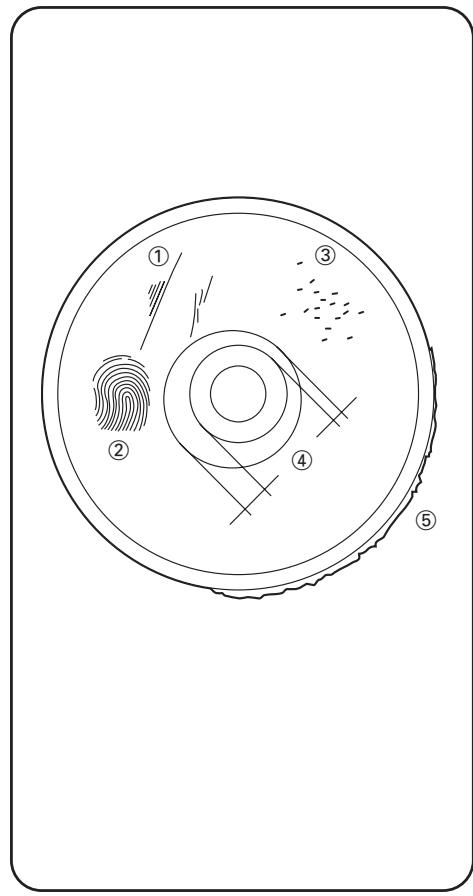
| Scratches. ①Fingerprint marks or dust. (Unclean sur-face.) ② |
| SOLUTION |
| · Handle CD by edge only.· Keep CD clean by using a cleaning kit specifically designed for CDs.· Load CD straight and level, not at an angle, to prevent further scratching.× CD Changer○→□ |
| SYMPTOMS |
| ■ CD loads, then ejects after a few seconds. |
| CAUSE |
| CD not being centered on clamping mechanism. ④ |
| SOLUTION |
| • CD center hole defective, preventing table of contents (TOC) to be read, triggering the eject mechanism. Defective CD should not be in CD Changer. |
| SYMPTOMS |
| ■ Skips.■ Stuck on one track.■ CD ejects during play. |
| CAUSE |
| Pin holes in CD caused during stamping process-reflective material missing. ③ |
| SOLUTION |
| · Check for pin holes by holing CD up to a light source and observing it as illustrated.· Defective CD should not be used in CD Changer. |
| SYMPTOMS |
| ■ CD loads, then ejects after a few seconds. |
| CAUSE |
| Rough edge. ⑤ |
| SOLUTION |
| • Rough edges may touch mechanism parts and can be corrected by lightly sanding CD edges. |
| To enable identification of CD Changers when two or address setting. more are connected, assign each one with a different | |||||||
| Disc Number Buttons | 1 | 2 | 3 | 4 | 5 | 6 | To switch the address setting, turn the ignition switch from OFF to ACC while pressing one of the buttons (1-4). |
| 1 | 2 | 3 | 4 | 5 | 6 | ||
| Note: When two or more CD Changers are connected, correct operation is not possible if the same address setting is used for more than one unit. Be sure to set addresses correctly as indicated above. | |||||||
Précautions 19
ÉJECTION D'UN DISQUE (2/2)
HALTEN SIE IHRE CDs SAUBER
WAARSCHUWINGEN BIJ WEERGAVE
WAARSCHUWING NIEUWE CD'S
TEMPERATUREN I FORDONET
UTMATNING AV CD (forts.)
Umatningsknapp
Skivnummerknappar Skivstatus-lysdiod
- Note:
- VOLUME
- LIQUIDS
- OUTSIDE CLEANING
- FOR DRIVING SAFETY
- MOISTURE CONDENSATION
- CAUTIONS DURING PLAYBACK
- TEMPERATURE IN THE
- VEHICLE
- COMPACT DISC TYPE
- PRECAUTIONS WHEN OPERATING THIS PRODUCT
- PROPER HANDLING
- - KEEP YOUR CDS CLEAN
- - DAMAGED CDS
- STORAGE
- Proper Care of Your CDs
- - CAUTION FOR NEW CDS
- - IRREGULAR SHAPED CDS
- EXPLANATION OF THE HAND MARKS
- LOADING THE CD (1 of 2)
- SELECTING A CD
- EJECTING THE CD (con't)
- ILLUMINATION
- SHIPPING BRACKET
- In Case of Difficulty
- ÉJECTION D'UN DISQUE (2/2)
- HALTEN SIE IHRE CDs SAUBER
- WAARSCHUWINGEN BIJ WEERGAVE
- WAARSCHUWING NIEUWE CD'S
- TEMPERATUREN I FORDONET
- UTMATNING AV CD (forts.)
Brand : PIONEER
Model : CDX-MG6056ZH
Category : Car stereo