
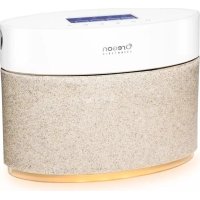
AURABREEZE WA638 - Aroma diffuser OREGON SCIENTIFIC - Free user manual and instructions
Find the device manual for free AURABREEZE WA638 OREGON SCIENTIFIC in PDF.

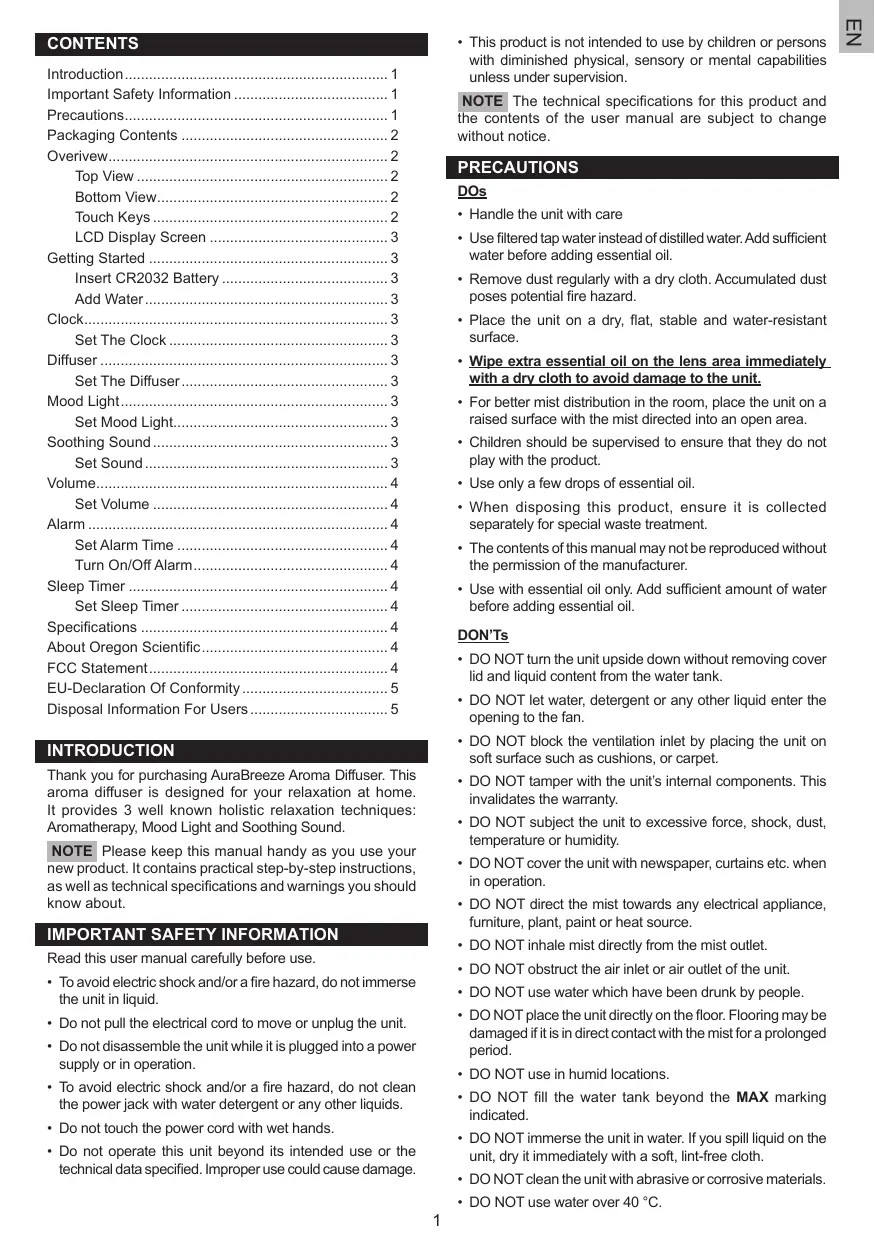


| Product Type | Aroma Diffuser |
| Brand | Oregon Scientific |
| Model | AuraBreeze WA638 |
| Dimensions (L x W x H) | 200 x 200 x 82 mm |
| Weight | 780 g |
| Water tank capacity | 450 ml |
| Power supply | Input: 100-240V AC 50/60Hz, Output: 12V 1000mA |
| Backup battery | CR2032 |
| Operating temperature | 10 °C to 40 °C |
| Storage temperature | -20 °C to 60 °C |
| Diffusion modes | Low (1) and High (2) |
| Diffusion autonomy (max) | Approximately 10 hours |
| Ambient light | 6 colors + LOOP mode + Off |
| Soothing sounds | 6 different sounds + Off |
| Sound volume | 3 levels (low, medium, high) |
| Clock | 12/24h display with alarm |
| Additional functions | Alarm, Sleep timer, Automatic shutoff if low water level |
| Recommended oil types | 100% natural essential oils |
| Recommended water temperature | 15-40 °C |
| Maintenance and cleaning | Clean regularly with water and a dry cloth. Avoid detergents and immersion. |
| Safety instructions | Do not immerse, do not block air inlets/outlets, do not use distilled water. |
| Package contents | 1 main unit, 1 power adapter |
Frequently Asked Questions - AURABREEZE WA638 OREGON SCIENTIFIC
User questions about AURABREEZE WA638 OREGON SCIENTIFIC
0 question about this device. Answer the ones you know or ask your own.
Ask a new question about this device
Download the instructions for your Aroma diffuser in PDF format for free! Find your manual AURABREEZE WA638 - OREGON SCIENTIFIC and take your electronic device back in hand. On this page are published all the documents necessary for the use of your device. AURABREEZE WA638 by OREGON SCIENTIFIC.
USER MANUAL AURABREEZE WA638 OREGON SCIENTIFIC
AuraBreeze Aroma Diffuser
WA638
User Manual

Packaging Contents 2
Overview 2
Top View 2
Bottom View. 2
Touch Keys 2
LCD Display Screen 3
Getting Started 3
Insert CR2032 Battery 3
Add Water 3
Clock. 3
Set The Clock 3
Diffuser 3
Set The Diffuser 3
Mood Light 3
Set Mood Light 3
Soothing Sound 3
SetSound 3
Volume 4
Set Volume 4
Alarm 4
Set Alarm Time 4
Turn On/Off Alarm 4
Sleep Timer 4
Set Sleep Timer 4
Specifications 4
About Oregon Scientific 4
FCC Statement 4
EU-Declaration Of Conformity 5
Disposal Information For Users 5
INTRODUCTION
Thank you for purchasing AuraBreeze Aroma Diffuser. This aroma diffuser is designed for your relaxation at home. It provides 3 well known holistic relaxation techniques: Aromatherapy, Mood Light and Soothing Sound.
NOTE Please keep this manual handy as you use your new product. It contains practical step-by-step instructions, as well as technical specifications and warnings you should know about.
IMPORTANT SAFETY INFORMATION
Read this user manual carefully before use.
- To avoid electric shock and/or a fire hazard, do not immerse the unit in liquid.
- Do not pull the electrical cord to move or unplug the unit.
- Do not disassemble the unit while it is plugged into a power supply or in operation.
- To avoid electric shock and/or a fire hazard, do not clean the power jack with water detergent or any other liquids.
- Do not touch the power cord with wet hands.
-
Do not operate this unit beyond its intended use or the technical data specified. Improper use could cause damage.
-
This product is not intended to use by children or persons with diminished physical, sensory or mental capabilities unless under supervision.
NOTE The technical specifications for this product and the contents of the user manual are subject to change without notice.
PRECAUTIONS
DOs
- Handle the unit with care
- Use filtered tap water instead of distilled water. Add sufficient water before adding essential oil.
- Remove dust regularly with a dry cloth. Accumulated dust poses potential fire hazard.
- Place the unit on a dry, flat, stable and water-resistant surface.
- Wipe extra essential oil on the lens area immediately with a dry cloth to avoid damage to the unit.
- For better mist distribution in the room, place the unit on a raised surface with the mist directed into an open area.
Children should be supervised to ensure that they do not play with the product. - Use only a few drops of essential oil.
- When disposing this product, ensure it is collected separately for special waste treatment.
- The contents of this manual may not be reproduced without the permission of the manufacturer.
- Use with essential oil only. Add sufficient amount of water before adding essential oil.
DON'Ts
- DO NOT turn the unit upside down without removing cover lid and liquid content from the water tank.
DO NOT let water, detergent or any other liquid enter the opening to the fan. - DO NOT block the ventilation inlet by placing the unit on soft surface such as cushions, or carpet.
- DO NOT tamper with the unit's internal components. This invalidates the warranty.
DO NOT subject the unit to excessive force, shock, dust, temperature or humidity. - DO NOT cover the unit with newspaper, curtains etc. when in operation.
- DO NOT direct the mist towards any electrical appliance, furniture, plant, paint or heat source.
- DO NOT inhale mist directly from the mist outlet.
- DO NOT obstruct the air inlet or air outlet of the unit.
DO NOT use water which have been drunk by people. - DO NOT place the unit directly on the floor. Flooring may be damaged if it is in direct contact with the mist for a prolonged period.
- DO NOT use in humid locations.
- DO NOT fill the water tank beyond the MAX marking indicated.
- DO NOT immerse the unit in water. If you spill liquid on the unit, dry it immediately with a soft, lint-free cloth.
- DO NOT clean the unit with abrasive or corrosive materials.
DO NOT use water over 40°C
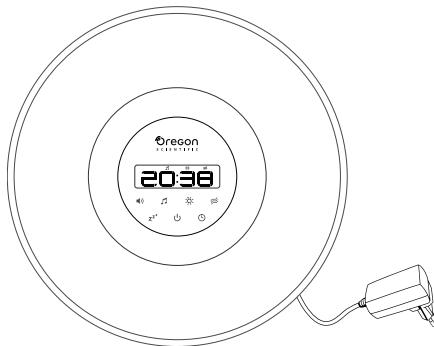
1x Main unit and 1x adapter
OVERIVEW
TOP VIEW
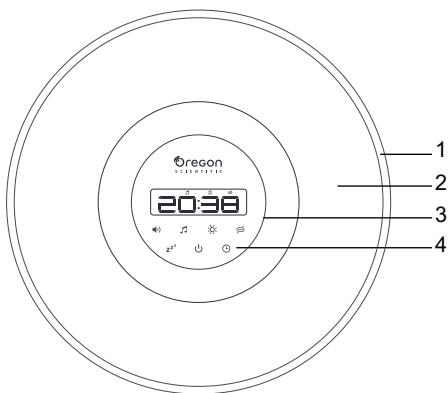
- Water tank
- Water tank cover
- LCD display screen
- Touch keys
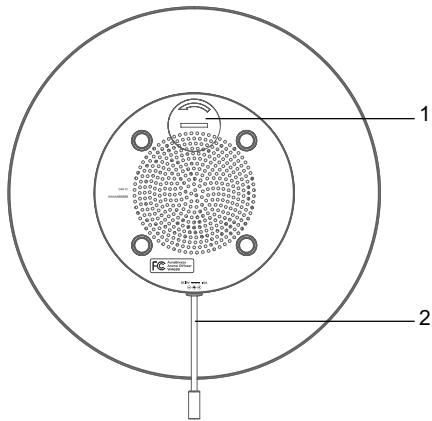
- CR2032 battery compartment
- Power cable linked to the adapter
TOUCH KEYS
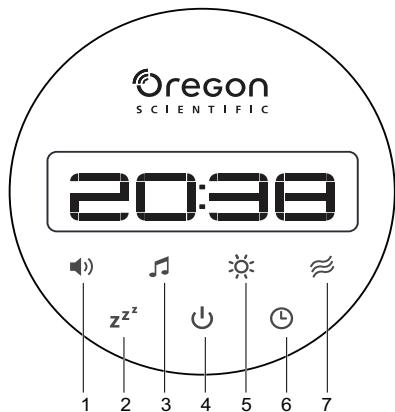
- Press to display the current volume setting, press again to toggle the volume level.
- zz2 - Press to show the remaining time of sleep timer. Press twice to enter timer setting mode, press repeatedly to toggle the timer setting.
-
- Press to display the current sound setting, press again to toggle 6 soothing sound or off.
- -Press to turn the unit on/off or confirm the settings.
-
- Press to display the current light setting, press again to toggle the mood light setting.
-
- Press to display alarm setting, press again to turn alarm on/off, or adjust settings in clock setting mode and alarm setting mode.
-
Press and hold to enter alarm setting mode
-
≈ - Press to display the current setting, press again to toggle the diffusing level.
LCD DISPLAY SCREEN
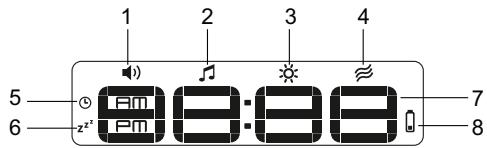
- the unit is in volume setting mode
- the soothing sound is on / the unit is in soothing sound setting mode
- Mood light is on / the unit is in mood-light setting mode
- ≈ Diffuser is on / the unit is in diffuser setting mode
- Alarm is set to on / the unit is in alarm setting mode
- zz2 Sleep timer is on / the unit is in sleep timer setting mode
- Time display
- Diffuser low battery display (CR2032)
GETTING STARTED
INSERT CR2032 BATTERY
This unit is equipped with a CR2032 battery as a backup power source.
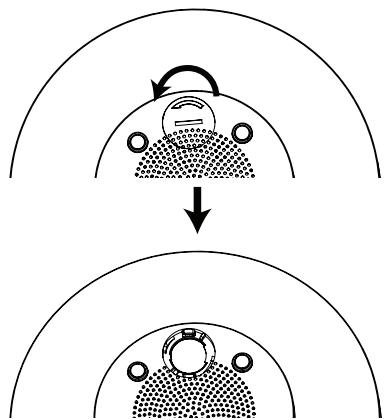
- Open the battery compartment cover by turning it in anticlockwise using a coin.
- Insert a CR2032 battery into the compartment, matching the polarity.
- Close the battery compartment cover by turning it in clockwise using a coin.
ADD WATER
NOTE Do not plug the unit to the power outlet before adding water.
- Remove the water tank cover, pour tap water in room temperature into the water tank. Do not exceed the MAX mark.
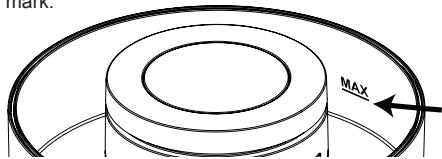
- Add few drops of essential oils into the water.
- Place the cover back in place.
- Plug the power adapter to the power outlet. Make sure the adaptor is not obstructed and is easily accessible to the unit.
- Press to turn the unit on.
When the water almost runs out (around 50ml remains in the unit), the diffusing function will stop automatically and ≈ will keep blinking until the unit is turned off.
NOTE
- Do not use distilled water with this product.
- Temperature of water should be around 15 - 40 ° C .
100% nature essential oil should be used. - Switch off the unit and unplug from the mains before moving or cleaning the unit.
- When the water fills up to the MAX marking, the unit diffuses mist up to 8 hours approximately if the sleep timer is set to OFF.
CLOCK
SET THE CLOCK
Set the clock when the unit is turned on for the first time.
- Press to set the 12/24-hour format, hour or minute. Press and hold to speed up the selection.
- Press to confirm.
DIFFUSER
SET THE DIFFUSER
- Press ≈ once to display the current setting. The screen displays ≈.
NOTE The screen returns to idle if no keys are pressed after 2 seconds. - Press ≈ again to toggle different diffusing modes - 1 (Low), 2 (High) or OFF.
MOOD LIGHT
SET MOOD LIGHT
- Press once to display the current setting. The screen displays
- Press again to toggle different mood light setting (1/2/3/4/5/6/LOOP/OFF).
SOOTHING SOUND
SET SOUND
- Press once to display the current setting. The screen displays
NOTE The screen returns to idle if no keys are pressed after 2 seconds. - Press again to toggle different sound (1/2/3/4/5/6/OFF).
VOLUME
SET VOLUME
- Press once to display the current setting. The screen displays
NOTE The screen returns to idle if no keys are pressed after 2 seconds. - Press again to toggle different volume setting -1 (low), 2 (medium), or 3 (high).
ALARM
You may set an alarm to turn on the unit automatically.
SET ALARM TIME
- Press and hold ① for about 2 seconds to enter the alarm time setting. The screen displays ① .
- Press to set the hour and minute. Press and hold to speed up the selection. Press to confirm.
- Press ≈ to toggle different diffusing modes - 1 (Low), 2 (High) or OFF, then press to confirm.
- Press to toggle different mood light setting (1/2/3/4/5/6/LOOP/OFF), then press to confirm.
- Press to toggle different sound (1/2/3/4/5/6/OFF), then press to confirm.
- Press to toggle different volume setting - 1 (low), 2 (medium), or 3 (high), then press to confirm.
- The alarm is set to on. The unit returns to idle and displays ①.
TURN ON/OFF ALARM
Press to display the set alarm time.
Press again to toggle the alarm on/off.
SLEEP TIMER
SET SLEEP TIMER
Press zzz twice enter the timer setting, then press zzz repeatedly to toggle the sleep timer setting.
NOTE The screen returns to idle if no keys are pressed after 2 seconds.
When the sleep timer starts to count down, press zzz to display the remaining time.
SPECIFICATIONS
| L x W x H | 200 x 200 x 82 mm (7.87 x 7.87 x 3.23 in) |
| Weight | 780 g |
| Water tank volume | 450 ml |
Operation temperature
| Temperature range (operation) | 10 °C to 40 °C |
| Temperature range (storage) | -20 °C to 60°C |
Power
| Input | 100-240V AC 50-60Hz |
| Output | 12 V 1000mA |
ABOUT OREGON SCIENTIFIC
Visit our website www.oregonscientific.com to learn more about Oregon Scientific products.
For any enquiry, please contact our Customer Services at info@oregonscientific.com.
Oregon Scientific Global Distribution Limited reserves the right to interpret and construe any contents, terms and provisions in this user manual and to amend it, at its sole discretion, at any time without prior notice. To the extent that there is any inconsistency between the English version and any other language versions, the English version shall prevail.
FCC STATEMENT
This device complies with Part 15 & 18 of the FCC Rules. Operation is subject to the following two conditions: (1) This device may not cause harmful interference, and (2) This device must accept any interference received, including interference that may cause undesired operation.
WARNING Changes or modifications not expressly approved by the party responsible for compliance could void the user's authority to operate the equipment.
NOTE This equipment has been tested and found to comply with the limits for a Class B digital device, pursuant to Part 15 & 18 of the FCC Rules. These limits are designed to provide reasonable protection against harmful interference in a residential installation.
This equipment generates, uses and can radiate radio frequency energy and, if not installed and used in accordance with the instructions, may cause harmful interference to radio communications. However, there is no guarantee that interference will not occur in a particular installation. If this equipment does cause harmful interference to radio or television reception, which can be determined by turning the equipment off and on, the user is encouraged to try to correct the interference by one or more of the following measures:
- Reorient or relocate the receiving antenna.
- Increase the separation between the equipment and receiver.
- Connect the equipment into an outlet on a circuit different from that to which the receiver is connected.
- Consult the dealer or an experienced radio/TV technician for help.
This Class B digital apparatus complies with Canadian ICES-003.
DECLARATION OF CONFORMITY
The following information is not to be used as contact for support or sales. Please call our customer service number (listed on our website at www.oregonscientific.com), or on the warranty card for this product) for all inquiries instead. We
Name: Oregon Scientific, Inc.
Address: 10778 SW Manhasset Dr.
Tualatin, Or 97062 USA
Telephone No.: 1-800-853-8883
declare that the product
Product No.: WA638
Product Name: AuraBreeze Aroma Diffuser
Manufacturer: IDT Technology Limited
Address: Block C, 9/F, Kaiser Estate,
Phase 1, 41 Man Yue St.,
Hung Hom, Kowloon,
Hong Kong
EU-DECLARATION OF CONFORMITY
Hereby, Oregon Scientific, declares that AuraBreeze Aroma Diffuser (model: WA638) is in compliance with EMC directive 2004/108/EC and LVD directive 2006/95/EC. A copy of the signed and dated Declaration of Conformity is available on request via our Oregon Scientific Customer Service.


DISPOSAL INFORMATION FOR USERS

Pursuant to and in accordance with Article 14 of the Directive 2012/19/EU of the European Parliament on waste electrical and electronic equipment (WEEE), and pursuant to and in accordance with Article 20 of the Directive
2006/66/EC of the European Parliament on batteries and accumulators and waste batteries.
The barred symbol of the rubbish bin shown on the equipment indicates that, at the end of its useful life, the product must be collected separately from other waste.
Please note that the batteries/rechargeable batteries must be removed from the equipment before it is given as waste. To remove the batteries/accumulators refer to the specifications in the user manual. Therefore, any products that have reached the end of their useful life must be given to waste disposal centers specializing in separate collection of waste electrical and electronic equipment, or given back to the dealer when purchasing a new WEEE, pursuant to and in accordance with Article 14 as implemented in the country.
The adequate separate collection for the subsequent start-up of the equipment sent to be recycled, treated and disposal of in an environmentally compatible way contributes to preventing possible negative effects on the environment and health and optimizes the recycling and reuse of components making up the apparatus.
Abusive disposal of the product by the user involves application of the administrative sanctions according to the laws in force.
AuraBreeze Raumbedufter WA638
Bedienungsanleitung
INHALT
Einführung 1
Uber Oregon Scientific 4
Entsorgung 4
A Propos D'Oregon Scientific. 4
Mise Au Rebut 4

∴ m = 3/11 ;
IMPOSTARE LA LUCE D'ATMOSFERA
VOORZORGSGMAATREGELEN
WAT TE DOEN


- INTRODUCTION
- IMPORTANT SAFETY INFORMATION
- PRECAUTIONS
- DOS
- DON'TS
- OVERIVEW
- TOP VIEW
- TOUCH KEYS
- LCD DISPLAY SCREEN
- GETTING STARTED
- INSERT CR2032 BATTERY
- ADD WATER
- NOTE
- CLOCK
- SET THE CLOCK
- DIFFUSER
- SET THE DIFFUSER
- MOOD LIGHT
- SET MOOD LIGHT
- SOOTHING SOUND
- SET SOUND
- VOLUME
- SET VOLUME
- ALARM
- SET ALARM TIME
- TURN ON/OFF ALARM
- SLEEP TIMER
- SET SLEEP TIMER
- ABOUT OREGON SCIENTIFIC
- FCC STATEMENT
- DECLARATION OF CONFORMITY
- EU-DECLARATION OF CONFORMITY
- DISPOSAL INFORMATION FOR USERS
- AURABREEZE RAUMBEDUFTER WA638
- BEDIENUNGSANLEITUNG
- INHALT
- IMPOSTARE LA LUCE D'ATMOSFERA
- VOORZORGSGMAATREGELEN
- WAT TE DOEN
Brand : OREGON SCIENTIFIC
Model : AURABREEZE WA638
Category : Aroma diffuser