
MUSICKIT MK6000 - Wireless Earbuds PARROT - Free user manual and instructions
Find the device manual for free MUSICKIT MK6000 PARROT in PDF.

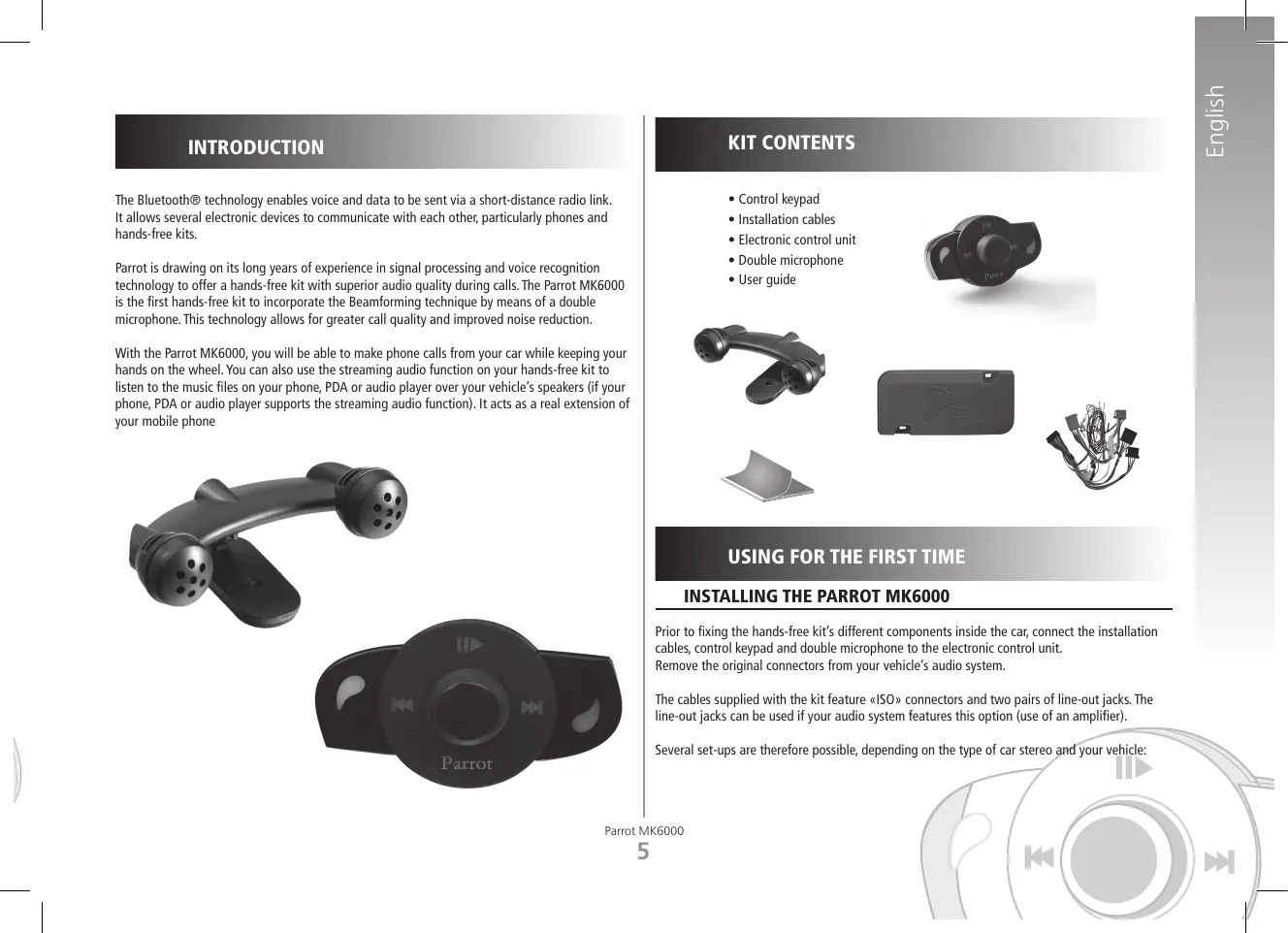


| Product Type | Bluetooth hands-free kit for vehicle |
| Brand | Parrot |
| Model | MUSICKIT MK6000 |
| Dimensions | 65 × 28 × 138 mm |
| Weight | 130 g |
| Power supply | 12 V (permanent and after-ignition) via installation cable |
| Bluetooth | Version 1.2, profiles HFP 1.0/1.5, HSP 1.1, OPP 1.1, A2DP 1.0, AVRCP 1.0 |
| Bluetooth range | Approximately 10 meters |
| PIN code | 0000 |
| Pairing | Up to 5 phones or audio players |
| Phonebook | 150 contacts per phone, 150 voice tags |
| Voice recognition | Built-in, with keywords and magic words |
| Microphone | Dual microphone with Beamforming technology |
| Noise reduction | Yes, with echo cancellation |
| Audio streaming function | Music playback from phone or compatible audio player |
| Connectors | ISO connectors, Line outputs (2 pairs), Mute input |
| Software update | Via Bluetooth from a computer (www.parrot.com) |
| Maintenance and cleaning | Clean with a soft dry cloth, do not use liquids |
| Safety | Professional installation recommended; do not obstruct airbags |
| Spare parts | ISO adapters available at www.parrot.com |
| General information | Hotline: +33 (0) 1 48 03 60 69 (Europe), service Monday to Friday 9am-6pm GMT+1 |
Frequently Asked Questions - MUSICKIT MK6000 PARROT
User questions about MUSICKIT MK6000 PARROT
0 question about this device. Answer the ones you know or ask your own.
Ask a new question about this device
Download the instructions for your Wireless Earbuds in PDF format for free! Find your manual MUSICKIT MK6000 - PARROT and take your electronic device back in hand. On this page are published all the documents necessary for the use of your device. MUSICKIT MK6000 by PARROT.
USER MANUAL MUSICKIT MK6000 PARROT
Description of the Parrot MK6000 p 8
Connecting your Bluetooth phone / PDA . p 9
FEATURES p 9
Telephony p 9
Voice menu structure 9
Description and use of the features . p 10
Voice recognition 11
Recording keywords and magic words 11
Saving contacts in the Parrot MK6000 . p 11
Streaming audio p 11
Pairing your audio player with the Parrot MK6000 . p 12
Description and use of the features . 12
UPDATING 13
HOTLINE 13
SPECIFICATIONS p 13
NOTES 14
GENERAL INFORMATION p 123
INTRODUCTION
The Bluetooth® technology enables voice and data to be sent via a short-distance radio link. It allows several electronic devices to communicate with each other, particularly phones and hands-free kits.
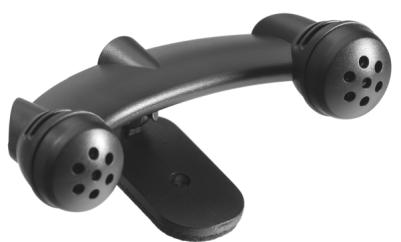
Parrot is drawing on its long years of experience in signal processing and voice recognition technology to offer a hands-free kit with superior audio quality during calls. The Parrot MK6000 is the first hands-free kit to incorporate the Beamforming technique by means of a double microphone. This technology allows for greater call quality and improved noise reduction.
With the Parrot MK6000, you will be able to make phone calls from your car while keeping your hands on the wheel. You can also use the streaming audio function on your hands-free kit to listen to the music files on your phone, PDA or audio player over your vehicle's speakers (if your phone, PDA or audio player supports the streaming audio function). It acts as a real extension of your mobile phone
KIT CONTENTS
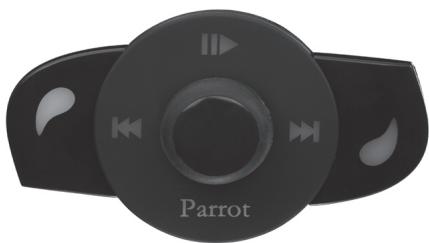
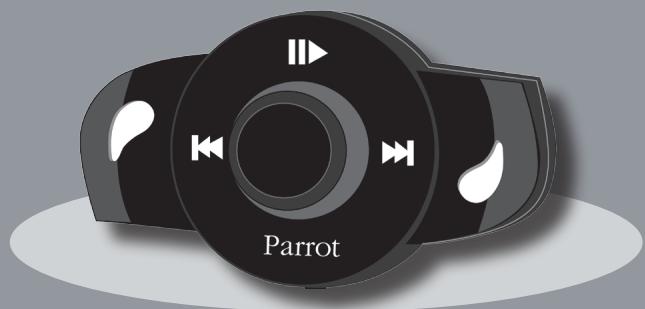
Control keypad
- Installation cables
Electronic control unit
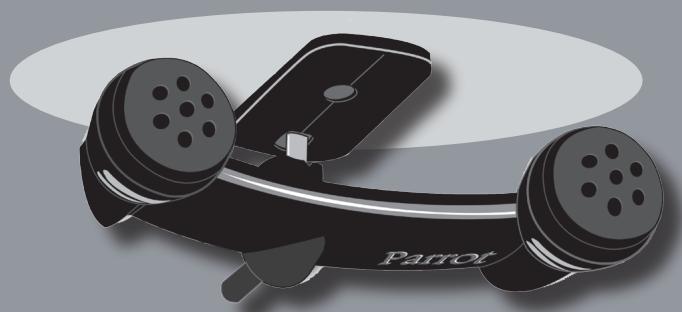
- Double microphone
- User guide
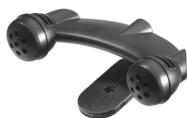
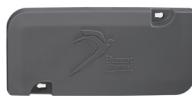
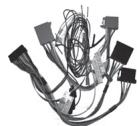

USING FOR THE FIRST TIME
INSTALLING THE PARROT MK6000
Prior to fixing the hands-free kit's different components inside the car, connect the installation cables, control keypad and double microphone to the electronic control unit. Remove the original connectors from your vehicle's audio system.
The cables supplied with the kit feature «ISO» connectors and two pairs of line-out jacks. The line-out jacks can be used if your audio system features this option (use of an amplifier).
Several set-ups are therefore possible, depending on the type of car stereo and your vehicle:
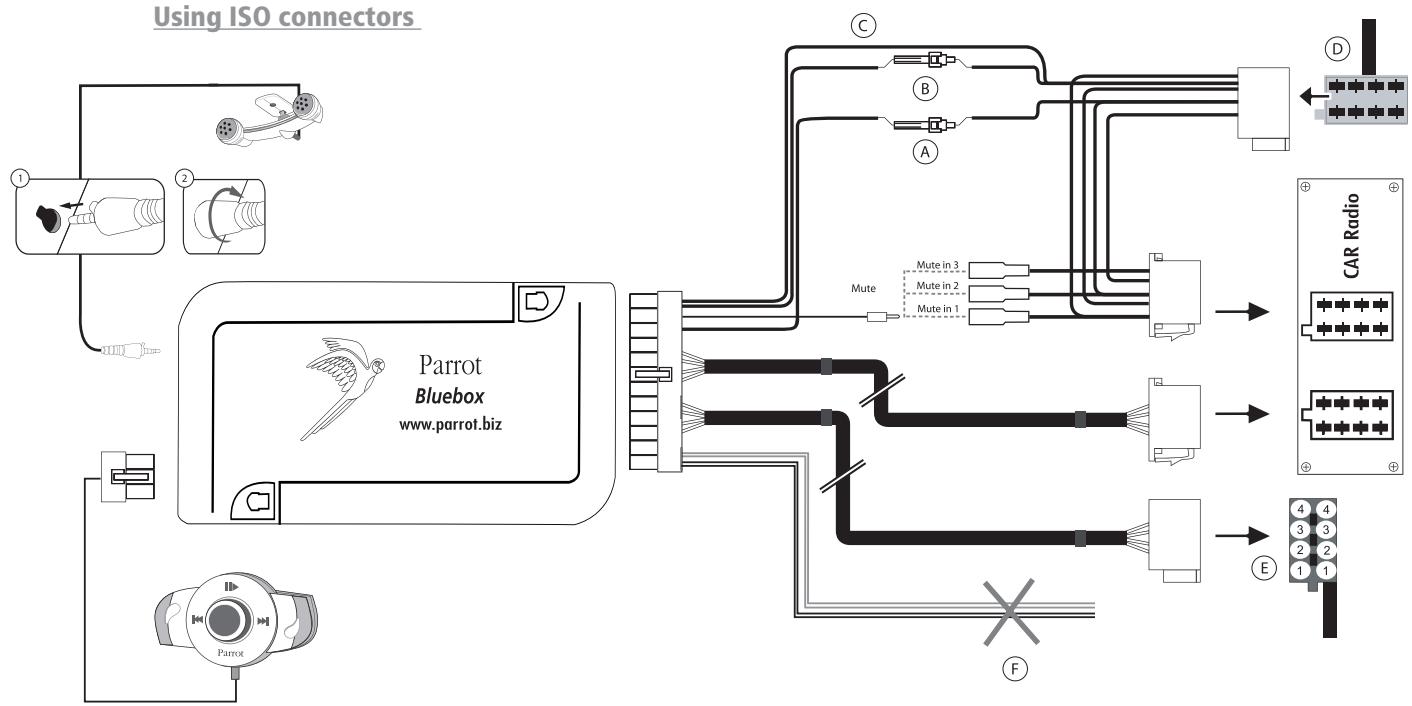
Car stereo with an «ISO» connector (refer to the following diagram):
- Connect the male connectors of the hands-free kit to the car stereo.
- Join the vehicle's audio and power supply cables to the female connectors of the Parrot MK6000
- On the installation cable, connect the free yellow wire to one of the audio system's corresponding mute-in jacks if available (mute in 1, mute in 2 or mute in 3).
Note: the mute function is used to silence the sound from your car stereo to make way for a call. The choice of the mute-in jack depends on your car stereo's configuration.
A: Ignition 12V
B: Constant 12V supply
C:Ground
D: Connection to the vehicle's power supply
- E: Connection to the vehicle's speakers
1.Rear right speaker (purple / purple-black)
2.Front right speaker (grey / grey-black)
3.Front left speaker (white / white-black)
4.Rear left speaker (green / green-black)
F: This wiring is not used.
Parrot MK6000
Car stereo with line-in jacks (refer to the following diagram):
- Use this type of connection by wiring a line-out jack (brown & white wire or red & black wire) to your car stereo's line-in jack.
- Using the two pairs of line-out jacks will enable you to take advantage of the streaming audio function in stereo over your vehicle's speakers.
- On the installation cable, connect the free yellow wire to one of the audio system's corresponding mute-in jacks if available (mute in 1, mute in 2 or mute in 3).
Note: the mute function is used to silence the sound from your car stereo to make way for a call. The choice of the mute-in jack depends on your car stereo's configuration.
A: Ignition 12V
B: Constant 12V supply
C:Ground
D: Connection to the vehicle's power supply
E: Line-out 1
1: Line 1+: white
2: Line 1 -- brown
F: Line-out 2
1: Line 2+:red
2:Line 2:-black
G: This wiring is not used.
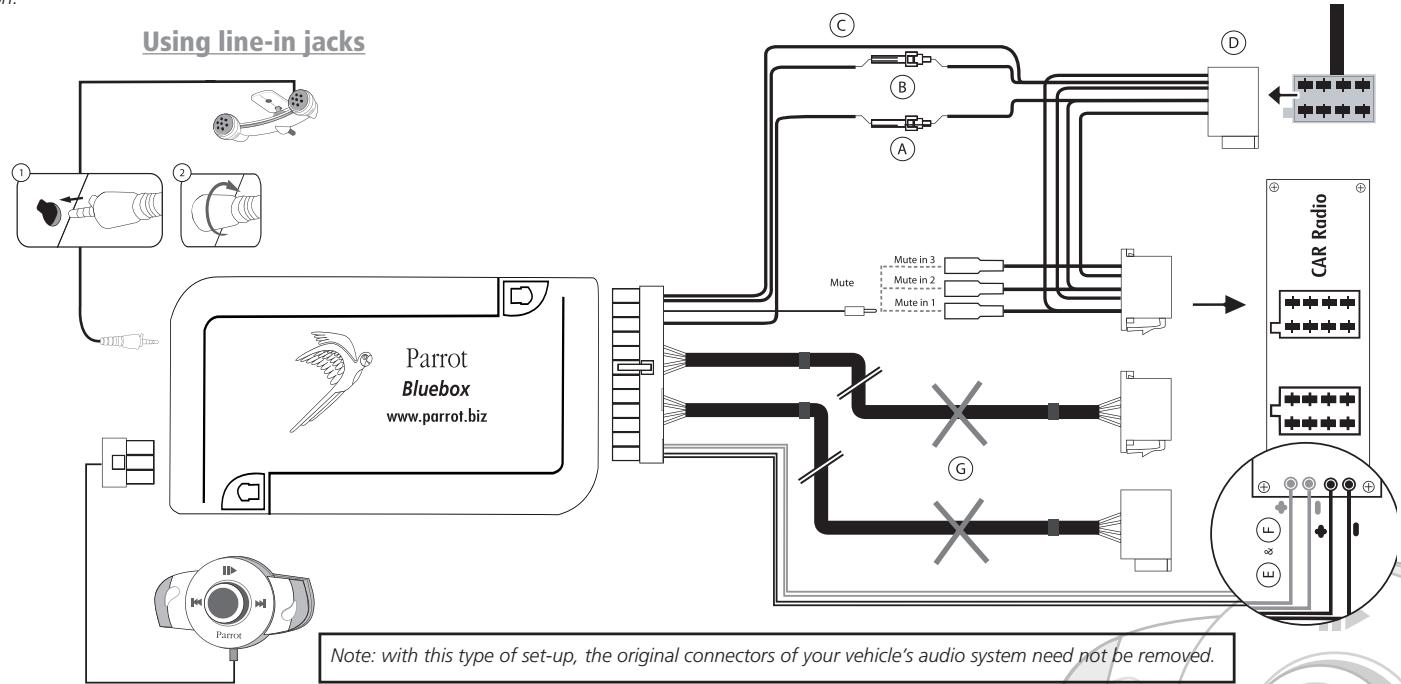
Note: with this type of set-up, the original connectors of your vehicle's audio system need not be removed.
Car stereo without «ISO» connectors:
- To simplify the wiring procedure, you will need to purchase an «ISO adapter» cable.
Refer to the range of ISO adapters on our website: www.parrot.com
Installing the kit's power cable:
Refer to your car stereo's wiring diagram.
- The red wire of the kit's cable must correspond to the constant +12V supply, the orange wire to the ignition +12V and the black wire to ground.
- Check that the orange wire is not connected to the constant +12V supply, as you could run down the vehicle's battery, preventing your hands-free kit from operating correctly.
- On some vehicles, the red and orange power supply wires may need to be reversed. This can easily be done by reversing the two fuse holders on the Parrot MK6000 installation cable.
Note: on some vehicles, there is no ignition +12V on the vehicle's connectors. You must therefore connect the orange power supply wire to the fuse box or another ignition power source.
Checking the wiring:
- When switching off your vehicle's ignition, you should notice the following:
- The red and green LEDs should turn off
- The «Fast forward» and «Fast rewind» LEDs should light up for one second
-
The «Play» LED should light up for one second
-
When switching on the ignition, the opposite should happen.
Otherwise, the ignition +12V and the constant +12V supply have been reversed. In this case, reverse the two fuse holders on the kit's power supply lead.
Choose the place for the keypad inside your vehicle. We would advise you to fit it in the centre of the dashboard or near you. The double microphone must be angled towards the driver and preferably fitted between the sun visor and the rear-view mirror.
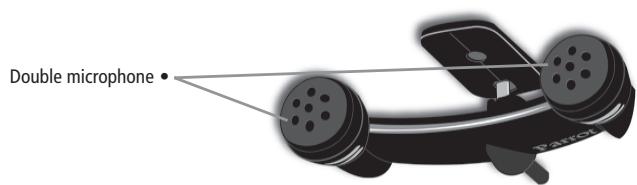
DESCRIPTION OF THE PARROT MK6000
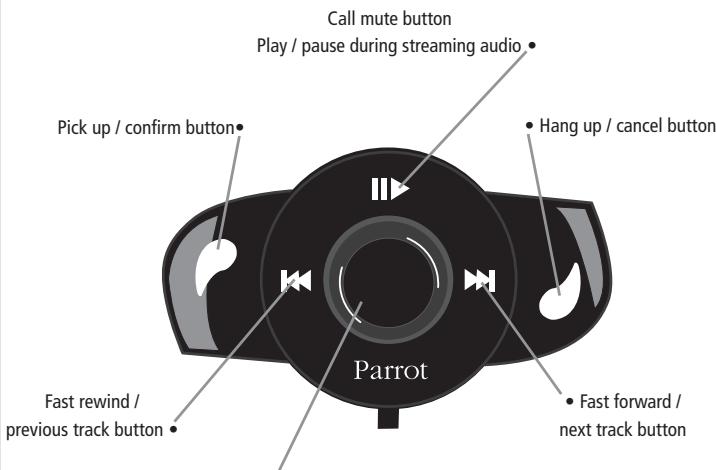
- Scroll wheel:
- Call / streaming audio volume adjustment
- Scrolling through the menus
- Press to confirm
CONNECTING YOUR BLUETOOTH PHONE / PDA
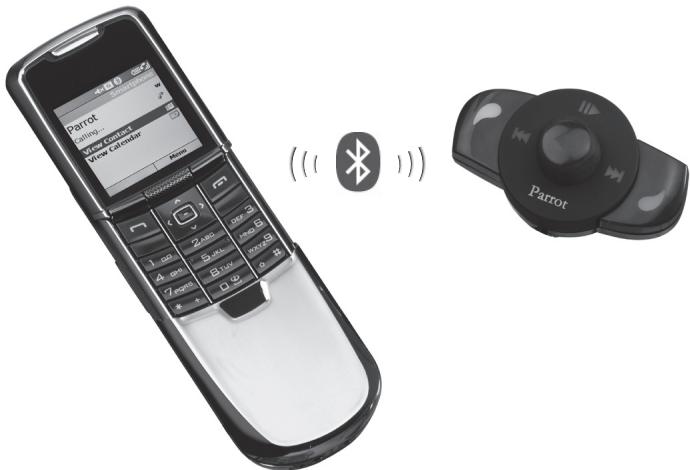
Prior to using your Parrot MK6000 with your phone for the very first time, you must initially pair both devices.
PAIRING YOUR PHONE WITH THE PARROT MK6000
- From your Bluetooth phone, search for Bluetooth peripherals (consult your phone's user guide or refer to the «Support» heading on the www.parrot.com website).
- Select «MK6000» in the list.
- Enter «0000» on your phone when prompted.
- The Parrot MK6000 says «pairing successful» when both devices are paired. The hands-free kit sounds a beep when connected.
FEATURES
TELEPHONY
VOICE MENU STRUCTURE
Scrolling through the menus:
- Press the central scroll wheel to access the menus. The kit says the name of the current menu.
- Browse through the menus by turning the wheel and confirm with the green button or by pressing the scroll wheel.
- To exit the menu, press the red button or wait a few seconds.
Menu structure
- Phonebook: this menu enables you to access your contacts. You must first send your contacts via the «Add voiceprints» menu.
- Language: select the language.
Volume: adjust the volume of the voice menus. - Add voiceprints: once enabled, the Parrot MK6000 is ready to receive contacts (sent one by one - refer to the chapter entitled «Save contacts in the Parrot MK6000»). You must first assign a voiceprint to the contact sent.
- Magic words activated / deactivated: activate / deactivate the magic words for making calls via the voice recognition feature. The magic words («phone» and «hang up») must be recorded, so that they can be enabled. If necessary, recording will start automatically.
- Record keywords: to use the voice recognition feature and all its possibilities, record the keywords «general», «mobile», «work», «home» and «other», as well as the magic words «phone» and «hang up».
- Software update by Bluetooth: enable this option before updating via Bluetooth
(www.parrot.com, Download section). Doing so will increase the number of devices compatible with your hands-free kit.
DESCRIPTION AND USE OF THE FEATURES
Making a call manually from the phone
- Dial the number using the phone's keypad and start the call.
- The call automatically changes to hands-free mode. Otherwise, press the green button on the Parrot MK6000.
Making a call from the hands-free kit's phonebook
- Click on the central scroll wheel and turn it until the kit says «Phonebook», and then confirm.
- Turn the scroll wheel to change to the next letter. Press the scroll wheel or the green button to consult the contact names beginning with that letter.
- Press the scroll wheel or the green button on the kit to select a contact.
- By turning the scroll wheel, the kit says the different types of phone number available for that contact: «general», «mobile», «work», «home» and «other».
- Press the scroll wheel or the green button on the kit to start the call.
The call is transmitted to the vehicle's speakers. - IMPORTANT: you must first associate voiceprints with your contacts (refer to the chapter entitled «Voice recognition»).
Making a call via the voice recognition feature
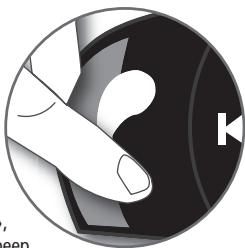
- Press the green button on the Parrot MK6000.
- Say the name of the person that you wish to call after the «beep».
- IMPORTANT: you must have first recorded the voice prints on your phone or the kit (refer to the chapter entitled «Voice recognition»).
- When using the kit's voice recognition feature, say «home», «work», «mobile», «general» or «other» after the second beep.
Receiving a call
- An incoming call is indicated by a ringtone and the LEDs flashing quickly on the Parrot MK6000. If the caller's name has been recorded, it will be played through the vehicle's speakers.
- Press the green button on the device to answer the call. The car stereo will automatically be muted and the call reproduced through the vehicle's front speakers.
Ending a call
- To end a call, press the red button on the Parrot MK6000. The car stereo will automatically come back on.
Redial function
- Hold down the green key on the kit for two seconds to radial the last number dialled.
Adjusting the volume
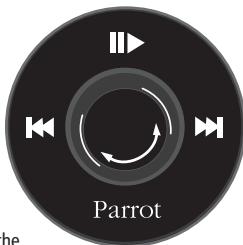
- During the call, turn the scroll wheel on the Parrot MK6000. The volume setting is saved for subsequent calls.
Changing to discreet mode
- During a call, if you want to continue the conversation on your phone (private conversation), press the green button on the Parrot MK6000. The call is transferred to the phone.
- If you want to switch back to the kit, press the green button again.
Microphone mute
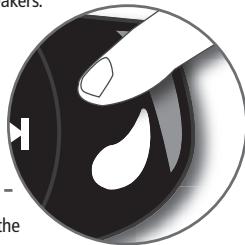
- During a call, if you do not want the person on the other end of the line to hear you, quickly press the «Play» button on the Parrot MK6000. Press the button again to cancel the mute.
Sending DTMFs
- During a call, you can send DTMFs (Dual-Tone Multi-Frequency) for touch-tone dialling. This feature can be used for managing your voicemail, for example.
- Press the scroll wheel - the kit says «0».
- Turn the wheel to scroll through the numbers.
- Press the scroll wheel to send the selected number to the phone.
- Repeat this sequence for sending other DTMFs.
Clearing the memory
- You can pair up to five devices.
- If you attempt to pair a sixth device, the kit says «memory full».
- To pair a new phone, you must clear the memory by holding down both the green and red buttons for three seconds.
CAUTION: doing so also clears all the contacts and the associated voiceprints.
Note: the use of certain features (voice recognition, radial, discreet mode) depends exclusively on your phone. Refer to the Support heading on our website at www.parrot.com for further information.
VOICE RECOGNITION
Recording keywords and magic words
To offer you as many features as possible, the Parrot MK6000 lets you record keywords: «general», «mobile», «work», «home», «other», as well as magic words: «phone» and «hang up».
The magic word «phone» lets you accept an incoming call, as well as start the voice recognition feature. The magic word «hang up» lets you terminate a call.
In the event of a contact with several phone numbers, the keywords allow you to choose the number to call.
- Click on the central scroll wheel and turn it until the kit says «Record keywords», and then confirm.
- The kit says «Record all keywords».
-
If one or more keywords are already recorded, the kit selects the first keyword that has not yet been recorded.
-
Press the central scroll wheel or the green button to start recording. Follow the prompts given by the kit. You will need to record each keyword twice for greater recognition.
- When a keyword is correctly recorded, the kit automatically goes to the next. Otherwise, it prompts you to record it again.
- As soon as all keywords are correctly recorded, the kit enables them automatically.
- You can exit the menu at any time by pressing the red button and then go back to record or modify the keywords whenever required.
- If you do not wish to record all the keywords, turn the scroll wheel to select the required word.
Saving contacts in the Parrot MK6000
To use the voice recognition feature of the Parrot MK6000, you must send the contacts by Bluetooth from your phone to the kit. Proceed as follows:
- Return to the «Add voiceprints» menu.
- Press the scroll wheel or the green button: the Parrot MK6000 and the phone disconnect the kit is now ready to receive contacts.
- On your phone, select the contacts and send them by Bluetooth (refer to your phone's user guide or our website).
- Select Parrot MK6000 from the list (enter 0000 as the PIN code if prompted by your phone).
- Once received, the kit asks you to record the name corresponding to the contact. The voice print is assigned to the contact.
Note: the use of certain features (voice recognition, send contacts by Bluetooth) depends exclusively on your phone (support of the Hands-free or Headset profile). Refer to the Support heading on our website at www.parrot.com for further information.
STREAMING AUDIO
The streaming audio feature lets you play the music tracks recorded on your Bluetooth audio player over the vehicle's speakers. This feature depends on your audio player. Some phones also incorporate this feature. For further information, refer to our website: www.parrot.com
Prior to using the Parrot MK6000 with your audio player, you will need to pair both devices.
Note: if you are using your phone for the hands-free and streaming audio functions at the same time, the following phase is not required. Your phone is already recognised by the kit.
Pairing your Bluetooth audio player
- From your Bluetooth audio player, search for Bluetooth peripherals (consult your audio player's user guide or refer to the «Support» heading on the www.parrot.com website).
- Select «MK6000».
- Enter «0000» on your audio player when prompted.
- The Parrot MK6000 says «pairing successful» when both devices are paired. The device sounds a beep when connected.
- The LED of the blue «Play / Pause» button lights up when the connection between the hands-free kit and the audio player is active.
Note: since some audio players do not have an interface for entering the pairing code, simply enable the pairing mode on your audio player (refer to your device's user guide) and switch on your Parrot MK6000.
Description and use of the features
Playing music files:
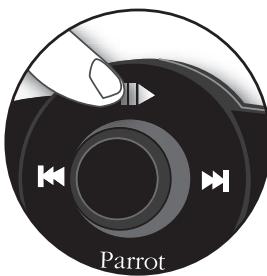
- If a connection for streaming audio is active, press the «Play / Pause» button to start playing the music files stored in your phone's / player's memory.
Pausing during playback:
- When playing music files, quickly press the «Play / Pause» button to momentarily stop playback. While paused, your car stereo is still muted and the «Play」 LED flashes.
- Quickly pressing the «Play / Pause» button resumes playback of the music track.
Stopping playback:
- Hold down the «Play / Pause» button to stop playback. The car stereo is once again played through the vehicle's speakers.
Adjusting the volume:
- When playing a music file, the scroll wheel on the hands-free kit can be used to adjust the volume. You can also adjust the volume via the phone (refer to your phone's user guide).
- The volume for calls and the volume for the streaming audio function work separately.
Selecting music files:
- When playing a music file, you can change to the next or previous track by quickly pressing the «Next» and «Previous» buttons respectively.
Note: if your audio player supports this feature, the front/rear LEDs on your hands-free kit light up.
Fast forwarding / fast rewinding the current track:
- During playback, you can fast forward or rewind by holding down the «Next» and «Previous» buttons respectively.

Note: if your audio player supports this feature, the front/rear LEDs on your hands-free kit light up.
Note: the use of certain features (selecting music files, fast forward / fast rewind, volume adjustment from the phone) depends exclusively on your phone. Refer to the Support heading on our website at www.parrot.com for further information.
When using the streaming audio function on your hands-free kit, you can still access the different menus: Phonebook, add voiceprints, and so on. Simply press and then turn the scroll wheel on the Parrot MK6000. The streaming audio feature pauses when browsing through the menus.
The phone functions of your Parrot MK6000 remain active while streaming audio is being used (except for use of the magic word «phone»). When using the Parrot MK6000 in phone mode, the streaming audio feature is suspended.
UPDATING
You can update the software version of your Parrot MK6000 by Bluetooth.
Simply enable this mode before updating.
The update is performed by Bluetooth from a computer equipped with Bluetooth.
Updating provides access to new features and improves compatibility with an even wider range of phones.
For further information, visit our website to download the latest software version: www.parrot. com
HOTLINE
Our hotline is at your disposal to provide you with any assistance required. You can contact the hotline by email or telephone. Open from Monday to Friday between 9 am and 6 pm (GMT+1).
- Europe: +33 (0) 148036069
Italy: +39 2 86 39 14 63
Spain: +34 902 404 202
UK: +44 (0) 870 112 5872
Germany: +49 900 172 77 68
USA: +1 (877) 9 PARROT (toll-free)
China: +862 164 601 944
Visit our website at www.parrot.com to download the latest software version.
SPECIFICATIONS
BLUETOOTH
- Bluetooth 1.2 qualified
Hands-free profile 1.0 and 1.5 -
Headset profile 1.1
-
Object Push Profile 1.1
- Advanced Audio Distribution Profile 1.0
Audio/Video Remote Control Profile 1.0 - Bluetooth PIN code «0000»
Maximum range: around 10m - Pairing of up to five phones
- 150 contacts per phone
150 voiceprints per phone
MECHANICS
- Dimensions: 65 × 28 × 138 mm
Weight: 130 g
CONNECTIONS
ISO connector
- ISO adapter available at: www.parrot.com
SIGNAL PROCESSING
- Beamforming and noise reduction
- Echo cancellation
Built-in voice recognition
COMPLIANCE
FCC
E2
- Bluetooth
CE
- Environment qualified
NOTES
Parrot MK6000
Parrot MK6000
François
SOMMAIRE
INTRODUCTION p 17
CONTENU DE L'EMBALLAGE p 17
PREMIÈRE UTILISATION p 17
Installation du Parrot MK6000 p 17
Description du Parrot MK6000 p 20
Connector son telephone / PDA Bluetooth . p 21
FONCTIONNALITÉS p 21
Téléphonie 21
CÓMOCONECTAR SU TELEFONO/PDA BLUETOOTH
Invio di DTMF (Dual-Tone Multi-Frequency)
FUNKTIONSINNEHÄLL I RÖSTMENYERNA
Installation of Parrot MK6000 p 101
Beskrivelse of Parrot MK6000 p 104
Tilslutning af Bluetooth-telefon / PDA Bluetooth . p 105
FUNKTIONER p 105
Telefoni p 105
Stemmemenuers struktur. p 105
FCC Compliance Statement
This device complies with part 15 of the FCC rules. Operation is subject to the following two conditions:
(1). this device may not cause harmful interference, and
(2). this device must accept any interference received, including interference that may cause undesired operation.
Note: The manufacturer is not responsible for any radio or tv interference caused by unauthorized modifications to this equipment. Such modifications could void the user's authority to operate the equipment.
Declaration of Conformity
CE We, Parrot S.A. of 174 quai de Jemmapes, 75010 Paris, France, declare under our sole responsibility that our product, the Parrot MK6000 to which this declaration relates is in conformity with appropriate standards EN300328, EN301489-1, EN60950 following the provision of Radio Equipment and Telecommunication Equipment directive (1999/5/EC R&TTE), and requirements covering EMC directive 89/336/EEC and Low Voltage directive 73/23/EEC.
Bluetooth
The Bluetooth® word mark and logos are owned by the Bluetooth® SIG, Inc. and any use of such marks by Parrot S.A. is under license. Other trademarks and trade names are those of their respective owners.
Correct Disposal of This Product (Waste Electrical & Electronic Equipment)
(Applicable in the European Union and other European countries with sepa
rate collection systems). This marking shown on the product or its literature, indicates that it should not be disposed with other household wastes at the end of its working life. To prevent possible harm to the environment or human health from uncontrolled waste disposal, please separate this from other types of wastes and recycle it responsibly to promote the sustainable reuse of material resources. Household users should contact either the retailer where they purchased this product, or their local government office, for details of where and how they can take this item for environ, mentally safe recycling. Business users should contract their supplier and the terms and conditions of the purchase contract. This product should not be mixed with other commercial wastes for disposal.
Copyrights
Copyright © 2004 Parrot. All rights reserved. The total or even partial reproduction, transmission or storage of this guide in any form or by any process whatsoever (electronic, mechanical, photocopy, recording or otherwise) is strictly prohibited without prior consent from Parrot.
Registered trademarks
All the names and trademarks mentioned in this document are copyright-protected and are the property of their respective owners.
Modifications
The explanations and specifications in this guide are given for information purposes only and may be modified without prior notice. They are deemed to be correct at time of going to press. The utmost care has been taken when writing this guide, as part of the aim to provide you with accurate information. However, Parrot shall not be held responsible for any consequences arising from any errors or omissions in the guide, nor for any damage or accidental loss of data resulting directly or indirectly from the use of the information herein. Parrot reserves the right to amend or improve the product design or user guide without any restrictions and without any
obligation to notify users.
As part of our ongoing concern to upgrade and improve our products, the product that you have purchased may differ slightly from the model described in this guide. If so, a later version of this guide might be available in electronic format at Parrot's website at www.parrot.com.
SPEEX License
Redistribution and use in source and binary forms, with or without modification, are permitted provided that the following conditions are met:
- Redistributions of source code must retain the above copyright notice, this list of conditions and the following disclaimer.
- Redistributions in binary form must reproduce the above copyright notice, this list of conditions and the following disclaimer in the documentation and/or other materials provided with the distribution.
- Neither the name of the Xiph.org Foundation nor the names of its contributors may be used to endorse or promote products derived from this software without specific prior written permission.
This software is provided by the copyright holders and contributors "as is" and any express or implied warranties, including, but not limited to, the implied warranties of merchantability and fitness for a particular purpose are disclaimed. In no event shall the foundation or contributors be liable for any direct, indirect, incidental, special, exemplary, or consequential damages (including, but not limited to, procurement of substitute goods or services; loss of use, data, or profits; or business interruption) however caused and on any theory of liability, whether in contract, strict liability, or tort (including negligence or otherwise) arising in any way out of the use of this software, even if advised of the possibility of such damage.
FLAC License
Redistribution and use in source and binary forms, with or without modification, are permitted provided that the following conditions are met:
- Redistributions of source code must retain the above copyright notice, this list of conditions and the following disclaimer.
- Redistributions in binary form must reproduce the above copyright notice, this list of conditions and the following disclaimer in the documentation and/or other materials provided with the distribution.
- Neither the name of the Xiph.org Foundation nor the names of its contributors may be used to endorse or promote products derived from this software without specific prior written permission.
This software is provided by the copyright holders and contributors "as is" and any express or implied warranties, including, but not limited to, the implied warranties of merchantability and fitness for a particular purpose are disclaimed. In no event shall the foundation or contributors be liable for any direct, indirect, incidental, special, exemplary, or consequential damages (including, but not limited to, procurement of substitute goods or services; loss of use, data, or profits; or business interruption) however caused and on any theory of liability, whether in contract, strict liability, or tort (including negligence or otherwise) arising in any way out of the use of this software, even if advised of the possibility of such damage.

Parrot
Parrot S.A. - 174, quai de Jemmapes - 75010 Paris - France
Fax +33 1 48 03 06 66 / Phone +33 1 48 03 60 60
http://www.parrot.biz

PI030384AA
ENG
DAN
ESP
)
FRA
DEU
NOR
POR
ITA
SWE
DUT