
TYER3D5ME - TV Accessories PANASONIC - Free user manual and instructions
Find the device manual for free TYER3D5ME PANASONIC in PDF.


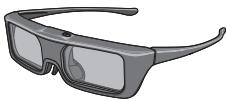
| Product type | Active 3D glasses |
| Brand | Panasonic |
| Model | TYER3D5ME |
| Category | TV accessory |
| Dimensions (L x H x D) | 164.7 x 41.0 x 170.7 mm |
| Weight | Approx. 34 g |
| Power supply | CR2025 lithium coin cell battery |
| Battery life | Approx. 75 hours |
| Lens type | Liquid crystal shutter |
| Operating distance | Up to 3.2 m from the TV |
| Communication system | Bluetooth® 2.4 GHz FH-SS |
| Materials | Body: resin; Lenses: liquid crystal glass |
| Operating temperature | 0°C to 40°C |
| Available modes | 3D and 2D (viewing 3D image in 2D) |
| Main functions | Pairing with TV, automatic shut-off, battery level indicator |
| Care and cleaning | Soft dry cloth; do not use benzene, thinner or wax; do not immerse in water |
| Safety | Do not use in hospitals, within 22 cm of a pacemaker; do not disassemble; respect viewing distance (3x image height) |
| Spare parts and repairability | Replaceable battery (CR2025); 12-month warranty parts and labor |
| General information | Compatible with Panasonic HD 3D TVs with Bluetooth®; first use: pairing required |
Frequently Asked Questions - TYER3D5ME PANASONIC
User questions about TYER3D5ME PANASONIC
0 question about this device. Answer the ones you know or ask your own.
Ask a new question about this device
Download the instructions for your TV Accessories in PDF format for free! Find your manual TYER3D5ME - PANASONIC and take your electronic device back in hand. On this page are published all the documents necessary for the use of your device. TYER3D5ME by PANASONIC.
USER MANUAL TYER3D5ME PANASONIC
Operating Instructions
3D Eyewear
Model No. TY-ER3D5ME
This product cannot and must not be used as sunglasses.
ENGLISH
DANSK
NEDERLANDS
FRANÇAIS
DEUTSCH
ITALIANO
KA3AK
PORTUGUES
PYCKM
ESPNOL
SVENSKA
TÜRKÇE
YKPAHcBA
GUARANTEE
TAPAHNTNHBIN TAJIOH
Thank you for purchasing a Panasonic product.
- Before operating this product, please read the instructions carefully, and save this manual for future use.
- Before using this product, be sure to read "Safety Precautions" and "Using Precautions" (12 pages 2 - 6).
This 3D Eyewear can be used for Panasonic HDTVs supporting 3D and the Bluetooth® Wireless technology.
For the latest information on applicable models, visit our web site.
http://panasonic.com/
Safety Precautions
Warning
About Prohibited Place
- Do not use 3D Eyewear in hospital or other medical facilities.
Radio waves from 3D Eyewear may cause interference of medical equipments.
- Do not use 3D Eyewear nearby automatic control equipments, like a automatic door, a fire alarm apparatus, etc.
Radio waves from 3D Eyewear may cause interference of automatic control equipments.
- Keep 3D Eyewear more than 22 cm away from the implant of cardiac pacemaker, or similar implantable medical equipments, at all times.
Radio waves from 3D Eyewear may affect implantable cardiac pacemaker or similar equipment operations.
Disassembly
- Do not disassemble or modify the 3D Eyewear.
Caution
Battery
Incorrect installation may cause battery leakage, corrosion and explosion.
Replace only with the same or equivalent type.
- Do not use rechargeable battery (Ni-Cd, etc.).
- Do not burn or break up battery.
- Do not expose battery to excessive heat such as sunshine, fire or the like.
Make sure you dispose of battery correctly.
- Remove the battery from the unit when not using for a prolonged period of time to prevent battery leakage, corrosion and explosion.
About 3D Eyewear
- Do not drop, exert pressure on, or step on the 3D Eyewear.
■ Be careful of the tips of the frame when putting on the 3D Eyewear.
Always keep the 3D Eyewear in a cool, dry place.
■ Be careful not to trap a finger in the hinge section of the 3D Eyewear.
Pay special attention when children are using this product.
Viewing 3D Content
- Do not use the 3D Eyewear if you have a history of over-sensitivity to light, heart problems, or have any other existing medical conditions.
- Stop using the 3D Eyewear immediately if you feel tired, discomfort, or any other uncomfortable sensation.
Take an appropriate break after viewing a 3D movie.
Take a break of between 30 - 60 minutes after viewing 3D content on interactive devices such as 3D games or computers.
■ Be careful not to strike the television screen or other people unintentionally. When using the 3D Eyewear the distance between the user and screen can be misjudged.
The 3D Eyewear must only be worn when viewing 3D content.
- Do not tilt your head and/or the 3D Eyewear while viewing 3D image. Keep your eyes and the 3D Eyewear are on a horizontal level to the television.
If you suffer from any eyesight problems (short/ far-sighted, astigmatism, eyesight differences in left and right), please ensure to correct your vision before using the 3D Eyewear.
- Stop using the 3D Eyewear if you can clearly see double images when viewing 3D content.
- Do not use the 3D Eyewear at a distance less than the recommended distance.
- The recommended viewing distance is at least 3 times of image height.
- e.g. For a 40-inch TV 1.5 m or more
- For a 42-inch TV 1.6 m or more
- For a 47-inch TV 1.8 m or more
- For a 48-inch TV 1.8 m or more
- For a 50-inch TV 1.9 m or more
- For a 55-inch TV 2.1 m or more
- For a 58-inch TV 2.2 m or more
- For a 60-inch TV 2.3 m or more
- For a 65-inch TV 2.4 m or more
- When the top and bottom area of the screen is blackened, such as movies, view the screen at a distance at least 3 times of the height of the actual image. (That makes the distance closer than above recommended figure.)
3D Eyewear Use
3D Eyewear should not be used by children younger than 5 - 6 years old, as a guideline.
All children must be fully supervised by parents or guardians who must ensure their safety and health throughout the using 3D Eyewear.
Before using the 3D Eyewear, ensure no breakable objects surrounding the user to avoid any accidental damage or injury.
- Remove the 3D Eyewear before moving around to avoid falling or accidental injury.
Use the 3D Eyewear only for the intended purpose and nothing else. - Do not use if the 3D Eyewear is physically damaged.
- Stop using the 3D Eyewear immediately if a malfunction or fault occurs.
- Stop using the 3D Eyewear immediately if you experience any redness, pain, or skin irritation around the nose or temples.
In rare cases, the materials used in the 3D Eyewear may cause an allergic reaction.
Using Precautions
Do not drop or bend the 3D Eyewear.
- Do not apply pressure to or scratch the surface of the liquid crystal shutter of the 3D Eyewear.
- Do not use devices (such as mobile phones or personal transceivers) that emit strong electromagnetic waves near the 3D Eyewear as this may cause the 3D Eyewear to malfunction.
- Do not use 3D Eyewear outside the specified usage temperature range (Cpage 14).
If the room is lit by fluorescent lights (50 Hz) and light appears to flicker when using the 3D Eyewear, switch off the fluorescent light.
3D content will not be correctly visible if the 3D Eyewear is worn upside down or back-to-front.
- Do not wear the 3D Eyewear when watching anything other than 3D images. Other kinds of displays (such as computer screens, digital clocks, or calculators etc.) may be difficult to see while wearing the 3D Eyewear.
Using radio waves This unit uses the 2.4 GHz radio frequency ISM band (Bluetooth®). However other wireless equipment may use the same frequency. Be sure to take note of the following to prevent radio wave interference from other equipment.
- Restriction of use
-
For use only in your country.
-
Range of use
The range of use is up to approximately 3.2m . The range may be less depending on the structure of the building, the environment and any obstacles between the receiver and the transmitter. Such obstacles as reinforced concrete walls and metal doors, in particular, obstruct the transmitter's signals.
- Interference from other equipment
Due to radio interference, malfunctions may occur if the unit is placed too close to other equipment. We recommend keeping the unit as far away as possible from the following devices:
Bluetooth® devices other than this unit, wireless LAN, microwaves, office automation devices, digital cordless telephones and other electronic devices.
The unit is designed to automatically avoid radio interference from these household devices.
However malfunctions may happen when radio interference occurs.
Identifying Controls
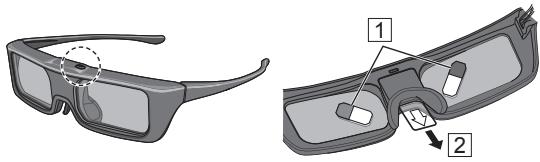
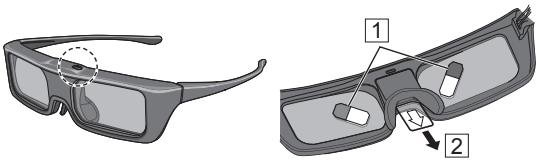
(Part No.: TY-ER3D5MA)
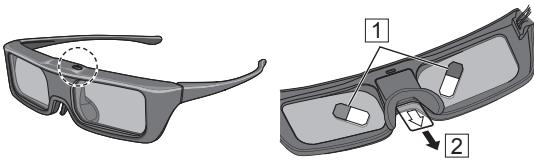
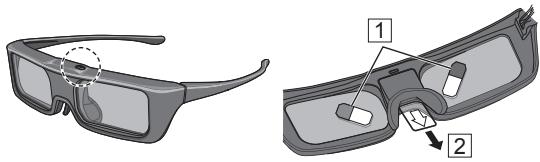
- Power button / Mode change
Power button
Press and hold for approx. 1 second to turn the 3D Eyewear on. (The indicator lamp lights for 2 seconds.) Press and hold for 3 seconds or more to turn the 3D Eyewear off. (The indicator lamp lights 3 times.)
Mode change
Press and hold for approx. 1 second to change the mode between 3D and 2D (view a 3D image in 2D). When power is off, press and hold for approx. 5 seconds to change to registration mode. For details on registration, refer to the Registration page. (page 9)
- Indicator lamp
Lights or flashes during use to show the status.
Indicator lamp status
| Indicator lamp | Status |
| Lights red for 2 seconds when turned on | Sufficient battery level |
| Flashes red 5 times when turned on | Low battery level |
| Flashes red | Under registration |
| Flashes red once every 1 second | Under reconnecting to the TV |
| Flashes red 3 times | Power off (Press and hold for more than 3 seconds when in use, or automatically power off when registering / reconnecting fails, or connection is lost.) |
| Flashes red once every 2 seconds when in use | 3D mode is selected |
| Flashes red twice every 4 seconds when in use | 2D mode is selected |
Registration
First Registration
Perform the First Registration when the 3D Eyewear is used for the first time.
- Turn on the TV to see.
- Press Power button for about 1 second to turn the 3D Eyewear on.
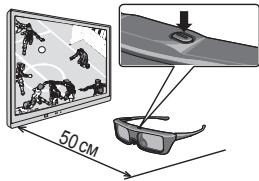
The lamp lights for about 2 seconds and then flashes. The 3D Eyewear will power on and start registration. Place the 3D Eyewear within 50 cm from the TV while registration in progress.
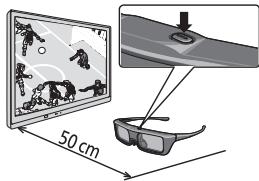
- After the registration is successfully completed, the 3D Eyewear will reconnect with TV automatically when the 3D Eyewear is turned on near the TV in 3D mode.
■ Registration Again
When connection with registered TV fails, or when using with another TV,re-register the 3D Eyewear.
- Turn on the TV to see.
- Within 50 cm from the TV, press Power button until lamp lights, then release it to start registration.
-
After the registration is successfully completed, the 3D Eyewear will reconnect with TV automatically when the 3D Eyewear is turned on near the TV in 3D mode.
-
If the registration failed, the 3D Eyewear will power off. In this case, power off the TV and perform from step 1.
Storage and Cleaning
- Clean using a soft, dry cloth.
- Wiping the 3D Eyewear with a soft cloth that is covered in dust or dirt may scratch the eyewear. Shake off any dust from the cloth before use.
- Do not use benzene, thinner, or wax on the 3D Eyewear, as doing so may cause the paint to peel off.
- Do not dunk the 3D Eyewear in liquid such as water when cleaning.
- Avoid storing the 3D Eyewear in hot or highly humid locations.
- As the liquid crystal shutters (lens) are fragile and easily broken, be very careful when cleaning them.
Replacing battery
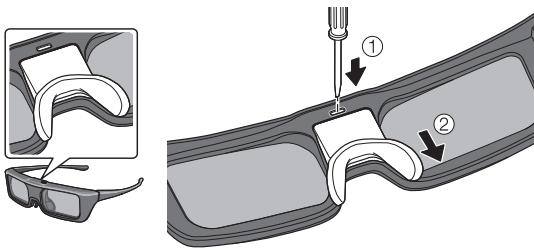
When the battery is running low, the indicator lamp flashes 5 times on turning the 3D Eyewear on. In this case, early battery replacement is recommended.
-
Dispose of the old batteries as non-burnable rubbish, or in line with the waste disposal regulations in your local area.
-
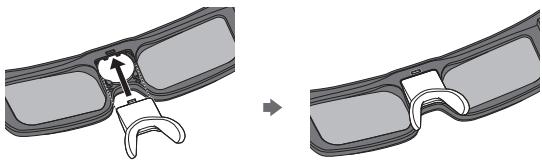
Remove the battery cover using pen tip or screwdriver (minus ), etc.
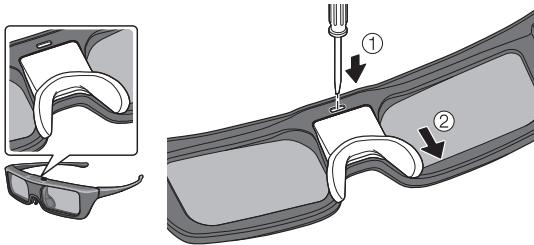
-
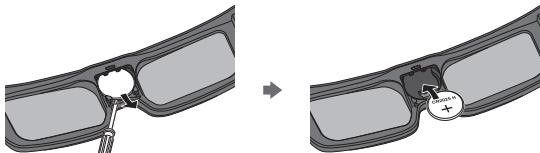
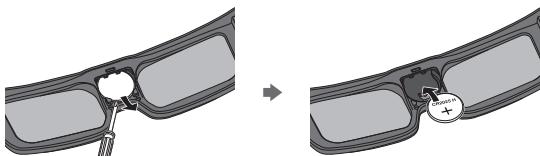
Replace the battery (coin-shaped lithium battery CR2025).
-
If difficulty, remove it with the tip of the driver.
Note the correct polarity ( or -
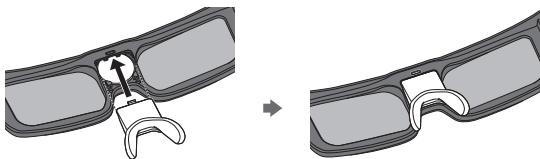
- Attach the battery cover.
Troubleshooting/Q&A
Check the followings first. If they do not solve the problem, please contact the place of purchase.
Cannot register a 3D Eyewear to TV.
Does the TV support on this 3D Eyewear? Use the 3D Eyewear with compatible TVs. (16 page.)
- Did you allow more than 1 minute to elapse after setting the unit to the device registration mode? The registration is automatically released if you allow more than 1 minute to elapse. Set the registration with the television and connected 3D Eyeware placed as close to each other as possible.
Images are not 3D.
Is the TV has been registered with the 3D Eyewear? Perform the registration with the TV to see. (K page 9)
- Is the 3D Eyewear Mode set to 3D?
Push the power button once to change the mode between 3D and 2D.
Are the image settings switched to 3D images? Refer the television operating instructions.
Individual differences may occur in which the 3D images are difficult to see, or cannot be seen, especially in users that have a different level of eyesight between the left and right eyes.
Take the necessary steps (wearing glasses etc.) to correct your eyesight before use.
Are there any objects between the eyewear and television?
The indicator lamp does not light up when pressing Power button on the 3D Eyewear.
The battery is too low to operate the 3D Eyewear.
The indicator lamp does not light when switching on the power by pressing and hold the power button for 1 second; that indicates the battery is completely flat. Replace the battery with new one.
Specifications
Lens type
Liquid Crystal Shutter
Usage temperature range
0°C - 40°C
Battery
Coin-shaped lithium battery CR2025
Operation time: Approx. 75 hours
Viewing range*
Within 3.2m from front surface of the TV.
Materials
Main body: Resin
Lens section: Liquid crystal glass
Communication system
2.4 GHz band FH-SS (Frequency Hopping Spread Spectrum)
Dimensions (not including nose pad part)
| Model No. | TY-ER3D5ME |
| Width | 164.7 mm |
| Height | 41.0 mm |
| Overall length | 170.7 mm |
| Mass | Approx. 34 g |
* Viewing range
- There are differences in the viewing range of the 3D Eyewear among individuals.
- The 3D Eyewear may not operate correctly at the outside of the viewing range.
C E
Declaration of Conformity (DoC)
"Hereby, Panasonic Corporation declares that this 3D Eyewear is in compliance with the essential requirements and other relevant provisions of the Directive 1999/5/EC."
If you want to get a copy of the original DoC of this 3D
Eyewear, please visit the following website:
http://www.doc.panasonic.de
Authorized Representative:
Panasonic Testing Centre (PTC)
Panasonic Europe Ltd.
Winsberging 15, D-22525 Hamburg, Germany
The Bluetooth® word mark and logos are owned by the Bluetooth SIG, Inc. and any use of such marks by Panasonic Corporation is under license.
Other trademarks and trade names are those of their respective owners.
Information on Disposal for Users of Waste Electrical & Electronic Equipment (private households)

This symbol on the products and/or accompanying documents means that used electrical and electronic products should not be mixed with general household waste. Please dispose of this item only in designated national waste electronic collection schemes, and not in the ordinary dust bin.
For business users in the European Union
If you wish to discard electrical and electronic equipment, please contact your dealer or supplier for further information.
Information on Disposal in other Countries outside the European Union
This symbol is only valid in the European Union.
If you wish to discard this product, please contact your local authorities or dealer and ask for the correct method of disposal.
Contact:
Panasonic Testing Centre (PTC)
Panasonic Europe Ltd.
Winsbergring 15, D-22525 Hamburg, Germany
Panasonic Corporation
Osaka Japan
Web Site: http://panasonic.com/
© Panasonic Corporation 2014
Panasonic Testing Centre (PTC)
Panasonic Europe Ltd.
Winsberging 15, D-22525 Hamburg, Germany
Panasonic Testing Centre (PTC)
Panasonic Europe Ltd.
Winsberging 15, D-22525 Hamburg, Germany
Panasonic Corporation
Osaka Japan
Web Site : http://panasonic.com/
© Panasonic Corporation 2014
2.4 GHz band FH-SS (Frequency Hopping Spread Spectrum)
Panasonic Testing Centre (PTC)
Panasonic Europe Ltd.
Winsbergring 15, D-22525 Hamburg, Germany
Panasonic Corporation
Osaka Japan
Web Site: http://panasonic.com/
© Panasonic Corporation 2014
Mode d'emploi
Iunettes 3D
N° de modulo
TY-ER3D5ME
Identification commands
(Number de piece: TY-ER3D5MA)
Panasonic Testing Centre (PTC)
Panasonic Europe Ltd.
Winsberging 15, D-22525 Hamburg, Germany
Panasonic Testing Centre (PTC)
Panasonic Europe Ltd.
Winsbergring 15, D-22525 Hamburg, Germany
Panasonic Corporation
Osaka Japon
Web Site: http://panasonic.com/
© Panasonic Corporation 2014
Gebrauchsanleitung
3D Eyewear
Panasonic Testing Centre (PTC)
Panasonic Europe Ltd.
Winsberging 15, D-22525 Hamburg, Germany
Panasonic Testing Centre (PTC)
Panasonic Europe Ltd.
Winsberging 15, D-22525 Hamburg, Germany
Panasonic Corporation
Osaka, Japan
Web Site : http://panasonic.com/
© Panasonic Corporation 2014
Istruzioni d'uso Occhiali 3D TY-ER3D5ME
Codice modello
Banda 2.4 GHz FH-SS (Frequency Hopping Spread Spectrum)
Panasonic Testing Centre (PTC)
Panasonic Europe Ltd.
Winsbergring 15, D-22525 Hamburg, Germany
Panasonic Corporation
Osaka Giappone
Web Site: http://panasonic.com/
© Panasonic Corporation 2014
Kymbic ICTey HycKaybifbl
3D kēzɪŋdɪpɪrì
Moelb Hemipi TY-ER3D5ME
Panasonic 6yibmbiH caTbIn aJFaHbIb3fa aJfbc 6inipemi3.
BiybIMMeH Kymbc iC tereHMc 6ypbH, HycayIbIKbl 3ep caIbIn OkblbI3, KeHe De KeiHri naJaDAnhy yuH caKTan KOblbI3.
- BybIMbI naIaIaNbOac 6pybH "Kayinci3ik wapanapbl" kHe "Kayinci3ik wapanapbH naIaIaNy" beniMdepin OKybI MybITnabI3 (1-6-bet).
Byn3DKeiJdipirih 3DKHeNeuBeLoothcbIMcbI3 texHOnlOrnncbIH KOnJaTbIH Panasonic HDTV TeNdiapnabHa naJaIaHyf a60laBi. KOnDaHbIaNbIH yIJIepre KaTbICTbE hCohfbl mJIImeTepdi any yUinh Be6-caTbIMbI3fa KpiHj3. http://panasonic.com/
BvI 6yIbIMdbI KYN Ke3iIndipiri petiHne naIdaIaHyra 6oImmaDbI XeHe naIdaIaN6ayKepek.
Kayinci3dk shapaapanby
EckepTy
PaiIaHaYfTa TbIbIM caIbIHFaH opbIHap
3DKe3inDipirihaypxaHanaHemece6baca MeiunHnabKMeMeNeppe naIaanHbHbI3. 3D Ke3inDipirihen HbFbaTHp radnoTckhnapdMeiunHnabK KyblfBnapraKeepriJxacayMbMYkH.
3D Ke3inDipiriH abTomAttb ecik, ept TpyaIb ciHAn 6epetIH acanT T.6.CnA KTBbl ABTomAtb backapy KpyllblapbHbH JxhaBHa NpaJdaJaHb3. 3D Ke3inDipiriHEN ShBaTbHIN paNDOTOnKbHdAp abTomAtb backapy KpyllblapbHaKeepri Xacayb MyMkiH.
Orkawan3DKe3iindpirihKapnioctmmyTOp NmIJaHTbHaH HemececofAHyKcAc NmIJaHTTaJtBtH MeuINHaJIbK KypbInfblnapaH KemIHDe 22 cm anbIC KOJIbIbI3.
3D K83JIndipirHeH IbIbFatbIh PadiNToTlKnBbIaPd MMnPaHTTaIaBtH
KapNDOctMmYIaTOpA HemeCe cofa YkCaC KpyBfBfApdBiH
XyMbIcBaHa acep Ety MyMKHi.
BəJIweKtey
3D Kezindpirin 6eJIweKTeMeHi3 Hemece KaHaPtnaHbI3.
CaK 60JIbIHbI3
Batapera
Ipybc opHaTnay 6aTapeylya, MyKiyiHe Hemece JkapbIJyibaHa eKeJyi MymkiH.
Tek 6ipdeHemec6baamabIyTypimeH aybICTbIPbIHb3.
3aPrtanmaJIb (Ni-Cd xHe T.6.) 6atapeJapbl naIdaIaNbHbI3.
BaTapeJapIbI JkaKnaHbI3 Hemece CbIHdbIpMaHbI3.
Батарегларды куннIHKe3i,эр симас cnякты кOFapы bICTbIKKa lIFaFMaHbl3.
Батaperялардын дypbIC tacTaIraHbHa Ke3 JKeTki3iH3.
Batapery 3ak yakbl6oibi naiaanahbimarafn Ke3de 6batape afyibih, upiyihxhe JApbyIybiHbH andbH any ywiH OHb KpybIfbHa H aIbIN KOIBHbI3.
3D Kezilipirine KaTbICTbl
3DKeziindpirihKyataNaHb3,KbcbIMKaCaMaHb3 Hemece OraH 6acnaHb3.
3D Ke3indpirih KireHeJxKaTaybHbH yuBHaH a6aB 0oJIbHbI3.
3DKe3indpirih apdaibim caikbIH, Kypfak Jepde yCTaHbI3.
CaycafbHb3db3D Kezijipirih tonca 6enirhe Tblfn aJMaHb3.
Балалap 6ун 6уиьIMы naидаланган yaКыttа epekeше кeнлбeлін.
3D KeckiHdepin KapaykaTbICTbl
Erep ci3eJkaBkKa ceiIMTaIbIK, JypeK aypuIapbl Hemece 6acka da MeiunHaJIbIK KaFdaInap 6oNca, 3D Ke3iinDipirih naIdaIanHbaHbI3.
Erep ci3 wapwan TpycaHb3, KOaNcbI3dbK Hemece 6acka da KOaNcbI3 ceImde 6oNcaHb3, Depey 3D Kezinndipirin naiDaanhydbI DorapbIHb3.
3DФиьмин Кергенн сеин Тисиш demaJIbHbI3.
3D OиьИндары сякты INHTepaKTnBTi KpyblIbIbIapdAn HeMece KOMNbIOTepeH 3D Ma3MybIH KeprHHeN KeiH 30-60 MInHyTTaI DeMaJIbIbI3.
Tepeinap 3kpaHbIH HeMece 6aCa aamapdbi 6aikaycbI3da ypbIn kji6epMeH3.3D Ke3iNdpirih naIaIaNHaHran Ke3De naiJaNaHybI MeH 3KpaH apacbIHdaft KaWbIKTBk Dypbic 6oImaybl MyMkiH.
3D Ke3inDipirin 3D Ma3MHybIn Kepren Ke3de faHa KNUKepeK.
3D6eHHeKeckiHIn Kepin OtbyipFaHda 6acbHbI3DbI Jxane/Hemce 3D Ke3iJdpirih EneKeiTpeHiz.Ke3iH3 6en 3D Ke3iJdpirih TepeHapMeH KeIpeHEn DeHreJe yCTaHbI3.
ErepKepyKaibinietiHaHaap6oJICA (XaKaBHHaH/ aIbICTAH KaKcbi KePMeceH3,ACTINMaTn3M, COIoh XaKTbI axbipata anMaCaHb3),3D KezInjDipirih naIdaanH6ac Kepy DeHreIH Dpybictan abHb3.
Erep3D Ma3MHybIH KeprHde eki eceneHRe 6eHHepepi aHbIK KepeTih 6oNcaHbI3, 3DKezinDipirih naDaJahybl ToKtTaHbI3.
3DKeiinnipirihycbHbIinFaHKaawbIKtbkTahXaKbIH KepJe naJdanaH6aHb3. YcHbIInFAnKpy KaWbIKtbfBfBeHnekeckH 6nKiTfHeHvUe cKeN.
MbicaJIbI
40 duimdk Tepeinap yuH 1.5 M HeMeCe oan H yKKeHipeK
42 JIoMdk TepeHdap yuH 1.6 M Hemece oan H yKKeHipeK
47 JIoMdk TepeHnap yuH 1.8 M Hemece oan H yIKeHipeK
48 duimdk Tepeidap yuin 1.8 M hemece oan H ykKeHipeK
50 duimdk Tepeidap yuin 1.9 M hemece oan H yknehipeK
55 duimdk Tepeidnap yuin 2.1 M hemece oan H yknehipek
58 duimdk Tepeidnap yuin 2.2 M hemece oan H yknehipeK
60 duimdk Tepeidap yuin 2.3 M heme oan H ykneHipeK
65 duimdk Tepeidnap yuin 2.4 M hemece oan H ykKeHipeK
KpHaHbIH Kofapfbl KHe TEmHri 6JIiri, MblcAbl, KInHOJIaPda Kapa XnEKNHe 6epiCne, OHbl HaKTbl KeckHHHbIKTIRiHeH 3 ece aJIbIC KaWbIKTbIKTaH KepiH3.
(On Kepy KaIbIKTbIFbIH XOFapblJa YCbIHbJIaTbIH KaIbIKTbIKTaH KaKbIHJaTaJaBl.)
3D keckindepin kepy
Hcykaib60bihwa3DKe3inipirih5-6kactan kiibi banaapra naaandahyfa 6oImmaIbl.
BapIbIK 6aIaIapIbI 3D Ke3iJdpirH naIaIaHy Ke3iHe OIapDbIH Kayinc3diri MeH DeHCayIbIFbHa XayaantbI aTa-aHaIapbl HEmece KaMKOpUbIapbl ToJIbIFbIMe 6aKbIaaybl Kepek.
3D KE3iNipirin naiDanaH6ac 6ypbH, 6aKaycbI3da 3aKbIM KeIITipyHe Hemece JapaKaTTaybHa Jc0J 6epMey yuHn naDanaHybHbH aHaHaNcBHa Da CbHaTbH 3aTTapDbH XOK eKeHlHe Ke3 JeTk3iHi3.
Knyan KaIyDan Hemece 6aikaycb3da XapaKaTTaHydAn caKaThy yuH KblNkBImac 6ypbH 3D KeiinDipirih weuH3.
3D Keziinipirih TeK apHaJFaH MaKcaTbHa naiJaIaHbIbI3.
Erep3DKe3iJdpiriФи3nKanbIbTKypfblaH 3aKbIMdaHcA,OhI naJaHaH6aHbI3.
ErepDpybic icTeMece Hemece akaybik 6aikkanca, 3D Ke3iinipirih naJaIaNahybl 6ipdeH ToKtaTbHb13.
ErepMypHbIb3dbInycTHe camaibHb3KbI3apbIn aybpIn,kbIunTBIN6oJca,3DKe3iJdpirH naJaIaHaHydbIdepeyTOkTaBbHb3.
KeB6ip kafdaIapda 3D Kezilipirine naIdaIaNbIraH MaTePnaIap aIneprnIbIpeakun TYdbpyb MyMkiH.
Kayinci3ik shapalapbH naJaIaHy
3DKeziinpiirinTycipin aImaHbI3KHeMaMbICTbIPMaHbI3.
Cynblk kpcntaIbH bIcIbMaCbIHbIH 6eTIHe KblcblM TycipMeHi3 Hemece cbI3abH3.
3D Ke3iNdiPiririHin KaHBnHa KUwTI 3NeKTp MaHTTI TOKNbIHdap WbIFapaTbH KpybIfblApdbI (MbICaJIb, Yybl TepeOHDapDbI HeMeceKeke paNDokaBnDaBtAP) naJdaNaHbA3, c6e6i on 3D Ke3iNdiPiririHIn DpybIC yMbc IcTeMeyiHe ce6en 6oJybl MymkH.
3D Ke3iinipirih KepcetilreH naIaIaNy TemnepaTypacbIHbH aykbIMbIHan (14-6eT) TBIC naIdaIaN6aHbI3.
Erep6eIme pfnyopceuHTti wammeh (50 Hz) japbiktandbipblbn, japbik 3D ke3iinpirih naJaIaHaHafn Ke3de XbInblbIKtafAH CnKtbl KepiHc, pfnyopceuHTti waMdbI eWipipH3.
Erep3DKezinipiri actbHaH KOFapbIaH TeMeH Kapai Hemece apTbHaH aIbHa Kaapi KniIce, 3DMa3Myhbl DpybIC KePiH6eBdi.
3D Ke3iinipirih 3D 6eHeneh 6aca 3aTTbI KaparaHa KaMehi3. DnCInneNepin 6acka TpynePi (MbicaJIb, KOMJIbOpTe 3KpaHdapbl, CaHdbK caFaTTap Hemece KaJIbKyIaTOpnap T.6.) 3D Ke3iinipirih KInreH Ke3de Kepy KInbH 6oNybl MyMkiH.
PaIIOToNkblHdapblnaiDanaHy
Byn Kpyblfbl 2.4 TTpu paIIOxNIIIK ISM dnaIa3ObHIn (Bluetooth) naIaIaNHaDbI. Bipak baca cbIMcbI3
6aJIaNaHbIC KpyblfbcI Da con XNIJIiKTI naIaIaNHybl
MymkiH. Backa KpyblfblDaH paIIOToNkblHap
INTEPpepeHcIyCBH 60JbIPmay yIiH MiHdetTIT
Typde KeIecinepre Haazap aydapbHbI3.
- PáñdañahydbI ŠeKtey
Tek ci3dɪn eɪniːzIDE naɪdañahyfa apHaɪfəh. - Палдалиу кашыктблг
- Палдалиу кашыктблг уамамен 3.2 M.
- Римаразн И Крьлпимьи, Коршаян optrafa жэne каблдafшп по Трасмиттет apacbндafы kedeprilepre bai nahtcbl kaшыктблakazipak bonyl mykini. Atan aayTkaHda, Temip beToHdbl kabIpranap MeH MeТаданжacalran ecikter cngKtbl Kepeprilep tpaHcMnITTePdIn CINHaIapblya Na depri Жасайдbl.
- Baca KypblfHbIH Keepri Xacaybl Erep 6yI KypblfB6acka KypblfTaTbIM XaKbIH Typca,paDNONHTpepepeHHaCanIapBHn AHaynap naJa 60Nybl MymKiH. ByN KypblfB6bcka KeNeci KypblfB1apHaH 6apbIHwa anbc YcTaydbYcHbAmbl3: OcbI KypblfDAnh 6bCa Bluetooth KypblfApbl, cbIMCb3 JKeprilikTI JKeJI, MNKPOTONkBbI NeWtep, KeHCederi ABTomaTTbl KypblfBnap, caHbIK cbIMCb3 TeNefoHdap XeHe 6baka 3JNEKTPOHDbIK KypblfBnap. KypblfOOCbyTypMbICTbIK KypblfBnapDaH 6oNaTBn paDNONHTpepeEHunHb ABOMATbI Typde 6oNDbIPMaTbIH etin XacanFaH.AaJa da pDNONHTpepeHHn 6onHan Ke3de aKaynap naJa 60Nybl MyMKH.
Бакылайларды анытay
(Ynri Nc: TY-ER3D5MA)
KyaT Tymeci / pexmDi e3repty
Kyat Tymeci
3D Ke3iJnpiripin 1cke Kocy yuH uamameh 1 cekyHd 6abIn TpybHb3. (INHdkatop 1aMb2 2 cekyHka kHaHabl.) 3D Ke3iJnpiripin eWippy uHin uamameh 3 cekyHd He oJAHK eBapn TpybHb3. (INHdkatop 1aMb3 pet KaHaDaI.)
Pekim e3repty
Peximdi 3D xhe 2D (3D 6eHecin 2D niiimihde kepy) apacbHa abyictbipbn Kocy yuih uamameh 1 cekynd bacn typbih3. Kyat aKbpaTybl 6oIfah Ke3de, Tipkey peximih aybctbpy yuih uamameh 5 cekynd bacn typbih3. Tipkey xohiHde ToIbK mAmet any yuih Tipkey 6eTih kapaHb3. (9-6et)
- INДикаторлькшам
Kyidi KepeCy yuH naiDanaHy bapbcbiHaJx KaHaDbI HEmeCe XblnblkTaBbl.
HnDnKaTopbIK waMHbIN Kyi
| Инданakotpbikшam | Куй |
| Косылган кеzie 2 секунд бовы Кьзblтucрен жанды | Батер Заряды кеткілікіт |
| Косылган кеzie 5 pet Кьзblтucрен Жыл blkітайды | Батер Заряды a3 |
| Кьзblл{Tсрен Жылblkітайды} | Улес'tipy opнатыл'dа |
| Ор 1 секунд савын Кьзbl Tсренжылblkітайды | Тelen'dapra ka'ta Косыл'dа |
| 3 pet Кьзblл{Tсрен Жылblkітайды} | Θшіpy (na'danalahbɪn ЖаTKан Ke3de 3 секун'da actam δасbl Tурblbɪ Hemece tipkey / ka'ta Kocу opbyндалимаганда небаиныс XФогалган Кe3de abTomatbl Tурde Жыротыл'dы) |
| Падалану кеzieн'de 2 секунд савын бір pet Кьзblл{Tсрен Жылblkітайды} | 3D рexmeni тандалган |
| Падалану кеzieн'de 4 секунд савын eki pet Кьзblл{Tсрен Жылblkітайды} | 2D рexmeni тандалган |
Yünectipy
Bipinchi yInectipy
3D Ke3iinipiri anfaw pet naiaanhaIinaHaJa 6ipihui yInectipyDi opbHnDaHbI3.
- Kepy yuhi TteJeiuaapbI icKe KocBHyI3.
- 3D Ke3iJdipirih icke kocy yuiH Kyat Tymecin Waamameh 1 cekynd bacbIb3.
Uam uamamem 2 cekynd iuiinde xahbIn, oan h keiH kblblblkTaibl.
3D Ke3iNdiPiricie KocbIaNabi Jxhe yInecydi 6actanaIbI. YInecTipy Ke3iHne 3D Ke3iNdiPirimeh TepeDiapdbH apa KaBkTbIb50cm-DeH acnaybTnic.
- Tipkeny cTti aKaTaNfHaHn KeiH 3D KeiIndpiiri 3D pexmiHderi TeeNupap KaHbIHda KocblFaHda, 3D KeiIndpiiri TeeNupa AToMaTTb Tpyde KaIta KocblNaDbI.
KaiTa yInlectipy
Yinectipinre TeenndapMen Baunhaic y3ince Hemece 6aca TeenndapMen bipre naDanaHraHa,3D Ke3iindipirih KaTata Tipkeh3.
- Kepy yuiH TepeiHaapbl icke KocbHbI3.
- TeIeIaIapdAn 50 cKaIbIKtkaIwamKaHaHaHa "KyaT" TyImeCIn 6acbln, tipKei 6actaHaOnbJi6epiH3.
-
Tipkeny cTtri aKaTaNfAHH an KeiH 3D KeiNdiPiri 3D pexmiH deri TeNeiIap JkaHbInda KocblnfaHa, 3D KeiNdiPiri TeNeiIaPra aBtOMaTTb Tpyde KaIta KocblnfaDb.
-
Yηncéptiy cætci3 60nca, 3D Ke3iJnpiri aXbipaTbIaNbI.
Byn JxafdaIa TepeIeIaIapdbI eIipin, 1-kaIamHan 6actan ĀpeKeTterpI opbIHaIbI3.
CaKTay xəHe Ta3aJAY
Kymcak, Kypfak 乌6epekti naDanaHbIn Ta3apTbHbI3.
3D Ke3ijdiipirih 1aHbI He Kip 1y6bepekneh CypTy Ke3iinpiqti Tbhpaiyi MymKIn. PAndaanh6ac 5yphH 1y6bepekTeH 6ap 1aHbI KaftbH3.
3D ke3indipirine 6eH3o1,epitkiu HEmece 6aIayb3dbl naIanaHbIbI3, onaiICTey 60ydbI aNbHbIN KaYbHa ekenyi MYMkhI.
Tasaanarhan Ke3e 3D Ke3indpirih cy CnKTBcYbIKbIKKa 6aTbIpMaHbI3.
- 3D kezɪnɪdɪpirɪh cækɪtarfənɪda kɔrəpɑ bɪrʌfənɪkæ He kɔrəpɑ bɪtempepaTpaɪbɪj Kερɛŋe cækTaHbɪHbɪʒ.
CyBik KpIcTaNbl bIcBIpMajap H3iK api CbHfbl 6bnFaHbIK TaH, OnapDbl Ta3aIaFah Ke3e MyKnrt 6bnbl3.
Батуареньы aybICTbipy
Batape 3apnIbTeMeHderenHe,3DKe3inDipirih KockaHa, Kepcetkiu Wam 5 pet KblnbTkaiDb. Byn XafdaJa, 6atapehbl epe aybCTbpy ycblnaDb.
Ecki 6ataperaanapdbI eptenMeTIN KOKbc petIHne Hemece JekprinikTI KOkbc Tactay epekelepine caT tactaHb3.
- BaTapeKaKNaFbH KAnam yIbIme HEmec 6bpybIuNeH (yIbXJannak), T.6.3aTneH aIbIHbI3.
- BaTapeAeHbIh OphBih aybICTbpy (TbIH oOpMaIbI JInTn 6BaTepeaCR2025).
KbHbIK 60Jca, OHb bypbIu YbIMeH anbHb3.
Dypbic noJpIbJIbIKtIeKepeH3 ( Hemece ←)
3.Баразуяka6bifihJxabictbipbH3.
AkaayIbIKTapIbITy3eTy/CypaK-kaYan
AaIbImeN KeIecinepeI TeKcepiI3. Erep onap da akayIbIbIkoIMaca, eHIMdi caTbI an IaHan Xepre xa6apnacblbI3.
3D Ke3indpirir TeJeDnapda Tipkey MymkIn eMec.
Tepeuap 6yn 3D Kezijipirin Kojdaa Ma?
3DKezimIpirinHyIeicIMTeIeIaIapnapMeH naIaIaIbHbI3. (1-6et)
KypbIyfnblHbI Tipkey peXmIme ophaTkHaHaH KeHH 1 cekyHdTah actam yaKbIT eTTi Me?
Erep 1 cekythan kebikep yakbi t EKTHo6nla, YneCTpy npaMetpi ATOMATbTu Tpye axbiataNbIa. TeenJeapmEn yneTecipti3 xKeHe KocBIFraH 3D Ke3iJdpirH 64BaHsHaX ZaKbH KOHyB3.
BeinheJep 3D emec.
3D Ke3indpiri Teeneiudapra ca ynectme?
Kepy yiwin Tepeindapfa cai yinectipydi opbHdaHb3. (9-6eT)
3D kezindipirihin pexnmi 3D kynihe opHaTbIbI ma?
PeximDi 3D xHe 2D apacbInda e3reTp yuiH kyat tyMeciH bip peT 6aCbIb3.
BéHHe napameTpnei 3D 6eHHepePi eaybckan 6a?
TepeiapbI naDanaHy KHeIHderI HcayIbIKbI kapaHbI3.
3D6eHenepiKapayra KbHb60anatbHHeMece KeiH6eiTINXeke 03reWeiNtep npaDa bonyi MyMki, ecipeceOnxheCOnKaKe3epinipIn apacbHa Tpyni Kepy DeHreIbap naJaDaNaHyublnap yuiH.
Painanabac6ypbHKe3Kepyih3DiIypbCTay yuHINKaKeTTi 7apanap (Ke3inDipik KMO T.6.) KOJNaHbIHb3.
Keizipik nen Teeneiap apacbHa 3aTAP 6ap ma?
3D Ke3indpirihderi "KyaT" Tymecin 6ackaHKe3eHnHdkaTOP wambl xah6aBdl.
Batapea 3apab3D Kezinipirih ymbic icTeTy yuH TbIM TEmeH.
Kyat Tymeci1 6ekHyd 6oBly 6abCy npTy apkblb Kyattb KockaHa dNnKaTOp WAm XanH6aBld; 6by nBatape ToIbFbIme TaycbnfAahn BKepeTeDi. BatapehNy JxanaCbIme yabCTbPbHtB.
CипаTTamалap
JINH3a Typi
CvIbIK KpIcTaNbIK bICbIPMa
Painanany temnepaTpya Weri
0°C - 40°C
Batapera
CR2025 TnBn NiiuHdi Nttn 6aTaercbbl Kymbc icTey yaKbIb: IwamMeH 75 caFat
Kapay weri*
Tepeiapdbih aIbIHbI 6eHHe3.2 M KaIbIKbIKTaH KapaHbI3.
MATEPNAIap
Herizi 6eNiri: waibip JIn3a 6eNiri: Cuybik KpncTaldbi eHnek
BaiNaHbIc KJyNeci
2.4 TTДиANA3OHBi FH-SS (KniJIri e3repMeIi KeH DiINA3OHBdi CmHaJI)
TeI. +7 (727) 298-09-09 - AnMaTbI MeH OpTa A3nJaH KOhblay wany yuih
8-8000-809-809-Ka3akctan6oibinha ctaunohapbl Telefohnapapkbl terih
Eypona OdaftbHaH e3re eJepDIn eHdpicIne naIdanaH6ay typaIbI aknapat

HbIaH TeK Eypona OdaBbHaJa KapaMdbI.
Erep oCbI eHIMdi JxoiRbHb3 KeNce, xeprinikTi
eKIneTTiK HemeCe Dneperi3re XabaplacBn,
eHdPiCTe naDanaHbDyBn Dpybc EanCIN
CypaHb3.
Panasonic aknapaTbIK opTaNbIfbl
Ka3aKCTaH MeH OpTa A3nJaH KOhbpay wany yuhiN.
© Panasonic Corporation 2014
Banda 2.4 GHz FH-SS (Frequency Hopping Spread Spectrum)
Panasonic Testing Centre (PTC)
Panasonic Europe Ltd.
Winsberging 15, D-22525 Hamburg, Germany
Panasonic Corporation
Osaka Japão
Web Site : http://panasonic.com/
© Panasonic Corporation 2014
He pa36paTe n He n3MeHnTe KOHCTpyKcHIO 3D ouKOB.
Мерсы пре dioctopoхноctи
Batapera
Hepabnblhaj yctahOBka moKet npBecTu K yTeUke 3JeKtpoNtA, KoppOuN I K B3pBy 6aTapeek.
3aMeHnTe 6bapeKy TOnbKO 6bapeKoTOrO JKe IINn aHaIOnuHoro TIna.
He nCnoIb3yIe nepe3apJkaemble 6aTapeKn (Ni-Cd u T. n.).
He cKnIaIte n He pa3pyuaiTe 6aTaapeKn.
He noDBepraTe 6aTaapeKn Bo3deIcTBIO Upe3-MepHOro TEnla, HAnpIMep, OT npRbIX COJIHeuHbIX Jyuei, OrHry N. T.
Ytvn3nyte 6aTapeKn HndIeKaunm o6pa3om.
Bo n36eKaHne BbITEkAHHa 3JIeKTpOInTa, Koppo3n nnB3pbIbA 6bTapeN n3BNeKaHte ee n3 ycTpOInCTBa, ecn BbI He co6bpaTeEc bncn0b30BaTb ycTpOInCTBO B TeueHne dIINTEJbHOrO BpeMeHN.
CbeHnO 3D oukax
He 6pocaiTe, He daBnte n He hactynaiTe Ha 3D oukN.
■Пи надевани akypаTHО deprжITE 3D oukn 3a duKKN.
Bcerda depeknte 3D oukn B cyxom n npoxlaanHom Mecte.
CneInte 3a TeM, YTObI nAIBcI He nonaIIN B neTJN 3D ouKOB.
BHNMaTeJbHO CneJeNTe 3a DeTbMn, KOrDa OHN NOJIb3yOTcA TImU N3dJIeINEM.
PpocMoTp 3D-KoHTeHTa
He nCnoB3yIte 3D ouKn, ecn y Bac ha6JIOdaIOTc noBbIeHHa YyBCTBHTeHbHOCTb K CBety, np6JIeMbI c cepIeM IINI IIO6bIe dpyrme 3a6oJeBaHnI.
BHNMaTeJbHO CneJeNTe 3a DeTbMn, KOrDa OHI NOJIb3yOTcA TImU N3dJIeIMEM.
Iocne npocmoTpa 3D-Фиьма сделаite Heo6xo-DIMbI nepepbIb.
Делайтейпекьн ha 30 - 60 mHyт посе пocмотра 3D-изобрахеня с ncIonb3OBaHneMHTEpaKTHBbIX yCtpoIcTB,Тaknx кak 3D-ИровыппсstabКИПКМьIOTepbI.
Будье octopokны,чтоби He 3aetb pykamn ekpan TelebeN0pa IIN HaxoJxuXcra prdOM lIOeB.Bo BpemI cnoIb3ObaHIn 3D OOKOB paCCTOHNe MEXdy NOJIb3ObaTeIeM nKpaHOM MOKeT OueHnBaTbcr HnnpabInbHo.
3D oukn cneJeTy HaeBaTb TOnbKO IpynpoCmToPa 3D-n3o6paXeHn.
He haknohnyte roNoBy n/nn 3D ouKn npn npocmOTpe 3D-n3o6paXeHn. Tla3a n 3D ouKn npn npocmOTpe dOJxKbI haxOuNTbcrHa ypOBHe ekpaHaTeJeBn3opa.
Ecni y bac ectb npo6JIembl co 3peHnEM (6IIN3OpyKoCTb/daJIbHO3OPKOCTb, actrMaTl3M, paJIMuHaN octPoTa 3peHnIEBOTo I npaBOrO rla3a),OT- KoppeKTnpuyTe CBoe 3pntelbHoe BocnpraTne pni nOMoOn 3D OOKOB.
■П配电ATITE NOJIb3OBAtbcra 3D OuykAmn,ecINBbI OTcETINBO BUNITE dBOHoe INo6paXeHne npn npocmOTpe 3D-KoHTeHTa.
He nCnoIb3yIte 3D OuyuHa paCCToHn, MeHbIe peKoMeHDoBaHHoro.
PekomehoBahHoeI npocMToPa pacCTOHe IOnKHO B TpN pa3a npebblaTb BbICOTy N3O6paKeHnI.
Hanpumep:
Tne TeneBn30pa C daarOHaNbIO 40 IIOHMOB 1.5 M n 6oJee
TnTeBn3Opa C DaIarOHaJIbIO 42 IIOHMOB 1.6 M n 6oJee
TnTeBn3Opa C dnaarOHaIbIO 47 NIOHMOB 1.8Mn6oJee
IЯ TeBn3opa C nAraHaJIbIO 48 IOnMOB 1.8 M n 6OJIee
TnTeBn3Opa C dnaarOHaIbIO 50 IouMOB 1.9 M n 6oJee
TnTeBn3Opa C dnaHOraHbI 55IOHMOB 2.1M6oJee
IyTeBn3opa CnaorHablo 58 IIOIMOB 2.2Mn6OJee
TnTeBn3Opa C dnaarOHaIbIO 60 IIOHMOB 2.3M n 6oJee
TnTeBn30pa C nHaOnaHb6 5DIOHMOB 2.4Mn6OJee
■PnHaHmN BBePxy N BHN3y 3KpaHa YepHbIX NOIoc, HAnPMep, TAKIN KAK BΦINbMAX, Ocy-1eCTBJIbTb IPOCMOTp Heo6xOdIMo C pacCTOHHa, KOtOpoe B 3 pa3a npebbliaeT bICOTy npuBeDeHHO rIO3o6paKeHHa.
(PacCTOHNHe 6yIeT MeHbIe peKOMeHIOBaHHO BblIe.)
KoHCTpykCnI DaHHoro ycTpoiCTBa No3BOJnEaTbAMToMaTHueCKN 36eRaTaB paDNONOMex OT NIOObHbIX 6blTOBbIX 3NeKTPnuCeCKNX pINbOpOB.ODnKO B CJIyAae HAnuHnPaDNONOMex ycTpoiCTBO BCE TAKN MoKet pa60TaTb HeNCnPabHO.
PacnoJoxeHne opraHOB ynpaBJIeHnI
(Yactb N: TY-ER3D5MA)
- Khonka nHTaHn/ N3MeHeHnepeXnMa
KhoNka nHTaHn
Haxmnte u ydepxnbai Te np6bn3nteIbHO B TceHeNe 1 cekyNdbI, YTO6blBKNUHTb 3D-0cKn. (HNDkATOpHa nAmna 3aRopaeTcHa 2 cekyNdbI.) Haxmnte u ydepxnbai Te np6bn3nteHo B TceHeNe 3 cekyND iIN 6Ooe, YTO6bl BbIKIOuNTb3D-0cKn. (HNDkATOpHa nAmna 3aRopaeTc 3 p3a.)
IzmeHeHpeKIma
Haxmnte u ydepkmbaTe 3Tu KhoN-ky np6bn3nteBHO B TeueHe n 1 cekyHdbI, TTo6bl nepeKIOUHTb peKIM npocmoTpa C 2D ha 3D u Hao6oPOT (npocMtp 3D-n3obpaxHenBa Pexkme 2D).Korda nITAHne OTKnIOUeHo,Haxmnte u ydepkmbaTe 3Tu KhoNkpy np6bn3nteBHO B TeueHe n 5 cekyHd, TTo6bl nepeuTN B pexk m pernctpaqmn.ДлпnoJIyEHH deralbHn INHΦOmaun O pernCTpaqnn ObpaTnecb K ctpaHnue PerncTpaqna.(Ctpt9)
- INДикaTopнаялamna
TOpIT NIM MIRaet BO BpemN IcNoIb3OBaHnI DJI OTO6paKHeHn COCTOHHN.
CocToHHe HnDnKaTopa
Дугrie TOBapHbIe 3HaKIn ITOBapHbIe Ha3BaHnЯRbIaIOrC SoCObTeBHeNHOCTbIO IN BlaJeIbueB.
INΦOPMALI O COOTBETCTBNI IPOJYKTA
Ouchn 3D TeJeBn3opa
Mодени TY-ER3D5M* "Panasonic"
ДекnapaIGNO COOTBETCTBUN 3apernctpnpoBaHa OC TECT63T
119334,MockBa,AHpeBckaHa6epKHa,2.2
空 -KOM6HnauZnCMBOIOBOTAdoZn/INIOnOT0do9,O6o3Haayet MAPKETINrROBbIKoD
yI. Bonbwa TynbcKa, 11, 3 TaXk.
Panasonic Testing Centre (PTC)
Panasonic Europe Ltd.
Winsberging 15, D-22525 Hamburg, Germany
Panasonic Testing Centre (PTC)
Panasonic Europe Ltd.
Winsbergring 15, D-22525 Hamburg, Germany
Panasonic Corporation
Osaka, Japon
Web Site: http://panasonic.com/
© Panasonic Corporation 2014
Panasonic Testing Centre (PTC)
Panasonic Europe Ltd.
Winsberging 15, D-22525 Hamburg, Germany
Panasonic Testing Centre (PTC)
Panasonic Europe Ltd.
Winsbergring 15, D-22525 Hamburg, Germany
Panasonic Corporation
Osaka, Japan
Web Site : http://panasonic.com/
© Panasonic Corporation 2014
Kullanim Kilavuzu
3D Gözlük
Modeller No. TY-ER3D5ME
Panasonic Testing Centre (PTC)
Panasonic Europe Ltd.
Winsberging 15, D-22525 Hamburg, Germany
Bluetooth® iṣareti ve logolari Bluetooth SIG, Inc. sirketine aittir ve Panasonic Corporation tarafindan bu iṣaretlerin kullanimi lians altindadir.
Panasonic Testing Centre (PTC)
Panasonic Europe Ltd.
Winsberging 15, D-22525 Hamburg, Germany
Panasonic Corporation
Osaka, Japonya
Web Sitesi: http://panasonic.com/
© Panasonic Corporation 2014
Ihctpykci3 BnKOpncTaanHna
3D okyjarpn
Moelb N2 TY-ER3D5ME
UeBvpi6 He moXHa i He Tpe6a BnKOpncToBByBatn kCOnue3axnChi OkyIpyn.
3axoДи 6e3peKn
PonepeJxHnH
Micya, y knx BnKOpncTaHHa6oPoHe
HeBnKOpncToBvIe3D-OkyIaPnyLiikapHi a60 iHnXMeNCHNXYCTaHObax.
Pádioxbi i bi 3D-oxylpmboxyt cbbpoBn nepeuokn dmeuHoro yctatkybaHH.
He BnKOpNCToBvIe 3D-OkJyIrpN no6bIy3 yCtAtKyBaHHiaBTOMaTUnHIM KepyBaHHaM, HAnpIKNaI, ABTomaTuHnx DBepei, npJaIbI NOxKHOI CnHaJIi3auii ToIO.
Pádioxbnii BID 3D-okylnpB MOxyTB CTbOpObaTn nepeuKoDN dny yctaTKyBaHnI i3 abTomATnuHMM KepyBaHHM.
3aBxI TpImaIte 3D-okyIpyn Ha BiIcTaHI He MeHwe 22 cm BiI imPnaHToBaHOrO KapIOCTmMyJTopa a6o nOi6HOrO imPnaHToBaHOrO MeMnHoro yctaTKyBaHH.
PadioxBnI BID 3D-OKyIrpB MOxyb BnINbATn Ha pO60Ty
IMnIANTOBaHOro KapIOCTmUyIaTopa a60 nOJi6HOrO MeuHOrO
ycatATKByAHN.
ДемоHTax
He po36bpaTte 3D okyIaPn Ta He 3MiHIOTe ix KOHCTpyKciHO.
3actepexehn
AkymyjIaTOp
HenpaBnIbHe BCTaHOBJIeHH MoKe pIn3BeCTn Do BVtIkaHH eJekTpOJIty 3 6aTapeiok, Kop03i a6o BNoxy.
3amHIOte 6bataeTO tINbKb 6bataeEO TOrO Jc camoro a6o ananorioHoro Tnny.
He BnKOpNCToBvIe akymyIaTOnHi 6aTapei (HikeNbKaAdMiEci ToIO).
He cnaioiTe Ta He po3KpBaIte 6aTapei.
He niDaaBate 6aTapei BnIINBy hAmMpHoro TeNna, HApnKnaD, BiD npAIMX COHAnx IpOmeHIB, BOrHIO TOso.
YtNi3yIte 6aTaPeI HaNExKHM YHOM.
IuO6 yHnKHyTN BnTikKaHn eNeKtpoNity, Kopo3i a60 BuOxy 6atapei, BuTraIe II 3 npucTpOIO, kUO Bu He 3bnpaTeCeBnKOpNCTOByBaTu npucTpI npToTAROM TpNBanoro Yacy.
Ipo 3D okyjarpn
He donyckaia Te ndiinna 3D OkyIpaIB, He niIaIbaiTe ix hAmipHomy TnCKy Ta He HacTyNaIte Ha HIX.
HaiBaIyUn3DokyIpyn,6yIbTe oBepeKHi 3 DuyKaMOnpaBn.
3aBxJn TpMaIte 3D okyIpyn B cyxomy n poXoIoNDHomy Micci.
Будъе оберекhi, He 3aшемiTb палць y shaphipax 3D okynярib.
БудьеоocobnOByBaXHi,КoNtCmBnPo6bOM KOpncTyOToBcAitN.
Ipo neperTnIa 3o6paXeHb 3D
He BnKOpNCtOByIe 3D OkyIaRn, kIuO Bn CtpaXdAeTe Ha 3axBOPHOBaHH cepz, HAdMipHy UytTnBicTb DO Cbitna a6o MaTe 6yIb-ki iHsi npOTnOKa3AHN.
HeraHNo npinnHItb BnKOpncTaHn3D okyJpIb, RaIIO Bn BTOMnIcR, BiDyBaTe DnCKomΦoT a60 6yDb-aki IHsi HenpiE MHi BiDyTTra.
CπiB iDnOuNbAtn nicna nepeRjLy φiMbMy y φopmati 3D.
BiiDnOuHbTe BnpoDoBx 30-60 XbNInH nicra nepeTgIy KOHTeHTy y fOpMaTi 3D Ha iTEpakTbHnx npICCTPOAx, HApNKlaad, Ha irpOBx npicTabkax a6o KOMnIOTePax.
Будье obepexkhi ta BINAdkOBO He BДapTe ekpan TeJIeBIsopapa6o iHUnx IIOJeI.II qac BVKOpnc-taHHa 3D OKyIparIBiDCTaHbMIX KOpNCtYBaUem Ta ekpaHOM MOKe 6yTu BN3HaueHa HeTOUHO.
3D Okypani notpiho OndarTu nIe niJ vac nepeerny kOnTeHTy y fOpmati 3D.
He haxnayTe roNoy Ta/a6o 3D okyIpy NiJcac npeerJny 3D 3o6paXeHb. TpMaJte Oci Ta 3D okyIpyn B rOpN3OHTaJIbHOMy NonoJxHHi Do TeJeBi3opa.
KyO y Bac BnHKn np6Jemn i3 30pom (kopotko30piCTb, daNeKO30piCTb, actrMaTn3M, a6o kyo y Bac p3Hi noka3HnK 3opy B nibomy i npabomy ouax), BkOhaTe KopeKciO 3opy, nepu Hix BnKopncTaTN 3D okyIpyn.
Припинов ВИКОРИСТАнгЯ OKУЛЯРВ,якso ВичITKO bauITE NOДBIИЕ 3OБРAXЕНН,пергладючКоHTeTуфopмTi3D.
He BnKOpncToBvIe 3D OkyIaRn Ha BiIcTaHi, Ka MeHua 3a peKOMeHIOBaHy.
PekomeHDoBaHa BiDcTaHbДЯпpeperIaIy BtpuHi 6iIb7a 3a BnCOTy 3O6paJexHH.
Hapnikla:
Дя телевизора 3 дiorohannIO 40 дiMIB 1.5 m ta 6bIbIe Дя телевизора 3 дiorohannIO 42 дiMIB 1.6 m ta 6bIbIe Дя телевизора 3 дiorohannIO 47 дiMIB 1.8 m ta 6bIbIe Дя телевизорa 3 дiorohannIO 48 dOIMIB 1.8 m ta 6bIbIe Дя телевизорa 3 дiorohannIO 50 dOIMIB 1.9 m ta 6bIbIe Дя телевизорa 3 дiorohannIO 55 dOIMIB 2.1 m ta 6bIbIe Дя телевизорa 3 дiorohannIO 58 dOIMIB 2.2 m ta 6bIbIe Дя телевизорa 3 дiorohannIO 60 dOIMIB 2.3 m ta 6bIbIe Дя телевизорa 3 дiorohannIO 65 dOIMIB 2.4 m ta 6bIbIe
IaKIO p iHaN 3O6paXeHHa H aekpaiE cOpHi CMyrN (A, HApnPKlaD, y KInoHoiIbMax), BiCTaHb Do ekpana MaE 6ByTN BtPrHi 6JIb7a 3a BnCOTy Camoro 3O6paXeHHa (TOMy BiCTaHb 6Bye MeHsOHO 3a pekomeHdoBaHy).
- IpeeIkoIbI iHwOro yCTaTkyBaHHa
LcE npictpi moKe HecnpabHNo npaioBATn Uepe3 padionepekoDn, kIoO BIn po3taoBAnH 3aHaTTO bIIN3bKO BiD IHwOTo yCTaTKyBaHN. MPeKOMeHdyEMo TpIMAtn npictpi JkHaJaIi BiD TaKOrO yCTaTKyBaHN:
IHINX pnpctpoB,IO BnKOpNCTOByOTb
Bluetooth, 6e3dpoTOBnX IOKaJIbHnX MepeK, MikPOXBnIbOBnX neey, ophiCHO rCTaTKyBaHHra, uNΦpOBnX 6e3dpoTOBnX TeNeΦoHIB Ta iHnIX eNEKTPNHn PrnJIaIbI.
KoHCTpykciu zbOro npnCTPOU DO3BOJAE ATO-MaTNUHO yHnKaTu paDIOnepeWkoB BdI NOIDHx NObTyOBHX eNEKTPnuHNX pPnlaIB. OHaK y pa3i HaeBHOcTi paDIOnepeWkoD npNCtpiB BCE J TAKN MOKe IpaUOBaTu HeCnpaBHO.

001
- IHdNKaTOp XnVBneHHA
Topntb abo Mrae nic uac BnKOpuctaHnЯ dny BiOba-KeHHNCTaHy.
CTaH iHdIkaTopHOJ lamn
3o6paXeHHa He y fOpMaTi 3D.
Yu TeJIeBi3Op 6yB po3ni3HaHn 3D-OkyIpaMn?
P03nouHtB po3ni3HaBaHHa i3 TeNeBi3OpOM (1-首CTop.9).
- Yu haJauSToBaHO dIa 3D okyIaRip pexIM 3D?
HaTnCiHb KOnIky XnBHeHHaOIN pa3 nIpeMnKaHHa peKmIB 3D Ta 2D.
Yn BCTaHOBUNBn HanaTuBaHH3O6paXeHHHaΦopMaT 3D?
IINb. iHCTpykciio 3 BnKOpncTahNr TeNeBizopa.
Moxytb cnoctepiratncra iHnBiyaIbhi BiDMiHHocTi, uee3 aKi 3D 3o6paXehn Baxko uN 3OBcIM HEmOXKnIBO no6aHTN, oO6bnBO ue CTocyETbc KOpNCtYBaIb 3 pI3HmN noka3Hkamn 30py B npabomy Ta niobmy ouax.
IpeBnBkOpncTaHnM BnOb6 cyiBxBnT BiDnObiDnHex 3axoBi,
0oB nokpaunTi 3ip (HaPnKnla, NaITn Okypani).
KMBnHn 3D OkyIparB BmNkaCTbCra cMo no co6i.
Yn 3naoxoJbocstopOHHI npEmdTeMIX OkyIpaMaTa TeneBisOpom?
PnHaTnckaHHi KhONKJXNBHeHHa 3D-OkyIpaX He 3aropaeTbcraIHdkaTopHa lamnoouka.
3apd 6aapei 3anaTo Hn3bKn Ipn po60tn 3D-okynpib.
IIndkaTOp XINBLeHnH He CbITbCSP npn BKIOHeHH XINBLeHH,RAIO HATNCHTy I yTPMByaTN KONKNY XINBLeHH nPOrTaOM 1 cekHyD, CE O3NaHaE, 506bApTeer NobHCTO pO3pRJXeHa. 3aMIHt b6aTepeHO Ha HOBY.
Cneunphiakii
TnJin3n
Pikokpnctajluynn 3aTbop
Diana30n po6oqux Tempepatyp
0°C - 40°C
AkymyIaTOp
JliriEba 6aTapea MoHeTHoro Tnny CR2025
© Panasonic Corporation 2014
PAN EUROPEAN
GUARANTEE
Caution: Please retain your sales receipt.
The Panasonic Pan European Guarantee applies to your product. You may obtain a copy of the guarantee from:
-Website: www.panasonic.co.uk/euguarantee
- Panasonic Customer Communications Centre: UK - 0844 844 3899 / Ireland - 01 289 8333
The Panasonic Pan European Guarantee applies to your product. You may obtain a copy of the guarantee from :
- the dealer where you purchased your product
-Website: www.digitalplanet.com.mt - Panasonic Customer Call Center : +356 21 24 1127 or +356 27 24 1127
- Email: support@digitalplanet.com.mt
CY KYNPOZ
H Vlaveuputrakn EYyUan TnPansonic IxuXe iya To npolov aC. Mtopefe va atokrtjEev Ava tvlypao TnEyyUan cntAto:
-To katataotma otnou ayopaae to npoiov aoc
-Website: www.panasonic.com.cy
-Kévtpo Egutnpétnoç Πeλatw: +357 22 514629
BG
Былгария
Panasonic Marketing Europe GmbH, organizacni slozka Ceska republika Thamova 289/13, Praha 8 - Karlin, Czech Republic, rapantnica tozni npdojtk crepsi npoio3boocdtbeHneDekeTikKATO n cepB3npaHOT My B ytbnHOUMOENHTE cepB3nHcIeHTPOBE HA Panasonic 3a 5bInpraia, 3a nepnood 2 (DBe) roDMIn, oDTaTaHa n bpbObaHauHATA nokynka,6e3 3aIpnaaAte 3 Tpyd npe3epBHNv CAATr.
Obu ycIOBna Ha rapaHIOHO obCyKbaHe:
(1)ПюуктБТгбба Да БьддоctabенДо нанБиЗКИ УльhhОMuEN cepBn3 (Иис CBbupatenEN pnyKT), 3aednoC раганцIHHATA KapTа OprinHAnHATA qAkTyPа INIpyr DOKyImET ЗАЯ КYNК. ИнpopмAZA сеCBPmITE MОж DA hamepITE Ha ye6 caIT: www.panasonic.bg BHMAmHe! Ппз azkyNbaHTo Ha npOduKTA, МОЯ DA ce YeBepITe, УраранцIHOnHATA KapTа EpbavINHIO ИЗДЮ NonbInHeHa (MOden, српeн HHomeР, Data Na npOdaX6a, NOДИСИ пechat Ha TbproBaEu).В ротовен с lyчayarapanuHTa мож De bSd OTka3aHa.
(2)「apahunraHama daeB cnla npn cneHnte cnyaan:
a) INHsEHTNEI pRn TPAHCNOPTOpHae N ToBAPo PA3TOBAPHn paBOTN H cBTOBETNHTE BpeDn BpeyNTaT Na TAKIBA INHsEHTNEI.
KUSHTET E PERGJITHESHME TE GARANCISE
Me kête garanci Panasonicé se bashku me Importuesin (distributorin e autorizuar) garanto re gurglises e kétij produits dhe sherbimet pé riparimin e difékteve kur kétó produite paraqiten prane serviseve t é autorizuara é Panasonic-ut, adress, nè njé afat kohor préj:
a a a a a a a a a a a a a a a a a a a a a a a a a a a a a a a a a a a a a a a a a
- 156060000000000000000000000000000000000000000000000000000000000000000000000000000000000000000000000
- 5650670000000000000000000000000000000000000000000000000000000000000000000000000000000000000000000000000000
- 1526262626262626262626262626262626262626262626262626262626262626262626262626262626262626262626262626262 1526262626262626262626262626262626262626262 15 15 15 15 15 15 15 15 15 15 15 15 15 15 15 15 15 15 15 15 15 15 15 15 15 15 15 15 15 15 15 15 15 15
- 560560560000000000000000000000000000000000000000000000000000000000000000000000000000000000000000000000000000
goggs gos dogong
aogbmo afofool gosgfofofofofofofofofofofofofofofofofofofofofofofofofofofofofofofofofofofofofofofofofofofofofofofofofofofofofofofofofofofofofofofofofofofofofofofofofofofofofofofofofofofofofo
BctaHOBHeHH Ta nIDKnIOUeHH.
Длгь BCТановеннгпрдбагогу осатквагнь МОжerteххоритca нathNHIMN NOСУгамггниоцИТ YВОБНВАКЕнх орраHAJIТа цentripовобсчугвагнь, рaki ВИКОHAJOТ bci Heo6xDiHoi bo6Otn ДЯ HOPMAIbHOrO BIVOKPCTAHнTextHIKI.
O6oB'3kn 3 daHOI rapaHTII BIKOHyTObca Ha TepuTOpii YkpaIHn ABTopIN3OBaHIMN CepBICHIMN CEHTPAMN Panasonic.
LHTpaIbHn ABTop3OBaHn CepBichn 9eHTP «JTC» 3haxOuNTbC83a aadpeco:04211 M. Kniv, Byn. Laiowa Tabpo, 1,
- OPERATING INSTRUCTIONS
- D EYEWEAR
- MODEL NO. TY-ER3D5ME
- THANK YOU FOR PURCHASING A PANASONIC PRODUCT
- SAFETY PRECAUTIONS
- WARNING
- ABOUT PROHIBITED PLACE
- DISASSEMBLY
- CAUTION
- BATTERY
- ABOUT 3D EYEWEAR
- VIEWING 3D CONTENT
- D EYEWEAR USE
- USING PRECAUTIONS
- IDENTIFYING CONTROLS
- POWER BUTTON / MODE CHANGE
- POWER BUTTON
- MODE CHANGE
- INDICATOR LAMP
- REGISTRATION
- FIRST REGISTRATION
- REGISTRATION AGAIN
- STORAGE AND CLEANING
- REPLACING BATTERY
- TROUBLESHOOTING/Q&A
- CANNOT REGISTER A 3D EYEWEAR TO TV
- IMAGES ARE NOT 3D
- SPECIFICATIONS
- LENS TYPE
- USAGE TEMPERATURE RANGE
- VIEWING RANGE
- MATERIALS
- COMMUNICATION SYSTEM
- DIMENSIONS (NOT INCLUDING NOSE PAD PART)
- C E
- INFORMATION ON DISPOSAL FOR USERS OF WASTE ELECTRICAL & ELECTRONIC EQUIPMENT (PRIVATE HOUSEHOLDS)
- FOR BUSINESS USERS IN THE EUROPEAN UNION
- INFORMATION ON DISPOSAL IN OTHER COUNTRIES OUTSIDE THE EUROPEAN UNION
- PANASONIC CORPORATION
- MODE D'EMPLOI
- IUNETTES 3D
- N° DE MODULO
- TY-ER3D5ME
- IDENTIFICATION COMMANDS
- GEBRAUCHSANLEITUNG
- ISTRUZIONI D'USO OCCHIALI 3D TY-ER3D5ME
- KYMBIC ICTEY HYCKAYBIFBL
- D KĒZꞮŊDꞮPꞮRÌ
- MOELB HEMIPI TY-ER3D5ME
- PANASONIC 6YIBMBIH CATBIN AJFAHBIB3FA AJFBC 6INIPEMI
- KAYINCI3DK SHAPAAPANBY
- ECKEPTY
- PAIIAHAYFTA TBIBIM CAIBIHFAH OPBIHAP
- BƏJIWEKTEY
- CAK 60JIBIHBI
- BATAPERA
- D KEZILIPIRINE KATBICTBL
- D KECKIHDEPIN KAPAYKATBICTBL
- D KECKINDEPIN KEPY
- KAYINCI3IK SHAPALAPBH NAJAIAHY
- БАКЫЛАЙЛАРДЫ АНЫТAY
- KYAT TYMECI / PEXMDI E3REPTY
- KYAT TYMECI
- PEKIM E3REPTY
- INДИКАТОРЛЬКШАМ
- YÜNECTIPY
- BIPINCHI YINECTIPY
- KAITA YINLECTIPY
- CAKTAY XƏHE TA3AJAY
- БАТУАРЕНЬЫ AYBICTBIPY
- AKAAYIBIKTAPIBITY3ETY/CYPAK-KAYAN
- D KE3INDPIRIR TEJEDNAPDA TIPKEY MYMKIN EMEC
- BEINHEJEP 3D EMEC
- CИПАTTAMАЛAP
- JINH3A TYPI
- PAINANANY TEMNEPATPYA WERI
- KAPAY WERI
- MATEPNAIAP
- BAINAHBIC KJYNECI
- EYPONA ODAFTBHAH E3RE EJEPDIN EHDPICINE NAIDANAH6AY TYPAIBI AKNAPAT
- МЕРСЫ ПРЕ DIOCTOPOХНОCTИ
- CBEHNO 3D OUKAX
- PPOCMOTP 3D-KOHTEHTA
- PACNOJOXEHNE OPRAHOB YNPABJIEHNI
- KHONKA NHTAHN/ N3MEHEHNEPEXNMA
- INДИКATOPНАЯЛAMNA
- INΦOPMALI O COOTBETCTBNI IPOJYKTA
- KULLANIM KILAVUZU
- D GÖZLÜK
- MODELLER NO. TY-ER3D5ME
- IHCTPYKCI3 BNKOPNCTAANHNA
- D OKYJARPN
- MOELB N2 TY-ER3D5ME
- AXOДИ 6E3PEKN
- PONEPEJXHNH
- MICYA, Y KNX BNKOPNCTAHHA6OPOHE
- ДЕМОHTAX
- ACTEPEXEHN
- AKYMYJIATOP
- IPO 3D OKYJARPN
- IPO NEPERTNIA 3O6PAXEHB 3D
- IHDNKATOP XNVBNEHHA
- O6PAXEHHA HE Y FOPMATI 3D
- KMBNHN 3D OKYIPARB BMNKACTBCRA CMO NO CO6I
- PNHATNCKAHHI KHONKJXNBHEHHA 3D-OKYIPAX HE 3AROPAETBCRAIHDKATOPHA LAMNOOUKA
- CNEUNPHIAKII
- TNJIN3N
- DIANA30N PO6OQUX TEMPEPATYP
- AKYMYIATOP
- PAN EUROPEAN
- GUARANTEE
- CY KYNPOZ
- БЫЛГАРИЯ
- BCTAHOBHEHH TA NIDKNIOUEHH
Brand : PANASONIC
Model : TYER3D5ME
Category : TV Accessories