
TY-WL20E - TV Accessories PANASONIC - Free user manual and instructions
Find the device manual for free TY-WL20E PANASONIC in PDF.
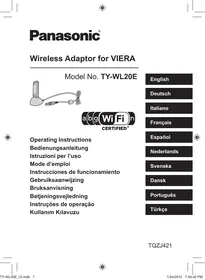


| Product Type | Wireless Adapter for TV |
| Brand | Panasonic |
| Model | TY-WL20E |
| Compatibility | Compatible VIERA TVs (from 2012) |
| Wireless Standards | IEEE 802.11 a/b/g/n |
| Frequency Bands | 2.4 GHz and 5 GHz |
| Security | WPA2-PSK (TKIP/AES), WPA-PSK (TKIP/AES), WEP (64/128-bit) |
| Power Supply | 5 V DC via USB, 370 mA |
| Power Consumption | Max. 2.5 W |
| Dimensions (W × H × D) | 30 mm × 11 mm × 90 mm |
| Weight | Approx. 23 g |
| Supplied Accessories | USB Extension Cable (K2KYYYY00150) |
| Operating Temperature | Avoid high temperatures and direct sunlight |
| Usage | Indoor only |
| Certifications | Wi-Fi CERTIFIED, CE |
| Countries of Use (EU) | Andorra, Austria, Belgium, Bulgaria, Cyprus, Czech Republic, Denmark, Estonia, Finland, France, Germany, Greece, Hungary, Ireland, Italy, Iceland, Latvia, Liechtenstein, Lithuania, Luxembourg, Malta, Monaco, Netherlands, Norway, Poland, Portugal, Romania, Slovakia, Slovenia, Spain, Sweden, Switzerland, Turkey, United Kingdom |
| Usage Precautions | Do not bend, expose to water, disassemble or modify |
Frequently Asked Questions - TY-WL20E PANASONIC
User questions about TY-WL20E PANASONIC
0 question about this device. Answer the ones you know or ask your own.
Ask a new question about this device
Download the instructions for your TV Accessories in PDF format for free! Find your manual TY-WL20E - PANASONIC and take your electronic device back in hand. On this page are published all the documents necessary for the use of your device. TY-WL20E by PANASONIC.
USER MANUAL TY-WL20E PANASONIC
Wireless Adaptor for VIERA
Model No. TY-WL20E

CERTIFIED®
Operating Instructions
Bedienungsanleitung
Thank you for purchasing this product.
For optimum performance and safety, please read these instructions carefully.
Before connecting, operating or adjusting this product, please read the instructions completely.
Please keep this manual for future reference.
This Wireless Adaptor for VIERA is intended only for use with Panasonic wireless LAN-compatible televisions, which are scheduled to go on sale from 2012.
- For how to connect or use this Wireless Adaptor for VIERA
Please refer to the respective operating instructions.
- For information on TV models confirmed for use with this Wireless Adaptor for VIERA
Please refer to the Panasonic website.
http://panasonic.jp/support/global/cs/
(This site is in English only.)
Precautions
The following limits are in place regarding the usage of this device. You must be aware of these limits before using this device.
Panasonic will in no way be responsible for any incidental damage which may arise due to a failure to obey these limits, or to any condition of use or disuse of this device.
- Do not use this device to connect to any wireless network for which you do not have usage rights.
During automatic searches in a wireless network environment, wireless networks (SSID*) for which you do not have usage rights may be displayed; however, using these networks may be regarded as illegal access.
* An SSID (Service Set IDentification) is a name used by wireless LAN to identify a particular network. Transmission is possible if the SSID matches for both devices. - Data transmitted and received over radio waves may be intercepted and monitored.
- If you have an 802.11n (compatible with 2.4 GHz and 5 GHz) wireless broadband router (access point), we recommend using it at 5 GHz.
- Configure the appropriate security settings (encryption settings). For details, see the instructions of your access point.
To Prevent Malfunctions
This device contains precision electronic components.
Use the device correctly while being careful of the following.
- Avoid using in high temperatures or direct sunlight.
- Do not bend or expose to strong impacts.
- Do not expose to water.
- Do not disassemble or modify.
- Do not connect to devices other than supported devices.
During Operation
Parts of the wireless adaptor body may become hot.
- The temperature of the plastic case may rise, but this will not affect performance or quality.
When this unit is not recognized
Messages such as "No Adaptor" or "Device Error" is displayed.
- Check if this unit is inserted fully and securely.
- Try removing this unit once, and inserting it again.
If it does not get recognized even after performing the above, consult the dealer where you purchased this unit.
Specifications
| Power supply | DC 5 V (USB powered) 370 mA |
| Power consumption | Max 2.5 W |
| Dimensions (W×H×D) | 30 mm (W) × 11 mm (H) × 90 mm (D) |
| Mass | Approx. 23 g |
| Standard Compliance | IEEE802.11a/b/g/n |
| Security | WPA2-PSK (TKIP/AES)WPA-PSK (TKIP/AES)WEP (64 bit / 128 bit) |
Accessory
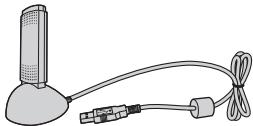
(Product numbers correct as of December 2011. These may be subject to change.) 1 USB extension cable (K2KYYYY00150)
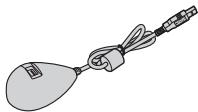
- Always use this cable when connecting a TV.
- Do not use any other USB extension cables except the supplied one.
The Wi-Fi CERTIFIED Logo is a certification mark of the Wi-Fi Alliance.
Information on Disposal for Users of Waste Electrical & Electronic Equipment (private households)

This symbol on the products and/or accompanying documents means that used electrical and electronic products should not be mixed with general household waste.
For proper treatment, recovery and recycling, please take these products to designated collection points, where they will be accepted on a free of charge basis. Alternatively, in some countries you may be able to return your products to your local retailer upon the purchase of an equivalent new product.
Disposing of this product correctly will help to save valuable resources and prevent any potential negative effects on human health and the environment which could otherwise arise from inappropriate waste handling. Please contact your local authority for further details of your nearest designated collection point.
Penalties may be applicable for incorrect disposal of this waste, in accordance with national legislation.
For business users in the European Union
If you wish to discard electrical and electronic equipment, please contact your dealer or supplier for further information.
Information on Disposal in other Countries outside the European Union
This symbol is only valid in the European Union.
If you wish to discard this product, please contact your local authorities or dealer and ask for the correct method of disposal.
For European Countries
CE!
Declaration of Conformity (DoC)
Hereby, “Panasonic Corporation” declares that this product is in compliance with the essential requirements and other relevant provisions of Directive 1999/5/EC.
Customers can download a copy of the original DoC to our R&TTE products from our DoC server:
http://www.doc.panasonic.de
Authorized Representative:
Panasonic Testing Centre
Panasonic Marketing Europe GmbH
Winsbergring 15, 22525 Hamburg, Germany
This product is intended to be used in the following countries.
Andorra, Austria, Belgium, Bulgaria, Cyprus, Czech Republic, Denmark, Estonia, Finland, France, Germany, Greece, Hungary, Ireland, Italy, Iceland, Latvia, Liechtenstein, Lithuania, Luxembourg, Malta, Monaco, Netherlands, Norway, Poland, Portugal, Romania, Slovakia, Slovenia, Spain, Sweden, Switzerland, Turkey, United Kingdom
This product is intended for general consumer. (Category 3)
The WLAN feature of this product shall exclusively be used inside buildings.
This product on purpose to connect to access point of 2.4 GHz or 5 GHz WLAN.
DEUTSCH
Sehr geehrter Kunde
Panasonic Testing Centre
Panasonic Marketing Europe GmbH
Panasonic Testing Centre
Panasonic Marketing Europe GmbH
Winsbergring 15, 22525 Hamburg, Germany

Panasonic Testing Centre
Panasonic Marketing Europe GmbH
Winsbergring 15, 22525 Hamburg, Allemagne
Panasonic Testing Centre
Panasonic Marketing Europe GmbH
Panasonic Testing Centre
Panasonic Marketing Europe GmbH
Panasonic Testing Centre
Panasonic Marketing Europe GmbH
Winsbergring 15, 22525 Hamburg, Tyskland
På Panasonics web-sted.
http://panasonic.jp/support/global/cs
Panasonic Testing Centre
Panasonic Marketing Europe GmbH
Winsbergring 15, 22525 Hamburg, Tyskland
Modelo: N5HBZ0000057
3334-10-1110
Acessório
Panasonic Testing Centre
Panasonic Marketing Europe GmbH
Winsbergring 15, 22525 Hamburg, Alemanha
Panasonic Testing Centre
Panasonic Marketing Europe GmbH
Winsbergring 15, 22525 Hamburg, Almanya
Pursuant to the directive 2004/108/EC, article 9(2)
Panasonic Testing Centre
Panasonic Marketing Europe GmbH
Winsbergring 15, 22525 Hamburg, Germany
- WIRELESS ADAPTOR FOR VIERA
- THIS WIRELESS ADAPTOR FOR VIERA IS INTENDED ONLY FOR USE WITH PANASONIC WIRELESS LAN-COMPATIBLE TELEVISIONS, WHICH ARE SCHEDULED TO GO ON SALE FROM
- PRECAUTIONS
- TO PREVENT MALFUNCTIONS
- DURING OPERATION
- WHEN THIS UNIT IS NOT RECOGNIZED
- ACCESSORY
- INFORMATION ON DISPOSAL FOR USERS OF WASTE ELECTRICAL & ELECTRONIC EQUIPMENT (PRIVATE HOUSEHOLDS)
- FOR BUSINESS USERS IN THE EUROPEAN UNION
- INFORMATION ON DISPOSAL IN OTHER COUNTRIES OUTSIDE THE EUROPEAN UNION
- FOR EUROPEAN COUNTRIES
- CE
- DECLARATION OF CONFORMITY (DOC)
- DEUTSCH
- SEHR GEEHRTER KUNDE
- ACESSÓRIO
Brand : PANASONIC
Model : TY-WL20E
Category : TV Accessories