 EasyManual
TY-CC20W - Camcorder PANASONIC - Free user manual and instructions
Find the device manual for free TY-CC20W PANASONIC in PDF.


User questions about TY-CC20W PANASONIC
0 question about this device. Answer the ones you know or ask your own.
Ask a new question about this device
Download the instructions for your Camcorder in PDF format for free! Find your manual TY-CC20W - PANASONIC and take your electronic device back in hand. On this page are published all the documents necessary for the use of your device. TY-CC20W by PANASONIC.
USER MANUAL TY-CC20W PANASONIC
Operating Instructions
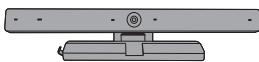
Communication Camera
Model No.
TY-CC20W
ENGLISH
日本語
繁體中文
DANSK
NEDERLANDS
FRANÇAIS
DEUTSCH
ITALIANO
KA3AK
PORTUGUES
PYCCKN
ESPANOL
SVENSKA
TÜRKÖCE
YKPAHcBA
TIENG VIET
GUARANTEE
TAPAHNTNHBI TALOH
Thank you for purchasing a Panasonic product.
- Before operating this product, please read the instructions carefully, and save this manual for future use.
-
Before using this product, be sure to read "Safety Precautions" and "Handling Precautions" (12 pages 2 - 3).
-
This product is used to make video calls and audio calls via the Internet through a Panasonic high-definition television that is equipped with USB ports*.
The television needs to be connected to the Internet using a broadband connection. - Some television models does not support this product. For details on the television models that support this product, see the Panasonic web site. http://panasonic.jp/support/global/cs/tv/compatibility/usb/index.html
Safety Precautions
Warning
Disassembly
- Do not disassemble or modify this camera.
Doing so may cause fire or electric shock.
Caution
Drop Prevention
Make sure that the camera is installed securely.
The camera may cause injury if it falls from its installation location.
Do not wet
Always keep the camera in a cool, dry place.
Failure to do so may cause fire or electric shock.
Handling Precautions
- Do not touch the camera lens section with your hand. Doing so may cause the lens to become dirty, which may cause the image to become blurred.
- Do not unplug the USB cable during use. Doing so may cause the camera or television to stop working correctly. In this case, unplug and plug the mains lead of the television from the mains socket once, then reconnect the camera USB cable, and switch the television power on again.
- Do not pull the USB cable excessively.
Doing so may damage the camera.
■ Do not drop, strike, or shake the camera.
Doing so may damage the camera.
- Do not store or use this camera in high temperature areas or near strong magnetic fields.
Doing so may cause damage, deformation, or malfunctions of the camera.
- Do not use this camera in dusty, steamy, or smokey locations, or where it may be splashed with water or liquids.
Doing so may damage the camera.
Do not bend the stand section.
Doing so may damage the camera.
FCC STATEMENT
This equipment has been tested and found to comply with the limits for a Class B digital device, pursuant to Part 15 of the FCC Rules. These limits are designed to provide reasonable protection against harmful interference in a residential installation. This equipment generates, uses and can radiate radio frequency energy and, if not installed and used in accordance with the instructions, may cause harmful interference to radio communications. However, there is no guarantee that interference will not occur in a particular installation. If this equipment does cause harmful interference to radio or television reception, which can be determined by turning the equipment off and on, the user is encouraged to try to correct the interference by one or more of the following measures:
- Reorient or relocate the receiving antenna.
- Increase the separation between the equipment and receiver.
- Consult the Panasonic Service Center or an experienced radio/TV technician for help.
FCC Caution:
To assure continued compliance, follow the attached installation instructions and use only shielded USB interface cable when connecting to computer or TV. Any changes or modifications not expressly approved by Panasonic Corp. of North America could void the user's authority to operate this device.
FCC Declaration of Conformity
Models: TY-CC20W
Responsible Party: Panasonic Corporation of North America One Panasonic Way, Secaucus, NJ 07094
Contact Source: Panasonic Consumer Marketing Company of North America 1-877-95-VIERA (958-4372)
email: consumerproducts@panasonic.com
This device complies with Part 15 of the FCC Rules. Operation is subject to the following two conditions: (1) This device may not cause harmful interference, and (2) this device must accept any interference received, including interference that may cause undesired operation.
CANADIAN NOTICE:
For Model TY-CC20W
This Class B digital apparatus complies with Canadian ICES-003.
Installation
Names and Functions of Parts
Camera Front View
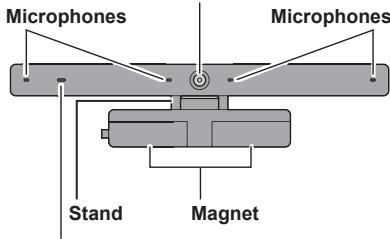
Camera Lens
Tally Lamp
Lights red while the camera or microphone is active.
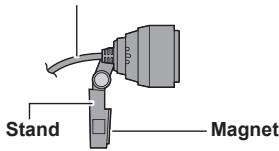
Camera Side View
USB Cable
Approx. 1.5 m (Approx. 4'11")
■ When installing the camera onto the television
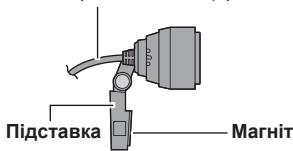
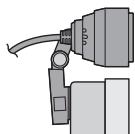
Attach magnets on the camera stand to the top of the rear of the TV. If the rear of the TV doesn't made from metal, please post the camera stand with adhesive tapes.
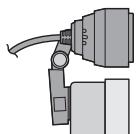
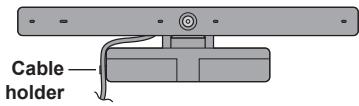

(Example installation at centre of display panel)
Top of Display Panel
When placing the camera on a table surface etc.
Place the camera on a flat surface in front of the television, at approximately face height.
NOTE
- If the camera is placed near to the television speakers, a high-pitched noise known as "howling" may occur depending on the volume of the television. If howling occurs, lower the volume of the television speakers.
Connection
Connect the USB cable of the camera to the USB port on the television.
- Press the power button on the television to switch the television power off.
- Insert the USB cable of the camera into the USB port on the television.
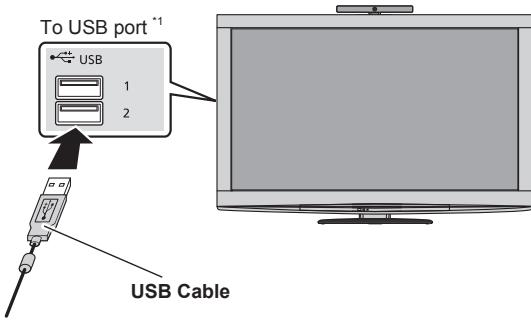
*1 For details of the connection to the USB port, see the television operating instructions.
Make sure the USB connector is facing the same direction as the USB port.
- Press the power button on the television to switch the television power on.
NOTE
- Always use the button on the television to switch the power ON and OFF.
- Do not use a USB hub to connect to the television. Always connect the camera USB connector directly to the television.
- You cannot connect this camera to a computer or other make of television for use.
Always connect this camera to a Panasonic television that is equipped with USB ports.
Using the Camera
The television needs to be connected to the Internet using a broadband connection.
- Perform the following operations using the television remote control. For more details on operations using the television remote control, see the television operating instructions.
- Display the "VIERA Connect" on the television screen.
- Select the content you want to use with the camera (eg: "SkypeTM" etc.), and press "OK".
For the following procedures, follow the on-screen instructions to register an account, send and receive video and audio calls, and adjust the camera etc.

No emergency calls with Skype.
Skype is not a replacement for your ordinary telephone and cannot be used for emergency calling.
NOTE
- Provided contents, procedures or screen displays are subject to change without notice.
Maintenance
Clean the camera using a soft, dry cloth.
Wiping the camera with a dusty cloth may scratch the camera.
Therefore, always shake off any dust and dirt etc. from the cloth before cleaning.
Do not use benzine, thinners, or wax etc. on the camera, as doing so may cause the paint to peel off.
Specifications
ENGLISH
| Power Supply | DC 5 V (USB powered) 500 mA | |
| Power consumption | Max. 0.5 W | |
| Dimensions | Width 180 mm (7.09") Height 47 mm (1.86") Depth 28 mm (1.11") | |
| Mass | Approx. 100 g (Approx. 0.22 lbs.) (including USB cable) | |
| Operating Temperature Range | 0 °C - 40 °C (32 °F - 104 °F) | |
| Lens | F/2.0 4P Lens; FOV (D) 56.8° (in HD mode) | |
| Microphone | 4 unidirectional microphones | |
| Sensor | 1/4 inch CMOS Sensor | |
| Resolution | 1280 × 720 | |
| Focus | Fixed focus (Approx. 60 cm - ∞) | |
| Output Image | Max. 1280 × 720 (HD) | |
| Output Format | H.264, YUV | |
| Max. Frame Rate | 30 fps | |
| Interface | USB 2.0 | |
Troubleshooting/Q&A
Check the followings first. If they do not solve the problem, please contact the place of purchase.
The camera does not operate.
Is the USB cable of the camera connected correctly to the USB port on the television?
page 6)
Press the button on the television to switch the television power off, connect the USB cable of the camera again.
- Did you start a service (such as Skype) that uses the communication camera? (v7 page 7)
When a service that supports the communication service is started and operated correctly, the camera operates automatically.
- Does your television model support the camera? (10 page 2)
The images shot with the camera are dark or grainy.
There is probably not enough light.
When using the camera, make the room bright.
The images shot with the camera are blurred.
The camera is probably too close.
Use while at least 60~cm away from the camera.
If the distance is less, the image may be blurred.
The image received from the other person looks like it has stopped.
Depending on the Internet connection environment, it may not be possible to obtain a communication speed appropriate for using the camera.
Enhance the connection environment, or try changing the time of day that you use the camera.
Limited Warranty
(for U.S.A. and Puerto Rico only)
ONLY FOR U.S.A. AND PUERTO RICO
Panasonic Accessory Limited Warranty
Panasonic Consumer Marketing Company of North America, Division of Panasonic Corporation of North America
One Panasonic Way, Secaucus, New Jersey 07094
Limited Warranty Coverage (For USA and Puerto Rico Only)
If your product does not work properly because of a defect in materials or workmanship, Panasonic Consumer Marketing Company of North America (referred to as "the warrantor") will, for the length of the period on the chart below, which starts with the date of original purchase ("warranty period"), at its option either (a) repair your product with new or refurbished parts, (b) replace it with a new or a refurbished equivalent value product, or (c) refund your purchase price. The decision to repair, replace or refund will be made by the warrantor.
| Product | Parts | Labor |
| Communication Camera | 90 (Ninety) Days | Not applicable |
During the "Parts" warranty period, there will be no charge for parts. This Limited Warranty excludes both parts and labor for non-rechargeable batteries, antennas, and cosmetic parts (cabinet). This warranty only applies to products purchased and serviced in U.S.A. or Puerto Rico. This warranty is extended only to the original purchaser of a new product which was not sold "as is".
Mail-In Service
For assistance in the U.S.A. and Puerto Rico in obtaining replacement, please ship the product prepaid to:
Panasonic Exchange Center
4900 George McVay Drive
Suite B
McAllen, TX 78503
panacare@us.panasonic.com
When shipping the unit, carefully pack, include all accessories, and send it prepaid, adequately insured and preferably in the original carton. If Lithium Ion batteries are shipped by air the package must be labeled "Contains Lithium Ion Battery (No lithium metal)". Damaged batteries are prohibited from shipment
by US Mail. Batteries must be securely packed in a manner to prevent short-circuiting and a package cannot contain more than 3 Lithium Ion batteries. Include a letter detailing the complaint, a return address and provide a daytime phone number where you can be reached. A valid registered receipt is required under the Limited Warranty.
IF REPAIR IS NEEDED DURING THE WARRANTY PERIOD, THE PURCHASER WILL BE REQUIRED TO FURNISH A SALES RECEIPT/PROOF OF PURCHASE INDICATING DATE OF PURCHASE, AMOUNT PAID AND PLACE OF PURCHASE. CUSTOMER WILL BE CHARGED FOR THE REPAIR OF ANY UNIT RECEIVED WITHOUT SUCH PROOF OF PURCHASE.
Limited Warranty Limits And Exclusions
This warranty ONLY COVERS failures due to defects in materials or workmanship, and DOES NOT COVER normal wear and tear or cosmetic damage. The warranty ALSO DOES NOT COVER damages which occurred in shipment, or failures which are caused by products not supplied by the warrantor, or failures which result from accidents, misuse, abuse, neglect, mishandling, misapplication, alteration, faulty installation, setup adjustments, misadjustment of consumer controls, improper maintenance, power line surge, lightning damage, modification, introduction of sand, humidity or liquids, commercial use such as hotel, office, restaurant, or other business or rental use of the product, or service by anyone other than a Factory Service Center or other Authorized Servicer, or damage that is attributable to acts of God.
THERE ARE NO EXPRESS WARRANTY EXCEPT AS LISTED UNDER "LIMITED WARRANTY COVERAGE".
THE WARRANTYOR IS NOT LIABLE FOR INCIDENTAL OR CONSEQUENTIAL DAMAGE RESULTING FROM THE USE OF THIS PRODUCT, OR ARISING OUT OF ANY BREACH OF THIS WARRANTY.
(As examples, this excludes damages for lost time, travel to and from the servicer, loss of or damage to media or images, data or other memory or recorded content. The items listed are not exclusive, but for illustration only.)
ALL EXPRESS AND IMPLIED WARRANTY, INCLUDING THE WARRANTY OF MERCHANTABILITY, ARE LIMITED TO THE PERIOD OF THE LIMITED WARRANTY.
Some states do not allow the exclusion or limitation of incidental or consequential damages, or limitations on how long an implied warranty lasts, so the exclusions may not apply to you.
This warranty gives you specific legal rights and you may also have other rights which vary from state to state. If a problem
with this product develops during or after the warranty period, you may contact your dealer or Service Center. If the problem is not handled to your satisfaction, then write to the warrantor's Consumer Affairs Department at the addresses listed for the warrantor.
PARTS AND SERVICE, WHICH ARE NOT COVERED BY THIS LIMITED WARRANTY, ARE YOUR RESPONSIBILITY.
Customer Services Directory (United States and Puerto Rico)
Obtain Product Information and Operating Assistance; locate your nearest Dealer or Service Center; purchase Parts and Accessories; or make Customer Service and Literature requests by visiting our Web Site at:
http://www.panasonic.com/help
or, contact us via the web at:
http://www.panasonic.com/contactinfo
You may also contact us directly at:
1-800-211-PANA (7262)
Monday-Friday 9am-9pm, Saturday-Sunday 10am-7pm EST
For hearing or speech impaired TTY users, TTY: 1-877-833-8855
Accessory Purchases (United States and Puerto Rico)
Purchase Parts, Accessories and Instruction Books online for all Panasonic Products by visiting our Web Site at: http://www.pstc. panasonic.com
Or, send your request by E-mail to: npcparts@us.panasonic.com
You may also contact us directly at:
1-800-332-5368 (Phone) 1-800-237-9080 (Fax Only)
(Monday-Friday 9am-9pm EST)
Panasonic Consumer Marketing Company of North America - National Parts Center
20421 84th Avenue South, Kent, WA 98032
(We accept Visa, MasterCard, Discover Card, American Express, and Personal Checks)
For hearing or speech impaired TTY users, TTY: 1-866-605-1277
As of January 2012
Limited Warranty (for Canada)
Panasonic Canada Inc.
5770 Ambler Drive, Mississauga, Ontario L4W 2T3
PANASONIC PRODUCT -LIMITED WARRANTY
EXCHANGE PROGRAM
Panasonic Canada Inc. warrants this product to be free from defects in material and workmanship under normal use and for a period as stated below from the date of original purchase agrees to, at its option either (a) repair your product with new or refurbished parts, (b) replace it with a new or a refurbished equivalent value product, or (c) refund your purchase price. The decision to repair, replace or refund will be made by Panasonic Canada Inc.
Accessories including rechargeable batteries One (1) year
This warranty is given only to the original purchaser, or the person for whom it was purchased as a gift, of a Panasonic brand product mentioned above sold by an authorized Panasonic dealer in Canada and purchased and used in Canada, which product was not sold "as is", and which product was delivered to you in new condition in the original packaging.
IN ORDER TO BE ELIGIBLE TO RECEIVE WARRANTY SERVICE HEREUNDER, A PURCHASE RECEIPT OR OTHER PROOF OF DATE OF ORIGINAL PURCHASE, SHOWING AMOUNT PAID AND PLACE OF PURCHASE IS REQUIRED
LIMITATIONS AND EXCLUSIONS
This warranty ONLY COVERS failures due to defects in materials or workmanship, and DOES NOT COVER normal wear and tear or cosmetic damage. The warranty ALSO DOES NOT COVER damages which occurred in shipment, or failures which are caused by products not supplied by Panasonic Canada Inc., or failures which result from accidents, misuse, abuse, neglect, mishandling, misapplication, alteration, faulty installation, setup adjustments, misadjustment of consumer controls, improper maintenance, power line surge, lightning damage, modification, introduction of sand, humidity or liquids, commercial use such as hotel, office, restaurant, or other business or rental use of the product, or service by anyone other than an Authorized Servicer, or damage that is attributable to acts of God.
Dry cell batteries are also excluded from coverage under this warranty.
THIS EXPRESS, LIMITED WARRANTY IS IN LIEU OF ALL OTHER WARRANTYES, EXPRESS OR IMPLIED, INCLUDING ANY IMPLIED WARRANTYES OF MERCHANTABILITY AND
FITNESS FOR A PARTICULAR PURPOSE. IN NO EVENT WILL PANASONIC CANADA INC. BE LIABLE FOR ANY SPECIAL, INDIRECT OR CONSEQUENTIAL DAMAGES RESULTING FROM THE USE OF THIS PRODUCT OR ARISING OUT OF ANY BREACH OF ANY EXPRESS OR IMPLIED WARRANTY. (As examples, this warranty excludes damages for lost time, travel to and from the Authorized Servicer, loss of or damage to media or images, data or other memory or recorded content. This list of items is not exhaustive, but for illustration only.)
In certain instances, some jurisdictions do not allow the exclusion or limitation of incidental or consequential damages, or the exclusion of implied warranties, so the above limitations and exclusions may not be applicable. This warranty gives you specific legal rights and you may have other rights which vary depending on your province or territory.
CONTACT INFORMATION
For product information and operation assistance, please contact: Our Customer Care Centre:
Telephone #: 1-800-561-5505
Fax#: (905) 238-2360
Email link: "Support contact us email" on
www.panasonic.ca
For defective product exchange within the warranty period, please contact the original dealer or our Customer Care Centre.
Warranty - Australia only
Panasonic Warranty
- The product is warranted for 12 months from the date of purchase. Subject to the conditions of this warranty Panasonic or its Authorised Service Centre will perform necessary service on the product without charge for parts or labour if, in the opinion of Panasonic, the product is found to be faulty within the warranty period.
- This warranty only applies to Panasonic products purchased in Australia and sold by Panasonic Australia or its Authorised Distributors or Dealers and only where the products are used and serviced within Australia or it's territories. Warranty cover only applies to service carried out by a Panasonic Authorised Service Centre and only if valid proof of purchase is presented when warranty service is requested.
-
This warranty only applies if the product has been installed and used in accordance with the manufacturer's recommendations (as noted in the operating instructions) under normal use and reasonable care (in the opinion of Panasonic). The warranty covers normal domestic use only and does not cover damage, malfunction or failure resulting from use of incorrect voltages, incorrect installation, accident, misuse, neglect, build-up of dirt or dust, abuse, maladjustment of customer controls, mains supply problems, thunderstorm activity, infestation by insects or vermin, tampering or repair by unauthorised persons (including unauthorised alterations), introduction of sand, humidity or liquids, commercial use such as hotel, office, restaurant, or other business or rental use of the product, exposure to abnormally corrosive conditions or any foreign object or matter having entered the product.
-
This warranty does not cover the following items unless the fault or defect existed at the time of purchase:
(a) Cabinet Part(s)
(b) Video or Audio Tapes
(c) SD cards or USB devices
(d) User replaceable Batteries
(e) DVD Video, Blu-ray, or Recordable Discs
(f) Video / Audio Heads from wear and tear in normal use
(g) Information stored on Hard Disk Drive, USB stick or SD card
(1) DTV reception issues caused by TV Aerial / Cableng / Wall socket(s) etc
- Some products may be supplied with Ethernet connection hardware. The warranty is limited on such products and will not cover
(a) Internet and or DLNA connection / setup related problems
(b) Access fees and or charges incurred for internet connection
(c) The use of incompatible software or software not specifically stipulated in the product operations manual; and
(d) Any indirect or consequential costs associated with the incorrect use or misuse of the hardware, its connection to the internet or any other device.
-
To claim warranty service, when required, you should:
-
Telephone Panasonic's Customer Care Centre on 132600 or visit our website referred to below and use the Service Centre Locator for the name/address of the nearest Authorised Service Centre.
-
Send or take the product to a Panasonic Authorised Service Centre together with your proof of purchase receipt as a proof of purchase date. Please note that freight and insurance to and / or from your nearest Authorised Service Centre must be arranged by you.
Note that home or pick-up/delivery service is available for the following products in the major metropolitan areas of Australia or the normal operating areas of the nearest Authorised Service Centres: - Plasma/LCD televisions / displays (screen size greater than 103~cm ) -
The warranties hereby conferred do not extend to, and exclude, any costs associated with the installation, de-installation or re-installation of a product, including costs related to the mounting, de-mounting or remounting of any screen, (and any other ancillary activities), delivery, handling, freightiing, transportation or insurance of the product or any part thereof or replacement of and do not extend to, and exclude, any damage or loss occurring by reason of, during, associated with, or related to such installation, de-installation, re-installation or transit. Panasonic Authorised Service Centres are located in major metropolitan areas and most regional centres of Australia, however, coverage will vary dependant on product. For advice on exact Authorised Service Centre locations for your product, please telephone our Customer Care Centre on 132600 or visit our website and use the Service Centre Locator.
In addition to your rights under this warranty, Panasonic products come with consumer guarantees that cannot be excluded under the Australian Consumer Law. If there is a major failure with the product, you can reject the product and elect to have a refund or to have the product replaced or if you wish you may elect to keep the goods and be compensated for the drop in value of the goods. You are also entitled to have the product repaired or replaced if the product fails to be of acceptable quality and the failure does not amount to a major failure.
If there is a major failure in regard to the product which cannot be remedied then you must notify us within a reasonable period by contacting the Panasonic Customer Care Centre. If the failure in the product is not a major failure then Panasonic may choose to repair or replace the product and will do so in a reasonable period of time from receiving notice from you.
THIS WARRANTY CARD AND THE PURCHASE DOCKET (OR SIMILAR PROOF OF PURCHASE) SHOULD BE RETAINED BY THE CUSTOMER AT ALL TIMES
If you require assistance regarding warranty conditions or any other enquiries, please visit the
Panasonic Australia website www.panasonic.com.au or contact by phone on 132 600
If phoning in, please ensure you have your operating instructions available.
Panasonic Australia Pty. Limited
ACN 001 592 187 ABN 83 001 592 187
1 Innovation Road, Macquarie Park NSW 2113
PRO-031-F11 Issue: 4.0 01-01-2011
WARRANTY - New Zealand only
WE WARRANTY that the Panasonic Product that you have purchased is free from defects in material and workmanship under normal home use and service. Accordingly, we undertake to repair, or at our option, replace without cost to the owner, either for material or labour, any part which within 12 months from the date of sale is found to be defective, provided that the appliance has been used for domestic purposes only and in accordance with the instructions given in the Instruction Book and not been subjected to misuse, neglect or faulty installation, dismantled, repaired or serviced by any other than an authorised Panasonic New Zealand Dealer or Panasonic New Zealand Authorised Service Centre.
NOTE
Before reporting a fault, please ensure that you read the item "Troubleshooting" in the information section of your Panasonic Instruction Book.
It is important to retain your proof of purchase as this will be required by the serviceman or retailer as proof of purchase date, should service be required.
In the event of service being required, contact your Panasonic New Zealand retailer or Panasonic New Zealand Authorised Service Centre.
IMPORTANT
Any request for warranty service must be through an Authorised Panasonic New Zealand Service Centre who during the period of the warranty, undertakes to make any necessary adjustment and fit any replacement part supplied by the manufacturer, during normal working hours, or alternatively will arrange for such service to be provided by some other Panasonic New Zealand Authorised Service Centre.
NEW ZEALAND
Distributed in New Zealand by Panasonic New Zealand Limited
350 Te Irirangi Drive East Tamaki, Private Bag 14911, Panmure Auckland
Tel. 09 272 0100
Customer Care Center
Email: Customerservice@nz.panasonic.com
www.panasonic.co.nz
Information on Disposal for Users of Waste Electrical & Electronic Equipment (private households)

This symbol on the products and/or accompanying documents means that used electrical and electronic products should not be mixed with general household waste. Please dispose of this item only in designated national waste electronic collection schemes, and not in the ordinary dust bin.
For business users in the European Union
If you wish to discard electrical and electronic equipment, please contact your dealer or supplier for further information.
Information on Disposal in other Countries outside the European Union
This symbol is only valid in the European Union.
If you wish to discard this product, please contact your local authorities or dealer and ask for the correct method of disposal.
[India Only]
![PANASONIC TY-CC20W - [India Only] - 1](/content/2019/08/105254/images/3520efa608151254d24d194ab85702e070798c9a59b5c21c9c2d6333326a19af.jpg)
For the purpose of recycling to facilitate effective utilization of resources, please return this product to a nearby authorized collection center, registered dismantler or recycler, or Panasonic service center when disposing of this product.
Please see the Panasonic website for further information on collection centers, etc.
http://www.panasonic.co.in/wps/portal/home
Environment care information for users in China

This symbol is only valid in China.
Pursuant to the directive 2004/108/EC, article 9(2)
Panasonic Testing Centre
Panasonic Service Europe, a division of Panasonic Marketing
Europe GmbH
Winsberging 15, 22525 Hamburg, F.R. Germany
取極説明書(日本語)
比工兰 ヨミ�二ケーニンカメラ
保証書付記
品番 TY-CC20W
Panasonic Testing Centre
Panasonic Service Europe, en afdeling af Panasonic Marketing Europe GmbH
Winsberging 15, 22525 Hamburg, F.R. Tyskland
Panasonic Corporation
Web Site : http://panasonic.net/
© Panasonic Corporation 2012
Panasonic Testing Centre
© Panasonic Corporation 2012
Mode d'emploi
Panasonic Canada Inc.
5770, Ambler Drive, Mississauga (Ontario) L4W 2T3
PRODUIT PANASONIC - GARANTIE LIMITÉE
PROGRAMME DE REMPLACEMENT
Panasonic Testing Centre
Panasonic Service Europe, une division de Panasonic Marketing Europe GmbH
Winsberging 15, 22525 Hamburg, F.R. Allemagne
Panasonic Corporation
Web Site : http://panasonic.net/
© Panasonic Corporation 2012
Bedienungsanleitung
Panasonic Testing Centre
© Panasonic Corporation 2012
Istruzioni d'uso
Communication Camera
Modello n.
TY-CC20W
Panasonic Testing Centre
Panasonic Service Europe, una divisione di Panasonic Marketing Europe GmbH
Winsberging 15, 22525 Hamburg, F.R. Germania
Panasonic Corporation
Web Site: http://panasonic.net/
© Panasonic Corporation 2012
Xymbic ICTey Hxckaybifbl
Байларыкамерасы
MoideJIb Hemipi
TY-CC20W
OcbI Panasonic eHimc catbIn aJfahbIhbl3fa aJfbc 6iDipem3.
MbHa naIanaHny HcyKaynapbIH MyKnT OKbIN sbfBIn, 6epilreH eHimDi dpybc naiDaIaHaTBiHbIb3Fa Ke3 XeTKi3iH3.
- BybIMbI naJanaHbAc 6ypbH "Kayinc3iK typaIb caKtBk waapanapbI"KonDany tpyanbI caKtbIK waapanapbI OKyfayMbITnAb3 (186etTep 1 - 2).
- Byn eHIM nHTepHeT apKbIbI USB TePMHaIaIapbIeMeh Xa6DbIcTaNraH Panasonic aIKbIHdbIbI JxOFapbl TeJeINdApMeH 6eHne KOHbIPaynap MeH dIb6bICTbIK KOHbIPaynap COfy yuH naJaIaHaBbIaNabI.*
-
TeteiДapIbI INThepHETKe KeH ayKbIMdbI XaNfay yNrici apKbJIbI Kocy kepeK.
-
Kei6ip TeJeDiap yIrrinepi 6yI eHIMdi KOnJaMaIdbI. ByI eHIMdi KOnJaIbTH TeJeDiap yIrrinepi TypaIbMIJIeMeTTepDi Panasonic 6actanKbl 6betHeH KapaHbI3.
http://panasonic.jp/support/global/cs/tv/compatibility/usb/index.html
Kayinci3dk Typalbl CaKtbik shapaapanpbI
EckepTy
Башекту
BykamepaHb6eJWeKTeMeHi3 HemeC e3repTneH3.
MHyI caKaTamay candapbIH an ePTTIH sbIFybl Hemece 3JIeKtp TOrbIH COFybl MymKiH.
A6aɪŋaɪbɪʒ
Kynatnay
KamepaHbIHMbIKTbOpHaTbIHaBbHaKe3XeTKi3IH3. KaMepa opHaTbIraH KepiHeN Kynan Ketce, aadMaIbJ kapaKaTTaybMyMKIIh.
Cy turi36ey
KamepaHbI epaaBIM cAikBih, KpyraK xepde yctahbi3. Oby opbyHdAmay caIapbHaH ept 1yfeHybI HEmece 3nEKT TOrblHc OFybl MyMKIH.
KoПдану ТypальыcaКъКшаралары
Kamepa liH3acbHa KOBbIbI3dbI Turi36eH3. MybIcakTamay IIN3aHbIn kipJeYHe ce6en 6oIbIn, cpeTITI 6yNbHbIp erin Kepcetedi.
Палдагук КЗИДDE USB кабелин дыратпьз.
Орьимдану салдарны Дурс ic teten Tурган камер hemece
Teelenдар xумьсы tcoktan kanybl mykIMiK.
Mндай karдада Тeteлдарды Коту Тумecimeh Teelenдарды
eupin, камерын USB кабелин каятжалгьз, cocbн Тeteлдарды
kaитадан Kocblын.
USB Ka6eJIiN KaTTbI TaPTnAbHbI3. MyHbOpbIHdAmayDAn Kamepa 3aKbIMdaJyby MyMkiH.
KamaphaBkyKaIpyaHb3, yPmaHb3 Hemece waiKaMaHb3. MyHb oOpHaMauyDan KamaEaKbIMdAynb MyMKH.
■Бун камераны Когары Temпаразы Лжрелд
Hemece Кутл Магнг Осіпетepi Хаьнда садтамьз
Же пайданбал.
Мын орьдамay candapbyан камераны Зakblдanyы, сьiptкы
niiHINI Бээрүйс римеся дүрсICTЕмі YMYKIN.
KamepaHbI lac, 6y Hemece TtTH XepJIpeDe Hemece cy He cybIKtbIk Ishaibpaybl MyMKIN hepe NaIaIaNb6aHbI3. Mybl obpIbIaMaydAn Kamepa 3akIMaMbIy MyMKIN.
Heri 6eJirin MaBictpMaHbI3. Myhbl opblamaydah kamepa 3akbIMdaJybl MyMkiH.
Ophaty
ByT TaHbTa TeK KbITaIra apHaJIFaH.
AkaayIbIKTapdbI Ty3eTy/CypaK-kaayan
AaIbImeKeIeNcIepiTeKcepiH3.ErepOnapdaakayIbIKtbo JKOIMaca,EHIIMDi catbIn aIraHxpeRe xabapnacblbI3.
Kamepa xymblic iTeMeiDi.
KamepaBbIh USB Ka6eni TeJeiNapDbIh USB nopTbHa dpybc KocblfAn 6a? (56 beTep 4) TeJeiNap KyatbIe ewipy yuHIn TeJeiNapdaFbI TyMeHi 6acbl, KamepaBbIh USB Ka6eni KaTaN KaTc KocblbI3.
- Baɪnʌhɪbɪc Kæmepaʊbɪn Naɪdʌnʌhɑt bɪŋ Kɒɪ3MeTɪ (Mbɪcaɪbɪ, Skye) iːke Kɔctbɪhɪbɪ 3 6a? (EɒsTeP 5) Eːrep 8aɪnʌhɪc Kɒɪ3MeɪɪN KOɪdaɪTbɪH Kɒɪ3MeT ᶅpɪbɪc iːkɛ Kɔsɪbɪc JəHe Naiʌdʌnʌhɪbɪnca, Kæmepa aBtOMaTbɪ TYPɒe XʌMɪbɪc ICTeɪni.
TeIeIaIapbIy yIrrici kAmepaHbI KOndai Ma? (6eTep 1)
KamepaHbIH KEMerImeH TycipinreH cypetTep KyHript Hemece Teric emec.
JXapbIK XeTKiJIkci3 6onybl MymKiH.
KamepaHbI naIdaIaNHaN Ke3de 6eIme XapbIK 6oNybl Tnic.
KamepaHbIH KEMerimeH TycipinreH cypeTtep aHbIK emc.
- PaindaHanyuishiKamepara deinHri apakaawbIKtbK KeminHe 60cm6onyblTnic.
ErepapaKaawbIKtbIK OdaH a3 60nca, cypet 6yIbIHfbip 60nybl MymkH.
Backa Kicideh anbIHfah cypet TOkTan KaIraH cnAaKtbl KepiHei.
- INTepHeTKe KocbIy XaFdaIaNapbHa6aIIaHbICTb, KaMepaHbI naIdIaNHyra JXapaMdb6aIIaHbIC KbIINdAMdbIFb 6oNMaybIMykH.
Baɪnʌhɪc Xaɪdʌnʌpʌbɪn Xaɪk cap Tbɪhɪs Hemece Kʌmepaʌbɪ nai dʌlaɪny yaKbɪtɪh əzreptɪn Kæpɪhɪz.
DaibIHaybIMeKeHkaBbl:
Ocaka, Jkanonna
Ynri:
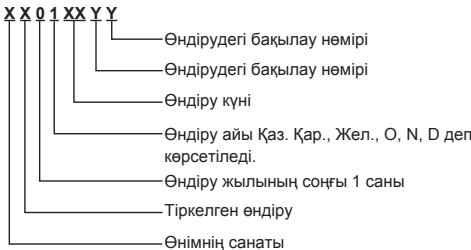
Panasonic aknapaTbIK opTaIbIfbl Ka3akCTah MeH OpTa A3nJaan KOhbpay wany yuHi. IЯ 3BOHkoB u3 Ka3axctana n LcHTpaIbHoi A3n: +7 (727) 298-09-09
Panasonic Corporation
Web Site : http://panasonic.net/ © Panasonic Corporation 2012
No. do Modelo TY-CC20W
IaHHeK KAmepbIC MeCTa ycTaHOBKn MOXKeT PnIBeCTN K TpaBMe.
He noBepraIte Bo3deIcTBIO BlaIaI
Bcerda depknte kamepy B cyxom n poxnlaHOM MeCTe. Hec6bnDeneHHaONHO TpeboAHNMO KOTBcTNI KOB30pAHOH NINI NopakhenIO 3NEKTPNHeCKM TOKOM.
Mepbl npeodoctopoXHocTn pni obpauneHnC kamepoi
He kacaTeCb pyKoI o6BeKTHBa KaMepbl.
HecobnOeHne HAnHO Tpe6oBaHNa MOKET npBcCTN 3AqrpaHHeHNObEeTb, YoMOKET cTaB pInuHNo HeueTKoCTN NIObpaXeHn.
Bo BpemnncnoJb3OBaHHne H3BJeKaIe USB-ka6eJIb.
Hec6oIIOENHE DaHOHO Tpe6OBAMOXET PnBECTK HApuyEHHIO HOPMAHBOH PA@bToI KAMEbI INI TeteBN3Opa.
B 3TOM cnyae OTKIOHHTe NITAHNE TELEBN3Opa C nOMOUBK HONIKI NITAHNA HAI TELEBN3Ope, NOBTOPO HNOCoEOHNITeUSB-Ka6ebb KaMepb, a NOTOM CHOBA BKNHOHTe NITAHNE TELEBN3Opa.
He TAHNTe CNJbHO 3a USB-ka6eJIb.
Hecobnienhe daHHoro TpeboaHm MOKET npVBecTu K nobpeckdeHIO KaMepbl.
He pohnyTe, He ydaPnTe n He Tpcnte kamepy.
Hec6bIIOJeHne DAHHORO Tpe6OBaHnA MOKET pINBECTN K NOPBEXDEHIO KAMEPs.
He xpaHHTe Hne IcNoIb3yIte DaHHyO KaMepy B MeCTax NOBbIeHHO TempePaTybI NnB6N3N CnJIbHbIX MarHHTbX IONJE.
Heco6noDene HAnHOro TpeBOBaHNO MOKET pNOBPEKDeHNIO, DeOpMOUHIN HnEICNpABHOCTN KAMpeB.
He nCnoJIb3yIte DaHHyO KaMepy B MecTea CKoJIeHnI bIIn,napa HnN DbIma,aTakKe TaM,ΓeHa KaMepy MOrYT nonactb 6bpIbnB OBDbl NnDpyrO XKnKoCTN.
Hecobnienhe daHHoro TpeboaHm MOKET npVBecTu K nobpeckdeHIO KaMepbl.
He crn6aIte noCTabKy.
Hec6bIIOJeHne DAHHORO Tpe6OBaHnA MOKET pINBECTN K NOPBEXDEHIO KAMEPs.
YctaHOBka
Ha3BaHnI nФункци KOMNoHEHTOB
BnKamepbI cpepei
06bekTNB kamepbI
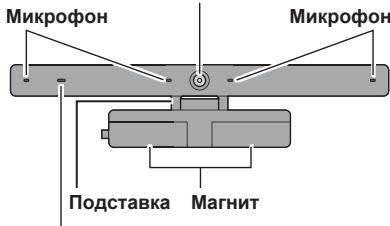
Jamna cbeMkn
Tognt KpaChbIM BO BpeMa pa60tI KaMepbl NmMnKpOfoHa.
Bud kamepbic60ky
USB-ka6eJb
Pn6n3.1,5M (np6n3.4'11")
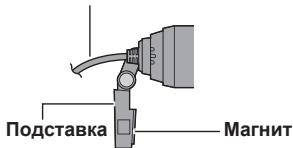
Skype He npedha3naeH dIy BbI3OBA 3KCTpeHHoN NOMOUI.
Skype HeЯBIAEcTc 3aMeHOn ObIyHOrO TelePOna, Iero HeJIb3ra NcONlb3OBaTb DnI BbI3OBA 3KCTpeHHoN NOMOuN.
ПОНМЕЧАНЕ
· PnpoctabLeHnoe cOepxMIOe, npocedyPbI nKpAnHbIe N3O6paKeHnMoYr 6bIb N3MeHeNb 6e3 npdeBaPntBnHOro yBEdOMNeHry.
TexHnueckoe 6cIyXnBaHne
BbItnpaIteKaMepycNOMOuMbMOrKoCyXoCaJIΦeTKn.
IpoTnpaHne KaMepbI nbIbHO nCafpeTKo MOKe T npBecTu K noaBHeHIO capanIH Ha KaMepe.
NIO3OMY nepeI npOTpAHmE KAMeBpI BCerIaCTprXINBaTte C canPeTKn PbIb, rPbAh T. N.
He npimehnre K kamepe 6e3nH, pa36abnteI INI BOCK, nockoJIbky 3TO MOKeT npBecTe N OTCJANBaHIMO KpaCNI.
Texhnueckne xapaKtepncTnkn
N3o6paXeHnC kamepbIyABJHOtCpa3MbITbIM.
Kamepa,Должно 6bITb,pacnoIoxKeHa CnIshkom 6nI3ko. Kamepa doJIXHa haoOnTbCra Ha pacCToHnH MeHee 60 cm.
Pn MeHbIeM pacCToHn n3O6paXeHne MoKet 6bITb pa3MbITbIM.
N3o6paXeHne, nOlyuYehHoe OT cObeSeHNka, BbIgrrnT 3aCTbIBWIM.
B3aBnCmOCTOn OT napameTPOB INHTepHcTeCoEINHeHn,CKOpOCTb CBra3N MoXeT 6blTb HeoctatoHou nIyNCNoJIb3OBaHn KaMepbI.
YBEnHbTe npaMeTpbl NpKJIuChENn JIbO nonpoByTe IcNoJIb3ObaTb KaMepy B DpyrOe BpeMa cyTOK.
Информацья обидени
Cpok cnjx6bl
1(OdH)roD
PnoDyKnIa He noDneKtI oBraTeIbHOMy noDtbepXeHNIO COOTBeTCTBIA (ToIbKO dIa PoCcn).
CdeJanaHO B Kntae
PpOn3BovnteJIb:
Panasonic Corporation
PanaconHcKopnp3iHn
Aqpnc npOn3BountTeia:
Ocaka, JnoHn
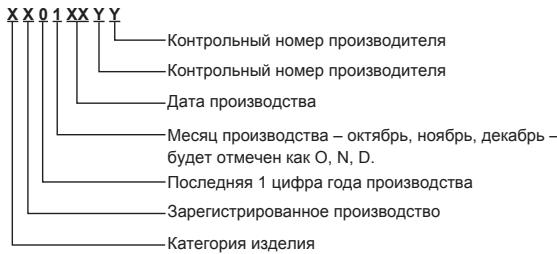
Ppimep:
HnDopMaunHbIeHTp Panasonic
ДЯЗBOHKOИзМOCKВы: +7 (495) 725-05-65
BecnPaThbI 3BOHOK no PocCm:8-800-200-21-00
Panasonic Testing Centre
Panasonic Service Europe, una division de Panasonic Marketing Europe GmbH
Winsberging 15, 22525 Hamburg, Alemania
Panasonic Corporation
Web Site: http://panasonic.net/
© Panasonic Corporation 2012
Bruksanvisning
Panasonic Testing Centre
Panasonic Service Europe, en division av Panasonic Marketing Europe GmbH
Winsberging 15, 22525 Hamburg, Tyskland
Panasonic Corporation
Web Site : http://panasonic.net/
© Panasonic Corporation 2012
Kameray dusurmayin, carpmayin veya sallamayin.
Yaklask 1,5m (Yaklask 4'11")
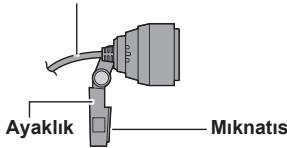
Panasonic Testing Centre
Panasonic Service Europe, Panasonic Marketing Europe GmbH grubu sirketi
Winsberging 15, 22525 Hamburg, F.R. Germany
Panasonic Corporation
Web Site: http://panasonic.net/
© Panasonic Corporation 2012
Ihctpykci3 ekcnlyaataii
Kamepa Д�� Вideo3B'я3ky
MoDJIb N#
TY-CC20W
He po36bpaTne Hn MoDnΦkyTe 10 KaMepy.
HedotpmaHHaIcBmOtnMoKe cnpuHHnT3aMaHHa6o np3BecTHdo ypaKeHH eJekTPnuHIM CTpyMOM.
PonepeJxHnHn
3an06iraHHnaiHHIO
IpekeohaTece, 0Kamepa BCTaHOBHeHaJiHo. PaHHa Kamep3 Mucy UcTaHOBMoKe np3BcTeNo TpaBMn.
He nidaabaTe BnIbBy BoJoru
3aBxI npMaTe Kamepy B cyXomy npoxoJHOMy Micci.
HeDOpTmuMaHnIeBmOtn MoKe cPnuHHTn 3aMHaHn A6o np3BecTn Do ypaaxeHH eJekTPnuHIM CTpyMOM.
3anobixhi 3axoNi npi noBodjKeHHi 3 kamepoI
He TopkaiaTeca pykoIO o6'ekTnBa KaMepn.
HeDToPImaHnHaIeBIMoR MoKe PnI3BeCTu Do 3abpydHenn H O6'kTbA, IIO MoKe CtaTu pNcHMoHO HeYtKocTi 3OpaXeHHa.
Iid yac BnKOpncTaHH He BntraaTe USB-ka6eJIb.
HedotpimamnHa UieBIMOn MOpE npIm3BecTe nO npoyeHn HopMaIbHO pOBoTn KAmepn a6o TepeBisopa.
YbOMy BnIaNDy BmKHITb XbINBEHNe TeneBI3oPa 3a DonOpMOIO KHOKNX XbINBHeNa Ha TeNEB3oPi, NoTOpHo nIiKnIOHT USB-KaBeB KaMepa, a NOTIM 3HOBy YbIMKHTb XbINBEHNe TeneBI3oPa.
HeTargHtbcnIbHo3aUSB-ka6eIb.
HeDToPmAmHnIeBIMOrnMOKe pIn3BecTNo yUkOJKeHHKaMeRn.
He BnyckaIte, He BdapraIte Ta He TpIcITb Kamepy.
HeDToPImaHnIyieBVMoRnMOKe pIn3BeCTN Do yuKoJxehn KaMepn.
He 36epiraTe Ta He BHKOPNCTOByte 10 KAMepy B Miccax NiBnSeHTo TEMpePaTyPi a6o nO6n3y Cnblnx MarHITnHex NOnIB.
HeDToPMaHHaIcBIMoRn MoKe Pnp3BecTeN Do yUkoJxehHn, DeOpMauii afo HecepabHocTi kamePi.
He BnKOpNCTOBuIte 10 KaMepy B MicxqX CkUpeHn Hny, napn a6o dmy, a taKoK TaM, de Ha KaMepy MoKyTb NotpanNTn 6pn3Kn BOu n a6o IHwOi pIDHn.
HeDToPImaHnIyieBVMoRnMOKe pIn3BeCTn Do yuKoJxehn KaMepn.
He 3rHaHte nIDCTaBky.
HeDToPImaHnIyieBVMoRnMOKe pIn3BeCTn Do yuKoJxehn KaMepn.
YctaHOBka
Ha3Bn ΦyHKciKOMNoHentiB
Budkamepn cpeedy
06'ekTbK kamepn
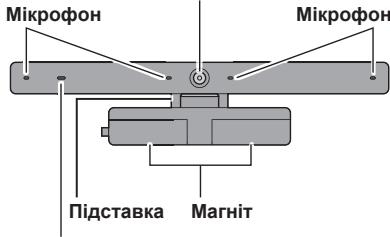
Jamna 3HOMK
TOpntb YepBoHm nI d vac po60tn kamepn abo mikpOFOHa.
Bud kamepn 360ky
USB-ka6eJb
Pn6m3.1,5 m (np6m3.4'11")
Y pa3i yctaHOBKN KaMepn Ha TeNeBi3Op
PnkrpiTb mArHIT, po3aIooBaHI ha kamePi, do BepxhBoI cactHHN 3adHbOi naHenI teNeBtOpa He metaneBa,6ydb nacka, npkrpiTb niDCTABky kamePi 3a donomorHO KneKoiO CTpIKM.
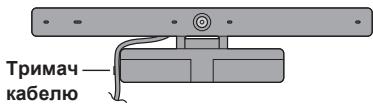
Kamepa, Ma6yTb, po3TaioBaHa 3aHaTo 6JIu3bKO. Kamepa noBHHa nepe6yBaTu Ha BiDCTaHi He MeHne 60 cm.
Y pa3i MeHooB BiIcTaHI 3o6paXeHHa MoKe 6yTu pO3MUTM.
3o6paXeHH,OTpMaHe BiD cnIBpo3MOBnka, BnIJaac 3actnIIM.
3aIeXHO BID napametpiB iTHePHT-niKnHouEHn, 1WbNkictb 3B'3Ky MOKe 6yTu HeOCTaTHbOIO dIra BnKOpncTaHHKaMepu.
36iJbUte napaMeTpNi iKJIIOueHnA 6o CnpObyTe BIKOPNCTOByBAtN KaMepy B iHsIu Yac Do6n.
InΦopMaця pro Bnpi6
TepmiN cnjx6n
1 (OuH) pik
3po6JIeNo B Kntai.
Bnpo6Hnk:
Panasonic Corporation
PanhacOHK KopnopeuH
Adepea Bnpo6nka:
Ocaka, Jnohia
Hapnikla:

IhopmauiHnIeHTp Panasonic
MixhapoDihi D3BihKn Ta D3BiHkn 3 KneBa: +380-44-490-38-98
Be3KOHTOBHd3BiHKn 3i ctaioHaHPHX TelefoHIB B
Mexkax YkpaHn: 8-800-309-8-800
Panasonic Corporation
Web Site : http://panasonic.net/
© Panasonic Corporation 2012
Huong dan sù dung
Camera giao tiép
Só model
TY-CC20W
Cám on ban dã mua san phám cua Panasonic.
Truckhi sur dung san pham nay, vui long doc cac hong dan can than va giu lai sich hong dan nay de sur dung ve sau.
- Trucoc khi su dung san pham nay, hya chac chan doc phan "Luu y an toan" vā "Luu y su dung" (Trang 1-2).
- San pham nay duoc dung de thuc hi en cuoc goi hinh vai tieng qua Internet thong qua TV co do phan giai cao qua Panasonic co gán cóng USB.*
- TV phai duoc két não vovi Internet bang két não bang thong rong.
- Môt sô model TV không hô tro sân phám nay. Dé biétr chi tiét vê cac model TV hô tro sân phám nay, hy xem trang chu Panasonic. http://panasonic.jp/support/global/cs/tv/compatibility/usb/index.html
Lwu y an toan
Canh bao
Tháo may
Khong thao hoac sua doi camera nay.
Lam nhuy vay co thegay hao hoan hoac dien giat.
Thantrong
Tranh lam roi
Dàmbao rang camera duoc lap chac chan.
Camera có thekhién ban bj thoung néu roi khoi v tri lap dát.
Tranh am wot
Lam nhuy vay co the lam hong camera.
Khong danh roi, dap manh hoac lac camera.
Lam nhuy vay co the lam hong camera.
Khong cat hoac su dung camera nay o' noi co nhiet do cao hoac gan cac tu truong manh.
Lam nhuy vay co the khién camera bi hong, bian dang hoac truc trac.
Khong su dung camera o nhung noi bui ban, am thap hoac co khoi, hay nhung cho co nuoc hoac chat long bao camera.
Lam nhu vay co the lam hong camera.
Khong uon cong phan de.
Lam nhuy vay co the lam hong camera.
Lapl dăt
Camera khong hoat dong.
Hinh anh chup bang camera toi hoac co hat.
Có the do khong du anh sang.
Trong phong phai sang khi su dung camera.
Hinh anh chup bang camera bj mo.
Có the do camera qua gan.
Su dung camera voi khoang cach it nhat la 60 cm.
Neu khoang cach gan hon, co theh inhn anh sBJ mo.
Hinh anh nhān duoc tu nguòi kia có vè nhup bi dún gai.
- Tuy chuoc vao miо truong két não internet ma co the khong dat duoc toc do truyen thich hop cho viec su dung camera.
Cài thien mòi truong két nói, hoac thu they doi thoi gian su dung camera.
Thong tin vè viéc vúr bó rac òc nupoc khac ngoài pham vi Lien minh chau Àu

Biéu tuong nay chi có già tri ò Lién minh chau Aú.
Néu ban muón vút bó sān pham yàn, xin vui long lién hévoí cócq quan sài tao dai ly bán hang dé hòi thong tin vě sinh truc vút bó rǎo theo quy dīnh.
Thong tin bao vê mi o trwong dans cho ngvoi dung o Trung Quoc

Biéu trong nay chi hop lé ò Trung Quoc.
PANEUROPEAN GUARANTEE
3D Eyewear
Communication Camera

Caution: Please retain your sales receipt.
The Panasonic Pan European Guarantee applies to your product. You may obtain a copy of the guarantee from:
- the dealer where you purchased your product
-Website: www.panasonic.co.uk/euguarantee - Panasonic Customer Communications Centre:
UK - 0844 844 3852 / Ireland - 01 289 8333
Panasonic Romania SRL
Bulevardul Preczieiei Nr.24, West Gate Park, Cladirea H3
Sector 6, Bucuresti, Romania, cod postal 062204
Tel: +4021 316 04 37 / 316 04 36 Fax: +4021 316 04 46
E-mail: service.bucharest@eu.panasonic.com

ÇESKA REPUBLIKA
The Panasonic Pan European Guarantee applies to your product. You may obtain a copy of the guarantee from :
- the dealer where you purchased your product
-Website: www.digitalplanet.com.mt - Panasonic Customer Call Center: +356 21 24 1127 or +356 27 24 1127
- Email: support@digitalplanet.com.mt

KYNPOZ
H Vlapeupwuraikr Eynyunan TnC Panasonic ixuia yia to ptolov oac, Mtropei va atokrtjEev avtiyapo nTc Eynyunan atio:
-To kataoTma oTou ayopaoate to Tpoiov os
-Website: www.panasonic.com.cy
- Kévtpo ειμπηρετησος Πελατων: +357 22 514629

Былария
1) PanacohnK KOrou3ToHa Ebpona, yU. HoIman Rnyu 1, n.k. 1117, Bydaneu, YHrapna, rapahtnpa To3n npOuyk rpeCy npoMBOCTBENe Deefekn, kAKTO cEBpN34PAnEto My B yTbNHOMOHeHNTe CEBP3HNu CEHTPObe Ha Panasonic 3a Blyrapna, N36poEnb T a3n KaTpa HnHa na y6e adpec www.panasonic.bg, 3a nepiOd ot 2 (DBe) roDNH, otDatata Na IpbBOHaunHaTa nokyika, 6ez 3aIaune 3a trPyd n pe3epBn Yaactn.
ObuynCIOBnaHa rapaunOHHoOBcIyKBaHe:
(1)Пюдуктг�пбьадаьde дocstавенdoнайбиknу yburhnoiuech cepb3n (илсьирatehennyk),аedno c rapanuohnata Kapta n opirnnaHnHaTa phaktya nln dpyr dokyment 3a nokynka.
NfOpmaa3a 3eBepnnto MoeKa da Hamepnta He y6c aatt: www. panasonic.bg BHMAnHe! Pnir 3akynyBaHToH naPdoKyta, moJa da ce ybepeite, ye rapanzIOHNHaT a KapTa e npAboHO nI3zIto nonbIhena (MoJeN, cepHEn HoMeD, eta Ha noPdoJaxBa, noDmIC nNeuat Ha tBpOBeHa). B npOtBeHc Siuyau ranapUeMaT oMe Da 6bde OTKa3Ha.
(2)「apanraHma daeB cnla npn cneHnte cnyaH:
a) INHUENTHEI pRTHAUPNOTHPAIE NO TAOBABPO3A3TOBAPNI PABOTNI cBTOBETNHTE BPEND I BPEYNTAT Na TAKIMA INHUENTHEI.
6) JeDéΦKTH IIN NOBpERD BY P3eITYH HA HENPABUNIy HNOTpeBA IIN HEXAETBO TO CTPNA H KNIHETA, YNOTpeBA H npOdyTKa NO HAHIN, PAZnIHEN TO T03 INOCOyen B INCHTpyKUInTE 3a NOI3BaHe, KAKTO I INON3YBaHEo H BAIBOTU ENEKTPOpyDEA 3a npODECIOHOAHIN, TbPBOBCKN INHNCTCPINHN CEJI.
B) DepektIIN nobpeda B pe3yntaHa noxapar, 3emetpecehenie, HABOHNHeM, MbHnHm IIN npyrto npirodoHO 6bctBVE, OTKNOHEHnA B HAPPEKHeNTo, BOHn IIN 6e3pduinu B pe3yTAT HaPBEOIOUma, 6HT, DpyrTH HENPeBDiEHNMHUdENTHn IBuHInH daKtOpR
r) PEmoHT, MoTHaK IINI N3MeHEnHnHaPabeHnOT HeOTOpN3nPaHO IIuJe, KaTO INMCTaIIpAHe, MoDInΦkaUeINI NINl ONEpaUNI B HApUSeHne HA TexNHueCKeTI XapakTePrcNTkN Ha N3dJIeNTo W/INI N3CKBaHnTAta 3a 6E3OnaHcOHT.
Д. Дюунгт, На КОТо Серийн我不是 Homeрсмени, Рдправен, Или Загунш.
e) K03metHnHu actn n akcecoapn Ha n3denneto, lamnn, 6aTeepn, AKymyIatopn, rpaOmoOHHNn, aHTeHN, ppeNa3Hn ekpAHn, OtnadbHuN ToBnKm, KOanHn, Yekn I dpyrHuactn C orOpahuEH cEBPM3eHKnIBOT.
(3)GarapuHOnHnA rcpK na namnata 3a LCD npoxeKtOpTne e orpAnHHe no 90 dnn ot daTata ha nokykna nn 200 caca paBota (koeto yocnoBe eoDcNHTAO pBPO).
Tana rāpānṣṭa e bānū Ṣa mào 3a ā terpɪtɒrɪya ha EbpəneɪcKɪya cβɔʊ₃ (EU), EbpəneɪcKOTO ἀκοθΟMHYeCKO προστρανθBo (EEA), Typrɪŋ, MaKeδɔnɪŋa, Cbþsɪə, XþbPàrtən, Bóchá & ḥεριεθoBɪnʌ iʌIbɛjæpɑrə, 3a πρόdúkTɪte, 3aʊyɪneɪn iɪʒɪɒŋ3yBaHɪ n cMo B pʌmkiTe h Teɪ s CTpaɪn.
Ako ctpaHATA naNo3BaHe e paoHHa O t ctpaHATA na3kyynbaHae, ycnYrata ue Ce npedocTabB Cb0TBeCTBne Cbc cpoKOBeTe nycybnTa, prnnoXmM B ctpaHATA no3NaBHae. NkKnIOHeMe ca CnyauHte, KbDeTo rapaunOHHHATc PcOK B ctpaHATA na3kyynbaHae nO-bIbT, oTKoIKOTO To3N b ctpaHATA na3NaBHae, B TO3nCnyaJ ce PnpemaRapauHOOHHATc PcOK, B aINIDe3 a Tc paaHATA na3kyynbaHae.
TbproBCkata rapaHnue e npbnHeNe H nHnKaB bnyaHne orpaHnuaI npabaHa na Notpe6nte, cBflnacHO Blrarpckoto 3aKoHDaTeNCTBO.
TbproBcKO IpeDCTaBHTeJCTBO Panasonic
1040 CoΦn, 6yn. Dparan LAnKOB 36
CTU INItepe, o0nc B-615
Ten: +359 (2) 971 2969, Φακς: +359 (2) 971 2970
E-mail: info@panasonic.bg, www.panasonic.bg
HR HRVATSKA
Potpisani uvoznik/distributor jamci isprawnost ovog proizvoda i ulsuge servisiranja u Panasonicovim ovastenim servisia, navedenima u priloženom popisu, u trajanju od dvije (2) godine od dana kupovine uredaja, te besplatne dijelove i rad servisa pod sljeedecim uvjetima:
(1) Proizvod mora biti dostavljen u servis (ili miesto primitka) ovlasten od Panasonic Marketing Europe -South-East Europe Branch Office, Neumann János u.1., 1117 Budimpeša, Madarska, za obavljanje servisi u jamstvenom roku, zajedno s ovm jamstvenim listom i originalnim racunom.
Prilikom kupovine neophodno je jamstveni list ispuniti isprawno i u potponusti, te ga potvdrildi.
Panasonic Marketing Europe GmbH. - South-East Europe Branch Office
PME-SEE Branch Office
Panasonic predstavništvo Beograd
Bulevar despota Stefana 41, 11000 Beograd/Srbija
Tel: +381 11 33 40 124
+381 11 33 44 091
e mail: pbo@panasonic.rs
www.panasonic.rs
Bih BOSNA I HERCEGOVINA
Potpisani uvoznik/distributor garantira ispavnost ovog proizvoda i usluge servisiranja u Panacomicovim ovlastimen servisima, navenedim u prilozhenom popisu u trajanju od:
- Dvjie (2) godine za sve proizvode iz domena proizvodnog potfolija potroščekelektronike (kao što su digitalni fotoparati, digitalni kamkorderi, LCD i plazma ekrani, kučna kina, Hi Fi uredaji, mali kuçanski aparati i proizvodi za osobnu njegu).
- Dvjie (2) godine za sie proizvode iz domena portfolija bijele tehnike (frizideri i veš masne), izuzev kompressora za frizidere na koji postoji dodatne 3 godine garancije za sami dio.
- Garancije za klime daju ovlasteni uvoznici ovih Panasonic proizvoda, dužina garancije要考虑 varirati na osnovu ponude i dogovrenih modalitàe odžavanja.
PME - SEE Branch Office
Predstavništro u Bosni i Hercegovini
Zmaja od Bosne 4,
71000 Sarajevo
Bosna i Hercegovina
Tel: +387 33 288 921
Fax: +387 33 288 921
E mail: info@panasonic.ca
E mail: customercare@panasonic.ca
MKMAKEOHHJA
Panasonic South-East Europe Sales Limited Liability Company, Neumann János U. 1., 1117 Bymmnneuta, YHrapmja, rapantnipa deka Oboj nopmbRDn Hema faopnuKn depeKtnn n deka 3a eEBHTyAnHOTO cepBncupahe BOOBaTcENITE cepBncnH CEENTPNn H Panasonic BO MaekoDnHa, HabeDeHN BO OBOJ NCT, 3a nepiOd oL 2 (Dbe) roDNH, CMeTajkn od datymot Na KynyaBaHe, He ce hannakaat pa0bTHata paka I pe3epBnHTe DeNoBN.
OnuTn rapaTHn ycNoBn:
(1)Пиюзовт tradeba da bide doctabew HOBJIcNKTOOBlaCTeH cepBIC (INI HEROBINTOCBUPEH NyHT), 3aedHO cO rapaTHNOT INC T OPIRIMHNATA qKATPya INI DpyT DOKUMETA 3a KYNONPOADkBaT.
BHMAMnI! PnI KynyBaHbETO HApno3BodOT,BeMOnIMe IpOBepete daIrahpTHTNtOIT e npAByHIOu IeNoCHO NonoHET (MOdE, cepNKcBpoJ, DaTym Ka NyuBaHbE/MoTHaxa,NotNcN nevat Na npOdaabot/MoTHaxeport). HenoTOnNHeta rapaunjuia Hema Baxhebe.
(2)「apaunjata ro rynb CBOeTo Baxhe Bo CneHnTe cnyaH:
a) OHTeYBaH a NdeEeKTH HAcTAHn Pnp TlAChNOPT h I npOn3BODT, eNEtKeHH UApDnapaHnHePNiCNoBcH anOH nPi npRoDHN HenPmNkN KAKO rPOM, 3emJOTpec, nnonJa, noXapK nCL, kAKO u "BwHa cima", HecOOBETHO pOBETpyBaH e BHTnnauJa H enHPaBnH0 pInKfNyHuBaHe.
6) OüTeYBaHbAи HepeKtN HACTaHAtn KaO pEyITaT ha HennpaBHa N yOpTeBaN hIe6peXHOCT O cTpaHa h KoPCHNcIKOT, yOntpBeHa n IpnO3BODOT Ha NaHIn pa3iueH eOn OHOJ KO e OniuaH BO yNaTcBTO 3a YOntpBeHa, KaKO hNcOPrctyBaHe h PaO3BODOT 3a PpOFeCIOHaHH, TPOBCKH INHyDCTPIcku Cenli.
B) OJETyBaHaN a NdeFekTI KO CE nojabyaaT KA KepzYnTAT HA Bnara, pfa, INcEKTNI, CTpaHn PnpdMeTI, HneHCTOTnJa, YnOTpeBAo BO HecooDBetMH NPocToPmN yNtOpeBA hAarpH3yBaKNN cpeCTBa.
r) PONPABKa, MOHTaKa iNt MoNΦnKnaJHa n pOn3BODot N3BpUeHa oN HeOBNaTeHO nIcE, mN MoTHaKa, MOnΦnKnauN iNt NejCTBuJa KOn DObEn O dHapuyBaHe Na TExNHvKnTe KapakTepnCTnKn Ha npOn3BODOT N cYbONBaTE 3a 6e36eDnOCT.
D) Cepncknot 6poj e cmeHeT, npenpaBeH nn HapBaBeH HeuNTmB.
e) 3a peoDbO OOpKByBaHe, npObepKa n UcHCTe Ha npOImBDoT KAKo Hn a3 pnpDpyKHNte n oTOPOuHN dENOBn KAKo uTo Ce: kaBn, anHTen, bAtePn, aadAnTepe, csiJaUKNu, upeBa, nanyUn, KOINbA, fNttn Pdynr ENOBn Ce o OrpaHueh POK ha TpaBe.
(3)GammaHTHMOPTOK HA NaM6Bte 3a LCD npoeKTOPIE e orpAHueH Ha 90 Deha oDatymOT HA KnyBaHeTo, INN 200 pabOTn Yaca (3abNCHO on ToA KOJ yCIOB e DOCTINHAT npB).
TapaHAniJata Ha npOImBbOToE naDoONnYBaHBe n BO HmKakOB cIyUaj He mOrpAInHyBa npAbaHa Na KyuBaHTe, 3arapaHTnpaHn CO 3aKOHNte Ha PM.
Obaa Tapaanuja eDINCTBeHO e BaJIMHa Ha TePITOpInTe Ha
Ebponcka YHja (EU), Ebponck EKohOMcKn IPoCTOp (EEA), TypuJa, MaKeDoHnJa, CpOJa, XpBatcKa, BocHa N XepeRobHa N UbajApnJa 3a npoB3doKyuNHeN and KOpCNTehn eDInHCTBEHO BO 3emJm.
Doklky 3emjata Ha Kopricthe e pa3nHna Od 3emjata Ha KnyBaHe, ycnrata Ke 6bne Obse3deHa BO corgnachoc T CO BaxkeChite ycNobu BO 3emjata Ha Kopricthe,OCBEN DOkOJIky rapaHTHNOt nepoND BO 3emjata HA KNYBaHe e NODON TOJ BO 3emjata Ha Kopricthe,BO TOJ Cnyaj Baxkechn KE bnde rapaHTHNOt nepoND BO 3emjata Ha KnyBaHe.
KiK doo Skopje
Skupi bb
1000 Skopje
Macedonia
Phone: ++389 2 3088 000
Fax: ++389 2 3088 080
E-mail: info@kik.com.mk
Panasonic®
TAPAHINHBI TAIOH GNRL No
(rapantirha KapTKa, kenidik tanohb, rapantihnhb tanoh, tanod de garantie, zemanot karti, bpwuhpuwhu npnab, 60660600660606, kafolat taloni, keppilk talony, bapran 3amohat, rapanthnblk tanoh)
| HOMER MODENI (HOMER MODENI, MODEIyH HOMeRI, Hymar MadaJIb, model, model, umnH, doxoxo, model raqam, modeliBelgisi, moedI yUmapa, HOMerIMOLO) |
| DatA noKynIKN (Data noKynIKN, catbI anbIyHraH kyHI, Data hAbbiu, data procurarii, alinma tarixi, qulw uWuWuHpU, yoxo3ob oxo600, olingan sana, Data noKynIKN, tabpriXn xapid, catbI anyy KyHy) |
| CerriHbIyHOMeR (CerriHbIyHOMeR, cerriYbIyK HOMeRI, cerIIbIyH NmUR, numaral de seriesi, seriya nomresi, ubIbIwIu wHuIup, do600000 bdo600, serlyavly raqam, tapgyr belgisi, shyMopar cnLcINaIIa, cerIIbIK HOMeRI) |
| ΦINO n TetePhon noKynatelera (im'Я, adReca ta TetePhon TpeKynIa, catbI anuYbIyHbI aThIyKeHI, imR i adPac nakynHika, numele, preuneme, patronimicul, adresa si tetefonl cumparatoruli, alcinnin adi, soyadi, atasinni adi, telefonu ve unvani, qunynH U.U.L. huwuIu hIuIuIuup, do600000 bdo600, bdo600, ado600 bdo600, do600bdo600 00 yoxo3ob, xaridorning FIO va tetefoni, aliyjynF.A.A we telefony, hom, homn padar Ba ten xarpIocp, catbI anuyyUnyH aThIy- JxENy MeHEH TetePhOn) |
| Adre pcnoBaZa (im'Я ta IopuDnHa aDreca noPabua, catUssI MEKemEnIH aIbIy Xhe 3AnbIy MeKEN-kaIbIy, na3Ba i IopbIbIyHbI aDpac apraH3a2bIy, kaJra pndae, demunirea si adresa juridica a vinyAtoruliu, satan ta5klatin adIe v hUquI unvani, qu600000 bdo600bdo600bdo600bdo600bdo600, huu6bI, qu600000 bdo600bdo600bdo600bdo600bdo600bdo600, sotuvchi korkonaning nomi va yuridik manzill, satyan guramany ady we hukuk salgsy, catyyU yOmdU mAtIy JxANa IopuDnKALbIck dapeRi, YBBOH Ba aDrepci XyKyIM co3MaHe fpyUaHdA, catyyU yOmdU aThIy JxANa IopuDnKALbIck dapeRi) |
| IpdNtscb pcnoBaZa (nIDnc pcnoBaZa, catUssInbH koJIy, noDnic pndaIya, semnatura vinoZatoruliu, saticinin imzasi, du600000 hunnpuHpIyIuIuIuIuIuIuIuIuIuIuIuIuIuIuIuIuIuIuIuIuIuIuIuIuIuIuIuIuIuIuIuIuIuIuIuIuIuIuIuIuIuIuIuIuIuIuIuIuIuIuIuuIuIuIuIuIuIuIuIuIuIuIuIuIuIuIuIuIuIuIuIuIuIuIuIuIuIuIuIuIuIuIuIuIuIuIuIuIuIuIuIuIuIuIuIuIuIuIuIuIuIeu) |
| IpeTbc pcnoBaZa (neatka pcnoBaZa, catUssInbH MEKemEnH MEPI, pIoucTa apraH13a2bIy, kayra pndae, L. S., satan ta5klatin moHir, du600000 huhpIuIuIuIuIuIuIuIuIuIuIuIuIuIuIuIuIuIuIuIuIuIuIuIuIuIuIuIuIuIuIuIuIuIuIuIuIuIuIuIuIuIuIuIuIuIuIuIuIuIuin, satyaf guramany mOhri, myxpi CooMaHn fpyUaHda, catyyUy yOmdU daReri Xaua Meepy) |
Ta6JInca peMOHTOB
© Panasonic Corporation 2012
Printed in China
S1111-3032