
A 68 - Air purifier QLIMA - Free user manual and instructions
Find the device manual for free A 68 QLIMA in PDF.


| Brand | Qlima |
| Model | A 68 |
| Product Type | Air Purifier |
| Dimensions (W x D x H) | 30 x 20 x 45 cm |
| Weight | 4.5 kg |
| Power Supply | 220-240 V, 50 Hz |
| Rated Power | 40 W |
| Recommended Coverage Area | Up to 30 m² |
| Filtration Type | HEPA filter + pre-filter + activated carbon filter |
| Fan Speeds | 3 speeds + night mode |
| Timer | Programmable up to 8 hours |
| Air Quality Sensor | Fine particle sensor (PM2.5) |
| Filter Replacement Indicator | Yes, LED indicator |
| Operating Modes | Auto, Manual, Night |
| Maximum Noise Level | 55 dB (A) |
| Maintenance and Cleaning | Clean the pre-filter every month, replace the HEPA filter every 6-12 months |
| Safety | Automatic shut-off if tipped over, child lock |
| Spare Parts and Repairability | Replacement filters available, repairability index 7.8/10 |
| Warranty | 2 years |
Frequently Asked Questions - A 68 QLIMA
User questions about A 68 QLIMA
0 question about this device. Answer the ones you know or ask your own.
Ask a new question about this device
Download the instructions for your Air purifier in PDF format for free! Find your manual A 68 - QLIMA and take your electronic device back in hand. On this page are published all the documents necessary for the use of your device. A 68 by QLIMA.
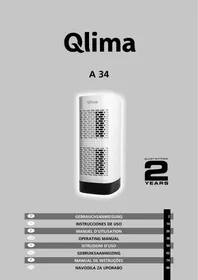
USER MANUAL A 68 QLIMA
guarantee
2
YEARS
| D | GEBRAUCHSANWEISUNG | 2 |
| E | INSTRUCCIONES DE USO | 16 |
| F | MANUEL D'UTILISATION | 30 |
| GB | OPERATING MANUAL | 44 |
| I | ISTRUZIONI D'USO | 58 |
| NL | GEBRUIKSAANWIJZING | 72 |
| P | MANUAL DE INSTRUÇÕES | 86 |
| SLO | NAVODILA ZA UPORABO | 100 |
MAIN COMPONENTS
STORAGE
MAIN PARTS

CLEANING OF EXTERIOR SURFACES
STORAGE
MAIN PARTS
CONTROLS/SETTINGS:

CLEANING OF EXTERIOR SURFACES
STORAGE
Congratulations on the purchase of your air purifier. You have acquired a high quality product that will give you years of pleasure if you use it sensibly. Read this manual first in order to optimise the life span of your air purifier.
On behalf of the manufacturer, we provide a two-year guarantee on possible material or manufacturing defects.
Enjoy your air purifier.
Yours sincerely,
PVG Holding B.V.
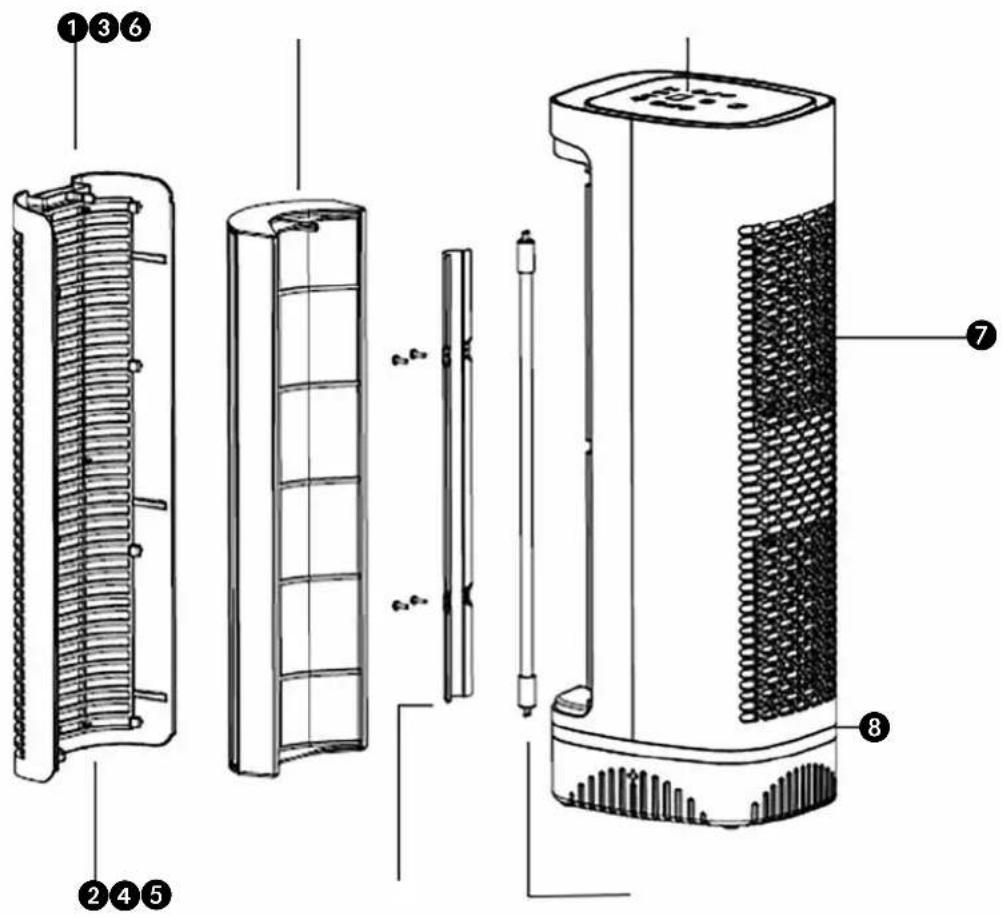
MAIN PARTS
① Locking Latch ② Air Inlet Grill ③ Cleanable HEPA-type Filter ④ UV Lamp Cover ⑤ UV Lamp ⑥ Control Panel: Time, On/Off, Speed, UV/VOC, Auto, ION and Night Mode ⑦ Air Outlet Grill ⑧ Air Quality Indicator Light
GENERAL
Take the following actions to obtain an optimum result.
- Place the air purifier in an elevated location (e.g. on a table or cupboard) in order to allow it to filter small particles such as smoke. Place the air purifier near or on the ground to enable it to filter large dust particles such as pollen.
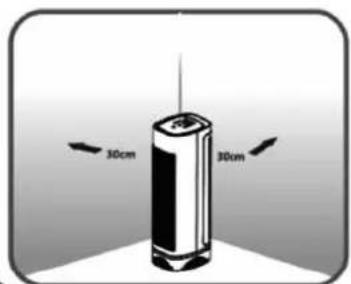
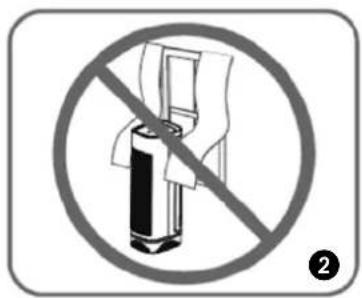
- Always maintain a free space of 30 cm around the device.
- Read these instructions carefully and follow the directions.
SAFETY REGULATIONS
Read this user manual carefully before using the appliance and keep it for future reference. Install this device only when it complies with local/national legislation, ordinances and standards. This product is intended to be used as an air purifier in residential houses and is only suitable for use in normal household conditions, indoors in living room, kitchen and garage. Check the mains voltage. This device is suitable exclusively for earthed sockets – connection voltage 220-240 Volt/ 50-60 Hz.
- Keep plastic bags and other packaging materials out of reach of children.
- The device was developed to purify air and not for any other application. • Always contact your supplier if repair or maintenance is required.
- Do not place the device in the vicinity of heat sources, materials, installations, or near curtains, that may cause a fire hazard or in environments where explosions may occur. • Always switch the device off and remove the plug
from the socket before cleaning it.
• The surface must be stable and level. • The installation must be completely in accordance with local regulations, ordinances and standards. • The device is suitable exclusively for use in dry places, indoors. • Check the mains voltage. This device is suitable exclusively for earthed sockets – connection voltage 220-240 Volt/ 50/60 Hz.
Before connecting the unit, check the following:
- The voltage supply must correspond with the mains voltage stated on the rating label.
- The socket and power supply must be suitable for the current stated on the rating label.
- The plug on the cable of the device must fit into the wall socket.
- The device must be placed on a flat and stable surface.
The electricity supply to the device must be checked by a recognised professional if you have any doubts regarding the compatibility.
- This appliance is not intended for use by persons (including children) with reduced physical, sensory or mental capabilities, or lack of experience and knowledge, unless they have been given supervision or instruction concerning use of the appliance by a person responsible for their safety.
- This device is manufactured according to CE safety standards. Nevertheless, you must take care, as with any other electrical device.
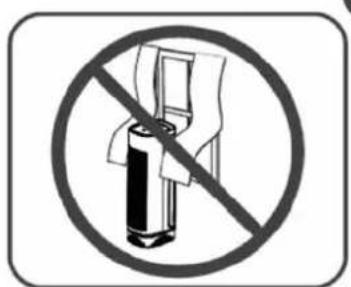
- Do not cover the air inlet and/or outlet.
- Never allow the device to come into contact with chemicals.
- Never submerge the unit in water.
- Do not insert objects into the openings of the unit.
- Always remove the plug from the electric power supply before cleaning or replacing the unit or components of the unit.
- Never use an extension cable to connect the device to the electric power supply.
- Children should be supervised to ensure that they do not play with the appliance.
- Have any repairs only carried out by a recognised service engineer or your supplier.
- Always remove the plug of the unit from the wall socket when it is not in use.
- If the power cable is damaged it must be replaced by the manufacturer, its customer service department or persons with comparable qualifications in order to prevent danger.
- If the supply cord is damaged, it must be replaced by the manufacturer, its service agent or similarly qualified persons in order to avoid a hazard.
- This appliance can be used by children aged from 8 years and above and persons with reduced physical, sensory or mental capabilities or lack of experience and knowledge if they have been given supervision or instruction concerning use of the appliance in a safe way and understand the hazards involved. Children shall not play with the appliance.
- Cleaning and user maintenance shall not be made by children without supervision.
UV LAMP NOTICE
UV Light is harmful to bare skin and eyes and can cause temporary or permanent loss of vision. Never look directly at the UV lamp while it is illuminated; doing so could cause loss of vision! Only view illumination through the window at the front of the unit. To prevent exposure to ultraviolet light, disconnect the power to the unit before servicing any part of the A 68 air purifier.
UV LAMP DISPOSAL
If the UV lamp breaks, turn off the unit. Do not operate the unit with a broken lamp. Do not use a vacuum to clean up breakage. Sweep debris into a plastic bag and dispose of properly. Contact your local waste management authority for instructions regarding recycling and the proper disposal of old lamp(s). To order a replacement lamp, call your retailer.
MERCURY NOTICE
Because the A 68 contains a light bulb and light bulbs contain mercury, please find following warning:
Do not place your used lamp(s) in the trash. Disposal of any item containing mercury must be in accordance with any hazardous waste disposal or recycling laws and regulations of your state.
This product complies with the maximum allowable concentration of ozone of 0.050 parts per million by volume (ppmv) in a 24-hour period.

ATTENTION!
Never use the device with a damaged power cord, plug, cabinet or control panel. Never trap the power cord or allow it to come into contact with sharp edges.

ATTENTION!
Failing to follow the instructions may lead to nullification of the guarantee on this device.
INSTALLATION
Before using the air purifier, please read the following important information.
REPLACEMENT PARTS:
- Pre-filter
- HEPA Filter
- UV Lamp
Locate a level surface on which to place the air purifier near a 220-240V outlet (follow warnings in the "SAFETY REGULATIONS" and "IMPORTANT WARNINGS" sections of this manual). Position your air purifier at least 30cm from the wall. Plug in the unit.
Before using the air purifier, please read the following important information.
SAFETY
- Do not place near fans.
- Keep both sides of the unit at least 30 cm away from a wall. Do not place the unit near curtains.
- Placing the unit close to the source of air pollution is an effective way to improve indoor air quality.
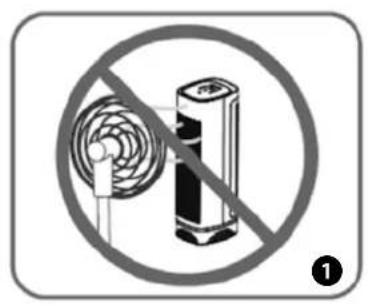
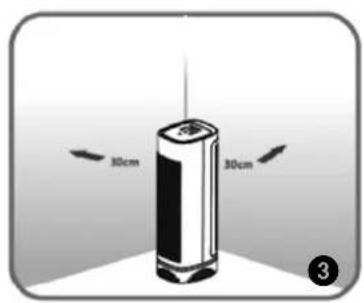
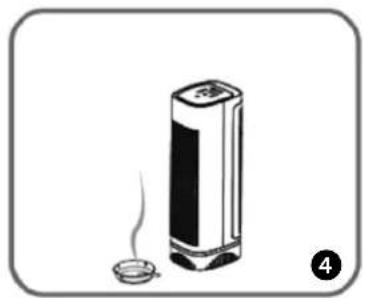

DO NOT run the air purifier with a broken filter. Replace the filter if the filter has a tear or a hole in it. If the filter is damaged or needs replacement, please contact the retailer to order a replacement filter.
OPERATION
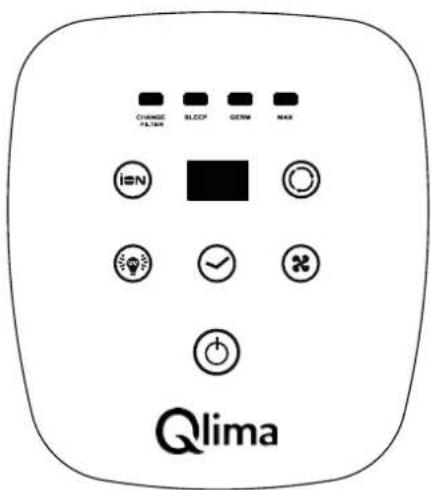
CONTROLS/SETTINGS:

Power Control
To operate the A 68, press the Power button to turn on the air purifier.
air purifier.

Timer Control
The A 68 air purifier can be programmed to turn off after a preset
Press the "TIME" button to program the timer. Each press will add one hour up to a total of 24 hours. Keeping the button pressed will automatically increase to 24 hours, 1 hour at a time, after that it will turn back to off.

ION Generator
Press the ION button to turn on the IONs. Press it again to turn the IONs off.
Fan Speed Control The A 68 has three different speeds of cleaning, LOW, MED and
HI. Press "SPEED" button to cycle the settings and select the fan speed you desire. The speed state will be shown on the LED display.
Auto Mode The A 68 is equipped with an air sensor to monitor the quality of
your air. Simply press the Auto button to activate the air monitoring system. The monitor will test the air quality and automatically adjust the fan speed to remove the air contaminants. The front of the display is equipped with LED lights to notify you of the air quality. RED color is for poor, ORANGE for fair and BLUE for good quality air.
CHANGE FILTER Clean Filter Indicator Light
The A 68 Clean Filter Indicator Light will turn on each time the filter needs to be cleaned. To reset the filter indicator, press the ION and UV/VOC buttons together for 3 seconds. The CLEAN FILTER light will flash 3 times and then turn off completely, indicating the unit has been reset.
Dim Mode If the LED lights are too bright, activate the "Dim Mode" to turn off
the LED lights and the lighted display. To turn on Dim mode, simultaneously press Auto and Time buttons. Power indicator, however, will remain lit.
UV Control Press the UV/VOC control button "UV/VOC" to turn on the UV
lamp and the photo catalyst filter.
CLEANING & MAINTENANCE
Keep the A 68 functioning properly by cleaning the cleanable HEPA-type Filter every four weeks of use. More frequent cleaning will be necessary if the unit is located in an area with a high level of airborne contaminants (excessive amounts of smoke, pet dander, etc.).
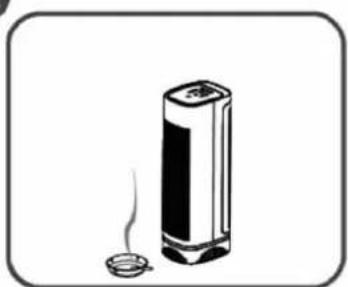
Exposing the A 68 to candle/oil/fireplace soot and smoke is not recommended and will require more frequent cleaning.

Always make sure the A 68 is turned off and unplugged before cleaning.
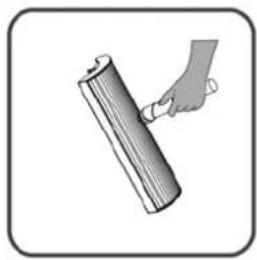
- Vacuuming will restore performance of the cleanable HEPA-type Filter. However, the filter may appear stained. This is normal and does not affect performance in any way.
- Do not use water or any household cleaners or detergents to clean the cleanable HEPA-type Filter.
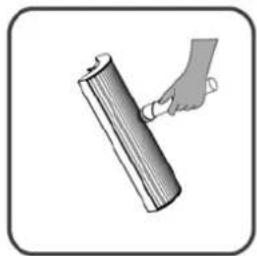
- The inlet grill may be cleaned (after the unit is turned off and unplugged) with a vacuum or a slightly damp cloth. Cleaning the cleanable HEPA-type filter.
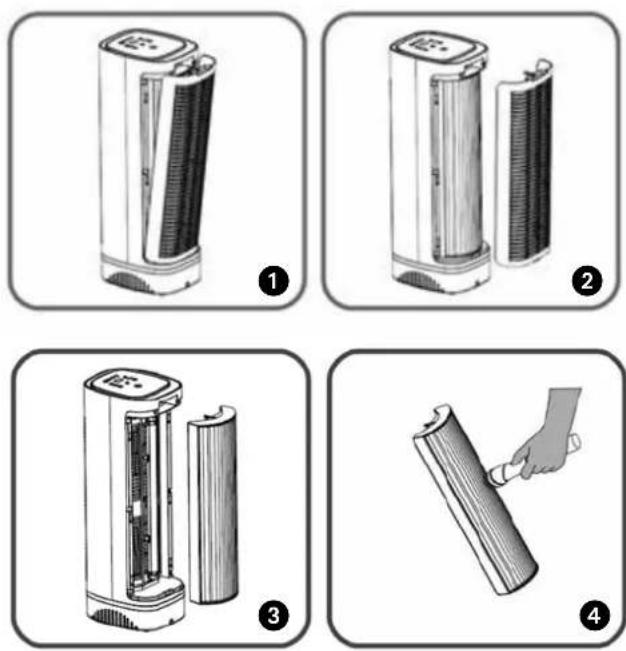
CLEANING THE CLEANABLE HEPA-TYPE FILTER
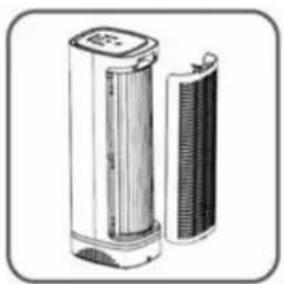
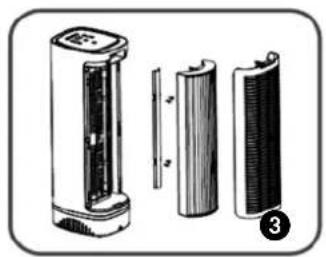
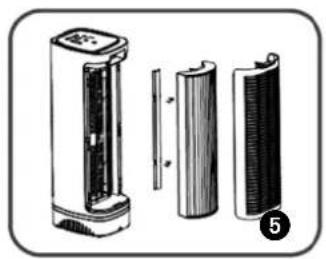
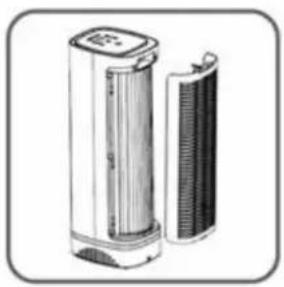
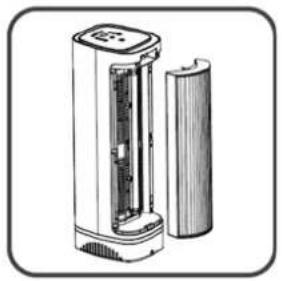
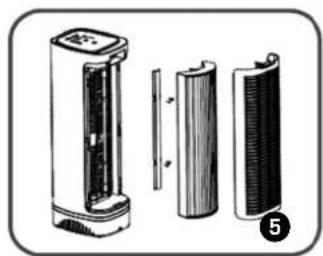
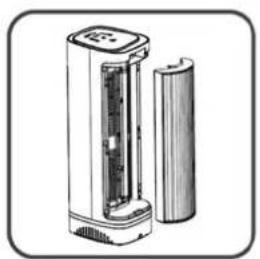
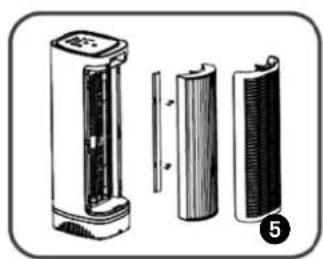
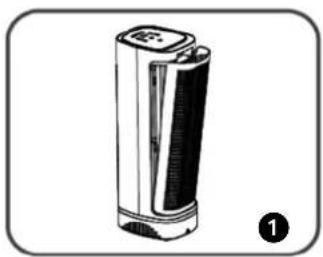
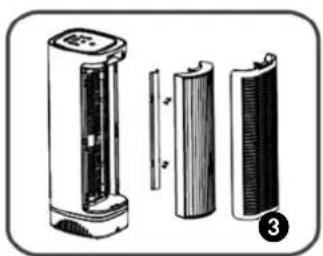
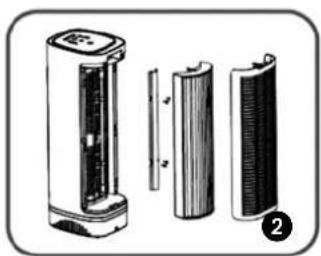
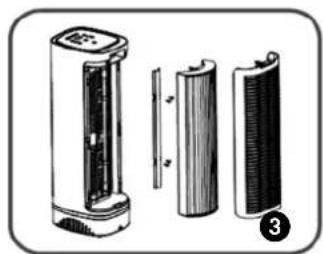
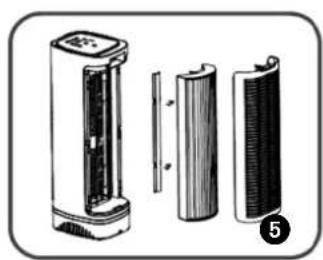
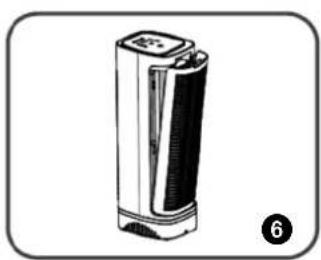
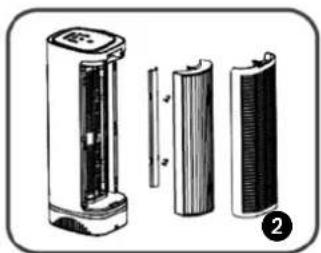
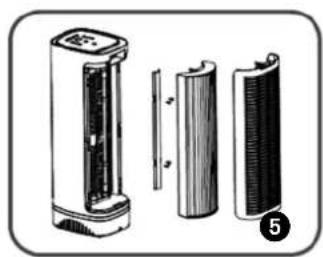
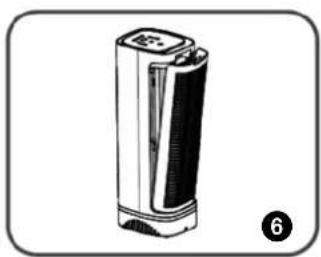
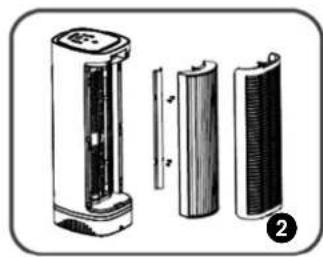
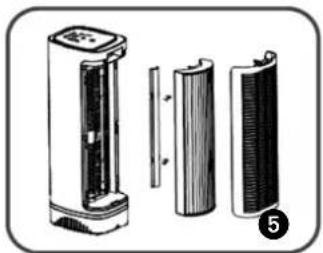
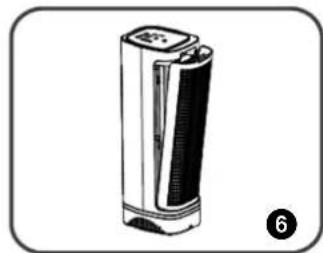
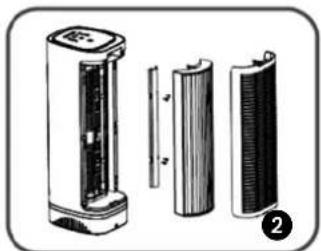
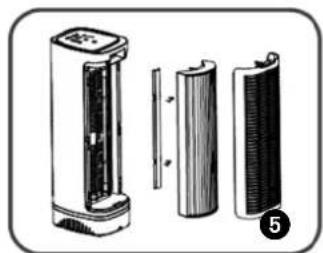
- Release the inlet grill by pressing on the locking latch (see diagram of main parts).
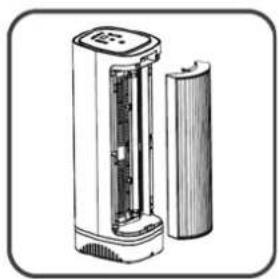
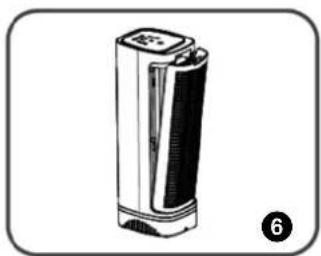
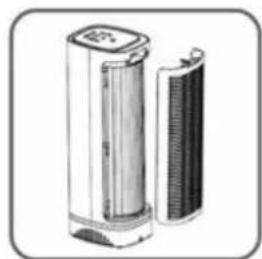
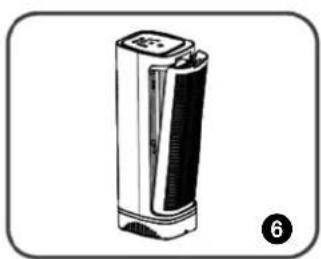
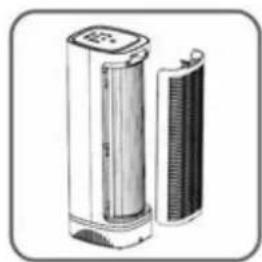
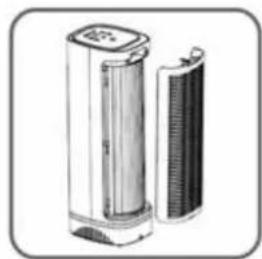
- Remove the inlet grill from the unit as shown below.
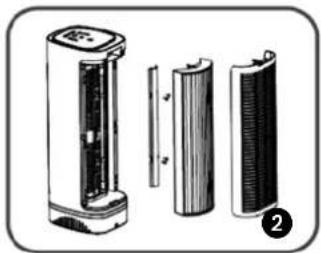
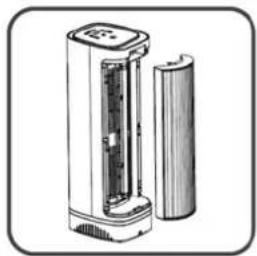
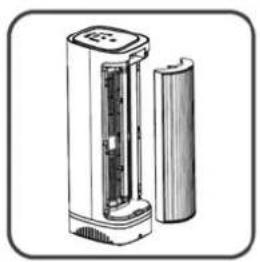
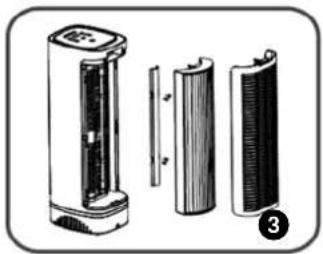
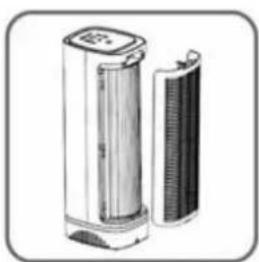
- Grasp the left and right frames of the cleanable HEPA-type filter through the indentations on the sides of the filter enclosure and remove the filter.
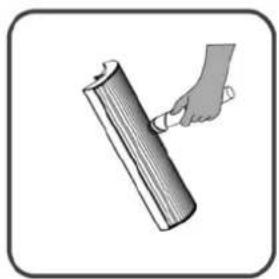
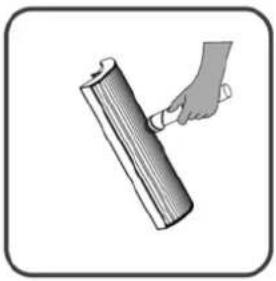
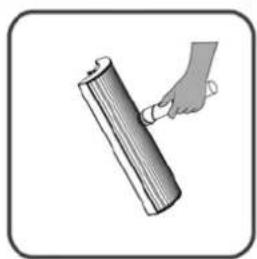
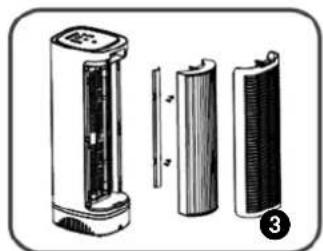
- To clean the cleanable HEPA-type filter, use the brush or crevice attachment with a vacuum cleaner. Run the attachment along the inlet and outlet sides of the filter, cleaning between the crevices as much as possible. Do not use water or any household cleaners or detergents to clean the cleanable HEPA-type filter.
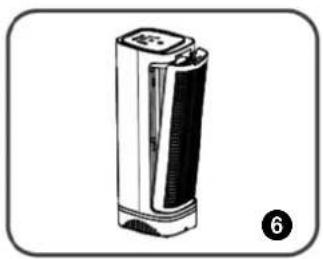
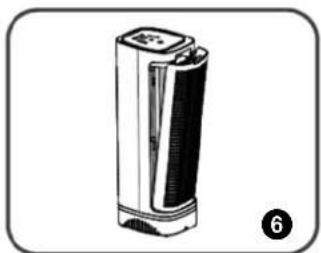
- Once the cleanable HEPA-type filter has been cleaned and checked for any possible damage, replace the filter back in the reverse direction described here. Plug in the unit and hold down the ION + UV/VOC button for 3 seconds. The clean filter light will go off and your cleaning maintenance is done.
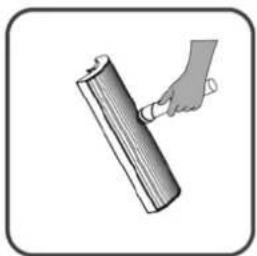
CLEANING EXTERNAL SURFACES
- Turn off and unplug the unit.
- Use a washcloth slightly dampened with a little water and dishwashing soap to wipe the outer case surfaces.
- Do not allow water to slip into the internal parts as this could damage your unit and result in electrical shock and injury to you.
- Allow the unit to thoroughly dry before use.
UV LAMP
The lifetime of the UV lamp is up to 12 months of continuous, effective operation. After this time, the bulb may remain illuminated, but its effectiveness is greatly reduced. For maximum effectiveness, please replace the UV bulb annually.
If the lamp stops functioning or needs replacement, please contact the retailer to order a replacement lamp.

CAUTION
Do not touch the glass part of the lamp. Oil from fingertips will decrease the effectiveness of the lamp. Never operate the unit without a filter or with a damaged filter. UV lamp cover must be installed at all times. The UV light from the UV lamp will result in severe damage to eyes and could cause blindness.

UV LAMP NOTICE WARNING
UV Light is harmful to bare skin and eyes and can cause temporary or permanent loss of vision. Never look directly at the UV lamp while it is illuminated - doing so could cause loss of vision!
Before replacing the UV lamp, make sure the A 68 air purifier is turned off and unplugged. Let the lamp cool down for 5 minutes before replacing it.
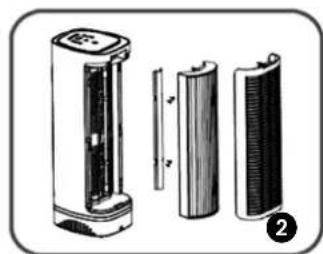
Replacing the UV Lamp:
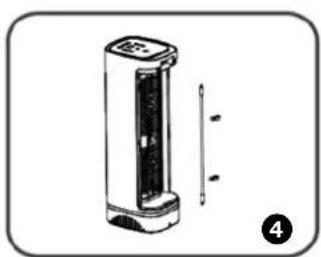
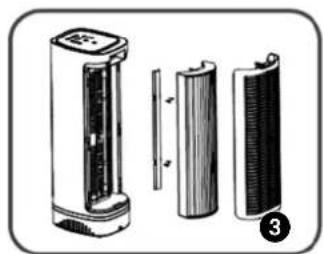
- Release the inlet grill by pressing on the locking latch.
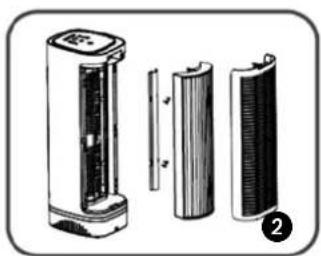
- Grasp the left and right frames of the cleanable HEPA-type filter through the indentations on the sides of the filter enclosure and remove filter.
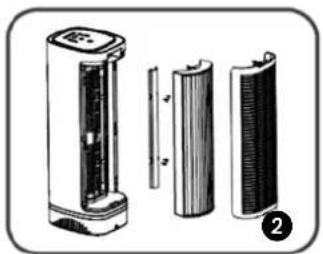
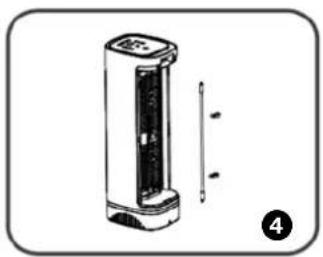
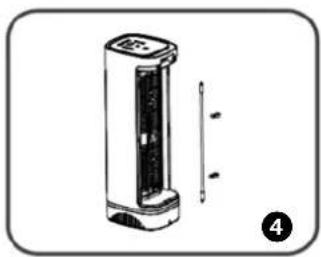
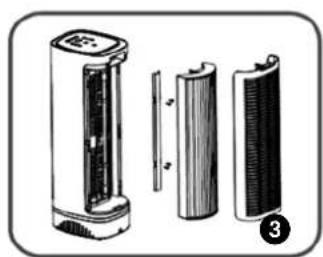
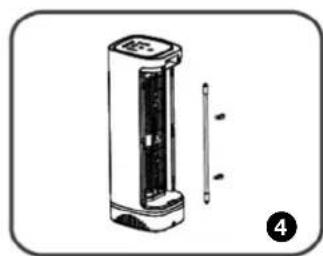
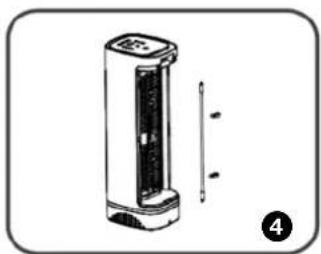
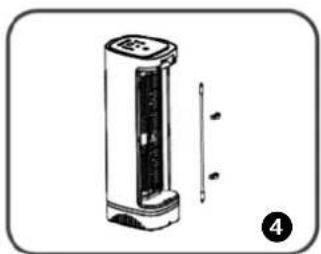
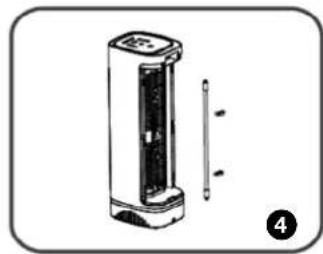
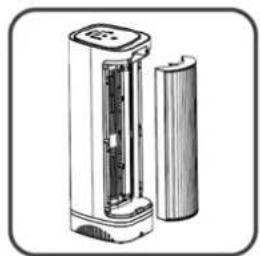
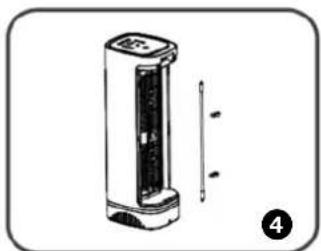
- Remove the two bolts used to fix the UV lamp cover and remove the cover out from the unit then unscrew the old UV lamp from the lamp base of the unit.
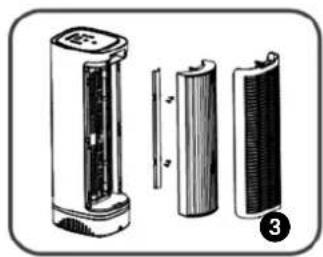
- Install the new UV lamp into the lamp base of the unit.
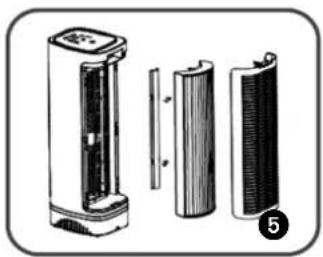
- Install the UV lamp cover with the two bolts on the unit.
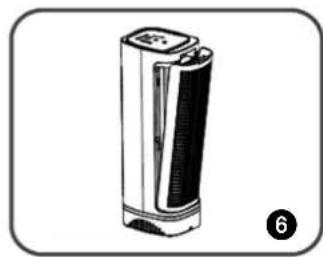
- Install the inlet grill on the unit.
STORAGE
If the machine will not be used for a long period of time, take the following steps:
- Switch off the device.
- Remove the plug from the socket.
- Clean the machine.
- Remove the filter package.
- Store the device in a dust-free room, preferably covered.
TROUBLESHOOTING
Check the following before contacting technical support:
| Problem Reason Solution | ||
| Unit will not operate | Power button has not been turned on. | Press the Power button |
| Unit is unplugged. Check to ensure unit is plugged in. | ||
| The inlet grill has not been installed & locked into place. | Check to make sure filter is properly installed & locked into place. | |
| Reduced airflow or poor filtering | The inlet or outlet grill may be blocked. | Check to ensure nothing is blocking air inlet & air outlet. |
| HEPA filter may be clogged. Check & change filter, if necessary. | ||
GUARANTEE CONDITIONS
We provide a two-year guarantee on your air purifier from the date of purchase. All material or manufacturing defects will be repaired free of charge. The following applies:
- All claims for compensation, including consequential damage, will not be entertained.
- Any repairs or replacement of components during the warranty period will not result in an extension of the warranty period.
- The warranty will expire if any alterations have been made, non-genuine components have been fitted, or if the air purifier has been repaired by a third party.
- Components subject to normal wear and tear, such as the air filter, are not covered by the warranty.
- The warranty is only valid on presentation of the original, unaltered, and date-stamped purchase receipt.
- The warranty does not cover damage caused by actions that deviate from those described in the user's manual or by neglect.
- Shipment costs and the risks associated with the shipment of the air purifier or parts of the air purifier are always borne by the purchaser.
To prevent unnecessary expenses, we recommend that you always carefully read the user's manual first. If this does not provide a solution, take the air purifier to your dealer for repair.
TECHNICAL SPECIFICATIONS
| Type A 68 | ||
| Mains power V / Hz / F 220-240 ~ / 50-60 | 1 | |
| Power consumption (min./max.) W 50 | ||
| Amperage (max.) A 0.36 | ||
| Noise level (min./max.) dB 62 | ||
| Air debit (min./max.) m | 3 /hour 91 | 166/225 |
| Net weight kg 4.2 | ||
| Dimensions (wxhxd) mm 215 x 585 x 176 | ||
| Suitable for rooms to m | 3 | 68 |
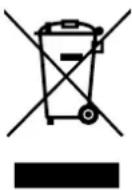
Contact your local government for information regarding the collection systems available. If electrical appliances are disposed of in landfills or dumps, hazardous substances can leak into the groundwater and get into the food chain, damaging your health and well-being. When replacing old appliances with new ones, the retailer is legally obligated to take back your old appliance for disposal at least for free of charge. Do not throw batteries into the fire, where they can explode or release dangerous liquids. If you replace or destroy the remote control, remove the batteries and throw them away in accordance with the applicable regulations because they are harmful to the environment.
Dear Madam, dear Sir,
MAIN COMPONENTS
HOW TO STORE THE APPLIANCE
MAIN COMPONENTS
WHAT YOU SHOULD KNOW BEFORE USE
GENERAL
NOTICE REGARDING UV LAMPS
NOTICE REGARDING THE PRESENCE OF MERCURY
CLEANING EXTERNAL SURFACES
WARNING REGARDING UV LAMPS
STORAGE
MAIN PARTS
CONTROLS/DEFINITIONS:

CLEANING OF EXTERNAL SURFACES
STORAGE
MAIN COMPONENTS
CONTROL ELEMENTS/SETTINGS:

Power control: To use the A 68 air cleaner, press the power button to turn on the air cleaner.

CLEANING OF EXTERNAL SURFACES
STORAGE
Distributed in Europe by PVG Holding B.V.
If you need further information or if problems arise, please visit our website www.qlima.com or contact our customer service (phone number on www.qlima.com). For all additional information or in case of any problems with the device, refer to www.qlima.com or the local Customer Center (phone numbers can be found at www.qlima.com). ES: If you need information or have any problem, visit our website www.qlima.com, or contact customer service (you will find the phone number at www.qlima.com). F: If you wish to obtain additional information or if you encounter a problem, visit our website (www.qlima.com) or contact our customer service (you will find the address and phone number at www.qlima.com). FHN: If you need service assistance, additional information, or if problems arise with the device, visit the website at www.qlima.com or ask for advice from the PVG consumer service center (www.qlima.com). (6) If you need information or if you have a problem, please visit our website (www.qlima.com) or contact our sales support (you will find its phone number at www.qlima.com). ① For information and in case of problems, visit the website www.qlima.com or contact the Customer Assistance Center (to find the phone number, consult www.qlima.com). If you need information, or if you have a problem with the product, you can go to the websites www.qlima.com. Alternatively, you can contact PVG's consumer service (phone number at www.qlima.com). If you need information or if you have a problem, visit our website (www.qlima.com) or contact the sales support department (address and phone at www.qlima.com). If you need information or if you have problems, visit the website www.qlima.com or contact the Assistance Center (phone number at www.qlima.com). FL: In case of problems and for detailed information, visit the Qlima website at www.qlima.com or contact the Qlima Contact Center (www.qlima.com). If you need service or information or have problems with the device, you can visit www.qlima.com or contact Qlima customer service (you will find the phone number at www.qlima.com). Slo: If you want additional information, visit the company's website at www.qlima.com or call the phone number (www.qlima.com). TR: If you need more information or if you encounter a problem, visit the Qlima website at www.qlima.com or contact the Qlima customer center in your country (phone number: www.qlima.com).
- MAIN COMPONENTS
- STORAGE
- MAIN PARTS
- CLEANING OF EXTERIOR SURFACES
- CONTROLS/SETTINGS
- GENERAL
- SAFETY REGULATIONS
- UV LAMP NOTICE
- UV LAMP DISPOSAL
- MERCURY NOTICE
- ATTENTION
- INSTALLATION
- REPLACEMENT PARTS
- SAFETY
- OPERATION
- POWER CONTROL
- TIMER CONTROL
- ION GENERATOR
- CLEANING & MAINTENANCE
- CLEANING THE CLEANABLE HEPA-TYPE FILTER
- CLEANING EXTERNAL SURFACES
- UV LAMP
- CAUTION
- UV LAMP NOTICE WARNING
- TROUBLESHOOTING
- GUARANTEE CONDITIONS
- TECHNICAL SPECIFICATIONS
- HOW TO STORE THE APPLIANCE
- WHAT YOU SHOULD KNOW BEFORE USE
- NOTICE REGARDING UV LAMPS
- NOTICE REGARDING THE PRESENCE OF MERCURY
- WARNING REGARDING UV LAMPS
- CONTROLS/DEFINITIONS
- CLEANING OF EXTERNAL SURFACES
- DISTRIBUTED IN EUROPE BY PVG HOLDING B.V
Brand : QLIMA
Model : A 68
Category : Air purifier