VT-1770 W - Humidifier Vitek - Free user manual and instructions
Find the device manual for free VT-1770 W Vitek in PDF.


| Product Type | Air Washer Humidifier |
| Model | VT-1770 W |
| Brand | Vitek |
| Power Supply | 220-230 V ~ 50 Hz |
| Power Consumption | 320 W |
| Water Tank Capacity | 3 L |
| Water Discharge | ≥ 350 ml/h |
| Productivity | Up to 150 m³/h |
| Humidified Area | Up to 30 m² |
| Operating Modes | Standard (50% RH), Humidification (60% RH), Sleep (50% RH, low noise), Intensive (constant) |
| Timer | 2, 4, or 8 hours auto-off |
| Eco Mode | Disables heating to save power |
| Child Lock | Yes, press and hold 3 seconds |
| No Water Indicator | Visible and audible alert |
| Filter Type | Disc filter block + antibacterial cartridge filter + inlet filter |
| Cleaning Frequency | Weekly disc filter and tank; inlet filter weekly; cartridge every 3-4 months |
| Safety Features | Auto shut-off when tank empty, child lock, overheat protection (RCD recommended) |
| Water Temperature Max | 40°C |
| Room Temperature Range | +5°C to +40°C, humidity <80% |
| Included Accessories | Humidifier, user manual |
| Service Life | 3 years |
Frequently Asked Questions - VT-1770 W Vitek
User questions about VT-1770 W Vitek
0 question about this device. Answer the ones you know or ask your own.
Ask a new question about this device
Download the instructions for your Humidifier in PDF format for free! Find your manual VT-1770 W - Vitek and take your electronic device back in hand. On this page are published all the documents necessary for the use of your device. VT-1770 W by Vitek.
USER MANUAL VT-1770 W Vitek
flowchart
graph TD
    A["12"] --> B["Стандартный"]
    A --> C["Увлажнение"]
    A --> D["Спящий"]
    A --> E["Интенсивный"]
    B --> F["14"]
    C --> G["8 ч"]
    D --> H["4 ч"]
    E --> I["2 ч"]
    F --> J["20"]
    G --> K["Блокировка"]
    H --> L["БЛОКИРОВКА ОТ ДЕТЕЙ"]
    I --> M["19"]
    J --> N["16"]
    K --> O["18"]
    L --> P["ЭКО РЕЖИМ"]
    M --> Q["Индикатор отсутствия воды"]
    N --> R["15"]
    O --> S["17"]
    P --> T["РЕЖИМ"]
    Q --> U["ТАЙМЕР"]
    R --> V["ВКЛ/ ВЫКЛ"]
    T --> W["11"]
    U --> X["13"]
    V --> Y["15"]
flowchart
graph LR
    A["Water Tap"] --> B["Increase"]
    B --> C["Decrease"]
natural_image
Technical diagram of a mechanical assembly with a cylindrical component and internal components (no text or symbols)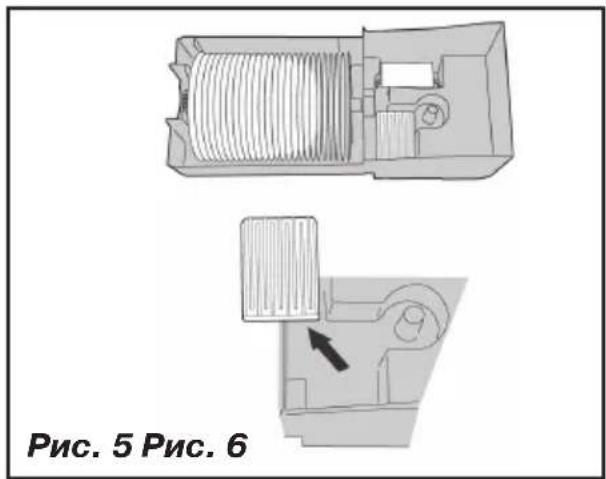
natural_image
Line drawing showing two hand positions: one assembling a mechanical component, the other inserting a small component into a smaller container (no text or symbols)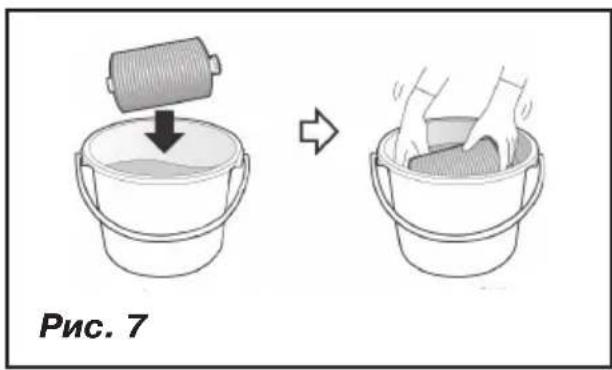
flowchart
graph LR
    A["Raw Material Input"] --> B["Add Processing"]
    B --> C["Close-up of Internal Processing"]
    C --> D["Final Product with Internal Interlocking"]
    D --> E["Final Output"]
Insufficient room humidity negatively affects human health, pets, plants and furniture.
The recommended comfortable room humidity level should be from 50 to 60%.
Humidifier - air washer VT-1770 is a combined unit for air cleaning and humidifying. Using this unit allows to improve the air quality in the room.
DESCRIPTION
- Disk filter block
- Disk filter
- Water level scale
- Water tank storage compartment lid
- Water tank lid
- Water tank
- Water tank handle
- Control panel
- Relative humidity level indicators
- Inlet filter grid
Control panel
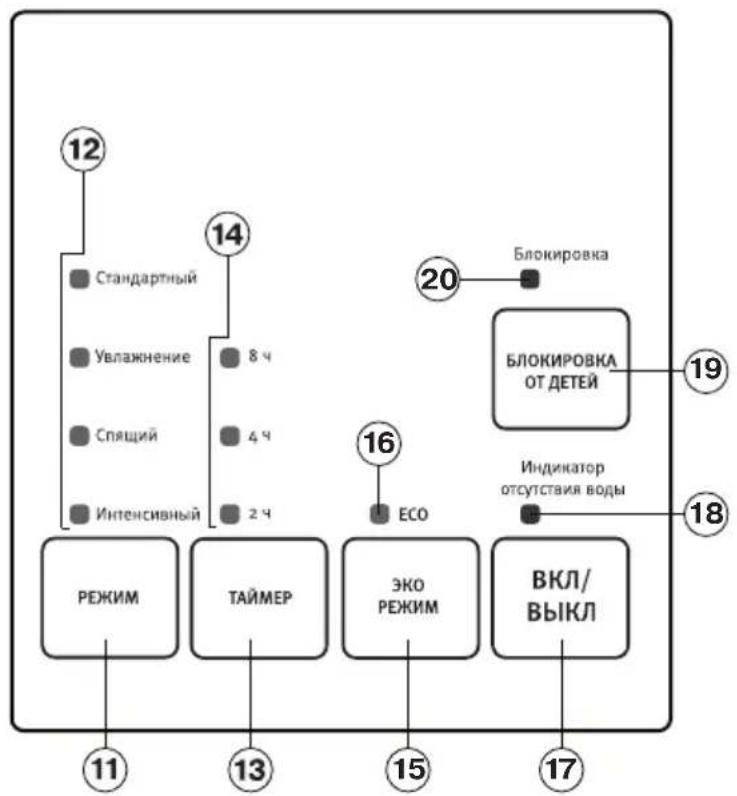
- «MODE» operation mode selection button
- Operation mode indications
- «TIMER» timer setting button
- Timer setting indicators
- «ECOMODE» button
- Ecomode indicator
- «ON/OFF» button
- No water indicator
- «CHILD SAFETY LOCK» button
- Child safety lock icon
Attention!
For additional protection it is reasonable to install a residual current device (RCD) with nominal operation current not exceeding 30 mA. To install RCD contact a specialist.
SAFETY MEASURES
Before using the electric unit, read these instructions carefully and keep these instructions for further reference.
Use the unit according to its intended purpose only, as it is stated in this user manual. Mishandling the unit can lead to its breakage and cause harm to the user or damage to his/her property.
- Before switching the unit on make sure that your home mains voltage corresponds to unit operating voltage.
-
To avoid fire do not use adapters for connecting the unit to the mains.
-
Place the unit on a flat, moisture-resistant surface. The distance to the walls, other furniture and interior objects should be at least 30 cm.
- Do not place the unit on carpet surfaces with high pile.
- The appliance must not be located immediatel below a socket outlet
- Do not place the humidifier in places exposed to direct sunlight, high temperatures, near computers or other sensitive electronic appliances.
• Do not use the unit outdoors. - Use only the removable parts supplied with the unit.
• Never allow children to use the unit as a toy. - This unit is not intended for usage by children or disabled persons unless they are given all the necessary and understandable instructions by a person who is responsible for their safety on safety measures and information about danger that can be caused by improper usage of the unit.
- For children safety reasons do not leave polyethylene bags, used as a packaging, unattended.
- Attention! Do not allow children to play with polyethylene bags or packaging film. Danger of suffocation!
- Do not switch the unit on without water; switch the unit off when the water tank becomes empty.
- Do not use soda or dirty water or any perfume additives
- The water temperature should not exceed 40^ C.
- Do not switch the unit on if the filters and water tank are not installed.
- Unplug the unit before removing the water tank or inlet filter grid.
- Do not cover the unit.
- Do not cover the unit openings and avoid getting of foreign objects inside them.
- Make sure that air inlets and outlets are not blocked during operation. Do not place the unit on soft surfaces, for instance, bed in order to avoid blockage of air openings and fire
- Do not immerse the unit body, the power plug or the power cord into water or other liquids.
- This unit is not intended for use in bathrooms or in places with higher moisture.
-
Do not move or tilt the unit during operation.
-
Always unplug the unit and pour out water from the water tank and disc filter block before cleaning or if you do not use the humidifier.
- Before moving the humidifier to another place, unplug it and pour out water from the water tank and disc filter block. When moving the unit, hold it by the base with both hands.
- Do not touch the power plug with wet hands.
- Before using the unit, closely examine the power cord and make sure that it is not damaged. Do not use the unit if the power cord is damaged.
- Do not switch on and do not use the unit if the cord or the plug is damaged or if the fan heater works irregularly, fell or is damaged. In this case contact an authorized service center for testing and repair
- Do not dismantle the unit by yourself, if any malfunction is detected, apply to the nearest authorized service center.
- Clean the unit regularly.
- Keep the unit out of reach of children.
After unit transportation or storage at low temperature it is necessary to keep it for at least two hours at room temperature before switching on.
- Unpack the unit and remove any stickers and package materials that can prevent unit operation. Examine the unit for damages. In case of damages do not switch the unit on.
Notes:
- Use the humidifier at the room temperature from +5^ C to +40^ C and relative humidity less than 80%.
- Water temperature should not exceed +40°C.
- Before connecting the humidifier to the mains make sure that your home mains voltage corresponds to unit operating voltage.
OPERATION
This unit type humidifies and cleans air by blowing hot air on the wet disc filter, thereby dust particles accumulate in water and on filter discs.
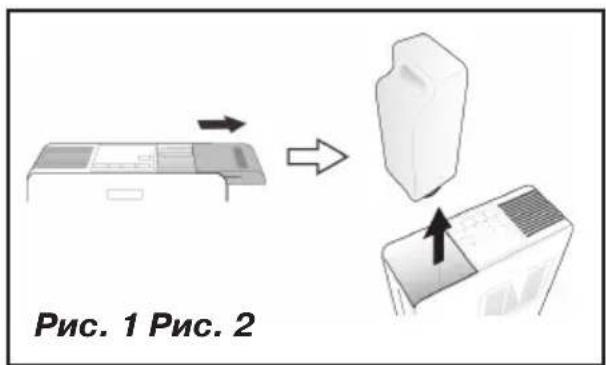
- Remove the lid (4) moving it aside.
- Take the water tank (6) by the handle (7) and remove it from the unit body (pic. 1).
- Turn over the tank (6), open the lid (5) rotating it counterclockwise. Fill the tank (6) with necessary amount of water, close the lid (5) rotating it clockwise (pic. 2).
- Put the filled water tank (6) back to its place and close the lid (4). Wait for some time, that is necessary to fill the disc filter block (1) with water.
- Insert the plug into the socket, you will hear a sound signal.
- Switch the unit on by pressing the «ON/OFF» button (17). You'll hear a sound signal, the standard operation mode indicator (12) and the relative room air humidity indicator (9) will light up.
- After the unit operation switch the unit off by pressing the «ON/OFF» button (17).
- Wait till the unit switches off completely (the fan motor stops in approximately 30 seconds) and then unplug the unit.
Notes:
- Every pressing of the buttons is confirmed with a short sound signal.
- The humidity level shown by the indicator (9) may be different from the readings of another hygrometer.
- The humidity level indications depend on the room temperature.
- Draughts or other air flows may affect the air humidity indications in the room.
CONTROL PANEL (8)
«ON/OFF» button (17)
To switch the unit on, press the «ON/OFF» button (17) once. Switch the unit off by pressing the «ON/OFF» button (17) again, the indicators on the control panel (8) will go out, and the unit will be switched off in approximately 30 seconds.
«MODE» button (11)
Select the operating mode pressing consequently the «MODE» button (11), one of the indicators (12) will light up:
- Standard* - operation mode maintaining the relative room humidity 50%;
- Humidification* - operation mode maintaining the relative room humidity 60%;
- Sleep* - operation mode maintaining the relative room humidity 50%; in this mode the
ENGLISH
electric motor rotation speed is reduced that provides low noise level;
*Once the set humidity level is reached, the unit will be switched off; when the relative room humidity decreases, the unit will be switched on. Thus the preset humidity level is maintained in the room.
- Intensive - constant operation mode, the humidity level in the room is not taken into account.
«TIMER» timer on button (13)
You can set the auto switch off of the humidifier in 2, 4 or 8 hours by pressing the «TIMER» button (13) consequently, one of the indicators (14) will light up.
To switch the timer off press the «TIMER» button (13) consequently or switch the unit off by pressing the «ON/OFF» button (17).
«ECOMODE» button (15)
The ecomode allows to reduce the amount of consumed power by switching the air heating function off.
To activate the ecomode press the «ECOMODE» button (15), the indicator (16) will light up.
To switch the ecomode off, press the «ECOMODE» button (15) again, the indicator (16) will go out.
When the child safety lock is on, you cannot change the preset unit operation modes. If you have switched the unit off by pressing the «ON/OFF» button (17), the restart is only possible after the «CHILD SAFETY LOCK» function is off. To switch the unit on or change the settings, first switch the child safety lock off.
To switch the child safety lock on press and hold the «CHILD SAFETY LOCK» button (19) for three seconds, you will hear a sound signal and the indicator (20) will light up.
To switch the child safety lock off press and hold the «CHILD SAFETY LOCK» button (19) for three seconds, you will hear a sound signal and the indicator (20) will go out.
No water indicator (18)
When the water tank (6) is empty, you'll hear three sound signals, and the indicator (18) will light up. Switch the unit off and unplug it, open the lid (4) and remove the water tank (6). Fill the tank with
water. Install the filled water tank back to its place, close the lid (4) and switch the unit on.
Notes:
- During the operation you can check the water level in the tank (6) using the scale (2).
- No water indicator (18) can also indicate that the disc filter block (1) is installed improperly.
CLEANING AND CARE
Warning! Always switch the unit off and unplug it before cleaning.
Hard water causes appearance of mineral scale in the disc filter block (1) and in the water tank (6) that leads to improper operation of the unit. To avoid it: use the water cleaned with domestic filter, boiled and settled water. If tap water is hard, mix it with distilled water in proportion 1:1; if tap water is too hard, mix it with distilled water in proportion 1:2 or use distilled water only.
- clean the disc filter block (1) and the water tank (6) weekly;
- change water in the water tank (6) every day.
Note:
- Do not immerse the unit body into water or any other liquids.
Once a week wash the water tank (6) and the disc filter block (1) carefully with a neutral detergent solution.
- Remove the water tank (6) (pic. 1).
- Remove the water tank lid and wash the tank with warm water and neutral detergent (pic. 2).
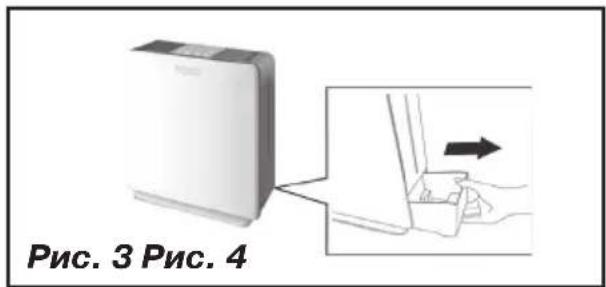
- Pull the disc filter block (1) and remove it from the unit body (pic. 3).
Note:
- Follow the described sequence of operations, because it is impossible to remove the disc filter block (1) from the unit body with installed water tank (6).
- Remove the disc filter from the filter block (1) (pic. 4).
-
Remove the antibacterial cartridge filter from the filter block (1) body (pic. 5). Wash the filter block (1) body with a neutral detergent solution, rinse with clean water and dry (pic. 6). Wash the cartridge filter under running water once in 3-4 months or more often, as it becomes dirty. Install the cartridge filter back to its place (pic. 5).
-
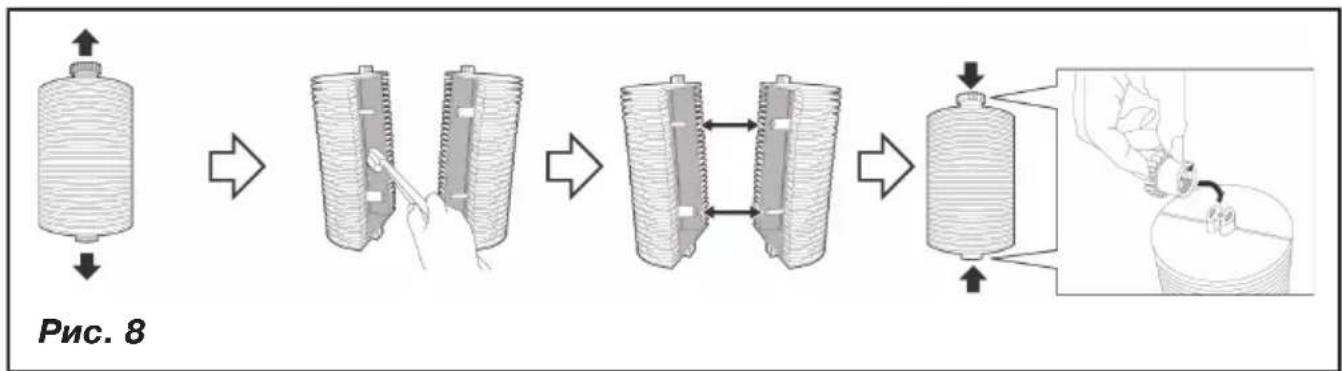
Place the disc filter (2) into a neutral detergent solution for approximately 1 hour (pic. 7). Disassemble the disc filter (2), removing the support bush from one side and the drive gear from the other one (pic. 8). Separate the disc filter (2) in two parts, clean inner and outer surfaces of the filter (2) with a brush. Assemble the disc filter (2) in reverse sequence.
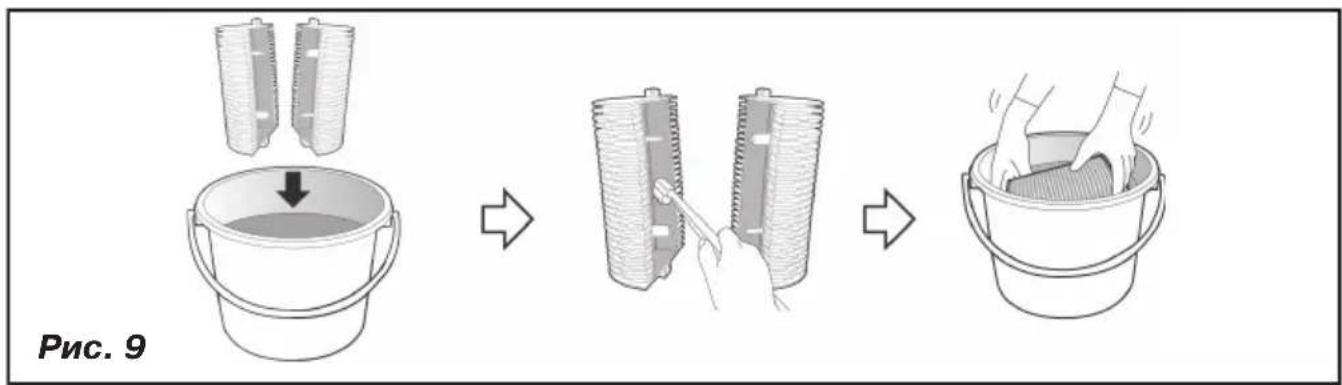
- If there are intensive lime deposits, use citric acid solution to clean the disc filter (2). Dissolve 2 tablespoons citric acid in 3 l water. Disassemble the disc filter (2) and put the parts into the citric acid solution for approximately 1 hour. Then wash and dry the disc filter (2) parts thoroughly. Assemble the disc filter (2) (pic. 9).
- Install the disc filter (2) into the block (1) body.
- Install the filter block (1) into the unit body, install the water tank (6) back to its place and install the lid (4).
Cleaning of the inlet filter
Clean the filter weekly.
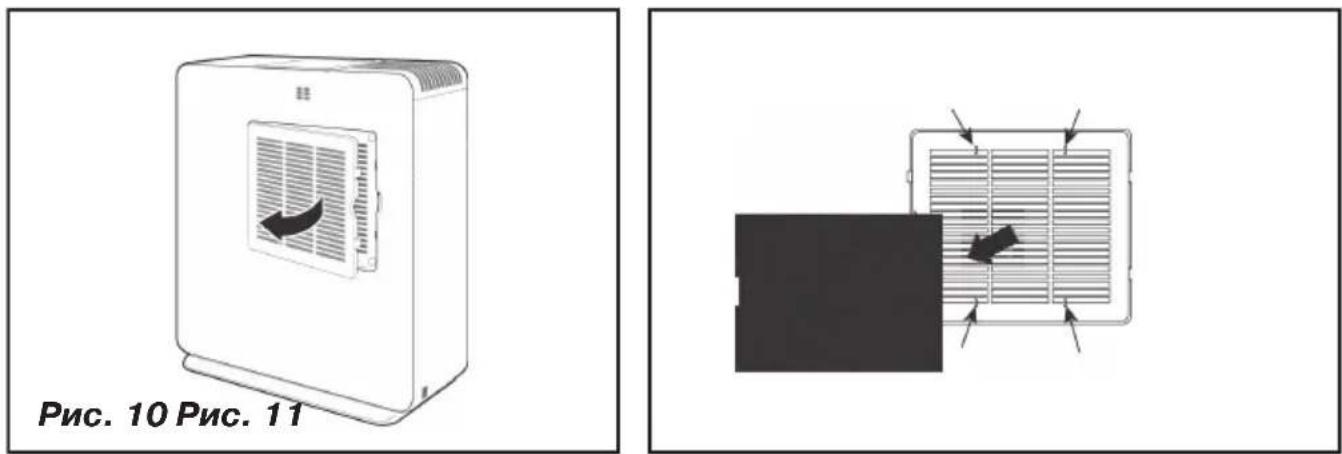
- Remove the inlet filter grid (10) (pic. 10).
- Remove the inlet filter from the inner side of the grid (pic. 11).
- Clean the filter.
- Fix the filter on the inner side of the grid (10).
- Insert the grid (10) ledges into the grooves on the body and install the grid (10) till clamp clicking.
- You can use a vacuum cleaner with a corresponding attachment to clean the inlet filter grid (10) (pic. 12).
STORAGE
- Before taking the unit away for storage, pour out water from the water tank (6) and disc filter block (1), wipe the filter block (1) dry.
- Do not keep the unit with water inside the tank or remaining water in the disc filter block.
- Keep the humidifier away from children in a dry cool place.
TROUBLESHOOTING
| Failure Possible causes Troubleshooting | ||
| The unit is out of operation | The unit is connected improperly. | Check whether the power plug is inserted into the mains socket. |
| Disc filter is installed improperly. | Install the filter block (1) correctly. | |
| The relative room air humidity is high or the humidifier has been switched off after the preset humidity level was reached. | See mode description in chapter «Control panel (8)» | |
| Foreign smell appears during the operation | First use of the unit | Remove the water tank lid, pour out the water and leave the tank open for 12 hours in a cool darkened place |
| Dirty or stale water | Unplug the unit, remove the water tank and disc filter block, pour out the water, wash the tank and fill it with clean boiled or distilled water | |
| Foreign noise during the operation | The filter block (1) and the disc filter (2) are installed improperly | Make sure that the unit is assembled properly. |
| The disc filter (2) is dirty | Clean the disc filter (2) | |
| Noticeable decrease of the air flow | Inlet filter is dirty | Clean the inlet filter and its grid |
| The relative humidity level indications do not change | Excessive room space, draughts or other foreign air flows | The unit operates effectively in a room with up to 30m2 area. |
ENGLISH
DELIVERY SET
Humidifier – air washer – 1 pc.
Instruction manual - 1 pc.
TECHNICAL SPECIFICATIONS
Power supply: 220-230 V \~ 50 Hz
Power consumption: 320 W
Water tank capacity: 3 L
Water discharge: ≥ 350ml/h
Productivity: up to 150 m³/h
Humidified area: up to 30 m²
The manufacturer preserves the right to change the specifications of the unit without a preliminary notification.
Unit operating life is 3 years
Guarantee
Details regarding guarantee conditions can be obtained from the dealer from whom the appliance was purchased. The bill of sale or receipt must be produced when making any claim under the terms of this guarantee.

This product conforms to the EMC-Requirements as laid down by the Council Directive 2004/108/EC and to the Low Voltage Regulation (2006/95/EC)
boydoping, jihozni ishlating.
Eslatrata:
(2006/95/EC) aytilgan YAXS
talablariga muvofiq keladi.
GB
A production date of the item is indicated in the serial number on the technical data plate. A serial number is an eleven-unit number, with the first four figures indicating the production date. For example, serial number 0606xxxxxxx means that the item was manufactured in June (the sixth month) 2006.
DE


- DESCRIPTION
- Control panel
- Attention!
- SAFETY MEASURES
- Notes:
- OPERATION
- CONTROL PANEL (8)
- «MODE» button (11)
- ENGLISH
- «TIMER» timer on button (13)
- «ECOMODE» button (15)
- No water indicator (18)
- CLEANING AND CARE
- Warning! Always switch the unit off and unplug it before cleaning.
- Note:
- Cleaning of the inlet filter
- STORAGE
- DELIVERY SET
- TECHNICAL SPECIFICATIONS
- Unit operating life is 3 years
- Guarantee
- Eslatrata:
- GB
- DE
Brand : Vitek
Model : VT-1770 W
Category : Humidifier