
VPL-ES7 - Projector SONY - Free user manual and instructions
Find the device manual for free VPL-ES7 SONY in PDF.



| Brand | Sony |
| Model | VPL-ES7 |
| Product Type | LCD Data Projector |
| Dimensions (W × H × D) | Approx. 314 × 109 × 269 mm |
| Weight | Approx. 2.9 kg |
| Power Supply | AC 100-240 V, 2.4-1.0 A, 50/60 Hz |
| Power Consumption | 240 W max (standby 3 W) |
| Light Output | 2000 lm (High Lamp Mode) |
| Projected Image Size | 40 to 300 inches |
| Projection Distance (100 inches) | 2.9 to 3.5 m |
| Color System | NTSC3.58/PAL/SECAM/NTSC4.43/PAL-M/PAL-N/PAL60 |
| Compatible Computer Signals | fH: 19-92 kHz, fV: 48-92 Hz, max resolution SXGA+ 1400×1050 |
| Video Signals | 15k RGB/component, progressive component, DTV (480/60i, 576/50i, etc.), composite, Y/C |
| Replacement Lamp | LMP-E191 |
| Lamp Life | Varies depending on usage conditions |
| Air Filter Cleaning | At every lamp replacement |
| Supplied Accessories | Remote control, CR2025 battery, HD D-sub 15-pin cable, carrying case, power cord, lens cap, CD-ROM instruction manual, quick reference guide |
| Safety | Grounding required, disconnect device, do not expose to rain |
| Operating Temperature | 0 °C to 35 °C |
Frequently Asked Questions - VPL-ES7 SONY
User questions about VPL-ES7 SONY
0 question about this device. Answer the ones you know or ask your own.
Ask a new question about this device
Download the instructions for your Projector in PDF format for free! Find your manual VPL-ES7 - SONY and take your electronic device back in hand. On this page are published all the documents necessary for the use of your device. VPL-ES7 by SONY.
USER MANUAL VPL-ES7 SONY
natural_image
Line drawing of a cluttered printer with a prohibition symbol above it (no text or symbols on the printer itself)natural_image
Illustration of a steaming hot airstand emitting smoke next to a portable heater and a computer monitor (no text or symbols)natural_image
Diagram of a spray gun with particles and a stop symbol (no text or labels)text_image
Diagram illustrating a hazardous material or disposal process with a no-smoking symbol and labeled components.natural_image
Illustration of a cigarette emitting exhaust smoke next to a device with a no-smoking symbol (no text or labels)natural_image
Two identical diagrams showing a vertical structure with circular holes and a prohibition symbol above (no text or labels)natural_image
Illustration of a rolled-up rectangular object with a circular opening, placed on a textured surface (no text or symbols)natural_image
Simple line drawing of a box with a diagonal tab and a prohibition symbol above it (no text or labels)natural_image
Simple line drawing of a box with a vertical rod and a circular symbol (no text or labels)natural_image
Pure technical line drawing of a screwdriver on a curved surface with a circular base (no text or symbols)ご注意
text_image
Technical diagram of a mechanical component with numbered parts and a screwdriver inserted, likely illustrating a repair or mounting process.ご注意
To reduce the risk of fire or electric shock, do not expose this apparatus to rain or moisture.
To avoid electrical shock, do not open the cabinet. Refer servicing to qualified personnel only.
THIS APPARATUS MUST BE EARTHED.
CAUTION
Danger of explosion if battery is incorrectly replaced.
Replace only with the same or equivalent type recommended by the manufacturer. When you dispose of the battery, you must obey the law in the relative area or country.
WARNING
When installing the unit, incorporate a readily accessible disconnect device in the fixed wiring, or connect the power plug to an easily accessible socket-outlet near the unit. If a fault should occur during operation of the unit, operate the disconnect device to switch the power supply off, or disconnect the power plug.
WARNING: THIS WARNING IS APPLICABLE FOR USA ONLY.
If used in USA, use the UL LISTED power cord specified below.
DO NOT USE ANY OTHER POWER CORD.
| Plug Cap | Parallel blade with ground pin (NEMA 5-15P Configuration) |
| Cord | Type SJT, three 16 or 18 AWG wires |
| Length | Minimum 1.5m (4 ft. 11 in.), Less than 4.5 m (14 ft. 9 5/8 in.) |
| Rating | Minimum 10 A, 125 V |
Using this unit at a voltage other than 120 V may require the use of a different line cord or attachment plug, or both. To reduce the risk of fire or electric shock, refer servicing to qualified service personnel.
WARNING: THIS WARNING IS APPLICABLE FOR OTHER COUNTRIES.
- Use the approved Power Cord (3-core mains lead) / Appliance Connector / Plug with earthing-contacts that conforms to the safety regulations of each country if applicable.
- Use the Power Cord (3-core mains lead) / Appliance Connector / Plug conforming to the proper ratings (Voltage, Ampere).
If you have questions on the use of the above Power Cord / Appliance Connector / Plug, please consult a qualified service personnel.
IMPORTANT
The nameplate is located on the bottom.
For kundene i Norge
Dette utstyret kan kobles til et IT-strømfordelingssystem.
For the customers in the U.S.A.
This equipment has been tested and found to comply with the limits for a Class B digital device, pursuant to Part 15 of the FCC Rules. These limits are designed to provide reasonable protection against harmful interference in a residential installation. This equipment generates, uses, and can radiate radio frequency energy and, if not installed and used in accordance with the instructions, may cause harmful interference to radio communications. However, there is no guarantee that interference will not occur in a particular installation. If this equipment does cause harmful interference to radio or television reception, which can be determined by turning the equipment off and on, the user is encouraged to try to correct the interference by one or more of the following measures:
- Reorient or relocate the receiving antenna.
- Increase the separation between the equipment and receiver.
- Connect the equipment into an outlet on a circuit different from that to which the receiver is connected.
- Consult the dealer or an experienced radio/TV technician for help.
You are cautioned that any changes or modifications not expressly approved in this manual could void your authority to operate this equipment.
All interface cables used to connect peripherals must be shielded in order to comply with the limits for a digital device pursuant to Subpart B of Part 15 of FCC Rules.
This device complies with Part 15 of the FCC Rules. Operation is subject to the following two conditions: (1) this device may not cause harmful interference, and (2) this device must accept any interference received, including interference that may cause undesired operation.
If you have any questions about this product, you may call; Sony Customer Information Service Center 1-800-222-7669 or http://www.sony.com/
Declaration of Conformity
Trade Name: SONY Model: VPL-EX70, VPL-EX7, VPL-ES7 Responsible party: Sony Electronics Inc. Address: 16530 Via Esprillo, San Diego, CA 92127 U.S.A. Telephone Number: 858-942-2230
This device complies with part 15 of the FCC Rules. Operation is subject to the following two conditions: (1) this device may not cause harmful interference, and (2) this device must accept any interference received, including interference that may cause undesired operation.
For the customers in Canada
This Class B digital apparatus complies with Canadian ICES-003.
For the customers in Europe
The manufacturer of this product is Sony Corporation, 1-7-1 Konan, Minato-ku, Tokyo, 108-0075 Japan. The Authorized Representative for EMC and product safety is Sony Deutschland GmbH, Hedelfinger Strasse 61, 70327 Stuttgart, Germany. For any service or guarantee matters please refer to the addresses given in separate service or guarantee documents.
For the State of California, USA only
Perchlorate Material - special handling may apply, See www.dtsc.ca.gov/hazardouswaste/perchlorate
Perchlorate Material: Lithium battery contains perchlorate.
Disposal of the used lamp
For the customers in the USA
Lamp in this product contains mercury. Disposal of these materials may be regulated due to environmental considerations. For disposal or recycling information, please contact your local authorities or the Electronic Industries Alliance (www.eiae.org).
For the customers in Taiwan only

廢電池請回收
Table of Contents
Precautions 5
Notes on Installation and Usage ...... 6
Using the CD-ROM Manuals ...... 9
Projecting 10
Projecting 10
Adjusting the Projector ...... 11
Turning off the Power...... 11
Replacing the Lamp 12
Cleaning the Air Filter 14
Troubleshooting 15
Specifications.... 17
Precautions
Safety
- Check that the operating voltage of your unit is identical with the voltage of your local power supply. If voltage adaptation is required, consult with qualified Sony personnel.
- Should any liquid or solid object fall into the cabinet, unplug the unit and have it checked by qualified personnel before operating it further.
- Unplug the unit from the wall outlet if it is not to be used for several days.
- To disconnect the cord, pull it out by the plug. Never pull the cord itself.
- The wall outlet should be near the unit and easily accessible.
- The unit is not disconnected to the AC power source (mains) as long as it is connected to the wall outlet, even if the unit itself has been turned off.
- Do not look into the lens while the lamp is on.
- Do not place your hand or objects near the ventilation holes. The air coming out is hot.
- Be careful not to get your fingers caught in the adjuster.
- Do not spread a cloth or paper under the unit.
Illumination
- To obtain the best picture, the front of the screen should not be exposed to direct lighting or sunlight.
- Ceiling-mounted spot lighting is recommended. Use a cover over fluorescent lamps to avoid lowering the contrast ratio.
- Cover any windows that face the screen with opaque draperies.
- It is desirable to install the unit in a room where floor and walls are not of light-reflecting material. If the floor and walls are of reflecting material, it is recommended that the carpet and wall paper be changed to a dark color.
Preventing internal heat build-up
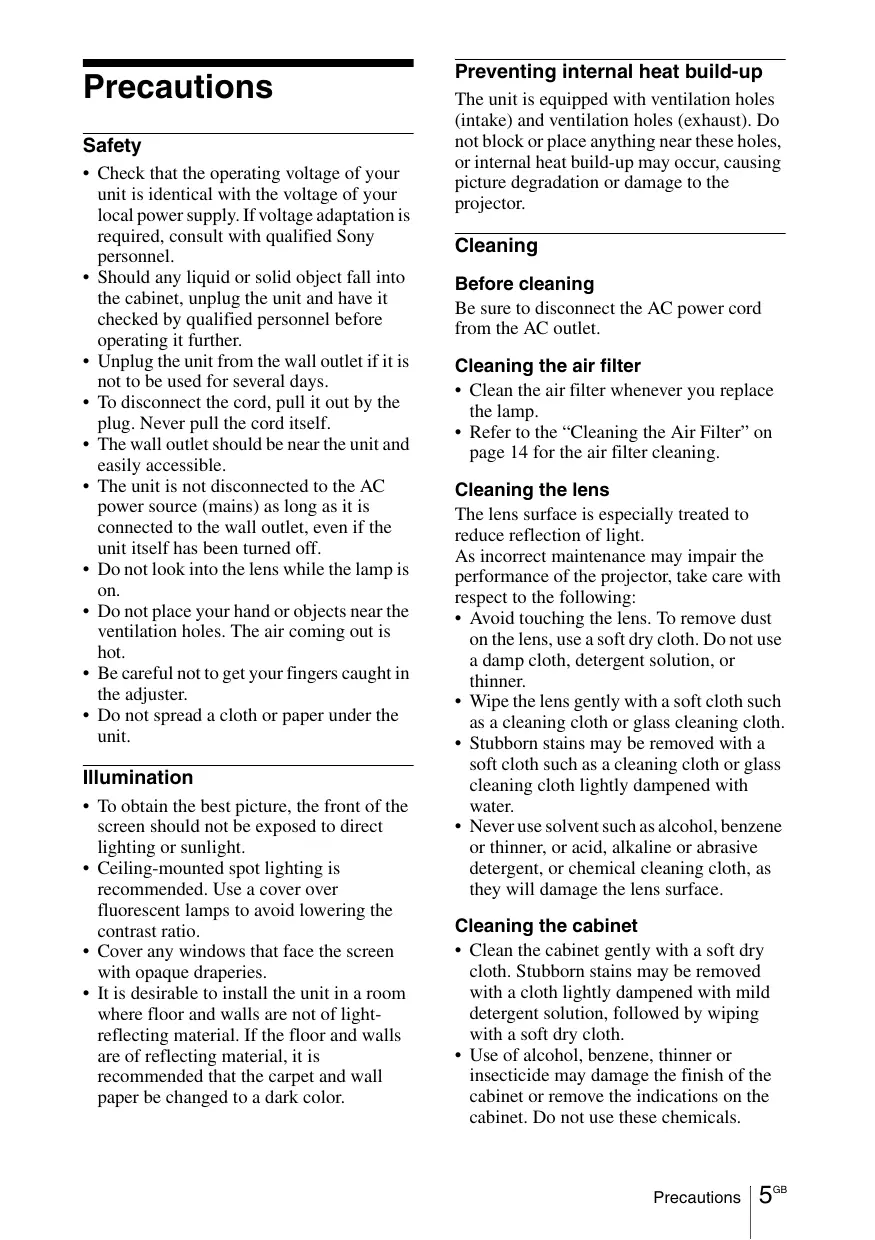
The unit is equipped with ventilation holes (intake) and ventilation holes (exhaust). Do not block or place anything near these holes, or internal heat build-up may occur, causing picture degradation or damage to the projector.
Cleaning
Before cleaning
Be sure to disconnect the AC power cord from the AC outlet.
Cleaning the air filter
- Clean the air filter whenever you replace the lamp.
- Refer to the “Cleaning the Air Filter” on page 14 for the air filter cleaning.
Cleaning the lens
The lens surface is especially treated to reduce reflection of light.
As incorrect maintenance may impair the performance of the projector, take care with respect to the following:
- Avoid touching the lens. To remove dust on the lens, use a soft dry cloth. Do not use a damp cloth, detergent solution, or thinner.
- Wipe the lens gently with a soft cloth such as a cleaning cloth or glass cleaning cloth.
- Stubborn stains may be removed with a soft cloth such as a cleaning cloth or glass cleaning cloth lightly dampened with water.
- Never use solvent such as alcohol, benzene or thinner, or acid, alkaline or abrasive detergent, or chemical cleaning cloth, as they will damage the lens surface.
Cleaning the cabinet
- Clean the cabinet gently with a soft dry cloth. Stubborn stains may be removed with a cloth lightly dampened with mild detergent solution, followed by wiping with a soft dry cloth.
-
Use of alcohol, benzene, thinner or insecticide may damage the finish of the cabinet or remove the indications on the cabinet. Do not use these chemicals.
-
If you rub on the cabinet with a stained cloth, the cabinet may be scratched.
- If the cabinet is in contact with a rubber or vinyl resin product for a long period of time, the finish of the cabinet may deteriorate or the coating may come off.
LCD data projector
This LCD data projector is manufactured using high-precision technology. You may, however, see tiny black points and/or bright points (red, blue, or green) that appear continuously on the LCD data projector. This is a normal result of the manufacturing process and does not indicate a malfunction. When the images are projected onto the screens from multiple LCD data projectors, they may generate color distinctions because each projector has its own color balance even if the projectors are the same models.
Notes on Installation and Usage
Unsuitable Installation
Do not install the projector in the following situations. Installation is these situations or locations may cause a malfunction or damage to the unit.
Poorly ventilated locations
natural_image
Line drawing of a cluttered printer with a prohibition symbol above it (no text or symbols on the printer itself)- Allow adequate air circulation to prevent internal heat build-up. Do not place the unit on surfaces (rugs, blankets, etc.) or near materials (curtains, draperies) that may block the ventilation holes. When internal heat builds up due to blockage of ventilation holes, the temperature sensor will function, and the power will be turned off automatically.
- Leave space of more than 30 cm (11 ^7 /8 inches) around the unit.
- Be careful not to allow the ventilation holes to inhale tiny objects such as pieces of paper or clumps of dust.
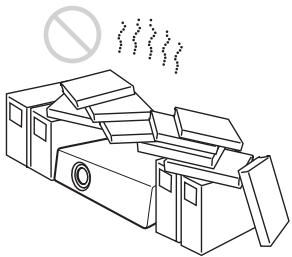
Hot and humid
natural_image
Illustration of a steaming hot air generator emitting smoke next to a portable computer with a prohibition symbol (no text or labels)- Avoid installing the unit in a location where the temperature or humidity is very high, or the temperature is very low.
- To avoid moisture condensation, do not install the unit in a location where the temperature may rise rapidly.
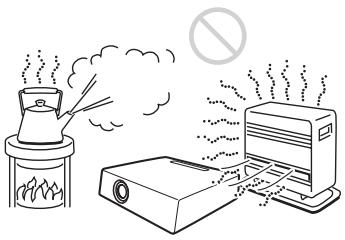
Locations subject to direct cool or warm air from an air-conditioner
natural_image
Diagram of a mechanical device with a tray, housing, and mounting base, showing particle flow and no text or symbols.Installing the projector in such a location may cause a malfunction of the unit due to moisture condensation or a rise in temperature.
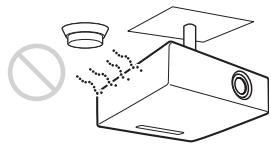
Near a heat or smoke sensor
natural_image
Diagram of a portable air purifier with a stopper and a plate, showing exhaust plume (no text or symbols)Malfunction of the sensor may occur.
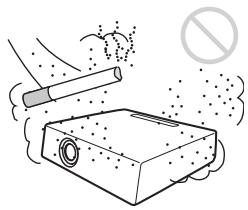
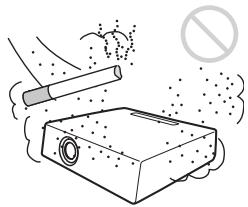
Very dusty, extremely smoky locations
natural_image
Illustration of a cigarette emitting smoke next to a device emitting exhaust (no text or symbols)Avoid installing the unit in a very dusty or extremely smoky environment. Otherwise, the air filter will become obstructed, and this may cause a malfunction of the unit or damage it. Dust preventing the air passing through the filter may cause a rise in the internal temperature of the unit. Clean the air filter whenever you replace the lamp.
Unsuitable Conditions
Do not use the projector under the following conditions.
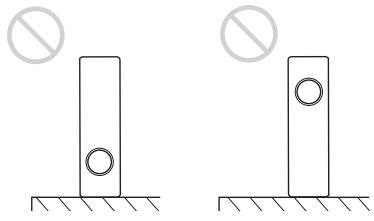
Do not stand the unit upright on one side
Avoid using the unit standing upright on its side. It may cause malfunction.
natural_image
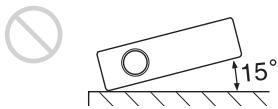
Two identical diagrams showing a vertical structure with circular holes and a prohibition symbol above, mounted on a ground base (no text or labels)Do not tilt the unit to the right or left
text_image
15°Avoid tilting the unit to an angle of 15^ , and avoid installing the unit in any way other than placing it on a level surface or suspending from the ceiling. Such an installation may cause color shading or shorten the lamp life excessively.
Do not block the ventilation holes
natural_image
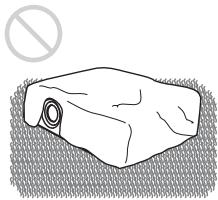
Simple line drawing of a rolled-up rectangular object with a circular hole, no text or symbols present.Avoid using a thick-piled carpet or anything that covers the ventilation holes (exhaust/intake); otherwise, internal heat may build up.
Do not place a blocking object just in front of the lens
natural_image
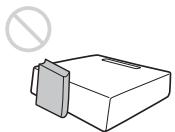
Simple line drawing of a box with a diagonal tab and a prohibition symbol above it (no text or labels)Do not place any object just in front of the lens that may block the light during projection. Heat from the light may damage the object. Use the PIC MUTING key to cut off the picture.
Do not use the Security bar for transporting or installation
natural_image
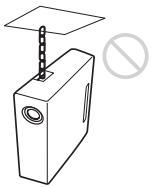
Simple line drawing of a box with a vertical rod and a circular button, no text or symbols present.Use the Security bar at the rear of the projector for a purpose of preventing theft, by attaching a commercially available theft prevention cable for example. If you lift the projector by holding the Security bar, or hang the projector by using this bar, it may cause the projector to fall or be damaged.
Usage at High Altitude
When using the projector at an altitude of 1,500 m or higher, turn on “High Altitude Mode” in the INSTALL SETTING menu. Failing to set this mode when using the projector at high altitudes could have adverse effects, such as reducing the reliability of certain components.
Notes on Use
Note on carrying the projector
The unit is manufactured using high-precision technology. When transporting the unit stored in the carrying case, do not drop the unit or subject it to shock, as this may cause damage. When storing the unit in the carrying case, disconnect the AC power cord and all other connecting cables or cards, and store the supplied accessories in a pocket of the carrying case.
Note on the screen
When using a screen with an uneven surface, a striped pattern may rarely appear on the screen depending on the distance between the screen and the projector or the zooming magnification settings used. This is not a malfunction of the projector.
Using the CD-ROM Manuals
The supplied CD-ROM contains Operating Instructions and ReadMe file in Japanese, English, French, German, Italian, Spanish, Chinese and Russian. First, refer to the ReadMe file.
Preparations
To read the Operating Instructions in the CD-ROM, Adobe Acrobat Reader 5.0 or later is required. If the Adobe Acrobat Reader is not installed in your computer, you can download free Acrobat Reader software from URL of Adobe Systems.
To read the Operating Instructions
The Operating Instructions are contained in the supplied CD-ROM. Insert the supplied CD-ROM into the CD-ROM drive of your computer, and the CD-ROM will start automatically after a while. Select the Operating Instructions you want to read.
The CD-ROM may not start automatically depending on the computer. In this case, open the Operating Instructions file as follows:
(In case of Windows)
① Open “My Computer.” (“Computer” is displayed in Windows Vista.)
② Right-click the CD-ROM icon and select “Explorer.”
③ Double-click “index.htm” file and select the Operating Instructions you want to read.
(In case of Macintosh)
① Double-click the CD-ROM icon on the desk top.
② Double-click “index.htm” file and select the Operating Instructions you want to read.
Note
If you cannot open “index.htm” file, double-click on the Operating Instructions you want to read from among those in “Operating_Instructions” folder.
Projecting
Projecting
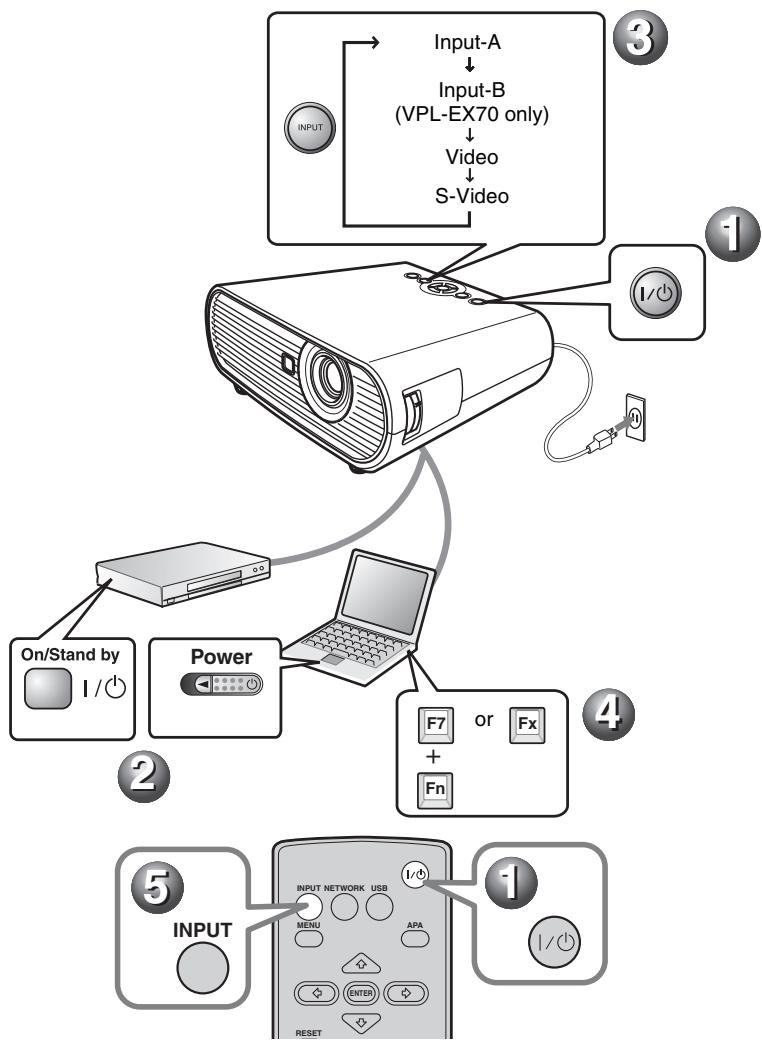
① Press the I/⏻ (on/standby) key.
② Turn on the equipment connected to the projector.
③ Press the INPUT key on the Remote Commander or the control panel to select the input source.
④ When the computer is connected, set it to output the signal to only the external monitor.
flowchart
graph TD
    A["Input-A"] --> B["Input-B (VPL-EX70 only)"]
    B --> C["Video"]
    C --> D["S-Video"]
    D --> E["1/Power"]
    E --> F["On/Stand by 1/Power"]
    F --> G["Power"]
    G --> H["Laptop"]
    H --> I["F7 or Fn"]
    I --> J["INPUT NETWORK USB MENU APA INPUT"]
    J --> K["RESET"]
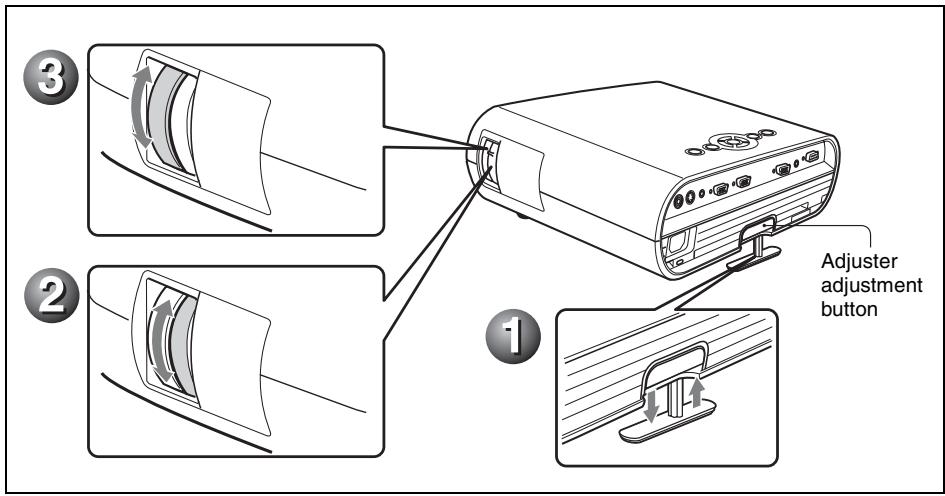
Adjusting the Projector
① Adjust the position of the picture.
Lift the projector while pressing the adjuster adjustment button, and adjust the tilt of the projector, then release the button to lock the adjuster.
② Adjust the size of the picture.
③ Adjust the focus.
The projector is equipped with the Picture menu to select the picture mode, and the Screen menu to select the appropriate aspect ratio of the picture.
text_image
① ② ③ Adjuster adjustment buttonTurning off the Power
1 Press the I/⏻ (on/standby) key.
2 When a message appears, press the I/⏻ (on/standby) key again.
3 Unplug the AC power cord from the wall outlet after the fan stops running and the I/ ^① (on/standby) key lights in red. (Except when using the Direct Power On/Off function or the Off & Go function.)
Replacing the Lamp
The lamp used as a light source is consumable product. Thus replace the lamp with a new one in the following cases.
- When the lamp has burnt out or dims
- “Please replace the Lamp.” appears on the screen
- The LAMP/COVER indicator lights up (repeats flashing three times)
The lamp life varies depending on conditions of use.
Use an LMP-E191 Projector Lamp as the replacement lamp.
Use of any other lamps than the LMP-E191 may cause damage to the projector.
Notes
- If the lamp breaks, ask qualified Sony personnel to replace the lamp and to check inside.
- Pull out the lamp by holding the handle.
- When removing the lamp, make sure it remains horizontal, then pull straight up. Do not tilt the lamp. If you pull out the lamp while it is tilted and if the lamp breaks.
1 Turn off the projector, and disconnect the AC power cord from the AC outlet.
Note
When replacing the lamp after using the projector, wait for at least an hour for the lamp to cool.
2 Place a protective sheet (cloth) beneath the projector. Turn the projector over so you can see its underside.
Note
Be sure that the projector is stable after turning it over.
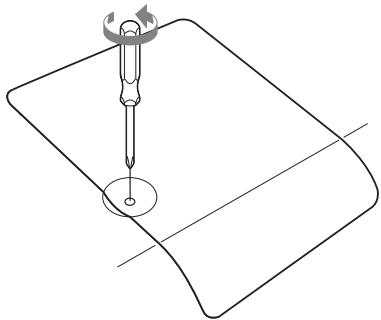
3 Open the lamp cover by loosening the screw with a Phillips screwdriver.
natural_image
Pure technical line drawing of a mechanical component with no text or symbolsNote
For safety reasons, do not loosen any other screws.
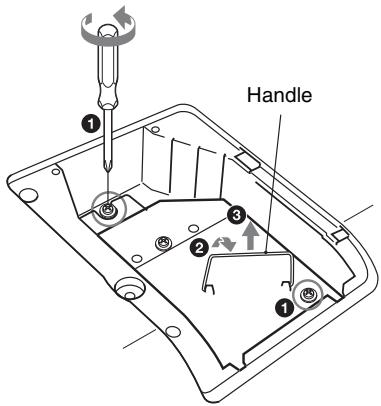
4 Loosen the two screws on the lamp unit with the Phillips screwdriver (①). Fold out the handle (②), then pull out the lamp unit by the handle (③).
text_image
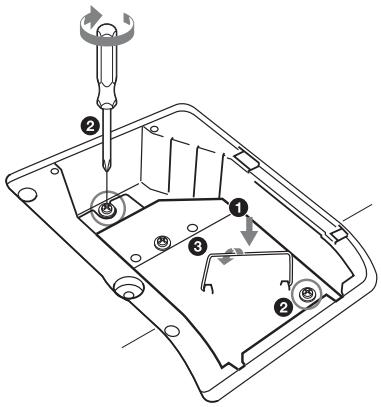
Handle ① ② ③5 Insert the new lamp all the way in until it is securely in place (1). Tighten the two screws (2). Fold down the handle to replace it (3).
text_image
Technical diagram of a mechanical assembly with numbered components and a screwdriver inserted into a housingNotes
- Be careful not to touch the glass surface of the lamp.
- The power will not turn on if the lamp is not secured properly.
- Do not allow any liquid or other objects into the slot to avoid electrical shock or fire.
6 Close the lamp cover and tighten the screw.
Note
Be sure to attach the lamp cover securely as it was. If not, the projector cannot be turned on.
7 Turn the projector back over.
8 Connect the power cord. The I/⏻ key lights in red.
9 Press the I/⏻ key to turn the projector on.
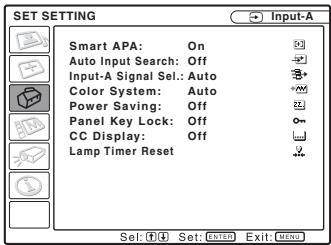
10 Press the MENU key, and then select the SET SETTING menu.
11 Select “Lamp Timer Reset”, and then press the ENTER key.
text_image
SET SETTING Smart APA: On Auto Input Search: Off Input-A Signal Sel.: Auto Color System: Auto Power Saving: Off Panel Key Lock: Off CC Display: Off Lamp Timer Reset Sel: Set: Enter Exit: MENU12 Select “Execute” with the ▼ key, and then press the ENTER key. The Lamp Timer is initialized to 0, and “Change the Lamp and clean the Filter?” is displayed in the menu screen.
Change the Lamp and clean the Filter?
Yes: ▲ No: ↓
Refer to page 14 for “Cleaning the Air Filter”.
13 Select "Yes" with the ▲ key. "Lamp Timer Reset Complete!" is displayed in the menu screen.
Disposal of the used lamp For the customers in the USA
Lamp in this product contains mercury. Disposal of these materials may be regulated due to environmental considerations. For disposal or recycling information, please contact your local authorities or the Electronic Industries Alliance (www.eiae.org).
Cleaning the Air Filter
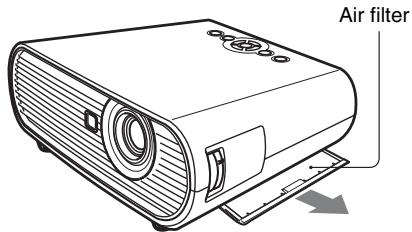
The air filter should be cleaned whenever you replace the lamp. Remove the air filter, and then remove the dust with a vacuum cleaner.
The time needed to clean the air filter will vary depending on the environment or how the projector is used.
When it becomes difficult to remove the dust from the filter with a vacuum cleaner, remove the air filter and wash it.
1 Turn the power off and unplug the power cord.
2 Draw out the air filter cover and remove it.
text_image
Air filter3 Remove the air filter.
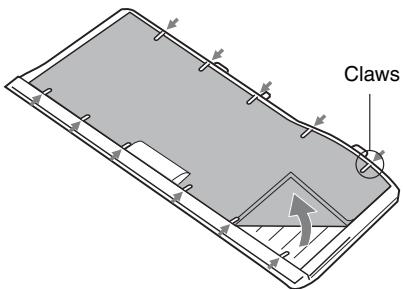
text_image
Claws4 Wash the air filter with a mild detergent solution and dry it in a shaded place.
5 Attach the air filter so that it fits into the each claws on the air filter cover and replace the cover.
Notes
- If you neglect to clean the air filter, dust may accumulate, clogging it. As a result, the temperature may rise inside the unit, leading to a possible malfunction or fire.
- Be sure to attach the air filter cover firmly; the power can not be turned on if it is not closed securely.
- The air filter has a face and a reverse side. Place the air filter so that it fits in a notch on the air filter cover.
Troubleshooting
If the projector appears to be operating erratically, try to diagnose and correct the problem using the following instructions. If the problem persists, consult with qualified Sony personnel.
For details on the symptoms, see the Operating Instructions contained in the CD-ROM.
Power
| Symptom | Cause and Remedy |
| The power is not turned on. | The power has been turned off and on with the I/⏻ key at a short interval.Wait for about 90 seconds before turning on the power.The lamp cover is not secured.Close the lamp cover securely.The air filter cover is detached.Attach the air filter cover securely. |
Picture
| Symptom | Cause and Remedy |
| No picture. | A cable is disconnected or the connections are wrong.→ Check that the proper connections have been made.The connections are wrong.→ This projector is compatible with DDC2B (Digital Data Channel 2B). If your computer is compatible with DDC, turn the projector on according to the following procedures.1 Connect the projector to the computer.2 Turn the projector on.3 Start the computer.Input selection is incorrect.→ Select the input source correctly.The picture is muted.→ Press the PIC MUTING key to release the picture muting.The computer signal is not set to output to an external monitor or set to output both to an external monitor and a LCD monitor of a computer.→ Set the computer signal to output only to an external monitor . |
| The picture is noisy. | Noise may appear on the background depending on the combination of the number of dots input from the computer and the numbers of pixels on the LCD panel.→ Change the desktop pattern on the connected computer. |
| The picture is not clear. | The picture is out of focus.→ Adjust the focus.Condensation has accumulated on the lens.→ Leave the projector for about two hours with the power on. |
| The image extends beyond the screen. | The APA key has been pressed even though there are black edges around the image.→ Display the full image on the screen and press the APA key.→ Adjust “Shift” in the Input setting menu properly. |
| The picture flickers. | “Dot Phase” in the Input setting menu has not been adjusted properly.→Adjust “Dot Phase” in the Input setting menu properly. |
Indicators
| Message | Meaning and Remedy |
| The LAMP/COVER indicator flashes in orange. (Repetition rate of 2 flashes) | The lamp cover or the air filter cover is detached.→ Attach the cover securely. |
| The LAMP/COVER indicator flashes in orange. (Repetition rate of 3 flashes) | · The lamp has reached the end of its life.→ Replace the lamp.· The lamp has reached a high temperature.→ Wait for 60 seconds to cool the lamp and then turn on the power again. |
| I/↓ key flashes in red. (Repetition rate of 2 flashes) | · The internal temperature is unusually high.→ Check to see that nothing is blocking the ventilation holes.· The projector is being used at a high altitude.→ Ensure that “High Altitude Mode” in the INSTALL SETTING menu is set to “On.” |
| I/↓ key flashes in red. (Repetition rate of 4 flashes) | The fan is broken.→ Consult with qualified Sony personnel. |
| I/↓ key flashes in red. (Repetition rate of 6 flashes) | Unplug the AC power cord from the wall outlet after the I/↓ indicator goes out, plug the power cord to the wall outlet, and then turn the projector on again. If the I/↓ flashes in red and the problem persists, the electrical system has failed.→ Consult with qualified Sony personnel. |
Specifications
Projection system
3 LCD panels, 1 lens, projection system
LCD panel
VPL-EX70/EX7: 0.63-inch (16.0 mm) XGA panel, about 2,360,000 pixels (1024 × 768 × 3)
VPL-ES7: 0.63-inch (16.0 mm) SVGA panel, about 1,440,000 pixels (800 × 600 × 3)
Lamp
190 W Ultra high pressure lamp
Projected picture size
40 to 300 inches (1,016 to 7,620 mm)
Light output 1)VPL-EX70: 2600 lm
VPL-EX7/ES7: 2000 lm
^1) When the Lamp Mode is set to “High.”
Throwing distance (When placed on the floor./Adjuster not stretched, and the V Keystone function has been done.)
40-inch (1,016 mm): 1.1 to 1.4 m (3.6 to 4.6 feet)
80-inch (2,032 mm): 2.3 to 2.8 m (7.5 to 9.2 feet)
100-inch (2,540 mm): 2.9 to 3.5 m (9.5 to 11.5 feet)
150-inch (3,810 mm): 4.4 to 5.2 m (14.4 to 17.1 feet)
200-inch (5,080 mm): 5.8 to 7.0 m (19.0 to 23.0 feet)
250-inch (6,350 mm): 7.3 to 8.8 m (24.0 to 28.9 feet)
300-inch (7,620 mm): 8.8 to 10.5 m (28.9 to 34.5 feet)
There may be a slight difference between the actual value and the design value shown above.
Color system NTSC3.58/PAL/SECAM/
NTSC4.43/PAL-M/PAL-N/
PAL60 system, switched automatically/manually
(NTSC4.43 is the color system used when playing back a video recorded in NTSC on a NTSC4.43 system VCR.)
Acceptable computer signals ^2)
fH: 19 to 92 kHz
fV: 48 to 92 Hz
(Maximum input signal resolution:
SXGA+ 1400 × 1050
fV: 60 Hz)
2) Set the resolution and the frequency of the signal of the connected computer within the
range of acceptable preset signals of the projector.
Applicable video signals
15 k RGB/component 50/60 Hz, Progressive component 50/60
Hz, DTV (480/60i, 575/50i,
480/60p, 575/50p, 720/60p,
720/50p, 1080/60i, 1080/50i),
Composite video, Y/C video
Dimensions Approx. 314 × 109 × 269 mm
(12^3/8× 4^3/8× 10^5/8 inches)
(w/h/d) (without projecting parts)
Mass VPL-EX70:
Approx. 3.0 kg (6 lb 10 oz)
VPL-EX7/ES7:
Approx. 2.9 kg (6 lb 6 oz)
Power requirements
VPL-EX70/EX7: AC 100 to 240
V, 2.6 to 1.1 A, 50/60 Hz
VPL-ES7: AC 100 to 240 V, 2.4 to
1.0 A, 50/60 Hz
Power consumption
VPL-EX70/EX7: Max. 260 W (in standby: 3 W)
VPL-ES7: Max. 240 W (in standby: 3 W)
Operating temperature
0^ to 35^ (32 °F to 95 °F)
Supplied accessories
Remote Commander (1)
Lithium battery CR2025 (1)
HD D-sub 15 pin cable (1.8 m) (1) (1-967-100-11/Sony)
Carrying case (1)
AC power cord (1)
Lens cap (1)
Operating Instructions (CD-ROM) (1)
Quick Reference Manual (1)
Security Label (1)
Design and specifications of the unit, including the optional accessories, are subject to change without notice.
Note
Always verify that the unit is operating properly before use. SONY WILL NOT BE LIABLE FOR DAMAGES OF ANY KIND INCLUDING, BUT NOT LIMITED TO, COMPENSATION OR REIMBURSEMENT ON ACCOUNT OF THE LOSS OF PRESENT OR PROSPECTIVE PROFITS DUE TO FAILURE OF THIS UNIT, EITHER DURING THE WARRANTY PERIOD OR AFTER EXPIRATION OF THE WARRANTY, OR FOR ANY OTHER REASON WHATSOEVER.
Optional accessories
Projector Lamp
LMP-E191 (for replacement)
Not all optional accessories are available in all countries.
Please check with your local Sony
Authorized Dealer.
AVERTISSEMENT
natural_image
Line drawing of a cluttered printer with a prohibition symbol above it (no text or symbols on the printer itself)natural_image
Illustration of a steaming stove emitting smoke next to an electric heater and a toaster, with no text or symbols present.natural_image
Diagram of a spray bottle with particles and a stopper, no text or symbols presentnatural_image
Diagram of a device with a stopper, bowl, and paperboard (no text or symbols)natural_image
Illustration of a cigarette emitting exhaust smoke next to a device emitting powder (no text or symbols)natural_image
Simple line drawing of a vertical rectangular object with a circular hole, above a hatched ground surface, with a no-smoking symbol above (no text or labels)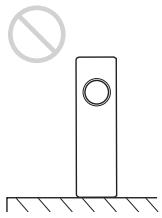
natural_image
Simple line drawing of a vertical pole with a circular hole and a prohibition symbol above it, resting on a surface (no text or labels)natural_image
Simple line drawing of a rolled-up rectangular object with a circular hole, no text or symbols present.natural_image
Simple line drawing of a box with a diagonal tab and a prohibition symbol above it (no text or labels)natural_image
Simple line drawing of a box with a vertical rod and a circular symbol (no text or labels)natural_image
Pure technical line drawing of a screwdriver on a curved surface with a circular base (no text or symbols)Remarque
text_image
Technical diagram of a mechanical component with numbered parts and a screwdriver inserted, likely illustrating a repair or assembly process.Remarques
VPL-ES7 : Panneau SVGA 0,63 pouce (16,0 mm), 1 440 000 pixels (800 × 600 × 3)
Lampe lampe ultra haute pression 190 W
natural_image
Line drawing of a cluttered printer with a prohibition symbol above it (no text or symbols on the printer itself)natural_image
Illustration of a steam rising from a steaming stove next to an air conditioner with smoke, no text or symbols present.natural_image
Diagram of a device with a shield, tray, and base, showing airflow or particle movement (no text or symbols)natural_image
Diagram of a kitchen appliance with a plate, sink, and no-smoking symbol (no text or labels)natural_image
Illustration of a cigarette emitting exhaust smoke next to a device emitting powder (no text or symbols)natural_image
Two identical diagrams showing a vertical structure with circular holes and a prohibition symbol above (no text or labels)natural_image
Simple line drawing of a rolled rock with a circular hole, no text or symbols presentnatural_image
Simple line drawing of a rectangular box with a diagonal tab and a prohibition symbol above it (no text or labels)natural_image
Simple line drawing of a box with a vertical rod and a circular symbol (no text or labels)natural_image
Pure technical line drawing of a screwdriver on a curved surface with a circular base (no text or symbols)Nota
text_image
Asa ① ② ③text_image
Technical diagram of a mechanical component with numbered parts and a screwdriver inserted, likely illustrating a repair or assembly process.Notas
200 pulgadas (5.080 mm): 5,8 a 7,0 m (19,0 a 23,0 pies)
250 pulgadas (6.350 mm): 7,3 a 8,8 m (24,0 a 28,9 pies)
300 pulgadas (7.620 mm): 8,8 a 10,5 m (28,9 a 34,5 pies)
natural_image
Line drawing of a cluttered printer with a prohibition symbol above it (no text or symbols on the printer itself)natural_image
Illustration of a portable stove emitting steam next to an electric heater and a monitor, with a prohibition symbol above (no text or labels)natural_image
Diagram of a spray bottle with particles and a stopper, no text or symbols presentnatural_image
Diagram of a device with a stopper, bowl, and paperboard (no text or symbols)natural_image
Illustration of a cigarette emitting smoke from a device, with no visible text or symbolsnatural_image
Two identical diagrams showing a vertical structure with circular holes and a prohibition symbol above them, no text or labels present.natural_image
Simple line drawing of a rolled rock with a circular hole, no text or symbols presentnatural_image
Simple line drawing of a rectangular box with a side tab and a diagonal line, no text or symbols present.natural_image
Simple line drawing of a box with a diagonal bar and a circular symbol (no text or labels)natural_image
Pure technical line drawing of a mechanical component with no text or symbolsHinweis
text_image
Griff ① ② ③text_image
Technical diagram of a mechanical assembly with numbered components and a screwdriver inserted into a housingHinweise
natural_image
Line drawing of a printer emitting smoke from its paper, with a no-smoking symbol above (no text or labels)natural_image
Illustration of a steaming hot airstand emitting smoke next to an electric heater and a computer (no text or symbols)natural_image
Diagram of a mechanical device with no visible text, numbers, or symbolstext_image
Diagram illustrating a hazardous device with a stop sign and a labeled container, showing particle dispersion.natural_image
Illustration of a cigarette emitting smoke next to a device emitting exhaust (no text or symbols)natural_image
Two identical diagrams showing a vertical structure with circular holes and a prohibition symbol above them, no text or labels present.natural_image
Simple line drawing of a rolled-up rectangular object with a circular opening, no text or symbols present.natural_image
Simple line drawing of a box with a diagonal tab and a prohibition symbol above it (no text or labels)natural_image
Simple line drawing of a box with a diagonal rod and a flat top, next to a prohibition symbol (no text or labels)natural_image
Pure technical line drawing of a screwdriver on a curved surface with a circular base (no text or symbols)Nota
text_image
Maniglia ① ② ③text_image
Technical diagram of a mechanical component with numbered parts and a screwdriver inserted, likely illustrating a repair or assembly process.Note
VPL-ES7: pannello SVGA da 0,63 pollici (16,0 mm), circa 1.440.000 pixel (800 × 600 × 3)
VPL-EX70/EX7: 260 W max (in standby 3 W)
VPL-ES7: 240 W max (in standby 3 W)
natural_image
Line drawing of a cluttered printer with loose pages and a prohibition symbol above (no text or labels)natural_image
Illustration of a steaming hot air stove with a smokestack emitting vapor, next to a portable toaster and a prohibition symbol (no text or labels)natural_image
Diagram of a spray gun with particles and a stop symbol (no text or labels)text_image
Diagram illustrating a hazardous plastic bag disposal process with labeled components and no litter symbol可能会造成传感器失灵。
多尘、多烟雾的场所
natural_image
Illustration of a cigarette emitting exhaust smoke next to a box with a stopper (no text or symbols)natural_image
Simple line drawing of a rolled-up rectangular object with a circular opening, no text or symbols present.natural_image
Simple line drawing of a box with a diagonal tab and a prohibition symbol above it (no text or labels)natural_image
Simple line drawing of a box with a diagonal rod and a circular symbol (no text or labels)natural_image
Pure technical line drawing of a mechanical component with no text or symbols注意
为了安全起见,请勿拧松其它任何螺丝。