
SU-52HX1 - TV Stand SONY - Free user manual and instructions
Find the device manual for free SU-52HX1 SONY in PDF.



| Product Type | TV Stand |
| Brand | SONY |
| Model | SU-52HX1 |
| TV Compatibility | XBR-52HX90☐*, KDL-52HX90☐*, XBR-46HX90☐*, KDL-46HX90☐* (March 2010) |
| Dimensions (W x D x H) | 1263 x 225 x 410 mm |
| Weight | 9.6 kg |
| Adjustable Tilt Angle | 0° or 6° |
| Material | Steel (estimated) |
| Accessories Included | Stand, back panel, leg cover, fixing screws (5x black PSW5×16), cover screw (1x black PSW5×16) |
| Recommended Number of Persons for Installation | 2 |
| Required Tools | Phillips screwdriver (recommended torque 1.5 N·m) |
| Cleaning | Soft dry cloth; mild soap for stubborn stains |
| Anti-Tip Safety | Wall mounting recommended (hole provided) |
| Operating Temperature | Room temperature, avoid direct sunlight and heat sources |
| Repairability | Not modifiable; contact SONY for spare parts |
Frequently Asked Questions - SU-52HX1 SONY
User questions about SU-52HX1 SONY
0 question about this device. Answer the ones you know or ask your own.
Ask a new question about this device
Download the instructions for your TV Stand in PDF format for free! Find your manual SU-52HX1 - SONY and take your electronic device back in hand. On this page are published all the documents necessary for the use of your device. SU-52HX1 by SONY.
USER MANUAL SU-52HX1 SONY
Thank you for purchasing this product. Products by Sony are designed with safety in mind. Incorrect use may result in a serious injury through fire, electric shock, the product toppling over, or the product being dropped. Be sure to observe the precautions for safety to prevent such accidents.
This instructions manual shows the correct handling of the product and important precautions necessary to prevent accidents. Be sure to read this manual thoroughly and use the product correctly. Keep this manual available for future reference.
The manufacturer of this product is Sony Corporation, 1-7-1 Konan Minato-ku Tokyo, 108-0075 Japan. The Authorized Representative for EMC and product safety is Sony Deutschland GmbH, Hedelfinger Strasse 61, 70327 Stuttgart, Germany.
CAUTION
Specified products
This stand is designed for use with the Sony products specified below. Do not install other than the specified products.
The following products are subject to change without notice, may be out of stock, or discontinued.
Also, certain models are sold in some regions.
| LCD color TV | |
| SU-52HX1 | XBR-52HX90☐*/KDL-52HX90☐* |
| SU-46HX1 | XBR-46HX90☐*/KDL-46HX90☐* |
(As of March 2010)
* In the actual model names, the “□” indicates numbers and/or characters specific to each model.
Location of the identification label
Label for Model No. is located on the rear of the TV Stand.
WARNING
If the following precautions are not observed, serious injury or death can result through fire, electric shock, or the product toppling over.
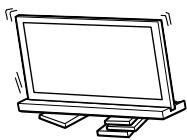
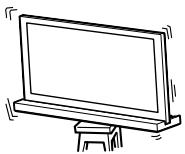
Be sure to take measures to prevent the TV Stand from toppling over.
If you fail to do so, the TV may topple over and cause injury. Anchor the TV Stand and the rack, etc., to prevent toppling over.
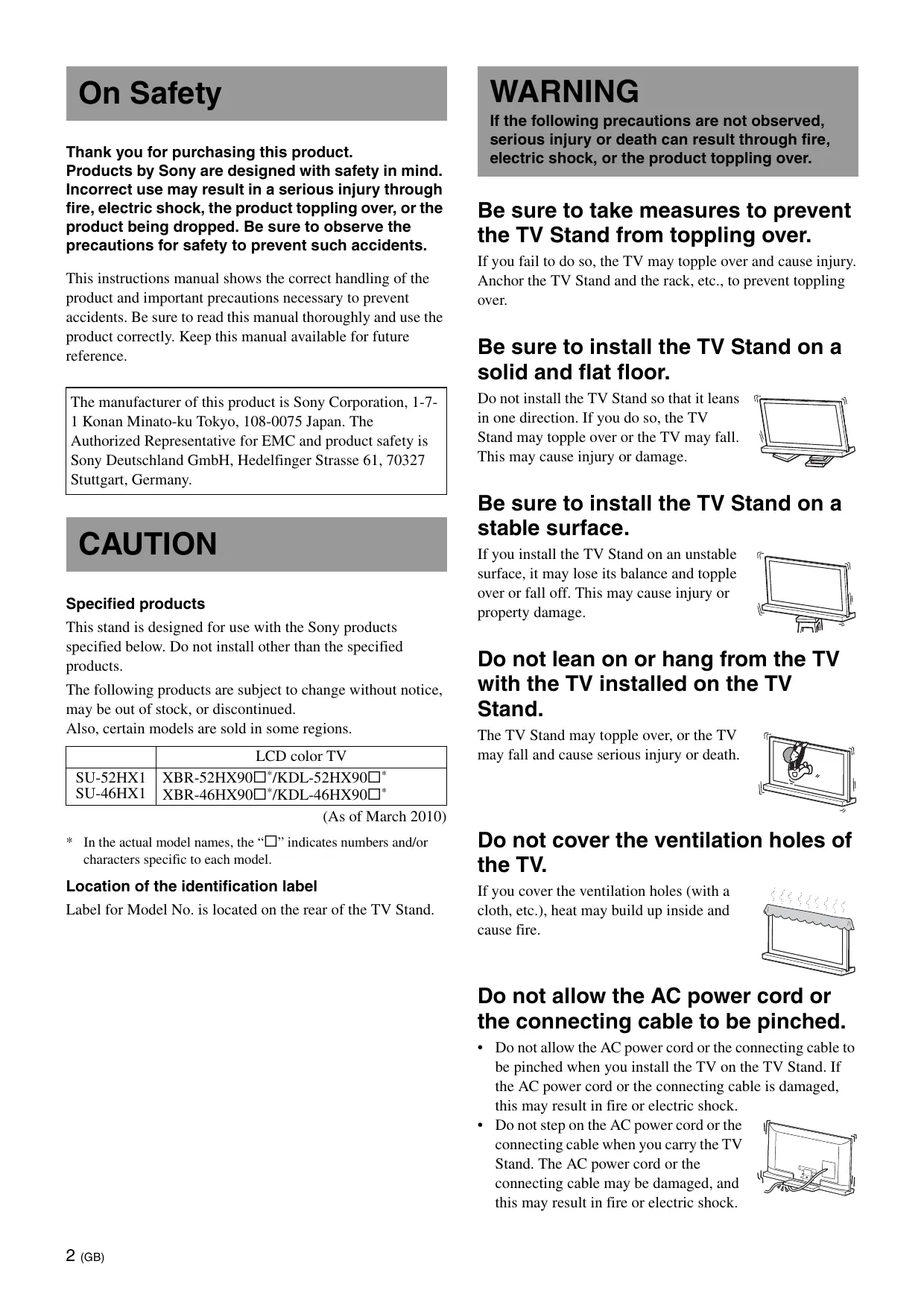
Be sure to install the TV Stand on a solid and flat floor.
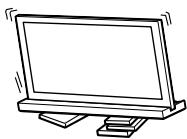
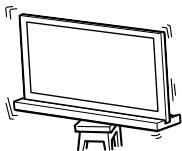
Do not install the TV Stand so that it leans in one direction. If you do so, the TV Stand may topple over or the TV may fall. This may cause injury or damage.
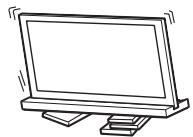
Be sure to install the TV Stand on a stable surface.
If you install the TV Stand on an unstable surface, it may lose its balance and topple over or fall off. This may cause injury or property damage.
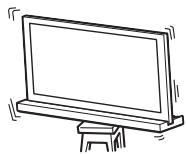
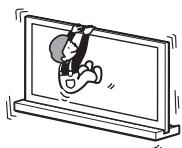
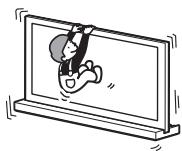
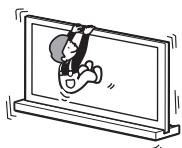
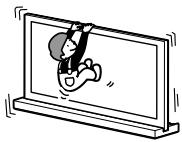
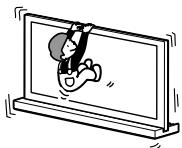
Do not lean on or hang from the TV with the TV installed on the TV Stand.
The TV Stand may topple over, or the TV may fall and cause serious injury or death.
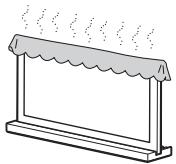
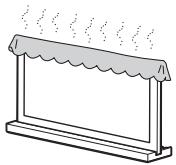
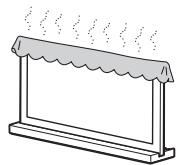
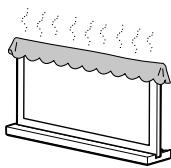
Do not cover the ventilation holes of the TV.
If you cover the ventilation holes (with a cloth, etc.), heat may build up inside and cause fire.
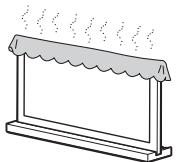
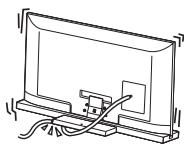
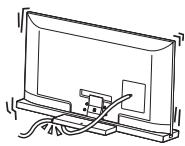
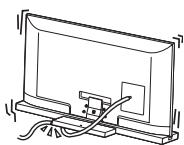
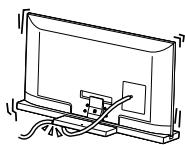
Do not allow the AC power cord or the connecting cable to be pinched.
-
Do not allow the AC power cord or the connecting cable to be pinched when you install the TV on the TV Stand. If the AC power cord or the connecting cable is damaged, this may result in fire or electric shock.
-
Do not step on the AC power cord or the connecting cable when you carry the TV Stand. The AC power cord or the connecting cable may be damaged, and this may result in fire or electric shock.
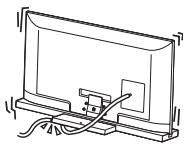
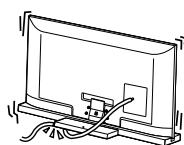
Do not stumble over the AC power cord or the connecting cable.
If you stumble over the AC power cord or the connecting cable, the TV Stand may topple over and cause injury.
CAUTION
If the following precautions are not observed, injury or property damage may occur.
Do not install any equipment other than the specified product.
This TV Stand is designed for use with the specified product only. If you install equipment other than specified, it may fall or break, and cause injury. Illustrations used in this manual show of the KDL-46HX90□, unless otherwise stated.
Be sure to secure the TV.
Secure the TV to the TV Stand using the supplied screws. If the TV is not installed securely, it may fall, or the TV Stand may topple over, and cause injury.
Notes on installation
Install the TV Stand on a solid and flat floor. Do not allow the TV Stand to be installed at an angle or incline. To avoid this, observe the following precautions.
If you install the TV Stand on a soft surface such as a mat or a carpet, lay a board over the designated location beforehand.
- Do not install the TV Stand in a place subject to direct sunlight or near a heater.
- Do not install the TV Stand in a hot or humid place, or outdoors.
Note on use
Cleaning
To keep the TV Stand clean, occasionally wipe it with a dry soft cloth. Stubborn stains may be removed by wiping with a cloth slightly dampened with mild soap. Be sure to dry the area afterwards with a dry soft cloth. Do not use chemicals, such as thinner or benzine, as they damage the finish of the TV Stand.
Be sure that two or more persons do the installation work.
Be sure that two or more persons install the TV on the TV Stand. If one person does the installation work alone, this may result in an accident or injury.
Do not modify the TV Stand.
It may fall and cause injury.
Be sure to install the TV securely following the instructions.
Tighten the screws securely. If the TV is not installed securely, it may fall and cause injury.
Be careful not to injure your hands or fingers while assembling.
- Do not move the TV Stand with holding the Neck section.
- Be careful not to hurt your fingers or hands when installing the TV.
Note on taking the TV Stand out from the carton
Be sure to hold the TV Stand and handle it carefully.
Step 1: Checking the parts
| Name | Quantity |
| Stand | 1 |
| Rear Cover | 1 |
| Neck Cover | 1 |
| TV Neck Attachment Screw (PSW5 × 16) black (× 4) | 5 |
| Neck Cover Screw (PSW5 × 16) black (× 1) |
WARNING
If you allow the AC power cord to be pinched under or between pieces of equipment, this may result in a short circuit or an electric shock. If you stumble over the AC power cord or the connecting cable, the TV Stand may topple over and cause injury.
Decide on the installation location and lay the TV Stand down before installing the TV.
Since the TV is heavy, it is recommended that you decide on the installation location beforehand, and assemble the TV Stand on site.
Refer to the operating instructions supplied with your TV for information on how to remove the Table-Top Stand from the TV.
Step 2: Installing the TV
Before assembling
- Be sure to have a Phillips screwdriver that fits the screws prior to the assembly.
- When using an electric screwdriver, set the torque setting to approximately 1.5N· m {15 kgf·cm}.
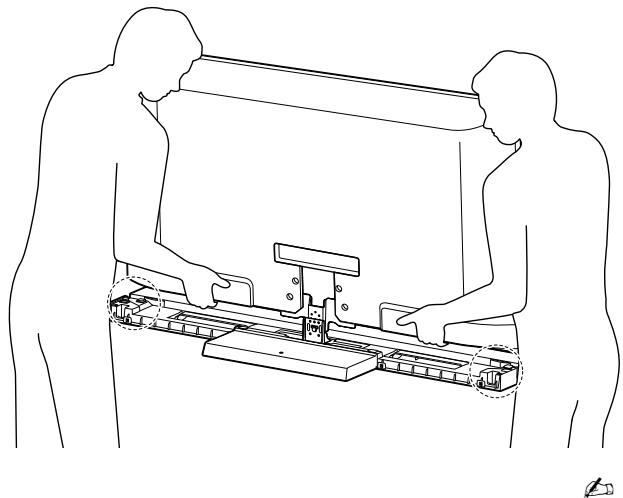
1 Hold the TV at the specified point when moving the TV.
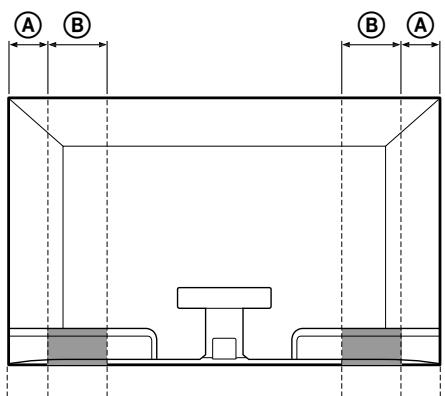
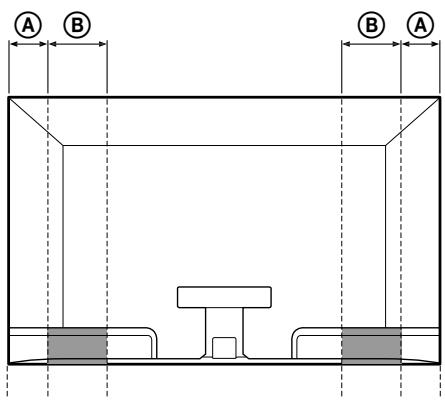
Refer to the chart and measure lengths A and B from the top edge of the TV, as shown in the illustration below. Hold the TV at the specified point of the measured length B ().
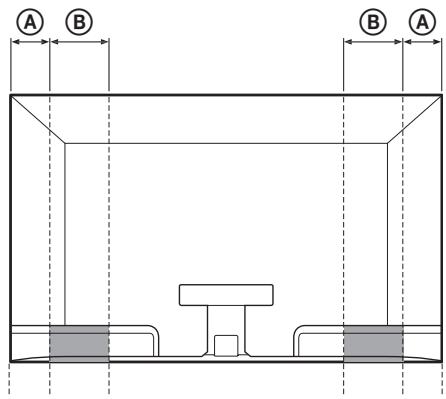
Unit: mm (inches)
| TV size | Length A | Length B |
| 52" | 170 (6 3/4) | 170 (6 3/4) |
| 46" | 170 (6 3/4) | 170 (6 3/4) |

- Hold at the specified point to avoid injuring your fingers.
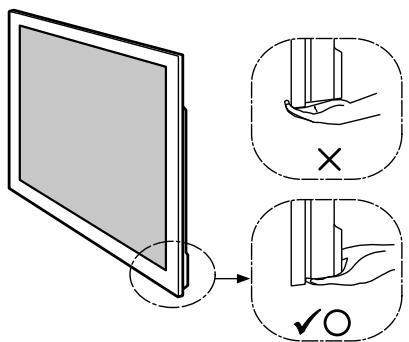
2 Make sure to hold the TV as shown:
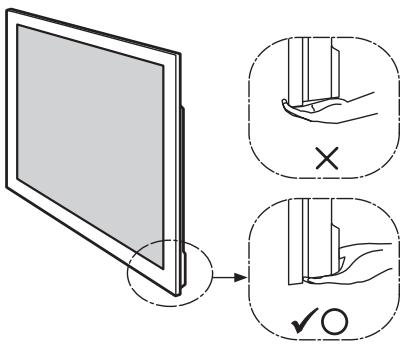

- When transporting the TV set by hand, hold it as shown above. Do not put stress on the LCD panel and the frame around the screen.
2 Install the TV onto the TV Stand.
The TV is installed by placing it in the groove of the TV Stand.
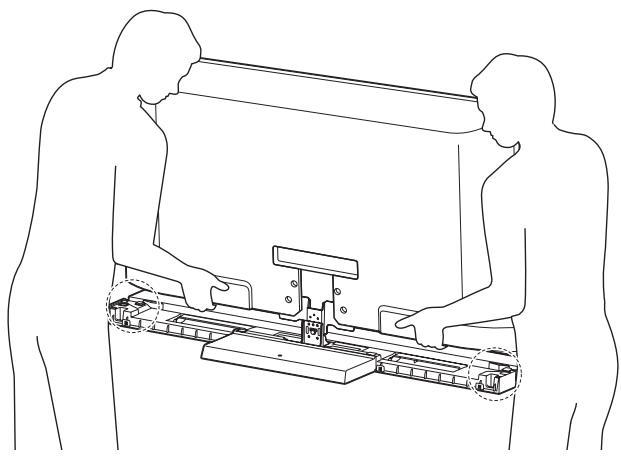

- Be careful not to pinch your fingers when installing the TV.
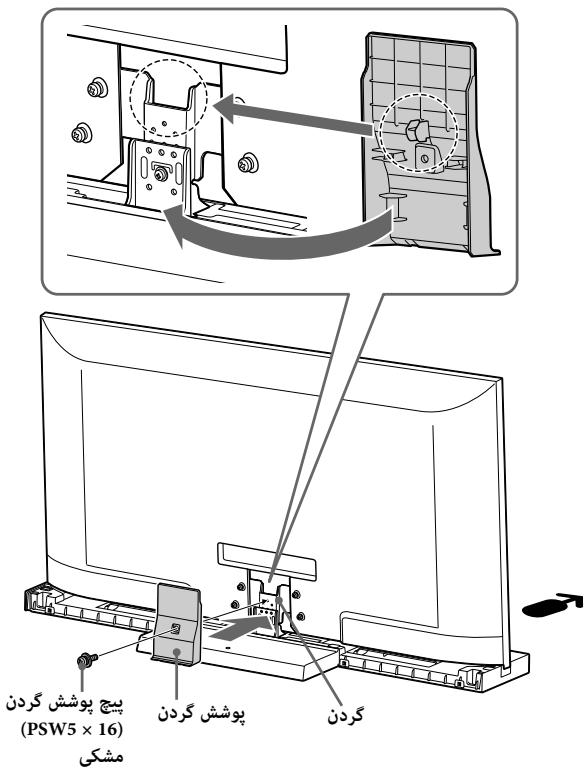
3 Secure the TV and the TV Stand with the four TV Neck Attachment Screws (PSW5 × 16) black (supplied).
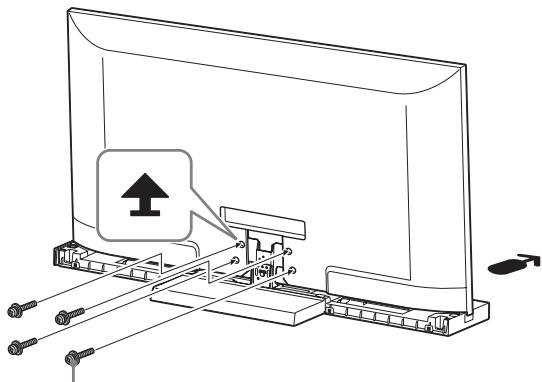
TV Neck Attachment Screw (PSW5 × 16) black
Arrow direction shows front of the TV Stand.
4 Attach the Neck Cover to the Neck.
Align the Neck Cover with the Neck and slide it down as shown in the illustration below. Secure the Neck Cover and Neck with the Neck Cover Screw (PSW5 × 16) black (supplied).
If you want to adjust the viewing angle of the TV, adjust the angle before attaching the Neck Cover. Refer to Step 2 of "Adjusting the viewing angle of the TV" on page 7.
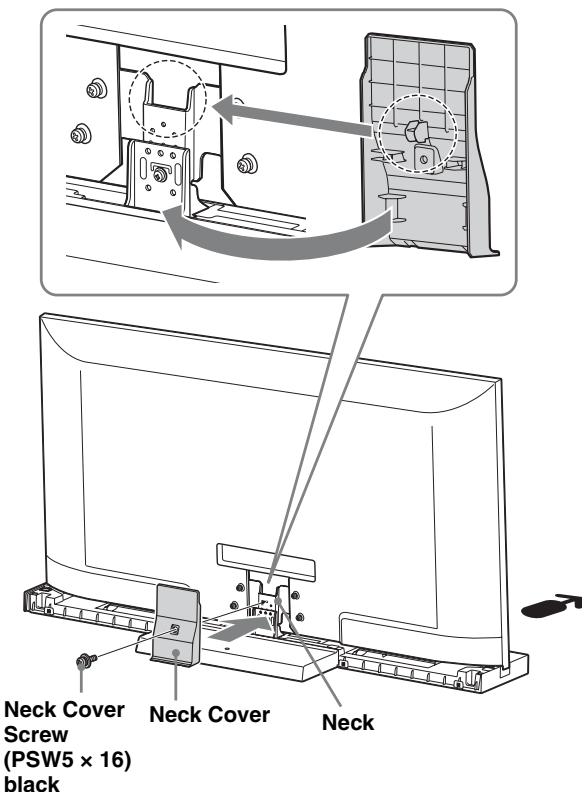
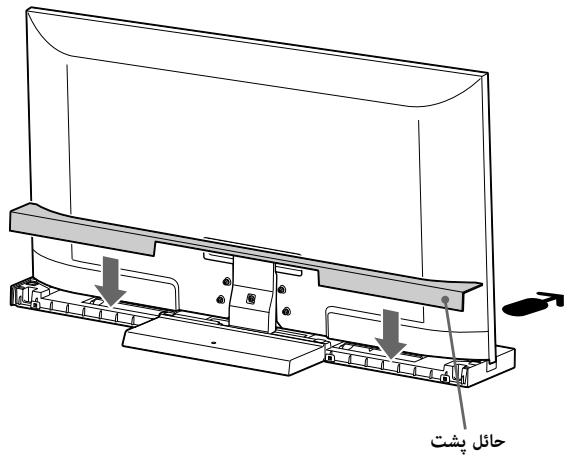
5 Attach the Rear Cover to the TV Stand.
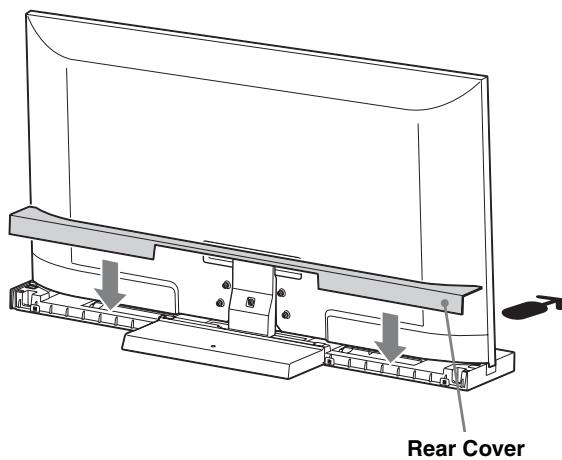
Step 3: Safety measures to prevent toppling over
WARNING
Be sure to take measures to prevent the TV Stand from toppling over, and causing possible injury and damage.
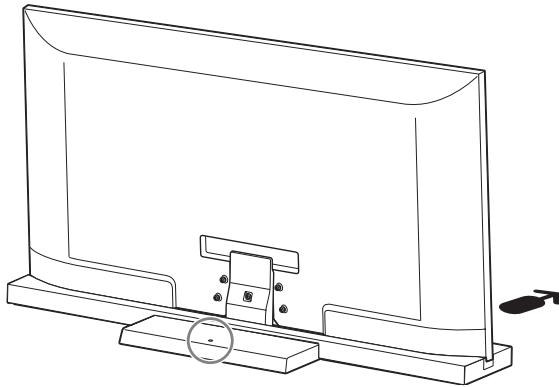
There is a hole to allow you to take measures to prevent the TV Stand from toppling over, as shown in the illustration below.
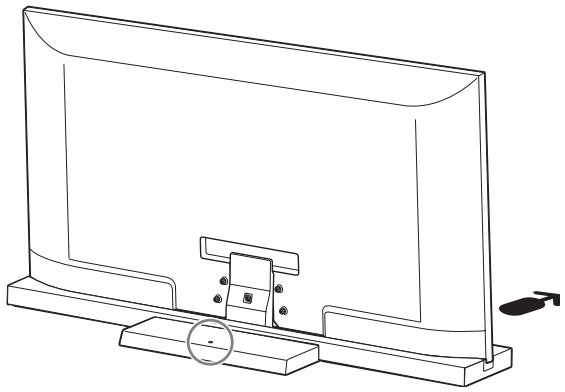
For details on the procedure, refer to the instruction manual supplied with the TV.
Specifications
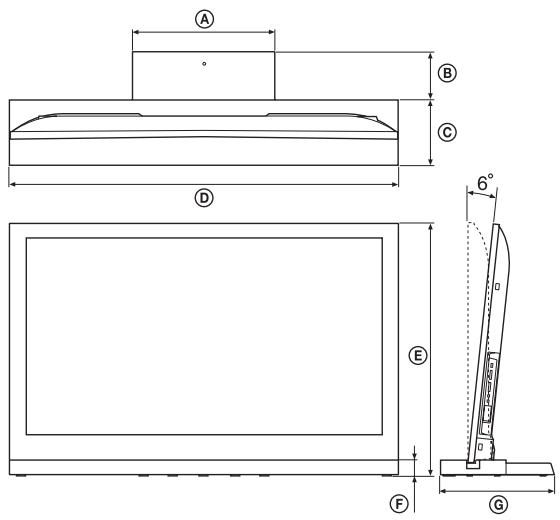
| SU-52HX1 | SU-46HX1 | |||
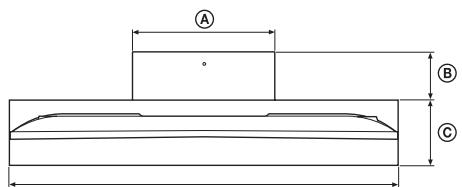
| Dimensions: mm (inches) | A | 410 (16 1/4) | 410 (16 1/4) | |
| B | 125 (5) | 140 (5 5/8) | ||
| C | 225 (8 7/8) | 190 (7 1/2) | ||
| D | 1,263 (49 3/4) | 1,124 (44 3/8) | ||
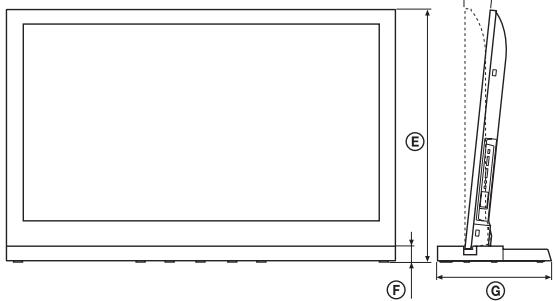
| E | 0° | 812.8 (32) | 732.8 (28 7/8) | |
| 6° | 808.8 (31 7/8) | 729.2 (28 3/4) | ||
| F | 45 (1 13/16) | 45 (1 13/16) | ||
| G | 350 (13 7/8) | 330 (13) | ||
| Stand Weight: | 9.6 kg (21.2 lb) | 8.8 kg (19.4 lb) | ||
Design and specifications are subject to change without notice.
Adjusting the viewing angle of the TV
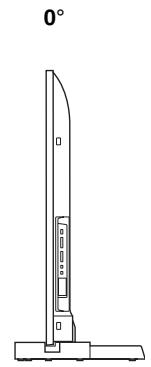
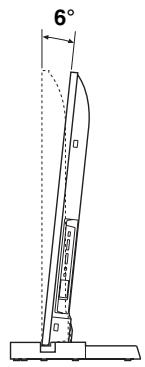
This TV can be adjusted within the angles shown below. (Factory setting is 6 degrees.)
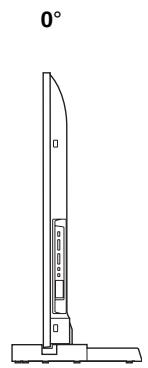
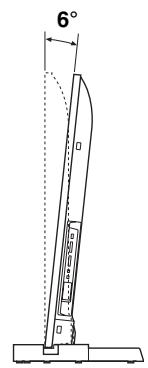
1 Detach the Rear Cover and Neck Cover.
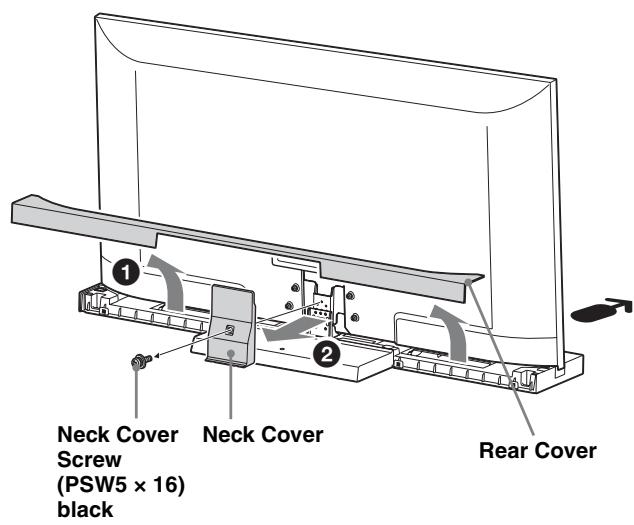
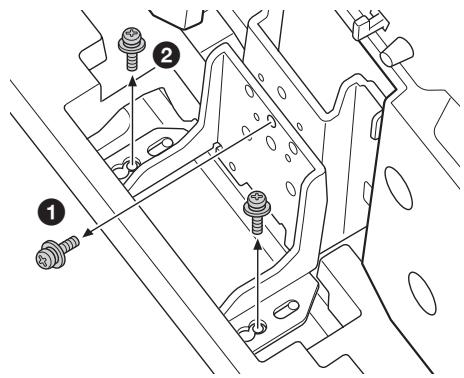
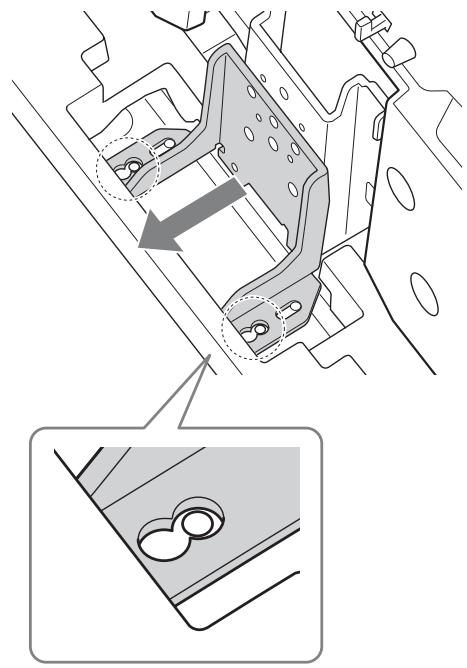
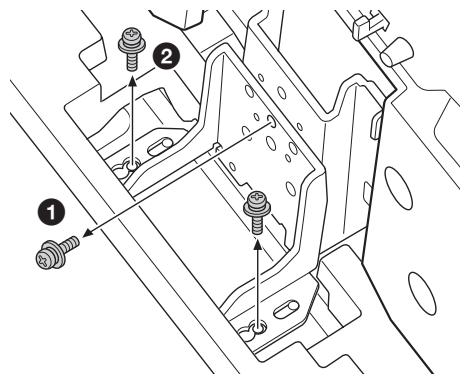
2 Remove the screws.
Remove the three screws from the Neck.
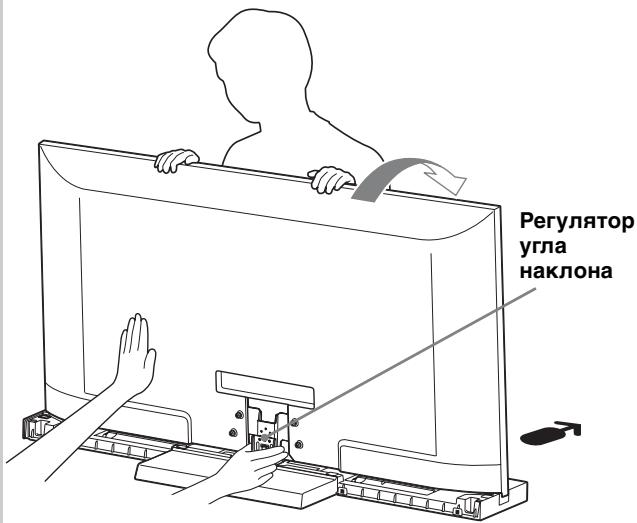
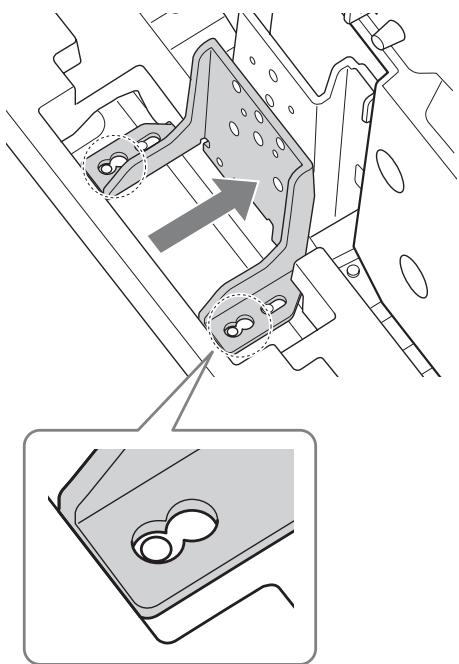
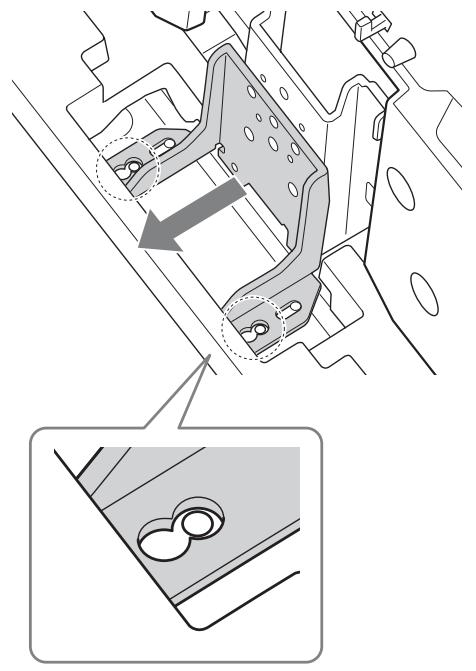
3 Adjust the angle.
Tilting the TV forwards, set the Adjuster at the required angle.
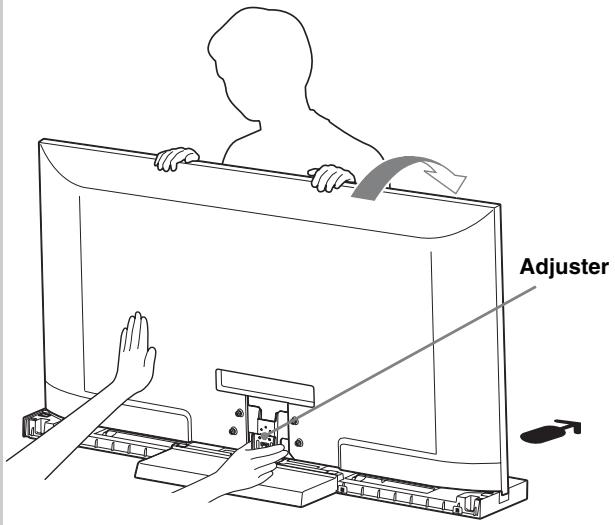
- Move the Adjuster backward when adjusting from 6 degrees to 0 degrees.
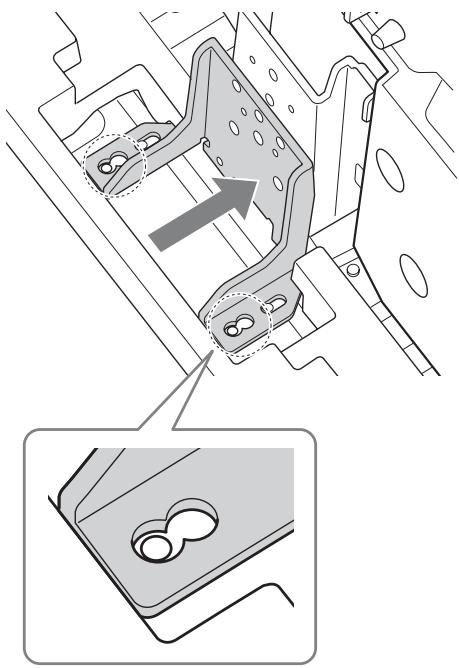
- Move the Adjuster forward when adjusting from 0 degrees to 6 degrees.
Position the TV back again.

- When positioning the TV back, support the Adjuster with a hand. (In the case of setting to 0 degrees only.)
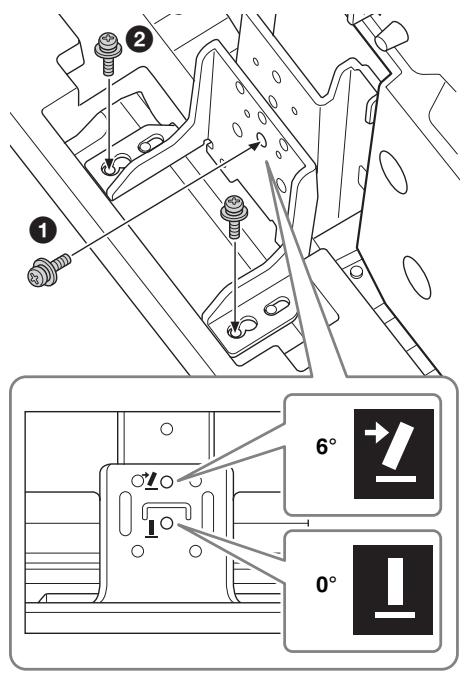
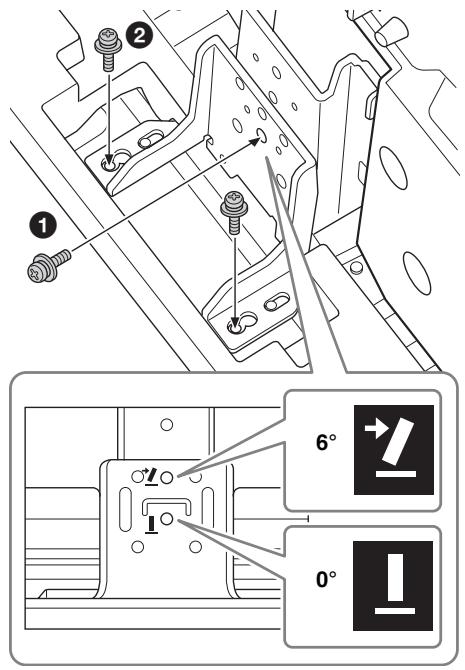
4 Secure the screws.
Firstly, secure the Adjuster and the Neck with the Screw (1), then two screws (2) (using the three screws removed in step 2).
(De fabrieksinstellung is 6 graden.)
Specifications producer
Sorg for at fastgore tv'et.
He onnpaTeCb Ha TeJeBn3Op n He BnCHnte Ha HEM, KOrda OH yCTaHOBJeH Ha NOdCTaBky.
IIOCTaBka MoKTe OIIPOKINHyTbCn TeJIeBN3Op MOKTe YIaCTb N CTAb IIpUHHOcpe3HOJ TpaBMbl HJIcMePTN.
He nepekepbBaIte BeHTnlaCNoHHOe OTBepCTne TeJIeBN3Opa.
IIpnIpeKpbITnBHeTHNJIAHNOHHbIX OTBepCTn(TKaHbIOI T.I.)BHyTpN yCTpOcTBAMoKeTIOBbICHTbcra TeMIIepaTypa,YTOMOKeTIpNBecTH K BO3rOpAHIO.
He donyckaite 3aueemlenna Ka6eIaNTaHnua CoedHHTeJIbHbIX Ka6eJe.
- IIpn yctaHOBKe TeJIeBn3Opa Ha IIOJCTaBky He IOnIyscKaIte 3aIeMJIeHnRA Ka6eJIЯ IINTaHnY I coeINHHTeJIbHbIX Ka6eJIe. IIOBpeXJdeHne Ka6eJIЯ IepeMeHHORo TOkA HJIu CoeINHHTeJIbHORO Ka6eJIra MOKeT CTAtB IIpNUHOr BO3rOpaHnRA HJIu IIOpaJxHeNRA 3JIeKTPnuecknM TOKOM.
He BCTaBaIte Ha Ka6eJIb IITaHnI IepemeHHOTo TOKa IJIn coeINHHTeJIbHbIK Ka6eJIb IIpi IpeHOce IOIDCTaBKN IJIa
TeJIeBn3Opa. 3TO MOKeT IIpNBecTHK IOBpeJDeHnIO Ka6eJIa IepemeHHOro TOKA HJI COeIHnHTeJIbHOro Ka6eJIa, YTO MOKeT CTaTB IIpyuHOB Bo3rOpAHnI HIN IopaxKeHnI 3JIeKTpNHueCKHM TOKOM.
He 3a\PuHaI\Tecb 3a Ka6eJIb nepemehHOro TOKa nLI coeHNHTeJbHbI KAb.
EcJI 3aIHyTbcra 3a Ka6eJIb IepMeHHoro TOka IIIN COeIHHTeJIbHbI K6eJIb,IOCTaBKa IIJIa TeJIeBN3Opa MOKeT OIIPOKHNyTbcra H IIpNBecTH K TpaBMe.
BHIMAHNE
Pn Heco6IIOJeHnn CJIeMyOuIcx Mep
PpeIOCTOpOXHOCTN CyueCTByET BepoAHTHOCTb
NoJyEHn TpaBM NII NOBpeKdEHN
IMyueCTBa.
He yctaHaBnBaIte Ha KpOnIeH KaKoe-Im6o dpyroe o6OpyDoBaHne, KpOme yKa3aHHoro.
Ta IIoIcTaBka IJIa TeJIeBn3Opa IpeHa3NaYeHa IJIa
HcIOJIb3OBaHHa TOJIbKO c yKa3aHHbIM H3JeJIHeM. EcJIn
Ha IIoIcTaBky UcTaHOBHTb O6OpyIOBaHHe, OTJIuHHe O T
yKa3aHHoro, OHO MOKeT YIIaCTb IJIIN IOBpeIITbcra, a
TaKke MoKeT cTaTB IprUHHoTpaBM. IJIIOCTpaIHN B
JaHHOM pYKOBoIDCTBe OTHOcRtC K MoJeJIn
KDL-46HX90□, ecJIn He yKa3aHO HHOe.
HadejHo 3aKpeNITe TeJeBn3Op.
3aKpeIInTe TeJIeBn3Op Ha IIOJCTaBKe IJIa TeJIeBn3Opa c IIOMOIIbIO IIpIIaRaEmbIX BnHTOB. EcII IN TeJIeBn3Op He yCTaHOBJEN HaJeXHo, OH MOKeT yIIaCTb IIIN IIOJCTaBKa MOKeT OIIPOKHNyTbcN CTaTB IIpNUHON TpaBM.
HaJExJHo 3aTaeHHTe BnHTbI. EcJIteJIeBn3Op He yCTaHOBJeH HaJExJHo, OH MOKeT yIaCTb I CtaTb IIpruHHo TpaBMbl.
Ppnc6opKe 6yDbTe oCtOpoxHbI, cyO6bl He nobpeintb pykn n paJIbciI.
He IepemeaTe IIOCTaBky TeJIeBn3Opa, IepJxacb 3a BepTnKaJIbHbI KPOHIITeH.
CJIeIHTe 3a TEM, YTO6bI IIpH yCTaHOBKe TeJIeBN3Opa He IOBpeINb pyKN IJIN IaJIbIIbI.
PpIMeuaHne NO N3BLeueHEnIO NOCTaBKn DJIa TeJIeBu3Opa N3 yNaKOBKn
O63aTeJIbHO pIINePJKBaHTe IIOCTaBky IJIa TeJIeBH3Opa H co6JIIOaJIte OCTOPoJxHocTb IIPI ee IIpeHoCke.
IpiHmHTe BCE Heo6xOHNMbIe MepbI IpeIOCTOPOXHOCTN IJIa IpeIoTbPaIeHnI OIIPOKINbIBaHnI IOIcTaBKN IJIa TeJIeBN3Opa I BO3MOXHBIX TpaBM IIIOBpeJKeHnI.
B IIoIcTaBKe IJIa TeJIeBn3Opa HmEeTcR OTBepCTHe (IIOka3aHo Ha pncyHKe HnKe), KOTOpoe IIO3BOJIaTe BbIIIOJIHHTb Heo6XoJIMbIe MepBi IJIa IIpeIoTbPaIeHnE ee OIIpOKnIBiBaHH.
IIJI IOJIyueHnI OIOJINHTeJIbHOI INHΦOpMauHnO BbIIOJIHeHHN OIIepaUHn CM. IHCtpyKUH NIO 3KcIIJyaTaUHn, IIpNJlaRaEMyE K TeJIeBn3OpY.
TexHnueckneXapakTepnctnKn
D
2 BbIKpyTnte BNHTbl.
BbIKpyTHTe TpH BnHTa H3 BePTHKaJIbHOKPOHIITeHa.
3 Otpereynipyte yroJ haKloHa.
HaKIOHnB TeJIeBn3Op BIIpeI, yCTaHOBnTe peYJrTOp yrJa HaKIOHa B HuxHoE IIOJOxKeHne.
- IepemecHTe peRyJIaTOp yIa HaKJIOHa Ha3aI npi peRyJIInpOBKe yIa ot 6 do 0 rpaIycob.
-ПеремechITEpeултOpугlaHaKLOHaВпepeДприpeулровkeугlaOTdo6rgpaIycob.
2 YcTaHOBHTe TeJIeBN3Op B HcxOJHoe IOJIOJKeHne.
- IIpyuTaHOBKe TeJIeBn3Opa B INCXoJHOe IIOJOxHeHne IIpyIePjXBaIte peRyJIaTOp yJIa HAKJIOHa pyKoI (ToJIbKO IIpyuTaHOBKe IIOJOxHeHne 0 rpaIycob).
4 BBePHTe BnHTbl.
B IIepByIO OuepeIb, 3aKpeIIITe pepyJIaTOp yJIa HaKJIoHa H BepTHKaJIbHbI KPOHIITeHH C IOMOIIbIO BnHTa (1), 3aTeM C IOMOIIbIO JByX BnHTOB (2) (HCIOJIb3yra Tprn BnHTa, BbIKpyeHHbIX B IIIare 2).
CTOCOBHO TexHikn 6e3nekn
(CtahOM Ha 6epe3ehb 2010)
* Y Ha3Bax MoJeIe 3aMicTb CTOrTb IuΦpr i/a6o cHMBOJIH, cIeIuΦiUHII JIJI KOKHOI MOJeIi.
Po3taWyBaHH iDeHTnΦiKauiHoI etNKeTKn
ETHKeTKa,HaJkiBkA3aHO HOMep MOJeJIi,3HaXoIHTbcr 33aNy HaPiICTabuI IJIra TeJIeBi3opa.
3ACTEPEXKEHH
Як soo He DoTpmyBaTnca HaBeDeEHnx HnKue 3aCtepekHex 3axoDiB, ue MoKe npu3BecTN do cepNo3Hx TpaBM qN CmepTi BHaCNIiOK noXeKi, ypaXeHH eJeKtpnHm CTpyMOM, nepeKndaHnB VbO6by qN Ioro naDInHn.
O6OB'Я3KOBO BxNBItB 3axoDiB, 3o6 3an06irtn pepeKnDaHHIO niDCTaBKn Дя TeJIeBi3opa.
JiIO He He 3po6HTN, TeJIeBi3Op MOKe IpekeHHyTHcR, IIIO IIpH3BeIe IO TpaBMyBaHHa.
He npuTyIaItecI Do TeIeBi3opa, yCTaHOBJIeHOrO Ha NiIcTaNzI, Ta He BiIaIte Ha HbOrO XoJHi ppeMMeTn.
IIiCTaBka MoKe IpeKeHHyTncs a6o TeJIeBi3Op MoKe BnAcTH, IIO IIpuI3BeIe IIO cepNo3HOrO TpaBMyBaHHa 6o cMepti.
He haKpNbAaTe BeHTnJaciHi OTBOpN TeJIeBi3opa.
JaKIO HaKpHTN BeHTNJIiHi OTBOpH (HaIIprHKJIaI,TKaHHHO),TeIIIO MoKe HAKOIIHyBaTncy BnPo6i,BhAcJIIOK YOrO BnHNKHe IIOKExa.
CπiДкуǐTe 3a TnM, οιοδ He 3aTnCHyTn ΦHypЖиВлeHHЯ 3mɪHOrO cTpymy a6o 3'ΕdHyBaJIbHn Ka6eJIb.
CJIkyIte 3a TmM, IIo6 He 3aTHChTyI HHyp KINBJIeHn3MIHHORO cTpyMy a6o 3'EnHyBaJIbHN Ka6JIb IIJ Yac yCTaHOBJIeHnTeJIeBi3Opa Ha IIiCTaBII. JIKIO IIHyp KINBJIeHn3MIHHORO cTpyMy a6o 3'ENHyBaJIbHN Ka6JIb IIOIIKOJKeHo, Ie MoJKe cTaTH IIpruHNOIO IOKexi a6o ypaJKeHHa EJIeKTPnUHM cTpyMOM.
He hactyiaIte Ha IIHyp KINBJIeHHa 3MInHOro cTpyMy a6o 3'EnHyBaJIbHN Ka6eJIb IIq Yac IpeHeceHHa IICTabKn IJIa TeJIeBi3opa. IIHyp KINBJIeHHa 3MInHOro cTpyMy a6o
3'εДиВаьньн Ka6eЛь може 6уТи ПОИКОДжЕН,ПО може CTaTN IIprHnHOI IOЖeksi abO ypaJxehnЯ eJIeKTPnHIM cTpyMOM.
Будъ Te yBaЖи, соб He nepeueNTscaYepe3 shyp XnBJIeHЯ 3mIHHO cTpymy a6o 3'cndHyBaIbHni Ka6eIb.
Jiio nepeeHTncy epe3 Hyp KHBJIeHH 3MiHHo CTpyMy a60 3'EnHyBaJIbHn Ka6JIb, IIcTaBka JIa TeJIeBi3opa MoKe IpeKHiHTncr Ta IIpN3BeCTn Do TpaBMvBAHH.
YBAGA
Якwo He DoTpmyBaTnca HaBeDeHnx HnXyce 3aCtepeKHX 3axOdiB, Ze MoKe Ipn3BecTu Do cepNo3HNx TpaBM YN NowKOdXeHHa MaHa.
He BCTaHOBJIouTe 6yDb-IAKnx iHxNx npnCTpoIB, KpIM 3a3HaueHoro Bnpo6y.
IIa IICTaBka IJIa TeJIeBi3Opa IIpH3HaueHa IJIa BHKOpNCtAHnJIIiE i3 3a3HaueHm BHPo6bOM. KIO BCTaHOBHTN O6JIaIHnHH, IKe TYT He BKa3aHO, BOHO MOKe BIIaCTn a60 3JIaMaTHscr Ta 3aBdAtn TpaBM. IIOcTpaii, HabeJeHi B IcbOMy IocioHNky, CTOCYOTbcra MoJIeJI KDL-46HX90☐, IJIIO He 3a3HaueHo iHIie.
O6OB'Я3KOBO HaDiIHo 3aKpiniTb TeJIeBi3Op.
JIKIO IICTaBA Ka IJI TeJIeBi3Opa BCTaHOBJIIOEbCra Ha M'AKI IIOBepxHi, HApnPKJIaI Na IIcTnJIi a60 KNIHMI, IOKJIaITb Ha BN3HaueHe MiIe IOIIKy.
- He BCTaHOBJIIOHTe IICTaBky IJIa TeJIeBi3Opa B MicIi, IIO IIJaAeTbCBy BIIJINBy IprMOrO COHryHOrO cBITJa, a60 Iopyu i3 o6irpiBaUem.
- He BCtAHOBJIIOHTe IIcCTaBky IJIa TeJIeBi3Opa B Mici 3 IIbNIIeHOJBOJIOrIcTIO Hn TemIepaTypoHO a6o HaIbOpi.
- Can than dé khong kep ngón tay khi lap TV.
TV St-BT3 of the chengluyi hui hui hui hui hui hui hui hui hui hui hui hui hui hui hui hui hui hui hui hui hui hui hui hui hui hui hui hui hui hui hui hui hui hui hui hui hui hui hui hui hui hui hui hui hui hui hui hui hui hui h1h1h1h1h1h1h1h1h1h1h1h1h1h1h1h1h1h1h1h1h1h1h1h1h1h1h1h1h1h1h1h1h1h1h1h1h1h1h1h1h1h1h1h1h1h1h1h1h1h1h1
wauuuaa uuuuauuauuauuuuuuuuuuuuuuuuuuuuuuuuuuuuuuuuuuuuuuuuuuuuuuuuuuuuuuuuuuuuuuuuuuuuuuuuuuuuuuuuuuuuuuuuuuuuuuuuuuuuuuuuuuuuuuuuuuuuuuuuuuuuuuuuuuuuuuuuuuuuuuuuuuuuuuuuuuuuuuuuuuuuuuuuuuuuuuuuuuuuuuuuuuuuuuuUU
20
nannnnnnnnnnnnnn
y 10000000000000000000000000000000000000000000000000000000000
wunlwnnnaananaananaananaananaananaananaananaananaananaananaananaananaananaananaananaananaananaananaananaananaananaananaananaananaananaananaananaananaananaananaananaananaananaananaananaananaananaananaananaananaananaananaananaananaananaananaananaananaananaananaan anaannnnn
y
nnuuuaeunnuunnuun (naunna) nuuauuuu uuuuuuuuuuuuuuuuuuuuuuuuuuuuuuuuuuuuuuuuuuuuuuuuuuuuuuuuuuuuuuuuuuuuuuuuuuuuuuuuuuuuuuuuuuuuuuuuuuuuuuuuuuuuuuuuuuuuuuuuuuuuuuuuuuuuuuuuuuuuuuuuuuuuuuuuuuuuuuuuuuuuuuuuuuuuuuuuuuuuuuuuuuuuuuuuuuuuuuuuuUU
a
a 1
Wnwnnnnnaaunwauu nannnnnnnnnnn nn nnnnnnnnnnnnnn nn nnnnnnnnnnnnnnnn nn nnnnnnnnnnnnnn nn nnnnnnnnnnnnnn nn nnnnnnnnnnnnnn nn nnnnnnnnnnnnnn nn nnnnnnnnnnnn nn nnnnnnnnnnnn nn nnnnnnnnnn nn nnnnnnnnnn nn nannnnn nn nannn nn nannn nn nannn nn nannn nn nannn nn nannn nn nannn nn nannn nn nannn nn nannn nn nannn nn nannn nn nannn nn nannn nn nannn nn nannn nn nannn nn nannn nn nannn nn nannn nn nannn nn nannn nn nannn nn nannn nn nannn nn nennn nn nannn nn nannn nn nannn nn nannn nn nannn nn nannn nn nannn nn nannn nn nannn nn nannn nn nannn nn nannn nn nannn nn nannn nn
y
muaaunnaananaananaananaananaananaananaananaananaananaananaananaananaananaananaananaananaananaananaananaananaananaananaananaananaananaananaananaananaananaananaananaananaananaananaananaananaananaananaananaananaananaananaananaananaananaananaananaananaananaananaanaraannnna
y
y
a
y
20
ynnnnaaannnnnnnnnnnnnnnnnnnnnnnnnnnnnnnnnnnnnnnnnnnnnnnnnnnnnnnnnnnnnnnnnnnnnnnnnnnnnnnnnnnnnnnnnnnnnnnnnnnnnnnnnnnnnnnnnnnnnnnnnnnnnnnnnnnnnnnnnnnnnnnnnnnnnnn nn n nn n nn n nn n nn n nn n nn n nn n nn n nn n nn n nn n nn n nn n nn n nn n nn n nn n nn n nn n nn n nn n nn n nn n nn n nn n nn n nn n nn n nn n nn n nn n nn n nn n nn n nn n nn n nn n nn n nn n nn n nn n nn n nn n nn n nn n nn n nn n nn n nn n nn
- 1
- 0
yaoynan yu
n
J 1 J 1 J 1 J 1 J 1 J 1 J 1 J 1 J 1 J 1 J 1 J 1 J 1 J 1 J 1 J 1 J 1 J 1 J 1 J 1 J 1 J 1 J 1 J 1 J 1 J 1 J 1 J 1 J 1 J 1 J 1 J 1 J 1 J 1 J
J 1 J 4gJ 1 J gjgl OaJgJ 4gJ 4gJ 4gJ 4gJ 4gJ 4gJ 4gJ 4gJ 4gJ 4gJ 4gJ 4gJ 4gJ 4gJ 4gJ 4gJ 4gJ 4gJ 4gJ 4gJ 4gJ 4gJ 4gJ 4gJ 4gJ 7 4000
L 1
4
.1 4y y g y jy
.
Lsi lao jiaai si ybi jyjgl a
A 10g 10g 10g 10g 10g 10g 10g 10g
1j 1
.()aJd a 0oOg oJol dgbdo jda j
jiao:oolg
| ◎بُلْف | ◎بُلْف | الإستعمال tj的女孩们 |
| 170 | 170 | 52" |
| 170 | 170 | 46" |
1
1
J 1 J 1 J 1 J 1 J 1 J 1 J 1 J 1 J 1 J 1 J 1 J 1 J 1 J 1 J 1 J 1 J 1 J 1 J 1 J 1 J 1 J 1 J 1 J 1 J 1 J 1 J 1 J 1 J 1 J 1 J 1 J 1 J 1 J 1 J
1Jgjgl4yJgjglqai jI 5 g 5
aai j 1500000000000000000000000000000000000000000000
15
j 1 j 1 j 1 j 1 j 1 j 1 j 1 j
A 1
d 1
15 11 jolj g joo
jg jgl la jolllgws j g y 45 dol o jilab
.155 000000000
Joo 100000000000000000000000000000000000000
.5gaww
a j 15
.
.
y jnssj nnnnns
J 1 J
cJoo 00000000000000000000000000000000000000000
.5g 5g
bl
JLwog 4a0o1 wawj Jkss. dgi jy j g yg
.
100000000000000000000000000000000000000
L
.0000000000000000000000000000000000000000
J 1
42j3 1000000000000000000000000000000000000000000
KDL-46HX90□
.
s0o o jyjggl d y 4 y jn jnyjggl odaw daa aagw gla wj l olaal uy Jsou L u sBgaw cwl Jso. dWol owi wai gao 4 n jyjggl sL .
.0g
aai 0g0d
dyu oJzI .duS uai jgao g Cauo Jy g yjgydi dy
j 1 j j g j g j g j g j g j g j g j g j g j g j g j g j g j g j g j g j g j g j g j g j g j g j g j g j g j g j g j g
JgS JJJJ Sduo j 100000000000000000000000000000000
a 10000000000000000000000000000000000000
Sooj yduofoa aannn ydo 45 0000000000000000
ai = Si - 1 - S_i = 12
jI jI jI J I J J J J J J J J J J J
g jyjgl yj g j
1 1 1 1 1 1 1 1 1 1 1 1 1 1 1 1 1 1 1 1 1 1 1 1 1 1 1 1 1 1 1 1
joo j 1 1 1 1 1 1 1 1 1 1 1 1 1 1 1 1 1 1 1
.15 10
JL 100000000000000000000000000000000000000000000000000000000000
Lbgaogjgglgla
.8do 100 L
a 45 a5
J 1 J 1 J 1 J 1 J 1 J 1 J 1 J 1 J 1 J 1 J 1 J 1 J 1 J 1 J 1 J 1 J 1 J 1 J 1 J 1 J 1 J 1 J 1 J 1 J 1 J 1 J 1 J 1 J 1 J 1 J 1 J 1 J 1 J 1 J
aJoojI aJooJooJooJooJoo
UJlJIJIbI JyRgJyS 1. jj
. 1
jui 50 10000000000000000000000000000
J15j 15 j0
JU 15 Jg
B ①
A 1
J 1
J 1
J 1
J 1
J 1
J 1
oo:ddg
aaogall aabally jalll Joo no 5t
aLia Ie baiy 1.0kI cgo gao los aloo p s jalil Jai
. . LCD
yj
J 1 J 1 J 1 J 1 J 1 J 1 J 1 J 1 J 1 J 1 J 1 J 1 J 1 J 1 J 1 J 1 J 1 J 1 J 1 J 1 J 1 J 1 J 1 J 1 J 1 J 1 J 1 J 1 J 1 J 1 J 1 J 1 J 1 J 1 J
a aaa aaa aaa aaa aaa aaa aaa aaa aaa aaa
a aal ylo y
Jol 1 Jl 1 Jssy. aagaa aal o jg jzll Jol 1 1 J 1 J 1 J 1 J 1 J 1 J 1 J 1 J 1 J 1 J 1 J 1 J 1 J 1 J 1 J 1 J 1 J 1 J 1 J 1 J 1 J 1 J 1 J 1 J 1 J 1 J 1 J 1 J 1 J 1 J 1 J 1 J 1 J 1 J
logj g o odow jdo cfo ycbw do yjabll dla s pall
a a d 1000000000000000000000000000000000000000000
a a
aill jg no wjll g o
JooosuJgfo
a 10000000000000000000000000000000000000000000000000
jll jiaauiuul algull JooosyL .dIe aR ydo Laaaiol
.0jzjzjzj 100 100 100 100 100 100
J 1
Jn Jn Jn Jn Jn Jn Jn Jn Jn Jn Jn Jn Jn Jn Jn Jn Jn Jn Jn Jn Jn Jn Jn Jn Jn Jn Jn Jn Jn Jn Jn Jn Jn Jn Jn Jn Jn Jn Jn Jn Jn Jn Jn Jn Jn Jn
Aa aIy I y 1000000000000000000000000000000000000000
.
a 1 1 1 1 1 1 1 1 1 1 1 1 1 1 1 1 1 1 1
.
olai! Jy juyjzalldolao yJydoa .n jyjzalldoayg jnyjzalldolao yJydo
ygl aIol 1sU sO
jaii jn jyjall lol 5r j no gao
s s 10000000000000000000000000000000000000000000000000000000000000000000
Laiie aie gai jyjai y iiaiy i Jaoi Jai Jai jai jai gao jay jai jai Jao
j
j 10000000000000000000000000000000000000000000000000
.0gjaiu 1e ggeqgai aeggl aeea Jusy
a aab Jlaasu) aygall baa 13! .yjalll JlU yJrJy. (L)JLo g JyB u
Jg
Jg 1 Jg j 1 1 1 1 1 1 1 1 1 1 1 1 1 1 1 1 1 1 1 1 1 1 1 1 1 1 1 1 1 1 1
aIbI Lggi Ie guey y 1oJiaolalolai Jglllgl 100gill lwlgl 100glll 100glll 100glll 100glll 100glll
a0xwJzao Jg
iiioi1isoljwglS
- CAUTION
- Specified products
- Location of the identification label
- WARNING
- Be sure to take measures to prevent the TV Stand from toppling over.
- Be sure to install the TV Stand on a solid and flat floor.
- Be sure to install the TV Stand on a stable surface.
- Do not lean on or hang from the TV with the TV installed on the TV Stand.
- Do not cover the ventilation holes of the TV.
- Do not allow the AC power cord or the connecting cable to be pinched.
- Do not stumble over the AC power cord or the connecting cable.
- Do not install any equipment other than the specified product.
- Be sure to secure the TV.
- Notes on installation
- Note on use
- Cleaning
- Be sure that two or more persons do the installation work.
- Do not modify the TV Stand.
- Be sure to install the TV securely following the instructions.
- Be careful not to injure your hands or fingers while assembling.
- Note on taking the TV Stand out from the carton
- Step 1: Checking the parts
- Decide on the installation location and lay the TV Stand down before installing the TV.
- Step 2: Installing the TV
- Before assembling
- Hold the TV at the specified point when moving the TV.
- Install the TV onto the TV Stand.
- Secure the TV and the TV Stand with the four TV Neck Attachment Screws (PSW5 × 16) black (supplied).
- Attach the Neck Cover to the Neck.
- Attach the Rear Cover to the TV Stand.
- Step 3: Safety measures to prevent toppling over
- Specifications
- Adjusting the viewing angle of the TV
- Detach the Rear Cover and Neck Cover.
- Remove the screws.
- Adjust the angle.
- Secure the screws.
- Specifications producer
- Sorg for at fastgore tv'et.
- He onnpaTeCb Ha TeJeBn3Op n He BnCHnte Ha HEM, KOrda OH yCTaHOBJeH Ha NOdCTaBky.
- He nepekepbBaIte BeHTnlaCNoHHOe OTBepCTne TeJIeBN3Opa.
- He donyckaite 3aueemlenna Ka6eIaNTaHnua CoedHHTeJIbHbIX Ka6eJe.
- He 3a\PuHaI\Tecb 3a Ka6eJIb nepemehHOro TOKa nLI coeHNHTeJbHbI KAb.
- BHIMAHNE
- He yctaHaBnBaIte Ha KpOnIeH KaKoe-Im6o dpyroe o6OpyDoBaHne, KpOme yKa3aHHoro.
- HadejHo 3aKpeNITe TeJeBn3Op.
- Ppnc6opKe 6yDbTe oCtOpoxHbI, cyO6bl He nobpeintb pykn n paJIbciI.
- PpIMeuaHne NO N3BLeueHEnIO NOCTaBKn DJIa TeJIeBu3Opa N3 yNaKOBKn
- TexHnueckneXapakTepnctnKn
- BbIKpyTnte BNHTbl.
- Otpereynipyte yroJ haKloHa.
- BBePHTe BnHTbl.
- CTOCOBHO TexHikn 6e3nekn
- Po3taWyBaHH iDeHTnΦiKauiHoI etNKeTKn
- 3ACTEPEXKEHH
- O6OB'Я3KOBO BxNBItB 3axoDiB, 3o6 3an06irtn pepeKnDaHHIO niDCTaBKn Дя TeJIeBi3opa.
- He npuTyIaItecI Do TeIeBi3opa, yCTaHOBJIeHOrO Ha NiIcTaNzI, Ta He BiIaIte Ha HbOrO XoJHi ppeMMeTn.
- He haKpNbAaTe BeHTnJaciHi OTBOpN TeJIeBi3opa.
- CπiДкуǐTe 3a TnM, οιοδ He 3aTnCHyTn ΦHypЖиВлeHHЯ 3mɪHOrO cTpymy a6o 3'ΕdHyBaJIbHn Ka6eJIb.
- Будъ Te yBaЖи, соб He nepeueNTscaYepe3 shyp XnBJIeHЯ 3mIHHO cTpymy a6o 3'cndHyBaIbHni Ka6eIb.
- YBAGA
- He BCTaHOBJIouTe 6yDb-IAKnx iHxNx npnCTpoIB, KpIM 3a3HaueHoro Bnpo6y.
- O6OB'Я3KOBO HaDiIHo 3aKpiniTb TeJIeBi3Op.
- 20
- nannnnnnnnnnnnnn
- y
- a
- n
- 1
- jI jI jI J I J J J J J J J J J J J
- g jyjgl yj g j
- joo j 1 1 1 1 1 1 1 1 1 1 1 1 1 1 1 1 1 1 1
- .15 10
- a 45 a5
- a0xwJzao Jg
Brand : SONY
Model : SU-52HX1
Category : TV Stand