
BG2030 - Scissors PHILIPS - Free user manual and instructions
Find the device manual for free BG2030 PHILIPS in PDF.


| Product Type | Body Groomer (Shaver & Trimmer) |
| Brand | Philips |
| Model | BG2030 |
| Power Source | Rechargeable battery (built-in) |
| Charging Time | 1 hour (select models) or 8 hours (standard) |
| Operating Time | Up to 50 minutes |
| Usage | Wet or dry (shower safe) |
| Trimming Combs | 1 to 3 combs (3mm, 5mm, 7mm hair lengths) |
| Shaving Unit | Replaceable (type BG2000) |
| Back Shaving Attachment | Available on select models (e.g., BG2036/38) |
| Cleaning | Rinse shaving unit under tap; use cleaning brush |
| Safety | Keep adapter dry; do not use if damaged |
| Accessories Included | Adapter, charging stand, cleaning brush (varies by model) |
| Battery Indicator | Flashing red when low; solid green when fully charged |
| Compliance | IEC safety regulations; safe in bath/shower |
Frequently Asked Questions - BG2030 PHILIPS
User questions about BG2030 PHILIPS
0 question about this device. Answer the ones you know or ask your own.
Ask a new question about this device
Download the instructions for your Scissors in PDF format for free! Find your manual BG2030 - PHILIPS and take your electronic device back in hand. On this page are published all the documents necessary for the use of your device. BG2030 by PHILIPS.
USER MANUAL BG2030 PHILIPS
Always here to help you
Register your product and get support at
www.philips.com/welcome

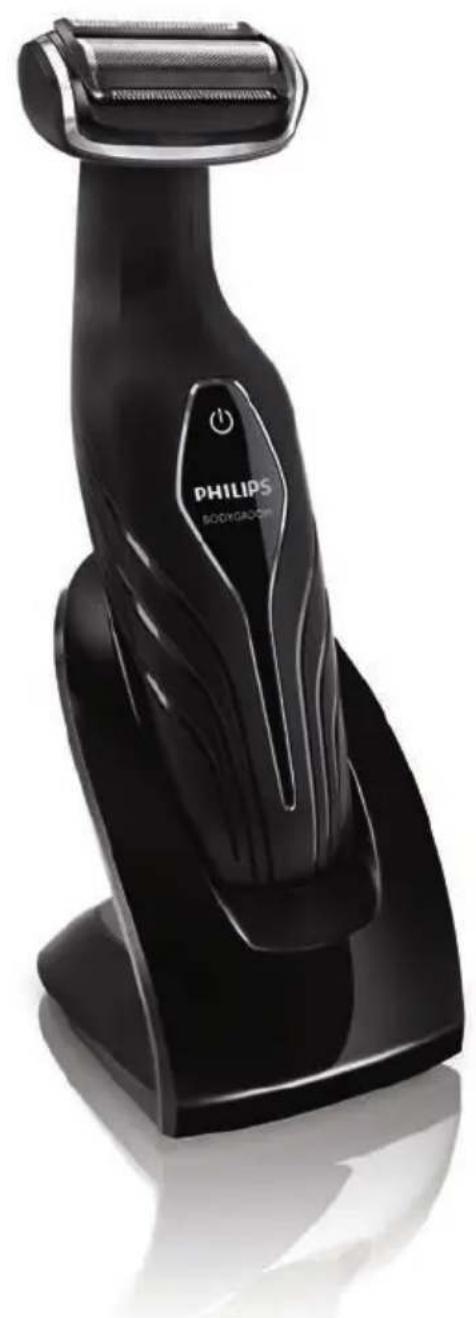
natural_image
Black Philips Bodygadon electric shaver with roller blade and power button (no text or symbols on body)BG2038
BG2036
BG2028
BG2026
BG2025
BG2024
User manual
PHILIPS
natural_image
Simple line drawing of an open book with a grid on the left and a closed page on the right (no text or symbols)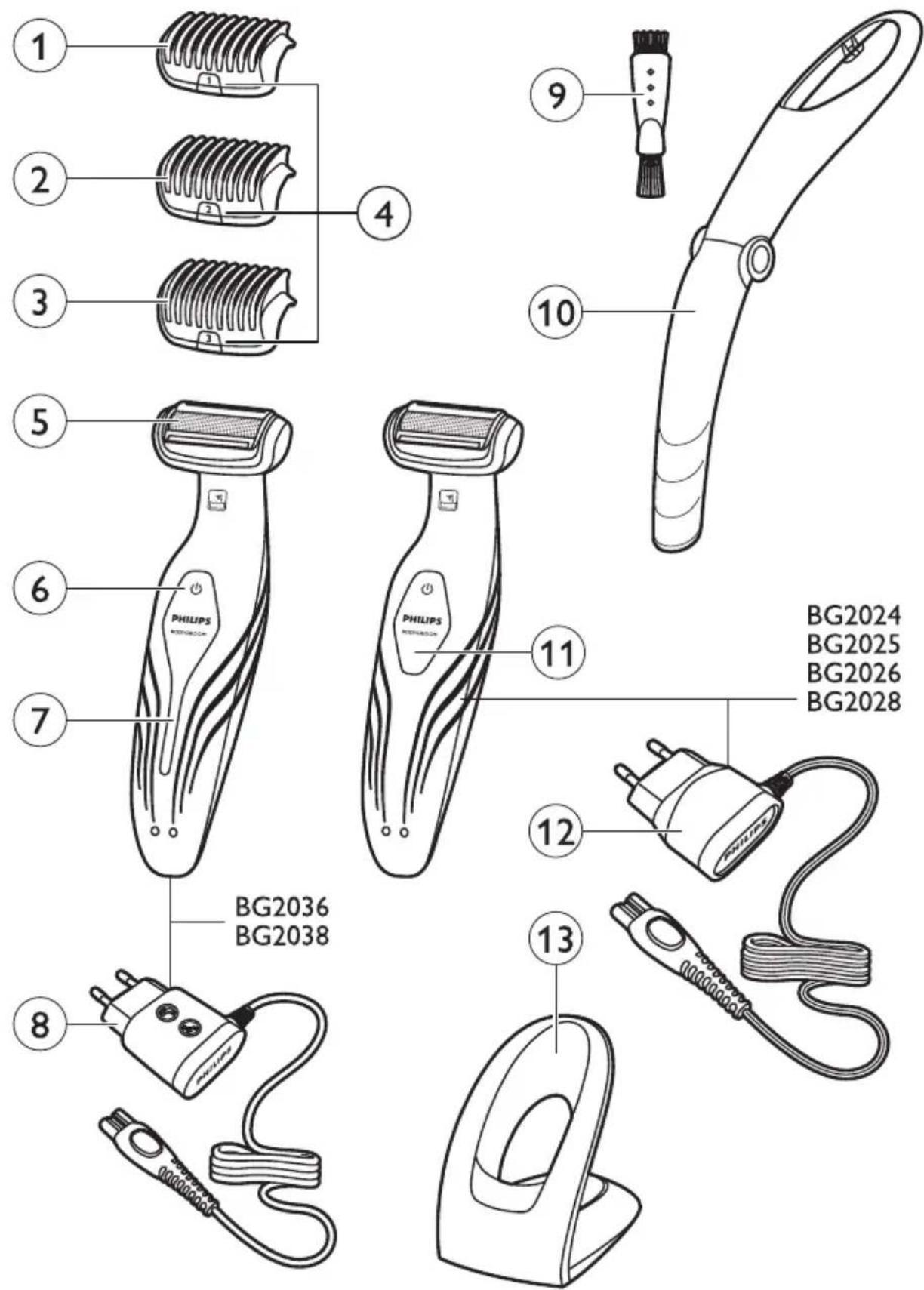
ENGLISH 6
БЪЛГАРСКИ 16
ČEŠTINA 26
EESTI 36
HRVATSKI 45
MAGYAR 55
КАЗАКША 65
LIETUVIŠKAI 75
LATVIEŠU 85
POLSKI 95
ROMÂNĂ 105
РУССКИЙ 115
SLOVENSKY 125
SLOVENŠČINA 135
SRPSKI 145
УКРАЇНСЬКА 155
Introduction
Congratulations on your purchase and welcome to Philips! To fully benefit from the support that Philips offers, register your product at www.philips.com/welcome.
The Philips Bodygroom offers you a safe, gentle, quick and smooth shave and trim for every body part below the neckline. With this new rechargeable shaver and trimmer in one you can easily shorten and remove body hair wherever you like, wet or dry!
General description (Fig. 1)
1 Trimming comb 1 (3mm/0.11 inch)
2 Trimming comb 2 (5mm/0.19 inch) (BG2038/BG2036/BG2028/BG2026 only)
3 Trimming comb 3 (7mm/0.27 inch) (BG2038/BG2036/BG2028/BG2026 only)
4 Comb size indication (1, 2 or 3)
5 Shaving unit
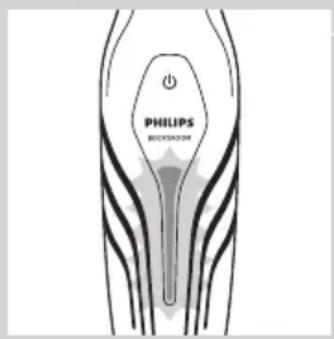
6 On/off button
7 Battery status indicator
8 Adapter
9 Cleaning brush (BG2038/BG2036/BG2028/BG2026 only)
10 Back shaving attachment (BG2038/BG2036 only)
11 Battery status indicator
12 Adapter
13 Charging stand
Important
Read this user manual carefully before you use the appliance and save it for future reference.
Danger
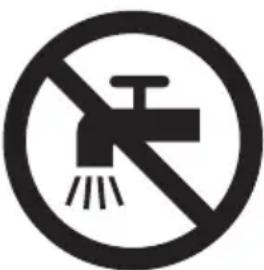
- Keep the adapter dry.
Warning
- Check if the voltage indicated on the adapter corresponds to the local mains voltage before you connect the appliance.
- The adapter contains a transformer. Do not cut off the adapter to replace it with another plug, as this causes a hazardous situation.
- This appliance is not intended for use by persons (including children) with reduced physical, sensory or mental capabilities, or lack of experience and knowledge, unless they have been given supervision or instruction concerning use of the shaver by a person responsible for their safety.
- Children should be supervised to ensure they do not play with the appliance.
- Always check the appliance before you use it. Do not use the appliance if it is damaged, as this may cause injury.
natural_image
Prohibition sign showing a faucet crossed out by a diagonal line, indicating no fire or water discharge (no text present)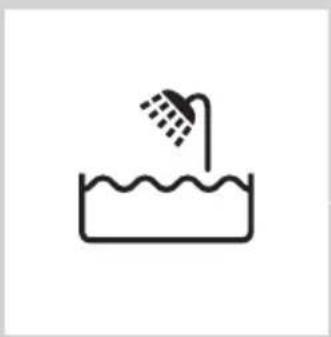
natural_image
Simple line drawing of a showerhead spraying over a water-filled basin (no text or symbols)Caution
- Use, charge and store the appliance at a temperature between 5^ C and 35^ C.
- Only use the adapter and the charging stand supplied to charge the appliance.
- Never immerse the charging stand in water nor rinse it under the tap.
- If the appliance is subjected to a major change in temperature, pressure or humidity, let the appliance acclimatise for 30 minutes before you use it.
- If the adapter or charging stand is damaged, always have it replaced with one of the original type in order to avoid a hazard.
- Do not use the appliance if any of its parts is damaged or broken, as this may cause injury.
- This appliance is only intended for shaving and trimming body parts below the neckline. Do not use it to shave or trim facial or scalp hair.
Compliance with standards
- The appliance complies with the internationally approved IEC safety regulations and can be safely used in the bath or shower.
- This Philips appliance complies with all applicable standards and regulations regarding exposure to electromagnetic fields.
Charging
natural_image
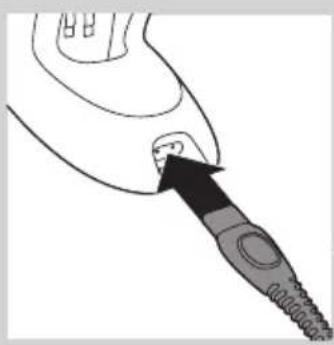
Line drawing of a medical or surgical instrument with a pointed tip and arrow pointing to a small component (no text or symbols)Charging takes 1 hour (BG2038/BG2036) or 8 hours (BG2028/BG2026/BG2025/BG2024) depending on the model. When the appliance is fully charged, it has an operating time of up to 50 minutes.
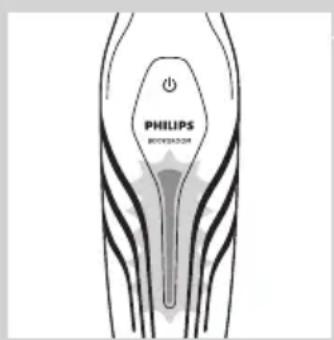
When the battery status indicator flashes red, the battery is running low (approx. 10 minutes of operating time left) and you need to recharge the appliance.
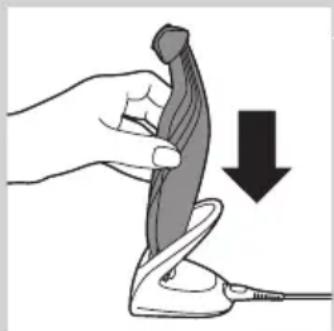
1 Insert the small plug into the charging stand.
natural_image
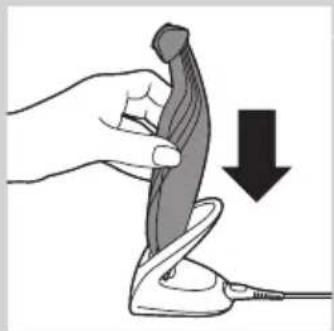
Illustration of a hand holding a pen-like object with a downward arrow indicating compression or disassembly (no text or symbols present)2 Put the appliance in the charging stand.
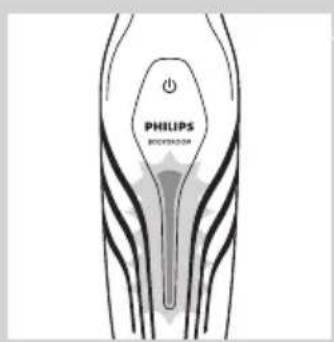
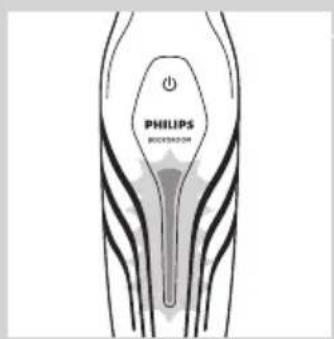
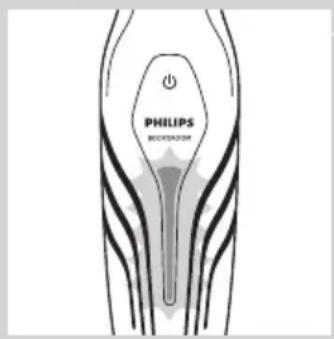
The battery status indicator flashes green to indicate that the appliance is charging.
Note: The battery status indicator of BG2028, BG2026, BG2025 and BG2024 looks different, but works in the same way.
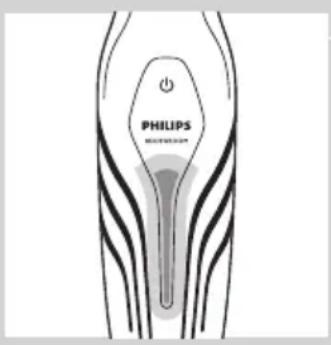
When the appliance is fully charged, the battery status indicator lights up green continuously.
Note: If the fully charged appliance is still in the plugged-in charging stand after 30 minutes, the battery status indicator goes out to save energy.
Using the appliance
Take your time when you first start to shave sensitive areas. You have to acquire practice with the appliance. Your skin also needs some time to adjust to the procedure.
You can use the appliance wet or dry to shave or trim hair on all parts of the body below the neckline. Do not use this appliance to shave or trim facial hair or scalp hair.
Trimming
BG2025 and BG2024 come with trimming comb 1. BG2038, BG2036, BG2028 and BG2026 come with trimming combs 1, 2 and 3. The back of each comb has been numbered 1, 2 and 3 (see the table below for the corresponding hair lengths after trimming). A trimming comb allows you to cut hair to a specific length (see the table below). If your appliance comes with 3 combs, start trimming with trimming comb 3 to acquire practice with this appliance.
Comb size indication Hair length after trimming
1 3mm/0.11 inch
2 5mm/0.19 inch
3 7mm/0.27 inch
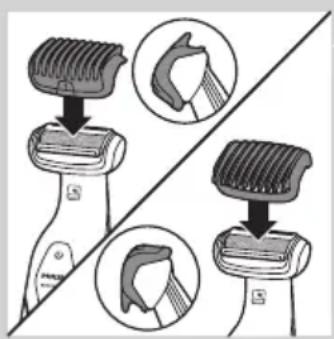
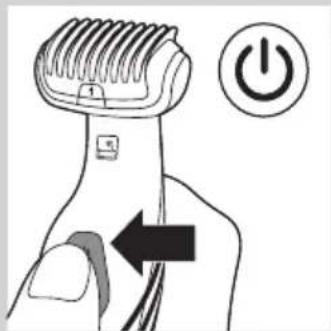
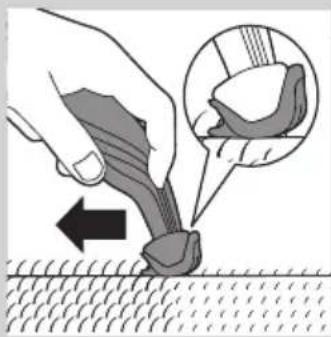
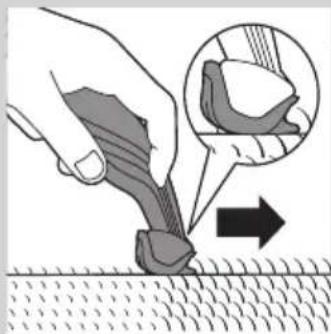
1 Snap the appropriate trimming comb onto the appliance. Make sure the teeth of the comb point in the direction in which you are going to move the appliance.
natural_image
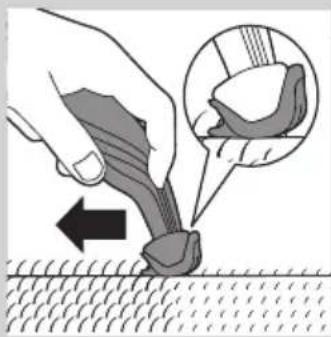
Illustration of a hand using a tool to apply a mechanical component, with an inset showing a close-up of the part (no text or symbols present)- When you move the appliance towards you, the teeth have to point towards you.
natural_image
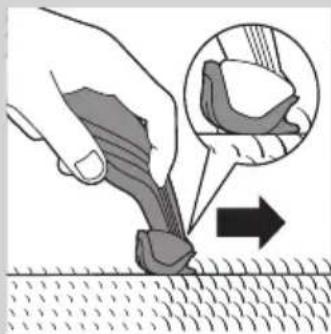
Illustration of a hand using a tool to apply material to a surface, with an inset showing a magnified view of the tool (no text or symbols present)- When you move the appliance away from you, the teeth have to point away from you.
natural_image
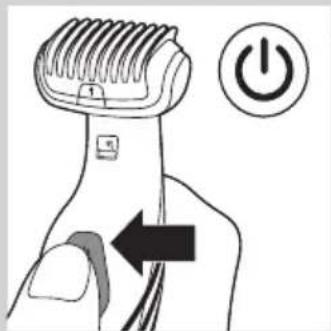
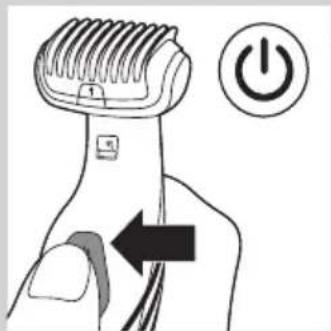
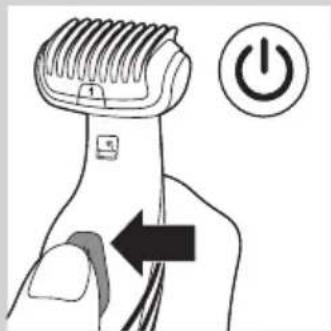
Illustration of a hand using a power shaver with an arrow indicating left-hand rule (no text or symbols)2 Press the on/off button to switch on the appliance.
3 Move the appliance against the direction of hair growth.
Note: Make sure that the flat part of the trimming comb is always fully in contact with the skin.
Shaving
natural_image
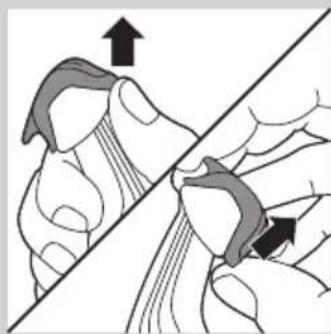
Illustration of a hand holding a tool with an arrow indicating direction (no text or symbols present)1 If a trimming comb is still attached, remove it.
Note: You can either push the trimming comb off the appliance or pull it off, depending on how the comb is placed on the appliance.
natural_image
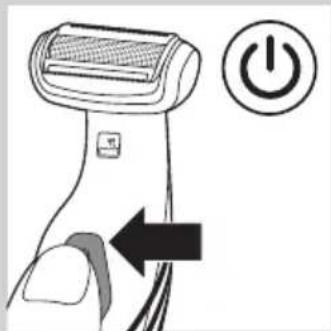
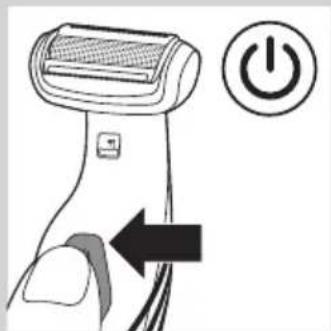
Illustration of a hairdryer with a power button icon (no text or symbols)2 Press the on/off button once to switch on the appliance.
3 Place the shaving unit on the skin.
4 Move the appliance against the direction of hair growth with one hand, while you stretch the skin with the other hand.
Note: Make sure that the shaving unit is always fully in contact with the skin.
Trimming and shaving tips
- If the hairs are longer than 10mm, you can trim them first with trimming comb 1 to a length of 3mm to make shaving easier.
- You get the best trimming results when the skin and hair are dry.
- You can use the appliance to shave in the shower or bath. To ensure easier gliding, apply some shaving foam or shower gel to your skin.
Shaving with the back shaving attachment (BG2036/BG2038 only)
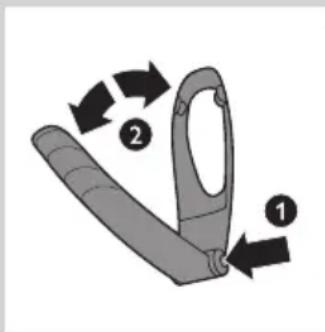
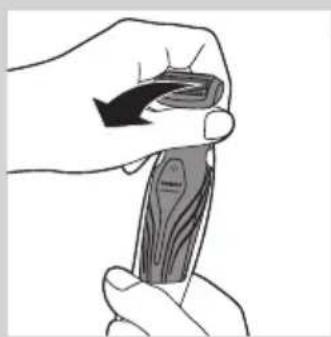
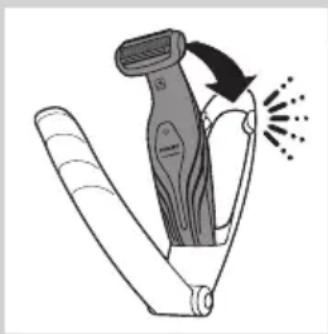
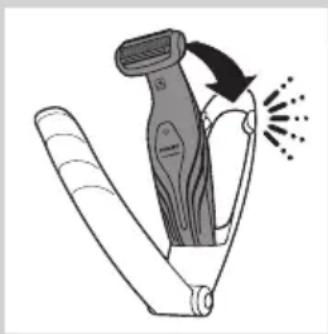
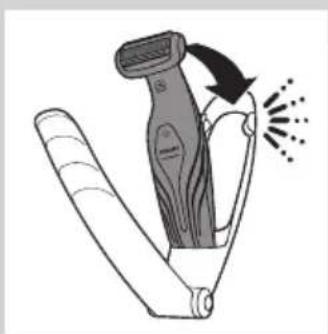
1 Press and hold the release button (1) and open the back shaving attachment (2).
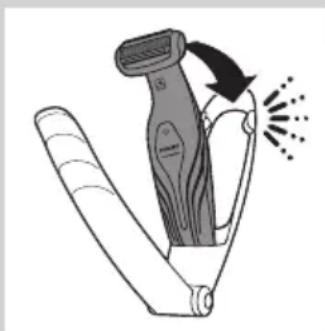
natural_image
Illustration of a hairdryer with motion arrows indicating hair movement (no text or symbols)2 Place the bottom of the appliance in the lower part of the holder of the back shaving attachment. Then press the top against the top part of the holder until it locks into position with a click.
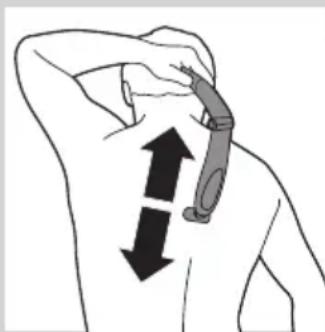
natural_image
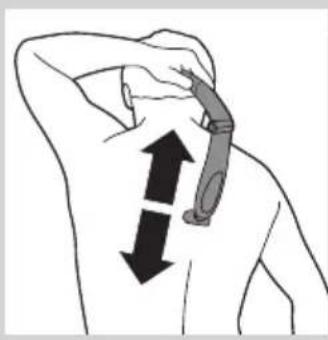
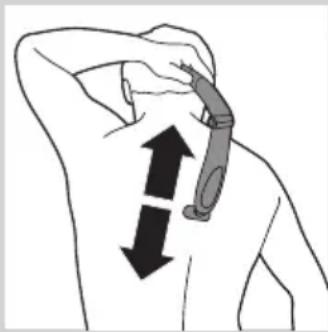
Illustration of a person's neck with two arrows indicating movement or force direction (no text or symbols)3 Shave your back by moving the back shaving attachment with the appliance up and down by its handle.
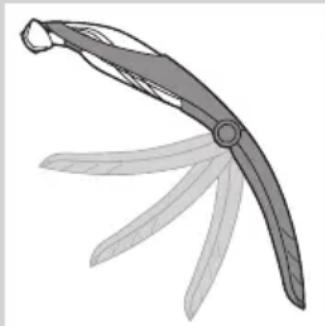
natural_image
Illustration of a curved blade with five blades, no text or symbols presentNote: For your convenience, the back shaving attachment can be folded to different angles.
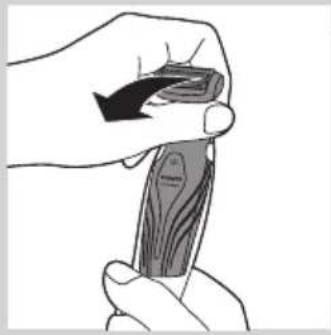
natural_image
Illustration of a hand holding a piece of wood or wood grain, no text or symbols present4 To remove the appliance from the back shaving attachment, pull the top of the appliance towards you until it unlocks from the holder.
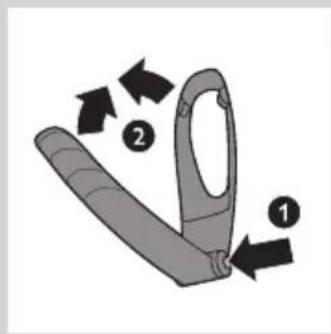
5 To close the back shaving attachment, press and hold the release button (1) and push the handle against the holder (2).
Cleaning
Clean the appliance after every use.
Never use compressed air, scouring pads, abrasive cleaning agents or aggressive liquids such as petrol or acetone to clean the appliance.
natural_image
Illustration of two hands performing a knot or knotting operation, with arrows indicating direction (no text or symbols present)1 Switch off the appliance.
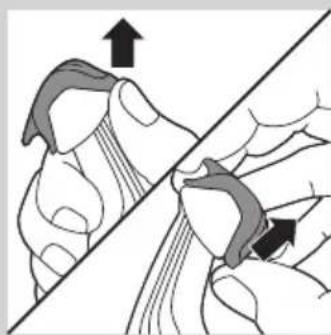
2 If a trimming comb is still attached, remove it.
Note: You can either push the trimming comb off the appliance or pull it off, depending on how the comb is placed on the appliance.
natural_image
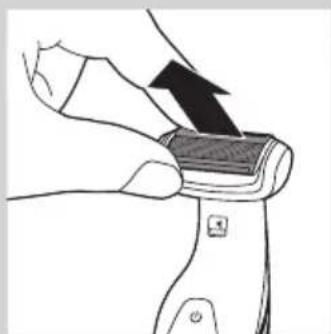
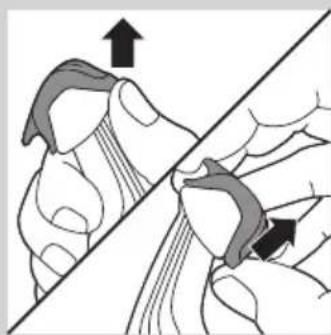
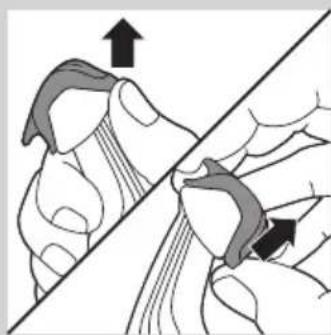
Illustration of a hand holding a small object with an arrow indicating motion (no text or symbols)3 Pull the shaving unit out of the appliance.
natural_image
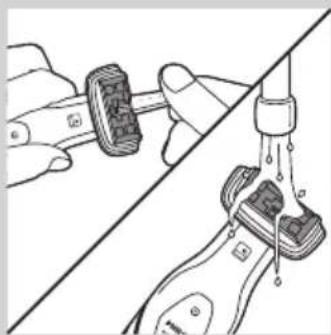
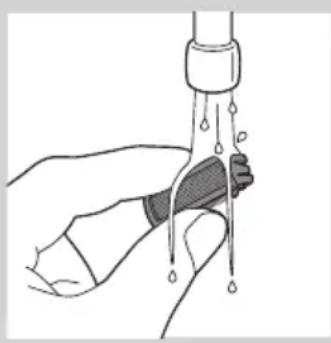
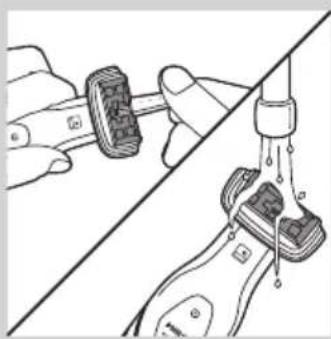
Illustration of a hand holding a wristband connected to a water tap, with no visible text or symbols4 Use the cleaning brush supplied to clean the inside of the shaving head or rinse the inside under the tap.
natural_image
Illustration of a hand holding a water droplet over a bottle (no text or symbols)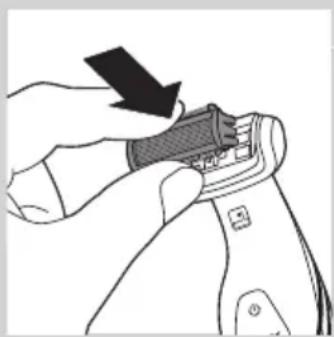
natural_image
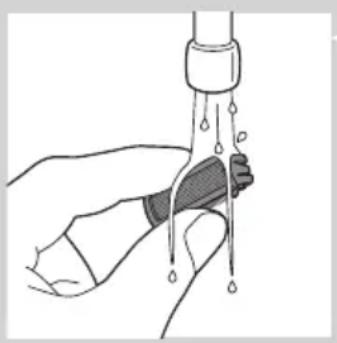
Illustration of a hand using a tool to adjust or install a mechanical component (no text or symbols visible)5 Rinse the shaving unit under the tap.
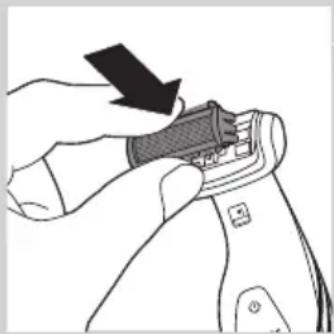
6 Shake off excess water and place the shaving unit back into the appliance.
7 Clean the back shaving attachment (BG2038/BG2036 only) with a moist cloth. Rinse it under the tap if you used it to shave your back with shower gel or shaving foam.
8 Clean the charging stand with a moist cloth.
Ordering accessories
To purchase accessories for this appliance, please visit our online shop at www.shop.philips.com/service. If the online shop is not available in your country, go to your Philips dealer or a Philips service centre. If you have any difficulties obtaining accessories for your appliance, please contact the Philips Consumer Care Centre in your country. You find its contact details in the worldwide guarantee leaflet.
Shaving unit
If you use the appliance very frequently, replace the shaving unit (type number BG2000) every year. Replace a damaged shaving unit immediately.
Environment
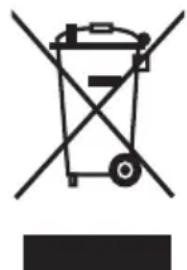
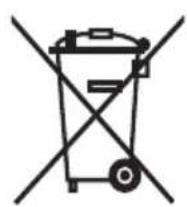
- Do not throw away the appliance with the normal household waste at the end of its life, but hand it in at an official collection point for recycling. By doing this, you help to preserve the environment.
natural_image
Symbol of a recycling bin with crossed lines indicating no waste or restriction (no text or numbers present)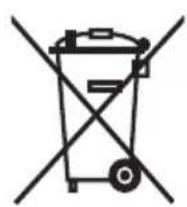
- The built-in rechargeable battery contains substances that may pollute the environment. Always remove the battery before you discard and hand in the appliance at an official collection point. Dispose of the battery at an official collection point for batteries. If you have trouble removing the battery, you can also take the appliance to a Philips service centre. The staff of this centre will remove the battery for you and will dispose of it in an environmentally safe way.
Removing the rechargeable battery
natural_image
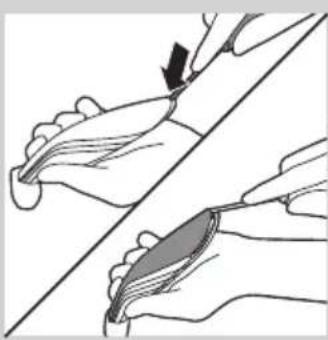
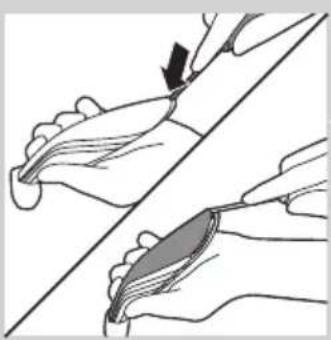
Illustration of two hands performing a manual manipulation or procedure on a curved surface (no text or symbols present)1 Take the appliance out of the charging stand and let the motor run until the battery is completely empty.
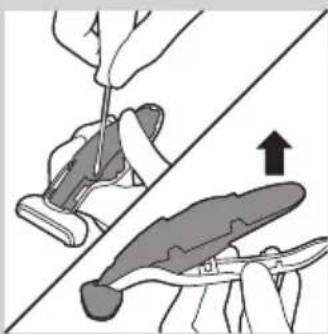
2 Insert a flathead screwdriver into the slot at the bottom of the handle and turn it to unlock the rear panel of the housing.
natural_image
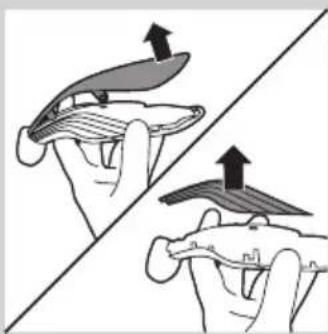
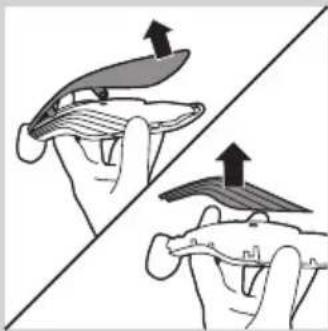
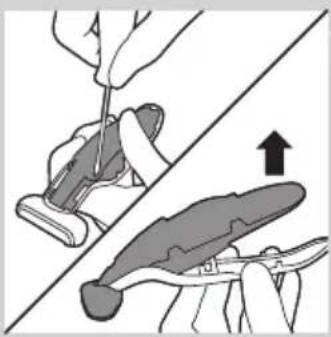
Illustration of two hands holding a flat object with arrows indicating upward motion (no text or symbols)3 Remove the rear panel of the housing and then remove the side panels.
natural_image
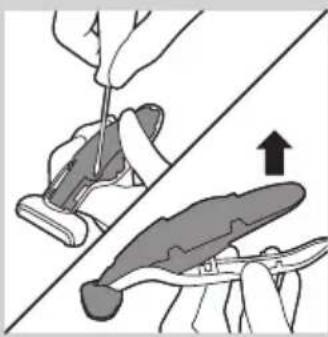
Illustration of a hand using a tool to cut a piece of material, with an arrow indicating the process (no text or symbols present)4 Undo the screws that connect the inner body of the appliance to the front panel of the housing and separate the inner body from the front panel.
natural_image
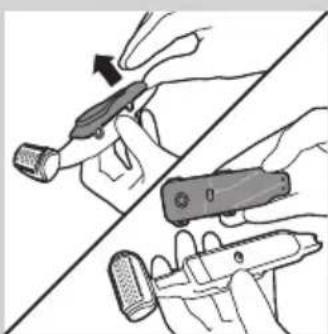
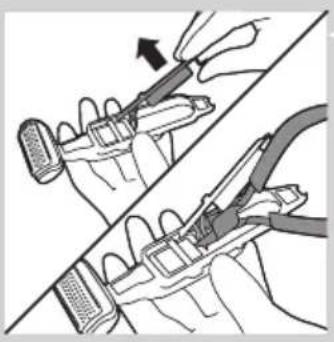
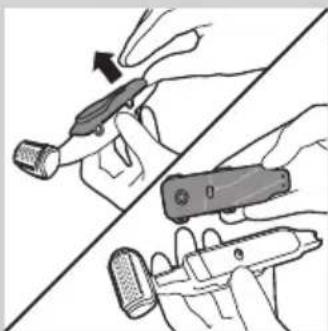
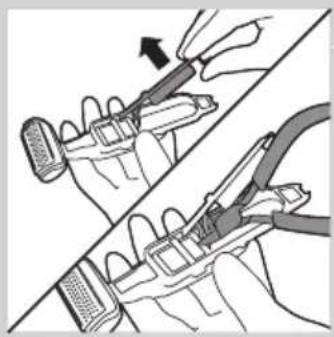
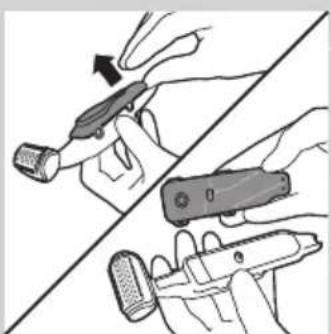
Illustration of two hands holding a tool, one pointing at the tip and the other holding a device (no text or symbols present)5 Turn over the inner body. Then detach the cover of the inner body with the control panel from the inner body.
natural_image
Illustration of two hands using pliers to adjust a mechanical component (no text or symbols present)6 Lift the printed-circuit board out of the inner body, turn it over and cut the wires that connect the battery to the power unit.
Guarantee and service
If you need service or information or if you have a problem, please visit the Philips website at www.philips.com/support or contact the Philips Consumer Care Centre in your country. You find its phone number in the worldwide guarantee leaflet. If there is no Consumer Care Centre in your country, go to your local Philips dealer.
Guarantee restrictions
The shaving unit is not covered by the terms of the international guarantee because it is subject to wear.
Troubleshooting
This chapter summarises the most common problems you could encounter with the appliance. If you are unable to solve the problem with the information below, visit www.philips.com/support for a list of frequently asked questions or contact the Consumer Care Centre in your country.
Problem Possible cause Solution
| The appliance does not work. | The battery is empty and/or the appliance does not charge. | Recharge the battery (see chapter ‘Charging’) and check if you have followed all instructions in chapters ‘Important’ and ‘Charging’. |
| The appliance makes more noise and/or vibrates more strongly than usual. | One or more parts are broken, perhaps because you dropped the appliance. | Take the appliance to your dealer or to an authorised Philips service centre for examination or repair. |
| If this appliance is used professionally, it will reach the end of its life earlier | Do not use the appliance professionally. | |
| The shaving unit is dirty. Clean the shaving unit (see chapter ‘Cleaning’). | ||
| The shaving unit is worn. Replace the shaving unit. | ||
| The operating time on a full charge decreases. | The shaving unit is dirty. Clean the shaving unit (see chapter ‘Cleaning’). | |
Problem Possible cause Solution
| Reduced trimming and/or shaving performance | You use the appliance in the wrong way. | Follow the instructions in chapter 'Using the appliance'. |
| The shaving unit is dirty. Clean the shaving unit (see chapter 'Cleaning'). | ||
| The battery is running low. Recharge the battery (see chapter 'Charging'). | ||
| You have not attached the trimming comb properly. | Remove the trimming comb and reattach it. | |
| If you are trimming very curly hair, the trimming comb may not be able to straighten the hair properly. | Try straightening the hair with your hands during trimming. | |
Въведение
natural_image
Prohibition sign showing a faucet crossed out by a diagonal line, indicating no leakage or anti-poaching (no text present)
natural_image
Simple line drawing of a showerhead spraying over a water-filled basin (no text or symbols)natural_image
Line drawing of a hairdryer with a screwdriver inserted (no text or symbols)natural_image
Illustration of a hand holding a pen-like object with a downward arrow indicating compression or disassembly (no text or symbols present)natural_image
Illustration of a hand using a tool to apply material to a surface, with an inset showing a close-up of the tool (no text or symbols present)natural_image
Illustration of a hand using a tool to apply material to a surface, with an inset showing a magnified view of the tool (no text or symbols present)natural_image
Illustration of a hand using a power shaver with an arrow indicating left-hand rule (no text or symbols)natural_image
Illustration of a hand holding a tool with an arrow indicating direction (no text or symbols present)natural_image
Illustration of a hairdryer with a power button icon (no text or symbols)natural_image
Illustration of a hairdryer with motion arrows indicating hair movement (no text or symbols)natural_image
Illustration of a person holding a medical device with two opposing arrows indicating movement (no text or symbols)natural_image
Illustration of a curved blade with five blades, no text or symbols presentnatural_image
Illustration of a hand holding a piece of wood or wood with a label (no text or symbols present)natural_image
Illustration of a hand holding a tool with an arrow indicating direction (no text or symbols present)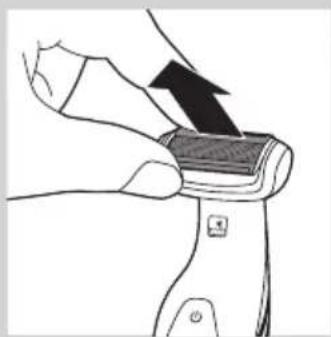
natural_image
Illustration of a hand holding a small object with an arrow indicating motion (no text or symbols)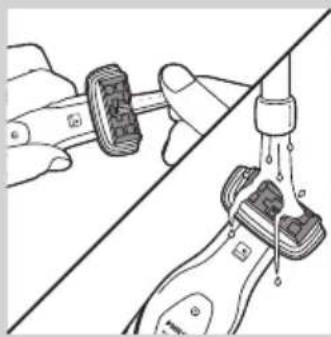
natural_image
Diagram showing two hands performing a manual valve operation, with no visible text or symbolsnatural_image
Illustration of a hand holding a water droplet over a bottle, with no text or symbols present.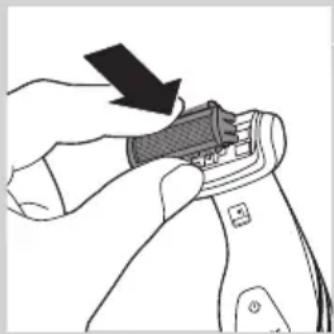
natural_image
Illustration of a hand using a tool to adjust or install a device component (no text or symbols visible)natural_image
Symbol of a waste bin with crossed lines indicating no waste, and a solid black rectangle below (no text or labels)natural_image
Illustration of two hands performing a manual manipulation or procedure on a curved surface (no text or symbols present)natural_image
Illustration of two hands holding a flat object with upward arrows indicating motion or force (no text or symbols)natural_image
Illustration of a hand using a tool to cut a small object with an upward arrow, no text or symbols presentnatural_image
Illustration of hands holding a tool with a device, showing a hand holding a pen and a close-up view of the device (no text or symbols present)natural_image
Illustration of two hands using pliers to adjust a mechanical component (no text or symbols present)natural_image
Prohibition sign showing a faucet without a shower, enclosed in a circle (no text or symbols)
natural_image
Simple line drawing of a showerhead spraying over a water-filled basin (no text or symbols)Upozornění
natural_image
Line drawing of a hairdryer tool with a pointed tip inserted (no text or symbols)natural_image
Illustration of a hand holding a pen-like object with a downward arrow indicating compression or disassembly (no text or symbols present)natural_image
Illustration of a hand using a tool to apply a mechanical component, with an inset showing a close-up of the component (no text or symbols present)natural_image
Illustration of a hand using a tool to apply material to a surface, with an inset showing a magnified view of the tool (no text or symbols present)natural_image
Illustration of a hand using a power shaver with an arrow indicating left-hand rule (no text or symbols present)natural_image
Illustration of a hand holding a tool with an arrow indicating direction (no text or symbols present)natural_image
Illustration of a hairdryer with a power button icon (no text or symbols)natural_image
Illustration of a hairdryer with motion arrows indicating force or motion (no text or symbols)natural_image
Illustration of a person holding a tool with directional arrows indicating movement or force (no text or symbols)natural_image
Illustration of a curved blade with five blades, no text or symbols presentnatural_image
Illustration of a hand holding a piece of wood or wood grain, no text or symbols presentnatural_image
Illustration of a hand holding a tool with an arrow indicating direction (no text or symbols present)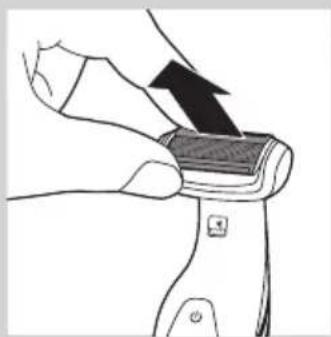
natural_image
Illustration of a hand holding a small object with an arrow indicating direction (no text or symbols)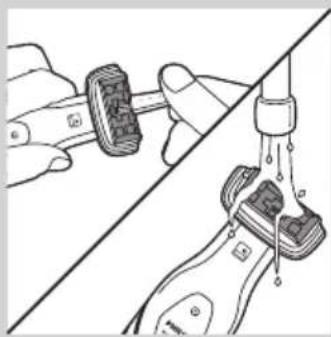
natural_image
Diagram showing two hands adjusting a mechanical component with a valve, no text or symbols presentnatural_image
Illustration of a hand holding a water droplet over a bottle, with no text or symbols present.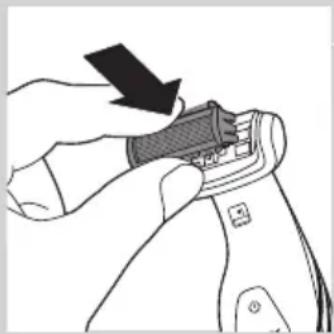
natural_image
Illustration of a hand using a tool to adjust or install a component, with no visible text or symbols.natural_image
Symbol of a waste bin with crossed lines indicating no waste, and a solid black rectangle below (no text or labels)natural_image
Illustration of two hands holding a spoon, one with an arrow pointing to the tip (no text or symbols)natural_image
Illustration of two hands holding a flat object with arrows indicating upward motion (no text or symbols)natural_image
Illustration showing a hand using a tool to cut a piece of material, with an arrow indicating upward motion (no text or symbols present)natural_image
Illustration of two hands holding a device with a tool, showing a change in the action (no text or symbols present)natural_image
Illustration of two hands using pliers to adjust a mechanical component (no text or symbols visible)natural_image
Prohibition sign showing a faucet without a shower, enclosed in a circle (no text or symbols)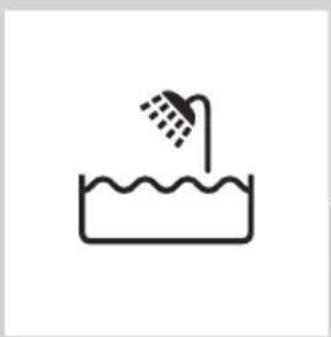
natural_image
Simple line drawing of a showerhead spraying over a water-filled basin (no text or symbols)Ettevaatust
natural_image
Line drawing of a hairdryer with a black clip inserted into the tip (no text or symbols)natural_image
Illustration of a hand holding a pen-like object with a downward arrow indicating compression or disassembly (no text or symbols present)2 Asetage seade laadimisalusele
natural_image
Illustration of a hand using a tool to apply material, with an inset showing a close-up of a mechanical component (no text or symbols present)natural_image
Illustration of a hand using a tool to apply material to a surface, with an inset showing a close-up of the tool (no text or symbols present)natural_image
Illustration of a hand holding a tool with an arrow indicating direction (no text or symbols present)natural_image
Illustration of a hairdryer with a power button icon (no text or symbols on the diagram itself)natural_image
Illustration of a hairdryer with motion arrows indicating hair movement (no text or symbols)natural_image
Illustration of a person's neck with two arrows indicating downward motion, no text or symbols presentnatural_image
Illustration of a curved blade with five blades, no text or symbols presentMärkus. Mugavuse tagamiseks saab selja raseerimise otsakut paigutada erinevate nurkade alla.
natural_image
Illustration of a hand holding a wooden object with a curved arrow indicating motion (no text or symbols)natural_image
Illustration of a hand holding a tool with an arrow indicating direction (no text or symbols present)natural_image
Illustration of a hand holding a device with an arrow indicating motion (no text or symbols)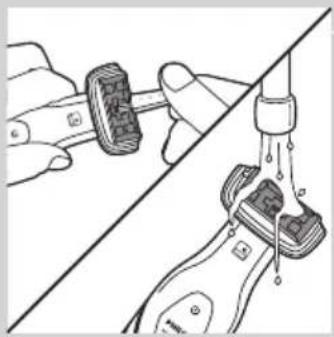
natural_image
Diagram showing two mechanical components connected by a diagonal line, with no visible text or symbols.natural_image
Illustration of a hand holding a water tap with liquid, no text or symbols presentnatural_image
Illustration of a hand using a tool to adjust or install a component, with no visible text or symbols.natural_image
Symbol of a waste sorting bin with no text or labelsnatural_image
Illustration of two hands performing a manual manipulation or repair operation (no text or symbols present)natural_image
Illustration of two hands holding a curved object with upward arrows indicating motion or force (no text or symbols)natural_image
Illustration of a hand using a tool to adjust or install a small object, with an upward arrow indicating motion (no text or symbols present)natural_image
Illustration of hands using a tool to adjust or install a device, showing a grip and handle (no text or symbols present)natural_image
Illustration of a hand holding a tool over a device, with an arrow indicating the process (no text or symbols present)natural_image
Prohibition sign showing a faucet without a shower, enclosed in a circle (no text or symbols)
natural_image
Simple line drawing of a showerhead spraying over a water-filled basin (no text or symbols)natural_image
Line drawing of a hairdryer tool with a pointed tip and threaded end (no text or symbols)Punjenje traje 1 sat (BG2038/BG2036) ili 8 sati (BG2028/BG2026/BG2025/BG2024), ovisno o modelu. Kada je aparat dokraja napunjen, vrijeme rada je do 50 minuta.
Kada indikator statusa baterije treperi crveno, baterija je gotovo prazna (preostalo je približno 10 minuta rada) te je potrebno napuniti aparat.
1 Umetnite mali utikač u postolje za punjenje.
natural_image
Illustration of a hand holding a pen-like object with a downward arrow indicating compression or disassembly (no text or symbols present)2 Stavite aparat u postolje za punjenje.
Indikator statusa baterije treperi zeleno, što znači da se aparat puni.
Napomena: Indikator statusa baterije na modelima BG2028, BG2026, BG2025 i BG2024 izgleda drugačije, no funkcionira na isti način.
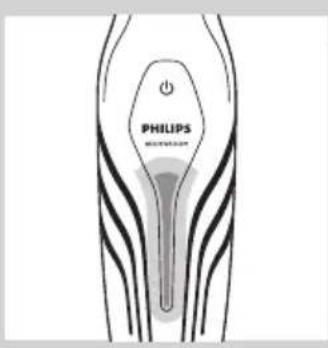
Kada se baterija potpuno napuni, indikator statusa baterije počet će stalno svijetliti zeleno.
natural_image
Illustration of a hand using a tool to apply a mechanical component, with an inset showing a close-up of the component (no text or symbols present)- Ako aparat pomičete prema sebi, zupci moraju biti okrenuti prema vama.
natural_image
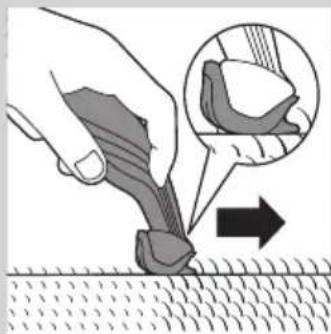
Illustration of a hand using a tool to apply material to a surface, with an inset showing a magnified view of the tool (no text or symbols present)- Ako aparat pomičete od sebe, zupci moraju biti okrenuti od vas.
natural_image
Illustration of a hand using a power shaver with an arrow indicating left-hand rule (no text or symbols present)natural_image
Illustration of a hand holding a tool with an arrow indicating direction (no text or symbols present)1 Ako je češalj za podrezivanje postavljen, skinite ga.
Napomena: Češalj za podrezivanje možete gurnuti s aparata ili ga izvući, ovisno o načinu postavljanja češlja na aparat.
natural_image
Illustration of a hairdryer with a power button icon (no text or symbols on the diagram itself)1 Pritisnite i otpustite gumb za otpuštanje (1) te otvorite nastavak za brijanje leđa (2).
natural_image
Illustration of a hairdryer with motion arrows indicating hair movement (no text or symbols)natural_image
Illustration of a person's neck with two arrows indicating downward motion (no text or symbols)natural_image
Illustration of a curved blade with five blades, no text or symbols presentnatural_image
Illustration of a hand holding a piece of wood or wood grain, no text or symbols present5 Nastavak za brijanje leđa zatvorite tako da pritisnete i zadržite gumb za otpuštanje (1) i zatim dršku pritisnite prema držaču (2).
Čišćenje
natural_image
Illustration of two hands performing a manual tool on a piece of material, with arrows indicating direction (no text or symbols)Očistite aparat nakon svake uporabe.
Za čišćenje aparata nikada nemojte upotrebljavati zračni mlaz, spužvice za ribanje, abrazivna sredstva za čišćenje ili agresivne tekućine poput benzina ili acetona.
natural_image
Illustration of a hand holding a device with an arrow indicating motion (no text or symbols)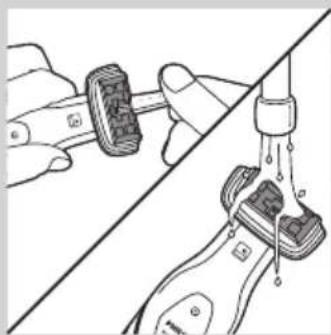
natural_image
Illustration of hands performing a manual valve operation on a mechanical component (no text or symbols visible)natural_image
Illustration of a hand holding a water tap with liquid droplets (no text or symbols)5 Jedinicu za brijanje isperite pod mlazom vode.
natural_image
Illustration of a hand using a tool to adjust or install a component, with no visible text or symbols.6 Otresite višak vode i jedinicu za brijanje ponovo postavite na aparat.
7 Nastavak za brijanje leđa (samo BG2038/BG2036) očistite vlažnom tkaninom. Ako ste prilikom brijanja leđa koristili gel ili pjenu za brijanje, nastavak isperite pod mlazom vode.
8 Postolje za punjenje očistite vlažnom tkaninom.
Naručivanje dodatnog pribora
natural_image
Symbol of a waste bin with crossed lines indicating no waste, and a solid black rectangle below (no text or labels)- Aparat koji se više ne može upotrebljavati nemojte odlagati suobičajenim otpadom iz kućanstva, nego ga odnesite u predviđeno odlagalište na recikliranje. Time ćete pridonijeti očuvanju okoliša.
HRVATSKI52
natural_image
Illustration of two hands performing a manual manipulation or procedure on a curved surface (no text or symbols present)1 Izvadite aparat iz postolja za punjenje i ostavite motor da radi sve dok se baterija potpuno ne isprazni.
2 Odvijač s ravnom glavom umetnite u utor na dnu drške i okrenite ga kako biste odblokirali stražnju stranu kućišta.
natural_image
Illustration of two hands holding a flat object with upward arrows indicating motion or force (no text or symbols)3 Skinite stražnju stranu kućišta, a zatim skinite bočne stranice.
natural_image
Illustration of a hand using a tool to cut a piece of material, with an upward arrow indicating the process (no text or symbols present)4 Otpustite vijka kojima je unutarnji dio aparata pričvršćen za prednju stranu kućišta i zatim unutarnji dio odvojite od prednje strane.
natural_image
Illustration of hands holding a tool with a device, showing a hand holding a pen and a close-up view of the device (no text or symbols present)natural_image
Illustration of two hands using pliers to adjust a mechanical component (no text or symbols present)6 Podignite tiskanu pločicu s unutarnjeg dijela, okrenite ga i prerežite žice kojima je baterija povezana s jedinicom za napajanje.
Jamstvo i servis
natural_image
Prohibition sign showing a faucet without a shower, enclosed in a circle (no text or symbols)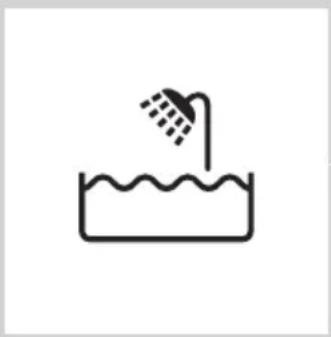
natural_image
Simple line drawing of a showerhead spraying over a water-filled basin (no text or symbols)Figyelmeztetés!
natural_image
Line drawing of a hairdryer tool with a black clip inserted (no text or symbols)natural_image
Illustration of a hand holding a pen-like object with a downward arrow indicating compression or disassembly (no text or symbols present)natural_image
Illustration of a hand using a tool to apply a mechanical component, with an inset showing a close-up of the component (no text or symbols present)natural_image
Illustration of a hand using a tool to apply material to a surface, with an inset showing a magnified view of the tool (no text or symbols present)natural_image
Illustration of a hand using a power shaver with an arrow indicating left-hand rule (no text or symbols present)natural_image
Illustration of a hand holding a tool with an arrow indicating direction (no text or symbols present)natural_image
Illustration of a hairdryer with a power button icon (no text or symbols on the diagram itself)natural_image
Illustration of a hairdryer with motion arrows indicating hair movement (no text or symbols)natural_image
Illustration of a person's neck with two arrows indicating downward motion (no text or symbols)natural_image
Illustration of a curved saw blade with five blades, no text or symbols presentnatural_image
Illustration of a hand holding a piece of wood or wood with a label (no text or symbols present)natural_image
Illustration of two hands performing a knot or knotting operation, with arrows indicating direction (no text or symbols present)natural_image
Illustration of a hand holding a small object with an arrow indicating motion (no text or symbols)natural_image
Illustration of a hand holding a wristband connected to a water tap, with no visible text or symbolsnatural_image
Illustration of a hand holding a water droplet over a bottle, with no text or symbols present.natural_image
Illustration of a hand using a tool to adjust or install a component, with no visible text or symbols.natural_image
Symbol of a waste bin with crossed lines indicating no waste, and a solid black rectangle below (no text or labels)natural_image
Illustration of two hands performing a manual manipulation or repair procedure (no text or symbols present)natural_image
Illustration of two hands holding a curved object with arrows indicating upward motion (no text or symbols)natural_image
Illustration showing a hand using a tool to cut a piece of material, with an arrow indicating upward motion (no text or symbols present)natural_image
Illustration of two hands holding a handheld device, one pointing at the screen (no text or symbols present)natural_image
Illustration of two hands using pliers to adjust a mechanical component (no text or symbols visible)natural_image
Prohibition sign showing a faucet crossed out by a diagonal line, indicating no fire or water discharge (no text present)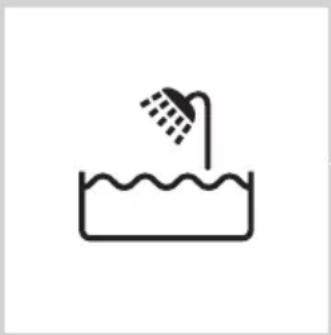
natural_image
Simple line drawing of a showerhead spraying over a water-filled basin (no text or symbols)Ескерту
natural_image
Line drawing of a hairdryer with a black arrow pointing to the tip (no text or symbols)natural_image
Illustration of a hand holding a pen-like object with a downward arrow indicating compression or disassembly (no text or symbols present)natural_image
Illustration of a hand holding a tool with an inset showing a close-up of a mechanical component (no text or symbols)natural_image
Illustration of a hand using a tool to apply a tool to a surface, with an inset showing the same tool (no text or symbols present)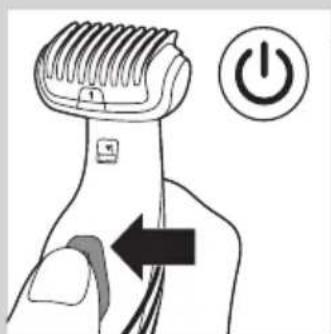
natural_image
Illustration of a hand using a hairdryer with a power button (no text or symbols)natural_image
Illustration of a hand holding a tool with an arrow indicating direction (no text or symbols present)natural_image
Illustration of a hand holding a power shaver with an arrow indicating left-hand rule (no text or symbols present)natural_image
Illustration of a hairdryer with motion arrows indicating hair movement (no text or symbols)natural_image
Illustration of a person's neck with two arrows indicating movement or pressure direction (no text or symbols)natural_image
Illustration of a curved blade with five blades, no text or symbols presentnatural_image
Illustration of a hand holding a wooden object with a black arrow indicating direction (no text or symbols)natural_image
Illustration of a hand holding a tool with an arrow indicating direction (no text or symbols present)natural_image
Illustration of a hand holding a small object with an arrow indicating direction (no text or symbols)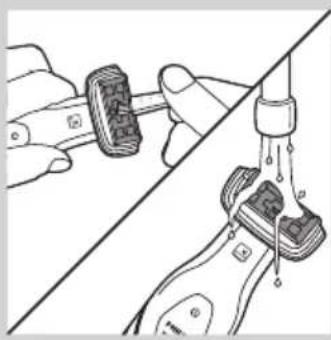
natural_image
Diagram showing hands connecting a mechanical component to a surface with a drain, no text or symbols presentnatural_image
Illustration of a hand holding a syringe with liquid dripping (no text or symbols)natural_image
Illustration of a hand using a tool to adjust or install a shoe component (no text or symbols visible)natural_image
Symbol of a trash bin crossed with a diagonal line and a horizontal bar below (no text or numbers present)natural_image
Symbol of a trash bin crossed out by two diagonal lines, representing no waste or discharge (no text or labels)natural_image
Illustration of two hands performing a manual manipulation or repair operation, with no visible text or symbols.natural_image
Illustration of two hands holding a flat object with upward arrows indicating motion or change (no text or symbols)natural_image
Illustration of a hand using a tool to cut a small object, with an upward arrow indicating motion (no text or symbols present)natural_image
Illustration of two hands holding a device with a tool, showing a close-up of the grip and handle (no text or symbols present)5 Iški korpuysti aydarblniz. Backary taktası bap iški korpustyn, kąkpaśyn iški korpustan aksypatblniz.
natural_image
Illustration of two hands using a tool to adjust or install a component, showing a magnified view (no text or symbols present)natural_image
Prohibition sign showing a faucet without a shower, enclosed in a circle (no text or symbols)
natural_image
Simple line drawing of a showerhead spraying over a water-filled basin (no text or symbols)natural_image
Line drawing of a hairdryer with a black clip inserted, showing no text or symbolsnatural_image
Illustration of a hand holding a pen-like object with a downward arrow indicating compression or disassembly (no text or symbols present)natural_image
Illustration of a hand using a tool to apply a mechanical component, with an inset showing a close-up of the component (no text or symbols present)natural_image
Illustration of a hand using a tool to apply material to a surface, with an inset showing a magnified view of the tool (no text or symbols present)natural_image
Illustration of a hairdryer with a power button icon (no text or symbols)natural_image
Illustration of a hand holding a tool with an arrow indicating direction (no text or symbols present)natural_image
Illustration of a hairdryer with a power button icon (no text or symbols on the diagram itself)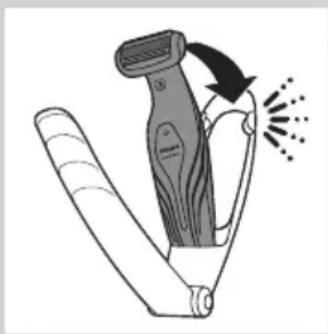
natural_image
Illustration of a hairdryer with motion arrows indicating hair movement (no text or symbols)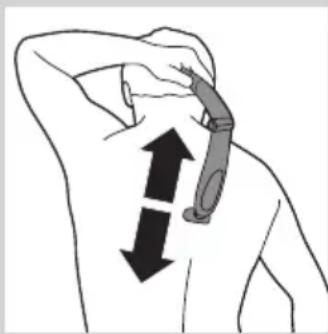
natural_image
Illustration of a person's neck with a medical device attached, showing two opposing arrows indicating movement (no text or symbols present)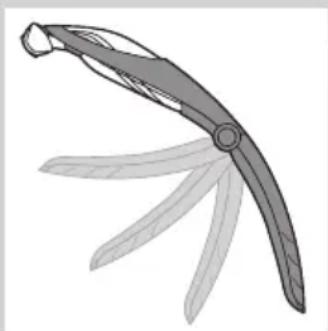
natural_image
Illustration of a pair of scissors blades (no text or symbols)natural_image
Illustration of a hand holding a piece of wood or wood with a label (no text or symbols present)natural_image
Illustration of a hand holding a tool with an arrow indicating direction (no text or symbols present)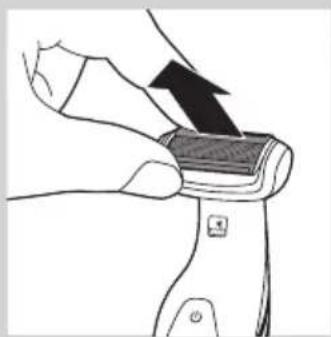
natural_image
Illustration of a hand holding a small object with an arrow indicating motion (no text or symbols)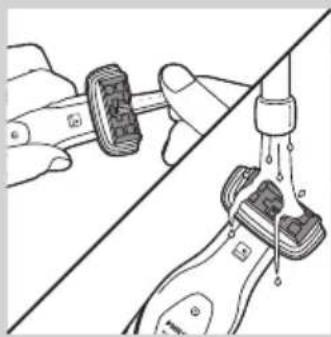
natural_image
Diagram showing two hands performing a manual valve operation, with no visible text or symbolsnatural_image
Illustration of a hand holding a water droplet over a bottle, with no text or symbols present.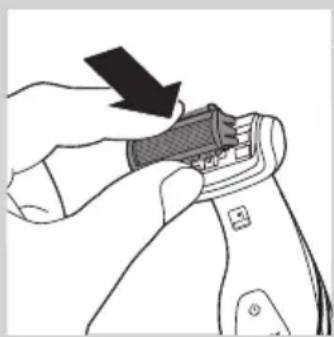
natural_image
Illustration of a hand using a tool to adjust or install a mechanical component (no text or symbols visible)natural_image
Symbol of a waste bin with crossed lines indicating no waste, and a solid black rectangle below (no text or labels)natural_image
Illustration of two hands performing a manual manipulation or repair procedure (no text or symbols present)natural_image
Illustration of two hands holding a curved object with arrows indicating upward motion (no text or symbols)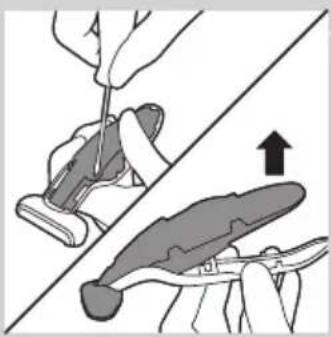
natural_image
Illustration showing a hand using a tool to cut a piece of material, with an arrow indicating upward motion (no text or symbols present)natural_image
Illustration of two hands holding a handheld device, one pointing at the screen (no text or symbols present)natural_image
Illustration of two hands using pliers to adjust a mechanical component (no text or symbols visible)natural_image
Prohibition sign showing a faucet without a shower, enclosed in a circle (no text or symbols)
natural_image
Simple line drawing of a showerhead spraying over a water-filled basin (no text or symbols)levērībai
natural_image
Line drawing of a hairdryer with a black clip inserted into the jaw (no text or symbols)natural_image
Illustration of a hand holding a pen-like object with a downward arrow indicating compression or disassembly (no text or symbols present)natural_image
Illustration of a hand using a tool to apply a mechanical component, with an inset showing a close-up of the part (no text or symbols present)natural_image
Illustration of a hand using a tool to apply material to a surface, with an inset showing a magnified view of the tool (no text or symbols present)natural_image
Illustration of a hairbrush with a power button icon (no text or symbols)natural_image
Illustration of a hand holding a tool with an arrow indicating direction (no text or symbols present)natural_image
Illustration of a hairdryer with a power button icon (no text or symbols)1 Nospiediet un turiet nospiestu atlaišanas pogu (1) un atveriet muguras skūšanas piederumu (2).
natural_image
Illustration of a hairdryer with motion arrows indicating hair movement (no text or symbols)natural_image
Illustration of a person's neck with two arrows indicating downward motion (no text or symbols)natural_image
Illustration of a curved blade with five blades, no text or symbols presentnatural_image
Illustration of a hand holding a piece of wood or wood grain, no text or symbols presentnatural_image
Illustration of a hand holding a tool with an arrow indicating direction (no text or symbols present)natural_image
Illustration of a hand holding a small object with an arrow indicating upward motion (no text or symbols)natural_image
Diagram showing hands performing a manual valve or grip operation (no text or symbols present)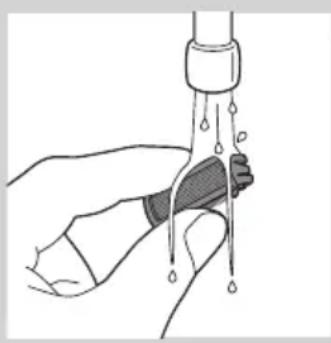
natural_image
Illustration of a hand holding a water droplet over a bottle (no text or symbols)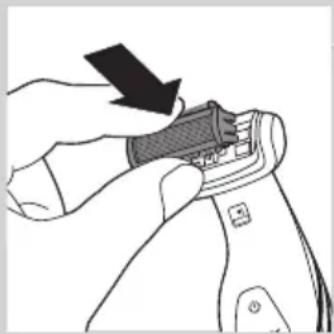
natural_image
Illustration of a hand using a tool to adjust or install a device component (no text or symbols visible)natural_image
Symbol of a recycling bin with crossed lines indicating no waste or restriction (no text or numbers present)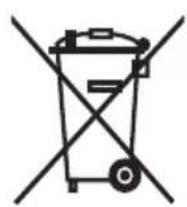
natural_image
Illustration of two hands performing a manual manipulation or procedure on a curved surface (no text or symbols)natural_image
Illustration of two hands holding a flat object with arrows indicating upward motion (no text or symbols)natural_image
Illustration of a hand using a tool to cut a piece of material, with an arrow indicating the process (no text or symbols present)natural_image
Illustration of two hands holding a tool, one pointing at the tip and the other holding a device (no text or symbols present)natural_image
Illustration of two hands using pliers to adjust a tool, showing step-by-step assembly (no text or symbols)natural_image
Prohibition sign showing a faucet crossed out by a diagonal line, indicating no fire or water discharge (no text present)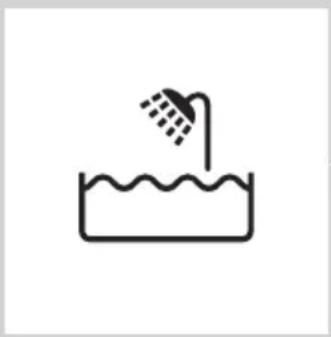
natural_image
Simple line drawing of a showerhead spraying over a water-filled basin (no text or symbols)Uwaga
natural_image
Line drawing of a hairdryer with a screwdriver inserted (no text or symbols)natural_image
Illustration of a hand holding a pen-like object with a downward arrow indicating compression or disassembly (no text or symbols present)natural_image
Illustration of a hand using a tool to apply a mechanical component, with an inset showing a close-up of the component (no text or symbols present)natural_image
Illustration of a hand using a tool to apply material to a surface, with an inset showing a magnified view of the tool (no text or symbols present)natural_image
Illustration of a hairbrush with a power button icon (no text or symbols)natural_image
Illustration of a hand holding a tool with an arrow indicating direction (no text or symbols present)natural_image
Illustration of a hairdryer with a power button icon (no text or symbols on the diagram itself)natural_image
Illustration of a hairdryer with motion arrows indicating hair movement (no text or symbols)natural_image
Illustration of a person's neck with two arrows indicating movement or pressure direction (no text or symbols)natural_image
Illustration of a curved blade with five blades, no text or symbols presentnatural_image
Illustration of a hand holding a piece of wood or wood grain, no text or symbols presentnatural_image
Illustration of a hand holding a tool with an arrow indicating direction (no text or symbols present)natural_image
Illustration of a hand holding a small object with an arrow indicating direction (no text or symbols)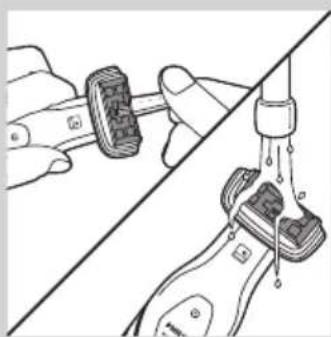
natural_image
Diagram showing hands connecting a tool to a water tap, with no visible text or symbolsnatural_image
Illustration of a hand holding a water droplet over a bottle, with no text or symbols present.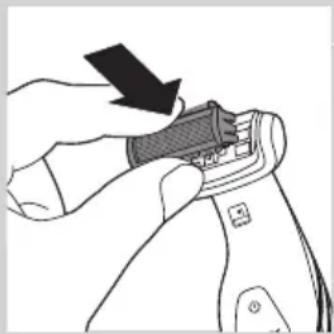
natural_image
Illustration of a hand using a tool to adjust or install a component, with no visible text or symbols.natural_image
Symbol of a waste bin with crossed lines indicating no waste, and a solid black rectangle below (no text or labels)natural_image
Illustration of two hands holding a spoon, one with an arrow pointing to the tip (no text or symbols)natural_image
Illustration of two hands holding a flat object with arrows indicating upward motion (no text or symbols)natural_image
Illustration of a hand using a tool to cut a piece of material, with an upward arrow indicating the process (no text or symbols present)natural_image
Illustration of hands holding a pen and a device, showing mechanical components (no text or symbols)natural_image
Illustration of two hands using pliers to adjust a mechanical component (no text or symbols visible)natural_image
Prohibition sign showing a faucet crossed out by a diagonal line, indicating no leakage or anti-poaching (no text present)
natural_image
Simple line drawing of a showerhead spraying over a water-filled basin (no text or symbols)Precautie
natural_image
Line drawing of a hairdryer with a black clip inserted into the tip (no text or symbols)natural_image
Illustration of a hand holding a pen-like object with a downward arrow indicating compression or disassembly (no text or symbols present)natural_image
Illustration of a hand using a tool to apply a mechanical component, with an inset showing a close-up of the component (no text or symbols present)natural_image
Illustration of a hand using a tool to apply material to a surface, with an inset showing a magnified view of the tool (no text or symbols present)natural_image
Illustration of a hairdryer with a power button icon (no text or symbols)natural_image
Illustration of a hand holding a tool with an arrow indicating direction (no text or symbols present)natural_image
Illustration of a hairdryer with a power button icon (no text or symbols on the diagram itself)natural_image
Illustration of a hairdryer with motion arrows indicating force or motion (no text or symbols)natural_image
Illustration of a person holding a medical device with bidirectional arrows indicating movement (no text or symbols)natural_image
Illustration of a curved blade with five blades, no text or symbols presentnatural_image
Illustration of a hand holding a piece of wood or wood with a label (no text or symbols present)natural_image
Illustration of a hand holding a tool with an arrow indicating direction (no text or symbols present)natural_image
Illustration of a hand holding a small object with an arrow indicating motion (no text or symbols)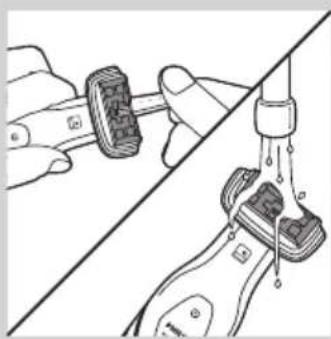
natural_image
Diagram showing two hands adjusting a mechanical component with a valve and connecting rod (no text or symbols)natural_image
Illustration of a hand holding a syringe with liquid dripping (no text or symbols)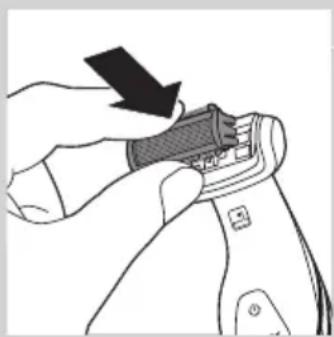
natural_image
Illustration of a hand adjusting a zipper on a device (no text or symbols visible)natural_image
Symbol of a recycling bin with crossed lines indicating no waste or restriction (no text or numbers present)natural_image
Symbol of a trash bin crossed out by two crossed lines, representing no waste or discharge (no text or labels)natural_image
Illustration of two hands holding a spoon, one with an arrow pointing to the tip (no text or symbols)natural_image
Illustration of two hands holding a flat object with arrows indicating upward motion (no text or symbols)natural_image
Illustration showing a hand using a tool to cut a piece of material, with an arrow indicating upward motion (no text or symbols present)natural_image
Illustration of two hands holding a device with a tool, showing a change in the action (no text or symbols present)natural_image
Illustration of two hands using pliers to adjust a tool, showing step-by-step assembly (no text or symbols)natural_image
Prohibition sign showing a faucet without shower, enclosed in a circle (no text or symbols)
natural_image
Simple line drawing of a showerhead spraying over a water-filled basin (no text or symbols)Внимание!
natural_image
Line drawing of a hairdryer tool with a black clip inserted into the tip (no text or symbols)natural_image
Illustration of a hand holding a tool with a downward arrow indicating compression or disassembly (no text or symbols present)natural_image
Illustration of a hand using a tool to apply a mechanical component, with an inset showing a close-up of the component (no text or symbols present)natural_image
Illustration of a hand using a tool to apply material to a surface, with an inset showing a magnified view of the tool (no text or symbols present)natural_image
Illustration of a hand using a hairdryer with a power button (no text or symbols)natural_image
Illustration of a hand holding a tool with an arrow indicating direction (no text or symbols present)natural_image
Illustration of a hand holding a power shaver with an arrow indicating left-hand rule (no text or symbols present)natural_image
Diagram of a mechanical component with numbered arrows indicating motion or sequence (no text or symbols)natural_image
Illustration of a hairdryer with motion arrows indicating hair movement (no text or symbols)natural_image
Illustration of a person's neck with two arrows indicating downward motion, no text or symbols presentnatural_image
Illustration of a curved blade with five blades, no text or symbols presentnatural_image
Illustration of a hand holding a wooden object with a black arrow indicating direction (no text or symbols)natural_image
Illustration of a hand holding a tool with an arrow indicating direction (no text or symbols present)natural_image
Illustration of a hand holding a small object with an arrow indicating direction (no text or symbols)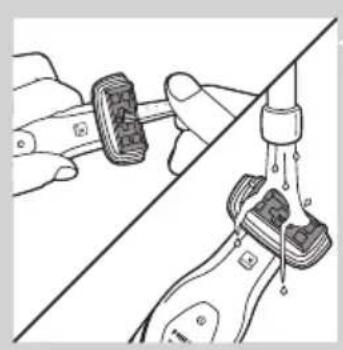
natural_image
Diagram showing a hand connecting two mechanical components to a vertical rod, with no visible text or symbols.natural_image
Illustration of a hand holding a medical device with liquid droplets (no text or symbols)natural_image
Illustration of a hand using a tool to adjust or install a component, with no visible text or symbols.natural_image
Symbol of a trash bin crossed with a diagonal line, representing waste sorting or disposal (no text or labels)natural_image
Illustration of two hands performing a manual manipulation or dissection (no text or symbols present)natural_image
Illustration of two hands holding a curved object with arrows indicating upward motion (no text or symbols)natural_image
Illustration showing a hand using a tool to cut a piece of material, with an arrow indicating the process (no text or symbols present)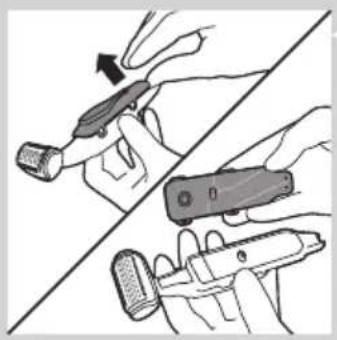
natural_image
Illustration of two hands holding a tool, one pointing at the tip and the other holding a device (no text or symbols present)natural_image
Illustration of two hands using a tool to adjust or install a component, showing a magnified view (no text or symbols present)natural_image
Prohibition sign showing a faucet crossed out by a diagonal line, indicating no leakage or anti-poaching (no text present)
natural_image
Simple line drawing of a showerhead spraying over a water-filled basin (no text or symbols)Výstraha
natural_image
Line drawing of a mechanical tool or device with a pointed tip and threaded end (no text or symbols)natural_image
Illustration of a hand holding a pen-like object with a downward arrow indicating compression or disassembly (no text or symbols present)2 Zariadenie postavte do nabíjacieho podstavca.
natural_image
Illustration of a hand using a tool to apply a mechanical component, with an inset showing a close-up of the component (no text or symbols present)natural_image
Illustration of a hand using a tool to apply material to a surface, with an inset showing a magnified view of the tool (no text or symbols present)- Ked' budete zariadením pohybovat' smerom od Vás, zúbky musia byt' otočené smerom od Vás.
natural_image
Illustration of a hairdryer with a power button icon (no text or symbols)natural_image
Illustration of a hand holding a tool with an arrow indicating direction (no text or symbols present)natural_image
Illustration of a hairdryer with a power button icon (no text or symbols on the diagram itself)1 Stlačte a podržte stlačené tlačidlo uvol'nenia (1) a otvorte nástavec na holenie chrbta (2).
natural_image
Illustration of a hairdryer with motion arrows indicating force or motion (no text or symbols)natural_image
Illustration of a person holding a tool with directional arrows indicating movement or force (no text or symbols)natural_image
Illustration of a curved blade with five blades, no text or symbols presentnatural_image
Illustration of a hand holding a piece of wood or wood with a label (no text or symbols present)natural_image
Illustration of a hand holding a tool with an arrow indicating direction (no text or symbols present)natural_image
Illustration of a hand holding a small object with an arrow indicating motion (no text or symbols)natural_image
Diagram showing two hands performing a manual valve operation, with no visible text or symbols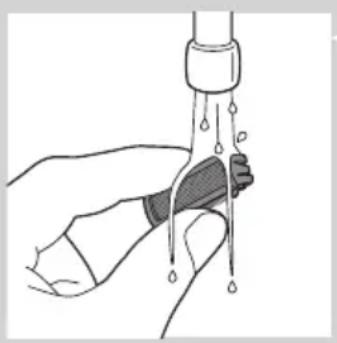
natural_image
Illustration of a hand holding a syringe with liquid dripping (no text or symbols)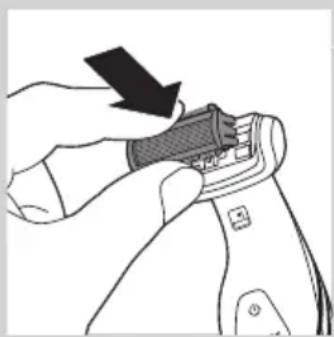
natural_image
Illustration of a hand using a tool to adjust or install a component, with no visible text or symbols.natural_image
Symbol of a waste bin with no text or labels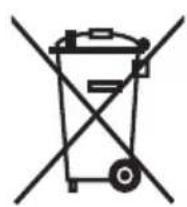
natural_image
Illustration of two hands performing a manual manipulation or repair procedure (no text or symbols present)1 Strojček vyberte z nabíjacieho podstavca a nechajte motor pracovat', kým sa batéria nevybije.
natural_image
Illustration of two hands holding a curved object with arrows indicating upward motion (no text or symbols)natural_image
Illustration showing a hand using a tool to cut a piece of material, with an arrow indicating upward motion (no text or symbols present)natural_image
Illustration of two hands holding a handheld device, one pointing at the screen (no text or symbols visible)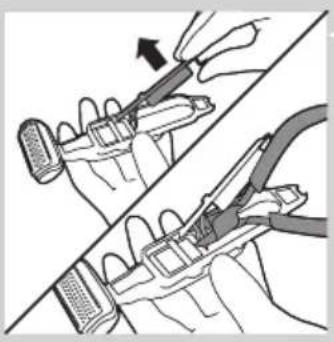
natural_image
Illustration of two hands using pliers to adjust a mechanical component (no text or symbols visible)natural_image
Prohibition sign showing a faucet without a shower, enclosed in a circle (no text or symbols)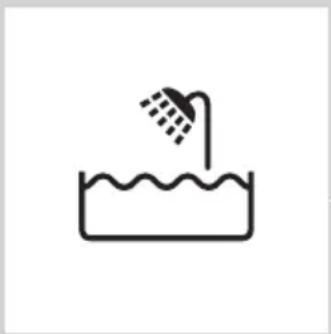
natural_image
Simple line drawing of a showerhead spraying over a water-filled basin (no text or symbols)natural_image
Line drawing of a hairdryer tool with a pointed tip and threaded end (no text or symbols)natural_image
Illustration of a hand holding a pen-like object with a downward arrow indicating compression or disassembly (no text or symbols present)2 Aparat postavite na stojalo za polnjenje.
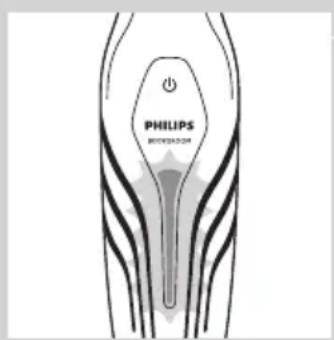
Indikator stanja baterije utripa zeleno, kar pomeni, da se aparat polni.
Opomba: Indikator stanja baterije modelov BG2028, BG2026, BG2025 in BG2024 je drugačen, vendar deluje na enako.
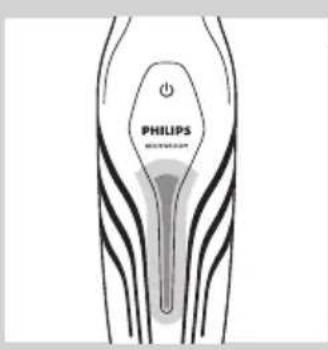
Ko je aparat povsem napolnjen, sveti indikator stanja baterije zeleno.
1 Na aparat pritrdite primeren prirezovalni glavnik. Prepričajte se, da konice glavnika kažejo v smer, v katero boste aparat premikali.
natural_image
Illustration of a hand using a tool to apply a mechanical component, with an inset showing a close-up of the part (no text or symbols present)- Ko aparat premikate proti sebi, morajo konice gledati proti vam.
natural_image
Illustration of a hand using a tool to apply material to a surface, with an inset showing a magnified view of the tool (no text or symbols present)- Ko napravo premikate proč od sebe, morajo biti konice usmerjene stran od vas.
natural_image
Illustration of a hairbrush with a power button icon (no text or symbols)2 Za vklop aparata pritisnite gumb za vklop/izklop.
3 Aparat premikajte v nasprotni smeri rasti dlačic.
natural_image
Illustration of a hand holding a tool with an arrow indicating direction (no text or symbols present)natural_image
Illustration of a hairdryer with a power button icon (no text or symbols)2 Za vklop aparata pritisnite gumb za vklop/izklop.
3 Brivno enoto postavite na kožo.
4 Ko z eno roko raztegujete kožo, z drugo roko premikajte aparat v nasprotni smeri rasti dlak.
natural_image
Illustration of a hairdryer with motion arrows indicating hair movement (no text or symbols)2 Dno aparata vstavite v nižji del držala nastavka za britje hrbta. Vrhnji del pritisnite ob vrhnji del držala, dokler se ne zaskoči na svoje mesto.
natural_image
Illustration of a person's neck with two arrows indicating downward motion (no text or symbols)natural_image
Illustration of a curved blade with five blades, no text or symbols presentnatural_image
Illustration of a hand holding a piece of wood or wood grain, no text or symbols presentnatural_image
Illustration of a hand holding a tool with an arrow indicating direction (no text or symbols present)natural_image
Illustration of a hand holding a small object with an arrow indicating direction (no text or symbols)3 Brivno enoto izvlecite iz aparata.
natural_image
Diagram showing two hands adjusting a mechanical component with a central valve (no text or symbols present)natural_image
Illustration of a hand holding a water droplet over a bottle (no text or symbols)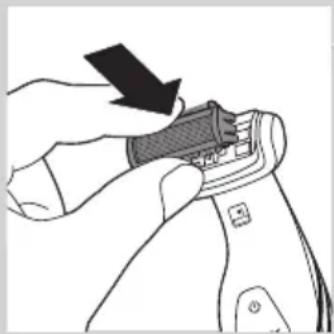
natural_image
Illustration of a hand using a tool to adjust or install a device component (no text or symbols visible)5 Brivno enoto sperite pod tekočo vodo.
6 Otresite odvečno vodo in brivno enoto vstavite nazaj v aparat.
7 Očistite nastavek za britje hrbta (samo pri BG2038/BG2036) z vlažno krpo. Če ste za britje hrbta uporabili brivsko peno ali tekoče milo, ga sperite s tekočo vodo.
8 Polnilno stojalo očistite z vlažno krpo.
natural_image
Symbol of a recycling bin with crossed lines indicating no waste or restriction (no text or numbers present)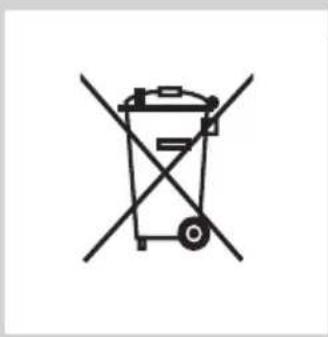
natural_image
Symbol of a trash bin crossed with two crossed lines, representing no waste or discharge (no text or labels)natural_image
Illustration of two hands holding a tool, one with an arrow pointing to the tool (no text or symbols present)natural_image
Illustration of two hands holding a tray with an upward arrow, no text or symbols presentnatural_image
Illustration of a hand using a tool to cut a piece of material, with an upward arrow indicating the process (no text or symbols present)natural_image
Illustration of two hands holding a tool, one with a curved arrow indicating motion (no text or symbols)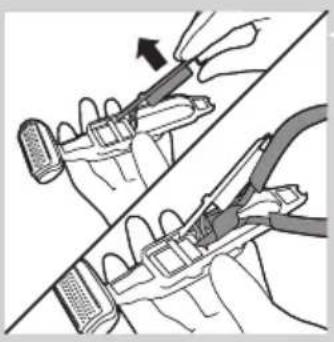
natural_image
Illustration of two hands using pliers to adjust a mechanical component (no text or symbols visible)natural_image
Prohibition sign showing a faucet without a shower, enclosed in a circle (no text or symbols)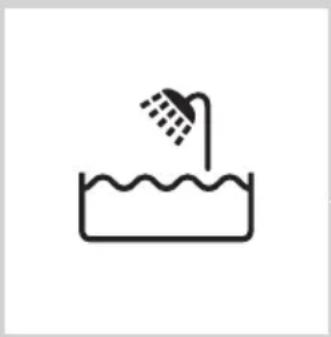
natural_image
Simple line drawing of a showerhead spraying over a water-filled basin (no text or symbols)Oprez
- Upotrebljavajte, punite i odlažite aparat na temperaturi od 5°C do 35°C.
- Za punjenje aparata koristite isključivo priloženi adapter i postolje za punjenje.
- Nikada ne uranjajte postolje za punjenje u vodu i nemojte ga prati pod slavinom.
- Ako je aparat izložen velikim promenama u temperaturi, pritisku i vlažnosti, pre korišćenja ga ostavite 30 minuta da se aklimatizira.
- Ako su adapter ili postolje za punjenje oštećeni, uvek ih zamenite originalnim delom da bi se izbegla opasnost.
- Nemojte koristiti aparat ako je neki od njegovih delova oštećen ili polomljen jer to može izazvati povrede.
- Ovaj aparat je namenjen isključivo za brijanje i podrezivanje na delovima tela ispod vrata. Nemojte ga koristiti za brijanje ili podrezivanje dlaka na licu ili glavi.
natural_image
Line drawing of a hairdryer tool with a black clip inserted (no text or symbols)natural_image
Illustration of a hand holding a pen-like object with a downward arrow indicating compression or disassembly (no text or symbols present)2 Stavite aparat na postolje za punjenje.
Indikator statusa baterije treperi zeleno kako bi označio da se aparat puni.
Napomena: Indikator statusa baterije na modelima BG2028, BG2026, BG2025 i BG2024 izgleda drugačije, ali funkcioniše na isti način.
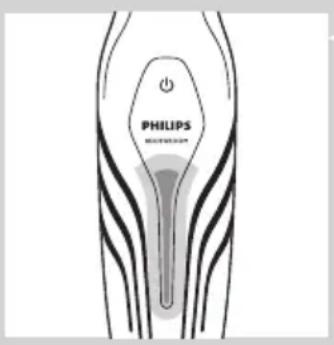
Kada se baterija potpuno napuni, indikator statusa baterije počeće neprestano da svetli zeleno.
Napomena: Ako se potpuno napunjen aparat nakon 30 minuta i dalje nalazi na postolju za punjenje koje je priključeno na električnu mrežu, indikator statusa baterije će se isključiti radi uštede energije.
Upotreba aparata
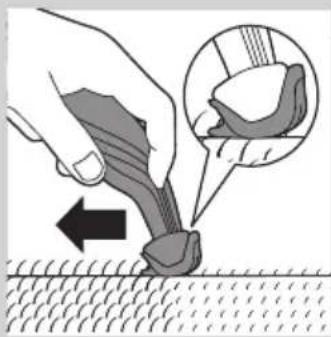
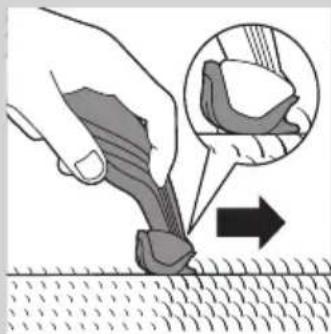
1 Pričvrstite odgovarajući češalj za podrezivanje na aparat. Proverite da li su zupci češlja okrenuti u pravcu u kojem ćete pomerati aparat.
natural_image
Illustration of a hand using a tool to apply material to a surface, with an inset showing a close-up of the tool (no text or symbols present)- Kada aparat pomerate prema sebi, zupci moraju da budu okrenuti ka vama.
natural_image
Illustration of a hand using a tool to apply material to a surface, with an inset showing a magnified view of the tool (no text or symbols present)- Kada aparat pomerate od sebe, zupci moraju da budu okrenuti od vas.
natural_image
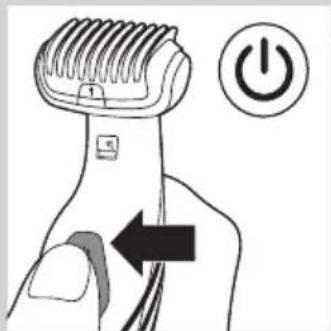
Illustration of a hairdryer with a power button icon (no text or symbols)2 Pritisnite dugme za uključivanje/isključivanje da biste uključili aparat.
3 Aparat uvek pomerajte u pravcu suprotnom od pravca rasta dlačica.
natural_image
Illustration of a hand holding a tool with an arrow indicating direction (no text or symbols present)1 Ako je češalj za podrezivanje i dalje montiran, uklonite ga.
Napomena: Češalj za podrezivanje možete da skinete sa aparata tako što ćete ga gurnuti ili povući, u zavisnosti od toga kako je on postavljen na aparat.
natural_image
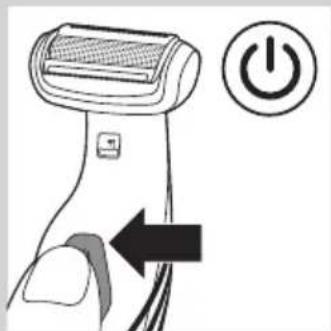
Illustration of a hairdryer with a power button icon (no text or symbols on the diagram itself)2 Jednom pritisnite dugme za uključivanje/isključivanje da biste uključili aparat.
3 Prislonite jedinicu za brijanje na kožu.
4 Aparat jednom rukom pomerajte suprotno od pravca rasta dlačica dok drugom rukom zatežete kožu.
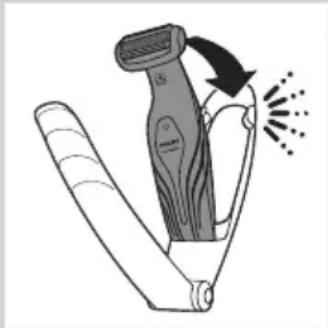
1 Pritisnite dugme za otpuštanje i zadržite ga (1), a zatim otvorite dodatak za brijanje leđa (2).
natural_image
Illustration of a hairdryer with motion arrows indicating hair movement (no text or symbols)2 Donji deo aparata postavite u donji deo držača dodatka za brijanje leđa. Zatim gornji deo pritisnite uz gornji deo držača dok ne legne ne mesto uz zvuk „klik“.
natural_image
Illustration of a person's neck with two arrows indicating movement or pressure direction (no text or symbols)natural_image
Illustration of a curved blade with five blades, no text or symbols presentNapomena: Radi veće praktičnosti, dodatak za brijanje leđa omogućava savijanje pod različitim ugovima.
natural_image
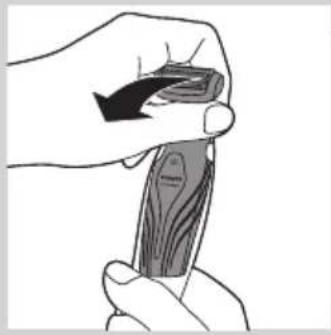
Illustration of a hand holding a piece of wood or wood grain, no text or symbols present5 Da biste zatvorili dodatak za brijanje leđa, pritisnite dugme za oslobadanje i zadržite ga (1), a zatim gurnite dršku na držač (2).
Čišćenje
natural_image
Illustration of two hands performing a manual tool on a piece of material, with arrows indicating direction (no text or symbols)Aparat očistite nakon svakog korišćenja.
natural_image
Illustration of a hand holding a device with an arrow indicating motion (no text or symbols)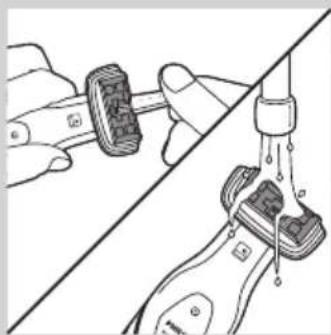
natural_image
Illustration of a hand holding a wristband connected to a water tap, with no visible text or symbols4 Pomoću priložene četke za čišćenje očistite unutrašnjost glave za brijanje ili isperite unutrašnjost pod mlazom vode sa česme.
natural_image
Illustration of a hand holding a water tap with liquid droplets (no text or symbols)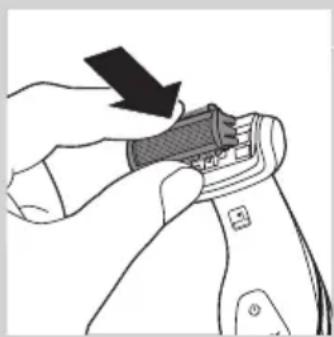
natural_image
Illustration of a hand using a tool to adjust or install a mechanical component (no text or symbols visible)5 Isperite jedinicu za brijanje pod mlazom vode.
6 Otresite višak vode i vratite jedinicu za brijanje na aparat.
7 Dodatak za brijanje leđa (samo BG2038/BG2036) očistite vlažnom krpom. Isperite ga pod mlazom vode sa česme ako ste ga koristili za brijanje leđa sa gelom za tuširanje ili penom za brijanje.
8 Očistite postolje za punjenje vlažnom krpom.
natural_image
Symbol of a waste bin with no text or numbers presentnatural_image
Symbol of a trash bin crossed out by two diagonal lines (no text or numbers present)- Ugrađena punjiva baterija sadrži supstance koje mogu da zagade okolinu. Uvek uklonite bateriju pre nego što bacite aparat i predate ga na zvaničnom odlagalištu. Baterije odlažite na zvaničnom mestu za odlaganje baterija. Ako imate problema sa uklanjanjem baterije, aparat možete da odnesete u Philips servisni centar. Osoblje centra će ukloniti bateriju i odložiti je tako da ne zagađuje okolinu.
Uklanjanje punjive baterije
natural_image
Illustration of two hands performing a manual manipulation or repair procedure (no text or symbols present)1 Izvadite aparat iz postolja za punjenje i ostavite motor da radi dok se baterija potpuno ne isprazni.
natural_image
Illustration of two hands holding a curved object with arrows indicating upward motion (no text or symbols)4 Odvijte zavrtnje koji povezuju unutrašnjost aparata sa prednjim poklopcem kućišta i odvojite unutrašnjost od prednjeg poklopca.
natural_image
Illustration of a hand using a tool to adjust or install a piece of material, with an upward arrow indicating motion (no text or symbols present)5 Okrenite unutrašnjost kućišta. Zatim skinite poklopac sa kontrolnom tablom sa unutrašnjosti kućišta.
natural_image
Illustration of two hands holding a handheld device, one pointing at the screen (no text or symbols visible)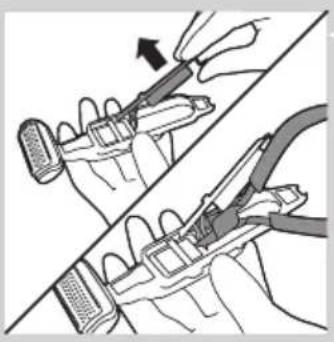
natural_image
Illustration of two hands using pliers to adjust a mechanical component (no text or symbols present)6 Izvadite štampanu ploču iz unutrašnjosti kućišta, okrenite je i isecite žice koje spajaju bateriju sa jedinicom za napajanje.
Garancija i servis
natural_image
Prohibition sign showing a faucet crossed out by a diagonal line, indicating no leakage or anti-poaching (no text present)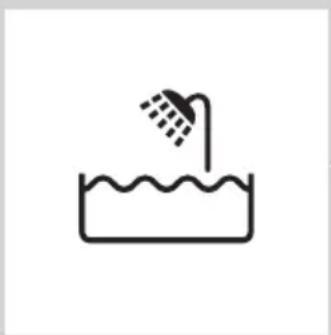
natural_image
Simple line drawing of a showerhead spraying over a water-filled basin (no text or symbols)Увага
natural_image
Line drawing of a hairdryer tool with a black clip inserted (no text or symbols)natural_image
Illustration of a hand holding a pen-like object with a downward arrow indicating compression or disassembly (no text or symbols present)natural_image
Illustration of a hand using a tool to apply a mechanical component, with an inset showing a close-up of the component (no text or symbols present)natural_image
Illustration of a hand using a tool to apply material to a surface, with an inset showing a magnified view of the tool (no text or symbols present)natural_image
Illustration of a hairdryer with a power button icon (no text or symbols)natural_image
Illustration of a hand holding a tool with an arrow indicating direction (no text or symbols present)natural_image
Illustration of a hairdryer with a power button icon (no text or symbols on the diagram itself)natural_image
Illustration of a hairdryer with motion arrows indicating hair direction (no text or symbols)natural_image
Illustration of a person's neck with two arrows indicating downward motion (no text or symbols)natural_image
Illustration of a folding knife with multiple blades (no text or symbols)natural_image
Illustration of a hand holding a piece of wood or wood grain, no text or symbols presentnatural_image
Illustration of two hands performing a manual tool or manipulation technique (no text or symbols present)natural_image
Illustration of a hand holding a small object with an arrow indicating motion (no text or symbols)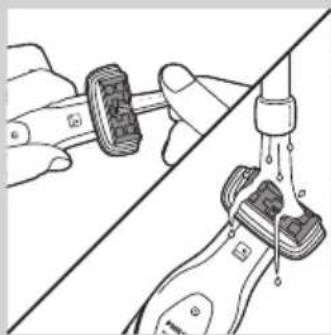
natural_image
Illustration of hands performing a manual valve operation on a mechanical component (no text or symbols visible)natural_image
Illustration of a hand holding a water droplet over a bottle, with no text or symbols present.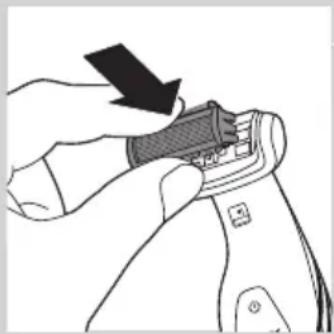
natural_image
Illustration of a hand using a tool to adjust or install a component, with no visible text or symbols.natural_image
Symbol of a waste bin with crossed lines indicating no waste, and a solid black rectangle below (no text or labels)natural_image
Illustration of two hands holding a spoon, one with an arrow pointing to the tip (no text or symbols)natural_image
Illustration of two hands holding a flat object with arrows indicating upward motion (no text or symbols)natural_image
Illustration of a hand using a tool to cut a piece of material, with an upward arrow indicating the process (no text or symbols present)natural_image
Illustration of two hands holding a device with a tool, showing a close-up of the interior (no text or symbols present)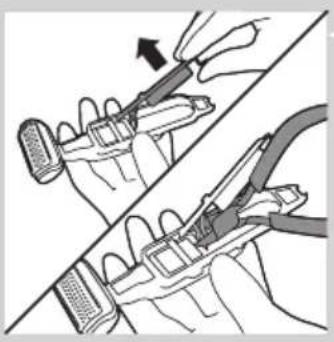
natural_image
Illustration of two hands using pliers to adjust a mechanical component (no text or symbols present)- Always here to help you
- User manual
- PHILIPS
- Introduction
- General description (Fig. 1)
- Important
- Danger
- Warning
- Caution
- Compliance with standards
- Charging
- Using the appliance
- Trimming
- Comb size indication Hair length after trimming
- Shaving
- Trimming and shaving tips
- Shaving with the back shaving attachment (BG2036/BG2038 only)
- Cleaning
- Ordering accessories
- Shaving unit
- Environment
- Removing the rechargeable battery
- Guarantee and service
- Guarantee restrictions
- Troubleshooting
- Въведение
- Upozornění
- Ettevaatust
- Čišćenje
- Naručivanje dodatnog pribora
- HRVATSKI52
- Jamstvo i servis
- Figyelmeztetés!
- Ескерту
- levērībai
- Uwaga
- Precautie
- Внимание!
- Výstraha
- Oprez
- Upotreba aparata
- Uklanjanje punjive baterije
- Garancija i servis
- Увага
Brand : PHILIPS
Model : BG2030
Category : Scissors