LIFEBEAT P61074 - Enceinte bluetooth MEDION - Notice d'utilisation et mode d'emploi gratuit
Retrouvez gratuitement la notice de l'appareil LIFEBEAT P61074 MEDION au format PDF.

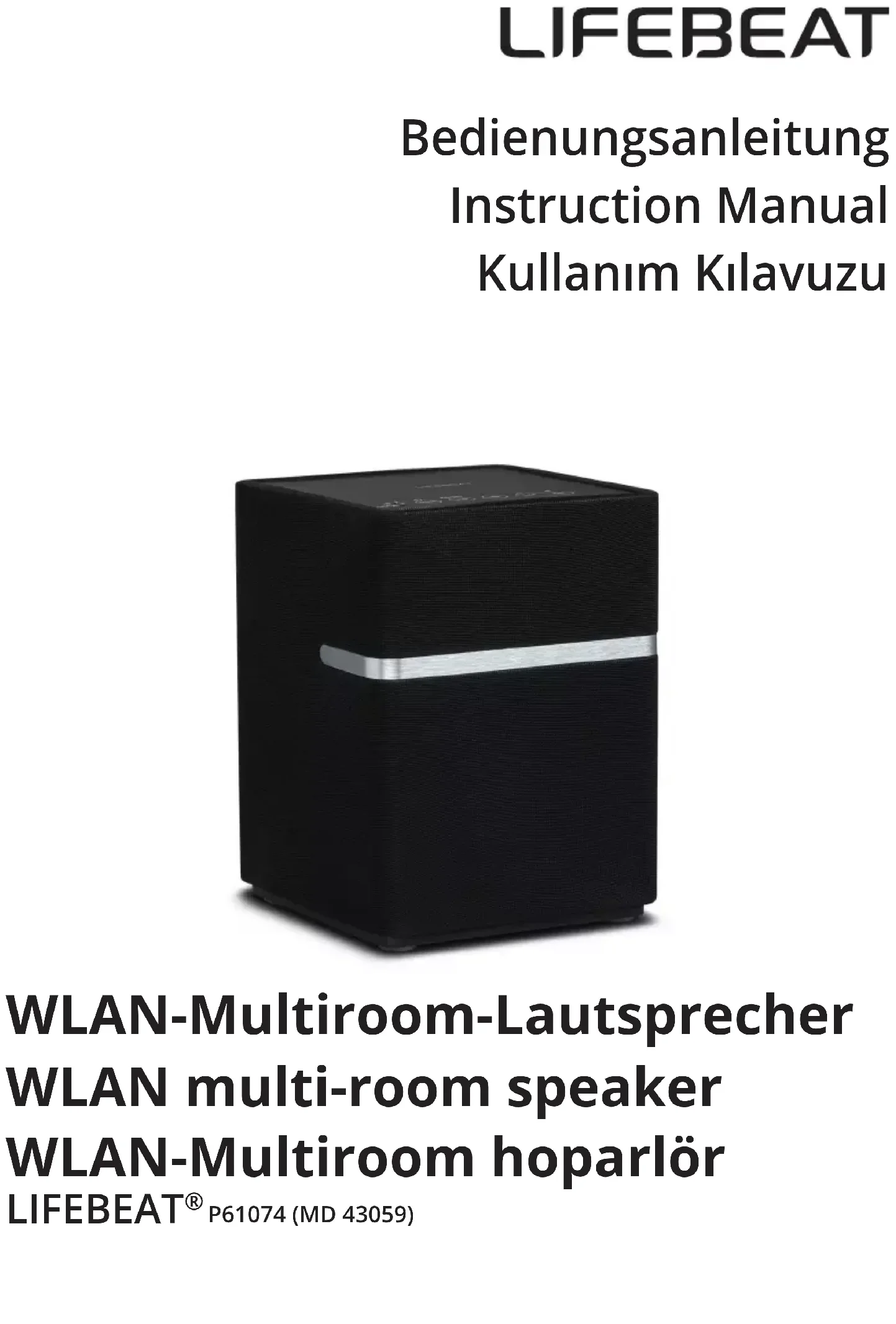


| Type de produit | Enceinte Bluetooth multiroom |
| Marque | Medion |
| Modèle | LIFEBEAT P61074 (MD 43059) |
| Dimensions (L x H x P) | Environ 132 x 174 x 132 mm |
| Poids | Environ 1,2 kg |
| Alimentation | Adaptateur secteur DC 18 V, 1,2 A (modèle OH-1024A1801200U-VDE) |
| Puissance des haut-parleurs | 20 W RMS |
| Connectivité sans fil | Wi-Fi 802.11 b/g/n (2,4 GHz) ; Bluetooth (pour appairage) |
| Connectivité filaire | Entrée LINE-IN (3,5 mm), port Ethernet RJ45, port USB 2.0 type A (charge) |
| Portée Wi-Fi | Intérieur environ 35-100 m, extérieur environ 100-300 m |
| Fonctions principales | Lecture audio via Wi-Fi, Bluetooth, LINE-IN ; multiroom via application LIFEBEAT P ; charge USB |
| Application associée | LIFEBEAT P (Android et iOS) |
| Services de streaming compatibles | Spotify Connect, UPnP |
| Entretien et nettoyage | Éteindre l'appareil et essuyer avec un chiffon doux et sec. Ne pas utiliser de produits abrasifs ou solvants. |
| Sécurité | Tenir hors de portée des enfants de moins de 8 ans. Ne pas exposer à l'humidité. Ne pas ouvrir ni réparer soi-même. |
| Pièces détachées et réparabilité | Contacter le service client Medion. Ne pas tenter de réparation personnelle. |
| Informations générales | Fabriqué par Medion AG, Allemagne. Utilisation en intérieur uniquement. Température de fonctionnement : 5-35 °C. |
FOIRE AUX QUESTIONS - LIFEBEAT P61074 MEDION
Questions des utilisateurs sur LIFEBEAT P61074 MEDION
0 question sur cet appareil. Repondez a celles que vous connaissez ou posez la votre.
Poser une nouvelle question sur cet appareil
Téléchargez la notice de votre Enceinte bluetooth au format PDF gratuitement ! Retrouvez votre notice LIFEBEAT P61074 - MEDION et reprennez votre appareil électronique en main. Sur cette page sont publiés tous les documents nécessaires à l'utilisation de votre appareil LIFEBEAT P61074 de la marque MEDION.
MODE D'EMPLOI LIFEBEAT P61074 MEDION
LIFEBEAT
Bedienungsanleitung Instruction Manual Kullanım Kılavuzu
natural_image
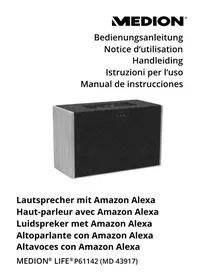
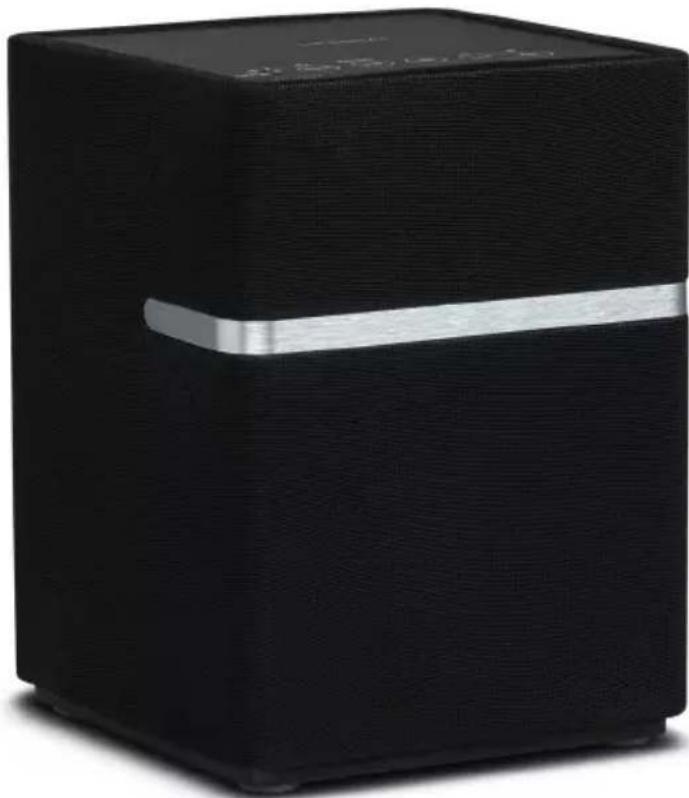
Black and silver portable electronic device with a silver stripe on top (no visible text or symbols)WLAN-Multiroom-Lautsprecher WLAN multi-room speaker WLAN-Multiroom hoparlör
LIFEBEAT® P61074 (MD 43059)
Inhaltsverzeichnis
DE
1. Hinweise zu dieser Anleitung 5
1.1. Verwendete Symbole und Signalwörter ....5
2. Bestimmungsgemäßer Gebrauch
3. Sicherheitshinweise 6
3.1. Nicht zugelassener Personenkreis 6
3.2. Das Gerät sicher aufstellen 7
3.3. Netzanschluss 8
3.4. Gewitter 8
3.5. Niemals selbst reparieren ....8
4. Vorbereitung 9
4.1. Lieferumfang prüfen 9
4.2. Anschlüsse....10
5. Übersicht WLAN-Lautsprecher
5.1. Oberseite....11
5.2. Rückseite....12
6. LED-Anzeigen 13
7. Netzwerkkonfiguration 13
7.1. Notwendige Netzwerkeigenschaften 13
8. Stromversorgung herstellen....13
9. Lautsprecher ein- und ausschalten 14
10. Erstinbetriebnahme 14
10.1. WLAN Verbindung über WPS 14
11. WLAN-Lautsprecher zum Netzwerk hinzufügen...... 15
12. Musik wiedergeben 16
12.1. App auf ein Android/Apple Smartphone/Tablet-PC installieren .....16
12.2. WLAN Direktverbindung über LIFEBEAT P herstellen ....17
12.3. Über Spotify® Musik hören....18
12.4. Spotify installieren....18
13. Wiedergabe über LIFEBEAT P App.... 19
14. Wiedergabe von einem externen Audiogerät 20
15. USB-Gerät am USB-Anschluss aufladen....20
16. Zurücksetzen bei fehlerhafter Funktion...... 21
16.1. Gerät über die App auf Werkseinstellungen zurücksetzen ......21
16.2. Gerät manuell Werkseinstellungen zurücksetzen......22
17. Software-Update 23
18. Fehlerbehebung 24
19. Reinigung 25
20. Entsorgung 25
21. Technische Daten 26
22. Konformitätsinformationen 27
23. Impressum
1. Hinweise zu dieser Anleitung

Lesen Sie vor der ersten Inbetriebnahme diese Bedienungsanleitung gründlich durch und befolgen Sie vor allen Dingen die Sicherheitshinweise! Bewahren Sie diese Bedienungsanleitung für den weiteren Gebrauch auf. Falls Sie das Gerät einmal weitergeben, legen Sie bitte auch diese Bedienungsanleitung dazu.
1.1. Verwendete Symbole und Signalwörter
 | GEFAHR!Warnung vor unmittelbarer Lebensgefahr!WARNUNG!Warnung vor möglicher Lebensgefahr und/oder schweren irreversiblen Verletzungen!VORSICHT!Warnung vor möglichen mittleren und oder leichten Verletzungen! |
 | ACHTUNG!Hinweise beachten, um Sachschäden zu vermeiden! |
 | HINWEIS!Weiterführende Informationen für den Gebrauch des Gerätes! |
 | HINWEIS!Hinweise in der Bedienungsanleitung beachten! |
 | WARNUNG!Warnung vor Gefahr durch elektrischen Schlag! |
 | WARNUNG!Warnung vor Gefahr durch hohe Lautstärke! |
| • Aufzahlungspunkt / Information über Ereignisse während der Bedienung | |
| ► | Auszuführende Handlungsanweisung |
2. Bestimmungsgemäßer Gebrauch
Das Gerät dient zum Abspielen von Audiodaten, die über ein WLAN-Netzwerk empfangen werden. Außerdem können Sie mit dem Gerät Audiosignale externer Geräte wiedergeben, sowie USB-Geräte aufladen.
Benutzen Sie das Gerät zu keinem anderen Zweck. Betreiben Sie das Gerät nur in Innenräumen.
- Das Gerät ist nur für den privaten und nicht für den industriellen/kommerziellen Gebrauch bestimmt.
Bitte beachten Sie, dass im Falle des nicht bestimmungsgemäßen Gebrauchs die Haftung erlischt:
- Bauen Sie das Gerät nicht ohne unsere Zustimmung um und verwenden Sie keine nicht von uns genehmigten oder gelieferten Zusatzgeräte.
- Verwenden Sie nur von uns gelieferte oder genehmigte Ersatz- und Zubehörteile.
- Beachten Sie alle Informationen in dieser Bedienungsanleitung, insbesondere die Sicherheitshinweise. Jede andere Bedienung gilt als nicht bestimmungsgemäß und kann zu Personen- oder Sachschäden führen.
- Nutzen Sie das Gerät nicht unter extremen Umgebungsbedingungen
3. Sicherheitshinweise
3.1. Nicht zugelassener Personenkreis
Bewahren Sie das Gerät und das Zubehör an einem für Kinder unerreichbaren Platz auf.
- Dieses Gerät kann von Kindern ab 8 Jahren und darüber und von Personen mit reduzierten physischen, sensorischen oder mentalen Fähigkeiten oder Mangel an Erfahrung und/oder Wissen benutzt werden, wenn sie beaufsichtigt oder bezüglich des sicheren Gebrauchs des Gerätes unterwiesen wurden und die daraus resultierenden Gefahren verstanden haben. Kinder dürfen nicht mit dem Gerät spielen. Reinigung und Benutzer-Wartung dürfen nicht durch Kinder durchgeführt werden, es sei denn, sie sind 8 Jahre
und älter und werden beaufsichtigt;
- Kinder jünger als 8 Jahre sollen vom Gerät und der Anschlussleitung ferngehalten werden.
- GEFAHR! Halten Sie auch die Verpackungsfolien von Kindern fern. Es besteht Erstickungsgefahr!
3.2. Das Gerät sicher aufstellen
- Stellen und betreiben Sie alle Komponenten auf einer stabilen, ebenen und vibrationsfreien Unterlage, um Stürze des Gerätes zu vermeiden.
- Setzen Sie das Gerät keinen Erschütterungen aus. Erschütterungen können der empfindlichen Elektronik schaden.
- Achten Sie darauf, dass keine direkten Wärmequellen (z. B. Heizungen) auf das Gerät wirken.
- Es dürfen keine offenen Brandquellen (z. B. brennende Kerzen) auf oder in der Nähe des Gerätes stehen.
- Achten Sie darauf, dass die Lüftungsschlitze nicht verdeckt sind, damit immer eine ausreichende Belüftung gewährleistet ist.
- Stellen Sie keine Gegenstände auf die Kabel, da diese sonst beschädigt werden könnten.
- Halten Sie einen Mindestabstand von ca. 10 cm zwischen Wänden und Gerät bzw. Netzteil ein. Sorgen Sie für eine ausreichende Belüftung.
- Stellen Sie keine mit Flüssigkeit gefüllten Gefäße, wie z.B. Vasen, auf das Gerät oder in die nähere Umgebung. Das Gefäß kann umkippen und die Flüssigkeit kann die elektrische Sicherheit beeinträchtigen. Halten Sie das Gerät von Feuchtigkeit, Tropf- und Spritzwasser fern.
- Vermeiden Sie Erschütterungen, Staub, Hitze und direkte Sonneneinstrahlung, um Betriebsstörungen zu verhindern. Die Betriebstemperatur beträgt 5 bis 35 °C.
- Betreiben Sie Ihr Gerät nicht im Freien, da äußere Einflüsse wie Regen, Schnee etc. das Gerät beschädigen könnten.
- Halten Sie mindestens einen Meter Abstand von hochfrequenten und magnetischen Störquellen (Fernsehgerät, Lautsprecherboxen, Mobiltelefon usw.) ein, um Funktionsstörungen zu vermeiden. Sollten Funktionsstörungen auftreten, stellen Sie das Gerät an einem
anderen Ort auf.
- Bei großen Temperatur- oder Feuchtigkeitsschwankungen kann es durch Kondensation zur Feuchtigkeitsbildung innerhalb des Gerätes kommen, die einen elektrischen Kurzschluss verursachen kann.
3.3. Netzanschluss
- Schließen Sie das Netzteil nur an eine gut erreichbare Steckdose (AC 100–240 V\~ 50/60 Hz) an, die sich in der Nähe des Aufstellorts befindet. Für den Fall, dass Sie das Gerät schnell vom Netz nehmen müssen, muss die Steckdose frei zugänglich sein.
- Verwenden Sie ausschließlich das mitgelieferte Netzteil. Versuchen Sie nie, das Netzteil an andere Buchsen anzuschließen, da sonst Schäden verursacht werden können.
- Warten Sie mit dem Anschluss des Netzteils, wenn das Gerät von einem kalten in einen warmen Raum gebracht wird. Das dabei entstehende Kondenswasser kann unter Umständen das Gerät zerstören. Wenn das Gerät Zimmertemperatur erreicht hat, kann das Gerät gefahrlos in Betrieb genommen werden.
- Achten Sie darauf, dass die Anschlussleitung nicht zur Stolperfalle wird. Die Anschlussleitung darf nicht geklemmt und gequetscht werden.
3.4. Gewitter
Bei längerer Abwesenheit oder Gewitter ziehen Sie den Netzstecker ab.
3.5. Niemals selbst reparieren
- Ziehen Sie bei Beschädigungen des Netzteils, der Anschlussleitung oder des Geräts sofort den Stecker aus der Steckdose.
- Nehmen Sie das Gerät nicht in Betrieb, wenn Gerät oder Anschlussleitungen sichtbare Schäden aufweisen oder das Gerät heruntergefallen ist.

WARNUNG!
Versuchen Sie auf keinen Fall, ein Geräteteil selbst zu öffnen und/oder zu reparieren. Es besteht die Gefahr des elektrischen Schlags!
- Wenden Sie sich im Störungsfall an unser Service Center oder eine andere geeignete Fachwerkstatt.
4. Vorbereitung
4.1. Lieferumfang prüfen
Entfernen Sie sämtliches Verpackungsmaterial, auch die Folie auf dem Display.

GEFAHR!
Lassen Sie kleine Kinder nicht mit Folie spielen. Es besteht Erstickungsgefahr!
Bitte überprüfen Sie die Vollständigkeit der Lieferung und benachrichtigen Sie uns bitte innerhalb von 14 Tagen nach dem Kauf, falls die Lieferung nicht komplett ist. Mit dem von Ihnen erworbenen Produkt haben Sie erhalten:
• WLAN Lautsprecher
• Netzteil (Modell OH-1024A1801200U-VDE)
• diese Bedienungsanleitung
- Garantiekarte
4.2. Anschlüsse
Betrieb im WLAN-Modus: Eine WLAN-Antenne ist im Gerät integriert.
Netzadapter: Verbinden Sie den Gerätestecker des mitgelieferten Netzadapters mit dem Anschluss DC IN und den Netzstecker mit einer Steckdose (AC 100–240 V\~50/60 Hz).
LINE-IN: Schließen Sie ein 3,5 mm Stereoklinkenkabel an die Buchse LINE-IN an, um den Stereoton anderer Audiogeräte mit dem WLAN-Lautsprecher wiederzugeben.
USB: Hier können Sie ein Smartgerät anschließen, um dessen internen Akku über den USB-Anschluss aufzuladen.
▶ ETHERNET: Schließen Sie ein Netzwerkkabel an den Anschluss ETHERNET an, um den WLAN-Lautsprecher über LAN mit Ihrem Heimnetzwerk zu verbinden.
5. Übersicht WLAN-Lautsprecher
5.1. Oberseite
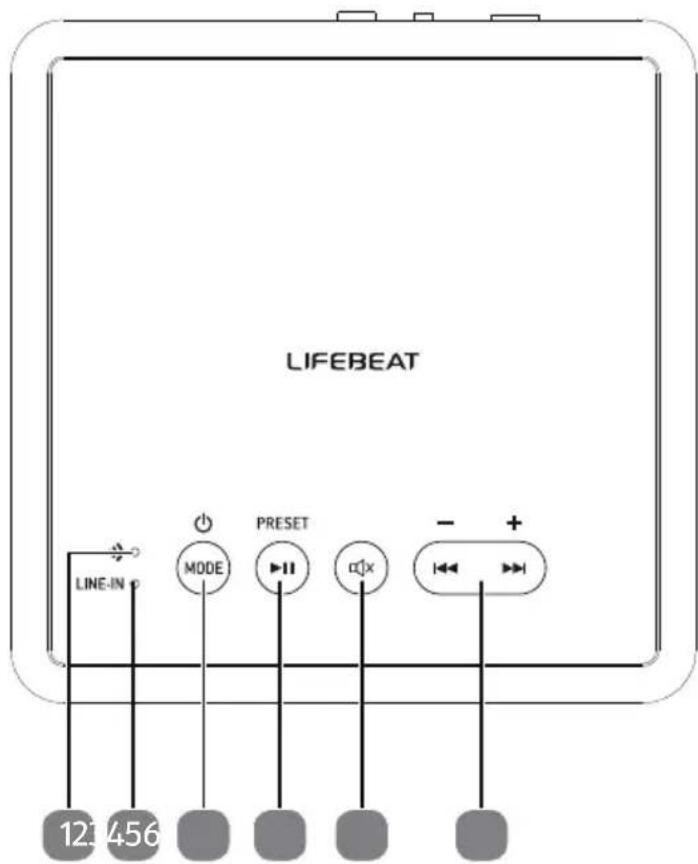
1) WIFI LED:
Blinkt gelb Wartet auf WLAN-Verbindung
Blinkt schnell gelb Betriebsart WLAN (Suche Verbindung)
Leuchtet gelb Betriebsart WLAN (Verbunden)
Aus Standby Modus
2) LINE IN LED: Leuchtet grün bei Wiedergabe über LINE IN.
3) MODE/STANDBY: In den Standby-Modus schalten/ Gerät einschalten; Betriebsart wählen
4) ▶ II; PRESET/PAIR: Abspielen/Pausieren; BT Pairing
5) MUTE: Ton stumm schalten
6) VOL -/VOL +: Länger drücken: Lautstärke verringern/ erhöhen, 2x drücken vorheriger Titel/nächster Titel
5.2. Rückseite
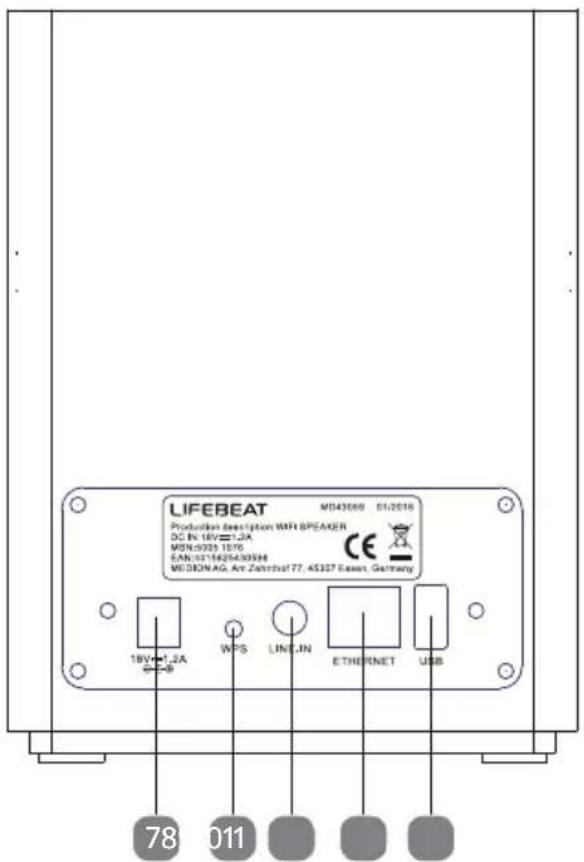
7) D C IN : Buchse für Steckernetzteil
8) WPS:WPS-Funktion verwenden
9) LINE-IN: Audioeingang 3,5 mm Stereobuchse
10) Ethernet: LAN-Anschluss (RJ45 Buchse)
11) USB: USB-Anschluss zum Aufladen externer Geräte
6. LED-Anzeigen
| LED Anzeige Status | ||
| LINE IN | Leuchtet grün Betriebsart LINE IN | |
| WIFI | Blinkt gelb Wartet auf WLAN-Verbindung | |
| Blinkt schnell gelb Betriebsart WLAN (Suche Verbindung) | ||
| Leuchtet gelb Betriebsart WLAN (Verbunden) | ||
| Aus Standby Modus | ||
7. Netzwerkkonfi guration
Der WLAN-Lautsprecher wird über WLAN oder LAN mit dem Netzwerk verbunden. Die WLAN-Antenne des Lautsprechers empfängt die Signale des Netzwerk-Routers. Um den WLAN-Lautsprecher über LAN mit Ihrem Heimnetzwerk zu verbinden, schließen Sie ein Netzwerkkabel an den Anschluss ETHERNET an.
7.1. Notwendige Netzwerkeigenschaften
Damit das Gerät auf Musikdateien im Netzwerk zugreifen kann, muss das Netzwerk folgende Eigenschaften haben:
- Der für das Netzwerk eingesetzte Router muss eine DHCP-Server-Funktion besitzen, damit er dem Gerät im Netzwerk automatisch eine IP-Adresse zuweisen kann. Stellen Sie die DHCP-Funktion andernfalls im Web-Interface auf manuell ein.
• Die Medienfreigabe für UPNP muss im Router eingerichtet sein.
8. Stromversorgung herstellen
Verbinden Sie den Gerätestecker des mitgelieferten Netzteils (Modell OH-1024A1801200U-VDE) mit der DC IN Buchse am Gerät.
▶ Schließen Sie das Netzteil an eine Steckdose 230 V \~ 50/60 Hz an.
9. Lautsprecher ein- und ausschalten
Lautsprecher einschalten
Drücken Sie die Taste MODE/STANDBY, um den Lautsprecher einzuschalten.
Der Lautsprecher schaltet sich in der zuletzt eingestellen Betriebsart ein.
Standby-Modus
▶ Halten Sie die Taste MODE/STANDBY länger gedrückt, bis die LEDs Bluetooth und WIFI erloschen sind, um den Lautsprecher in den Standby-Modus zu schalten.
Im Standby-Modus hält der Lautsprecher die Netzwerkverbindung, so dass sie nach einem erneuten Einschalten sofort zur Verfügung steht. In dieser Betriebsart verbraucht der Lautsprecher mehr Strom, als im Standby-Modus.
10. Erstinbetriebnahme
- Sie können den WLAN-Lautsprecher über die WPS-Taste mit dem bestehenden Netzwerk Ihres Routers verbinden.
- Bringen Sie den WLAN-Lautsprecher bei der ersten Inbetriebnahme möglichst in die Nähe des Routers, um ein einwandfreies WLAN-Signal während der Einrichtung zu gewährleisten. Stellen Sie den WLAN-Lautsprecher anschließend in Reichweite des WLAN-Signals auf.
10.1. WLAN Verbindung über WPS
Wenn Ihr Router über eine WPS-Taste verfügt, können Sie die Verbindung des Lautsprechers zum Netzwerk über diese Taste einfach herstellen:
Drücken Sie die WPS -Taste des WLAN-Lautsprechers, bis die WIFI-LED gelb blinkt.
Drücken Sie nun die WPS-Taste des WLAN-Routers.

HINWEIS!
Beachten Sie hierzu auch die Bedienungsanleitung des Routers.
Das Gerät baut nun eine Verbindung mit dem Netzwerk auf. Währenddessen blinkt die WIFI-LED schnell.
- Nach erfolgreicher Verbindung leuchtet die WIFI-LED dauerhaft gelb.
- Das Gerät kann nun Audiosignale aus dem Netzwerk wiedergeben.
- Das Gerät speichert die Verbindungsdaten, so dass sie bei einem erneuten Einschalten nicht noch einmal eingegeben werden müssen.
11. WLAN-Lautsprecher zum Netzwerk hinzufügen
▶ Schalten Sie den Lautsprecher ein und warten Sie, bis das System vollständig hochgefahren ist (Begrüßungston ist zu hören.
▶ Schalten Sie den Lautsprecher in den WLAN-Modus. Die WIFI-LED blinkt gelb.
▶ Verbinden Sie Ihr mobiles Gerät, mit Ihrem WLAN Netzwerk.
▶ Starten Sie die LIFEBEAT P App und tippen auf MultiRoom Lautsprecher hinzufügen.
Drücken Sie nun die Taste WPS auf der Rückseite des Lautsprechers. Die WIFI-LED blinkt schnell gelb.
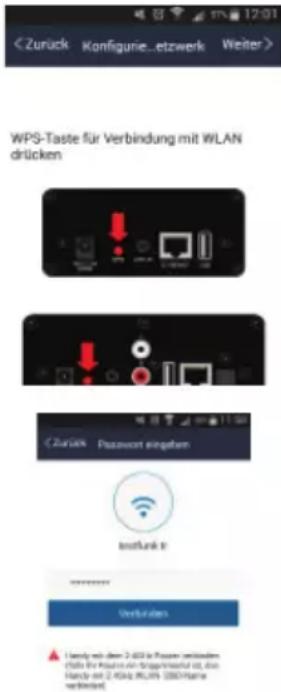
▶ Geben Sie nun das Passwort Ihres WLAN Netzwerkes ein und bestätigen Sie die Eingabe, indem Sie auf Verbinden tippen.
Nach erfolgreicher Verbindung ertönt ein Signalton und die WIFI-LED leuchtet gelb.
Sie können nun in der App einen Namen für Ihren WLAN-Lautsprecher vergeben. So können Sie beim Betrieb mehrerer Lautsprecher diese voneinander unterscheiden.


HINWEIS
Ihr mobiles Gerät (Smartphone oder Tablet-PC), muss im WLAN Netzwerk des Routers angemeldet sein.
12. Musik wiedergeben
Sie können auf Ihrem WLAN-Lautsprecher Musik aus dem Netzwerk, Musik von einem über WLAN angemeldeten Gerät (Direkt-Modus) oder das Stereosignal eines extern angeschlossenen Gerätes wiedergeben.
Im Folgenden werden die Betriebsarten des WLAN-Lautsprechers mit den verschiedenen Audioquellen beschrieben.

HINWEIS!
Zur Steuerung der Musikwiedergabe aus dem Netzwerk mit einem Smartphone oder Tablet-PC ist eine entsprechende UPNP-fähige App erforderlich.
12.1. App auf ein Android/Apple Smartphone/Tablet-PC installieren
Um die Steuerung der Musikwiedergabe auf dem WLAN-Lautsprecher an einem Tablet-PC oder Smartphone nutzen zu können, müssen Sie zunächst die über den Playstore (Android) bzw. AppStore (Apple) zur Verfügung gestellte App LIFEBEAT P auf Ihrem Tablet-PC/Smartphone installieren.
12.2. WLAN Direktverbindung über LIFEBEAT P herstellen
Besteht keine Möglichkeit zum Aufbau einer Netzwerkverbindung über WPS, verwenden Sie die APP LIFEBEAT P Ihres Smartphones oder Tablets, um eine Verbindung mit dem Internet bzw. dem WLAN-Lautsprecher herzustellen.
▶ Schalten Sie den Lautsprecher ein und warten Sie, bis das System vollständig hochgefahren ist (Begrüßungston).
▶ Schalten Sie den Lautsprecher in den WLAN-Modus. Die WIFI-LED blinkt gelb.
Öffnen Sie die WLAN Einstellungen Ihres mobilen Gerätes.
Wählen Sie das vorgeschlagene Audiosystem „P61074_XXXX“ aus und tippen Sie auf Verbinden.
▶ Geben Sie bei der ersten Inbetriebnahme den Netzwerkschlüssel „LIFEBEAT“ ein.

HINWEIS!
Es wird unbedingt empfohlen, den Netzwerkschlüssel des Lautsprechers nachd er ersten Inbetriebnahme zu ändern.
Drücken Sie nun auf die „Zurück-Taste“ Ihres Smartphones.
▶ Starten Sie die LIFEBEAT P App.
Die LIFEBEAT P App verbindet nun Ihr mobiles Gerät mit dem WLAN-Lautsprecher.
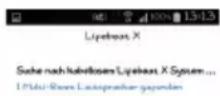
Sobald die Verbindung betriebsbereit ist, wechselt die App automatisch in das Quellenverzeichnis.
Sobald die Einrichtung des Gerätes und somit die Verbindung des WLAN Lautsprechers mit dem Internet erfolgreich been- det wurde, leuchtet die WIFI-LED dauerhaft gelb.
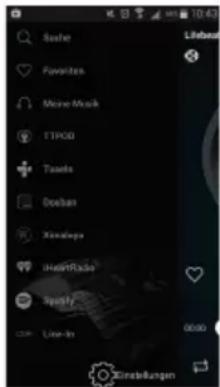
12.3. Über Spotify® Musik hören
Sie können Audiodaten vom Musikstreaming-Dienst Spotify® über den WLAN-Lautsprecher abspielen. Voraussetzung ist, dass Sie auf Ihrem Smartphone oder Tablet PC die Premium-Version der Spotify-App installiert haben und dass den WLAN-Lautsprecher und das Gerät mit der Spotify-App im selben Netzwerk angemeldet sind.

12.4. Spotify installieren
- Öffnen Sie den Google Play oder den Apple App Store und suchen Sie nach dem Begriff Spotify.
▶ Installieren Sie auf Ihrem Smartphone oder Tablet PC die Spotify-App. Folgen Sie dabei den Anweisungen zur Installation auf dem Bildschirm.
▶ Abonnieren Sie den Premium Account von Spotify®.

HINWEIS!
Um die Spotify-Applikation installieren zu können, muss eine Internetverbindung bestehen.
Die Premium-Version der Spotify-App ist kostenpflichtig.
Informationen zu Spotify® Software-Lizenzen finden Sie unter www.spotify.com/connect/third-party-licenses.
13. Wiedergabe über LIFEBEAT P App
▶ Schalten Sie den Lautsprecher ein und warten Sie, bis das System vollständig hochgefahren ist (Begrüßungston ist zu hören.
▶ Schalten Sie den Lautsprecher in den WLAN-Modus. Die WIFI-LED blinkt gelb.
▶ Starten Sie die LIFEBEAT P App.
Die App Startet mit dem Hauptbildschirm, indem Sie Wiedergabelisten öffnen, Titel vor und zurück springen, die Lautstärke ändern oder Favoriten wählen können.
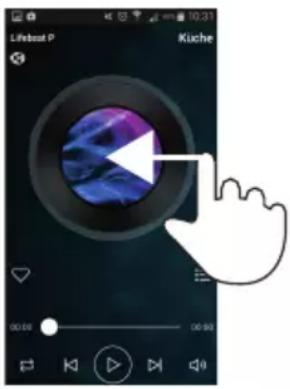
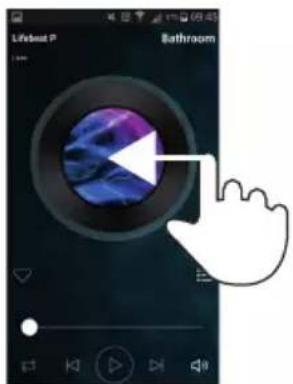
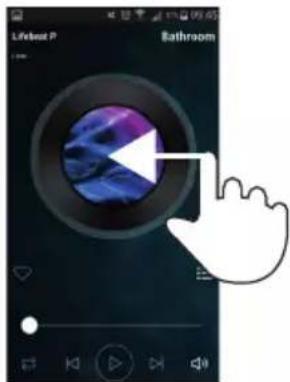
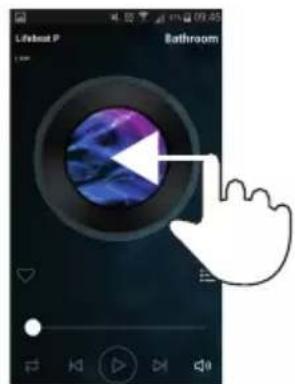
- Öffnen Sie die Geräteliste, indem Sie mit Ihrem Finger im Hauptbildschirm der App von rechts nach links wischen.
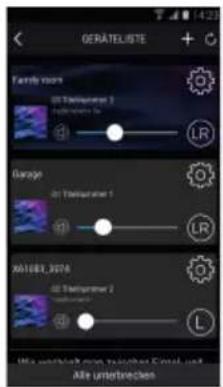
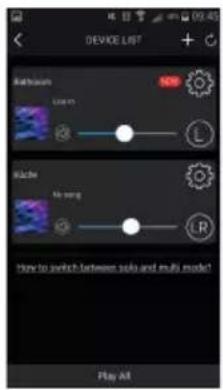
Hier werden nun alle angemeldeten WLAN-Lautsprecher angezeigt.
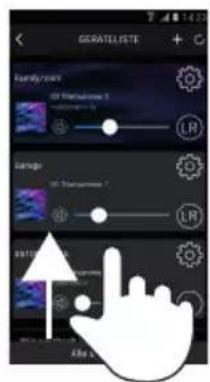
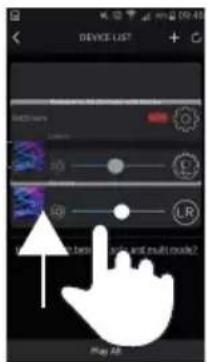
Um einen WLAN-Lautsprecher zu einer Gruppe hinzuzufügen, müssen Sie den entsprechenden WLAN-Lautsprecher antippen und einfach auf einen anderen gewünschten WLAN-Lautsprecher „ziehen“.
So können Sie die Musik gleichzeitig über jeden, in der Gruppe „abgelegten“ WLAN-Lautsprecher abspielen.
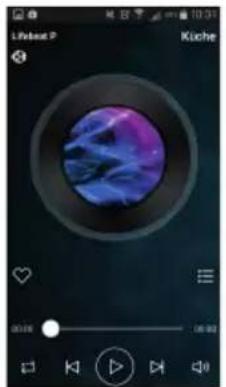
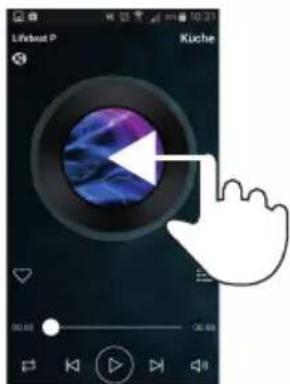
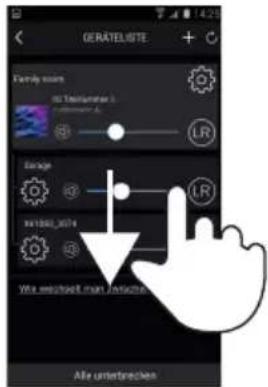
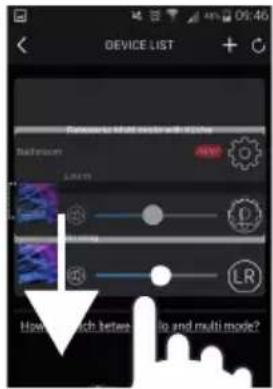
Um einen WLAN-Lautsprecher von einer Gruppe zu lösen, „ziehen“ Sie einfach einen gewünschten WLAN-Lautsprecher aus der Gruppe raus.
Nun können Sie über jeden einzelnen WLAN-Lautsprecher eine andere Musik abspielen.
HINWEIS
Sie können die Wiedergabe auf anderen Lautsprechern auch in den Wiedergabearten (LINE IN oder BLUETOOTH) verwenden!
14. Wiedergabe von einem externen Audiogerät
▶ Schließen Sie das ein 3,5 mm Stereoklinkenkabel an die Buchse LINE-IN an, um den Stereoton anderer Audiogeräte mit dem WLAN-Lautsprecher wiederzugeben.
- Wählen Sie anschließend mit der Taste MODE am Lautsprecher die Betriebsart LINE IN aus (Siehe „6. LED-Anzeigen“ auf Seite 13).
15. USB-Gerät am USB-Anschluss aufl aden
Sie können den Akku eines Gerätes, das über einen USB-Anschluss geladen wird, am USB-Anschluss des WLAN-Lautsprechers aufladen.
Verbinden Sie das Gerät, das Sie aufladen wollen über ein USB-Kabel mit dem USB-Anschluss an der Rückseite des WLAN-Lautsprechers.

HINWEIS
Der USB-Anschluss am WLAN-Lautsprecher liefert einen Ladestrom von 1 A bei einer Ausgangsspannung von max. 5 V. Geräte, die Sie zum Auf- laden an den WLAN-Lautsprecher anschließen, dürfen keine höhere Stromaufnahme besitzen.
Der WLAN-Lautsprecher muss zum Aufladen eingeschaltet und die USB Ladefunktion gewählt werden oder sich im Standby-Modus befinden.
16. Zurücksetzen bei fehlerhafter Funktion
Sollte Ihr Gerät nicht reagieren, ziehen Sie das Steckernetzteil aus der Steckdose und stecken Sie es nach ein paar Sekunden wieder ein.
16.1. Gerät über die App auf Werkseinstellungen zurücksetzen
▶ Schalten Sie den WLAN-Lausprecher ein
▶ Starten Sie die LIFEBEAT P App.
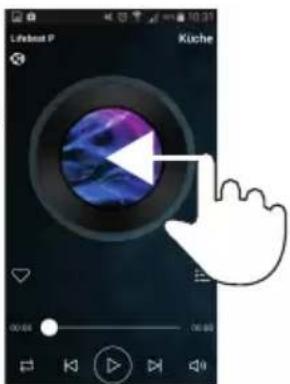
Öffnen Sie die Geräteliste, indem Sie mit Ihrem Finger im Hauptbildschirm der App von rechts nach links wischen.
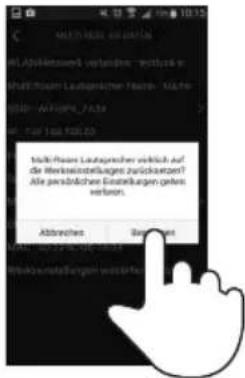
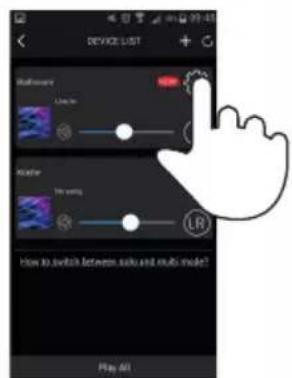
Tippen Sie nun auf die Einstellung (10), des gewünschten WLAN-Lautsprechers.
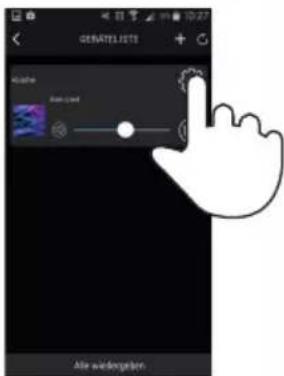
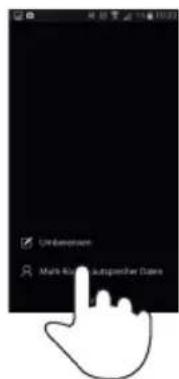
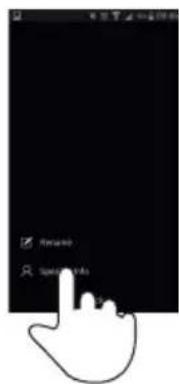
Tippen Sie nun auf Multi-Room Lautsprecher Daten.
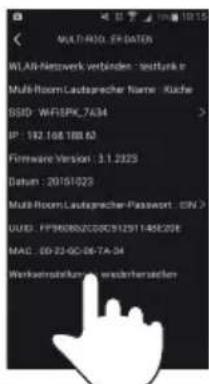
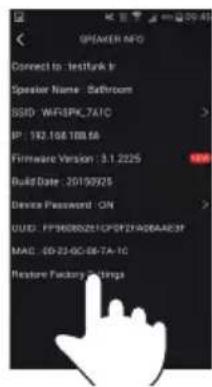
Tippen Sie nun auf Werkseinstellungen wiederherstellen.
Tippen Sie nun auf Bestätigen.
16.2. Gerät manuell Werkseinstellungen zurücksetzen
Für den Fall, dass der Lautsprecher sich nicht mehr mit dem WLAN-Access Point verbindet oder sie die WLAN-Verbindung erneut ausführen wollen, können Sie den Lautsprecher manuell auf die Werkseinstellungen zurücksetzen.
▶ Halten Sie dazu die Taste WPS auf der Rückseite des Lautsprechers für etwa 10 Sekunden lang gedrückt.
Der Lautsprecher schaltet sich aus und danach wieder ein.
Warten Sie ab, bis das System vollständig hochgefahren ist.
Anschließend ertönen zwei Signaltöne zur Bestätigung, dass der Einstellungen zurückgesetzt wurden.
▶ Verbinden Sie den Lautsprecher erneut mit einem WLAN-Accesspoint, wie unter „7. Netzwerkkonfiguration“ auf Seite 13 beschrieben.
17. Software-Update
- Sie können die Software des WLAN-Lautsprecher über die App aktualisieren. Die App sucht ob ein Software-Update verfügbar ist und lädt dieses über das Internet auf den WLAN-Lautsprecher.
▶ Schalten Sie den WLAN-Lausprecher ein
▶ Starten Sie die LIFEBEAT P App.
- Öffnen Sie die Geräteliste, indem Sie mit Ihrem Finger im Hauptbildschirm der App von rechts nach links wischen.
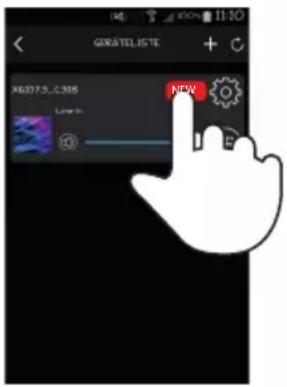
Die App überpüft automatisch, ob ein Softwareupdate für die angemeldeten WLAN-Lautsprecher zur Verfügung steht. Sollte dies der Fall sein, erscheint neben der Einstellung (DE) des entsprechenden WLAN-Lautsprechers das Info Feld NEW.
Tippen Sie nun auf NEW, des gewünschten WLAN-Lautsprechers um das Softwareupdates zu starten.
18. Fehlerbehebung
Bei einer Störung des Geräts prüfen Sie bitte zunächst, ob Sie das Problem mit Hilfe der folgenden Übersicht selbst beheben können.
Versuchen Sie auf keinen Fall, die Geräte selbst zu reparieren. Wenn eine Reparatur notwendig ist, wenden Sie sich bitte an unser Service Center oder eine andere geeignete Fachwerkstatt.
| Problem Mögliche Ursache Lösung | ||
| Kein Ton Falscher Wiedergabemodus eingestellt | Stellen Sie den WLAN-Modus oder den LINE-IN/AUDIO IN Modus ein. | |
| Kein Empfang Prüfen Sie die Netzwerk-konfiguration. | ||
| Problem bei der Verbindung zum Router. | Es ist kein DHCP-Server aktiviert. | Überprüfen Sie die Einstellungen des Routers. |
| Es wurde ein falscher Netzwerkschlüssel des Netzwerkes eingeben. | Netzwerkschlüssel des Netzwerkes erneut eingeben. | |
| Die IP-Adresse, die Sie manuell vergeben haben, liegt außerhalb des Adressbereichs des Routers | Geben Sie eine gültige IP-Adresse für den WLAN-Lautsprecher an. | |
| Die Einstellungen des Access-Points haben sich geändert. | Setzen Sie den Lautprecher manuell auf die Werkseinstellungen zurück und verbinden Sie ihn erneut mit dem Access-Point. | |
| Der WLAN-Lautsprecher lässt sich nicht mit der Lifestream App steuern. | WLAN-Lautsprecher und Smartphone/Tablet PC befinden sich nicht im selben WLAN Netzwerk. | Überprüfen Sie den Netzwerkstatus von WLAN-Lautsprecher und Smart-phone/Tablet PC. |
19. Reinigung
▶ Schalten Sie das Gerät aus, bevor Sie es reinigen.
Verwenden Sie ein weiches, trockenes Tuch, ab es abzuwischen. Benutzen Sie keine rauen Tücher, keine scharten Reinigungsmittel, keine Verdünner oder alkoholische Lösungen für die Reinigung. Solche Mittel können das Gerät beschädigen.
20. Entsorgung

Verpackung
Ihr Gerät befindet sich zum Schutz vor Transportschäden in einer Verpackung, Verpackungen sind Rohmaterialien und können wiederverwertet werden oder dem Recycling-Kreislauf zugeführt werden.

Gerät
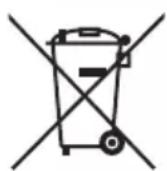
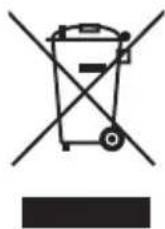
Altgeräte dürfen nicht im normalen Hausmüll entsorgt werden. Entsprechend Richtlinie 2012/19/EU ist das Gerät am Ende seiner Lebensdauer einer geordneten Entsorgung zuzuführen. Dabei werden im Gerät enthaltene Wertstoffe der Wiederverwertung zugeführt und die Belastung der Umwelt vermieden. Geben Sie das Altgerät an einer Sammelstelle für Elektroschrott oder einem Wertstoffhof ab. Wenden Sie sich für nähere Auskünfte an Ihr örtliches Entsorgungsunternehmen oder Ihre kommunale Verwaltung.
Batterien
Akkus müssen sachgerecht entsorgt werden. Zu diesem Zweck stehen im batterievertreibenden Handel sowie bei kommunalen Sammelstellen entsprechende Behälter zur Entsorgung bereit. Weitere Auskünfte erteilen Ihr örtlicher Entsorgungsbetrieb oder Ihre kommunale Verwaltung.
21. Technische Daten
Netzadapter
Modell: OH-1024A1801200U-VDE
Hersteller: ORIENTAL HERO ELE. FTY.
Eingangsspannung: AC 100 – 240 V \~ 50/60 Hz, 500 mA max
Ausgangsspannung:

Gerät
Lautsprecher: 20
W RMS
Abmessungen: ca. 132 x 174 x 132 cm
Gewicht: ca. 1,2 kg
WLAN
Frequenzbereich: 2,4 GHz
WLAN Standard: 802.11 b/g/n
Verschlüsselung: WPA2 möglich
Reichweite: Innen ca. 35 – 100 m /
Aussen ca. 100 – 300 m
Anschlüsse
Netzadaptereingang: DC 18 V, 1,2 A
LINE IN: 3,5 mm-Stereoklinke
USB: USB 2.0 A-Buchse
USB Service und Ladeanschluss
USB-Ausgang: DC 5V max. 750 mA
Technische und optische Änderungen sowie Druckfehler vorbehalten.
22. Konformitätsinformationen
Mit diesem Gerät wurden folgende Funkausstattungen ausgeliefert:
- Wireless LAN
Hiermit erklärt die Medion AG, dass das Produkt mit den folgenden europäischen Anforderungen übereinstimmt:
• R&TTE Richtline 1999/5/EG
• EMV-Richtlinie 2014/30/EU
- Öko-Design Richtlinie 2009/125/EG
• RoHS-Richtlinie 2011/65/EU.
Dieses Gerät erfüllt die grundlegenden Anforderungen und relevanten Vorschriften der Ökodesign Richtlinie 2009/125/EG (Verordnung 1275/2008). Allerdings ist für dieses Gerät aufgrund seiner Funktionsweise (dauerhafte Bereitstellung eines WLAN-Signals) keine Minimierung des Verbrauchs gemäß der Ökodesign-Richtlinie vorgesehen.
Um den Stromverbrauch zu minimieren, trennen Sie das Gerät bei Nichtbedarf vom Stromnetz.
Vollständige Konformitätserklärungen sind erhältlich unter www.medion.com/conformity.
CE
23. Impressum
Copyright © 2016
Stand: 19/02/2016
Alle Rechte vorbehalten.
Diese Bedienungsanleitung ist urheberrechtlich geschützt.
Vervielfältigung in mechanischer, elektronischer und jeder anderen Form ohne die schriftliche Genehmigung des Herstellers ist verboten
Das Copyright liegt bei der Firma:
Medion AG
Am Zehnthof 77
45307 Essen
Deutschland

Die Anleitung kann über die Service Hotline nachbestellt werden und steht über das Serviceportal www.medionservice.de zum Download zur Verfügung.
Sie können auch den oben stehenden QR Code scannen und die Anleitung über das Serviceportal auf Ihr mobiles Endgerät laden.
Table of contents
DE
1. Notes on how to use these instructions .... 31
1.1. Symbols and keywords used in these instructions ....31
2. Proper use
3. Safety information
3.1. People not permitted to use this device ....32
3.2. Setting up the device safely 33
3.3. Mains connection .... 33
3.4. Thunderstorms 34
3.5. Never carry out repairs yourself ....34
4. Getting started
4.1. Check package contents ....34
4.2. Connections....35
5. Overview of the WLAN loudspeaker 36
5.1. Top....36
5.2. Rear....37
6. LED displays
7. Network configuration
7.1. Network requirements 38
8. Connecting to a power supply 38
9. Switching the loudspeaker on and off 39
10. Using the device for the first time 39
10.1. WLAN connection via WPS 39
11. Control using the Lifebeat P application 40
11.1. Installation via direct link....40
11.2. Installation via Google Play or the Apple App Store 40
12. Adding the WLAN loudspeaker to a network.... 41
13. Playing back music 42
13.1. Installing the app on an Android/Apple smartphone/tablet PC.....42
13.2. Establishing a direct WLAN connection via LIFEBEAT P....43
13.3. Listening to music via Spotify ^® 44
13.4. Installing Spotify 44
14. Playback via the LIFEBEAT P app 45
15. Playback from an external audio device.... 46
16. Charging a USB device via the USB socket 46
17. Resetting the device in case of malfunction...... 47
17.1. Resetting the device to factory settings via the app ....47
17.2. Manually resetting the device to factory settings 48
18. Software update 49
19. Troubleshooting 50
20. Cleaning 51
- Disposal 51
- Technical data 52
- Compliance information 53
- Legal notice 54
1. Notes on how to use these instructions

Before using the device for the first time, read these operating instructions thoroughly and follow the safety advice!
Please keep these instructions in a safe place for future reference. Always include these instructions if you pass the device on to a new owner.
1.1. Symbols and keywords used in these instructions
 | DANGER!Warning of immediate mortal danger!WARNING!Warning of possible mortal danger and/or serious irreversible injuries!CAUTION!Warning of possible minor or moderate injuries! |
 | ATTENTION!Please follow the instructions to avoid property damage! |
 | NOTICE!Additional information on using the device! |
 | NOTICE!Please follow the instructions in the operating instructions! |
 | WARNING!Warning of risk of electric shock! |
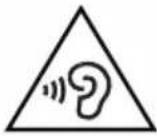 | WARNING!Warning of danger due to loud volume! |
| ·Bullet point/information on operating steps and results | |
| ►Tasks to be performed | |
2. Proper use
This device is used for playing audio files streamed over a WLAN network. In addition, you can use the device to play audio signals from external devices, as well as to charge USB devices.
Never use the device for any other purpose. Only use the device indoors.
- The device is intended for private use only and not for industrial/commercial use.
Please note that we shall not be liable in cases of improper use:
- Do not modify the device without our consent and do not use any auxiliary equipment that we have not approved or supplied.
- Use only spare parts and accessories that we have supplied or approved.
- Heed all the information in these operating instructions, especially the safety information. Any other use is deemed improper and can cause personal injury or property damage.
- Do not use the device in extreme environmental conditions.
3. Safety information
3.1. People not permitted to use this device
Keep the device and its accessories out of the reach of children.
- This device may be used by children over the age of 8 and by persons with reduced physical, sensory or mental abilities or by those without experience and/or knowledge, if they are supervised or have been instructed in the safe use of the device and have understood the dangers that result from it. Children must not be allowed to play with the device. Cleaning and user maintenance may not be carried out by children, unless they are aged 8 or over and are supervised.
- Children younger than 8 should be kept away from the device and the mains cable.
- DANGER! Keep plastic packaging out of the reach of children. There is a risk of suffocation!
3.2. Setting up the device safely
- Set up and operate all the components on a stable, level and vibration-free surface to prevent the product from falling.
- Do not subject the product to knocks and vibrations. Knocks and vibrations may damage the sensitive electronics.
- Do not place the product near heat sources (e.g. heaters) that could affect it.
- Do not place naked flames (e.g. lit candles) on or near the product.
- Make sure that the vents are never covered so as to ensure that there is always adequate ventilation.
- Do not place any objects on the cables as they may be damaged.
- Maintain a minimum distance of approx. 10 cm between the product or mains adapter and any walls. Ensure adequate ventilation.
- Do not place liquid-filled containers, such as vases, on or near the device. The container may tip over and the liquid may impair the electrical safety of the product. Keep the device away from moisture and from water in droplet or spray form.
- In order to prevent malfunctions, avoid knocks, dust, heat and direct sunlight. The operating temperature is 5-35°C.
- Do not use the product outdoors as it could be damaged by rain, snow, etc.
- To avoid malfunctions, keep the product at a distance of at least one metre from high-frequency or magnetic interference sources (televisions, loudspeakers, mobile telephones, etc.). If any malfunctions occur, set up the device at a different location.
- Major changes in temperature or fluctuations in humidity can cause moisture to build up within the product due to condensation – this can cause an electrical short circuit.
3.3. Mains connection
- Connect the mains adapter only to a power socket (AC 100–240 V \~ 50/60 Hz) that is easy to reach and close to the place where you have set up the device. The socket outlet must be freely accessible so that you can unplug the device from the mains quickly if necessary.
- Only use the power cable supplied with the product. Never try to
connect the mains adapter to other connectors as this may cause damage.
- If the product has been moved from a cold room to a warm room, wait before connecting it to the power supply. The resulting condensation may damage the device. The device can be operated safely as soon as it has reached room temperature.
- Make sure that the mains cable does not present a trip hazard. Do not allow the connecting cable to become trapped or squashed.
3.4. Thunderstorms
Pull out the mains plug if you are away for a long period of time or there is a thunderstorm.
3.5. Never carry out repairs yourself
- If the plug, cable or device is damaged, immediately unplug the device from the mains.
- Do not use the device if it or the connecting cables are visibly damaged or if the device itself has been dropped.

WARNING!
Never try to open and/or repair a device component yourself. There is a risk of electric shock!
- In the event of a fault, contact our Service Centre or another suitable professional repair workshop.
4. Getting started
4.1. Check package contents
Remove all packaging materials including the film on the display.

DANGER!
Do not let children play with the plastic film. There is a risk of suffocation!
Please check your purchase to ensure that all items are included. If anything is missing, please contact us within 14 days of purchase. The following items are supplied with your product:
- WLAN loudspeaker
- Mains adapter (model OH-1024A1801200U-VDE)
• These operating instructions - Warranty card
4.2. Connections
WLAN mode: The device has an integrated WLAN antenna.
Mains adapter: Connect the connector plug on the supplied mains adapter to the DC IN socket and plug the mains plug into an AC 100–240 V \~ 50/60 Hz socket.
LINE IN: Connect a 3.5 mm stereo jack to the LINE IN socket to play back stereo sound output from other audio devices via the WLAN loudspeaker.
USB: You can connect a smart device here to charge its internal battery via the USB connection.
▶ ETHERNET: Connect a network cable to the ETHERNET socket to connect the WLAN loudspeaker to your home network via LAN.
5. Overview of the WLAN loudspeaker
5.1. Top
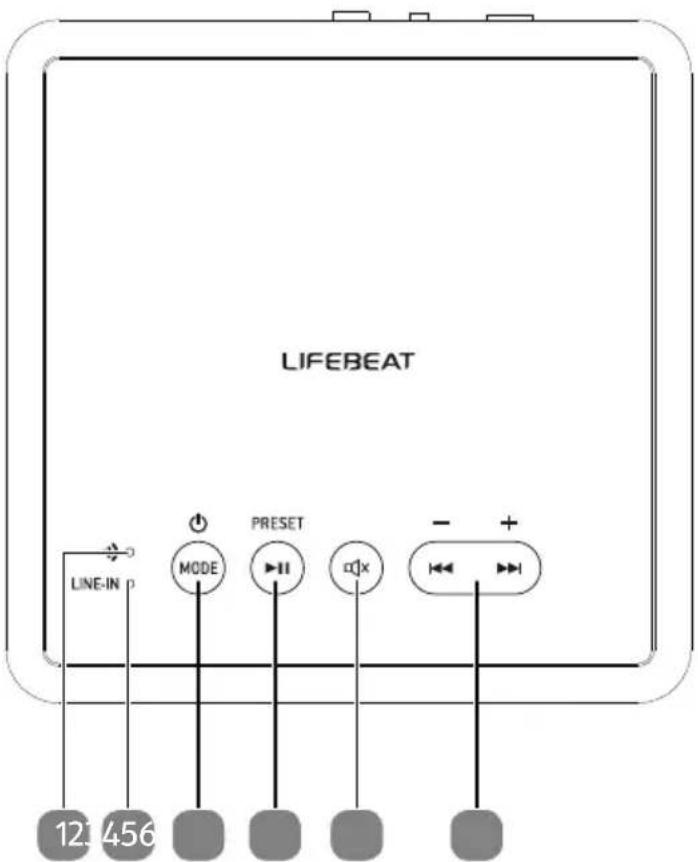
1) WIFI LED:
Flashes in yellow Waiting for a WLAN connection
Flashes quickly in yellow WLAN operating mode (searching for connection)
Lights up yellow WLAN operating mode (connected)
Off
Standby
mode
2) LINE IN LED: Lights up green for playback via LINE IN.
3) MODE/STANDBY: Switch to standby mode/switch on device; select operating mode
4) ▶II; PRESET/PAIR: Play/Pause; BT pairing
5) MUTE: Switch sound to mute
6) VOL-/VOL+: Press for a long time: reduce/increase sound, press briefly: previous track/next track (not available in Bluetooth mode)
5.2. Rear
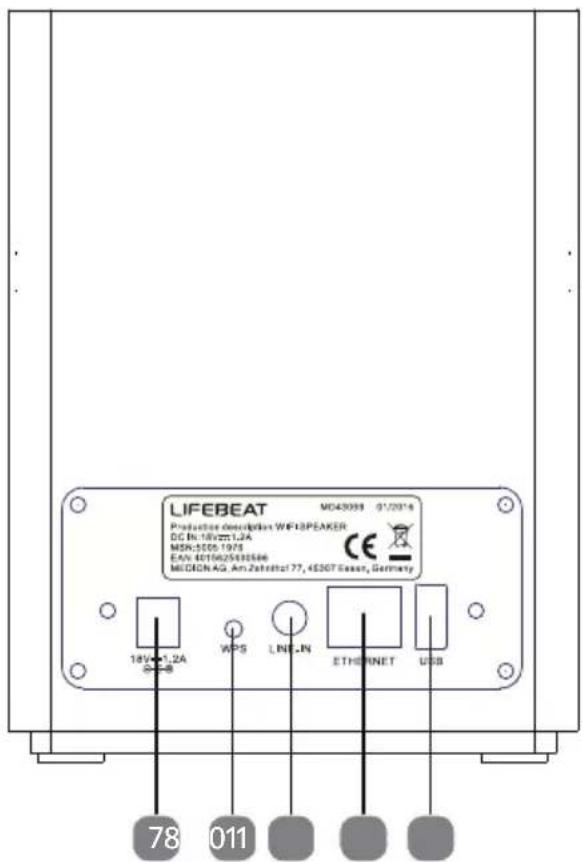
7) D C IN: Socket for power cable
8) WPS: Use WPS function
9) LINE-IN: Audio input, 3.5 mm stereo socket
10) Ethernet: LAN socket (RJ45 socket)
11) USB: USB port for charging external devices
6. LED displays
| LED Display Status | ||
| LINE IN | Green light LINE IN operating mode | |
| WIFI | Flashes yellow Waiting for WLAN connection | |
| Flashes quickly yellow | WLAN operating mode (searching for connection) | |
| Lights up yellow WL | AN operating mode (connected) | |
| Off Standby mode | ||
7. Network configuration
The WLAN loudspeaker is connected to the network via WLAN or LAN. The WLAN antenna on the loudspeaker receives the signals from your network router.
In order to connect the WLAN loudspeaker to your home network via LAN, connect a network cable to the ETHERNET socket.
7.1. Network requirements
The network must meet the following requirements for the device to be able to access music files on the network:
- The router used for the network must have a DHCP server function so it can automatically assign the device a network IP address.
Otherwise, set the DHCP function in the web interface to manual.
- The media sharing function for UPNP must be set up on the router.
8. Connecting to a power supply
Connect the power supply plug on the supplied mains adapter (model OH-1024A1801200U-VDE) to the DC IN socket on the device.
Connect the mains adapter to a 230 V \~ 50/60 Hz socket.
9. Switching the loudspeaker on and off
Switching on the loudspeaker
▶ Press the MODE/STANDBY button on the loudspeaker to turn it on.
The loudspeaker switches to the last mode set.
Standby mode
▶ Press and hold down the MODE/STANDBY button until the Bluetooth and WIFI LEDs go out to switch the loudspeaker to standby mode.
In standby mode, the loudspeaker maintains its network connection so that it is immediately available to use when it is switched on again. The loudspeaker consumes more electricity in this operating mode than in standby mode.
10. Using the device for the first time
- You can connect the WLAN loudspeaker to your router's existing network with the WPS button.
- When using the WLAN loudspeaker for the first time, position it as near as possible to the router in order to guarantee a clear WLAN signal during the setup process. Then move the WLAN loudspeaker to the desired position within the range of the WLAN signal.
10.1. WLAN connection via WPS
If your router has a WPS button, you can easily connect the loudspeaker to the network using this button:
▶ Press the WPS button on the WLAN loudspeaker until the WIFI LED flashes in yellow.
Now press the WPS button on the WLAN router.

NOTICE!
Please also refer to the instructions for the router.
The device will now establish a connection with the network. The WIFI LED flashes quickly while the connection is being established.
- Once a connection has been successfully established, the WIFI LED will light up permanently in yellow.
- The device can now play back audio signals via the network.
- The device saves the connection data so that it does not need to be entered again when the device is switched on again.
11. Control using the Lifebeat P application
You can control your loudspeaker using the Lifebeat P app on your smartphone or tablet PC.
11.1. Installation via direct link
Scan the adjacent QR code to be directed to the download page for the Lifestream IR app on Google Play or the App Store from Apple:

11.2. Installation via Google Play or the Apple App Store
▶ Open Google Play or the Apple App Store and search for the term "MEDION Lifebeat P" ^1 .
▶ Install the "Lifebeat P" app from Medion. Follow the installation instructions on the screen.

NOTICE
In order to be able to install the Lifebeat P application, there must be an Internet connection.
12. Adding the WLAN loudspeaker to a network
▶ Switch on the loudspeaker and wait until the system has completely powered up (you will hear a welcome tone).
▶ Switch the loudspeaker to WLAN mode. The WIFI LED flashes in yellow.
Connect your mobile device to your WLAN network.
▶ Start the LIFEBEAT P app and tap on Add Device.
Now press the WPS button on the rear of the loudspeaker. The WIFI LED flashes quickly in yellow.
Tap on Next.
Now enter the password for your WLAN network and confirm your entry by tapping on Connect.
Now enter the password for your WLAN network and confirm your entry by tapping on Connect.
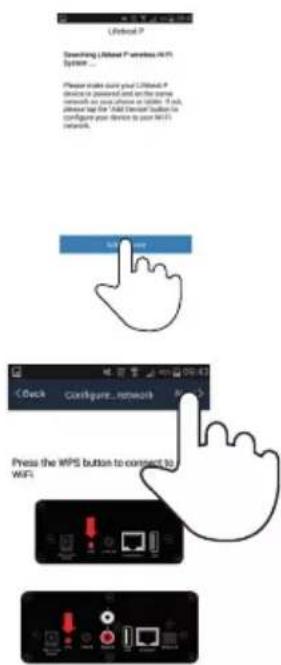

▶ A signal tone will sound after the connection has been successfully established and the WIFI LED will light up in yellow.
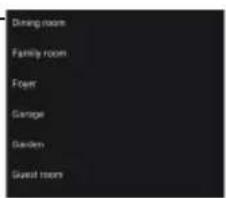
You can now enter a name for your WLAN loudspeaker in the app. This enables you to differentiate between loudspeakers if you are operating multiple loudspeakers.

NOTICE
Your mobile device (smartphone or tablet PC) must be registered on your router's WLAN network.
13. Playing back music
You can use your WLAN loudspeaker to play music from the network, play music from a device registered via WLAN (direct mode) or play stereo signals from an externally connected device.
The following section describes the operating modes on the WLAN loudspeaker and the different audio sources.

NOTICE!
A corresponding UPNP-capable app is required to control music play-back via the network with a smartphone or tablet PC.
13.1. Installing the app on an Android/Apple smartphone/tablet PC
In order to be able to control music playback on the WLAN loudspeaker from a tablet PC or smartphone, you first need to install the LIFEBEAT P app for your tablet PC/smartphone that is available via the Playstore (Android) or AppStore (Apple).
13.2. Establishing a direct WLAN connection via LIFEBEAT P
If it is not possible to establish a network connection via WPS, use the LIFEBEAT P app on your smartphone or tablet to establish a connection with the Internet or the WLAN loudspeaker.
▶ Switch on the loudspeaker and wait until the system has completely powered up (welcome tone).
▶ Switch the loudspeaker to WLAN mode. The WIFI LED flashes in yellow.
▶ Open the WLAN settings on your mobile device.
▶ Select the suggested audio system "P61074_XXXX" and tap on connect.
▶ If using for the first time, enter the network key "LIFE-BEAT".

NOTICE!
It is highly recommended that you change the network key for the loudspeaker after using it for the first time.
Now press the "back button" on your smartphone.
▶ Start the LIFEBEAT P app.
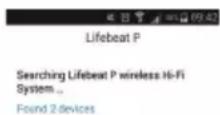
The LIFEBEAT P app now connects your mobile device to the WLAN loudspeaker.
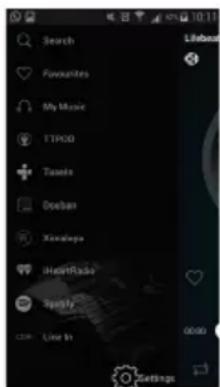
As soon as the connection is operational, the app switches automatically to the source directory.
As soon as the device setup and thus the WLAN loudspeaker's connection to the Internet has been successfully completed, the WIFI LED lights up permanently in yellow.
13.3. Listening to music via Spotify®
You can play back audio files from the music streaming service
Spotify ^® via the WLAN loudspeaker. The prerequisite is that you have the premium version of the Spotify app installed on your smartphone or tablet PC and the WLAN loudspeaker and the device with the Spotify app are registered on the same network.

13.4. Installing Spotify
▶ Open Google Play or the Apple App Store and search for the term Spotify.
▶ Install the Spotify app on your smartphone or tablet PC. Follow the installation instruction on the screen.
▶ Subscribe to a premium account from Spotify®.

NOTICE!
In order to be able to install the Spotify application, there must be an Internet connection.
The premium version of the Spotify app is subject to a fee.
You can find information about Spotify® software licences at www.spotify.com/connect/third-party-licenses.
14. Playback via the LIFEBEAT P app
▶ Switch on the loudspeaker and wait until the system has completely powered up (you will hear a welcome tone).
▶ Switch the loudspeaker to WLAN mode. The WIFI LED flashes in yellow.
▶ Start the LIFEBEAT P app. The app starts on the main screen where you can open playlists, skip forwards and backwards through tracks, change the volume or select favourites.
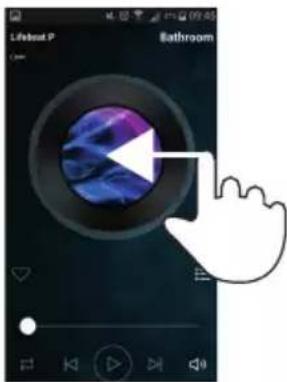
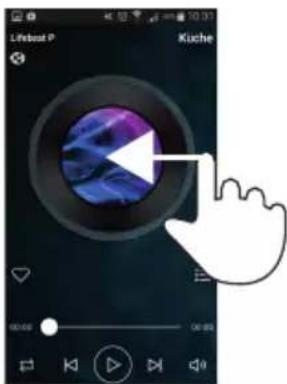
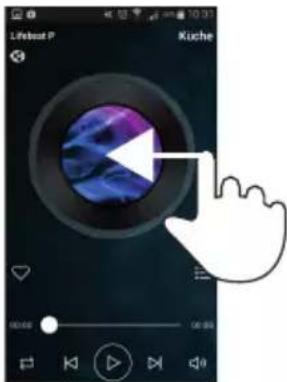
▶ Open the device list by swiping your finger from right to left on the main screen of the app.
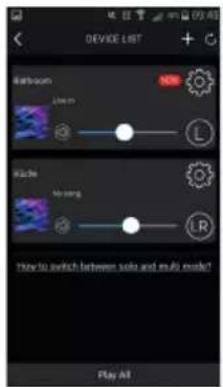
All of the registered WLAN loudspeakers will now be displayed here.
In order to add a WLAN loudspeaker to a group, you need to tap on the corresponding WLAN loudspeaker and simply "pull" it onto another desired WLAN loudspeaker.
This enables you to play music from all of the WLAN loudspeakers "allocated" to this group at the same time.
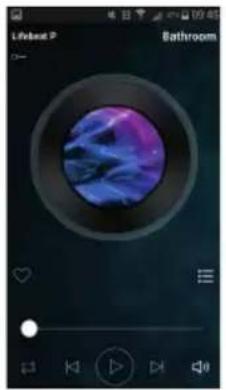
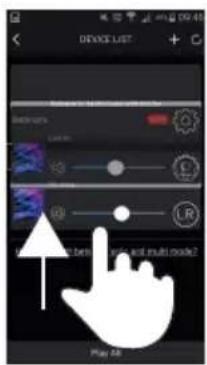
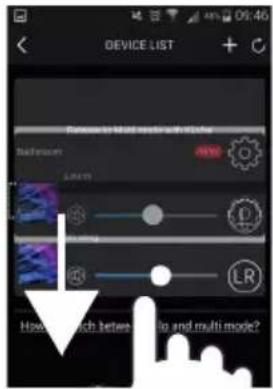
In order to delete a WLAN loudspeaker from a group, simply "pull" the desired WLAN loudspeaker out of the group.
You can now play different music via each individual WLAN loudspeaker.
NOTICE
You can also use the playback modes (LINE IN or BLUE-TOOTH) to play music on other loudspeakers!
15. Playback from an external audio device
Connect a 3.5 mm stereo jack to the LINE IN socket to play back stereo sound output from other audio devices via the WLAN loudspeaker.
- Then use the MODE button on the loudspeaker to select the operating mode LINE IN (see "6. LED displays" on page 38).
16. Charging a USB device via the USB socket
You can charge the battery on a device that is capable of being charged via a USB connection using the USB socket on the WLAN loudspeaker.
Connect the device that you want to charge to the USB socket on the rear of the WLAN loudspeaker using a USB cable.

NOTICE
The USB socket on the WLAN loudspeaker delivers a charging current of 1 A at an output voltage of max. 5 V. Any devices that you connect to the WLAN loudspeaker for charging must not consume higher currents.
In order to charge other devices, the WLAN loudspeaker must either
be switched on and the USB charging function selected or the device should be in standby mode.
17. Resetting the device in case of malfunction
If the device fails to react, disconnect the mains plug from the mains socket and then plug it in again after a few seconds.
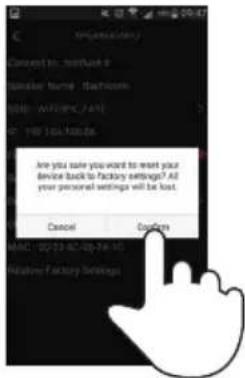
17.1. Resetting the device to factory settings via the app
▶ Switch the WLAN loudspeaker on.
▶ Start the LIFEBEAT P app.
▶ Open the device list by swiping your finger from right to left on the main screen of the app.
▶ Now tap on the setting) for the desired WLAN loudspeaker.
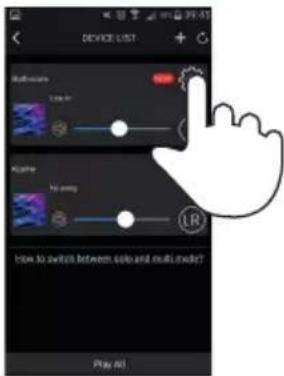
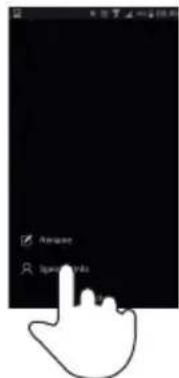
Now tap on Speaker Info.
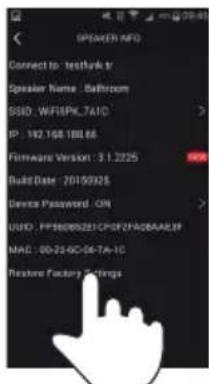
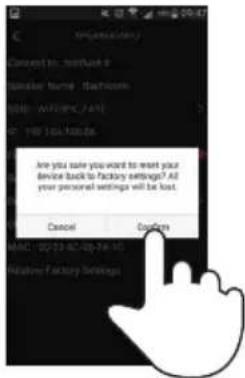
Now tap on Restore Factory Settings.
Now tap on Confirm.
17.2. Manually resetting the device to factory settings
If the loudspeaker no longer connects to the WLAN access point or you want to re-establish the WLAN connection, you can manually reset the device to the factory settings.
▶ Press and hold down the WPS button on the rear of the loudspeaker for around 10 seconds.
The loudspeaker will switch off and then back on again.
▶ Wait until the system has completely powered up.
Two signal tones will then sound to confirm that the settings have been reset.
Connect the loudspeaker to a WLAN access point again as described in "7. Network configuration" on page 38.
18. Software update
- You can update the software for the WLAN loudspeaker via the app. The app searches to see if a software update is available and then downloads the update onto the WLAN loudspeaker from the Internet.
▶ Switch the WLAN loudspeaker on.
▶ Start the LIFEBEAT P app.
▶ Open the device list by swiping your finger from right to left on the main screen of the app.
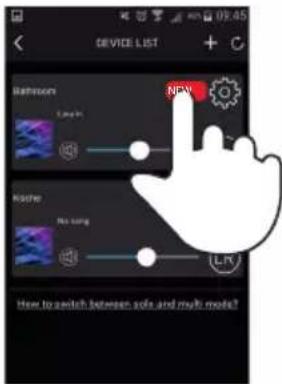
The app automatically checks whether a software update is available for the registered WLAN loudspeaker.
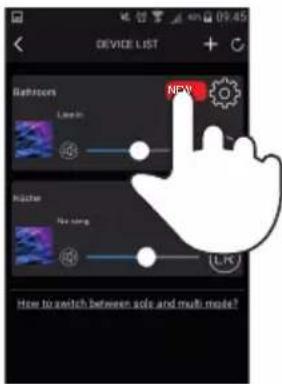
If an update is available, the information field NEW appears next to the setting (for the corresponding WLAN loudspeaker.
Now tap on NEW to start the software update for the desired WLAN loudspeaker.
19. Troubleshooting
If the product malfunctions, please check first if you can remedy the problem yourself with the help of the following hints.
Never try to repair the product yourself. Please contact our Service Centre or another professional repair shop if a repair is necessary.
| Problem Possible | cause Solution | |
| No sound Incorrect playback | k mode selected | Select WLAN mode or LINE IN mode. |
| Volume level too low. Check the volume level. | ||
| No reception. Check the network settings. | ||
| Problems with the router connection. | No DHCP server is activated. | Check the router settings. |
| An incorrect network key was entered for the network. | Re-enter the network key for the network. | |
| The IP address that you have manually entered is outside of the address range for the router. | Enter a valid IP address for the WLAN loudspeaker. | |
| The settings for the access point have changed. | Manually reset the device to the factory settings and connect it again to the access point. | |
| The WLAN loudspeaker cannot be controlled by the Lifestream app. | The WLAN loudspeaker and smartphone/tablet PC are not on the same WLAN network. | Check the network status of the WLAN loudspeaker and smartphone/tablet PC. |
20. Cleaning
▶ Switch off the device before cleaning it.
▶ Use a soft, dry cloth to wipe the device. Never use rough cloths, abrasive detergent, thinners or solutions containing alcohol to clean the device. These can damage the device.
21. Disposal

Packaging
Your device is packaged to protect it from transportation damage. Packaging is raw material and can be reused or added to the recycling system.
Device
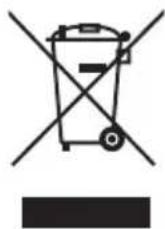
Old devices should not be disposed of with the normal household rubbish. In accordance with Directive 2012/19/EU, the device must be properly disposed of at the end of its service life. This involves separating the materials in the device for the purpose of recycling and avoiding any impact on the environment. Take old devices to a collection point for electrical scrap or a recycling centre. Contact your local waste disposal company or your local authority for more information on this subject.

Batteries
Batteries must be properly disposed of. Retailers who stock batteries and local authority collection points have appropriate disposal containers for this purpose. You can contact your local waste disposal company or municipal authorities for further information.
22. Technical data
Mains adapter
Model: OH-1024A1801200U-VDE
Manufacturer: ORIENTAL HERO ELE. FTY.
Input voltage: AC 100 – 240 V \~ 50/60 Hz, 800 mA max
Output voltage: 18 V 1.2 A

Device
Speakers: 20 W
Dimensions: approx. 132 x 174 x 132 cm
Weight: approx. 1.2 kg
WLAN
Frequency range: 2.4 GHz
WLAN standard: 802.11 b/g/n
Encryption: WPA2 possible
Range: inside approx. 35–100 m/ outside approx. 100–300 m
Connections
Mains adapter input: DC 18 V, 1.2 A
LINE IN: 3.5 mm stereo jack
USB: USB 2.0 A port DC 5 V -- max. 1 A
Subject to technical and optical changes as well as printing errors.
23. Compliance information
This device is supplied with the following wireless features:
- Wireless LAN
Medion AG hereby declares that the product conforms to the following European requirements:
• R&TTE Directive 1999/5/EC
• EMC Directive 2014/30/EC
• Low Voltage Directive 2014/35/EC
• Ecodesign Directive 2009/125/EC
• RoHS Directive 2011/65/EU
This product satisfies the basic requirements and relevant regulations of the Ecodesign Directive 2009/125/EC (Commission Regulation 1275/2008). However, due to its mode of operation (continuous permanent provision of a WLAN signal), no provision is made in respect of this product to minimise power consumption in accordance with the Ecodesign Directive.
To minimise power consumption, disconnect the device from the power outlet when not required.
Full declarations of conformity are available at www.medion.com/conformity.
CE
24. Legal notice
Copyright © 2016
Status: 2016-02-19
All rights reserved.
This operating manual is protected by copyright.
Mechanical, electronic and any other form of reproduction is prohibited without the written permission of the manufacturer
Copyright is owned by the company:
Medion AG
Am Zehnthof 77
45307 Essen
Germany

The operating manual can be reordered via the service hotline and is available for download via the service portal at www.medion.com/gb/service/start/.
You can also scan the QR code above and download the operating manual onto your mobile device via the service portal.
İçindekiler
DE
1. Bu kılavuz ile ilgili açıklamalar 57
1.1. Kullanılan simgeler ve uyarı sözcükleri ....57
2. Amaca uygun kullanım....58
3. Güvenlik uyarıları
3.1. Müsaade edilmeyen kişiler ....58
3.2. Cihazın güvenli kurulumu ....59
3.3. Elektrik bağlantısı....59
3.4. Firtina 60
3.5. Asla kendiniz onarmayın 60
4. Hazırlık
4.1. Teslimat kapsamının kontrolü 60
4.2. Bağlantılar 61
5. WLAN hoparlörüne genel bakış......62
5.1. Üst taraf....62
5.2. Arka taraf....63
6. LED göstergeler
7. Ağ konfigürasyonu
7.1. Gerekli ağ özellikleri....64
8. Güç beslemesini sağlama....64
9. Hoparlörü açma ve kapatma....65
10. İlk kez işletme alma 65
10.1. WPS üzerinden WLAN bağlantısı 65
11. Lifebeat P uygulaması üzerinden kumanda...... 66
11.1. Doğrudan bağlantı üzerinden yükleme 66
11.2. Google Play veya Apple App Store üzerinden yükleme....66
12. WLAN hoparlörü ağa ekleme....67
13. Müzik çalma 68
13.1. Android/Apple akıllı telefona/tablet bilgisayara uygulama yükleme 68
13.2. LIFEBEAT P üzerinden doğrudan WLAN bağlantısı kurma ......69
13.3. Spotify® üzerinden müzik dinleme....70
13.4. Spotify yükleme....70
14. LIFEBEAT P uygulaması üzerinden çalma 71
15. Harici audio cihazından çalma....72
16. USB cihazını USB bağlantı yeri üzerinden şarj etme...... 72
17. Hatalı çalışmada sıfırlama....73
17.1. Cihaza uygulama üzerinden fabrika ayarlarını yükleme .....73
17.2. Cihaza manüel olarak fabrika ayarlarını yükleme .....74
18. Yazılım güncellemesi 75
19. Hata giderme 76
20. Temizlik....77
- Bertaraf etme 77
- Teknik bilgiler 78
- Uygunluk bilgileri 79
1. Bu kılavuz ile ilgili açıklamalar

Cihazı ilk kez işletme almadan önce bu kullanım kılavuzunu özenle okuyun ve güvenlik uyarılarına mutlaka uyun!
Bu kullanım kılavuzunu bir başvuru kaynağı olarak muhafaza edin. Ciha- zı başka bir kullanıcıya vermek istediğinizde, lütfen beraberinde bu kul- lanım kılavuzunu da verin.
1.1. Kullanılan simgeler ve uyarı sözcükleri
 | TEHLİKE!Mutlak hayati tehlikelere karşı uyarı!UYARI!Olası hayati tehlikelere ve/veya ağır kalıcı yaralanmala-ra karşı uyarı!DİKKAT!Orta ve/veya hafif yaralanmalara karşı uyarı! |
 | DİKKAT!Maddi zararları önlemek için açıklamaları dikkate alın! |
 | BİLGİ!Cihazın kullanımına ilişkin ayrıntılı bilgiler! |
 | BİLGİ!Kullanım kılavuzundaki bilgileri dikkate alın! |
 | UYARI!Elektrik çarpma tehlikesine karşı uyarı! |
 | UYARI!Ses seviyesinin yüksek olması nedeniyle oluşabilecek tehlikelere karşı uyarı! |
| • Madde işareti / kullanım sırasındaki işlemlere ilişkin bilgi | |
| ▸ Yürütülmesi gereken işlemler/talimatlar | |
2. Amaca uygun kullanım
Cihaz, WLAN ağı üzerinden alınan audio verilerini çalmak içindir. Ayrıca cihazı kullanarak harici cihazların audio sinyallerini çalabilir ve USB cihazları şarj edebilirsiniz.
Cihazı başka bir amaçla kullanmayın. Cihazı sadece kapalı ortamlarda çalıştırın.
- Cihaz endüstriyel/ticari kullanım için değil, sadece kişisel kullanım için tasarlanmıştır.
Cihazın amacına uygun kullanılmaması durumunda garantisinin geçerliliğini yitireceğini lütfen dikkate alın.
- Cihazda bizim onayımızı almadan değişiklik yapmayın ve bizim onayımız olmayan ya da bizim tarafımızdan teslim edilmeyen ilave cihazlar kullanmayın.
- Yalnızca bizim tarafından teslim edilen ya da onaylanan yedek parça ve aksesuarları kullanın.
- Bu kullanım kılavuzundaki tüm bilgileri, özellikle de güvenlik tali-matlarını dikkate alın. Bunlardan farklı her tür kullanım amaç dışı kullanım sayılır ve yaralanmalara veya maddi hasarlara yol açabilir.
- Cihazı aşırı zorlu ortam koşullarında kullanmayın.
3. Güvenlik uyarıları
3.1. Müsaade edilmeyen kişiler
Cihazı ve aksesuarlarını çocukların erişemeyeceği bir yerde saklayın.
- Bu cihaz, 8 yaş üstü çocuklar ve fiziksel, duyusal ve zihinsel yetileri kısıtlı olan ve/veya deneyim ve bilgi açısından yetersiz olan kişiler tarafından ancak gözetim altında veya cihazın güvenli kullanımı konusunda bilgilendirilmiş ve ortaya çıkabilecek tehlikeleri anlamı olmaları halinde kullanılabilir. Çocukların cihazla oynaması yasaktır. 8 yaşından büyük olmamaları ve gözetim altında olmamaları halinde çocuklar tarafından cihaz temizliği ve bakımı yapılmamalıdır;
- 8 yaşından küçük çocukların cihazdan ve bağlantı kablosundan uzak tutulması gerekmektedir.
- TEHLİKE! Ambalaj folyolarını da çocuklardan uzak tutun. Bunlar boğulma tehlikesine yol açabilir.
3.2. Cihazın güvenli kurulumu
- Cihazın düşmesini önlemek için tüm bileşenleri sağlam, düz ve titreşimsiz bir zemin üzerine koyup çalıştırın.
- Cihazı sarsıntılara maruz bırakmayın. Sarsıntılar, hassas elektronik sisteme hasar verebilir.
- Cihazı doğrudan ısı kaynaklarına (örn. kalorifer) maruz bırakmayın.
- Cihazın üstüne veya yakınına açık ateş kaynakları (örn. yanan mumlar) konulmamalıdır.
- Her zaman yeterince hava sirkülasyonu olmasını sağlamak için ha- valandırma deliklerinin açık kalmasına dikkat edin.
- Kablonun üzerine herhangi bir nesne koymayın, aksi halde bunlar hasar görebilir.
- Duvarlar ve cihaz/elektrik adaptörü arasında en az yakl. 10 cm mesafe olmasına dikkat edin. Yeterli hava sirkülasyonu olmasını sağlayın.
- Cihazın üstüne veya yakınına, vazo gibi içi sıvı dolu kaplar koymayın. Kap devrilebilir ve içerisindeki sıvı elektrik emniyeti açısından olumsuzluk yaratabilir. Cihazı nemden, damlayan ve sıçrayan sudan uzak tutun.
- Arızaları önlemek için cihazı sarsıntılara, toza, ısıya ve doğrudan güneş ışığına maruz bırakmayın. Çalışma sıcaklığı 5 ila 35 °C arasındadır.
- Yağmur, kar vb. dış etkenler cihaza zarar verebileceği için cihazınızı açık havada çalıştırmayın.
- Çalışma hatalarını önlemek için yüksek frekanslı ve manyetik parazit kaynaklarına (televizyon, hoparlörler, cep telefonu vs.) en az bir metre mesafe bırakın. Çalışma hataları ortaya çıkıyorsa cihazı başka bir yere kurun.
- Büyük sıcaklık ve nem dalgalanmalarında cihaz içerisinde yoğuşma nedeniyle nem oluşabilir ve sonuç olarak elektriksel kısa devre meydana gelebilir.
3.3. Elektrik bağlantısı
- Elektrik adaptörünü, sadece kurulum yerine yakın bir noktada yer alan ve kolay erişilebilen bir prize (AC 100–240 V\~ 50/60 Hz) takın. Cihazı hızlı bir şekilde şebekeden ayırmanız gereken durumlar ola-
bileceği için prize kolayca erişebilmeniz gerekmektedir.
- Sadece ürünle birlikte gelen elektrik adaptörünü kullanın. Asla elektrik adaptörünü başka yuvalara bağlamaya çalışmayın, aksi halde hasara sebep olabilirsiniz.
- Cihaz soğuk bir ortamdan sıcak bir ortama alındığı zaman elektrik adaptörünü hemen takmayın. Bu esnada oluşan yoğuşma suyu ci-haza zarar verebilir. Cihaz oda sıcaklığına ulaştığı zaman tehlike yaratmayacak şekilde çalıştırılabilir.
- Bağlantı kablosunu, insanların ayağı takılıp düşmeyecek şekilde döşeyin. Bağlantı kablosu sıkıştırılmamalı ve ezilmemelidir.
3.4. Firtina
Cihazı uzun süre kullanmayacağını durumlarda veya fırtınalı havalarda elektrik fişini prizden çekin.
3.5. Asla kendiniz onarmayın
- Elektrik adaptörünün, bağlantı kablosunun veya cihazın hasar görmesi halinde derhal fişi prizden çekin.
- Cihazda veya bağlantı kablolarında görünen hasarlar varsa veya cihaz düştüğünde cihazı çalıştırmayın.

UYARI!
Hiçbir surette cihazın içini kendi başınıza açmaya ve/veya tamir etmeye çalışmayın. Elektrik çarpması tehlikesi vardır!
- Arıza durumunda servis merkezine ya da uygun olan başka bir servise başvurun.
4. Hazırlık
4.1. Teslimat kapsamının kontrolü
Ekran üzerindeki folyo dahil olmak üzere tüm ambalaj malzemelerini çıkarın.

TEHLİKE!
Küçük çocukların folyo ile oynamasına izin vermeyin. Bunlar boğulma tehlikesine yol açabilir.
Lütfen teslimatın eksiksiz olup olmadığını kontrol edin ve herhangi bir eksiklik durumunda, alış tarihinden itibaren 14 gün içinde, bizi haberdar edin. Satın aldığınız
ürünle birlikte şunlar teslim edilmiştir:
- WLAN hoparlör
- Elektrik adaptörü (Model OH-1024A1801200U-VDE)
- Bu kullanım kılavuzu
- Garanti kartı
4.2. Bağlantılar
WLAN modunda işletim: Cihaza bir WLAN anteni entegre edilmiştir.
Elektrik adaptörü: Ürünle birlikte verilen elektrik adaptörünün fişini DC IN bağlantı yerine takın ve elektrik fişini bir prize takın (AC 100–240 V\~ 50/60 Hz).
LINE-IN: Başka audio cihazların stereo sesini WLAN hoparlör üzerinden çalmak için LINE-IN yuvasına 3,5 mm'lik bir stereo jak kablosu bağlayın.
USB: Buraya USB bağlantısı üzerinden cihaz içi bataryayı şarj etmek için bir akıllı cihaz bağlayabilirsiniz.
▶ ETHERNET: WLAN hoparlörü LAN üzerinden ev ağınıza bağlamak için ETHERNET bağlantısına bir ağ kablosu bağlayın.
5. WLAN hoparlörüne genel bakış
5.1. Üst taraf
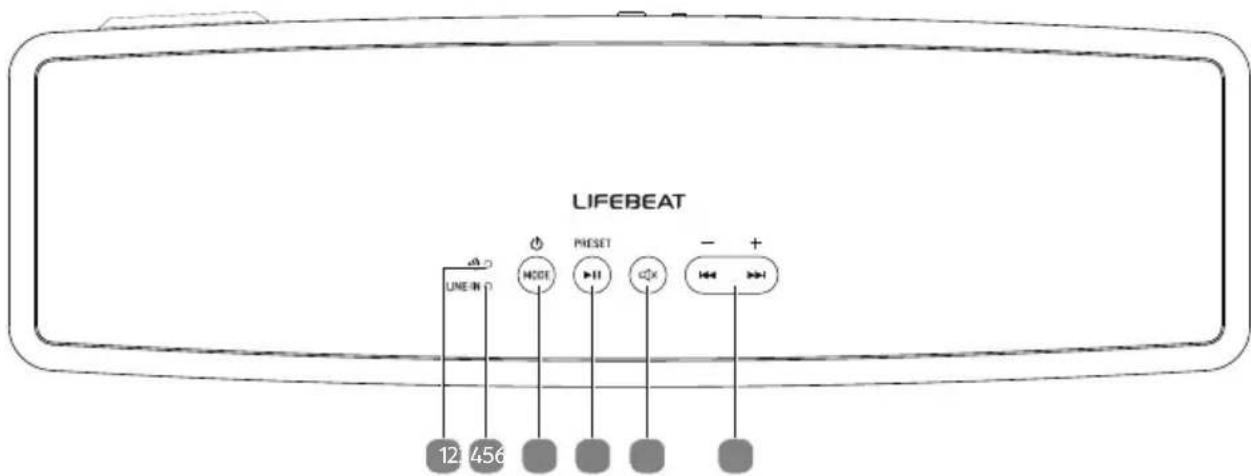
1) WIFI LED:
Sarı yanıp sönüyorsa WLAN bağlantısını bekliyor
Hızlı sarı yanıp sönüyorsa Çalışma modu WLAN (Bağlantı aranıyor)
Sarı yanıyorsa Çalışma modu WLAN (Bağlı)
Kapalı Bekleme modu
2) LINE IN LED: LINE IN üzerinden çalındığında, yeşil yanar.
3) MODE/STANDBY: Bekleme moduna alma/ Cihazı açma; Çalışma modunu seçme
4) ▶II; PRESET/PAIR: Çalma/Durdurma; BT eşleştirme
5) MUTE: Sesi kapatma
6) VOL -/VOL +: Daha uzun basınca: Ses seviyesini azaltma/arttirma, kısa basınca önceki parça/sonraki parça (Bluetooth modunda kullanılamaz)
5.2. Arka taraf
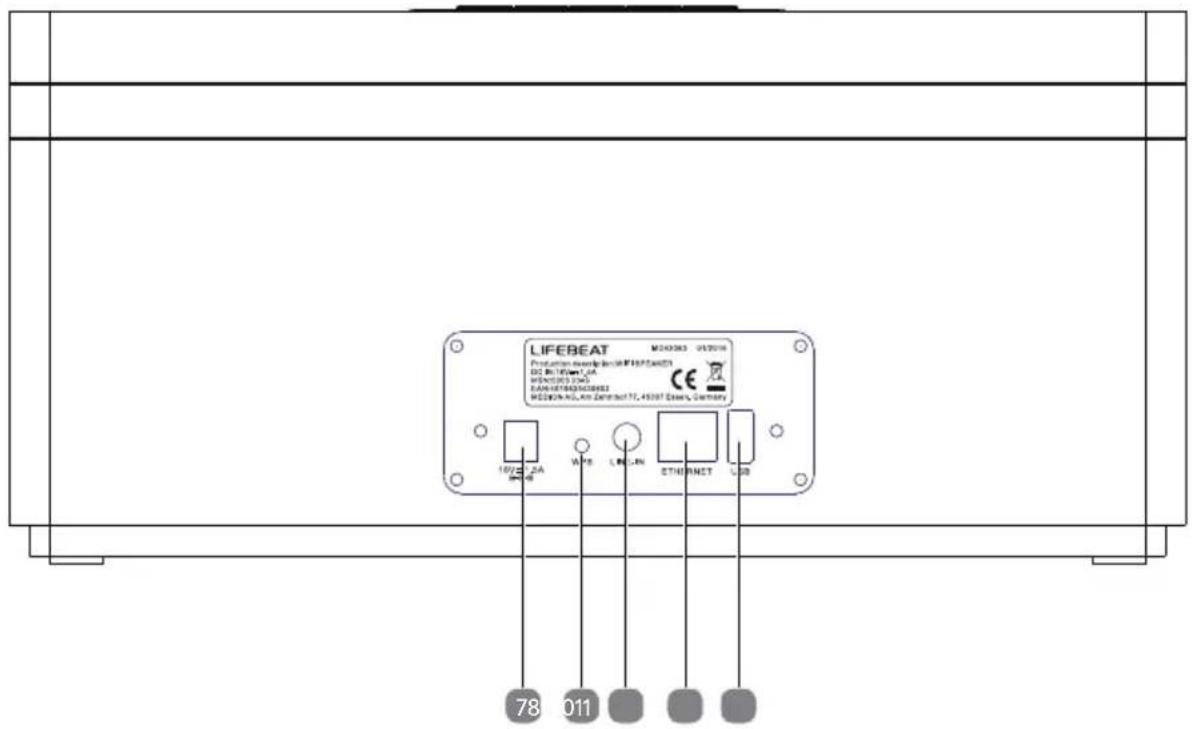
7) D C IN : Fişli elektrik adaptörü için yuva
8) WPS: WPS işlevinin kullanımı
9) LINE-IN: 3,5 mm stereo yuva audio girişi
10) Ethernet: LAN bağlantısı (RJ45 yuvası)
11) USB: Harici cihazları şarj etmek için USB bağlantısı
6. LED göstergeler
| LED Gösterim Durum | ||
| LINE IN | Yeşil yanıyorsa Çalışma modu LINE IN | |
| WIFI | Sarı yanıp sönü-yorsa | WLAN bağlantısı bekleniyor |
| Hızlı sarı yanıp sö-nüyorsa | Çalışma modu WLAN (Bağlantı aran-yor) | |
| Sarı yanıyorsa Çalışma modu WLAN (Bağlı) | ||
| Kapalı Bekleme modu | ||
7. Ağ konfigürasyonu
WLAN hoparlörü, WLAN veya LAN üzerinden ağ ile bağlanır. Hoparlörün WLAN anteni, ağ yönlendiricisinin sinyallerini alır.
WLAN hoparlörü LAN üzerinden ev ağınıza bağlamak için ağ kablosunu ETHERNET bağlantısına bağlayın.
7.1. Gerekli ağ özellikleri
Cihazın ağdaki müzik dosyalarına erişebilmesi için ağın aşağıdaki özellikleri sahip olması gerekmektedir:
- Ağ için kullanılan yönlendirici, ağdaki cihaza otomatik olarak IP adresi atayabilmesi için DHCP sunucu işlevine sahip olmalıdır.
Aksi takdirde DHCP işlevini Web arayüzünde manüel olarak ayarlayın.
- Yönlendiricide UPNP için medya izni ayarlanmış olmalıdır.
8. Güç beslemesini sağlama
Ürünle birlikte verilen elektrik adaptörünün fişini
(Model OH-1024A1801200U-VDE) cihazdaki DC IN yuvasına bağlayın.
Elektrik adaptörünü bir 230 V \~ 50/60 Hz prize bağlayın.
9. Hoparlörü açma ve kapatma
Hoparlörü açma
▶ Hoparlörü açmak için MODE/STANDBY tuşuna basın.
▶ Hoparlör, en son ayarlanmış olan çalışma modunda açılır.
Bekleme modu
▶ Hoparlörü bekleme moduna almak için Bluetooth ve WIFI LED'leri kapanana dek MODE/STANDBY tuşunu daha uzun süre basılı tutun.
Hoparlör bekleme modunda ağ bağlantısını kesmez, böylece yeniden açtığınızda hemen kullanabilirsiniz. Hoparlör bu çalışma modunda, bekleme moduna göre daha fazla elektrik tüketir.
10. İlk kez işletme alma
- WLAN hoparlörü, WPS tuşu üzerinden yönlendiricinizin mevcut ağına bağlayabilirsiniz.
- WLAN hoparlörü ilk kez işletme alırken kurulum sırasında kusursuz bir WLAN sinyali elde edebilmek için hoparlörü olabildiğince yönlendiricinin yakınına getirin. Ardından WLAN hoparlörü WLAN sinyalinin kapsama alanına kurun.
10.1. WPS üzerinden WLAN bağlantısı
Yönlendiricinizde WPS tuşu varsa hoparlör ile ağ arasındaki bağlantıyı bu tuş üzerinden kolayca yapabilirsiniz:
WIFI LED'i sarı yanıp sönene dek WLAN hoparlörde WPS tuşuna basın.
Şimdi WLAN yönlendiricinin WPS tuşuna basın.

BİLGİ!
Bununla ilgili olarak yönlendiricinin kullanım kılavuzunu da dikkate alın.
Cihaz şimdi ağa bağlanır. Bu esnada WIFI LED'i hızlıca yanıp söner.
- Bağlantı başarılı bir şekilde kurulduktan sonra WIFI LED'i sürekli sarı yanar.
- Cihaz şimdi ağdan audio sinyalleri çalabilir.
- Cihaz bağlantı verilerini kaydeder, dolayısıyla cihazı yeniden açtığınızda verileri yeniden girmeniz gerekmez.
11. Lifebeat P uygulaması üzerinden kumanda
Akıllı telefonunuz veya tablet bilgisayarınızdaki Lifebeat P uygulaması ile hoparlörü- nüzü kumanda edebilirsiniz.
11.1. Doğrudan bağlantı üzerinden yüklem
Yanda yazan QR kodu üzerinden Google Play'den veya Apple'ın App Store'u üzerinden Lifestream IR uygulamasını doğrudan indirebilirsiniz:

11.2. Google Play veya Apple App Store üzerinden yükleme
▶ Google Play veya Apple App Store'u açın ve "MEDION Lifebeat P" sözcüğü ile arama yapın ^1 .
Medion'un "Lifebeat P" uygulamasını yükleyin. Bu esnada ekranda yükleme işlemine yönelik talimatları izleyin.

BİLGİ
Lifebeat P uygulamasını yüklemek için bir İnternet bağlantısı mevcut olmalıdır.
12. WLAN hoparlörü ağa ekleme
▶ Hoparlörü açın ve sistemin komple açılmasını bekleyin (karşılama sesi duyulur).
▶ Hoparlörü WLAN moduna ayarlayın. WIFI LED'i sarı yanıp söner.
▶ Mobil cihazınızı WLAN ağınıza bağlayın.
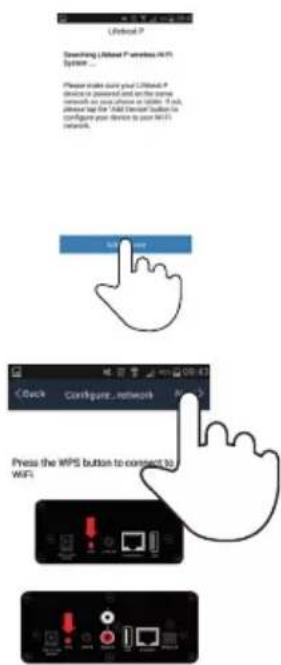
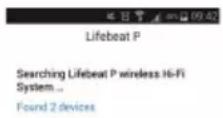
LIFEBEAT P uygulamasını başlatın ve Add Device üzerine tıklayın.
Şimdi hoparlörün arka tarafındani WPS tuşuna basın. WIFI LED'i hızlı sarı yanıp söner.
▶ Next üzerine dokunun.
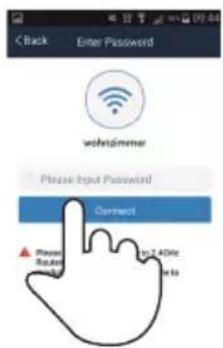
Şimdi WLAN ağınızın şifresini girin ve Connect üzerine basarak yaptığınız girişi onaylayın.
Şimdi WLAN ağınızın şifresini girin ve Connect üzerine basarak yaptığınız girişi onaylayın.
Bağlantı başarılı bir şekilde kurulduktan sonra bir sinyal sesi duyulur WIFI LED'i sarı yanar.
Şimdi uygulamada WLAN hoparlörünüze bir ad verebilirsiniz. Böylece birden fazla hoparlör çalıştırdığınızda, bunları birbirlerinden ayırt edebilirsiniz.


BİLGİ
Mobil cihazınızın (akıllı telefon veya tablet bilgisayar) yönlendiricinin WLAN ağına kayıtlı olması gerekmektedir.
13. Müzik çalma
WLAN hoparlörünüz ile ağdan müzik çalabilir, WLAN üzerinden kayıtlı cihazdan (direkt mod) müzik çalabilir veya harici bağlı bir cihazın stereo sinyalini çalabilirsiniz.
Aşağıda WLAN hoparlörün çeşitli ses kaynaklarıyla çalışma modları açıklanmaktadır.

BİLGİ!
Akıllı telefon veya tablet bilgisayar ile ağdan müzik çalmayı kontrol etmek için UPNP özellikleri bir uygulama gerekmektedir.
13.1. Android/Apple akıllı telefona/tablet bilgisayara uygulama yükleme
WLAN hoparlöründen çalınan müziği tablet bilgisayar veya akıllı telefon üzerinden kontrol etmek için önce Playstore (Android) veya AppStore (Apple) üzerinden sunulan LIFEBEAT P uygulamasını tablet bilgisayarınıza/akıllı telefonunuza yüklemelisiniz.
13.2. LIFEBEAT P üzerinden doğrudan WLAN bağlantısı kurma
WPS üzerinden ağ bağlantısı kurulamıyorsa İnternet'e veya WLAN hoparlöre bağlanmak için akıllı telefonunuzdaki veya tabletinizdeki LIFEBEAT P uygulamasını kullanın.
▶ Hoparlörü açın ve sistemin komple açılmasını bekleyin (Karşılama sesi).
▶ Hoparlörü WLAN moduna ayarlayın. WIFI LED'i sarı yanıp söner.
▶ Mobil cihazınızın WLAN ayarlarını açın.
Önerilen audio sistemini "P61074_XXXX" seçin ve "Verbinden" üzerine dokunun.
▶ İlk çalıştırmada "LIFEBEAT" ağ anahtarını girin.

BİLGİ!
Hoparlörün ağ anahtarını ilk çalıştırmadan sonra mutlaka değiştirmeniz önerilir.
Şimdi akıllı telefonunuzdaki "back-button tuşuna basın.
▶ LIFEBEAT P uygulamasını başlatın.
LIFEBEAT P uygulaması şimdi mobil cihazınız ile WLAN hoparlör arasında bağlantı kurar.
Bağlantı kurulduğunda uygulama otomatik olarak kaynak dizine geçer.
Cihaz ayarlandıktan ve WLAN hoparlörün İnternet bağlantısı başarıyla tamamlandıktan sonra WIFI LED'i sürekli sarı yanar.
13.3. Spotify® üzerinden müzik dinleme
Spotify® müzik yayınlama hizmetinin audio verilerini WLAN hoparlör üzerinden çalabilirsiniz. Bunun için akıllı telefonunuza veya tablet bilgisayarınıza Spotify uygulamasının Premium versiyonunu yüklemiş olmanız gerekmekte ve WLAN hoparlör ile cihaz aynı ağda Spotify uygulamasına kayıtlı olmalıdır.

13.4. Spotify yükleme
▶ Google Play veya Apple App Store'u açın ve Spotify kelimesini aratın.
Akıllı telefonunuza veya tablet bilgisayarınıza Spotify uygulamasını yükleyin. Ekrandaki yükleme talimatlarını izleyin.
▶ Spotify®'in Premium hesabına abone olun.

BİLGİ!
Spotify uygulamalarını yükleyebilmek için İnternet bağlantısı olması gerekir.
Spotify uygulamasının Premium versiyonu ücretlidir.
Spotify® yazılım lisanslarına ilişkin bilgileri www.spotify.com/connect/third-party-licenses adresinde bulabilirsiniz.
14. LIFEBEAT P uygulaması üzerinden çalma
▶ Hoparlörü açın ve sistemin komple açılmasını bekleyin (karşılama sesi duyulur).
▶ Hoparlörü WLAN moduna ayarlayın. WIFI LED'i sarı yanıp söner.
LIFEBEAT P uygulamasını başlatın.
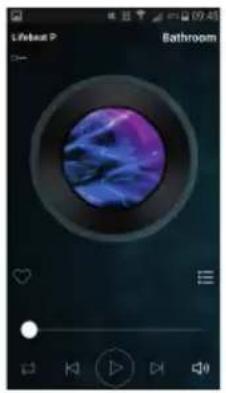
Uygulamanın başlangıç sayfası açılır. Burada çalma listelerini açabilir, sonraki ve önceki parçalara geçebilir, ses seviyesini değiştirebilir veya favoriler seçebilirsiniz.
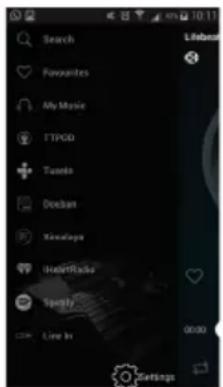
Uygulamanın başlangıç sayfasında parmağınızı sağdan sola doğru sürükleyerek cihaz listesini açın.
Burada kayıtlı olan tüm WLAN hoparlörler gösterilir.
Bir gruba WLAN hoparlör eklemek için ilgili WLAN hoparlöre tıklayın ve istediğiniz diğer WLAN hoparlöre "çekin".
Böylece "kayıtlı" gruptaki tüm WLAN hoparlörler üzerinden aynı anda müzik çalabilirsiniz.
Bir WLAN hoparlörü bir gruptan kaldırmak için istediğiniz WLAN hoparlörü grubun dışına "çekin".
Şimdi her bir WLAN hoparlör üzerinden farklı müzikler çalabilirsiniz.
BİLGİ
Başka hoparlörlerde çalma işlevini, çalma türlerinde (LINE IN veya BLUETOOTH) de kullanabilirsiniz!
15. Harici audio cihazından çalma
▶ Başka audio cihazların stereo sesini WLAN hoparlör üzerinden çalmak için LI-NE-IN yuvasına 3,5 mm'lik bir stereo jak kablosu bağlayın.
- Ardından hoparlördeki MODE tuşu ile LINE IN çalışma modunu seçin (bkz. "6. LED göstergeler", sayfa 64).
16. USB cihazını USB bağlantı yeri üzerinden şarj etme
USB bağlantı yeri üzerinden şarj edilebilen cihazın bataryasını WLAN hoparlörün USB bağlantısı üzerinden şarj edebilirsiniz.
Şarj etmek istediğiniz cihazı bir USB kablosu ile WLAN hoparlörün arkasındaki USB bağlantı yerine bağlayın.

BİLGİ
WLAN hoparlördeki USB bağlantı yeri, maks. 5V çıkış geriliminde 1A şarj akımı sağlar. Şarj etmek için WLAN hoparlöre bağladığınız cihazların akım tüketimi daha fazla olmamalıdır.
Şarj edebilmek için WLAN hoparlör açık olmalı ve USB şarj işlevi seçilmeli veya bekleme modunda olmalıdır.
17. Hatalı çalışmada sıfırlama
Cihazınız çalışmıyorsa fişli elektrik adaptörünü prizden çekin ve birkaç saniye sonra geri takın.
17.1. Cihaza uygulama üzerinden fabrika ayarlarını yükleme
▶ WLAN hoparlörü açın
▶ LIFEBEAT P uygulamasını başlatın.
Uygulamanın başlangıç sayfasında parmağınızı sağdan sola doğru sürükleyerek cihaz listesini açın.
İstediğiniz WLAN hoparlörün (☐) ayarına tıklayın.
▶ Şimdi Speaker Info üzerine tıklayın.
Şimdi Restore Factory Settings üzerine tıklayın.
▶ Şimdi Confirm üzerine tıklayın.
17.2. Cihaza manüel olarak fabrika ayarlarını yükleme
Hoparlör, WLAN-Access Point ile bağlantı kurmazsa veya WLAN bağlantısını yeniden uygulamak istiyorsanız, hoparlöre manüel olarak fabrika ayarlarını yükleyebilirsiniz.
Bunun için hoparlörün arka tarafındani WPS tuşunu yaklaşık 10 saniye basılı tutun.
Hoparlör kapanır ve ardından tekrar açılır.
Sistemin komple başlamasını bekleyin.
Ardından ayarların sıfırlandığını onaylamak için iki sinyal sesi duyulur.
▶ Hoparlörü "7. Ağ konfigürasyonu", sayfa 64 altında belirtilen şekilde tekrar bir WLAN-Accesspoint'a bağlayın.
18. Yazılım güncellemesi
- WLAN hoparlörün yazılımını uygulama üzerinden güncelleyebilirsiniz. Uygulama, yazılım güncellemesi olup olmadığını arar ve varsa güncellemeyi İnternet üzerinden WLAN hoparlöre yükler.
▶ WLAN hoparlörü açın
▶ LIFEBEAT P uygulamasını başlatın.
Uygulamanın başlangıç sayfasında parmağınızı sağdan sola doğru sürükleyerek cihaz listesini açın.
Uygulama otomatik olarak, kayıtlı WLAN hoparlörler için yazılım güncellemesi olup olmadığını kontrol eder.
Eğer bir güncelleme varsa ilgili WLAN hoparlör ayarının ( Yanında NEW bilgi alanı görünür.
▶ Yazılım güncellemesini başlatmak için istediğiniz WLAN hoparlörün NEW simgesine tıklayın.
19. Hata giderme
Cihaz arızalandığında önce sorunu aşağıdaki genel bakış yardımıyla kendiniz giderip gideremeyeceğinizi kontrol edin.
Hiçbir surette cihazları kendi başınıza tamir etmeye çalışmayın. Tamir edilmesi gerekiyorsa lütfen servis merkezimize ya da uygun olan başka bir servise başvurun.
| Sorun Olası neden Çözüm | ||
| Ses yok Yanlış çalma modu | ayarlı WLAN modunu veya Li-NE-IN modunu ayarlayın. | |
| Ses seviyesi çok düşük Ses seviyesi ayarını kontrol edin. | ||
| Alım yok Ağ konfigürasyonunu kontrol edin. | ||
| Yönlendirici ile bağlantı kurulurken sorun. | DHCP sunucusu etkinleştirilmemiş. | Yönlendirici ayarlarını kontrol edin. |
| Ağ için yanlış ağ anahtarı girildi. | Ağın ağ anahtarını yeni-den girin. | |
| Manüel olarak ativığınız IP adresi yönlendiricinin adres aralığı dışında | WLAN hoparlör için geçer-li bir IP adresi girin. | |
| Access-Point'un ayarları değişti. | Hoparlörü manüel olarak fabrika ayarlarına sıfırlayın ve tekrar Access-Point'a bağlayın. | |
| WLAN hoparlör, Lifestream uygulamasıyla kontrol edilemiyor. | WLAN hoparlör ve akıllı telefon/tablet bilgisayar, aynı WLAN ağında değil. | WLAN hoparlörün ve akıllı telefonun/tablet bilgisa-yarın ağ durumunu kont-rol edin. |
20. Temizlik
▶ Cihazı temizlemeden önce kapatın.
Silmek için yumuşak ve kuru bir bez kullanın. Temizlemek için sert bezler, aşındırıcı temizlik maddeleri, inceltici veya alkol içeren çözeltiler kullanmayın. Bu tür maddeler cihaza zarar verebilir.
21. Bertaraf etme

Ambalaj
Cihazınız, nakliye hasarlarına karşı korunmak için bir ambalaj içerisinde- dir, ambalajlar yeniden kullanılabilir veya geri dönüşüme verilebilir.
Cihaz
Eski cihazlar ev çöpüne atılmamalıdır. 2012/19/AB yönergesi uyarınca cihazın kullanım ömrü sonunda uygun şekilde bertaraf edilmesi sağlanmalıdır. Cihaz içerisindeki değerli maddeler geri dönüşüme yönlendirilir ve çevreye zarar vermesi önlenmiş olur. Eski cihazı, elektronik hurda toplama noktasına veya değerli madde merkezine teslim edin. Ayrıntılı bilgi almak için yerel atık yönetim kuruluşuna veya yetkili belediye makamına başvurun.

Piller
Bataryaların usule uygun olarak bertaraf edilmesi gerekmektedir. Bunun için pil satan işletmelerde ve belediyenin toplama noktalarında pilleri atabileceğihiz hazneler bulunmaktadır. Ayrıntılı bilgi için yerel atık yönetim kurumuna veya yetkili belediye makamına başvurabilirsiniz.
22. Teknik bilgiler
Elektrik adaptörü
Model: OH-1024A1801200U-VDE
Üretici: ORIENTAL HERO ELE. FTY.
Giriş gerilimi: AC 100 – 240 V \~ 50/60 Hz, 800 mA maks
Çıkış gerilimi: 18 V 1.2 A

Cihaz
Hoparlör: 20 W
Ölçüler: yakl. 132 x 174 x 132 cm
Ağırlık: yakl. 1,2 kg
WLAN
Frekans aralığı: 2,4 GHz
WLAN standardı: 802.11 b/g/n
Şifreleme: WPA2 mümkün
Kapsama alanı: İçeride yakl. 35 – 100 m /
Dışarıda yakl. 100 – 300 m
Bağlantılar
Elektrik adaptörü girişi: DC 18 V, 1.2 A
LINE IN: 3,5 mm stereo fiş
USB: USB 2.0 A yuvası DC 5V - - - maks. 1 A
Teknik ve görsel değişiklikler yapma hakkı saklıdır ve yazım hataları için sorumluluk kabul edilmez.
23. Uygunluk bilgileri
Bu cihaz ile birlikte aşağıdaki telsiz donanımları teslim edilmiştir:
- Kablosuz LAN
Medion AG işbu belgeyle ürünün aşağıdaki Avrupa yönergeleri ile uyumlu olduğunu beyan eder:
• R&TTE Yönergesi 1999/5/AT
• EMC Yönergesi 2014/30/AB
- Alçak Gerilim Yönetmeliği 2014/35/AB Ekolojik Tasarım Yönergesi 2009/125/AT
• RoHS Yönergesi 2011/65/AB.
Cihaz, 2009/125/AT Ekolojik Tasarım Yönergesi'nin temel gerekliliklerini ve ilgili kurallarını yerine getirmektedir (1275/2008 Kararnamesi). Ancak çalışma şekli (sürekli WLAN sinyali sağlama) nedeniyle bu cihaz için ekolojik tasarım yönergesi uyarınca tüketimin azaltılması öngörülmemiştir.
Akım tüketimini en aza indirgemek için cihazı, kullanmadığınız zamanlarda elektrik şebekesinden ayırın.
Uygunluk beyanlarının tamamını www.medion.com/conformity adresinde bulabilirsiniz.
CE