
TS0MFLRD8E - Lecteur de cartes mémoire TRANSCEND - Notice d'utilisation et mode d'emploi gratuit
Retrouvez gratuitement la notice de l'appareil TS0MFLRD8E TRANSCEND au format PDF.


| Type de produit | Lecteur de cartes mémoire interne |
| Marque | Transcend |
| Modèle | TS0MFLRD8E |
| Interface | USB 2.0 (compatible USB 1.1) |
| Vitesse de transfert maximale | 480 Mbps (Hi-Speed) |
| Formats de cartes supportés | CompactFlash Type I/II, Microdrive, SmartMedia, SD, miniSD (avec adaptateur), MMC, RS-MMC (avec adaptateur), Memory Stick, Memory Stick PRO, Memory Stick Duo (avec adaptateur), Memory Stick PRO Duo (avec adaptateur) |
| Nombre de slots | 4 (lecteurs logiques distincts) |
| Alimentation | 5 V DC via port USB (fournie par la carte mère) |
| Dimensions (L x l x h) | 102 mm x 102 mm x 26 mm |
| Poids | 234 g |
| Température de fonctionnement | 0 °C à 40 °C |
| Température de stockage | -10 °C à 60 °C |
| Humidité de fonctionnement | 0 % à 90 % HR (sans condensation) |
| Certifications | FCC Classe B, CE, BSMI |
| Systèmes d'exploitation supportés | Windows 98SE/2000/Me/XP, Linux noyau 2.4 ou ultérieur |
| Installation | Baie de 3,5 pouces, connexion au connecteur USB interne de la carte mère |
| Contenu du colis | Lecteur, CD de pilotes, guide d'installation rapide |
| Garantie | 2 ans |
| Indicateurs LED | Présence de carte et transfert de données |
| Compatibilité des adaptateurs | Nécessite adaptateurs pour miniSD, RS-MMC, Memory Stick Duo |
FOIRE AUX QUESTIONS - TS0MFLRD8E TRANSCEND
Questions des utilisateurs sur TS0MFLRD8E TRANSCEND
0 question sur cet appareil. Repondez a celles que vous connaissez ou posez la votre.
Poser une nouvelle question sur cet appareil
Téléchargez la notice de votre Lecteur de cartes mémoire au format PDF gratuitement ! Retrouvez votre notice TS0MFLRD8E - TRANSCEND et reprennez votre appareil électronique en main. Sur cette page sont publiés tous les documents nécessaires à l'utilisation de votre appareil TS0MFLRD8E de la marque TRANSCEND.
MODE D'EMPLOI TS0MFLRD8E TRANSCEND
USB 2.0
Lecteur de cartes multiples interne
Manuel de l'utilisateur
N° de pièce TS0MFLRD8B/8E
Transcend
Votre fournisseur, votre partenaire,
Votre ami.
Table des matières
Introduction
Contenu de l'emballage. 1
Caractéristiques. 1
Configuration système requise 1
Installation du pilote
Installation du pilote pour Windows 98SE et 2000 2
Installation du pilote pour Windows Me, XP et Linux. 4
Configuration matérielle 4
Utilisation du lecteur de cartes multi-format interne
Utilisation avec Windows 98SE et 2000 .6
Utilisation avec Windows Me et XP 7
Utilisation avec Linux Kernel 2.4 ou ultérieur.. 7
Retrait sécurisé des cartes mémoire
Retrait sous Windows. 8
Retrait sous Linux 8
Spécifications 9
Garantie limitée du lecteur de cartes
Introduction
Merci d'avoir acheté le lecteur de cartes multi-format interne de Transcend, conçu pour un échange de données rapide et facile avec plusieurs types de supports de stockage : votre lecteur de cartes multi-format interne prend en charge : CompactFlash™ Type I/II, Microdrive™, SmartMedia™, Secure Digital, miniSD (avec adaptateur), MultiMediaCard™, RS-MMC (avec adaptateur), Memory Stick®, Memory Stick PRO®, Memory Stick Duo® (avec adaptateur) et Memory Stick PRO Duo® (avec adaptateur). Conçu pour s'adapter à n'importe quel emplacement de lecteur de 3,5 pouces, le lecteur de cartes multi-format interne de Transcend est facile à installer dans votre ordinateur.
Contenu de l'emballage
Le paquet du lecteur de cartes multi-format interne comprend les éléments suivants :
Lecteur de cartes multi-format interne CD de pilotes Guide d'installation rapide
Caractéristiques
Le lecteur de cartes multiples interne possède les caractéristiques suivantes :
Conforme à la spécification USB version 2.0. Prend en charge plusieurs types de supports de stockage :
- Carte CompactFlash Type I/II
- Microdrive
- Carte SmartMedia
- Carte Secure Digital
- miniSD (avec adaptateur)
- Carte MultiMedia
- RS-MMC (avec adaptateur)
- Memory Stick
- Memory Stick PRO
- Memory Stick Duo (avec adaptateur)
- Memory Stick PRO Duo (avec adaptateur)
Débit de transfert de données haute vitesse jusqu'à 480 Mbps. Les voyants LED indiquent l'insertion de la carte et le trafic de données. Installation facile.
Configuration requise
Ordinateur de bureau avec un connecteur USB interne sur la carte mère et un emplacement de baie de 3,5 pouces. L'un des systèmes d'exploitation suivants :
- Windows® 98SE, Windows® 2000, Windows® Me et Windows® XP
- Noyau Linux 2.4 ou version ultérieure
Installation du pilote
Installation du pilote pour Windows 98SE et 2000
- Allumez l'ordinateur sur lequel vous installerez le lecteur de cartes multi-format interne et assurez-vous que le port USB est activé et fonctionne correctement.

Ne branchez pas le lecteur de cartes multi-format interne sur le port USB pour le moment.
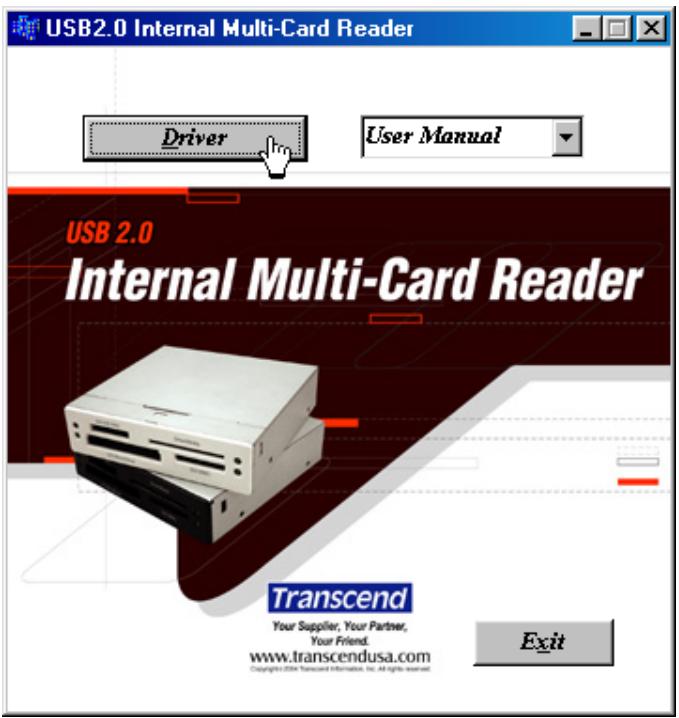
- Insérez le CD de pilotes dans le lecteur de CD-ROM (exécution automatique prise en charge). Sélectionnez le bouton Pilote pour installer le pilote. Si la fenêtre d'exécution automatique n'apparaît pas, exécutez CardRead.exe dans le répertoire racine du CD de pilotes.
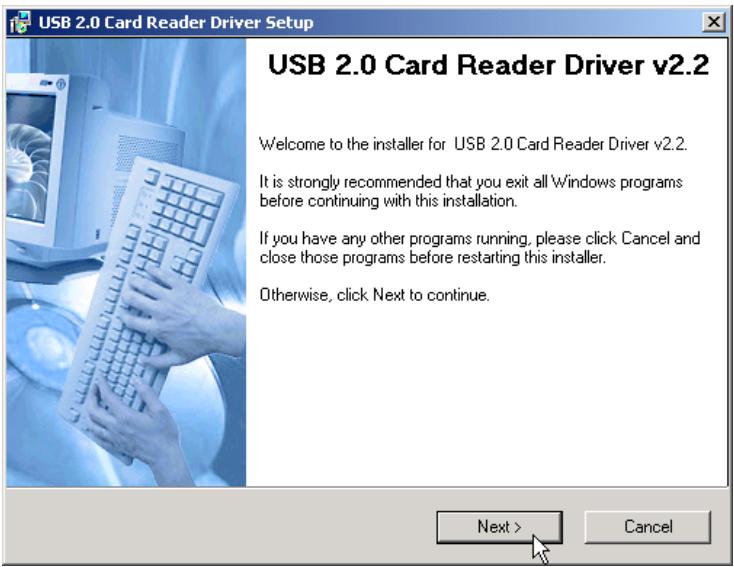
- La fenêtre d'installation du lecteur de cartes apparaîtra, puis sélectionnez le bouton Suivant pour continuer.
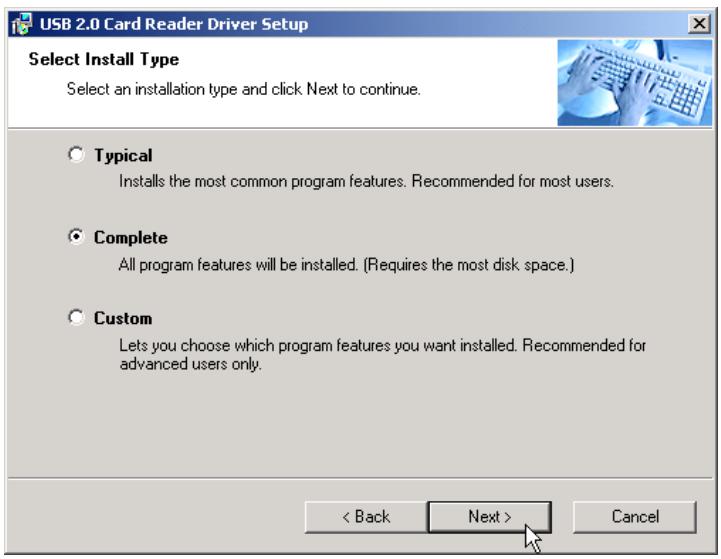
- Choisissez une option d'installation et sélectionnez le bouton Suivant pour continuer.
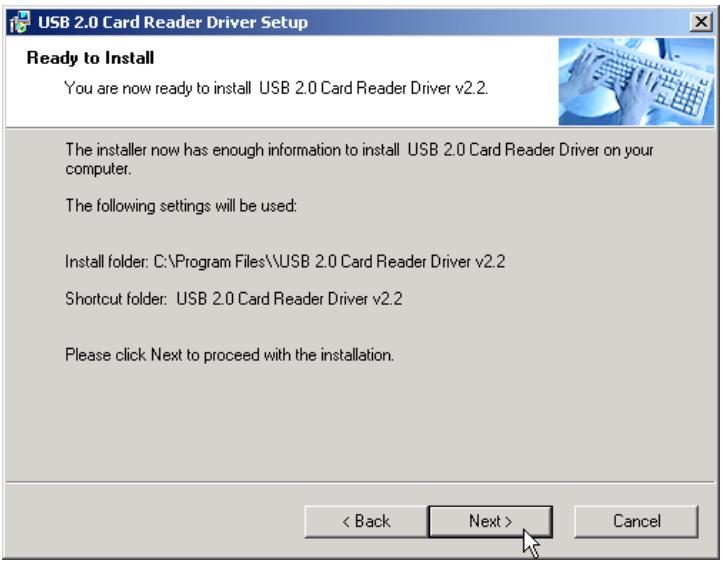
- Sélectionnez le bouton Suivant pour terminer l'installation du pilote.
Si vous utilisez Windows 98SE ou 2000, le système vous demandera de redémarrer votre ordinateur. Ne redémarrez pas votre ordinateur pour le moment. Annulez l'option Oui, redémarrer mon ordinateur maintenant et sélectionnez le bouton Terminer.
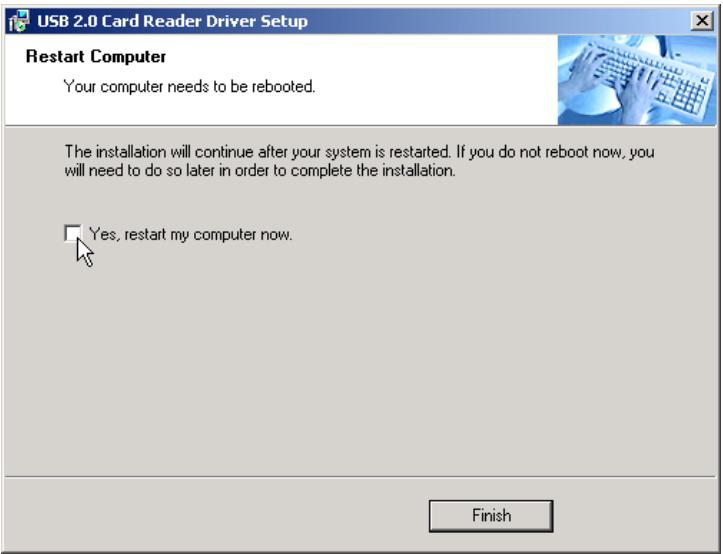
- Éteignez l'ordinateur et reportez-vous à la section Configuration matérielle ci-dessous pour configurer le lecteur de cartes multi-format interne.
Installation du pilote pour Windows Me, XP et Linux
Aucun pilote n'est nécessaire. Éteignez l'ordinateur et reportez-vous à la section Installation matérielle ci-dessous pour installer le lecteur de cartes multi-format interne dans votre PC.
Installation matérielle
- Installez le lecteur de cartes multi-format interne dans un emplacement de baie de 3,5 pouces disponible.
- Consultez le manuel du propriétaire de votre carte mère pour connaître la disposition du connecteur USB.
- Si la disposition du connecteur USB est comme indiqué ci-dessous, elle correspond au réglage par défaut du connecteur USB.
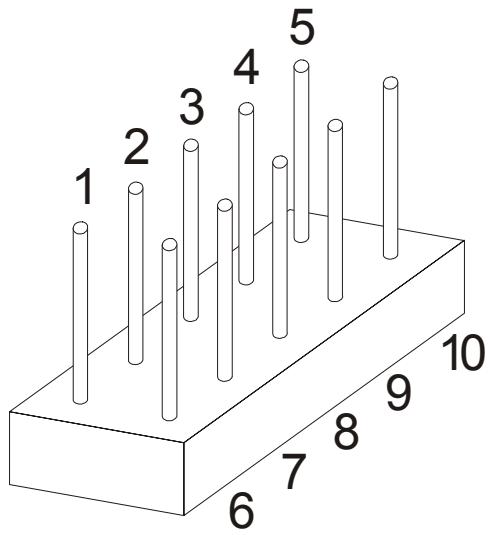
Broche 1 : Alimentation USB
Broche 2 : USB -
Broche 3 : USB +
Broche 4 : GND
Broche 5 : NC/USBOC
Broche 6 : Alimentation USB
Broche 7 : USB -
Broche 8 : USB +
Broche 9 : GND
Broche 10 : NC (pas de broche)
Si la disposition du connecteur USB sur la carte mère n'est pas comme indiqué ci-dessus, ignorez l'étape 4 et passez directement à l'étape 5.
- Branchez le connecteur USB du lecteur de cartes multi interne sur le connecteur USB de la carte mère, avec le fil rouge inséré dans la broche 1 ou la broche 6. L'installation matérielle est terminée.
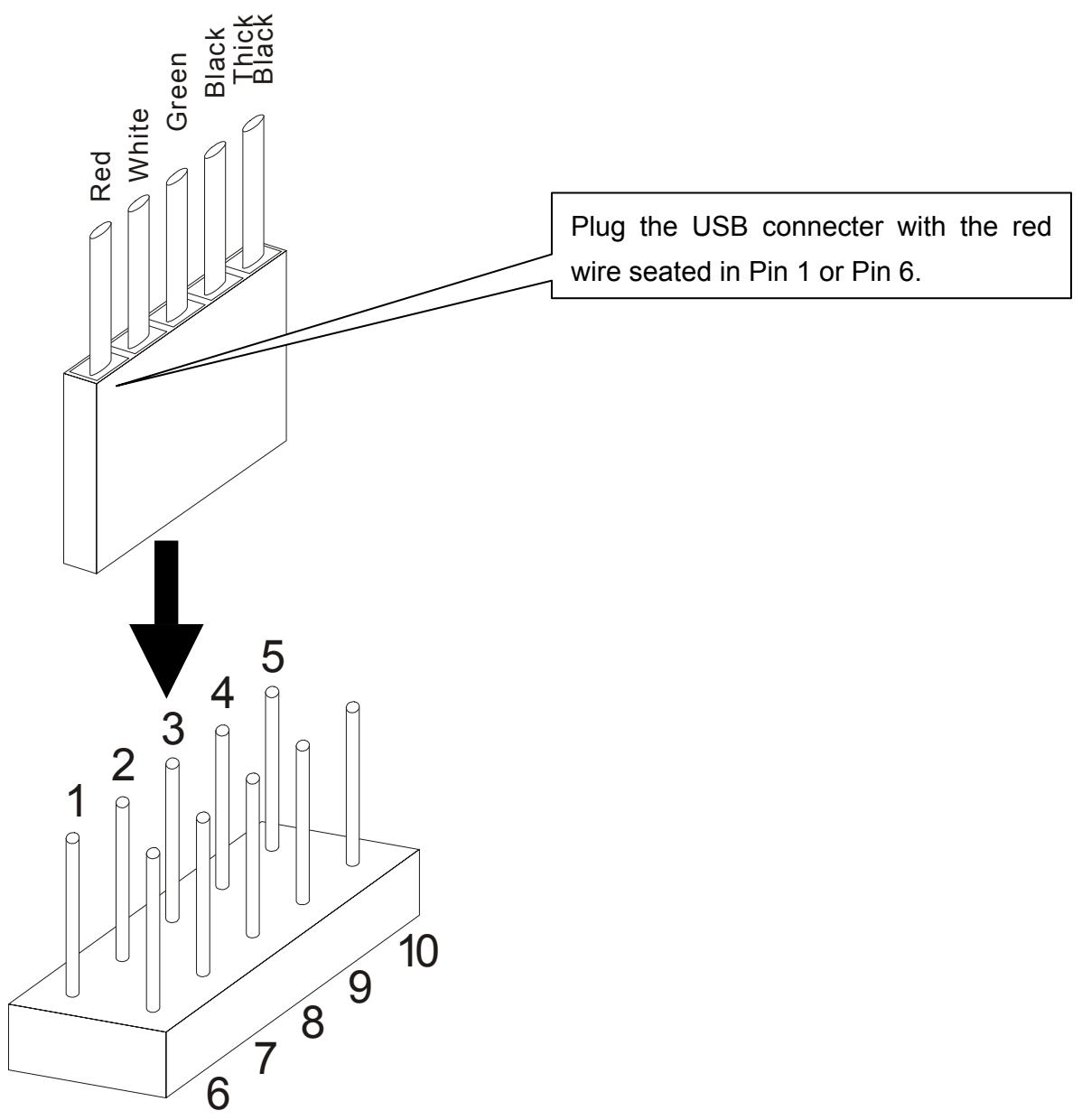
- Si la disposition du connecteur USB ne correspond pas au réglage par défaut du connecteur USB (indiqué ci-dessus à l'étape 3), veuillez réorganiser les couleurs des fils du câble USB comme suit :
a. Utilisez une aiguille pour soulever la petite languette en plastique et retirez les fils du connecteur. Veillez à ne pas casser la languette !
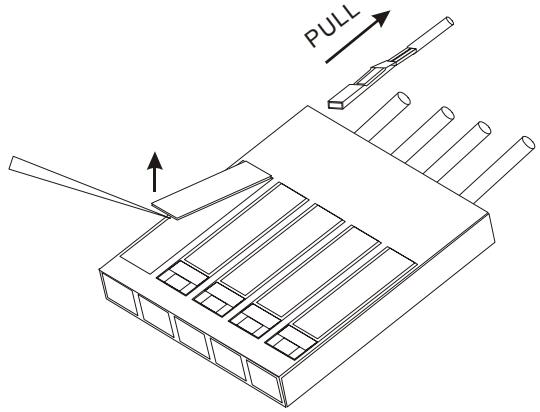
b. Reportez-vous à l'affectation des broches du connecteur USB (ci-dessous) pour réaligner les couleurs des fils.
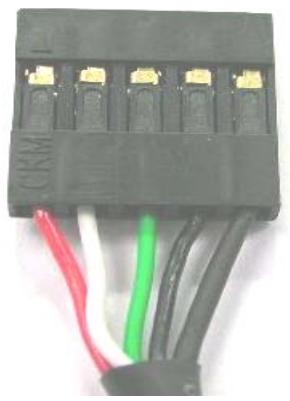
| Wire | Pin Assignment |
| Red | Vcc / Power / +5V |
| White | P-, Data- |
| Green | P+, Data+ |
| Black | GND |
| Thick Black | Not Connect / Shield Ground |

Soyez prudent lors du réalignement des fils de couleur. Toute erreur ici peut causer des dommages graves au lecteur de cartes multi interne.
c. Gardez le même côté des broches des fils vers le haut et insérez-les à nouveau dans le connecteur. Appuyez sur la languette pour bien fixer les broches.
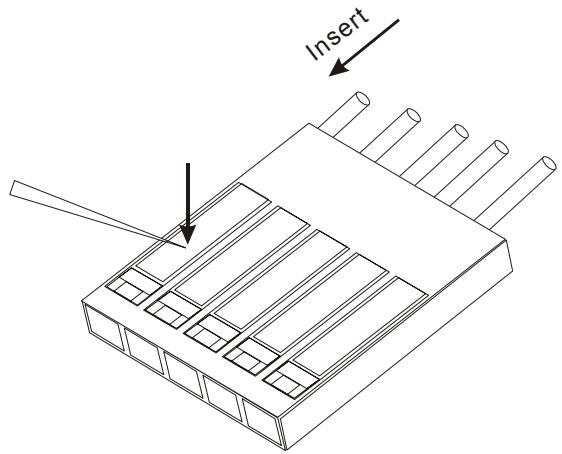
- Branchez le connecteur USB du lecteur de cartes multi interne sur le connecteur USB de la carte mère. L'installation matérielle est terminée.
Utilisation du lecteur de cartes multi interne
Après l'installation du pilote et la configuration matérielle, vous pouvez allumer l'ordinateur et commencer à utiliser votre lecteur de cartes multi interne.
Utilisation avec Windows 98SE et 2000
- Allumez l'ordinateur. La fenêtre Nouveau matériel détecté apparaîtra (la première fois que vous allumez l'ordinateur après l'installation du lecteur de cartes multi interne).
Nouveau matériel détecté

Périphérique de stockage USB
Windows installe le logiciel pour votre nouveau matériel.
- Quatre lecteurs de disque amovibles avec de nouvelles lettres de lecteur apparaîtront dans Poste de travail. Le lecteur de cartes multi interne est prêt à l'emploi.
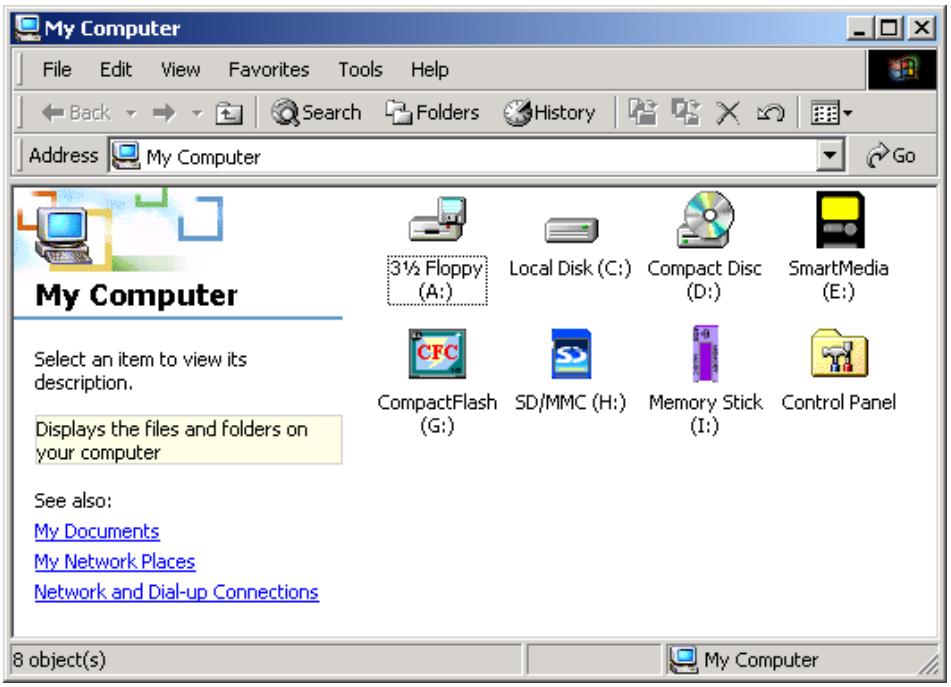
Pour une utilisation avec Windows Me et XP
- Allumez l'ordinateur. Le message d'état Nouveau matériel détecté apparaîtra (la première fois que vous allumez l'ordinateur après l'installation du lecteur de cartes multi interne).
- Quatre lecteurs de disque amovibles avec de nouvelles lettres de lecteur apparaîtront dans Poste de travail. Le lecteur de cartes multi interne est prêt à l'emploi.
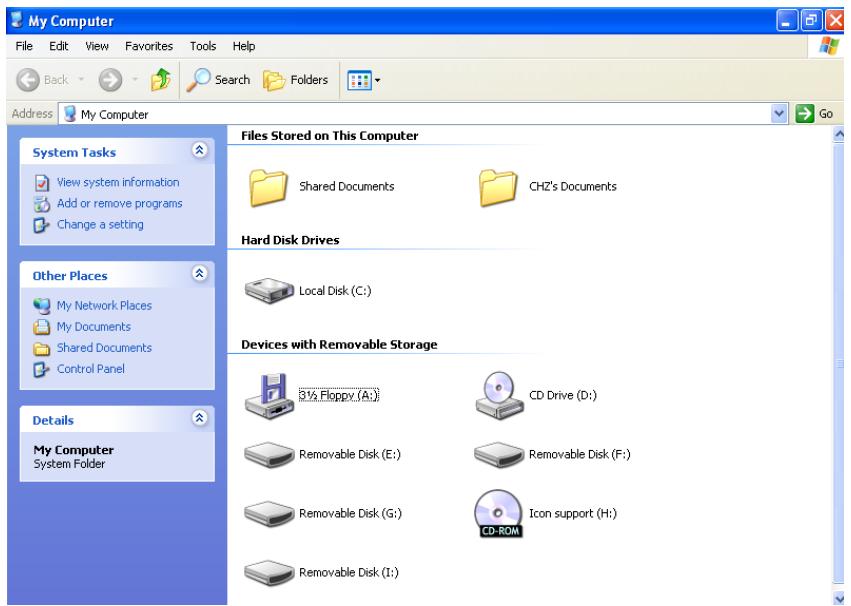
Pour une utilisation avec Linux Kernel 2.4 ou ultérieur
Le lecteur de cartes multi interne est un périphérique sans pilote pour Linux kernel 2.4 ou ultérieur. Suivez simplement les procédures ci-dessous pour monter et utiliser.
- Allumez l'ordinateur et insérez une carte mémoire dans le lecteur de cartes multi interne.
- Créez un répertoire pour le lecteur de cartes multi interne.
Exemple : mkdir /mnt/CardReader
3. Montez le lecteur de cartes multi interne.
Exemple : mount -a -t mdos /dev/sda1 /mnt/CardReader
Peu importe le nombre de cartes mémoire insérées dans le lecteur de cartes multi interne, seule la première carte insérée peut être montée.
Pour retirer les cartes mémoire en toute sécurité
Pour retirer sous Windows
Assurez-vous que le voyant LED ne clignote pas (aucune donnée n'est transmise). Vous pouvez alors retirer la carte mémoire en toute sécurité.

Le retrait d'une carte mémoire pendant un transfert de données peut endommager la carte et provoquer l'arrêt du système.
Pour retirer sous Linux
Démontez le périphérique depuis l'environnement Linux. Vous pouvez ensuite retirer la carte mémoire en toute sécurité. Exemple : umount /mnt/CardReader

Ne retirez jamais une carte mémoire pendant un transfert de données. Pour éviter un arrêt incorrect, ouvrez le fichier transmis depuis son nouvel emplacement pour vous assurer que la transmission est terminée.
Spécifications
Alimentation : 5 V CC à partir du port USB. Emplacements pour supports de stockage : CompactFlash Type I/II
Microdrive, SmartMedia, Secure Digital, miniSD (avec adaptateur), MultiMediaCard, RS-MMC (avec adaptateur), Memory Stick, Memory Stick PRO, Memory Stick Duo (avec adaptateur), Memory Stick PRO Duo (avec adaptateur)
Température de fonctionnement : 0 °C à 40 °C. Température de stockage : -10 °C à 60 °C. Humidité : 0 % à 90 % HR. Émissions/Sécurité : FCC Classe B, CE, BSMI. Dimensions : 102 mm x 102 mm x 26 mm. Poids : 234 g
Garantie limitée du lecteur de cartes
« Au-delà des attentes » est la norme que nous nous fixons pour le service client chez Transcend. Nous nous positionnons constamment au-dessus de la norme de l'industrie. Cela fait partie de notre engagement envers la satisfaction client.
Tous les produits Transcend Information, Inc. (Transcend) sont garantis et testés pour être exempts de défauts de matériaux et de fabrication et pour se conformer aux spécifications publiées. Si votre lecteur de cartes Transcend fonctionne mal pendant une utilisation normale dans son environnement recommandé en raison d'une fabrication ou de matériaux défectueux pendant la période de garantie, Transcend réparera ou remplacera votre produit par un produit comparable. Cette garantie est soumise aux conditions et limitations énoncées ci-après.
Durée de la garantie : Les lecteurs de cartes Transcend sont couverts par cette garantie pendant une période de deux (2) ans à compter de la date d'achat. Transcend inspectera le produit et déterminera s'il est éligible à la réparation ou au remplacement. La décision de Transcend concernant l'éligibilité du produit à la réparation ou au remplacement sera définitive et contraignante. Transcend se réserve le droit de fournir un produit de remplacement reconditionné fonctionnellement équivalent.
Limitations : Cette garantie ne s'applique pas aux produits qui tombent en panne en raison d'un accident, d'un abus, d'une mauvaise manipulation, d'une installation incorrecte, d'une altération, de catastrophes naturelles, d'une utilisation inappropriée ou de problèmes d'alimentation électrique. Le lecteur de cartes Transcend doit être utilisé avec des dispositifs conformes aux normes industrielles recommandées. Transcend ne sera pas responsable des dommages résultant d'un dispositif tiers qui provoque la défaillance du produit Transcend. Transcend ne sera en aucun cas responsable des dommages indirects, consécutifs ou accessoires, des pertes de profits, des pertes d'investissements commerciaux, des pertes de clientèle ou des interférences avec les relations commerciales résultant d'une perte de données. Transcend n'est pas non plus responsable des dommages ou de la défaillance de tout équipement tiers, même si Transcend a été informé de la possibilité de tels dommages. Cette limitation ne s'applique pas dans la mesure où elle est illégale ou inapplicable en vertu de la loi applicable.
Avertissement : La garantie limitée susmentionnée est exclusive, sans aucune autre garantie implicite ou légale, y compris, mais sans s'y limiter, toute garantie implicite de qualité marchande ou d'adéquation à un usage particulier. Cette garantie n'est affectée en aucune partie par la fourniture d'une assistance technique ou de conseils par Transcend.
Enregistrement en ligne : Pour accélérer le service de garantie, veuillez enregistrer votre produit Transcend dans les 30 jours suivant l'achat.
Enregistrez-vous en ligne sur http://www.transcendusa.com/registration

Votre fournisseur, votre partenaire, votre ami.
Transcend Information, Inc.
www.transcendusa.com
Le logo Transcend est une marque déposée de Transcend Information, Inc. *Tous les logos et marques sont des marques de leurs sociétés respectives.


- USB
- LECTEUR DE CARTES MULTIPLES INTERNE
- MANUEL DE L'UTILISATEUR
- TRANSCEND
- TABLE DES MATIÈRES
- INTRODUCTION
- INSTALLATION DU PILOTE
- UTILISATION DU LECTEUR DE CARTES MULTI-FORMAT INTERNE
- RETRAIT SÉCURISÉ DES CARTES MÉMOIRE
- GARANTIE LIMITÉE DU LECTEUR DE CARTES
- CONTENU DE L'EMBALLAGE
- CARACTÉRISTIQUES
- CONFIGURATION REQUISE
- INSTALLATION DU PILOTE POUR WINDOWS 98SE ET
- INSTALLATION DU PILOTE POUR WINDOWS ME, XP ET LINUX
- INSTALLATION MATÉRIELLE
- UTILISATION DU LECTEUR DE CARTES MULTI INTERNE
- UTILISATION AVEC WINDOWS 98SE ET
- NOUVEAU MATÉRIEL DÉTECTÉ
- POUR UNE UTILISATION AVEC WINDOWS ME ET XP
- POUR UNE UTILISATION AVEC LINUX KERNEL 2.4 OU ULTÉRIEUR
- MONTEZ LE LECTEUR DE CARTES MULTI INTERNE
- POUR RETIRER LES CARTES MÉMOIRE EN TOUTE SÉCURITÉ
- POUR RETIRER SOUS WINDOWS
- POUR RETIRER SOUS LINUX
- SPÉCIFICATIONS
Marque : TRANSCEND
Modèle : TS0MFLRD8E
Catégorie : Lecteur de cartes mémoire