
002-203 - Radio Marquant - Free user manual and instructions
Find the device manual for free 002-203 Marquant in PDF.


| Product Type | Portable AM/FM Radio |
| Brand | Marquant |
| Model | 002-203 |
| Dimensions (W x H x D) | Approx. 20 x 12 x 8 cm |
| Weight | Approx. 400 g (without batteries) |
| Power Supply | 3 x AA batteries (not included) or AC adapter (not included) |
| Frequency Range | AM: 530-1710 kHz, FM: 88-108 MHz |
| Tuning Method | Analog dial with thumbwheel |
| Speaker | Built-in, 3 W output |
| Headphone Jack | 3.5 mm stereo |
| Antenna | Telescopic rod antenna for FM |
| Controls | Volume knob, tuning knob, AM/FM band selector, power switch |
| Additional Functions | Carrying handle, external antenna connection (AM) |
| Cleaning and Maintenance | Wipe with a soft, dry cloth. Do not use liquids or abrasives. |
| Safety Precautions | Do not expose to rain or moisture. Remove batteries if not used for long periods. |
| Spare Parts / Repairability | Contact Marquant customer service for replacement parts or repairs. |
| General Information | Designed for indoor and outdoor use. Operating temperature: 0°C to 40°C. |
Frequently Asked Questions - 002-203 Marquant
User questions about 002-203 Marquant
0 question about this device. Answer the ones you know or ask your own.
Ask a new question about this device
Download the instructions for your Radio in PDF format for free! Find your manual 002-203 - Marquant and take your electronic device back in hand. On this page are published all the documents necessary for the use of your device. 002-203 by Marquant.
USER MANUAL 002-203 Marquant
natural_image
Black portable radio with antenna and control panel (no visible text or symbols)SE DAB-RADIO
Bruksanvisning i original
Operating instructions
(Translation of the original instructions)
Important! Read the user instructions carefully before use.
Save them for future reference.
Jula reserves the right to make changes. In the event of problems, please contact our service department.
www.jula.com
Tillverkare/ Produsent/ Producenci/ Manufacturer
Jula AB, Box 363, 532 24 SKARA
Distributör/ Distributør/ Dystrybutor/ Distributor
Jula Poland Sp. z o.o., ul.
Care for the environment!
Must not be discarded with household waste! This product contains electrical or electronic components that should be recycled. Leave the product for recycling at the designated station e.g. the local authority's recycling station.
CE
EC DECLARATION OF CONFORMITY EG FÖRSÄKRAN OM ÖVERENSSTÄMMELSE EF SAMSVARSERKLÆRING DEKLARACJA ZGODNOŚCI WE

Jula AB, Box 363, SE-532 24 SKARA, SWEDEN
This product was CE marked in year -17
Skara 2017-07-04
MATTIAS LIF BUSINESS AREA MANAGER
1
SÄKERHETSANVISNINGAR
WARNING!
- Do not expose the product to rain or moisture – risk of fire and/or electric shock.
- Never open the case – risk of electric shock. Service must only be carried out by qualified personnel.
- Do not allow the batteries to remain in the battery compartment too long. Remove the batteries to avoid leakage and damage.
- Do not expose the appliance to extreme temperatures or high humidity to ensure normal functionality and a long life.
- Never place the appliance in the bathroom, next to stoves or radiators.
- If the appliance does not work correctly, take it to the nearest service centre. Do not attempt to repair it yourself.
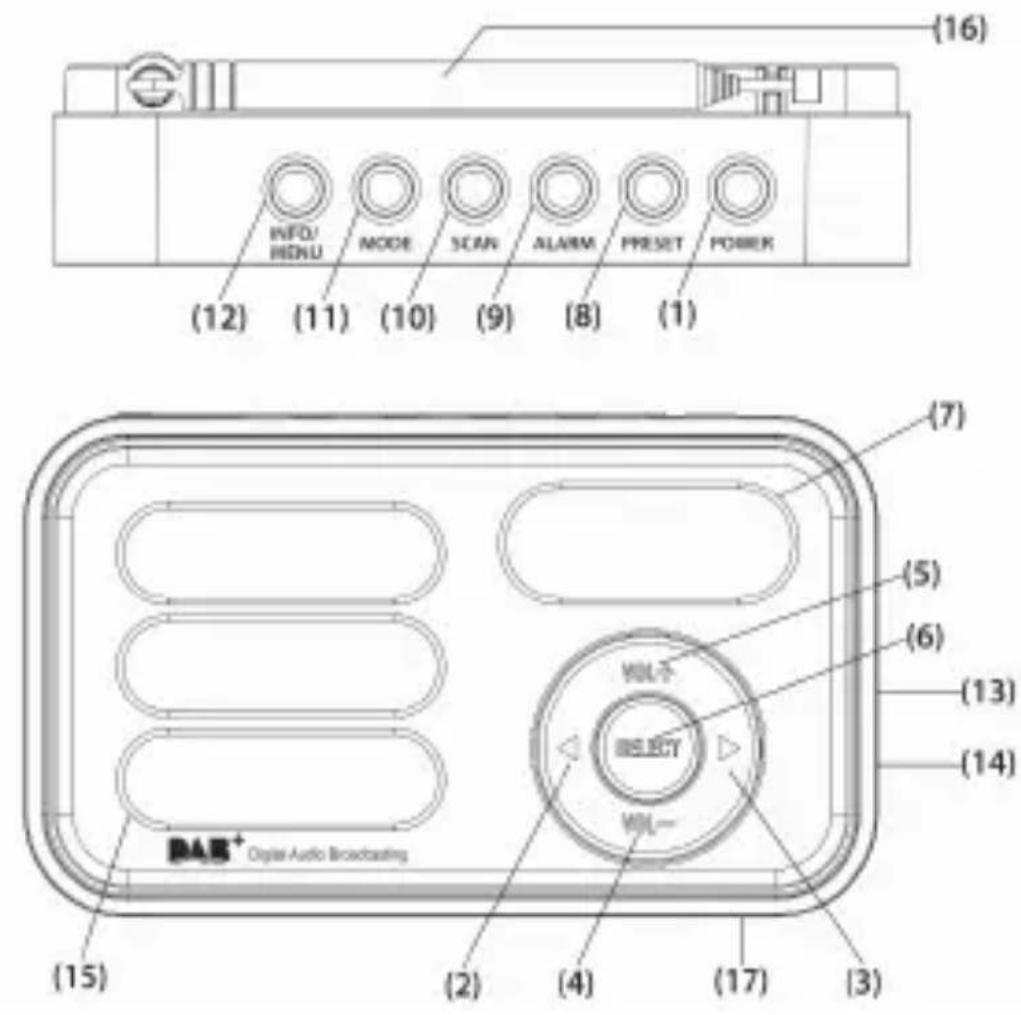
DESCRIPTION
FIG. 1
- Power
- Left arrow
- Right arrow
- Volume -
- Volume +
- Select
- LCD display
- Preset
- Alarm
- Scan
- Mode
- Info/Menu
- 3.5 mm connection
- Power connection
- Speaker
EN
- Antenna
- Batterylid
USB cable supplied.
TECHNICAL DATA
| Battery | 3xAAA |
| Speaker 8 ohm | |
| Output 1.2 W |
USE
BATTERY
Open the battery cover and insert the batteries in the direction shown in the battery compartment.
USB CABLE
Connect the USB cable to a mobile unit's USB port or a USB charger for a wall socket.
START/SWITCH OFF
- Extend the antenna and angle it for the best reception.
-
Start the radio.
-
Press the Power button once. Press the Power button once more to activate standby mode.
-
Press and hold the Power button to switch off.
-
Press the Mode button to switch between FM and DAB.
VOLUME
- Press Vol+ to increase the volume Vol- to lower the volume.
- The speakers are shut-off when the 3.5 mm connection is used.
DAB MODE
Automatic station search
- Press Mode and select DAB mode.
- The first time the radio is started, it selects automatic DAB mode and starts to search directly for DAB stations. Let the search process finish.
- Press the arrows to got to the required station.
- Press Scan to perform a new search.
Manual station search
- Press Mode and select DAB mode.
- Press and hold Info/Menu until Manual tune is shown on the display. Press Select to confirm.
- Use the left and right arrows to browse through the stations (5A-13F). Press Select to confirm.
FM RADIO
- Press Mode and select FM mode.
- Press Scan for automatic frequency search.
- Press Scan again to find the next station.
- Press and hold Scan to search backwards to the previous station.
- Press the arrows to set the station manually.
- Press Select to switch audio mode between mono and auto mode.
PRESET STATIONS
10 different stations can be saved. A saved frequency is erased when a new one in saved in its place.
- Set the required frequency in DAB or FM mode.
EN
- Press and hold Preset until Preset Empty is shown on the display. Use the arrows to select the station location (1-10).
- Select the station number and confirm with Select. Once the station has been saved the saved frequency is shown instead of Preset Empty.
- Press the Preset to listen to the station. Browse between the station numbers with the arrows. Confirm with Select.
ALARM
- Start the radio.
- Press Alarm. Use the arrows to make the following selections, while the display flashes, confirm with select:
-on/off
– time hour
– time minutes
– alarm mode: Daily/Once/Weekends/Weekdays/
- type of alarm; Beeper1/FM/DAB/ Beeper2
- alarm volume
Snooze
- When the alarm sounds, press Select to snooze for 9 minutes.
- The Snooze function is repeated until Alarm is pressed in.
KEY LOCK
- Press and hold Select for five seconds to activate the key lock. The padlock symbol is shown on the display.
- Repeat to unlock the key lock.
EN
FACTORY RESET
- In DAB or FM mode. Press and hold Info/Menu.
- Use the arrows to scroll to Factory Reset. Select Yes. Confirm with Select.
- All settings are reset to the factory settings.
- SE DAB-RADIO
- CE
- EC DECLARATION OF CONFORMITY EG FÖRSÄKRAN OM ÖVERENSSTÄMMELSE EF SAMSVARSERKLÆRING DEKLARACJA ZGODNOŚCI WE
- SÄKERHETSANVISNINGAR
- WARNING!
- DESCRIPTION
- 1
- EN
- TECHNICAL DATA
- USE
- BATTERY
- USB CABLE
- START/SWITCH OFF
- VOLUME
- DAB MODE
- Automatic station search
- Manual station search
- FM RADIO
- PRESET STATIONS
- ALARM
- Snooze
- KEY LOCK
- FACTORY RESET
Brand : Marquant
Model : 002-203
Category : Radio