
002-205 - Radio Marquant - Free user manual and instructions
Find the device manual for free 002-205 Marquant in PDF.


| Product Type | Portable FM/DAB Radio |
| Brand | Marquant |
| Model | 002-205 |
| Power Source | 4 x AA batteries (not included) |
| Speaker Impedance | 8 ohms |
| Output Power | 1 W |
| Frequency Bands | FM, DAB+ |
| Preset Stations | 10 stations |
| Alarm Function | Yes, with snooze |
| Headphone Jack | Yes, 3.5mm |
| Display | LCD screen |
| Antenna | Extendable telescopic antenna |
| Key Lock | Yes |
| Dimensions (approx.) | 200 x 120 x 70 mm |
| Weight (approx.) | 0.5 kg (with batteries) |
| Material | Plastic |
| Color | Black |
| Safety Features | Do not expose to rain or moisture; do not open casing |
| Cleaning Instructions | Wipe with a soft, dry cloth |
| Repairability | Service only by qualified personnel; no user-serviceable parts |
| Country of Origin | Designed in Sweden, manufactured in China (assumed) |
Frequently Asked Questions - 002-205 Marquant
User questions about 002-205 Marquant
0 question about this device. Answer the ones you know or ask your own.
Ask a new question about this device
Download the instructions for your Radio in PDF format for free! Find your manual 002-205 - Marquant and take your electronic device back in hand. On this page are published all the documents necessary for the use of your device. 002-205 by Marquant.
USER MANUAL 002-205 Marquant
natural_image
Black portable radio with antenna and control buttons (no visible text or symbols on device body)
SE FM-/DAB-RADIO
Operating instructions (Translation of the original instructions) Important! Read the user instructions carefully before use. Save them for future reference.
Värna om miljön!
Care for the environment!
Must not be discarded with household waste! This product contains electrical or electronic components that should be recycled. Leave the product for recycling at the designated station e.g. the local authority's recycling station.
Jula reserves the right to make changes. In the event of problems, please contact our service department.
www.jula.com
Tillverkare/ Produsent/ Producenci/ Manufacturer
Jula AB, Box 363, 532 24 SKARA
Distributör/ Distributør/ Dystrybutor/ Distributor
Jula Poland Sp. z o.o., ul.
This product was CE marked in year -17
Skara 2017-07-04
MATTIAS LIF BUSINESS AREA MANAGER
1
SÄKERHETSANVISNINGAR
WARNING!
- Do not expose the product to rain or moisture – risk of fire and/or electric shock.
- Never remove the case – risk of electric shock. Service must only be carried out by qualified personnel.
- Do not allow the batteries to remain in the battery compartment too long. Remove the batteries to avoid leakage and damage.
- Do not expose the appliance to extreme temperatures or high relative humidity to ensure normal function and a long life.
- Never place the appliance in the bathroom, by stoves or heaters.
- If the appliance does not work correctly take it to the nearest service centre. Do not attempt to repair it yourself.
DESCRIPTION
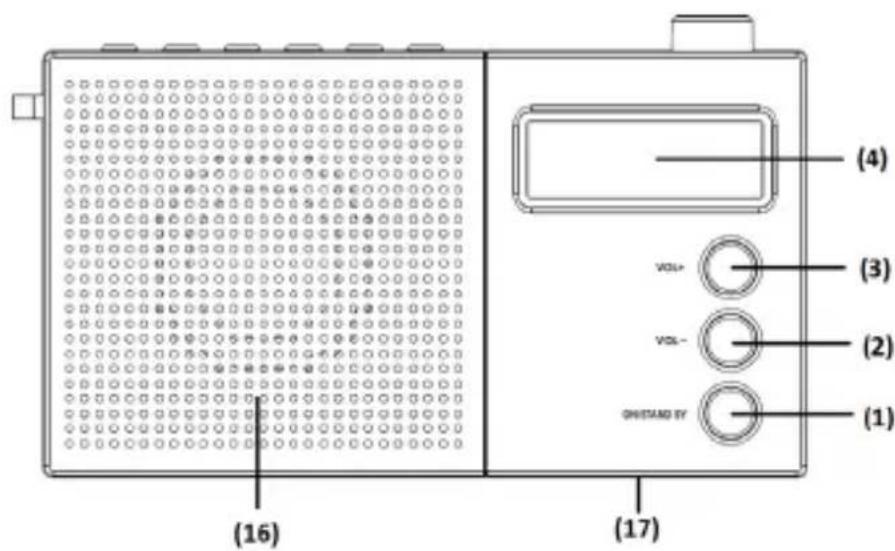
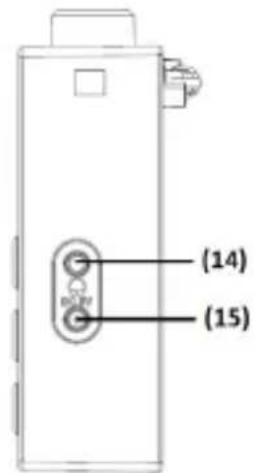
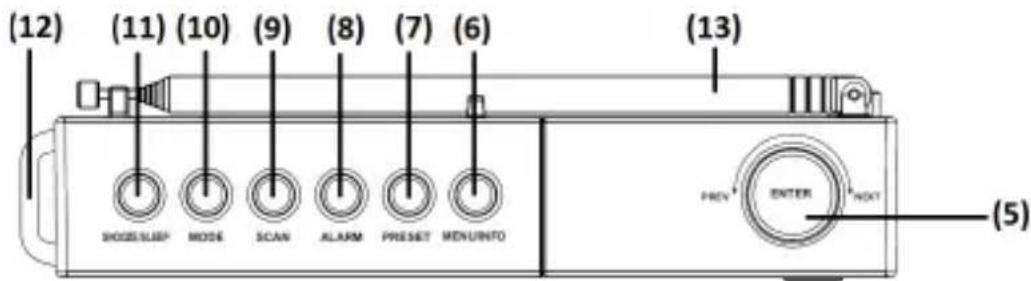
FIG. 1
- On/Standby
- Vol -
- Vol -
- LCD display
- Prev/Next & Enter
- Menu/Info
- Preset
- Alarm
- Scan
- Mode
- Snooze/Sleep
- Carrying strap
- Antenna
- Earphone jack
- DC Input
- Speakers
- Battery cover
TECHNICAL DATA
Battery
4xAA
Speakers 8 ohm
Output 1 W
USE
BATTERY
Open the battery cover and insert the batteries in the direction shown in the battery compartment.
SWITCH ON/OFF
- Fully extend the antenna and angle it for the best reception.
-
Start the radio.
-
Press On/Standby once. Press On/Standby once again to activate standby mode.
-
Press and hold On/Standby to switch off.
-
Press MODE to switch between FM and DAB.
VOLUME
- Press Vol+ to increase the volume and Vol- to lower the volume.
- The speakers are switched of when the headphone connection is used.
DAB MODE
Automatic station search
-
Press MODE and select DAB mode.
-
The first time the radio is switched on it selects automatic DAB mode and starts immediately to search for DAB stations. Allow the search process to finish.
- Turn the Prev/Next knob to go to the required station.
- Press Scan to make a new search.
Manual station search
- Press MODE and select DAB mode.
- Press and hold Menu/Info until Manual tune is shown on the display. Press Enter to confirm.
- Use the Prev/Next knob to scroll between the stations. Press Enter to confirm.
FM RADIO
Press Enter to switch audio modes between mono and auto.
Automatic station search
- Press Mode and select FM mode.
- Press Scan for automatic frequency searching.
- Press Scan once again to find the next station.
- Press and hold Scan to search backwards to the previous station.
Manual station search
- Use the Prev/Next knob to set the station manually.
PRESET STATIONS
10 different stations can be saved. A saved frequency is erased when a new station is saved in its place.
- Set the required frequency in DAB or FM mode.
- Press and hold Preset until Preset Empty is shown on the display. Use the knob to select the station location (1-10).
- Select the station number and confirm with Enter. Once the station is saved, the saved frequency is shown instead of Preset Empty.
- Press Preset once and use the knob to listen to a saved station. Confirm with Enter.
ALARM
- Start the radio.
- Press Alarm. Use the knob to make the following selections, while the display flashes, confirm with Enter:
-on/off
– time hour
– time minutes
– alarm mode: Daily/Once/Weekends/Weekdays/
– types of alarm; Beeper1/FM/DAB/Beeper2
- alarm volume
Snooze
- When the alarm sounds, press Enter to snooze for 9 minutes.
- The Snooze function is repeated until Alarm is pressed.
KEY LOCK
- Press and hold Enter for about five seconds to activate the key lock. The padlock is shown on the display.
- Repeat to unlock.
FACTORY RESET
- In DAB or FM mode. Press and hold Info/Menu.
- Use the knob to scroll to Factory Reset. Select Yes. Confirm with Enter.
- All settings are reset to the factory default settings.
Brand : Marquant
Model : 002-205
Category : Radio