
FLX 70 - Conference system SENNHEISER - Free user manual and instructions
Find the device manual for free FLX 70 SENNHEISER in PDF.


| Product Type | Mono Bluetooth Headset |
| Brand | Sennheiser |
| Model | FLX 70 |
| Weight | 10 g (13 g with ear hook) |
| Talk time | Up to 6 hours |
| Standby time | Up to 240 hours |
| Charging time | 2.5 hours (first charge: 3 hours min) |
| Battery type | Rechargeable integrated Lithium-Polymer |
| Bluetooth technology | Bluetooth 2.0 with EDR and eSCO |
| Supported Bluetooth profiles | Hands-Free Profile (HFP) and Headset Profile (HSP) |
| Bluetooth range | Up to 10 meters (free field) |
| Noise reduction | Yes, ambient noise reduction |
| Acoustic shock protection | ActiveGard™ |
| Microphone type | Directional electret microphone |
| Microphone sensitivity | -45 dBV at 94 dB SPL, 1 kHz |
| Speaker type | Dynamic with neodymium magnet |
| Maximum output level | 110 dB SPL |
| Power supply | Power adapter (100-240 V AC, output 5 V DC, 150 mA) or USB port |
| Compatibility | Mobile phones and Bluetooth devices with hands-free or headset profile |
| Included accessories | 1 headset, 3 ear tips (S/M/L), 1 ear hook, 1 power adapter, 1 USB cable, 1 lanyard, 1 lanyard clip, instruction manual |
| Operating temperature | 10 °C to 40 °C |
| Charging temperature | 10 °C to 40 °C |
| Warranty | 24 months (6 months for battery) |
| Care and cleaning | Dry cloth only, no liquids or solvents |
| Spare parts available | Yes: power adapter, USB cable, car charger, accessory set (ear hook, lanyard, ear tips) |
Frequently Asked Questions - FLX 70 SENNHEISER
User questions about FLX 70 SENNHEISER
0 question about this device. Answer the ones you know or ask your own.
Ask a new question about this device
Download the instructions for your Conference system in PDF format for free! Find your manual FLX 70 - SENNHEISER and take your electronic device back in hand. On this page are published all the documents necessary for the use of your device. FLX 70 by SENNHEISER.
USER MANUAL FLX 70 SENNHEISER
Important safety instructions. 2
Features of the FLX 70 6
Delivery includes 6
Operating elements 7
Button overview 8
Quick Setup Guide 9
Setting up the FLX 70. 11
Charging the battery in the headset 11
Switching the headset on/off 12
Pairing the headset to mobile phones or other Bluetooth devices ....13
Wearing the headset. 15
Operating the FLX 70 17
Telephoning with the FLX 70. 17
Changing the speaker volume 20
Changing the ring tone volume 20
Muting/un-muting the headset microphone 20
Restoring factory settings 21
Maintenance and care 22
Accessories 22
Specifications 23
Manufacturer declarations 24
We have designed this product to give you reliable operation over many years. Over half a century of accumulated expertise in the design and manufacture of high-quality electroacoustic equipment have made Sennheiser a world-leading company in this field.
Please take a few moments to read these instructions carefully, as we want you to enjoy your new Sennheiser product quickly and to the fullest.
Important safety instructions

The FLX 70 has been manufactured according to the accepted rules of safety and current technology. However, there is still a danger of damage to equipment if the following general safety instructions are not complied with.
- Read these instructions.
- Follow these instructions.
- Keep these instructions in a location where they are accessible to all users at all times.
- Always include the operating instructions when you pass the FLX 70 on to third parties.
Intended use
The FLX 70 is an accessory for mobile phones or any Bluetooth compliant device with a "hands free" or a "headset" profile intended for wireless communication via Bluetooth in dry environments.
It is considered improper use when the FLX 70 is used
for any application not named in these instructions,
- under operating conditions that deviate from those described in these instructions.
To avoid damage to your hearing
- Set a low volume setting before putting on the headset!
- Do not use the headset for long periods of time with a high volume setting!
To avoid damage to your auditory canals and eardrums:
- Place a suitable earbud on the headset (S, M or L). Never insert the headset without earbud!
- Always insert and remove the headset from the auditory canal slowly and carefully! Do not insert the headset too far into the ear!
Always keep the headset dry.
To prevent accidents
- Do not use the headset in environments in which particular attention must be paid (e.g. on roads or while carrying out manual work).
General instructions
- Never disassemble or modify components of the FLX 70.
- Keep away from children.
- The built-in rechargeable battery may present a fire or chemical burn hazard if mistreated. Therefore, do not disassemble, heat above 40^ ( 104^ ) or incinerate the rechargeable battery.
- Sennheiser Communications is not liable for damages resulting from the loss of connection due to a run flat battery, an old battery or exceeding the transmitting range.
Before operation
- Use the FLX 70 in dry places only and keep liquids and small electrically conductive parts away from the FLX 70 and its connecting sockets.
- Do not expose the FLX 70 to extreme temperatures. Normal operating temperatures are 10^ ( 50^ ) to 40^ ( 104^ ).
- Store the headset in a clean, dust-free environment.
During charging
- Do not wear the headset when charging.
- Sennheiser Communications is not liable for damages to USB devices that are not consistent with the USB specifications.
- The headset must be charged either with the FLX 70 power supply (EU: 502310, UK: 502311, US: 502312), the FLX 70 car charger unit (502313) or a USB socket of a computer. Never try to charge batteries other than the one in the FLX 70 headset with the FLX 70 power supply or the FLX 70 car charger unit.
During operation
- This equipment generates, uses and can radiate radio frequency energy and, if not used in accordance with the instructions, may cause harmful interference to radio communications. However, there is no guarantee that interference will not occur in a particular installation.
Safety instructions for Lithium-Polymer rechargeable batteries
The FLX 70 has a built-in Lithium-Polymer rechargeable battery. If abused or misused, rechargeable batteries may leak.
WARNING!

In extreme cases, rechargeable batteries may even present
- a heat hazard
- a fire hazard
- an explosion hazard
- a smoke and gas hazard
Please understand that Sennheiser Communications does not accept liability for damage arising from abuse or misuse.
Do not heat above 40^ C ( 104^ F ), e.g. do not expose to sunlight or throw into a fire.
Do not expose to moisture.
Do not short-circuit.
Do not mutilate or dismantle.
Store the units/re-chargeable batteries in a cool and dry place at room temperature (approx. 20^ ).
Only charge rechargeable batteries with the appropriate Sennheiser Communications chargers.
When not using rechargeable batteries for extended periods of time, charge them regularly (every six months for about 1 hour).
Only charge rechargeable batteries at ambient temperatures between 10^ and 40^ .
Do not charge the rechargeable battery if the unit is obviously defective.
Return defective units or units with defective rechargeable batteries to your specialist dealer.
Features of the FLX 70
- FlexFit™ technology for perfect fit
- Closed speaker design, shutting out ambient noise
- Flexible and removable earhook for individual wearing comfort
- Interchangeable left/right wearing
ActiveGard™ protection against acoustic shocks - Bluetooth 2.0, eSCO and EDR: compatible with all Bluetooth 1.1, 1.2 and 2.0 devices that support the "hands free" or "headset" profile
- Up to six hours talk time
- Up to 240 hours standby time
- Charging directly from USB
- Superior Sennheiser audio quality
- Extremely lightweight and comfortable (13 grams)
Delivery includes
1 FLX 70 Bluetooth headset with built-in rechargeable Li-polymer battery
2 Extra earbuds, sizes M and L (size S is already mounted)
1 Earhook
1 FLX 70 power supply
1 USB charging cable
1 Lanyard
1 Lanyard clip
1 Instruction manual
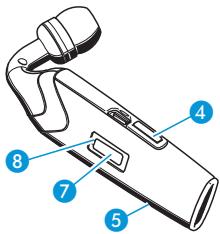
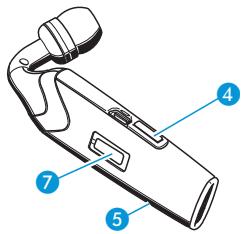
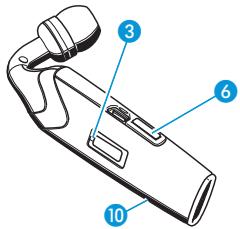
Operating elements
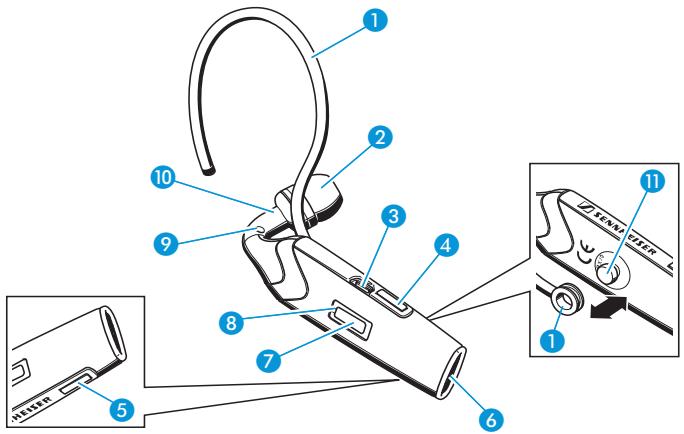
1earhook (removable, flexible)
earbud (exchangeable)
socket for power supply
4 volume up button
5 volume down button
microphone
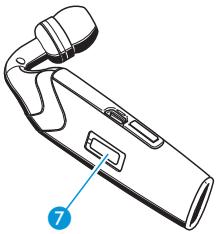
7 hook button
8 LED
grommet for lanyard
10 attachment point for lanyard clip
11 ball joint for the earhook
Button overview
| Button | Function | Page |
| hook button 7 | switch the headset on or off | 12 |
| enter pairing mode | 13 | |
| accept incoming call | 17 | |
| making a call | 18 | |
| reject an incoming call | 18 | |
| redial | 18 | |
| voice dial | 18 | |
| end a call | 19 | |
| transfer a call from the mobile phone to the headset | 19 | |
| mute/un-mute | 20 | |
| volume up button 4 | increase the speaker volume | 20 |
| increase the ring tone volume | 20 | |
| un-mute the microphone | 20 | |
| accept incoming call | 17 | |
| volume down button 5 | decrease the speaker volume | 20 |
| decrease the ring tone volume | 20 | |
| un-mute the microphone | 20 | |
| accept incoming call | 17 |
Quick Setup Guide
First, charge the headset.
For the first charging allow 3 hours. Later, 21/2 hours suffice to fully charge the battery. For details see page 11.
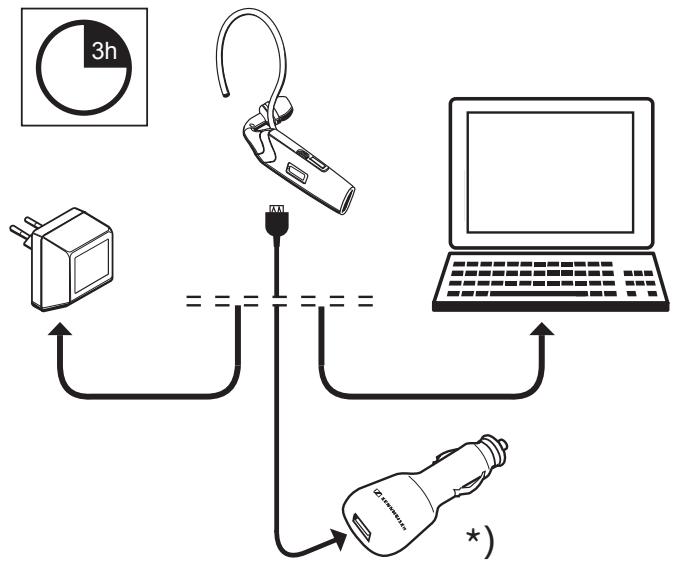
*) The car charger unit is available as an accessory (see page 22).
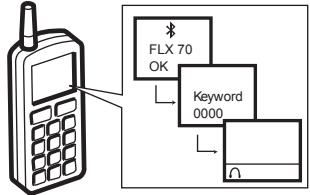
- Then switch on the headset (details on page 12) and pair it to your mobile phone. For details and information on how to pair to another Bluetooth device see page 13.
Put the headset on your ear.
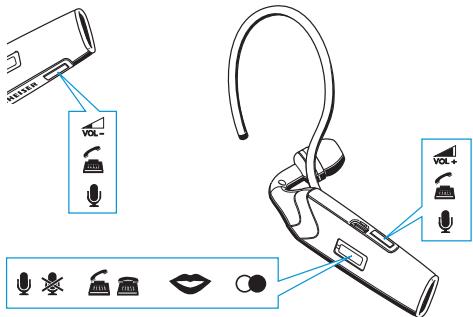

(un)muting (p. 20)

accepting calls (p. 17)

ending calls (p.19)

voice dialling (p. 18)

redialling (p. 18)


volume (p. 20)
Setting up the FLX 70
Charging the battery in the headset
If you charge the battery for the first time, allow charging for at least 3 hours without interruption. Later, 212 hours suffice to fully charge the battery. The headset cannot be used during the charging process.
To charge the battery in the headset:
Take off the headset and switch it off (see page 12).
Connect the USB charging cable to the socket for power supply ③.
Connect the USB plug of the USB charging cable to:
- either the USB socket of the FLX 70 power supply
- or a USB socket of a computer
- or the USB socket of the FLX 70 car charger unit (available as an accessory)
Connect either the power supply or the car charger unit to the appropriate power outlet.
If the battery was completely drained, the LED ⑧ flashes red in the beginning of the charging process. During charging, the LED ⑧ lights up red. When charging is complete, the LED ⑧ lights up blue.
The charging process cannot be started during an ongoing call. A fully charged battery provides a talk time of up to six hours or a standby time of up to 240 hours. When the battery is about to run flat:
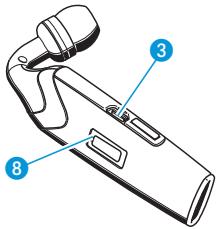
The LED 8 flashes red.
- Three beeps are heard in the speaker 3 times with an interval of 15 seconds and thereafter with an interval of 2 minutes.
Less than 10 minutes of talk time are left.
Switching the headset on/off
Press the hook button 7 for more than 3 sec. until the LED 8 lights up blue.
The headset is switched on and in one of the following modes:
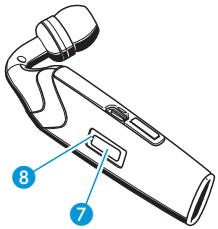
- If the headset is already paired to a mobile phone, the headset is ready to use.
- If the headset is not yet paired to a mobile phone, pair it as described under "Pairing the headset to mobile phones or other Bluetooth devices" on page 13.
- If the headset is already paired to a mobile phone and if there is an incoming call on your mobile phone, the call is answered immediately by pressing the hook button ⑦ once.
To switch off the headset:
Press the hook button ⑦ for more than 3 sec. until the LED ⑧ flashes red and then turns off.
All settings are saved. The battery lasts longer, if you switch off the headset when you are not using it.
Pairing the headset to mobile phones or other Bluetooth devices
Pairing to a mobile phone
To be able to use the headset, you must first pair it to your mobile phone or a similar device with a Bluetooth hands-free or headset profile. Once you have paired the headset to a mobile phone, the headset is connected automatically each time this mobile phone and the headset detect each other.
Make sure the headset is switched on and placed close to your mobile phone.
- If you have not yet paired the headset to a mobile phone, the headset enters the pairing mode automatically.
If you have already paired the headset to another mobile phone before, you have to enter the pairing mode manually by first switching off the headset and then switching it on again and keeping the hook button 7 pressed for 6 seconds.
- As soon as the headset is in the pairing mode, the LED ③ flashes alternatingly in red and blue.
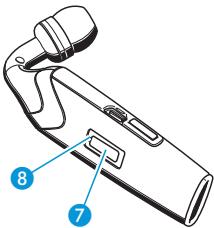
On your mobile phone, start a search for Bluetooth devices (see the manual of your mobile phone) and follow any instructions displayed on your mobile phone display.
- Once the headset is detected by your mobile phone, select "FLX 70". When the Bluetooth connection is successfully established, the headset is identified as "FLX 70" in the mobile phone's display.
When your mobile phone prompts for a keyword, enter four zeros (0000).
If pairing was successful, the LED 8 stops flashing.
Once paired, your mobile phone will be able to transfer the call audio to the headset – either automatically or manually
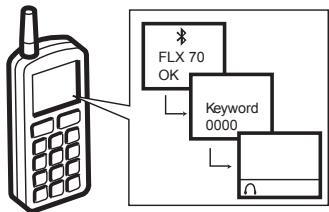
(please see your mobile phone's manual whether the call audio is transferred automatically or manually). Most mobile phones show a headset symbol in their display, if successfully paired.
Pairing to other Bluetooth devices
If you wish to pair the headset to other Bluetooth devices, please see the Bluetooth device's manual.
Pairing to several mobile phones
If you wish to pair the headset to a second mobile phone, you first have to disconnect from the first mobile phone (see the manual of the first mobile phone). The headset saves up to four pairing profiles. As soon as the headset is switched on it tries to connect to the mobile phone that it was last connected to. If this mobile phone is not detected by the headset, you can manually connect it with one of the other three mobile phones (see the manual of the respective mobile phone).
Wearing the headset
WARNING!

Danger of injury!
If you insert the headset without earbud, your auditory canal can be harmed!
Never insert the headset without earbud!
You can wear the headset
with the lanyard, with the earhook 1 or with both
- on the left or right ear
Attaching the lanyard
Use the lanyard to prevent the headset from coming off - especially when you do not use the earhook 1! To attach the lanyard permanently:
Pull the narrow loop of the lanyard through the grommet 9.
Pull the lanyard through the narrow loop.
Pull tight the lanyard.
To attach the lanyard temporarily:
Clip the lanyard clip on the attachment point 10.
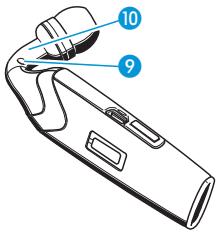
Exchanging the earbud
If the pre-mounted earbud (size S) does not fit your ear:
Detach the earbud from the headset and replace it by the larger or smaller one included in delivery.
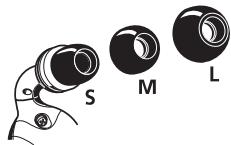
Attaching and adapting the earhook
Please note that the earhook 1 has to be turned when changing from the left to the right ear or vice versa.
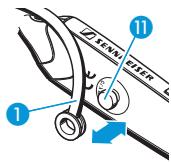
- Clip the earhook ① on the ball joint ⑩, so that the earhook can be turned and inclined to fit comfortably on your ear.
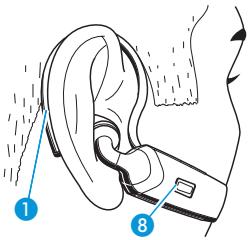
Putting on and adjusting
Switch the headset on. The LED ⑧ flashes blue three times.
Put the headset on so that the earbud fits into your auditory canal as shown on the right.
Bend the flexible earhook 1 until it fits perfectly on your ear.
Operating the FLX 70
Telephoning with the FLX 70
Accepting an incoming call
Make sure the headset is paired to your mobile phone (see "Pairing the headset to mobile phones or other Bluetooth devices" on page 13).
When you receive a call, a ring tone is heard in the speaker and the LED ⑧ flashes blue quickly. To accept this call if the headset is already switched on:
Press the hook button ⑦ or one of the volume buttons ④ or ⑤.
A beep is heard in the speaker.
Start to talk.
To accept the call if the headset is not switched on:
Press the hook button 7 for more than 3 sec.
The headset is switched on and the call is answered immediately without any further action, however, there might be a delay depending on the type of mobile phone you use.
Put the headset on your ear.
Start to talk.
Rejecting an incoming call
Press and hold the hook button 7 while the mobile phone is ringing until a beep is heard in the speaker.
The ring tone stops. Depending on the mobile phone settings, the call is either rejected or transferred to a voice mailbox.
Making a call
Dial the number on your mobile phone as usual.
If your mobile phone automatically transfers the call audio to the headset, a beep is heard in the speaker.
If your mobile phone does not automatically transfer the call audio to the headset, you must press a button on your mobile phone to transfer the call audio to the headset manually.
Start to talk.
Redialling
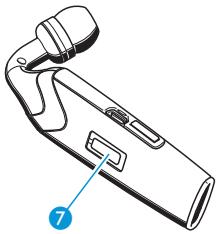
Press and hold the hook button 7 for 1.5 seconds.
A beep is heard in the speaker. The mobile phone redials the last dialled number automatically.
Voice dialling
The voice dialling function must be supported by your mobile phone and be activated.
Press the hook button 7.
After you hear a confirmation beep: Say the name of the other party.
The mobile phone dials the corresponding number automatically.
Ending a call
Press the hook button or use your mobile phone to end the call.
A beep is heard in the speaker. The call is ended.
Transferring an ongoing call from the mobile phone to the headset
Press the hook button 7.
A beep is heard in the speaker. The call audio is transferred to the headset.
Transferring a call from the headset to the mobile phone
See your mobile phone's manual on how to transfer the call audio from the headset to your mobile phone.
If you leave the transmitting range
If the headset leaves the mobile phone's transmitting range during a call:
- The sound quality deteriorates before the connection finally breaks down.
- A beep is heard in the headset when the connection is lost.
- Your mobile phone might display the loss of connection.
- See the manual of your mobile phone whether or not your mobile phone ends the call automatically.
Changing the speaker volume
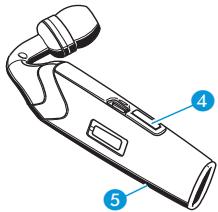
Press the volume button 4 or 5 during a call.
The speaker volume is changed by one step.
- The speaker volume can be adjusted in 8 steps. The factory setting is 4. When the minimum or maximum volume is reached, a beep is heard in the speaker.
- In addition, the adaptive intelligence
"learns" the users preferred settings and adjusts the volume automatically.
- If you switch off the headset, the current volume setting is saved.
Changing the ring tone volume
Press the volume button 4 or 5 while the headset is in standby mode (no active call).
The ring tone volume is changed by one step. The ring tone is played once in the set volume. The selected volume is saved.
- The ring tone volume can be adjusted in 8 steps. The factory setting is 4.
Muting/un-muting the headset microphone
To mute the headset microphone:
Press and hold the hook button ⑦ during a call until a beep is heard in the speaker.
The microphone is muted. A beep is heard every 5 seconds in the speaker.
To un-mute the headset microphone:
Press either the hook button ⑦ or one of the volume buttons ④ or ⑤. The beeping stops. The microphone works as usual.
Restoring factory settings
You can restore the following settings to factory settings:
- speaker volume
ring tone volume
pairing
Set the headset to pairing mode as described under "Pairing the headset to mobile phones or other Bluetooth devices" on page 13.
Press and hold both the volume buttons 4 and 5 while the headset is in pairing mode until the LED 8 stops flashing for a short time.
Afterwards the LED ⑧ flashes alternatingly in red and blue to indicate that the headset is in the pairing mode. The headset needs to be paired again before using.
Maintenance and care
If you do not want to use the headset for a longer time:
Turn the headset off.
Store the headset in a clean and dry environment.
Charge the rechargeable battery at least once every six months.
To clean the headset:
Only clean with a dry cloth. Do not use any liquids, solvents or cleansing agents.
Accessories
502564 FLX 70 accessory set (earhook, lanyard, lanyard clip and earbuds)
502309 USB charging cable
502310 Power supply EU version
502311 Power supply UK version
502312 Power supply US version
502313 Car charger unit
Specifications
Directional microphone system
Microphone type: electret microphone
Sensitivity: -45 dBV at 94 dB SPL, 1 kHz
Speaker unit
Speaker type: Dynamic - Neodymium magnet
Max.output: 110 dB SPL
General
Dimensions: 52mm× 20mm× 31mm (width x height x depth)
Weight: 10 g (13g with earhook mounted)
Power supply: input 100-240 V AC, output 5 V DC, 150 mA
Car charger
(assistant): input 12-24 V DC, output 5 V DC, 150 mA
Manufacturer declarations
Warranty regulations
The guarantee period for this Sennheiser Communications product is 24 months - for the battery 6 months - from the date of purchase. Excluded are accessory items, rechargeable or disposable batteries that are delivered with the product; due to their characteristics these products have a shorter service life that is principally dependent on the individual frequency of use.
The guarantee period starts from the date of original purchase. For this reason, we recommend that the sales receipt be retained as proof of purchase. Without this proof (which is checked by the responsible Sennheiser Communications service partner) you will not be reimbursed for any repairs that are carried out.
Depending on our choice, guarantee service comprises, free of charge, the removal of material and manufacturing defects through repair or replacement of either individual parts or the entire device. Inappropriate usage (e.g. operating faults, mechanical damages, incorrect operating voltage), wear and tear, force majeure and defects which were known at the time of purchase are excluded from guarantee claims. The guarantee is void if the product is manipulated by non-authorised persons or repair stations.
In the case of a claim under the terms of this guarantee, send the device, including accessories and sales receipt, to the responsible service partner. To minimise the risk of transport damage, we recommend that the original packaging is used. Your legal rights against the seller, resulting from the contract of sale, are not affected by this guarantee.
The guarantee can be claimed in all countries outside the U.S. provided that no national law limits our terms of guarantee.
CE Declaration of Conformity

This equipment is in compliance with the essential requirements and other relevant provisions of Directives 1999/5/EC, 89/336/EC or 73/23/EC.
Before putting the device into operation, please observe the respective country-specific regulations!
Please see also www.sennheisercommunications.com/doc.
FCC statements
This equipment has been tested and found to comply with the limits for a Class B digital device, pursuant to Part 15 of the FCC Rules. These limits are designed to provide reasonable protection against harmful interference in a residential installation. This equipment generates, uses and
can radiate radio frequency energy and, if not installed and used in accordance with the instructions, may cause harmful interference to radio communications. However, there is no guarantee that interference will not occur in a particular installation. If this equipment does cause harmful interference to radio or television reception, which can be determined by turning the equipment off and on, the user is encouraged to try to correct the interference by one or more of the following measures:
Reorient or relocate the receiving antenna.
- Increase the separation between the equipment and receiver.
- Connect the equipment into an outlet on a circuit different from that to which the receiver is connected.
- Consult the dealer or an experienced radio/TV technician for help.
This device complies with Part 15 of the FCC Rules and with RSS-210 of Industry Canada.
Operation is subject to the following two conditions:
(1) this device may not cause harmful interference, and
(2) this device must accept any interference received, including interference that may cause undesired operation.
This Class [] digital apparatus complies with Canadian ICES-003.
Batteries or rechargeable batteries

The supplied batteries or rechargeable batteries can be recycled. Please dispose of them as special waste or return them to your specialist dealer. In order to protect the environment, only dispose of exhausted batteries.
WEEE Declaration

Your Sennheiser Communications product was developed and manufactured with high quality materials and components which can be recycled and/or reused. This symbol indicates that electrical and electronic equipment must be disposed of separately from normal waste at the end of its operational lifetime.
Please dispose of this product by bringing it to your local collection point or recycling centre for such equipment. This will help to protect the environment in which we all live.
Inhalt
Inhalt. 1
Dimensions: 52 mm x 20 mm x 31 mm (L x H x P)
Sennheiser Communications A/S
6 Langager
2680 Solrd Strand
Denmark
Phone: +45 5618 0000
Fax: +45 5618 0099
www.sennheisercommunications.com
Printed in China
Publ.01/08
525709/A01