
ADN - Conference system SENNHEISER - Free user manual and instructions
Find the device manual for free ADN SENNHEISER in PDF.


| Product Type | Digital Conference System |
| Brand | Sennheiser |
| Model | ADN |
| Main Components | ADN CU1 central unit, ADN D1 delegate unit, ADN C1 chairman unit |
| Unit dimensions (W x H x D) | 185 x 63 x 140 mm |
| Central unit dimensions (W x H x D) | 417 x 100 x 345 mm |
| Unit weight | Approx. 700 g |
| Central unit weight | Approx. 6.5 kg |
| Central unit power supply | 100-240 V~, 50-60 Hz, 245 W |
| Unit power supply | 35-52.8 V DC via system cable |
| Conference operating modes | Direct Access, Override, Request |
| Maximum number of simultaneous speakers | 1 to 10 (adjustable) |
| Speaking time management | Adjustable limit (1-60 min), end warning, extension or cut-off |
| Audio connections | XLR input (line), XLR output (line), 3.5 mm headphone jack on each unit |
| Audio settings | Equalizer for XLR input/output and conference channel, volume, sensitivity, gain reduction |
| Management software | Conference Manager (built-in or Windows version), configuration and control via network |
| Network connection | Ethernet RJ-45, TCP/IP protocol (IPv4), static or dynamic IP address |
| Maximum number of units | Approx. 30 (depending on cable length), up to 15 per port |
| Maximum system cable length | 80 m between central unit and first unit, 2-5 m between units |
| Maintenance and cleaning | Soft dry cloth, do not use solvents, clean ventilation slots |
| Safety | Do not open central unit, avoid moisture, moderate headphone volume |
| Repairability | Repair by qualified personnel only, no user-serviceable parts |
| Warranty | 24 months |
| Country of manufacture | Germany (Sennheiser electronic GmbH & Co. KG) |
Frequently Asked Questions - ADN SENNHEISER
User questions about ADN SENNHEISER
0 question about this device. Answer the ones you know or ask your own.
Ask a new question about this device
Download the instructions for your Conference system in PDF format for free! Find your manual ADN - SENNHEISER and take your electronic device back in hand. On this page are published all the documents necessary for the use of your device. ADN by SENNHEISER.
USER MANUAL ADN SENNHEISER
ADN Conference Manager (local)

Network and Internet View network status and tasks Set up file shark

Network and Internet
View network status and tasks
Choose home up and sharing options
Save as ... >> apparait.
Start Initialization
Stop Initialization
Talk Time Limitation
Talk Time Limitation
Talk Time Limit
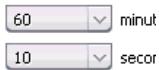
Premonition Time
Switch Off Microphone on Talktime Exceed
Audio Gain Reduction:
0.0 dB per Mic.
These license terms are an agreement between you and Sennheiser electronic GmbH & Co. KG (Sennheiser). Please read them. They apply to the software included on this device. The software also includes any separate media on which you received the software.
The software on this device includes software licensed from Microsoft Corporation or its affiliate.
The terms also apply to any Microsoft
- Updates,
- Supplements,
- Internet-based services, and
Support services
for this software, unless other terms accompany those items. If so, those terms apply. If you obtain updates or supplements directly from Microsoft, then Microsoft, and not Sennheiser, licenses those to you.
As described below, using some features also operates as your consent to the transmission of certain standard computer information for Internet-based services.
By using the software, you accept these terms. If you do not accept them, do not use or copy the software. Instead, contact Sennheiser to determine its return policy for a refund or credit.
If you comply with these license terms, you have the rights below.
1. Use Rights.
You may use the software on the device with which you acquired the software.
2. Additional Licensing Requirements and/or Use Rights.
a. Specific Use. Sennheiser designed this device for a specific use. You may only use the software for that use.
b. Other Software. You may use other programs with the software as long as the other programs
- Directly support the manufacturer's specific use for the device, or
- Provide system utilities, resource management, or anti-virus or similar protection.
Software that provides consumer or business tasks or processes may not be run on the device. This includes email, word processing, spreadsheet, database, scheduling and personal finance software. The device may use terminal services protocols to access such software running on a server.
c. Device Connections.
- You may use terminal services protocols to connect the device to another device running business task or processes software such as email, word processing, scheduling or spreadsheets.
- You may allow up to ten other devices to access the software to use
File Services,
Print Services,
- Internet Information Services, and
- Internet Connection Sharing and Telephony Services.
The ten connection limit applies to devices that access the software indirectly through „multiplexing" or other software or hardware that pools connections. You may use unlimited inbound connections at any time via TCP/IP.
-
Scope of License. The software is licensed, not sold. This agreement only gives you some rights to use the software. Sennheiser and Microsoft reserve all other rights. Unless applicable law gives you more rights despite this limitation, you may use the software only as expressly permitted in this agreement. In doing so, you must comply with any technical limitations in the software that allow you to use it only in certain ways. For more information, see the software documentation or contact Sennheiser. Except and only to the extent permitted by applicable law despite these limitations, you may not:
-
Work around any technical limitations in the software;
- Reverse engineer, decompile or disassemble the software;
- Make more copies of the software than specified in this agreement;
- Publish the software for others to copy;
- Rent, lease or lend the software; or
- Use the software for commercial software hosting services.
Except as expressly provided in this agreement, rights to access the software on this device do not give you any right to implement Microsoft patents or other Microsoft intellectual property in software or devices that access this device.
You may use remote access technologies in the software such as Remote Desktop to access the software remotely from another device. You are responsible for obtaining any licenses required for use of these protocols to access other software.
- Remote Boot Feature. If the Sennheiser enabled the device Remote Boot feature of the software, you may
(i) use the Remote Boot Installation Service (RBIS) tool only to install one copy of the software on your server and to deploy the software on licensed devices as part of the Remote Boot process; and
(ii) use the Remote Boot Installation Service only for deployment of the software to devices as part of the Remote Boot process; and
(iii) download the software to licensed devices and use it on them. For more information, please refer to the device documentation or contact Sennheiser.
- Internet-Based Services. Microsoft provides Internet-based services with the software. Microsoft may change or cancel them at any time.
a. Consent for Internet-Based Services. The software features described below connect to Microsoft or service provider computer systems over the Internet. In some cases, you will not receive a separate notice when they connect. You may switch off these features or not use them. For more information about these features, visit http://www.microsoft.com/windowsxp/downloads/updates/sp2/docs/privacy.mspx.
By using these features, you consent to the transmission of this information. Microsoft does not use the information to identify or contact you.
b. Computer Information. The following features use Internet protocols, which send to the appropriate systems computer information, such as your Internet protocol address, the type of operating system, browser and name and version of the software you are using, and the language code of the device where you installed the software. Microsoft uses this information to make the Internet-based services available to you.
-
Web Content Features. Features in the software can retrieve related content from Microsoft and provide it to you. To provide the content, these features send to Microsoft the type of operating system, name and version of the software you are using, type of browser and language code of the device where the software was installed. Examples of these features are clip art, templates, online training, online assistance and Appshelp. These features only operate when you activate them. You may choose to switch them off or not use them.
-
Digital Certificates. The software uses digital certificates. These digital certificates confirm the identity of Internet users sending X.509 standard encrypted information. The software retrieves certificates and updates certificate revocation lists. These security features operate only when you use the Internet.
-
Auto Root Update. The Auto Root Update feature updates the list of trusted certificate authorities. You can switch off the Auto Root Update feature.
-
Windows Media Player. When you use Windows Media Player, it checks with Microsoft for compatible online music services in your region;
-
New versions of the player; and
-
Codec if your device does not have the correct ones for playing content. You can switch off this feature. For more information, go to: http://microsoft.com/windows/windowsmedia/mp10/privacy.aspx.
-
Windows Media Digital Rights Management. Content owners use Windows Media digital rights management technology (WMDRM) to protect their intellectual property, including copyrights. This software and third party software use WMDRM to play and copy WMDRM-protected content. If the software fails to protect the content, content owners may ask Microsoft to revoke the software's ability to use WMDRM to play or copy protected content. Revocation does not affect other content. When you download licenses for protected content, you agree that Microsoft may include a revocation list with the licenses. Content owners may require you to upgrade WMDRM to access their content. Microsoft software that includes WMDRM will ask for your consent prior to the upgrade. If you decline an upgrade, you will not be able to access content that requires the upgrade. You may switch off WMDRM features that access the Internet. When these features are off, you can still play content for which you have a valid license.
c. Misuse of Internet-based Services. You may not use these services in any way that could harm them or impair anyone else's use of them. You may not use the services to try to gain unauthorized access to any service, data, account or network by any means.
-
Windows Update Agent (also known as Software Update Services). The software on the device includes Windows Update Agent (,WUA^ ) functionality that may enable your device to connect to and access updates (,Windows Updates^ ) from a server installed with the required server component. Without limiting any other disclaimer in this Microsoft Software License Terms or any EULA accompanying a Windows Update, you acknowledge and agree that no warranty is provided by MS, Microsoft Corporation or their affiliates with respect to any Windows Update that you install or attempt to install on your device.
-
Product Support. Contact Sennheiser for support options. Refer to the support number provided with the device.
-
Backup Copy. You may make one backup copy of the software. You may use it only to reinstall the software on the device.
-
Proof Of License. If you acquired the software on the device, or on a disc or other media, a genuine Certificate of Authenticity label with a genuine copy of the software identifies licensed software. To be valid, this label must be affixed to the device, or included on or in Sennheiser's software packaging. If you receive the label separately, it is not valid. You should keep the label on the device or packaging to prove that you are licensed to use the software. To identify genuine Microsoft software, see http:// www.howtotell.com.
-
Transfer to a Third Party. You may transfer the software only with the device, the Certificate of Authenticity label, and these license terms directly to a third party. Before the transfer, that party must agree that these license terms apply to the transfer and use of the software. You may not retain any copies of the software including the backup copy.
-
Not Fault Tolerant. The software is not fault tolerant. Sennheiser installed the software on the device and is responsible for how it operates on the device.
-
Restricted Use. The Microsoft software was designed for systems that do not require fail-safe performance. You may not use the Microsoft software in any device or system in which a malfunction of the software would result in foreseeable risk of injury or death to any person. This includes operation of nuclear facilities, aircraft navigation or communication systems and air traffic control.
-
No Warranties for the Software. The software is provided „as is". You bear all risks of using it. Microsoft gives no express warranties, guarantees or conditions. Any warranties you receive regarding the device or the software do not originate from, and are not binding on, Microsoft or its affiliates. When allowed by your local laws, Sennheiser and Microsoft exclude implied warranties of merchantability, fitness for a particular purpose and non-infringement.
-
Liability Limitations. You can recover from Microsoft and its affiliates only direct damages up to two hundred fifty U.S. Dollars (U.S. $250.00). You cannot recover any other damages, including consequential, lost profits, special, indirect or incidental damages.
This limitation applies to:
- Anything related to the software, services, content (including code) on third party internet sites, or third party programs; and
- Claims for breach of contract, breach of warranty, guarantee or condition, strict liability, negligence, or other tort to the extent permitted by applicable law.
It also applies even if Microsoft should have been aware of the possibility of the damages. The above limitation may not apply to you because your country may not allow the exclusion or limitation of incidental, consequential or other damages.
- Export Restrictions. The software is subject to United States export laws and regulations. You must comply with all domestic and international export laws and regulations that apply to the software. These laws include restrictions on destinations, end users and end use. For additional information, see www.microsoft.com/exporting.
Directive RoHS (2002/95/CE)
Directive WEEE (2002/96/CE)

Audio Gain Reduction 32, 95
Audio IN et Audio OUT 19, 31
Régleraudio94,96
Avertissement 34
Clear Request List on Cancel 30
Commander
Conference 100
Conference Manager 49
Open Active Conference Document 69
Floor/Loudspeakers 32,94
Fonction Cancel 47
Activer/désactiver 28,92
Régler 28, 92
Linear Division 32, 95
Microphone Limit 27, 92
Premonition Time Limit 28, 92
R
Rajouter
Postes 48
Reaction on Talktime Exceed 29, 93
Réglages audio
Réaliser 31, 94, 96
Request Limit 28, 92
Reset Break Indication 40
Reset Error Indication 40
S
Talk Time Limit 28, 92
Touché de priorité
Am Labor 1, 30900 Wedemark, Germany
www.sennheiser.com
Brand : SENNHEISER
Model : ADN
Category : Conference system