
LS1214 - Miter saw MAKITA - Free user manual and instructions
Find the device manual for free LS1214 MAKITA in PDF.



| Product type | Miter saw (miter cut, bevel cut, compound cut) |
| Brand | MAKITA |
| Model | LS1214 / LS1214F / LS1214L |
| Blade diameter | 305 mm |
| Arbor hole diameter | Europe: 30 mm; other countries: 25.4 mm |
| Maximum miter angle | 47° left, 52° right |
| Maximum bevel angle | 45° left and right |
| Maximum cutting capacities (H x L) at 0° miter / 0° bevel | 120 mm x 270 mm (with 20 mm wood facing) |
| No-load speed | 3,200 min⁻¹ |
| Laser (model LS1214L) | Red laser 650 nm, <1mW, class 2 |
| Dimensions (L x W x H) | 723 mm x 520 mm x 696 mm (LS1214/LS1214F) |
| Net weight | LS1214: 24.4 kg; LS1214F: 24.6 kg; LS1214L: 25.3 kg |
| Power supply | Single-phase mains, voltage as per rating plate |
| Double insulation | Yes (CE compliant, no grounding) |
| Sound pressure level (LpA) | 89 dB(A) with uncertainty K=3 dB(A) |
| Sound power level (LWA) | 102 dB(A) with uncertainty K=3 dB(A) |
| Vibration emission | 2.5 m/s² or less (uncertainty K=1.5 m/s²) |
| Main functions | Vertical cut, sliding cut, miter cut, bevel cut, compound cut, groove cutting |
| Safety protection | Automatic blade guard, unlock button, shaft lock, brake |
| Included / optional accessories | Dust bag, vertical vise, horizontal vise, chip deflector, stand, dust box, socket wrench |
| Maintenance and cleaning | Clean the blade guard with a damp cloth; lubricate sliding parts with machine oil; replace carbon brushes at wear mark |
| Repairability | Have all repairs done by an authorized Makita service center with genuine parts |
Frequently Asked Questions - LS1214 MAKITA
User questions about LS1214 MAKITA
0 question about this device. Answer the ones you know or ask your own.
Ask a new question about this device
Download the instructions for your Miter saw in PDF format for free! Find your manual LS1214 - MAKITA and take your electronic device back in hand. On this page are published all the documents necessary for the use of your device. LS1214 by MAKITA.
USER MANUAL LS1214 MAKITA
natural_image
Technical line drawing of a cutting machine with a blade and cutting tool (no text or symbols)
1
natural_image
Technical line drawing of a mechanical component with labeled part '2' (no text or symbols beyond label)2
natural_image
Technical line drawing of a mechanical device with labeled parts (no text or symbols present)3
4
5
6
7
8
9
10
11
12
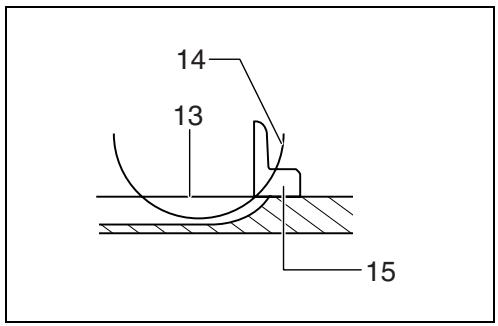
13
14
15
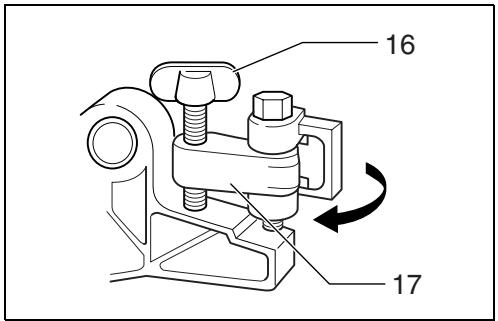
16
17
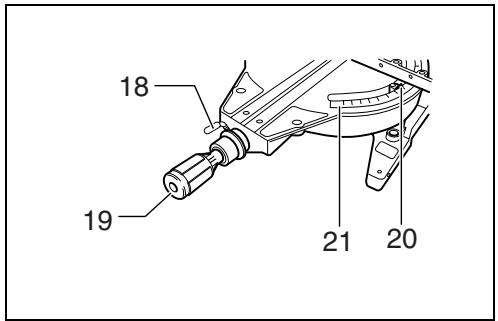
18
19
20
21
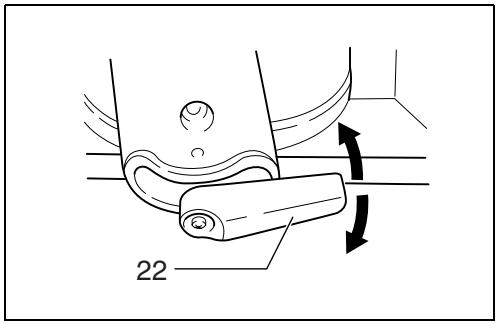
22
23
24
25
26
27
28
29
30
31
32
33
34
35
36
37
38
39
40
natural_image
Simple line drawing of a circular object with diagonal lines and a central cross, resembling a warning sign or symbol (no text or numbers present)41
natural_image
Illustration of a hand using a cutting tool on a workbench, with no visible text or symbols42
natural_image
Illustration of a hand using a power tool to cut a saw blade, showing motion arrows (no text or symbols)43
natural_image
Illustration of a hand using a tool to cut or adjust a mechanical component (no text or symbols present)44
45
46
47
48
49
natural_image
Technical line drawing of a mechanical assembly with no visible text or symbols50
51
52
53
54
55
56
57
58
59
60
61
62
63
64
65
66
Symbols
The followings show the symbols used for the machine. Be sure that you understand their meaning before use.
Symboles
- Only for EU countries
Do not dispose of electric equipment together with household waste material!
In observance of European Directive 2002/96/EC on waste electrical and electronic equipment and its implementation in accordance with national law, electric equipment that have reached the end of their life must be collected separately and returned to an environmentally compatible recycling facility.
Explanation of general view
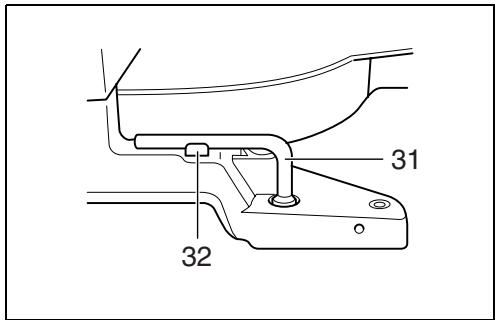
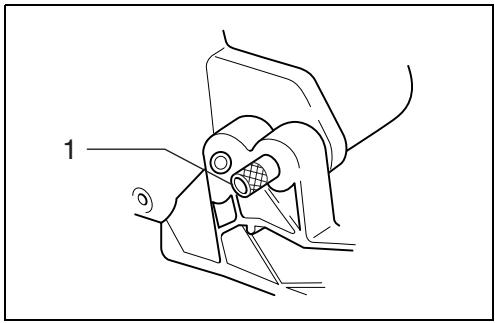
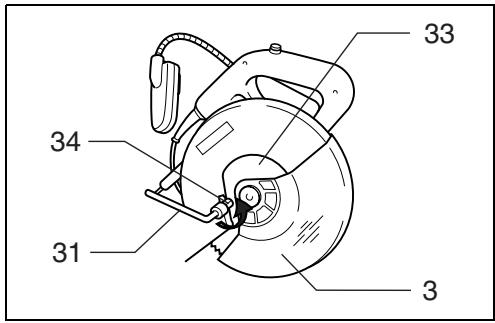
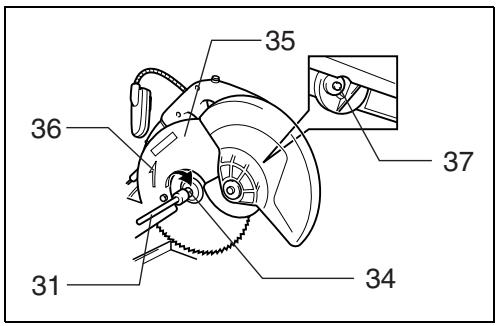
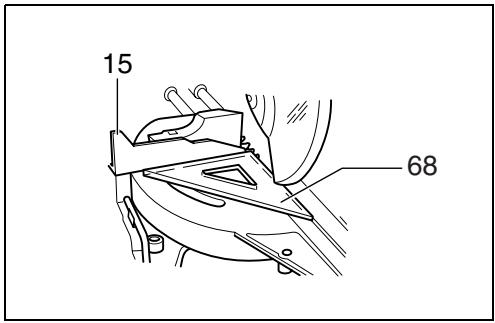
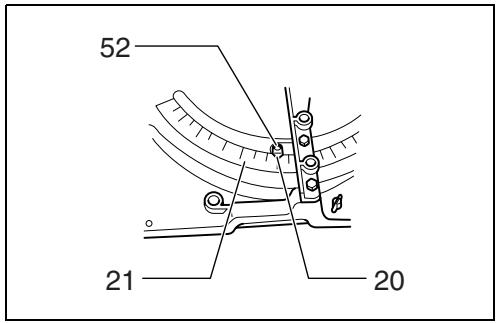
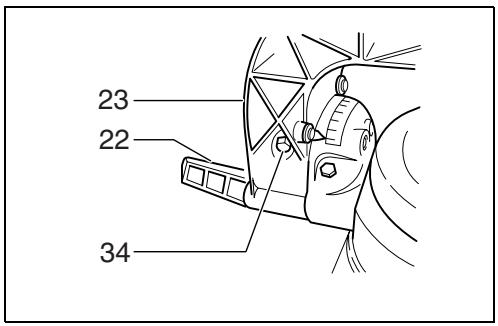
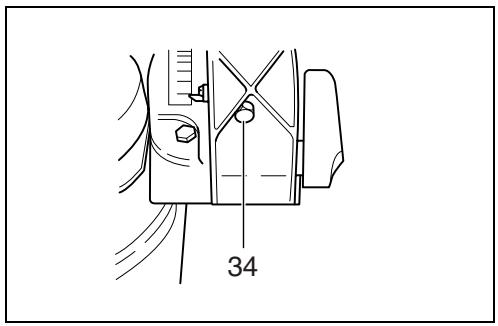
| 1 | Stopper pin | 33 | Center cover | 64 | Over 15 mm |
| 2 | Bolt | 34 | Hex bolt | 65 | Over 540 mm |
| 3 | Blade guard | 35 | Blade case | 66 | Cut grooves with blade |
| 4 | Knob | 36 | Arrow | 67 | Hex bolts |
| 5 | Kerf board | 37 | Shaft lock | 68 | Triangular rule |
| 6 | Saw blade | 38 | Inner flange | 69 | Pointers |
| 7 | Blade teeth | 39 | Spindle | 70 | Arm holder |
| 8 | Left bevel cut | 40 | Ring | 71 | Right 45° bevel angle adjusting bolt |
| 9 | Straight cut | 41 | Outer flange | ||
| 10 | Right bevel cut | 42 | Hex bolt (left handed) | 72 | Left 45° bevel angle adjusting bolt |
| 11 | Adjusting bolt | 43 | Dust nozzle | ||
| 12 | Turn base | 44 | Dust bag | 73 | Hex lock nut |
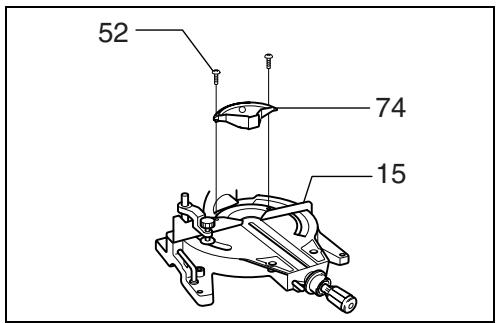
| 13 | Top surface of turn base | 45 | Fastener | 74 | Kerf block |
| 14 | Periphery of blade | 46 | Support | 75 | Work piece |
| 15 | Guide fence | 47 | Turn base | 76 | Cutting line |
| 16 | Adjusting screw | 48 | Sub-fence | 77 | Vertical vise |
| 17 | Stopper arm | 49 | Sub-fence R | 78 | Screwdriver |
| 18 | Lock lever | 50 | Screws | 79 | Screw (one piece only) |
| 19 | Grip | 51 | Vise knob | 80 | Lens for the laser light |
| 20 | Pointer | 52 | Screw | 81 | Pull out |
| 21 | Miter scale | 53 | Vise arm | 82 | Push |
| 22 | Lever | 54 | Vise rod | 83 | Lamp box |
| 23 | Arm | 55 | Vise plate | 84 | Screws |
| 24 | Bevel scale | 56 | Vise nut | 85 | Fluorescent tube |
| 25 | Lock-off button | 57 | Vise knob | 86 | Limit mark |
| 26 | Switch trigger | 58 | Holder | 87 | Brush holder cap |
| 27 | Handle | 59 | Spacer block | 88 | Rod |
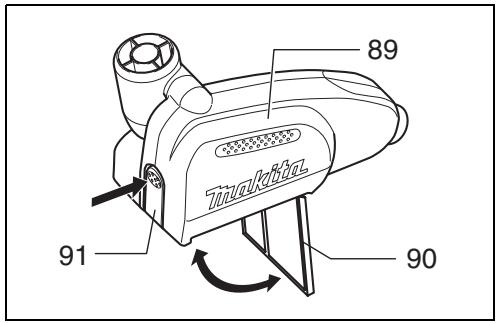
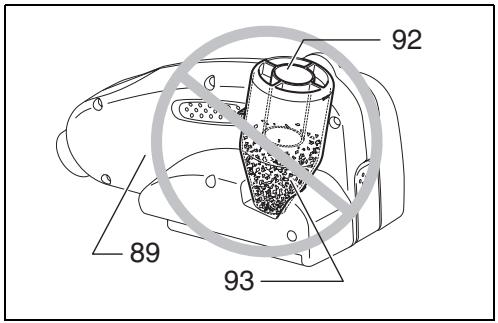
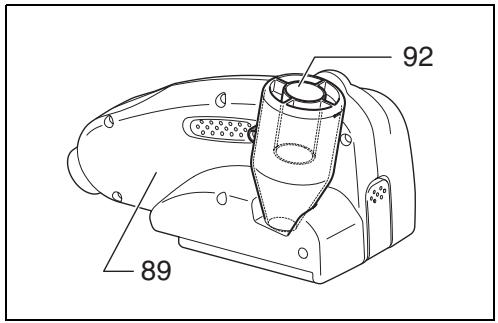
| 28 | Light | 60 | Vise | 89 | Dust box |
| 29 | Light switch | 61 | Aluminum extrusion | 90 | Cover |
| 30 | Switch for laser | 62 | Horizontal vise | 91 | Button |
| 31 | Socket wrench | (optional accessory) | 92 | Cylinder part | |
| 32 | Wrench holder | 63 | Hole | 93 | Sawdust |
SPECIFICATIONS
| Model | LS1214/LS1214F/LS1214L |
| Blade diameter | 305 mm |
| Hole diameter | European countries: 30 mm, other than European countries: 25.4 mm |
| Max. Miter angle | Left 47°, Right 52° |
| Max. Bevel angle | Left and Right 45° |
| Max. cutting capacities (H x W) |
| Miter angle | Bevel angle | ||
| 45° (left) | 0° | 45° (right) | |
| 0° | *71 mm x 260 mm66 mm x 305 mm | *120 mm x 270 mm115 mm x 308 mm | *50 mm x 260 mm45 mm x 305 mm |
| 45° (left and right) | (left) *71 mm x 155 mm66 mm x 170 mm(right) *71 mm x 175 mm66 mm x 215 mm | *120 mm x 185 mm115 mm x 218 mm | *50 mm x 175 mm45 mm x 215 mm |
| 52° (right) | - | *120 mm x 160 mm115 mm x 185 mm | - |
(Note)
* mark indicates that a wood facing with the following thickness is used.
| Miter angle | Thickness of wood |
| 0° | 20 mm |
| 45° (left and right) | 15 mm |
| 52° (right) | 15 mm |
No load speed (min ^-1 ) 3,200
Laser Type (LS1214L only)....Red Laser 650 nm, <1mW (Laser Class 2)
Dimensions (L x W x H)
LS1214/LS1214F 723 mm x 520 mm x 696 mm
LS1214L....723 mm x 520 mm x 718 mm
Net weight
LS1214....24.4 kg
LS1214F 24.6 kg
LS1214L....25.3 kg
Safety class....回 /II
- Due to our continuing program of research and development, the specifications herein are subject to change without notice.
- Specifications may differ from country to country.
• Weight according to EPTA-Procedure 01/2003
Intended use
The tool is intended for accurate straight and miter cutting in wood. With appropriate saw blades, aluminum can also be sawed.
Power supply
The tool should be connected only to a power supply of the same voltage as indicated on the nameplate, and can only be operated on single-phase AC supply. They are double-insulated in accordance with European Standard and can, therefore, also be used from sockets without earth wire.
GEA010-1
General Power Tool Safety Warnings
⚠ WARNING Read all safety warnings and all instructions. Failure to follow the warnings and instructions may result in electric shock, fire and/or serious injury.
Save all warnings and instructions for future reference.
ADDITIONAL SAFETY RULES FOR TOOL
ENB034-3
- Wear eye protection.
- Keep hands out of path of saw blade. Avoid contact with any coasting blade. It can still cause severe injury.
- Do not operate saw without guards in place. Check blade guard for proper closing before each use. Do not operate saw if blade guard does not move freely and close instantly. Never clamp or tie the blade guard into the open position.
- Do not perform any operation freehand. The workpiece must be secured firmly against the turn base and guide fence with the vise during all operations. Never use your hand to secure the workpiece.
- Never reach around saw blade.
- Turn off tool and wait for saw blade to stop before moving workpiece or changing settings.
- Unplug tool before changing blade or servicing.
- Always secure all moving portions before carrying the tool.
- Stopper pin which locks the cutter head down is for carrying and storage purposes only and not for any cutting operations.
-
Do not use the tool in the presence of flammable liquids or gases.
-
Check the blade carefully for cracks or damage before operation.
Replace cracked or damaged blade immediately. - Use only flanges specified for this tool.
- Be careful not to damage the arbor, flanges (especially the installing surface) or bolt. Damage to these parts could result in blade breakage.
- Make sure that the turn base is properly secured so it will not move during operation.
- For your safety, remove the chips, small pieces, etc. from the table top before operation.
- Avoid cutting nails. Inspect for and remove all nails from the workpiece before operation.
- Make sure the shaft lock is released before the switch is turned on.
- Be sure that the blade does not contact the turn base in the lowest position.
- Hold the handle firmly. Be aware that the saw moves up or down slightly during start-up and stopping.
- Make sure the blade is not contacting the workpiece before the switch is turned on.
- Before using the tool on an actual workpiece, let it run for a while. Watch for vibration or wobbling that could indicate poor installation or a poorly balanced blade.
- Wait until the blade attains full speed before cutting.
- Stop operation immediately if you notice anything abnormal.
- Do not attempt to lock the trigger in the on position.
- Be alert at all times, especially during repetitive, monotonous operations. Don't be lulled into a false sense of security. Blades are extremely unforgiving.
- Always use accessories recommended in this manual. Use of improper accessories such as abrasive wheels may cause an injury.
- Do not use the saw to cut other than aluminum, wood or similar materials.
- Connect miter saws to a dust collecting device when sawing.
- Select saw blades in relation to the material to be cut.
- Take care when slotting.
- Replace the kerf board when worn.
- Do not use saw blades manufactured from high speed steel.
- Some dust created from operation contains chemicals known to cause cancer, birth defects or other reproductive harm. Some examples of these chemicals are:
- lead from lead-based-painted material and,
• arsenic and chromium from chemically-treated lumber.
Your risk from these exposures varies, depending on how often you do this type of work. To reduce your exposure to these chemicals: work in a well ventilated area and work with approved safety equipment, such as those dust masks that are specially designed to filter out microscopic particles.
- To reduce the emitted noise, always be sure that the blade is sharp and clean.
- The operator is adequately trained in the use, adjustment and operation of the machine.
- Use correctly sharpened saw blades. Observe the maximum speed marked on the saw blade.
- Refrain from removing any cut-offs or other parts of the workpiece from the cutting area whilst the machine is running and the saw head is not in the rest position.
SAVE THESE INSTRUCTIONS
INSTALLATION
Bench mounting
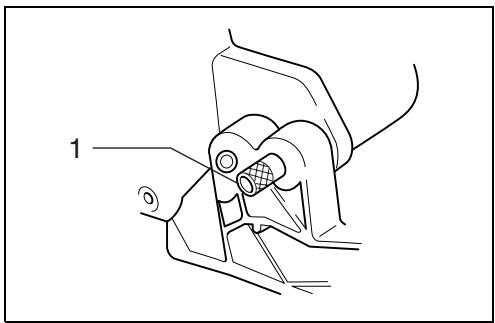
When the tool is shipped, the handle is locked in the lowered position by the stopper pin. Release the stopper pin by lowering the handle slightly and pulling the stopper pin. (Fig. 1)
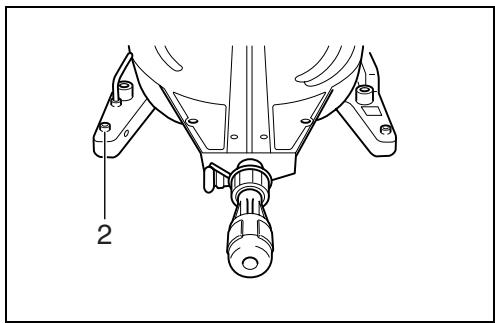
This tool should be bolted with four bolts to a level and stable surface using the bolt holes provided in the tool's base. This will help prevent tipping and possible injury. (Fig. 2)
FUNCTIONAL DESCRIPTION
CAUTION:
- Always be sure that the tool is switched off and unplugged before adjusting or checking function on the tool.
Blade guard (Fig. 3 & 4)
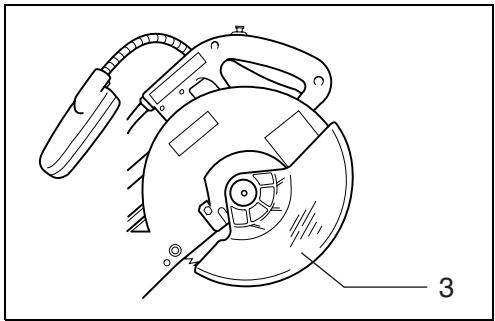
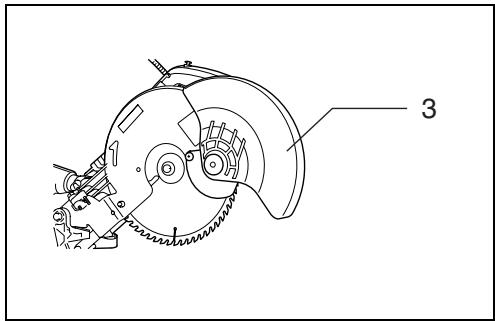
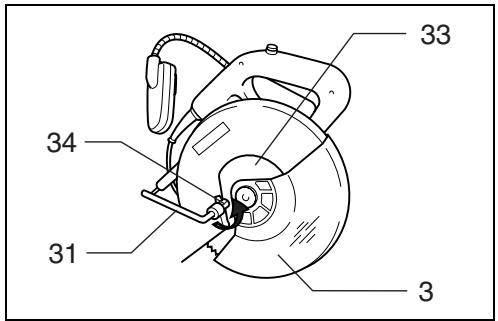
When lowering the handle, the blade guard rises automatically. The blade guard returns to its original position when the cut is completed and the handle is raised. NEVER DEFEAT OR REMOVE THE BLADE GUARD OR THE SPRING WHICH ATTACHES TO THE GUARD. In the interest of your personal safety, always maintain the blade guard in good condition. Any irregular operation of the blade guard should be corrected immediately. Check to assure spring loaded return action of guard. NEVER USE THE TOOL IF THE BLADE GUARD OR SPRING ARE DAMAGED, FAULTY OR REMOVED. DOING SO IS HIGHLY DANGEROUS AND CAN CAUSE SERIOUS PERSONAL INJURY.
If the see-through blade guard becomes dirty, or sawdust adheres to it in such a way that the blade and/or workpiece is no longer easily visible, unplug the saw and clean the guard carefully with a damp cloth. Do not use solvents or any petroleum-based cleaners on the plastic guard.
If the blade guard is especially dirty and vision through the guard is impaired, use the supplied socket wrench to loosen the hex bolt holding the center cover. Loosen the hex bolt by turning it counterclockwise and raise the blade guard and center cover. With the blade guard so positioned, cleaning can be more completely and efficiently accomplished. When cleaning is complete, reverse procedure above and secure bolt. Do not remove spring holding blade guard. If guard becomes discolored through age or UV light exposure, contact a Makita service center for a new guard. DO NOT DEFEAT OR REMOVE GUARD.
Positioning kerf board (Fig. 5 & 6)
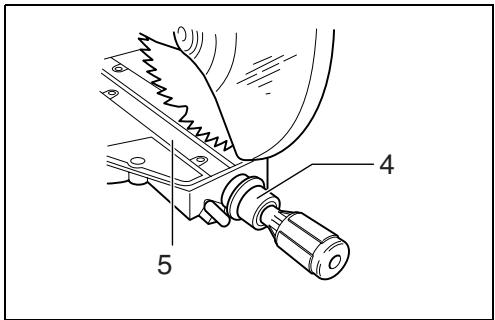
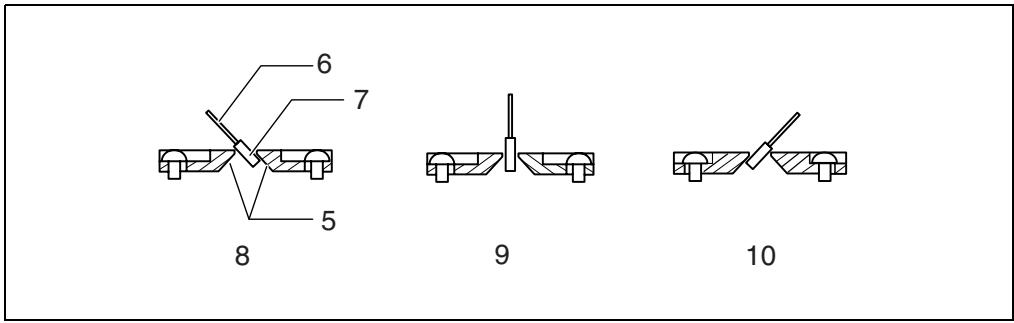
This tool is provided with the kerf boards in the turn base to minimize tearing on the exit side of a cut. The kerf boards are factory adjusted so that the saw blade does not contact the kerf boards. Before use, adjust the kerf boards as follows:
First, unplug the tool. Loosen all the screws (2 each on left and right) securing the kerf boards. Re-tighten them only to the extent that the kerf boards can still be easily moved by hand. Lower the handle fully and push in the stopper pin to lock the handle in the lowered position. Loosen the knob which secures the slide poles. Pull the carriage toward you fully. Adjust the kerf boards so that the kerf boards just contact the sides of the blade teeth. Tighten the front screws (do not tighten firmly). Push the carriage toward the guide fence fully and adjust the kerf boards so that the kerf boards just contact the sides of blade teeth. Tighten the rear screws (do not tighten firmly).
After adjusting the kerf boards, release the stopper pin and raise the handle. Then tighten all the screws securely.
CAUTION:
- Before and after changing the bevel angle, always adjust the kerf boards as described above.
Maintaining maximum cutting capacity (Fig. 7 & 8)
This tool is factory adjusted to provide the maximum cutting capacity for a 305 mm saw blade.
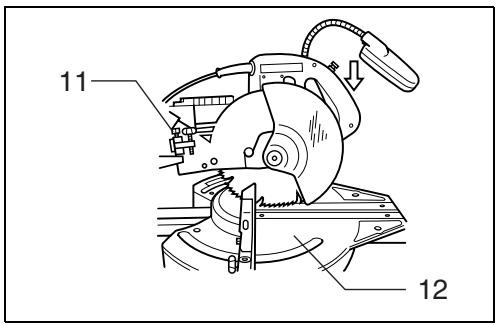
When installing a new blade, always check the lower limit position of the blade and if necessary, adjust it as follows: First, unplug the tool. Push the carriage toward the guide fence fully and lower the handle completely. Use the socket wrench to turn the adjusting bolt until the periphery of the blade extends slightly below the top surface of the turn base at the point where the front face of the guide fence meets the top surface of the turn base.
With the tool unplugged, rotate the blade by hand while holding the handle all the way down to be sure that the blade does not contact any part of the lower base. Re-adjust slightly, if necessary.
CAUTION:
- After installing a new blade, always be sure that the blade does not contact any part of the lower base when the handle is lowered completely. Always do this with the tool unplugged.
Stopper arm (Fig. 9)
The lower limit position of the blade can be easily adjusted with the stopper arm. To adjust it, rotate the stopper arm in the direction of the arrow as shown in the figure. Adjust the adjusting screw so that the blade stops at the desired position when lowering the handle fully.
Adjusting the miter angle (Fig. 10)
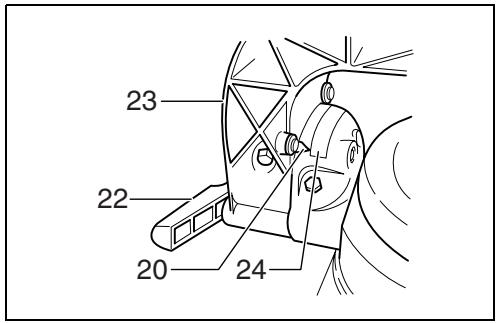
Loosen the grip by turning counterclockwise. Turn the turn base while pressing down the lock lever. When you have moved the grip to the position where the pointer points to the desired angle on the miter scale, securely tighten the grip clockwise.
CAUTION:
- When turning the turn base, be sure to raise the handle fully.
- After changing the miter angle, always secure the turn base by tightening the grip firmly.
Adjusting the bevel angle (Fig. 11 & 12)
To adjust the bevel angle, loosen the lever at the rear of the tool counterclockwise. Unlock the arm by pushing the handle somewhat strongly in the direction that you intend to tilt the saw blade.
Tilt the saw blade until the pointer points to the desired angle on the bevel scale. Then tighten the lever clockwise firmly to secure the arm.
CAUTION:
- When tilting the saw blade, be sure to raise the handle fully.
- After changing the bevel angle, always secure the arm by tightening the lever clockwise.
- When changing bevel angles, be sure to position the kerf boards appropriately as explained in the “Positioning kerf boards” section.
Switch action
CAUTION:
- Before plugging in the tool, always check to see that the switch trigger actuates properly and returns to the "OFF" position when released.
- When not using the tool, remove the lock-off button and store it in a secure place. This prevents unauthorized operation.
- Do not pull the switch trigger hard without pressing in the lock-off button. This can cause switch breakage.
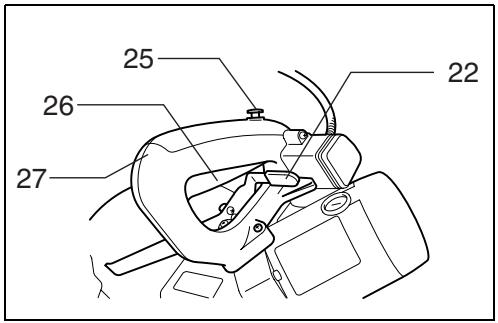
For European countries (Fig. 13)
To prevent the switch trigger from being accidentally pulled, a lock-off button is provided. To start the tool, push the lever to the left, press in the lock-off button and then pull the switch trigger. Release the switch trigger to stop.
For all countries other than European countries
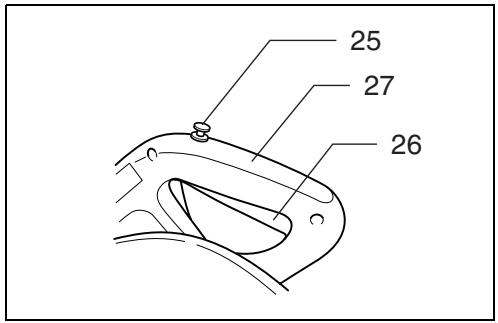
(Fig. 14)
To prevent the switch trigger from being accidentally pulled, a lock-off button is provided. To start the tool, press in the lock-off button and pull the switch trigger. Release the switch trigger to stop.
WARNING:
- NEVER use tool without a fully operative switch trigger. Any tool with an inoperative switch is HIGHLY DANGEROUS and must be repaired before further usage.
- For your safety, this tool is equipped with a lock-off button which prevents the tool from unintended starting. NEVER use the tool if it runs when you simply pull the switch trigger without pressing the lock-off button. Return tool to a Makita service center for proper repairs BEFORE further usage.
- NEVER tape down or defeat purpose and function of lock-off button.
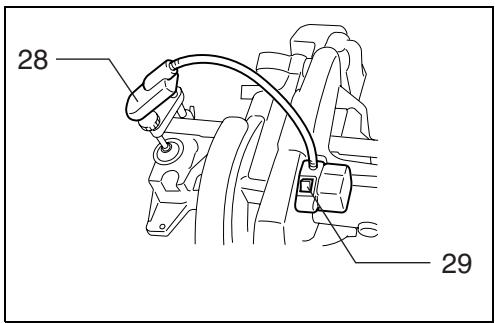
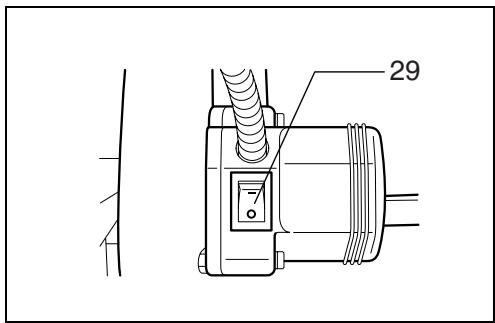
Lighting up the lamps (Fig. 15 & 16)
For Model LS1214F only
CAUTION:
- This is not a rainproof light. Do not wash the light in water or use it in a rain or a wet area. Such a conduct can cause an electric shock and fume.
- Do not touch the lens of the light, as it is very hot while it is lighted or shortly after it is turned off. This may cause a burn to a human body.
- Do not apply impact to the light, which may cause damage or shorted service time to it.
- Do not keep casting the beam of the light to your eyes. This can cause your eyes to be hurt.
- Do not cover the light with clothes, carton, cardboard or similar objects while it is lighted, which can cause a fire or an ignition.
Push the upper position of the switch for turning on the light and the lower position for off.
Move the light to shift an area of lighting.
NOTE:
- Use a dry cloth to wipe the dirt off the lens of lamp. Be careful not to scratch the lens of light, or it may lower the illumination.
Laser beam action
For model LS1214L only
CAUTION:
- Never look into the laser beam. Direct laser beam may injure your eyes.
- LASER RADIATION, DO NOT STARE INTO THE BEAM OR VIEW DIRECTLY WITH OPTICAL INSTRUMENTS, CLASS 2M LASER PRODUCT.
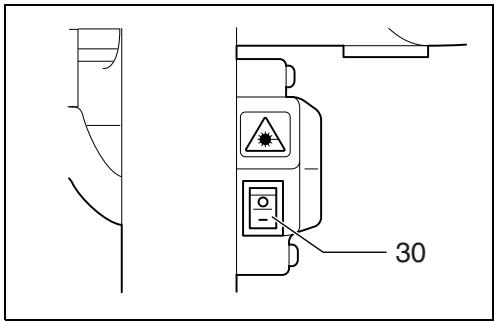
To turn on the laser beam, press the upper position (I) of the switch. Press the lower position (O) to turn off. (Fig. 17)
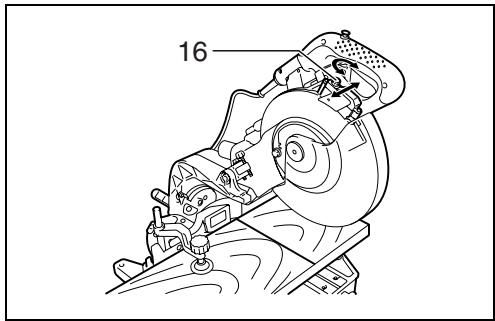
Laser line can be shifted to either the left or right side of the saw blade by adjusting the adjusting screw as follows. (Fig. 18)
- Loosen the adjusting screw by turning it counterclockwise.
- With the adjusting screw loosened, slide the adjusting screw to the right or left as far as it goes.
- Tighten the adjusting screw firmly at the position where it stops sliding.
Laser line is factory adjusted so that it is positioned within 1 mm from the side surface of the blade (cutting position).
NOTE:
- When laser line is dim and almost or entirely invisible because of the direct sunlight in the indoor or outdoor window-by work, relocate the work area to a place not exposed to the direct sunlight.
Aligning the laser line (Fig. 19)
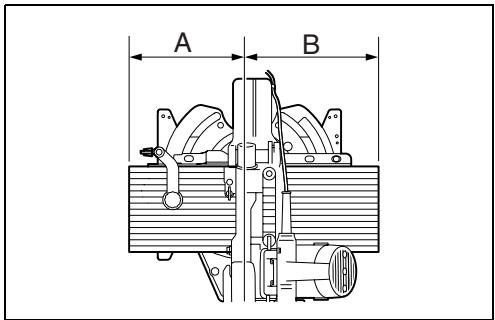
Laser line can be shifted to either the left or right side of the blade according to the applications of cutting. Refer to explanation titled “Laser beam action” regarding its shifting method.
NOTE:
- Use wood facing against the guide fence when aligning the cutting line with the laser line at the side of guide fence in compound cutting (bevel angle 45 degrees and miter angle right 45 degrees).
A) When you obtain correct size on the left side of workpiece
- Shift the laser line to the left of the blade.
B) When you obtain correct size on the right side of workpiece
- Shift the laser line to the right of the blade.
Align the cutting line on your workpiece with the laser line.
ASSEMBLY
CAUTION:
- Always be sure that the tool is switched off and unplugged before carrying out any work on the tool.
Socket wrench storage (Fig. 20)
The socket wrench is stored as shown in the figure. When using the socket wrench, pull it out of the wrench holder. After using the socket wrench, return it to the wrench holder.
Installing or removing saw blade
CAUTION:
- Always be sure that the tool is switched off and unplugged before installing or removing the blade.
- Use only the Makita socket wrench provided to install or remove the blade. Failure to do so may result in overtightening or insufficient tightening of the hex bolt. This could cause a personal injury.
Lock the handle in the raised position by pushing in the stopper pin. (Fig. 21)
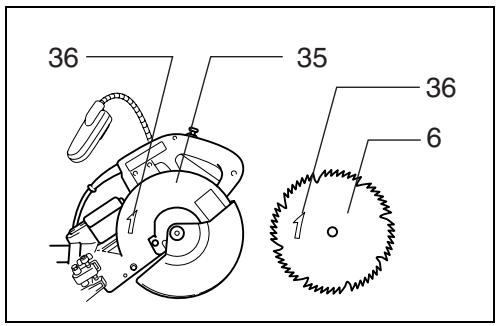
To remove the blade, use the socket wrench to loosen the hex bolt holding the center cover by turning it counterclockwise. Raise the blade guard and center cover. (Fig. 22)
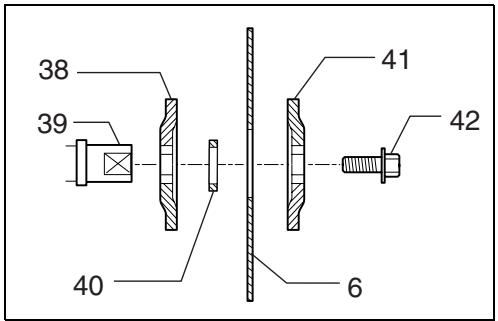
Press the shaft lock to lock the spindle and use the socket wrench to loosen the hex bolt clockwise. Then remove the hex bolt, outer flange and blade. (Fig. 23)
To install the blade, mount it carefully onto the spindle, making sure that the direction of the arrow on the surface of the blade matches the direction of the arrow on the blade case.
Install the outer flange and hex bolt, and then use the socket wrench to tighten the hex bolt (left-handed) securely counterclockwise while pressing the shaft lock. (Fig. 24)
For all countries other than European countries
CAUTION:
- The black ring 25 mm in outer diameter and the silver ring 25.4 mm in outer diameter are factory-installed as shown in the figure. When using a blade with 25 mm hole diameter, replace the silver ring with the black ring. Before mounting the blade onto the spindle, always be sure that the correct ring for the arbor hole of the blade you intend to use is installed between the inner and outer flanges. (Fig. 25)
For European countries
CAUTION:
- The ring 30 mm in outer diameter is factory-installed between the inner and outer flanges.
Install the outer flange and hex bolt, and then use the socket wrench to tighten the hex bolt securely counterclockwise while pressing the shaft lock.
Return the blade guard and center cover to its original position. Then tighten the hex bolt clockwise to secure the center cover. Release the handle from the raised position by pulling the stopper pin. Lower the handle to make sure that the blade guard moves properly. Make sure shaft lock has released spindle before making cut. (Fig. 26)
Dust bag (accessory) (Fig. 27)
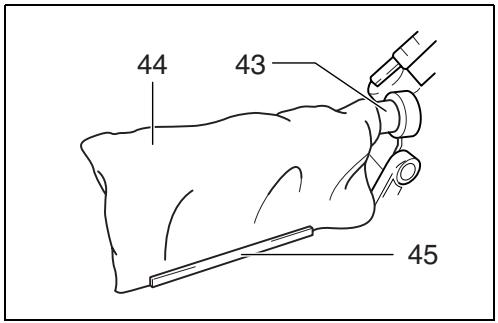
The use of the dust bag makes cutting operations clean and dust collection easy. To attach the dust bag, insert the dust nozzle into the dust spout on the blade case and fit the bag's entry port over the dust nozzle.
When the dust bag is about half full, remove the dust bag from the tool and pull the fastener out. Empty the dust bag of its contents, tapping it lightly so as to remove particles adhering to the insides which might hamper further collection.
NOTE:
If you connect a vacuum cleaner to your saw, more efficient and cleaner operations can be performed.
Dust box (accessory) (Fig. 28, 29 & 30)
Insert the dust box into the dust nozzle.
Empty the dust box at the earliest possible.
To empty the dust box, open the cover by pushing the button and throw away sawdust. Return the cover to the original position and it locks. Dust box can easily be removed by pulling out while turning it near the dust nozzle on the tool.
NOTE:
- If you connect a Makita vacuum cleaner to this tool, more efficient and cleaner operations can be performed.
CAUTION:
- Empty the dust box before collected sawdust level reaches the cylinder part.
Securing workpiece
WARNING:
- It is extremely important to always secure the workpiece properly and tightly with the vise. Failure to do so can cause the tool to be damaged and/or the workpiece to be destroyed. PERSONAL INJURY MAY ALSO RESULT. Also, after a cutting operation, DO NOT raise the blade until the blade has come to a complete stop.
CAUTION:
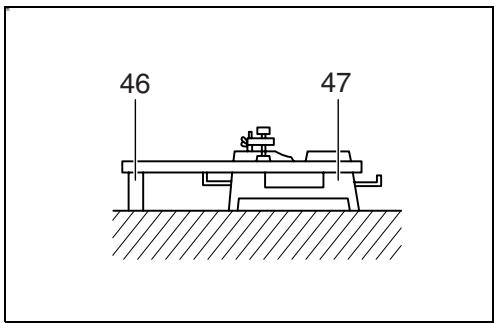
- When cutting long workpieces, use supports that are as high as the top surface level of the turn base. Do not rely solely on the vertical vise and/or horizontal vise to secure the workpiece.
Thin material tends to sag. Support workpiece over its entire length to avoid blade pinch and possible KICKBACK. (Fig. 31)
Sub-fence
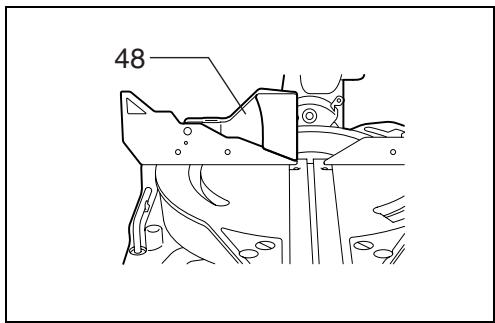
This tool is equipped with the sub-fence which should ordinarily be positioned as shown in Fig. 32.
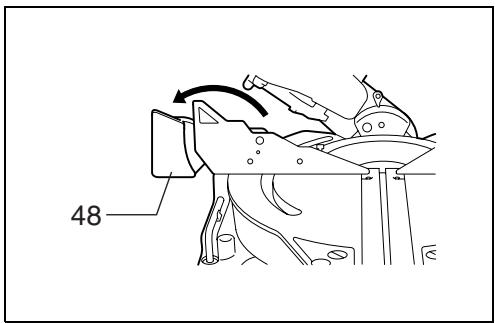
However, when performing left bevel cuts, set it to the left position as shown in Fig. 33.
CAUTION:
- When performing left bevel cuts, flip the fence over to the left position as shown in Fig. 33. Otherwise, it will contact the blade or a part of the tool, causing possible serious injury to the operator.
Sub-fence R (Fig. 34)
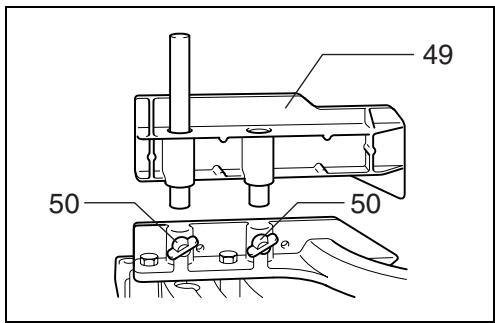
The sub-fence R can be installed on the right side of the guide fence. Insert the rods of the sub-fence R into the holes in the guide fence. Tighten the screws which come with the sub-fence R to secure the sub-fence R.
CAUTION:
- When performing right bevel cuts, never use the subfence R. It will contact the blade or a part of the tool, causing a serious injury to operator.
Vertical vise (Fig. 35 & 36)
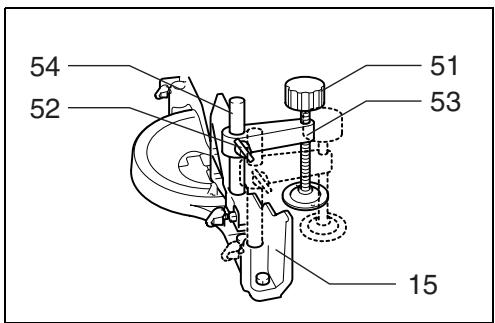
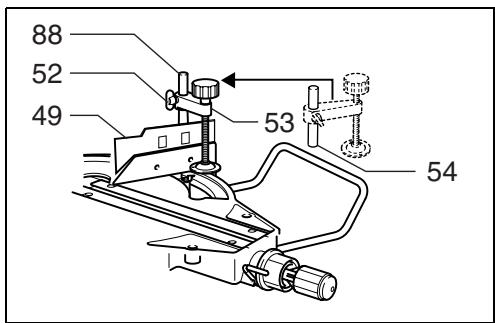
The vertical vise can be installed in two positions on either the left or right side of the guide fence. Insert the vise rod into the hole in the guide fence and tighten the screw on the back of the guide fence to secure the vise rod.
The vertical vise can also be secured to the rod on the right side of the subfence R.
Position the vise arm according to the thickness and shape of the workpiece and secure the vise arm by tightening the screw. If the screw to secure the vise arm contacts the guide fence, install the screw on the opposite side of vise arm. Make sure that no part of the tool contacts the vise when lowering the handle fully and pulling or pushing the carriage all the way. If some part contacts the vise, re-position the vise.
Press the workpiece flat against the guide fence and the turn base. Position the workpiece at the desired cutting position and secure it firmly by tightening the vise knob.
CAUTION:
- The workpiece must be secured firmly against the turn base and guide fence with the vise during all operations.
Horizontal vise (optional accessory) (Fig. 37 & 38)
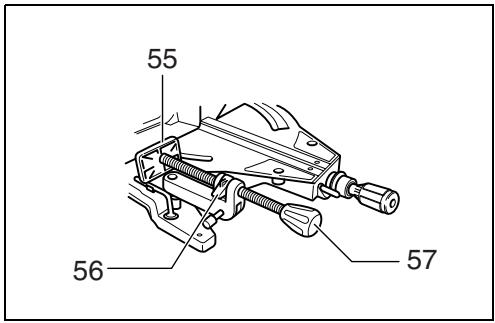
The horizontal vise can be installed in two positions on either the left or right side of the base. When performing 15^ or greater miter cuts, install the horizontal vise on the side opposite the direction in which the turn base is to be turned.
By flipping the vise nut to the left, the vise is released, and rapidly moves in and out. To grip the workpiece, push the vise knob forward until the vise plate contacts the workpiece and flip the vise nut to the right. Then turn the vise knob clockwise to secure the workpiece.
The maximum width of workpiece which can be secured by the horizontal vise is 200 mm.
When installing the horizontal vise on the right side of the base, also use the sub-fence R to secure the workpiece more firmly. Refer to the “Sub-fence R” section described on previously for installing the sub-fence R.
CAUTION:
- Always set the vice nut to the right fully when securing the workpiece. Failure to do so may result in insufficient securing of the workpiece. This could cause the workpiece to be thrown, cause damage to the blade or cause the loss of control, which can result in PERSONAL INJURY.
Holders (Fig. 39)
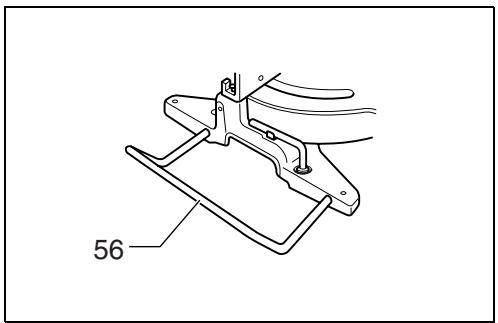
The holders can be installed on either side as a convenient means of holding workpieces horizontally. Slip the holder rods into the holes in the base and adjust their length according to the workpiece to be held. Then tighten the holders securely with the screws.
CAUTION:
- Always support long workpieces level with the top surface of the turn base for accurate cuts and to prevent dangerous loss of control of the tool.
Kerf block (optional accessory) (Fig. 40 & 41)
CAUTION:
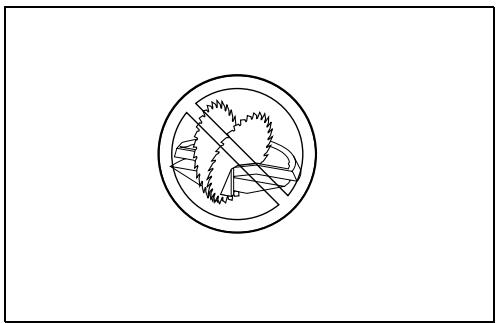
- When using the kerf block, always cut at the same miter angle.
- When changing the miter angle, use other kerf blocks.
- When performing bevel cuts, never use the kerf blocks.
Failure to do so splits the block, causing a serious injury to operator.
When you use the kerf block at 90^ cutting, you can splinter-free cut in workpiece on the side of the guide fence (height of the workpiece is up to 35 mm). Install the kerf block onto the guide fence by means of the two screws. (Adjust the guide fence and the kerf block so that they contact their faces. Then tighten the screws securely.)
OPERATION
CAUTION:
- Before use, be sure to release the handle from the lowered position by pulling the stopper pin.
- Make sure the blade is not contacting the workpiece, etc. before the switch is turned on.
- Do not apply excessive pressure on the handle when cutting. Too much force may result in overload of the motor and/or decreased cutting efficiency. Push down handle with only as much force as is necessary for smooth cutting and without significant decrease in blade speed.
- Gently press down the handle to perform the cut. If the handle is pressed down with force or if lateral force is applied, the blade will vibrate and leave a mark (saw mark) in the workpiece and the precision of the cut will be impaired.
- During a slide cut, gently push the carriage toward the guide fence without stopping. If the carriage movement is stopped during the cut, a mark will be left in the workpiece and the precision of the cut will be impaired.
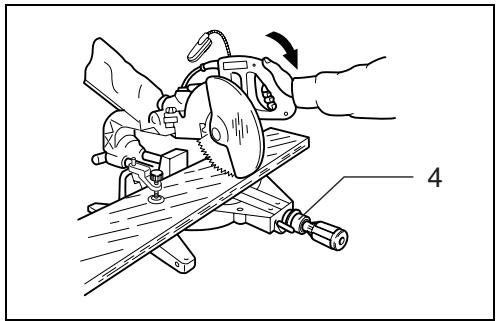
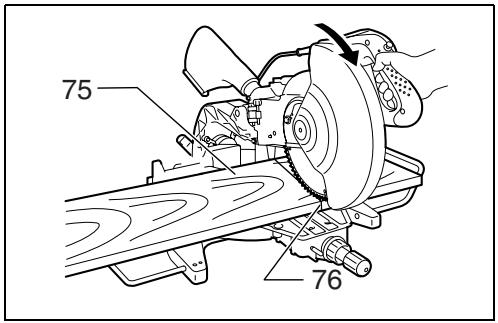
1. Press cutting (cutting small workpieces) (Fig. 42)
Workpieces up to 115 mm high and 75 mm wide can be cut in the following way.
Push the carriage toward the guide fence fully and tighten the knob clockwise to secure the carriage. Secure the workpiece with the vise. Switch on the tool without the blade making any contact and wait until the blade attains full speed before lowering. Then gently lower the handle to the fully lowered position to cut the workpiece. When the cut is completed, switch off the tool and WAIT UNTIL THE BLADE HAS COME TO A COMPLETE STOP before returning the blade to its fully elevated position.
CAUTION:
- Firmly tighten the knob clockwise so that the carriage will not move during operation. Insufficient tightening may cause unexpected kickback of the blade. Possible serious PERSONAL INJURY may result.
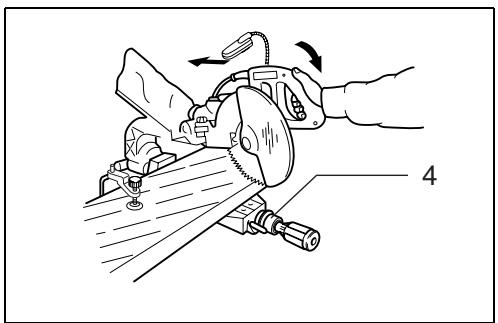
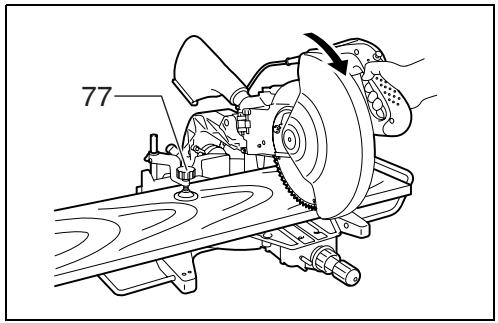
2. Slide (push) cutting (cutting wide workpieces) (Fig. 43)
Loosen the knob counterclockwise so that the carriage can slide freely. Secure the workpiece with the vise. Pull the carriage toward you fully. Switch on the tool without the blade making any contact and wait until the blade attains full speed. Press down the handle and PUSH THE CARRIAGE TOWARD THE GUIDE FENCE AND THROUGH THE WORKPIECE. When the cut is completed, switch off the tool and WAIT UNTIL THE BLADE HAS COME TO A COMPLETE STOP before returning the blade to its fully elevated position.
CAUTION:
- Whenever performing the slide cut, FIRST PULL THE CARRIAGE TOWARD YOU FULLY and press down the handle to the fully lowered position, then PUSH THE CARRIAGE TOWARD THE GUIDE FENCE. NEVER START THE CUT WITH THE CARRIAGE NOT FULLY PULLED TOWARD YOU. If you perform the slide cut without pulling the carriage fully or if you perform the slide cut toward your direction, the blade may kickback unexpectedly with the potential to cause serious PERSONAL INJURY.
- Never perform the slide cut with the handle locked in the lowered position by pressing the stopper pin.
- Never loosen the knob which secures the carriage while the blade is rotating. This may cause serious injury.
3. Mitre cutting
Refer to the previously covered "Adjusting the miter angle".
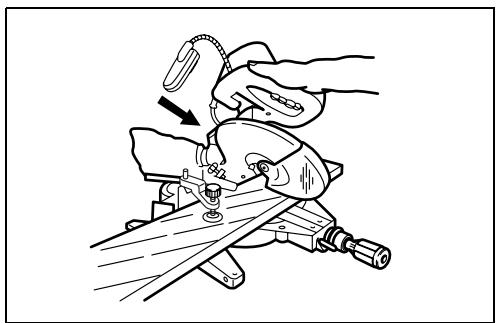
4. Bevel cut (Fig. 44)
Loosen the lever and tilt the saw blade to set the bevel angle (Refer to the previously covered "Adjusting the bevel angle"). Be sure to retighten the lever firmly to secure the selected bevel angle safely. Secure the workpiece with a vise. Make sure the carriage is pulled all the way back toward the operator. Switch on the tool without the blade making any contact and wait until the blade attains full speed. Then gently lower the handle to the fully lowered position while applying pressure in parallel with the blade and PUSH THE CARRIAGE TOWARD THE GUIDE FENCE TO CUT THE WORKPIECE. When the cut is completed, switch off the tool and WAIT UNTIL THE BLADE HAS COME TO A COMPLETE STOP before returning the blade to its fully elevated position.
CAUTION:
- Always be sure that the blade will move down to bevel direction during a bevel cut. Keep hands out of path of saw blade.
-
During a bevel cut, it may create a condition whereby the piece cut off will come to rest against the side of the blade. If the blade is raised while the blade is still rotating, this piece may be caught by the blade, causing fragments to be scattered which is dangerous. The blade should be raised ONLY after the blade has come to a complete stop.
-
When pressing down the handle, apply pressure in parallel with the blade. If a force is applied perpendicularly to the turn base or if the pressure direction is changed during a cut, the precision of the cut will be impaired.
- Always set the sub-fence to the left position when performing left bevel cuts.
5. Compound cutting
Compound cutting is the process in which a bevel angle is made at the same time in which a miter angle is being cut on a workpiece. Compound cutting can be performed at angle shown in the table.
| Miter angle | Bevel angle |
| Left and Right 45° | Left and Right 0° – 45° |
| Left 47° | Left 0° – 45° and Right 0° – 40° |
| Right 52° | Left 0° – 30° and Right 0° – 45° |
At the miter angle of left 45^ and bevel angle of left 45^ , workpieces up to 66 mm high and 170 mm wide can be cut.
At the miter angle of right 45^ and bevel angle of left 45^ , workpieces up to 66 mm high and 215 mm wide can be cut.
At the miter angle of left and right 45^ and bevel angle of right 45^ , workpieces up to 45 mm high and 215 mm wide can be cut.
When performing compound cutting, refer to “Press cutting”, “Slide cutting”, “Miter cutting” and “Bevel cut” explanations.
6. Cutting aluminum extrusion
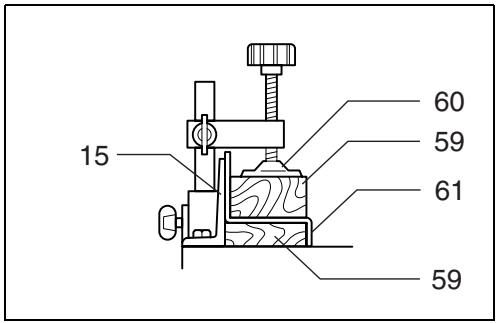
When securing aluminum extrusions, use spacer blocks or pieces of scrap as shown in Fig. 45 to prevent deformation of the aluminum. Use a cutting lubricant when cutting the aluminum extrusion to prevent build-up of the aluminum material on the blade.
CAUTION:
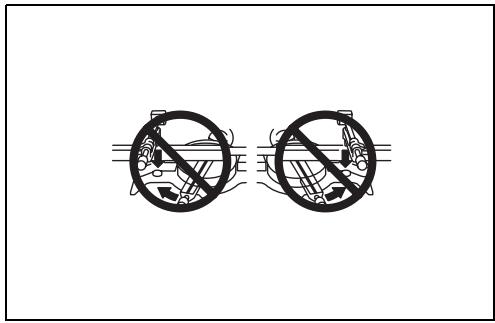
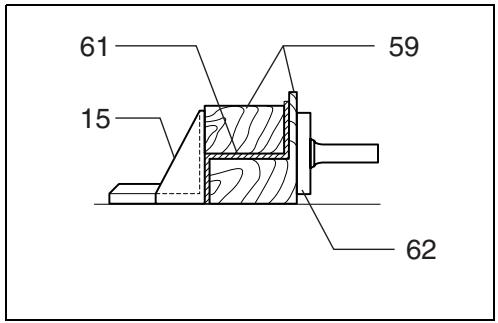
- Never attempt to cut thick or round aluminum extrusions. Thick aluminum extrusions may come loose during operation and round aluminum extrusions cannot be secured firmly with this tool. (Fig. 46)
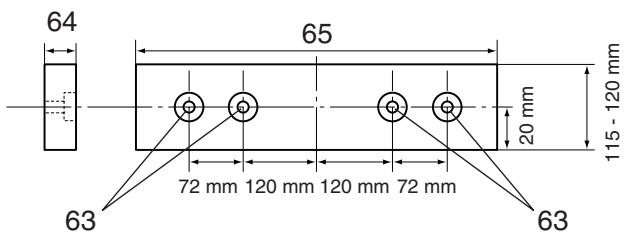
7. Wood facing (Fig. 47)
Use of wood facing helps to assure splinter-free cuts in workpieces. Attach a wood facing to the guide fence using the holes in the guide fence and 6 mm screws.
See the figure concerning the dimensions for a suggested wood facing.
CAUTION:
- Use straight wood of even thickness as the wood facing.
- When cutting workpieces from 115 mm to 120 mm high, use a wood facing to prevent a portion of the workpiece near the guide fence from being left uncut.
Example:
When cutting workpieces 120 mm high, use a wood facing with the following thickness.
| Miter angle | Thickness of wood facing |
| 0° | Over 20 mm |
| Left and Right 45° | Over 15 mm |
| Right 52° | Over 15 mm |
CAUTION:
- Use screws to attach the wood facing to the guide fence. The screws should be installed so that the screw heads are below the surface of the wood facing.
- When the wood facing is attached, do not turn the turn base with the handle lowered. The blade and/or the wood facing will be damaged.
8. Groove cutting (Fig. 48)
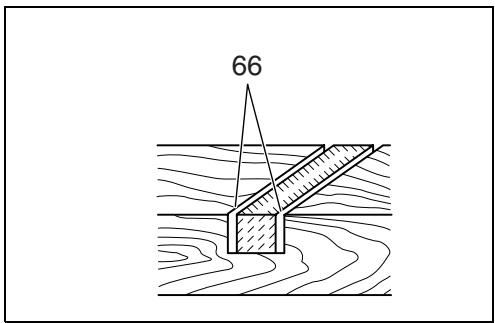
A dado type cut can be made by proceeding as follows: Adjust the lower limit position of the blade using the adjusting screw and the stopper arm to limit the cutting depth of the blade. Refer to “Stopper arm” section described previously.
After adjusting the lower limit position of the blade, cut parallel grooves across the width of the workpiece using a slide (push) cut as shown in the figure. Then remove the workpiece material between the grooves with a chisel. Do not attempt to perform this type of cut using wide (thick) blades or with a dado blade. Possible loss of control and injury may result.
CAUTION:
- Be sure to return the stopper arm to the original position when performing other than groove cutting.
Carrying tool
Make sure that the tool is unplugged. Secure the blade at 0^ bevel angle and the turn base at right miter angle fully. Secure the slide poles after pulling the carriage toward you fully. Lower the handle fully and lock it in the lowered position by pushing in the stopper pin. (Fig. 49)
Carry the tool by holding both sides of the tool base as shown in the figure. If you remove the holders, dust bag, etc., you can carry the tool more easily. (Fig. 50)
CAUTION:
- Always secure all moving portions before carrying the tool.
- Stopper pin is for carrying and storage purposes only and not for any cutting operations.
MAINTENANCE
CAUTION:
- Always be sure that the tool is switched off and unplugged before attempting to perform inspection or maintenance.
WARNING:
- Always be sure that the blade is sharp and clean for the best and safest performance.
Adjusting the cutting angle
This tool is carefully adjusted and aligned at the factory, but rough handling may have affected the alignment. If your tool is not aligned properly, perform the following:
1. Miter angle
Push the carriage toward the guide fence and tighten the knob to secure the carriage.
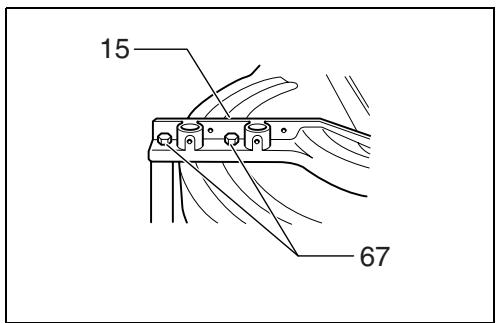
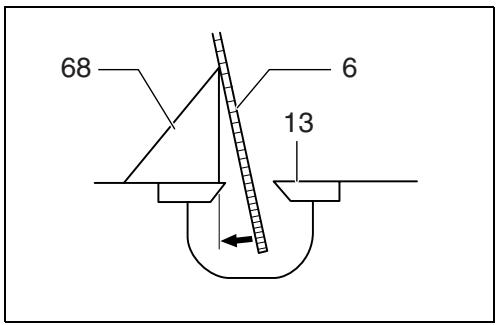
Loosen the grip which secures the turn base. Turn the turn base so that the pointer points to 0^ on the miter scale. Then turn the turn base slightly clockwise and counterclockwise to seat the turn base in the 0^ miter notch. (Leave as it is if the pointer does not point to 0^ .) Loosen the hex bolts securing the guide fence using the socket wrench. (Fig. 51)
Lower the handle fully and lock it in the lowered position by pushing in the stopper pin. Square the side of the blade with the face of the guide fence using a triangular rule, try-square, etc. Then securely tighten the hex bolts on the guide fence in the order from the right side.
(Fig. 52)
Make sure that the pointer points to 0^ on the miter scale. If the pointer does not point to 0^ , loosen the screw which secures the pointer and adjust the pointer so that it will point to 0^ . (Fig. 53)
2. Bevel angle
1) 0^ bevel angle
Push the carriage toward the guide fence and tighten the knob to secure the carriage. Lower the handle fully and lock it in the lowered position by pushing in the stopper pin. Loosen the lever at the rear of the tool. Make sure that the arm is locked. (Fig. 54)
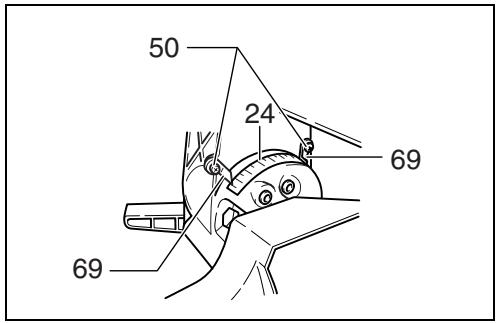
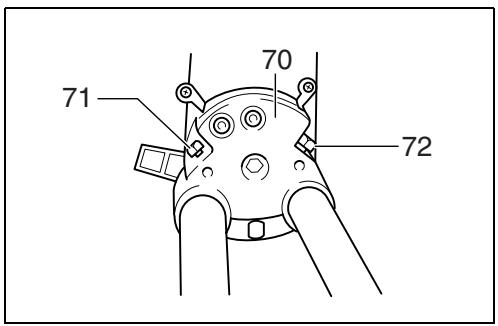
Turn the hex bolt on the left side of the arm two or three revolutions counterclockwise. Turn the hex bolt on the right side of the arm two or three revolutions counterclockwise to tilt the blade to the left. (Fig. 55) Carefully square the side of the blade with the top surface of the turn base using the triangular rule, try-square, etc. by turning the hex bolt on the right side of the arm clockwise. Turn the hex bolt on the left side of the arm clockwise as far as it will go. Then tighten the lever securely. (Fig. 56)
Make sure that the two pointers on the arm point to each 0^ on the bevel scale on the arm holder. If they do not point to 0^ , loosen the screws which secure the pointers and adjust them so that they will point to 0^ . (Fig. 57)
2) 45° bevel angle (Fig. 58)
Adjust the 45^ bevel angle only after performing 0^ bevel angle adjustment. To adjust left 45^ bevel angle, loosen the lever and tilt the blade to the left fully. Make sure that the pointer on the arm points to 45^ on the bevel scale on the arm holder. If the pointer does not point to 45^ , turn the left 45^ bevel angle adjusting bolt on the side of the arm holder until the pointer points to 45^ .
To adjust right 45^ bevel angle, perform the same procedure described above.
Adjusting for smooth beveling action (Fig. 59)
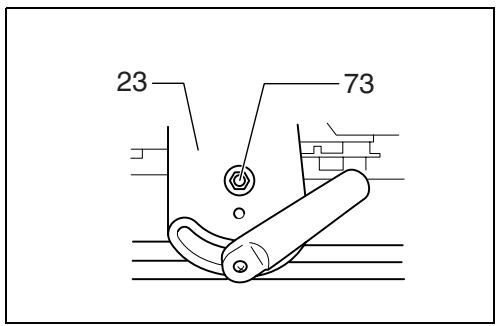
The hex lock nut holding together the arm and arm holder has been factory adjusted to assure smooth beveling action and to guarantee precise cutting. Do not tamper with it. Should looseness develop at the arm and arm holder connection, tighten the hex lock nut using a wrench.
Adjusting the position of laser line (Fig. 60 & 61)
For model LS1214L only
WARNING:
- As the tool is plugged when adjusting the position of laser line, take a full caution especially at switch action. Pulling the switch trigger accidentally cause an accidental start of the tool and personal injury.
CAUTION:
- Never look into the laser beam directly. Direct laser beam causes damage to your eyes.
- Never apply a blow or impact to the tool. A blow or impact causes the incorrect position of laser line, damage to the laser beam emitting part or a short life of the tool.
When adjusting the laser line appears on the left side of the saw blade
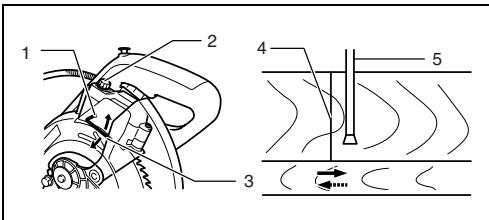
1 Screw to change the movable range of the adjusting screw
2 Adjusting screw
3 Hex wrench
4 Laser line
5 Saw blade
When adjusting the laser line appears on the right side of the saw blade
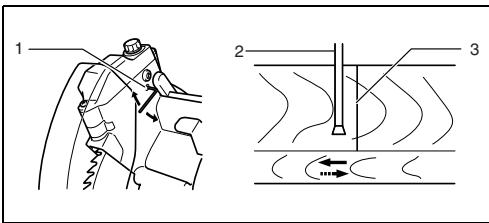
1 Screw to change the movable range of the adjusting screw
2 Saw blade
3 Laser line
For both adjustments, do as follows.
- Make sure that the tool is unplugged.
- Draw the cutting line on the workpiece and place it on the turn table. At this time, do not secure the workpiece with a vise or similar securing device.
- Lower the blade by lowering the handle and just check to see where the cutting line and the position of the saw blade is. (Decide which position to cut on the line of cut.)
- After decision the position to be cut, return the handle to the original position. Secure the workpiece with the vertical vise without shifting the workpiece from the pre-checked position.
- Plug the tool and turn on the laser switch.
- Adjust the position of laser line as follows.
The position of laser line can be changed as the movable range of the adjusting screw for the laser is changed by turning two screws with a hex wrench. (The movable range of laser line is factory adjusted within 1 mm from the side surface of blade.)
To shift the laser line movable range further away from the side surface of blade, turn the two screws counterclockwise after loosening the adjusting screw. Turn these two screws clockwise to shift it closer to the side surface of the blade after loosening the adjusting screw.
Refer to the section titled "Laser beam action" and adjust the adjusting screw so that the cutting line on your workpiece is aligned with the laser line.
NOTE:
- Check the position of laser line regularly for accuracy.
- Have the tool repaired by Makita authorized service center for any failure on the laser unit.
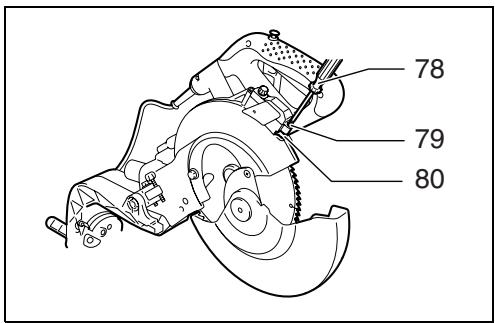
Cleaning of the lens for the laser light (Fig. 62 & 63)
For model LS1214L only
If the lens for the laser light becomes dirty, or sawdust adheres to it in such a way that the laser line is no longer easily visible, unplug the saw and remove and clean the lens for the laser light carefully with a damp, soft cloth. Do not use solvents or any petroleum-based cleaners on the lens.
To remove the lens for the laser light, remove the saw blade before removing the lens according to the instructions in the section titled "Installing or removing saw blade".
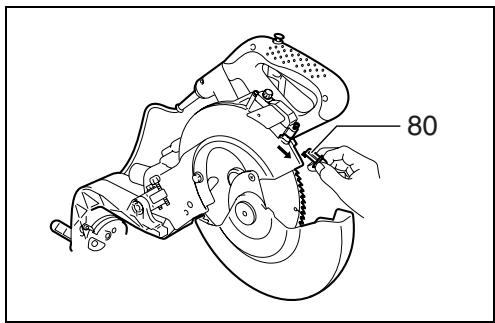
Loosen but do not remove the screw which secures the lens using a screwdriver.
Pull out the lens as shown in the figure.
NOTE:
- If the lens does not come out, loosen the screw further and pull out the lens again without removing the screw.
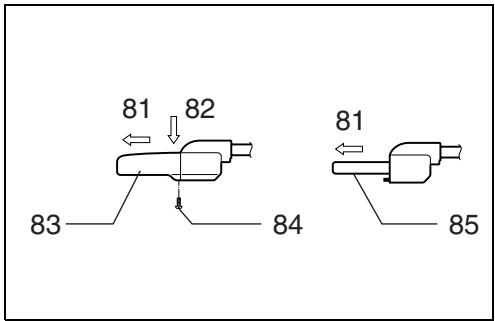
Replacing fluorescent tube (Fig. 64)
For LS1214F only
CAUTION:
- Always be sure that the tool is switched off and unplugged before replacing the fluorescent tube.
- Do not apply force, impact or scratch to a fluorescent tube, which can cause a glass of the fluorescent tube to be broken resulting in a injury to you or your bystanders.
- Leave the florescent tube for a while immediately after a use of it and then replace it. If not, you may burn yourself.
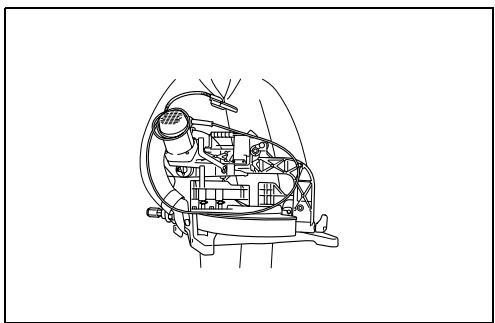
Remove screws, which secure Lamp box for the light.
Pull out the Lamp box keeping pushing lightly the upper position of it as illustrated on Fig. 64.
Pull out the fluorescent tube and then replace it with Makita original new one.
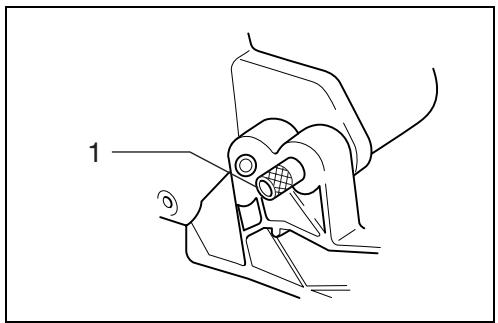
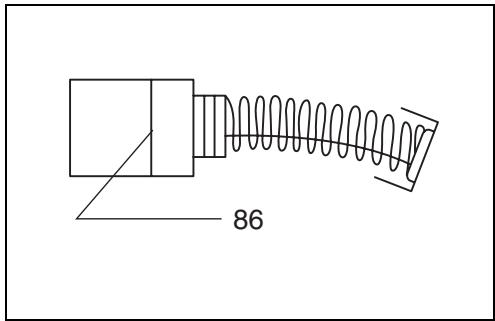
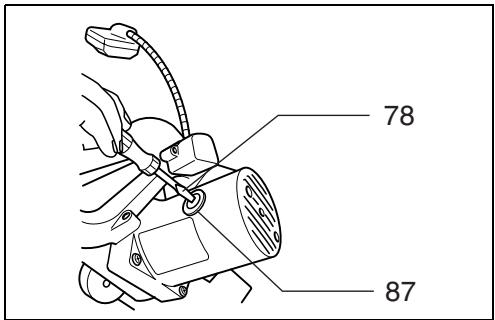
Replacing carbon brushes (Fig. 65 & 66)
Remove and check the carbon brushes regularly. Replace when they wear down to the limit mark. Keep the carbon brushes clean and free to slip in the holders. Both carbon brushes should be replaced at the same time. Use only identical carbon brushes.
Use a screwdriver to remove the brush holder caps. Take out the worn carbon brushes, insert the new ones and secure the brush holder caps.
After use
- After use, wipe off chips and dust adhering to the tool with a cloth or the like. Keep the blade guard clean according to the directions in the previously covered section titled “Blade guard”. Lubricate the sliding portions with machine oil to prevent rust.
- When storing the tool, pull the carriage toward you fully so that the slide pole is thoroughly inserted into the turn base.
To maintain product SAFETY and RELIABILITY, repairs, any other maintenance or adjustment should be performed by Makita Authorized Service Centers, always using Makita replacement parts.
ACCESSORIES
CAUTION:
- These accessories or attachments are recommended for use with your Makita tool specified in this manual. The use of any other accessories or attachments might present a risk of injury to persons. Only use accessory or attachment for its stated purpose.
If you need any assistance for more details regarding these accessories, ask your local Makita service center.
• Steel & Carbide-tipped saw blades
- Dust bag
- Sub-fence R
- Elbow
- Vise assembly (Horizontal vise)
- Triangular rule
- Vertical vise
- Lock-off button (2 pcs.)
- Socket wrench 13
- Kerf block
- Holder
- Fluorescent tube (For LS1214F)
• Hex wrench (For LS1214L)
- Dust box
ENG102-3
Noise
The typical A-weighted noise level determined according to EN61029:
Sound pressure level ( L_pA ): 89 dB (A)
Sound power level ( L_WA ): 102 dB (A)
Uncertainty (K): 3 dB (A)
Wear ear protection
ENG238-1
Vibration
The vibration emission value determined according to EN61029:
Vibration emission ( a_h ): 2.5 m/s ^2 or less
Uncertainty (K): 1.5 m/s ^4
ENG901-1
- The declared vibration emission value has been measured in accordance with the standard test method and may be used for comparing one tool with another.
- The declared vibration emission value may also be used in a preliminary assessment of exposure.
WARNING:
- The vibration emission during actual use of the power tool can differ from the declared emission value depending on the ways in which the tool is used.
- Be sure to identify safety measures to protect the operator that are based on an estimation of exposure in the actual conditions of use (taking account of all parts of the operating cycle such as the times when the tool is switched off and when it is running idle in addition to the trigger time).
For European countries only
EC Declaration of Conformity
We Makita Corporation as the responsible manufacturer declare that the following Makita machine(s):
Designation of Machine: Slide Compound Saw
Model No./ Type: LS1214, LS1214F, LS1214L
are of series production and
Conforms to the following European Directives:
98/37/EC until 28th December 2009 and then with
2006/42/EC from 29th December 2009
And are manufactured in accordance with the following standards or standardised documents:
EN61029
The technical documentation is kept by our authorized representative in Europe who is:
Makita International Europe Ltd.
Michigan Drive, Tongwell,
Milton Keynes, MK15 8JD, England
30th January 2009

Tomoyasu Kato
Director
Makita Corporation
3-11-8, Sumiyoshi-cho,
Anjo, Aichi, JAPAN
Descriptif
Michigan Drive, Tongwell,
Milton Keynes, MK15 8JD, Angleterre
30 janvier 2009

3-11-8, Sumiyoshi-cho,
Anjo, Aichi, JAPAN
Übersicht
Michigan Drive, Tongwell,
Milton Keynes, MK15 8JD, England
- Januar 2009

Tomoyasu Kato Direktor
Makita Corporation
3-11-8, Sumiyoshi-cho,
Anjo, Aichi, JAPAN
Visione generale
Dimensioni (L x A x P)
LS1214/LS1214F....723 mm x 520 mm x 696 mm
LS1214L 723 mm x 520 mm x 718 mm
Peso netto
LS1214 24,4 kg
LS1214F 24,6 kg
LS1214L 25,3 kg
natural_image
Line drawing of a mechanical clamp or grip assembly (no text or symbols)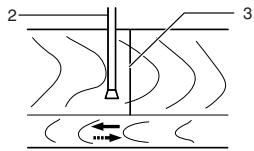
Michigan Drive, Tongwell,
Milton Keynes, MK15 8JD, England
30 gennaio 2009

Tomoyasu Kato
Amministratore
Makita Corporation
3-11-8, Sumiyoshi-cho,
Anjo, Aichi, JAPAN
Michigan Drive, Tongwell,
Milton Keynes, MK15 8JD, Engeland
30 januari 2009

Tomoyasu Kato
Directeur
Makita Corporation
3-11-8, Sumiyoshi-cho,
Anjo, Aichi, JAPAN
Tomoyasu Kato Director
Makita Corporation
3-11-8, Sumiyoshi-cho, Anjo, Aichi, JAPAN
Explicação geral
Acender as lâmpadas (Fig. 15 e 16)
Michigan Drive, Tongwell,
Milton Keynes, MK15 8JD, Inglaterra
Tomoyasu Kato Director
Makita Corporation
3-11-8, Sumiyoshi-cho,
Anjo, Aichi, JAPAN
natural_image
Technical line drawing of a mechanical clamp or bracket assembly (no text or symbols)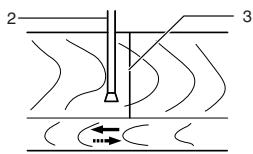
Michigan Drive, Tongwell,
Milton Keynes, MK15 8JD, England
- januar 2009

Tomoyasu Kato
Direktør
Makita Corporation
3-11-8, Sumiyoshi-cho,
Anjo, Aichi, JAPAN
Michigan Drive, Tongwell,
Milton Keynes, MK15 8JD, England (Αγγλία)
30 lavouapiou 2009

3-11-8, Sumiyoshi-cho,
Anjo, Aichi, JAPAN
Makita Corporation
Anjo, Aichi, Japan
- Symbols
- Symboles
- Intended use
- Power supply
- General Power Tool Safety Warnings
- ADDITIONAL SAFETY RULES FOR TOOL
- SAVE THESE INSTRUCTIONS
- INSTALLATION
- Bench mounting
- FUNCTIONAL DESCRIPTION
- CAUTION:
- Blade guard (Fig. 3 & 4)
- Positioning kerf board (Fig. 5 & 6)
- Maintaining maximum cutting capacity (Fig. 7 & 8)
- Stopper arm (Fig. 9)
- Adjusting the miter angle (Fig. 10)
- Adjusting the bevel angle (Fig. 11 & 12)
- Switch action
- For European countries (Fig. 13)
- For all countries other than European countries
- (Fig. 14)
- WARNING:
- Lighting up the lamps (Fig. 15 & 16)
- For Model LS1214F only
- Push the upper position of the switch for turning on the light and the lower position for off.
- NOTE:
- Laser beam action
- For model LS1214L only
- To turn on the laser beam, press the upper position (I) of the switch. Press the lower position (O) to turn off. (Fig. 17)
- Laser line can be shifted to either the left or right side of the saw blade by adjusting the adjusting screw as follows. (Fig. 18)
- Laser line is factory adjusted so that it is positioned within 1 mm from the side surface of the blade (cutting position).
- Aligning the laser line (Fig. 19)
- ASSEMBLY
- Socket wrench storage (Fig. 20)
- Installing or removing saw blade
- Lock the handle in the raised position by pushing in the stopper pin. (Fig. 21)
- For European countries
- Dust bag (accessory) (Fig. 27)
- Dust box (accessory) (Fig. 28, 29 & 30)
- Securing workpiece
- Sub-fence
- Sub-fence R (Fig. 34)
- Vertical vise (Fig. 35 & 36)
- Horizontal vise (optional accessory) (Fig. 37 & 38)
- Holders (Fig. 39)
- Kerf block (optional accessory) (Fig. 40 & 41)
- OPERATION
- Press cutting (cutting small workpieces) (Fig. 42)
- Slide (push) cutting (cutting wide workpieces) (Fig. 43)
- Mitre cutting
- Bevel cut (Fig. 44)
- Compound cutting
- At the miter angle of left 45° and bevel angle of left 45° , workpieces up to 66 mm high and 170 mm wide can be cut.
- Cutting aluminum extrusion
- Wood facing (Fig. 47)
- Example:
- Groove cutting (Fig. 48)
- Carrying tool
- MAINTENANCE
- Adjusting the cutting angle
- Miter angle
- (Fig. 52)
- Bevel angle
- Adjusting for smooth beveling action (Fig. 59)
- Adjusting the position of laser line (Fig. 60 & 61)
- When adjusting the laser line appears on the left side of the saw blade
- When adjusting the laser line appears on the right side of the saw blade
- For both adjustments, do as follows.
- The position of laser line can be changed as the movable range of the adjusting screw for the laser is changed by turning two screws with a hex wrench. (The movable range of laser line is factory adjusted within 1 mm from the side surface of blade.)
- Cleaning of the lens for the laser light (Fig. 62 & 63)
- Replacing fluorescent tube (Fig. 64)
- For LS1214F only
- Remove screws, which secure Lamp box for the light.
- Replacing carbon brushes (Fig. 65 & 66)
- After use
- ACCESSORIES
- If you need any assistance for more details regarding these accessories, ask your local Makita service center.
- Noise
- Wear ear protection
- Vibration
- For European countries only
- EC Declaration of Conformity
- Acender as lâmpadas (Fig. 15 e 16)
- Makita Corporation
Brand : MAKITA
Model : LS1214
Category : Miter saw