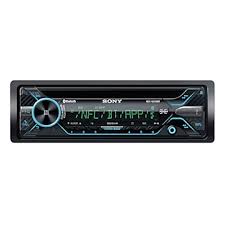
MEX N5200BT.EUR, MEX-N5200BT - Car stereo SONY - Free user manual and instructions
Find the device manual for free MEX N5200BT.EUR, MEX-N5200BT SONY in PDF.


| Product Type | Bluetooth Car Stereo with CD Player |
| Dimensions (W x H x D) | Approx. 178 x 50 x 177 mm |
| Weight | Approx. 1.2 kg |
| Power Supply | 12 V DC vehicle battery (negative ground), rated current 10 A |
| Main Functions | CD player, FM/MW/LW tuner, Bluetooth hands-free and audio streaming, USB port, AUX input, NFC, SongPal, Siri Eyes Free, 10-band equalizer, built-in subwoofer, steering wheel remote compatible |
| Maintenance and Cleaning | Clean connectors with a cotton swab; do not touch with fingers or metal objects |
| Safety | Warning alarm if faceplate removed; AUTO OFF function to prevent battery discharge; microphone for hands-free calls |
| Spare Parts and Reparability | Spare fuse; optional XA-MC10 microphone (for MEX-N4200BT); wired remote control (not supplied) |
| General Information | Manufacturer: Sony Corporation; Made in Thailand; EU compliant; Firmware update via USB; iPod/iPhone compatible |
Frequently Asked Questions - MEX N5200BT.EUR, MEX-N5200BT SONY
User questions about MEX N5200BT.EUR, MEX-N5200BT SONY
0 question about this device. Answer the ones you know or ask your own.
Ask a new question about this device
Download the instructions for your Car stereo in PDF format for free! Find your manual MEX N5200BT.EUR, MEX-N5200BT - SONY and take your electronic device back in hand. On this page are published all the documents necessary for the use of your device. MEX N5200BT.EUR, MEX-N5200BT by SONY.
USER MANUAL MEX N5200BT.EUR, MEX-N5200BT SONY
Bluetooth® Audio System
Aydioocntema Bluetooth®
Aydioocntema 3 Bluetooth®
To cancel the demonstration (DEMO) display, see page 18.
For the connection/installation, see page 33.
Operating Instructions
GB
Bedienungsanleitung
DE
Mode d'emploi
FR
For safety, be sure to install this unit in the dashboard of the car as the rear side of the unit becomes hot during use. For details, see "Connection/Installation" (page 33).
Made in Thailand
Laser Diode Properties
- Emission Duration: Continuous
- Laser Output: Less than 53.3 W
(This output is the value measurement at a distance of 200mm from the objective lens surface on the Optical Pick-up Block with 7 mm aperture.)
The nameplate indicating operating voltage, etc., is located on the bottom of the chassis.
C E
Hereby, Sony Corporation declares that this equipment is in compliance with Directive 2014/53/EU.
The full text of the EU declaration of conformity is available at the following internet address:
http://www.compliance.sony.de/
This equipment is intended to be used with the approved version(s) of software that are indicated in the EU Declaration of Conformity.
The software loaded on this equipment is verified to comply with the essential requirements of the Directive 2014/53/EU.
Software version: 1_
The software version can be checked in the firmware setup item of the general setup menu.
Notice for customers: the following information is only applicable to equipment sold in countries applying EU Directives
Manufacturer: Sony Corporation, 1-7-1 Konan Minato-ku Tokyo, 108-0075 Japan For EU product compliance: Sony Belgium, bijkantoor van Sony Europe Limited, Da Vincilaan 7-D1, 1935 Zaventem, Belgium

Disposal of waste batteries and electrical and electronic equipment (applicable in the European Union and other European countries
with separate collection systems)
This symbol on the product, the battery or on the packaging indicates that the product and the battery shall not be treated as household waste. On certain batteries this symbol might be used in combination with a chemical symbol. The chemical symbols for mercury (Hg) or lead (Pb) are added if the battery contains more than 0.0005% mercury or 0.004% lead.
By ensuring these products and batteries are disposed of correctly, you will help prevent potentially negative consequences for the environment and human health which could otherwise be caused by inappropriate waste handling. The recycling of the materials will help to conserve natural resources.
In case of products that for safety, performance or data integrity reasons require a permanent connection with an incorporated battery, this battery should be replaced by qualified service staff only.
To ensure that the battery and the electrical and electronic equipment will be treated properly, hand over these products at end-of-life to the applicable collection point for the recycling of electrical and electronic equipment.
For all other batteries, please view the section on how to remove the battery from the product safely. Hand the battery over to the applicable collection point for the recycling of waste batteries.
For more detailed information about recycling of this product or battery, please contact your local Civic Office, your household waste disposal service or the shop where you purchased the product or battery.
CAUTION
The following frequency 65 - 74 MHz range is not allocated to sound broadcasting in the European Common Allocations table and cannot be used in Europe.
Warning if your car's ignition has no ACC position
Be sure to set the AUTO OFF function (page 19). The unit will shut off completely and automatically in the set time after the unit is turned off, which prevents battery drain. If you do not set the AUTO OFF function, press and hold OFF until the display disappears each time you turn the ignition off.
Disclaimer regarding services offered by third parties
Services offered by third parties may be changed, suspended, or terminated without prior notice. Sony does not bear any responsibility in these sorts of situations.
Important notice
Caution
IN NO EVENT SHALL SONY BE LIABLE FOR ANY INCIDENTAL, INDIRECT OR CONSEQUENTIAL DAMAGES OR OTHER DAMAGES INCLUDING, WITHOUT LIMITATION, LOSS OF PROFITS, LOSS OF REVENUE, LOSS OF DATA, LOSS OF USE OF THE PRODUCT OR ANY ASSOCIATED EQUIPMENT, DOWNTIME, AND PURCHASER'S TIME RELATED TO OR ARISING OUT OF THE USE OF THIS PRODUCT, ITS HARDWARE AND/OR ITS SOFTWARE.
Dear customer, this product includes a radio transmitter.
According to UNECE Regulation no. 10, a vehicle manufacturers may impose specific conditions for installation of radio transmitters into vehicles.
Please check your vehicle operation manual or contact the manufacturer of your vehicle or your vehicle dealer, before you install this product into your vehicle.
Emergency calls
This BLUETOOTH car handsfree and the electronic device connected to the handsfree operate using radio signals, cellular, and landline networks as well as user-programmed function, which cannot guarantee connection under all conditions. Therefore do not rely solely upon any electronic device for essential communications (such as medical emergencies).
On BLUETOOTH communication
- Microwaves emitting from a BLUETOOTH device may affect the operation of electronic medical devices. Turn off this unit and other BLUETOOTH devices in the following locations, as it may cause an accident.
- where inflammable gas is present, in a hospital, train, airplane, or petrol station
- near automatic doors or a fire alarm
- This unit supports security capabilities that comply with the BLUETOOTH standard to provide a secure connection when the BLUETOOTH wireless technology is used, but security may not be enough depending on the setting. Be careful when communicating using BLUETOOTH wireless technology.
- We do not take any responsibility for the leakage of information during BLUETOOTH communication.
If you have any questions or problems concerning your unit that are not covered in this manual, consult your nearest Sony dealer.
Table of Contents
Guide to Parts and Controls. 5
Getting Started
Detaching the Front Panel 6
Resetting the Unit. 6
Setting the Clock. 7
Preparing a BLUETOOTH Device 7
Connecting a USB Device. 9
Connecting Other Portable Audio Device 10
Listening to the Radio
Listening to the Radio 10
Using Radio Data System (RDS). 11
Playback
Playing a Disc 12
Playing a USB Device 12
Playing a BLUETOOTH Device 12
Searching and Playing Tracks 13
Handsfree Calling (via BLUETOOTH only)
Receiving a Call. 14
Making a Call. 14
Available Operations during Call. 15
Useful Functions
SongPal with iPhone/Android smartphone 16
Using Siri Eyes Free. 17
Settings
Canceling the DEMO Mode 18
Basic Setting Operation 18
General Setup (GENERAL) 19
Sound Setup (SOUND) 20
Display Setup (DISPLAY). 20
BLUETOOTH Setup (BLUETOOTH) 21
SongPal Setup (SONGPAL) 22
Additional Information
Updating the Firmware 22
Precautions 22
Maintenance. 24
Specifications 24
Troubleshooting 27
Messages 30
Connection/Installation
Cautions 33
Parts List for Installation 33
Connection (For MEX-N5200BT) 34
Connection (For MEX-N4200BT) 35
Installation 38
Guide to Parts and Controls
Main unit
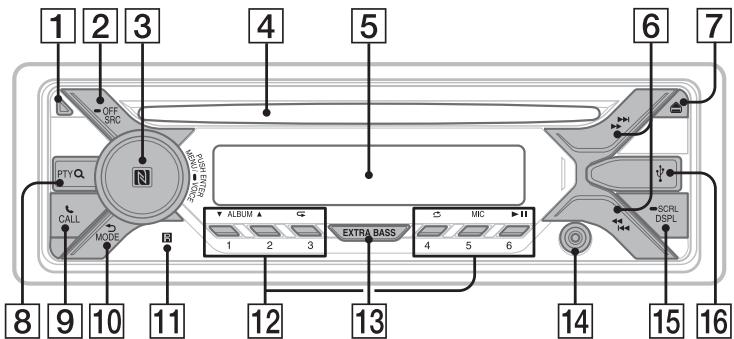
1 Front panel release button
2 SRC (source)
Turn on the power.
Change the source.
OFF
Press and hold for 1 second to turn the source off and display the clock.
Press and hold for more than 2 seconds to turn off the power and the display.
3 Control dial
Rotate to adjust the volume.
PUSH ENTER
Enter the selected item.
Press SRC, rotate then press to change the source (timeout in 2 seconds).
MENU
Open the setup menu.
- VOICE (page 15, 17, 18)
Press and hold for more than 2 seconds to activate voice dial, voice recognition (Android™ smartphone only), or the Siri function (iPhone only).
N-Mark
Touch the control dial with Android smartphone to make BLUETOOTH connection.
4 Disc slot
5 Display window
6 // (SEEK-/+)
Tune in radio stations automatically. Press and hold to tune manually.
I />I (prev/next) < < > />> (fast-reverse/fast-forward)
7 (disc eject)
8 PTY (program type)
Select PTY in RDS.
Q (browse) (page 13)
Enter the browse mode during playback.
(Not available when a USB device in Android mode or iPod is connected.
9CALL
Enter the call menu. Receive/end a call. Press and hold for more than 2 seconds to switch the BLUETOOTH signal.
10 (back)
Return to the previous display.
MODE (page 7, 10, 15)
11 Receptor for the remote commander
12 Number buttons (1 to 6)
Receive stored radio stations. Press and hold to store stations.
ALBUMV/
Skip an album for audio device. Press and hold to skip albums continuously.
(Not available when a USB device in Android mode or iPod is connected.
(repeat)
(Not available when a USB device in Android mode is connected.)
_shuffle
(Not available when a USB device in Android mode is connected.)
MIC (page 15)
II (play/pause)
13 EXTRA BASS
Reinforce bass sound in synchronization with the volume level. Press to change the EXTRA BASS setting: [1], [2], [OFF].
AUX input jack
15 DSPL (display)
Change display items.
SCRL (scroll)
Press and hold to scroll a display item.
16 USB port
Getting Started
Detaching the Front Panel
You can detach the front panel of this unit to prevent theft.
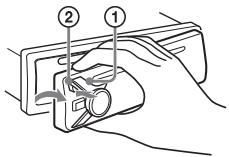
1 Press and hold OFF ① until the unit turns off, press the front panel release button ②, then pull the panel towards you to remove.
Caution alarm
If you turn the ignition switch to the OFF position without detaching the front panel, the caution alarm will sound for a few seconds. The alarm will only sound if the built-in amplifier is used.
Serial numbers
Make sure the serial numbers on the bottom of the unit and the back of the front panel are matched correctly. Otherwise you cannot make BLUETOOTH pairing, connection and disconnection by NFC.
Attaching the front panel
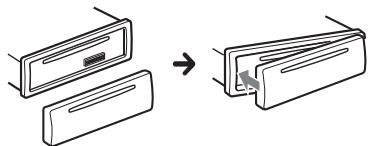
Resetting the Unit
Before operating the unit for the first time, or after replacing the car battery or changing connections, you must reset the unit.
1 Press DSPL and (back)/MODE for more than 2 seconds.
Note
Resetting the unit will erase the clock setting and some stored contents.
Setting the area/region
After resetting the unit, the area/region setting display appears.
1 Press ENTER while [SET AREA] is displayed.
The area/region currently set appears.
2 Rotate the control dial to select [EUROPE] or [RUSSIA], then press it.
3 Rotate the control dial to select [YES] or [NO], then press it.
If the setting area/region is changed, the unit is reset, then the clock is displayed.
This setting can be configured in the general setup menu (page 19).
Setting the Clock
1 Press MENU, rotate the control dial to select [GENERAL], then press it.
2 Rotate the control dial to select [SET CLOCK-ADJ], then press it.
The hour indication flashes.
3 Rotate the control dial to set the hour and minute.
To move the digital indication, press
I▶/▶(SEEK-/+).
4 After setting the minute, press MENU.
The setup is complete and the clock starts.
To display the clock
Press DSPL.
Preparing a BLUETOOTH Device
You can enjoy music, or perform handsfree calling depending on the BLUETOOTH compatible device such as a smartphone, cellular phone and audio device (hereafter "BLUETOOTH device" if not otherwise specified). For details on connecting, refer to the operating instructions supplied with the device.
Before connecting the device, turn down the volume of this unit; otherwise, loud sound may result.
Connecting with a Smartphone by One touch (NFC)
By touching the control dial on the unit with an NFC* compatible smartphone, the unit is paired and connected with the smartphone automatically.
- NFC (Near Field Communication) is a technology enabling short-range wireless communication between various devices, such as mobile phones and IC tags. Thanks to the NFC function, data communication can be achieved easily just by touching the relevant symbol or designated location on NFC compatible devices.
For a smartphone with Android OS 4.0 or lower installed, downloading the app "NFC Easy Connect" available at Google Play™ is required. The app may not be downloadable in some countries/regions.
1 Activate the NFC function on the smartphone.
For details, refer to the operating instructions supplied with the smartphone.
2 Touch the N-Mark part of the unit with the N-Mark part of the smartphone.
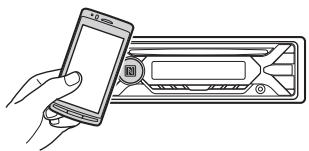
Make sure that lights up on the display of the unit.
To disconnect by One touch
Touch the N-Mark part of the unit with the N-Mark part of the smartphone again.
Notes
- When making the connection, handle the smartphone carefully to prevent scratches.
- One touch connection is not possible when the unit is already connected to two NFC compatible devices. In this case, disconnect either device, and make connection with the smartphone again.
Pairing and connecting with a BLUETOOTH device
When connecting a BLUETOOTH device for the first time, mutual registration (called "pairing") is required. Pairing enables this unit and other devices to recognize each other. This unit can connect two BLUETOOTH devices (two cellular phones, or a cellular phone and an audio device).

1 Place the BLUETOOTH device within 1 m (3 ft) of this unit.
2 Press MENU, rotate the control dial to select [BLUETOOTH], then press it.
3 Rotate the control dial to select [SET PAIRING], then press it.
4 Rotate the control dial to select [SET DEVICE 1] or [SET DEVICE 2], then press it.
flashes while the unit is in pairing standby mode.
- [SET DEVICE 1] or [SET DEVICE 2] will be changed to the paired device name after pairing is complete.
5 Perform pairing on the BLUETOOTH device so it detects this unit.
6 Select [MEX-XXXX] (your model name) shown in the display of the BLUETOOTH device.
If your model name does not appear, repeat from step 2.
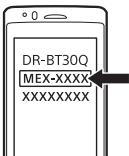
7 If passkey* input is required on the BLUETOOTH device, input [0000].
- Passkey may be called "Passcode," "PIN code," "PIN number" or "Password," etc., depending on the device.
![SONY MEX N5200BT.EUR, MEX-N5200BT - If passkey* input is required on the BLUETOOTH device, input [0000]. - 1](/content/2019/10/947/images/353fa16e69099eb915229f7ff806ca5c2a77507ab8b89e5d05b1d3cac63ac6b7.jpg)
When pairing is made, 8 stays lit.
8 Select this unit on the BLUETOOTH device to establish the BLUETOOTH connection.
or lights up when the connection is made.
Note
While connecting to a BLUETOOTH device, this unit cannot be detected from another device. To enable detection, enter the pairing mode and search for this unit from another device.
To start playback
For details, see "Playing a BLUETOOTH Device" (page 12).
To disconnect the paired device
Perform steps 2 to 4 to disconnect after this unit and the BLUETOOTH device are paired.
Connecting with a paired BLUETOOTH device
To use a paired device, connection with this unit is required. Some paired devices will connect automatically.
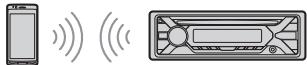
1 Press MENU, rotate the control dial to select [BLUETOOTH], then press it.
2 Rotate the control dial to select [SET BT SIGNL], then press it.
Make sure that lights up.
3 Activate the BLUETOOTH function on the BLUETOOTH device.
4 Operate the BLUETOOTH device to connect to this unit.
or lights up.
Icons in the display:
| Lights up when handsfree calling is available by enabling the HFP (Handsfree Profile). | |
| Lights up when the audio device is playable by enabling the A2DP (Advanced Audio Distribution Profile). |
To connect the last-connected device from this unit
Activate the BLUETOOTH function on the BLUETOOTH device.
To connect with the audio device, press SRC to select [BT AUDIO] and press (play/ pause).
To connect with the cellular phone, press CALL.
Note
While streaming BLUETOOTH audio, you cannot connect from this unit to the cellular phone. Connect from the cellular phone to this unit instead.
Tip
With BLUETOOTH signal on: when the ignition is turned to on, this unit reconnects automatically to the last-connected cellular phone.
To install the microphone
For details, see "Installing the microphone (MEX-N5200BT only)" (page 37).
Connecting with an iPhone/iPod (BLUETOOTH Auto Pairing)
When an iPhone/iPod with iOS5 or later installed is connected to the USB port, the unit is paired and connected with the iPhone/iPod automatically.
To enable BLUETOOTH Auto Pairing, make sure [SET AUTOPAIR] in [BLUETOOTH] is set to [ON] (page 21).
1 Activate the BLUETOOTH function on the iPhone/iPod.
2 Connect an iPhone/iPod to the USB port.
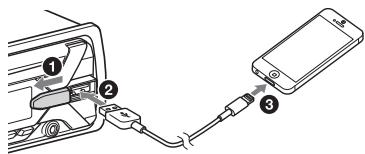
Make sure that lights up on the display of the unit.
Notes
- BLUETOOTH Auto Pairing is not possible if the unit is already connected to two BLUETOOTH devices. In this case, disconnect either device, then connect the iPhone/iPod again.
- If BLUETOOTH Auto Pairsing is not established, see "Preparing a BLUETOOTH Device" (page 7).
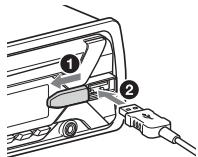
Connecting a USB Device
1 Turn down the volume on the unit.
2 Connect the USB device to the unit. To connect an iPod/iPhone, use the USB connection cable for iPod (not supplied).
Connecting Other Portable Audio Device
1 Turn off the portable audio device.
2 Turn down the volume on the unit.
3 Connect the portable audio device to the AUX input jack (stereo mini jack) on the unit with a connecting cord (not supplied)*.
- Be sure to use a straight type plug.
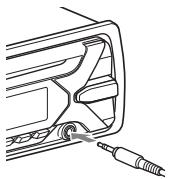
4 Press SRC to select [AUX].
To match the volume level of the connected device to other sources
Start playback of the portable audio device at a moderate volume, and set your usual listening volume on the unit.
Press MENU, then select [SOUND] SET AUX VOL.
Listening to the Radio
Listening to the Radio
To listen to the radio, press SRC to select [TUNER].
Storing automatically (BTM)
1 Press MODE to change the band (FM1, FM2, FM3, MW or LW).
2 Press MENU, rotate the control dial to select [GENERAL], then press it.
3 Rotate the control dial to select [SET BTM], then press it.
The unit stores stations in order of frequency on the number buttons.
Tuning
1 Press MODE to change the band (FM1, FM2, FM3, MW or LW).
2 Perform tuning.
To tune manually
Press and hold 1 / 1 (SEEK -/+) to locate the approximate frequency, then press 1 / 1 (SEEK -/+) repeatedly to finely adjust to the desired frequency.
To tune automatically
Press 1 /▶ (SEEK-/+).
Scanning stops when the unit receives a station.
Storing manually
1 While receiving the station that you want to store, press and hold a number button (1 to 6) until [MEM] appears.
Receiving the stored stations
1 Select the band, then press a number button (1 to 6).
Using Radio Data System (RDS)
Setting alternative frequencies (AF) and traffic announcement (TA)
AF continuously returnes the station to the strongest signal in a network, and TA provides current traffic information or traffic programs (TP) if received.
1 Press MENU, rotate the control dial to select [GENERAL], then press it.
2 Rotate the control dial to select [SET AF/TA], then press it.
3 Rotate the control dial to select [SET AF-ON], [SET TA-ON], [SET AF/TA-ON] or [SET AF/TA-OFF], then press it.
To store RDS stations with the AF and TA setting
You can preset RDS stations along with an AF/TA setting. Set AF/TA, then store the station with BTM or manually. If you preset manually, you can also preset non-RDS stations.
To receive emergency announcements
With AF or TA on, emergency announcements will automatically interrupt the currently selected source.
To adjust the volume level during a traffic announcement
Level will be stored into memory for subsequent traffic announcements, independently from the regular volume level.
To stay with one regional program (REGIONAL)
When the AF and REGIONAL functions are on, you will not be switched to another regional station with a stronger frequency. If you leave this regional program's reception area, set [SET REG-OFF] in [GENERAL] during FM reception (page 19). This function does not work in the UK and some other areas.
Local Link function (UK only)
This function enables you to select other local stations in the area, even if they are not stored on your number buttons.
During FM reception, press a number button (1 to 6) on which a local station is stored.
Within 5 seconds, press again a number button of the local station. Repeat this procedure until the local station is received.
Selecting program types (PTY)
1 Press PTY during FM reception.
2 Rotate the control dial until the desired program type appears, then press it.
The unit starts to search for a station broadcasting the selected program type.
Type of programs
NEWS (News), AFFAIRS (Current Affairs), INFO (Information), SPORT (Sports), EDUCATE (Education), DRAMA (Drama), CULTURE (Culture), SCIENCE (Science), VARIORED (Varied), POP M (Pop Music), ROCK M (Rock Music), EASY M (M.O.R. Music), LIGHT M (Light classical), CLASSICS (Serious classical), OTHER M (Other Music), WEATHER (Weather), FINANCE (Finance), CHILDREN (Children's program), SOCIAL A (Social Affairs), RELIGION (Religion), PHONE IN (Phone In), TRAVEL (Travel), LEISURE (Leisure), JAZZ (Jazz Music), COUNTRY (Country Music), NATIONAL M (National Music), OLDIES (Oldies Music), FOLK M (Folk Music), DOCUMENT (Documentary)
Setting clock time (CT)
The CT data from the RDS transmission sets the clock.
1 Set [SET CT-ON] in [GENERAL] (page 19).
Playback
Playing a Disc
1 Insert the disc (label side up).
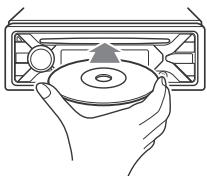
Playback starts automatically.
Playing a USB Device
In these Operating Instructions, "iPod" is used as a general reference for the iPod functions on an iPod and iPhone, unless otherwise specified by the text or illustrations.
For details on the compatibility of your iPod, see "About iPod" (page 23) or visit the support site on the back cover.
AOA (Android Open Accessory) 2.0, MSC (Mass Storage Class) and MTP (Media Transfer Protocol) type USB devices* compliant with the USB standard can be used. Depending on the USB device, the Android mode or MSC/MTP mode can be selected on the unit.
Some digital media players or Android smartphones may require setting to MTP mode.
- e.g., a USB flash drive, digital media player, Android smartphone
Notes
- For details on the compatibility of your USB device, visit the support site on the back cover.
- Smartphones with Android OS 4.1 or higher installed support Android Open Accessory 2.0 (AOA 2.0). However, some smartphones may not fully support AOA 2.0 even if Android OS 4.1 or higher is installed.
For details on the compatibility of your Android smartphone, visit the support site on the back cover.
- Playback of the following files is not supported.
MP3/WMA/FLAC:
copyright-protected files - DRM (Digital Rights Management) files
Multi-channel audio files
MP3/WMA:
-lossless compression files
Before making a connection, select the USB mode (Android mode or MSC/MTP mode) depending on the USB device (page 19).
1 Connect a USB device to the USB port (page 9).
Playback starts.
If a device is already connected, to start playback, press SRC to select [USB] ([IPD] appears in the display when the iPod is recognized).
2 Adjust the volume on this unit.
To stop playback
Press and hold OFF for 1 second.
To remove the device
Stop playback, then remove the device.
Caution for iPhone
When you connect an iPhone via USB, phone call volume is controlled by the iPhone, not the unit. Do not inadvertently increase the volume on the unit during a call, as a sudden loud sound may result when the call ends.
Playing a BLUETOOTH Device
You can play contents on a connected device that supports BLUETOOTH A2DP (Advanced Audio Distribution Profile).
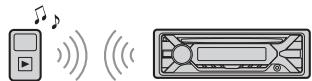
1 Make BLUETOOTH connection with the audio device (page 7).
To select the audio device, press MENU, then select [BLUETOOTH] SET AUDIODEV.
2 Press SRC to select [BT AUDIO].
3 Operate the audio device to start playback.
4 Adjust the volume on this unit.
Notes
- Depending on the audio device, information such as title, track number/time and playback status may not be displayed on this unit.
Even if the source is changed on this unit, playback of the audio device does not stop. - [BT AUDIO] does not appear in the display while running the "SongPal" application via the BLUETOOTH function.
To match the volume level of the BLUETOOTH device to other sources
Start playback of the BLUETOOTH audio device at a moderate volume, and set your usual listening volume on the unit. Press MENU, then select [SOUND] [SET BTA VOL] (page 20).
Searching and Playing Tracks
Repeat play and shuffle play
Not available when a USB device in Android mode is connected.
1 During playback, press (repeat) or (shuffle) repeatedly to select the desired play mode.
Playback in the selected play mode may take time to start.
Available play modes differ depending on the selected sound source.
Searching a track by name (QuickBrowZerTM)
Not available when a USB device in Android mode or iPod is connected.
1 During CD or USB playback, press Q (browse)* to display the list of search categories.
When the track list appears, press (back) repeatedly to display the desired search category.
- During USB playback, press Q (browse) for more than 2 seconds to directly return to the beginning of the category list.
2 Rotate the control dial to select the desired search category, then press it to confirm.
3 Repeat step 2 to search the desired track. Playback starts.
To exit the Quick-BrowZer mode Press Q (browse).
Searching by skipping items (Jump mode)
Not available when a USB device in Android mode or iPod is connected.
1 Press Q (browse).
2 Press▶I (SEEK+).
3 Rotate the control dial to select the item. The list is jumped in steps of 10% of the total number of items.
4 Press ENTER to return to the QuickBrowZer mode. The selected item appears.
5 Rotate the control dial to select the desired item, then press it. Playback starts.
Handsfree Calling (via BLUETOOTH only)
To use a cellular phone, connect it with this unit. You can connect two cellular phones to the unit. For details, see "Preparing a BLUETOOTH Device" (page 7).

Receiving a Call
1 Press CALL when a call is received with a ringtone.
The phone call starts.
Note
The ringtone and talker's voice are output only from the front speakers.
To reject the call
Press and hold OFF for 1 second.
To end the call
PressCALL again.
Making a Call
You can make a call from the phonebook or call history when a cellular phone supporting PBAP (Phone Book Access Profile) is connected.
When two cellular phones are connected to the unit, select either phone.
From the phonebook
1 Press CALL.
When two cellular phones are connected to the unit, rotate the control dial to select either phone, then press it.
2 Rotate the control dial to select [PHONE BOOK], then press it.
3 Rotate the control dial to select an initial from the initial list, then press it.
4 Rotate the control dial to select a name from the name list, then press it.
5 Rotate the control dial to select a number from the number list, then press it.
The phone call starts.
From the call history
1 Press CALL.
When two cellular phones are connected to the unit, rotate the control dial to select either phone, then press it.
2 Rotate the control dial to select [RECENT CALL], then press it.
A list of the call history appears.
3 Rotate the control dial to select a name or phone number from the call history, then press it.
The phone call starts.
By phone number input
1 Press CALL.
When two cellular phones are connected to the unit, rotate the control dial to select either phone, then press it.
2 Rotate the control dial to select [DIAL NUMBER], then press it.
3 Rotate the control dial to enter the phone number, and lastly select [ ] (space), then press ENTER*.
The phone call starts.
- To move the digital indication, press | / | (SEEK -/+).
Note
[...] appears instead of [#] on the display.
By radial
1 Press CALL.
When two cellular phones are connected to the unit, rotate the control dial to select either phone, then press it.
2 Rotate the control dial to select [REDIAL], then press it. The phone call starts.
By voice tags
You can make a call by saying the voice tag stored in a connected cellular phone that has a voice dialing function.
1 Press CALL.
When two cellular phones are connected to the unit, rotate the control dial to select either phone, then press it.
2 Rotate the control dial to select [VOICE DIAL], then press it.
Alternatively, press and hold VOICE for more than 2 seconds.
3 Say the voice tag stored on the cellular phone.
Your voice is recognized, and the call is made.
To cancel voice dialing
Press VOICE.
Available Operations during Call
To adjust the ringtone volume
Rotate the control dial while receiving a call.
To adjust the talker's voice volume
Rotate the control dial during a call.
To adjust the volume for the other party (Mic gain adjustment)
Press MIC.
Adjustable volume levels: [MIC-LOW], [MIC-MID], [MIC-HI].
To reduce echo and noise (Echo Canceler/Noise Canceler Mode)
Press and hold MIC.
Settable mode: [EC/NC-1], [EC/NC-2].
To switch between handsfree mode and handheld mode
During a call, press MODE to switch the phone call audio between the unit and cellular phone.
Note
Depending on the cellular phone, this operation may not be available.
Useful Functions
SongPal with iPhone/Android smartphone
Downloading the latest version of "SongPal" application is required from the App Store for iPhone or from Google Play for Android smartphone.


Notes
- For your safety, follow your local traffic laws and regulations, and do not operate the application while driving.
- "SongPal" is an app for controlling Sony audio devices which are compatible with "SongPal", by your iPhone/Android smartphone.
- What you can control with "SongPal" varies depending on the connected device.
- To make use of "SongPal" features, see the details on your iPhone/Android smartphone.
For further details on "SongPal," visit the following URL: http://rdl.sony.net/help/songpal/ - Visit the website below and check the compatible iPhone/Android smartphone models. For iPhone: visit the App Store For Android smartphone: visit Google Play
Establishing the SongPal connection
1 Make the BLUETOOTH connection with iPhone/Android smartphone (page 7).
To select the audio device, press MENU, then select [BLUETOOTH] [SET AUDIODEV] (page 21).
2 Launch the "SongPal" application.
3 Press MENU, rotate the control dial to select [SONGPAL], then press it.
4 Rotate the control dial to select [CONNECT], then press it.
Connection to iPhone/Android smartphone starts.
For details on the operations on iPhone/Android smartphone, see the help of the application.
If the device number appears
Make sure that the number is displayed (e.g., 123456), then select [Yes] on the iPhone/Android smartphone.
To terminate connection
1 Press MENU, rotate the control dial to select [SONGPAL], then press it.
2 Rotate the control dial to select [CONNECT], then press it.
Selecting the source or application
You can operate to select the desired source or application on iPhone/Android smartphone.
To select the source
Press SRC repeatedly. Alternatively, press SRC, rotate the control dial to select the desired source, then press ENTER.
To display the source list
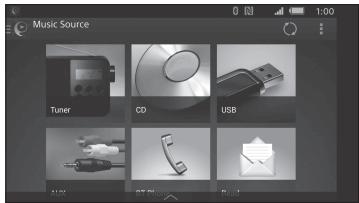
Press SRC.
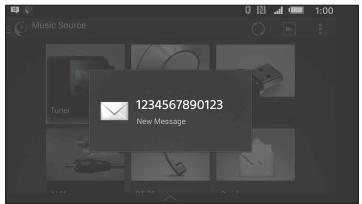
Announcement of various information by voice guide (Android smartphone only)
When SMS, Twitter/Facebook/Calendar notifications, etc., are received, they are automatically announced through the car speakers.
For details on settings, refer to the help of the application.
Activating voice recognition (Android smartphone only)
By registering applications, you can control an application by voice command. For details, refer to the help of the application.
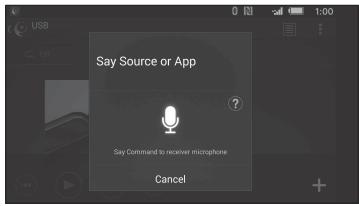
To activate voice recognition
1 Press and hold VOICE to activate voice recognition.
2 Say the desired voice command into the microphone when [Say Source or App] appears on the Android smartphone.
Notes
Voice recognition may not be available in some cases.
- Voice recognition may not work properly depending on the performance of the connected Android smartphone.
- Operate under conditions where noise such as engine sound is minimized during voice recognition.
Replying a message of SMS (Android smartphone only)
You can reply a message by voice recognition.
1 Activate voice recognition, then input "Reply."
The message input display appears on the "SongPal" application.
2 Input a reply message by voice recognition. The list of message candidates appears on the "SongPal" application.
3 Rotate the control dial to select the desired message, then press it.
The message is sent out.
Making sound and display settings
You can adjust the settings relating to sound and display via iPhone/Android smartphone.
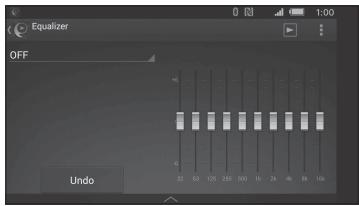
For details on settings, refer to the help of the application.
Using Siri Eyes Free
Siri Eyes Free allows you to use an iPhone handsfree by simply speaking into the microphone. This function requires you to connect an iPhone to the unit via BLUETOOTH. Availability is limited to iPhone 4s or later. Make sure that your iPhone is running the latest iOS version.
You must complete BLUETOOTH registration and connection configurations for the iPhone with the unit in advance. For details, see "Preparing a BLUETOOTH Device" (page 7). To select the iPhone, press MENU, then select [BLUETOOTH] [SET AUDIODEV] (page 21).
1 Activate the Siri function on the iPhone.
For details, refer to the operating instructions supplied with the iPhone.
2 Press and hold VOICE for more than 2 seconds.
The voice command display appears.
3 After the iPhone beeps, speak into the microphone.
The iPhone beeps again, then Siri starts responding.
To deactivate Siri Eyes Free
Press VOICE.
Notes
- The iPhone may not recognize your voice depending on usage conditions. (For example, if you are in a moving car.)
- Siri Eyes Free may not function properly, or the response time may lag in locations where iPhone signals are difficult to receive.
Depending on the iPhone's operating condition, Siri Eyes Free may not function properly, or may quit. - If you play a track with an iPhone using the BLUETOOTH audio connection, when the track starts playback via BLUETOOTH, Siri Eyes Free automatically quits and the unit switches to the BLUETOOTH audio source.
- When Siri Eyes Free is activated during audio playback, the unit may switch to the BLUETOOTH audio source even if you do not specify a track to play.
- When connecting the iPhone to the USB port, Siri Eyes Free may not function properly, or may quit.
- When connecting the iPhone to the unit via USB, do not activate Siri with the iPhone. Siri Eyes Free may not function properly, or may quit.
- There is no audio sound while Siri Eyes Free is activated.
Settings
Canceling the DEMO Mode
You can cancel the demonstration display which appears when the source is off and the clock is displayed.
1 Press MENU, rotate the control dial to select [GENERAL], then press it.
2 Rotate the control dial to select [SET DEMO], then press it.
3 Rotate the control dial to select [SET DEMO-OFF], then press it. The setting is complete.
4 Press (back) twice.
The display returns to normal reception/ play mode.
Basic Setting Operation
You can set items in the following setup categories:
General setup (GENERAL), Sound setup (SOUND), Display setup (DISPLAY), BLUETOOTH setup (BLUETOOTH), SongPal setup (SONGPAL)
1 Press MENU.
2 Rotate the control dial to select the setup category, then press it.
The items that can be set differ depending on the source and settings.
3 Rotate the control dial to select the options, then press it.
To return to the previous display
Press (back).
General Setup (GENERAL)
AREA
Specifies the area/region to use this unit: [EUROPE], [RUSSIA].
If the area/region currently set is changed, this unit is reset, then the clock is displayed.
(Available only while the source is off and the clock is displayed.)
DEMO (demonstration)
Activates the demonstration: [ON], [OFF].
CLOCK-ADJ (clock adjust) (page 7)
CAUT ALM (caution alarm)
Activates the caution alarm: [ON], [OFF] (page 6).
(Available only while the source is off and the clock is displayed.)
BEEP
Activates the beep sound: [ON], [OFF].
AUTO OFF
Shuts off automatically after a desired time when the unit is turned off: [ON] (30 minutes), [OFF].
STEERING
Registers/rewets the setting of the steering wheel remote control.
(Available when connected with the connection cable (not supplied).)
(Available only while the source is off and the clock is displayed.)
STR CONTROL (steering control)
Selects the input mode of the connected remote control. To prevent a malfunction, be sure to match the input mode with the connected remote control before use.
CUSTOM
Input mode for the steering wheel remote control
PRESET
Input mode for the wired remote control excluding the steering wheel remote control (automatically selected when [RESET CUSTOM] is performed.)
EDIT CUSTOM
Registers the functions (SOURCE, ATT, VOL + / - , SEEK + / - VOICE, ON HOOK, OFF HOOK) to the steering wheel remote control:
1 Rotate the control dial to select the function you want to assign to the steering wheel remote control, then press it.
While [REGISTER] is blinking, press and hold the button on the steering wheel remote control you want to assign the function to. When registration is complete, [REGISTERED] is displayed.
To register other functions, repeat steps 1 and 2.
(Available only when [STR CONTROL] is set to [CUSTOM].)
RESET CUSTOM
Resetsthe setting of the steering wheel remote control:[YES],[NO].
(Available only when [STR CONTROL] is set to [CUSTOM].)
Notes
- While making settings, only button operation on the unit is available. For safety, park your car before making this setting.
- If an error occurs while registering, all the previously-registered information remains. Restart registration from the function where the error occurred.
- This function may not be available on some vehicles. For details on the compatibility of your vehicle, visit the support site on the back cover.
USB MODE
Changes the USB mode: [ANDROID], [MSC/MTP].
(Available only when the USB source is selected.)
CT (clock time)
Activates the CT function: [ON], [OFF].
AF/TA (alternative frequencies/traffic announcement)
Selects the alternative frequencies (AF) and traffic announcement (TA) setting: [AF-ON], [TA-ON], [AF/TA-ON], [AF/TA-OFF].
REGIONAL
Restricts reception to a specific region: [ON], [OFF].
(Available only when FM is received.)
BTM (best tuning memory) (page 10)
(Available only when the tuner is selected.)
FIRMWARE
(Available only while the source is off and the clock is displayed.)
Checks/updates the firmware version. For details, visit the support site on the back cover.
FW VERSION (firmware version)
Displays current firmware version.
FW UPDATE (firmware update)
Enters firmware update process: [YES], [NO].
Updating the firmware takes a few minutes to complete. During the update, do not turn the ignition to the OFF position, nor remove the USB device.
Sound Setup (SOUND)
This setup menu is not available when the source is off and the clock is displayed.
EQ10 PRESET
Selects an equalizer curve from 10 equalizer curves or off:
[OFF], [R&B], [ROCK], [POP], [HIP-HOP],
[ELECTRONICA], [JAZZ], [SOUL],
[COUNTRY], [KARAOKE]*, [CUSTOM].
The equalizer curve setting can be memorized for each source.
- [KARAOKE] reduces the vocal sound but cannot fully remove it during playback. Also, using a microphone is not supported.
EQ10 CUSTOM
Sets [CUSTOM] of EQ10.
Selects the equalizer curve: [BAND1] 32
Hz, [BAND2] 63 Hz, [BAND3] 125 Hz,
[BAND4] 250 Hz, [BAND5] 500 Hz,
[BAND6] 1 kHz, [BAND7] 2 kHz, [BAND8] 4
kHz, [BAND9] 8 kHz, [BAND10] 16 kHz.
The volume level is adjustable in 1 dB steps, from -6 dB to +6 dB.
BALANCE
Adjusts the sound balance: [RIGHT-15] - [CENTER] - [LEFT-15].
FADER
Adjusts the relative level: [FRONT-15] - [CENTER] - [REAR-15].
([ATT] is displayed at the lowest setting.)
Selects the subwoofer phase: [NORM], [REV].
LPF FREQ (low pass filter frequency)
Selects the subwoofer cut-off frequency:
[80Hz], [100Hz], [120Hz].
HPF FREQ (high pass filter frequency)
Selects the front/rear speaker cut-off frequency: [OFF], [80Hz], [100Hz], [120Hz].
AUX VOL (AUX volume level)
Adjusts the volume level for each
connected auxiliary device: [+18dB] - [0 dB] - [-8 dB].
This setting negates the need to adjust
the volume level between sources.
(Available only when the AUX is selected.)
BTA VOL (BLUETOOTH audio volume level)
Adjusts the volume level for each connected BLUETOOTH device: [+6dB] - [0 dB] - [-6 dB].
This setting negates the need to adjust the volume level between sources.
(Available only when the BT audio or application is selected.)
Display Setup (DISPLAY)
DIMMER
Changes the display brightness:
For MEX-N5200BT: [OFF], [ON], [AT] (auto), [CLK].
[AT] is available only when the
illumination control lead is connected, and the head light is turned on.)
For MEX-N4200BT: [OFF], [ON], [CLK].
To set this function to be active only during a fixed period, select [CLK], then set the start and end times.
- To set the brightness when the dimmer function is activated: Set [DIMMER] to [ON], then adjust [BRIGHTNESS].
- To set the brightness when the dimmer function is deactivated: Set [DIMMER] to [OFF], then adjust [BRIGHTNESS].
The brightness setting is stored and applied when the dimmer function is activated or deactivated.
BRIGHTNESS
Adjusts the display brightness. The brightness level is adjustable: [1] - [10].
BUTTON-C (button color) (MEX-N5200BT only)
Sets a preset color or customized color for the buttons.
COLOR
Selects from 15 preset colors, 1 customized color.
CUSTOM-C (custom color)
Registers a customized color for the buttons.
RGB RED, RGB GRN, RGB BLUE
Adjustable color range: [0] - [32] ([0]
cannot be set for all color ranges).
DSPL-C (display color) (MEX-N5200BT only)
Sets a preset color or customized color for the display.
COLOR
Selects from 15 preset colors, 1 customized color.
CUSTOM-C (custom color)
Registers a customized color for the display.
RGB RED, RGB GRN, RGB BLUE
Adjustable color range: [0] - [32] ([0]
cannot be set for all color ranges).
SND SYNC (sound synchronization)
Activates the synchronization of the illumination with the sound: [ON], [OFF].
AUTO SCR (auto scroll)
Scrolls long items automatically: [ON], [OFF].
(Not available when the AUX or tuner is selected.)
BLUETOOTH Setup (BLUETOOTH)
PAIRING (page 8)
Connects up to two BLUETOOTH devices: [DEVICE 1], [DEVICE 2].
[DEVICE 1] or [DEVICE 2] will be changed to the paired device name after pairing is complete.
AUDIO device
Selects the audio device.
[^*] appears on the device paired with [DEVICE 1] or the current A2DP compatible audio device.
RINGTONE
Selects whether this unit or the connected cellular phone outputs the ringtone: [1] (this unit), [2] (cellular phone).
AUTO ANS (auto answer)
Sets this unit to answer an incoming call automatically: [OFF], [1] (about 3 seconds), [2] (about 10 seconds).
AUTOPAIR (auto pairing)
Starts BLUETOOTH pairing automatically when iOS device version 5.0 or later is connected via USB: [ON], [OFF].
BT SIGNL (BLUETOOTH signal) (page 8)
Activates/deactivates the BLUETOOTH function.
BT INIT (BLUETOOTH initialize)
Initializes all the BLUETOOTH related settings (pairing information, preset number, device information, etc.): [YES], [NO].
When disposing the unit, initialize all the settings.
(Available only while the source is off and the clock is displayed.)
SongPal Setup (SONGPAL)
AUTO LAUNCH
Activates the "SongPal" auto launch: [ON], [OFF].
When [ON] is selected, "SongPal" will automatically connect after the
BLUETOOTH connection is complete.
CONNECT (page 16)
Establish and terminate "SongPal" function (connection).
Additional Information
Updating the Firmware
To update the firmware, visit the support site on the back cover, then follow the online instructions.
Notes
- Using a USB device (not supplied) is required for updating the firmware. Store the updater in the USB device, and connect the device to the USB port, then perform the update operation.
- Updating the firmware takes a few minutes to complete. During the update, do not turn the ignition to the OFF position, nor remove the USB device.
Precautions
Cool off the unit beforehand if your car has been parked in direct sunlight.
- Do not leave the front panel or audio devices brought in inside the car, or it may cause malfunction due to high temperature in direct sunlight.
- Power antenna (aerial) extends automatically.
Moisture condensation
Should moisture condensation occur inside the unit, remove the disc and wait for about an hour for it to dry out; otherwise the unit will not operate properly.
To maintain high sound quality
Do not splash liquid onto the unit or discs.
Notes on discs
- Do not expose discs to direct sunlight or heat sources such as hot air ducts, nor leave it in a car parked in direct sunlight.
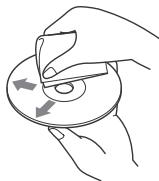
- Before playing, wipe the discs with a cleaning cloth from the center out. Do not use solvents such as benzine, thinner, commercially available cleaners.
- This unit is designed to play discs that conform to the Compact Disc (CD) standard. DualDiscs and some of the music discs encoded with copyright protection technologies do not conform to the Compact Disc (CD) standard, therefore, these discs may not be playable by this unit.
- Discs that this unit CANNOT play
- Discs with labels, stickers, or sticky tape or paper attached. Doing so may cause a malfunction, or may ruin the disc.
- Disks with non-standard shapes (e.g., heart, square, star). Attempting to do so may damage the unit.
- 8 cm (3 1/4 in) discs.
Notes on CD-R/CD-RW discs
- If the multi-session disc begins with a CD-DA session, it is recognized as a CD-DA disc, and other sessions are not played.
- Discs that this unit CANNOT play
- CD-R/CD-RW of poor recording quality.
- CD-R/CD-RW recorded with an incompatible recording device.
- CD-R/CD-RW which is finalized incorrectly.
- CD-R/CD-RW other than those recorded in music CD format or MP3 format conforming to ISO9660 Level 1/Level 2, Joliet/Romeo or multi-session.
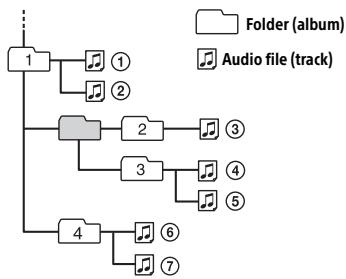
Playback order of audio files
About iPod
- You can connect to the following iPod models. Update your iPod devices to the latest software before use.
Compatible iPhone/iPod models
| Compatible Model | Bluetooth® | USB |
| iPhone SE | ✓ | ✓ |
| iPhone 6s Plus | ✓ | ✓ |
| iPhone 6s | ✓ | ✓ |
| iPhone 6 Plus | ✓ | ✓ |
| iPhone 6 | ✓ | ✓ |
| iPhone 5s | ✓ | ✓ |
| iPhone 5c | ✓ | ✓ |
| iPhone 5 | ✓ | ✓ |
| iPhone 4s | ✓ | ✓ |
| iPod touch (6th generation) | ✓ | ✓ |
| iPod touch (5th generation) | ✓ | ✓ |
| iPod nano (7th generation) | ✓ |
- "Made for iPod," and "Made for iPhone," mean that an electronic accessory has been designed to connect specifically to iPod or iPhone, respectively, and has been certified by the developer to meet Apple performance standards. Apple is not responsible for the operation of this device or its compliance with safety and regulatory standards. Please note that the use of this accessory with iPod or iPhone may affect wireless performance.
If you have any questions or problems concerning your unit that are not covered in this manual, consult your nearest Sony dealer.
Maintenance
Cleaning the connectors
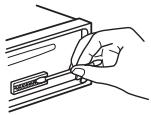
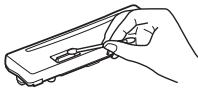
The unit may not function properly if the connectors between the unit and the front panel are not clean. In order to prevent this, detach the front panel (page 6) and clean the connectors with a cotton swab. Do not apply too much force. Otherwise, the connectors may be damaged.
Notes
- For safety, turn off the ignition before cleaning the connectors, and remove the key from the ignition switch.
- Never touch the connectors directly with your fingers or with any metal device.
Specifications
Tuner section
FM
Tuning range:
When [AREA] is set to [EUROPE]:
87.5 MHz - 108.0 MHz
When [AREA] is set to [RUSSIA]:
FM1/FM2: 87.5 MHz - 108.0 MHz (at 50 kHz step)
FM3: 65 MHz - 74 MHz (at 30 kHz step)
Antenna (aerial) terminal:
External antenna (aerial) connector
Intermediate frequency:
When [AREA] is set to [EUROPE]:
FM CCIR: -1,956.5 kHz to -487.3 kHz and +500.0 kHz to +2,095.4 kHz
When [AREA] is set to [RUSSIA]:
FM CCIR: -1,956.5 kHz to -487.3 kHz and +500.0 kHz to +2,095.4 kHz
FM OIRT: -1,815.6 kHz to -943.7 kHz and +996.6 kHz to +1,776.6 kHz
Usable sensitivity: 8 dBf
Selectivity: 75 dB at 400 kHz
Signal-to-noise ratio: 73 dB
Separation: 50 dB at 1 kHz
Frequency response: 20Hz - 15,000Hz
MW/LW
Tuning range:
MW: 531 kHz - 1,602 kHz
LW: 153 kHz - 279 kHz
Antenna (aerial) terminal:
External antenna (aerial) connector
Sensitivity: MW: 26 V , LW: 50 V
CD Player section
Signal-to-noise ratio: 95 dB
Frequency response: 10Hz - 20,000Hz
Wow and flutter: Below measurable limit
The maximum number of: (CD-R/CD-RW only)
- folders (albums): 150 (including root folder)
- files (tracks) and folders: 300 (may less than 300 if folder/file names contain many characters)
displayable characters for a folder/file name: 32 (Joliet)/64 (Romeo)
Corresponding codec: MP3 (.mp3) and WMA (.wma)
USB Player section
Interface: USB (Full-speed)
Maximum current: 1 A
The maximum number of recognizable tracks:
-
folders (albums): 256
-
files (tracks) per folder: 256
Compatible Android Open Accessory protocol (AOA): 2.0
Corresponding codec: MP3 (.mp3)
Bit rate: 8 kbps - 320 kbps (Supports VBR (Variable Bit Rate))
Sampling rate: 16kHz - 48kHz
WMA (.wma)
Bit rate: 32 kbps - 192 kbps (Supports VBR (Variable Bit Rate))
Sampling rate: 32 kHz, 44.1 kHz, 48 kHz
FLAC (.flac)
Bit depth: 16 bit, 24 bit
Sampling rate: 44.1 kHz, 48 kHz
Wireless Communication
Communication System:
BLUETOOTH Standard version 3.0
Output:
BLUETOOTH Standard Power Class 2 (Max. +4 dBm)
Maximum communication range:
Line of sight approx. 10m (33 ft)*1
Frequency band:
2.4 GHz band
(2.4000 GHz - 2.4835 GHz)
Modulation method: FHSS
Compatible BLUETOOTH Profiles*2:
A2DP (Advanced Audio Distribution Profile) 1.3
AVRCP (Audio Video Remote Control Profile) 1.3
HFP (Handsfree Profile) 1.6
PBAP (Phone Book Access Profile)
SPP (Serial Port Profile)
Corresponding codec:
SBC (.sbc), ACC (.m4a)
1 The actual range will vary depending on factors such as obstacles between devices, magnetic fields around a microwave oven, static electricity, reception sensitivity, antenna (aerial)'s performance, operating system, software application, etc.
2 BLUETOOTH standard profiles indicate the purpose of BLUETOOTH communication between devices.
NFC Communication
Frequency band and maximum power spec
NFC: 13.56 MHz < 60 dBμA/m at 10 m
Power amplifier section
Output: Speaker outputs
Speaker impedance: 4 -8
Maximum power output: 55W× 4 (at 4
General
Outputs:
Audio outputs terminal:
MEX-N5200BT: FRONT, REAR, SUB
MEX-N4200BT: REAR, SUB
Power antenna (aerial)/Power amplifier control terminal (REM OUT)
Inputs:
Remote controller input terminal
Antenna (aerial) input terminal MIC input (terminal)
Power requirements: 12 V DC car battery (negative ground (earth))
Rated current consumption: 10 A
Dimensions:
Approx. 178mm× 50mm× 177mm (71 / 8in× 2in× 7in) (w/h/d)
Mounting dimensions:
Approx. 182mm× 53mm× 160mm (71 / 4in× 21 / 8in× 6^5 / 16in)(w / h / d)
Mass: Approx. 1.2kg (2 lb 11 oz)
Package contents:
Main unit (1)
Microphone (1) (MEX-N5200BT only)
Parts for installation and connections (1 set)
Optional accessories/equipment:
Microphone:XA-MC10 (MEX-N4200BT only)
Your dealer may not handle some of the above listed accessories. Please ask the dealer for detailed information.
Design and specifications are subject to change without notice.
Copyrights
The Bluetooth® word mark and logos are registered trademarks owned by Bluetooth SIG, Inc. and any use of such marks by Sony Corporation is under license. Other trademarks and trade names are those of their respective owners.
The N-Mark is a trademark or registered trademark of NFC Forum, Inc. in the United States and in other countries.
Windows Media is either a registered trademark or trademark of Microsoft Corporation in the United States and/or other countries.
This product is protected by certain intellectual property rights of Microsoft Corporation. Use or distribution of such technology outside of this product is prohibited without a license from Microsoft or an authorized Microsoft subsidiary.
iPhone, iPod, iPod classic, iPod nano, iPod touch, and Siri are trademarks of Apple Inc., registered in the U.S. and other countries. App Store is a service mark of Apple Inc.
MPEG Layer-3 audio coding technology and patents licensed from Fraunhofer IIS and Thomson.
Google, Google Play and Android are trademarks of Google Inc.
libFLAC
Copyright (C) 2000-2009 Josh Coalson
Copyright (C) 2011-2013 Xiph.Org Foundation
Redistribution and use in source and binary forms, with or without modification, are permitted provided that the following conditions are met:
- Redistributions of source code must retain the above copyright notice, this list of conditions and the following disclaimer.
- Redistributions in binary form must reproduce the above copyright notice, this list of conditions and the following disclaimer in the documentation and/or other materials provided with the distribution.
- Neither the name of the Xiph.org Foundation nor the names of its contributors may be used to endorse or promote products derived from this software without specific prior written permission.
THIS SOFTWARE IS PROVIDED BY THE
COPYRIGHT HOLDERS AND COLNTRIBUTORS "AS IS" AND ANY EXPRESS OR IMPLIED
WARRANTIES, INCLUDING, BUT NOT LIMITED TO, THE IMPLIED WARRANTY OF
MERCHANTABILITY AND FITNESS FOR A
PARTICULAR PURPOSE ARE DISCLAIMED. IN NO EVENT SHALL THE FOUNDATION OR COLNTRIBUTORS BE LIABLE FOR ANY DIRECT, INDIRECT,INCIDENTAL, SPECIAL,
EXEMPLARY, OR CONSEQUENTIAL DAMAGES (INCLUDING, BUT NOT LIMITED TO,
PROCUREMENT OF SUBSTITUTE GOODS OR SERVICES; LOSS OF USE, DATA,OR PROFITS; OR BUSINESS INTERRUIPTION) HOWEVER CAUSED AND ON ANY THEORY OF LIABILITY,
WHETHER IN CONTRACT, STRICRT LIABILITY,
OR TORT (INCLUDING NEGLIGENCE OR
OTHERWISE) ASING IN ANY WAY OUT OF THE USE OF THIS SOFTWARE, EVEN IF
ADVISED OF THE POSSIBILITY OF SUCH DAMAGE.
Troubleshooting
The following checklist will help you remedy problems you may encounter with your unit. Before going through the checklist below, check the connection and operating procedures.
For details on using the fuse and removing the unit from the dashboard, see
"Connection/Installation" (page 33).
If the problem is not solved, visit the support site on the back cover.
General
No sound or the sound is very low.
The position of the fader control [FADER] is not set for a 2-speaker system.
The volume of the unit and/or connected device is very low.
- Increase the volume of the unit and connected device.
No beep sound.
An optional power amplifier is connected and you are not using the built-in amplifier.
The contents of the memory have been erased.
The power supply lead or battery has been disconnected or not connected properly.
Stored stations and correct time are erased.
The fuse has blown.
Makes a noise when the position of the ignition is switched.
The leads are not matched correctly with the car's accessory power connector.
During playback or reception, the demonstration mode starts.
If no operation is performed for 5 minutes with [DEMO-ON] set, the demonstration mode starts.
- Set [DEMO-OFF] (page 19).
The display disappears from/does not appear in the display window.
The dimmer is set to [DIM-ON] (page 20).
The display disappears if you press and hold OFF.
- Press OFF on the unit until the display appears.
The connectors are dirty (page 24).
The display/illumination flashes.
The power supply is not sufficient.
- Check that the car battery supplies enough power to the unit. (The power requirement is 12 V DC.)
The operation buttons do not function. The disc will not eject.
Press DSPL and (back)/MODE for more than 2 seconds to reset the unit.
The contents stored in memory are erased.
For your safety, do not reset the unit while you are driving.
Radio reception
Stations cannot be received.
The sound is hampered by noises.
The connection is not correct.
- Check the connection of the car antenna (aerial).
- If the auto antenna (aerial) will not extend, check the connection of the power antenna (aerial) control lead.
Preset tuning is not possible.
The broadcast signal is too weak.
65 MHz to 74 MHz in FM3 cannot be tuned in.
[AREA] is set to [EUROPE].
- Set [AREA] to [RUSSIA] (page 19).
RDS
RDS services cannot be received (when [AREA] is set to [RUSSIA]).
FM3 is selected.
- Select FM1 or FM2.
RDS services are unavailable in the current region.
The SEEK starts after a few seconds of listening.
The station is non-TP or has weak signal. -Deactivate TA (page 11).
No traffic announcements.
Activate TA (page 11).
- The station does not broadcast any traffic announcements despite being TP.
- Tune in another station.
PTY displays [ ]
The current station is not an RDS station.
RDS data has not been received.
The station does not specify the program type.
Program service name flashes.
There is no alternative frequency for the current station.
- Press SEEK +/- while the program service name is flashing. [PI SEEK] appears and the unit starts searching for another frequency with the same PI (program identification) data.
CD playback
The disc does not play.
Defective or dirty disc.
The CD-R/CD-RW is not for audio use (page 23).
MP3/WMA files cannot be played.
The disc is incompatible with the MP3/WMA format and version. For details on playable discs and formats, visit the support site on the back cover.
MP3/WMA files take longer to play than others.
The following discs take a longer time to start playback.
- A disc recorded with a complicated tree structure.
- A disc recorded in Multi Session.
- A disc to which data can be added.
The sound skips.
Defective or dirty disc.
USB device playback
You cannot play items via a USB hub.
This unit cannot recognize USB devices via a USB hub.
A USB device takes longer to play.
The USB device contains files with a complicated tree structure.
The sound is intermittent.
The sound may be intermittent at a high-bit-rate.
DRM (Digital Rights Management) files may not be playable in some cases.
The audio file cannot be played.
USB devices formatted with file systems other than FAT16 or FAT32 are unsupported.*
* This unit supports FAT16 and FAT32, but some USB device may not support all of these FAT. For details, refer to the operating instruction of each USB device or contact the manufacturer.
Operations for skipping an album, skipping items (Jump mode), and searching a track by name (QuickBrowZer) cannot be performed.
These operations cannot be performed when a USB device in Android mode or iPod is connected.
- Set [USB MODE] to [MSC/MTP] (page 19).
- Remove the iPod.
The USB mode of the device is not set to the appropriate mode.
- Make sure that the USB mode of the device is set to MSC/MTP mode.
The sound cannot be output during playback in Android mode.
While the unit is in Android mode, the sound outputs only from the Android smartphone.
- Check the status of the audio playback application on the Android smartphone.
- Playback may not perform properly depending on the Android smartphone.
NFC function
One touch connection (NFC) is not possible.
If the smartphone does not respond to the touching.
- Check that the NFC function of the smartphone is turned on.
- Move the N-Mark part of the smartphone closer to the N-Mark part on this unit.
- If the smartphone is in a case, remove it.
NFC receiving sensitivity depends on the device.
If One touch connection with the smartphone fails several times, make BLUETOOTH connection manually.
BLUETOOTH function
The connecting device cannot detect this unit.
Before the pairing is made, set this unit to pairing standby mode.
While connected to two BLUETOOTH devices, this unit cannot be detected from another device.
- Disconnect either connection and search for this unit from another device.
When the device pairing is made, set the BLUETOOTH signal output to on (page 8).
Connection is not possible.
The connection is controlled from one side (this unit or BLUETOOTH device), but not both.
- Connect to this unit from a BLUETOOTH device or vice versa.
The name of the detected device does not appear.
Depending on the status of the other device, it may not be possible to obtain the name.
No ringtone.
Adjust the volume by rotating the control dial while receiving a call.
Depending on the connecting device, the ringtone may not be sent properly. - Set [RINGTONE] to [1] (page 21).
The front speakers are not connected to the unit.
- Connect the front speakers to the unit. The ringtone is output only from the front speakers.
The talker's voice cannot be heard.
The front speakers are not connected to the unit.
- Connect the front speakers to the unit. The talker's voice is output only from the front speakers.
A call partner says that the volume is too low or high.
Adjust the volume accordingly using Mic gain adjustment (page 15).
Echo or noise occurs in phone call conversations.
Lower the volume.
Set EC/NC Mode to [EC/NC-1] or [EC/NC-2] (page 15).
If the ambient noise other than the phone call sound is loud, try reducing this noise. E.g.: If a window is open and road noise, etc., is loud, shut the window. If an air conditioner is loud, lower the air conditioner.
The phone is not connected.
When BLUETOOTH audio is played, the phone is not connected even if you press CALL.
- Connect from the phone.
The phone sound quality is poor.
Phone sound quality depends on reception conditions of cellular phone.
- Move your car to a place where you can enhance the cellular phone's signal if the reception is poor.
The volume of the connected audio device is low (high).
Volume level will differ depending on the audio device.
- Adjust the volume of the connected audio device or this unit (page 20).
The sound skips during playback of a BLUETOOTH audio device.
Reduce the distance between the unit and the BLUETOOTH audio device.
If the BLUETOOTH audio device is stored in a case which interrupts the signal, remove the audio device from the case during use.
Several BLUETOOTH devices or other devices which emit radio waves are in use nearby.
- Turn off the other devices.
- Increase the distance from the other devices.
The playback sound stops momentarily when the connection between this unit and the cellular phone is being made. This is not a malfunction.
The connected BLUETOOTH audio device cannot be controlled.
Check that the connected BLUETOOTH audio device supports AVRCP.
Some functions do not work.
Check if the connecting device supports the functions in question.
A call is answered unintentionally.
The connecting phone is set to answer a call automatically.
Pairing failed due to a timeout.
Depending on the connecting device, the time limit for pairing may be short.
- Try completing the pairing within the time.
BLUETOOTH function cannot operate.
Turn off the unit by pressing OFF for more than 2 seconds, then turn the unit on again.
No sound is output from the car speakers during handsfree call.
If the sound is output from the cellular phone, set the cellular phone to output the sound from the car speakers.
Siri Eyes Free is not activated.
Perform the handsfree registration for an iPhone that supports Siri Eyes Free.
Set the Siri function on the iPhone to on.
Cancel the BLUETOOTH connection with the iPhone and the unit, and reconnect.
SongPal operation
Application name is mismatched with the actual application in "SongPal".
Launch the application again from the "SongPal" application.
While running the "SongPal" application via BLUETOOTH, the display automatically switches to [BT AUDIO].
The "SongPal" application or BLUETOOTH function has failed.
Run the application again.
The "SongPal" application is automatically disconnected when the display switches to [IPD].
The "SongPal" application on iPhone/iPod does not support iPod playback.
- Change the source of the unit to other than [IPD], then establish the "SongPal" connection (page 16).
Messages
The following messages may appear or flash during operation.
CD ERROR: The disc cannot be played. The disc will be ejected automatically.
Clean or insert the disc correctly, or make sure the disc is not blank or defective.
CD NO MUSIC: There is no playable file. The disc will be ejected automatically.
Insert a disc containing playable files (page 25).
CD PUSH EJT: The disc could not be ejected properly.
Press (eject).
HUB NO SUPRT: USB hubs are not supported.
INVALID
The selected operation could be invalid.
[USB MODE] cannot be changed during iPod playback.
IPD STOP: iPod playback has finished.
OperateryouriPod/iPhone to start playback.
NO AF: No alternative frequencies.
Press SEEK + / - while the program service name is flashing. The unit starts searching for another frequency with the same PI (program identification) data ([PI SEEK] appears).
NO TP: No traffic programs.
The unit will continue searching for available TP stations.
NOT SUPPORT -Android MODE
A USB device not supporting AOA (Android Open Accessory) 2.0 is connected to the unit while [USB MODE] is set to [ANDROID]. - Set [USB MODE] to [MSC/MTP] (page 19).
OVERLOAD: The USB device is overloaded.
Disconnect the USB device, then press SRC to select another source.
The USB device has a fault, or an unsupported device is connected.
READ: Now reading information.
Wait until reading is complete and playback starts automatically. This may take some time depending on the file organization.
USB ERROR: The USB device cannot be played.
Connect the USB device again.
USB NO DEV: A USB device is not connected or recognized.
Make sure the USB device or USB cable is securely connected.
USB NO MUSIC: There is no playable file.
Connect a USB device containing playable files (page 25).
USB NO SUPRT: The USB device is not supported.
For details on the compatibility of your USB device, visit the support site on the back cover.
LLLor:Thebeginning or the end of the disc has been reached.
- (underscore): The character cannot be displayed.
For BLUETOOTH function:
BTA NO DEV: The BLUETOOTH device is not connected or recognized.
Make sure the BLUETOOTH device is securely connected, or the BLUETOOTH connection is established with the BLUETOOTH device.
ERROR: The selected operation could not be performed.
Wait for a while, then try again.
UNKNOWN: A name or phone number cannot be displayed.
WITHHIELD: The phone number is hidden by the caller.
For SongPal operation:
APP ----: A connection with the application is not established.
Make the "SongPal" connection again (page 16).
APP DISCNT: The application is disconnected.
Make the "SongPal" connection (page 16).
APP DISPLAY: A screen setting display of the application is open.
Exit the screen setting display of the application to enable button operation.
APP LIST: The contents list of the CD/USB/iPod is open.
Exit the list of the application to enable button operation.
APP MENU: A setting display of the application is open.
Exit the setting display of the application to enable button operation.
APP NO DEV: The device with the application installed is not connected or recognized.
Make the BLUETOOTH connection and establish the "SongPal" connection again (page 16).
APP SOUND: A sound setting display of the application is open.
Exit the sound setting display of the application to enable button operation.
OPEN APP: The "SongPal" application is not running.
Launch the application.
For steering wheel remote control operation:
ERROR: An error occurred during the function registration.
Register again from the function where the error occurred (page 19).
TIMEOUT: The function registration failed due to a timeout.
Try completing the registration while [REGISTER] is blinking (about 6 seconds) (page 19).
If these solutions do not help improve the situation, consult your nearest Sony dealer. If you take the unit to be repaired because of CD playback trouble, bring the disc that was used at the time the problem began.
Connection/Installation
Cautions
- Run all ground (earth) leads to a common ground (earth) point.
- Do not get the leads trapped under a screw, or caught in moving parts (e.g., seat railing).
- Before making connections, turn the car ignition off to avoid short circuits.
- Connect the power supply lead (6) to the unit and speakers before connecting it to the auxiliary power connector.
- Be sure to insulate any loose unconnected leads with electrical tape for safety.
Precautions
- Choose the installation location carefully so that the unit will not interfere with normal driving operations.
- Avoid installing the unit in areas subject to dust, dirt, excessive vibration, or high temperature, such as in direct sunlight or near heater ducts.
- Use only the supplied mounting hardware for a safe and secure installation.
Note on the power supply lead (yellow)
When connecting this unit in combination with other stereo components, the amperage rating of the car circuit to which the unit is connected must be higher than the sum of each component's fuse amperage rating.
Mounting angle adjustment
Adjust the mounting angle to less than 45^ .
Parts List for Installation
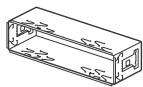
①
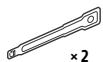
(2)
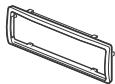
(3)
(4)


(5)
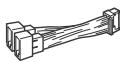
(6)
For MEX-N5200BT
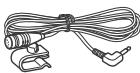
⑦
⑧

- This parts list does not include all the package contents.
- The bracket ① and the protection collar ③ are attached to the unit before shipping. Before mounting the unit, use the release keys ② to remove the bracket ① from the unit. For details, see "Removing the protection collar and the bracket" (page 38).
- Keep the release keys (2) for future use as they are also necessary if you remove the unit from your car.
Connection (For MEX-N5200BT)
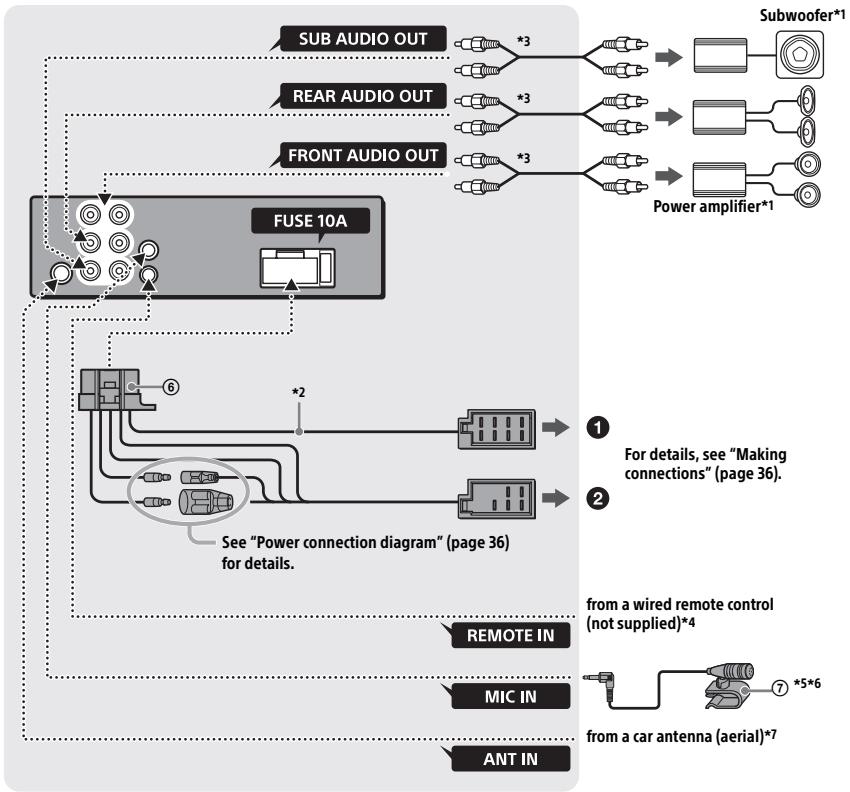
1 Not supplied
2 Speaker impedance: 4 - 8 × 4
3 RCA pin cord (not supplied)
4 Depending on the type of car, use an adaptor for a wired remote control (not supplied). For details on using the wired remote control, see "Using the wired remote control" (page 37).
5 Whether in use or not, route the microphone input cord such that it does not interfere with driving operations. Secure the cord with a clamp, etc., if it is installed around your feet.
6 For details on installing the microphone, see "Installing the microphone (MEX-N5200BT only)" (page 37).
*7 Depending on the type of car, use an adaptor (not supplied) if the antenna connector does not fit.
Connection (For MEX-N4200BT)
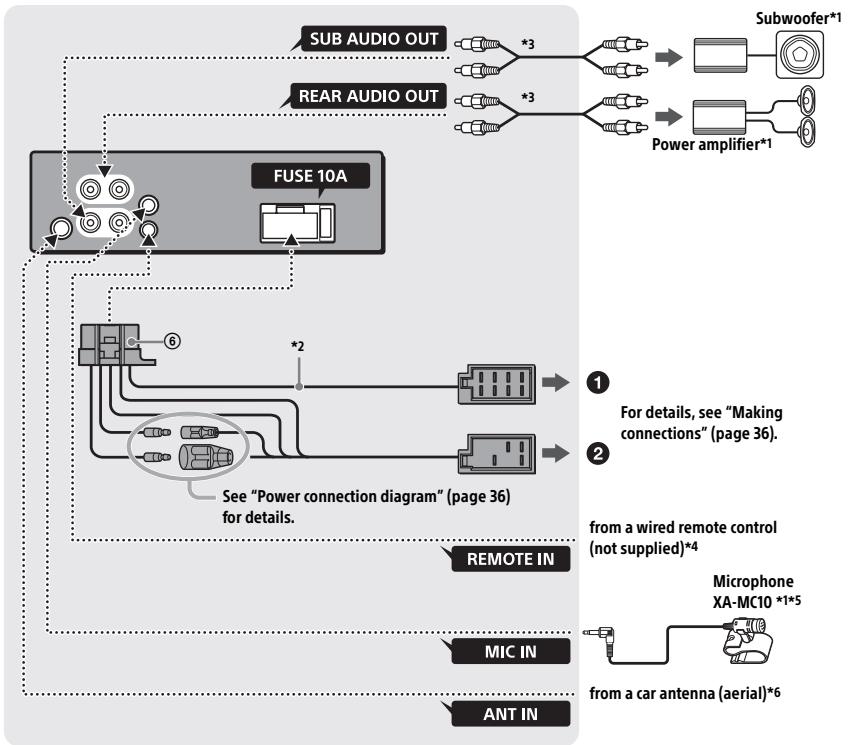
1 Not supplied
2 Speaker impedance: 4 - 8 × 4
3 RCA pin cord (not supplied)
4 Depending on the type of car, use an adaptor for a wired remote control (not supplied). For details on using the wired remote control, see "Using the wired remote control" (page 37).
5 Whether in use or not, route the microphone input cord such that it does not interfere with driving operations. Secure the cord with a clamp, etc., if it is installed around your feet.
6 Depending on the type of car, use an adaptor (not supplied) if the antenna connector does not fit.
Making connections
If you have a power antenna (aerial) without a relay box, connecting this unit with the supplied power supply lead ⑥ may damage the antenna (aerial).
To the car's speaker connector
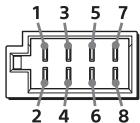
| 1 | Rear speaker (right) | ⊕ | Purple |
| 2 | ⊗ | Purple/black striped | |
| 3 | Front speaker (right) | ⊕ | Gray |
| 4 | ⊗ | Gray/black striped | |
| 5 | Front speaker (left) | ⊕ | White |
| 6 | ⊗ | White/black striped | |
| 7 | Rear speaker (left) | ⊕ | Green |
| 8 | ⊗ | Green/black striped |
2 To the car's power connector
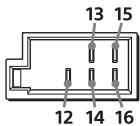
| 12 | continuous power supply | Yellow |
| 13 | power antenna (aerial)/power amplifier control (REM OUT) | Blue/white striped |
| 14* | switched illumination power supply | Orange/white striped |
| 15 | switched power supply | Red |
| 16 | ground (earth) | Black |
- MEX-N5200BT only
Subwoofer Easy Connection
You can use a subwoofer without a power amplifier when it is connected to a rear speaker cord.
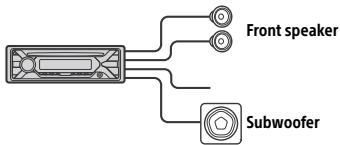
Notes
- Preparation of the rear speaker cords is required.
- Use a subwoofer with an impedance of 4 to 8 and with adequate power handling capacities to avoid damage.
Memory hold connection
When the yellow power supply lead is connected, power will always be supplied to the memory circuit even when the ignition switch is turned off.
Speaker connection
- Before connecting the speakers, turn the unit off.
- Use speakers with an impedance of 4 to 8 , and with adequate power handling capacities to avoid damage.
Power connection diagram
Check your car's auxiliary power connector, and match the connections of cords correctly depending on the car.
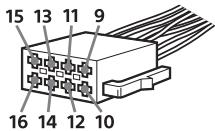
Auxiliary power connector
Common connection
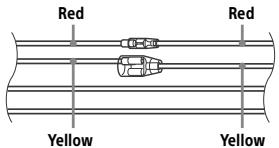
| 12 | continuous power supply | Yellow |
| 15 | switched power supply | Red |
When the positions of the red and yellow leads are inverted
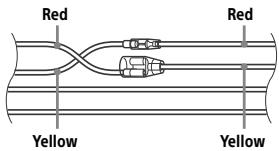
| 12 | switched power supply | Yellow |
| 15 | continuous power supply | Red |
When the car without ACC position
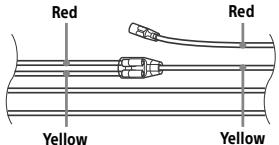
After matching the connections and switching power supply leads correctly, connect the unit to the car's power supply. If you have any questions and problems connecting your unit that are not covered in this manual, consult the car dealer.
Installing the microphone (MEXN5200BT only)
To capture your voice during handsfree calling, you need to install the microphone ⑦.
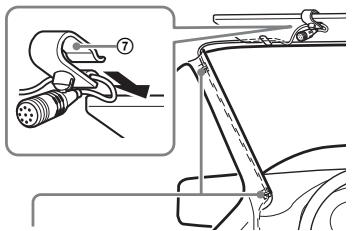
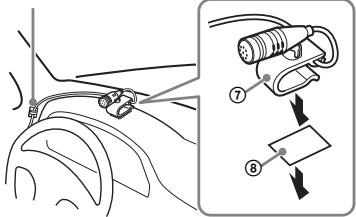
Clip (not supplied)
Cautions
- It is extremely dangerous if the cord becomes wound around the steering column or gearstick. Be sure to keep it and other parts from interfering with your driving operations.
- If airbags or any other shock-absorbing equipment is in your car, contact the store where you purchased this unit, or the car dealer, before installation.
Note
Before attaching the double-sided tape ⑧ , clean the surface of the dashboard with a dry cloth.
Using the wired remote control
1 To enable the wired remote control, set [STR CONTROL] in [SET STEERING] to [PRESET] (page 19).
Installation
Removing the protection collar and the bracket
Before installing the unit, remove the protection collar ③ and the bracket ① from the unit.
1 Pinch both edges of the protection collar ③ , then pull it out.
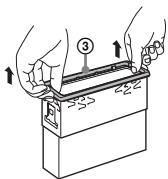
2 Insert both release keys ② until they click, and pull down the bracket ①, then pull up the unit to separate.
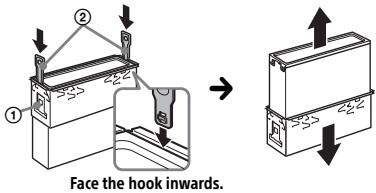
Mounting the unit in the dashboard
Before installing, make sure the catches on both sides of the bracket ① are bent inwards 2mm (3/32 in).
1 Position the bracket ① inside the dashboard, then bend the claws outward for a tight fit.
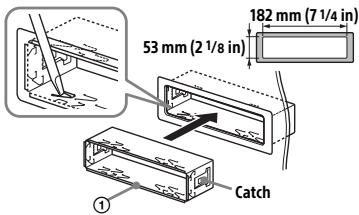
2 Mount the unit onto the bracket ①, then attach the protection collar ③.
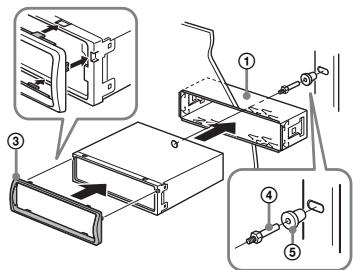
Notes
- If the catches are straight or bent outwards, the unit will not be installed securely and may spring out.
- Make sure the 4 catches on the protection collar
- ③ are properly engaged in the slots of the unit.
Detaching and attaching the front panel
For details, see "Detaching the Front Panel" (page 6).
Resetting the unit
For details, see "Resetting the Unit" (page 6).
Fuse replacement
When replacing the fuse,
be sure to use one
matching the amperage
rating stated on the
original fuse. If the fuse
blows, check the power
connection and replace the
fuse. If the fuse blows again after
replacement, there may be an internal
malfunction. In such a case, consult your
nearest Sony dealer.
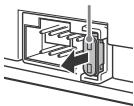
Fuse (10 A)
FW VERSION (Firmwareversion)
Abstrate: 32 kHz, 44,1 kHz, 48 kHz
FLAC (.flac)
A2DP (Advanced Audio Distribution Profile) 1.3
AVRCP (Audio Video Remote Control Profile) 1.3
HFP (Handsfree Profile) 1.6
PBAP (Phone Book Access Profile)
SPP (Serial Port Profile)
Copyright (C) 2000-2009 Josh Coalson
Copyright (C) 2011-2013 Xiph.Org Foundation
Raccordement/Installation
Attention. 37
MODE (page 7, 11, 17)
La lecture commence.
La lecture commence.
Appel mains libres (via BLUETOOTH uniquement)
DEMO (demonstration)
Permet d'activer la démonstration : [ON], [OFF].
Appareil principal (1)
Raccordement/Installation
Attention
250 Hz, [BAND5] 500 Hz, [BAND6] 1 kHz, [BAND7] 2 kHz, [BAND8] 4 kHz, [BAND9]
8 kHz, [BAND10] 16 kHz.
| Modello compatible | Bluetooth® | USB |
| iPhone SE | ✓ | ✓ |
| iPhone 6s Plus | ✓ | ✓ |
| iPhone 6s | ✓ | ✓ |
| iPhone 6 Plus | ✓ | ✓ |
| iPhone 6 | ✓ | ✓ |
| iPhone 5s | ✓ | ✓ |
| iPhone 5c | ✓ | ✓ |
| iPhone 5 | ✓ | ✓ |
| iPhone 4s | ✓ | ✓ |
| iPod touch (6a generatione) | ✓ | ✓ |
| iPod touch (5a generatione) | ✓ | ✓ |
| iPod nano (7a generation) | ✓ |
+500,0 kHz a +2.095,4 kHz
+500,0 kHz a +2.095,4 kHz
FM OIRT: -1.815,6 kHz a -943,7 kHz e
+996,6 kHz a +1.776,6 kHz
Interfaccia: USB (Full speed)
cartelle (album): 256
Accessory (AOA): 2.0
A2DP (Advanced Audio Distribution Profile) 1.3
AVRCP (Audio Video Remote Control Profile) 1.3
HFP (Handsfree Profile) 1.6
PBAP (Phone Book Access Profile)
SPP (Serial Port Profile)
Codec corrispondenti: SBC (.sbc), ACC (.m4a)
Copyright (C) 2000-2009 Josh Coalson
Copyright (C) 2011-2013 Xiph.Org Foundation
Producent: Sony Corporation, 1-7-1 Konan
Minato-ku Tokyo, 108-0075 Japan
Selecteer PTY in RDS.
Q (bladeren) (pagea 14, 15)
PBAP (Phone Book Access Profile)
understeunt.
32 Hz, [BAND2] 63 Hz, [BAND3] 125 Hz,
[BAND4] 250Hz [BAND5] 500Hz
[BAND6] 1 kHz, [BAND7] 2 kHz, [BAND8]
4 kHz, [BAND9] 8 kHz, [BAND10] 16 kHz.
Wanner [AREA] is ingesteld op
[EUROPE]:
87,5 MHz - 108,0 MHz
Wanner [AREA] is ingesteld op [RUSSIA]:
FM1/FM2: 87,5 MHz - 108,0 MHz (in stappen van 50 kHz)
FM3: 65 MHz - 74 MHz (in stappen van 30 kHz)
Antenneaansluiting:
Wanner [AREA] is ingesteld op
[EUROPE]:
FM CCIR: -1.956,5 kHz tot -487,3 kHz en +500,0 kHz tot +2.095,4 kHz
Wanner [AREA] is ingesteld op [RUSSIA]:
FM CCIR: -1.956,5 kHz tot -487,3 kHz en +500,0 kHz tot +2.095,4 kHz
FM OIRT: -1.815,6 kHz tot -943,7 kHz en +996,6 kHz tot +1.776,6 kHz
Interface: USB (Full-speed)
Maximale stroom: 1 A
- mappings (albums): 256
bestanden tracks) per map: 256
Geschikt Android Open Accessory Protocol (AOA): 2.0
Bijbehorende codec: MP3 (.mp3)
Bitfrequentie: 8 kbps - 320 kbps (Ondersteunt VBR (Variable Bit Rate))
Sampling-frequentie: 16kHz - 48kHz
WMA (.wma)
Bitfrequentie: 32 kbps - 192 kbps (Ondersteunt VBR (Variable Bit Rate))
Sampling-frequentie: 32kHz 44,1 kHz, 48 kHz
FLAC(.flac)
Bitdiepte: 16 bit, 24 bit
Sampling-frequentie: 44,1 kHz, 48 kHz
AVRCP (Audio Video Remote Control Profile) 1.3
HFP (Handsfree Profile) 1.6
PBAP (Phone Book Access Profile)
SPP (Serial Port Profile)
Bijbehorende codec:
SBC (.sbc), ACC (.m4a)
CBoICTBa Ia3epHOrO dNoDa
BxOД B MeHIO NaCTPOIKN.
= VOICE (ctp.18, 20, 21)
Haxmnte dncKobbl peYIaTOp n ydepXnBaIe erO hXaTbIM 6oJee 2 cekynd, tO6bl akTNBupOBaTb fYHKuHIO rOLOCOBOrO hAbopa Homepa, fYHKcuHIO paCNO3HaBAnHpeu (TOnbKO dJa cMaprTOHOB COC AndroidTM), nnf fYHKcuHIO Siri (TOnbKO dJa iPhone).
3HaK N
Tb6bl yctaHOBnTB noDKNIOUChHHe NO BLUETOOTH, KcOHnTeCb DNCKOBOro peryJrto cMaprTOHcmOC Android.
4 CNOTДЯДИСКOB
5 Okoosko ducnnej
6 // (SEEK-/+)
A B T O M A T N U C E C K A H a c t p o i k a h
p a d i n o c t a n u n. H a x m i t e n
y d e p x i b a i rte J I I a n h c t p o i k n B p y h y i o.
141/1 (npedbyuza/cneyuouza)
<1> (yckopeHnA nepeMOTKa h3aJ/ yckopeHHa nepeMOTKa bnepe)
△(n3BnechDnCK)
8 PTY (Tn nporpaMmb)
Bb6op Tuna nporpaMMbl (PTY) B RDS.
Q (o63op) (ctp. 15, 16)
IpehexoB pexim o63opa npn Bocnpou3BeDeHIN.
(HeDocTyHNo, ecnI nodkIoueHo yctpoictBO USB b peXmme Android nIy yctpoictBO iPod.)
9CALL
BxOД B MEnIO Bbl3OBOB.Прпeн 3aBepeHne Bbl3OBa.
Haxmnte khONky uYedpkBaiye ee hajatOn 6oBe 2 cekyhd, tOtb6i nepeKIOuHTb CnHaN BLUETOOTH.
10 (Ha3aI)
Bo3BpaT K npeIbIyUeMy ekpaHy.
MODE (ctp. 7, 12, 18)
11PnemHnK CnHaJIOB C npIbTa DnCTAHUONHO YnpaBHeHna
12 Homiche KhoIkn (1-6)
Pnemc coxpaHEnbIbx B nAmTn paAnocTaHcN. HaxMnte UyepKbAaTe Ido CoXpaHEnbI cTaHcN.
ALBUM ▼/▲
PpOnyck aIb6Oma dIra ayIHOuOCTpoIcTBa. HaxMnte I yIepXkBaIte nI HeIpepbIbHOro npOnycka aIb6OmOB.
(HeDocTynHO,ecnIIOdkIIOUeH0 yCTPOIcTBO USB B pexmE Android nIy uCTPOIcTBo iPod.)
(nOBTOp)
(HeDocTyHNo, eCNI NOdkNIOUeHO yCTpoNCTBO USB B pexnme Android.)
Ppe3ayp3ka YcptOIBCTBa PnpBedeT K ydaIeHnIO Hactpoek cAocB u HeKOpTbIX COxpaHeHHbIX 3NEMeTOB COePXDMOFO.
YctaHObKa cTpaHbI/perNoHa
Iocne nepe3aqrpy3kn yctpoiCTBa OTkoepTcMeHNO HacTPOkN CTpaHbI/perNoHa.
1 Пи отобрахжени [SET AREA] нажмite Кногку ENTER.
OTo6pa3ntcTeKyuzaCTpaHa nn peHOn.
2 NobopaunBaJdNCKOBbI peyIaTOp, BbI6epnTe [EUROPE] nIu [RUSSIA], a 3aTeM HaXmTe DnCKOBbI peyIaTOp.
3 Поворачивая дисковы ретултор, bblберпгe [YES] Ии [NO], a 3atem haxмпite дисковы ретултор. Пии nзменин PernoHa Ии CTpaHbI yctpoiCTBO pepe3arpytsTc, nocle Yero Ha dincJIee OTO6pa3aTc qacbl.
3TOTnapaMeTpMOXHOHaCTPONTbBMEHIO 06xnxnapaMeTPOB(cTp.22).
YCTaHOBka YacOB
1 Haxmte KhoNky MENU, NOBepHnTe DnCKOBbl peYJLTop IaB BbIbopa [GENERAL], 3aTeM Haxmte DnCKOBbl peYJLtop.
2 Nobopaunbaa dNCKOBbI peyJrTOp, Bb6epnte [SET CLOCK-ADJ], 3aTeM haxmte dNCKOBbI peyJrTOp. HayHET MIRatb INDnKaunca haca.
1 Pa3mecTne yctpoiCTBO BLUETOOTH Ha pacCTOaHn He 6oJIe 1 M oT daHHoro annapata.
2 HaxMMTe KhoNky MENU. NobopaunBaJdNCKOBbI peRyJrTOp, BbI6epnTe [BLUETOOTH], 3aTeM HaxMMTe DnCKOBbI peRyJrTOp.
3 NobopaunBaJ DNCKOBbI peYyIaTOp, BbI6epnte [SET PAIRING], a 3aTeM HaxMnTe DNCKOBbI peYyIaTOp.
4 NobopauHbAa DnCKOBbI peYJrTOp, BbIepeNt [SET DEVICE 1] mIn [SET DEVICE 2], a3aTeM hXKMTe DnCKOBbI peYJrTOp.
MnraeT, KOrda annapaT haoDNTcB pexime OxuandaHcOpJKeHn.
По заBERшENHи соржЕнЯ BmecTo hAнДиMuN [SET DEVICE 1]Ии [SET DEVICE 2] bIeT OTObpaXaTbCЯ IMЯ cOprjxEHHoro yCTpoICTBa.
5 BbINOJIHnTE CoPRAJKeHne Ha yCTpoIcTBe BLUETOOTH, YTO6bl OHO 0bHApYKnIO annapaT.
6 BbIbepnTe pNHT [MEX-XXXX] (Ha3BaHHe MoJeIN BaJWeO aannapata), oTo6paXaembl Ha dncnlee yctpoiCTBa BLUETOOTH.
Ecni NaBaBHeMoDJIe NauBero annapata He OTo6paKaetc, NoBTOpTe BCE Onerapaun, NaChnHaA C dIeCTBn 2.
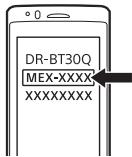
7 EcIn Ha yCTpoiCTBe BLUETOOTH Heo6xoIIMo BBeCTn KIOu DoCTyna*, BBeDuTe [0000].
- B 3abnncmocnt O nCnOJb3yEmofo yctpoiCTBa kIIOU DCtYna MOKet Ha3bBbTaBC "ceKpTeHbI KOi", "PiH-KoD", "Homep PiH", "napoiB" I T.Д.
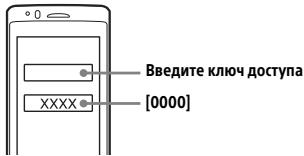
Iocne ydauchoro copjxehn6ydet OTo6paXaTbcra 3HaQOK
8 BbI6epnte daHbI aannapaT ha yctpoiCTbe BLUETOOTH, YTo6bl co3daT noKlnOHe BLUETOOTH. nnn OTo6pKaIoTcR, cInn eoKnIOueHne CO3dAno.
PpimueaHne
Bo Bpemno JycknoeHn K yctpoiCTBy BLUETOOTH DpyrOmy yctpoCTBy He YAycTe ObHApKyntb DaHHbI annapat. YtObIy yctpoCTBO CMOrlo ObHApKxtb Annapat, BKIOChte pexmN cOnpJxHeHn I bInOpNHte NOnCK dAnHORo annapata H aDpyrOMy CTpoCTBc.
BkIyueHne yHKcun Bocnpon3BeHn
IopnbHbIe CBeHeHn cM. B pa3JeIe "Bocnpoun3BeHene c yctpoiCtBa BLUETOOTH" (cTp.15).
OTKJIIOUeHHe cOpJxKeHHOrO yCTpoIcTBA
YTo6blnOcne cOprrxHnnaDAnHO rannapata n yctpoCTBa BLUETOOTH OTKJNUHTb Nx Dpyr O npyra, BbINONHte DeiCTBn 2-4.
Подклоченke coprajжehHomy yctpoiCTBy BLUETOOTH
YTo6bI NcNoJIb3OBAb TcOpJxEHHoe yctPoRCTBO, HeoXoDMIO Co3dTaB noKJIouHeNe K annapaTy. HeKOTopBe cOpJxEHHbIe YctPoRCTBa NoKJILOuAOTcra ABTomATnueCKN.


1 HaKMMTe KhoNky MENU. NobopaunBaJ dIckOBbI peYJrTOp, BbI6epnTe [BLUETOOTH], 3aTeM HaKMMTe dIckOBbI peYJrTOp.
2 Поворачивая дисковыpeуларop, bby6epnte [SET BT SIGNL], a 3aTeM haxmnte disckobiy peyarTop. y6eintecb, cyTO BKIOUChEN INHINkaTOp
3 AKTINBpyyTe FyHKuNIO BLUETOOTH Ha yctpoiCTBe BLUETOOTH.
4 BbINOHNITE Heo6xOIMbIe DeIcCTBnHa yCtPOJCTBe BLUETOOTH, YTO6blIOKnIOuHTb erO K DaHHOMy annapatY. 86yET CBETNTbcr.
3NauchnHaДиспjee:
AbTomatnueckoe coxpaheHne (BTM)
1 Haxkumaj KhoNky MODE, n3MeHnTe dnaana3oH (FM1, FM2, FM3, MW nnLW).
2 HaxmTe KhoNky MENU, NOBepHnTe DnCKOBbI peYyIaTOp IJIy Bbl6opa [GENERAL], 3aTeM HaxmTe DnCKOBbI peYyIaTOp.
3Поворачивая дисковы ретуларot, bbyберпte [SET BTM], 3aTe mнжмтесдисковы ретуларot. PaindocanuЗз зakpenlaюТСя 3a HOMEрнык KNOKКAMи COxpaHЯнOTСВЯ namTn yCTpoiCtBA b NOPДKeЧАТ.
Hacroka
1 Haximma KhoNky MODE, n3MeHnte dnaIa3oH (FM1, FM2, FM3, MW nnLW).
2 BbIOpHnTE HaCTpoKy.
HajnMaJ uYdePjNBAJ KHOKn I/SEEK-/+),3aJaTe np6JIu3nteBHyO qACTOTy,3aTEM KpAteKOBpeMeHHbIMn HaxaTnAMn KHONoK I/SEEK-/+)ToUHO hAcTpoTe HxHNo qACTOTy.
HajnABTomatueckoHaCTpoKn
IcnoJIb3yIte KHOKnI /SEEK-/+).
PiOnCK octaHOBNTcK, KOrDa yCTpoiCTBO NaIeT paAnOCTaHcIO.
CoxpaHeneHbpyHyu
1 Bo Bpemr npnema paadnoctaunu, KOtOpyU Heo6xOAnMo COxpaHHTb, HaxMnte N yapedxNbaTe HomepHyOn KhoNkY (1-6), nOka He noPaBtca INDikacua [MEM].
Ppnepepaioctaun CoxpaheHHbIX B namrTn
1 BbIbepnte dnaana3OH, 3aTeM Haxmnte HomepHyo KhoNky (1-6).
CnCTembl paHnoHaHHbIX (RDS)
YctaHObKa aIbTepHaTnBbIX chaTOT (AF) n coo6zehn o Tekyuei cnTuaznn Ha doporax (TA)
Функця AF BbINONHЯET NOCTOHHYU nepeHaCtpoKy paDnOCTaHcNIM, NMeUoIxN cambl cnblbHb CnTHaN B CeTu, aФункця TA obecneuBaet npHem coo6uHen nI IN nporpaAM (TP) o TekuSye cnTuaynHa doporax, ecIn nx pImeB O3MOxeyn.
1 HaxmTe KhoNky MENU, NOBepHnTe DnCKOBbI peYJrTOp IJa Bbl6opa [GENERAL], 3aTeM haxmTe DnCKOBbI peYJrTOp.
2 Поворачивая дисковы ретуларot, Вьберпгe [SET AF/TA], 3aTeM нажмITE дисковы ретуларot.
3 Поворачивая дисковы рergyларTop, Вьберпг [SET AF-ON], [SET TA-ON], [SET AF/TA-ON] nii [SET AF/TA-OFF], 3aTem НжмITE дисковы рergyларTop.
YcTaHObKa yAcOB (CT)
Дааньie CT, nepedaabaembe c cnHanaM RDS, nCnoIb3yIOTcЯДЯ yCTaHOBKn Yacob yCTpoiCTBa.
1 UCTaHOBuTe [SET CT-ON]В ПОЛожени [GENERAL] (cTp. 23).
Bocnpon3BeDeneHne
Bocnpon3BeJeHne Dncka
1 BCTaBbTe DNCK (3TNKETKO BBepx).
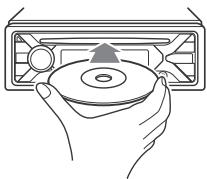
Bocnpou3BeDeHneHaunHeTcra abTomaTuYeCKn.
Bocnpon3BedeHne yctpoiCTBa USB
B daHnoi HNCTpykuni no 3KcIpyataun
TePMn "iPod" npImeHetaTcJn
ob6oennu cBIOK nA fynKcui iPod B iPod
u IPhone, eCNI INoe He cKa3aHO B TeKCTe
nn Ha pncyHke.
CBeDeHnO oCBMeCTNMOCTn BaWero UcTPOICTBa IPoD cm. B pa3eJe "CBeDeHnO6 uCTPOIcTBe iPOD" (ctp. 28) nIi Ha Be6- CaIte NODePckK, yKa3AHOM Na IocNeHne CTpaHmE O6loXKn.
Moryt nCnoIb3ObaTbCy uCTpoiCTBa USB* Tnna AOA (Android Open Accessory) 2.0, MSC (3aONmHaUoee yCTpoiCTBO bOJbwoe EMKoCTn) n MTP (npotokOn nepeaun MylbTmMeJa), COmecTmBle Co CTaNdaptom USB.B 3aBncumocTo n OTtna IcNoJIb3yEmoro yCTpoiCTBa USB Ha aannapate MoKHO Bb6paTb pexm Android nnMSC/MTP.
Дянковорьх модени зфpoьхплесров ИИСмартфоновс OCAndroid moketnotpeboBatcpeximMTP.
- Hanpimep, Phleu-HakoninTeB USB, ΣιφροBoi nleep, cMaprФонс OC Android.
PpimueaHn
Длг польени подробьх сбесени oCOBMEtHMOCrN yCtpoiCTBa USB nocetinte Be6-caIT noDpeKxN, yKa3aHbH Na 3a3dHe NTcopoHoe0bLOJoxKn.
CmaptfohblcyctahOBLeHHOnc Android 4.1 nn 60lee n03dneBepcnnoDpekmbaOT Android Open Accessory 2.0 (AOA 2.0).OnHako KecOpbte CmaptfohblMOrT He noJIHOCTbIooPeKJBabT AOA 2.0,daKe eCNI yctAHOBLeHa OC Android 4.1 nn 60lee n03dNBEBpcn.
Для поуевеля поюбьх CBeDEн o СOBMeCTMocSTa Bawsero CMaprTOHa c OC Android nocETHte Be6-caT NOdEprKxN, yKa3aHHb Ha 3aJdHe CTROPHe O6bOxKn.
Bocnpo3BeDHeNnepeuCnEHHbIXHnHexe
phiJNoB He noDnepKnBaetcR.
MP3/WMA/FLAC:
-Фaилbl,3aшишеньаВТОРСКИМправам;
-ФанысDRM(ynpablenheuφpoBmnpaBam)
-MHOFOKAHAbHbIe 3ByKOBbIe faHbI. MP3/WMA:
-φaJIbI, CxkTbe 6e3 NOTepn DaHHbIX.
Ipepe yctaHOBko coeINHeHbBb6epnte pexm USB (pexm Android uJn MSC/MTP) B3aBcIMoCTn OT Tnna NcOJb3yEmoTO yCTpojCTBa USB (ctp. 23).
Bocnpou3BeDeHHe B bblbpaHHOM pexnme MoKeT HaaTbcra He cpa3y.
OCTYHbIepeXHMbI BOCnpo3BEdEHN OTNUaHOTcR B 3aBNCIMOCTN OT bIbpaHHORIO NCTOUYHKa 3ByKa.
ПОИС KOMПОЗИЦИ NO Ha3BaHNUO (Quick-BrowZer™)
CobepseHne Bbl3Oba n3 KypHaHa Bbl3OBB
1 HaXMMTe KHONKy CALL.
EcnK aannapaty nocklouheBda M06nblbHx TenefoHa,TO NOBOPaNBaB NDCKOyB peYJLTop,Bi6epNte JIO6oN u3 TepeHOB,a 3aTeM hXKMnTe DNCKOyB peYJLTop.
2 Поворачивая дUCKOBынpeулгтOP, bIберпe [RECENTCALL], a 3aTe mHakmITE dUCKOBынpeулгтOP.
OTo6pa3ntcra CnICOK JyPHaIa BbI3OBoB.
HaunheTcTeJeOHHbpa3roBOp.
Д. Мялбова Habтпаевимору разда nchonlbayte Chkonki<|im_start|><|im_start|>assistant <|im_start|>assistant SEEK(-/+).
Ppimechane
Ha NcIeBmeBMcToCmBBOla[#]OTo6pa3ntcA cmBOM [ ]
CobepueHne BbI3Oba nyTem nobTophoro Ha6opa Homepa
1 HaXMMTe KhoNky CALL.
EcnK aannapaty NpokJIuOHebI dBa M06nblbIX TenefoHa, TO NOBOPaUNBaJ DnCKOBbl peYyIaTOp, BbIepeNte JIO6oN u3 TenefoHOB, a 3aTeM hAekMnte DnCKOBbl peYyIaTOp.
2 NobopaunBaa DnCKOBbI peyIaTOp, BbI6epnte [REDIAL], a 3aTeM Haxmnte DnCKOBbI peyIaTOp.
Haunetca TelefoHHb pa3roBop.
CobepueHne Bbl3OBA cNOMOuIbIO rOJIOCOBbIX METOK
BbMOKeTe COBepuNTb Bbl3OB, npOn3Hece rOLOCOByO MEkTy, XpaHnUIOcB N OKnJIoueHHOM MObIbHOM TeNeΦOHe, KOTOpBIOsOHaIeH eNfYHKnEe rOLOcoBOrHObopa Homaepa.
1 HaxmTe KhoNkyCALL.
EcnK aannapaty nodkJIOUeHbI Dba M0oNBbIX TeLEFOHa,TO NOBOPaUNBaI NDCKObl peYrJOpT, BbIEbpNTe IIO6OuN3 TELEFOHO,Ba 3aTeM hXKMnTe DnCKOBblpeyJrTop.
3 Nobopaunbaa ducckOBbI peyIaTOp, BbIepeTe npaMeTpbl, a 3aTeM HaxMtTe ducckOBbI peyIaTOp.
FW UPDATE (O6HOBJIeHne
MKNpOONporpAMMBbl)
3aynck o6HOBNeHnMnKpOnpOrpaMMb:[YES],[NO].
06HOBJIeHHe MUKponporpaMMbl
3aHnMaet HeckoIbKO MHyT. Bo BpeM
OboBHeHneIOBOpaHbAte
BbIKIOUaTeJIb 3aXnIraHnB NOLOXKeHne
OFFи He oToeDnHЯ Te nCNoJIb3yEmoe yCTpoIcTBo USB.
HactpoikKa 3Byka (SOUND)
3TO MeHNO HAcTpoEK HeoCTyHNO pIIN BbIKNoUeHHOM NcToHnKe, KOrDa OTo6paxaOTcY aCbI.
EQ10 PRESET
Bb6op KpmboB 3KbaIaI3epa n3 10
KPNBbIX 3KBaJai3epa NIN BbIKIIOUeHne 3KBaJai3epa:
[OFF], [R&B], [ROCK], [POP], [HIP-HOP],
[ELECTRONICA], [JAZZ], [SOUL],
[COUNTRY], [KARAOKE]*, [CUSTOM].
BbI6paHHyIO dIa KaJdOro IcToUHnka KpNByIO 3KbAaI3epa MoXHO 3aHeCTN B nAmTb.
*PnBb6ope[KARAOKE]3Byk BOKana BO BVPMeBOCpOINB3eDneHHn pInrIyuaaTc,HO He yCTpaHaeTcN oHIOHctbU. NcNoB3OBaHHe Mnkpo0HOna H NoOpdEKPbMaTeC.
EQ10 CUSTOM
Bb6op BapnaHTa [CUSTOM] nla EQ10.
HacpoiKa KpBOn 3KbAlaI3epa:
[BAND1] 32 Γι, [BAND2] 63 Γι, [BAND3]
125 , [BAND4] 250 , [BAND5] 500 ,
[BAND6] 1 kΓι, [BAND7] 2 kΓι, [BAND8]
4 kΓu, [BAND9] 8 kΓu, [BAND10] 16 kΓu.
UpoBeHb rpoMkoCTn HacTpaBaETcB 8 dIana3ohe Ot-6D5do+6D5c7aROM 1d5.
BALANCE
Peryulnpovka 3BykoBoro 6aHaCa:
[RIGHT-15] - [CENTER] - [LEFT-15].
FADER
Perynupobka oTHocntelbHoro ypOBHa:
[FRONT-15] - [CENTER] - [REAR-15].
S.WOOFER (ca6ByΦep)
SW LEVEL (ypoBHe b ca6ByΦepa)
PerylnipOBka ypOBn rPOMKoCTN
ca6bvypepa: [+6dB] -[0 dB]-[-6 dB].
([ATT] oTo6paXaEeTcA, ecJn yCTaHOHe
MNHIMaJIbHoe3NaueHne.)
SW PHASE (φa3a ca6by φepa)
Bb60p fba3b ca6Byepa: [NORM], [REV].
LPF FREQ (caCTota fNbIbTpra Hn3Knx CaCTOT)
Bb6op rpaHnHOn yactotbl ca6Byfepea:
[80Hz], [100Hz], [120Hz].
HPF FREQ (caCTota Φιλβτρα BBICOKNX yactOT)
BbIbOp 3NaueHnraPauHNoJ uactoTbI nepeDnHex/3aDnHex rPomKorOBopuTeJIe:
[OFF], [80Hz], [100Hz], [120Hz].
AUX VOL (ypoBHeB IrpOMKoCTn AUX)
Hacpoika ypOBnI rPOMKoCTn dIa
KaKdOroIIOdkJIOUeHHO
ДОПОЛНТЕLBHOrOустpoICTBA:[+18dB]-[0dB]-[-8dB].
3Ta HacTpoiKa NCKJIIOUaET
Heo6xoJIMOCTbpeyIINPOBKNpOMKOTnДЯ pa3HbIX NCTOCHNKOB.
(DoctyNHO,ToIbKO KOrda Bbl6paH
IcToUHk AUX.)
BTA VOL (ypoBeHb rPOMKoCTn 3Byka yCTpOuCTBa BLUETOOTH)
Hacpoika ypOBnI rPOMKoCTn dIa
KaKDoRO NIOKJIIOUeHHOrO yCTpOINCTBa
BLUETOOTH: [+6dB] - [0dB] -[-6 dB].
3Ta HacTpoJa NCKJIIOUaET
Heo6xoJIMOCTbpeyIINPOBKNpOMKOTnДЯ pa3HbIX NCTOCHNKOB.
(DocTynHO,ToJbKO KOrDa BbIbpaHo
aydnooyctpoiocTBoBTn npunoxehne.)
Hactpoia dnncnpea (DISPLAY)
DIMMER
Измения ркости дсплес.Дль морел MEX-N5200BT: [OFF], [ON] n[AT] (abTomatueckn), [CLK].(Реким [AT] doctynen ToIbko ToIgda,Когд�пдкюен nproBOD uypaBvHneuOCBeUeHnem, n pa6OtaeT, korдьВКIOUeHbI nepeDInhe Фары.)Дль морел MEX-N4200BT: [OFF], [ON] n[CLK].Тфоб 3ta Функцяь bIJaЯakTINBHaToIbKO B TceuHene OnpedelneHOROBpeMeHH, Bbl6epiTe [CLK], a 3aTeM3aJaIte BPEM NaHajAи OkOHuaHnIy.「Tфob 3aJadTB pRkOCTb npBkIOUeHHom DMMMepe:YcTaHOBITE ДЯ [DIMMER] 3haueHne[ON] n otperyuInpye [BRIGHTNESS].-Tфob 3aJadTB pRkOCTb npBbKIOUeHHom DMMMepe:YcTaHOBITE ДЯ [DIMMER] 3haueHne[OFF] n otperyuInpye [BRIGHTNESS].HactpoKa rpoKCTn coxpaHaeTc npImmeheTc npBkIOUeHn NJIbBkIOUeHn DIMMepa.
BRIGHTNESS
PergunpoBka npKocTn DncnIe.
HactpanBaembl dnaapa30h ypOBnep KocTn:[1]-[10].
BUTTON-C(UBeT KHOPOK,TOJIbKOДЯ moDeJIIMEXN-N5200BT)
BbIbOp npEepBaPnteBHo NaCTpoEHHOro
HnI NpIb3OBaTeBCKOro ZBeta dJa
KHOJOK.
COLOR
Bb6op n3 15 npedBaPnteHNo
HaCTpoeHHbIX uCBETOB N
1 noIb3oBAteJIbCKOrO uBeTa.
CUSTOM-C (noIb3oBAteJIbCKn uCBET)
HaCTPOJa noIb3oBAteJIbCKOrO uCBETA
dIy KHOJOK. RGB RED, RGB GRN, RGB BLUE HAcTPOJa uCBETOBOrO dIana3OHa: [0] - [32] (3NaueHne [0] He IcNoIb3yETcR Hi Ia J KaKnx dIINA3OHOB uCBETOB).
DSPL-C(UEBT DnCnJIe,TOJbKO JnI MOJeMEX-N5200BT)
HaCTpoJa npedBapNTelHo
HaCTpoEHHO rIN NIOb3OBATeNbCKOrO UCBTe dJIa DnCnJIe.
COLOR
BbI6op n3 15 npedBapNTelHo
HaCTpoEHbXu CBETOBu I
1NIOb3OBAteNbCKORo CBETa.
CUSTOM-C (NOb3OBAteNbCKn uCBET)
HaCTpoJa noJIb3OBAteNbCKORo CBETa
dJIa DnCnJIe.RGB RED,RGB GRN,RGB BLUE
HaCTpoJa CuTEbOBOrO DnAna3OHa: [0] -[32] (3NaueHne [0] He
iNCNoJIb3yETcR HnI JnI KaKnx DnAna3OHOB CBEtOB).
SND SYNC (cHxpoHn3aunno 3bky) BkIIOueHne cHxpoHn3aunn noDCBETKn co 3bYkom: [ON], [OFF].
AUTO SCR (aBtOMaTnuecka npOKpyTKa) ABOtMAuNeCKa npOKpyKa dINHHbIX 3JEMeHTOB: [ON], [OFF]. (HeDcOCTynHO, ecN bIb6paH nCToHnK AUX nn TIOhep.)
Hactpoika BLUETOOTH (BLUETOOTH)
PAIRING (cTp.9)
Пдклочене дд Вьх устов BLUETOOTH: [DEVICE 1] n [DEVICE 2].
П завершени соряжени вместо надпсн [DEVICE 1] nii [DEVICE 2] bуdet otobражatableся соряжени Horoу устов CTba.
AUDIODEV (aydnooyctpoiCTBO) Bb6op ayduooyctpoiCTBa. Ha annpaate, cnpjxehHom C yctpoiCTBOM [DEVICE 1] nIu Tekyuim AynooYCTPOICTBOM,COBMecTUMbIM C npOphiJEM A2DP, oTo6paXaeTc CMBBoI [ ]
RINGTONE
Bb6op yctpoiCTBa,Ha KOtOpom DoJIXHa 3ByaTb MEJIOINBb3OBA (annapat INI NOkJIyueHHb MObINbHbI TeJeΦOH) [1] - anpaT, [2] - MoNbHbI TeEΦOH.
AUTO ANS (aBtOMaTnueckn OTBEt)
HactpokKa annapaata nla
ABTOMaTneCKoro OTBeta Ha BXOJaune
Bb3OBb:[OFF],[1] - c 3aepxKoI
Pnp6n3nteIbHO 3cekyHbI,[2] - c
3aepxKoI np6bn3nteIbHO 10 cekyHd.
AUTOPAIR (aBtOMaTnueckoe cOprrxKeHne) AToMaTnueckcn 3anpyck cOprrxKeHnno BLUETOOTH npn noKJIoueHHn yctpOCTBa c iOS 5.0 nnn 6oee no3dHe Bercn cep3 USB: [ON] nnn [OFF].
BT SIGNL (CINHAN BLUETOOTH) (CTP.10) BKNIOUeHne NIII BbIKIOUeHne ΦHKUN BLUETOOTH.
BT INIT (nHnuaaiaauiu BLEUTooth)
VHnuiaJin3aunia NaCTpoeK, Cb83aHHbIX BLUETOOTH (CbeDHeNIO o CONpRKeHnn, npEdbapntelbHO NaCTpoEHnI HOMep, CbeDHeNIO ob yctpoiCTBe nT. d.): [YES] nn [NO].
Pn yTmIaHnnDaHHOro aannapata BbIIOJIHnTe HnUaJIaN3aUIO BCex NaCTpoE.
(DoctyHNO TOJbKO pN BbIKJIOUeHHOM NTOUHNKe, KOrDa OTo6paJxAOTcYacbl.)
Hac tropona npuIooKeHn aSongPaI (SONGPAL)
AUTO LAUNCH
BkIIOUeHHe ΦHyKcIaI aBToMaTuYeCKOrO 3aIyCs Ka npIIoJKeHnIa "SongPal": [ON] nII [OFF].
EcnB Bb6paHO 3aHcHene [ON], npInoJXeHHe "SongPal" aBtOMaTnueCKu yCTaHOBNT oDkJIouChEne no
3aBepueHn noDkLIOeHn BLUETOOTH.
CONNECT (ctp.19)
BkIIOUeHne N BbIKIOUeHne FyHKcNn (noKIOUeHn) "SongPal".
DOnONHnTeJIbHaN HOpMaun
06HOBJIeHne
MnKponporpaMMbl
TTo6blObHOBntb MKNpONporpamMy,
nepeiDnTe Ha Be6-caH TeXnHueCKo
NoIeepKKn, yKa3aHHbHa 3aDHei
obIoKKe, a 3aTe m CNeyIte yKa3aHNm B
InItePheTe.
PpimechaHn
Длэобовени МКррогрмБМытpeбуетсустюгТВО(BH BXOДNTB KOMПЛЕKT NOCTABKN).Coхразнite nporpammyобовени на учгостяBEUSOBKNOKJIIOHHTeEROKnopTyUSB BnINONNHTEOBHONHE.
- O6HOBNeHMe MmKpOnpOrpaMMb3aHIMMaET HECKoJIbKO mNHTy. Bo BPEMa OBHOBNeHn He NOBOpaHbAte BbIKIhOaTeJI 3aXnIraHn B nIOJoxHe HOF Nf He oTcoEINrHe IVcNoJIb3yeMoe yctPoICTBO USB.
Mepbl npedoctopoXhOCTn
- EcInn ABTomOmbInb bbl npinapKOBaH B COJIHeHOM MeCTe, He BKIOuHaTKe YCTPOICTBO Do TEX nop, NOKa OHO He OXJaDITcR.
He octabnIte nepedIOI npaHJIb IINI nepeHOChIbe aydNOyCTpoNCTBa BNYTpI aBTOMO6II, NOKoKbKy BVICOKa TeMnepaTypaB pe3yJIbTaTe BO3JeCTBnI npAByx COJNeHbIX LyYe MoKeT npMBECTK INX NOBpeXDeHIO. - PnI pa6Ote yCTPOJCTBA ABTOMaTNUeCKN BbDInBaTeCtAHTENHCA 3JeKTPuYeCKM pNPBODOM
KoHdEhcaZyBlaRn
Ipn KOHDeHcaunn BnaRn BHyTp nycPoTcBA n3BJeKnte DnCK npoOxJnte np6bn3ntelbHo cac, noka BlaHa ne cnapuTcB. B npotuBHom clyuea BO3MOXHb c6o np np pa6ote yctpoiCTBa.
IopraOK BOCnpOn3BedeHna ayduofoaaiIOB
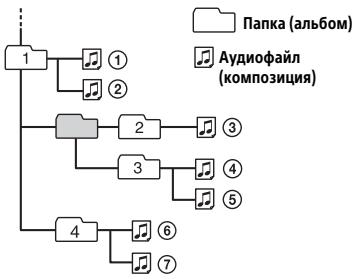
CbeHn oB yctpoiCTBe iPod
K DaHOMy annapaty MoXHO noKIOuOaTb yka3aHbte Hxke MoeiPi iPod. Ipeep nCIOJIb3OBAHnEM yCTpoCTb iPod yCTaHOBtHe Ha HEm npOrpaMMHoe oecneueHHe NocJeDHe Bercn.
CobmteMbIe moJeJn iPhone n iPod
| Совмостимая м odeль | Bluetooth® | USB |
| iPhone SE | ✓ | ✓ |
| iPhone 6s Plus | ✓ | ✓ |
| iPhone 6s | ✓ | ✓ |
| iPhone 6 Plus | ✓ | ✓ |
| iPhone 6 | ✓ | ✓ |
| iPhone 5s | ✓ | ✓ |
| iPhone 5c | ✓ | ✓ |
| iPhone 5 | ✓ | ✓ |
| iPhone 4s | ✓ | ✓ |
| iPod touch (6-ロ noko�enedи) | ✓ | ✓ |
| iPod touch (5-ロ noko�enedи) | ✓ | ✓ |
| iPod nano (7-ロ noko�enedи) | ✓ |
- 06o3naeHnna "Made for iPod" (CdelaHo dIy iPod) n "Made for iPhone" (CdelaHo dIy iPhone) O3hauoT, YTO eNeKtpOnHHb KOMNoHHT pa3pa6oTaH dIy NODKnIOUeHnI iPod nII iNpIe COOTBETCTBENHO n cepTnΦuINpOBAH pa3pa6oTuKOM dIy COOTBETCTBNI EKcNlYaTauioHNbIM CTaNdApTam Apple. Apple He Hecet OTBETCTBeHHocTn 3a pa6Oty TaNX yCTpoiCTB nII nIX COOTBETCTBne Tpe6OBAHm B63oNaCHOCTn n PeryJIaTNbHM HopMaM. ObpaNTe BHMAnHe, UTO nCnOJb3OBAHne 3ToD oONJInTeJIbHOB npNJaLdEeXHOCTn C yCTpoiCTbOM iPod nII iNpIhoneMoKeT yXuDUnTB kaueCTBO beCcnpoBoDHO CB83n.
B clyae Bo3HKnHOBeHn BOpocOB nIIN npObJem, KacaOuXxCra DAHHoro yCTpoiCTBa, KOtOpBie He OINcaHbI B 3TOM pyKoBQoCTBe, 6paTInTeC b 6lnkaiWemy dInepy Sony.
YxOДЗаустpoIcTBOM
YnCTKa KOHTAKTOB
Bo3MOxH, yCTpoiCTBO He 6yIeT pa6oTaTB
HaJIeXaUIM o6pa3OM n3-3a 3aqr3HeHnIe
KoHTAKTOB, clyJXaUIN dIy CoEInHnIe
NepdneH naHEn C yCTPOiCTBOM. Bo
n36eXaHnE 3TOrO oTOcoEInHnTe nepdHiIO
naHEnb (ctp.7) I npOTpNe KOtAcTbI
BaTHbM TaMNoHOM. He npKlAdbBaIte
n3ImuHNx YcNII. B npOTNBom cIyae
MOxHO NOpeDntb KOtAcTbI.
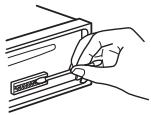
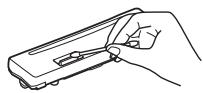
PpIMeuaHn
B U cIeN6 630NaCHOTn nepei uHCTKo pa3bEmOB BbKIOUHTe 3aXINrAHnE N bHbTe KIOU n3 BbKIOUHTeJIa 3aXINrAHnE.
HInKorga He nprkacaTneB KoKHTaKMn nIbIaUMn IIN metanLIueKcHMn pIepdMeTaN.
TexHnueckne xapaKTepeNCTnKN
Tiohep
FM
Дианаэоннстойк:
Дляnapametpa[AREA]3aDaHO
3Nauchene [EUROPE]:
87,5 MΓι - 108,0 MΓι
Дляnapametpa[AREA]3aandaHO
Знayецни [RUSSIA]:
FM1/FM2:87,5 MΓι - 108,0 MΓι (c υαροΜ 50 κΓι)
FM3:65 MΓι-74 MΓι (c υαρον 30 κΓι)
ANTehHoe rHe3do:
Pa3bEm BHeUHeu aHTeHHbI
Ppomexytohna yactota:
Дляnapametpa[AREA]3aandaHO
3начени [EUROPE]:
FM CCIR: ot-1956,5 kTι Φo -487,3 kTι Φ oT +500,0 kTι Φo +2095,4 kTι
Дляnapametpa[AREA]3aandaHO
Знayене [RUSSIA]:
FM CCIR: ot-1956,5 kTι Φo -487,3 kTι Φ oT +500,0 kTι Φo +2095,4 kTι
I36npaTeJIbHOCTb:75d npn 400 K
OTHOWeHHe "CunHnAIn-7Mm": 73 n6
Pa3deneHne:50Db npn1KtU
Pa3pIaHocTb:166nt,246nt
Yactota dncckpeTn3aun: 44,1 Kt48 Kt
BecnpobodnacBz3b
BbIXoI: cTaNapr BLUETOOTH, KJacc MOuHocn2 (MaKc. +4 dBM)
MaKcMmAbHnA daBHoCTb CBa3n: Bnpedexn pRMO BVNDMOCTn: npu6I. 10 M*1
ДианазонЧаст; Дианазон2,4Г; (OT2,4000ГПдо2,4835ГП)
MToD moUyIaun: FHSS
Советимье рождел BLUETOOTH*2: A2DP (Advanced Audio Distribution Profile) 1.3
AVRCP (Audio Video Remote Control Profile) 1.3
HFP (Handsfree Profile) 1.6 PBAP (Phone Book Access Profile) SPP (Serial Port Profile)
CoOTBcTeCTByUoiMn KoIeK: SBC (.sbc), ACC (.m4a)
^1 ФakTnueckaДаьHocTb CBaN3 3aBNCt OT
рдзИнвх ФakTOPOB, HanpIMeP OT
прNTCTBm Мжdy UcToPcTBaMn, МагHThBx
нолг ВОКуг MнкPoBOLHOBxпчeи,
СТАнУССКOrO 3ЛeKTpUeCtBA,
ЧYВсТВЕЛБHOCrTN ПМЕMHNka, 3ФФeKTbHOCtN
aHTeHbI, OpepaUNHOHnCnCTeMbl,
ПОрРamMHOrO рпнОЖeHnI T.Д.
2 TcAnIaPHTbYe IpoΦyIi NBLUToOTH Yka3bYBaIOT HaZeIb 6MbMeHa DaHbMyNo nPoTOKOly BLUToOTH MeXJy UcTPOICTBAMi.
PoiKJIIOUeHnE no NFC
ДианэонЧастовспсцИКацьmaKcIMaJIbHоI MOUHOCHTI
He cIbIeH 3ByKOBoB CnHaJ.
→Подкlioуен ДОпОЛинтельну усИлntelь мошноctи,а BСТроeHHь He ИСПОЛьЗУЕТС.
YdaJIeHbI daHHbIe N3 naMaTn.
OToCoeHnHnCraNn HnepBaHnBnHO nOaKlUeH nPoBOd nHTaHn, IIn6o n3BLeuHa 6bTaapeKa.
I3 namrtn ydaJIeHbI
3anporpaMMnpoBaHHbIpe padIOCTaHcNIM
yctAHOBKa BpemHeN.
Peneropel npedoxpaHTeIb.
CblIeH wum pn nepeKlnOeHnn
noLOXeHra KIOUa 3axINaTHa.
HeDocTaOuHaNpaNaTaHnA.
- Y6eDnTeCb, cTo Ha yCTpoiCTBO nOaEaTcI OCTaTOHIO NITAHIO OT aBTOMoBnJIbHOrO AKKymJrTOpA. (Tpe6oBaHmKe K MTOCHNky NITAHn: 12 B NOCTOHHORO TOKA.)
He pa6oTaIOT KhoTKn ynpaBLeHn. DnCK He n3BNeKaETc.
→Haxmnte u ydepxnbai Te KhoNk DSL n (Ha3ad)/MODE 6oJee 2 cekyHd, YTO6bI nepe3arpyuNbYcTpoiCTBO. Coepxmoe naamrtn bdyet ydaJIeHO. B cienx 6e3onacOHTn He BbIOnHnTe nepe3arpy3ky BO Bpemr BoKdEHHa.
Ppne m padnoctanm
He ydaetc npnraTb padnoctanu. 3Byk cnpoboxdaetc nomexamn.
HenpaBnJIbHoe coeINHeHne.
IpoBoepeTe NOcOeINHeHne aBTOMO6nJIbHOaHTehHbI.
- Ecn He BbDnBaAeTc ABTOMaTmEecka aHTeHHa, npOBepTe CoeINHeHne npOBOda ynpabLeHnAHTeHNO C 3NeKtpuCheKm pNBODOM.
He ydaetcBbINOHNHTb npedBaPnteIbHyIO HaCTpOky.
PeredeBaemb paDnOcnrHaJ CnIuKOM cna6.
B dana3ohe FM3 He ydaTcHacTpOHTb aactotbl 65 MΓu-74 MΓu.
Dopokhbie coo6eHn He nepedaioTc.
BkIIOHTeTA (CTp.12).
→ CstanhЯ He TpaHcInpyeT DOpOxHbIX coo6uEHH, XOTN OTHOCNTCA K Ttyny TP.
- HactpoTecb Ha npuyu cTaHcNIO.
PnBVKIOUeHmΦyHKUIN PTY OTo6paKaTaCn HnDnkaTn[-.
→ПиИнMuEmaЯ StaHцЯ He nepeJaET daHbIe RDS.
→ДанныеRDSнпиимmaOTсЯ.
→CTaHcIaNe He yKa3bIbAeT TnnpOrpaMMbl.
Ha3baHne nporpaMMHO ycIyrr Mnaet.
Длгь blybpaHOnB DAHNbIM MOMENT CTaHcNHe IcNoIb3YeTcR aJIbTePHATNBHA qACTO.
- Hαχmnte KhONkY SEEK + / - , noka muraet na3BaHnne npOrpAmMHO yCnyr. NpoBNTc INdNkaCua [PI SEEK], uycTPOJCTBO NaHcET nOcK dpyroJ qACTOTbI c TaKIMn Jx DeaHbIMn PI (npOrpaMMHaJaEHTnΦKaCua).
Bocnpoun3BepeHne nckOB CD
KomnakT-He BOCPon3BOJNTc.
→ДиСЗагряЗн ИИ NOBpeKdeH.
→Дицкн CD-R/CD-RW He npedHa3Hauehblдя Bocnpo3BedeHn 3Byka (cTp.27).
Hebo3MOxHO BOCpOu3BecTuΦaJIbI MP3/WMA.
→ДиСК He COBMeCTM C ФОмТOM I BepCneI MP3/WMA. YTObI NOJyNTb NOДрбHbIe CBeDEHnO BOCpON3BODIMbIX DnCKaX IФОмTAx, NocetNte Be6-caI, aDpec KOTopOrO yKa3aH Na 3aDHeI OБLOKKe.
IopKnIOUaEMOMy yCTpOuCTBy He ydaetcB o6hApYKuTb daHbI annapaT.
ChobI BbINOJIHnITb CONpRAJKeHne, nepeBcIte annapaT bpeKIM OxNiDaHnCOnpRAJEHnI.
KoRgda annapaT nodknUohen K dBym yCTpoiOCTBAM BLUETOOTH, dpyromy yCTpoiOCTBy He ydaCTsObhApYkntb erO.
-3aKpOHTe BCE NOpKJIouYeHnIbVbIOJNHTe NOnCK daHHoro aannapaHaDpyROM yCTPOINCTBE.
NocLe BbIOnJIHeNcONpJxKeHnC cYCTpoIcTBOM BkIIOHTe BIXOxDHOI cnHAI BLUETOOTH (ctp.10).
He ydaetc co3daTb nodknloueHne.
He oTo6paJxAeTcNIMr o6HApUxKeHHOrO yCTpOuCTBa.
B3AByCNMOCTMOT COCTOHNMyDpyrOFOyCTPOINCTBa,BO3MOXHO,He yDaCTcNPOIyUHTb EROIMR.
He cblshno co6eecdHnka.
→Передни громкоговорил Н подкючны Кдану annapaTy.
- PodknIOUHTe nepeDnHe rpoMkoROBOpTeNkAnnpaTep.10oc 6oBe6eHnKa BOCpOm3BODtCtToBko ueP3 nepeDnHe rpoMkoROBOpTeNl.
CobecdNHK roBOpNT, yTO BAC cblshO OueHb TnXO nnn oueHrpoMko.
HactpoTe Heo6xOaMMy rPOMKocTb c NmOIOsbI npaMeTp a yCUNJIeHn CnIHHaJc MnKPOphiA (ctp.18).
BoBpemTeJefoHHbIX pa3roBOpOB CblshO 3X0 NIN Wym.
YMeHbUHTe rPOMKoCTb.
→Вьберпгдя рекиma EC/NC3начене [EC/NC-1]ии [EC/NC-2](ctrp.18).
Ecnn ypOBeHb OkpyXaIOUeTo OyMa cnNtKOM BblcOKn, nOnbTaIaTeCb yEmhBbNTb 3OT yM. HanpImep, ecn OTKpbIto OKHO n CblIweH rpOMKn yM dopOrn, 3aKpOte OKHO. Ecnn rpoMko pa60taet KOHdIoHOpHe, yEmhBbNTe erO MoUHocTb.
TeleoH He noKnIOueH.
→Пи ВСпрпзБе徳нуадио c yctpoiCTBa BLUETOOTH Tepeфон He 6удET поКluочen, Даме ecIn Bbl HaxkMeTe KhoNky CALL. -ВылОЛнITE поКluоченс Tepeфona.
IIIOXoe KaueCTBO 3ByKa B TeJefoHe.
KaueCTBO 3Byka B MO6nIbHOM TeNefoHe 3aBNCUT OT YCJIOBNI pInema.
-Пи пloxиx условяприema
пореметиte АВТOMОБиь В дpyroe
месTo, B KOTOPOM ypoBEHB снгнala,
приннmaemoro MOбиьным
телфоHOM, 6удET 6bonbшe.
PROMKoCTb NOkKnOuChENHOro ayNIOyCTPoICTBa CNIuKOM Hn3KaA NIN CNIuKOM BvICOKA.
YpOBeHbTpOMKoCTn3aBNCtOT OKHKeTHOro aynOuCTpoNCTBa.
- NaCTPOITRE rPOMKOCtB NOJKNIOUeHHORO aydNOyCTPOINCTBa Ha daHNNOM anNapate (ctp. 24).
Bo BpemB BoCpOn3BeDeHncaayNoocPbCTBa BLUeTOOHnppeBbAeTc3ByK.
YMeHbIePaePacCToRHeMEXKdY annapaTOMuAydOyCtPOiCTBOM BLUETOOTH.
EcnnyuoyctpoB BLUETOOTH XpaHNTcB YeXNe, CnJxHaOeM yPoBeHb CnHJHa, TO CHNIMTE3OT HEXN.
→Радом Исторь自由贸易区
YctpoiostВ BLUETOOTH Или Дурови
YcPoIyCTB, ИлЧУаоши радиовлны.
- BbIKIIOUHTe IpyrIe yCTpoIcTba.
YBeIuIbTe paCCTOJHne MEXdYaHHbIM aInpapATOM IN DpyTMM YCTPOIcTBAMN.
→Пи co3dHIM NOdkHoueHn MExJy TaHbIM AnIpaTOM N MO6JIbHbIM TeLEFOH MROHEBOH NpeKpaAaetCBy BOCpOnB3BeDeHne ayDNo.3To He ABJrEoTc HEnCnPabBHOCTbHo.
He ydaetcya npabnTb noKluoyeHHbIM ayduocyctpoicTBOM BLUETOOTH.
Y6eJntecb, yTO nOdkJIOUeHHoe yCTpoiCTBO BLUETOOTH noIepxNBAET npoΦnJIb AVRCP.
He pa6oTaIOT HeKOTOpBie yHKnU.
Y6eIntecb, TcO NOdkJIIOUeHNOEYCTPOJcTBO NOIDepKXBaeTHeo6XOnMlbE cyHKnN.
PpOncxOoNT aBtOMaTnueckn OTBeT Ha BXoJaIy BbI3OB.
Пдкlioунець телефонНастрөнТak, YTObblabTOMaTNeCKNOTBEyAToHb XBOJIAUHnB3OBl.
Hyeaioob BbIIOJIHHb COnpJxKeHne n3- 3a IpeBbIeHn BpeMeHn OxuaHn.
Bpemr,OTBeDeHHe Ha cOprrKeHne, 3aBmCt OT NpDKnIOHaEMORO yCTPOIcTBa MoKcET bItb He6oBbIM. -PocTapaTeCb BInOJINHTb cOprrKeHne BOTBeDeHHe Bpemr.
He ydaetcya npablaTb yHKcuNee BLUETOOTH.
→BbIKHOnUte annpaT, HaxkAB KHOKNy OFF nYedepXnBaay haxaToi 60Jee 2 cekyn, a 3aTeM CHOBA BKJIOnuTE ero.
Bo vbpem Tepeohnro pa3robopa B peKIme 6ecnpoBnoH raphNtpyb HET 3Byka uDnHaMnikOB ABTOmObIJa.
Ecnn 3ByK NOCTynaet C MObIbHOro
TeNeΦOna, NaCTPOINe erO TaK, UTo6bl 3ByK
OT Hrro IeJ NpeE3 DnHaMnKn
ABTOMOJIy.
Функци Siri Eyes Free He BKluoyeha.
BvIbnHnIte perIcTpaIIO iPhone c
Функци Siri Eyes Free b pexmme
Бесрвоюн rapнТурь.
BkIIOUHTe FyHKuIIO Siro Ha yCTPOIcTBE iPhone.
Otmehniete nodkJIOueHne BLUETOOTH MEXdy UCTPOIcTBOM IPhone n daHbIM annapatOM, a 3aTEM CHOBa coZdaIte erO.
McnoIb3ObaHne npnloXeHna SongPal
Ha3BaHHe npInIOKeHnHe COOTBeTCTByET fakTHueCKOMy npInIOKeHnIO B "SongPal".
Eue pa3 3aynCTnTe npuIoxKeHne n3 npuIoxKeHnra "SongPal".
CD PUSH EJT: He ydaIocb npaBnIbHo n3BJeCb DNCK.
→HakmTe KhoNky (n3BJeYb).
HUB NO SUPRT: He noДeрЖиВaIOTcKoHcHTpaTOpbl USB.
INVALID
→BbIbpaHHa Opeaun MoKeT He nOJIePxNBaTbcra.
BoBpEmBaBOcPOn3BVeDeHnnc yCtPoIcTbaIPoDHeydaetcnyepeKJIOuHTbcrapeKIMMa[USBMODE]Ha dpyroI pekmM.
IPD STOP: BOCNpOu3BVeJeHne C yCTpOuCTBa iPod 3aKoHueHo.
→Ha iPod nnn iPhone BKJIIOUHTe yHKUIO BOCPON3BEdENI.
NO AF:OTCYTCTBYIOT aJIbTePhaTHBhIe yAcTObl.
→HaxMMTe KhoNkY SEEK +/−, noka muraet Na3BaHnne nporpamMHOy cynr. YcTpoiCTBO HauHnaeT oNNck dpyroJ qactOToBc TEmN Xe daHHbIMPi (nporpamMHaA NdeHTmDfKaCaun) (noBJIaETc INHdNkaCn [PI SEEK]).
NO TP: Hét cooșeșn o tekușe CNtuașn ha doporax.
YCTpoIcTBIOPOIoJXnT NOnCK CTaHcN, nepeDaioUxN pOgrpaMMy TP.
NOT SUPPORT -Android MODE
Kannapaty nodkluyeno yctpoiCTBO USB, He noideprkvaibouoee npotokol AOA (Android Open Accessory) 2.0, korga dans napametra [USB MODE] 3aandaHO 3nauehne [ANDROID].
-ДляnapaMeTpra[USB MODE] yctahOBuTe 3haueHne [MSC/MTP] (cTp.23).
OVERLOAD: yctpoictbo USB nepenolnheo.
OTKIIIOUHTYEYCTPOICTBOUSB,a3aTEM hAKMnTe KHOJNKy SRCdA BbIbOpa dpyrOrO hICTOHNka.
YCTpoIcTBo USB IOBpeXJeHO, nINnIOCoEiHHeHO HeIOJIepXInBaEMoeYCTpoIcTBO.
READ: ndet cHTbIbAHe.
→ДождntecьзавершенисчтbingaHnB. Bocponu3BedeHne HauHetc4 abTomatueckn.ЗTO MOxET 3aHrtbHEKOTOPOE BPemB 3aBNCMOCNT OT CTpykTypblФaiJa.
USB ERROR: HeB03MOJHO BOCIpOu3BecTn yCTpoIcTBo USB.
→ CHOBA IOdkHIOUHTe yCTpoIcTBO USB.
USB NO DEV: yctpoiCTBO USB He noJKNIOUeHOnI He paCnO3HaHO.
Y6eintecb, yTO yCTpOuCTBO USB nIIN Ka6eBb USB hAdexHo nOpKnIOUeHbl.
USB NO MUSIC: OTCYCTBYET Φаил ДяВОСПОНЗВЕДЕНЯ.
→ПодсоeДиНиTe yCTpoIcTBo USBCBOCpOuN3BODiMbIMnФaJIaMn(ctp.29).
USB NO SUPRT: yctpoiCTBO USB He noDpeXKNBaETC.
Для почесни подбьх с蜱едени о coьмостимостсуств USB nocetnte Be6-cait NOdεржк, уka3aHHь На 3a3dнe CTOPHe O6bOxKn.
LLLLL nnn 777:Haayano nn KOHeu DnCKa DOCTnHyTbI.
(3нakpoIuepKuBaHn):He ydaetcra OTO6pa3ntb CmB0JI.
UNKNOWN: He ydaetc8 OTo6pa3ntb nMn HmOpTelefoHa.
WITHHELD: 3BOHJIaI aBOHeNT cKpbIcBoi HOMep TelefoHa.
PpimmeuHnNo pa6oTe cnpiJIOKeHnem SongPal
APP : He co3daHo nOdkIIOueHne K npJNOJKeHIO.
C03daiTe noiKJIIOUeHHe K npIIOJKeHHo "SongPal" eue pa3 (ctp.19).
APP DISCNCT: npinlojxehne OTKJIIOUeHO.
Co3daiTe nodkJIOUeHne K npuIooJeHHIO "SongPal" (ctp.19).
APP DISPLAY: OTKpbITo MeHIO napaMeTpOB 3KpaHa npInIoXeHn.
0TObMoXHO6bIIO NcOJIb3OBaTb KHONKY, BbIdNtU3 MHeU npaMeTPOB 3KpaHaB PnVIOKeHm.
APP LIST:OTKpbIT CnICOK COePXMORO CD/USB/iPod.
HTO MoXHO 6bIIO NcPOnb3oBaTb KHOKNy, BByiDnTe U3 cNtCKa B npInIOxEHnn.
APP MENU: OTKpbITo MeHIO napaMeTpOB B npInIoXeHIN.
YTObI MOXHO bIIO IcIIOJIb3OBaTb KHOJKNy, BByIINTe IV3 MEHIO napaMeTpOB B npINOpEHHi.
APP NO DEV: YCTPOICTBO C YCTAHOBJIENHHBM
PINJIOXJEHEM HE NIOJIKHOUYI HEN
pacNO3HAHO.
Co3daIte noJkIIOueHne BLUETOOTH, a 3aTeM eIe pa3 co3daIte noJkIIOueHne K npInloXeHnIO "SongPal" (ctp.19).
APP SOUND: OTKpbITo MeHIO napaMeTPOB 3Byka B pInIOJKeHN.
TObMoKHO6bIIO NcNoB3OBaTb KHTOKY, BbIMTe IN3 MeHIO npaMeTPOB 3BYKa B PnVIOJKeHN.
OPEN APP:прinalsье "SongPal" He 3aŋyuεHo.
→3anycntte npniloKeHne.
PpimcHnno pa6oTe npIbTa DnCTaHcNHOHHoro ynpabHeHnHa pyJe
ERROR: BO Bpemperntpaunn FyHKnnpon3oJna Own6ka.
→BbINOHnTepeRnCTpaNIOchOBa, NaHHaCToIyHKuINrJe npOn3oJla Oun6Ka (cTp.23).
TIMEOUT: npocedupa perncptaun He BbIPOJIHeHa BCBA3n C npeBbIWeHneM JIMMTa BpemHn.
→Пюценичу ретистрацим Heo6xodmo 3aBepuNTb, noka mnaet [REGISTER] (okono 6cekynd) (ctp.23).
EcnBpe3yIbTaTe npednaeraEmbx
DeiCTBn He ydaCTcYyCTpaHITb
HeNoJaKy,6bpaTntecb K 6bnKaJWeMy
DInNepy Sony.
EcnYcTpoiCtBO cdaetc B pemont B
Cnyaae KaKoJ-lnoBo HenoJaKn,
BO3NkUeM npri BOCpON3BeDenH DNCKa
CD,Heo6xOIMO NMeTb Ppi Ce6e KOMnaktD
nck,piBocPON3BeDenH KOTOPORO
6OBapXknAcB HenCnpaBHOCTb.
YctaHObKa/IOpkJIuOyeHne
BHMMaHne!
-Повьдente BCE 3a3eMЯюиne npobOda Kобш"Toчke 3a3eMleHnY.
- He donyckaIte nonaIaHnI npOboDob noi BHTbl uIIM MekJy NOBbIXhblm DeTalMn (HaNPImep, MekJy HapPabNJIouMIMn cnJeHnI).
Bo n36bexaHne KOPOTKORo 3aMbkaHnna neped yctaHOBko coeINHeHnB BYkIOUHTe 3aXIGrAHNc ABTOmObNJu.
- Chauana noDcoeDnHnte npOBoD nITaHnA ⑥ KUCTPOICTBY n rPOMKOROBOPHTeJAM, a 3aTEM - K KOHTaKTam BHeUHero NCTOCHNKA nITaHnA.
Bzelax 630nacHcTm 683aTeIbHo n3OJIpyu TBE CBO6DhIbe HenoCoEINHeHnBe npoBODa JNkETPOIN3JLAnHHOJeHToI.
Mepbippeoctopokxhoctn
TuaTeBnH BbIuPaJte MeCTo dJa yCTaHOBKn apnapaTa, YTObOn He MeMaJIynpaBNeHIO autOMoJIeM.
He yctaHaBnBaIte annapaT TaM, rde OH 6ydet nOdBepKeH B03dEiCTBUNIO bIIN, rp3N, Ype3MePno Bv6paunu IIN BbICOKnx TemnepaTyP, HApnpMep B MeCTax, Kya IOnaAdIoT npMble COJIneHbIe lyu, INIb B6JIn3I BEHTINLAIOHOHBIX peWeTOK oBorpeBaTeNei.
B cIeX 6oeCneueHn HaeKHO n 6eOHaCHO yCTaHOBKn MCNoJIb3yIte IINb BXoJrA uE B KOMPNeKT MOHTaXHbIe DeTaN.
ПИМЕЧАНОНСТЕЛБО ПОНБОДA ПУТАЙ (KEЛТь)
ПИ РДКЛЮЕНИДАнHOROуСТРОСТВБМЕСС ДУРГМССTEPEOKOMNOHEТAMN HOMHaJIbHoE 3HAJEHNE CILIBy TOKA B KOHTYPE NITAHN ABOTMOBNIДОЛЖHO ПЕВБΙΙΑΤΑСΥММАРhoe 3HAJEHNE CILIBy TOKA, YKAZaHHOE Ha ПЕДОХАРНIELANxCEX KOMNOHETOB.
PerylnpobKa yrJa yctahOBKn
OTperynpyte yroI yctaHOBKn TaK, TTObI OH COCTABJI Mehee 45^
Ipeuehenb deTaJeN dJa UcTaHOBKn
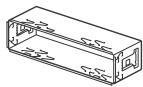
①
(2)
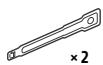
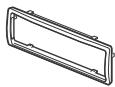
(3)
(4)


⑤
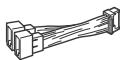
(6)
Длma moDEDmEX-N5200BT
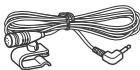
⑦
⑧

B 3TOT CnncOK BXoJNT He BCE coJepeKImOe KOMJIeKTA NOCTABKN.
-KpohuTeH ① n 3aunTnaMamKeTa ③ npKppeIneHb K yCTpoiCTBy DO nOCTaBn. Neped yCTaHOKByUCTpoiCTBa BOCNoJIb3yIeTcB KJIUoAMnJLdEMOHTaKa ②,YTO6bI OTcoeINHb KpOHuTeH ① OT yCTpoiCTBa. NOpO6HbIe CBeDeHnCm.B pa3JeNeOTcoeDInHeHne 3aunTHoM MaHKeTb I KpOHuTeHa" (CTp.44).
- Coxpahnite KIIOUy DNIA DeMOHTaJa ② DnI INCNOJb3OBAHIN B 6DyUeM, NOCKOLbky OHN TAKKe NOTpeBvTOcPn Pn DEMOHTaJa ennapapa n3 ABTomo6bnJa.
OToeDInHeHne 3aunTHoM MaHKeTbI N KpOHuTeHnHa
Ipepe MoHTaxKom yCTpoCTBa OTOcoeINHnTe 3aunTHyMO MaHKeTy ③ N KPOHJTeH ① OT yCTpoCTBa.
1 3axBaTnTe o6a Kpa8 3auNTHOJ MaHKeTbI ③ ,a 3aTeM BblTaUNTe ee.
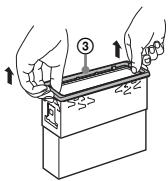
2 BCTaBbTe o6a KIIIOu7 IaIa DeMOHTaKa
② Do ΣeJUka, NOTaHnTe KPOHtTeH
1BHN3,a 3aTeM NOTAHHTe UCTPOICTBO BBepx,UTO6bl OTCOEIMHITb ERO.
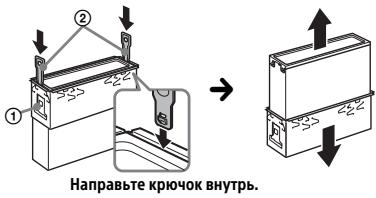
UctaHOBka yCTpoiCTBa B npnbopno naheJn
IpepeyctahOBKOy6eNTecb,yTO
fHKcTOpblcObeNXCTOPOHKPOHHTeHa ① COrHyTbBOBHYTpba2MM.
1 UCTaHOBnTe KPOHUsTeuH ① B npIn6OpHyIO nAHeJIb,3aTeM BByrHnTe BbICTynbI HApUKy,UTo6bl ObecneuHTb PLOTHyIO FHKCaUIO.
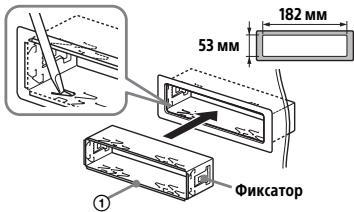
2 ПикpenTe yctpoCTBO KpoHHTeHy ①,3aTEM BCTaBbTe 3aIHTHYo MaHKeTy ③.
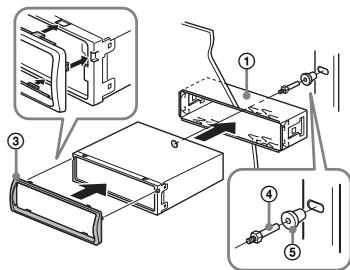
Примechаня
- EcnI ΦKcATOpbI He corHTbI nnBbITbI HApNy, yCToIcbTO He bdyet YctaHOBeNHOHdJIeXaZIMHOBaO3OM AND MOKET BbNaCTb.
Y6dJIeTcB, 704 4 mKcATOpa Ha3aunTHoH MaHKeTe ③ HADJIeXaUIMbOpa30m BCTaBHeIb B TOBpeTcN, IMeUOJIeMC B YCTpoIcTBe.
Сятын установka поеденье naheл
3aTepeKeHHn DnBnApKIB, KOJI 3aapanIOBaHHn ABTomO6Ig He Mae NOJoxHeH ACC
060B'3KOBO BCTaHOBITb FyHKuIO AUTO OFF (ctop. 22).PnucptriB BMNKaTMeTcBcnoBHICTUo ABTOMaTHUHO Y BCTaHOBJIneH uac nICJBA BMKHeHH pncIcPOIO, UO 3aNo6iBaTMpeo3pJxHaHHIO akymJIaTopa.JkIo OYHACO AUTO OFF He AKtIBoBAHO, UOp3aY NiD cAc BMKNHeHH3 3anaJIIOBAHHH HATNCKaHTe UyTPmMyTe KhONKY OFF, DOKU dncnJIne He 3rache.
BidMoBa BID BiNobiIaJIbHocTi 0do nocnyr,3anponoHObaHnx TpeIMN CTOPOHAMN
Iocnyn, 3anpnoHOBAHt TpeTIMN CTOPoHaMNI,MOxuyb 3MiHOBaTICN, npn3yUnnTHcA 60 npnInnHnTPO6O TYbe3 nonepdHbOro nobiOnmLeHH. Sony He Hece JxOJHOBI BIDNOBIAJbHoCTI B TaKnx CNTyaUix.
BaxJIbVe nobIDomIeHHa
ybara
KOMIANHJORYAJOONHIXO6CTABINH HEHECEBIDIOBAIDJIbHOCT3A6UYIb-RAIK BINNAKOBI,HEIPRMA,NEPEDBAYBAHI HENPRTMIABOIHUI3BHTKN(B TOMYUNCJI BTPATQDOXOBIDYNPIBSYTKB,IADHINBINOIBAOBJLAHNHH,YAC PTOCTOHOABVITPAUEHNIPOKYIUEM YAC TOULO,AKI BHNHKAIOTB BHACJIIDOK BIKOPNCTAHNNLbOFOIPODyKTY, ANAPATHOTOA/ABIOIPOPTPAMHOTO 3AE3NEUHH.
UHOBHnIPOKyIuO,ueBvPi6MiCTNtB padionepedabay.
3riHNO 3 noctaHOBO EK OOH N°10
BnOb6NHKn TpAChNOpTHNX 3ac06IB MoXyTb
HaKnaDaTN ObmEgeHHN IooD
BCTaHOBLeHN HaJionepedabauH na
TpaHcNOpTHNX 3ac06ax.
IpeDe yCTaHOBeHNMy BnOoby
O3NaHOMTeec 3 IHCTpykUeIO DO BaWoTO
TpaHCnOpTHORo 3ac06by a60 3BepHiTbCn Do
NoRo BnOp6HnKa nn ToproBoro
NocepeNDnKa.
Ekctpehi 3BbIKN
Lg aBtOMo6iNbHa BLUETOOTH-rapHItypa Ta nIqKnIOUeHN Do HeI eNeKTOPHNn npICTpi npaIOuTb Ha 6a3i paoCunrHaJIb, Mepex CTbnHKOBOrO ΦIKCOBaHO 3B'3KY, a TAKOK nporpramoBAHnx KOpMTyBaUem fYHKui, 10 He rapaHTye 63nepe6iHe nIqKnIOUeHN. He NOKaJaNTecBaKNIOUcH No eKToPOHI npICTpoI Dnla 3a6e3neueHN H 3'3KY B hEviKLaDHNX BnIaNkax, 3OKPema Dn 3BepHeh IIO MeMNHy DOnOMOTy.
LIOO 3B'3Ky 3a DOnOMoroo BLUETOOTH
-Писсто3 Textholorie BLUETOOTH BnnpomHIOHTb Mikpoxbni, lo MOkytb BnlnBaTn ha poboty eneKTPOHHx MeuHnx npicstpoiB.ДЯ ункнен HeaacnXn BnapKIB BiKJIouaYte ueY ta Hnui BLUETOOTH-npIcSTpoY habeDeHHnx HxKye cnTyauiaJx:
- y63n0cepeHn6bnbKoCTi doIeKo3aMnCTnx rA3IB, yNikpHx, NoI3dx, nITakax, ha ABTO3anpaBkax;
-nopy3 aBTOMaTnUHIMN dBepuMa, npNCtpoMn NOxEKeHOI TpNUBOrN.
- Cěn pínctrié nepeðbáaç épád φyнкцій Для 3a6e3neuehenna 3axuüeHOr
ПДКЛЮЧЕHЯ 3ВИКОпСТАНМ
6e3dpoTOBoi TEXHONJI BLUETOOTH
3rɪdno 3 BiNIOBIДиM CTaHДapTOM, nPoTe
В OkpeMxвипаджхьо може 6утNi
HeNoCTaTHbO. KopiStyItec 3B'8aKOM i3
6e3dpoTOBoi TEXHONJIrcIb BLUETOOTH
6aHaHo.
Mn He hecMo BjIbnOjIaJIbHocTi 3a BInToKn IHfOpMaII, IIO CTaJIncI pIc HbIKOpCTHaN3B'3Ky 3a TexHoIOnIeI BLUETOOTH.
Y pa3i BUNHKHHe HnPiTaHb a6o np6bnm 13 npInCTPOcM, He OINcaHNx Y cboMy noci6Hnky, 3eBpHiTcB do Na Hn6LnXyOro dInepa Sony.
3mict
IobiDnK i3 qactH i opraHIB KepyBaHHa. 5
PouaToKpo6Otn
Bid'εДнанняпepedHboi naHeni 7
Ipe3aBaHTaxKeHH npictpoIO 7
YcTaHOBLeHHr RoUHHNka 7
PiIroTobKa npicrpoIO BLUETOOTH 8
PiiknueHn npncTroo USB 11
Пдкlioчени iишо ro npotatNBHoro aydionpnctroю 11
PpocnyxobvbaHnpaia
IprocyxOBvBaHHraio 12
BukopncTaHHcCnCTeMpaIIOaHnx (RDS) 12
BiDtbOpenhra
BijTBOpENHa Dncka 14
BidiTbOpenHnI npicTroIO USB. 14
BijTbopeHn3 npicrpoIO BLUETOOTH. 15
Iouyk i BiTbOpEnH KOMnO3nui 15
PiiKJIIOUeHHBvCTaHOBJIeHH
YBara! 39
Cnncok qactnh nla BCTaHOBJIeHHra 39
Плкlioченna(Mодень MEX-N5200BT) 40
ПиДКЛЮЧЕНЯ (Модаль MEX-N4200BT) 41
YcTaHOBJIeHHN 44
IobiHnK i3 qactnH i opraHIB KepyBaHHa
OchOBHn npCTpi
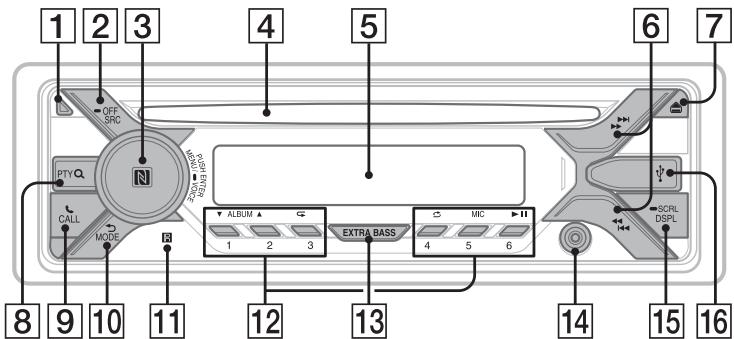
1 Khonka po36lokyBaHHn nepeHbOi naHeJI
2 SRC(Jxepeno)YBIMKHeHHXINBJIeHHN.3MInHHJxpeJa.
OFF
Uo6 bumkhytn dxepeNo bio6pa3ntn roHHNK, haTNCiB I notpmaTe npotraTOM 1 cekydu.
KJIOHATUCHYTN YTPMByATN KONKY DOBJE 2 CekyHd, XJBNHeHHB MKNHEbC, aDNCnne3rache.
3 DnCK KepyBaHHa
PobertaTe dJa HalaTByBaHnryuHOCTi.
PUSH ENTER
BxiДdo Bn6paHOrO nyHKrY.
HaTnCHITb KhoNkY SRC, noBepHITb i HaTnCHITb DmCK KepyBaHnY dIy 3MiHi NdxKepeNa (DncPnIe 3rAcHeYepe3 2 cekyndi).
MENU
BiDkPnTTMeHIOHaJauSTyBaHb.
- VOICE (ctrop.18, 20, 21)
HaTnCtIb i UtpmUyTe KhONkY doBwe 2 cekyn, uo6 yBIMKHyTu pexnM roLocoboro Habopy, pO3ni3HabAHnra roLocy (TilbKn dIn CmapTfoHIB AndroidTM) a60 fynkuio Siri (TilbKn B cMapTfoHax iPhone).
P03Ha4ka N
TopKhItbCsCMaTΦOHOM Android DnCKa KepyBaHHN DnI BCTaHOBNeHH NIDKnluChENB LBUETOOTH.
6/(SEEK-/+)
4 Hnizdo nla nickib
5Bikonue nucnne
ABTOMATUNHe NACTPOBAAHnHa paiaOCTaHJI. HaTnCHITb i yTpmyTe, Uo6 HAcTOPIrNt ChAteuO BpyHy.
14/101 (nonepnHa/HacTynHa)
<1/> (npnckopene nepemotybaHHaHaazd/npncopene nepemotybaHHbnepe)
1 HaTnCHiB i UyTPmUyTe KHOJKN DSPLi (Ha3aI)/MODE DoBwe 2 cekyHd.
Pnmuitka
Ipe3e3aHtAkeHHaPnCTPOIO np3Bede IO CTpuHaNHa HAcTpoIO KOrOINHHNKa, a TaKoK NeBHoro 36bepeEeHORo BMICTy.
HanaawtybaHHKpaiHn/perioHy
Iicra nepe3aBaHTaJxehH npictpoB iDkpiTbC8 ekpaH HalaWtYbaHH KpaHH/ perioHy.
1 Koli Ni BiO6paXkaTImeTbC8 [SET AREA], HATNCHiTB KHONKY ENTER. BiO6pa3nTbc8 nOTOnHa KpaIIHa a6o perioH.
2 Повертаюч дис Керуваима Виберіт b [EUROPE] a60 [RUSSIA], aNotIM HaTnchITb dNCS KepyBaHnH.
3 NObepTaOuH dNcK KepyBaHHa, Bn6epiTb [YES] a6o [NO], a noTim HaTnCHiTb dNcK KepyBaHHa.
Ypazi 3mihennkpaHn a6o periohy npictpi nepe3aBaHTaxntbcs, nicJyOro BIDobpaKaTumetbCraODHHNK.
LcennapaMeTpMOXHaHaJaTaYBaTINB MeHIO 3aRaJIbHNx HaJaTaYBaHb (CTOp.22).
YctaHOBJIeHHr rOIMHHNKa
1 HaTnCHiTB KhoNkY MENU, Bn6epiB [GENERAL], NOBepTaHOnu DNCK KepyBaHHa, a NOTIM HaTnCHiTB DNCK KepyBaHHa.
2 Nobeptaiou nnck kepybaHHn, Bn6epiB [SET CLOCK-ADJ], a notim HataNCHit bnck kepyBaHHn. 3haehnny hacy noue He 6nmatn.
3ПоветаiteДИСК КерУВань,ибустановтугинТаxbилин.шобпесити сфровидИкадю,在нчSCaITE KHONKY I< />I (SEEK-/+).
4ПicraBCTaHOBLeHnXbUInH HATNCihtb KhoNky MENU. HactpoIOBaHH6yde 3aBepeSheo, i roDINHHK NOHc IpaOBOAtn.
Uo6 BiO6pa3nTn rOuHHNK, HATNCHTb KHOJky DSPL.
DToTopKHiTbCmApTfoHOM iNITpUmKoHO texHoIiF NCF* DoIMCKa KepyBaHH npICTpoIO,Ioob ABOMaTHO CTBOPHTn npABy BCTaHOBnTI NIKJIOeHHMaIK npICTPOEMi CmApTfoHOM.
Texhonoria NFC (Near Field Communication)
BVKOPINCTOBYETBCN Dny 63eDAPOTOBOR8'3KKYMAJORA pADIYCU DII MIX pIHMMN PNICTPOMN,AK-OT MOJIHMMN TELEOHAMN a60 IC-MITKAMM.3ABKANy KNUI NFC Dn o6MHY daNHMI MIXpNPCTPOMN, NQ iNDTPMIMyTOB LIO TexHOONIO,NOTi6EN LIuE DoTIK DO BIIINOBIDHO CMBNOA6o CNEUJIbHO pIN3NaHHeOI dInHKN HaNPCTPOI.
Для смарфовипд керваим OC Android 4.0 abo Нжоче Небхлсо Заразхити рогрamy «NFC Easy Connect» 3 магашиу Google Play™. Y.deякх крайхаabo perioхax рограма може buyн Heюctунна.
1 YbIMKHTb cyHKUIO NFC ha CmapTphiHI.
Doknaihe DInB. B IHCTpykix 3 ekCnlyaataiDi CBOrO cMaprfoHa.
2 TopKhiTbCra DiJIAHKn npnCTpoo 3 n03HaUKOIO N qaCTnHOIO CmapTfoHa 3 BiIDNoBjIDHOIO n03HaUKOIO.
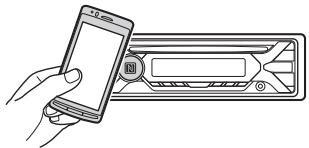
IpekeohaTece, 10Ha nCnnei npictpo CBITbCt iNkaTOp
BiKJIIOUeHHe «BODINOTNK
Ie p3T topKhitb8c dIJIaHKn npIcSTPOO 3 nO3NaHcKOIO N qactInHOo CmApTfOHa 3 BiNOnOBiHOIO NO3HaKIO.
Ppimitkn
Пд.Часуагановнынглкуновни Ртумайч МартФон кУAPATHO, lo6b YHKNHTY noDpRINH.
-Пдклоченн «ВОДИN DOTИК» HEMOXЛИBE,ЯкIoO anapat уcke пдклочен do DOxBQ nprcTpoIB 3a texhoIorio NFC.Y zuomy pazi cnid biq'ecHnat OdINI III nprcTpoIB I BCTAHOBITn ПдклочenHi CMaprTOHOM.
CTbOpenhna napi i BcTaHOBLeHHn niKlNoUeHHN 3 npNCtpoEM BLUETOOTH
Пд чаршоу рійкlioчени пирстpoю BLUETOOTH Heob6xioHо 3diiChnTu B3aEMHy pectpaizio npictpoIB (CTboprtn napy). CTbopenHЯ napи NotpiOHe Дяп поальшоу po3ni3habanHу cmyichnx пирстpoIB пд чac poBOTи.Цe anapat може пiklJOuATncяdoДBox pnrstpoIB BLUETOOTH (ДBox MO6iJIbHnx TepeHOBI a60 MO6JIbHORO TepeHOny aydionpntpoI.
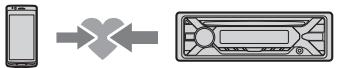
1 Tomictb npictpri BLUETOOTH y paici 1 M Bi anapaty.
2 HaTnCHiB KhoNky MENU i Bn6epiB [BLUETOOTH], NOBepTaOnu DnCK KepyBaHHa, a Notim HaTnCHiB DnCK KepyBaHHa.
3 Nobeptaoyn Dnck KepyBaHHa, Bn6epitb [SET PAIRING], noTim HATNCHTb Dnck KepyBaHHa.
4 NobeptaOuN dNcK kepyBaHH, Bn6epitb [SET DEVICE 1] a6o [SET DEVICE 2], a Notim HaTncHtB dNcK kepyBaHH.
6IIMae, KOJI pIeCTPI 3HaOJntbCSB PekmOI OUYKByHnI PiI qac CTBopeHHa napi.
* Koli napiy6yu de CTbopeHo, Hannc [SET DEVICE] 1 a60 [SET DEVICE] 3 mHiNtbcra Ha h3aBy BIDnobIdHoro nprictPo.
5 Ctbopitb napy ha npucptpoi BLUETOOTH, 0o6 po3ni3nat anapat Ha npucptpoi.
BCTaHOBJIeHHIiKJIIOUeHHJ.
PnmiTka
IiucnkiKIOHcHIO npriCTPOO BLUETOOTH
pO3ni3HabAHNcIbOTo anapaty IHsIMNI
npIcTPOAMHEMOXINBE.IIO6BVKOnATNI
pO3ni3HABAHNcI3 IuIMNX pNcTPOIB,CnIDYbIyTN B
peXMM CTbOpEHNApi Ta 3dJCHNTNs OwuyK bsoRO
anapaty 3IHoNO pNcTPOO.
NoataOK BiTBopeHHa
1 HaTnCHiTB KONKy MODE, 0o6 3MiHHTn Diapa3OH (FM1, FM2, FM3, MW a6o LW).
2 HactpoTe qactOty.
Uo6 hactpoitn BpyuHy
HaTNCbWt Ta yTpmyuOnu KHONky
/ 一 / 一 一 一 (SEEK-/+),3aHuiDItb
npi6Jni3Hy cAtractOy, a notim HaTnckaiTe
KhONky I 一 / 一 一 一 (SEEK-/+) KInbKa pa3iB
IraToCHoro hactpoOBaHHa NoTpi6Hy
uaCTOty.
Uo6 hactpoitn ATOmatuHo
HaTnCHITb KhONky I 一 / 一 一 (SEEK-/+).
CkaHuyBaHHa 3ynHHaTbc, KOJI npNCTpi
3HaXoDMtpaIOctaHciIO.
36epexeHnBpyHy
1Пид час пииму paiodoctahuii,якуNotpioho 36epeTи,натисihitb iутpresyteцфpoBy kHONKY (BIDI 1do6),ДOKи He 3'ЯВntcь сИндацья[MEM].
Ppniompaioctaun, 36epexehnx y nam'atI
1 Bn6epitb diana3OH, a notim HATNCHITb uΦpOBy KhONKy (BiD 1 do 6).
BukopustahnncTeMnpaioaHx (RDS)
HanahtyBaHHaIbTePhaTHBHX chaTOT (AF)i nObiDomJIeH npo cHTyaCiIO Ha doporax (TA)
Функця AF noctiHOn HanaTuBoytbcN Ha CTaHJIIO 3 NaIcNbHIuM CnHAnOM y Mepexi, a phKzIa TAHaIe HauHOBIuY iHOpMaIIO npo cntyaio Ha doporax abO dopoxHi nporpaMn (TP), kAIO BOHn pInmAoTbcN.
1 HaTnCHiMb KhoNkMy MENU, Bn6epiB [GENERAL], NOBepTaOuN dNcK KepyBaHnA, a NOTIM HaTnCHiMb NOrO.
2 NobeptaouN DnCK KepyBaHHn, Bn6epiTb [SET AF/TA], nOtIM HaTNCHTb DnCK KepyBaHHn.
3 Поветаочи дSCК Керуванн, Вберіпь [SET AF-ON], [SET TA-ON], [SET AF/TA-ON] a60 [SET AF/TA-OFF], a NOTIM HATNCHITb dNCK KepyBaHH.
36epekeHHcTaHcRDSi3 BnKOpNCtAHmHaJalStyBaHb AF i TA
Mожна зарограмуbatи CTанць RDS pa3om ıhaaHTyBaHnA M N AF/TA.YCTaHOBiTb AF/ TA,a notim 36epeKtIb CTanuio 3a DonomorOTo BTM a6o BpyHy.ЯksO nporpaMaBHa HCTanuiz 3diNCHIOETbcr BpyHy,MOxHA takoX zanpogrpaMyBatn CTanuiz 6e3RDS.
PpIMMaHHeKCTpeHx OOrIoUeHb
KJIO BBIMKHyTO AF i TA, ekCTpeHi ORIOnUeHHAABTOMaTHH OpepeINbATMMyTb IOTOuHe Bn6paHe Djkepeno.
PeryIIOBaHHryHocTi nID yac orOLOWeHHn pO cTuayuio Ha doporax
PibeHb rHyHOCTi 6yde 36epeXeHO B nAM'rTi dHaCTynHnX OFOrOLoHeB npo CnTuAciuHO Ha doporax, i BIn He 6yde 3aJeKaTn BiD 3BmuaHoro pibra ryHocI.
Прийом odhi'e periohaьhoi nporpamn (REGIONAL)
JkyofoyHKuAFI REGIONAL yBIMKHyTO, npictpri He nepemkataMeTbca Ha iHwy perioHaJIbHy ctaHcIO 3 NOTyXHIaMn CnHaNoL. Jkyo Bu 3aIIuHaTe 3OHy npriNOMy ciEi perioHaJIbHOI nepedaHi, yCTaHOBIb [SET REG-OFF] y MeHIO HanaWtYBaHb [GENERAL] nID hac npniomy FM-padiocTaHcii (CTop.23).
Lc fyHKJHe npaIOe y BEnKOpntaHII Ta deAKNx IHnXk KpaIHax.
Bn6ip tnniB nporpam (PTY)
1 HaTnCHiB PTY niД yac npniOmy FMpaiooctaHci.
2 NobeptaIte DnCK KepyBaHHa, DOKHa DnCnneI He BiO6pa3NtbcNOTpi6Hn TnnpoRpAMn, NotIM HATNCHTb DnCK KepyBaHHa.
Pnictpi nochne noosyk ctahii, kka TpaHcIOE BvbpauH NtI nporpaMn.
Tun nporpam
NEWS (Hobin), AFFAIRS (Itochni noii), INFO (Infopmaui), SPORT (Cnpot), EDUCATE (Ocbira), DRAMA (Padiobnctabu), CULTURE (KynbTypa), SCIENCE (Hayka), VARIORED (Pi3ne), POP M (Pon-My3nka), ROCK M (Pok-my3nka), EASY M (Mys3nka B dopo3i), LIGHT M (Jerka knauchna My3nka), CLASSICS (TpaunuiHa knauchna), OTHER M (lnua my3nka), WEATHER (Iporoda), FINANCE (PhiHcn), CHILDREN (Дитячпрогам), SOCIAL A (Cycinblnoi noiii), RELIGION (Peneria), PHONE IN (BxdiN d3BInn), TRAVEL (IpoDopoxi), LEISURE (BiDnovnok), JAZZ (JxazaoBa My3nka), COUNTRY (Mys3nka B CTNIi «KaHTpi»), NATION M (EtHnHa my3nka), OLDIES (CTapi xitn), FOLKM (Mys3nka B CTNIi «Фон»), DOCUMENT (Dokymentalbhi nepeaui)
YcTaHOBJIeHHr RoDmHHNka (CT)
Dani CT, 10 nepeaotbcya che3 RDS, HanaTTOBYOTb rOHHNK.
1 Y MeHIO HaJIaIHTyBaHb [GENERAL] yCTaHObitb [SET CT-ON] (ctOp. 23).
Bjdtbopenhra
BiTbOpenhnaIncKa
1 BCTABTe DnCK (niDnncaHOO CTOPHOIO DOrOpN).
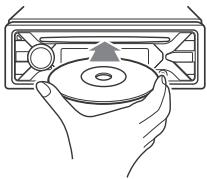
BijTBopenHn po3noUHeTbCABTOMaTHNO.
BiTbOpEnH npictpoU USB
Y ci nhtpykui 3 ekcnnyatau « iPod» BKNOPCTOBYETcRAK 3aaraBHe NocnnaHnHa fynku iPod npnctroi iPod i iPhone, kIIO B TeKCTI a60 Ha iIOCTpaiajx He BKA3AHO iHue.
Uo6 OtpMaTn DoklaDi Hi BiDomOsti npocymicHCTb IPod, nIB. «Ipo iPod» (Ctosp. 28) a6o BiDiJaTe Be6-caT cnJx6n NiIDTpIMKn, 3a3NaueHn Ha octaHHi CTopINuO6kAaHNKn.
Moxytb BnKOpNtOByBaTnc npctpoi USB* TnB A0 2.0 (Android Open Accessory), MSC (npctpoi-nakOnuYbAci) i MTP (pntokoI nepeaui MylbTmEia), cymi ci 3i CTanDapToM USB. 3aJexHo BVd Tnny npctpoIO USB ha anapati moKha Bn6paTn pexim Android abo MSC/MTP. Dla deKaNX MoJeNeu cHpOBnx pIeepiB a6o CmapTfOH 3 OC Android moKe 3HaDo6nTcR peXIM MTP.
- Hanpiknla, Фпш-eнakopoичыв USB, сифpoьи npeeк, мсггтэн 30 Android
Pnmuitkn
-Длготриманнд дokladnix BiDOMOteN npO cymicHCTb pncIcPOO USB dIN. Be6-caIT nIDTPMKN,3a3HaueHn Ha ocTaHHI CTOpIHci 0kLnAnHKn.
- CMaprfoHn 3 IHCtAJIbOBAHOOC Android 4.1 a60 HOBUIoI BepcII pIITPMYIOB t npOTOKoI Android Open Accessory 2.0 (AOA 2.0). IPoTe DeKei CMaprfoHn MOxTyB He NobHCTIO pIITPMYBaTI OAO 2.0, HABIT bKIOO IHCTAJIbOBAHO OC Android 4.1 a60 HOBUIy BEpCIO. DnT PIMAAHNN DOKJADHNX BIDOMOeTI npO cymicHCTb BawaO CMaprFOHy 3 OC Android, dN.B. Be6-caT IIITPIMKn, 3a3HaueHNI Ha OCTAHNI CTOpINH6OKnDNKN.
BjTbPOeHn HabeDeHnx Hxue foAJIb He NiITpMycTeBCP. MP3/WMA/FLC:
-afain,3axuiehi ABTOPCbKIMn npaBaMn;
-ФаллзDRM(kepybaHnAицфровимппавамы)
-6araTOKaHaJIbHi aydioΦaIIMn.
MP3/WMA:
-Файин 3 компесileo 6e3 Врази данИX.
PereD CTBOPEHNM PIIKIOUeHHN BIM6epiB pexm USB (pexmAndroid a6o M5C/MTP) 3aJeXxo BID tiny npIcTpOo USB (ctop.23).
1Плдклочьпсстрий USДdo nopTy USB (cstop.11).
PozhnyetbcBvIDTBOpenHn.
Kuio npicpiy uke nikluoyeno, dny
noatayk BiITbpeHn HATNCihtb KHONIKY
SRC iBn6epitb [USB]. KOni anapat
po3ni3aE nikluoyenH do hboro iPod,
Ha dnCnIe i'3'auNTbca HAnnc [IPD].
2 BiDpyrIIOJIe rUHicTb Ha IcBOMy anapati.
Pn3yHnEHnB BiTbOpeHnHaTnCHiB iYtpmUyTe KhONky OFF pnoTARc1 6ekyn.
Budanen npnctpoio
PpnnHItb BiTbOpenHn Ta BuaJIitb npictpi.
NonepdxkennI pyncptoib iPhone
Kxio iPhone nikloucho nepe3 USB, to
ryhiCTb d3B1Hka pereyIOeTbca H iPhone, a
He na bOmy anapati. CnIKyIte 3a TMM,
06 BnnaKOBO He 3biBnTu ryHiCTb Ha
anapati nii qac 3dBiHKa, 06 yNkHyn
HeCNOdiBaHNx ryHInx 3BykB niCIA
3aKiHHeHH po3MOBN.
BiTbOpEnH3 npNcTpoIo BLUETOOTH
3a DoNOMOHO ΒbO rnpCTPOo MOxHa
BiTbOPBOBAtn BIMCT πiDKIIOHOrO
npCTPO, 0o NiTpMHy e npOiNb
BLUETOOTH A2DP (po3wupenHn npOphiN
nouipenHH auyio).


1 HanauTyTe niKlIoUeHnBA BLUETOOTH do aydionpncTropo (ctop.8).
Дявбору aydiopnctpoю haTncHtB
KhoNKy MENU,notim Bv6epiB
[BLUETOOTH] [SET AUDIODEV]
(стор.25).
2 HaTnCKaIOUH KHOJky SRC, Bn6epiTy nyHKr [BT AUDIO].
3 BukohaiTe Heo6xHni IIHa ayionpntpoi, 0o6 po3noaTn BiTBopeHH.
4 BiDpeRyIIOJIe rUChIcTb Ha IcbOMy anapari.
PpumitKu
3aJekHO BID TINy ayionpncTroho Ha anapati MOyHT He BIDo6paxatnca Okpei BIDOMcTi, HApNKlaIaH 3Ba YnHomep KOMOn3uII, II TPNBAJIcTb, CTaN BiDTPBOpEHNHa.
- 韓弘 甲乙bOMY pRcTPOI 6yde oBpaHO iHue Dzepepo BVDtBOpEHn, BiDtBOpEHn He pRiINHHtCB.
Пиц сбкрпангл рогамп «SongPal» чере пдкlioень BLUETOOTH на дсплпи рирстюе в ВIDобрахаетья [BT AUDIO].
IooB BnipBnTn rHyHicThb npncToPo BLUETOOTH BiHocHo iHnx Dxkepe
3aNyctTb BiDtBopenHHa aydionpncTpoi BLUETOOTH 3 nomipHO yuHiCtTO Ta BCTaHOItb Ha anapati 3BnuAunHy ruyHiCtB npocIyXOBYBaHHa.
HaTnCHiTb KhoNkY MENU, a Notim Bn6epiTb [SOUND] [SET BTA VOL] (ctop. 24).
1 HaTnCiHt b KOnKy CALL.
JaIO Do npIcTpoIO nIKnOueHO DbMoibNHi TeneΦoHn, Bn6epiTb OdnH 13Hnx, NOBepTaOuCh DNCK KepyBaHnA, aNOTIM HATnICHITb DNCK KepyBaHnA.
2Повертайчднck керувань, Виберпь [VOICE DIAL],notim HATINCHITbДСК керувань. Можа takожНатичтун утprимувати KhoIGNKY VOICEdoBue 2 cekyHd.
3 PpOMoBTe roJocoby MItky, 36epeXeHny Ha Mo6iNbHomy TeJefoHi. PicJra po3ni3HaBaHHa BaWoRo roJocCy po3NoUChTbCBAKNIk.
Uo6 ckacybTu roJocobn Ha6ip HATNCHTb KhoNky VOICE.
Moxnbi onepaui nid yac 3Bihka
PeryniobaHHra yuHocTi ciHany BxidHoro d3BiHka
HaTnCHiMb KhoNky MlC.
MoxJInBi pIBi rHyHocTi: [MIC-LOW], [MIC-MID], [MIC-HI].
3MeHWeHHB iDnyHH Ta wMy (peKIM cKacyBaHH B iDnyHH/wwMy)
HaTnCHiB i yTPmUyTe KhONkY MIC. MoXJIuBi taKi peXImn: [EC/NC-1], [EC/NC-2].
IpepexiMix pexnMOM «BilbHi pyKn» IpexNMOM po3MOBn 3 TeJefoHy
Пд ус дзьинka HaTиСсИт bK Honkу MODE,шоpeпeклioчиТЗвуk i3 npiСтpoIЯMuMoбilhN TeleфОH.
Ppimitka
YdEaKINXMOJIbHNXTEIeFOHAXUZIIMOKe6yTNHeDcTynHa.
Kopnchi yHKcii
ПPORpама SongPal Дд iPhone a6o смртфona Android
Iotpi6hO 3aBaHTaxkntu octaHnB Bepcio nporpamN «SongPal» 3 maraznHy App Store nIy iPhone abo 3 maraznHy Google Play nd cMaprfoHb Android.


PpumitKu
IotpmyTeec npabnIOpoxHbOpyx IBMOM3AOKoBADCTBa:3MeTOO6eNeKHe KOpNCTyTeC
nporpaMOIOiD qac KepyBaHHaBtOMoBiJEM.
«SongPal» — ce nporpaMдя керваннay aiyionpncrtpoMn BiD Sony, zuo niptnmyotb Фнкii «SongPal», за дорomoу мсартфоHa Android a60 iPhone.
MokjNtBocI kepyBaHnHa 3a DonOpMOrO nporpAmi "SongPal" 3aIeXaTb BID nIckLIOueHo rnpIcTPO.
• Κιδό κοριστυβαις «SongPal», cnidуyte Bkazibkam Na cboεmγ iPhone a60 cmaptФоhi Android.
-Дokладиши рpo порраму «SongPal» ДИВ.За
носсаннем
http://rdf1.sony.net/help/speaker/songpal/
O3haHOMTeC3 nepeIikOM cYMICHX MOpEne cmapTphiH iPbice i Android ha BiDnobiDhomy BeB-caHri (DNB. HNxHcE).
3'YBnTbCg DnCnIeRTOLOCOBUX KOMaHd.
3 Koli Na iPhone npolyha 3BykoBn cnHaJI, npomOBTe Heo6XiDiHb Bka3iBKn B MikofoH.
Плеся NBOTOPHORO 3BYKOBORO cnHany iPhone nporpama Siri biNobiadiTme Ha OTPMnAHy KOMaHdY.
BumkHeHH nporpamn Siri Eyes Free
HaTnCHiMb KhoNkY VOICE.
PnmiTkn
YdEaKmBnuaAdkXiPhoneMoKe He pO3ni3HabatnToNcoBoi KOMaHdi.Nanpknka, ce MoKe TpaIJIaTcNciPiN cay pxy ABTOM6JIa.
- Y cepenobu 3 ycklaDneHm npnHOMom cngHany npictpoi iPhone nporpama Siri Eyes Free Moxe npaObTa 3 HenoJaKaMn a60 moXJIba 3atPIMNa i nd VcIbNObj.
YJENKHXBINAIXAKXMOKJIINBAHEKOPEKTHaP06Ota a6o hecnipdibahe 3aBepweHnRp06Tn nporpamSiRi Eyes Free.
JksoI DnI BIDTBOPENHryaio 3 iPhone BMOPINCTOBYETCBNiDKNIOHENHNO ayIoONpIcTPOU Upee3 BLUETOOTH, nporpama Siri Eyes Free AromatunHO 3abePoue 6oB6Otu nicra noaTuKByIDTBOPHENH, a npriCtprin pepeKnIOuocBaTcHnaA yauDIOxepENo BLUETOOTH.
- Raikpo nporpam Syri Eyes Free yBimkHyto nd cac BldTBPoHnA aydio, pniCTpi Moke nepeKIOuHTncsHa aydIOxpeKeNo BLUETOOTH, HabiIb kAIO KOMno3uOio Dlar BldTbpoeHHa 6bAno.
Морковая Некороча робota abo-heсноцьане завшени роботи рогормам Siri Eyes Free nID сч пdkluонун iPhone чета USB.
-Пдклочаюн iPhone за дономою USB, He koprictупесуnpамо Siri.Можива Некоргета робота abo 3abepшени роботу npropammi Siri Eyes Free.
KoI nporpamya Sire Eyes BFE BMkHYto, BIVTDOpENHAAyIO pnpHHAETbca.
CkacyBaHHpeKmMy DEMO
Moxha Kcasybattn NOK3
dEmOHCTpauiHoro pOnuKa, KOJI dKepeLo
BIMKHeHO i BIO@pKaXaETcbrFOINHHNK.
1 HaTnCiHtB KhoIky MEnu, Bn6epiB [GENERAL], nObeptaHouN dUck KepyBaHHa, a Notim HATnCiHtB dUck KepyBaHHa.
2 Повертаочи дSCК керваимь,在беріт[b SET DEMO],notimНатиспь дSCК керваимь.
3 Повертаюч диСК керУвань, Виберіт[b SET DEMO-OFF], a Notim Hаншіт b dNc KepуВань. HabtpoIOBAHn 3aBepseHo.
4 Dbihi HATINCHITb KHONKy (Ha3a).DinCnIe NOBepHeTcBcR BpeXIM3BnuHOro npuOmy/BiDTBOpEHHr.
Ochobhi onepauii HanauTyBaHn
HaanuTyBaHnneJeMeENTB BkOHyETbCz3a TaKIMN KATEROPiMn: 3araIbHe HanaTuYBaHHa (GENERAL), HanaTuBaHHn 3Byky (SOUND), HanaTuBaHHn DncIpey (DISPLAY), HanaTuBaHHn BLUETOOTH (BLUETOOTH), HanaTuBaHHn nporpamn SongPal (SONGPAL).
1 HaTnCHiTb KOnKy MENU.
2 3a donomoroo du ncka kepyBaHHn Bn6epitb kateropio hanaWtBuHb, nicJy Qoro HATNCiTb DnCK kepyBaHH. HactpouBaHi eIemEnTu BiDpi3HIOHTbc3aJeXHO BID dxKepeTa Ta napaMeTpib.
3 3a donomoroIO DNCKa KepyBaHHBn6epiTb Ntpi6hi npaMeTpni, nicJyOro HATNCHTb DnCK KepyBaHHa.
Ioo nobepnytnca do nonepedhboro ducnne
HaTnCiHtB KHOIIKy (Ha3aI).
3araIbHI halaIHTyBaHHN (GENERAL)
AREA
UctahOBLeHnKpaIHn/perIOHy,de6yDe BVKOpNCTOBvATnczue npCTpi:[EUROPE],[RUSSIA].
Ypasi3mIeHHNnOToUHOi KpaIHn a6o perioHny npCTpi nepE3aBAHTaXntbCn, nicra yoro BiOobpaXaTImMeTbcr roDInHHNK.
(ФункцяДocTyHa,TIlbKnKoIIN DxkepeNo BIMKHeNo BIDObpaXa€TbCn roDInHHNK.)
DEMO(demonctpaia)
Pexm BBOy dI pyoBOOBOr Oybla DnctauHuiHoro KepyBaHH,3a BnHTKOM PylbTa DnCTauHuiHoro KepyBaHHa HKePMOBomy KOleci (BnuBpaTeCb aYbOMaTmHoPiJvac BkOHaHH [RESET CUSTOM]).
EDIT CUSTOM
PeCTpye fynkui (SOURCE, ATT, VOL +/-, SEEK + / - , VOICE, ON HOOK, OFF HOOK) dnynblTa dinctauHoiHoro kypBaHna KepMOBOMKOJIcI.
1 NobepHb Dnck KepyBaHHa, 06Bn6paTn FynKcHIO, kny NotpioHo npn3HaunrDna NylbTa nCTaHuiHoro KepyBaHHa Ha KePMOBMy KOJIeCi, a NOTIM HATNCHTb Dnck KepyBaHHa.
Koln [REGISTER] 6IImaE,HaTncHITb i Uytpmyte KhoNkY ha NylbTi DnctaHcHOrO KepyBaHnHa KePMOBomy KOleci,IJRAKOi NTpiBHO npn3NaHTu FynKcIIO. Koln peecTpacio 3abepeHo, BiO6pa3ntbcra [REGISTERED].
山o63apeectpyBatn iHsi yHKuii, NOBTOPIb KpOKn 1i2
(Функьд Достунна, Тлбки Колдяпапаметра [STR CONTROL] Вибразно 3начени [CUSTOM].)
RESET CUSTOM
CknDaHnHaNCTpoIOK nylbTa
nCTaHuiHOrO KepyBaHHa Ha
KePMoBOMy Koneci: [YES], [NO].
(ФуннкядОТунha, Тльки КOLДЯ
napaMeTpa [STR CONTROL] BИбраHO
3haeHnHa [CUSTOM].)
PpnmITkn
Пд ус здий сени Habстpoи Кпсntpoi 6уde Достунгітіпькі керваим КногКам.3 MeTOIO 6e3пек рпинаркіті СВИ abTOMO6ib, a NOTIM BVKOHаті NaHactrpoIky.
JxuoPiJcAepeCtpauiiCTaHETbcaNOMIka, ycu paHJIe 3apeCtpoBany HOpmauio 6yde 36epKeHo. BUKoHaNe InpOeDpypeCtpauii 3AnHO, noUHaOnu 3Tie FHyKuui, de CTanacn NOMIka.
LФyHKcHnHa deekmX ABTOMObIHX HeOCTynH.ДлгТОPMaHnD OdknAdHnx BiOMocTe npC yMChICTb ABTOMObIIN DVB-eaTlPiTUMKn,3aHaueHnHa octAHnTi CToPiHcO6KnAdHnK.
USB MODE
3MHeHnpeXmMy USB:[ANDROID][MSC/MTP].
(Фиклдя достунla,тльки коли Вьраноджерени USB.)
CT(Touhni HaC)
AKTINBaIJIaФyHKnIiCT: [ON], [OFF].
AF/TA (aJIbTePHaTnBHi YacToN/
NoBIOMLeHnI pO CNTyauCiHO Ha DOporax)
YBMKHeHnA bO BIMKHeHn
aJIbTePHaTnBnX YacToT (AF)i
NoBIOMNeHb IPO CNTyauCiHO Ha DOporax
(TA): [AF-ON], [TA-ON], [AF/TA-ON],
[AF/TA-OFF].
REGIONAL
O6MekHeHn pInyomny neBnHm perioHOM: [ON], [OFF]. (Ooctynho nIiue nID yac npinyomy cnHany FM.)
BTM (nam'ytb onTmMaJbHoI hAcTrouKN) (ctop.12)
3aynck OHOBLeHnB 6yDObaHoro P3: [YES], [NO]. OHOBLeHnB 6bYDoBaHoro P3 TpNbae kIbKa XbUInn. IiD yac OHOBLeHnHe nepeBoDbTe 3aMok 3aPAnleHnB B noLoXeHHN OFF i He BeID'cHyIte npictpi USB.
Hanaштуваимь 3Byky (SOUND)
Le MeHIO HAcTPOIOK HeOCTyINHe, KOJI NJKepeNo BUMKHYTo NiDObpaKaεTbcra RoDMHHNK.
EQ10 PRESET
Bn6ip kpiBoi ekBaIaI3epa 3 10 KpBnx ekBaIaI3epa a6o BmKHeHna ekBaIaI3epa:
[OFF], [R&B], [ROCK], [POP], [HIP-HOP], [ELECTRONICA], [JAZZ], [SOUL],
[COUNTRY], [KARAOKE]*, [CUSTOM].
HacptoKn KpNBoi ekBaJna3epa MoKHa 36epeTt nIy KoXHorO dKepepa.
*KaKIO Bn6paho[KARAOKE],3ByK rOnocy niD ACaBITBOpEHHnpIryNpyUyETbc,AnHe yCyBaTbCn NobHCTIO.BvKOpNCtAHn MIKPOFOHa HE niIDTpMPyETbc.
EQ10 CUSTOM
YCTaHOBJIeHHra [CUSTOM] 3 EQ10.
HanaaHTyBaHHK pINBoI eKBaJai3epa:
[BAND1] 32 Γu, [BAND2] 63 Γu, [BAND3]
125 , [BAND4] 250 , [BAND5] 500 ,
[BAND6] 1 _u [BAND7] 2 _u [BAND8]
4 kΓι, [BAND9] 8 kΓι, [BAND10] 16 kΓι.
PibehryHocti peryIIOeTbcB diana3oHi bID-6Ddo+6DbI kpoKOM B1d5.
BALANCE
PeryniobaHHa 3BykoBOro 6aHaHCy:
[RIGHT-15] - [CENTER] - [LEFT-15].
FADER
PeryIIOBaHnB BiIDHOCHO rPiBHa:
[FRONT-15] - [CENTER] - [REAR-15].
S.WOOFER (ca6ByΦep)
SW LEVEL (piBHeb ca6ByΦepa)
Perynobannpibn rnuhocti ca6byepa:
[+6 ~dB] - [0 ~dB] - [-6 ~dB] .
([ATT] BiöópbαKaεTbCЯ 3a NaHnXqYOrO
3HaueHHra.
SW PHASE (φa3a ca6Byφepa)
Bn6ip a3u ca6Byfepa: [NORM], [REV].
(3naeHn [0] He moKe 6yTu o6paHe nIaBcx iiana3oHbKoJIbOpy).
SND SYNC (cunxpoHizai3Byky)
YbIMKHeHnCnHxPOHi3auiiPiDCBiuCyBaHHa 3i 3BykOM: [ON], [OFF].
AUTO SCR (aBtOMaTnUHa nPokpyTkA)
ABTomatnHno npokpyye IOBri
[DEVICE 1] a6o [DEVICE 2] 3mHnTbCra HaHa3By BiIDNoBiDnHO pIncTpoIO.
AUDIOVEV (aydionpncptpi)
Bn6ip aydionpncpo.
CmB0J [*] BiO6paKaεTbCЯ Ha npICTpoi, o6'EDHaHOMy B npay 3 npICTpoE
[DEVICE 1], a6o Na noTOUHOMY aydionpncIpoi3 NiITpMkOIO npOphiIO A2DP.
RINGTONE
Bn6ip npncptpo IaIy BiTbOpenHna MeNoiBxIHOrO 3BvHka: [1] -npntpi, [2] -Mo6IbHn TepeOH.
AUTO ANS (aBtOMaTmUHe npIMMaHnHaD3BbIKb)
HaIaTuBaHn npuCTpoHo Ha aBTOMaTmHe npuMaHn BxIDHnx D3BiKIB: [OFF], [1] (pnpuMaHHn D3BInKIB uee3 3 cekyHn), [2] (npuMaHHn D3BiKHB uee3 10 cekyHn).
AUTOPAIR (aBTOMaTnue ChTBOpHnnaPn) HanaIHTyBaHHa ABOTMAuTHoRc TBOpENHa napb BLUETOOTH nCicra NiDkJIouHeHH npriCTpOio 3 iOS 5.0 a6o HObiwoi Bepciü chee USB: [ON], [OFF].
BT SIGNL (CunHraJI BLUETOOTH) (CTop.10) YbIMKHeHHa a6o BmKHeHHa fYHKcII BLUETOOTH.
BT INIT (iHuiaiiaiziaj BLUETOOTH)
Iiuiaiiaizaiy BCix napametpiB DnA fynkciBLUETOOTH (BiDomocTi npo npay,
nonepdno BcTahOBLeHn Homep,
BiDomocTi npo npctpri Tto): [YES],
[NO].
BnuKoHaTe iHuiaiiaizaiu npaMeTpib,
kaio Bu BiDaae 60 npdae Cbi npicpti.
(ФункцяdoCTyHna,Tlbkn KOLIN
dKepeNo BmKHeNo BiObpaKaETbcra
roHHNK.)
KkUO y npnCTpoi 3'YBnAcra BONa,
BnIMtB Dnck I NoeKaaTe 3 RoDnHy, NOKn
npnCTpiI He BnCOxHe; Y npToNJIeXHOMy
BnJaKnY npnCTpi MoKe He npaObATn
HaJIeXHMM YINHom.
3a6e3neueHHBVCOKoi kokci 3Byky
He po3JIbBaIe piIINn Ha npIcTpiI iHa IuCKn.
PnIMITKuOoDoNCKIB
TpmaTe NDCNn OdaJI BiD npMOrO COHryHOro nPOMInHna 60 Taknx DKepeN BWCOKNX TemnepaTpy, kK Tpyb3 3 rapyMn NOBITpM, a TAKOX He 3aJlnaMaTe ix B ABTOMOiJx, pnpIapKOBaHNx iD npMmM COHryHMn POMiHHM.
- PpeiB ViTbOpEHnAM
DnCKIB OuHsUyTe ix
TKaHNHOJn
YuHsEHHa,pyXaOuChb
BID CEHTPa Do KpaIb.
He BnKopncTOByte
pOzHHNKn,3OKpeMa
6eH3nH,po3piXjBuayi,
NaBHn B npOdaJxy
OuCNHi 3ac06n.
-Le npicpi npn3naeHO nla BiTbOpEHn DaNcKIB, kI BiNObiAdoTb cTaNdapTy Compact Disc (CD). Dncku DualDisc i Jeaki MyzunHi KOMnKT-dNcKn, 3aunΦpObaH3 aDonomOrOToTexHOnorir 3axnCTy ABTopcbKnx npab, He BiNObiAdoTb cTaNdapTy Compact Disc (CD), a TOMy MoKytB He BiTbOpOBaTncs Ha ZbOmy npicptoi.
-Диски,як HE MOЖHA BiДТВОРЮВАТ N CBOMY ппстpoi:
-ДИСКИЗ eТИКeТКAMи,НаIINKamu abO 3ппкрПЛЕнEOЛИNKOО CTРИКОЮТаЛИNКIM napepOM. BiITBTOpeHnRA taknxДИСКIB MÖXе пиЗВecTиdo HeCnpaBHOCTi npICSTpoIO abO noUkoДNTInДИСК;
-ДИСКИ NECTAHApTHNX φОМ
(Hарнклад, у Форм capitalized, KBaДраТА,
ЗэрпTOоц).Hamагань ВДтВорNTи IX
Може пошкODHTи рпсntri;
-ДИСКДIaMeTpOM8cM.
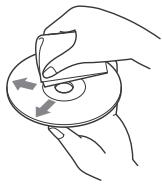
Ппмиткnt Stocobno duckib CD-R/CDRW
JaKIO 6aRaTOceCINHIM NCK NOUHaETbC8 i3 cecii CD-DA, HnO 6yIe pO3ni3HaHO Jk DCD-DA, aIHsi cecii He BIiTBCOPUBaTHMUTbc8.
-ДиСк,якHE MOЖHA BiДТВОПИВАТИ CBOMYпиСТЮП:
-ДИСКИФОматIB CD-R/CD-RW i3 nOraHOJЯкICTH3aIInCy;
-Дискп Форматов CD-R/CD-RW, 3аисahi 3а ДОПOMORОНО НecуmicHERO 3аисУВалBERO PRNCTРО;
- Henpabunlbo Hoi ngToBneHi Dnckn fOpmatIB CD-R/CD-RW;
-ДиСКИ CD-R/CD-RW,Записиу
форматax, ВДIMинхи ВД Формту
МУзунин CD та Формту MP3, як
ВДИповдяють.stандартам ISO9660
(Level 1 abo Level 2),Joliet/Romeо ч
багатocсiiHOMу Формту.
Iopraok BiTbOpenhaydiofoauiB
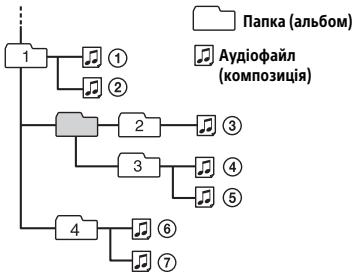
Ippo iPod
-Moxkha niklouatn Habeedehi NHXe mojeli iPod. Peped BukopctAHm npictpoib iPod cnd OHOBNTi x nporpamhe 3a63neueHHN.
Cymichi Moeni iPhone/iPod
| Суmic衲 морень | Bluetooth® | USB |
| iPhone SE | ✓ | ✓ |
| iPhone 6s Plus | ✓ | ✓ |
| iPhone 6s | ✓ | ✓ |
| iPhone 6 Plus | ✓ | ✓ |
| iPhone 6 | ✓ | ✓ |
| iPhone 5s | ✓ | ✓ |
| iPhone 5c | ✓ | ✓ |
| iPhone 5 | ✓ | ✓ |
| iPhone 4s | ✓ | ✓ |
| iPod touch (6-e nokolinna) | ✓ | ✓ |
| iPod touch (5-e nokolinna) | ✓ | ✓ |
| iPod nano (7-e nokolinna) | ✓ |
- Hannc «Made for iPod» (Burotobleno Дь iPod) ч «Made for iPhone» (Burotobleno Дь iPhone) означа, сюеелктонои akcecayap 6by po3po6leni сцuaJBLOдь пikлочену до iPod у iPhone BiDnOBiHIO, яоу розрбнк засычec BiDnOBiHICbTb texHicHM cTaHdApTAm Apple. KompaniaApple He Hece BiDnOBiDAIbHocSti 3a po6Otu zboRo npCtpoAo 6o Myo BiDnOBiDiHiCTb cTaHdApTAM 6e3neKu TpeRyTINBHM Hopmam. 3BepHitb yBary, sO biKOpriTaHn cyOro akcecya 3 iPod a60 iPhone Mожe BpInHyTu HaЯКICTb 6e3npoBODoBOrO 3b'я3ky.
Y pa3i BnHKnHeHH NpTaHb a6o npOBeM i3 pNcTPOEM, He OINcaHNy Y cboMy NocIOHKNy, 3BepHiTbc So HaIbJnxQHoro dJIePa Sony.
TexhieHe 06cIyroBvBaHHa
Чишени КонтakteВ
PnictiM MoKe IpaObATn HeHaJIeXHIM
YHOM Y BnIaNDy 3a6pydHeHHa KOHTAKTIB,
Uo 3'EDHyIOb pnCTPII npeDnHO paHEnb.
Uo6 3aNo6IITN cOMy, BiE'EDHaIte
peDnIO paHEnb (cTOp.7) I npOuNCtBe
KOHTAKTN BaTHm TAMNOHOM. He
DOKNaJaTe NaDMIPHNx 3ycINb. B iHOWMy
pa3i MOKHa NOnKOJNTN KOHTAKTNI.
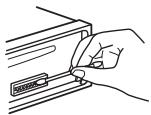
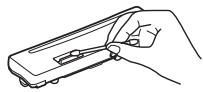
Pnmuitkn
3 MIPKYBaHb 63eNKeB BMNKaIte 3anaIIOBAHHa Ta BImaIte KIOU 3aMka 3anaIIOBAHHnpePeuEHHM KOHTakTIB.
Hikolni He TopkaiTecn KOHTAKTIB BeznocepeHbO naJIbCuMn a6o 6yDb-jaKIM MetaJIeBmI pIeDMETOM.
Texhhi xapaKtepnctnkn
Tiohep
FM
Диаэонн actpoioBaHЯ:
ДяnapaMeTpra [AREA]ВCTaHOBJeHO
3HaueHnra [EUROPE]:
87,5 MΓu-108,0 MΓu
ДяnapaMeTpra [AREA]ВCTaHOBJeHO
3HaueHnra [RUSSIA]:
FM1/FM2:87,5 MΓu-108,0 MΓu(3 iTHepBaJOM 50 KΓu)
FM3:65 MΓu-74 MΓu (3 iTHepBaJOM 30 KΓu)
HnIdo aHTeHn: 3'EDHyBaD nla 3OBHiUHbOi aHTeHn
BukopncTobvBaHa YUITnBicTB:8D6Φ
Bn6ipKobicb: 75 d5 npn 400 K
BidNoWeHnCnHaJ/Shym:73d6
Pozdileenhra: 50 dan ha 1 Kfz
YacToTHa xapaKTepeNtka: 20 Tc-15000 Tc
MW/LW
ДиаэонНастpoювпя:
MW:531KΓ-1602KΓ
LW:153KΓ-279KΓ
Hizdo aHTehn: 3'EDHyBaD yIa 30BHiUHbOi aHTehN
UytIuBicTb: MW: 26 MKB, LW: 50 MKB
IporpaBau CD
Bidnohenn CnHaj/Um:95 d5
HaCToTHa xapaKtePnciKa:10 Tc-20000 Tc
KoeiCiHET deToHaui: no3a BmipObAHmM mExma
MaKcImaJIbHa KInbKicTb (Iinwe CD-R/ CD-RW):
- nanopok (aIb60mIB): 150 (y TOMy uncni kopeheba nanka);
-ФанИВ(KOMno3uIi)i nanOK:300 (MOxNJIBO,MeHSe 300,AkyIO imHa napanok a6oФanIK CBkaIaIbTcB 3 BENKOI KINbKOci CmBBOJIB;
- BiöDpaKjyBaHnx CmBOniB IЯ Na3Bn nAnKn a6o paAyny: 32 (Joliet)/64 (Romeo).
Kojek: MP3 (.mp3) i WMA (.wma)
PporpaBau USB
Intepfeic:USB(nOBHwBnDkichn)
MaKcImMaJIbHn cTpym:1A
MaKcImaIbHa KInbKICTb KOMnO3nui, Io pO3ni3HaIOtbc:
-
nanok (aIb6omIB): 256
-
aHniB (KOMno3nii): 256
Cymicha Berci npToKoIy Android Open Accessory (AOA): 2.0
KoJek: MP3(.mp3) 8 K6iT/c-320 K6iT/c (piIdtprMvYbCBA VBR (pepeMHnha WbNdkcTB pepeaui daHnx)) YaCTota dinckpeTu3aui:16 kTu-48 kTu WMA (.wma) 32 K6iT/c-192 K6iT/c (piIdtprMvYbCBA VBR (pepeMHnha WbNdkcTB pepeau daHnx)) YaCTota dinckpeTu3aui:32 kTu, 44,1kTu,48kTu FLAC (.flac) Po3pRdHiCb:16 6iT,24 6iT YaCTota dinckpeTu3aui:44,1kTu, 48kTu
Be3dpoTobn 3B'ra3OK
BiDcyTHi3ByKOBn cnrHaJ.
→ПлкюсенДоаТКOBи nICJIIOBau notyxHocTi, a B6yDObaHи nICJIIOBau He BnKOpNCOTByETcR.
Bmict nam'riTi ctepto.
ⅢHypJXnJIeHnA b6o eIeMeHT XnJIbIeHnB IdKJIIOHeO a6o He nI dKJIIOHeO HAIJIeXHIM YIHOM.
36epexehi B nam'pi radioctanu ta noka3Hn npabunbHoro yacy ctepti. Ipeperopib 3ano6ixhNk.
Y npicrpoi BnHkae Wm nid vac 3miHn noLoXeHHa3AMKa 3anaIIOBaHHa.
ⅢHypn HnnpaBnblHo NiiknIOueHi Do OdoaTkoBOrO rH3da KINbIeHHA ABTOMO6JIa.
IiicBvBtBOpHnA6o npHOMy 3anyckaTbcra demOHCTpauiHn pexHM.
Якло He ВИКОУВаТи XODнИХ DiI npOTЯROM 5xbuINH, KOLN BBIMKHeHO [DEMO-ON],3aNyCTnTbCЯ DEMOHCTpaцIHn pexIM.
- YCTaHOBITb 3HaueHHra [DEMO-OFF] (CTop.22).
IIndnkaiaiyBikOniDncnIe3HnKlaa6o He Biodopaxaetbca.
→ PernyTOp NiCbIyBaHnB CtAHOBJIeHO B noJoxeHH [DIM-ON] (CTop. 25).
→Диспл徴 ВIMNKa€тбя,ЯкsoHaTnCHyTN
И NOTPIMATN KHONKY OFF.
- Hatnichtb KhoNkY OFF ha npctpoi ta
- yTpMnyTe ii, dOKn dinCnpneH ne
- BBIMKHeTbC4.
→ KOHTaKTn 3a6pydHEni (CTop. 28).
Dncnnei/nicbiybaHna6IImae.
→Погаэтбая HeДОCTaTHbO XKNBNeHHЯ.
- IpekeohaTece, lo Ha npicptpi NoJaebcNoCTaTHbO XnBHeHn BiJ abTomo6iBHorO akymyIToPA. (Bmora do XnBHeHH: 12 B noctiHoro cTpyM.)
KhoNkOn onepaui He yHKcuioHyOtB. DnCK He BnMaetbcra.
→HaTnChiTi b i yTpmyTe KhoNkD DSPL i (Ha3aJ)/MODE doBwe 2 cekyHd, uo6 nepe3aBaHTaXnTu npCTpii. Bmict, 36epeXeHn y nam'rti, 6yde ctepto.
3MipkyBaHb6e3neKHe BmHOHyTe onepaiopepeaBaHTaeHHnPiJ cac kepyBaHHaBtOMo6JIem.
Padiopnionom
He npnmaHbCc nHaJI npaIOCTaHci. 3ByK cynpOBdXyETbc yWMAMN.
HenpaBnIbHe nIdkNIOueHn.
- IpepeBipTe niiKlIOueHnA bTOMo6IbHOi aHTeHn.
-Якso aBOMaTnUHa aHTeHa 3 eJekTpuNHM pINBODOM He BcYBaTbCra,пepeBIpTe nIqKlIoUeHnЯ npBOy KepyBaHnA hTeHOo 3 eJekTpOpNBODOM.
He Bdaetbcra 3naHTn 3anporpamOBaHi cTahui.
→ TpaHcNbObaHn CnHaN HaTOn Cna6Kn.
Y diajana3oH FM3 hemoxnbo hactpoTn 65 M7-74 M7.
→Дя [AREA] Вибрано [EUROPE]. -Установить Дд [AREA] 3наченая [RUSSIA] (стор.22).
RDS
He npinmaoTbca nocLyrRDS (Koln dIa napametpa [AREA] BCTaHOBJeHo 3haueHHra [RUSSIA]).
→Bn6paHo FM3. -Bn6epiTb FM1 a6o FM2.
→Послуги RDS Нedingуни в поочиму periohi.
PicnKilbKOcCekyHnpocnyxOByaHHa3anyckaTbc4yHKnCi SEEK.
→ Ctaunizhe n e TP-ctanziio a6o TpaHcIIOe cnabkni ciHaJI. -Bumkhitb TA (CTop.12).
Hemae NOBIDOMLeHb npo nToOHy cnTuayio Ha doporax.
YBiMKhHiTb TA (CTOp.12).
CtaHsI He TpaHCIOE NOBIDOMLeHHN npo TOTOH CyTuAciHO Ha DOpOraX, HEBaXaOuN Ha Te, 0e Tp-CTaHcIeO. -Halaustyte IHw CTaHcuio.
PTYbio6paXaε[---].
→ItoTuHa cTaHcIa He e RDS-ctaHcIeIO.
He oTpImaHo daHux RDS.
→ CtaHucI He Bka3yE TnI nepedaqi.
He BiTbOpIOeTbcIuCK.
→ДиСК пошкоДжени aбо 3аБрдени.
→ДицкN CD-R/CD-RW He npn3haeHi Дя BiNTBOpEHn3bVky (CTop. 27).
HemoxjIbO BiTbOpTu PhaJI MP3/WMA.
→Диck Hecymichn i3 ФорmaTOM i BepciO MP3/WMA.ДoknaDi BiDOMocTi npo BiTbOpIbAhi DiCKN Ta ФорMaTn HabedeHi Ha caiTi NiIDTpMkN, 3a3NaueHOMy Ha octaHHi CTopiHci O6KlaAnHKn.
Фаил MP3/WMA notpe6yIoTB 6iNbwe yacy din noqatky biDtbOpeneHn, hix iHsi.
HabeHeHn HxJyde NcKn Notpe6yIOb 6iIbIe yAcy dJa nOaTky BiDTHoPeHHa: -IMCK,3aNcAhn 3i CkJaIHOCTpyKtpoIO DepeBa aiNIB; -IMCK,3aNcAhn y pexMl Multi Session; -IMCK,Ha JAKNI MOXHa DODaBAtn aiN DaHnx.
3Byk nepepenBaetbcra.
→ДиСК пошкоДжЕн aб0а6рдненH.
BiTbOpHn3 npctpoo USB
He BiTbropIOUObc eneMeHTu Chepe3 KOHcEHTpaTOp USB.
→Писстpoю He Вдаэтбяр розni3натипистрий USB чepe3 концentpaTop USB.
Дя поату BiTBopeHЯ i3 npuctpoo USB notpi6ho 6iNbwe yacy.
→ Ctrpyktypa dpeba faaiiib y npicctpoi USBCKnaIHa.
IpepeuBvactictb 3Byky.
→ 3ByK MoKe 6yTu NpeepuBvactm Upeez BVCOKY WbUdkicTb Npepaui DaHnx.
YJDenKHX BnAaDkAX BIDTBopeHNNIaJIiB i3DRM (KepyBaHHNzIΦpOBmN npBaAMn) HEMOxJINBO.
He BiIbTOBIOeTbcra ayiofoaaiJ.
→Писторoi USB, BiДфогматовини 3a ДОПOMORЮ ФайLOBИХСИТЕМ, BiДміннIX BiД FAT16 a60 FAT32, He niДТримуЛься.*
念 ċn anapat niDtpmmy cncTeMn FAT16 i FAT32, pnoTe JeanpnpTc0B USMooytb 6ytn HeCymiHm4 3 yCiMa nmmfAoiNBoMn CnTeMAm. DoknadHsiu HnfopmaioDbv. B iHctpykuij 3 EkcnPatauzi npnctpoo USB a6b0 38jAixtcb 3 BVPoSHNOM.
HeBdaTcBaBkoHaTOnepaui nponycky aIb6Omy, nponycky enemeHTB (pexim uBnDKoro nepexody) i nowky kOMnO3nui 3a Na3boo (Quick-BrowZer).
Lizi onepaui Heoctyni, kaoi0 nkiuchoe iPod a6o npictri USB y pexkmi Android.
- YctaHObitIy [USB MODE] 3naueHnra [MSC/MTP] (cstop.23).
-Budanitb npictpi iPod.
He BiDObpaKaεTbCra Ha3Ba BnBLeHOro npictpO.
→3aIeXHo BID cTaTcy IHNoro npnctpoH NOro Ha3Ba MoKe He BiOobpaKaTnc.
He yTuTHo MeIooHbXiDHorO 3zBInKa.
→HajauTytIe rTuHiCTb, NoBepTaOuYi MInCK KepyBaHnH, KOJI NHaDxOoNtB BIXiDN Hn D3B1OHK.
BiCyTHICTb MeLoDiI BXiDHorO 3BViHka MoKe 6yTu TAKoX CnpuNHeHa OC6JIbBOCTMn NiKJIuOeHOro npnCTPOJ.
- YctahOBiBtB IJIa [RINGTONE] 3HaueHnra [1] (CTop. 25).
→Пистрий He niДКЛЮЧЕно Do nepeДнIx ДИНAMIKIB.
-Пдклочьпесн DiHnAmiKи Do zufoR npncTpoI. MeNoJia BxIHOrO d3B1HaKnapepaTeC TIlbKn Ypee3песн DiHnAmiKи.
Pidac3BbHka He yyTHo roNocy cnIBpo3MOBnHa.
→Пистрий He niДКЛЮЧЕно Do nepeДнIx ДИНAMIKIB.
-Пдкнluчт b nepeDi dINHAMiKn do zufoR npriCTpo. TOnoc cnIBpO3MOBnIka nepeJaTcBcTinbKn Uepe3 nepeDi nINAMKi.
Cnibpo3MOBnK yE Bac nyKe TnxO a6o 3aHaTTO roJIOCHO.
→HanaTnyTe rUHyIcTb,peryIIOuOuPiBeHb nocnHeHHB MikpofoHi (CTop.18).
IiD qac d3BcHb YyTHo BiDnyHna 60CTOPOHHI yMn.
→3MeHHTe rYHicTb.
YctaHOBiBtIbI npaMaTePra EC/NC 3haeHenn [EC/NC-1] a6o [EC/NC-2] (ctop.18).
RaKoMOxJInBO, CnpO6yIte 3MeHUnTI npiBeHbUMy HABKOINHbOro cepeDobuIIa. HanpIKJa, RaKo Bn pO3MOBJIeTe 3 BiIDKPITM BIKHOM iCyTN UWM dOpoxHbOrO pyx, 3aKpNIte BkHO. RaKo PO3MOBI 3aBaXa€ UWM KOHNIOhepa, 3MiHiTb peXIM pO60TN KOnDNUOHepa.
TeJeOHe nIdknluoaetbcra.
→Пид уас BiДтВорешиаудio BLUETOOTH 3'ЕнданьЗ TeTeфОном He BCTAHOBIIIOCTbC. Habi'tя кю BO NaTINCHNYI KHONKY CALL.
-HanaTnyTe niiKnIoueHn3 TeJefoHy.
Hn3bka kictb 3Byky niД yac po3MOBn.
AkiCTb 3BvN iNJ qac TeneoHNOHoi PO3MOBN3aJeKHTb BID xapakTePncTnK npmAmHnCRnHaJy Ha MO6JIbHOMY TeNeoHl.
Iid cac BvdTbOpENH3 aydionpncToPO BLUETOOTH 3Byk nepePnBaetc.
3MeHHTe BIDCTaHB MIX UIM NpNCTPOEM i nIKIIOueHm ayIQIONPNCTOE BLUETOOTH.
NpepaBHaHnCnHaNly MoKe nepePbAuncya Peep3 QoxoN Ha ayionpncptoi BLUeTOoTH, cnpo6yIte Ioro 3HTn.
→Поблneyс Кильka пирстpoIB BLUETOOTH A60 iHmX npicstpoIB, lo npaioIOtBa h6a3i paoiaactoT.
-BumKHiB iHui npucTpoi.
-36iNbWTe BiDcTaHb Do iHxnpucTpoIB.
→Пд.Yac BCtaHOBHeHHIpiKlIoUeHHI mix pIcTPOE M I MOBIIbHM TENEΦOHOm BiTBopeHHI 3BykY TmUcBO nepePnBaEcTbc. Ce He CBdUHT npo HeCnpaBHiCb.
HeBdaETbcKepyBaTuPiKluOeHMaayionpncTrooEM BLUETOOTH.
→ Пеконайтес, сц рдкю悔иу aydionopncrtpi BLUETOOTH nɪdtpmyme npoφijb AVRCP.
He npaioIOb deKei yHKuii.
→PepekohaTeC8,10PiKluOeHnnpntpi nIgTpMMye ci yHKuii.
Pnpi npimae Bxidni dzBHK6e3 BiNobiDHOI KOMaHn.
Ha NiJIKJIOUeHOMY TeJIeΦOHi HJaIaIITOBaHO ABTOMaTlUHe IpNiMaHnH DaB1HkIB.
HeBdaTbCSTBOpTNnapyBHaCNIIDOK npeBnuuHnnaCyOkyBaHn.
MokJInBO,ДЯДанOro npnCTpoHO nepe6baHcKOPOkTmIac OuikyBaHNHa CTBOpENH napr.
- CnpobyTe CTbOpTu npay npotrO m zuBO rUcay.
He npaioe fynkuiu BLUETOOTH.
HatachitbI notpimMaTe KHONky OFF doBwe 2 cekyH, uO6 BmKHytn npnctpi, a nOTIM 3HOBY BBIMKHiTb Noro.
He BMkaetbca nporpama Siri Eyes Free.
→Виконайтpepecectpaizio pexmmy «Вильни руkn» Дая iPhone, сю niДтprmyme nporpamy Siri Eyes Free.
YbIMKnHtB BnKOpNCTaHHaФyHKcii Siri Ha npncTpoi iPhone.
3aBeepuTb 3'edHaHnH BLUETOOTH mix Xiphe i anapaTom, a notim BiHOBiTB niiKJIouHeyn.
Pobota nporpamn SongPal
CD ERROR: He BiTbOPIOETbcIaCK. IaCK 6yde BnlyueHn aBtOMaTuHNo.
→POnuCTbTe DmK a6o BCTaBte NOrO pAnBnIbHo. NpeKeONaHTecA, 0U DNCK He npOPOXHi I He NOnkOJdXeHN.
CD NO MUSIC: BiCyTHi BiTBTOBAnHn
faiI. DiCK bye BUNyUeHN nABTomTuNoHO.
BCTABTEДИСК3BДТВОВАнMu ΦaIJaMn(CTOp.29).
CD PUSH EJT:ДИСК HEMOXKINBO BИНЯТN.
→HATNCHTb△(BIMaHHA.
HUB NO SUPRT: uei npictpri He niTpmye KOunchpatopn USB.
INVALID
→Bn6paHa onepaizr moKe He nIiTpumyBaTncr.
→PexnM [USB MODE] He MoXe 6yTn 3mHeHn NiD yac BiTbOpeHHa 3 iPod.
IPD STOP: BiTbOpenHЯ iPod 6yNo 3aBepseHo.
→Bukohai Te heo6xidiHa iPod a60 iPhone, 106 po3noaTu BiTbOpenHn.
NO AF: BiIDCYTHI aIbTepHaTNBHI YaCTOTN.
→Hattchitb KhoNkSy SEEK + / - ,KoJI 6nIma H3Ba npOrpamHoI nocLyr. PnpCTpi noHHe uKaTIn iHsU yactOTy 3 TaKIMn camm daHmPi (iJeHTnΦikaiz nporpam) (3'ABuTbcN nobIDomJehn [PI SEEK]).
NO TP: Biicythi nporpamn npo cntyaio Ha doporax.
→Pnucpii npoOBJKByBaTmne nouYk doCTynHnx TP-CTaHci.
NOT SUPPORT -Android MODE
APP :He BCTaHOBJIeHe 3'EnHaHn3 npOrpAmIO.
→ Nobtoriptb cnpo6y BCTaHOBuTn niKkIoueHHN «SongPal» (ctop. 19).
APP DISCNCT: 3'εДнання 3 nporpaMOH npnINHeHe.
BCTaHOBiTB NiIaKJIuOeHHra «SongPal» (ctop. 19).
APP DISPLAY: BiДКРИТЕ BiKHO
Hаlaштувашия ekрара пограMuN.
→ BmДITb 3 BIXHа HanaityBaHnE ekpaHa nporpam,Mu6 nepeuTn Do KepyBaHnR 3aONOMOROIO KHONOK.
APP LIST: BiДкрий спнсок Вмісту CD, пистою USB abó iPod.
→BnDItb3iCnCKy,L06nepeTINdo KepyBaHnHa 3a DOnOMOrOHO KHONOK.
APP MENU: BiДкрпe BiКнnapametpiB nporpamn.
BuiDITb 3iKHa napaMeTpiB npOrpaMn, Uo6 nepeRtn DoKepyBaHNr 3a DOnOMOROIO KHONOK.
APP NO DEV:Прострии, на якову Bстановлесно рогрamy, He пдкlioецно abо He розпзIHао.
BCTaHOBIb 3'EnHaHnBLUeTOOTH i ue pa3 BCTaHOBIb nIiKJIIOueHnR «SongPaI (CTOp.19).
APP SOUND: Bɪdɪkpuɪnɪ nɪcɪŋneɪ Ṣaɪlaʊtɪyaɪbʌnɪ 3Bvky npʊrpaɪm.
BnDITb 3 nCnpeo HanaWtBuHn3ByKu npOrpAmn, uO6 nepeTuNo KepyBaHn3 3a DOnOMOROHO KHONOK.
OPEN APP: nporpamy «SongPal» BIMKHEHO.
3anyctitb nporpamy.
Lioo po60tn nybta DnCTaHcuiHoro KepyBaHHa KePMOBOMy KOJIeci:
ERROR: niД уac peεctpaцii ΦункцiiсталасяпOMИКа.
→BVKoHaIte pnoceDpypeCtpaui 3HOBy, noHnHaOuN 3TiEi FyHKui, De CtaJaCra nomnka (ctop.23).
TIMEOUT: npoceynpy peectpauiy fynkuii He BnKoHaHO y 3B'ay3ky 3 nepeBnueHnHm limity uacy.
Cnpo6byTe 3aBepuHTn npoceDpy peecTpaui, nokn 6bImae [REGISTER] (6bn3bko 6 cekynd) (ctop.23).
JaKIO haBeHeI npaDn He donomaraHOTb BwipuHTn pnoBEmy, npoKOHcybTuTytec3 HaibJNxUHM dInnePOM Sony. JaKIO npiCtpi 3daeTcbr BpeMOHT chePe3 npoBEmy 3 BiDTBOpEHNM dNcKa CD, 3axOniTb i3 cO6HO dNcK, NiD qac BiDTBOpEHNA JKO rO BHNKnla npoBema.
PikKIOUeHHaBCTaHOBJIeHHa
YBara!
-Пи'd'EDnaiTe Bci 3a3emLeHi Ka6eIdo cnilbHOI ToUKn 3a3emHeHH.
3a06iraTne nopadaHHIO npOBOKn iID rBNHTn a6o mix pyxomHmDeTaneI (hapnKlaad, mIX HapnMHNMMc dDiHHN).
-Пелед CTBOPEHHR MIIKJIQUeHb BIMKHTb 3anaiIOBAnHa ABTomO6JI, So6 3anOpIITN KOPOTKOMY 3amIKaHHIO.
Пдклioчть кабелжнвгеня ⑥ сюатукуdo npicstpoTo TaДинамikib,aNotIM- doDAtKOBOrO po3'EmyЖИВеHЯ.
3МірКУвань земпеко 60OB'яЗКОВО iO1oIoiTe BciBilni HeniД'Енahi Ka6eIi eKeKTOIoiIOBajLbHOIO CTPIKHO.
3açtepekhi 3axoju
YBaXHo BnBepiTb MlCue dIy BCTaHOBJeHnI, IIO6 npICTpI He IpeuKoJxab HopMaJIbHOMy KepyBaHHO abTOMoBJIeM.
- YHnKaIe TBeBCTAHOBLeHHa PnICrPoIO B MiCzX, IIO NiIaIaIObTcB BnIMBy PnIy, 6pyU, HAdmipHOIi BibaPaii abo BnCOKOi Tempepatyn, HapnKnaD y Mucx, Ha kI naAe pIpme CoHnYe npOMHHa, aO bIina BEHTnlauiNHX OTBopIB o6irpBaHa.
ДябeзnevHorTo TaHaIiHOrO BCTaHOBJIeHHN BKNOPICTOBYte MOHTaXHe 06laHaHaHH TijbKn 3 KOMPJIeKtY NOCTaHaHH.
PpIMtKa 0do Ka6eJIO XKVBHeHn (XOBTH)
3a NiДкИLOЧЕНЯ рпСТЮО разOM 3 iHUNIMI CTepeOKOMIOHENTAMи CЛУСТРУМВ YKOTHI pABTOM6JIЯ Мб 6уTN BIVSUOIO 3cMu 3aHaeJeu CINI CTРΥМ, YKAZaHINx Ha nlaBkX 3anObIXHHNKAX KOKHOHR OKOMOHEHTA.
PerylIOBaHHa KyTa BCTaHOBJeHHa
BicpeyIIOHTe Kyt BCTaHOBJIENH TaK, 106
BIN 6by He 6JIbIshn 3a 45^
Cnncok yactnH JbBCTaHOBLeHH
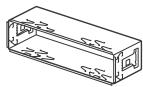
①
(2)
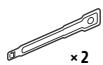
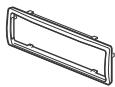
(3)
(4)


⑤
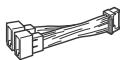
(6)
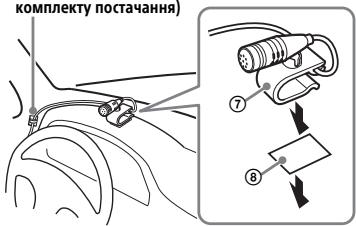
3atmckA (HE 80mbD aKomnKNeTy noctaannH
Ybara!
- Lhnp He noBnHeN oBkpyuBaTncs HbKOLO pylboOoi KOJOHKn YN BaxKeIa NepemKanHn nepeDaue -Ce naD3BnuAho Hne63neHc. CnIkye, 1o6 hUnp Ta iHsi JactHN npiCtpoU He 3aBaxJaN BamPiD Yac KepyBaHHn ABTomObiJEM.
-KaioBaawABTomO6iNbO6naHaHO npDyKamn 6e3neKn a6o IHsnnm amOpT3UoyuHm enEmeHTaMn, npokOHcyIbTyItec3 npINBOy BCTAHOBLeHHMaKPOfOHa 3npOaBcMy Ma3aHNy,de6yNo npuD6haN pnpCTpiI, a6o 3dInepom ABtomO6iNbHoI KOMnaiii.
Ppimitka
Peped 3akpiIneHnHM DBOCTOPoHHboI KNEkoI CTPIKIN QOCHNT nobEPXHO naneI npuaiaB 3a DONOMORO Cxyoi rHanuipKn.
BnKOpNCTaHnI npOBoIOBOrO nyIbTa dNCTaHciHoro KepyBaHHa
Hereby, Sony Corporation declares that this equipment is in compliance with Directive 2014/53/EU. The full text of the EU declaration of conformity is available at the following internet address: http://www.compliance.sony.de/
Eesti keel
If you have any questions or for the latest support information on this product, please visit the web site below:
Site d'assistance
Register your product online now at:

- Bluetooth® Audio System
- Made in Thailand
- C E
- Notice for customers: the following information is only applicable to equipment sold in countries applying EU Directives
- Disposal of waste batteries and electrical and electronic equipment (applicable in the European Union and other European countries
- with separate collection systems)
- CAUTION
- Warning if your car's ignition has no ACC position
- Disclaimer regarding services offered by third parties
- Important notice
- Emergency calls
- On BLUETOOTH communication
- Table of Contents
- Getting Started
- Listening to the Radio
- Playback
- Handsfree Calling (via BLUETOOTH only)
- Useful Functions
- Settings
- Additional Information
- Connection/Installation
- Guide to Parts and Controls
- Main unit
- PUSH ENTER
- MENU
- N-Mark
- ALBUMV/
- Detaching the Front Panel
- Caution alarm
- Serial numbers
- Attaching the front panel
- Resetting the Unit
- Note
- Setting the area/region
- Setting the Clock
- Preparing a BLUETOOTH Device
- Connecting with a Smartphone by One touch (NFC)
- To disconnect by One touch
- Notes
- Pairing and connecting with a BLUETOOTH device
- If passkey* input is required on the BLUETOOTH device, input [0000].
- Select this unit on the BLUETOOTH device to establish the BLUETOOTH connection.
- To start playback
- To disconnect the paired device
- Connecting with a paired BLUETOOTH device
- To connect the last-connected device from this unit
- Tip
- To install the microphone
- Connecting with an iPhone/iPod (BLUETOOTH Auto Pairing)
- Connecting a USB Device
- Connecting Other Portable Audio Device
- Press SRC to select [AUX].
- To match the volume level of the connected device to other sources
- Storing automatically (BTM)
- Tuning
- Storing manually
- Receiving the stored stations
- Using Radio Data System (RDS)
- Setting alternative frequencies (AF) and traffic announcement (TA)
- To store RDS stations with the AF and TA setting
- To receive emergency announcements
- To adjust the volume level during a traffic announcement
- To stay with one regional program (REGIONAL)
- Local Link function (UK only)
- Selecting program types (PTY)
- Type of programs
- Setting clock time (CT)
- Playing a Disc
- Insert the disc (label side up).
- Playing a USB Device
- To stop playback
- To remove the device
- Caution for iPhone
- Playing a BLUETOOTH Device
- Adjust the volume on this unit.
- To match the volume level of the BLUETOOTH device to other sources
- Searching and Playing Tracks
- Repeat play and shuffle play
- Searching a track by name (QuickBrowZerTM)
- Searching by skipping items (Jump mode)
- Receiving a Call
- Making a Call
- From the phonebook
- From the call history
- By phone number input
- By radial
- By voice tags
- Available Operations during Call
- To switch between handsfree mode and handheld mode
- SongPal with iPhone/Android smartphone
- Establishing the SongPal connection
- If the device number appears
- To terminate connection
- Selecting the source or application
- To select the source
- To display the source list
- Announcement of various information by voice guide (Android smartphone only)
- Activating voice recognition (Android smartphone only)
- To activate voice recognition
- Replying a message of SMS (Android smartphone only)
- Making sound and display settings
- Using Siri Eyes Free
- To deactivate Siri Eyes Free
- Canceling the DEMO Mode
- Basic Setting Operation
- General Setup (GENERAL)
- AREA
- DEMO (demonstration)
- CLOCK-ADJ (clock adjust) (page 7)
- CAUT ALM (caution alarm)
- BEEP
- AUTO OFF
- STEERING
- CUSTOM
- PRESET
- EDIT CUSTOM
- RESET CUSTOM
- USB MODE
- CT (clock time)
- AF/TA (alternative frequencies/traffic announcement)
- REGIONAL
- FIRMWARE
- Sound Setup (SOUND)
- EQ10 PRESET
- EQ10 CUSTOM
- BALANCE
- FADER
- Display Setup (DISPLAY)
- DIMMER
- BRIGHTNESS
- BUTTON-C (button color) (MEX-N5200BT only)
- COLOR
- DSPL-C (display color) (MEX-N5200BT only)
- SND SYNC (sound synchronization)
- AUTO SCR (auto scroll)
- BLUETOOTH Setup (BLUETOOTH)
- PAIRING (page 8)
- AUDIO device
- RINGTONE
- AUTO ANS (auto answer)
- AUTOPAIR (auto pairing)
- BT SIGNL (BLUETOOTH signal) (page 8)
- BT INIT (BLUETOOTH initialize)
- SongPal Setup (SONGPAL)
- AUTO LAUNCH
- CONNECT (page 16)
- Updating the Firmware
- Precautions
- Moisture condensation
- To maintain high sound quality
- Notes on discs
- Notes on CD-R/CD-RW discs
- Playback order of audio files
- About iPod
- Maintenance
- Cleaning the connectors
- Specifications
- Tuner section
- FM
- MW/LW
- CD Player section
- USB Player section
- Wireless Communication
- NFC Communication
- Power amplifier section
- General
- Copyrights
- libFLAC
- Troubleshooting
- No sound or the sound is very low.
- No beep sound.
- The contents of the memory have been erased.
- Stored stations and correct time are erased.
- Makes a noise when the position of the ignition is switched.
- During playback or reception, the demonstration mode starts.
- The display disappears from/does not appear in the display window.
- The display/illumination flashes.
- The operation buttons do not function. The disc will not eject.
- Radio reception
- Stations cannot be received.
- The sound is hampered by noises.
- Preset tuning is not possible.
- MHz to 74 MHz in FM3 cannot be tuned in.
- RDS
- RDS services cannot be received (when [AREA] is set to [RUSSIA]).
- The SEEK starts after a few seconds of listening.
- No traffic announcements.
- PTY displays [ ]
- Program service name flashes.
- CD playback
- The disc does not play.
- MP3/WMA files cannot be played.
- MP3/WMA files take longer to play than others.
- The sound skips.
- USB device playback
- You cannot play items via a USB hub.
- A USB device takes longer to play.
- The sound is intermittent.
- The audio file cannot be played.
- Operations for skipping an album, skipping items (Jump mode), and searching a track by name (QuickBrowZer) cannot be performed.
- The sound cannot be output during playback in Android mode.
- NFC function
- One touch connection (NFC) is not possible.
- BLUETOOTH function
- The connecting device cannot detect this unit.
- Connection is not possible.
- The name of the detected device does not appear.
- No ringtone.
- The talker's voice cannot be heard.
- A call partner says that the volume is too low or high.
- Echo or noise occurs in phone call conversations.
- The phone is not connected.
- The phone sound quality is poor.
- The volume of the connected audio device is low (high).
- The sound skips during playback of a BLUETOOTH audio device.
- The connected BLUETOOTH audio device cannot be controlled.
- Some functions do not work.
- A call is answered unintentionally.
- Pairing failed due to a timeout.
- BLUETOOTH function cannot operate.
- No sound is output from the car speakers during handsfree call.
- Siri Eyes Free is not activated.
- SongPal operation
- Application name is mismatched with the actual application in "SongPal".
- While running the "SongPal" application via BLUETOOTH, the display automatically switches to [BT AUDIO].
- The "SongPal" application is automatically disconnected when the display switches to [IPD].
- Messages
- CD ERROR: The disc cannot be played. The disc will be ejected automatically.
- CD NO MUSIC: There is no playable file. The disc will be ejected automatically.
- CD PUSH EJT: The disc could not be ejected properly.
- HUB NO SUPRT: USB hubs are not supported.
- INVALID
- NOT SUPPORT -Android MODE
- For BLUETOOTH function:
- For SongPal operation:
- For steering wheel remote control operation:
- Cautions
- Note on the power supply lead (yellow)
- Mounting angle adjustment
- Parts List for Installation
- For MEX-N5200BT
- Connection (For MEX-N5200BT)
- Connection (For MEX-N4200BT)
- Making connections
- To the car's speaker connector
- To the car's power connector
- Subwoofer Easy Connection
- Memory hold connection
- Speaker connection
- Power connection diagram
- Common connection
- When the positions of the red and yellow leads are inverted
- When the car without ACC position
- Installing the microphone (MEXN5200BT only)
- Using the wired remote control
- Installation
- Removing the protection collar and the bracket
- Mounting the unit in the dashboard
- Detaching and attaching the front panel
- Fuse replacement
- Raccordement/Installation
- Appel mains libres (via BLUETOOTH uniquement)
- Attention
- 3HaK N
- ALBUM ▼/▲
- YctaHObKa cTpaHbI/perNoHa
- YCTaHOBka YacOB
- PpimueaHne
- BkIyueHne yHKcun Bocnpon3BeHn
- OTKJIIOUeHHe cOpJxKeHHOrO yCTpoIcTBA
- Подклоченke coprajжehHomy yctpoiCTBy BLUETOOTH
- AbTomatnueckoe coxpaheHne (BTM)
- Hacroka
- CoxpaHeneHbpyHyu
- Ppnepepaioctaun CoxpaheHHbIX B namrTn
- CnCTembl paHnoHaHHbIX (RDS)
- YctaHObKa aIbTepHaTnBbIX chaTOT (AF) n coo6zehn o Tekyuei cnTuaznn Ha doporax (TA)
- YcTaHObKa yAcOB (CT)
- Bocnpon3BeDeneHne
- Bocnpon3BeJeHne Dncka
- BCTaBbTe DNCK (3TNKETKO BBepx).
- Bocnpon3BedeHne yctpoiCTBa USB
- PpimueaHn
- ПОИС KOMПОЗИЦИ NO Ha3BaHNUO (Quick-BrowZer™)
- CobepseHne Bbl3Oba n3 KypHaHa Bbl3OBB
- CobepueHne BbI3Oba nyTem nobTophoro Ha6opa Homepa
- CobepueHne Bbl3OBA cNOMOuIbIO rOJIOCOBbIX METOK
- HactpoikKa 3Byka (SOUND)
- Hactpoia dnncnpea (DISPLAY)
- Hactpoika BLUETOOTH (BLUETOOTH)
- AUTO ANS (aBtOMaTnueckn OTBEt)
- BT INIT (nHnuaaiaauiu BLEUTooth)
- Hac tropona npuIooKeHn aSongPaI (SONGPAL)
- CONNECT (ctp.19)
- DOnONHnTeJIbHaN HOpMaun
- 06HOBJIeHne
- MnKponporpaMMbl
- PpimechaHn
- Mepbl npedoctopoXhOCTn
- KoHdEhcaZyBlaRn
- IopraOK BOCnpOn3BedeHna ayduofoaaiIOB
- CbeHn oB yctpoiCTBe iPod
- YxOДЗаустpoIcTBOM
- YnCTKa KOHTAKTOB
- PpIMeuaHn
- TexHnueckne xapaKTepeNCTnKN
- Tiohep
- BecnpobodnacBz3b
- PoiKJIIOUeHnE no NFC
- He cIbIeH 3ByKOBoB CnHaJ.
- YdaJIeHbI daHHbIe N3 naMaTn.
- He pa6oTaIOT KhoTKn ynpaBLeHn. DnCK He n3BNeKaETc.
- Ppne m padnoctanm
- He ydaetc npnraTb padnoctanu. 3Byk cnpoboxdaetc nomexamn.
- He ydaetcBbINOHNHTb npedBaPnteIbHyIO HaCTpOky.
- B dana3ohe FM3 He ydaTcHacTpOHTb aactotbl 65 MΓu-74 MΓu.
- Dopokhbie coo6eHn He nepedaioTc.
- PnBVKIOUeHmΦyHKUIN PTY OTo6paKaTaCn HnDnkaTn[-.
- Ha3baHne nporpaMMHO ycIyrr Mnaet.
- Bocnpoun3BepeHne nckOB CD
- KomnakT-He BOCPon3BOJNTc.
- Hebo3MOxHO BOCpOu3BecTuΦaJIbI MP3/WMA.
- IopKnIOUaEMOMy yCTpOuCTBy He ydaetcB o6hApYKuTb daHbI annapaT.
- He ydaetc co3daTb nodknloueHne.
- He oTo6paJxAeTcNIMr o6HApUxKeHHOrO yCTpOuCTBa.
- He cblshno co6eecdHnka.
- CobecdNHK roBOpNT, yTO BAC cblshO OueHb TnXO nnn oueHrpoMko.
- BoBpemTeJefoHHbIX pa3roBOpOB CblshO 3X0 NIN Wym.
- TeleoH He noKnIOueH.
- IIIOXoe KaueCTBO 3ByKa B TeJefoHe.
- PROMKoCTb NOkKnOuChENHOro ayNIOyCTPoICTBa CNIuKOM Hn3KaA NIN CNIuKOM BvICOKA.
- Bo BpemB BoCpOn3BeDeHncaayNoocPbCTBa BLUeTOOHnppeBbAeTc3ByK.
- He ydaetcya npabnTb noKluoyeHHbIM ayduocyctpoicTBOM BLUETOOTH.
- He pa6oTaIOT HeKOTOpBie yHKnU.
- PpOncxOoNT aBtOMaTnueckn OTBeT Ha BXoJaIy BbI3OB.
- Hyeaioob BbIIOJIHHb COnpJxKeHne n3- 3a IpeBbIeHn BpeMeHn OxuaHn.
- He ydaetcya npablaTb yHKcuNee BLUETOOTH.
- Bo vbpem Tepeohnro pa3robopa B peKIme 6ecnpoBnoH raphNtpyb HET 3Byka uDnHaMnikOB ABTOmObIJa.
- Функци Siri Eyes Free He BKluoyeha.
- McnoIb3ObaHne npnloXeHna SongPal
- Ha3BaHHe npInIOKeHnHe COOTBeTCTByET fakTHueCKOMy npInIOKeHnIO B "SongPal".
- CD PUSH EJT: He ydaIocb npaBnIbHo n3BJeCb DNCK.
- PpimmeuHnNo pa6oTe cnpiJIOKeHnem SongPal
- PpimcHnno pa6oTe npIbTa DnCTaHcNHOHHoro ynpabHeHnHa pyJe
- YctaHObKa/IOpkJIuOyeHne
- BHMMaHne!
- Mepbippeoctopokxhoctn
- ПИМЕЧАНОНСТЕЛБО ПОНБОДA ПУТАЙ (KEЛТь)
- PerylnpobKa yrJa yctahOBKn
- Ipeuehenb deTaJeN dJa UcTaHOBKn
- Длma moDEDmEX-N5200BT
- OToeDInHeHne 3aunTHoM MaHKeTbI N KpOHuTeHnHa
- UctaHOBka yCTpoiCTBa B npnbopno naheJn
- Примechаня
- Сятын установka поеденье naheл
- BaxJIbVe nobIDomIeHHa
- ybara
- Ekctpehi 3BbIKN
- LIOO 3B'3Ky 3a DOnOMoroo BLUETOOTH
- 3mict
- PouaToKpo6Otn
- PpocnyxobvbaHnpaia
- BiDtbOpenhra
- PiiKJIIOUeHHBvCTaHOBJIeHH
- IobiHnK i3 qactnH i opraHIB KepyBaHHa
- OchOBHn npCTpi
- OFF
- P03Ha4ka N
- Pnmuitka
- HanaawtybaHHKpaiHn/perioHy
- YctaHOBJIeHHr rOIMHHNKa
- BiKJIIOUeHHe «BODINOTNK
- Ppimitkn
- CTbOpenhna napi i BcTaHOBLeHHn niKlNoUeHHN 3 npNCtpoEM BLUETOOTH
- PnmiTka
- NoataOK BiTBopeHHa
- 36epexeHnBpyHy
- Ppniompaioctaun, 36epexehnx y nam'atI
- BukopustahnncTeMnpaioaHx (RDS)
- HanahtyBaHHaIbTePhaTHBHX chaTOT (AF)i nObiDomJIeH npo cHTyaCiIO Ha doporax (TA)
- 36epekeHHcTaHcRDSi3 BnKOpNCtAHmHaJalStyBaHb AF i TA
- PpIMMaHHeKCTpeHx OOrIoUeHb
- PeryIIOBaHHryHocTi nID yac orOLOWeHHn pO cTuayuio Ha doporax
- Прийом odhi'e periohaьhoi nporpamn (REGIONAL)
- Bn6ip tnniB nporpam (PTY)
- Tun nporpam
- YcTaHOBJIeHHr RoDmHHNka (CT)
- Bjdtbopenhra
- BiTbOpenhnaIncKa
- BCTABTe DnCK (niDnncaHOO CTOPHOIO DOrOpN).
- BiTbOpEnH npictpoU USB
- Pnmuitkn
- 1Плдклочьпсстрий USДdo nopTy USB (cstop.11).
- BiDpyrIIOJIe rUHicTb Ha IcBOMy anapati.
- Budanen npnctpoio
- BiTbOpEnH3 npNcTpoIo BLUETOOTH
- PpumitKu
- IooB BnipBnTn rHyHicThb npncToPo BLUETOOTH BiHocHo iHnx Dxkepe
- Moxnbi onepaui nid yac 3Bihka
- Kopnchi yHKcii
- ПPORpама SongPal Дд iPhone a6o смртфona Android
- BumkHeHH nporpamn Siri Eyes Free
- PnmiTkn
- CkacyBaHHpeKmMy DEMO
- Ochobhi onepauii HanauTyBaHn
- 3araIbHI halaIHTyBaHHN (GENERAL)
- DEMO(demonctpaia)
- PpnmITkn
- CT(Touhni HaC)
- BTM (nam'ytb onTmMaJbHoI hAcTrouKN) (ctop.12)
- Hanaштуваимь 3Byky (SOUND)
- 3a6e3neueHHBVCOKoi kokci 3Byky
- PnIMITKuOoDoNCKIB
- Ппмиткnt Stocobno duckib CD-R/CDRW
- Iopraok BiTbOpenhaydiofoauiB
- Ippo iPod
- TexhieHe 06cIyroBvBaHHa
- Чишени КонтakteВ
- Texhhi xapaKtepnctnkn
- IporpaBau CD
- PporpaBau USB
- Be3dpoTobn 3B'ra3OK
- BiDcyTHi3ByKOBn cnrHaJ.
- Bmict nam'riTi ctepto.
- 36epexehi B nam'pi radioctanu ta noka3Hn npabunbHoro yacy ctepti. Ipeperopib 3ano6ixhNk.
- Y npicrpoi BnHkae Wm nid vac 3miHn noLoXeHHa3AMKa 3anaIIOBaHHa.
- IiicBvBtBOpHnA6o npHOMy 3anyckaTbcra demOHCTpauiHn pexHM.
- IIndnkaiaiyBikOniDncnIe3HnKlaa6o He Biodopaxaetbca.
- Dncnnei/nicbiybaHna6IImae.
- KhoNkOn onepaui He yHKcuioHyOtB. DnCK He BnMaetbcra.
- Padiopnionom
- He npnmaHbCc nHaJI npaIOCTaHci. 3ByK cynpOBdXyETbc yWMAMN.
- BiTbOpHn3 npctpoo USB
- He BiIbTOBIOeTbcra ayiofoaaiJ.
- HeBdaTcBaBkoHaTOnepaui nponycky aIb6Omy, nponycky enemeHTB (pexim uBnDKoro nepexody) i nowky kOMnO3nui 3a Na3boo (Quick-BrowZer).
- He BiDObpaKaεTbCra Ha3Ba BnBLeHOro npictpO.
- He yTuTHo MeIooHbXiDHorO 3zBInKa.
- Pidac3BbHka He yyTHo roNocy cnIBpo3MOBnHa.
- Cnibpo3MOBnK yE Bac nyKe TnxO a6o 3aHaTTO roJIOCHO.
- IiD qac d3BcHb YyTHo BiDnyHna 60CTOPOHHI yMn.
- TeJeOHe nIdknluoaetbcra.
- Hn3bka kictb 3Byky niД yac po3MOBn.
- Iid cac BvdTbOpENH3 aydionpncToPO BLUETOOTH 3Byk nepePnBaetc.
- HeBdaETbcKepyBaTuPiKluOeHMaayionpncTrooEM BLUETOOTH.
- He npaioIOb deKei yHKuii.
- Pnpi npimae Bxidni dzBHK6e3 BiNobiDHOI KOMaHn.
- HeBdaTbCSTBOpTNnapyBHaCNIIDOK npeBnuuHnnaCyOkyBaHn.
- He npaioe fynkuiu BLUETOOTH.
- He BMkaetbca nporpama Siri Eyes Free.
- Pobota nporpamn SongPal
- IPD STOP: BiTbOpenHЯ iPod 6yNo 3aBepseHo.
- Lioo po60tn nybta DnCTaHcuiHoro KepyBaHHa KePMOBOMy KOJIeci:
- PikKIOUeHHaBCTaHOBJIeHHa
- YBara!
- 3açtepekhi 3axoju
- PpIMtKa 0do Ka6eJIO XKVBHeHn (XOBTH)
- PerylIOBaHHa KyTa BCTaHOBJeHHa
- Cnncok yactnH JbBCTaHOBLeHH
- Ppimitka
- BnKOpNCTaHnI npOBoIOBOrO nyIbTa dNCTaHciHoro KepyBaHHa
- Eesti keel
- Site d'assistance
Brand : SONY
Model : MEX N5200BT.EUR, MEX-N5200BT
Category : Car stereo