
CM 1000 Ceramic - Oven CASO - Free user manual and instructions
Find the device manual for free CM 1000 Ceramic CASO in PDF.


| Product Type | Microwave Oven |
| Model | CM 1000 Ceramic Electronic |
| Brand | CASO |
| Item Number | 3082 |
| External Dimensions (W x H x D) | 520 x 320 x 460 mm |
| Cooking Chamber Dimensions (W x H x D) | 335 x 195 x 345 mm |
| Net Weight | Approx. 17.3 kg |
| Power Supply | 230 V ~ 50 Hz |
| Power Consumption (Microwave) | 1500 W |
| Nominal Microwave Output | 1000 W |
| Operating Frequency | 2450 MHz |
| Main Functions | Microwave cooking, defrosting, multi-stage cooking, memory buttons, X2 function, operation counter |
| Power Levels | HI (high), MED (medium), DEF (defrost) |
| Door Safety | Safety interlock switches prevent operation when door is open |
| Base Plate | CASOTEK-Base plate (ceramic bottom) |
| Cleaning | Wipe interior with damp cloth; use mild detergent; for stuck food, heat lemon water for 10 minutes |
| Installation Clearances | 10 cm rear, 20 cm above, 5 cm sides; do not place in cabinet |
| Intended Use | Household and commercial environments for defrosting, heating, and cooking food and beverages |
| Warranty | 12 months from date of purchase (for Germany, Austria, Netherlands; other countries contact manufacturer) |
| Spare Parts | Only original replacement parts from manufacturer; repairs by authorized service centers |
| Accessories Included | Operating instructions |
| Certifications | CE mark (implied) |
Frequently Asked Questions - CM 1000 Ceramic CASO
User questions about CM 1000 Ceramic CASO
0 question about this device. Answer the ones you know or ask your own.
Ask a new question about this device
Download the instructions for your Oven in PDF format for free! Find your manual CM 1000 Ceramic - CASO and take your electronic device back in hand. On this page are published all the documents necessary for the use of your device. CM 1000 Ceramic by CASO.
USER MANUAL CM 1000 Ceramic CASO
CM 1000 Ceramic Electronic
natural_image
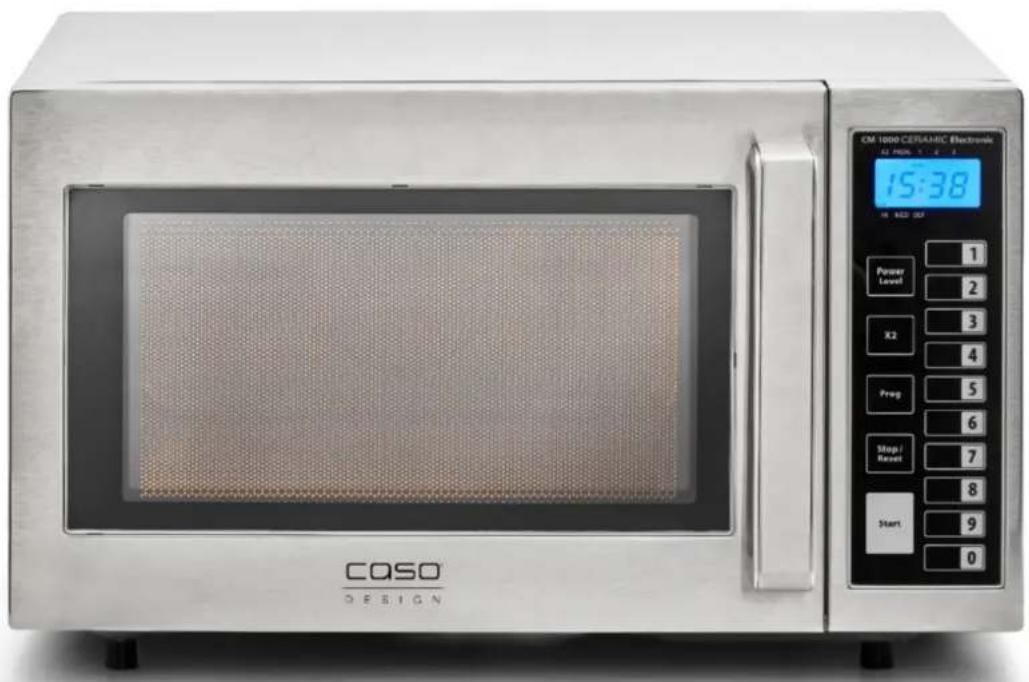
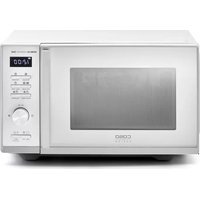
Exterior view of a CASO Design microwave oven with digital display and control buttons (no readable text beyond branding)(Garantiegeber)
CASO GmbH
Raiffeisenstraße 9
D-59757 Arnsberg
Service-Hotline International:
Tel.: +49 (0) 29 32 / 80 55 4 - 99
Fax: +49 (0) 29 32 / 80 55 4 - 77
eMail: kundenservice@caso-design.de
13.5 Sources of danger....39
13.5.1 Danger due to microwaves 39
13.5.2 Danger of burns 39
13.5.3 Danger of fire....40
13.5.4 Danger of explosion....41
13.5.5 Dangers due to electrical power 41
13.6 Limitation of liability 42
13.7 Copyright protection....42
14 Safety 42
14.1 Intended use....43
15 Commissioning....43
15.1 Safety information....43
15.2 Delivery scope and transport inspection....43
15.3 Unpacking....43
15.4 Disposal of the packaging....44
15.5 Setup location requirements:....44
15.5.1 Installation of the appliance 45
15.5.2 Avoiding radio interference 45
15.6 Electrical connection....45
15.6.1 Extension cables....46
16 Design and Function......47
16.1 Complete overview ....47
16.2 Operating elements....48
48
16.2.1 Warning notices on device....48
16.2.2 Door latch 49
16.3 Rating plate....49
17 Operation and Handing 49
17.1 Principles of microwave cooking ....49
17.2 Operating modes: 50
17.3 Information on microwave cookware 50
17.4 Opening / closing door 50
18 Microwave operation ....51
18.1 Cooking based on time and setting....51
18.2 Multi-stage cooking ....51
18.3 Saving cooking settings on memory buttons....52
18.4 Function of the "X2" button 52
18.5 Operation counter....53
19 Defrosting....53
19.1 Defrosting frozen food....53
19.2 Tips & notes....54
20 Cleaning and Maintenance....54
20.1 Safety information....54
20.2 Cleaning 55
21 Troubleshooting....56
21.1 Safety notices....56
21.2 Causes and rectification of faults....56
22 Disposal of the Old Device....57
23 Guarantee ....57
24 Technical Data....57
4.1 Gesamtübersicht
Original Operating Manual
Microwave CM 1000 Ceramic Electronic
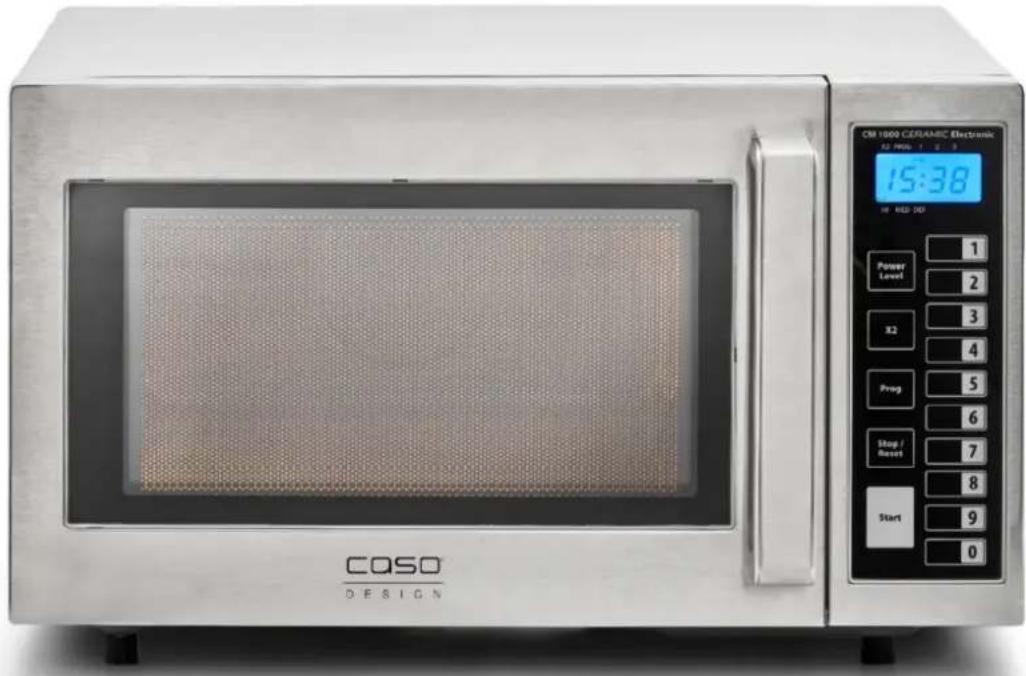
13 Operating Manual
13.1 General
Please read the information contained herein so that you can become familiar with your device quickly and take advantage of the full scope of its functions. Your microwave will serve you for many years if you handle it and care for it properly.
We wish you a lot of pleasure in using it!
13.2 Information on this manual
These Operating Instructions are a component of the microwave (referred to hereafter as the Device) and provide you with important information for the initial commissioning, safety, intended use and care of the device. The Operating Instructions must be available at all times at the device. This Operating Manual must be read and applied by every person who is instructed to work with the device: • Commissioning •
Operation
- Troubleshooting and/or
- Cleaning
Keep the Operating Manual in a safe place and pass it on to the
subsequent owner along with the device.
13.3 Warning notices
The following warning notices are used in the Operating Manual concerned here.
⚠GEFAHR
DANGER
A warning notice of this level of danger indicates a potentially dangerous situation. If the dangerous situation is not avoided, this can lead to death or serious injuries.
▶ Observe the instructions in this warning notice in order to avoid the danger of death or serious personal injuries.
⚠️WARNUNG
WARNING
A warning notice of this level of danger indicates a possible dangerous situation. If the dangerous situation is not avoided, this can lead to serious injuries.
▶ Observe the instructions in this warning notice in order to avoid the personal injuries.
▲VORSICHT
ATTENTION
A warning notice of this level of danger indicates a possible dangerous situation. If the dangerous situation is not avoided, this can lead to slight or moderate injuries.
▶ Observe the instructions in this warning notice in order to avoid the personal injuries.
HINWEIS
PLEASE NOTE
A notice of this kind indicates additional information, which will simplify the handling of the machine.
13.4 General Safety information
HINWEIS
Please note
Please observe the following general safety notices with regard to the safe handling of the device.
Read all these instructions before using the device.
▶ Examine the device for any visible external damages prior to using it. Never put a damaged device into operation.
▶ The device is not intended for drying, warming up or heating up living animals.
This device may be used by children aged 8 and above, if they are supervised or have been instructed at to the safe use of the device and have understood the resulting hazards.
▶ Cleaning and maintenance by the user must not be performed by children unless they are at least 8 years old and are supervised.
▶ Children are not allowed to play with the device.
▶ The device and its connecting cable must be kept away from children who are less than 8 years old.
The device may be used by individuals with reduced physical, sensory or mental capabilities or a lack of experience and / or knowledge of their use if they are supervised or have been instructed at to the safe use of the device and have understood the resulting hazards.
▶ Only qualified electricians, who have been trained by the manufacturer, may carry out any repairs that may be needed. Improperly performed repairs can cause considerable dangers for the user.
▶ Defective components must always be replaced with original replacement parts. Only such parts will guarantee that the safety requirements are fulfilled.
▶ Only use utensils that are suitable for use in microwave ovens.
HINWEIS
Please note
▶ Only customer service departments authorized by the manufacturer may carry out repairs on the device during the guarantee period, as otherwise the guarantee entitlements will be null and void in the event of any subsequent damages.
▶ Use this device only for its intended use as described in this manual. Do not use corrosive chemicals or vapors in this device. This type of oven is specifically designed to heat, cook or dry food. It is not designed for industrial or laboratory use.
▶ Do not operate this device if it has a damaged cord or plug, if it is not working properly or if it has been damaged or dropped. If the supply cord is damaged, it must be replaced by the manufacturer or its service agent or a similarly qualified person in order to avoid a hazard.
▶ Food thermometers are unsuitable to be used when the microwave is in operation.
▶ The microwave oven is only used when it is freestanding.
▶ The microwave oven must not be placed in a cabinet.
▶ The device shall be placed against a wall.
▶ Warning: Do not install the oven over a range cooktop or other heat-producing device. If it is installed it could be damaged and the warranty would be void.
▶ The device is not intended to be operated by means of an external timer or separate remote-control system.
▶ Never remove the distance holder in the back or on the sides, as it ensures a minimum distance from the wall for air circulation.
▶ The microwave oven is intended for defrosting, cooking and food only.
▶ The device must not be cleaned with a steam cleaner.
13.5 Sources of danger
13.5.1 Danger due to microwaves
⚠️WARNUNG
Warning
Exposure to microwaves on the human body can result in injuries. Please observe the following safety notices in order not to expose yourself or others to microwaves.
▶ Never operate the device when the door is open. Having a faulty or manipulated safety switch results in the danger of exposing oneself directly to the microwaves.
▶ If the door or door seals are damaged, the device must not be operated until it has been repaired by an authorized person.
▶ WARNING: It is hazardous for anyone other than a competent person to carry out any service or repair operation that involves the removal of a cover which gives protection against exposure to microwave energy. This applies to changing the power cord or the lighting as well. Send the device in these cases to our service centre.
13.5.2 Danger of burns
⚠️WARNUNG
Warning
The culinary items being heated up in this device as well as the cookware that being used and the surface of the device can become very hot.
Please observe the following safety notices in order not to burn or scald yourself or others.
- Microwave heating of beverages can result in delayed eruptive boiling (boiling retardation), therefore care must be taken when handling the container.
▶ Do not fry food in the oven. Hot oil can damage oven parts and utensils and even result in skin burns.
▶ In particular, the contents of baby bottles and baby food jars must be stirred or shaken, and the temperature must be checked before consumption to prevent scolding.
▶ Use gloves if you remove any heated food.
⚠️WARNUNG
Warning
▶ Cooking utensils may become hot because of heat transferred from the heated food. Potholders may be needed to handle the utensil.
▶ The door or the outer surface may get hot when the device is operating. The accessible surface may be hot during operation. The temperature of accessible surfaces may be high when the device is operating.
▶ Caution! Steam will escape, when opening lids or wrapping foil.
13.5.3 Danger of fire
⚠️WARNUNG
Warning
There is a danger of fire due to the ignition of the content in the event the device is not used properly.
Observe the following safety notices to avoid dangers of fire:
▶ Never the leave the device unsupervised if you are warming up or cooking foods in disposable containers made of plastic, paper or other flammable materials.
▶ Never use the device to store or dry flammable materials.
▶ Do not warm up any alcohol in an undiluted state.
▶ Do not operate the oven when empty.
- Disposable containers made of plastic must have the properties shown under the heading “Notices on microwave cookware”.
▶ To reduce the risk of fire in the oven cavity:
a) When heating food in plastic or paper container, keep an eye on the oven due to the possibility of ignition.
b) Remove wire twist-ties from paper or plastic bags before placing bag in oven.
c) If smoke is emitted turn off the device or unplug the device and keep the door closed to extinguish any flames.
⚠️WARNUNG
Warning
d) Do not use the cavity for storage purposes. Do not leave paper products, cooking utensils or food in the cavity when not in use.
▶ The microwave oven is intended for heating food and beverages. Drying of food or clothing and heating of warming pads, slippers, sponges, damp cloth and similar may lead to risk of injury, ignition or fire.
▶ Always remove grease residues in the device, as these residues can otherwise ignite.
13.5.4 Danger of explosion
⚠️WARNUNG
Warning
There is a danger of explosion due to excess pressure that is created in the event the device is not used properly.
Observe the following safety notices to avoid dangers of an explosion:
▶ Liquids and other food must not be heated in closed vessels as these may explode.
▶ Do not cook eggs in the shell or extremely hard boiled eggs in the device as they can still explode, even after the microwave operation has been completed.
▶ Pierce foods with heavy skins such as potatoes, whole squashes, apples and chestnuts before cooking.
13.5.5 Dangers due to electrical power
⚠GEFAHR
Mortal danger due to electrical power!
Mortal danger exists when coming into contact with live wires or subassemblies! Observe the following safety notices to avoid dangers due to electrical power:
▶ Do not open the housing on the device under any circumstances. There is a danger of an electrical shock if live connections are touched and the electrical or mechanical structure is altered. In addition, functional faults on the device can also occur.
⚠GEFAHR
Danger
▶ Do not operate this device if it has a damaged cord or plug, if it is not working properly or if it has been damaged or dropped. If the supply cord is damaged, it must be replaced by the manufacturer or its service agent or a similarly qualified person in order to avoid a hazard.
▶ Caution: It is dangerous to repair or maintain the device by anyone other than a specialist because under these circumstances the cover would have to be removed which ensures protection against microwave radiation. This applies to changing the power cord or the lighting as well. Send the device in these cases to our service center.
13.6 Limitation of liability
All the technical information, data and notices with regard to the installation, operation and care are completely up-to-date at the time of printing and are compiled to the best of our knowledge and belief, taking our past experience and findings into consideration. No claims can be derived from the information provided, the illustrations or descriptions in this manual. The manufacturer does not assume any liability for damages arising as a result of the following:
• Non-observance of the manual
• Uses for non-intended purposes
- Improper repairs
- Technical alterations, modifications of the device
- Use of unauthorized spare parts
Modifications of the device are not recommended and are not covered by the guarantee.
All translations are carried out to the best of our knowledge. We do not assume any liability for translation errors, not even if the translation was carried out by us or on our instructions. The original German text remains solely binding.
13.7 Copyright protection
This document is copyright protected.
CASO GmbH reserves all the rights, including those for photomechanical reproduction, duplication and distribution using special processes (e.g. data processing, data carriers, data networks), even partially. Subject to content and technical changes.
14 Safety
This chapter provides you with important safety notices when handling the device. The device corresponds with the required safety regulations. Improper use can result in personal or property damages.
14.1 Intended use
This device is only intended for use in households in enclosed spaces for
- Defrosting
- warming up
- cooking
foods and beverages. This appliance is intended to be used in commercial and domestic environments. Uses for a different purpose or for a purpose which exceeds this description are considered incompatible with the intended or designated use.
⚠️WARNUNG Warning
Danger due to unintended use!
Dangers can emanate from the device if it is used for an unintended use and/or a different kind of use.
▶ Use the device exclusively for its intended use.
▶ Observe the procedural methods described in this Operating Manual.
Claims of all kinds due to damages resulting from unintended uses are excluded.
The User bears the sole risk.
15 Commissioning
This chapter provides you with important safety notices during the initial commissioning of the device. Observe the following notices to avoid dangers and damages:
15.1 Safety information
⚠️WARNUNG Warning
Personal and property damages can occur during commissioning of the device!
Observe the following safety notices to avoid such dangers:
▶ Packaging materials may not be used for playing. There is a danger of suffocation.
15.2 Delivery scope and transport inspection
As a rule, the C1000M Microwave is delivered with the following components:
• Microwave CM 1000 Ceramic Electronic
- Operating Instructions
HINWEIS Please note
▶ Examine the shipment for its completeness and for any visible damages.
▶ Immediately notify the carrier, the insurance and the supplier about any incomplete shipment or damages as a result of inadequate packaging or due to transportation.
15.3 Unpacking
To unpack the device, proceed as follows:
- Remove all packaging and accessories.
- Check the appliance for possible damages (dents, damaged door etc.). Damaged appliances may not be used.
- Casing: Remove the protective film covering the outside surface of the appliance.
15.4 Disposal of the packaging
The packaging protects the device against damages during transit. The packaging materials are selected in accordance with environmentally compatible and recycling-related points of view and can therefore be recycled. Returning the packaging back to the material loop saves raw materials and reduces the quantities of accumulated waste.
Take any packaging materials that are no longer required to "Green Dot" recycling collection points for disposal.
HINWEIS
Please note
▶ If possible, keep the original packaging for the device for the duration of the guarantee period of the device, in order that the device can be re-packaged properly in the event of a guarantee claim.
15.5 Setup location requirements:
In order to ensure the safe and trouble-free operation of the device, the setup location must fulfil the following prerequisites:
- The device must be set up on a firm, flat, horizontal and heat-resistant surface with sufficient load-bearing capacity for the oven and the maximum weight of the expected food that is to be prepared in the oven.
- Choose the setup location in such a way that children cannot reach any hot surfaces on the device.
- The device is not intended to be installed in a wall or a built-in cupboard.
- Do not set up the device in a hot, wet or extremely damp environment or near flammable material.
- Ensure that the power cable does not hang down over a table or counter edge.
- The electrical socket must be easily accessible so that the power lead can be disconnected easily, in the case of an emergency.
- The installation and assembly of this device in non-stationary setup locations (e.g. on ships) must be carried out by specialist companies / electricians, provided they guarantee the prerequisites for the safe use of this device.

15.5.1 Installation of the appliance
1) Select a level surface providing enough distance between the ventilation slots and walls or other units.
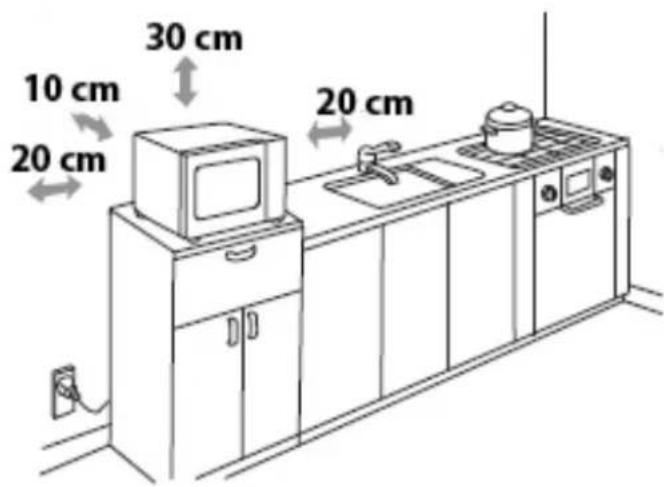
a) The rear of the appliance must be facing a wall (10 cm distance). Above the appliance a clearance of 20 cm is needed, and on the sides at least 5 cm distance to other walls or units are needed.
b) Do not remove the feet from the bottom of the appliance.
c) Do not cover or obstruct any openings in the appliance.
d) Covering the ventilation slots may cause damage to the appliance.
e) Place the microwave appliance as far away from radios of TVs to minimize any interference to radio and TV reception.
2) Insert the power plug into a normal household outlet; check that voltage and frequency of the appliance (see appliance rating label) matches that of the household electrical supply.
15.5.2 Avoiding radio interference
The device can cause the occurrence of interference in radios, televisions or similar devices.
Such faults can be rectified or reduced as a result of employing the following measures:
- Clean the door and the sealing surfaces of the device.
- Set the radio, the television, etc as far as possible away from the device.
- Connect the device to a different electrical outlet, so that various power circuits are used for the device and the receiver with the interference.
15.6 Electrical connection
ΔGEFAHR DANGER
▶ Risk of electrocution
▶ Touching internal components may cause serious, severe and fatal injuries.
▶ Do not disassemble the appliance.
▶ Improper grounding can cause electrical shocks. Do not use a power outlet if it is not properly installed and grounded.
In order to ensure the safe and trouble-free operation of the device, the following instructions must be observed for the electrical connection:
- Before connecting the device, compare the connection data (voltage and frequency) on the rating plate with those of your electrical network. This data must agree in order that no damages occur in the device. If in doubt, ask your qualified electrician.
- The electrical outlet must be protected by a 16A safety cut-out switch, separately from other electricity consumers,
- The connection between the device and the electrical network may employ a 3 meter long (max.) extension cable with a cross-section of 1.5 mm^2 . The use of multiple plugs or gangs is prohibited because of the danger of fire that is involved with this.
- Make sure that the power cable is undamaged and has not been installed under the oven or over hot or sharp surfaces.
- This appliance must be electrically grounded. In case of a short circuit grounding will protect against electric shocks because the electrical current is diverted through the grounding lead. The appliance is fitted with an appropriate cable with a ground lead and a grounded safety plug. The plug must be inserted into a properly installed and grounded outlet.
- The electrical safety of the device is only guaranteed if the device is connected to a properly installed protective conductor system. Operations using an electrical outlet without a protective conductor are prohibited. If in doubt, have the house installation checked over by a qualified electrician. The manufacturer cannot be made responsible for damages that are caused by a missing or damaged protective conductor.
15.6.1 Extension cables
- The power cable is kept intentionally short to reduce the risk of tangling or presenting a tripping hazard.
- If a longer cable or an extension cable is required:
- 1) The power rating of the cable or extension cable must be no less than the rating of the appliance.
• 2) The extension cable must a three-lead (grounded) cable. - 3) Arrange the long cable so that it does not hang down from table or counter tops where it can be pulled by children and that it does not present a tripping hazard.
16 Design and Function
This chapter provides you with important safety notices on the design and function of the device.
16.1 Complete overview
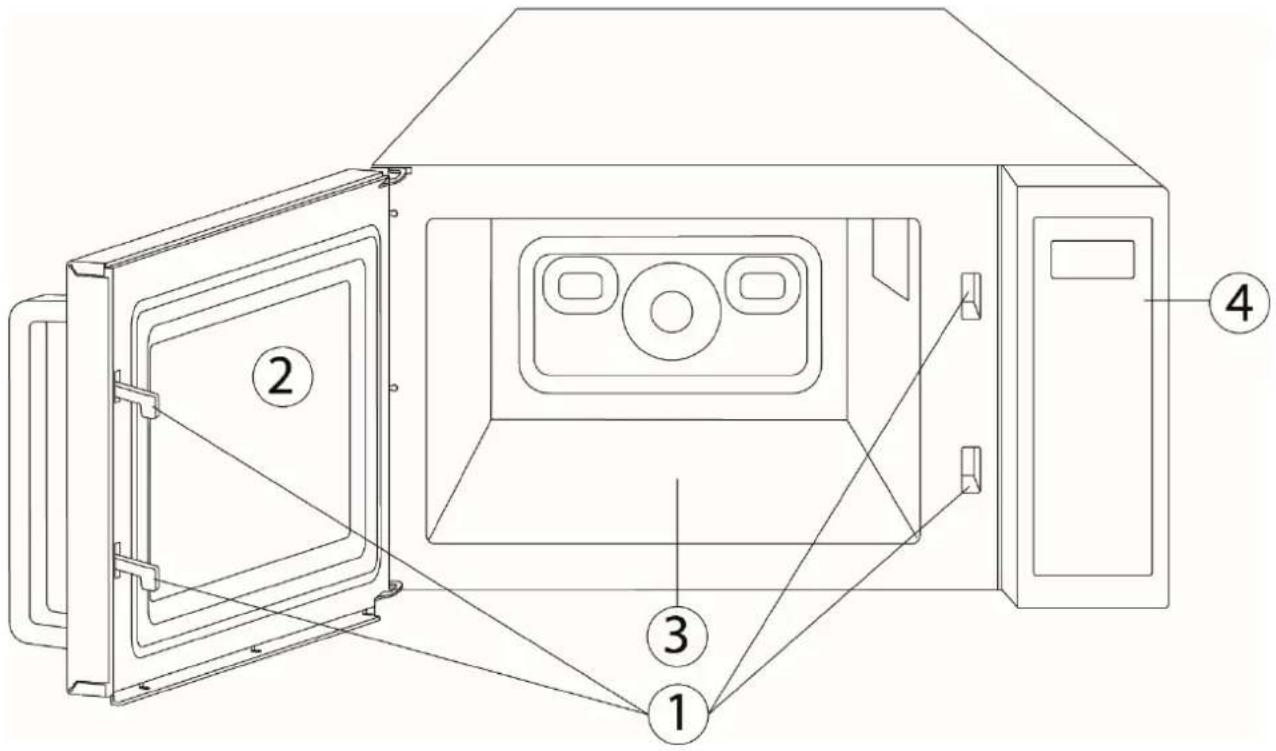
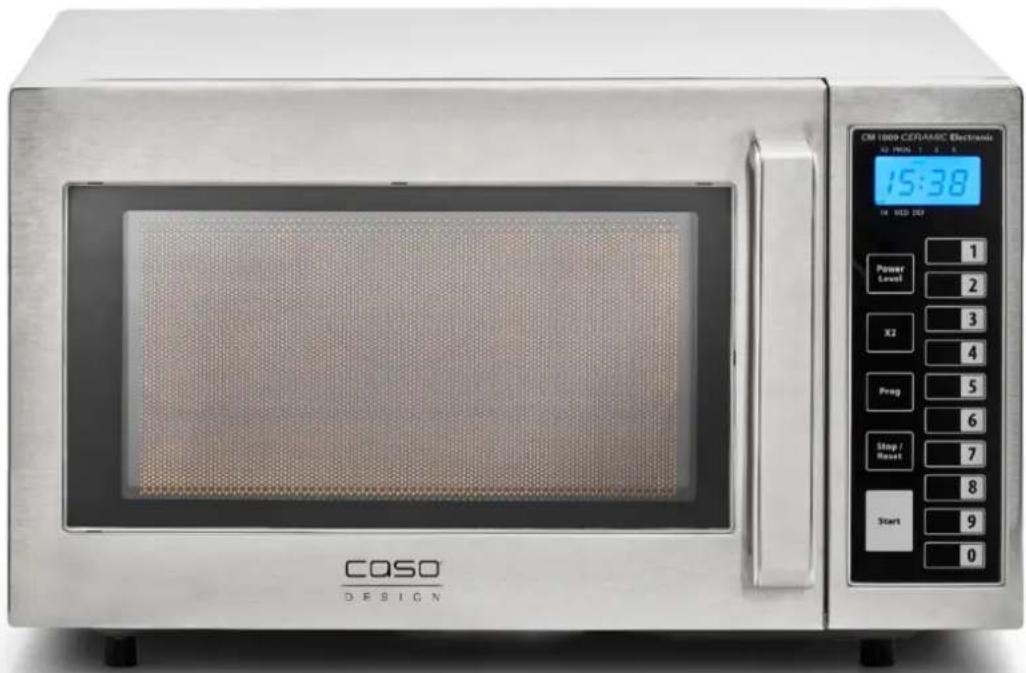
1) Protective door latch
2) Door
3) CASOTEK-Base
plate
4) Control panel
HINWEIS
Please note
- Don' press the Base plate forcibly, it could be damaged.
▶ Place and remove the food carefully so that you do not damage the COSOTEK-Base plate.
▶ The ventilator can continue running afterwards to cool down the device.
⚠️WARNUNG
Warning
▶ After using, don't touch the C-Base plate it could be hot. Risk of burns!
16.2 Operating elements
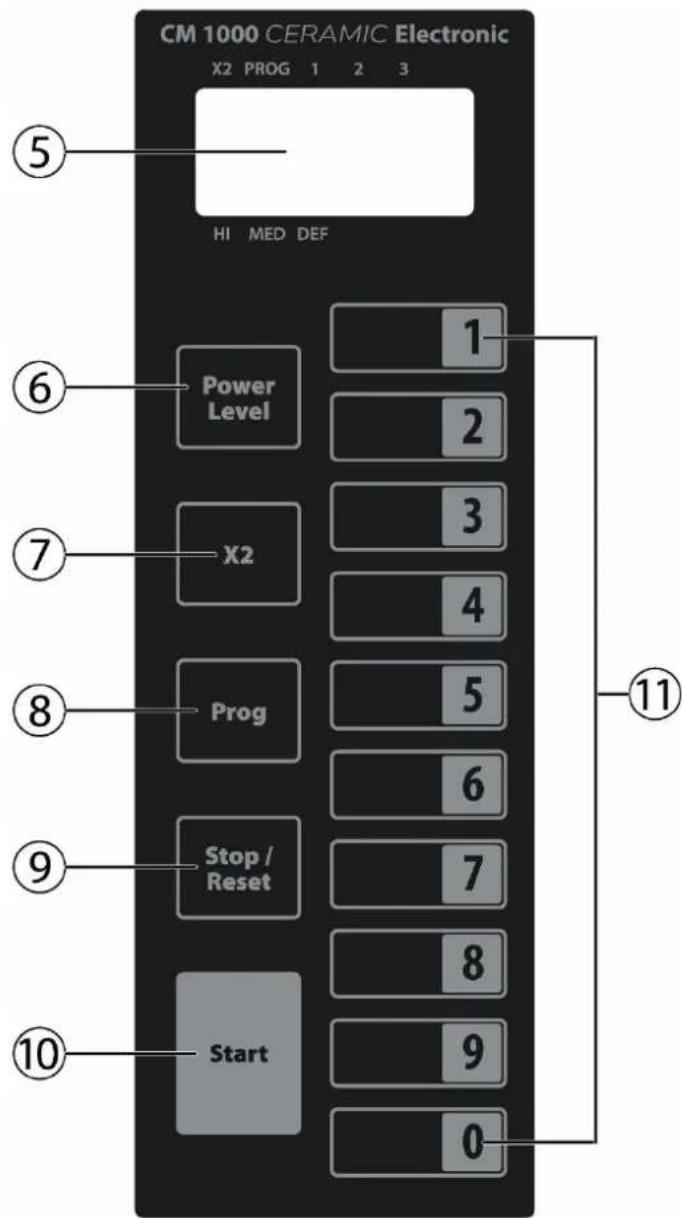
5) Digital display
6) Cooking stages
7) X2 button
8) Program button
9) Stop/reset button
10) Start button
11) Number/memory buttons
Indications in display
X2 – Cooking in X2 mode PROG – Setting a cooking program 1, 2, 3 – Cooking stage HI MED The selected cooking stages are displayed DEF
HINWEIS
Please note
▶ Do not use the device, when it is empty. It could be damaged.
| Press “Power Level” Setting | |
| Once | HI |
| Twice | MED |
| Three times DEF |
16.2.1 Warning notices on device
▲VORSICHT
ATTENTION
Danger due to hot surface!
There is a warning notice referring to dangers due to hot surfaces located on the back upper side of the housing. The surfaces of the device can become extremely hot.
▶ Do not touch the hot surfaces of the device. Danger of burns!
▲VORSICHT ATTENTION
▶ Do not set or lay any items on the device.
▶ Do not place the microwave appliance above a cooker, hob or another devices producing heat, as this would damage the microwave appliance and render the warranty void.
16.2.2 Door latch
A safety switch is installed in the door latch of the device, which prevents the device from being operated when the door is open.
▲VORSICHT ATTENTION
Danger due to microwaves!
If this safety device is defective or if this safety device is bypassed, you can directly expose yourself and others to microwave radiation.
▶ Do not operate the device if the safety switch is defective.
▶ Do not disable this safety device.
16.3 Rating plate
The rating plate with the connection and performance data can be founded on the back of the device.
17 Operation and Handing
This chapter provides you with important notices with regard to operating the device. Observe the following notices to avoid dangers and damages:
▲WARNUNG Warning
▶ Do not leave the device unsupervised when it is in operation, so that you can intervene quickly in the event of dangers.
17.1 Principles of microwave cooking
- The power levels and time required for cooking / warming up food items depends on the starting time, the quantity and the type and consistency of the food, etc. Use the shortest indicated cooking time and extend the cooking procedure as necessary.
- Arrange the food carefully. Position the thickest areas on the external edge of the bowl.
- Cover the food while it is cooking. Lids protect against spatters and also contribute towards cooking/warming up the food evenly.
- During warming, the food should be turned, rearranged or stirred repeatedly, in order for the temperature to be distributed evenly.
- Any existing germs in the food are only killed off if the temperature is sufficiently high enough ( >70^ ) and if the time used is sufficiently long enough ( >10 min ).
-
Foods with a firm skin or shell, such as tomatoes, sausages, potatoes in the skin, eggplants must be pierced or punctured repeatedly so that any developing steam can escape and so that the food does not burst.
-
Eggs without their shell may only be cooked in the microwave if the skin of the egg yoke has been pierced repeatedly first. Otherwise, the egg yoke can squirt out with excessive pressure after cooking.
- Rearrange layers of foods such as meat balls from top to the bottom and from the middle to the outside edge.
17.2 Operating modes:
The unit is to be operated in various operating modes. The following list shows the operating modes that are possible with the device:
◆ “Microwave” mode
This operating mode is suitable for the normal reheating of food.
◆ Defrost
This operating mode is suitable for defrosting frozen food. You can set desired time.
17.3 Information on microwave cookware
The ideal material for microwave cookware is permeable for microwaves and allows the energy to penetrate the container and warm up the food.
Please observe the following tips when selecting the correct cookware:
Microwaves cannot penetrate metal. Therefore, you should not use utensils made of metal or cookware with metal trim.
For microwave cooking, do not use any products made from recycled paper, as they could contain tiny metal fragments, which could cause sparks and/or result in fire.
The following table is intended as a basis for selecting the correct cookware:
| Cookware Microwave Cookware Microwave | |||
| Heat-resistant glass dishes | √ | Kitchen roll | ✕ |
| Non heat-resistant glass dishes | ✕ | Metal sheet | ✕ |
| Heat-resistant ceramic dishes | √ | Metal rack; metal container | ✕ |
| Microwave-resistant plastic container | √ | Aluminium foil and container | ✕ |
17.4 Opening / closing door
Open door
Pull the door handle with a slight tug to open the door of the device. If the device is switched on, the current cooking programme will be interrupted.
HINWEIS
Please note
▶ Leave the door open for a moment before reaching into the cooking chamber, to allow the accumulated heat to escape.
◆ Close doors
Close the door until the door latch audibly locks in place. If a current cooking programme was interrupted as a result of opening the door, the current cooking programme will be continued automatically.
18 Microwave operation
18.1 Cooking based on time and setting
Select a setting by pressing the "Power level" button for a corresponding number of times. Following this, use the number block to enter the cooking time.
| Press “Power Level” Setting | |
| Once | HI |
| Twice | MED |
| Three times DEF |
Example: One-stage cooking at the highest power level for 4 minutes:
- Press the "Power level" button once.
- "HI" will appear on the display.
- Press the 4, 0, 0 buttons one after another.
- Press the "Start" button.
18.2 Multi-stage cooking
Some food must be prepared in multiple stages at different temperatures and for different times.
You can choose between three manual settings:
Setting 1
→ As described above, without pressing "Start".
Setting 2 (middle level, 6 minutes)
→ 1. Press the "Power level" button twice.
2. "MED" will appear on the display.
3. Press the 6, 0, 0 buttons one after another.
Setting 3 (defrost, 5 minutes)
→ 1. Press the "Power level" button three times.
2. "DEF" will appear on the display.
3. Press the 5, 0, 0 buttons one after another.
4. Press the "Start" button.
The display will show the total cooking time and the relevant stage. The device will beep at the end of each stage. When the cooking process ends, the acoustic signal will beep 4 times and "0" will appear on the display.
18.3 Saving cooking settings on memory buttons
You can save frequently used cooking settings on the memory buttons, enabling you to start a setting at the press of a button.
If the microwave is in standby mode, you can use these buttons to start a cooking setting.
Each memory button has the following standard default settings:
“HI” setting
| Memory button | 1 | 2 | 3 | 4 | 5 | 6 | 7 | 8 | 9 | 0 | ||
| Cooking time | :10 | :20 | :30 | :45 | 01:00 | 01:30 | 02:00 | 02:30 | 03:00 | 03:30 |
Any combination of buttons can be programmed.
If you would like to programme a three-stage cooking setting on one of the memory buttons, then proceed as follows:
- Press the "PROG" button once.
- Press the "1" button.
- Press the "Power level" button twice.
- Press the 7, 0, 0 buttons one after another.
Use this process to programme one-, two- or three-stage cooking settings by repeating Steps 3-4 once or twice.
- Press the "PROG" button to confirm and save the setting.
Following this, press the "Stop/Reset" button to return to the standby mode.
18.4 Function of the "X2" button
The "X2" button enables you to programme additional cooking settings on the memory buttons.
Press the "X2" button while the microwave is in standby mode and then press the relevant memory button.
The memory buttons are programmed with the following settings:
“HI” setting
| Memory button | 1 | 2 | 3 | 4 | 5 | 6 | 7 | 8 | 9 | 0 |
| Cooking time | :20 | :40 | 1:00 | 01:30 | 02:00 | 03:00 | 04:00 | 05:00 | 06:00 | 07:00 |
The “X2” function can only be used to programme one-stage cooking settings.
Press the "Stop/Reset" button to return to the standby mode.
Press the "X2" button and then the relevant memory button to start the desired setting.
If you would like to use the "X2" function to programme a setting with the highest cooking level and four minutes' cooking time, then proceed as follows:
- Press the "PROG" button.
- Press the "X2" button once.
- Press the "1" button.
- Press the "Power level" button once.
- Press the 4, 0, 0 buttons one after another.
- Press the "PROG" button to save the setting.
18.5 Operation counter
If you would like to know the number of times the microwave has been used:
- Open the door.
- Hold down the "Stop/Reset" button and then press the "Power level" button.
The number of times the device has been used will now appear on the display.
This feature is practical for commercial users who want to analyse frequency of use at specific locations.
HINWEIS
Please note
▶ Do not operate the unit when it is empty. The unit may be damaged.
19 Defrosting
If, for example, you would like to start a three-minute defrosting setting, then proceed as follows:
- Press the "Power level" button three times.
- "DEF" will appear on the display.
- Press the 3, 0, 0 buttons one after another.
- Press the "Start" button.
19.1 Defrosting frozen food
- When defrosting a heavy piece of high-fat meat, you should only warm it up in the microwave for a short time and then place it in a container at room temperature. Alternatively, you can heated it at short intervals with breaks in between.
- Food should be turned over regularly during defrosting to ensure that it thaws evenly.
-
Simultaneous full defrosting of food items of different thicknesses and shapes using a microwave is not recommended because this can result in uneven thawing.
Melt water can cause some areas of the food items to heat up while others remain frozen.
We therefore recommend that only approx. 70% of the defrosting process is carried out using the microwave. -
Any ice which has formed on food should be removed gradually.
- When defrosting a whole chicken, the thinner areas should be wrapped in aluminium foil. This will result in them being heated more slowly than thicker areas. Thicker areas can be wrapped in aluminium foil at the sides for even heating by the vertical microwaves during defrosting.
19.2 Tips & notes
- Cover food items to speed up the heating process, to prevent them drying out and to avoid fat splashing onto the cooking chamber.
This does not apply for dishes which should stay crunchy, such as biscuits or breaded items.
- A variety of factors will affect cooking time:
| Shape The thicker the item, the longer the cooking time | |
| Weight The heavier the item, the longer the cooking time | |
| Density The denser the item, the longer the cooking time | |
| Starting temperature | The lower the starting temperature, the longer the cooking time |
| Moisture content The drier | the item, the longer the cooking time |
20 Cleaning and Maintenance
This chapter provides you with important notices with regard to cleaning and maintaining the device. Please observe the notices to prevent damages due to cleaning the device incorrectly and to ensure trouble-free operation.
20.1 Safety information
▲VORSICHT
Attention
Please observe the following safety notices, before you commence with cleaning the device:
The device must be cleaned regularly and any food residues must be removed. Insufficient cleanliness of the device can lead to the destruction of the surface, which for its part can have a negative impact upon the service life of the device and can lead to a dangerous condition of the device as well as fungal and bacterial contamination.
▶ Switch the oven off prior to cleaning it and unplug the plug from the wall power outlet.
The cooking chamber is hot after it is used. There is a danger of burns! Wait until the device has cooled down.
▶ Clean the cooking chamber after use as soon as it has cooled down. Extended waiting unnecessarily complicates cleaning and can make it impossible in extreme cases. Excessive accumulations of dirt can even damage the device under certain circumstances.
▲VORSICHT Attention
▶ If dampness penetrates into the device, this can damage the electronic components. Please ensure that no liquid can enter the interior of the device through the ventilation slots.
▶ Do not use any aggressive or abrasive cleaning agents or solvents.
▶ Do not scrape off stubborn dirt with hard items.
▶ Because of the hazards involved in repair or maintenance work for which the radiation safety cover must be removed, any such work may only be carried out by a skilled and qualified specialist.
20.2 Cleaning
◆ Cooking chamber and inside of door
Keep the cooking chamber of the oven clean. Wipe off any spattered or spilt food from the walls of the cooking chamber with a damp cloth. If the oven is excessively dirty, you can use a mild cleaning agent.
Wipe the door, window and the door gaskets with a damp cloth, to remove any spatters and spilt food. Residues on the door gasket can mean that the door does not close properly any more, which will cause the microwaves to escape.
Wipe off any steam, which has settled on the oven door, with a soft cloth. This may be the case if the device is used in an extremely damp environment and is normal.
After cleaning the interior space, leave the oven door open until the interior of the device is completely dry.
Cleaning hint – If there are cooked food residues stuck to the inside walls of the oven, there is an easy way to clean these: Place half a lemon into bowl, add 300 ml water and microwave this for 10 minutes at full power. Then simply wipe the inside of the appliance clean with a soft and dry cloth.
◆ Front of device and operating panel
Clean the front of the device and the operating panel with a soft, slightly damp cloth.
Please bear in mind that the operating elements do not get wet. Use a soft, damp cloth for cleaning.
HINWEIS Please note
Leave the oven door open to prevent the device from being re-started accidentally.
▶ Make sure that no water gets into the ventilation slots.
▶ After cleaning, you can use a dry, soft cloth to dry and polish the surface.
◆ Exterior housing
Clean the exterior surfaces of the device with a damp cloth.
-Base plate
Wipe the bottom of the device with a mild cleaning agent.
21 Troubleshooting
This chapter provides you with important notices with regard to operating the device.
Observe the following notices to avoid dangers and damages:
21.1 Safety notices
▲VORSICHT Attention
▶ Only qualified electricians, who have been trained by the manufacturer, may carry out any repairs on electrical equipment.
▶ Improperly performed repairs can cause considerable dangers for the user and damages to the device.
21.2 Causes and rectification of faults
The following table assists in localizing and rectifying minor faults.
| Error Possible cause Action | ||
| The selected program will not start. | Device door is not closed Close device door | |
| Power plug is not plugged in Plug in mains plug! | ||
| Fuse is not activated Activate fuse | ||
| Food is not sufficiently defrosted, warmed up or cooked after preset time has elapsed. | Incorrectly selected time or power level | Re-set time and power levelRepeat process |
| The device functions but the cooking chamber lighting does not work. | Defective cooking chamber light. | Have Service dept repair cooking chamber light. |
| Abnormal noises can be heard during operation of microwave. | Food is covered with aluminium foil | Remove aluminium foil |
| The cookware contains metal and sparks are being created within the cooking chamber | Observe information on cookware! | |
HINWEIS Please note
▶ If you are unable to solve the problem with the steps shown above, please contact Customer Service.
▶ Clean the device before you send it to customer service.
22 Disposal of the Old Device
Old electric and electronic devices frequently still contain valuable materials. However, they also contain damaging substances, which were necessary for their functionality and safety. If these were put in the non-recyclable waste or were handled incorrectly, they could be detrimental to human health and the environment. Therefore, do not put your old device into the non-recyclable waste under any circumstances.
HINWEIS
Please note
▶ Utilise the collection point, established in your town, to return and recycle old electric and electronic devices. If necessary, contact your town hall, local refuse collection service or your dealer for information.
▶ Ensure that your old device is stored safely away from children until it is taken away.
23 Guarantee
We provide a 12-month guarantee for defects caused by production or material faults, beginning on the date of purchase. Our guarantee is valid for Germany, Austria and the Netherlands. For all other countries, please contact us. Your legal guarantee claims as per Art. 437 ff. German Civil Code (BGB) will remain unaffected by this. You may exercise your statutory guarantee rights free of charge. The guarantee does not cover damage caused by improper handling or use of the product or defects which have only a minor impact on the product's functionality or value. In addition to this, the guarantee also excludes parts which are subject to wear and tear; transport damages insofar as we are not responsible for them and damages caused by repairs which were not carried out by us.
This product is not designed for commercial use. In the case of legitimate complaints we may either repair the defective product or replace it with a defect-free product at our discretion. Obvious defects must be notified to us within 14 days of the product's delivery. Any further claims are excluded. When making a guarantee claim please contact us before you return the product (always with the purchase receipt!). Our contact details ("Guarantor") are provided at the beginning of this instruction manual.
24 Technical Data
| Device Microwave | |
| Name CM1000 Ceramic Electronic | |
| Item No.: 3082 | |
| Mains data 230V~50Hz | |
| Power consumption 1500 W (Microwave) | |
| Nominal output of microwave 1000 W | |
| Operating frequency 2450 MHz | |
| External measurements (W x H x D): | 520 x 320 x 460 mm |
| Cooking chamber dimensions (W x H x D): | 335 x 195 x 345 mm |
| Net weight | Ca. 17,3 kg |
Manual del usuario
Horno Microondas CM 1000 Ceramic Electronic
natural_image
Exterior view of a CO2O ceramic microwave oven (no visible text or symbols on the main body)1) Sakerhetssparr
2) Lucka
3) COSOTEK-Bottenplatta
4) Kontrollpanel
HINWEIS
OBS
- 48
- Gesamtübersicht
- Original Operating Manual
- Microwave CM 1000 Ceramic Electronic
- Operating Manual
- General
- Information on this manual
- Warning notices
- ⚠GEFAHR
- DANGER
- ⚠️WARNUNG
- WARNING
- ▲VORSICHT
- ATTENTION
- HINWEIS
- PLEASE NOTE
- General Safety information
- Please observe the following general safety notices with regard to the safe handling of the device.
- Sources of danger
- Danger due to microwaves
- Danger of burns
- Danger of fire
- There is a danger of fire due to the ignition of the content in the event the device is not used properly.
- Danger of explosion
- Dangers due to electrical power
- Limitation of liability
- Copyright protection
- Safety
- Intended use
- ⚠️WARNUNG Warning
- Danger due to unintended use!
- Commissioning
- Safety information
- Delivery scope and transport inspection
- HINWEIS Please note
- Unpacking
- Disposal of the packaging
- Setup location requirements:
- Installation of the appliance
- Avoiding radio interference
- Electrical connection
- ΔGEFAHR DANGER
- Extension cables
- Design and Function
- Complete overview
- Operating elements
- Indications in display
- Warning notices on device
- Danger due to hot surface!
- ▲VORSICHT ATTENTION
- Door latch
- Danger due to microwaves!
- Rating plate
- Operation and Handing
- ▲WARNUNG Warning
- Principles of microwave cooking
- Operating modes:
- ◆ “Microwave” mode
- ◆ Defrost
- Information on microwave cookware
- Opening / closing door
- Open door
- ◆ Close doors
- Microwave operation
- Cooking based on time and setting
- Multi-stage cooking
- Setting 1
- Saving cooking settings on memory buttons
- Function of the "X2" button
- Operation counter
- Defrosting
- Defrosting frozen food
- Tips & notes
- Cleaning and Maintenance
- Safety information
- Cleaning
- ◆ Cooking chamber and inside of door
- ◆ Front of device and operating panel
- ◆ Exterior housing
- -Base plate
- Troubleshooting
- Safety notices
- Causes and rectification of faults
- Disposal of the Old Device
- Guarantee
- Technical Data
- Manual del usuario
- Horno Microondas CM 1000 Ceramic Electronic
- OBS
Brand : CASO
Model : CM 1000 Ceramic
Category : Oven