TO-124164.2 - Toaster Emerio - Free user manual and instructions
Find the device manual for free TO-124164.2 Emerio in PDF.


| Product Type | Toaster |
| Brand | Emerio |
| Model | TO-124164.2 |
| Power Consumption | 700W |
| Operating Voltage | 220-240V ~ 50-60Hz |
| Number of Toast Slots | 2 |
| Browning Control | Electric, 6 levels (1-6) plus Cancel |
| Toasting Lever | Yes, press down to start |
| Automatic Shut-Off | Yes, when toast is ready |
| Cancel Function | Rotate browning control anticlockwise to Cancel |
| Removable Crumb Tray | Yes, for easy cleaning |
| Cleaning Method | Wipe exterior with damp cloth; shake out crumbs; do not immerse |
| Safety Features | Automatic shut-off; do not use near combustibles; children 8+ only under supervision |
| Warranty | 2 years |
| Spare Parts Availability | https://spareparts.emerio.eu |
| Customer Service | +31 (0) 23 3034369 (NL) / +49 (0) 3222 1097 600 (DE) |
| Intended Use | Household and similar (e.g., staff kitchens, farm houses, B&B) |
Frequently Asked Questions - TO-124164.2 Emerio
User questions about TO-124164.2 Emerio
0 question about this device. Answer the ones you know or ask your own.
Ask a new question about this device
Download the instructions for your Toaster in PDF format for free! Find your manual TO-124164.2 - Emerio and take your electronic device back in hand. On this page are published all the documents necessary for the use of your device. TO-124164.2 by Emerio.
USER MANUAL TO-124164.2 Emerio
natural_image
Black WOYOL brand toaster with a standard design and 'WOYOL' logo on the front (no additional text or symbols visible)Toaster (D)
Broodrooster (NL)
Tostadora (E)
Torradeira (P)
Tostapane (I)
Hriankovač (SK)
Opekač (SLO)
Toster (PL)
Prajitor de pâine (RO)
Toster (HR)
Topinkovač (CZ)
Тостер (BG)
Kenyérpirító (H)
Toaster (EN)
Inhalt – Inhoud – Contenido – Índice – Contenuto – Obsah – Vsebina – Treść – Cuprins – Sadržaj – Obsah – Съдържание – Tartalom – Content
Instruction manual – English (EN) ...... - 54 -
VOR DEM GEBRAUCH
VOOR GEBRUIK
ANTES DE USAR
Looking for spare parts? Have a look at https://spareparts.emerio.eu
ANTES DA UTILIZAÇÃO
Looking for spare parts? Have a look at https://spareparts.emerio.eu
OPERAZIONI PRELIMINARI
Looking for spare parts? Have a look at https://spareparts.emerio.eu
PRED POUŽITÍM
Looking for spare parts? Have a look at https://spareparts.emerio.eu
PRED UPORABO
Looking for spare parts? Have a look at https://spareparts.emerio.eu
INTRUCTIUNI DE SIGURANTĂ
ÎNAINTEA UTILIZĂRII
Looking for spare parts? Have a look at https://spareparts.emerio.eu
Looking for spare parts? Have a look at https://spareparts.emerio.eu
PŘED POUŽITÍM
Looking for spare parts? Have a look at https://spareparts.emerio.eu
ПРЕДИ УПОТРЕБА
HASZNÁLAT ELŐTT
Instruction manual – English (EN)
SAFETY INSTRUCTIONS
Before use make sure to read all of the below instructions in order to avoid injury or damage, and to get the best results from the appliance. Make sure to keep this manual in a safe place. If you give or transfer this appliance to someone else make sure to also include this manual.
In case of damage caused by user failing to follow the instructions in this manual the warranty will be void. The manufacturer/importer accepts no liability for damages caused by failure to follow the manual, a negligent use or use not in accordance with the requirements of this manual.
- This appliance can be used by children aged from 8 years and above and persons with reduced physical, sensory or mental capabilities or lack of experience and knowledge if they have been given supervision or instruction concerning use of the appliance in a safe way and understand the hazards involved.
- Children shall not play with the appliance.
- Cleaning and user maintenance shall not be made by children unless they are older than 8 and supervised.
- Keep the appliance and its cord out of reach of children less than 8 years.
- If the supply cord is damaged, it must be replaced by the manufacturer, its service agent or similarly qualified persons in order to avoid a hazard.
- The bread may burn, therefore do not use the toaster near or below combustible material, such as curtains.
- This appliance is not intended to be operated by means of an external timer or separate remote-control system.
- Regarding the instructions for cleaning the surfaces which come in contact with food, please refer to the paragraph "cleaning and maintenance" of the manual.
- This appliance is intended to be used in household and similar applications such as: staff kitchen areas in shops, offices and other working environments; farm houses; by clients in hotels, motels and other residential type environment; bed and breakfast type environments.
- Before inserting the plug into the mains socket, please check that the voltage and frequency comply with the specifications on the rating label.
- If an extension cord is used it must be suited to the power consumption of the appliance, otherwise overheating of the extension cord and/or plug may occur. There is a potential risk of injuries from tripping over the extension cord. Be careful to avoid dangerous situations.
- Disconnect the mains plug from the socket when the appliance is not in use and before cleaning.
- Ensure that the mains cable is not hung over sharp edges and keep it away from hot objects and open flames.
- Do not immerse the appliance or the mains plug in water or other liquids. There is danger to life due to electric shock!
- To remove the plug from the plug socket, pull the plug. Do not pull the power cord.
- Do not touch the appliance if it falls into water. Remove the plug from its socket, turn off the appliance and send it to an authorized service center for repair.
- Do not plug or unplug the appliance from the electrical outlet with a wet hand.
- Never attempt to open the housing of the appliance, or to repair the appliance yourself. This could cause electric shock.
- Never leave the appliance unattended during use.
- This appliance is not designed for commercial use.
- Do not use the appliance for other than intended use.
- Do not wind the cord around the appliance and do not bend it.
- Place the appliance at least 10cm off the wall or flammable objects (such as curtains, candles or towels).
- Warning!! Should any pieces of toast or other items happen to get stuck in the toaster, never try to remove them with a knife or any other object, since contact with live parts can cause an electric shock. Let the appliance cool down and take the plug out of the socket before removing the bread.
- Don't place bread or any other objects directly on top of the toaster. Only when a bun warmer is supplied, the toaster is suitable for this purpose.
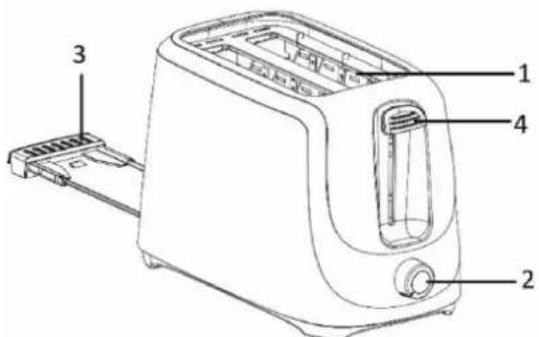
FUNCTIONAL CHARACTERISTICS
- Toast aperture
- Electric browning control & cancel switch
- Removable crumb tray
- Toasting lever
BEFORE USE
- Place the toaster on a flat and heat resistant surface. Make sure that there is enough ventilation around the toaster.
- Before using the toaster for the first time, clean your toaster (see Chapter "CLEANING AND MAINTENANCE"). Operate the toaster at least twice without bread and on the highest setting. Ventilate the room during this period.
- This appliance may emit a characteristic smell when you switch it on for the first time. This is normal, and no harm.
- Make sure the crumb tray is placed tightly on the bottom of the toaster.
INSTRUCTIONS FOR USE
- Insert the power plug into the socket.
- Insert up to two slices of bread in the browning slot.
- Use the browning control switch to select the desired degree of browning between 1 and 6 (1 = lightest; 6 = darkest degree of browning). No. 3 is recommended for first use. The degree of browning chosen depends on the type of bread and individual taste.
- Press the toasting lever down until it engages. The toasting process starts automatically.
- Please remember that the toasting lever will not engage if the power plug is not inserted in the socket.
- The toaster switches itself off automatically and the toasted bread is ejected when the desired degree of browning has been reached.
- You can manually cancel the browning process by rotating the electric browning control anticlockwise to the "cancel" position.
NOTE:
(1) 1 minute interval between each toasting can get the same degree of browning for different batch of toasted bread.
(2) Oversized food, metal foil packages or utensils must not be inserted in the toaster as they may cause fire or electric shock.
CLEANING AND MAINTENANCE
- Before cleaning, make sure that you have switched off the appliance and removed the power plug from the socket. Let the toaster cool down first.
- Pull the crumb tray out to clean it up, reset it before using the appliance again.
- Clean the outside of the toaster with a slightly damp cloth and wipe it dry with a soft cloth. Never dip the toaster in water to clean it!
- To clean the inside, turn it upside down and shake it over the sink until any crumbs adhering to the inside fall out. Clean the crumb tray regularly to avoid crumbs accumulating inside.
TECHNICAL DATA
Operating voltage: 220-240V \~ 50-60Hz
Power consumption: 700W
GUARANTEE AND CUSTOMER SERVICE
Before delivery our devices are subjected to rigorous quality control. If, despite all care, damage has occurred during production or transportation, please return the device to your dealer.
For the purchased device we provide 2 years guarantee, commencing from the day of sale. If you have a defective product, you can directly go back to the point of purchase.
Defects which arise due to improper handling of the device and malfunctions due to interventions and repairs by third parties or the fitting of non-original parts are not covered by this guarantee. Always keep your receipt, without the receipt you can't claim any form of warranty. Damage caused by not following the instruction manual, will lead to a void of warranty, if this results in consequential damages then we will not be liable. Neither can we hold responsible for material damage or personal injury caused by improper use if the instruction manual is not properly executed. Damage to accessories does not mean free replacement of the whole appliance. In such case please contact our service department. Broken glass or breakage of plastic parts is always subject to a charge. Defects to consumables or parts subjected to wearing, as well as cleaning, maintenance or the replacement of said parts are not covered by the warranty and are to be paid.
Electrical and electronic devices/ information for private households
The Directive 2012/19/EU on waste electrical and electronic equipment contains a large number of requirements for handling electrical and electronic equipment. The most important are compiled here.
1. Separate collection of waste electrical and electronic equipment
Electrical and electronic equipment that has become waste is referred to as waste electrical and electronic equipment (WEEE). Owners of WEEE must collect them separately from unsorted municipal waste. WEEE do not belong in household waste, but in special collection and return systems.
2. Batteries, accumulators and lamps
Owners of WEEE must hand over them in complete condition. However, owners of WEEE have to separate old batteries and accumulators which are not enclosed by the WEEE, as well as lamps which can be removed, from the WEEE without destroying it before handing it over to a collection point.
3. Ways to return the WEEE
Owners of WEEE from private households can hand them in free of charge at the designated collection points of the public waste disposal authorities or at the take-back points set up by manufacturers or distributors in terms of the Directive 2012/19/EU.
4. Privacy Protection Notice
WEEE often contain sensitive personal data. This applies especially to information and telecommunications technology devices such as computers and smartphones. In your own interest, please note that each end user is responsible for deleting the data on the WEEE before disposing it.
5. Potential environmental impact
WEEE contain substances that may have a negative impact on the environment and human health if their collection, hand-over, re-use or material recovery is not done in compliance with respective legislation.
6. Your role in WEEE waste treatment
By fulfilling these obligations and especially by fulfilling the obligation to collect WEEE separately, not to dispose it together with unsorted municipal waste and to hand it over to at collection points, you as the end user contribute to the re-use and material recovery of WEEE.
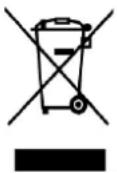
7. Meaning of the crossed-out dustbin symbol
The crossed-out dustbin, which is regularly displayed on electrical and electronic equipment, indicates that the respective device must be collected separately from unsorted municipal waste at the end of its life cycle.
Emerio B.V.
Oudeweg 115
2031 CC Haarlem
The Netherlands
Customer service:
T: +31 (0) 23 3034369
www.emerio.eu/service
Kundeninformation:
T: +49 (0) 3222 1097 600
www.emerio.eu/service
Klantenservice:
T: +31 (0) 23 3034369
www.emerio.eu/service
Looking for spare parts? Have a look at https://spareparts.emerio.eu
- VOR DEM GEBRAUCH
- VOOR GEBRUIK
- ANTES DE USAR
- ANTES DA UTILIZAÇÃO
- OPERAZIONI PRELIMINARI
- PRED POUŽITÍM
- PRED UPORABO
- INTRUCTIUNI DE SIGURANTĂ
- ÎNAINTEA UTILIZĂRII
- PŘED POUŽITÍM
- ПРЕДИ УПОТРЕБА
- HASZNÁLAT ELŐTT
- Instruction manual – English (EN)
- SAFETY INSTRUCTIONS
- FUNCTIONAL CHARACTERISTICS
- BEFORE USE
- INSTRUCTIONS FOR USE
- NOTE:
- CLEANING AND MAINTENANCE
- TECHNICAL DATA
- GUARANTEE AND CUSTOMER SERVICE
- Electrical and electronic devices/ information for private households
- Separate collection of waste electrical and electronic equipment
- Batteries, accumulators and lamps
- Ways to return the WEEE
- Privacy Protection Notice
- Potential environmental impact
- Your role in WEEE waste treatment
- Meaning of the crossed-out dustbin symbol
Brand : Emerio
Model : TO-124164.2
Category : Toaster