
ST-211828.2 - Toaster Emerio - Free user manual and instructions
Find the device manual for free ST-211828.2 Emerio in PDF.


| Product Type | Toaster |
| Brand | Emerio |
| Model | ST-211828.2 |
| Color | White/Stainless Steel |
| Housing Material | Plastic with stainless steel accents |
| Number of Slots | 2 |
| Power Consumption | 800 W |
| Voltage | 220-240 V |
| Frequency | 50/60 Hz |
| Dimensions (W x D x H) | 30 x 20 x 20 cm |
| Net Weight | 1.5 kg |
| Cord Length | 1 m |
| Browning Control | 6 levels |
| Functions | Cancel, Reheat, Defrost |
| Self-Centering Racks | Yes |
| Removable Crumb Tray | Yes |
| Cool-Touch Housing | Yes |
| Auto Shutoff | Yes |
| Non-Slip Feet | Yes |
| Warranty | 2 years |
Frequently Asked Questions - ST-211828.2 Emerio
User questions about ST-211828.2 Emerio
0 question about this device. Answer the ones you know or ask your own.
Ask a new question about this device
Download the instructions for your Toaster in PDF format for free! Find your manual ST-211828.2 - Emerio and take your electronic device back in hand. On this page are published all the documents necessary for the use of your device. ST-211828.2 by Emerio.
USER MANUAL ST-211828.2 Emerio
natural_image
White rectangular food grater with decorative pattern and side panel, no visible text or symbolsSandwich toaster (EN)
Sandwichtoaster (DE)
Smörgåsgrill (SE)
Sandwich toaster (NL)
Voileipägrilli (FI)
Sandwichjern (NOR)
Instruction manual – English ...... - 2 -
Before use make sure to read all of the below instructions in order to avoid injury or damage, and to get the best results from the appliance. Make sure to keep this manual in a safe place. If you give or transfer this appliance to someone else make sure to also include this manual.
In case of damage caused by user failing to follow the instructions in this manual the warranty will be void. The manufacturer/importer accepts no liability for damages caused by failure to follow the manual, a negligent use or use not in accordance with the requirements of this manual.
- This appliance can be used by children aged from 8 years and above and persons with reduced physical, sensory or mental capabilities or lack of experience and knowledge if they have been given supervision or instruction concerning use of the appliance in a safe way and understand the hazards involved.
- Children shall not play with the appliance.
- Cleaning and user maintenance shall not be made by children unless they are older than 8 years and supervised.
- Keep the appliance and its cord out of reach of children less than 8 years.
- If the supply cord is damaged, it must be replaced by the manufacturer, its service agent or similarly qualified persons in order to avoid a hazard.
- Regarding the instructions for cleaning the surfaces which come in contact with food or oil, please refer to the paragraph “cleaning and maintenance” of the manual.
- This appliance is not intended to be operated by means of an external timer or separate remote-control system.
- This appliance is intended to be used in household and similar applications such as: staff kitchen areas in shops,
offices and other working environments; farm houses; by clients in hotels, motels and other residential type environments; bed and breakfast type environments.
-
Before inserting the plug into the mains socket, please check that the voltage and frequency comply with the specifications on the rating label.
-
Always plug the appliance into an earthed plug socket.
-
If an extension cord is used it must be suited to the power consumption of the appliance, otherwise overheating of the extension cord and/or plug may occur. There is a potential risk of injuries from tripping over the extension cord. Be careful to avoid dangerous situations.
-
Disconnect the mains plug from the socket when the appliance is not in use and before cleaning.
-
Ensure that the mains cable is not hung over sharp edges and keep it away from hot objects and open flames.
-
Do not immerse the appliance or the mains plug in water or other liquids. There is danger to life due to electric shock!
-
To remove the plug from the plug socket, pull the plug. Do not pull the power cord.
-
Do not touch the appliance if it falls into water. Remove the plug from its socket and send it to an authorized service center for repair.
-
Do not plug or unplug the appliance from the electrical outlet with a wet hand.
-
Never attempt to open the housing of the appliance, or to repair the appliance yourself. This could cause electric shock.
-
Never leave the appliance unattended during use.
-
This appliance is not designed for commercial use.
-
Do not use the appliance for other than intended use.
-
Do not wind the cord around the appliance and do not bend it.
-
Place the appliance on a stable, level surface from which it cannot fall off.
-
If you use products with non-stick surfaces, please make sure no birds are in the same room and that the room can be completely closed off and well-ventilated.
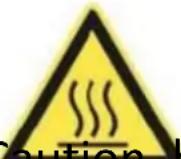
- Caution, hot surface.
WARNING!! Please do not touch surface while in use. The temperature of accessible surfaces may be high when the appliance is operating.
PARTS DESCRIPTION
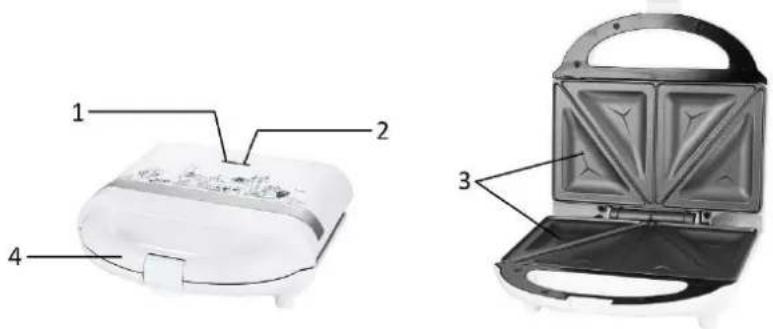
- Red power light
- Green control light
- Non-stick cooking plates
- Handle
BEFORE INTITIAL USE
- Remove all packaging.
- Clean the toasting surfaces with a soft damp cloth and then dry them.
- Unwind the mains cable completely.
USE
- Connect the appliance to an appropriate socket. Both of the indicator lights will illuminate and the toasting surface begins to heat.
- As soon as the appliance has heated up, the green control light goes off.
- The appliance must be heated up before you toast a sandwich. In the meantime prepare your sandwich.
- Open the appliance at the handle by unlocking the catch.
- Put the slices of bread on the lower toasting surface. Ensure that the buttered sides are facing outwards.
- Now put the filling on the bread slices (e.g. cheese, ham, pineapple, etc.) and cover this with the second slice of bread. Once again, ensure that the buttered sides are facing outwards.
- Close the appliance, making sure that the catch is engaged.
- Caution: If the slices of bread have too much filling on, it will not be possible to close the appliance. Take some of the filling off. Never use force to close the appliance.
- During toasting the temperature regulating thermostat switches off and on again. The green control light also switches off and on again.
- After completion of the toasting process (approx. 2-4 minutes) open the catch and remove the sandwiches with the help of a flat wooden or plastic spatula. Never use sharp or metal objects (e.g. knives, metal spatulas, etc.) as this will damage the non-stick coating.
- If you wish to toast more sandwiches, close the appliance again and wait until the toasting surfaces have reheated sufficiently, repeat the toasting process as described above.
- After use, disconnect the mains plug immediately. With the appliance open, allow it to cool down.
TIPS FOR TASTY SANDWICHES
- Allow the appliance to heat up completely before you begin toasting.
- Lay the buttered side facing outwards.
- With fruit fillings the toasted bread will be crispier if you sprinkle a little sugar on the buttered side.
- The following ingredients are particularly recommended: cheese, ham, pineapple, tomatoes, cooked meat, onions, herbs and spices.
CLEANING AND MAINTENANCE
- First, disconnect the mains plug!
- Only clean when the appliance has completely cooled down.
- Clean the housing surface and the toasting surfaces of the sandwich toaster with a soft, damp cloth.
- It is easiest to remove toast or food crumbs with a very soft brush.
- Never use abrasive cleaning agents or sharp objects (e.g. scrubbing brush or knife) for cleaning.
- Caution: Do not immerse the appliance in water or other liquids. There is danger to life due to electric shock!
- Do not place the appliance in a dishwasher for cleaning.
TECHNICAL DATA
Operating voltage: 220-240V \~ 50/60Hz
Power: 700W
GUARANTEE AND CUSTOMER SERVICE
Before delivery our devices are subjected to rigorous quality control. If, despite all care, damage has occurred during production or transportation, please return the device to your dealer. In addition to statutory legal rights, the purchaser has an option to claim under the terms of the following guarantee:
For the purchased device we provide 2 years guarantee, commencing from the day of sale. If you have a defective product, you can directly go back to the point of purchase.
Defects which arise due to improper handling of the device and malfunctions due to interventions and repairs by third parties or the fitting of non-original parts are not covered by this guarantee. Always keep your receipt, without the receipt you can't claim any form of warranty. Damage caused by not following the instruction manual, will lead to a void of warranty, if this results in consequential damages then we will not be liable. Neither can we hold responsible for material damage or personal injury caused by improper use if the instruction manual is not properly executed. Damage to accessories does not mean free replacement of the whole appliance. In such case please contact our service department. Broken glass or breakage of plastic parts is always subject to a charge.
Defects to consumables or parts subjected to wearing, as well as cleaning, maintenance or the replacement of said parts are not covered by the warranty and are to be paid.
ENVIRONMENT FRIENDLY DISPOSAL
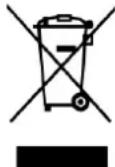
Recycling – European Directive 2012/19/EU
This marking indicates that this product should not be disposed with other household wastes. To prevent possible harm to the environment or human health from uncontrolled waste disposal, recycle it responsibly to promote the sustainable reuse of material resources. To return your used
device, please use the return and collection systems or contact the retailer where the product was purchased.
They can take this product for environmental safe recycling.
SICHERHEITSHINWEISE
- Röd kontrollampa
- Grön kontrollampa
- Non-stickplattor
- Handtag
INNAN FÖ RSTA ANVÄNDNING
TIPS FÖR GODA SMÖRGÅSAR
Brand : Emerio
Model : ST-211828.2
Category : Toaster