
CEN 126 IN - Kitchen furniture ROSIERES - Free user manual and instructions
Find the device manual for free CEN 126 IN ROSIERES in PDF.



| Product type | Under-counter kitchen cabinet |
| Brand | ROSIERES |
| Model | CEN 126 IN |
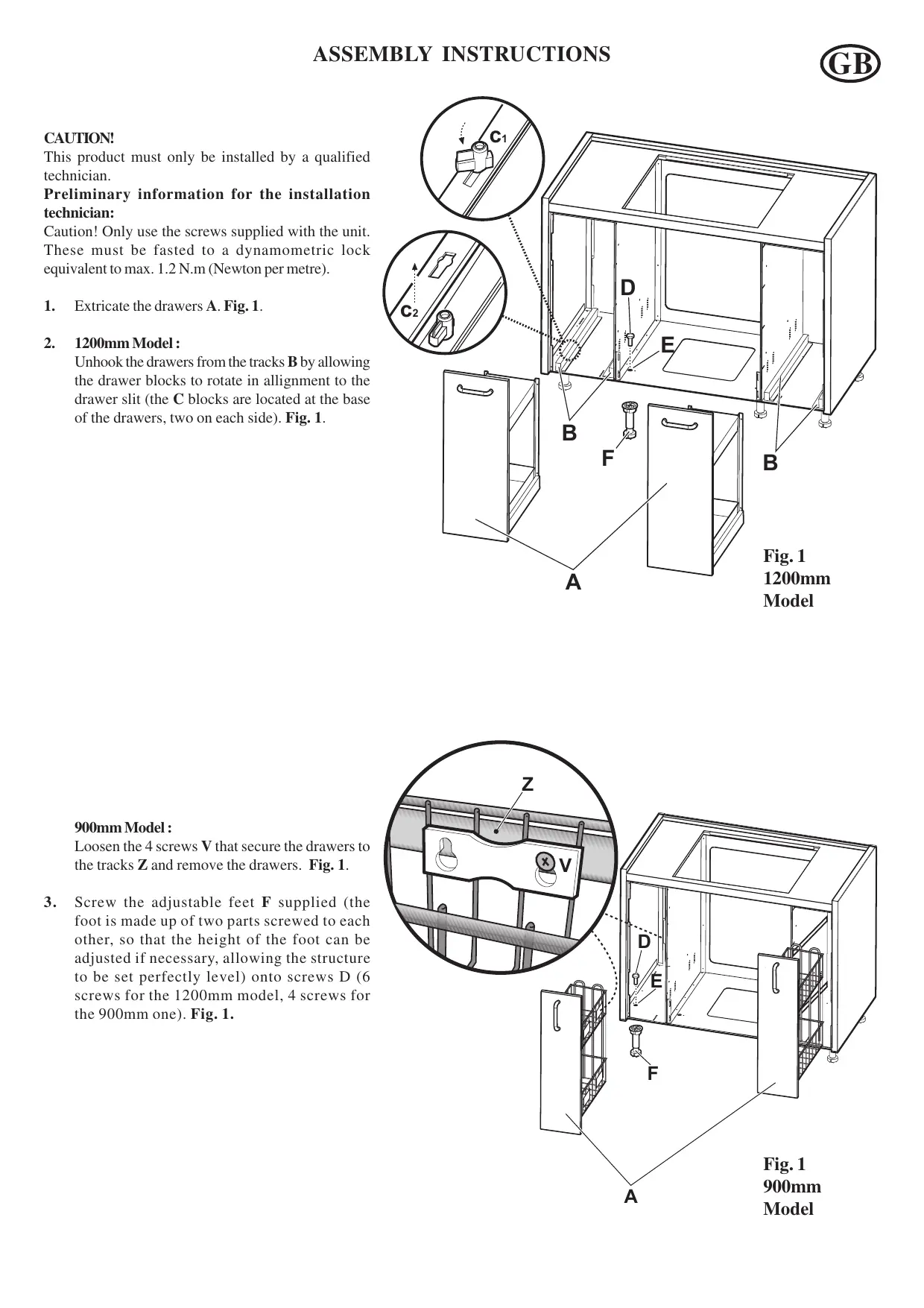
| Available width | 900 mm or 1200 mm |
| Adjustable height | Yes, via adjustable feet |
| Adjustable depth | Yes, via adjustable fixing brackets |
| Estimated weight | Approximately 35 kg |
| Material | Metal frame and wood panels |
| Color | Not specified (usually white or stainless steel) |
| Number of drawers | 2 pull-out drawers (depending on model) |
| Oven housing | Yes, with height-adjustable supports |
| Installation type | Built-in under countertop (by qualified technician) |
| Included accessories | Fixing screws, adjustable feet, oven supports, brackets, countertop |
| Leveling | Via adjustable feet (adjustable height) |
| Maintenance | Clean with a damp cloth and mild detergent |
| Safety | Use only the supplied screws (max torque 1.2 Nm) |
| Cooling gap | 5 mm between the oven and the cooktop |
| Repairability | Spare parts available on request |
| Warranty | 2 years (standard estimate) |
Frequently Asked Questions - CEN 126 IN ROSIERES
User questions about CEN 126 IN ROSIERES
0 question about this device. Answer the ones you know or ask your own.
Ask a new question about this device
Download the instructions for your Kitchen furniture in PDF format for free! Find your manual CEN 126 IN - ROSIERES and take your electronic device back in hand. On this page are published all the documents necessary for the use of your device. CEN 126 IN by ROSIERES.
USER MANUAL CEN 126 IN ROSIERES
E ISTRUCCIONES DE MONTAJE
P INSTRUÇÉS DE MONTAGEM
F INSTRUCTIONS DE MONTAGE
GB ASSEMBLY INSTRUCTIONS
D MONTAGEANWEISUNGEN
NL MONTAGE-INSTRUCTIES
I ISTRUZIONI DI MONTAGGIO
CZ POKNYK MONTÁZI
SK POKNY NA MONTAZ
H SZERELESI UTASITÁSOK
PL INSTRUUKCJA MONTAZU
ATENCIón!
- Extraia as gavetas A. Fig. 1.
2. Modelo de 1200 mm:
This product must only be installed by a qualified technician.
Preliminary information for the installation technician:
Caution! Only use the screws supplied with the unit. These must be fasted to a dynamometric lock equivalent to max. 1.2 N.m (Newton per metre).
- Extricate the drawers A. Fig. 1.
2. 1200mm Model :
Unhook the drawers from the tracks B by allowing the drawer blocks to rotate in allignment to the drawer slit (the C blocks are located at the base of the drawers, two on each side). Fig. 1.
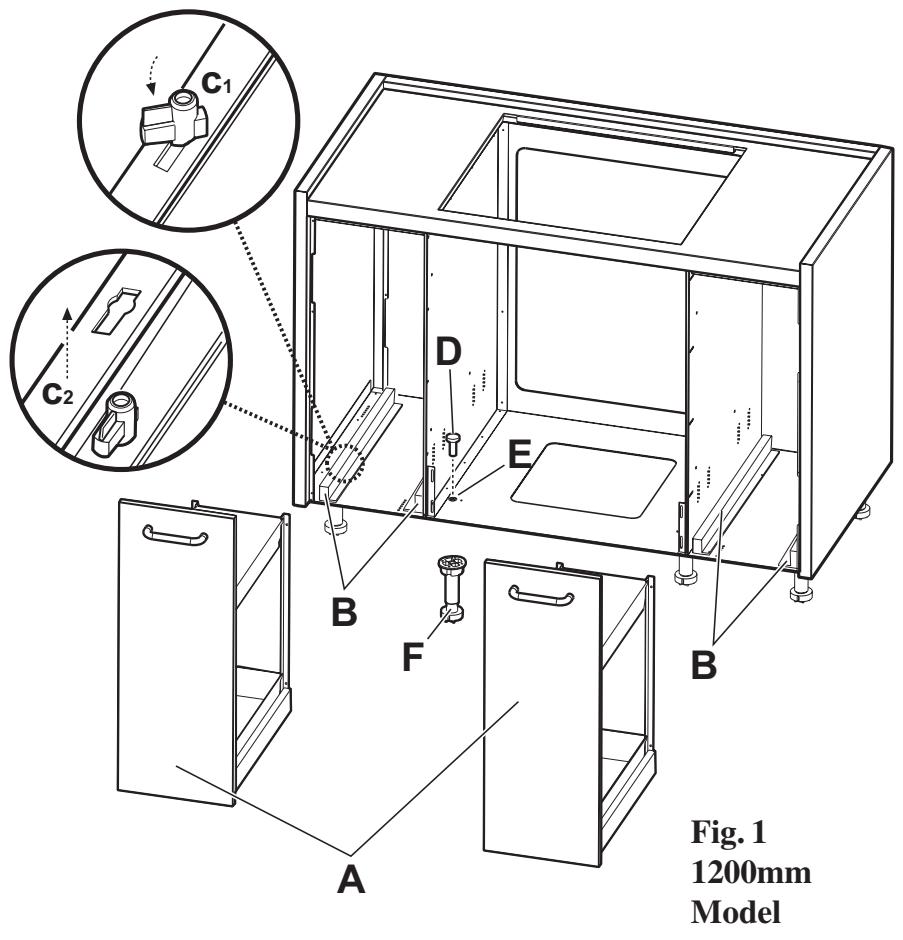
Fig.1 1200mm Model
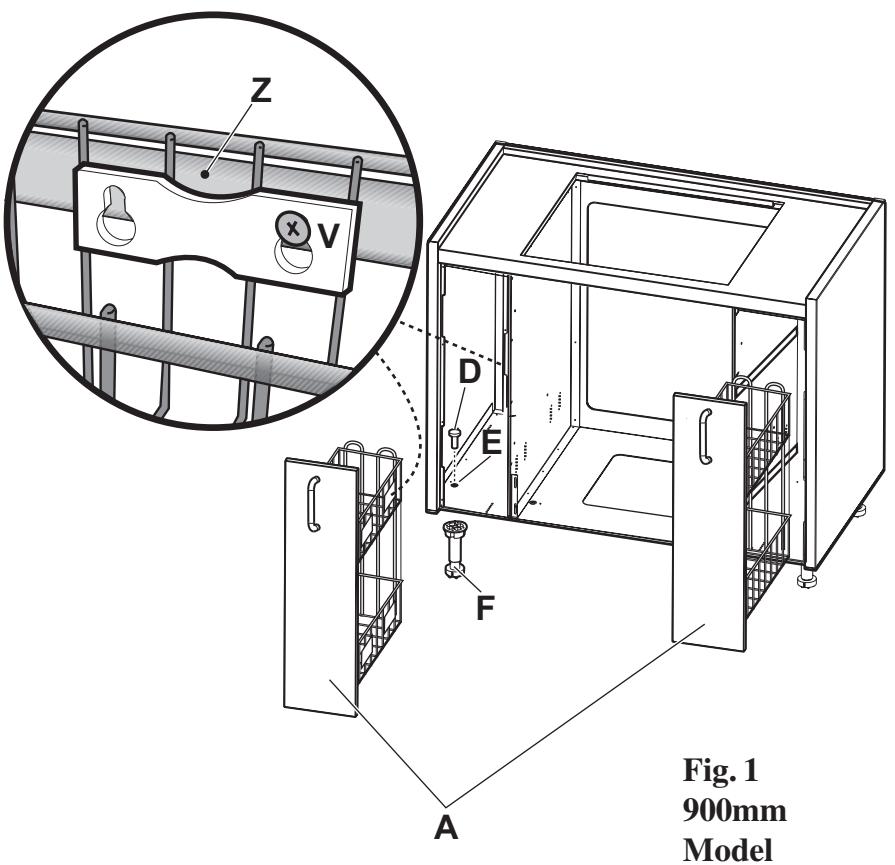
900mm Model :
Loosen the 4 screws V that secure the drawers to the tracks Z and remove the drawers. Fig. 1.
- Screw the adjustable feet F supplied (the foot is made up of two parts screwed to each other, so that the height of the foot can be adjusted if necessary, allowing the structure to be set perfectly level) onto screws D (6 screws for the 1200mm model, 4 screws for the 900mm one). Fig. 1.
- N.B.: The oven supports G are supplied ready-mounted, but they can be adjusted in height as follows:
a. Remove the oven supports G by removing the side screws fixing is to the walls of the oven unit.
b. Position the two oven supports G at the height required and fix them into the new position using the screws provided.
Caution! Fix the support so that when the oven is mounted there is a minimum space of 5mm between the top side of the oven and the underneath side of the cooker top, so as to allow a flow of air to cool the oven. Fig. 2.
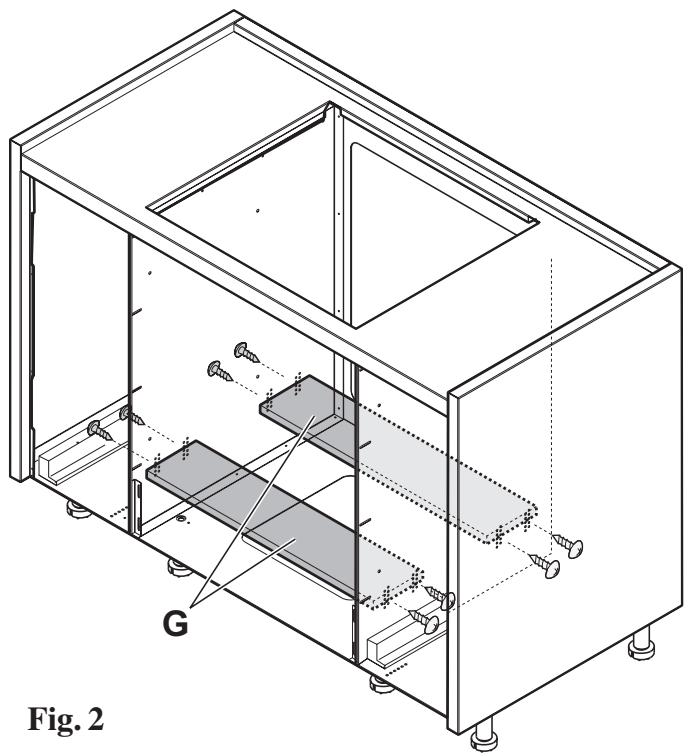
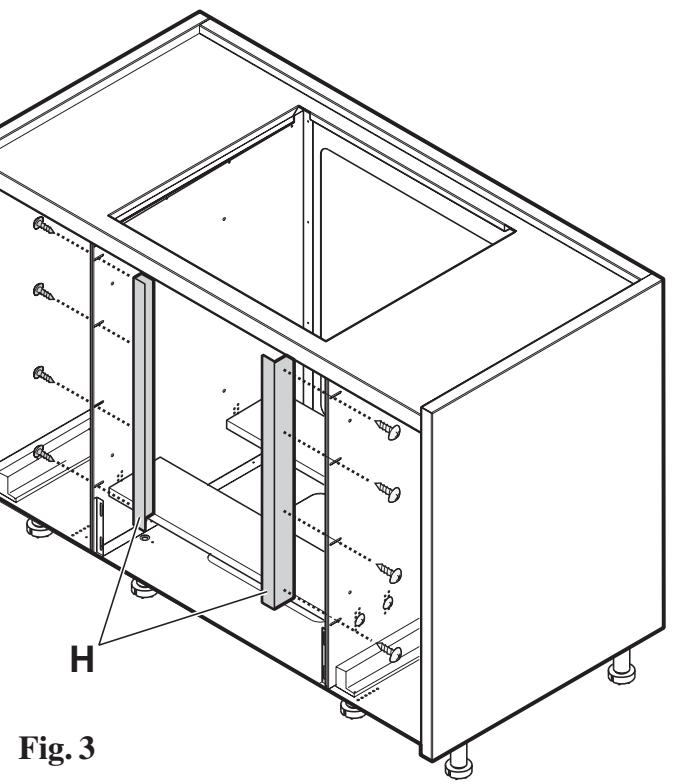
Fig. 3.
- N.B.: The brackets H for final fixing of the oven are supplied ready-mounted, but they can be adjusted to the depth required as follows:
a. Loosen the screws fixing the brackets H.
b. Move the brackets H to the depth required (the brackets must be positioned so that, when installation has been completed, the oven frame is in line with the side drawers).
- Place the cabinet in the selected area and check that the workbench J is perfectly level (achieve levelling by regulating the cabinet legs F ). Fig. 5.
- Affix the frontal lower cabinet panel K to the cabinet with 4 screws (the panel may be fixed in various depths according to needs, therefore diverse drill holes L are provided). Fig. 5.
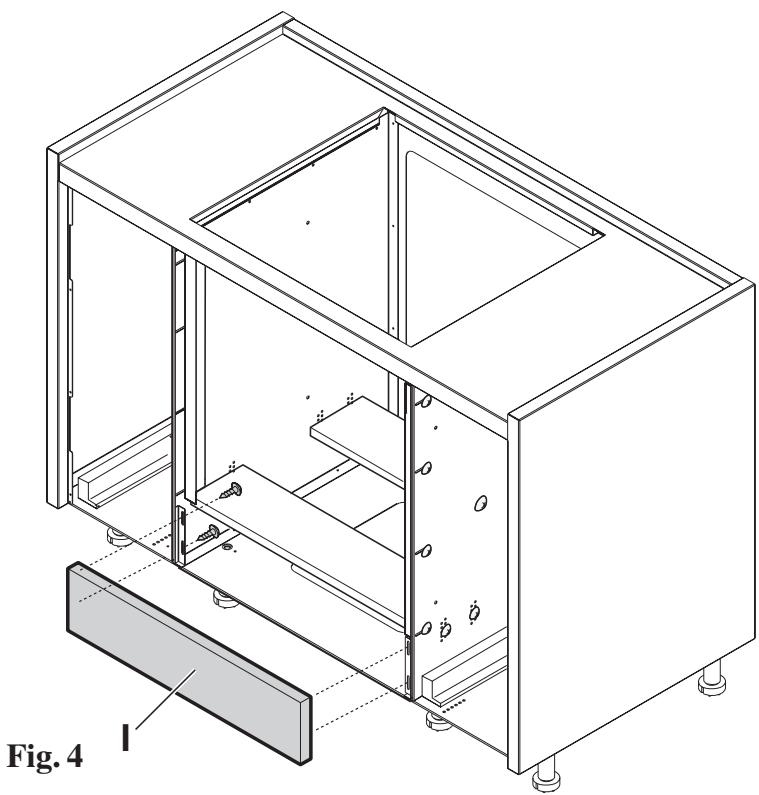
- N.B.: The bottom front piece I covering the oven is supplied ready-mounted. Check that its position is suitable for the type of oven to be installed, proceeding as follows:
a. Insert the oven and open the oven door
b. check that the door is not obstructed in any way by the front piece, and then install the oven, otherwise b1. adjust the position of the front piece
b2. remove the oven
b3. loosen the screws fixing the connector to the walls of the oven unit.
b4. adjust the height of the front piece and lock the screws once more.
c. Repeat operations a, b, above. Fig. 4
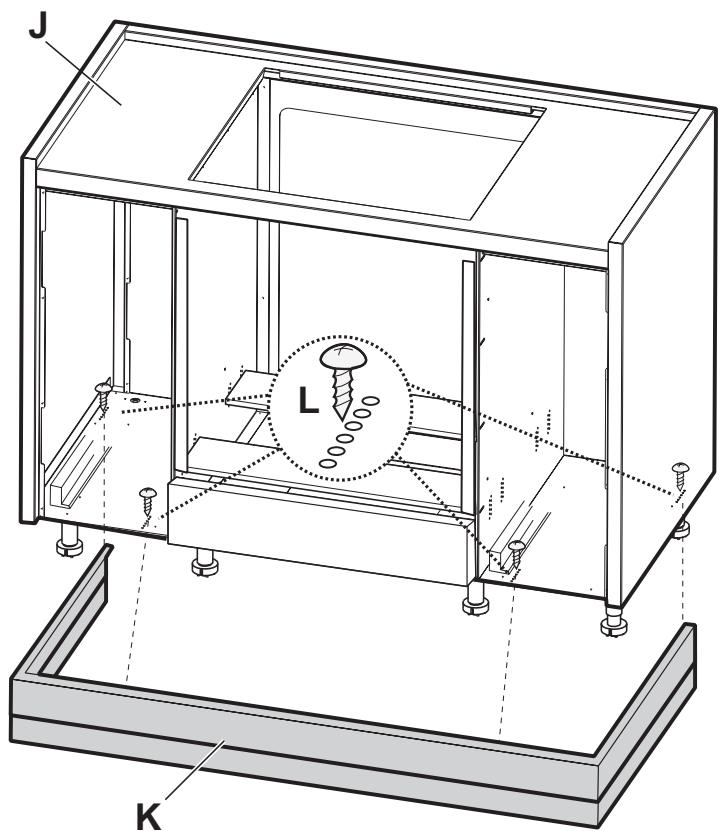
Fig.5
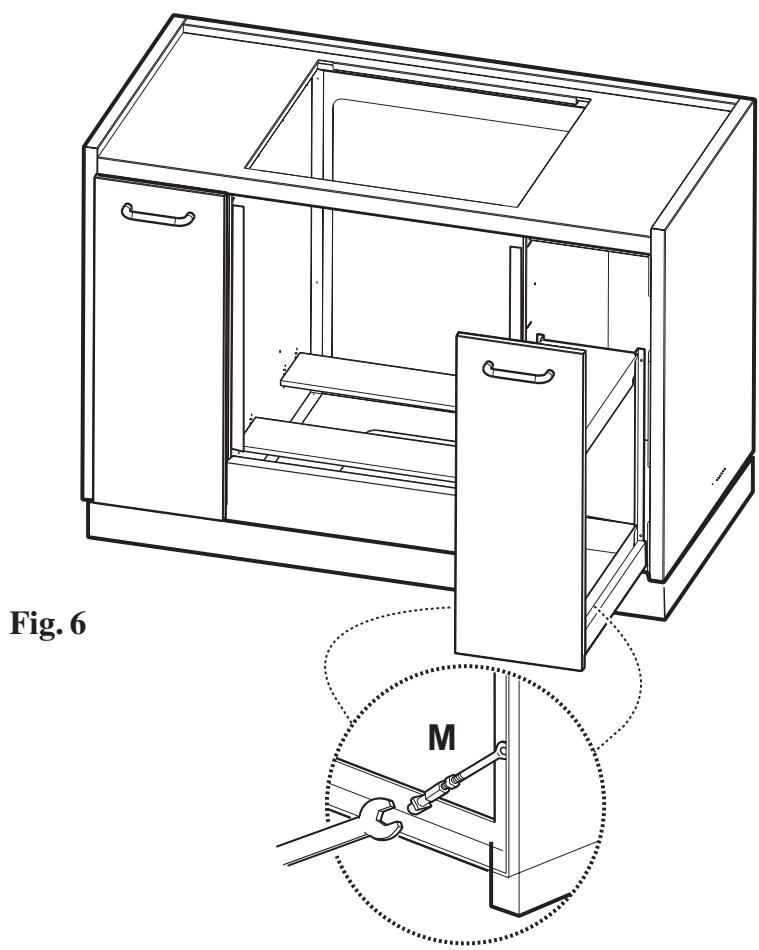
- Replace the drawers in the cabinet (by blocking the drawers via the drawer block C for the 1200mm model or fix the drawers to the screws V on the track Z- fig. 1.). Fig. 6.
- Regulate the slide drawer closing and opening via the regulating screws M. Fig. 6.