
SRD 250 A1 - Alarm clock radio SILVERCREST - Free user manual and instructions
Find the device manual for free SRD 250 A1 SILVERCREST in PDF.


| Product Type | Alarm clock radio |
| Brand | SilverCrest |
| Model | SRD 250 A1 |
| Dimensions (W x H x D) | 14.3 x 13.3 x 8.3 cm |
| Weight | Approx. 435 g |
| Power Supply | 220-240 V, 50 Hz |
| Power Consumption (Operation) | 10 W |
| Power Consumption (Standby) | Approx. 1.5 W |
| Battery Backup | 2 x 1.5 V AA (R6/LR6) for clock retention |
| Radio Bands | FM (VHF): 87.5–108 MHz, AM (MW): 526.5–1606.5 kHz |
| Alarm Functions | Dual alarms with wake-to-radio or tone, snooze (6 min), auto off |
| Sleep Timer | 10 to 60 minutes, adjustable |
| Display | Digital time display with adjustable brightness (HIGH/LOW) |
| Volume Control | Rotary VOL knob |
| Antenna | Wired VHF antenna |
| Operating Temperature | +5 °C to +40 °C |
| Humidity | 5% to 90% (non-condensing) |
| Protection Class | II (double insulation) |
| Warranty | 3 years |
| Cleaning | Soft dry cloth; unplug before cleaning |
Frequently Asked Questions - SRD 250 A1 SILVERCREST
User questions about SRD 250 A1 SILVERCREST
0 question about this device. Answer the ones you know or ask your own.
Ask a new question about this device
Download the instructions for your Alarm clock radio in PDF format for free! Find your manual SRD 250 A1 - SILVERCREST and take your electronic device back in hand. On this page are published all the documents necessary for the use of your device. SRD 250 A1 by SILVERCREST.
USER MANUAL SRD 250 A1 SILVERCREST
Clock Radio SRD 250 A1
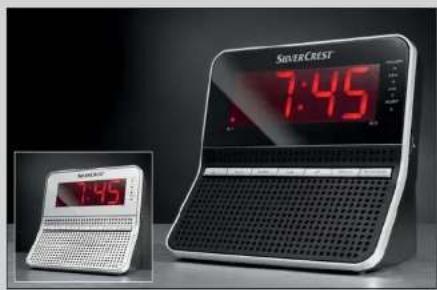
natural_image
Modern coffee machine with digital display showing 7:45, next to a small laptop displaying 7:45 (no visible text or symbols on device)GB Clock
Radio
Budzik z radiem
Operating
instructions
Instrukcja
obstugi
HU Rádiós
Information for these operating instructions .... 3
Copyright 3
Intended use 3
Safety 5
Danger from electric shock 5
Interaction with batteries 6
Basic Safety Instructions 6
Operating components 8
Setting up and connecting 9
Package contents and transport inspection 9
Set-up location requirements 9
Electrical connection 10
Inserting the batteries 10
Providing mains power 11
VHF wire antenna 11
Handling and operation....11
Setting the time 11
Radio operation 12
Programming the wake time and method 13
Switching the alarm function on 14
Switching the alarm off 14
Switching the alarm function off 14
GB
Snooze function ("SNOOZE" function) 14
Automatic Switch-off ("SLEEP" function) 14
Setting the display illumination .....15
Cleaning 15
Troubleshooting 16
Malfunction causes and remedies....16
Storage 17
Disposal....17
Disposal of the appliance 17
Disposing of the batteries 17
Appendix 18
Technical data 18
Information regarding the EG Conformity Declaration ..... 19
Warranty 19
Service 20
Importer....20
Introduction
Information for these operating instructions
These operating instructions are a component of the SRD 250 A1 Clock Radio (henceforth designated as the appliance) and they supply you with important information about the intended use, safety and connection as well as operation of the appliance. These operating instructions must be kept available close to the appliance. They are to be read and used by anyone assigned to operate and repair faults in the appliance. Retain these operating instructions and pass them on to any future owners with the appliance.
Copyright
This documentation is copyright protected.
Any copying and/or reproduction, wholly or partially, as well as rendition of the illustrations, also in a modified form, is permitted only with written consent from the manufacturer.
Intended use
This device is intended exclusively for listening to radio programmes and for waking by an alarm tone or radio in a domestic environment. This appliance is not intended for any other use or for uses beyond those mentioned. Claims of any kind for damage caused by improper use, incompetent repair, unauthorized modification or the use of unauthorized parts are excluded. The risks from these are borne entirely by the user.
In these operating instructions the following warnings are used:

DANGER
A warning at this danger level indicates a threatening dangerous situation.
In the event that the hazardous situation is not avoided it can lead to death or serious injury.
Compliance to the instructions in this warning are necessary to avoid the danger of death or serious injury.

WARNING
A warning at this danger level indicates a potentially dangerous situation.
If the dangerous situation is not avoided it can lead to injuries.
The directives in this warning are there to avoid personal injuries.
IMPORTANT
A warning of this danger level signifi es possible property damage.
If the situation is not avoided it can lead to property damage.
The directives in this warning are there to avoid property damage.
NOTE
A notice signifies additional information that assists in the handling of the appliance.
Safety
In this chapter you receive important safety information regarding handling of the appliance. This appliance complies with the statutory safety regulations. Incorrect usage can lead to injuries and property damage.
Danger from electric shock

DANGER
Life-threatening situation from electric shock!
A life-threatening situation can arise from contact with live wires or components!
Observe the following safety instructions to avoid electric shock hazards:
Do not use the appliance if the mains power plug or the connection cable are damaged.
Do not, under any circumstances, open the appliance housing. The risk of an electric shock is present if the power carrying connections are touched and the electrical and mechanical construction is changed.
The appliance consumes power when in standby-mode. To completely separate the appliance from mains power, the power plug MUST be removed from the mains power socket. The appliance should be positioned so that you have unrestricted access to the mains power socket at all times, thus enabling the plug to be immediately withdrawn should an emergency situation arise.
Interaction with batteries
WARNING
Danger from improper use!
For safe handling of batteries observe the following safety instructions:
Do not throw batteries into a fi re.
Do not short circuit batteries.
Do not attempt to recharge batteries.
Never open, solder or weld batteries. The risk of explosions and injuries exists.
Regularly check the condition of the batteries. Leaking battery acid can cause permanent damage to the appliance. Special caution should be shown when handling damaged or leaking batteries. Danger from acid burns! Wear protective gloves.
Store batteries in a place inaccessible to children.
When swallowed seek immediate medical attention.
If you do not intend to use the appliance for an extended period of time, remove the batteries.
Basic Safety Instructions
For safe handling of the appliance observe the following safety information:
Before use check the appliance for visible external damage. Do not put into operation an appliance that is damaged or has been dropped.
Damaged cables or connections should be replaced by authorised qualified persons or by the customer service department.
Persons who, due to their physical, intellectual or motor abilities, are incapable of operating the appliance safely may only use the device under supervision or direction from a responsible person.
GB
Only permit children to use the appliance under supervision.
Repairs should only be carried out by authorised specialist companies or by the customer service department. Incorrect repairs can result in danger to the user. In addition warranty claims become void.
A repair to the appliance during the warranty period may only be carried out by a customer service department authorised by the manufacturer otherwise no additional warranty claims can be considered for subsequent damages.
Defective components may only be replaced with original replacement parts. Only by using original replacement parts can you guarantee that the safety requirements are complied with.
Protect the appliance from moisture and liquid penetration. Never submerge the appliance in water, do not place the appliance in the vicinity of water and do not stand any object filled with liquid (i.e. vases) on the appliance.
Do not place any objects on the appliance.
Do not operate the appliance in the vicinity of open flames (i.e. candles).
Avoid direct sunlight.
Always pull on the power plug when disconnecting from the wall socket, never pull on the connection cable.
If malfunctions occur or thunder storms threaten pull the power plug from the wall socket.
GB
Operating components
1 SNOOZE Button: Alarm interrupt
2 Display
3 POWER-LED: Lights up when the device is switched on
4 MHz-LED: Lights up with VHF reception
5 kHz-LED: Lights up with MW reception
6 SLEEP-LED: Lights up when the SLEEP function is switched on
7 TUNING regulator: Station selection
8 Wire antenna
9 POWER/BAND button: Switch device on / off / select frequency band
10 DOWN button: Adjustments downwards
11 Battery compartment
12 UP button: Adjustments upwards
13 TIME button: Set the time
14 SLEEP button: Set the automatic switch off
15 AL2 button: Set Alarm time 2
16 AL1 button: Set Alarm time 1
17 Power Cable
18 VOL control: Volume control
19 DIMMER switch: Set the display illumination
Setting up and connecting
Package contents and transport inspection
The appliance is delivered with the following components as standard:
Clock Radio
Operating instructions ●
Extract the appliance and the instruction manual from the carton and remove all packaging material.
NOTE
Check the contents to ensure everything is present and there are no signs of visible damage.
If the contents are not complete or are damaged as a result of defective packaging or through transportation, contact the Service Hotline (see chapter Service).
Set-up location requirements
For safe and fault free operation of the appliance the set-up location must comply with the following provisions:
Place the appliance on a firm, flat and even surface.
Place the appliance so that the ventilation slots are not covered.
Do not place the appliance in a hot, wet or very humid location or in the vicinity of flammable materials.
GB
The surfaces of furniture may contain components that can affect the rubber pads of the appliance and could soften them. If necessary, place a covering under the appliance's rubber pads.
The mains power socket must be easily accessible so that, in an emergency, the plug can be quickly withdrawn from the socket.
Electrical connection
Before connecting the appliance compare the connection data (Voltage and frequency) on the rating plate with that of the mains electric source. This data must be compatible to avoid possible damage to the appliance.
Make sure that the appliance's connection cable is not damaged and is not laying over hot surfaces and/or sharp edges.
Make sure that the connection cable is not tightly stretched or bent.
Do not allow the connection cable to hang over edges (Trip wire effect).
Inserting the batteries
By inserting two 1.5 V batteries (type R6/LR6/AA/Mignon) you avoid losing the programmed time of day and wake time in the event of mains power loss. The batteries make sure that the internal clock continues to run even during a power outage.
When power is restored the correct time appears automatically in the display 2.
NOTICE
The display, radio and alarm do not function with battery-power alone.
Open the cover of the battery compartment 11 on the bottom of the device.
Insert two 1.5 V batteries type R6/LR6/AA/Mignon (not supplied) into the battery compartment 11. For correct polarity make sure that the batteries are inserted according to the diagram in the battery compartment 11.
Close the battery compartment 11 by replacing the cover and allowing it to lock into place.
Providing mains power
Plug the mains power plug into a wall socket. The time of day (- - : - ) will be shown in the display 2.
VHF wire antenna
For VHF reception completely unfold the wire antenna 8.
Handling and operation
In this chapter you receive important information for the handling and operation of the appliance.
Setting the time
Press and hold the TIME button 13. In the display 2 the hour indicator blinks.
Press or hold down the UP button 12 and/or DOWN button 10 to set the hour.
Press the TIME button 13 again. In the display 2 the minute indicator blinks.
Press or hold down the UP button 12 and/or DOWN button 10 to set the minutes.
Press the TIME button 13 again. The set time of day will be accepted.
NOTICE
The time of day will revert back to - -:- if the device is disconnected from the mains power supply and no batteries have been inserted.
Radio operation
Press the POWER/BAND button 9 to switch the device on.
With the VOL control 18 set the desired sound level.
Press briefly the POWER/BAND button ⑨ to set the desired frequency band. With VHF reception the MHz-LED ④ lights up, with MW reception the kHz-LED ⑤ lights up.
With the TUNING control 7 set the desired radio station.
Press for approx. two seconds the POWER/BAND button ⑨ to switch the device off.
NOTE
The technical realities of the appliance permit an adjustable frequency range outside the permitted frequency ranges of VHF (FM) 87.5 - 108 MHz and/or MW (AM) 526,5 - 1606,5 kHz. In some countries, different national regulations may apply to the assigned radio frequency ranges. Please note that information received outside of the assigned radio frequency ranges may not be used, passed on to third parties or otherwise misused.
Programming the wake time and method
When programming the alarm times, you can select whether, at the programmed time, alarm tones should sound or the radio should start playing. Two different alarm times (Alarm 1/Alarm 2) can be programmed.
Press and hold the AL1 button 16 or AL2 button 15. In the display 2 the hour indicator blinks.
Press or hold down the UP button 12 or DOWN button 10 to set the hour.
Press the AL1 button 16 or AL2 button 15 again. In the display 2 the minute indicator blinks.
Press or hold down the UP button 12 or DOWN button 10 to set the minutes.
Press the AL1 button 16 or AL2 button 15 again. The set wake time is accepted and in the display 2 appears the wake method indicator.
Press the UP button 12 to set the desired wake method (682 Alarm tone or r-Radio).
Press the AL1 button 16 or AL2 button 15 again to accept the setting.
NOTICE
If you want to be awakened with the radio, apart from the wake time programming you must also set, additionally, the desired radio station and volume (see section Radio operation).
GB
Switching the alarm function on
Press briefly the AL1 button ^16 and/or AL2 button ^15 . In the display 2 a point appears to the left and/or to the right. The alarm function is now activated.
Switching the alarm off
Whilst the alarm is sounding press the POWER/BAND button 9, to switch the alarm off for 24 hours.
Switching the alarm function off
Press briefly the AL1 button ^16 and/or AL2 button ^15 . The alarm indicators go out in the display ^2 .
Snooze function ("SNOOZE" function)
Whilst the alarm is sounding press the SNOOZE button 1 to temporarily switch off the alarm. After 6 minutes the alarm sounds again.
NOTICE
If the snooze function is activated the corresponding alarm point blinks in the display 2.
Automatic Switch-off ("SLEEP" function)
With the "Sleep" function the device switches itself off after a time lapse of between 60 and 10 minutes.
Press the POWER/BAND button 9 to switch the device on.
Press the SLEEP button 14. In the display 2 appears the switch off time 60 minutes and the SLEEP-LED 6 lights up. Repeated pressing of the SLEEP button 14 shortens the switch off time by 10 minutes respectively.
Press repeatedly the SLEEP button 14 until the desired switch of time is shown in the display 2.
To switch off the sleep function press repeatedly the SLEEP button ^14 , until in the display ② is shown. The SLEEP-LED ⑥ goes out.
Setting the display illumination
Set the DIMMER switch 19 to HIGH if you want the indicators in the display 2 to appear brighter.
Set the DIMMER switch 19 to LOW if you want the indicators in the display 2 to appear darker.
Cleaning

DANGER
Risk of fatal electrocution!
Remove the plug from the mains power socket before cleaning.
Whilst cleaning make sure that no moisture is allowed to enter the device.
Do not use aggressive cleaning agents or scouring powder.
These can affect the surfaces of the device.
Clean the surfaces of the device with a soft, dry cloth.
GB
Troubleshooting
In this chapter you will receive important information for the localisation of malfunctions and their remedies. Observe the instructions in order to avoid danger and damage.
Malfunction causes and remedies
The following table will help with localizing and remedying minor malfunctions:
| Defect Possible cause Solution | ||
| Appliance does not switch on. | The plug is not inserted. | Insert the plug into the mains power socket. |
| Mains power socket is not supplying power. | Check the circuit fuse. | |
| No sound | The volume is set to minimum. | Increase the sound volume with the VOL regulator 18. |
| Noisy radio reception | The radio station is not properly tuned in. | Tune in the radio station properly with the TUNING regulator 7. |
| Reception is too weak. | Try to improve reception by moving the wire antenna 8. | |
NOTE
If you cannot solve the problem with the aforementioned methods, please contact Customer Service.
Storage
If you do not intend to use the appliance for an extended period of time, disconnect it from the mains power supply, remove the battery and store it at a clean, dry location that is not subjected to direct sunlight.
Disposal
Disposal of the appliance

Dispose of the appliance through an approved disposal centre or at your community waste facility. Observe the currently applicable regulations. In case of doubt, please contact your waste disposal centre.
Disposing of the batteries
Do not dispose of the batteries with household waste. Every consumer is legally obligated to hand in batteries at a collection centre in his/her community/district or a dealer. This obligation is intended to ensure that batteries are disposed of in an environmentally safe fashion. Hand batteries in only when they are fully discharged.
GB
Appendix
Technical data
| Operational voltage 220-240 V / 50 Hz | ||
| Batteries for power reserve | 2 x 1.5 V batteryType AA/Mignon/R6/LR6(Batteries not supplied) | |
| Power consumption | ||
| Operation 10 W | ||
| Standby approx. 1.5 W | ||
| Max. LoudspeakerOutput Power | 250 mW | |
| Frequency FM (USW) 87.5 - 108 MHz | ||
| Frequency AM (MW) 526.5 - 1606.5 kHz | ||
| Operating temperature +5 - +40 °C | ||
| Humidity (no condensation) 5 - 90 % | ||
| Measurements (W x H x D) 14.3 x 13.3 x 8.3 cm | ||
| Weight approx. 435 g | ||
| Protection class | II ☐ | |
CE Information regarding the EG Conformity Declaration
This appliance complies with, in regard to conformance to the basic requirements and other relevant regulations, the European Directive for Electromagnetic Compatibility 2004/108/EC, the Low Voltage Directive 2006/95/EC as well as the Eco-Design Directive 2009/125/EC (Supplement 1275/2008 Appendix II, Nr.1).
The complete original declaration of conformity can be obtained from the importer.
Warranty
You receive a 3-year warranty for this appliance as of the purchase date. This appliance has been manufactured with care and meticulously examined before delivery.
Please retain your receipt as proof of purchase. In the case of a warranty claim, please get in touch, by telephone, with our service department. Only in this way can a post-free dispatch for your goods be assured.
NOTE
The warranty adjustment is valid only for material or manufacturing defects not, however, for transport damage, wear and tear or for damage to breakable parts, i.e. switches or rechargeable batteries.
This product is for private use only and is not intended for commercial use. The warranty is void in the case of abusive and improper handling, use of force and internal tampering not carried out by our authorised service branch.
GB
Your statutory rights are not restricted in any way by this warranty. The warranty period will not be extended as a result of warranty adjustments. This applies also to replacement and repaired parts.
Damage and defects potentially present at the time of purchase must be reported immediately after unpacking or, at the very least, two days after date of purchase.
After expiry of the warranty period incidental repairs are subject to payment.
Service
GB Service Great Britain
Tel.: 0871 5000 720 (0.10 £/Min.)
E-Mail: kompernass@lidl.gb
IE Service Ireland
Tel.: 1890 930 034
(0,082 EUR/Min., (peak))
(0,064 EUR/Min., (off peak))
E-Mail: kompernass@lidl.ie
Importer
KOMPERNASS GMBH
BURGSTRASSE 21
44867 BOCHUM, GERMANY
www.kompernass.com