
SRW 250 A2 - Alarm clock radio SILVERCREST - Free user manual and instructions
Find the device manual for free SRW 250 A2 SILVERCREST in PDF.


| Product type | Clock radio |
| Brand | SilverCrest |
| Model | SRW 250 A2 |
| Dimensions (W x H x D) | Approx. 150 x 80 x 120 mm |
| Weight | Approx. 250 g |
| Power supply | 220-240 V ~ 50 Hz, mains adapter included; backup batteries (2 x AAA, not included) |
| Power consumption | Max. 5 W |
| FM radio frequency | 87.5 - 108 MHz |
| Main functions | FM radio, dual alarm, alarm repeat (snooze), time display, brightness adjustment, night light, volume control |
| Display | Red LED display, adjustable brightness |
| Alarms | 2 independent alarms (radio or buzzer) |
| Alarm repeat | Snooze function, adjustable duration (5 to 60 minutes) |
| Sleep timer | Sleep timer: 15 to 90 minutes |
| Maintenance and cleaning | Unplug the device; wipe with a soft dry cloth; do not use abrasive products |
| Operating temperature | 5°C to 35°C |
| Operating humidity | Max. 85% RH |
| Safety | Do not expose to moisture; do not open; use only the provided adapter; keep batteries out of reach of children |
| Spare parts and repairability | No spare parts available; repair by a professional only |
| Package contents | Clock radio, mains adapter, instruction manual |
Frequently Asked Questions - SRW 250 A2 SILVERCREST
User questions about SRW 250 A2 SILVERCREST
0 question about this device. Answer the ones you know or ask your own.
Ask a new question about this device
Download the instructions for your Alarm clock radio in PDF format for free! Find your manual SRW 250 A2 - SILVERCREST and take your electronic device back in hand. On this page are published all the documents necessary for the use of your device. SRW 250 A2 by SILVERCREST.
USER MANUAL SRW 250 A2 SILVERCREST
User manual and service information
DK
Technical specifications....6
Safety Instructions....7
Operating Environment 7
Note on mains disconnection 8
Power cable 9
Batteries 9
Children 10
Copyright....10
Device view and buttons explanation ....11
Display....13
Before Getting Started....13
Getting started 14
Switching the device on/off....14
12/24-hours display 14
Setting the Time....14
Tuning to a Station....16
Automatic Station Search....16
Selecting a Saved Station 17
Setting the Alarm....18
Enabling the Alarm 19
Switching the alarm off....20
SLEEP Timer 20
NAP Timer 21
Connecting an external audio source....22
Display Brightness 23
Light for orientation at night 23
Inserting the Backup Batteries....24
Troubleshooting 25
Maintenance/Cleaning 26
Environmental Considerations and Recycling 26
Declaration of conformity....27
Warranty and service information 28
Introduction
Thank you for choosing a SilverCrest product. The SilverCrest SRW 250 A2 Alarm Clock Radio features a digital clock with an alarm clock function. It also allows you to listen to radio programmes.
Please read the following pages for instructions on how to use your product.

natural_image
Warning symbol with exclamation mark inside a triangle (no text or numbers)This symbol indicates important instructions for the safe operation of the device and the protection of the user.

This symbol denotes further information on the topic.
Intended use
This device is a consumer electronics device. It has been designed to receive and play back radio stations. The device can also be used as an alarm clock. It is suitable only for private use, not for industrial or commercial purposes. The device may not be used outdoors or in tropical climates. The manufacturer is not liable for any damage or problems caused by unauthorised modifications.
Please observe the regulations and laws in the country of use.
Please note that country-specific regulations may exist with respect to the frequency bands that can be received. Any information received from frequency bands outside those that are explicitly free for public use may not be used, nor may its contents be forwarded to any third parties.
Package contents
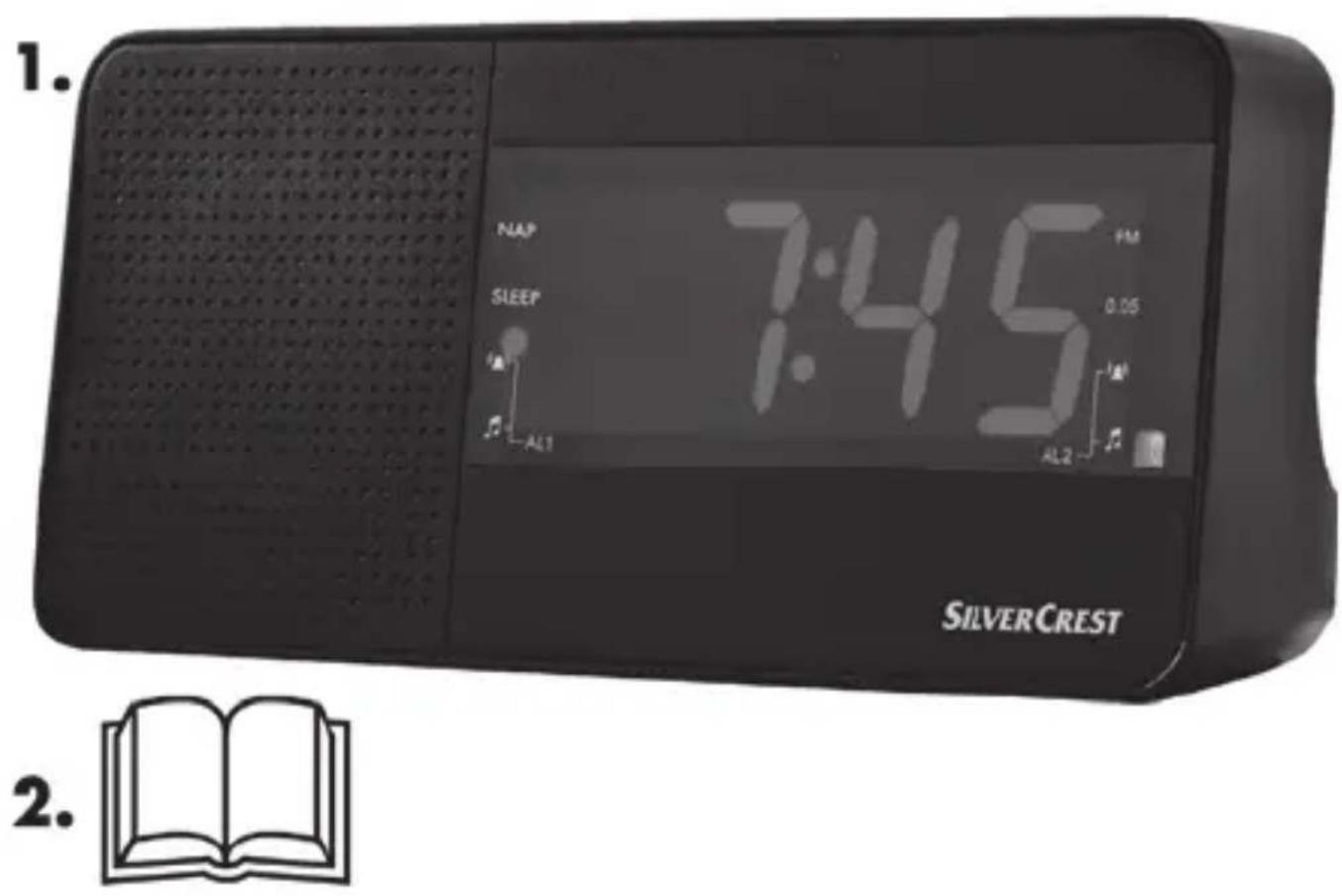
- SilverCrest SRW 250 A2 Alarm Clock Radio
- This User Manual (Lineart illustration)
Technical specifications
| Input voltage 230V | ~/ 50 Hz |
| Power consumption Standby: max. 1 W *Operation: max. 3 W | |
| Output power 250 mW | |
| Backup batteries 2x AAA (Micro/R03/LR03) 1.5Vbatteries (not included) | |
| FM frequency 87.5 - 108 MHz | |
| Station presets 20 FM | |
| Dimensions 189 x 92 x 85 mm (W x H x D) | |
| Weight approx. 435 g (without batteries) | |
| Operating temperature 5 °C to 35 °C | |
| Operating humidity max. 85 % rel. humidity | |
* The standby power consumption depends on the display brightness set.
The technical data and design may be changed without notification.

natural_image
Warning symbol with exclamation mark inside a triangle (no text or numbers)This information describes the technical characteristics of your device. Different national regulations may apply in different countries with respect to the frequency bands that are free for public use. Please note that receiving any information from bands outside these frequency bands will be illegal and may be punishable by law.
Safety Instructions
Before you use this device for the first time, please read the following notes in this manual and heed all warnings, even if you are familiar with handling electronic devices. Keep this manual safe for future refe you sell the device or pass it on, it is essential that you also hand over this manual.
Operating Environment
The device is not designed for use in environments with high temperatures or humidity (e.g. bathrooms) or those with above-average levels of dust. Operating temperature and operating humidity: 5 °C to 35 °C, max. 85 % RH.

Always make sure that:
■ there is free circulation of air (do not place the device on shelves, on a carpet, on a bed, or anywhere that obstructs the ventilation slots and leave at least 10 cm clearance on all sides);
■ no direct heat sources (e.g. radiators) can affect the device;
■ the device is not exposed to direct sunlight or bright artificial light;
- contact with sprayed and dripping water and aggressive fluids must be avoided and the device should never be operated near water. Never under any circumstances immerse the device in liquid
(do not place any items containing liquids such as drinks, vases, etc. on or near the device);
■ the device is never placed near magnetic fields (e.g. speakers);
■ no fire hazards (e.g. burning candles) are placed on or near the device;
■ no foreign bodies enter the device;
■ the device is not subject to major great temperature fluctuations as this can cause condensation and short-circuits; if the device has been exposed to strong temperature variations anyway, wait (approx. 2 hours) before turning it on, so it has reached the ambient temperature.
■ the device is not subjected to excessive shocks or vibrations.

Note on mains disconnection
The ON/OFF-FM/AUX button [2] located on the top of the device does not fully disconnect the device from the mains. The device still consumes electricity in standby mode. Disconnecting the device completely involves removing the power plug from the wall outlet. For this reason, the device should be positioned such as to enable unobstructed access to the wall outlet so that the power plug can be pulled out immediately in an emergency. To avoid the risk of fire, if the device is not going to be used for an extended period (e.g. during holidays), it should always be disconnected from the power socket. Always disconnect the device from the power supply in stormy conditions.
Never open the housing of the device! Opening the housing could expose you a fatal electric shock.

natural_image
Warning symbol with exclamation mark inside a triangle (no text or numbers)Power cable
Always hold the power cord by the plug. Never pull on the cable itself and never hold the power cord with wet hands as this may cause a short circuit or electric shock. Do not place the unit itself or any furniture or other devices on the power cord and make sure that the cable does not get trapped. Never tie knots in the cable and do not tie it to other cables. The power cord should be positioned so that nobody can trip over it or be obstructed by it. A damaged power cord can cause a fire or electric shock. Check the power cord from time to time. If it is damaged, contc the nearest authorised service centre or your dealer for a replacement.

natural_image
Warning symbol with exclamation mark inside a triangle (no text or numbers)Batteries
Insert the batteries with the correct polarity. Refer to the diagram inside the battery compartment. Do not attempt to recharge the batteries and do not throw batteries into a fire. Do not mix battery types (old and new or carbon and alkaline, etc.). Remove the batteries if the device will not be in use for an extended period. Improper use could cause explosions or leaks.

natural_image
Warning symbol with exclamation mark inside a triangle (no text or numbers)Children
Electrical appliances do not belong in the hands of children! Never allow children use electrical devices unsupervised. Children may not understand that they can be dangerous. Small parts can represent choking hazards. If a battery is swallowed, seek medical help immediately. Keep the packaging materials out of the reach of children. There is a risk of suffocation!

natural_image
Warning symbol with exclamation mark inside a triangle (no text or numbers)Risk of suffocation!
Copyright
All the contents of this user manual are protected by copyright and provided to the reader for information only. Copying data and information without the prior explicit written consent of the author is strictly forbidden. This also applies to any commercial use of the contents and information. All texts and diagrams are up to date as of the date of printing.
Device view and buttons explanation
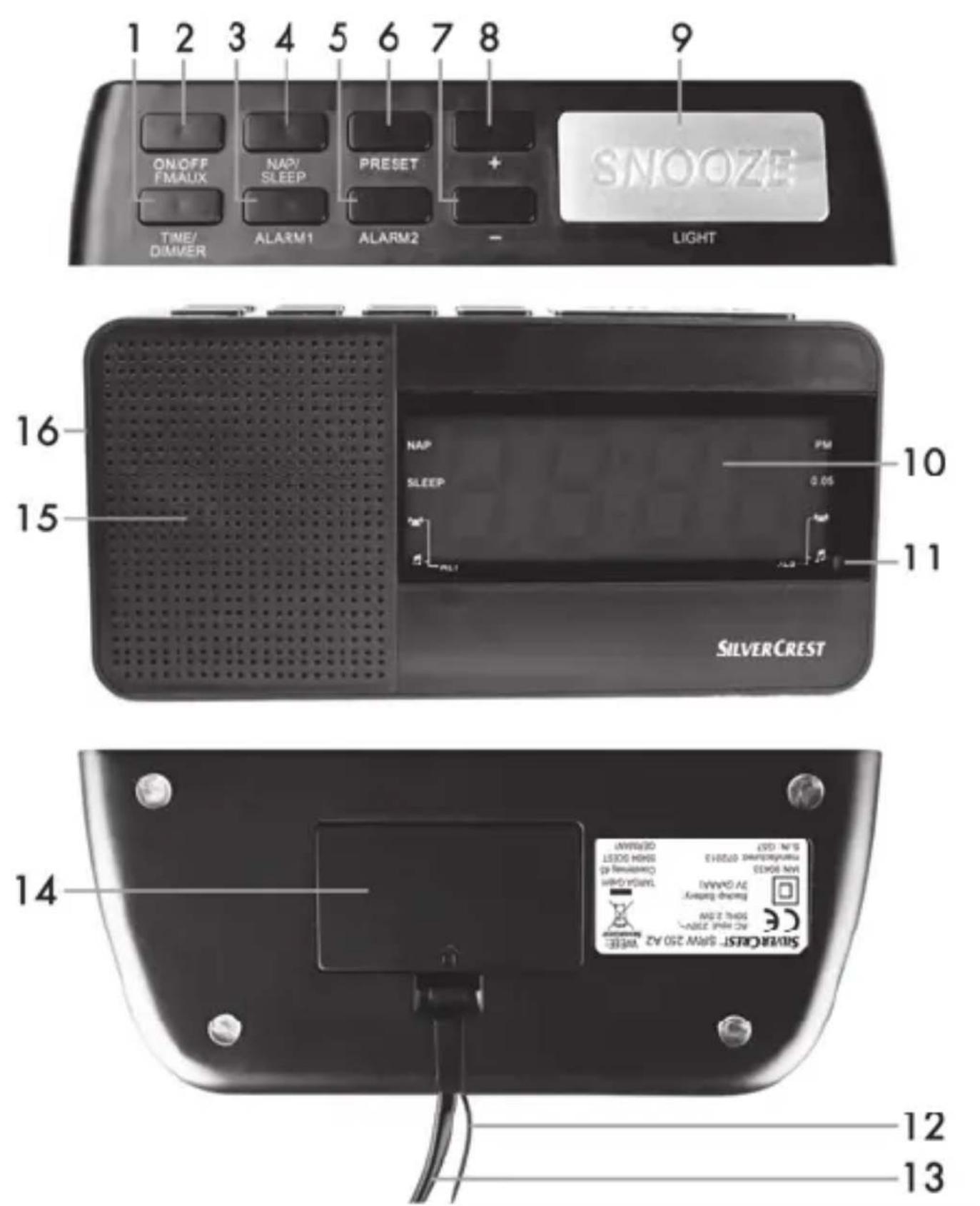
1 TIME/DIMMER (time/display brightness)
2 ON/OFF (switch on/off); FM/AUX (select)
3 ALARM1 (to set or enable/disable ALARM1)
4 NAP/SLEEP (set the NAP timer or the SLEEP timer)
5 ALARM2 (to set or enable/disable ALARM2)
6 PRESET (save/load preset station, scan for stations)
7 - (Reduce volume or select an option)
8 + (Increase audio volume or select an option)
9 SNOOZE/LIGHT (delay the alarm for approx. 6 minutes, enable/disable the light for orientation at night)
10 Display
11 Light sensor
12 Wire antenna
13 Power cable
14 Battery compartment
15 Speaker
16 AUX input (back panel)
12 - English
Display
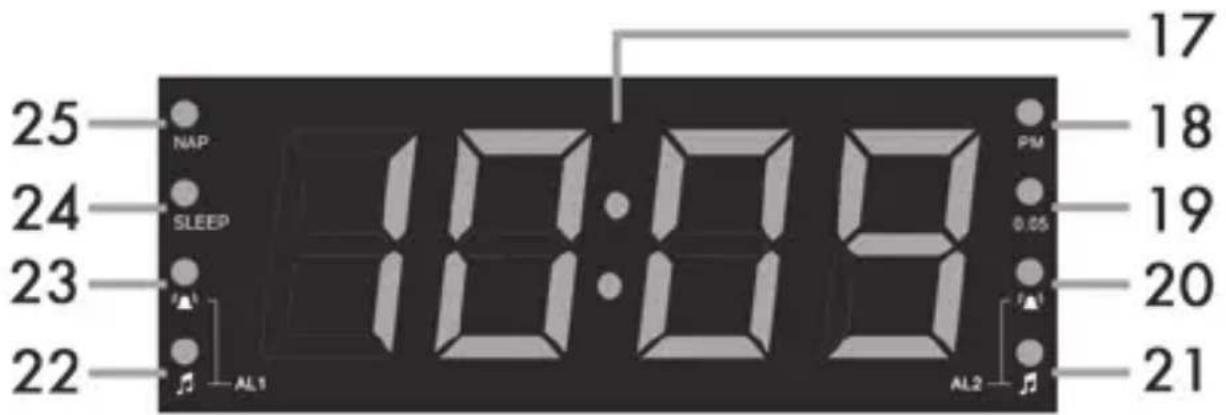
17 Clock/frequency/volume indication
18 PM (for 12 hour mode only)
19 0.05 MHz for FM tuning
20 AL2 - Alarm time enabled with alarm sound
21 AL2 - Alarm time enabled with radio
22 AL1 - Alarm time enabled with radio
23 AL1 - Alarm time enabled with alarm sound
24 SLEEP LED (sleep timer)
25 NAP LED (NAP timer)
Before Getting Started
Position the device on a stable, flat surface and do not place any heavy objects on the device. Next, connect the power plug of the power cord [13] to an easily accessible wall outlet.

You can use backup batteries so you do not have to re-program all your custom settings if there is a power cut. For more information, please read the "Inserting the Backup Batteries" chapter on page 24.
Getting started
Switching the device on/off
To power the device on, press the ON/OFF-FM/AUX button [2]. When powered on, first the currently set frequency is shown briefly on the display [10] and then the time.
To power the device off, hold the ON/OFF-FM/AUX button [2] for at least one second. When powered off, the current time is shown on the display [10].
12/24-hours display
The alarm clock radio can show the time in 12- or 24-hours format. Settings the format is described in the following section "Setting the Time".
Setting the Time
The time can only be set while the device is powered on, press the ON/OFF-FM/AUX button [2] to power the device off.
- Press the TIME/DIMMER button [1] until the hour display flashes [10].

When powering the device on for the first time, the device goes into clock setting mode automatically and the hour display flashes[10]. Upon factory delivery the time format is set to 24-hours.
- Press the - [7] or + [8] button to set the hour. You can also press and hold the - [7] or + [8] button.
■ Then press the TIME/DIMMER button [1] quickly to set the minutes. The minutes counter flashes on the display [10]. - Press the - [7] or + [8] button to set the minutes. You can also press and hold the - [7] or + [8] button to set the minutes in 10-minute steps.
- Press the TIME/DIMMER button [1] to toggle between 12 and 24 hour mode. "24" or "12" is shown on the display [10].
- You can then the - [7] or + [8] button to change between 12 and 24-hour time mode. To distinguish between morning and afternoon time in 12-hour mode, there is a PM LED [18] on the display.
- Wait until the display [10] shows the set time or press the TIME/DIMMER button [1] briefly.

Please note that you can only set the time while the display is flashing [10]. If no input is made for a few seconds, the display [10] stops flashing and the procedure needs to be repeated.
Tuning to a Station
■ Power the device on by pressing the ON/OFF-FM/AUX button [2].
- The current frequency is shown briefly on the display [10]. As soon as the current time is shown, you can press the - [7] or + [8] buttons to adjust the volume.
- Press the ON/OFF-FM/AUX button [2] briefly. As soon as the current frequency is shown, you can press the - [7] or + [8] buttons to set the desired frequency manually.
- To search for a station automatically, press and hold the - [7] or + [8] button. The currently-tuned frequency is indicated in MHz. Any frequencies with 0.05 MHz are shown by means of the 0.05 LED [19]. If required, move the wire antenna into a different position or move the device to improve reception.
■ You can save a station by pressing and holding the PRESET button [6] for approx. 1-2 seconds.
■ "P" flashes on the display [10], followed by a number between 01 and 20.
■ Press - [7] or + [8] to select the station preset you want.
- Press the PRESET button [6] again to save the current station to the selected preset.
Automatic Station Search
If you do not want to set the stations manually, you can have the device search for them automatically. Proceed as follows:
■ Power the device on by pressing the ON/OFF-FM/AUX button [2].
- Press and hold the PRESET button [6] for approx. 4 seconds. The search is started and any stations found are saved automatically.
■ Once a station has been found, the assigned station preset will flash briefly on the display [10].
- Press the PRESET button [6] again to cancel the search.

Please note that a maximum of 20 stations can be saved. If more than 20 stations are found, only the first 20 are saved.
Selecting a Saved Station
- To select a station from a preset, the device has to be powered on. If it is powered off, press the ON/OFF-FM/AUX button [2] to power the device on.
- Press the PRESET button [6] briefly. The current station preset (P01 to P20) selected is shown.
- Press the - [7] or + [8] button to select a different station (preset).
Setting the Alarm
Make sure that the clock has been set correctly (see the page 14 - Setting the Time). You can set two different alarm times (ALARM1 and ALARM2). The alarm time can only be set while the device is powered off. If it is powered on, press the ON/OFF-FM/AUX button [2] to power the device off.
- Press and hold the ALARM1 [3] or ALARM2 [5] button until the hour display flashes [10].
- Press the - [7] or + [8] button to set the hour. You can also press and hold the - [7] or + [8] button.
- Press the ALARM1 [3] or the ALARM2 [5] button quickly again to set the minutes. The minutes flash on the display [10].
- Press the - [7] or + [8] button to set the minutes. You can also press and hold the - [7] or + [8] button to set the minutes in 10-minute steps.
- Press the ALARM1 [3] or the ALARM2 [5] button quickly again to set the alarm volume to the desired level from 00 to 16. The current volume level flashes on the display [10].
- Press the - [7] or + [8] button to set the alarm volume. You can also press and hold the - [7] or + [8] button. You can set different alarm volumes for the two alarm times (ALARM1 and ALARM2).
■ Wait until the display [10] stops flashing or quickly press the ALARM1 [3] or the ALARM2 [5] button.

Please note that you can only set the alarm time and alarm volume while the numbers are flashing on the display [10]. If no input is made for a few seconds, the numbers on the display [10] stop flashing and you will have to repeat the procedure.
Enabling the Alarm
After the you have set the alarm time you want, you can enable the alarm as follows:
- Press the ALARM1 [3] or the ALARM2 [5] button quickly. The AL1 alarm sound LED [23] or the AL2 alarm sound LED [20] lights up on the display [10]. The alarm is now enabled for the set time and with the alarm sound.
- Press the ALARM1 [3] or the ALARM2 [5] button again quickly. The AL1 alarm radio LED [22] or the AL2 radio [21] lights up on the display [10]. The alarm is now enabled for the set time and with the radio.
- To disable the alarm, press the ALARM1 [3] or the ALARM2 [5] button again. While the alarm is disabled, the AL1 alarm sound LED [23], the AL1 radio LED [22], the AL2 alarm sound LED [20] and the AL2 radio LED [21] are off.

In radio alarm mode, the device powers on at the alarm time set and receives the last frequency and the last volume set. In buzzer alarm mode the alarm will sound with the volume assigned to the corresponding alarm function too.
Switching the alarm off
When the alarm starts, you can disable it as follows.
■ Press the ON/OFF-FM/AUX button [2] to stop the alarm. The alarm is switched off until the next day.
or
■ Press the SNOOZE/LIGHT button [9] to delay the alarm for approx. 6 minutes. After this period, the alarm starts again.

While SNOOZE is enabled, the corresponding alarm LED [20, 21, 22 or 23] will flash.
SLEEP Timer
The sleep timer powers the device off automatically after a set time.
■ While the device is powered on, press the NAP/SLEEP button [4]. The number "60" appears on the display [10] to indicate that the device will power off automatically after 60 minutes.
- Press the NAP/SLEEP button [4] multiple times to decrease the countdown time shown. Each press of the button reduces the power-off time by 10 minutes.
If "OFF" is shown on the display [10], the sleep timer is disabled and the device will stay on. You can press the NAP/SLEEP button [4] again to select the power-off delay from the beginning.
- When the sleep timer is enabled, the SLEEP LED [24] will light on the display [10].

While the sleep timer countdown is running, you can power the device off at any time by pressing the ON/OFF-FM/AUX button [2].

Press the NAP/SLEEP button [4] while the sleep timer is enabled to display the remaining time until the unit powers off.
NAP Timer
You can set a nap timer (with alarm buzzer only) for a one-time power on event. You can set a value between 1 and 60 minutes.
■ While the device is powered off, press the NAP/SLEEP button [4]. "n30" appears on the display [10] to indicate that the device will power on automatically after 30 minutes.
- Press the - [7] or + [8] button to set power-on delay between 1 and 60 minutes. You can also press and hold the - [7] or + [8] button.
■ When the nap timer is enabled, the NAP LED [25] will light on the display [10].
- Press any button to disable the nap timer alarm buzzer.

While the nap timer countdown is running, you can disable it at any time by pressing the ON/OFF-FM/AUX button [2].

Press the NAP/SLEEP button [4] while the nap timer is enabled to display the remaining time until the unit powers on.
Connecting an external audio source
- To connect the alarm clock radio to an external audio source you need an audio cable with 3.5 mm jack-type plug. This is optional and not included with the alarm clock radio.
Plug one end of the audio cable into the headphones output of the external device and the other end into the AUX input [16] on the alarm clock radio back panel.
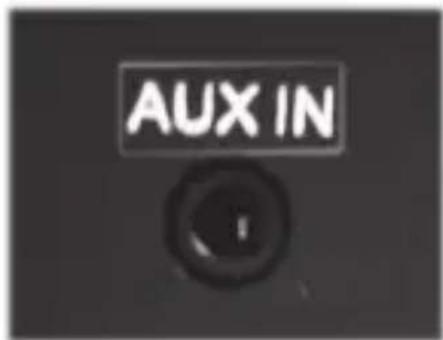
■ Power the device on and press the ON/OFF-FM/AUX button [2] multiple times to select the “AUH” audio source. The display indication “AUH” means “AUXILIARY”.
■ Start playback on the external audio source.
- Press the - [7] or + [8] button to set the desired volume.

You can also adjust the play back volume on external device.
Display Brightness
The display is set to maximum brightness on delivery. To adjust the display brightness, proceed as follows:
- Press the TIME/DIMMER button [1] quickly to dim the display. "L" (LOW) is shown briefly on the display [10].
- Quickly press the TIME/DIMMER button [1] again to dim the display brightness automatically as a function of the ambient lighting. The lightning conditions are measured by the light sensor [11]. "A" (AUTOMATIC) is briefly shown on the display [10].
- Briefly press the TIME/DIMMER button [1] once again to set the display brightness back to maximum. "H" (HIGH) is briefly shown on the display [10].
- Pressing the TIME/DIMMER [1] button again allows you to repeat the display brightness setting in the above sequence.
Light for orientation at night
The alarm clock radio has a light for orientation at night that helps you to orientate in darkness. It also allows operating the alarm clock radio more easily when it is dark. While the device is powered off, press the SNOOZE/LIGHT button [9] to switch the light for orientation at night on. Press the SNOOZE/LIGHT button [9] again to switch the light for orientation at night back off.

natural_image
Warning symbol with exclamation mark inside a triangle (no text or numbers)The light for orientation at night built into the alarm clock radio is not suitable for room lightning.
Inserting the Backup Batteries
To avoid having to adjust the device settings again after a power failure or the device being disconnecting from the mains, you can use backup batteries (not supplied). Proceed as follows:
■ Disconnect the device from the mains.
■ Open the battery compartment [14] on the bottom of the device.
- Insert two AAA batteries 1,5 V (Micro/ R03/LR03) into the battery compartment, making sure the polarity is correct. Note the + and - icons on the batteries and inside the battery compartment (see diagram).
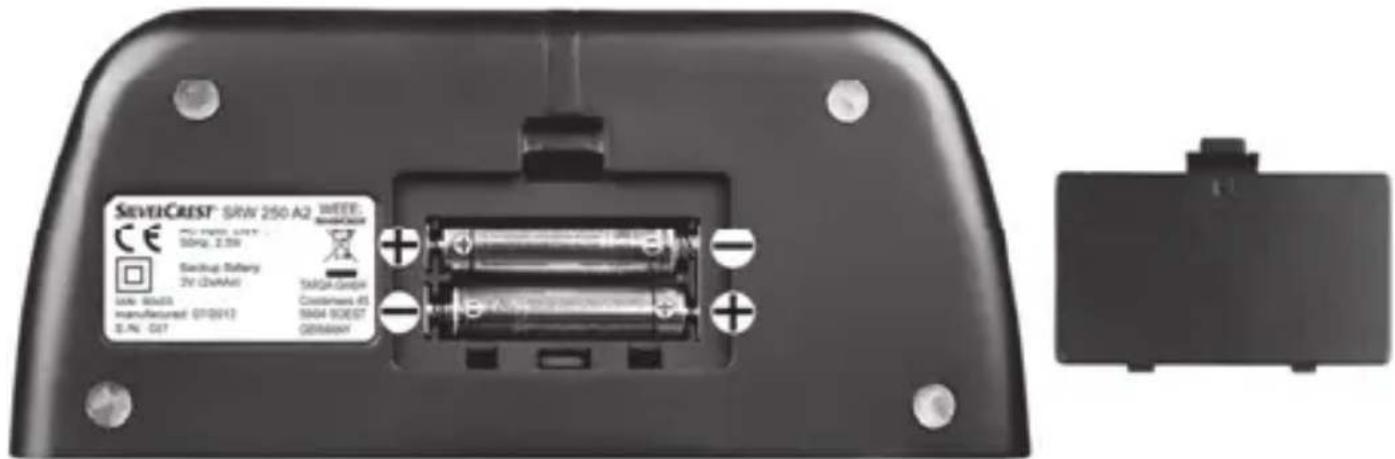
■ Close the battery compartment.
■ Reconnect the device to the mains.

natural_image
Warning symbol with exclamation mark inside a triangle (no text or numbers)Remove the batteries when the device is not to be used for an extended period.
Troubleshooting
Device will not switch on.
■ Power socket defective or fuse blown: check the power socket by connecting a different device.
No sound
If the sound is very low or there is no sound at all, double-check the volume setting (the device needs to be powered on) and, if necessary, increase the volume by pressing the + button [8] several times.
Poor radio reception
■ Extend the wire aerial [12] fully and change its position if necessary.
No playback of external audio sources
■ Make sure that the audio cable is firmly connected to the alarm clock radio AUX input [16] and to the external device headphones jack.
■ Make sure to select the external audio source by checking the "AUH" indication on the display. The display indication "AUH" means "AUXILIARY".
■ Make sure that playback is started on the external audio source and that its volume is sufficiently high. Please also read the operating instructions of the external device.
Maintenance/Cleaning
The device must be serviced if it has been damaged in any way, for example, if the power plug, power cord or housing is damaged, if liquid or objects have penetrated the device, if the product has been exposed to rain or moisture, if the product does not work normally or if the product has been dropped. If you notice any smoke, unusual noise or strange smells, switch off the device immediately and pull the plug from the wall outlet. If this occurs, the device should no longer be used and should be inspected by an expert. All servicing work must be carried out by qualified specialist personnel. Never open the housing of the device. Opening the housing can exposes you to a lethal electric shock. Only use a clean, dry cloth for cleaning. Never use any aggressive liquids. Do not attempt to open the housing of the device, this could void your warranty.
Environmental Considerations and Recycling
natural_image
Symbol of a trash bin crossed with a diagonal line, no text or numbers presentDevices marked with this symbol are subject to European Directive 2002/96/EC. All electric and electronic devices must be disposed of separately from household waste at official disposal centres. Proper disposal of old devices prevents damage to the environment or your health.
For further information about proper disposal, contact your local council, recycling centre or the shop where you bought the device.
Respect the environment. Old batteries do not belong in with household waste. They must be handed in to a collection point for waste batteries. Please note that batteries must be disposed of fully discharged at appropriate collection points for old batteries. If disposing of batteries which are not fully discharged, take precautions to prevent short circuits.
Dispose of all packaging in an environmentally-friendly manner. Boxes can be recycled with waste paper collections or handed in to public collection points. Films and plastics included in the original packaging can be disposed of via your local waste disposal company in an environmentally-friendly way.
Declaration of conformity
CE
This device complies with the basic and other relevant requirements of the EMC Directive 2004/108/EC, the Low-voltage Directive 2006/95/EC, the RoHS II Directive 2011/65/EU and the ErP Directive 2009/125/EC. The corresponding Declaration of Conformity can be found at the end of this User Manual.
Warranty and service information
Warranty of TARGA GmbH
This device is sold with three years warranty from the date of Please keep the original receipt in a safe place as proof of purchase. Before using your product for the first time, please read the enclosed documentation or online help. Should any problems arise which cannot be solved in this way, please call our hotline. Please have the article number and, if available, the serial number to hand for all enquiries. If it is not possible to solve the problem on the phone, our hotline support staff will initiate further servicing procedures depending on the fault. Within the warranty period the product will be repaired or replaced free of charge as we deem appropriate. No new warranty period commences if the product is repaired or replaced. Consumables such as batteries, rechargeable batteries and lamps are not covered by the warranty.
Your statutory rights towards the seller are not affected or restricted by this warranty.
Service

Phone: 0207 - 36 50 744
E-Mail: service.GB@targa-online.com

Phone: 01 - 242 15 83
E-Mail: service.IE@targa-online.com

Phone: 800 - 62 175
E-Mail: service.MT@targa-online.com

Phone: 800 - 92 496
E-Mail: service.CY@targa-online.com
IAN: 90433

Manufacturer
TARGA
GmbH
Coesterweg 45
59494 SOEST
GERMANY
Indhold
Introduktion ....31
Påtænkt brug 32
Pakkens indhold....33
Tekniske specifikationer 34
natural_image
Warning symbol with exclamation mark inside a triangle (no text or numbers)natural_image
Warning symbol with exclamation mark inside a triangle (no text or numbers)natural_image
Warning symbol with exclamation mark inside a triangle (no text or numbers)Batterier
natural_image
Warning symbol with exclamation mark inside a triangle (no text or numbers)natural_image
Warning symbol with exclamation mark inside a triangle (no text or numbers)natural_image
Symbol of a trash bin with crossed lines indicating no waste, and a solid black rectangle below (no text or labels)natural_image
Warning symbol with exclamation mark inside a triangle (no text or numbers)natural_image
Warning symbol with exclamation mark inside a triangle (no text or numbers)natural_image
Warning symbol with exclamation mark inside a triangle (no text or numbers)Piles
natural_image
Symbol of a trash bin with crossed lines indicating no waste, and a solid black rectangle below (no text or labels)natural_image
Warning symbol with exclamation mark inside a triangle (no text or numbers)natural_image
Warning symbol with exclamation mark inside a triangle (no text or numbers)natural_image
Warning symbol with exclamation mark inside a triangle (no text or numbers)Netsnoer
natural_image
Warning symbol with exclamation mark inside a triangle (no text or numbers)Batterijen
natural_image
Warning symbol with exclamation mark inside a triangle (no text or numbers)Verstikkingsgevaar!
Copyright
natural_image
Warning symbol with exclamation mark inside a triangle (no text or numbers)natural_image
Symbol of a trash bin crossed with two crossed lines, no text or numbers presentnatural_image
Warning symbol with exclamation mark inside a triangle (no text or numbers)natural_image
Warning symbol with exclamation mark inside a triangle (no text or numbers)natural_image
Warning symbol with exclamation mark inside a triangle (no text or numbers)natural_image
Warning symbol with exclamation mark inside a triangle (no text or numbers)Netzkabel
natural_image
Warning symbol with exclamation mark inside a triangle (no text or numbers)Batterien
natural_image
Warning symbol with exclamation mark inside a triangle (no text or numbers)Kinder
natural_image
Warning symbol with exclamation mark inside a triangle (no text or numbers)natural_image
Warning symbol with exclamation mark inside a triangle (no text or numbers)natural_image
Warning symbol with exclamation mark inside a triangle (no text or numbers)natural_image
Symbol of a trash bin crossed with two crossed lines, no text or numbers presentEU-Declaration of Conformity
Adress: Targa GmbH
Coesterweg 45
59494 Soest, Germany
Product: Clock Radio
Model: SilverCrest SRW 250 A2
Identification number: IAN 90433
The product complies with the requirements of the following European directives:
2004/108/EC Electromagnetic Compatibility
2006/95/EC Low Voltage
2009/125/EC Energy Relating Products
2011/65/EU Restriction of the use of certain hazardous substances in electrical and electronic equipment
Compliance was proved by the application of the following standards:
EMC: EN 55013:2001 + A1:2003 + A2:2006
EN 55020:2007+A11:2011
EN 61000-3-2:2006+A1:2009+A2:2009
EN 61000-3-3:2008
Safety: EN 60065:2002+A1:2006+A11:2008+A12:2011
ERP: EN50564:2011 with Regulation 12/5/2008
Power Management as required in COMMISSION REGULATION (EC) No 1275/2008 is not applicable for equipment SilverCrest SRW 250 A2 according chapter 2.d) page 6, because main function of equipment is to show the time and to provide alert function by means of buzzer or optional by receiving FM or AM radio program. This main function is provided permanently.
Rohs: EN 50581:2012
Year of CE marking: 2013
Soest, 16 ^th of September 2013

natural_image
Simple line drawing of a stylized bird or dragon (no text or symbols)Matthias Klauke, Managing Director