
Küchen-Chef Twin 14.1511 - Cooking thermometer TFA - Free user manual and instructions
Find the device manual for free Küchen-Chef Twin 14.1511 TFA in PDF.


| Product type | Wireless cooking thermometer |
| Brand | TFA |
| Model | Küchen-Chef Twin 14.1511 |
| Receiver dimensions | 60 (65) x 21 (33) x 142 mm |
| Transmitter dimensions | 60 x 24 x 122 mm |
| Receiver weight | 100 g |
| Transmitter weight | 66 g |
| Power supply | 2 AAA 1.5 V batteries per device (not included) |
| Measurement range | 0 °C to 300 °C |
| Resolution | 1 °C |
| Radio range | Up to 100 m (free field) |
| Transmission frequency | 433 MHz |
| Main functions | Core temperature measurement (FOOD mode) or ambient temperature (BARBECUE mode) with adjustable alarms, backlight, two probes, presets for different meat types and doneness levels |
| Number of probes | 2 (cable approx. 100 cm, resistant to 300 °C) |
| Care and cleaning | Soft damp cloth; do not immerse probes or transmitter; do not wash in dishwasher |
| Safety | Do not use in microwave; wear protective gloves; keep batteries out of reach of children |
| Spare parts available | Probes (ref. 30.3526), transmitter (ref. 30.3231), barbecue clip (ref. 30.3525) |
| General information | Manual available for download at notice-facile.com |
Frequently Asked Questions - Küchen-Chef Twin 14.1511 TFA
User questions about Küchen-Chef Twin 14.1511 TFA
0 question about this device. Answer the ones you know or ask your own.
Ask a new question about this device
Download the instructions for your Cooking thermometer in PDF format for free! Find your manual Küchen-Chef Twin 14.1511 - TFA and take your electronic device back in hand. On this page are published all the documents necessary for the use of your device. Küchen-Chef Twin 14.1511 by TFA.
USER MANUAL Küchen-Chef Twin 14.1511 TFA
natural_image
Technical line drawing of a mobile phone casing with internal components and wiring (no text or symbols)
natural_image
Technical line drawing of a mechanical component with no visible text or symbolsFig. 3
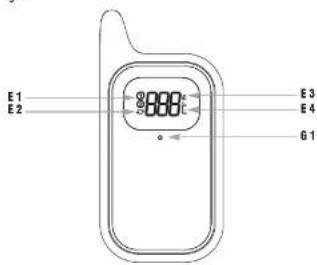

Fig. 2

natural_image
Technical line drawing of a mechanical device with a curved arm and attached components (no text or symbols)E 3: Sendosignalsymbol E 4: Temperatur in °C
2.3.1.2.2.3.4.5.6.7.8.9.10.11.12.13.14.15.16.17.18.19.20.21.22.23.24.25.26.27.28.29.30.31.32.33.34.35.36.37.38.39.40.41.42.43.44.45.46.47.48.49.50.51.52.53.54.55.56.57.58.59.60.61.62.63.64.65.66.67.68.69.70.71.72.73.74.75.76.77.78.79.80.81.82.83.84.85.86.87.88.89.90.91.92.93.94.95.96.97.98.99.100
Tasten
F 1: RESYNC Taste
B 2: LIGHT Taste
B 4: ALARM Taste
B 6: > Taste
[Non-Text]
Gchäuse
Thank you for choosing this instrument from TFA.
1. Before you use this product
- Please make sure you read the instruction manual carefully.
This information will help you to familiarize yourself with your new device, to learn all of its functions and parts, to find out important details about its first use and how to operate it and to get advice in the event of a malfunction. - Following and respecting the instructions in your manual will prevent damage to your instrument and loss of your statutory rights arising from defects due to incorrect use. We shall not be liable for any damage occurring as a result of non following of these instructions.
• Likewise, we take no responsibility for any incorrect readings or for any consequences resulting from them. - Please take particular note of the safety advice
- Please keep this instruction manual safe for future reference.
2. Delivery contents
• Wireless BBQ meat thermometer (receiver)
• Transmitter (cat.-no. 30.3231)
- Two stainless steel probes with approx. 100 cm cable (cat.-no. 30.3526)
• Instruction manual
• Supports
3. Range of application and all the benefits of your new instrument at a glance
- For the optimal preparation of meat, poultry and fish, can be used for the barbecue or oven
- Transmitter with two stainless steel probes with approx. 100 cm cable, distance range of up to 100 m (open field)
• Alternatively the two probes can be used to monitor the cooking chamber temperature of the barbecue or oven - with the upper and lower temperature limits, or the core temperature of a maximum of two roasting or grilling pieces.
• Also ideal for monitoring cooking at low temperatures
• Pre-programmed settings for different types of meat and doneness (in German and English). - Beef, veal, lamb, pork, chicken, turkey, fish and hamburger
- Well done, medium, medium rare and rare
• Individual target temperatures can be programmed
• Alarm warning when the target temperature is reached - Backlight
• Will supp
4. For your safety
• This product is exclusively intended for the range of application described above. It should only be used as described within these instructions.
- Unauthorized repairs alterations or changes to the product are prohibited.
• This product should not be used for medical purposes.
Caution! Risk of injury:
- Wear heat-resistant protective gloves when touching the probe during or after cooking
- Do not use the instrument in the microwave
- Be careful when handling the sharp probes.
- Keep these dwines and the batting net of work of children.
- Batteries contain harmful acids and may be hazardous if swallowed. If a battery is swallowed, this can lead to serious internal burns and death within two hours. If you suspect a battery could have been swallowed or otherwise caught in the body, seek medical help immediately.
- Batteries must not be thrown into a fire, short-circuited, taken apart or recharged. Risk of explosive
- Low batteries should be changed as soon as possible to prevent damage caused by leaking. Never use a combination of old and new batteries together, one battery of different types
- Wear chemical-resistant protective gloves and safety glasses when handling leaking batteries.

Important information on product safety!
- Do not expose the receiver and transmitter to extreme temperatures, vibrations or shocks. Only the probe and the cable are heat resistant up to 300 °C. Never hold the probe directly over a fire.
- Do not immerse the probe and the cable in water. Water can penetrate and cause malfunction. Not suitable for dishwasher.
- The receiver is not splashproof. Do not use it in the rain.
- The transmitter is splashproof, but not watertight. Do not immerse the instrument in water.
5. Elements
5.1 Wireless BBQ meat thermometer (receiver) (Fig. 1)
Display
A1: Channel 1 or 2
A 2: Circle symbol for the alternating channel
A 3: FOOD mode (core temperature) or BARBECUE mode (cocking chamber temperature)
A 4: Types of meal (in FOOD mode)
A 5: Doneness (in FOOD mode)
A 6: Battery symbol for receiver
0.7: Channel 1 (lot jack)
A 8: activated alarm
A 9: HI target temperature (in FOOD model) or upper temperature limit (in BARBECUE mode)
A 10: LO lower temperature limit (BARBECUE mode)
A 11: Actual measured temperature
A.12-Channel 2 (for jark 7)
A 12. Onchler E, (or) 0.13- Activated slam

Küchen-Chef TWIN – Wireless BBQ meat thermometer
A 14: HI target temperature (in FOOD mode) or upper temperature limit (in BARBEGUE mode)
A 15: LO lower temperature limit (BARBECUE mode)
A 16: Actual measured temperature
Buttons
B 1: ON/OFF button
B.3: SET button
B.5: < button
B 7: GER/ENG button (inside battery compartment)
Housing
C 1: Battery compartment C 2: Support
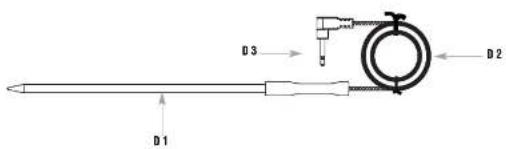
5.2 Probe (Fig. 2)
D 1 Probe D 2 Cat
D 3: Probe connector
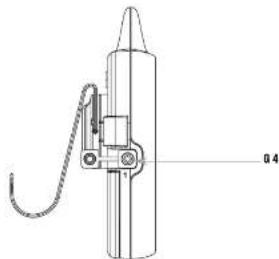
5.3 Transmitter (Fig. 3)
Display
E 1: Channel number 1 - 2
E 3: Transmission symbol E 4: Temperature °C
Bullons
F 1: RESYNC button
Housing
0 1: Transmission LED 0 2: Battery compartment (screwed)
G 3: Support G 4: Jack for temperature probe on channel 1
G 5: Jack for temperature probe on channel 2
6. Getting started
- Remove the protective films from the receiver and the transmitter.
- Remove the supports at the back of the receiver and the transmitter, if necessary.
- Pull off the rubber protection cover carefully from the opening of the first probe on the left side of the transmitter. Plug the connector for the
probe cable into the jack. - Repeat the process for the second probe.
- Open the battery compartment at the back of the transmitter with a suitable screwdriver.
GB
- Open the battery compartment at the back of the receiver.
- Put the devices on a table. Avoid being close to possible sources of interference such as electronic devices and radio equipment.
- To guarantee a quicker and better transmission of the measured temperature, insert first two AAA 1.5 V batteries in the compartment of the receiver. Make sure the polarity is correct. The device will alert you with a beep and all segments will be displayed for a short moment.
• The device is ready for use. - On the temperature display for channel 1 and 2 appears"- - - °C".
- New insert two new AAA 1.5 V batteries in the compartment of the transmitter. Make sure the polarity is correct. All segments will be displayed briefly.
- The actual measured temperature for channel 1 and 2 appears in sequence in the display, as well as the symbol for the alternating channel
- The transmitter sends the actual measured temperatures to the receiver
- As soon as the transmission is successful, the device will alert you with a beep and the actual measured temperatures for channels 1 and 2 appear in the receiver's display.
• The transmitter sends the last measured temperature every 12 seconds. - Press and hold the GER/ENG button in the battery compartment of the receiver to toggle between German and English.
- Close the battery compartments of the receiver and the transmitter
- You can also operate the device with only one probe. “---” appears in the display of the unused channel and the symbol for the alternating channel ○ disappears.
6.1 Manual search for the transmitter
- If the transmission fails or if the contact between the transmitter and the receiver gets lost (transmission range of up to 100 m in open areas, within solid walls, especially ones with metal parts, the transmission range can be reduced considerably) a beep tone will be heard at regular intervals and ' - - °C' appears on the display of the receiver for channel 1 and 2.
- You can also start the search for the transmitter manually.
• Press and hold the LIGHT button on the receiver.
• '---"C" flashes on the display of the receiver for channel 1 and 2. - Press and hold the RESYNC button at the back of the transmitter.
- As soon as the transmission is successful, the device will alert you with a beep and the last measured temperature will appear on the display of the receiver for channel 1 and 2.
6.2 Switch the devices off and on
6.2.1 Receiver
- Press and hold the ON/OFF button
• The device is switched off - Page and hold the ON/OFF button to turn the device back on
- On the display for the hypogonate let channel 1 and 2 apears, ^4 - - - °C
- On the display for the temperature for Channel 1 and 2 opacels
- It necessary, activate the transmitter.
- Wait until the last measured temperature appears or start the manual search for the transmitter.
Küchen-Chef TWIN – Wireless BBQ meat thermometer
GB
6.2.2 Transmitter
- Press and hold the ON/OFF button at the back of the transmitter.
• The device is switched off. - Press and hold the ON/OFF button to turn the device back on.
- If the probes are still connected, the display will show the last measured temperature in sequence.
• To guarantee a better and quicker transmission of the last measured temperature, turn the receiver on first and then the transmitter. - IMPORTANT: To increase the life of the hot air, switch off the device after each end
7. Settings
• The two stainless steel probes can optionally be used to monitor
1. the cooking chamber temperature of the grill or oven with the temperature upper and lower limit (BARBECUE model) or
2. the core temperature of a maximum of two coasting or grilling pieces (FOOD mode).
7.1 Select channel
- Press and hold the SET button to enter the setting mode.
- Channel 1 starts flashing and you can now use the < or > button to select the channel for which you want to make the setting (channel 1 or 2).
- Confirm the setting with the SET button.
7.2 Select setting mode
- You can now use the < or > button to select whether you want to choose BARBEGUE (upper and lower limit temperatures) or FOOD mode (core
temperature). - Confirm the setting with the SET button.
7.3 Set temperatures
7.3.1 BARBECUE modc
- Hi will start flashing and you can use the < or > button to set the upper temperature limit.
- Confirm the setting with the SET button.
• LO will start flashing and you can use the < or > button to set the lower temperature limit. - Confirm the setting with the SET button.
- Press and hold the < or > button for fast mode
7.3.2 FOOD mode
- Press the < or > button to choose the type of meat (see table)
- Confirm the setting with the SET button.
- Press the
button to choose the doneness (see table). - Confirm the setting with the SET button. Alternatively you can press the < or > button to adjust the core temperature to your preference. Press
and hold the < or > button for fast mode. The individually set temperature is not saved. - Confirm the setting with the SET button.

* Different levels of doneness available depending on type of meat.
8. Measuring procedure
- If you want to measure the cooking chamber temperature (BARBECUE mode), place the corresponding probe in the grill or oven. Do not place the probe directly on the rack. For an optimal measuring result we recommend the clip for BBD meat thermometer (cat-no, 30.3525.63) to attach the temperature probe to the grill.
- For measuring the core temperature of meat (FOOD mode): Plunge the corresponding probe at least 2 cm into the middle of the thickest part of the meat; for poultry, between the torso and the thigh - it should not touch bones or cartilage and it should not protrude from the meat. The probe should remain in the meat throughout the cooking process.
- Now simply run the cable to the outside. Be careful with sharp-edged frames and hinges.
- Use the flexible supports to fasten the transmitter in position near the oven (cable length 100 cm) or remove the support and the device can be placed onto flat surfaces.
9. Temperature alarm
- Press the ALARM button in normal mode, to activate or deactivate the alarm function.
- The alarm symbol appears/disappears on the display.
9.1 FOOD mode
9.1.1 Pre-alarm (another 5 °C until target temperature is reached)
- As soon as the core temperature minus 5°C is reached three alarm boeps are heard per second and the alarm symbol flashes on the receiver's display.
- Press any button to stop the alarm sound.

Küchen-Chef TWIN – Wireless BBQ meat thermometer
GB
9.1.2 Hi-alarm (when the target temperature is exceeded)
- As soon as the core temperature is exceeded four alarm beeps are heard per second.
• The corresponding temperature and the alarm symbol hashes on the receiver's display. - The temperature display and the alarm symbol will continue flashing until the measured temperature is below the set temperature.
9.2 BARBECUE mode
- If the set upper temperature limit in the cooling chamber is exceeded, two alarm beeps are heard per second.
- If the set lower temperature limit in the cooking chamber is fallen below, one alarm beep is heard per second.
- The corresponding temperature and the alarm symbol flashes on the receiver's display.
- Press any motion to stop the alarm buttons.
- The temperature display and the alarm symbol will continue flashing until the measured temperature is within the alarm limits.
Note: If the alarm is not activated, the corresponding temperature display flashes when the set alarm value is fallen below or exceeded.
10. Backlight
- Press the LIGHT button.
• The backlight is activated briefly.
11. Table stand and attachment
11.1 Receiver
- To use the support as a clamp (e.g. for belts), insert the double-sided mounting aids into the upper slots of the receiver. The installation is successful if you hear a click.
- To use the support as a stand, put the double-sided mounting aids into the lower, gently sleeping slots.
• The installation is successful if you hear a click.
11.2 Transmiller
- Insert the double-sided mounting aids of the support into the slots of the transmitter. The installation is successful if you hear a click. Take the metal stand and attach the two ends into the holes provided at the turntable. With the turntable, you can now choose whether you want to use the support to stand or to be mounted. The turntable is properly adjusted when you hear a click.
12. Care and maintenance
- Clean the instrument, the transmitter and the probes with a soft clamp cloth. Do not use solvents or scouring agents. Do not immerse the probe and the cable in water. Not suitable for dishwasher
- Should water or steam enter the device's jack, it could affect the contact with the probe. Dry the probe connector with a cloth before you connect it to the transmitter.
• Turn off the instrument after use. - Remove the batteries if you do not use the devices for a long period of time.
- Store the devices in a dry place.
12.1 Battery replacement
- Change the receiver's batteries when the battery symbol appears on the display.
- If the transmitter's batteries are too weak, the two probes measured values and "LO" are displayed alternately.
- Open the battery compartments on the back of both instruments and insert two AAA 1.5V batteries in each one. Make sure the polarities are correct. Close the battery compartments again.
- Please note: When the batteries are changed, the contact between the transmitter and the receiver must be restored – so always insert new batteries into both devices or start the manual search for the transmitter.
13. Troubleshooting
Problem Solution
| No display | → Turn on the instruments (the receiver first and the transmitter afterwards)→ Ensure the batteries' polarity are correct→ Change the batteries |
| Incorrect indication | → Change the batteries→ Check the contact between plug and socket, cry if it necessary |
| Display will be flashing and a beep tone is hoard→ no contact between the transmitter and the receiver | → Reduce the distance between the transmitter and the receiver (max. 100 m)→ Check if there is any source of interference.→ Manual search for the transmitter→ Restart the device |
| Temperature display is too high | → Check the position of the probe in the meat |
If your device fails to work despite these measures, contact the retailer where you purchased the product.
14. Waste disposal
This product has been manufactured using high-grade materials and components which can be recycled and reused.
Never dispose of empty batteries and rechargeable batteries with ordinary household waste.
As a consumer, you are required by law to take them to your retail store or to an appropriate collection site depending on national or local regulations in order to protect the environment.
The symbols for the contained heavy metals are:
Cd=cadmium, Hg=mercury, Pb=lead
This product is labelled in accordance with the EU Waste Electrical and Electronic Equipment Directive (WEEE).
Please do not dispose of this product in ordinary household waste. As a consumer, you are required to take end-of-life devices to a designated collection point for the disposal of electrical and electronic equipment, in order to ensure environmentally-compatible disposal.
Küchen-Chef TWIN – Wireless BBQ meat thermometer
GB
15. Specifications
Wireless BBO meat thermometer (receiver)
| Measuring range: 0 °C...300°C |
| Resolution: 1°C |
| HPR/LL Temperature is outside measuring range |
| Power consumption 2 x AAA 1.5 V batteries (not included) – Use alkaline batteries |
| Housing dimension 60 (65) x 21 (35) x 142 mm |
| Weight: 100 g (device only) |
Transmitter
| Cable appr. 100 m, heat resistant up to 300 °C |
| Range max. 100 m (open field) |
| Transmission frequency 433 MHz |
| Maximum radio-frequency power < 10mW |
| Power consumption 2 x AAA 1.5 V batteries (not included) – Use alkaline batteries |
| Housing dimension 60 x 24 x 125 mm |
| Weight 66 g (device only) |
As part of this manner, may be reproduced without, written consent of the Justman. The technical sales are carried at the time of going to print, and may change rated cost below. The latest technical data are information about the product can be found in our businesses by simply limiting the product member in the search box.
EU Declaration of conformity
In reality, I A Declarant declaration that the radio equipment type 14.2011.01 is in compliance with Directive 2014/S35U. The full use of the LU declaration of conformity is available at the following interest addresses: area for business derivative information
www.fia-festream.cc
E-mail: info@e-mail.com
- Doolmann GmbH & Co. KG, Zum Ellersberg 12, D-B7377 Werthorn, Germany; OA2


C 1 : Compartment & piles C 2 : Support
5.2 Sonde (Fig. 2)
- Free public balance for canal
6. Mise en service
• 2016 Q3: 15th October 2017 (Harris Bank)
24
[Unreadable]

signal soncre reterpit → Éliminez les sources parasites
A B. 2-100000000000000
The Ground Truth image displays a single, solid horizontal line. According to Rule 2 (UNDERSCORE & LINE RULES), this is a stylistic or background line, not a placeholder underscore. Therefore, the OCR result must ignore it. The provided OCR content is "____", which consists of four underscores. This is an incorrect interpretation of the line as a placeholder and violates the rule that stylistic lines must be ignored. The OCR has hallucinated underscores where none should exist based on the GT's visual context. Hence, the OCR result is inconsistent with the Ground Truth.


A.7: Revs 4, Iron security 4
A T: Lana 1 (para conexión 1)
A B: Alarma activada

- Tasten
- Gchäuse
- Before you use this product
- Delivery contents
- Range of application and all the benefits of your new instrument at a glance
- For your safety
- Caution! Risk of injury:
- Important information on product safety!
- Elements
- Wireless BBQ meat thermometer (receiver) (Fig. 1)
- Display
- Küchen-Chef TWIN – Wireless BBQ meat thermometer
- Buttons
- Housing
- Probe (Fig. 2)
- Transmitter (Fig. 3)
- Bullons
- Getting started
- Manual search for the transmitter
- Switch the devices off and on
- Receiver
- Transmitter
- Settings
- Select channel
- Select setting mode
- Set temperatures
- BARBECUE modc
- FOOD mode
- Measuring procedure
- Temperature alarm
- FOOD mode
- BARBECUE mode
- Backlight
- - Press the LIGHT button.
- Table stand and attachment
- Receiver
- Transmiller
- Care and maintenance
- Battery replacement
- Troubleshooting
- Waste disposal
- Specifications
- Transmitter
- EU Declaration of conformity
- www.fia-festream.cc
- Sonde (Fig. 2)
- Mise en service
Brand : TFA
Model : Küchen-Chef Twin 14.1511
Category : Cooking thermometer