L1PCDR13E - CD Player Logik - Free user manual and instructions
Find the device manual for free L1PCDR13E Logik in PDF.


| Product Type | CD Player |
| Model | L1PCDR13E |
| Brand | Logik |
| Disc Formats Supported | CD, CD-R, CD-RW, MP3 CD |
| Playback Functions | Play, Pause, Stop, Skip, Repeat, Shuffle, Program |
| Display | LCD with track number, time, and mode indicators |
| Audio Outputs | 3.5mm headphone jack, RCA line out (stereo) |
| Power Supply | AC 100-240V, 50/60Hz (external adapter) |
| Power Consumption | 8W (max) |
| Dimensions (W x D x H) | 280 x 240 x 90 mm (approx.) |
| Weight | 1.5 kg (approx.) |
| Remote Control | Included (batteries not included) |
| Anti-shock Protection | Yes, for portable use |
| Cleaning | Wipe with a soft dry cloth; use lens cleaner disc for laser |
| Safety | Class II double insulation; do not open |
| Repairability | Refer to qualified service personnel; no user-serviceable parts |
| Warranty | 1 year manufacturer warranty |
Frequently Asked Questions - L1PCDR13E Logik
User questions about L1PCDR13E Logik
0 question about this device. Answer the ones you know or ask your own.
Ask a new question about this device
Download the instructions for your CD Player in PDF format for free! Find your manual L1PCDR13E - Logik and take your electronic device back in hand. On this page are published all the documents necessary for the use of your device. L1PCDR13E by Logik.
USER MANUAL L1PCDR13E Logik
COMPACT disc DIGITAL AUDIO
CD Player INSTRUCTION MANUAL
GB
CD PLAYER INSTRUCTION MANUAL
NO
CD PLAYER INSTRUCTION MANUAL
SE
Battery Installation 9
Handling the Battery 9
Connections 10
Using a Mains Adapter (not supplied)....10
Connecting to a Sound System Component 10
Using Earphones....10
Operation....11
Inserting a CD 11
Playing a CD....11
Removing the CD 11
EQ Control 12
Playing Tracks Again (Repeat Play) 12
Intro Play 13
Random Track Play....13
Programmable Playback....13
ESP....14
Searching a Track (MP3 Only)....14
Directly Selecting a track from the Directory (MP3 Only) 15
Maintenance....15
Cleaning the Unit....15
Hints and Tips....16
Specifications....17
Safety Warnings....84
Contents
NO
Unpacking 18
Product Overview....19
Thank you for purchasing your new Logik CD Player.
We recommend that you spend some time reading this instruction manual so that you fully understand all the operational features it offers. You will also find some hints and tips to help you resolve any issues.
Read all the safety instructions carefully before use and keep this instruction manual for future reference.

Unpacking
Remove all packaging from the unit. Retain the packaging. If you dispose of it please do so according to local regulations.
The following items are included:
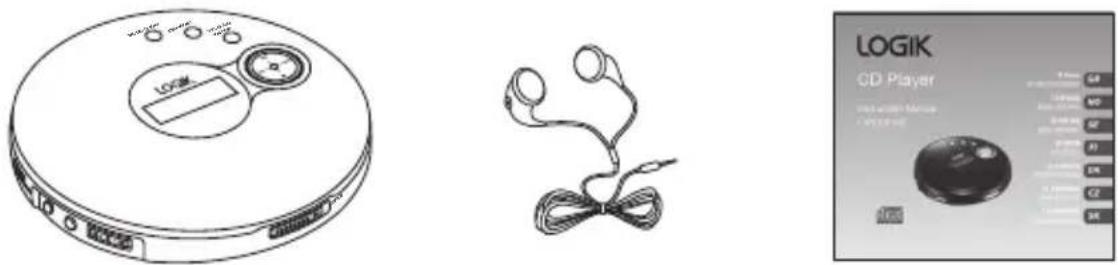
The Main Unit, Earphones, Instruction Manual, CD
Product Overview
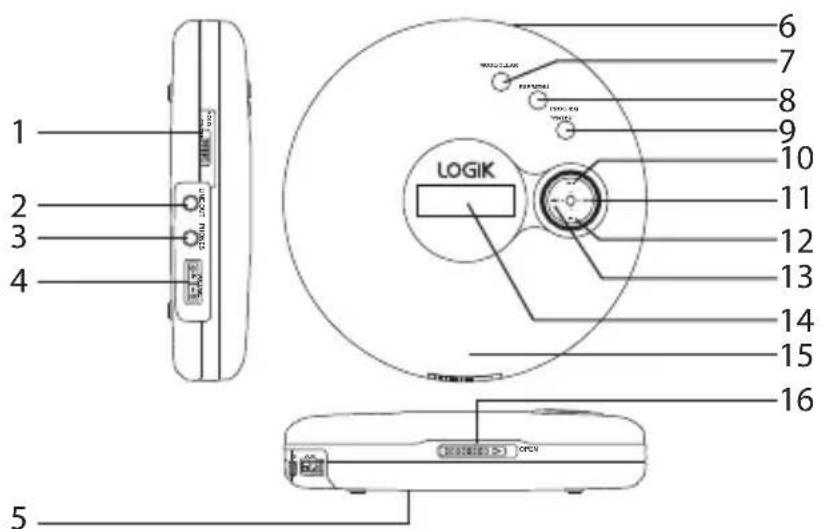
- HOLD ON/OFF
- LINE OUT Socket
- PHONES Socket
- VOLUME +/- Buttons
- Battery Compartment
- DC IN Socket
- MODE/CLEAR Button
- ESP/MENU Button
- PROG/EQ/ENTER Button
- Play / Pause ▶ Button
- SKIP/SEARCH ▶ Button
- STOP ■ Button
- SKIP/SEARCH ◀ Button
- LCD Display
- CD Door
- Open Latch

Battery Installation
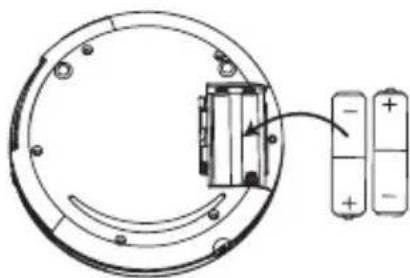
- Press and hold the battery release tab and pull out the battery holder completely.
- Remove the old battery, and replace with two alkaline batteries (not supplied), size "AA" (LR6).
Handling the Battery
- Improper or incorrect use of batteries may cause corrosion or battery leakage, which could cause fire, personal injury or damage to property.
- Install the battery correctly by following the polarity (+ and -) indications in the battery compartment.
- Only use the battery type indicated in this manual.
- Do not dispose of the used battery as domestic waste. Dispose of it in accordance with the local regulations.
- Battery (battery pack or battery installed) shall not be exposed to excessive heat such as sunshine, fire or the like.
- Do not mix different types of batteries together (e.g. alkaline, rechargeable and standard (carbon zinc)) or old batteries with fresh ones.

Connections
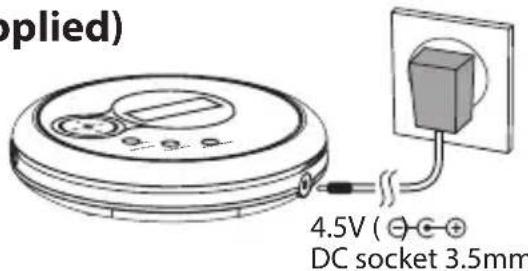
Using a Mains Adapter (not supplied)
- Connect the power cable to the DC 4.5V socket of the CD player.
- Plug in the mains adapter to the mains socket.
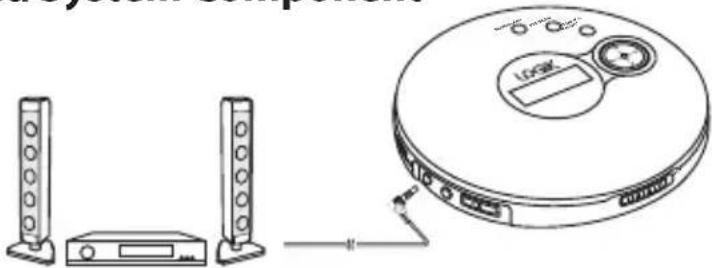
Connecting to a Sound System Component
Connect an audio cable (not supplied) into the (black)
LINE OUT socket of your CD player and the other end into the CD /AUX input of a sound system.
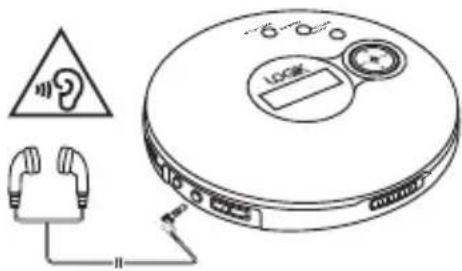
Using Earphones
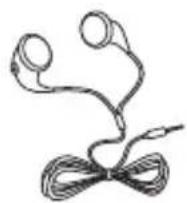
Connect the stereo earphones (supplied) to the (green) earphones socket (PHONES) on the unit.

Operation
Inserting a CD
- Open the CD door by sliding the OPEN latch to the right.
- Place the CD firmly on the central spindle and close the CD door.
Playing a CD
- Press the button to play / pause / resume playback.
- Press the VOLUME +/- buttons to adjust the volume.
- Press the ◀◀ or ▶ buttons to skip backwards to the beginning of the current track (to the previous track) or to skip to the next track.
- Press and hold the ◀◀ or ▶ buttons to fast reverse/forward the current track.
- To stop playback, press the ■ button. Press the ■ button again to turn off the power.
Removing the CD
Remove the CD by opening the CD door, holding the centre spindle and lifting out the CD.
EQ Control
During playback, press the PROG/EQ/ENTER button to select a desired music mode. Each time the PROG/EQ/ENTER button is pressed, the sound ambience mode will change to the next one as follows:
![graph LR A["ROCKFLATCLASSICPOPJAZZ"] --> B["→"] B --> C["→"]](/content/2026/05/871671/images/61955267de019f401066ed9652d3b25db93ffc618b0c427b73b0b7bc699a79b9.jpg)
Playing Tracks Again (Repeat Play)
You can play tracks again in either normal or program play mode. You can repeat all the tracks or just one track.
Repeat Current Track
Press the MODE/CLEAR button once, the "REP 1" indicator will appear on the display. The current track will be played repeatedly.
REP 1 01 003 02:15
Repeat All Tracks
Press the MODE/CLEAR button twice, the "REP A" symbol will appear on the display. All the disc's tracks will be played repeatedly in a cycle.
REP A 01 003 02:15
Repeat Current Directory Tracks (MP3 Only)
Press the MODE/CLEAR button three times, the "REP D" symbol will appear on the display. All tracks in the current directory will be played repeatedly in a cycle.
REP D 01 003 02:15
Cancel Repeat Playback Mode
To cancel repeat play, press the MODE/CLEAR button repeatedly until "PLAY" appears on the display.
Intro Play
- Press the MODE/CLEAR button repeatedly until "INTRO" shows on the display. The unit will play the first 10 seconds of each track on the CD.
- To resume normal playback, press the MODE/CLEAR button repeatedly until "PLAY" appears on the display.
INTRO
01 003 02:15
Random Track Play
- Press the MODE/CLEAR button repeatedly until "RANDOM" shows on the display. The unit will then play tracks at random.
- To resume normal playback, press the MODE/CLEAR button repeatedly until "PLAY" appears on the display.
RANDOM
01 003 02:15
Programmable Playback
You can programme the playing of up to 24 tracks in preset order.
- In stop mode, press the PROG/EQ/ENTER button until "P" shows on the display. The track number and order of play will appear.
- Directory number will flash on the display. Press the ◀◀ or ▶ buttons to select the desired directory number, then press the PROG/EQ/ENTER button to confirm (for MP3 disc only).
- Track number will flash on the display. Press the ◀◀ or ▶ buttons to select the desired track, then press the PROG/EQ/ENTER button to confirm.
- Repeat steps 2 and 3 to programme additional tracks.
- Press the ▶ button to start playback of the first track of the program.
- To erase the programming, press the ■ button, then press and hold the MODE/CLEAR button for 3 seconds.
ESP
- The unit incorporates the latest digital anti shock circuit, which prevents interruption of the sound output if the unit is subject to shock or vibration during playback.
- During MP3 playback, the display will read "Welcome MP3", the "ESP" icon will not appear but is automatically activated regardless of the ESP switch setting.
- During CD playback, press the ESP/MENU button to turn on the ESP function, "ESP" icon will show on the display.
Searching a Track (MP3 Only)
- Press the ESP/MENU button to enter search mode.
- Press the ◀◀ or ▶ buttons to select letter and press the o■ ▶▶▶▶ buttons to select next page of letter. Then press the PROG/EQ/ENTER button to confirm.
- Track name will show on the display with the letter you selected. Press ◀◀ or ▶ buttons to select a track with the chosen letter, then press the PROG/EQ/ENTER button to confirm.
ABCDEFGHIJKLMNOPQRSTUVWXYZK File search
Directly Selecting a track from the Directory (MP3 Only)
Root Music...
- Press the ESP/MENU button twice. "Root" and "track names" will show on the display.
- Press the ■ or ▶ buttons to navigator up/down to select directory.
- Press the ◀◀ or ▶ buttons to select the desired track, and press the PROG/EQ/ENTER button to confirm the selection.
- Selected track will start playback.

Maintenance
Cleaning the Unit

Ensure that the unit is not connected to an optional AC adapter before cleaning.
• To clean the unit, wipe the case with a slightly moist, lint-free cloth. - Do not use any cleaning fluids containing alcohol, ammonia or abrasives. - Do not spray an aerosol at or near the unit.

Hints and Tips
If a problem does occur, it may often be due to something very minor. The following table contains various tips.
| Problem Cause / Solution | |
| CD player does not work | Batteries are dead or low, replace the batteries.Optional AC adapter is not correctly connected. |
| CD does not play • | CD is incorrectly inserted, re-insert the CD label side up.Defective CD, try another CD.CD compartment is not closed, close CD door properly.Condensation in CD compartment, remove CD and leave CD door open for about one hour to dry out. |
| No sound in the earphones | Earphones are not connected properly, re-insert earphone jack.Volume control is at minimum, increase the volume.Batteries are low, replace the batteries or use an optional AC adapter.Defective CD, try another CD.. |
| Skips during play • | Dirty CD or lens, clean or replace CD, or clean lens.Strong vibrations, place CD player on a flat & stable surface. |

Specifications
| Model L1PCDR13E | |
| Power Supply 2 x Alkaline batteries “AA” size LR6 | |
| Power Supply Socket DC 4.5V ( [IMAGE] ) socket 3.5mm | |
| Dimension Approx 140(W) 29(H) 140(D)mm | |
| Unit Weight: Approx 200g without batteries | |
| Audio | |
| Frequency Range 20 Hz - 20kHz | |
| Wow & Flutter Below measurable levels | |
| Number of Channels 2 Channels (Stereo) | |
| Output Level Earphones: Max. 4mW | |
Features and specifications are subject to change without prior notice.
Handle the battery
Using earphones

Use
Inserting a CD
Handling the battery
Using headphones

Handling
Inserting a CD

OPERATION

Operation
Battery handling
Using headphones
CZ

Controls
Inserting a CD
SK

Product overview
![1 2 3 4 5 6 7 8 9 LOGIK 10 11 12 13 14 15 16 [CPU]](/content/2026/05/871671/images/58accbafd5d13f97dd6b8b2412cfb7eb2a05022a509ba0518d9d06800e04909b.jpg)
- POWER SWITCH
- AUDIO OUTPUT connector
- HEADPHONES connector
- VOLUME +/− buttons
- Battery compartment
- DC INPUT connector
- MODE/DELETE button
- ESP/MENU button
- PROG/EQUALIZER/STOP button
- PLAY/PAUSE button
- SKIP/SEARCH FORWARD button
- STOP button
- SKIP/SEARCH BACKWARD button
- LCD display
- CD door
- OPEN latch


Battery installation
4.5 V (⊕) ⊕ ⊕ 3.5 mm DC input jack
SK

operation
Inserting a CD
- Open the CD door by sliding the latch to the right to the OPEN position.
- Firmly place the CD onto the center spindle and close the CD door.
- Read all the instructions carefully before using the unit and keep them for future reference.
- Retain the manual. If you pass the unit onto a third party make sure to include this manual.
- Check that the voltage marked on the rating label matches your mains voltage.
Damage
- Please inspect the unit for damage after unpacking.
- Do not continue to operate the unit if you are in any doubt about it working normally, or if it is damaged in any way - switch off, withdraw the mains plug and consult your dealer.
Location of Unit
- The unit must be placed on a flat stable surface and should not be subjected to vibrations.
- Do not place the unit on sloped or unstable surfaces as the unit may fall off or tip over.
- The mains socket must be located near the unit and should be easily accessible.
Temperature
- Avoid extreme degrees of temperature, either hot or cold. Place the unit well away from heat sources such as radiators or gas/electric fires.
- Avoid exposure to direct sunlight and other sources of heat.
Naked Flames
- Never place any type of candle or naked flame on the top of or near the unit.
Moisture
- To reduce the risk of fire, electric shock or product damage, do not expose this unit to rain, moisture, dripping or splashing. No objects filled with liquids, such as vases, should be placed on the unit.
- If you spill any liquid into the unit, it can cause serious damage. Switch it off at the mains immediately. Withdraw the mains plug and consult your dealer.
Ventilation
- To prevent the risk of electric shock or fire hazard due to overheating, ensure that curtains and other materials do not obstruct the ventilation vents.
- Do not install or place this unit in a bookcase, built-in cabinet or in another confined space. Ensure the unit is well ventilated.
Interference
- Do not place the unit on or near appliances which may cause electromagnetic interference. If you do, it may adversely affect the operating performance of the unit, and cause a distorted picture or sound.
Earphones
- For traffic safety, do not use earphones while driving or cycling.
- Listening to loud sounds for prolonged periods of time may permanently damage your hearing.
- Before putting on earphones, turn the volume down then put the earphones on and slowly increase the volume until you reach a comfortable listening level.
Batteries
- Keep loose batteries away from young children and make sure that the battery holder tray is secure in the remote control. Seek medical advice if you believe a cell has been swallowed.
- Please dispose of batteries correctly by following the guidance in this manual.
Supervision
Children should be supervised to ensure that they do not play with the unit and the remote control. Never let anyone, especially children, push anything into the holes, slots, or any other openings in the case - this could result in a fatal electric shock.


The lightning flash with arrowhead symbol, within an equilateral triangle, is intended to alert the user to the presence of uninsulated "dangerous voltage" within the unit's enclosure that may be of sufficient magnitude to constitute a risk of electric shock.

The exclamation point within an equilateral triangle is intended to alert the user to the presence of important operating and maintenance (servicing) instructions in the manual accompanying the unit.
Service
- To reduce the risk of electric shock, do not remove screws. The unit does not contain any user-serviceable parts. Please leave all maintenance work to qualified personnel.
- Do not open any fixed covers as this may expose dangerous voltages.
Maintenance
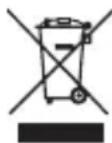
The above mark is in compliance with the Waste Electrical and Electronic Equipment Directive 2002/96/EC (WEEE). The mark indicates the requirement NOT to dispose the equipment including any spent or discarded batteries as unsorted municipal waste, but use the return and collection systems available. If the batteries or accumulators included with this equipment display the chemical symbol Hg, Cd or Pb, then it means that the battery has a heavy metal content of more than 0.0005% Mercury, or more than 0.002% Cadmium or more than 0.004% Lead.
In the unlikely event of a problem developing, please contact the store where you purchased your equipment.
We continually strive to improve our products; specifications may change without prior notice.
For advice on where to purchase accessories, please contact the store where you purchased your equipment.
All trademarks are the property of their respective owners and all rights are acknowledged.
- CONTENTS
- THANK YOU FOR PURCHASING YOUR NEW LOGIK CD PLAYER
- UNPACKING
- PRODUCT OVERVIEW
- BATTERY INSTALLATION
- HANDLING THE BATTERY
- CONNECTIONS
- USING A MAINS ADAPTER (NOT SUPPLIED)
- CONNECTING TO A SOUND SYSTEM COMPONENT
- USING EARPHONES
- OPERATION
- INSERTING A CD
- PLAYING A CD
- REMOVING THE CD
- EQ CONTROL
- PLAYING TRACKS AGAIN (REPEAT PLAY)
- REPEAT CURRENT TRACK
- REPEAT ALL TRACKS
- REPEAT CURRENT DIRECTORY TRACKS (MP3 ONLY)
- CANCEL REPEAT PLAYBACK MODE
- INTRO PLAY
- RANDOM TRACK PLAY
- PROGRAMMABLE PLAYBACK
- ESP
- SEARCHING A TRACK (MP3 ONLY)
- DIRECTLY SELECTING A TRACK FROM THE DIRECTORY (MP3 ONLY)
- MAINTENANCE
- CLEANING THE UNIT
- HINTS AND TIPS
- SPECIFICATIONS
- HANDLE THE BATTERY
- USE
- USING HEADPHONES
- HANDLING
- BATTERY HANDLING
- CONTROLS
- DAMAGE
- LOCATION OF UNIT
- TEMPERATURE
- NAKED FLAMES
- MOISTURE
- VENTILATION
- INTERFERENCE
- EARPHONES
- BATTERIES
- SUPERVISION
- SERVICE
Brand : Logik
Model : L1PCDR13E
Category : CD Player