HELIUM 45B - Smartphone ARCHOS - Free user manual and instructions
Find the device manual for free HELIUM 45B ARCHOS in PDF.


User questions about HELIUM 45B ARCHOS
0 question about this device. Answer the ones you know or ask your own.
Ask a new question about this device
Download the instructions for your Smartphone in PDF format for free! Find your manual HELIUM 45B - ARCHOS and take your electronic device back in hand. On this page are published all the documents necessary for the use of your device. HELIUM 45B by ARCHOS.
USER MANUAL HELIUM 45B ARCHOS
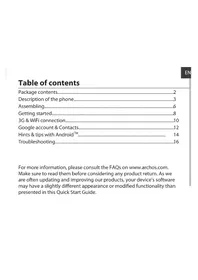
Description of the phone. 3
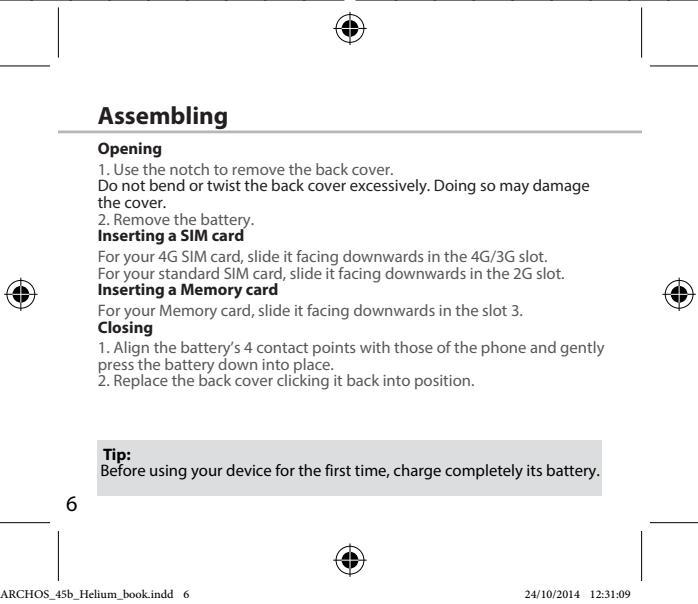
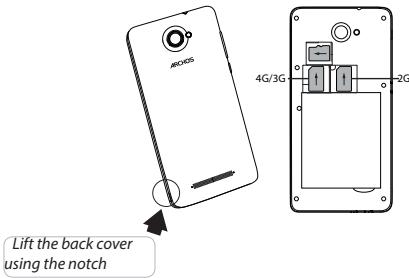
Assembling. 6
Getting started. 8
4G & WiFi connection. 10
Google account & Contacts. 12
Hints & tips with AndroidTM 14
Troubleshooting. 16
For more information, please consult the FAQs on www.archos.com. Make sure to read them before considering any product return. As we are often updating and improving our products, your device's software may have a slightly different appearance or modified functionality than presented in this Quick Start Guide.
Consult the declaration of conformity on http://www.archos.com/products/declaration_conformity.html
Package Contents
Check your product box for the following items:
- ARCHOS 45b Helium
- Battery
- Headset
- USB cable
- Charger
- Quick start guide
Warranty Legal & Safety notices
The items supplied with your device and available accessories may vary depending on your region or service provider.
The supplied items are designed only for your device and may not be compatible with other devices.
Unapproved accessories may cause your device to malfunction.
2

Description of the phone
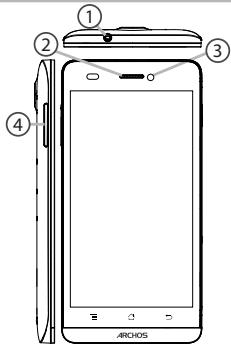
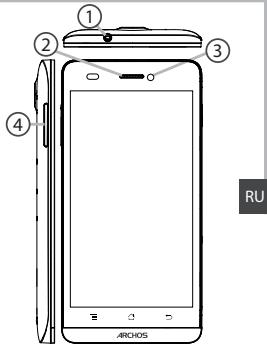
① Headset jack
② Phone speaker
③ Camera
Volume buttons
EN
Description of the phone
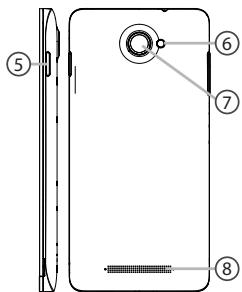
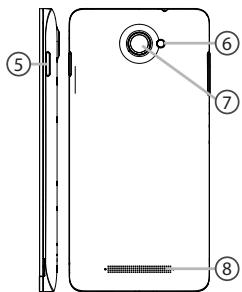
⑤ ON/OFF button
⑥ Flash light
⑦ Camera
⑧ Loudspeaker
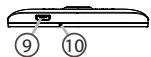
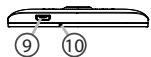
⑨ Micro-USB port
10 Microphone

EN
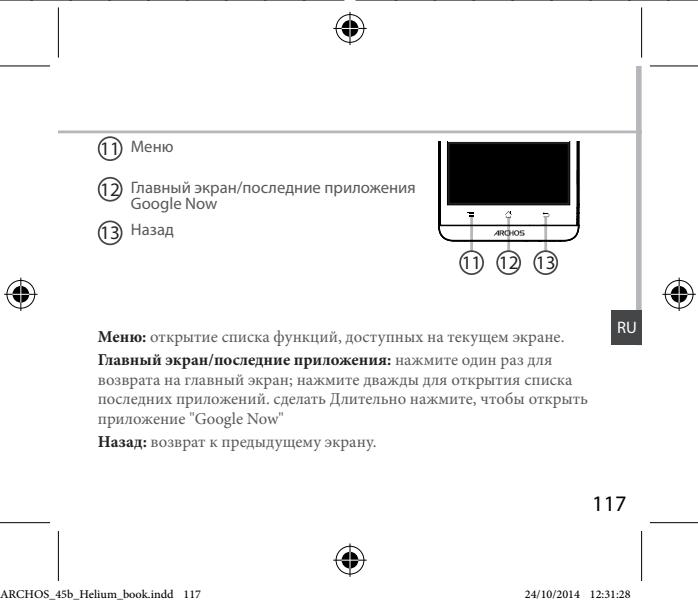
11Menu
12 Home/Recent apps/Google NOW
13 Back
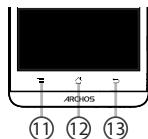

Menu: open the list of options available on the current screen.
Home/Recent apps/Google NOW: short press to return to the Home screen; double press to open the list of recent applications; long press to access Google Now.
Back: return to the previous screen.
5

EN


Getting started
Turn ON
- Press and hold the ON/OFF button to turn on the device.
When you turn on your device, a PIN code may be requested. - Type the PIN code supplied with your SIM card.
Beware of typing a wrong PIN code.
3. Select OK
Through the wizard
The first time you start up your ARCHOS, the installation wizard will help you set up your device:
- Language
- Date & time
WiFi connection - Location service options
Turn OFF
To turn off your device, press and hold the ON/OFF button, and then select Power off > OK.
8

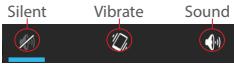
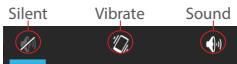
Sound & Notification profiles
- When the device is turned on, press and hold the ON/OFF button.
- Select an option.
Touch screen actions:
Tap: touch once to select or launch a menu, option, or application.
Tap and hold: tap an item and hold it for more than 2 seconds.
Drag: tap an item and move it to a new location.
Double-tap: tap an item twice quickly.
Flick: briskly scroll up, down, left, or right to move through lists or screens.
Pinch in/out: place two of your fingers far apart, and then pinch them together.
Tip:
Your device goes in standby mode when you do not use it for a specified period of time. To wake up your device, press the ON/OFF button. To set the duration, go to Settings > Display > Sleep.


3G & WiFi connection
4G & 3G connection
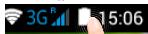
With your SIM card, you should be connected to the Internet without any further setup. The ARCHOS will only have signal if you are in an area covered by your provider's 4G or 3G network. When connected to the 4G network, the 4G icon is displayed in the status bar.
Activating the mobile data
To be able to access Internet, the mobile data icon must be activated.
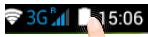
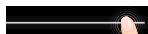
- Touch and hold the time & battery icons to reveal the status bar.
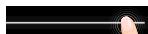
- Pull the blue line down to display the status dashboard.

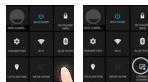
- Touch the status dashboard icon
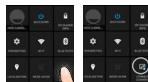
- Touch the mobile data icon to activate it.
Tip:
When you encounter connection problem's, see the FAQs on www. archos.com or contact your 4G network connection provider.

WiFi connection
WARNING: Make sure that you are in a WiFi zone. You can access the WiFi settings quickly from the status bar.
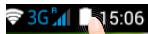
- Touch and hold the time & battery icons to reveal the status bar.
2.Pull the blue line down to display the status dashboard. - Touch the status dashboard icon
- Touch the "Settings" icon to open the settings menu.
- In the "Wireless & networks" section, if the WiFi is off, slide the WiFi switch to the "ON" position. Once the WiFi is on, the ARCHOS will scan for WiFi networks in range.
- Touch "WiFi" to display available networks.
- Touch the name of network you want to connect to.
Private networks are shown with a lock icon and will require you to enter your password.




Google & Contacts
Adding a Google account
A Google account lets you take full advantage of any Google apps and services that you may want to use.
- Go to "Settings" > "Accounts" > "Add account".
- Select the account type"Google"to add.
- Follow the onscreen instructions to enter information about the account. Once the account is created, you can access Play Store, Gmail, Hangouts, Maps and many other apps.
Synchronizing info
Information must be sync to be saved. Your data is backed up on Google servers.
- Go to "Settings" > "Accounts" > "Google".
- Select your account.
The list of information that can be sync are displayed.
Automatic sync should be activated. To launch the sync, press the Menu button, then Sync now. You can get them back in case of loss of your device or SIM card. When your Google account is added to a new device, all your saved information is transferred.
12


Saving your contacts
When your contacts are saved, they are always available on the web and can be syncsed to any Android phone that's set up with your Google account.
- Install the SIM card with your contacts in your phone.
- From a Home or All Apps screen, select the People app
- Touch the Menu button >"Import/Export".
- In Import/export contacts, select "Import from SIM card".
- Select your Google account.
- Check contacts to be imported and validate.
- Once the contacts are imported in the Google account, go to "Settings" > "Accounts"> "Google".
- Select you Google account.
- Select the Menu button, then "Sync now".
Your contacts are saved to via your Google account.

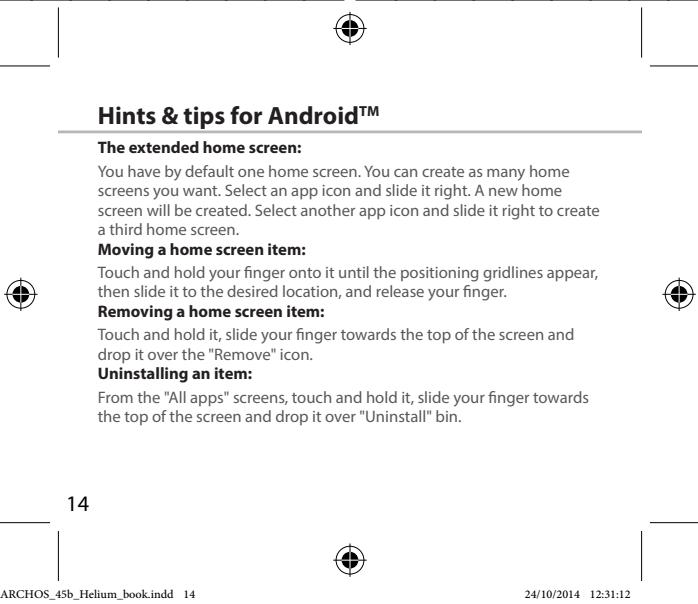
Creating application folders:
Drop one app icon over another on a home screen and the two icons will be combined.
Widgets:
Touch and hold your finger on your home screen. Touch "Widgets".
Changing your wallpaper:
Hold your finger on a home screen at an empty location, then choose from the list.
Locking the touchscreen:
From the quick settings dashboard in the status bar, touch "Settings". In "Settings", scroll down and touch "Security", Touch "Screen lock", Touch the type of lock you would like to use. After you set a lock, a lock screen is displayed whenever your screen wakes up, requesting the pattern, pin or other specified key.


Troubleshooting
My phone is frozen or cannot switch on
Check the battery contacts, remove and reinstall your battery, then turn your phone on. Check the battery power level, charge for at least 20 minutes.
My phone cannot connect to a network or "No service" is displayed
Try connecting in another location. Verify the network coverage with your operator.
Unable to make outgoing calls
Make sure your phone is connected to a network, and the network is not overloaded or unavailable.
Unable to receive incoming calls
Make sure your phone is switched on and connected to a network (check for overloaded or unavailable network).
SIM card PIN locked
Contact your network operator to obtain the PUK code (Personal Unblocking Key).
To configure a new 4G network:
On your device, tap Settings.
Select Wireless & networks > More... > Mobile networks.
Select Network settings. In Network operators, select your operator. In Access Point Names, select the correct access point name and enter the exact connection parameters provided by your 4G provider.
Table des matieres
KOMHOENTbI, BxOAniue B KOMNKeT NCTABK yCTPOICTBa, n OCTyNBuA kXeCCCaBpY MOYr pA3NIMtBa3B 2A3BnIMCOTN OT perNoHa INI NOCTaUHcQA yCNYr. KOMHOENTbI, BxOAniue B KOMNKeT, n PpENa3HaBdI bI cINONbOAHNAIT TIObK C dAnhBm YCTPOICTBOM I MOYr 6bTbHECOBMECTMbIMc D cDyrrMg YCTPOICTBAMn.
IcnoIb3oBAHne AkccecyapOB, KOTOpBe He b6JIi pa3peSeHbK pIpIMeHENIO C daHHbIM yCTPOBCTBOM, M0KeT npMBeCTM K ERO HENCPABHOCTIO.
114
Oncanhe yctpoictBa
1Ihe3oJnraRapHmTpyb
2rpoMkoROBopTReB
③Be6-kamepa
KHOKNIpeyIpOBOKBINpOMKOCTN
Oncanhe yctpoictBa
⑤ KHONKAKBKNIOHEN/BykNIOHEN
6
⑦ Kamepa
8rpoMkoROOBpntB
⑨ Flopt micro-USB
10 Minkpofoh


C6opka
OTKpbTne
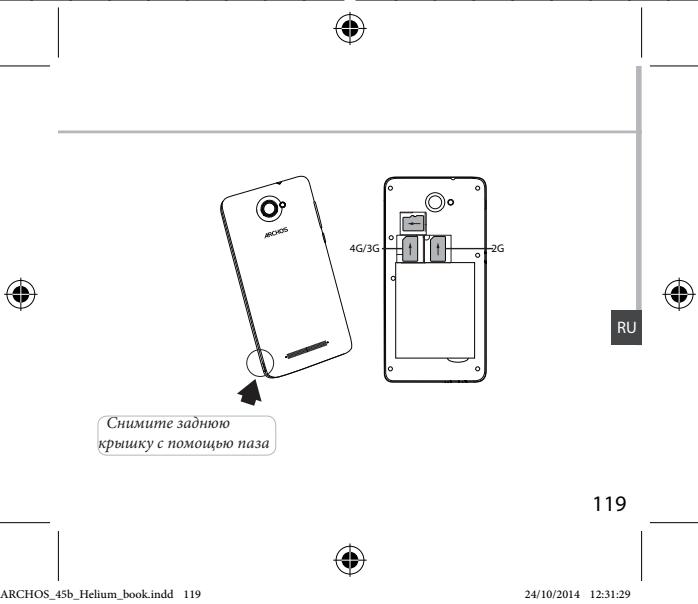
- CHIMMTE 3aHIOIO KpbIiKy.
He m3n6baine i ne KcprnuBaiae KpbIshK cylniKoM cnIbHo. 3To MOKET pniBCTe K keo NpBeKzEnHIO.
2.ИЗВЕКNTe 6aTapeio.
Bctabka SIM-kapt
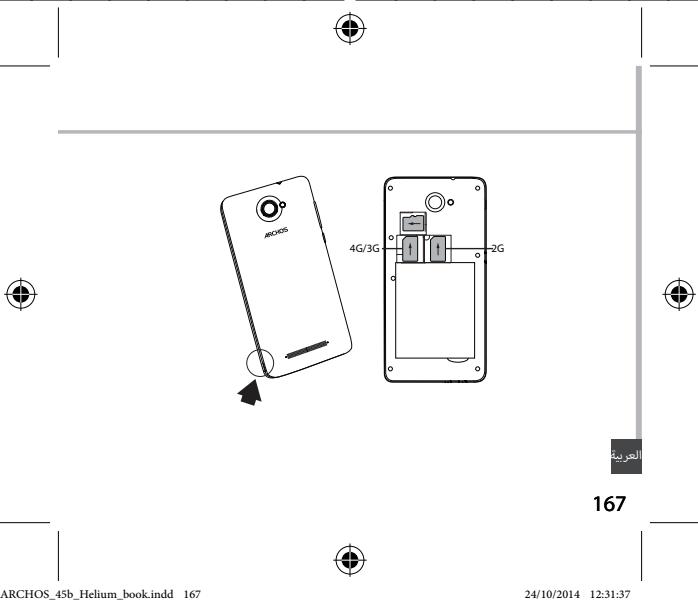
YtOb6yctAHOBnBt 4G SIM-kapty, BCTaBtte ee nIiueBov CTOpOHn BHm 3 RHe3do 4G/3G.
Tc0b6y tachonobt 2G SIM-Kapty, BCTabte ee eee nuebeB CTOPHO BHN3 BTHe2O 2G. BCTabKa KaptbNaamrTa
BCTabtne Kapty namTn KOHTAKTHoN O6NaTbO BHN3 B HEn3Do 3. 3aKpbtBe
1.COBmectnte4TOUKNKoHTaKToB aKKymyIaTopa C COOTBeTCTByIOJIMM
TOKAMHI Na TELEFOHE ON ECTOPOKHO NaHADBITE Na AKKYMUYIATOP BHN3, TTO6b4 3A2BNIHYB ERO HA MEKT.
2. Uctahobinte Kpblsky Akymyjntopara, Tuk YTObI OHa co ounkOM StaHa MECTO.
Iopcka3kn.
PereJnepBbMnCNOB3OBAHEMcYCToRCTBaNIOHOBtBu 3aApIte AkyMMyTAPr.
118



Hauano pa60tbI
BkIoueHne
- Haxkmtte uIyderpKbnaite KHOINKY BKNIOCHENH yBkIOCHENH, YTO6bl BKNIOHNTy UCTPOCTHO.
PnB BKJIOUeHnn yCTPOINCTBa MOXET NOBtbcra 3aipoc Ha BBOD PIN-KoJa. - BBeDInTe PIN-KoD, npedocTabraembIc SIM-kapToI.
- Haxmte OK.
MacTep HacTpoKu
He ydaetcBbINONHrTbNcXoJnme Bbl3OBbl
Y6eHtEcB, cyTo TeneoH noKIOuChE K cTeN, n yTO cTeB DOCTyNHa H He nepepyKeHa.
He ydaetc npHHMaTb BXOJaIe Bbl3OBbl
YbDteBc, YTO TEOEoH BKIOH N I ONDKIOH N K CTeI (PNOBepTe, YTO cTe BDOCTYHa H e nepyRJCeB.
3a6loKIpOBaH PIN-KoD SIM-KapTbI
ObatitmeBcK O nopotary MPOuHbN BcHn DnnyuHnpu PUK-Koda (Personal Unoblocking Key — nepoCHaBbN bpaTkoHpOuHyauKd)
HnactpoiknHOBOI cTn 3G m4G
Ha 3Kpahe yCTpoiCTBa KOCHNTecb nyHkTa Settings (HaCTpoiKn).
BbEeprte Wiless & networks (BeCpPobOaHna CBaBn cTei) > More... (BoIbue...) > Mobile networks (MoBiNbHe bTei).
BvBepiye npNKT Network Settings (Cebene Nactoikno). B pBanede Network Operators (Onetapobty ceni) BvBepiye cboero noctabuizcu ycnur. B pBanede Access Point Names (MeHaToek DCctOyuna) npBnHbU HBeDite IMM TOKIN DOCTYNA nTOhJIe NapamETpy coeqmHEnHn, pIPOxCTABENHbIe NOCTABUKNOM YCNUR CET4 G#.




Aids: 1. Edit the text in the text box.
2. Edit the text in the text box.
3. Edit the text in the text box.
4. Edit the text in the text box.
5. Edit the text in the text box.
6. Edit the text in the text box.


aalalwgl aalwlll alalw q:aaal
gajal aal, aaij jai jai jai jai: Google Now / aai jai jai jai jai jai
Google Now UJgdugbdabla, dclal
aalw alw wll 0gse:0g

165


aJduwUd
aall alll lall 1
. 1
.2
aIbI
3Ggl4GdAeAeAeAeAeAeAeAeAeAeAeAeAeAeAeAeAeAeAeAeAeAeAeAeAeAeAeAeAeAeAeAeAeAeAeAeAeAeAe
.2G)18aBaaBaaB2GaaaDaaaLyg
0511 48y
aalll lalll gogg a ojolil alilb c baa a, qal aasall kall jol slall alilb gag y
ybllll gniilggo yjblal jndalee lglbll 10000000000000000000000000000000000000
.
aalalalalalalalalalalalalalal
:ab>la
. 1



glgglgall
JuaaJIiiaJdeaaIbaaiIaill Jaaui.1
.ailggl gog jol 2
:aaalaaa aas
gull, ailll jly 01g o y bol
aui 2 uuc uu jdual baiol:duai
jolal aai jai baoi g aic joi
.4e jw jwlluo jyo baoi: 9gojo bao
aiilalw juiiui jaiygljgljuiuul yjuaa
yol yo a o aalwll Jyol gogd:
:ab>la
c 1000000000000000000000000000000000000000
.0glll< 0jolll< 0j1jclyll 0joll jjj g jj


J
J
aaijll jauw jauw ltaa ool baw .1
.PIN joljI 111111111111111111111111111
.PIN j0j j0j 2
Cauall PIN jol lsl o slst
.3
wizard
aillg allusxwJyagj yae aai aai aal gll alssxwJglic
aJU
&g
aclwUdclwU
golgaluolus
.


4Gdd
olalg uol g 4G 4G 4G 4G 4G 4G 4G 4G 4G 4G 4G 4G 4G 4G 4G 4G 4G 4G 4G 4G 4G 4G 4G 4G 4G 4G 4G 4G 4G 4G 4G 4G 4G 4G
. allllb
aalld aod plad

. ygl ciull aod jzj cuy, cuiyll 4w plsiwl
. 1
.1jlll 10g lgl jol 1000000000000000000000000000
1Jssalgagalb0a1.3
.0aoll oia Jai 5 Cuiu wao aigai baol .4

4b > 3a
www.archos.com cuiyjgogjgl aaiiwlalwlqy jy, jayl yd g
. aai jia jui yiy gl,




aSLwUJ aS. & 4G aS.
aLwUd
1 11111111111111111111111111
aJbJ 10
. aIbI bJgJU JgJU g aJbU g aJU Jc dJbU bJdU .1
10 2
B 10
cilllalll ljjj 1
aSLWUdJg, aSLWUdJgJgJgJgJgJgJg
aalllk
.4a11111111111111111111111111
Gmail, jzall aluwrj kow, gll Google wuw cuiy eliy dwl lalai y 3
. 1

lagoljolji
Google aoucuiuocucll bao, lqboollogal joiy
.1wJj1.2
LgocjSsGdcloglallao jy a
.ajolj lac aai wll clogall no Stily
jGGoogle 1a> aIb> ,cull oia slaalusssllsagall gl aill
.


clawyI &Google
e 1
. 1
. . ka lw \& J ka lJ) aasllglae 3 . ailll o aokj
Google 山 _ 1 ^ 出 jisl .5
.6
. Google <clulawll <clulawll | | clulawll , , Google
.10jbi baiol ai, aiall eliai bsai 9
. Google aouccluaocj cnaaill bao ayu

173



aaijll aaij
jgl jall aai jll alal lal jy jai jssaal say
:aaaijaiai jia
.aaaiyllolal ldoagall o1g0jfo
.1goluswai jyll oj yll clalabill aqil l jssw gdo bdo
a 431y jll gl jnall gubill yai
:aaai jia aiai
ggy ggy yall kall g 4000y gai lgl uyluuyuuyuyuyuy
. cleowl
aaiyll aalw jaoaic
a"ddal lall kall gdo yd a calixg uy daiy
.
:aaic c
4000000000000000000000000000000000000000000000
J 1
Jusyll Jua
:laababababab
a 100g abol 3 loa uabull o a w g y sl gubdiagal lc gubdiagaiogy
: widgets, polic
. widgets rlic jlll g nnll aill l y , "clalll J" aill Ugul
:bllll
aaiall no jai, aaiyll aaii 10k
:a

j<allll jy jy jy jy jy jy jy jy jy jy jy jy jy jy jy jy jy jy jy jy jy jy jy jy jy jy jy jy jy jy jy jy jy jy jy jy jy
jolldl lglw gwlqg 100
. j, PIN jəj, "JaaU 3gω" jk alg aJaaU Jaa
y

[ \Leftrightarrow \frac{1 - k}{x} > \frac{\ln x}{x\left( {1 + u}\right) } - \frac{\ln x}{x\left( {1 + u}\right) }]
ailll jzj zj 10
jy,aiilll jdyddyddyds ydo ydo ydo ydo ydo ydo ydo ydo ydo ydo ydo
.42220jLaiyolJxwlly,aJblljxwSgws
a a y y g a y jy Jy
a aaaa aaaa 2g> g no slll y, y| o k (s y | d y d y
aJbckcJzJd
. aio g jao ai wul 1g , ai wu ilal lail u wll y
alkkjlaaoljdo
.(aio g Jai aJg), aJU Jia g Jao ai jn nn ssll y
aIPIN jao
.PUK joo Jgaww Aww Jaa Jy
4G
jol, jogaoal dlgl lckw < wjoll < cksll & slswl 4kwl jol , cldscyl jgds
aagall cloglaal g aasall jgssll abaaawjai a, aai jaaa jiai a, aai ci
.4GdoJJeao Jds Jo Jua
y jg jll 8 gaiall qilq l jy jyj y jy jy jy jy jy jy jy jy jy jy jy jy jy jy jy jy jy jy jy jy jy jy jy jy jy jy jy jy jy jy jy jy jy jy jy jy jy
.
![ARCHOS HELIUM 45B - [ \Leftrightarrow \frac{1 - k}{x} > \frac{\ln x}{x\left( {1 + u}\right) } - \frac{\ln x}{x\left( {1 + u}\right) }] - 1](/content/2024/12/87044/images/455b4aef1c778c0fdf84a3fec81de4a6661100f49eb1384be5b6e078542aa94e.jpg)
![ARCHOS HELIUM 45B - [ \Leftrightarrow \frac{1 - k}{x} > \frac{\ln x}{x\left( {1 + u}\right) } - \frac{\ln x}{x\left( {1 + u}\right) }] - 2](/content/2024/12/87044/images/ce3514f75c72cadedda0fff8f17a1c957aea3139eeb4ba6fd03fe2b2cee75d62.jpg)
![ARCHOS HELIUM 45B - [ \Leftrightarrow \frac{1 - k}{x} > \frac{\ln x}{x\left( {1 + u}\right) } - \frac{\ln x}{x\left( {1 + u}\right) }] - 3](/content/2024/12/87044/images/ffd6a6f4301441b9cb98a1ab9e54c4c0da28edcd4732e09a06138408bfa85208.jpg)
![ARCHOS HELIUM 45B - [ \Leftrightarrow \frac{1 - k}{x} > \frac{\ln x}{x\left( {1 + u}\right) } - \frac{\ln x}{x\left( {1 + u}\right) }] - 4](/content/2024/12/87044/images/ba01c09440c5dc4616bd61bc890b925d30128be1f6f213b4a07551d9fbc4bf53.jpg)
yulqulqulqulqoljoo
OJAL
S111 111 111 111 111 111 111 111 111 111 111 111 111 111 111 111 111 111 111 1

iJlEIOIigjUJIa:JUo eUJUW:JUo U
auiA
aaiiaaii aaiiaai iaiiaai iaiiaai iaiiaai iaiiaai
aLd

a00000000000000000119:oo
a-0gJ0JI
JU 10:00
b0
aJJIeJUgJGooJUwO:
ARCHOS
Entertainment your way
U
...
wJg o a Jn 9


Uni-Group

19043
www.uni-grp.com

ArchosEgypt

ArchosEgypt





aulluallalbubucgogollllllloo aollbuiy
jL
UoAulgUolalOjioUgbauuUeUaUgUaUaU
jua aooJUoJIOuOaouoJUoo aoo ooooooo
Jg
:baqJgUulalaiwUusagoooUuogoojaoauiuogugbglg:
auiu uo 100gugooallugjlljao jy jllluej
julil jll wu 10a all oio g hao jgai uill uiau uua uau
yjg j0 uuguagall a(jo (bdo dlaol) a
00000000000000000000000000000000000000
1000000000000000000000000000000000000000
JgOoIgQyUulUdUuUuUuUuUuUuUuUuUuUuUuUuUuUuUuUuUuUuUuUuUuUuUuUuUuUuUuUuUuUuUuUuUuUuUuUuUuUuUuUuUuUuUuUuUuUuUuUuUuUuU
yuljolaljioJlssiOoUooguogusgoujoo(aIlaIoo)
y jnll auiu gaii i 100
UuuaUaUcU
gjll jui jui uuiuuiuuiuuiuuiuuiuuiuuiuuiuuiuuiuuiuuiuuiuuiuuiuuiuuiuuiuuiuuiuuiuuiuuiuuiuuiuuiuuiuuiuuiuuiuuiuuiuuiuuiuuiuuiuuiuuiuuiuuiuuiuuiuuiuuiuuiuuiuuiuuiuuiuui
aaiyjlljnlugicg100raojjaojia joguunliljglulnir
info@ntra.gov.eg jgjjlllglpE ojjjllgjlllqjll
jLjwJawu:
()0)uolqgulnojgljlaalldjyjuaucgagul
oogg 15 (uul uol uol uol uol uol uol uol uol uol uol uol uol uol uol uol uol uol uol uol uol uol uol uol uol uol uol uol uol uol uol uol uol uol uol uol uol uol uol uol uol uol uol uol uol uol uol
Jaaolaoaiai jaioiuioo Jauo aiajiaaiai jaiiaai jaiiaai jaiiaai
auiugaiuiooJiaydiJIuaIiUjuiuIlaiojiuoiEua
auiuuljolil0jgilo jolqE aull
UoOla
1 1
:
:JMLWol
auiuuljgolagcugdalljulglqalululoouulll
b0juauiu
.
:ullllullllulllllojio jgluJluuJluuE Eoi
aalalalagcoglll 10 10
aasaaallllglolgogollllglal
L2oUcJgmou
llo polyll lioofo oaoa oao aoo
.
JUJIJIJIJUJI-JUJIJI-ROJUJIWJUgU)UCaJUUGCJOUJUJUJI
JUJUg jglqjlgu
oJyUgO- jauuagaii-0aioooeogwolrro
LguluUulUulUulUulUulUulUulUulUulUulUulUulUulUulUulUulUulUulUulUulUulUulUulUulUulUulUulUulUulUulUulUulUulUulUulUulUulUulUulUulUulUulUulUulUulUulUulUulUulUulU
aaiiuiuuiuuiuuiuuiuuiuuiuuiuuiuuiuuiuuiuui
.8golrrnai gaauiuia 29g 0uullglu


Open Source Software Offer
The software bundled with this product includes software files subject to certain open source license requirements. Such open source software files are subject solely to the terms of the relevant open source software license. Such open source software is provided on an "AS IS" basis to the maximum extent permitted by applicable law.
For the open source files contained herein, please access "Open source license" section located at: Settings\About phone\Legal information on the device for the relevant copyright and licensing terms. You may obtain a copy of Apache License, Version 2.0 at http://www.apache.org/licenses/License-2.0. You may also obtain a copy of GNU General Public License, Version 2 at the Free Software Foundation, INC, 51 Franklin Street, Fifth Floor, Boston, MA 02110-1301, USA.
Until the date that is three years after our last shipment of this product, you may obtain a copy of the source code corresponding to the binaries for any GPL-Licensed file by contacting ARCHOS customer service at http://www.archos.com and ARCHOS will send you a link to such source code or will provide instructions to get the source on a physical medium.
This offer is valid to anyone in receipt of this information.
National restrictions
This device is intended for home and office use in all EU countries (and other countries following the EU directive 1999/5/EC) without any limitation except for the countries mentioned below:
Country
Restriction
ReasonRemark
Bulgaria
None
General authorization required for outdoor use and public service
France
Outdoor use
Military Radiolocation use. Refarming of the 2.4 GHz band has been ongoing in recent years to allow current relaxed regulation. Ful implementation planned 2012
Italy
None
If used outside of own premises, general authorization is required.
Luxembourg
None
General authorization required for network and service supply (not for spectrum)
Norway Implemented This subsection does not apply for the geographical aera within a radius of 20km from the centre of Ny-Alesund
Russian None Only for indoor applications Federation
Note: Frequency 2454-2483.5MHZ are restricted to indoor use in France.
Consult the declaration of conformity on http://www.archos.com/products/ declaration_conformity.html
SAR
After the laboratory measurement, this mobile phone SAR value is: Body SAR max. value is 0.593 W/Kg, and Head max.value is 0.548 W/Kg. Archos company declares that this device is in compliance with the essential requirements and other relevant provisions of Directive 1999/5/EC
€0700