
OGB80SMC6 - Water heater GORENJE - Free user manual and instructions
Find the device manual for free OGB80SMC6 GORENJE in PDF.


| Product Type | Electric Water Heater |
| Model | OGB80SMC6 |
| Brand | Gorenje |
| Capacity | 80 liters |
| Rated Pressure | 0.6 MPa (6 bar) |
| Weight (empty) | 36 kg |
| Weight (filled) | 116 kg |
| Power Consumption | 2000 W (2 x 1000 W) |
| Voltage | 230 V~ |
| Protection Class | I |
| Ingress Protection | IP24 |
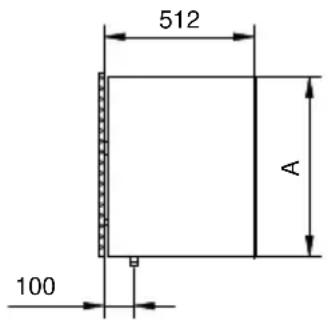
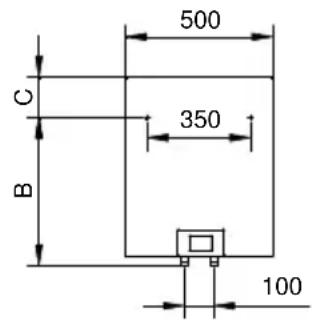
| Dimensions (A x B x C) | 830 x 600 x 260 mm |
| Heating Time to 75°C | Approx. 3 hours 5 minutes |
| Mixed Water at 40°C | 148 liters |
| Energy Consumption (standby) | 0.90 kWh/24h |
| Control Type | LCD Touch Screen with Electronic Regulator |
| Temperature Range | 10°C to 85°C |
| Smart Mode | Yes (records user habits for optimized heating) |
| Timer Function | Yes (up to 3 OFF periods per day) |
| Vacation Mode | Yes (maintains 10°C, up to 100 days) |
| Anti-Legionella Function | Yes (heats to 65°C for 15 min every 30 days) |
| Error Display | Yes (codes E01–E42) |
| Safety Valve | Return safety valve with drip outlet |
| Anti-Corrosion Protection | Enameled tank & Magnesium Anode |
| Installation | Vertical wall mount, closed/open system |
Frequently Asked Questions - OGB80SMC6 GORENJE
User questions about OGB80SMC6 GORENJE
0 question about this device. Answer the ones you know or ask your own.
Ask a new question about this device
Download the instructions for your Water heater in PDF format for free! Find your manual OGB80SMC6 - GORENJE and take your electronic device back in hand. On this page are published all the documents necessary for the use of your device. OGB80SMC6 by GORENJE.
USER MANUAL OGB80SMC6 GORENJE
natural_image
White portable gas water heater with digital display and two red connectors at the base (no visible text or symbols)OGB 80-150 E4
Navodila za uporabo 3
Instructions for Use 11
Gebrauchsanweisung 19
Руководство по эксплуатации 27
Інструкція з експлуатації 36
Návod k obsluze 44
Návod na obsluhu 51
Upute za upotrebu 58
Упатства за употребу 65
Upute za upotrebu 73
Упатства за употреба 80
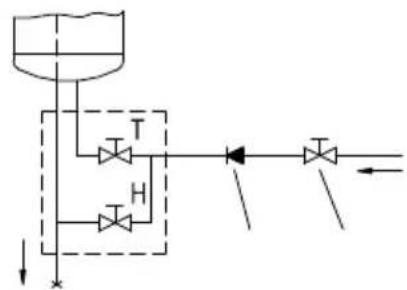
Zaprti (tlačni) sistem
flowchart
graph TD
    A["Container Tank"] --> B["T Valve"]
    A --> C["H Valve"]
    B --> D["Directional Flow Arrow"]
    C --> D
    D --> E["Output"]
natural_image
Simple diagram of a curved object with two arrows pointing outward, no text or symbols presentDear buyer, thank you for purchasing our product.
Prior to the installation and first use of the electric water heater, please read these instructions carefully.
THIS APPLIANCE IS NOT INTENDED FOR USE BY PERSONS (INCLUDING CHILDREN) WITH REDUCED PHYSICAL, SENSORY OR MENTAL CAPABILITIES, OR LACK OF EXPERIENCE AND KNOWLEDGE, UNLESS THEY HAVE BEEN GIVEN SUPERVISION OR INSTRUCTIONS CONCERNING THE USE OF THE APPLIANCE BY A PERSON RESPONSIBLE FOR THEIR SAFETY.
CHILDREN SHOULD BE SUPERVISED TO ENSURE THAT THEY DO NOT PLAY WITH THE APPLIANCE.
To comply with the latest standards and to satisfy our most demanding customers, we have developed an electrical water heater with an LCD touch screen. The OGB series heater is equipped with a sophisticated intelligent electronic regulator for regulating and displaying the temperature of the water in the heater. Its functions include a timer, display of the quantity of warm water in the boiler, operation mode in case of longer absence, manual switch, troubleshooting application and other functions.
The most important innovation of the new intelligent controller is the new SMART operating mode. The heater records your habits and after a while, it calculates the optimal operating mode that enables minimal use of electric energy necessary to meet your warm water needs.
This water heater has been manufactured in compliance with the relevant standards and tested by the relevant authorities as indicated by the Safety Certificate and the Electromagnetic Compatibility Certificate. The technical characteristics of the product are listed on the label affixed between the inlet and outlet pipes. The installation must be carried out by qualified staff. All repairs and maintenance work within the water heater, e.g. lime removal or inspection/replacement of the protective anticorrosion anode, must be carried out by an authorised maintenance service provider.
INSTALLATION
The water heater shall be installed as close as possible to the outlets. When installing the water heater in a room with a bathtub or shower, take into account the requirements defined in IEC Standard 60364-7-701 (VDE 0100, Part 701). It has to be fitted to the wall using appropriate wall screws with a minimum diameter of 8 mm. A wall with a poor load-bearing capacity must be properly reinforced where the heater will be installed. The water heater may only be fixed upon the wall vertically.
TECHNICAL PROPERTIES OF THE APPLIANCE
| Type OGB 80 E4 OGB 100 E4 OGB 120 E4 | OGB 150 E4 | ||||
| Model OGB 80 SM OGB 100 SM OGB 120 SM OGB 150 SM | |||||
| Volume [l] | 80 | 100 | 120 | 150 | |
| Rated pressure [MPa (bar)] | 0.6 (6) | ||||
| Weight / Filled with water [kg] | 36/116 | 41/141 | 46/166 | 52/202 | |
| Anti-corrosion of tank | enamelled & Mg Anode | ||||
| Power of electrical heater [W] | 2000 | ||||
| Number and power of heating elements [W] | 2 x 1000 | ||||
| Connection voltage [V~] | 230 | ||||
| Protection class | I | ||||
| Degree of protection | IP24 | ||||
| Duration of heating to 75 °C ^1) [h] | 3^05 | 3^55 | 4^35 | 5^45 | |
| Quantity of mixed water at 40 °C [l] | 148 | 194 | 226 | 282 | ||
| Energy consumption ^2) [kWh/24h] | 0 | 90 | 1.11 | 1.31 | 1 | 60 |
1) Time for heating the whole content of heater if the initial temperature of cold water from water supply is 15^ C.
2) Energy consumption to maintain the temperature of water in the water heater at 65 °C if the surrounding temperature is 20 °C , measured according to EN 60379.
| A B C | |||
| OGB 80 E4 830 600 | 260 | ||
| OGB 100 E4 975 750 | 255 | ||
| OGB 120 E4 1130 | 900 | 260 | |
| OGB 150 E4 1345 | 1100 | 275 |
Connection and installation dimensions of the water heater [mm]
CONNECTION TO THE WATER SUPPLY
The water heater connections for the inlet and outlet of water are colour-coded. The inlet of cold water is marked with blue colour, while the hot water outlet is marked with red colour.
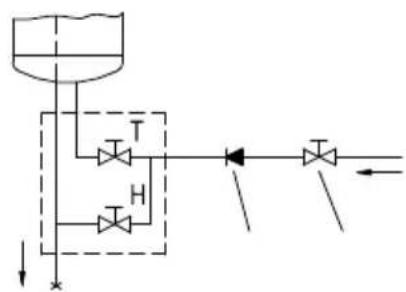
The water heater can be connected to the water supply in two ways. The closed-circuit pressure system enables several points of use, while the open-circuit gravity system enables a single point of use only. The mixer taps must also be installed in accordance with the selected installation mode.
The open-circuit gravity system requires the installation of a non-return valve in order to prevent the water from draining out of the tank in the event of the water supply running dry or being shut down. This installation mode requires the use of a cross-flow mixer tap. As the heating of water expands its volume, this causes the tap to drip. The dripping cannot be stopped by tightening it further; on the contrary, the tightening can only damage the tap.
The closed-circuit pressure system requires the use of pressure mixer taps. For safety reasons the supply pipe must be fitted with a return safety valve or alternatively, a valve of the safety class that prevents the pressure in the tank from exceeding the nominal pressure by more than 0.1 MPa (1 bar). The outlet opening on the relief valve must be equipped with an outlet for atmospheric pressure.
The heating of water in the heater causes the pressure in the tank to increase to the level set by the safety valve. As the water cannot return to the water supply system, this can result in dripping from the outlet of the safety valve. The drip can be piped to the drain by installing a catching unit just below the safety valve. The drain installed below the safety valve outlet must be piped down vertically and placed in an environment that is free from the onset of freezing conditions.
In case the existing plumbing does not enable you to pipe the dripping water from the return safety valve into the drain, you can avoid the dripping by installing a 3-litre expansion tank on the inlet water pipe of the boiler.
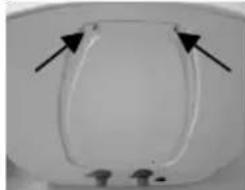
In order to provide correct operation of the safety valve, periodical inspections of the relief valve must be carried out by the user to eliminate any limescale and check if the safety valve is blocked. To check the valve, open the outlet of the return safety valve by turning the handle or unscrewing the nut of the valve (depending on the type of the valve). The valve is operating properly if the water comes out of the nozzle when the outlet is open.
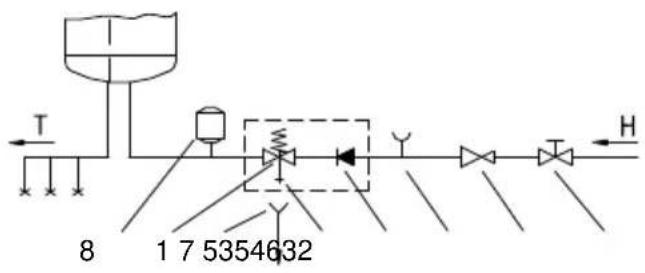
Closed (pressure) system
flowchart
graph TD
    A["Top Tank"] --> B["Valve"]
    B --> C["Valve 1"]
    B --> D["Valve 2"]
    B --> E["Valve 3"]
    C --> F["Pressure Indicator"]
    D --> F
    E --> F
    F --> G["Downward Flow"]
Open (non-pressure) system
Legend:
1 - Safety valve
2 - Test valve
3 - Non-return valve
4 - Pressure reduction valve
5 - Closing valve
6 - Checking fitting
7 - Funnel with outlet connection
8 - Expansion tank
H - Cold water
T - Hot water
Between the water heater and return safety valve, no closing valve may be built in because it could impede the function of the return safety valve.
The heater can be connected to the domestic water supply network without a pressure-reducing valve if the pressure in the network is lower than the nominal pressure. If the pressure in the network exceeds the nominal pressure, a pressure-reducing valve must be installed.
Before connecting it to the power supply, the water heater must be filled with water. When filling the heater for the first time, the tap for the hot water on the mixing tap must be opened. When the heater is filled with water, the water starts to run through the outlet pipe of the mixing tap.
CONNECTING THE WATER HEATER TO THE POWER SUPPLY NETWORK
Before connecting to the power supply network, install a power supply cord in the water heater, with a min. diameter of 1.5 mm ^2 (H05VV-F 3G 1.5 mm ^2 ). To do this, the protective plate must be removed from the water heater.
natural_image
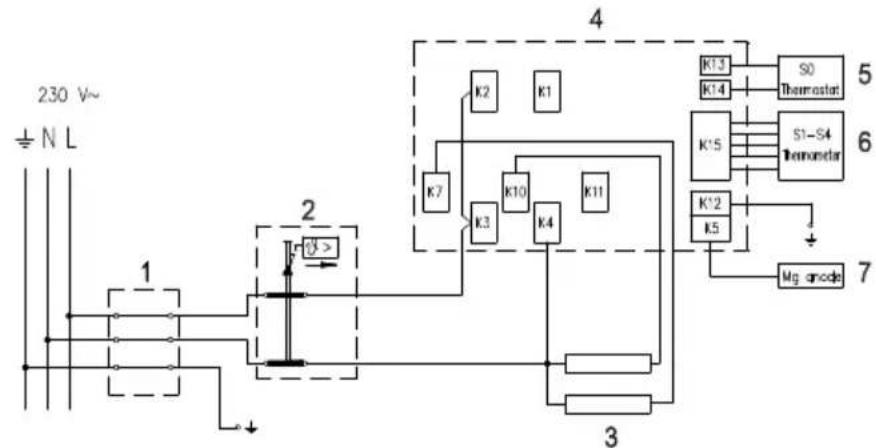
Close-up of a U-shaped glass toilet with black arrows pointing to the opening (no text or symbols visible)Connecting the heater to the power supply network must take place in accordance with the standards for electric appliances. To comply with the national installation regulations, an all poles disconnect switch must be installed between the water heater and the power supply network.
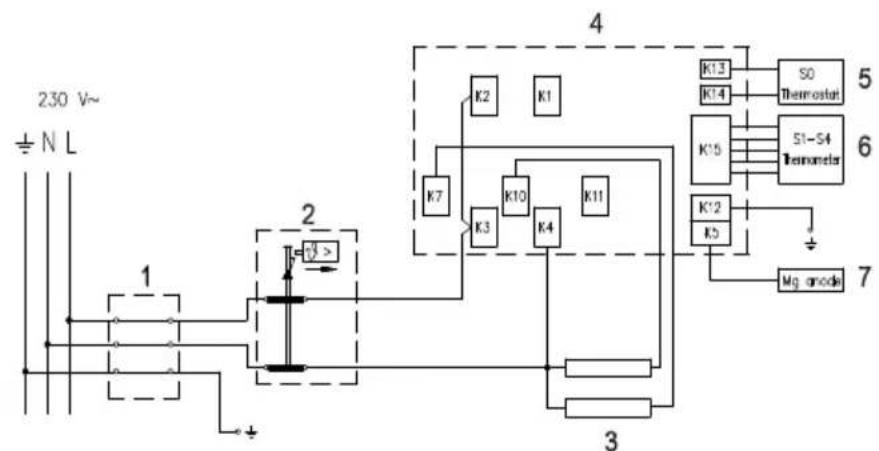
Legend:
1 - Connection terminal
2 - Thermal cut-out
3 - Electric heating element (2 x 1000 W)
4 - Electronic regulator
5 - Thermostat sensor
6 - Thermometer sensors
7 - Magnesium anode
L - Live conductor
N - Neutral conductor
± - Earthing conductor
flowchart
graph TD
    A["230 V~"] --> B["± N L"]
    B --> C["1"]
    C --> D["2"]
    D --> E["K7"]
    D --> F["K3"]
    D --> G["K4"]
    D --> H["K10"]
    D --> I["K11"]
    D --> J["K2"]
    D --> K["K1"]
    D --> L["S0 Thermistor"]
    D --> M["S1-S4 Thermistor"]
    D --> N["K13 K14"]
    D --> O["K15"]
    D --> P["K12 K5"]
    D --> Q["Mg anode"]
    D --> R["3"]
    R --> S["Ground"]
    style A fill:#f9f,stroke:#333
    style B fill:#ccf,stroke:#333
    style C fill:#cfc,stroke:#333
    style D fill:#fcc,stroke:#333
    style E fill:#ffc,stroke:#333
    style F fill:#ffc,stroke:#333
    style G fill:#ffc,stroke:#333
    style H fill:#ffc,stroke:#333
    style I fill:#ffc,stroke:#333
    style J fill:#ffc,stroke:#333
    style K fill:#ffc,stroke:#333
    style L fill:#ffc,stroke:#333
    style M fill:#ffc,stroke:#333
    style N fill:#ffc,stroke:#333
    style O fill:#ffc,stroke:#333
    style P fill:#ffc,stroke:#333
    style Q fill:#ffc,stroke:#333
    style R fill:#ffc,stroke:#333
    style S fill:#ffc,stroke:#333
    style T fill:#ffc,stroke:#333
    style U fill:#ffc,stroke:#333
    style V fill:#ffc,stroke:#333
    style W fill:#ffc,stroke:#333
    style X fill:#ffc,stroke:#333
    style Y fill:#ffc,stroke:#333
    style Z fill:#ffc,stroke:#333
Electric installation
CAUTION: Before any intervention into the interior of the water heater, disconnect it from the power supply network!
After connecting to the water and power supply, the heater is ready for use.
The heater is equipped with an electronic regulator that enables the setting and display of the temperature of water, adjustment of the heater's operation to your habits (SMART programme), timer, display of the quantity of warm water in the boiler, operation mode in case of longer absence (VACATION programme), manual switch and troubleshooting application.
OPERATION
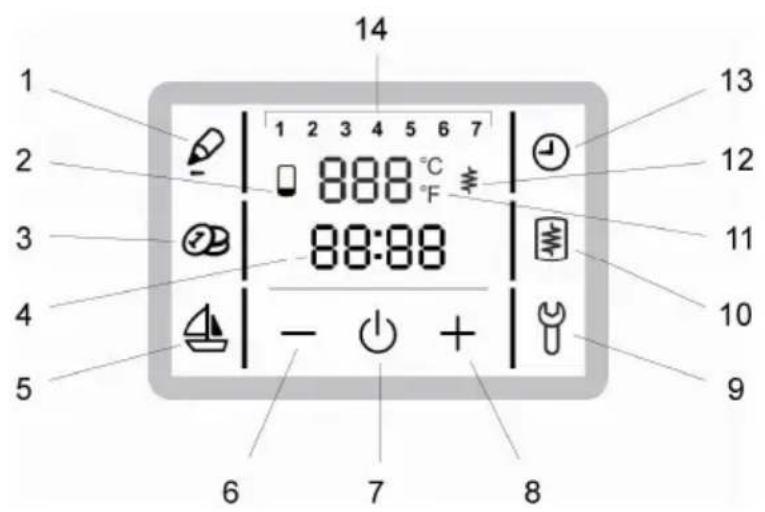
The water heater can be operated using an LCD touch screen.
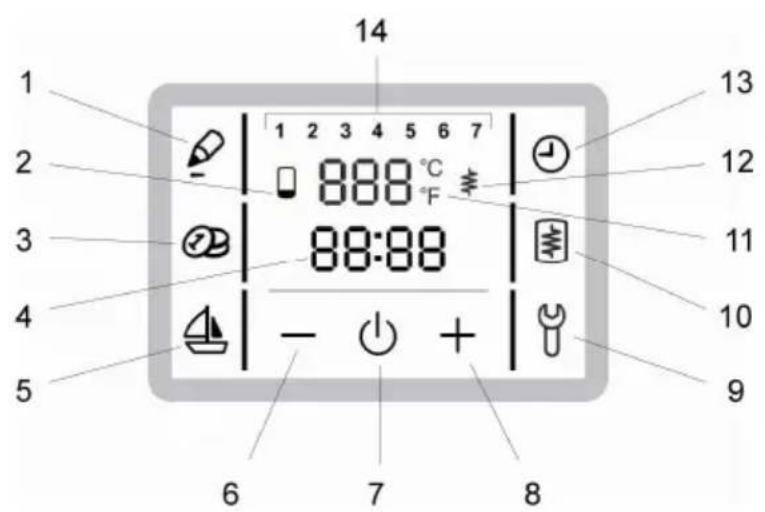
1 - SMART programme recording
2 - Warm water quantity display
3 - SMART programme activation/deactivation
4 - Time setup and display
5 - Start and setup of the VACATION programme
6 - Reducing the value
7 - Start/stop heater
8 - Increasing the value
9 - Indication and overview of errors
10 - Manual switch for heating
11 - Display and setup of temperature in °C
12 - Indicator of the heating element operation
13 - TIMER start and setup
14 - Day of the week
(1 .. Monday, ..., 7 .. Sunday)
Start/stop heater
• To start the water heater hold field no. 7 for a while.
- By holding field no. 7 again, the heater is stopped (if you are disconnecting the heater for a longer period of time, drain out all the water to prevent it from freezing).
Setting the clock and day of the week
- Press field no. 4.
- On the field no. 14 a blinking number of the day of the week appears.
- By pressing + or – you can set the number of the day of the week (1 – Monday, ..., 7 – Sunday).
- Press field no. 4 again.
• A blinking clock appears. - By pressing + or - you can set the clock (by holding + or - you can speed up the setting).
- The setting is stored when field no. 4 stops blinking.
Setting the temperature
-
Press field no. 11.
• The set temperature starts blinking. -
By pressing + or – you can change the temperature setting from 10 °C to 85 °C (preset to economic temperature of 55 °C).
- The setting is stored when field no. 11 stops blinking and the actual temperature appears on the display.
Display of the quantity of water in the heater
- The display shows the symbol: - no warm water
- low quantity of warm water
- high quantity of warm water
Setting the vacation mode
In the vacation mode, you can set the number of days (maximally 100), when the heater shall maintain the minimal temperature of water (approximately 10 °C ).
- Press field no. 5.
- Field no. 5 starts blinking and 0 is flashing in field no. 11.
- By pressing + or – you can set the number of vacation days.
- By pressing field no. 5 again, you confirm the set number of days (if you do not confirm the set number of days by pressing field no. 5 again, the heater will resume its normal operating mode).
- If you set the value to 0, then the heater will resume its normal operating mode after confirming the setting, and illumination of field no. 5 will turn off.
- If the heater is operating in the vacation mode and you press field no. 5, the number of remaining days is displayed.
- After the set number of days has elapsed, the heater returns to the normal mode and illumination of field no. 5 turns off.
Setting the TIMER mode
In the TIMER operating mode, you can set the times when the heater will start and stop. For each timer combination, you can set up to three time periods in which the heater will not heat the water.
- Hold field no. 13 for a while. Field no. 13 becomes illuminated.
- Then, press field no. 4 (days of the week start to blink).
- By pressing field + or – you can select among three different combinations of timer modes:
- timer mode for individual days (in field no. 14 individual numbers from 1 to 7 will be blinking),
- timer mode for the period between Monday and Friday and from Saturday to Sunday (blinking numbers 1 and 5, then 6 and 7)
- or the TIMER operating mode of the heater for the entire week (blinking numbers 1 to 7).
- To set the time, press field no. 4 again.
- On the field no. 11, the text 1OF appears and field no. 4 starts to blink.
- By pressing + or – set the time for the beginning of the OFF period.
- Press field no. 4 again.
- The text 1ON appears and field no. 4 blinks.
- By pressing + or – set the time for the end of the OFF period.
- By pressing field no. 4 again, you can use the above procedure to set the second and third period.
Operation of the timer
- By pressing field no. 13, you can activate the set timer mode.
- The heater heats the water in the ON periods (to the set temperature) and in the OFF periods, it does not heat the water.

Manual activation of heating
- By pressing field no. 10, you can activate the heating of water to the set temperature regardless of the current operating mode.
• After the heating is finished the heater resumes to the preset operating mode.
Recording of the user's habits for the SMART mode
During the recording, the programme remembers your habits and uses the measurements to heat the water in the SMART mode. The recording takes place for 7 days.
- By pressing field no. 1, you can activate the recording of your habits. Field no. 1 becomes illuminated.
- If you press field no. 1 while the user's habits are being recorded for the SMART mode, the remaining number of days for recording is displayed.
- During the recording, it is not possible to activate special regimes of operation of the heater (vacation, manual activation, TIMER regime).
- If a power supply failure occurs during the recording, the data becomes invalid (field no. 1 is blinking).
- When recording is finished, the illumination of field no. 1 turns off.
• To exit the recording mode, hold field no. 1 for a while or restart the heater by turning it off and then on again.
- If the user's habits in terms of the consumption of hot water change, they must be recorded again (press field no. 1: for the next 7 days, the user's habits and behaviour will be recorded). Heating of the water in accordance with the recorded habits can be activated by pressing field no. 3 (activation of the SMART mode).
Activation of the SMART mode
If the recording of the habits for the SMART mode is completed, it is possible to activate the SMART mode.
- By pressing field no. 3, you can activate the SMART mode. Field no. 3 becomes illuminated.
- You can exit the SMART mode by pressing field no. 3 again.
The operation of the heater in the SMART mode
- Useful especially when the user's habits are relatively consistent in terms of consumption of warm water (example: the user takes a shower every day at an approximately same time).
- The operation of the heater in the SMART mode reduces the consumption of electric energy.
-
In case minor discharges were recorded, the temperature of water in the heater remains between 40 °C and the set temperature, depending on the quantity of used water when the user's habits were recorded.
-
In case major discharges were recorded, the heater heats the water to the set temperature.
- In case no discharges were recorded, the temperature of the water can be lower than 40 °C.
- When the SMART mode is deactivated, the heater heats the water to the manually preset temperature.
Anti-legionella function
- If the heater has not achieved 65 °C for 30 days in a row, it starts and heats the water to 65 °C for 15 minutes.
Indicator of errors
- In case of errors, field no. 9 begins to blink. If you press field no. 9, the code of error appears.
| Error Description of error Solution | ||
| E 01 | Error of the electronic regulator sensor. | Call the service (heater is not working). |
| E 04 | Freezing. The error appears if the temperature in the heater is below 0 °C. | If the error does not disappear eventually, call the service. |
| E 05 | Overheating (temperature >100 °C, electronic regulator failure) | Unplug the heater from the power supply. Call the service. |
| E 06 Mg | anode error. | Call the service (heater functions normally). |
| E 07 Volume sensors error. | Call the service (heater functions in the normal mode). | |
| E 10 | Power failure during the recording for the SMART programme. | Error during the recording for the SMART mode. Restart recording procedure. |
| E 11 | No data for the operation of the SMART programme. | Start the recording procedure for the SMART mode. |
| E 12 | No data for the operation of the TIMER mode. | Set the TIMER mode. |
| E 13 | Manual activation of heating is not possible. | The set temperature has been achieved. |
| E 42 Anti-legionella function error. | Press field no. 9 to restart. | |
| R0 Deletion of the SMART programme. | If you want the heater to operate in the SMART mode, start recording for the SMART mode. After the recording is completed, the operation of the SMART mode is possible. | |
If you do not intend to use the heater for a longer period of time, protect its contents from freezing by setting the temperature of water to 10 °C. In case of power failure, this protection does not work! Should you choose to disconnect the power, the water heater should be thoroughly drained before the onset of freezing conditions. Water is discharged from heater via the inlet pipe. For this purpose, a special fitting (T-fitting) must be mounted between the relief valve and the heater inlet pipe, or a discharge tap. The heater can be discharged directly through the relief valve, by rotating the handle or the rotating valve cap to the same position as for checking the operation. Before discharge, make sure the heater is disconnected from the power supply, and open the hot water on the connected mixer tap. After discharging through the inlet pipe, there is still some water left in the water
heater. The remaining water will be discharged after removing the heating flange, through the heating flange opening.
The external parts of the water heater can be cleaned with a mild detergent solution. Do not use solvents and abrasives.
Regular preventive maintenance inspections ensure faultless performance and long life of your heater. The first of these inspections should be carried out by the authorised maintenance service provider about two years from installation in order to inspect the wear of the protective anticorrosion anode and remove the lime coating and sediment as required. The lime coating and sediment on the walls of the tank and on the heating element is a result of quality, quantity and temperature of water flowing through the water heater. The maintenance service provider shall also issue a condition report and recommend the approximate date of the next inspection.
Never try to repair any possible faults of the water heater by yourself, but inform about it the nearest authorised service workshop.
natural_image
Close-up of a white toilet vent with black arrows pointing to the vent (no text or symbols visible)natural_image
Close-up of a white object with two black arrows pointing to a rounded square shape, no visible text or symbols.natural_image
Close-up of a white toilet vent with black arrows pointing to the vent (no text or symbols visible)natural_image
Close-up of a white object with a curved rectangular shape and two black arrows pointing outward (no text or symbols visible)natural_image
Close-up of a white toilet vent with black arrows pointing to the vent (no text or symbols visible)natural_image
Close-up of a white plastic object with two black arrows pointing to its surface (no text or symbols visible)Отворени систем (проточни)
Легенда:
1 - Сигурносни вентил
2 - Вентил за тестирање
3 - Неповратни вентил
4 - Вентил за редукцију притиска
5 - Запорни вентил
natural_image
Close-up of a white toilet or sink with two black arrows pointing to the interior (no text or symbols visible)natural_image
Close-up of a transparent oval object with two black arrows pointing outward, no visible text or symbols.Priključenje bojlera na električnu mrežu mora da se izvrši u skladu sa standardima za postavljanje električne instalacije. Između bojlera i trajne instalacije mora da bude ugrađen uređaj za odvajanje svih polova od električne mreže u skladu sa nacionalnim instalacionim propisima.
Legenda:
1 - Priključne kleme
2 - Dvopolni toplotni osigurač
3 - Grejač
(2 x 1000 W)
4 - Elektronski regulator
5 - Senzor termostata
6 - Senzor termometra
7 - Magnezijumova anoda
L - Faza
N - Neutralni provodnik
- Uzemljenje Šema povezivanja električnih provodnika
flowchart
graph TD
    A["230 V~"] --> B["± N L"]
    B --> C["1"]
    C --> D["2"]
    D --> E["K7"]
    D --> F["K3"]
    D --> G["K10"]
    D --> H["K4"]
    D --> I["K11"]
    D --> J["K2"]
    D --> K["K1"]
    D --> L["K5"]
    L --> M["S0 Thermostat"]
    L --> N["S1-S4 Thermometer"]
    L --> O["Mg. anode"]
    P["3"] --> Q["Ground"]
    R["4"] --> S["Thermal Sensor"]
    T["5"] --> U["Thermal Sensor"]
    V["6"] --> W["Thermal Sensor"]
UPOZORENJE: Pre svake intervencije u unutrašnjosti bojlera obavezno isključite bojler iz električne mreže!
UPOTREBA I ODRŽAVANJE
Posle priključivanja na vodovodnu i električnu mrežu bojler je spreman za upotrebu.
Bojler sadrži elektronski regulator koji omogućava podešavanje i prikaz temperature vode, prilagođavanje rada bojlera s obzirom na vaše navike (program "SMART"), vremensko upravljanje rada, prikaz količine tople vode u kotlu, način rada u slučaju odsustva u trajanju od više dana (program ODMOR), ručno uključivanje zagrevanja i dijagnostiku grešaka.
UPRAVLJANJE
Bojler upravljate preko LCD-a koji je osetljiv na dodir.
1 - Snimanje programa "SMART"
2 - Prikaz količine tople vode
Отворен систем (прелевен)
Легенда: