
F10 GPS 4K - Uncategorized Lamax - Free user manual and instructions
Find the device manual for free F10 GPS 4K Lamax in PDF.


| Type | Dashcam (Dashboard Camera) |
| Model | F10 GPS 4K |
| Dimensions | 65 × 81 × 43 mm |
| Weight | 134 g |
| Power Supply | 12-24 V DC input; 5 V / 2.4 A and 5 V / 3 A outputs via included adapter |
| Battery | Supercapacitor (no built-in battery) |
| Front Camera Resolution | 3840×2160 @30fps (without rear camera); 3840×2160 @25fps (with rear camera); also 2560×1440 @60/30fps, 1920×1080 @60/30fps |
| Rear Camera Resolution | 1920×1080 @30fps |
| Field of View (Front) | 160° at 1080p |
| Field of View (Rear) | 140° at 1080p |
| Display | 2.31" TFT LCD, 320 × 240 pixels |
| Video Compression | MP4 format; H.264 / H.265 codec |
| Memory Card | MicroSD (U3 class) up to 256 GB |
| Connectivity | WiFi 2.4/5 GHz, USB-C |
| GPS | Built-in GPS module for speed and location logging; speed camera alerts |
| Loop Recording | Supports loop recording with selectable clip duration (1/2/3 min) |
| G-Sensor | Built-in accelerometer; automatically protects impact videos |
| Parking Mode | Automatic recording upon vibration; stops after 30 seconds of inactivity (requires constant power) |
| Timelapse | Time-lapse recording at intervals of 0.2 / 0.5 / 1 second |
| Audio | Built-in microphone with on/off control |
| Operating Temperature | -10°C to +50°C |
| Included Accessories | Car adapter with Fast Charge USB port, USB-C power cable (350 cm), USB-C data cable (20 cm), spare adhesive pads (2×), cable holders (5×), trim tool, electrostatic stickers (2×) |
| Safety | Use only supplied charger; keep away from moisture; do not disassemble; avoid extreme temperatures |
| Warranty | 2 years on device; battery/supercapacitor: 6 months on capacity |
Frequently Asked Questions - F10 GPS 4K Lamax
User questions about F10 GPS 4K Lamax
0 question about this device. Answer the ones you know or ask your own.
Ask a new question about this device
Download the instructions for your Uncategorized in PDF format for free! Find your manual F10 GPS 4K - Lamax and take your electronic device back in hand. On this page are published all the documents necessary for the use of your device. F10 GPS 4K by Lamax.
USER MANUAL F10 GPS 4K Lamax
natural_image
Illustration of a portable electronic device with a red screen and control panel (no text or symbols)
natural_image
Simple grayscale illustration of a mechanical component with a circular label containing the letter B (no text or symbols on the object itself)
natural_image
Coiled black-and-white USB cable with a circular connector, no text or symbols visible
natural_image
Simple diagram of two USB connectors with a circular label (D) above, no text or symbols present.



E
F
G
H
(A) LAMAX F10 GPS 4K dashcam
⑧ Adapter with extra Fast Charge USB port
© USB-C power cable 350 cm
(D) USB-C power & data cable 20 cm
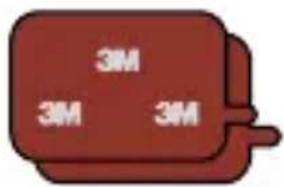
E Spare 3M adhesive pad (2x)
⑤ Cable holder (5x)
© Trim tool
(H) Electrostatic sticker for glass (2x)
- GETTING TO KNOW THE CAMERA / CONTROLS

Ⓐ Removable holder with 3M sticker
B USB-C power port
© Memory card slot
(D) Rear camera cable input (optional)
© Microphone
F LED power indicator (red light = camera is on)
© LED recording indicator (flashing blue = recording)
CONTROLS:
| EMERGENCY / POWER | Press while recording | Protect video | |
| Hold anytime | Turn dashcam ON / OFF | ||
| ↑↓ | UP / MIC | Press in main view | Turn sound recording ON / OFF |
| Hold in main view | Turn WiFi ON / OFF | ||
| OK | OK | Press in main view | Start / stop recording |
| Hold in main view | Turn display ON / OFF | ||
| ↓ | DOWN | Hold in main view | Switch to rear camera view |
| Press in main view | Open menu | ||
| ≡ | Menu | Press in the menu | Back |
| Hold in main view | Open gallery |
3. DISPLAY ICONS

Ⓐ Recording
(B) Current recording duration
© Resolution
(D) Frames per second
E WiFi
F GPS module (green colour indicates connection to satellites)
© Date
H Time
① Loop recording duration
① Sound recording on/off
4. FIRST TIME USE
flowchart
graph LR
    A["Device Input"] --> B["User Verification"]
    B --> C["Device Display"]
    C --> D["User Monitoring"]
    D --> E["Device Display with Security icon"]
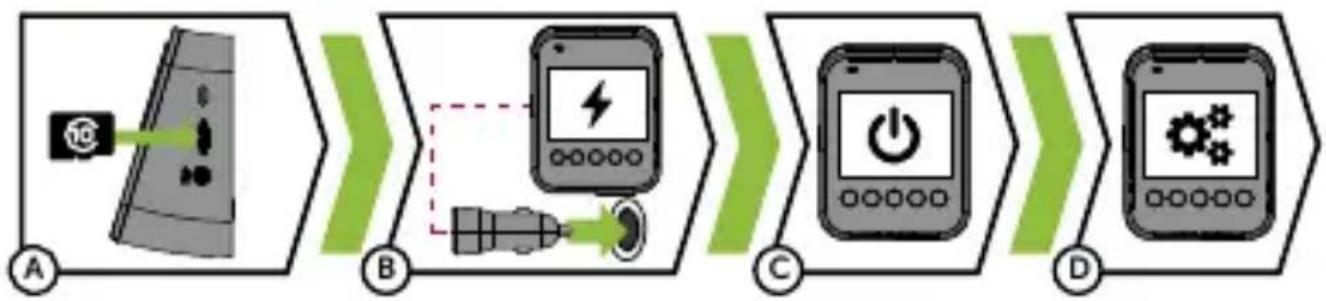
A Insert the microSD card as shown on the camera.
Use branded U3 class cards with a capacity of up to 256 GB.
Only remove the card when the camera is off.
Format the card in the camera when using it for the first time and re-format it at least once a month.
⑧ Connect the adapter to the car's cigarette lighter and to the dashcam using the USB cable.
The camera is designed to operate only when connected to a power source.
Instead of a battery, the camera contains a supercapacitor with a significantly longer lifespan.
© The camera will automatically turn on and start recording.
For some vehicles, it is first necessary to turn the ignition key.
(D) Perform basic camera settings before attaching the holder to the windscreen.
5. ATTACHING TO WINDSCREEN

(A) The ideal place to attach the dashcam is the space between the windscreen and the rearview mirror so that it does not obstruct the driver's view.
Make sure that the cable does not interfere with safety features in the car (e.g. airbag).
⑧ Make sure the glass is clean and dry at the attachment point.
The ideal temperature for adhesion is 20^ C – 40^ C.
© Remove the film from the 3M adhesive pad on the camera mount.
D Press the 3M pad onto the glass and hold for a while.
For easier removal of the holder, you can place the electrostatic sticker between the 3M adhesive pad and the windscreen.
Finally, adjust the lens direction so that part of the hood/bonnet is visible in the shot.
6. BASIC FUNCTIONS
Loop recording
The camera automatically divides the recording into shorter video files and, when the SD card is full, begins to overwrite the oldest unprotected files with new ones.
This way, you don't have to worry about free space on the card.
File protection
To protect the file from being overwritten, press the EMERGENCY button during recording. The file will then be saved to the protected files folder on the memory card.
G-sensor
If the G-sensor detects an impact, it will automatically protect the currently recorded video from being overwritten.
Note that with high sensitivity settings and driving on uneven surfaces, files may be protected unintentionally and the SD card may become full.
WiFi
WiFi can be turned on in the camera for wireless connection with a smartphone. There are two bands to choose from. For faster data transfer, choose the 5 GHz band.
To display the network name and WiFi password on the camera screen, return to the main screen.
Timelapse
Accelerated timelapse recording, or time-lapse video, allows you to create a video using frames at intervals of 0.2 s, 0.5 s and 1 s. With a continuous power supply, it enables long-term monitoring of events around a parked car and expands the memory card capacity.
Parking mode
The camera will automatically start recording when it detects vehicle vibration and, if motion is not repeated, will stop recording after approximately 30 seconds and turn off.
For the Parking mode to work, the camera must be turned off and connected to a power source.
7. GPS AND SPEED CAMERA REPORTS
General
The GPS module is integrated into the camera body.
After connecting to GPS satellites, the icon will change from white to green.
The GPS module records speed and GPS coordinates, and warns of stationary speed cameras and red light crossings.
Explanation of display icons

A Speed camera
B Red light crossing
© Red light camera
Audio signalling
A Warning of approaching speed camera - 3 beeps in the same tone
⑧ Warning of passing through a speed camera – Ascending tone
8. WIFI APPLICATION

flowchart
graph LR
    A["QR Code"] --> B["Mobile Device"]
    B --> C["Wi-Fi Display"]
    C --> D["Hand Touch"]
Ⓐ Scan the QR code or go to the URL lamax-electronics.com/f10/app
(B) Install the app on your smart device.
© Turn on the WiFi in the camera by holding the WiFi button (3s).
On your smart device, connect to the WiFi network with the camera name, enter the password (default 12345678), launch the app and connect to the camera.
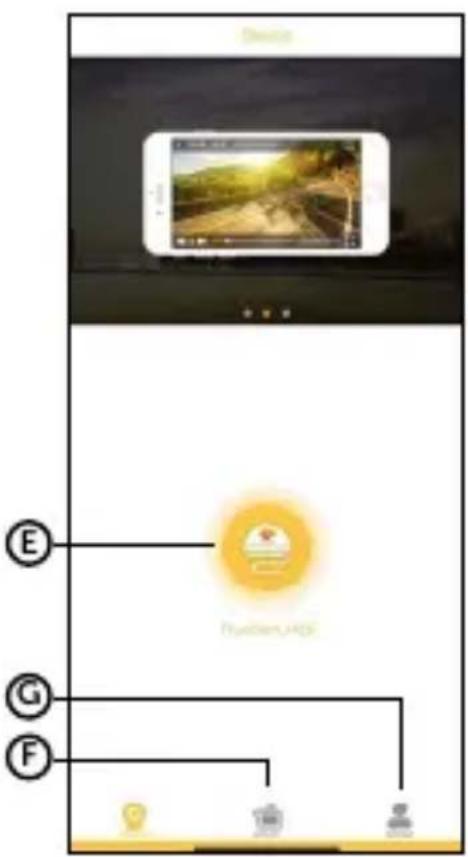
APP CONTROLS:
WITHOUT CONNECTION
E Connect the camera
F Files transferred to the phone
© Information
AFTER CONNECTION
H Settings
① Files on the camera
J Start/Stop recording
© Take a photo

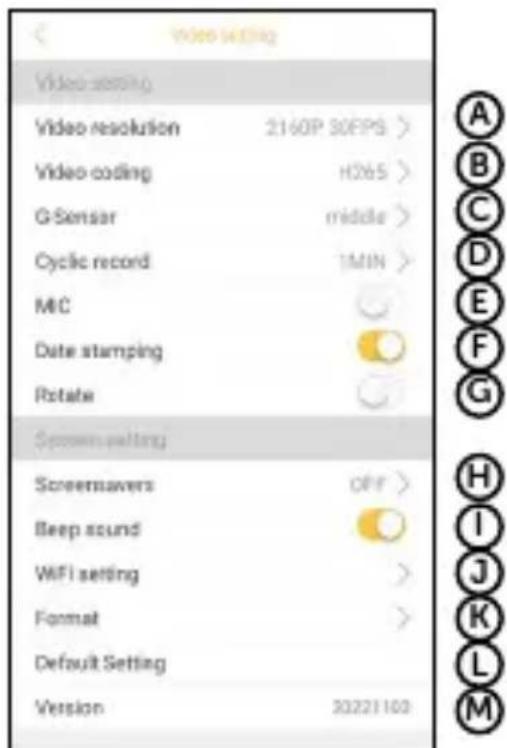
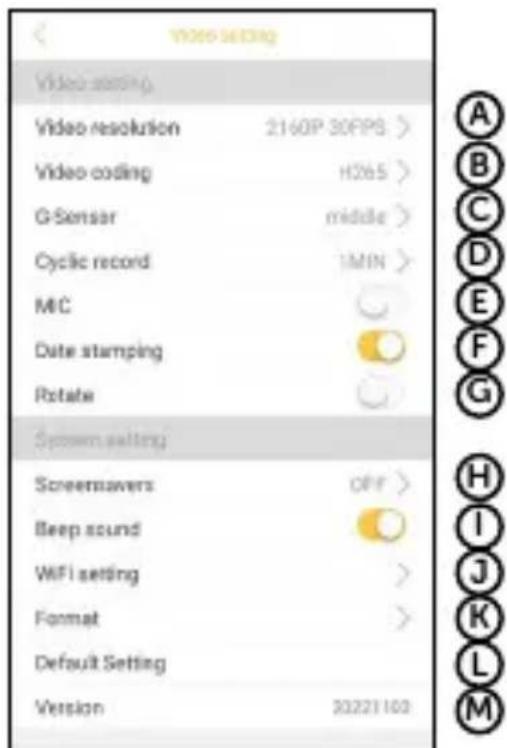
SETTINGS
Ⓐ Video resolution
B Codec
© G-sensor
D Loop
E Microphone
F Timestamp
© Rotate image
(H) Screensaver
① Sounds
J WiFi settings
® Formatting
L Factory settings
M Firmware version
- COMPLETE SETTINGS
| Speed camera reporting | Turns speed camera alerts on/off |
| WiFi | Turns WiFi on/off |
| Wifi App QR | Displays a QR code to download the app |
| Resolution | Sets the video resolution. Higher resolution = more detail and larger file |
| Timelapse | Allows recording at a reduced frame rate, saving space on the memory card. The feature is especially useful when the vehicle is parked. For normal driving, it is recommended to turn it off |
| Microphone | Turns the microphone on/off |
| System sounds | Turns key sounds and welcome tones on/off |
| Loop recording | Sets the length of individual loops. Longer loop = bigger file |
| G-sensor sensitivity | Sets the sensitivity of the G-sensor |
| Compression | Sets the video encoding format (we recommend H.265)H.265 - high quality, lower file size, no support for older devices/programs when viewing videoH.264 - high quality, larger file size, support for older devices/programs when viewing a video |
| Rear camera image rotation | Allows you to mirror or flip the image from the rear camera |
| Screensaver | Turns on/off the screensaver |
| Speedometer | Turns the speedometer on/off |
| Data on the video | Time stamp - Displays the time and date on the videoGPS stamp - Displays the GPS coordinates on the videoSpeed stamp - Displays the speed on the video |
| Speed units | Toggles between km/h and mph |
| Name of driver | Changes the name of the driver shown on the video |
| Language | English, German, Czech, Slovak, Polish, Hungarian |
| Time setting | Sets the time format |
| Time zone | Sets the time zone |
| Summer time | Turns summer time on/off |
| About the camera | Displays camera information including FW version and speed camera database |
| Factory settings | Restores the camera to factory settings |
| Formatting time | Sets the time period after which the camera reminds you to format the card |
| Format | Formats the data on the memory card. Attention, this erases protected files too! |
| Video gallery | Displays saved videos |
- SPECIFICATIONS
| Video resolution (front camera) | Without rear camera: | With rear camera: |
| 3840×2160/30fps | 3840×2160/25fps | |
| 2560×1440/60fps | 2560×1440/60fps | |
| 2560×1440/30fps | 2560×1440/30fps | |
| 1920×1080/60fps | 1920×1080/60fps | |
| 1920×1080/30fps | 1920×1080/30fps | |
| Resolution (rear camera) | 1920×1080/30fps | |
| Field of view at 1080p | Front camera 160°Rear camera 140° | |
| Format and compression | MP4 format, H.264/H.265 compression | |
| Sound | Built-in microphone, option to turn it off | |
| Display | 2.31" 320 × 240 px with option to turn off | |
| WiFi | 2.4 GHz, 5 GHz | |
| Micro SD card | Up to 256 GB | |
| Connectivity | WiFi 2.4 GHz, WiFi 5 GHz, USB-C | |
| Battery | Supercapacitor | |
| Charger - input | 12-24 V | |
| Charger - outputs | 5 V / 2,4 A, 5 V / 3 A | |
| Power cord length | 350 cm | |
| Dimensions | 65 × 81 × 43 mm | |
| Weight | 134 g | |
| Operating temperature | -10°C ~ +50°C | |
11. SAFETY PRECAUTIONS AND WARNINGS
Before first use, the consumer is obliged to familiarize himself with the principles of safe use of the product.
Precautions and notices
For your own safety, do not use the camera's controls while driving.
A window mount is needed when using the recorder in a car. Make sure that you place the recorder in an appropriate place, so as not to obstruct the driver's view or deployment of airbags.
Make sure that no object is blocking the camera lens and no reflective material is placed near the lens. Please keep the lens clean.
If the car windscreen is tinted or heated, it may limit the quality of the recording and, above all, the GPS signal.
For general use it is recommended to have motion detection disabled. It may lead to the memory card filling up quickly.
The camera is primarily designed to operate while being constantly connected to a power supply.
Make sure that the legislation of the country where you operate the vehicle allows the use of dashcams and speed radar alerts.
Safety precautions
Use only the charger supplied with your device. Use of another type of charger may result in malfunction and/or danger.
Do not use the charger in high moister environment. Never touch the charger when your hands or feet are wet.
Allow adequate ventilation around the charger when using it to operate the device or to charge the battery. Do not cover the charger with paper or other objects that will reduce cooling. Do not use the charger while it is inside a carrying case.
Connect the charger to a proper power source. The voltage requirements are found on the product case and/or on the packaging.
Do not use the charger if it is visibly damaged. In case of damage, do not repair the equipment yourself!
In case of device overheating, immediately disconnect the power source.
Charge the device under supervision only.
Packaging contains small pieces, that can be dangerous for children. Store the product always out of reach of children. Bags or many of the pieces containing may cause suffocation after swallowing.
Avoid contact with open flames.
Safety notices for power supply
For charging only use chargers, that is specified for this camera.
Use standard cables for charging, otherwise it could damage the device.
Do not use any damaged adapter or charger.
Power at room temperature, never charge at a temperature below 0^ C or at a temperature higher than 40^ C.
Do not expose the charger to moisture, water, rain, snow or any kind of various liquids.
Never leave the camera unattended during power-up, short-circuiting or accidental overcharging can cause aggressive chemicals to leak, explode, or cause a fire!
In the case of excessive heating of the camera, immediately disconnect it from the power supply.
Do not place charger on or near flammable objects. Beware of curtains, carpets, tablecloths etc.
Caring for your device
Taking good care of your device will ensure trouble-free operation and reduce the risk of damage.
Keep your device away from excessive moisture and extreme temperatures and avoid exposing your device to direct sunlight or strong ultraviolet light for extended periods of time.
Do not drop your device or subject it to severe shock.
Do not subject your device to sudden and severe temperature changes. This could cause moisture condensation inside the unit, which could damage your device. In the event of moisture condensation, allow the device to dry out completely before use.
The screen surface can easily be scratched. Avoid touching it with sharp objects.
Never clean your device when it is powered on. Use a soft, lint-free cloth to wipe the screen and the exterior of your device. Do not use paper towels to clean the screen.
Never attempt to disassemble, repair or make any modifications to your device. Disassembly, modification or any attempt at repair could cause damage to your device and even bodily injury or property damage and will void any warranty.
Do not store or carry flammable liquids, gases or explosive materials in the same compartment as your device, its parts or accessories.
To discourage theft, do not leave the device and accessories in plain view in an unattended vehicle.
Overheating may damage the device.
Other information
1) For households: This marking indicates that this product should not be disposed with other household wastes throughout the EU. To prevent possible harm to the environment or human health from uncontrolled waste disposal, recycle it responsibly to promote the sustainable reuse of material resources. To return your used device, please use the return and collection systems or contact the retailer where the product was purchased. They can take this product for environmentally safe recycling. In case of incorrect disposal of this kind of wastes user can be fined according to national laws. User information for disposal of electric and electronic devices in countries outside the EU: The symbol stated above (crossed recycle bin) is valid only in countries in European Union. For correct disposal of electric and electronic devices ask your city hall or distributor of these devices. Everything is expressed by the symbol of crossed recycle bin on product, cover or printed materials.
2) You can determine a warranty service at the place of purchase. In case of technical problems or queries contact your dealer, who will inform you about the following procedure. Follow the rules for work with electric devices. User is not allowed to disassembly the device neither replace any of its components. To reduce the risk of electric shock, do not remove or open the cover. In case of incorrect setup and plug in of device you will expose yourself risk of electric shock.
Products are covered by a two-year warranty, unless otherwise stated. The warranty period of the battery is 24 months and 6 months for its capacity.
Declaration of Conformity
Hereby, elem6 s.r.o., declares that all LAMAX F10 GPS 4K products are in compliance with the essential requirements and other re-levant provisions of Directive 2014/53/EU and 2014/30/EU. Products are intended for sale without any restriction in Germany, Czech Republic, Slovak Republic, Poland, Hungary and other EU countries. You can download the Declaration of Conformity from the website: www.lamax-electronics.com/support/doc.
Frequency band(s) in which the radio equipment operates: 2426–2448 MHz (2.4 GHz); 5735–5755 MHz (5 GHz).
Maximum radio-frequency power transmitted in the frequency band(s) in which the radio equipment operates: 17.5 dBm (2.4 GHz); 16.39 dBm (5 GHz).
Frequency of the GPS module: 1575.42 MHz.
Manufacturer:
elem6 s.r.o.,
LAMAX® brand is a registered trademark and our products are protected by patent.
All rights reserved.
LAMAX
ELECTRONICS
F10 GPS 4K

INHALT
natural_image
Illustration of a vintage mobile phone with a red screen and control panel (no text or symbols)B

©

natural_image
Black and white illustration of a USB cable with two connectors (no text or symbols)D





natural_image
Simple diagram with a dashed square and a green horizontal bar labeled 'x2' (no text or symbols beyond the label)E
F
G
H
natural_image
Interior view of a car dashboard and steering wheel (no text or symbols visible)

natural_image
Illustration of a hand holding a red object next to a mobile phone, with a green arrow and copyright symbol (no text or labels)

EINSTELLUNGEN:
- ALLE EINSTELLUNGEN
natural_image
Illustration of a vintage mobile phone with a red screen and control panel (no text or symbols)B

©

natural_image
Black and white illustration of a USB cable with two connectors (no text or symbols)D


E

F

©

H
(A) Autokamera LAMAX F10 GPS 4K
© Adaptér s extra Fast Charge USB portem
© Napájecí USB-C kabel 350 cm
(D) USB-C napájecí & datový kabel 20 cm

Nastavení
- ÚPLNÉ NASTAVENÍ
natural_image
Illustration of a vintage mobile phone with a red screen and control panel (no text or symbols)B

©

natural_image
Coiled black USB cable with two connectors (no text or symbols visible)D


E

F

©

H
(A) Autokamera LAMAX F10 GPS 4K
B Adaptér s extra Fast Charge USB portom
© Napájací USB-C kábel 350 cm
USB-C kábel na prenos súborov do PC 20 cm
flowchart
graph LR
    A["Device Input"] --> B["User Verification"]
    B --> C["Device Display"]
    C --> D["User Monitoring with Security System"]
    D --> E["User Display with Power icon"]
    E --> F["User Monitoring with Gear icons"]
NASTAVENIE
A B C D E F G H I J K L M
- ÚPLNÉ NASTAVENIE
USTAWIENIE
A B C D E F G H I J K L M
- KOMPLETNE USTAWIENIE
natural_image
3D rendering of a vintage computer monitor with red screen and perforated base (no visible text or symbols)
8. WIFI ALKALMAZÁSOK

flowchart
graph LR
    A["QR Code"] --> B["Mobile Device"]
    B --> C["Wi-Fi Reading Interface"]
    C --> D["Hand Touching Device"]
    D --> E["Phone Notification Icon"]
BEÁLLÍTÁS
natural_image
Illustration of a vintage mobile phone with red screen and control panel (no text or symbols)B

©

natural_image
Coiled black USB cable with two connectors (no text or symbols visible)D

E

F

G

H
(A) Auto kamera LAMAX F10 GPS 4K
⑧ Adapter s posebnim vhodom Fast Charge USB
© Napajalni kabel USB-C 350 cm
D Kabel USB-C za prenos datotek na osebni računalnik 20 cm
E Nadomestna nalepka 3M (2x)
(F) Držalo za kable (5x)
© Orodje za skritje kabla
H Elektrostaticna nalepka za na steklo (2x)
- SPOZNAJTE KAMERO / UPRAVLJANJE


NASTAVITVE
A B C D E F G H I J K L M
- CELOTNE NASTAVITVE

POSTAVKE
Ⓐ Rezolucija videa
B Kodek
© G-senzor
(D) Petlja
E Mikrofon
(F) Vremenska oznaka
© Rotacija slike
H Čuvar zaslona
① Zvukovi
J WiFi postavke
K Formatiranje
L Tvorničke postavke
M Verzija FW
- POTPUNE POSTAVKE
| Upozorenje na radare | Uključuje / isključuje upozorenje na radare |
| WiFi | Uključuje / isključuje WiFi |
| Wifi App QR | Prikazuje QR kôd za preuzimanje aplikacije |
| Rezolucija | Postavke rezolucije videozapisa. Veća rezolucija = više detalja i veća datoteka |
| Timelapse | Omogućuje snimanje videa uz smanjeni broj snimki u sekundi, čime štedi prostor na memorijskoj kartici. Funkcija je posebno korisna pri parkiranju vozila. Preporučujemo da se isključi kod klasične vožnje. |
| Mikrofon | Uključuje / isključuje mikrofon |
| Zvukovi sustava | Uključuje / isključuje zvuk tipki i ton dobrodošlice |
| Snimanje u petlji | Postavka duljine pojedinačnih petlji. Dulja petlja = veća datoteka |
| Osjetljivost G-senzora | Postavka osjetljivosti G-senzora |
| Kompresija | Postavka formata kodiranja videa (preporučujemo H.265) H.265 – visoka kvaliteta, manja veličina datoteke, ne podržava starije uređaje / programe prilikom gledanja videa H.264 – visoka kvaliteta, veća veličina datoteke, podržava starije uređaje / programe prilikom gledanja videa |
| Rotacija slike stražnje kamere | Omogućuje zrcaljenje ili okretanje slike sa stražnje kamere |
| Čuvar zaslona | Uključuje / isključuje čuvar zaslona |
| Tahometar | Uključuje / isključuje tahometar |
| Podaci u videu | Vremenska oznaka – Prikazuje vrijeme i datum u videu GPS oznaka – Prikazuje GPS koordinate u videu Oznaka brzine – Prikazuje brzinu u videu |
| Jedinice brzine | Odabir između km/h i mph |
| Ime vozača | Promjena imena vozača prikazanog u vođenom žigu videa |
| Jezik | Engleski, njemački, češki, slovački, poljski, mađarski |
| Postavka vremena | Odabir formata vremena |
| Vremenska zona | Odabir vremenske zone |
| Ljetno računanje vremena | Uključuje / isključuje ljetno računanje vremena |
| O kameri | Prikazuje informacije o kameri, uključujući verziju FW i bazu podataka s lokacijama radara |
| Tvorničke postavke | Vraća kameru na tvorničke postavke |
| Vrijeme formatiranja | Odabir vremenskog razdoblja nakon kojeg će kamera upozoriti na potrebu formatiranja kartice |
| Formatiranje | Formatira podatke na memorijskoj kartici. Pažnja, to uključuje i zaštičene datoteke! |
| Video galerija | Prikazuje pohranjene videozapise |
- SPECIFIKACE
| Rezolucija video (prednja kamera) | Bez straž. kamere: | Sa stražnjom kamerom: |
| 3840×2160/30fps | 3840×2160/25fps | |
| 2560×1440/60fps | 2560×1440/60fps | |
| 2560×1440/30fps | 2560×1440/30fps | |
| 1920×1080/60fps | 1920×1080/60fps | |
| 1920×1080/30fps | 1920×1080/30fps | |
| Rezolucija video (stražnja kamera) | 1920×1080/30fps | |
| Kut snimanja pri 1080p | Prednja kamera 160° | |
| Stražnja kamera 140° | ||
| Format i kompresija | Format MP4, kompresija H.264/H.265 | |
| Zvuk | Ugrađeni mikrofon, mogućnost isključenja | |
| Zaslon | 2,31" 320 × 240 px s mogućnošću isključenja | |
| WiFi | 2.4 GHz, 5 GHz | |
| Utor za Micro SD | Do 256 GB | |
| Povezivost | WiFi 2.4 GHz, WiFi 5 GHz, USB-C | |
| Baterija | Superkondenzator | |
| Punjač – ulaz | 12–24 V | |
| Punjač – izlazi | 5 V / 2,4 A, 5 V / 3 A | |
| Duljina kabela za napajanje | 350 cm | |
| Dimenzije | 65 × 81 × 43 mm | |
| Težina | 134 g | |
| Radna temperatura | -10°C ~ +50°C | |
11. SIGURNOSNA PRAVILA I UPOZORENJA
Prije prve uporabe potrošač je dužan upoznati se s načelima sigurne uporabe pro- izvoda.
Mjere opreza i napomene



- DISPLAY ICONS
- FIRST TIME USE
- ATTACHING TO WINDSCREEN
- BASIC FUNCTIONS
- Loop recording
- File protection
- G-sensor
- WiFi
- Timelapse
- Parking mode
- GPS AND SPEED CAMERA REPORTS
- General
- Explanation of display icons
- Audio signalling
- WIFI APPLICATION
- APP CONTROLS:
- WITHOUT CONNECTION
- AFTER CONNECTION
- SETTINGS
- SAFETY PRECAUTIONS AND WARNINGS
- Precautions and notices
- Safety precautions
- Safety notices for power supply
- Caring for your device
- Other information
- Declaration of Conformity
- Manufacturer:
- LAMAX
- ELECTRONICS
- F10 GPS 4K
- INHALT
- EINSTELLUNGEN:
- Nastavení
- NASTAVENIE
- USTAWIENIE
- WIFI ALKALMAZÁSOK
- BEÁLLÍTÁS
- NASTAVITVE
- POSTAVKE
- SIGURNOSNA PRAVILA I UPOZORENJA
- Mjere opreza i napomene
Brand : Lamax
Model : F10 GPS 4K
Category : Uncategorized