
ArtKid1 3D - Uncategorized Lamax - Free user manual and instructions
Find the device manual for free ArtKid1 3D Lamax in PDF.


| Product Type | 3D Pen |
| Model | ArtKid1 3D |
| Brand | Lamax |
| Dimensions | 142 × 29 × 26 mm |
| Weight | 46 g |
| Input Voltage | DC 5 V, 2 A |
| Power Consumption | 10 W |
| Battery Type | Built-in rechargeable lithium-ion |
| Battery Capacity | 3.7 V, 550 mAh |
| Charging Time | 2 to 3 hours |
| Dispensing Hole Diameter | 0.8 mm |
| Filament Diameter | 1.75 mm |
| Speed Settings | 2 levels (low and high) |
| Heating Indicator | Indicator light flashes during heating, stops when ready |
| Automatic Shutdown | After 2 minutes of inactivity |
| Filament Ejection | Yes, via eject button |
| Temperature Adjustment | Press and hold eject button for 5 seconds to increase/decrease |
| Charging Cable | USB-A to proprietary connector (included) |
| Recommended Filament | Use filaments supplied or recommended by manufacturer |
| Safety Age Recommendation | 8 years and older with adult supervision |
| Cleaning | Dry cloth only; do not use liquids |
| Warranty | 24 months (battery capacity: 6 months) |
| Certifications | CE, RoHS |
Frequently Asked Questions - ArtKid1 3D Lamax
User questions about ArtKid1 3D Lamax
0 question about this device. Answer the ones you know or ask your own.
Ask a new question about this device
Download the instructions for your Uncategorized in PDF format for free! Find your manual ArtKid1 3D - Lamax and take your electronic device back in hand. On this page are published all the documents necessary for the use of your device. ArtKid1 3D by Lamax.
USER MANUAL ArtKid1 3D Lamax
- Handle
- On/Speed Switch
- Button to eject the filament/set the temperature
- Indicator light
- Refill button
- Dispensing hole
- Hole for filling
- Socket for connecting the charging cable connector
CHARGING
The 3D pen must be fully charged before first use.
-
Plug one end of the charging cable into the socket on the top of the 3D pen. Plug the other end into the USB-A port of your computer or a suitable network adapter (output voltage 5 V / 2 A).
-
When the 3D pen is off, the indicator light is red, indicating that the 3D pen is charging. When it turns green, the 3D pen is charged.
-
When the 3D pen is on, the indicator light will flash three times to indicate that the 3D pen is charging.
The charging time usually takes 2 to 3 hours.
When the indicator light flashes quickly during use, the 3D pen needs to be charged.
The 3D pen and charging cable may become warm during charging. This is a normal phenomenon.
Warning: Use only the supplied charging cable for charging.
OPERATION
Make sure the 3D pen is charged.
-
Move the switch to position 1 (low filling speed) or 2 (high filling speed). The indicator light will flash to indicate that the 3D pen is heating up. The heating time depends on the ambient temperature.
-
When the indicator light stops flashing, press the refill button. Insert the filament into the hole at the top of the 3D pen. Wait until the heated filament starts to flow out of the dispensing hole.
- To stop dispensing the heated filament, briefly press the filling dispensing button.
- If you will not be using the 3D pen, slide the switch to the 0 (off) position.
Automatic shutdown
The 3D pen automatically turns off after 2 minutes of inactivity.
Ejecting the filament and setting the temperature
Briefly press the eject button and the heated filament will eject from the dispensing opening.
Press and hold the eject button for 5 seconds and the temperature will increase for about 10 seconds. Press and hold the button again for 5 seconds and the temperature will decrease.
Notes:
Always wait for the 3D pen to warm up.
Use only the filaments that are supplied with the product, or which the manufacturer recommends.
Place the 3D pen on a heat-resistant mat.
The end of the filament must be cut straight.
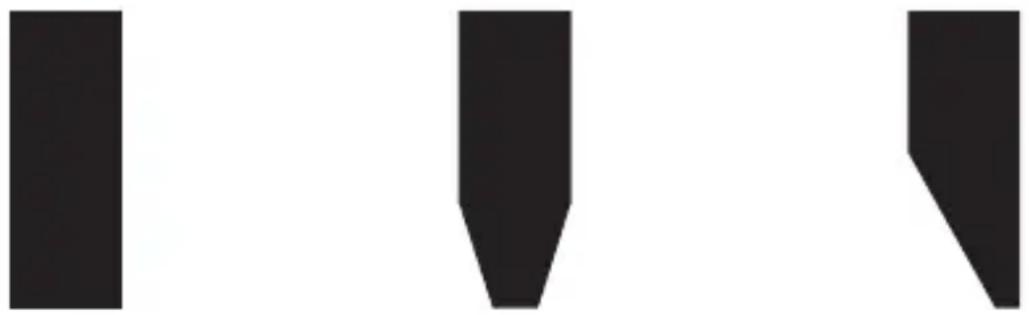
natural_image
Three black geometric shapes on white background: two vertical rectangles and one U-shaped, with no text or symbols.Right Wrong Wrong
TROUBLESHOOTING
| Problem Possible cause Solution | ||
| The indicator light does not light up. The 3D pen is discharged. Let the 3D pen charge. | ||
| The 3D pen does not dispense a refill. | The dispensing opening is blocked. Eliminate the cause of the blockage. | |
| The 3D pen is not heated enough. Wait for the 3D pen to warm up. | ||
| The filament is inserted incorrectly. Remove the filament, cut it and insert it again. | ||
| Fault on the mainboard. Contact an authorized service center. | ||
| The switch does not work. Contact an authorized service center. | ||
| The 3D pen does not heat up. The 3D pen is discharged. Let the 3D pen charge. | ||
Note: If the problem persists, or not listed here, do not use the 3D pen and contact
SPECIFICATIONS
| Input voltage DC 5 V, 2 A, 10 W | |
| Built-in battery 3.7 V 550 mAh | |
| Dispensing hole diameter 0.8 mm | |
| Diameter of the opening for filling 1.75 mm | |
| Dimensions 142 × 29 × 26 mm | |
| Weight 46 g | |
| Charging time 2 to 3 hours |
SAFETY PRECAUTIONS
Before first use, the consumer is obliged to familiarize himself with the principles of safe use of the product.
Safety precautions
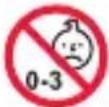
Warning: Not suitable for children under 36 months. Danger of suffocation. If swallowed, seek medical attention immediately. Contains small parts that could be swallowed or inhaled.
- The product must be stored out of the reach of children under 8 years of age.
- This product may be used by children aged 8 years and older and persons with reduced physical, sensory or mental capabilities or lack of experience and knowledge if they are under constant supervision or have been instructed in the safe use of the appliance and understand the potential hazards.
- Children under the age of 8 must be supervised to ensure that they do not play with the product.
- Cleaning and maintenance may not be carried out by children under the age of 8. Children over the age of 8 may only perform cleaning and maintenance under the supervision of an adult.
- If the USB cable is damaged, it must be replaced by the manufacturer, its service technician or a similarly qualified person to avoid a hazardous situation. It is forbidden to use a damaged product or a product with a damaged USB cable.
- The product is intended for the processing of fusible filaments, which are intended for this type of product. Do not use the product for purposes other than those for which it is intended. The filaments are not intended for consumption. In case of ingestion, seek professional medical advice.
- Do not use the product with fusible filaments other than those supplied with the product or recommended by the manufacturer. Do not insert any foreign objects into the outlet opening.
- The product must not be modified for another use.
- Do not leave the product unattended when in use.
- Do not use the product in humid or dusty environments, at high temperatures or in places where flammable, volatile or explosive substances are stored or used. Overheating can damage the product.
- Do not place the product on or near heat sources (e.g. stoves, heaters, etc.).
- During use, both the fusible link and the fusible filament heat up and may be very hot to the touch. Avoid contact with heated surfaces. There is a risk of burns.
- The package contains small parts that can be dangerous for children. Always store the product out of the reach of children. The bags or the many parts they contain can cause suffocation if swallowed. If swallowed, seek medical attention immediately.
- The product must not come into contact with water or place objects filled with any liquid, such as vases, on it. Do not expose the product to rain or moisture. This may cause electric shock or fire. Do not place any objects that are a source of open flame, such as candles, ashtrays, etc., on the product.
- Do not clean the product with organic solvents. Do not leave the power cord near hot surfaces.
- Do not handle the product with wet hands.
- Do not cover the ventilation openings of the product. It may overheat and thus damage it.
- Place the product on a flat and stable surface.
- Never insert foreign objects into the ventilation vents or any other openings of the product. Serious injury may occur.
- The product is intended for use only in a dry place.
- Never use the product if it is damaged or if it shows signs of damage. Do not disassemble or repair the product! Contact your dealer or manufacturer.
- Do not leave the product in the vehicle, do not expose it to sunlight and do not place it near heat sources. Strong
light or high temperatures can damage it.
- Protect the product from drops or impacts. Handle the product with care.
Safety principles when charging
- Only use the supplied charging cable to charge the product, otherwise the product may be damaged.
- Place the product and charging cable on a heat-resistant surface out of the reach of children under 8 years of age.
- During charging, the product and the charging cable may heat up slightly. This is a common situation. However, if the product or the charging cable is hot to the touch, disconnect the product from the charging source and let it cool down. If the situation recurs, have the product checked by an authorized service center.
- When the product is charged, disconnect the charging cable.
- If the charging cable is plugged into the product, route it so that it cannot be tripped over, hang over the edge of a table or worktop, touch a hot surface, or touch sharp objects.
- Keep the charging cable out of the reach of children so that they cannot play with it. It could cause suffocation.
- Do not cover the product or the charging cable during charging.
- Never charge the product when it is mechanically damaged or the battery is swollen. Do not use the product in this state at all, there is a risk of explosion.
- Charge at room temperature, never charge below 0°C or above 40°C.
- If you are not going to use the product for a long time, charge it to half capacity at least once every 30 days. Otherwise, permanent damage to the battery may occur, which may not be recognized as a reason for warranty repair.
Safety principles for the accumulator
- The product is equipped with a built-in battery.
- Fully charge the product before using it for the first time.
- Do not damage the outer packaging of the product, otherwise the battery could be damaged. Do not repair a damaged battery.
- Do not expose the battery to moisture, water, rain, snow or dripping/splashing water.
- Keep the battery out of the reach of children and animals.
- Never disassemble, repair or short-circuit the battery.
- Never disassemble the product unless otherwise specified. Any such attempt is risky and may result in product damage and subsequent loss of warranty.
- Do not dispose of worn or damaged accumulators in mixed municipal waste, in fire or in heating devices. Dispose of it ecologically.
- If you do not comply with these policies, you assume full responsibility for the resulting damage.
- If electrolyte leaks, avoid contact with it. In case of skin contact, flush the area with plenty of drinking water. In case of eye contact, flush with plenty of drinking water and seek medical attention. If swallowed, seek immediate medical attention.
Product maintenance
- Keep the product clean. Proper maintenance will ensure trouble-free and long-term operation and reduce the risk of damage.
- Use only a dry cloth to clean the product.
- Do not use any abrasive cleaners, thinners, benzine, chemicals or other similar agents to clean the product.
- To avoid the risk of electric shock, do not immerse the product or the power cord in water or any other liquid.
- Do not expose the product to sudden and sharp temperature changes. This could cause moisture to condense inside the product, which could damage it. When moisture condensation occurs, allow the product to dry completely before further use.
- As a matter of principle, do not attempt to disassemble, repair or modify the product in any way. Disassembly, modification or any attempted repair will void the warranty and may result in damage to the product, or even personal injury or property damage.
Other information
1) For households: This marking indicates that this product should not be disposed with other household wastes throughout the EU. To prevent possible harm to the environment or human health from uncontrolled waste disposal, recycle it responsibly to promote the sustainable reuse of material resources. To return your used device, please use the return and collection systems or contact the retailer where the product was purchased. They can take this product for environmental safe recycling. In case of incorrect disposal of this kind of wastes user can be fined according to national laws. User information for disposal of electric and electronic devices in countries outside the EU: The symbol stated above (crossed recycle bin) is valid only in countries in European Union. For correct disposal of electric and electronic devices ask your city hall or distributor of these devices. Everything is expressed by the symbol of crossed recycle bin on product, cover or printed materials.
2) Please contact your dealer for warranty repairs. In case of technical problems and questions, please contact your dealer who will inform you of the next steps to be taken. Observe the rules for working with electrical equipment. The user is not authorised to disassemble the equipment or replace any of its components. There is a risk of electric
shock if the covers are opened or removed. Incorrect assembly and reconnection of the equipment also exposes you to the risk of electric shock.
The warranty period for the products is 24 months unless otherwise stated. The warranty does not cover damage caused by non-standard use, mechanical damage, exposure to harsh conditions, handling contrary to the manual and normal wear and tear. The warranty period is 24 months for the battery and 6 months for its capacity. For more information on the warranty, please visit www.elem6.com/warranty
Neither the manufacturer, importer nor distributor shall be liable for any damage caused by the installation or improper use of the product.
EU Declaration of Conformity
elem6 s.r.o. hereby declares that the LAMAX ArtKid1 3D complies with the essential requirements and other relevant provisions of Directive 2009/48/ES and 2014/108/ES. All LAMAX products are intended for sale without restriction in Germany, the Czech Republic, Slovakia, Poland, Hungary and other EU member states. The full Declaration of Conformity can be downloaded from www.lamax-electronics.com/support/doc/
Manufacturer:
LAMAX® brand is a registered trademark and our products are protected by patent.
All rights reserved.
Typographical errors and changes are reserved.

CE

LAMAX
ELECTRONICS
ArtKid1 3D
DE - BENUTZERHANDBUCH
PACKUNGSINHALT
natural_image
Three black geometric shapes on white background: two vertical rectangles and one downward-pointing arrow (no text or symbols)natural_image
Three black geometric shapes on white background: two vertical rectangles and one U-shaped (no text or symbols)natural_image
Three black geometric shapes on white background: two vertical rectangles and one U-shaped, with no text or symbols.ROZWIĄZANIA PROBLEMÓW
natural_image
Three black geometric shapes on white background: two vertical rectangles and one downward-pointing arrow (no text or symbols)Helyes Rossz Rossz
MEGOLDÁSOK A PROBLÉMÁKRA
natural_image
Three black geometric shapes on white background: two vertical rectangles and one U-shaped, with no text or symbols.Prav Narobe Narobe
REŠITVE TEŽAV
www.lamax-electronics.coms
natural_image
Three black geometric shapes on white background: two vertical rectangles and one U-shaped, with no text or symbols.Točno Pogrešno Pogrešno
RJEŠENJA PROBLEMA




- CHARGING
- OPERATION
- Automatic shutdown
- Ejecting the filament and setting the temperature
- Notes:
- SPECIFICATIONS
- SAFETY PRECAUTIONS
- Warning: Not suitable for children under 36 months. Danger of suffocation. If swallowed, seek medical attention immediately. Contains small parts that could be swallowed or inhaled.
- Safety principles when charging
- Safety principles for the accumulator
- Product maintenance
- Other information
- EU Declaration of Conformity
- Manufacturer:
- LAMAX
- ELECTRONICS
- ArtKid1 3D
- PACKUNGSINHALT
Brand : Lamax
Model : ArtKid1 3D
Category : Uncategorized