
KaraokeKid1 - Uncategorized Lamax - Free user manual and instructions
Find the device manual for free KaraokeKid1 Lamax in PDF.


| Product Type | Mini Karaoke Speaker with Wireless Microphone |
| Brand | Lamax |
| Model | KaraokeKid1 |
| Speaker Dimensions (W x H x D) | 141 mm x 74 mm x 96.6 mm |
| Microphone Dimensions (D x L) | 130 mm x 30 mm x 30 mm |
| Speaker Weight | 563 g |
| Microphone Weight | 83 g |
| Total Power Output | 10 W |
| Frequency Range | 120 Hz – 20 kHz |
| Wireless Technology | Bluetooth 5.3 |
| Supported Audio Codecs | SBC |
| Speaker Battery Capacity | 1800 mAh |
| Microphone Battery Capacity | 500 mAh |
| Speaker Play Time (50% volume, backlight off) | 8 hours |
| Microphone Battery Life | 6 hours |
| Input Interfaces | USB-C (charging), USB-A, AUX, microSD card slot |
| Supported Memory Card Capacity | Up to 32 GB (microSD) |
| Audio Sources | Bluetooth, SD card, AUX input |
| Microphone Voice Modes | Profi, Standard, Girl, Boy, Hell, Helium |
| Light Effects | 3 modes (change via double press MODE) |
| Karaoke Mode | Yes (double press MIC during playback) |
| Charging Indicator | Red LED when charging, off when fully charged |
| Low Battery Warning | Red LED flashes twice every 5 seconds |
Frequently Asked Questions - KaraokeKid1 Lamax
User questions about KaraokeKid1 Lamax
0 question about this device. Answer the ones you know or ask your own.
Ask a new question about this device
Download the instructions for your Uncategorized in PDF format for free! Find your manual KaraokeKid1 - Lamax and take your electronic device back in hand. On this page are published all the documents necessary for the use of your device. KaraokeKid1 by Lamax.
USER MANUAL KaraokeKid1 Lamax
natural_image
Line drawing of a portable electronic device next to a rectangular box with handle and control buttons (no text or symbols)- FUNCTIONS

natural_image
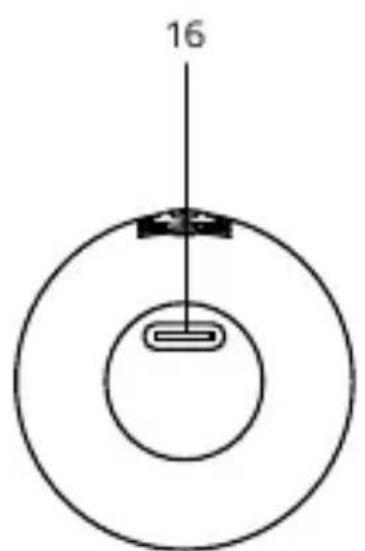
Simple diagram of a circular structure with a central rectangular element and a vertical line labeled '16' (no text or symbols beyond the number)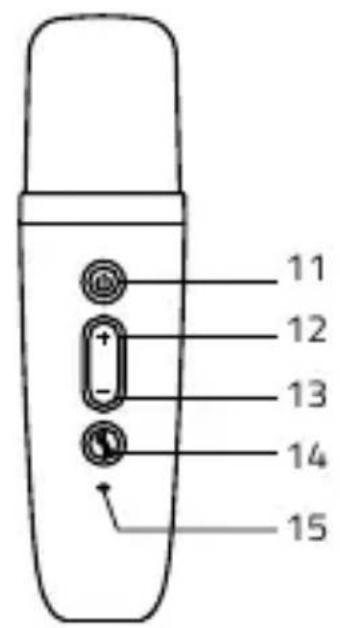
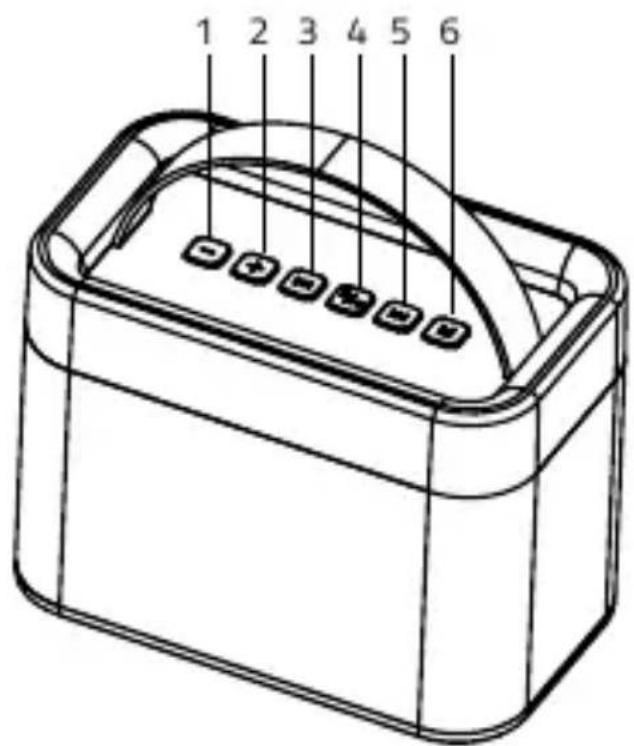
2. BUTTON INSTRUCTIONS
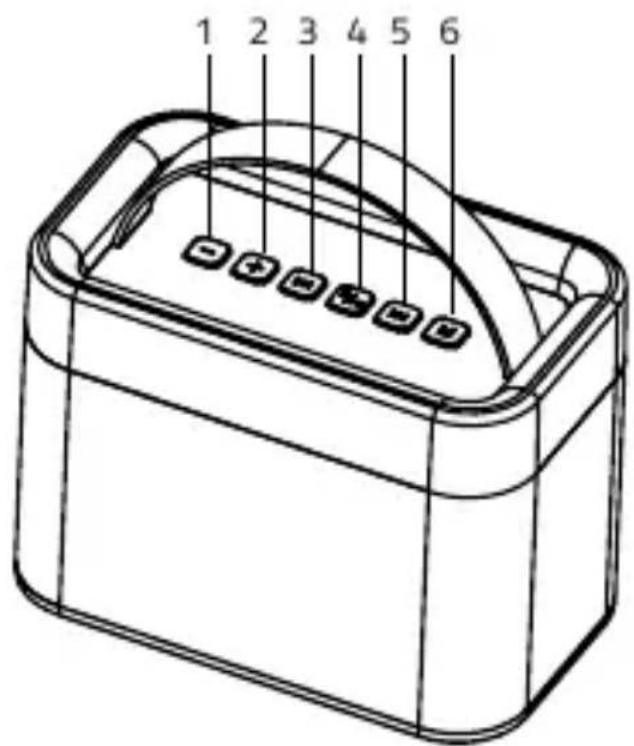
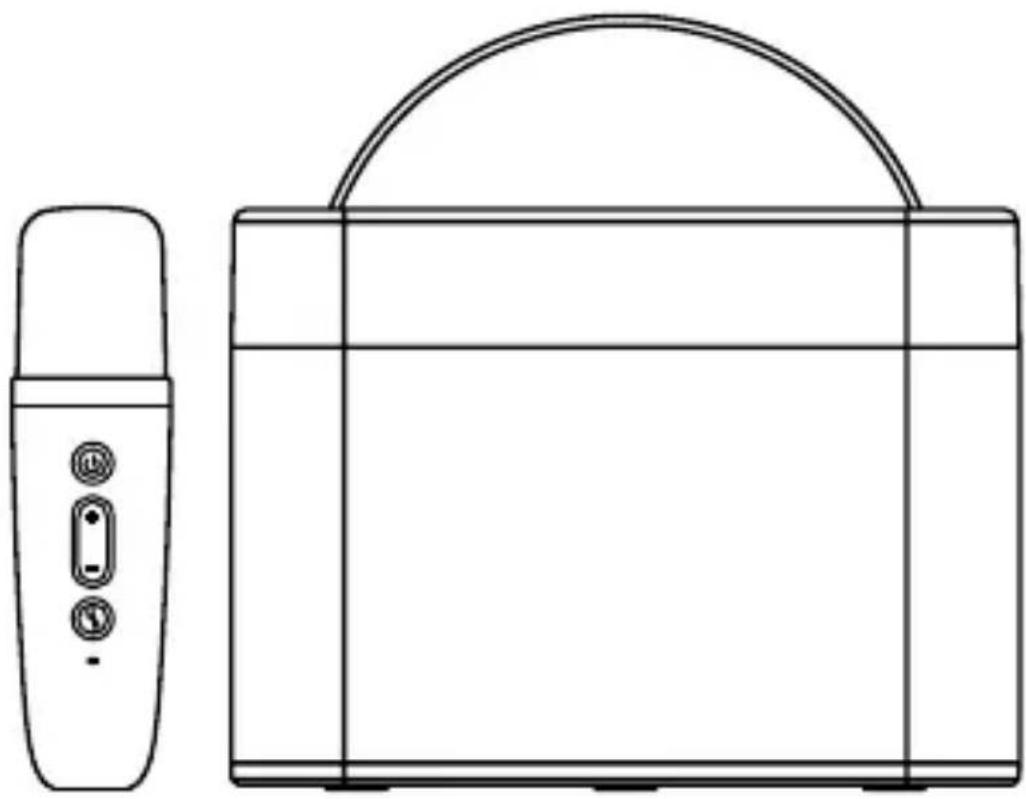
1) VOL -: Hold to decrease volume
2) VOL +: Hold to increase volume
3) Previous track: Press for previous track
4) POWER: Hold to turn on/off the speaker, press to play/pause
5) Next track: Press for next track
6) MODE: Hold to change light modes
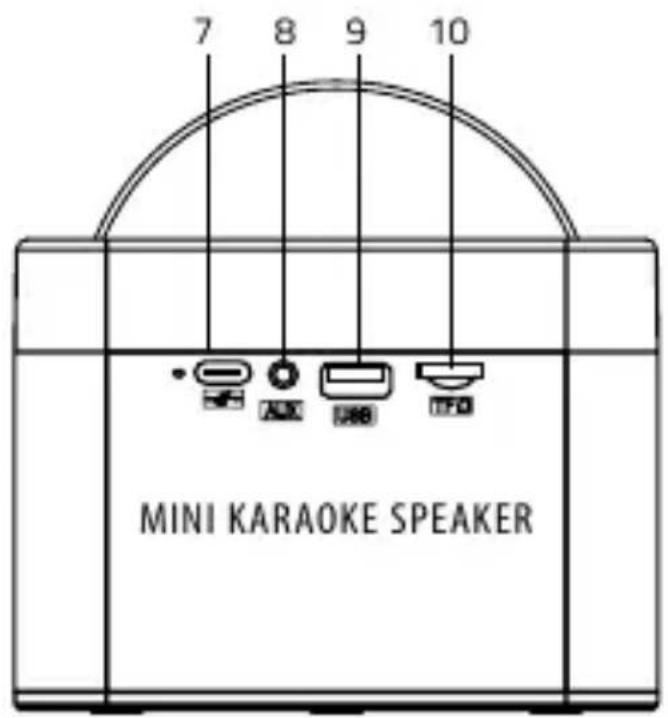
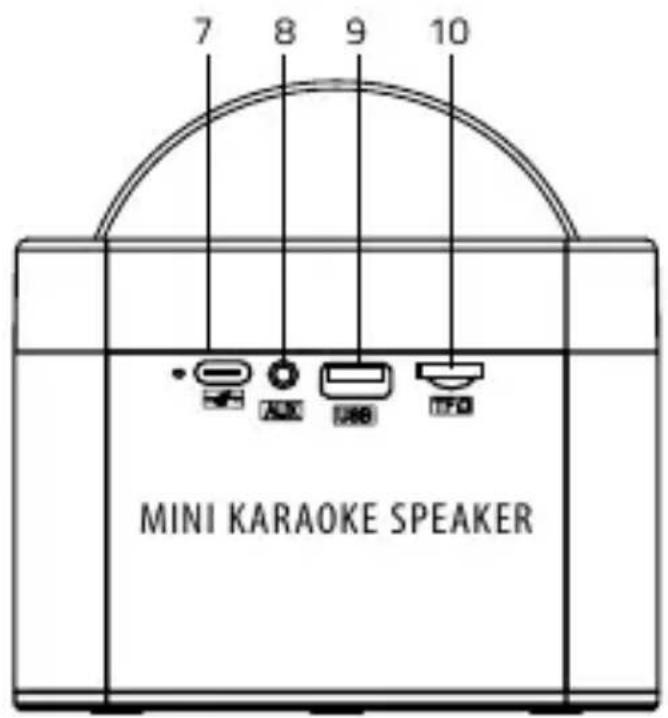
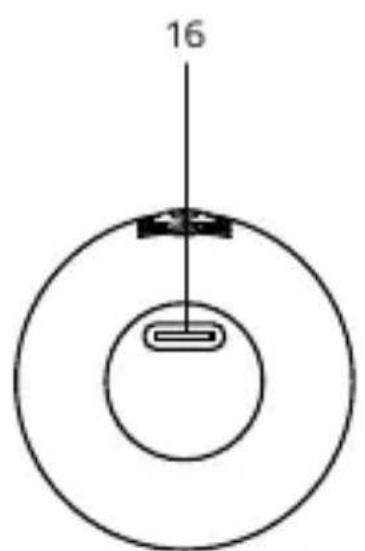
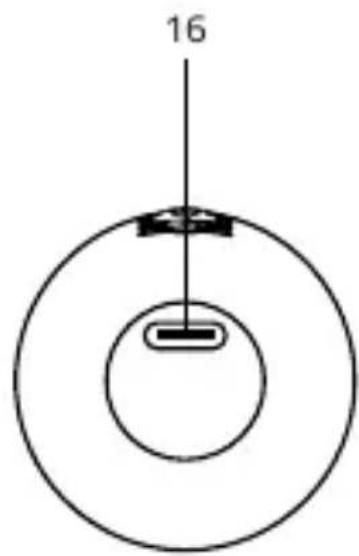
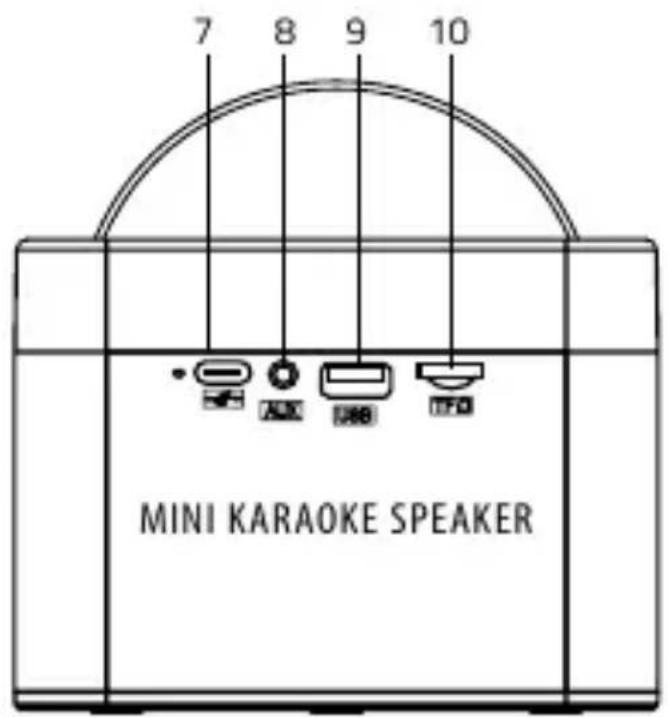
7) USB-C charging port
8) AUX input
9) USB-A port
10) MicroSD slot
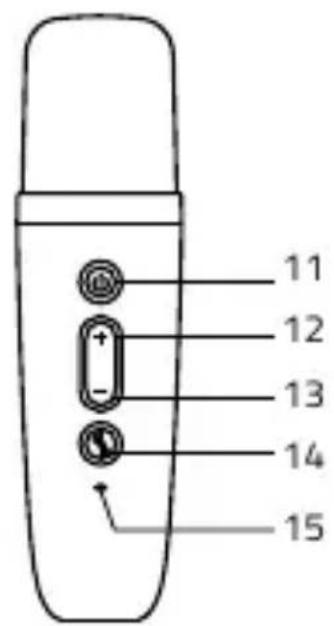
3. MIC BUTTON FUNCTIONS
11) POWER: Hold to turn the microphone on/off. Press to change mode: Microphone Volume, Music Volume, Echo Volume. Press twice to play/pause a track.
12) VOL +: Press to increase microphone and echo volume; hold to skip to next track.
13) VOL -: Press to decrease microphone and echo volume; hold to return to previous track.
14) MIC: Press to change voice modes – Profi, Standard, Girl, Boy, Hell, Helium. Press twice during song playback for Karaoke mode. Hold to mute the microphone.
15) LED indicator: The LED flashes blue quickly when powering on and turns solid blue after pairing is complete. The light turns red when charging and turns off after charging. The red LED flashes twice every 5 seconds when the battery is low.
Note: When turning on, the microphone will automatically connect to the last device used. However, if no device is connected within 10 seconds, the microphone will enter pairing mode.
4. INSTRUCTIONS FOR USE
Bluetooth mode
(1) BT connection: Connect to „LAMAX KaraokeKid1“ via your device's Bluetooth settings. After the pairing is complete, the LED lights steadily and a beep sounds.
(2) Music playback: Play music from your Bluetooth-enabled device.
(3) After the first pairing, the product remembers the last connected device and automatically re-pairs with it when turned on. Press the POWER button twice to disconnect or through your mobile phone settings.
SD card mode
(1) The device plays music from the inserted SD card and emits a sound signal.
(2) Use the „MODE" button to switch between SD card and AUX modes.
AUX input mode
(1) When a device is connected via AUX, the speaker will give priority to it in playing audio.
(2) Press the "MODE" button to switch the SD card and AUX input mode.
5. LIGHTING
Three light effects available. Double press „MODE“ to change effects, hold to turn on/off.
6. WIRELESS MICROPHONE
Turn on the speaker and microphone, and they will pair automatically. Click button „MIC" to select your preferred voice style. Note: when the microphone is switched to accompaniment mode, the volume of the accompaniment music can be adjusted. When the microphone is switched to echo mode, the echo effect can be adjusted.
- SPECIFICATIONS
| Total Performance | 10W |
| Frequency range | 120Hz–20KHZ |
| Speaker Battery | 1800 mAh |
| Microphone battery | 500 mAh |
| Play Time | Volume 50 % – 8 h (with backlight off) |
| Microphone battery life | 6 h |
| Wireless technology | Bluetooth 5.3 |
| Supported Codecs | SBC |
| Interface | USB-C, USB-A, AUX, microSD card |
| Memory card | supported capacity – 32 GB |
| Speaker dimensions | 141 mm x 74 mm x 96,6 mm |
| Microphone dimensions | 130 mm x 30 mm x 30 mm |
| Speaker weight | 563 g |
| Microphone weight | 83 g |
The current version of the manual can be downloaded here: lamax.cz/karaokekid1/manual


LAMAX
ELECTRONICS
KaraokeKid1

natural_image
Line drawing of a portable electronic device next to a rectangular box with handle and control buttons (no text or symbols)- FUNKTIONEN

natural_image
Simple diagram of a circular structure with a central rectangular element and a vertical line labeled '16' (no text or symbols beyond the number)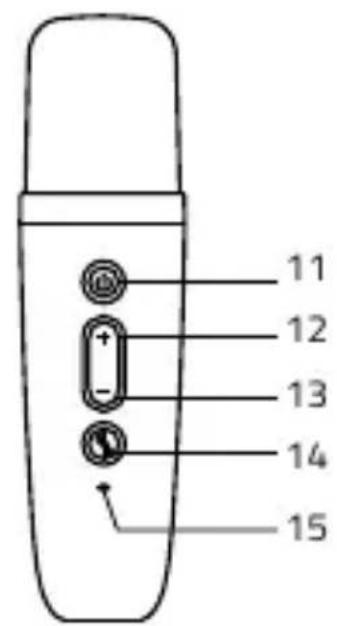
LAMAX
ELECTRONICS
KaraokeKid1
natural_image
Line drawing of a portable electronic device next to a rectangular box with handle and control buttons (no text or symbols)- FUNKCE


LAMAX
ELECTRONICS
KaraokeKid1

natural_image
Line drawing of a portable electronic device next to a rectangular box with handle and control buttons (no text or symbols)- FUNKCIA


natural_image
Simple diagram of concentric circles with a central rectangular element and a vertical line labeled '16' (no text or symbols beyond the number)
2. POKYNY PRE TLAČIDLÁ
LAMAX
ELECTRONICS
KaraokeKid1

natural_image
Line drawing of a portable electronic device next to a rectangular box with handle and control buttons (no text or symbols)- FUNKCJONOWAĆ


natural_image
Simple diagram of a circular structure with a central rectangular element and a vertical line labeled '16' (no text or symbols beyond the number)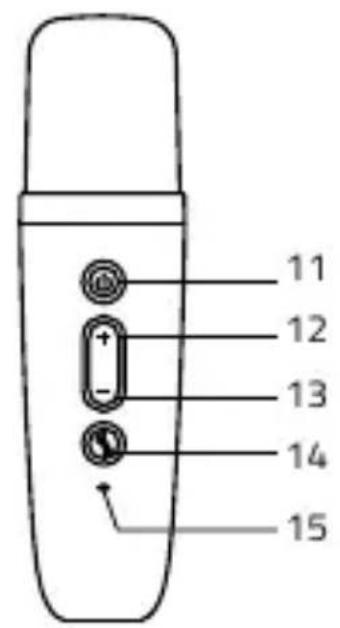
2. INSTRUKCJE DOTYCZĄCE PRZYCISKÓW
LAMAX
ELECTRONICS
KaraokeKid1

natural_image
Line drawing of a portable electronic device next to a rectangular box with handle and control buttons (no text or symbols)- FUNKCIÓ


natural_image
Simple diagram of a circular structure with a central rectangular element and a vertical line labeled '16' (no text or symbols beyond the number)
2. GOMB UTASÍTÁSOK
LAMAX
ELECTRONICS
KaraokeKid1

natural_image
Line drawing of a portable electronic device next to a rectangular box with handle and control buttons (no text or symbols)- FUNKCIJA


natural_image
Simple diagram of a circular structure with a central rectangular element and a vertical line labeled '16' (no text or symbols beyond the number)
2. NAVODILA ZA GUMB
LAMAX
ELECTRONICS
KaraokeKid1

natural_image
Line drawing of a portable electronic device next to a rectangular box with handle and control buttons (no text or symbols)- FUNKCIJA


natural_image
Simple diagram of a circular structure with a central rectangular element and a vertical line labeled '16' (no text or symbols beyond the number)
2. UPUTE ZA GUMBE
LAMAX
ELECTRONICS


Brand : Lamax
Model : KaraokeKid1
Category : Uncategorized