
StrongVision DUAL A - Security Camera Evolveo - Free user manual and instructions
Find the device manual for free StrongVision DUAL A Evolveo in PDF.


| Product Type | Security Camera / Trail Camera |
| Brand | Evolveo |
| Model | StrongVision DUAL A |
| Display | 2.4" Color TFT LCD |
| Motion Sensor | PIR, adjustable sensitivity (3 levels) |
| Detection Angle | 90° |
| Night Illumination | 6x 3W 940nm IR LEDs, range up to 20m |
| Daytime Photo Resolution | Up to 30 MP (30/24/20/16/12/8/5 MP) |
| Night Photo Resolution | 2/3/5/8 MP |
| Video Resolution | Up to 4K (4K, 2K, 1080p, 720p, VGA) |
| Recording Modes | Photo, Video, Photo & Video, Time-lapse |
| Trigger Speed | 0.8 seconds |
| Memory Card | SD up to 256 GB (no internal memory) |
| Power Source | 10x AA 1.5V batteries (alkaline or lithium) or optional SGV CAM-BAT3 Li-Ion 8000mAh |
| External Power | DC 12V 1.5A (adapter SGV CAM-ADAP) |
| Connectivity | USB-C (USB 2.0) for PC connection |
| Security | 4-digit PIN protection (master PIN: 1314) |
| Dimensions (HxWxD) | 175 x 118 x 87 mm |
| Operating Temperature | -10°C to +50°C |
| Storage Temperature | -15°C to +60°C |
| Ingress Protection | IP65 (dust and water resistant) |
| Mounting | 1/4" tripod thread; optional bracket SGV CAM-H1 |
| Included Accessories | Belt strap, lock attachment (SGV CAM-LOCK compatible) |
Frequently Asked Questions - StrongVision DUAL A Evolveo
User questions about StrongVision DUAL A Evolveo
0 question about this device. Answer the ones you know or ask your own.
Ask a new question about this device
Download the instructions for your Security Camera in PDF format for free! Find your manual StrongVision DUAL A - Evolveo and take your electronic device back in hand. On this page are published all the documents necessary for the use of your device. StrongVision DUAL A by Evolveo.
USER MANUAL StrongVision DUAL A Evolveo
natural_image
Close-up of a camouflage video camera with visible lens, frame, and screen (no text or symbols)Obsah / Content / Tartalom / Soddisfare / Continut / Inhalt
Česky 4
Slovensky 29
English 55
Magyar 81
Română....108
Deutsch 134
Italiano....162
CZ
SK
EN
HU
RO
DE
IT
Obsah
natural_image
Close-up of a gray gaming device with a black card and control panel, no visible text or symbols on the main body.natural_image
Black portable device with camouflage pattern and two labeled buttons (1 and 2), no visible text or symbols on the device itself.natural_image
Black rectangular device with two red circular labels (1 and 2) on its side, no visible text or symbols on the body.Copyright © Abacus Electric, s.r.o.
www.evolveo.com
www.facebook.com/EvolveoCZ
natural_image
Close-up of a beige gaming device with a black LCD screen and control buttons, next to a green 'Kingston' card with a logo (no readable text on device body)natural_image
Black portable device with camouflage pattern and two labeled buttons (1 and 2), no visible text or symbols on the device itself.| 1. | Konektor pre napájanie DC 12V/ 1,5A(Nabíja vloženú batériu !) |
| 2. | Závit pre 1⁄4" statív je možné dokúpit' SGV držiak CAM-H1 |
natural_image
Black rectangular device with two numbered slots (1 and 2) on its side, no visible text or symbols beyond the numbers.| 1. | Nástavec pre lanový zámok (SGV CAM-LOCK) max.priemer 12 mm |
| 2. | Upevnenie na opasok |
| 1. Sekvencia | V režimoch Photo (Fotografia),Photo&Video (Fotografia a video) a Time-lapse (Časozberné snímanie) nastavuje, kol’ko snímok sa má nasnímat’ po aktivácii fotoaparátu. Možno nastavit’: 1,2,3 alebo 10 obrázkov |
4. Menu
Copyright © Abacus Electric, s.r.o.
www.evolveo.com
www.facebook.com/EvolveoCZ
- Turn on 55
- Technical specifications .... 61
- Description of the device 65
- Menu 70
- Media Browser.... 74
- Shooting directly from the menu 75
- Troubleshooting 75
- Support and warranty .... 77
EN
1. Turn on
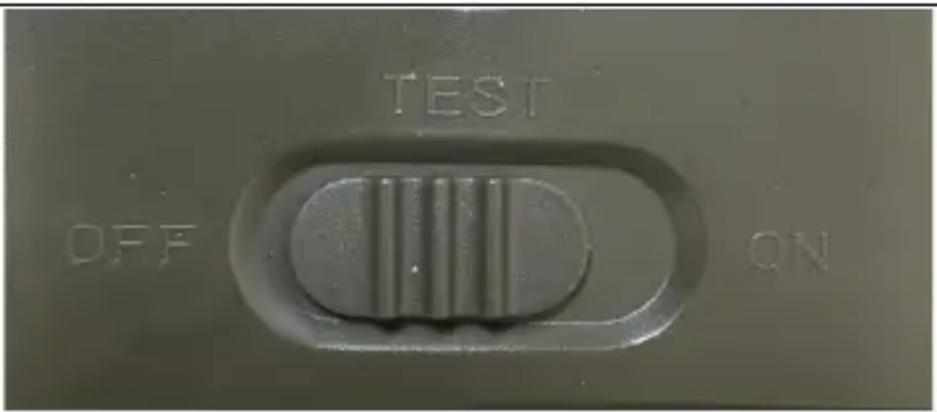
Slide the switch from the OFF position to the TEST position to put the device into setup mode, where the camera image preview will be displayed on the screen.
1.2. Language settings
Press the "MENU" button to switch to English as the base language and all menu items are in this language, to select another language, scroll down the menu to the "Language" item, confirm with the "OK" button and select your preferred language in the menu.
1.3. To move around the device menu
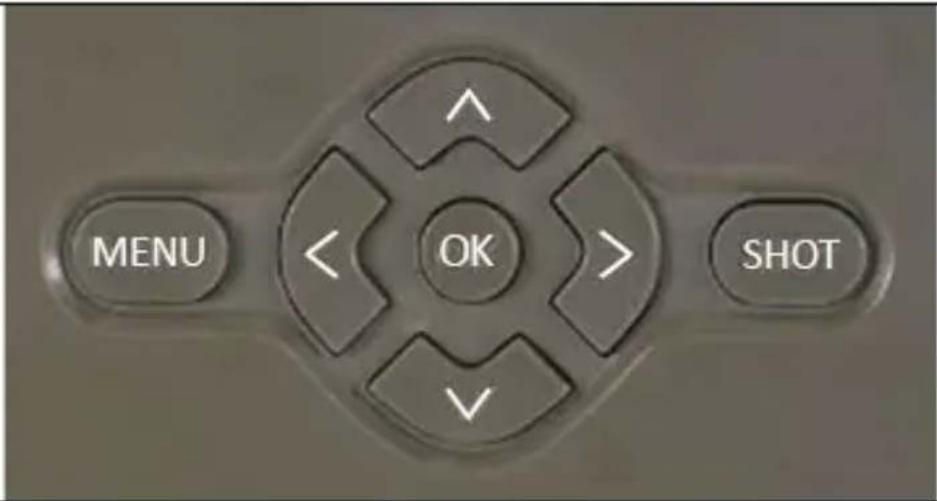
Press the MENU button to set up the device. When you press the button, you will see the individual setting items described in Chapter 4.
You can scroll through the menu using the up and down arrows, confirm the selection with the "OK" button, return to the previous menu with the "MENU" button
1.4. Start-up/Activation
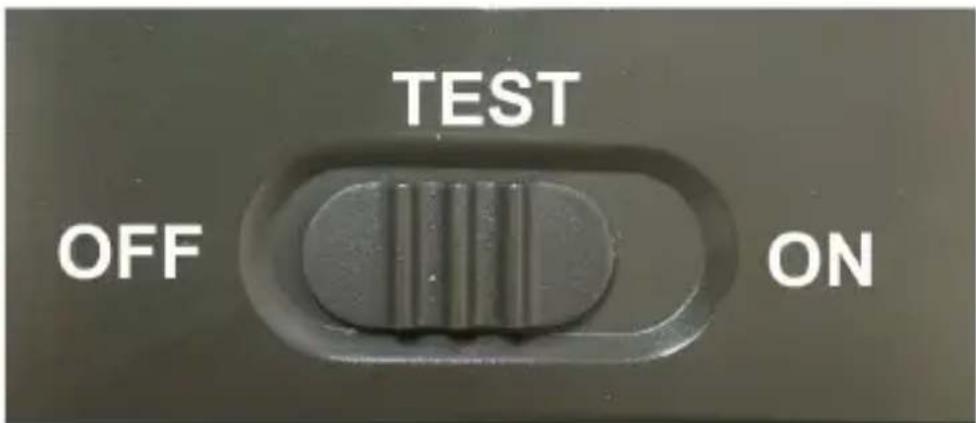
Once you have completed the setup, you can put the camera into an active state where it will take Photos/Videos based on the motion detection, according to the settings you have specified. To activate the camera, slide the switch from "TEST" to "ON", the display will start counting down and at the same time the red LED on the front panel will flash. When the countdown runs out the device is active. If motion is detected by a "PIR" sensor, the camera will record. An SD card must be installed in the camera, otherwise the camera will not work see chapter 1.5
1.4 Power supply
StrongVision DUAL A requires 10x AA 1.5V alkaline batteries or Lithium 1.5V batteries for operation. You can also purchase an 8000mAh Li-Ion battery for the device, which will extend the battery life and allow for more economical operation. Li-Ion batteries can be found at www.evolveo.com under the code SGV CAM-BAT3.
The batteries are placed in the battery case, which is secured with two locks. To release, the locks must be moved to the "UNLOCK" position
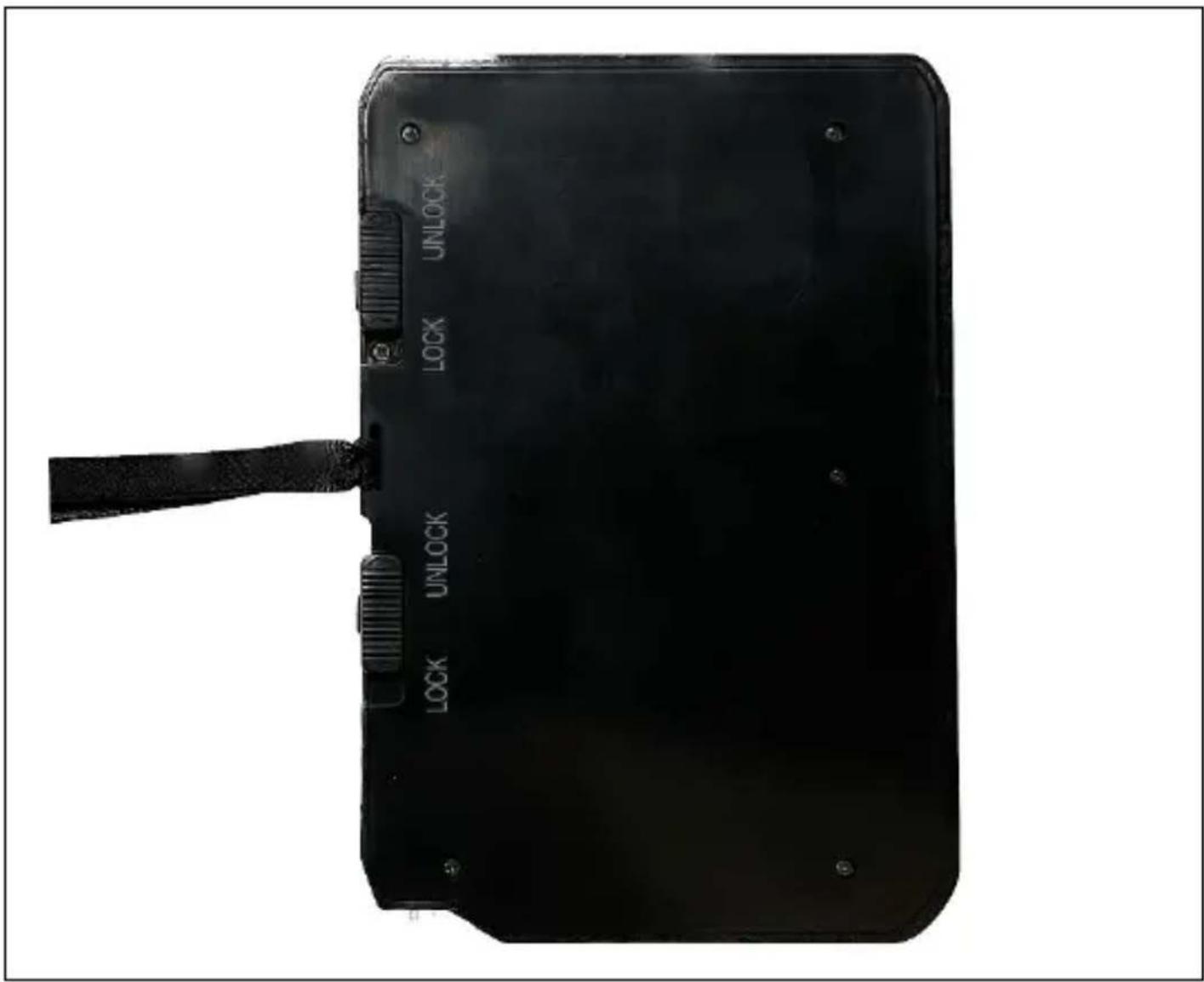
▶ The batteries must be inserted exactly as indicated in the battery compartment, if you turn the battery over, the device will not work and you may damage it.
▶ Always use AA batteries of the same type and manufacturer, and the batteries must always have the same charge. If you use different types of batteries, the device may be damaged. Such damage is not covered by the statutory warranty.
▶ If you know that you will not be using the device for an extended period of time, remove the batteries from the device. Leaving them in the device may cause damage to the device that is not covered by the warranty.
▶ Due to the large number of modes and settings, the battery life of an active device cannot be specified exactly. Night mode or video recording have high power consumption requirements and significantly reduce battery life. We can only recommend the use of high quality Alkaline or Lithium rechargeable batteries for longer battery life.
Warning: Insert the batteries into the device when it is switched off!
1.5 Memory card
The camera supports SD memory cards up to 256GB.
Before inserting or removing a memory card, the device must be switched off by moving the switch to the "OFF" position
If you handle the card while it is switched on, the data on the card may be corrupted.
▶ The camera does not have any built-in memory, you must insert a memory card into the device to use it. For proper operation, it is a good idea to format the memory card directly in the camera in Menu / Formatting before use
▶ A maximum of 256GB memory card can be used, 256GB cards and larger will not be recognised by the device.
▶ For the card to function properly, avoid contact with moisture. Ensure that the device is not exposed to vibration or that the cards are exposed to direct sunlight for extended periods of time.
▶ The camera supports cyclic overwriting, in which case the camera will start overwriting the oldest files when the SD card memory is full.
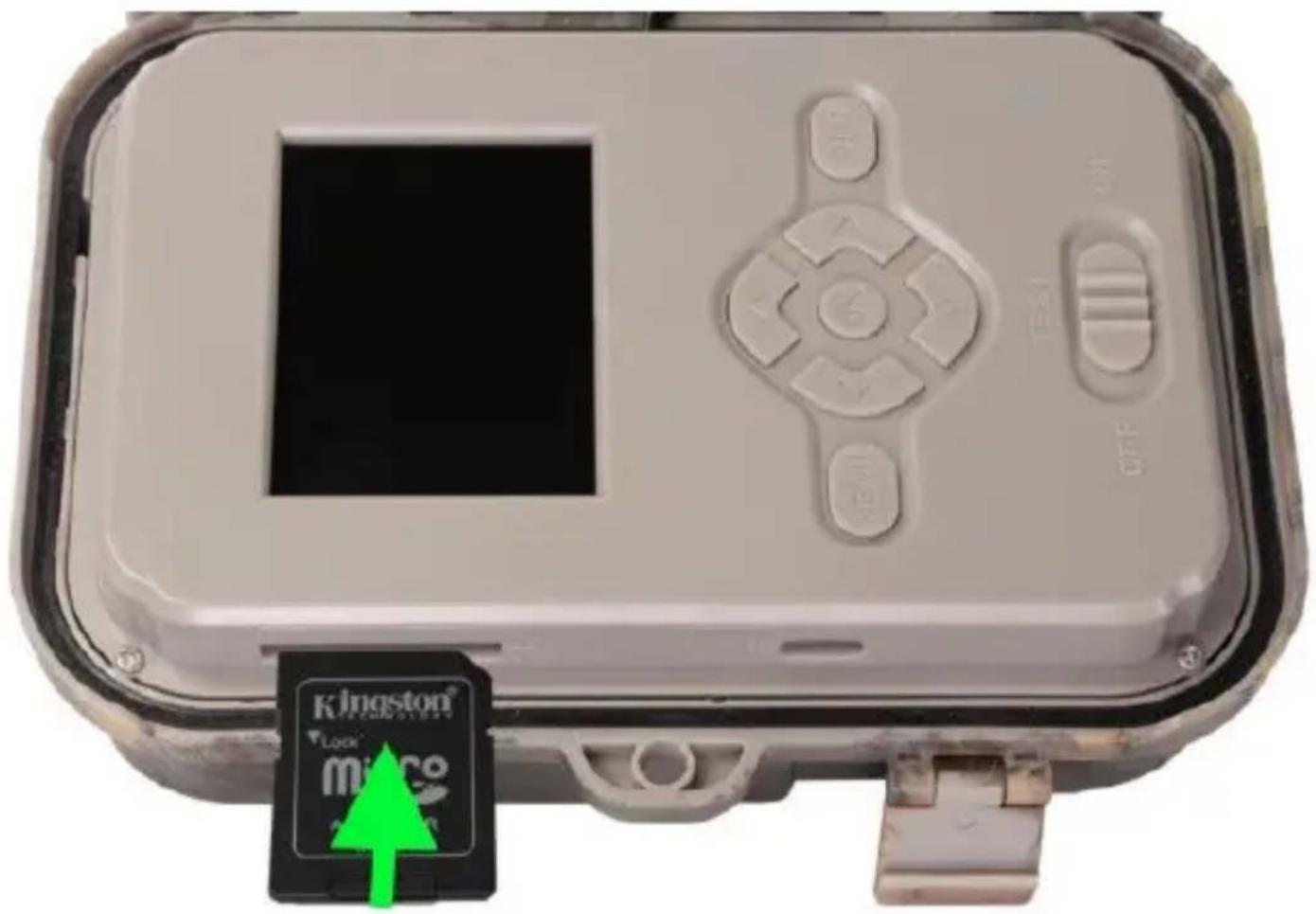
▶ Insert the SD card carefully into the slot, pushing it gently until the card slot mechanism clicks.
▶ To remove the SD card, press the edge of the card until it slides out of the camera body. After that, you can safely remove it - the camera must always be in the OFF position.
natural_image
Close-up of a gray gaming device with a black card and control panel, no visible text or symbols on the main body.2. Technical specifications
| Display Colour TFT 2.4" | |
| Motion sensor | PIR - adjustable sensitivity (3 levels) |
| Motion sensor detection angle | 90° |
| Night light IR LED 940nm, 6x 3W IR LEDs under front anti-reflective cover | |
| IR LED range 20 m * | |
| Dimensions | H x W x D. 175x118x87mm |
| Operating Temperature -10 °C to +50 °C | |
| Storage Temperature -15 °C to +60 °C | |
| Coverage IP65 | |
| Security 4-digit optional pa ssword | |
| Operating temperature | -10°C - +55°C |
*If there are no other objects in the area in front of the camera from which the IR light can reflect, night images may be dark. Ideally, the area in front of the camera should contain objects from which the IR light will reflect, such as rocks, bushes, logs, etc. Ideal range is between 8-12 m from the camera
2.1. Photo
| Colour sensor - for daytime images | 8MP color CMOS (night photo black and white) |
| Black and white sensor for night photography | 2MP sensor for Infrared spectrum |
| Daytime lens | F=3.1; FOV=67°(H) |
| Night lens | F=1.6; FOV=86.6°(H) |
| Daytime photo resolution | 30/24/20/16/12/8/5MP |
| Night Photography Resolution | 2/3/5/8 MP |
| Timelapse mode 1s-24h | |
| Burst shooting 1/2/3 or 10 frames | |
| Information on the photo Time and Date, Temperature (°C, °F), Moon phase, optional name | |
| Recording modes Photography, Photography & Video, Timelapse | |
| File format .JPEG | |
| Activation speed 0,8 s * | |
| Delay interval | The amount of time the device is inactive after the last motion-based start. Instantly, the range is 5-59s and 1-60minutes |
*The PIR sensor detects movement based on changes in surface temperatures. This figure is in an ideal environment, when the object in front of the camera has a sufficient surface temperature difference, and crosses perpendicularly the scanned area (passes from side to side) If the object will approach the camera frontally, it will take longer to recognize the motion.
2.2. Video
2.2.1. Daily Video
| Video resolution VGA, 720 p, | 1080 p, 2K, 4K |
| Record length 3-59s or 1-10min | |
| File format | MP4/H.264 |
2.2.2. Night Video
| Video resolution VGA, 720 p, | 1080 p, |
| Record length 3-59s or 1-10min | |
| File format | MP4/H.264 |
2.3. Power
| Built-in Battery * | 10 x AA 1.5V. Or SGV CAM-BAT3 - Li-Ion battery 8 000mAh |
| Power source | DC 12V 1,5 A - Adapter: SGV CAM-ADAP |
| Connector for external power supply | DC Jack 3.5x1.3 mm |
| External batteries | A 12 V battery can be connected to the external power connector using a cable: SGV CAM-EXTA |
2.4. Connectivity
| Memory card SD up to 256 GB | |
| Internal memory | The device has no internal memory |
| USB - Type C | Can be connected to a PC using a USB-C cable (not included) |
*Battery life decreases depending on the mode used and the number of videos and photos taken, 3-4 months of battery life is calculated using only photo recording in day mode and 10 photos per day. In the winter months with temperatures below 0^ , battery life drops significantly more than in normal summer temperatures, this is a characteristic of batteries.
3. Description of the device
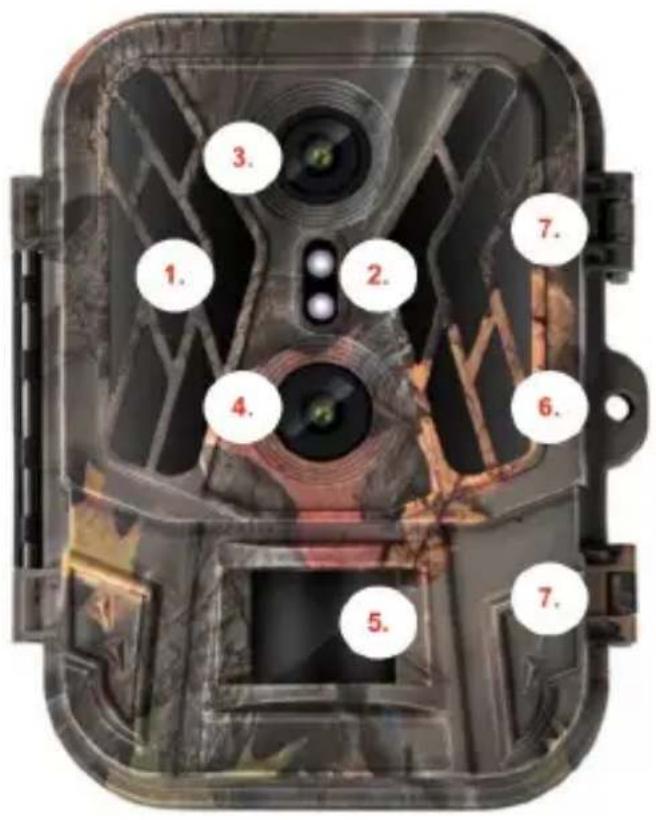
| 1. | IR illuminator 6x HiPower IR IED 940nm |
| 2. | Indication LED, Ambient light sensor |
| 3. | Camera lens for night shots |
| 4. | Camera lens for daytime images |
| 5. | PIR sensor (Motion sensor) |
| 6. | Place for locking |
| 7. | Latches |
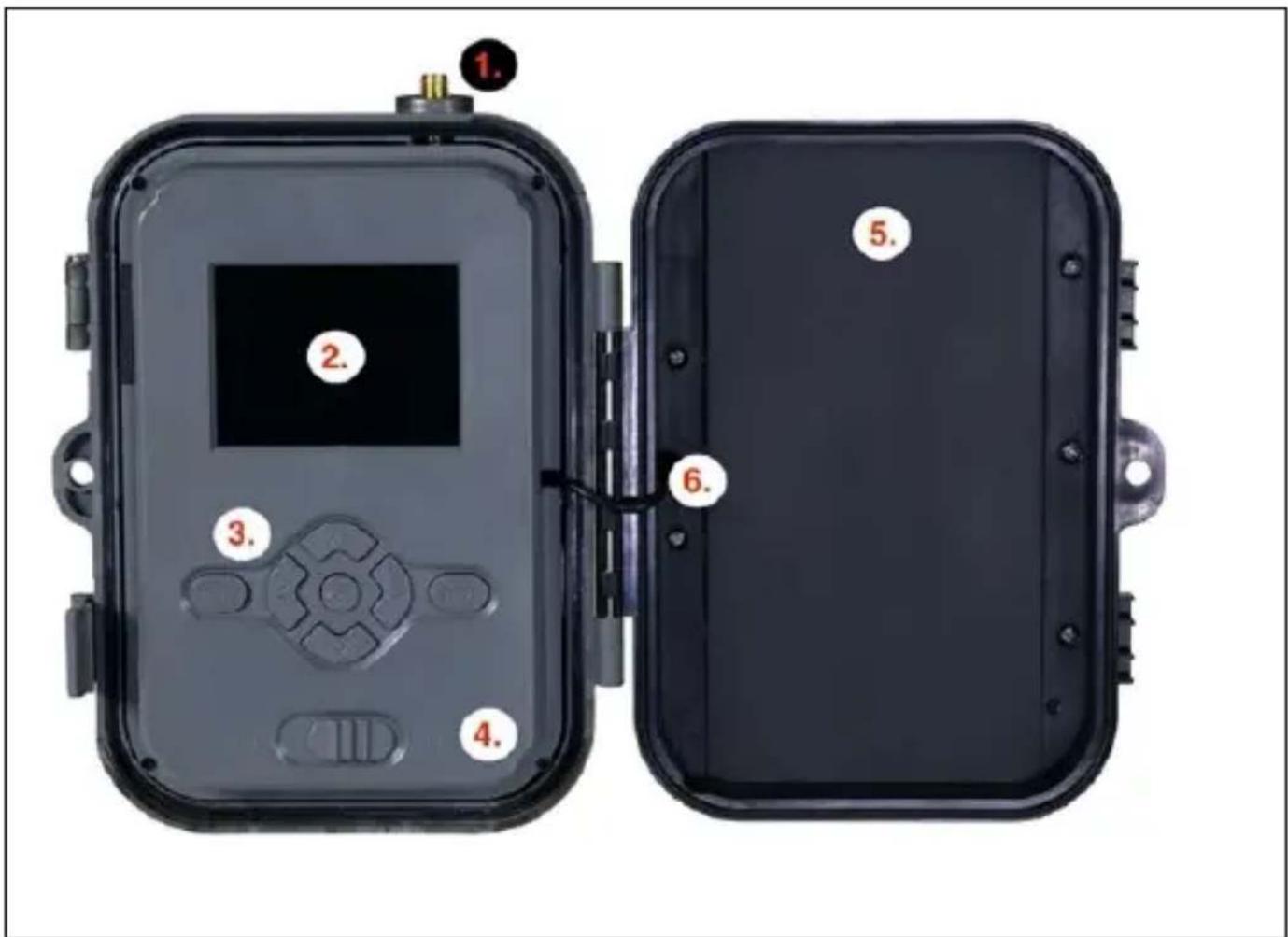
| 1. Antenna (4G model only) | |
| 2. 2.4" Colour LCD display | |
| 3. Control buttons | |
| 4. | Main position switch: OFF – TEST -- ON |
| 5. Case for 10 x 1.5V AA batteries | |
| 6. | Power supply connection cable - must not be broken. In case of damage, remove the battery and send the device to an authorized service center. |
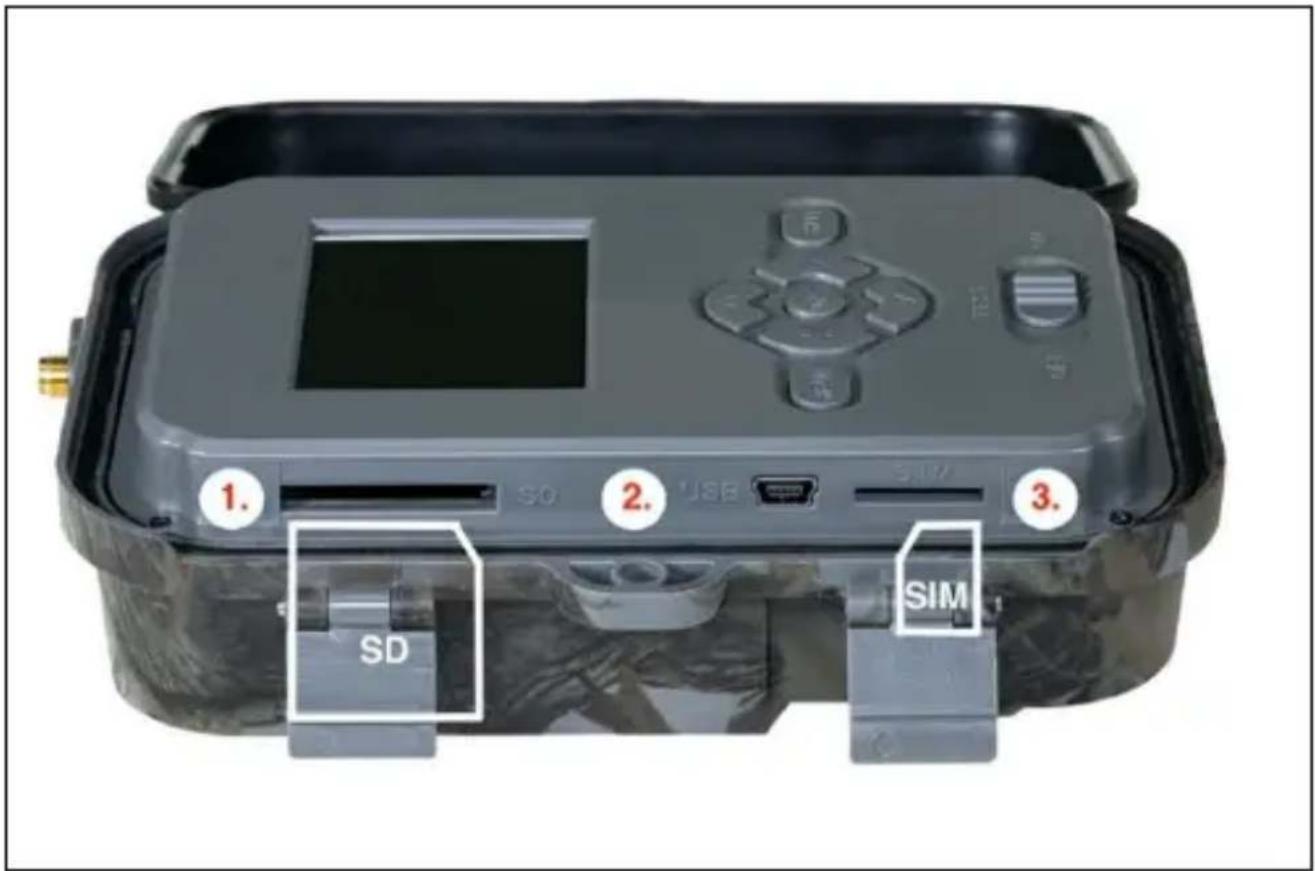
| 1. | SD card slot (max. size 256 GB) |
| 2. | USB-C connector for connection to PC (Mass Storage) - USB 2.0 |
| 3. | SIM card slot (GSM model only) |
natural_image
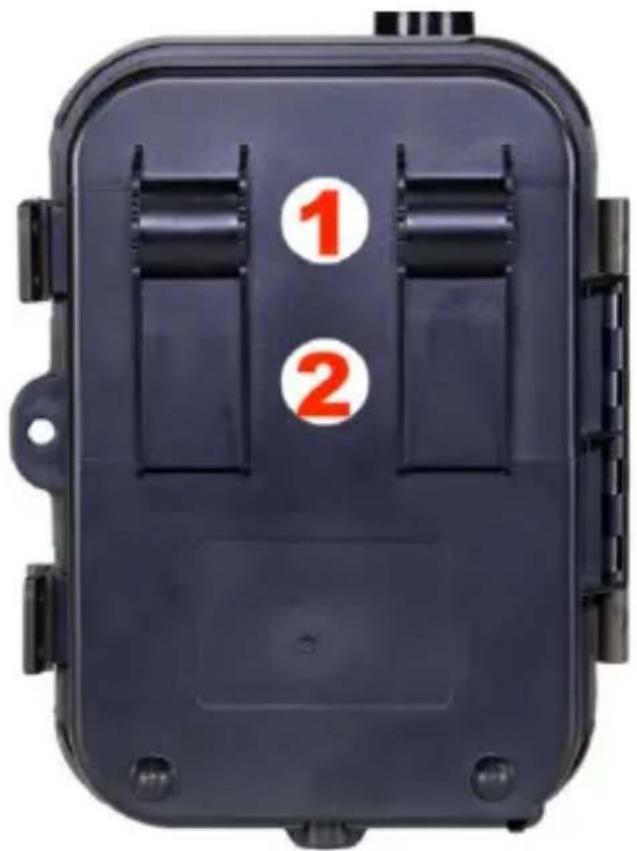
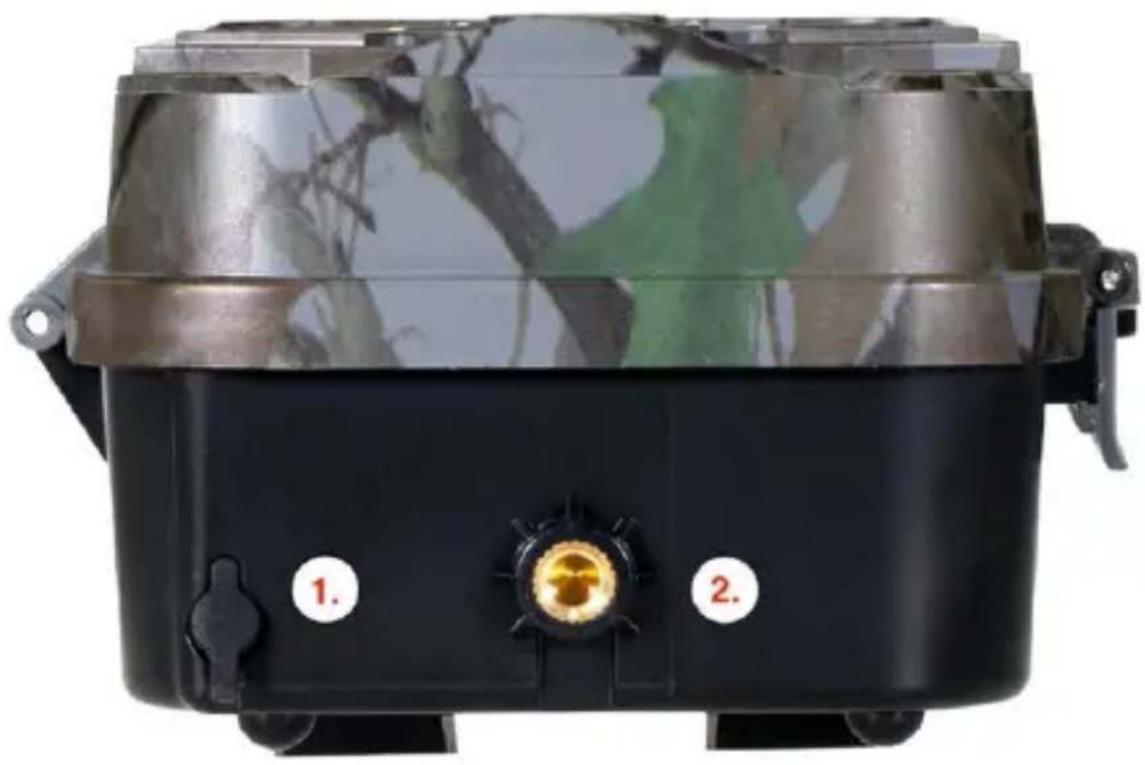
Black portable device with camouflage pattern and two labeled buttons (1 and 2), no visible text or symbols on the device itself.| 1. | Connector for DC 12V/ 1.5A power supply(Charges the inserted battery!) |
| 2. | Thread for 1⁄4" tripod can be purchased SGV CAM-H1 bracket |
natural_image
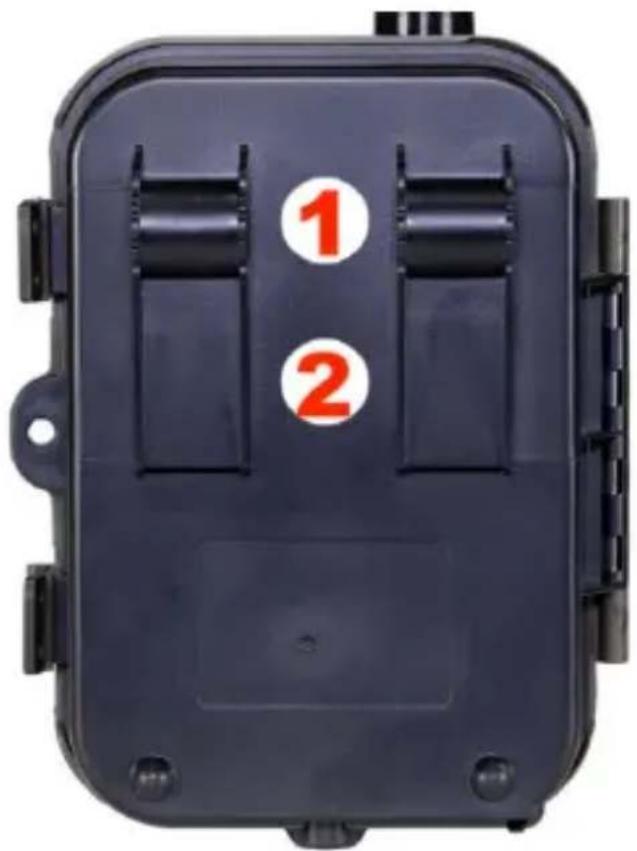
Black rectangular device with two numbered slots (1 and 2) on its side, no visible text or symbols beyond the numbers.| 1. | Attachment for rope lock (SGV CAM-LOCK) max.diameter 12 mm |
| 2. Fastening for belt | |
| 1. Sequence | In Photo, Photo&Video and Time-lapse mode, it sets how many pictures to take when the camera is activated. Can be set: 1,2,3 or 10 pictures |
4. Menu
| 2. Fashion | Camera In this mode, the camera will only take pictures | |
| Video In this mode, the camera will only capture video footage | ||
| Camera & Video | The camera will capture both images and video. | |
| 3. Daytime photo resolution | The resolution at which all images, selection: 30, 24, 20, 16, 12, 8, 5, 3 MP, | |
| 4. Resolution night focals | 2/3/5/8 MP | |
| 5. Sequence | In Photo, Photo&Video and Time-lapse mode, sets how many frames to take when the camera is activated. Can be set: 1,3,6 or 9 images | |
| 6. Video resolution daily | Resolution setting for Video recording: 4K, 2K, 1080p, or 720p or VGA. | |
| 7. Video resolution night | 1080p, or 720p or VGA | |
| 8. Video length | Set the length of the video recording: 1s - 10min | |
| 9. Sound recording | If you select on, it will record sound when recording video. | |
| 10. Interval | The interval is a time value that indicates the time of inactivity after a detected movement. If the camera is activated by the PIR sensor, the camera performs the desired action and waits for a specified time after the motion is over before taking another picture. The range is 1-59s and 1-60minutes | |
| 11. PIR sensitivity | PIR sensor sensitivity setting. If unwanted activation by distant objects occurs, the sensitivity of the sensor can be reduced. Can be set: Low,Medium, High or Off | |
| 12. Recording time | Set the time range in which the camera should record. | |
| 13. Timing interval | Video or Photo - PIR sensors are not active during the mode | Setting the capture interval in Time Lapse mode. Images will be taken at the selected time interval. The following values can be set: 1s-24h |
| 14. Language | It is used to set the language in the menu. | |
| 15. Rewrite | Zap. - When the SD card is full, the oldest files are overwritten.OFF - When the SD card is full, no more images are stored | |
| 16. Date/Time | Set the date, time and format.Move the arrow keys to select and set, confirm by pressingthe OK button. | |
| 17. Stamp photos | Time and Date/Date/ Off | |
| 18. PIN | PIN to protect the access to the camera.It is necessary to enter it at each start-up. The universal PIN in case of loss is 1314 | |
| 19. Formatting | Format SD memory cards inserted in the device - We recommend the first time you insert an SD card into the device | |
| 20. Camera ID | The name that appears in the stamp on the captured images. | |
| 21. Default settings | Deletes all settings made in camera. | |
| 22. View Full Version | Displays the current FW version | |
5. Media Browser
It is possible to view the recorded footage directly on the camera display.
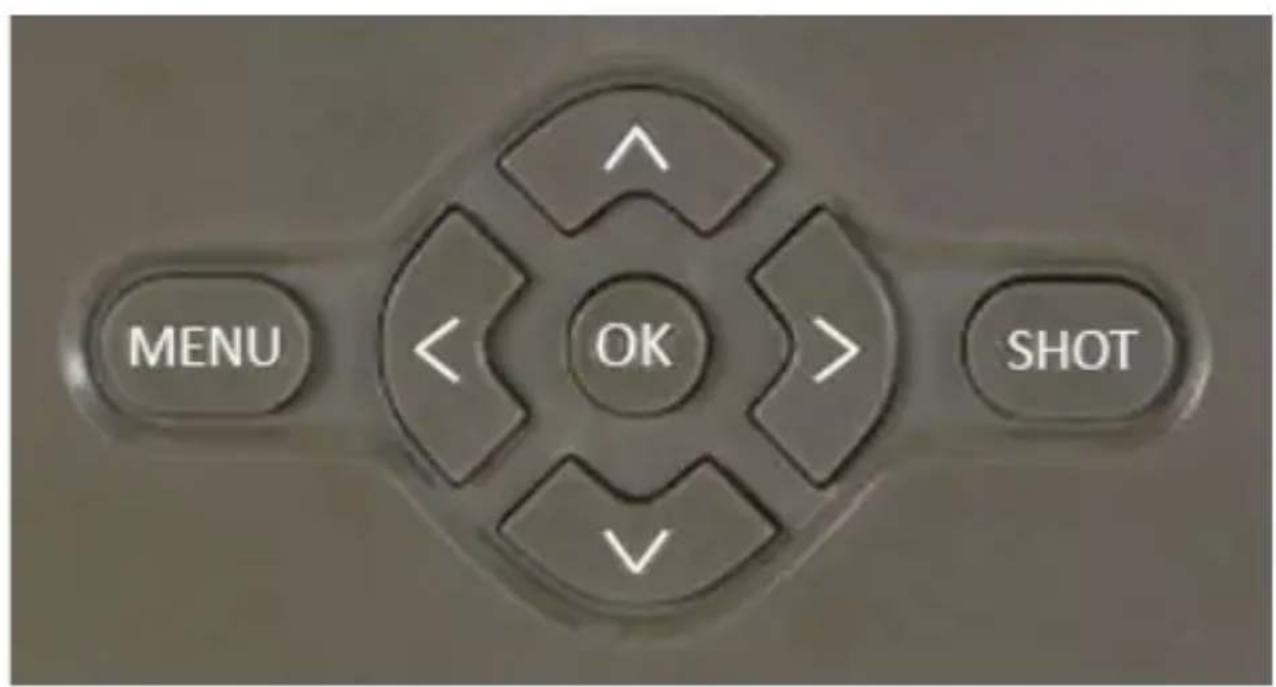
To view, switch to TEST mode, press the Right Arrow button on the Home screen.
Control by arrow keys:
• Next picture: up arrow
• Previous picture: down arrow
- Play video: left arrow
- Stop Video: right arrow
- Return to main menu SHOT button

6. Shooting directly from the menu
The camera can also be used to take photos or record video using only the buttons. Switch the camera to TEST mode. It is then serviced afterwards:
- The up or down arrow switches between Photo or Video mode
- Press the SHOT button to take a picture
7. Troubleshooting
7.1 The camera does not record photos/videos when moving
- Check the PIR sensor to see if it is damaged or blocked, for example by a leaf.
-
Test the camera in places where there are no hot spots. The PIR sensor detects motion based on temperature difference, if the camera environment is overheated, the sensor is not activated.
-
In some cases, the water level may cause the PIR sensor to activate unintentionally, in which case turn the camera away from the water level.
-
Set the camera so that it is not pointing directly at the ground.
-
Position the camera so that it does not move and large moving objects, such as a large tree, are not in the frame.
-
At night, the device can detect movement outside the range of the IR night light, so no moving object will be detected in the photos.
-
Sunset or sunrise may cause the recording to start unintentionally - change the camera position.
- If the animal/person in front of the camera moves quickly, the camera may not record them - move the camera further away from the objects (e.g. further away from the path where the animals are moving)
7.2 The camera does not produce any images
- Make sure there is enough free space on the inserted SD card. If the old file overwrite function is disabled, the device no longer records after the SD card is full.
- Check that the battery has enough power to operate the photo trap.
- Make sure the switch is in the ON position and not OFF.
- Before using the SD card for the first time, format the SD card directly in the photo trap, in the menu item Format
- If you are using a micro SD card with a reduction - try another reduction or use a full size SD card. Adapters are very often defective from the factory.
7.3 Night light does not have sufficient range
-
Make sure the battery in the device is charged, if the capacity is below 15%, the night light may not activate
-
For good quality night shots, place the camera in a dark environment with no other light sources.
- Try to use the camera in locations where it will be surrounded by other objects that can reflect IR light. If you place the camera in an open area, the resulting photo will not be sufficiently illuminated. It's the same as shining a flashlight on the night sky, you won't see anything either, even if the flashlight is very powerful.
8. Support and warranty
First, read the "FAQ" at: https://eshop.evolveo.com/ or contact
EVOLVEO Technical Support at: service@evolveo.com
The warranty does NOT cover:
- using the equipment for purposes other than those for which it is designed,
- installing firmware other than that installed on the device
- electrical or mechanical damage caused by improper use
- damage caused by natural elements such as water, fire, static electricity, power surges, etc. 13
- damage caused by repairs carried out by an unqualified person
- illegible serial number
- battery capacity drops after 6 months of use (6 month battery life guarantee)
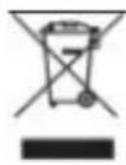
Disposal: The crossed-out container symbol on the product, accompanying documentation or on the packaging reminds that in EU countries, all electrical and electronic equipment, ties and accumulators must be disposed of separately at the f their useful life as part of sorted waste. Do not dispose of products in unsorted municipal waste.
① C€
DECLARATION OF CONFORMITY
Abacus Electric, s.r.o. hereby declares that the EVOLVEO Strongvision DUAL A product meets the requirements of the standards and regulations that are relevant for the type of equipment.
The full text of the Declaration of Conformity can be found at http://ftp.evolveo.com/ce/
Importer / Manufacturer
Abacus Electric, s.r.o.
Planá 2, 370 01, Czech Republic
Made in China
Copyright © Abacus Electric, s.r.o.
www.evolveo.com
www.facebook.com/EvolveoCZ
All rights reserved. The appearance and technical specifications of the product are subject to change without notice.
Tartalomjegyzék
natural_image
Close-up of a gray gaming device with a black LCD screen and control buttons, next to a green 'Kingston' card labeled 'miaco' (no readable text beyond branding)natural_image
Black portable device with camouflage pattern and two labeled buttons (1 and 2), no visible text or symbols on the device itself.natural_image
Black rectangular device with two numbered slots (1 and 2) on its side, no visible text or symbols beyond the numbers.Copyright © Abacus Electric, s.r.o.
www.evolveo.com
www.facebook.com/EvolveoCZ
natural_image
Close-up of a gray gaming device with a black LCD screen and control buttons, next to a green 'Kingston' card labeled 'miaco' (no readable text beyond branding)natural_image
Black portable device with camouflage pattern and two labeled buttons (1 and 2), no visible text or symbols on the main body.natural_image
Black rectangular device with two numbered slots (1 and 2) on its side, no visible text or symbols beyond the numbers.Copyright © Abacus Electric, s.r.o.
www.evolveo.com
www.facebook.com/EvolveoCZ
natural_image
Close-up of a sleek, silver electronic device with a black LCD screen and control buttons, next to a green 'Kingston' card labeled 'miaco' (no readable text beyond branding)2. Technische Daten
natural_image
Black portable device with camouflage pattern and two labeled buttons (1 and 2), no visible text or symbols on the main body.natural_image
Black rectangular device with two numbered slots (1 and 2) on its side, no visible text or symbols beyond the numbers.Copyright © Abacus Electric, s.r.o.
www.evolveo.com
www.facebook.com/EvolveoCZ
natural_image
Close-up of a beige gaming device with a black LCD screen and control buttons, next to a green 'Kingston' card with a logo (no readable text on device body)natural_image
Black portable device with camouflage pattern and two labeled buttons (1 and 2), no visible text or symbols on the device itself.natural_image
Black rectangular device with two numbered slots (1 and 2) on its side, no visible text or symbols beyond the numbers.Copyright © Abacus Electric, s.r.o.
www.evolveo.com
www.facebook.com/EvolveoCZ


- Obsah / Content / Tartalom / Soddisfare / Continut / Inhalt
- Obsah
- Menu
- EN
- Turn on
- Language settings
- To move around the device menu
- Start-up/Activation
- Power supply
- Memory card
- Technical specifications
- Photo
- Video
- Daily Video
- Night Video
- Power
- Connectivity
- Description of the device
- Media Browser
- Shooting directly from the menu
- Troubleshooting
- The camera does not record photos/videos when moving
- The camera does not produce any images
- Night light does not have sufficient range
- Support and warranty
- The warranty does NOT cover:
- ① C€
- DECLARATION OF CONFORMITY
- Tartalomjegyzék
- Technische Daten
Brand : Evolveo
Model : StrongVision DUAL A
Category : Security Camera