
16N3AVP - Air-conditioner TOSHIBA - Free user manual and instructions
Find the device manual for free 16N3AVP TOSHIBA in PDF.


| Product Type | Split Air Conditioner (Outdoor Unit) |
| Brand | Toshiba |
| Model | 16N3AVP |
| Indoor Unit Compatibility | RAS-B10, 13, 16N3KVP Series |
| Cooling Capacity (approximate) | 16,000 BTU/h |
| Heating Capacity (approximate) | 16,000 BTU/h |
| Power Supply | 220-240 V ~50 Hz |
| Operating Modes | Cool, Heat, Dry, Fan Only, Auto |
| Fan Speeds | Auto, Low, Low+, Med, Med+, High, Quiet |
| Air Purification | Plasma Air Purifier & Air Ionizer |
| Timer Functions | On Timer, Off Timer, Daily Timer |
| One-Touch Operation | Yes (customized auto operation) |
| ECO Mode | Automatic energy saving |
| Hi-POWER Mode | Faster cooling/heating |
| Comfort Sleep | Automatic temperature control for sleep |
| 8°C Heating | Maintains 8°C (optional remote required) |
| Power Selection | 100%, 75%, 50% (optional remote required) |
| Auto Restart | Automatic restart after power failure |
Frequently Asked Questions - 16N3AVP TOSHIBA
User questions about 16N3AVP TOSHIBA
0 question about this device. Answer the ones you know or ask your own.
Ask a new question about this device
Download the instructions for your Air-conditioner in PDF format for free! Find your manual 16N3AVP - TOSHIBA and take your electronic device back in hand. On this page are published all the documents necessary for the use of your device. 16N3AVP by TOSHIBA.
USER MANUAL 16N3AVP TOSHIBA
natural_image
Illustration of a car air conditioner unit with airflow arrows indicating airflow direction (no text or symbols)AIR CONDITIONER (SPLIT TYPE)
For general public use
Indoor unit
RAS-B10, 13, 16N3KVP Series
Outdoor unit
RAS-10, 13, 16N3AVP Series
RAS-M14GAV-E, RAS-M18UAV-E, RAS-3M18SAV-E,
RAS-4M23SAV-E
RAS-3M26UAV-E, RAS-4M27UAV-E, RAS-5M34UAV-E1
ENGLISH
ESPAÑOL
FRANÇAIS
ITALIANO
DEUTSCH
PORTUGUÊS
POLSKI
ČESKY
РУССКИЙ
HRVATSKI
MAGYAR
TÜRKÇE
NEDERLANDS
ΕΛΛΗΝΙΚΑ
SVENSKA
SUOMI
NORSK
DANSK
ROMÂNĂ
БЪЛГАРСКИ
EESTI
LATVISKI
SLOVENČINA
SLOVENŠČINA
LIETUVIŲ
The manufacturer shall not assume any liability for the damage caused by not observing the description of this manual.
Store this owner's manual in a location where it can be easily accessed when needed.
Be sure to read this owner's manual carefully before operating.
It is recommended that maintenance be performed by a specialist when the unit has been operated for a long time and/or makes a strange noise.
This appliance is not intended for use by person (including children) with reduced physical, sensory or mental capabilities, or lack of experience and knowledge, unless they have been given supervision or instruction concerning use of the appliance by a person responsible for their safety.
Children should be supervised to ensure that they do not play with the appliance.
| Be sure to follow the precautions provided here to avoid safety risks.The symbols and their meanings are shown below. | |
| ⚠️ DANGER | It indicates that incorrect use of this unit can result in a high possibility of severe injury(*1) or death. |
| ⚠️ WARNING | It indicates that incorrect use of this unit may cause severe injury or death. |
| ⚠️ CAUTION | It indicates that incorrect use of this unit may cause personal injury(*2), or property damage(*3). |
*1: A severe injury refers to blindness, injury, burns (hot or cold), electrical shock, bone fracture, or poisoning that leaves aftereffects and requires hospitalization or extended out-patient treatment.
*2: Personal injury means a slight accident, burn, or electrical shock which does not require admission or repeated hospital treatment.
*3: Property damage means greater damage which affects assets or resources.
| Never do. | Beware of rotating parts | ||
| Electrical hazard. Contact with water will cause electric shock.Do NOT touch with wet hands. Always unplug when not in use. | Risk of fi nger injury | ||
| Always follow the instructions | Do not get the product wet |
| DANGER | |
| Do not install, repair, open or remove the cover. It may expose you to dangerous voltages. Ask the dealership or the specialist to do this. | |
| Turning off the power supply will not prevent potential electric shock. | |
| The appliance shall be installed in accordance with national wiring regulation. | |
| Means for disconnection from the supply having a contact separation of at least 3 mm in all poles must be incorporated in the fixed wiring. | |
| Do not place a spray can near the air outlet grille less than 1 m.The warm air from indoor and outdoor units may cause an explosion of the spray can. | |
| WARNING | |
| Installation must be requested from the supplying retail dealership or professional installation vendors. Installation requires special knowledge and skill. If customers install on their own, it can be a cause of fire, electric shock, injury or water leakage. | |
| Do not use any refrigerant different from the one specified for complement or replacement. Otherwise, abnormally high pressure may be generated in the refrigeration cycle, which may result in a failure or explosion of the product or an injury to your body. | |
| Do not disassemble, modify or relocate the unit by yourself. It may become the cause of fire, electric shock, or water leakage. For repair or relocation, please request service from the supplying retail dealership. | |
| When relocating or repairing the unit, please contact the supplying retail dealership. When there is a kink in the wiring, it may be the cause of electric shock or fi re. | |
| Do not select a location for installation where flammable gas may leak. If there is any gas leakage or accumulation around the unit, it can be a cause of fi re. | |
| Do not select a location for installation where there may be excessive water or humidity, such as a bathroom. Deterioration of insulation may be a cause of electric shock or fi re. | |
| Earth work should be requested from the supplying retail dealership or professional vendors. Insufficient grounding work may be the cause of electric shock. Do not connect the earth wire to a gas pipe, water pipe, lightning conductor, or telephone earth wire. | |
| You must use an independent power outlet for the power supply. If a power outlet other than the independent outlet is used, it may cause a fire. | |
| Check that the circuit breaker is installed correctly. If the circuit breaker is not properly installed, it may cause an electric shock. To check the installation method, please contact the supplying retail dealership or the professional vendor who installed the unit. | |
| During an error (such as a burning odor, not cooling, or not warming), stop operating the unit and turn off the circuit breaker. Continuous operation may be a cause of fire, or electric shock. Please request repair or service from the supplying retail dealership. | |
| Do not turn ON/OFF the circuit breaker or operate buttons with a wet hand. It may be a cause of electric shock. | |
| Do not insert any material (metal, paper, or water, etc) into the air outlet or air intake opening. Fan may be rotating at high speed inside or there are high voltage sections, which may cause an injury or electric shock. | |
| DANGER | |
| Do not install, repair, open or remove the cover. It may expose you to dangerous voltages. Ask the dealership or the specialist to do this. | |
| Turning off the power supply will not prevent potential electric shock. | |
| The appliance shall be installed in accordance with national wiring regulation. | |
| Means for disconnection from the supply having a contact separation of at least 3 mm in all poles must be incorporated in the fixed wiring. | |
| Do not place a spray can near the air outlet grille less than 1 m.The warm air from indoor and outdoor units may cause an explosion of the spray can. | |
| WARNING | |
| Installation must be requested from the supplying retail dealership or professional installation vendors. Installation requires special knowledge and skill. If customers install on their own, it can be a cause of fire, electric shock, injury or water leakage. | |
| Do not use any refrigerant different from the one specified for complement or replacement. Otherwise, abnormally high pressure may be generated in the refrigeration cycle, which may result in a failure or explosion of the product or an injury to your body. | |
| Do not disassemble, modify or relocate the unit by yourself. It may become the cause of fire, electric shock, or water leakage. For repair or relocation, please request service from the supplying retail dealership. | |
| When relocating or repairing the unit, please contact the supplying retail dealership. When there is a kink in the wiring, it may be the cause of electric shock or fi re. | |
| Do not select a location for installation where flammable gas may leak. If there is any gas leakage or accumulation around the unit, it can be a cause of fi re. | |
| Do not select a location for installation where there may be excessive water or humidity, such as a bathroom. Deterioration of insulation may be a cause of electric shock or fi re. | |
| Earth work should be requested from the supplying retail dealership or professional vendors. Insufficient grounding work may be the cause of electric shock. Do not connect the earth wire to a gas pipe, water pipe, lightning conductor, or telephone earth wire. | |
| You must use an independent power outlet for the power supply. If a power outlet other than the independent outlet is used, it may cause a fire. | |
| Check that the circuit breaker is installed correctly. If the circuit breaker is not properly installed, it may cause an electric shock. To check the installation method, please contact the supplying retail dealership or the professional vendor who installed the unit. | |
| During an error (such as a burning odor, not cooling, or not warming), stop operating the unit and turn off the circuit breaker.Continuous operation may be a cause of fire, or electric shock. Please request repair or service from the supplying retail dealership. | |
| Do not turn ON/OFF the circuit breaker or operate buttons with a wet hand. It may be a cause of electric shock. | |
| Do not insert any material (metal, paper, or water, etc) into the air outlet or air intake opening. Fan may be rotating at high speed inside or there are high voltage sections, which may cause an injury or electric shock.When the air-conditioning unit does not cool or warm, there may be a leakage of refrigerant. Please consult the supplying retail dealership. The refrigerant used in the air-conditioning unit is safe. It will not leak under normal operating conditions but if it leaks into the room and contacts a heat source such as a heater, or stove, it may cause a harmful reaction. | |
| When water or other foreign substances enter the internal parts, stop operating the unit immediately and turn off the circuit breaker. Operating the unit continuously may cause fire or electric shock. Please contact the supplying retail dealership for repair. | |
| Do not clean the inside of the air-conditioning unit yourself. Please request internal cleaning of the air-conditioning unit from the supplying retail dealership. Incorrect cleaning may cause breakage of resin parts or insulation defects of electrical parts, causing water leakage, electric shock or fire. | |
| Do not damage or modify the power cable. Do not connect the cable midway, or use a multiple outlet extension cord that is shared by other devices. Failure to do so may cause fi re. | |
| Do not place heavy objects on the power cable, expose it to heat, or pull it. To do so may cause electrical shock or fire. | |
| Do not expose your body directly to cool air for a long time. | |
| Do not insert your fi nger or any article into the air inlet/outlet. | |
| CAUTION | |
| Ensure that drained water is discharged. When the discharging water process is not sufficient, water may leak, causing water damage to furniture. To check that the installation method used is correct, please contact the supplying retail dealership or the professional vendor who installed the unit. | |
| If the indoor unit piping outlet is exposed due to relocation, close the opening, Touching internal electrical parts may cause injury or electric shock. | |
| Do not wash the main air-conditioning unit with water. It may cause an electric shock. | |
| Do not place any containers such as a vase containing fluid on the unit. It might cause water to enter the unit and deteriorate the electrical insulation, causing an electric shock. | |
| When using the unit in a closed room, or operating with other combustion appliances, make sure to open a window occasionally for ventilation. Insufficient ventilation may cause suffocation due to a lack of oxygen. | |
| Do not use combustion appliances in the direct flow of the air from the air-conditioning unit. Poor combustion of a combustion appliance may cause suffocation. | |
| Avoid operating for long periods in a high humidity environment (over 80%) such as with the windows or doors open. There may be condensation on the indoor unit and droplets may fall onto the furniture. | |
| When the unit won't be used for a long time, turn off the main switch or the circuit breaker. | |
| At least once a year check if the mounting table of the outdoor unit is damaged or not. If a damaged state is ignored, the unit may fall or over-turn, causing an injury. | |
| Stand on a sturdy ladder when attaching/detaching the front panel/air filter/air cleaning filter. Failure to do so may cause a fall or injury. | |
| Do not stand on the outdoor unit or place anything on the unit. It may be the cause of injury due to falling or over-turn. Any damage to the unit may cause an electric shock or fi re. | |
| Do not place anything around the outdoor unit or allow fallen leaves to accumulate around it. If there are fallen leaves, small animals could enter and contact internal electrical parts, causing a failure or fi re. | |
| Do not place animals and plants in places where wind from the air-conditioning unit flows directly. It may have a negative influence on the animal or plant. | |
| Do not use for special applications such as storage of food or animals, or to display plants, precision devices, or art objects. Do not use on ships or in other vehicles. It may cause a failure in the air-conditioning unit. In addition, it may damage these items. | |
| Do not place other electrical appliances or furniture under the unit. Water droplets might fall, causing damage or failure. | |
| When performing maintenance, you must stop operating the unit and turn off the circuit breaker. Since the fan inside may be rotating at high speed, it may cause an injury. | |
| After the front panel/air filter is cleaned, wipe away any water and allow to dry. If water remains, it may cause an electric shock. | |
| Once the front panel is removed, do not touch the metal parts (aluminum fins, etc.) of the unit. It may cause an injury. | |
| When you hear thunder and there might be a lightning strike, stop operating the unit and disconnect the circuit breaker. If lightning strikes, it may cause a failure. | |
- Batteries for remote control unit:
- Should be inserted with correct polarity (+) and (-).
- Should not be recharged.
- Do not use batteries for which the "Recommended usage period" has expired.
- Do not keep used batteries inside the remote control unit.
- Do not mix different types of batteries, or mix new batteries with old ones.
- Do not directly solder the batteries.
- Do not short-circuit, disassemble, heat, or throw batteries into a fire. If batteries are not disposed of correctly, they may burst or be the cause of fluid leakage, resulting in burns or injuries. If touching the fluid, wash thoroughly with water. If it touches devices, wipe off to avoid direct contact.
- Do not place within reach of small children. If a battery is swallowed, consult a doctor immediately.
- When you press CLOCK ●, CHECK ●, FILTER ● and RESET ● button, do not let any foreign substances enter and remain inside of the remote control.
1 INDOOR UNIT DISPLAY
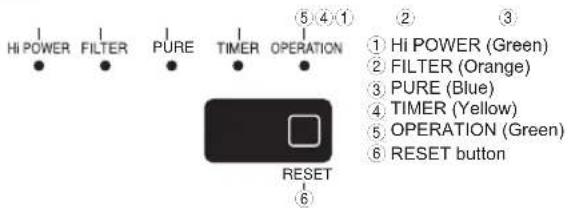
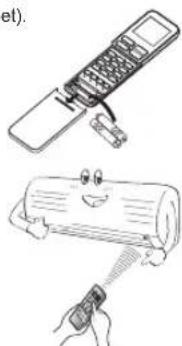
2 PREPARATION BEFORE USE
Preparing Filters
- Open the air inlet grille and remove the air filters.
- Attach the filters. (see detail in the accessory sheet).
Loading Batteries
- Remove the battery cover.
- Insert 2 new batteries (AAA type) following the (+) and (-) positions.
Clock Setup
- Push ☐ by tip of the pencil.
- Press 🔍 TEMP.: adjust the time.
- Press SET: Set the time.
Remote Control Reset
Press for reset.
natural_image
Illustration of a mobile phone and a cylindrical device with a cartoon face, no text or symbols present3 AIRFLOW DIRECTION
| 1 | PressMove the louver in the desired vertical direction. | |
| 2 | PressSwing the air automatically and press again to stop. | |
| 3 | For horizontal direction, adjust manually. |
Note:
- Do not move the louver manually by others.
• The louver may automation positioning by some operation mode.
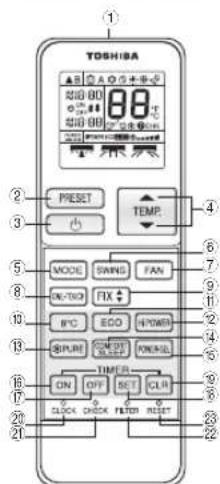
4 REMOTE CONTROL
① Infrared signal emitter
② Memory and preset button (PRESET)
③ Start/Stop button
④ Temperature up/down and
Timer or clock up/down button (TEMP.)
⑤ Mode select button (MODE)
⑥ Swing louver button (SWING)
7 Fan speed button (FAN)
⑧ One Touch button (ONE-TOUCH)
⑨ Set louver button (FIX)
⑩ 8 degree celcius operation button (8°C)*
⑪ Economy button (ECO)
⑫ High power button (Hi-POWER)
⑬ Plasma Air Purifi er button (PURE)
⑭ Comfort sleep button (COMFORT SLEEP)
15 Power selection button (POWER-SEL)*
16 On timer button (ON)
⑰ Off timer button (OFF)
⑱ Setup button (SET)
⑲ Clear button (CLR)
20 Clock setup button (CLOCK)
21 Check button (CHECK)
22 Filter reset button (FILTER)
23. Reset button (RESET)
* These 2 functions cannot be activated by the remote controller provided in carton, please contact your distributor or retailer for purchasing of optional remote controller in order to activate such functions. Its service part no. is 43T66311 (Model: WH-TA01JE). Only when using a single split outdoor unit is connected, WH-TA01JE can be used.
5 ONE-TOUCH
Press the "ONE-TOUCH" button for fully automated operation that is customised to the typical consumer preferences in your region of the world. The customised settings control temperature air flow strength, air flow direction and other settings to provide you alternate contact with "ONE-TOUCH" of the button. If you prefer other settings you can select from the many other operating functions of your Toshiba unit.
Press 📄CNS-TOUCH : Start the operation.
To automatically select cooling, heating, or fan only operation
- Press MODE : Select A.
- Press : Set the desired temperature.
- Press FAN : Select AUTO, LOW, LOW+, MED, MED+, HIGH, or Quiet
(Fan only operation is required optional remote controller)
- Press : Set the desired temperature. Cooling: Min. 17°C, Heating: Max. 30°C, Fan Only: No temperature indication
- Press FAN : Select AUTO, LOW_LOW+ MED , MED+ HIGH , or Quiet
Note: QUIET is supper low fan speed for quiet operation. When using a multi-system outdoor unit is connected, FAN ONLY operation cannot be used.
For dehumidifi cation, a moderate cooling performance is controlled automatically.
- Press MODE : Select Dry
- Press : Set the desired temperature.
During air conditioner operation
Press ☑PURE to start and stop plasma air purifi er and air ionizer operation.
The plasma air purifier and air ionizer can be activated or deactivated during air conditioner is stopped and the air ionizer starts in conjunction with plasma air purifier operation.
Note: The FILTER indicator (orange) turns on after PURE operation is performed for about 1000 hours.
To automatically control room temperature and airflow for faster cooling or heating operation (except in DRY and FAN ONLY mode)
Press 📄 POWER : Start and stop the operation.
11 ECO OPERATION
To automatically control room to save energy (except in DRY and FAN ONLY mode)
Press ECO : Start and stop the operation.
Note: Cooling operation; the set temperature will increase automatically 1 degree/hour for 2 hours (maximum 2 degrees increase). For heating operation the set temperature will decrease.
12 TEMPORARY OPERATION
In case of the misplaced or discharged remote control
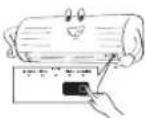
- Pressing the RESET button, the unit can start or stop without using the remote control.
- Operation mode is set on AUTOMATIC operation, preset temperature is 25°C and fan operation is automatic speed.
13 TIMER OPERATION
Setting the ON Timer Setting the OFF Timer
| 1 | Press for enter ON timer setting | Press OFF for enter OFF timer setting |
| 2 | Press for select desired ON timer. | Press for select desired OFF timer. |
| 3 | Press for set timer. Press for set timer. | SFT |
| 4 | Press for cancel timer. Press for cancel timer. | CLR |
Daily timer allows the user to set both the ON & OFF timers and will be activated on a daily basis.
Setting Daily Timer
| 1 | Press for enter ON timer setting | 4 | Press for select desired OFF timer. |
| 2 | Press for select desired ON timer. | 5 | Press SET |
| 3 | Press for enter OFF timer setting | 6 | Press lagain during the or blink. |
- During the daily timer is activating, both arrows (↑) are indicated.
Note:
- Keep the remote control in accessible transmission to the indoor unit; otherwise, the time lag up to 15 minutes will occur.
- The setting will be saved for the next same operation.
14 PRESET OPERATION
Set your preferred operation for future use. The setting will be memorized by the unit for future operation (except airflow direction).
-
Select your preferred operation.
-
Press and hold for 3 seconds to memorize the setting.
The Ⓟ mark displays.
- Press ☐ PRESET : Operate the preset operation.
To automatically restart the conditioner after the power failure (Power of the unit must be on.)
Setting
-
Press and hold the RESET button on the indoor unit for 3 seconds to set the operation. (3 beep sound and OPERATION lamp blink 5 time/sec for 5 seconds)
-
Press and hold the RESET button on the indoor unit for 3 seconds to cancel the operation. (3 beep sound but OPERATION lamp does not blink)
- In case of ON timer or OFF timer are set, AUTO RESTART OPERATION does not activate.
16 POWER-SELECTION OPERATION (Optional)
This function is used when its circuit breaker is shared with other electrical appliances. It limits the maximum current/ power consumption to 100%, 75% or 50%. The lower the percentage, the higher the saving and also the longer the compressor lifetime.
Press POWER-SEL : Select: (for 100%), (for 75%), (for 50%)
- When the level is selected, PWR-SEL level flashes on LCD display for 3 seconds. In case of 75% and 50% level, number "75" or "50" also flashes for 2 seconds.
- Due to the reason that POWER SELECT FUNCTION limits the maximum current, inadequate capacity may occur.
Note: When using a multi-system outdoor unit is connected, POWER-SELECTION operation can not be used.
To save energy while sleeping, automatically control air flow and automatically turn OFF.
Press 📄️ COMFORT SLEEP : Select 1, 3, 5 or 9 hrs for OFF timer operation.
Note: The cooling operation, the set temperature will increase automatically 1 degree/hour for 2 hours (maximum 2 degrees increase). For heating operation, the set temperature will decrease.
-
Press 8°C button to change to 8°C set temperature heating operation.
-
Press to adjust setting temperature from 5°C to 13°C.
Note: 8^ will operate in Heating mode only. If Air conditioner performs in cooling operation (including automatic cooling) or dry operation it will change to heating operating. When using a multi-system outdoor unit is connected, 8^ operation can not be used.
19 MAINTENANCE

Firstly, turn off the circuit breaker.
Filter Reset (Some models only)
FILTER lamp lights on; the filter must be cleaned.
To turn off the lamp, push the RESET button on the indoor unit or the FILTER button on the remote control.
Indoor Unit and Remote Control
Clean the indoor unit and the remote control with a wet cloth when needed.
• No benzine, thinner, polishing powder or chemically-treated duster.
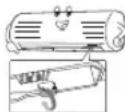
Cleaning the air ionizer (Once every six months)
-
Turn off air conditioner using remote control and power supply.
-
Fully open the vertical air flow louvers by hand.
-
Use a toothbrush to rub the ends of metal pin three or four times.
Note: Do not use cotton swabs or other objects with fluff.
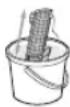
Cleaning the plasma air purifier unit (About every 1000 hours performed)
Turn off air conditioner using remote control and power supply
-
Take out the air inlet grille (See detail in installation manual).
-
Take out the plasma air purifier by grasp the handle, and the pull it out.
-
Soak in hot water at 40^ C to 50^ C for about 10 to 15 minutes and rub up, down, left, right and rub surface gently with a sponge.
-
Allow to dry thoroughly in the shade.
-
Attach the plasma air purifi er by grasp the handle and insert into the right and left guide rails.
-
Press both ends of the plasma air purifi er until the protrusions on both sides of the plasma air purifi er are completely inserted.
-
Attach the air filter, and then close the air inlet grille.
To protect bad smell caused by the humidity in the indoor unit.
-
If the ⏻ button is pressed once during "Cool" or "Dry" mode, the fan will continue to run for other 30 minutes, then it will turn off automatically. This will reduce the moisture in the indoor unit.
-
To stop the unit immediately, press the ⏻ more 2 times within 30 seconds.
- Three-minute protection feature: To prevent the unit from being activated for 3 minutes when suddenly restarted or switched to ON.
- Preheating operation: Warm up the unit for 5 minutes before the heating operation starts.
- Warm air control: When the room temperature reaches the set temperature, the fan speed is automatically reduced and the outdoor unit will stop.
- Automatic defrosting: Fans will stop during defrost operation.
- Heating capacity: Heat is absorbed from outdoors and released into the room When the outdoor temperature is too low, use another recommended heating apparatus in combination with the air conditioner.
- Consideration for accumulated snow: Select the position for outdoor unit where it will not be subjected to snow drifts, accumulation of leaves or other seasonal debris.
- Some minor cracking sound may occur when unit operating. This is normal because the cracking sound may be caused by expansion/contraction of plastic. Note: Item 2 to 6 for Heating model
Air conditioner operating conditions
| Operation\Temp. | Outdoor Temperature | Room Temperature |
| Heating | -15^ 24^ | Less than 28^ |
| Cooling | -10^ 46^ | 21^ 32^ |
| Dry | -10^ 46^ | 17^ 32^ |
22 TROUBLESHOOTING (CHECK POINT)
| The unit does not operate. | Cooling or Heating is abnormally low. |
| The power main switch is turned off.The circuit breaker is activated to cut off the power supply.Stoppage of electric currentON timer is set. | The filters are blocked with dust.The temperature has been set improperly.The windows or doors are opened.The air inlet or outlet of the outdoor unit is blocked.The fan speed is too low.The operation mode is FAN or DRY.POWER SELECT FUNCTION is set at 75% or 50%. |
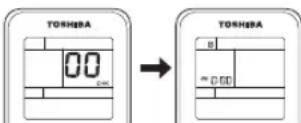
23 REMOTE CONTROL A-B SELECTION
To separate using of remote control for each indoor unit in case of 2 air conditioner are installed nearly.
Remote Control B Setup.
- Press RESET button on the indoor unit to turn the air conditioner ON.
- Point the remote control at the indoor unit.
- Push and hold ⚙️ button on the Remote Control by the tip of the pencil. "00" will be shown on the display.
- Press MODE during pushing "B" will show on the display and "00" will disappear and the air conditioner will turn OFF. The Remote Control B is memorized.
Note:
- Repeat above step to reset Remote Control to be A.
- Remote Control A has not "A" display.
- Default setting of Remote Control from factory is A.
11 STROMSPARMODUS (ECO)
natural_image
Illustration of a mobile phone with a scroll and a hand holding a pen, showing different actions (no text or symbols present)3 SMĚR PRŮTOKU VZDUCHU
natural_image
Illustration of a mobile phone and a smiling cylindrical device with a brush, both without any text or symbols.- AIR CONDITIONER (SPLIT TYPE)
- INDOOR UNIT DISPLAY
- PREPARATION BEFORE USE
- Preparing Filters
- Loading Batteries
- Clock Setup
- Remote Control Reset
- AIRFLOW DIRECTION
- Note:
- REMOTE CONTROL
- ONE-TOUCH
- ECO OPERATION
- TEMPORARY OPERATION
- TIMER OPERATION
- PRESET OPERATION
- POWER-SELECTION OPERATION (Optional)
- MAINTENANCE
- TROUBLESHOOTING (CHECK POINT)
- REMOTE CONTROL A-B SELECTION
- STROMSPARMODUS (ECO)
- SMĚR PRŮTOKU VZDUCHU
Brand : TOSHIBA
Model : 16N3AVP
Category : Air-conditioner