USER MANUAL Azur GC4872 PHILIPS
natural_image
Exterior view of a Philips air iron on a metal plate (no text or symbols visible)
User manual

www.philips.com
423 001 00113
ENGLISH 6
БЪЛГАРСКИ 18
ČEŠTINA 30
EESTI 42
HRVATSKI 54
MAGYAR 66
ҚАЗАҚША 78
LIETUVIŠKAI 90
LATVIEŠU 101
POLSKI 113
ROMÂNĂ 125
РУССКИЙ 137
SLOVENSKY 149
SLOVENŠČINA 161
TÜRKÇE 173
УКРАЇНСЬКА 185
Introduction
Congratulations on your purchase and welcome to Philips! To fully benefit from the support that Philips offers, register your product at www.philips.com/welcome.
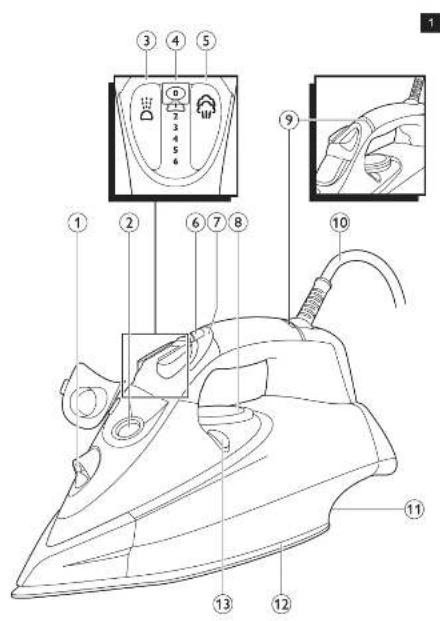
General description (Fig. 1)
1 Spray nozzle
2 Filling opening
3 Spray button
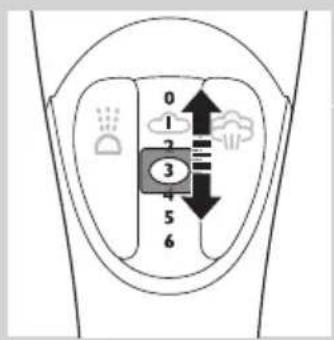
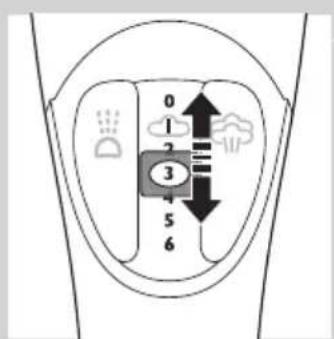
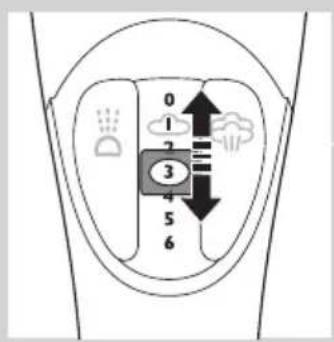
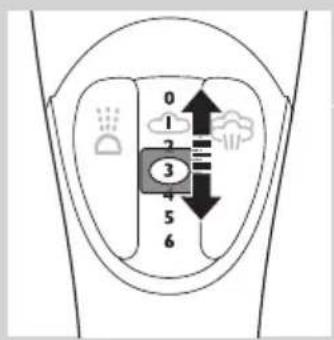
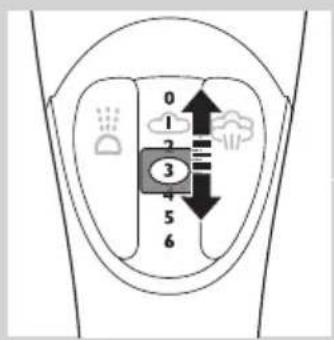
4 Steam control
5 Steam boost button
6 Ionic DeepSteam button (GC4880, GC4875, GC4870 only)
7 Ionic DeepSteam light (GC4880, GC4875, GC4870 only)
8 Temperature dial
9 Amber temperature light (all types)/red auto-off light GC4891/GC4890/GC4880/GC4875/GC4870/GC4865/GC4860/GC4856/GC4855/GC4852/GC4851/GC4850 only).
10 Mains cord
11 Type plate
12 Soleplate
13 Calc-Clean button
Not shown: Heat-resistant protective cover (GC4880 only)
Not shown: filling cup
Important
Read this user manual carefully before you use the appliance and save it for future reference.
Danger
- Never immerse the iron in water.
Warning
- Check if the voltage indicated on the type plate corresponds to the local mains voltage before you connect the appliance.
- Do not use the appliance if the plug, the mains cord or the appliance itself shows visible damage, or if the appliance has been dropped or leaks.
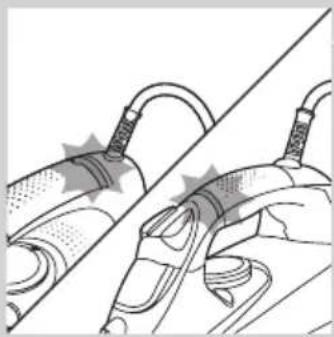
- If the mains cord is damaged, you must have it replaced by Philips, a service centre authorised by Philips or similarly qualified persons in order to avoid a hazard.
- Never leave the appliance unattended when it is connected to the mains.
- This appliance is not intended for use by persons (including children) with reduced physical, sensory or mental capabilities, or lack of experience and knowledge, unless they have been given supervision or instruction concerning use of the appliance by a person responsible for their safety.
- Children should be supervised to ensure that they do not play with the appliance.
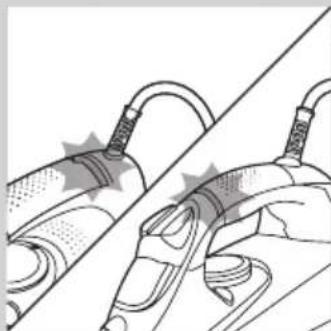
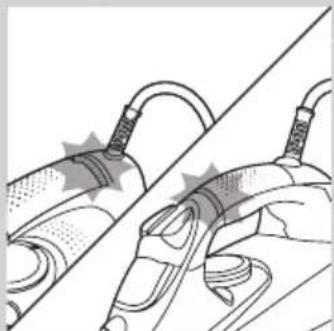
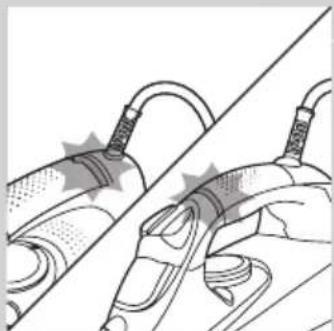
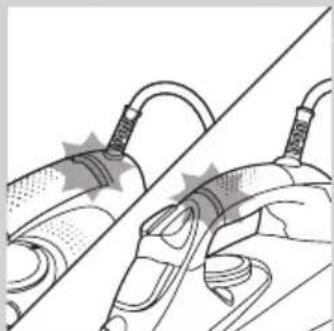
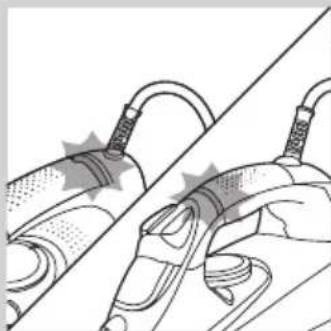
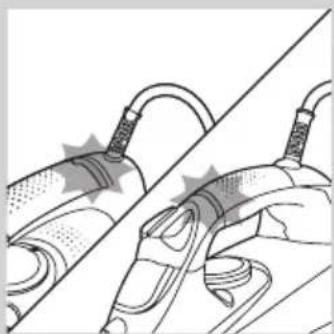
- Do not let the mains cord come into contact with the hot soleplate of the iron.
Caution
- Only connect the appliance to an earthed wall socket.
- Check the mains cord regularly for possible damage.
- The soleplate of the iron can become extremely hot and may cause burns if touched.
- When you have finished ironing, when you clean the appliance, when you fill or empty the water tank and also when you leave the iron even for a short while: set the steam control to position 0, put the iron on its heel and remove the mains plug from the wall socket.
- Always place and use the iron on a stable, level and horizontal surface.
- Do not put perfume, vinegar, starch, descaling agents, ironing aids or other chemicals in the water tank.
- This appliance is intended for household use only.
Electromagnetic fields (EMF)
This Philips appliance complies with all standards regarding electromagnetic fields (EMF). If handled properly and according to the instructions in this user manual, the appliance is safe to use based on scientific evidence available today.
Before first use
1 Remove any sticker, protective foil or plastic from the soleplate.
2 Rinse and dry the filling cup.
Preparing for use
Filling the water tank
Type of water to be used
You can use normal tap water to fill the water tank.
Tip: If the tap water in your area is very hard, we advise you to mix it with an equal amount of distilled water. Do not use distilled water only.
1 Make sure the appliance is unplugged.
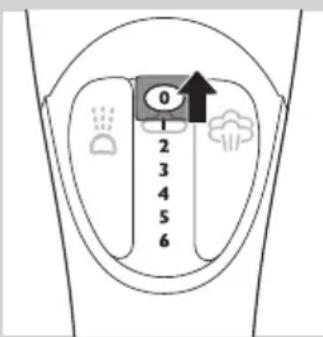
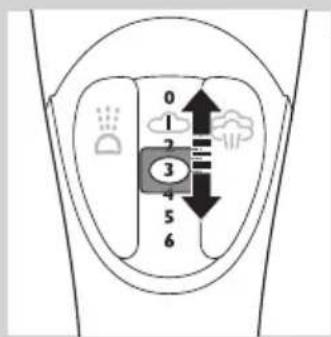
2 Set the steam control to position 0 (= no steam).
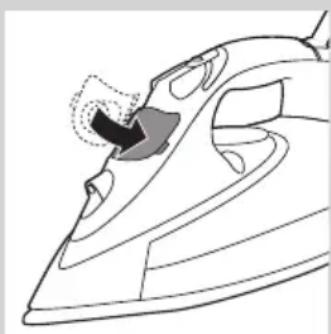
3 Open the cap of the filling opening.
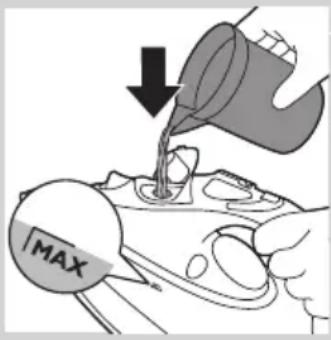
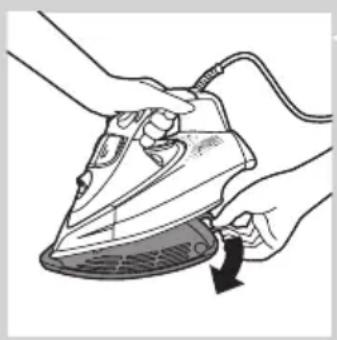
4 Tilt the iron backwards and use the filling cup to fill the water tank with tap water up to the maximum level.
Do not fill the water tank beyond the MAX indication.
Do not put perfume, vinegar, starch, descaling agents, ironing aids or other chemicals in the water tank.
natural_image
Line drawing of a steam iron with a highlighted section showing the cutting edge (no text or symbols)
5 Close the cap of the filling opening ('click').
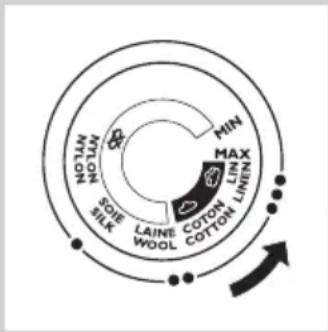
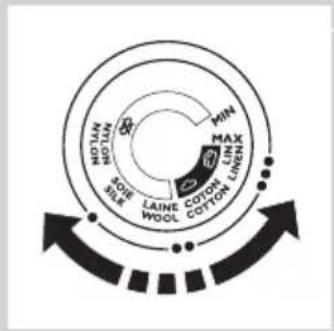
Selecting the temperature and steam setting
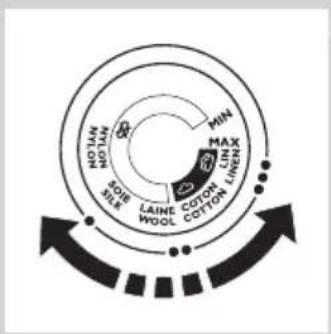
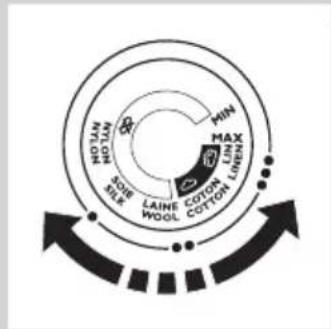
Temperature and steam settings
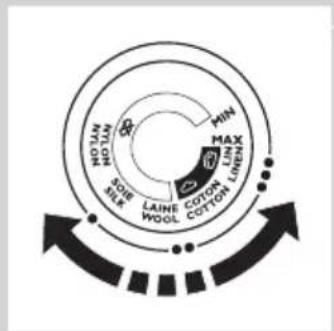
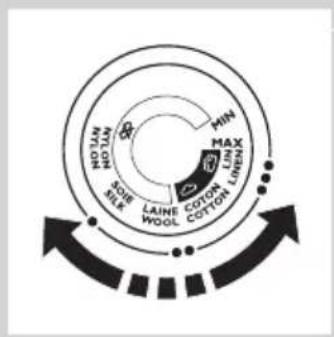
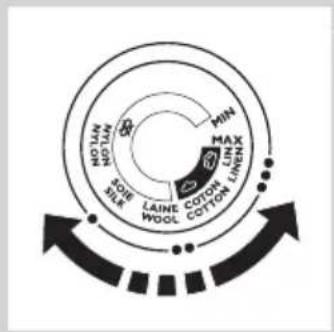
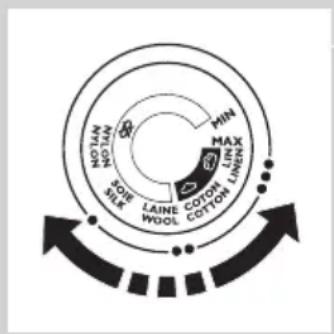
| Fabric type Temperature setting | Steam setting | Steam boost ionic | DeepSteam (specific types only) |
| Linen MAX 5-6 | | | yes |
| Cotton ●●●3-4 | | | yes |
| Wool ●●1-2 N.A. yes | | | |
| Silk ● | 0 | N.A. N.A. | | |
| Synthetic fabrics (e.g. acrylic, nylon, polyamide, polyester) | ● | 0 | N.A. N.A. | |
natural_image
Illustration of hands ironing a steam iron with a circular arrow indicating cooling effect (no text or symbols)
natural_image
Illustration of a hand holding a tool with a diagonal line, no text or symbols present
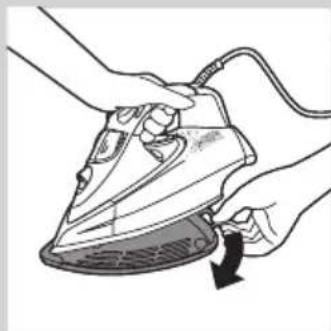
1 Specific types only: remove the heat-resistant protective cover.
Do not leave the heat-resistant protective cover on the soleplate during ironing.
2 Put the iron on its heel.
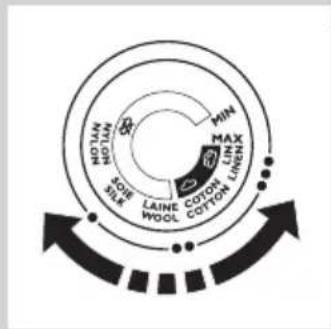
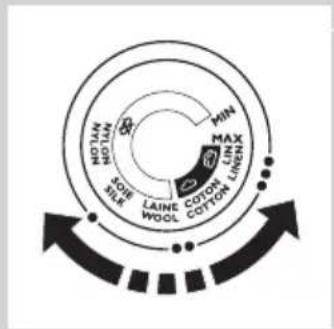
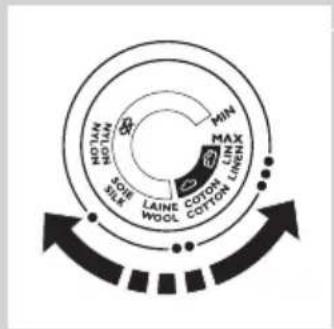
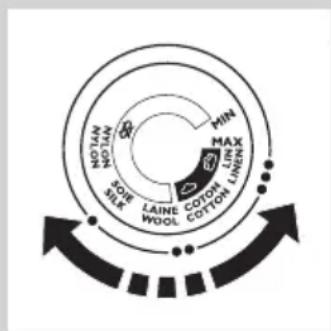
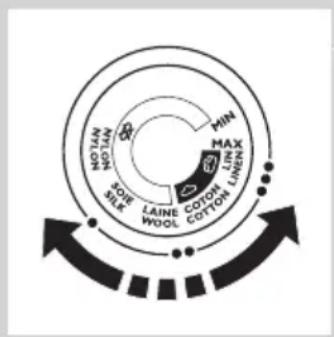
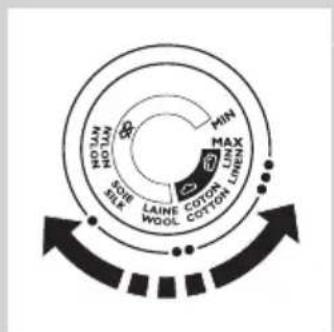
3 To set the required ironing temperature, turn the temperature dial to the appropriate position (see the 'Temperature and steam settings' table above).
Check the laundry care label for the fabric type.
If you do not know what kind or kinds of fabric an article is made of, determine the right ironing temperature by ironing a part that is not visible when you wear or use the article.
Silk, woollen and synthetic materials: iron the reverse side of the fabric to prevent shiny patches. To prevent stains, do not use the spray function.
Start ironing the articles that require the lowest ironing temperature, such as those made of synthetic fibres.
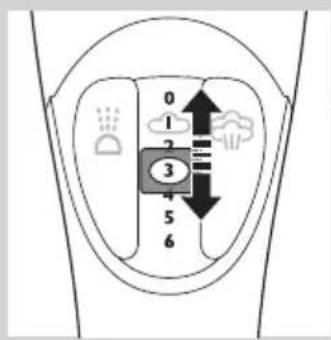
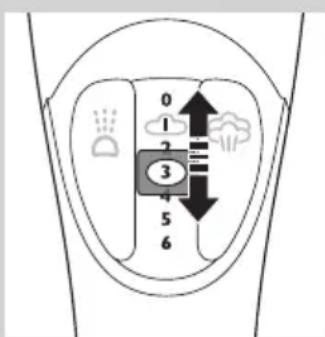
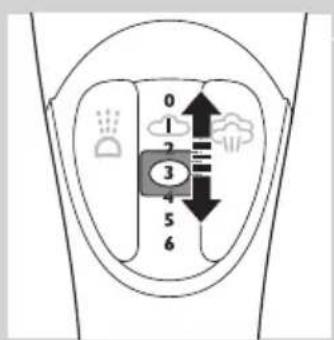
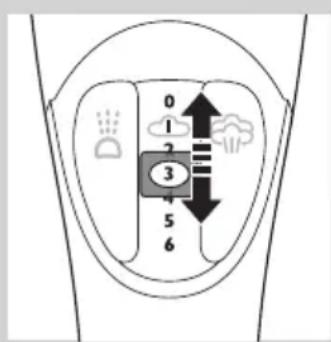
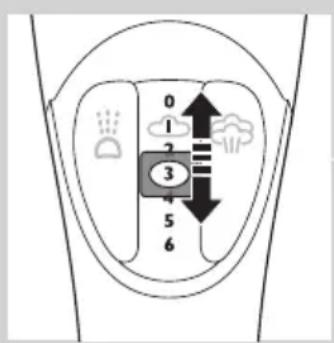
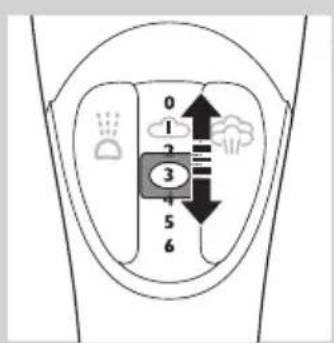
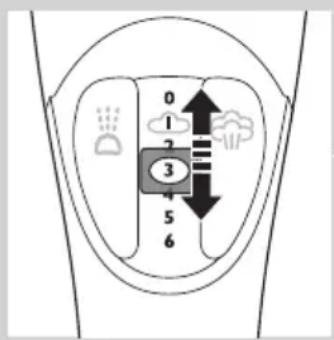
4 Set the appropriate steam setting (see the 'Temperature and steam settings' table above).
Note: Make sure that the steam setting you select is suitable for the set ironing temperature.
5 Put the mains plug in an earthed wall socket.
The amber temperature light goes on.
6 When the amber temperature light has gone out, wait a while before you start ironing.
The temperature light goes on from time to time during ironing.
Using the appliance
Note: The iron may give off some smoke when you use it for the first time. This ceases after a short while.
Ironing without steam
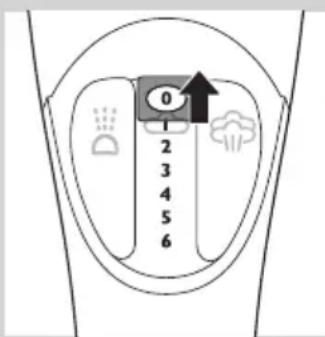
1 Set the steam control to position 0 (= no steam).
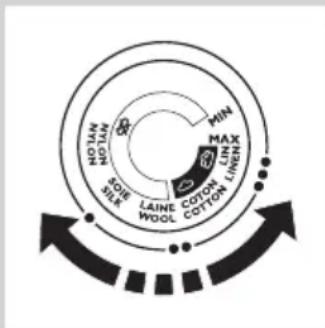
2 Set the required ironing temperature (see chapter 'Preparing for use', section 'Selecting the temperature and steam setting').
Steam ironing
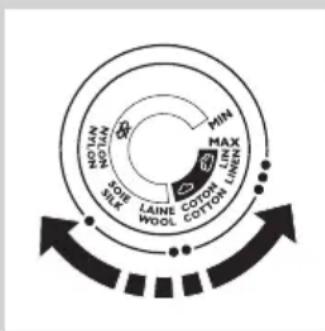
1 Make sure that there is water in the water tank.
2 Set the required ironing temperature (see chapter 'Preparing for use', section 'Selecting the temperature and steam setting').
3 Set the appropriate steam setting (see chapter 'Preparing for use', section 'Selecting the temperature and steam setting').
Note: The iron starts to produce steam as soon as it reaches the set temperature.
natural_image
Illustration of a hand using a tool to brush or brush onto a surface, with a circular icon containing a cloud and arrow indicating direction (no text or symbols)
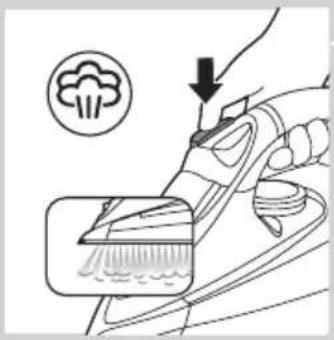
1 For extra steam during ironing, press and hold the steam boost button.
Ironing with Ionic DeepSteam (specific types only)
When you use the Ionic DeepSteam function during steam ironing, the steam produced is finer than during regular steam ironing. Fine steam reaches deeper, especially into thick fabrics. This helps you to remove stubborn creases easily.
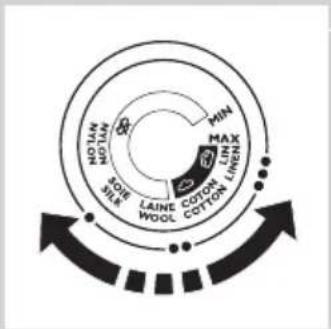
1 Make sure that there is water in the water tank.
2 Set the required ironing temperature (see chapter 'Preparing for use', section 'Selecting the temperature and steam setting').
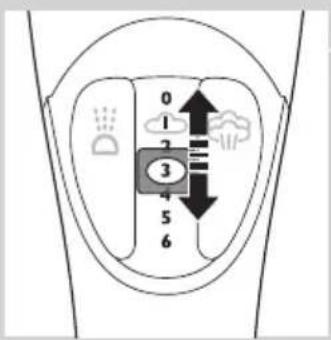
3 Set the appropriate steam setting (see chapter 'Preparing for use', section 'Selecting the temperature and steam setting').
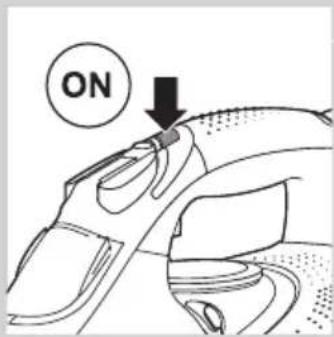
4 Press the Ionic DeepSteam button once to switch on the Ionic DeepSteam function.
natural_image
Line drawing of a car's front wheel and side arm, showing motion lines (no text or symbols)
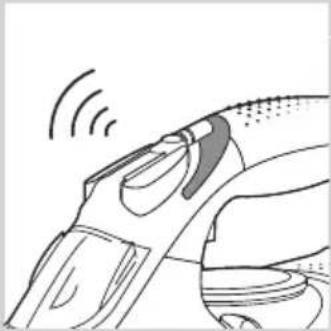
The blue Ionic DeepSteam light goes on and you hear a humming sound.
The iron now produces Ionic DeepSteam to help you remove even the toughest creases.
5 Press the Ionic DeepSteam button again to switch off the Ionic DeepSteam function.
Note: The Ionic DeepSteam function is only effective when it is used in combination with a steam setting and a temperature setting between ●● and MAX.
Note: Do not use the Ionic DeepSteam function when you iron without steam and/or at low temperature settings. However, ironing at low temperatures without steam with the Ionic DeepSteam function switched on will not damage the iron.
Note: The Ionic DeepSteam output may vary from time to time, depending on the ironing temperature.
Features
Spray function
natural_image
Illustration of a hand pressing down on a mechanical component with a droplet symbol (no text or labels)
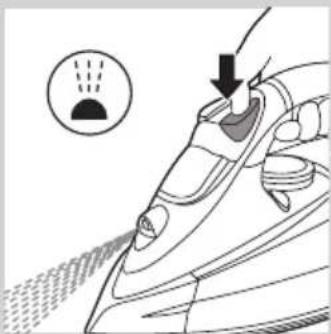
You can use the spray function at any temperature to moisten the article to be ironed. This helps remove stubborn creases.
1 Make sure that there is water in the water tank.
2 Press the spray button several times to moisten the article to be ironed.
Steam boost function
natural_image
Illustration of a hand using a cleaning brush to clean food, with a broccoli icon and arrow indicating the process (no text or symbols)
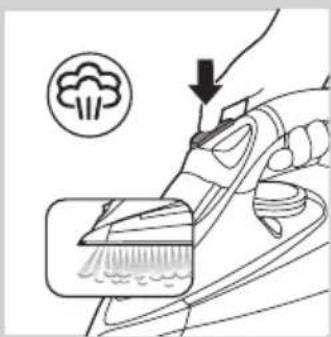
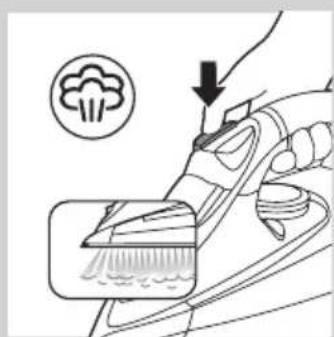
A steam boost from the special Steam Tip soleplate helps remove stubborn creases. The steam boost enhances the distribution of steam into every part of your garment.
The steam boost function can only be used at temperature settings between ●●● and MAX.
1 Press and release the steam boost button.
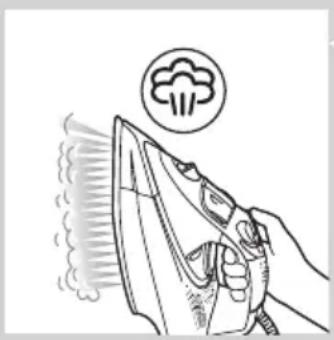
Vertical steam boost
natural_image
Line drawing of a hand using an iron to clean air, with a circular icon above indicating a hairless product (no text or symbols present)
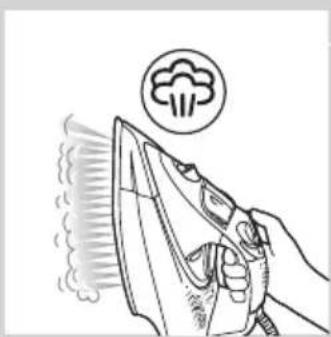
1 You can also use the steam boost function when you hold the iron in vertical position.
This is useful for removing creases from hanging clothes, curtains etc.
Never direct the steam at people.
Drip stop
This iron is equipped with a drip-stop function: the iron automatically stops producing steam when the temperature is too low, to prevent water from dripping out of the soleplate. When this happens, you may hear a sound.
Automatic shut-off function (specific types only)
The automatic shut-off function automatically switches off the iron if it has not been moved for a while.
The red auto-off light flashes to indicate that the iron has been switched off by the automatic shut-off function.
To let the iron heat up again:
1 Pick up the iron or move it slightly.
The red auto-off light goes out.
If the temperature of the soleplate has dropped below the set ironing temperature, the amber temperature light goes on.
2 If the amber temperature light goes on after you have moved the iron, wait for it to go out before you start ironing.
Note: If the amber temperature light does not go on after you move the iron, the soleplate still has the right temperature and the iron is ready for use.
Cleaning and maintenance
Cleaning
1 Set the steam control to position 0, remove the plug from the wall socket and let the iron cool down.
2 Wipe flakes and any other deposits off the soleplate with a damp cloth and a non-abrasive (liquid) cleaning agent.
To keep the soleplate smooth, avoid hard contact with metal objects. Never use a scouring pad, vinegar or other chemicals to clean the soleplate.
3 Clean the upper part of the iron with a damp cloth.
4 Regularly rinse the water tank with water. Empty the water tank after you have rinsed it.
Double-Active Calc System
- The Anti-Calc tablet prevents scale from clogging the steam vents. This tablet is constantly active and does not need to be replaced.
- The Calc-Clean function removes the scale particles from the iron.
Using the Calc-Clean function
Use the Calc-Clean function once every two weeks. If the water in your area is very hard (i.e. when flakes come out of the soleplate during ironing), use the Calc-Clean function more frequently.
1 Make sure the appliance is unplugged.
2 Set the steam control to position 0.
3 Fill the water tank to the MAX level.
Do not put vinegar or other descaling agents in the water tank.
4 Set the temperature dial to MAX.
5 Put the plug in an earthed wall socket.
6 Unplug the iron when the temperature light goes out.
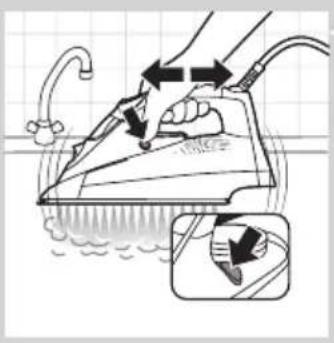
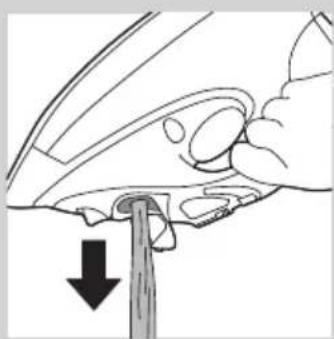
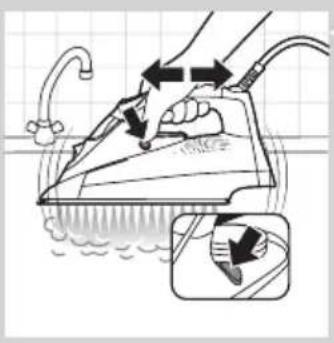
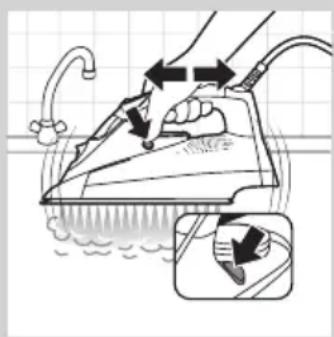
7 Hold the iron over the sink, press and hold the Calc-Clean button and gently shake the iron to and fro.
▶Steam and boiling water come out of the soleplate. Impurities and flakes (if any) are flushed out.
8 Release the Calc-Clean button as soon as all the water in the tank has been used up.
9 Repeat the Calc-Clean process if the iron still contains a lot of impurities.
After the Calc-Clean process
1 Put the plug back into the wall socket and let the iron heat up to let the soleplate dry.
2 Unplug the iron when it has reached the set ironing temperature.
3 Move the hot iron gently over a piece of used cloth to remove any water stains that may have formed on the soleplate.
4 Let the iron cool down before you store it.
Storage
natural_image
Diagram of a hand turning a car wheel with a downward arrow indicating force or motion (no text or symbols)
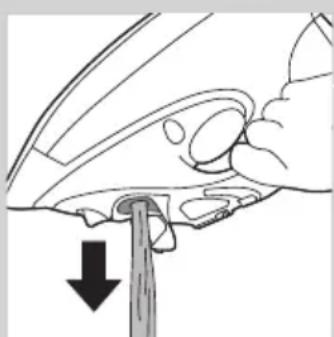
1 Set the steam control to position 0 and unplug the iron.
2 Empty the water tank.
3 Let the iron cool down in a safe place.
natural_image
Line drawing of a steam iron with a black arrow indicating the handle (no text or symbols)
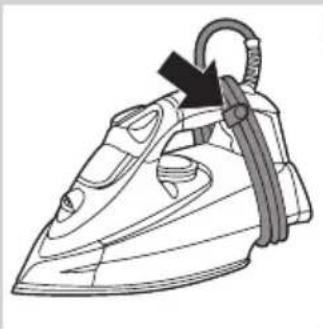
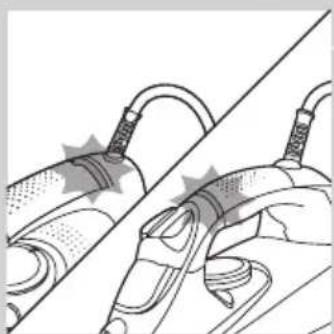
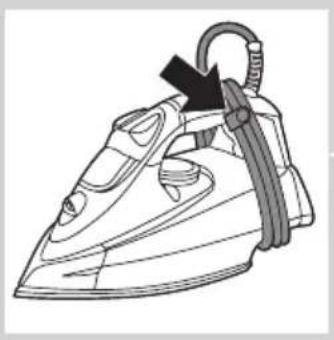
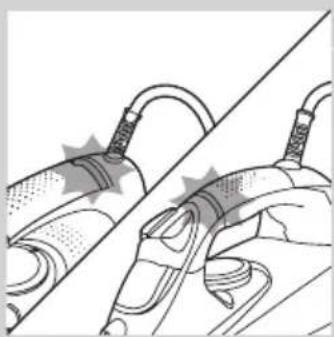
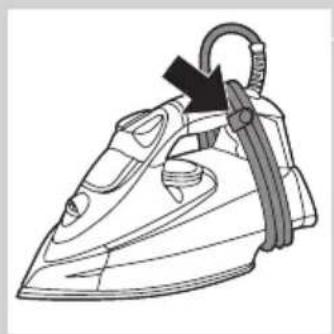
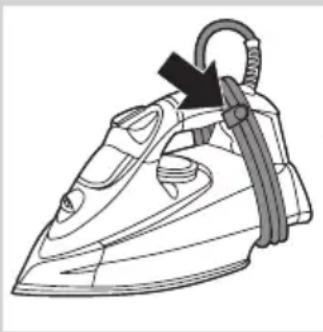
4 Wind the mains cord around the cord storage facility and fix it with the cord clip.
5 Store the iron on its heel in a dry and safe place.
Heat-resistant protective cover (specific types only)
You can store the iron on the heat-resistant protective cover immediately after ironing. It is not necessary to let the iron cool down first.
Do not use the heat-resistant protective cover during ironing.
natural_image
Line drawing of a steam iron with a black arrow indicating the handle (no text or symbols)
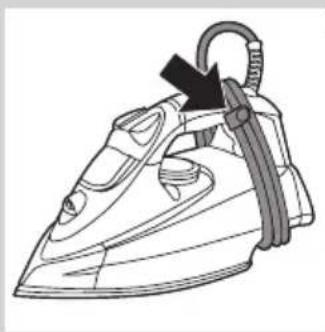
1 Wind the mains cord around the cord storage facility and fix it with the cord clip.
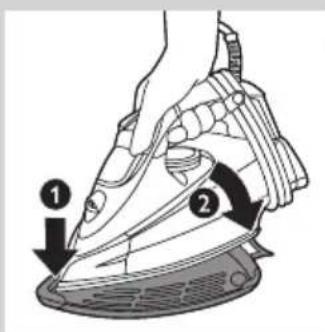
2 Put the iron on the heat-resistant protective cover.
Environment
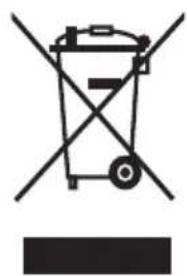
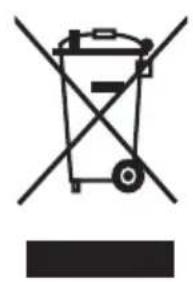
- Do not throw away the appliance with the normal household waste at the end of its life, but hand it in at an official collection point for recycling. By doing this, you help to preserve the environment.
natural_image
Symbol of a waste bin with crossed lines indicating no waste or restriction, and a solid black rectangle below (no text or symbols)
Guarantee and service
If you need information or if you have a problem, please visit the Philips website at www.philips.com or contact the Philips Consumer Care Centre in your country (you find its phone number in the worldwide guarantee leaflet). If there is no Consumer Care Centre in your country, go to your local Philips dealer.
Troubleshooting
If the appliance does not work or does not work properly, first check the list below. If the problem is not mentioned in this list, the appliance probably has a defect. In that case we advise you to take the appliance to your dealer or to an authorised Philips service centre.
Problem Possible cause Solution
| The iron is plugged in, but the soleplate is cold. | There is a connection problem. | Check the mains cord, the plug and the wall socket. |
| The temperature dial is set to MIN. | Set the temperature dial to the required position. |
| The iron does not produce any steam. | There is not enough water in the water tank. | Fill the water tank (see chapter ‘Preparing for use’, section ‘Filling the water tank’). |
| The steam control is set to position 0. | Set the steam control to a position between 1 and 6 (see chapter ‘Using the appliance’, section ‘Steam ironing’). |
| The iron is not hot enough and/or the drip-stop function has been activated. | Set an ironing temperature that is suitable for steam ironing (●● to MAX). Put the iron on its heel and wait until the temperature light has gone out before you start ironing. |
| The iron does not produce a steam boost. | You have used the steam boost function too often within a very short period. | Continue ironing in horizontal position and wait a while before you use the steam boost function again. |
| The iron is not hot enough. Set an ironing temperature at which the steam boost function can be used (●●● to MAX). Put the iron on its heel and wait until the temperature light has gone out before you use the steam boost function. |
| Problem Possible cause Solution |
| Water droplets drip onto the fabric during ironing. | You have not closed the cap of the filling opening properly. | Press the cap until you hear a click. |
| You have put an additive in the water tank. | Rinse the water tank and do not put any additive in the water tank. |
| The set temperature is too low for steam ironing. | Set a temperature of or ●● higher. |
| You have used the steam boost function at a temperature setting below ●●●. | Set the temperature dial to a setting between ●●● and MAX. |
| Water drips from the soleplate after the iron has cooled down or has been stored. | You have put the iron in horizontal position with water still left in the water tank. | Empty the water tank. |
| Flakes and impurities come out of the soleplate during ironing. | Hard water forms flakes inside the soleplate. | Use the Calc-Clean function one or more times (see chapter ‘Cleaning and maintenance’, section ‘Using the Calc-Clean function’). |
| The red light flashes (specific types only). | The automatic shut-off function has switched off the iron (see chapter ‘Features’, section ‘Automatic shut-off function’). | Move the iron slightly to deactivate the automatic shut-off function. The red auto-off light goes out. |
| The iron makes a humming sound. | The Ionic DeepSteam function is on. | If you hear the humming sound when you iron without steam, press the Ionic DeepSteam button to switch off the Ionic DeepSteam function. The Ionic DeepSteam function has no effect when you iron without steam. |
| The humming sound stops, although the Ionic DeepSteam function is on. | The sound stopped because you placed the iron on its heel. | The humming sound resumes as soon as you continue to iron. |
Въведение
natural_image
Line drawing of a steam iron with a circular arrow indicating motion (no text or symbols)
natural_image
Illustration of hands ironing a steam iron with a downward arrow indicating cooling (no text or symbols)
natural_image
Illustration of a hand holding a device with a diagonal line crossing through it (no text or symbols)
natural_image
Illustration of a hand using a tool to clean food items, with a broccoli icon and downward arrow indicating action (no text or symbols)
natural_image
Line drawing of a car's head and side profile with motion lines indicating sound waves (no text or symbols)
natural_image
Illustration of a hand using a power tool to press down a socket, with a magnified inset showing the tip and handle (no text or symbols)
natural_image
Illustration of a hand using a brush to apply a paintbrush to a surface, with a broccoli icon and arrow indicating action (no text or symbols)
natural_image
Line drawing of a hand using an iron to clean air, with a circular icon above indicating a smoke or dust emission (no text or symbols present)
natural_image
Illustration of a hand using an iron on a surface with water spray, showing mechanical components and a magnified inset (no text or symbols)
natural_image
Diagram of a hand turning a car's wheel, showing the blade and handle (no text or symbols)
natural_image
Line drawing of a steam iron with a black arrow indicating the handle (no text or symbols)
natural_image
Line drawing of a steam iron with a black arrow indicating the handle (no text or symbols)
natural_image
Symbol of a trash bin crossed with no text or symbols, representing waste sorting or disposal (no text present)
natural_image
Line drawing of a steam iron with a highlighted cutting edge (no text or symbols)
natural_image
Illustration of hands ironing a steam iron with a circular arrow indicating cooling effect (no text or symbols)
natural_image
Illustration of a hand holding a tool with a diagonal line, no text or symbols present
natural_image
Illustration of a hand using a tool to brush or brush onto a surface, with a circular icon containing a cloud and arrow indicating direction (no text or symbols)
natural_image
Line drawing of a car's head and neck with motion lines indicating sound waves (no text or symbols)
natural_image
Illustration of a hand pressing down on a train hood with a downward arrow indicating motion (no text or symbols)
natural_image
Illustration of a hand using a cleaning tool to clean or brush (no text or symbols present)
natural_image
Illustration of a hand using an iron to clean air with a smokestack emitting vapor (no text or symbols)
natural_image
Illustration of a hand using an iron to clean water, with a magnified inset showing the foot and shoe (no text or symbols)
natural_image
Illustration of a hand turning a tool with a downward arrow (no text or symbols)
natural_image
Line drawing of a steam iron with a black arrow indicating the handle (no text or symbols)
natural_image
Line drawing of a steam iron with a black arrow indicating the handle (no text or symbols)
natural_image
Symbol of a trash bin crossed with no text or symbols, representing waste sorting or disposal (no text present)
natural_image
Line drawing of a steam iron with a highlighted cutting edge (no text or symbols)
natural_image
Illustration of hands ironing a steam iron with a downward arrow indicating cooling (no text or symbols)
natural_image
Illustration of a hand holding a cable with a diagonal line, no text or symbols present
natural_image
Illustration of a hand using a tool to brush or brush onto a surface, with a circular icon containing a cloud and arrow indicating action (no text or symbols present)
natural_image
Line drawing of a car's airfoil with exhaust pipe and sensor waves (no text or symbols)
natural_image
Illustration of a hand using a tool to press down a surface, with a magnified inset showing liquid droplets (no text or symbols)
Lisaauru funktsioon
natural_image
Illustration of a hand cleaning a broom with a brush, showing a downward arrow and circular icon (no text or symbols)
Aurutus ka vertikaalasendis
natural_image
Line drawing of a hand using an iron to clean air, with a circular icon above indicating smoke or dust (no text or symbols)
Tilgalukk
natural_image
Illustration of a hand using an iron on a surface with a magnified inset showing the process (no text or symbols)
natural_image
Line drawing of a hand holding a car's head with a downward arrow indicating a drop or force (no text or symbols present)
natural_image
Line drawing of a steam iron with a black arrow indicating the handle (no text or symbols)
natural_image
Line drawing of a steam iron with a black arrow indicating the handle (no text or symbols)
natural_image
Symbol of a trash bin with crossed lines and a solid black rectangle below (no text or numbers)
natural_image
Line drawing of a steam iron with a highlighted section showing the cutting edge (no text or symbols)
5 Zatvorite poklopac otvora za punjenje ('klik').
Odabir postavki temperature i pare
Postavke temperature i pare
| Vrsta tkanine Postavka temperature | Postavka pare Dodatna količina pare | Ionic DeepSteam (samo neki modeli) |
| Lan MAX 5-6 | | da |
| Pamuk ●●●3-4 | | da |
Vuna ●●1-2 nije primjenjivo da
natural_image
Illustration of hands ironing a steam iron with a downward arrow indicating cooling (no text or symbols)
natural_image
Illustration of a hand holding a cable with a close-up view of the cable being smoothed (no text or symbols)
natural_image
Illustration of a hand using a tool to brush or brush onto a surface, with a circular icon containing a cloud and arrow indicating action (no text or symbols present)
1 Za dodatnu količinu pare prilikom glačanja pritisnite i zadržite gumb za dodatnu količinu pare.
Glačanje uz Ionic DeepSteam (samo neki modeli)
Kada koristite funkciju Ionic DeepSteam tijekom glačanja s parom, čestice pare bit će sitnije od čestica koje nastaju tijekom uobičajenog glačanja s parom. Sitne čestice pare prodiru dublje u tkaninu, posebno debelu tkaninu. To olakšava uklanjanje nabora koji se teško glačaju.
natural_image
Line drawing of a car's head and neck with motion lines indicating sound waves (no text or symbols)
▶Plavi indikator pare s ionima se uključuje i čuje se šuštanje.
Glačalo sada proizvodi ioniziranu paru koja vam pomaže pri uklanjanju i najjačih nabora.
5 Ponovo pritisnite gumb Ionic DeepSteam kako biste isključili funkciju Ionic DeepSteam.
Napomena: Funkcija Ionic DeepSteam učinkovita je samo kada se koristi u kombinaciji s postavkama pare i temperature između ●● i MAX.
Napomena: Nemojte koristiti funkciju stvaranja iona kada glačate bez pare il ili na niskim temperaturama. Međutim, glačanje na niskim temperaturama bez pare s uključenom funkcijom stvaranja iona neće oštetiti glačalo.
Napomena: Mlaz iona može se razlikovati, ovisno o temperaturi glačanja.
Značajke
natural_image
Illustration of a hand using a power tool to press down a component, with a magnified inset showing liquid droplets (no text or symbols)
Funkcija za dodatnu količinu pare
Jaki mlaz pare iz posebnog vrha Steam Tip površine za glačanje olakšava uklanjanje nabora koji se teško glačaju. Mlaz pare poboljšava raspodjelu pare na svaki dio odjevnog predmeta.
Funkcija dodatne količine pare se može koristiti isključivo pri postavkama temperature između ●●● i MAX.
1 Pritisnite i otpustite gumb za dodatnu količinu pare.
Okomiti mlaz pare
natural_image
Illustration of a hand using a cleaning brush to clean food, with a broccoli icon and downward arrow (no text or symbols)
1 Funkciju dodatne količine pare možete koristiti i kada glačalo držite u okomitom položaju.
natural_image
Line drawing of a hand using an iron to clean air, with a circular icon above indicating smoke or dust (no text or symbols)
Funkcija zaustavljanja kapanja
natural_image
Illustration of a hand using an iron on a surface with water flowing, showing mechanical components and a magnified inset (no text or symbols)
2 Postavite kontrolu pare u položaj 0.
3 Spremnik za vodu napunite do oznake MAX.
U spremnik za vodu ne ulijevajte ocat ili druga sredstva za uklanjanje kamenca.
4 Regulator temperature postavite na MAX.
5 Umetnite mrežni kabel u uzemljenu zidnu utičnicu.
6 Kad se indikator temperature ugasi, izvucite utikač iz utičnice.
7 Držite glačalo iznad sudopera, pritisnite i držite gumb za čišćenje od kamenca i blago tresite glačalo.
Iz površine za glačanje izlaze para i kipuća voda. Nečistoća i komadići kamenca (ako ih ima) se ispiru.
8 Otpustite gumb Calc-Clean za čišćenje kamenca čim se voda iz spremnika potroši.
9 Ako u glačalu još ima nečistoće, ponovite postupak Calc-Clean.
Nakon postupka Calc-Clean
1 Utikač vratite u zidnu utičnicu i ostavite glačalo da se zagrije kako bi se površina za glačanje osušila.
2 Isključite napajanje glačala kad dostigne postavljenu temperaturu glačanja.
3 Lagano glačajte komad tkanine kako bi ste s površine za glačanje uklonili moguće mrlje.
4 Ostavite glačalo da se potpuno ohladi prije odlaganja.
Spremanje
natural_image
Diagram of a hand using a tool to press or adjust a mechanical component, with a black arrow indicating downward motion (no text or symbols present)
natural_image
Line drawing of a steam iron with a black arrow indicating the handle (no text or symbols)
4 Omotajte kabel za napajanje oko držača kabela i učvrstite ga kopčom.
5 Glačalo spremite u uspravnom položaju na suho i sigurno mjesto.
Zaštitna folija otporna na toplinu (samo neki modeli)
natural_image
Line drawing of a steam iron with a black arrow indicating the handle (no text or symbols)
natural_image
Symbol of a waste bin with crossed lines indicating no waste, and a solid black rectangle below (no text or labels)
- Aparat koji se više ne može koristiti nemojte odlagati s uobičajenim otpadom iz kućanstva, nego ga odnesite u predviđeno odlagalište na recikliranje. Time ćete pridonijeti očuvanju okoliša.
Jamstvo i servis
U slučaju da vam je potrebna informacija ili imate neki problem, posjetite web-stranicu tvrtke Philips, www.philips.com, ili se obratite centru za potrošače tvrtke Philips u svojoj državi (broj telefona nalazi se u priloženom jamstvu). Ako u vašoj državi ne postoji centar za potrošače, obratite se lokalnom prodavaču proizvoda tvrtke Philips.
Rješavanje problema
Ako aparat ne radi ili ne radi ispravno, prvo pogledajte popis u nastavku. Ako problem nije spomenut na popisu, aparat je vjerojatno neispravan. U tom slučaju aparat odnesite prodavaču ili u ovlašteni Philips servisni centar.
natural_image
Line drawing of a steam iron with a highlighted section showing the cutting edge (no text or symbols)
natural_image
Illustration of hands ironing a steam iron with a downward arrow indicating cooling (no text or symbols)
natural_image
Illustration of a medical or surgical procedure showing two hands holding medical instruments with a diagonal line (no text or symbols)
natural_image
Illustration of a hand using a tool to brush or brush onto a surface, with a circular icon containing a cloud and arrow indicating direction (no text or symbols)
natural_image
Line drawing of a car's head and neck with motion lines indicating airflow (no text or symbols)
natural_image
Illustration of a hand pressing down on a train hood with a droplet symbol above (no text or labels)
Gözlövet funkció
natural_image
Illustration of a hand using a tool to clean or brush the brush, with a broccoli icon and arrow indicating action (no text or symbols)
natural_image
Line drawing of a hand using an iron to clean air, with a circular icon above indicating smoke or dust (no text or symbols)
Cseppzáró rendszer
natural_image
Illustration of a hand using an iron on a surface with a magnified inset showing the process (no text or symbols)
natural_image
Illustration of a hand holding a car's wheel with a downward arrow indicating a force or pressure point (no text or symbols present)
natural_image
Line drawing of a steam iron with a black arrow indicating the handle (no text or symbols)
natural_image
Line drawing of a steam iron with a black arrow indicating the handle (no text or symbols)
natural_image
Symbol of a trash bin with crossed lines indicating no waste or restriction, accompanied by a solid black rectangle below (no text or symbols)
Jótállás és szerviz
natural_image
Line drawing of a steam iron with a highlighted section showing the cutting edge (no text or symbols)
natural_image
Illustration of hands ironing a steam iron with a downward arrow indicating cooling (no text or symbols)
natural_image
Illustration of a medical or surgical procedure showing two steps of tool manipulation (no text or symbols present)
natural_image
Illustration of a hand using a tool to clean or brush a brush, with a circular icon showing a coffee cup (no text or symbols)
natural_image
Line drawing of a car's head and side profile with motion lines indicating sound waves (no text or symbols)
natural_image
Illustration of a hand using a power tool to press down a socket, with a circular icon showing liquid level (no text or symbols)
natural_image
Illustration of a hand using a brush to apply a brush to a surface, with a broccoli icon and arrow indicating action (no text or symbols)
natural_image
Line drawing of a hand using an iron to clean air, with a circular icon above indicating a smoke or dust emission (no text or symbols present)
natural_image
Illustration of a hand ironing an iron with water spray, showing mechanical components and a magnified inset (no text or symbols)
natural_image
Diagram of a hand using a tool to press or adjust a component, with a downward arrow indicating motion (no text or symbols present)
natural_image
Line drawing of a steam iron with a black arrow indicating the handle (no text or symbols)
natural_image
Line drawing of a steam iron with a black arrow indicating the handle (no text or symbols)
natural_image
Symbol of a waste bin with crossed lines indicating no waste, and a solid black rectangle below (no text or labels)
natural_image
Line drawing of a steam iron with a magnified inset showing the blade (no text or symbols)
Naudojamas vanduo
natural_image
Illustration of hands ironing a steam iron with a downward arrow indicating cooling (no text or symbols)
natural_image
Illustration of a hand holding a cable with a close-up view of the cable being inserted (no text or symbols present)
natural_image
Illustration of a hand using a tool to brush or brush onto a surface, with a circular icon containing a cloud and arrow indicating action (no text or symbols present)
natural_image
Line drawing of a car's head and neck with motion lines indicating sound waves (no text or symbols)
natural_image
Illustration of a hand using a power tool to press down a component, with a circular icon showing liquid droplets (no text or symbols)
natural_image
Line drawing of a hand using an iron to clean air, with a circular icon above indicating a smoke or dust emission (no text or symbols present)
natural_image
Illustration of a hand using a steam iron to clean water, with an inset showing the same step (no text or symbols present)
natural_image
Diagram of a hand holding a car interior with a downward arrow indicating a force or pressure point (no text or symbols present)
natural_image
Line drawing of a steam iron with a black arrow indicating the handle (no text or symbols)
natural_image
Line drawing of a steam iron with a black arrow indicating the handle (no text or symbols)
natural_image
Symbol of a trash bin crossed with no text or labels, representing waste sorting or disposal (no text present)
natural_image
Line drawing of a steam iron with a highlighted section showing the cutting edge (no text or symbols)
natural_image
Illustration of hands ironing a steam iron with a curved arrow indicating cooling (no text or symbols)
natural_image
Illustration of a hand holding a device with a diagonal line, no text or symbols present
natural_image
Illustration of a hand using a brush to clean food, with a broccoli icon and downward arrow (no text or symbols)
natural_image
Line drawing of a car's airfoil with exhaust pipe and sensor waves (no text or symbols)
natural_image
Illustration of a hand using a tool to press down a small object, with no visible text or symbols.
natural_image
Illustration of a hand using a tool to clean food items, with a broccoli icon and arrow indicating action (no text or symbols)
natural_image
Line drawing of a hand using an iron to clean air, with a circular icon above indicating a smoke or dust emission (no text or symbols present)
natural_image
Illustration of a hand using an iron on a surface with water flowing, showing mechanical components and a magnified inset (no text or symbols)
natural_image
Diagram of a hand holding a car's wheel with a downward arrow indicating force or pressure (no text or symbols present)
natural_image
Line drawing of a steam iron with a black arrow indicating the handle (no text or symbols)
natural_image
Line drawing of a steam iron with a black arrow indicating the handle (no text or symbols)
natural_image
Symbol of a trash bin crossed with no text or numbers, representing waste sorting or disposal (no text present)
natural_image
Line drawing of a steam iron with a highlighted section showing the blade and handle (no text or symbols)
natural_image
Illustration of hands ironing a steam iron with a downward arrow indicating cooling (no text or symbols)
natural_image
Illustration of a hand holding a tool with a curved cable and a contact lens, no text or symbols present
natural_image
Illustration of a hand using a cleaning tool to clean or brush (no text or symbols present)
natural_image
Line drawing of a car's head and side profile with motion lines indicating sound or vibration (no text or symbols)
natural_image
Illustration of a hand using a power tool to press down a socket, with a circular icon showing liquid level (no text or symbols)
natural_image
Illustration of a hand using a cleaning tool to clean food items, with a broccoli icon and arrow indicating action (no text or symbols)
natural_image
Line drawing of a hand using an iron to clean air, with a circular icon above indicating a hairless product (no text or symbols present)
natural_image
Illustration of a hand using an iron on a surface with water spray, showing two different steps (no text or symbols present)
natural_image
Illustration of a hand turning a car's wheel, showing the blade and handle (no text or symbols)
natural_image
Line drawing of a steam iron with a black arrow indicating the handle (no text or symbols)
natural_image
Line drawing of a steam iron with a black arrow indicating the handle (no text or symbols)
Ochrona środowiska
natural_image
Symbol of a waste bin with no text or labels, crossed by two crossed lines and a solid black rectangle below (no text or symbols present)
natural_image
Line drawing of a steam iron with a highlighted cutting edge (no text or symbols)
natural_image
Illustration of hands ironing a steam iron with a curved arrow indicating cooling (no text or symbols)
natural_image
Illustration of a hand holding a tool with a diagonal line, showing mechanical components and a highlighted section (no text or symbols)
natural_image
Illustration of a hand using a cleaning tool to clean food, with a broccoli icon and arrow indicating action (no text or symbols)
natural_image
Line drawing of a car's head and neck with motion lines indicating speed (no text or symbols)
natural_image
Illustration of a hand using a power tool to press down a component, with no visible text or symbols.
natural_image
Illustration of a hand using a tool to brush or brush onto a surface, with a broccoli icon and arrow indicating process (no text or symbols)
natural_image
Line drawing of a hand ironing an iron with a smokestack emitting vapor (no text or symbols)
natural_image
Illustration of a hand using a steam iron to clean water, with an inset showing the same process (no text or symbols present)
natural_image
Hand holding a car interior with a downward arrow indicating a drop or action (no text or symbols present)
natural_image
Line drawing of a steam iron with a black arrow indicating the handle (no text or symbols)
natural_image
Line drawing of a steam iron with a black arrow indicating the handle (no text or symbols)
2 Puneti fierul pe capacul protector termorezistent.
Protectia mediului
natural_image
Symbol of a trash bin crossed with no text or symbols, representing waste sorting or restriction (no text present)
natural_image
Line drawing of a steam iron with a highlighted section showing the blade (no text or symbols)
natural_image
Illustration of hands ironing a steam iron with a downward arrow indicating cooling (no text or symbols)
natural_image
Illustration of a hand holding a tool with a diagonal line, no text or symbols present
natural_image
Illustration of a hand using a tool to interact with a microphone, showing a magnified view of the microphone (no text or symbols present)
natural_image
Line drawing of a car's head and neck with motion lines indicating sound waves (no text or symbols)
natural_image
Illustration of a hand using a tool to press down a surface, with a magnified inset showing liquid droplets (no text or symbols)
natural_image
Illustration of a hand using a cleaning tool to clean a tooth (no text or symbols present)
natural_image
Line drawing of a hand using an iron to clean air, with a cloud icon above (no text or symbols)
natural_image
Line drawing of a steam iron with a downward arrow indicating cooling effect (no text or symbols)
natural_image
Illustration of a hand ironing an iron with water spray, showing mechanical components and a close-up of the tool (no text or symbols)
natural_image
Illustration of a hand using a tool to press down a mechanical component, with a downward arrow indicating compression (no text or symbols present)
natural_image
Line drawing of a steam iron with a black arrow indicating the handle (no text or symbols)
natural_image
Line drawing of a steam iron with a black arrow indicating the handle (no text or symbols)
natural_image
Line drawing of a steam iron with a highlighted section showing the blade and handle (no text or symbols)
5 Zatvorte veko plniaceho otvoru („kliknutie“).
●0 NIE JE DOSTUPNÉ NIE JE DOSTUPNÉ
natural_image
Illustration of hands ironing a steam iron with a downward arrow indicating cooling (no text or symbols)
natural_image
Illustration of a hand holding a tool with a curved cable and a contact lens, no text or symbols present
5 Zariadenie pripojte do siete.
Rozsvieti sa žlté kontrolné svetlo nastavenia teploty.
6 Ked' zhasne kontrolné svetlo nastavenia teploty jantárovej farby, chvíľu počkajte a potom začnite so žehlením.
Kontrolné svetlo nastavenia teploty sa počas žehlenia občas rozsvieti.
Použitie zariadenia
natural_image
Illustration of a hand using a tool to clean or brush the brush, with a broccoli icon and downward arrow (no text or symbols)
natural_image
Line drawing of a car's head and side profile with motion lines indicating sound waves (no text or symbols)
natural_image
Illustration of a hand using a power tool to press down a socket, with a circular icon showing liquid level (no text or symbols)
natural_image
Illustration of a hand using a cleaning tool to clean food items, with a broccoli icon and arrow indicating action (no text or symbols)
natural_image
Line drawing of a hand using an iron to clean air, with a circular icon above indicating a hairless product (no text or symbols present)
natural_image
Illustration of a hand ironing an iron with water spray, showing mechanical components and cleaning process (no text or symbols)
natural_image
Line drawing of a hand turning a car wheel, with a black arrow indicating the direction (no text or symbols present)
natural_image
Line drawing of a steam iron with a black arrow indicating the handle (no text or symbols)
natural_image
Line drawing of a steam iron with a black arrow indicating the handle (no text or symbols)
natural_image
Symbol of a trash bin crossed with no text or numbers, representing waste sorting or disposal (no text present)
natural_image
Line drawing of a steam iron with a magnified inset showing the blade and handle (no text or symbols)
natural_image
Illustration of hands ironing a steam iron with a circular arrow indicating cooling effect (no text or symbols)
natural_image
Illustration of a hand holding a device with a diagonal line, showing mechanical components and a highlighted section (no text or symbols)
natural_image
Illustration of a hand using a tool to brush or brush onto a surface, with a circular icon containing a cloud and arrow indicating action (no text or symbols present)
natural_image
Line drawing of a car's airfoil with exhaust pipe and sensor waves (no text or symbols)
natural_image
Illustration of a hand using a power tool to press down a socket, with a circular icon showing liquid level (no text or symbols)
1 Poskrbite, da je v zbiralniku za vodo voda.
2 Večkrat pritisnite gumb za pršenje, da pred likanjem navlažite blago.
natural_image
Line drawing of a hand using an iron to clean air, with a smokestack icon above (no text or symbols)
Preprečevanje kapljanja
natural_image
Illustration of a hand using an iron on a surface with water flowing, showing mechanical components and motion arrows (no text or symbols)
3 Zbiralnik za vodo napolnite do oznake MAX.
natural_image
Hand holding a car interior with a downward arrow indicating a drop or action (no text or symbols present)
1 Parni regulator nastavite na položaj 0 in izklopite likalnik.
2 Izpraznite zbiralnik za vodo.
3 Likalnik pustite na varnem, da se ohladi.
natural_image
Line drawing of a steam iron with a black arrow indicating the handle (no text or symbols)
4 Navijte omrežni kabel na pripomoček za shranjevanje kabla in ga pritrdite s sponko.
5 Pokonci postavljen likalnik shranite na suho in varno mesto.
natural_image
Line drawing of a steam iron with a black arrow indicating the handle (no text or symbols)
natural_image
Symbol of a trash bin with crossed-out lanes and a blank rectangular base (no text or numbers)
natural_image
Line drawing of a steam iron with a highlighted cutting edge (no text or symbols)
natural_image
Illustration of hands ironing a steam iron with a curved arrow indicating cooling (no text or symbols)
natural_image
Illustration of hands holding a tool with a diagonal line, no text or symbols present
natural_image
Line drawing of a car's head and neck with motion lines indicating sound waves (no text or symbols)
natural_image
Illustration of a hand holding a small object with a downward arrow, no text or symbols present
natural_image
Illustration of a hand using a tool to clean or brush the brush, with a broccoli icon and arrow indicating action (no text or symbols)
natural_image
Line drawing of a hand using an iron to clean air, with a circular icon above indicating a smoke or dust emission (no text or symbols present)
natural_image
Illustration of a hand using an iron on a surface with water flowing, showing mechanical components and a magnified inset (no text or symbols)
natural_image
Diagram of a hand turning a car's wheel, showing the blade and handle (no text or symbols)
natural_image
Line drawing of a steam iron with a black arrow indicating the handle (no text or symbols)
natural_image
Line drawing of a steam iron with a black arrow indicating the handle (no text or symbols)
natural_image
Symbol of a trash bin crossed with no text or symbols, representing waste sorting or disposal (no text present)
Garanti ve servis
natural_image
Line drawing of a steam iron with a highlighted section showing the blade and handle (no text or symbols)
natural_image
Illustration of hands ironing a steam iron with a downward arrow indicating cooling (no text or symbols)
natural_image
Illustration of hands using a tool to connect two devices, no text or symbols present
natural_image
Illustration of a hand using a tool to adjust a textured surface, with a broccoli icon and arrow indicating action (no text or symbols)
natural_image
Line drawing of a car's head and side profile with motion lines indicating sound waves (no text or symbols)
natural_image
Illustration of a hand using a power iron to press down a socket, with a droplet symbol above (no text or labels)
natural_image
Illustration of a hand cleaning a broom with a brush, showing a downward arrow and a circular icon (no text or symbols)
natural_image
Line drawing of a hand using an iron to clean air, with a circular icon above indicating a hairless product (no text or symbols present)
natural_image
Illustration of a hand using an iron on a surface with water spray, showing motion arrows and magnified detail (no text or symbols)
natural_image
Illustration of a hand using a tool to press down a mechanical component (no text or symbols visible)
natural_image
Line drawing of a steam iron with a black arrow indicating the handle (no text or symbols)
natural_image
Line drawing of a steam iron with a black arrow indicating the handle (no text or symbols)



