
MAXPAD 7O - Tablet GoGen - Free user manual and instructions
Find the device manual for free MAXPAD 7O GoGen in PDF.


| Product Type | Tablet |
| Model | MAXPAD 7O |
| Brand | GoGen |
| Operating System | Android V4.1.1 |
| Display Size | 7 inches |
| Display Type | Digital TFT Full Screen capacitive touch |
| Display Resolution | 800 x 480 pixels (16:9) |
| Front Camera | 0.3 Megapixel |
| Battery Capacity | 2800 mAh li-poly |
| Battery Life | Up to 3 hours (web browsing, video, music) |
| Charging | Via power adapter (5V, 1500 mA) or USB |
| Wireless Connectivity | Wi-Fi 802.11b/g |
| Expansion Slot | T-Flash card slot |
| USB Ports | Mini 5p USB, USB OTG |
| Audio Jack | 3.5 mm stereo headphone mini jack |
| Buttons | Power, Volume +/- , Home, ESC, Camera |
| Dimensions (L x W x H) | 217.2 mm x 129 mm x 11.3 mm |
| Weight | 310 g |
| Parental Controls | Yes (Parents Mode, Children Mode, app management) |
| Preloaded Content | Educational apps, mini-games (50), Family Sports (9), ABC learning |
| Video Formats Supported | Flash 10.1, AVI, RM, RMVB, WMV, MOV, MP4, DAT, VOB, MPEG, MPG, FLV, ASF, TS, 3GP, HD 1080P, WebM VP8 |
| Audio Formats Supported | MP3, WMA, OGG, AAC, FLAC, APE, WAV |
| LED Indicator | Red (charging), Blue (working/fully charged) |
| Factory Reset | Requires re-registration of preloaded content |
Frequently Asked Questions - MAXPAD 7O GoGen
User questions about MAXPAD 7O GoGen
0 question about this device. Answer the ones you know or ask your own.
Ask a new question about this device
Download the instructions for your Tablet in PDF format for free! Find your manual MAXPAD 7O - GoGen and take your electronic device back in hand. On this page are published all the documents necessary for the use of your device. MAXPAD 7O by GoGen.
USER MANUAL MAXPAD 7O GoGen
natural_image
Abstract logo design with white stylized 'S' inside a circle on black background (no text or symbols)MAX PAD 7
GoGEN
natural_image
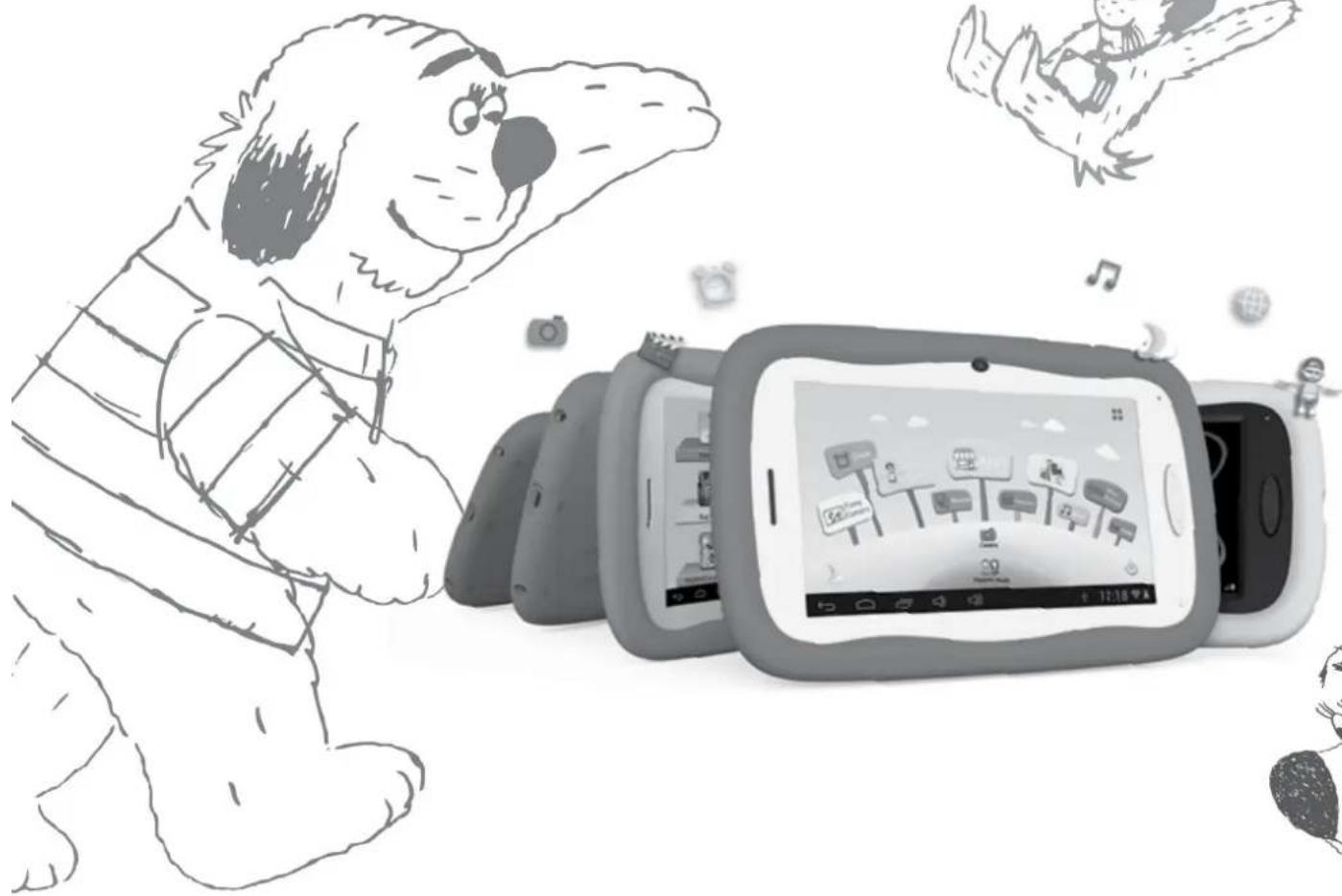
Illustration of a dog interacting with a smartphone displaying app icons, surrounded by floating devices and cartoon characters (no text or symbols)
TABLET
TABLET
TABLET
TABLET
TÁBLAGÉP
NÁVOD K POUŽITÍ
NÁVOD NA POUŽITIE
INSTRUKCJA OBSŁUGI
USER MANUAL
HASZNÁLATI UTASÍTÁS
OBSAH
BEZPEČNOSTNÍ UPOZORNĚNÍ 3
FUNKCE 4
TLAČÍTKA 5
PROVOZ
1.1: Kontrolka LED 5
1.8: USB Host (OTG) 15
1.4: RODIČOVSKÉ NASTAVENÍ
1.4.1.3: Správa aplikací
1.5.2.1: Abeceda

1.5.2.4: Minihry

Tablet (Mobile Internet Device)
typy: Gogen MAXPAD7,
1.8: USB Host (OTG) 32
1.2.2: Režim šetrenia energii a uzamknutia obrazovky.
1.4: RODIČOVSKÉ NASTAVENIE
1.4.1: Rodičovské nastavenie
1.4.1.1: Nastavenie doby pre vypnutie
- Tu sa nastavuje doba, po ktorej sa detský tablet vypne.
1.4.1.2: Nastavenie jasu displeja
1.4.1.4.3: Zabudnutie rodičovského hesla
1.4.1.4.4: Zabudnutie resetovacieho kódu
- Pokial' zabudnete i resetovací kód, pošlete prosím e-mail na adresu info@gogen.cz ako žiadost' o resetovací kód.
1.4.1.4.5: Zmena resetovacieho kódu
1.5.2.1: Abeceda

1.5.2.4: Minihry

Tablet (Mobile Internet Device)
typy: Gogen MAXPAD7,
1.4: USTAWIENIA RODZICIELSKIE
1.5.2.1: ABC
- Wybrać ikonę

1.5.2.4: Mini gry
• Wybrać ikone USB Connected
1.4: Parents Setting 57
1.4.1: Parents Setting
1.4.1.1: Power off time setting 57
1.4.1.2: Display brightness setting 58
1.4.1.3: App Manage 58
1.4.1.4: Parents Passcode Manage
1.4.1.4.1: Parents Passcode Change – First time 59
1.4.1.4.2: Parents Passcode Change – After first time change 59
1.4.1.4.3: Forgot Parents Passcode 59
1.4.1.4.4: Forgot Reset Code 60
1.4.1.4.5: Change Reset Code 60
1.4.1.5: Kids Passcode Manage
1.4.1.5.1: Kids Passcode Change 60
1.4.1.5.2: Forgot Kids Passcode 60
1.5: Children Mode 60
1.5.1: Icons & function 60
1.5.2: User Interface
1.5.2.1: ABC 61
1.5.2.2: Funny Camera 62
1.5.2.3: Family Sports 62
1.5.2.4: Mini Games 62
1.5.2.5: Apps 63
1.5.2.6: Photos 63
1.5.2.7: Music 63
1.5.2.8: Video 63
1.5.2.9: Camera 63
1.5.2.10: Calculator 63
1.5.2.11: Parents Mode 63
1.6: Factory Reset 64
1.7: WiFi Connection 65
1.8: USB Host (OTG) 65
1.9: File Copy/Transfer 65
1.10: System Settings 66
PRECAUTIONS
Follow these tips to preserve the operational lifespan of your Kids Tablet
- This device is neither break-proof nor water-proof. Please handle with care.
- It is recommended that you charge the device around 12 hours before using the device for the first time.
- Do not allow young children to charge your Kids Tablet
- Recommended AC adaptor spec: Input: 100-240V 50/60 Hz and Output: 5V, 1500 mA
- Please don't charge the Kids Tablet if the temperature is too high.
- If the device is nearly running out the battery, please charge it immediately.
- To keep the battery in good condition, please make sure to charge the power once per two weeks if you don't use this device for a long time.
- Do not use this Kids Tablet in extreme temperatures. Keep away from extreme hot, cold, dry, or damp areas. Also keep away from water, fire, and radiation.
- Do not disassemble your Kids Tablet
- Never force any cable connectors into the ports of your Kids Tablet or computer. Always make sure that your cable connectors are identical in shape and size before attempting to connect.
- When disconnecting your Kids Tablet from a computer, use the Safely Remove Device function on your computer. Do not disconnect your Kids Tablet while it is still transmitting data.
FEATURES
Operation System
- Android OS V4.1.1 preinstalled.
Wireless
• Built-in Wi-Fi 802.11b/g. Support USB _LAN
Display
- 7-inch Digital TFT Full Screen capacitive touch screen
- 800 x 480 pixels (16:9) display resolution
Cameras and Photos
- Features a 0.3 Megapixel front camera.
- Can use it for video conference through Skype, MSN or any other instant messenger. Easy to shoot and share photos and videos wherever you are.
Parental Controls
- Preloaded with educational content and games for kids
- Parents can easily pick and choose which Apps the kids are allowed to use;
- Parents can unlock device and turn it into a full-featured tablet
Video
- Supports all major video formats such as Flash player 10.1, Plays Flash player 10.1, AVI, RM, RMVB, WMV, MOV, MP4, DAT(VCD), VOB(DVD), MPEG, MPG, FLV, ASF, TS, 3GP, MPG etc. HD 1080P, WebM VP8 decoding video format files
Music Player
• The best music player ever.
• Gives music lovers an all-new audio and visual experience.
- Simply glide through favorite music by album covers and tap on the track list to play. Support all major music MP3, WMA, OGG, AAC, FLAC, APE, WAV
Power and Battery
• Built-in 2800mAh li-poly Battery
- Up to 3 hours of surfing the web on Wi-Fi, watching video, or listening to music
- Charging via power adapter or USB to computer system
Input/Output
- T- Flash Card slot
- mini 5p USB Jacket
- USB OTG port
• 3.5-mm stereo headphone mini jacket - DC Jacket
Windows System Requirements
• PC with USB 2.0 port
- Windows 7; Windows Vista; or Windows XP Home or Professional with Service Pack 3 or later
- Internet access
Size and Weight
• Size: 217.2mm×129mm×11.3mm
- Weight: 310g
We reserve the right to change technical specifications.
BUTTONS
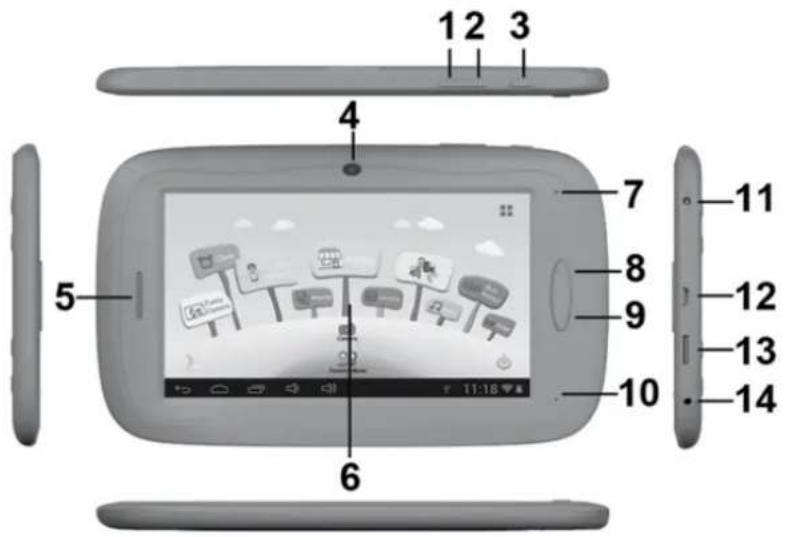
- VOL-
- VOL+
- Power
- Camera
- Speaker
- Screen
- LED Indicator
- Home button
- ESC(Back button)
- MIC
- DC jacket
- USB2.0 mini jacket / USB 2.0 OTG port
- T-flash card slot
- Earphone Jacket
OPERATION
1.1: LED INDICATOR
• Working: Blue LED Indicator
• Charging: Red LED indicator
• Fully Charged: Red LED Indicator turns to Blue LED Indicator
1.2: SWITCH ON/OFF
1.2.1: Switch On and Unlock:
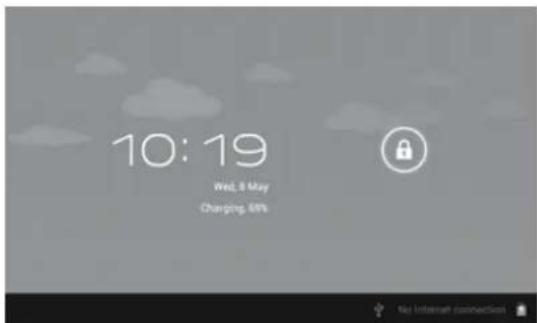
- When the device is in the OFF mode, press and hold "Power" key for 3 seconds to enter the Android startup progress bar, it need about 28 seconds enter to the system desktop, when the LCD is under locked mode, please press and pull the icon to the green point, then the LCD will unlocked automatically, see the figures below,
1.2.2: Power Saving Modes and lock screen:
- Press the "POWER" key shortly after starting up, system enter to power save and lock mode.
- Press the "POWER" key or tap the touch screen, system will return to bright in 1 second
- The primary operation of the device will not stop under the power save mode, just the LCD is shut and with black screen. For example: playing music, movie, etc
- Switch OFF: When the device is in the OFF mode, press and hold the "POWER" key for 3 seconds, the screen will display the power off interface, choose the power off item to confirm, the system will shut automatically
Note: When the device with low battery it will alarm continuous and shut automatically without charging. If the device can not start up please check if the battery is low, and try it again after the battery is charged.
1.3: MAIN MENU
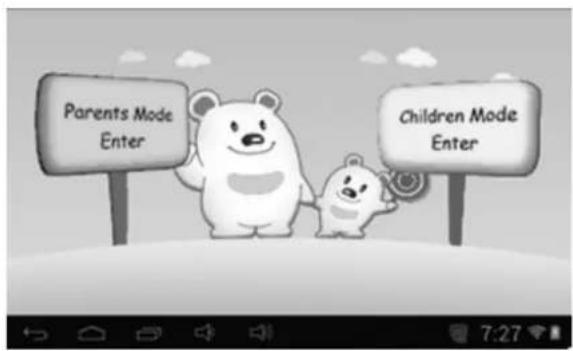
1.3.1: Parents Mode Enter
Parents Mode Login:
- Choose "Parents Mode Enter". You are requested to enter the 4-digital Passcode factory default: 8888
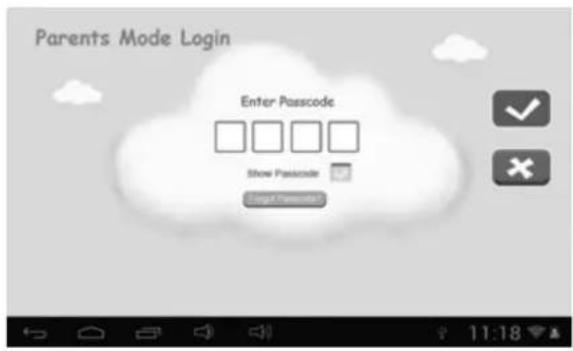
Show Passcode : To display Passcode, please tick


: Wrong Passcode inputted
: Correct Passcode and Login
: Return to last menu
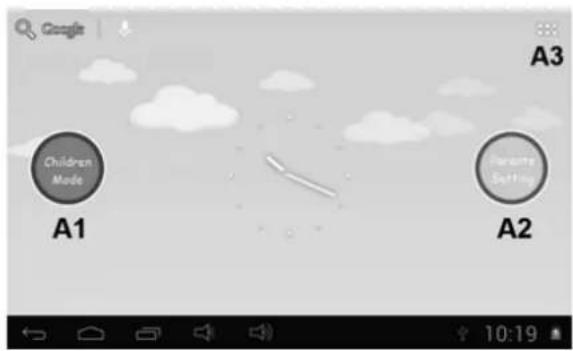
- Once Passcode correctly inputted. it will go to,
A1: Children Mode
A2: Parents Setting
A3: Android OS
1.3.2: Children Mode Enter
Children Mode Login:
- Choose "Children Mode Enter". You are requested to enter the 4-digital Passcode factory default: 8888
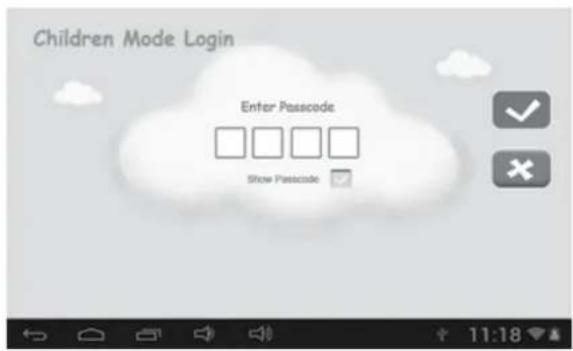
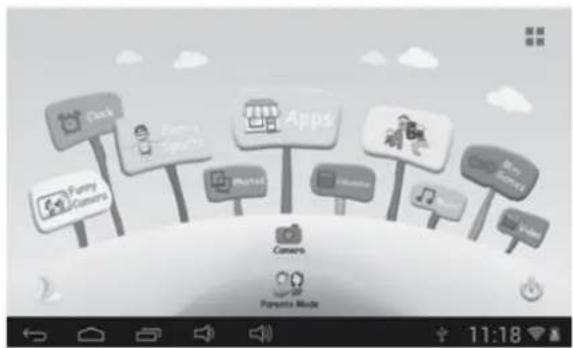
- Once Passcode correctly inputted. it will go to,
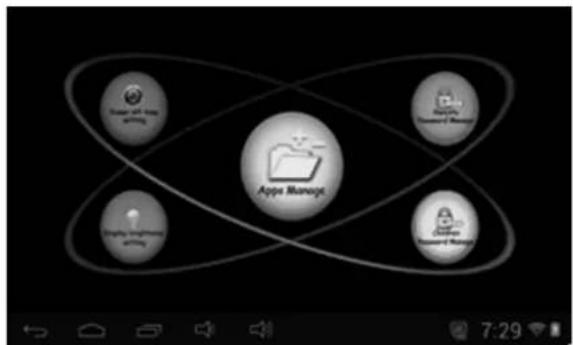
1.4: PARENTS SETTING
1.4.1: Parents Setting
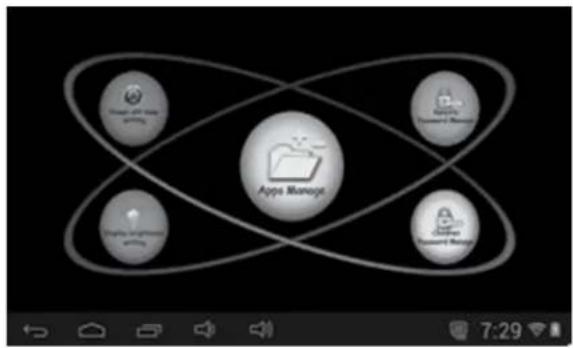
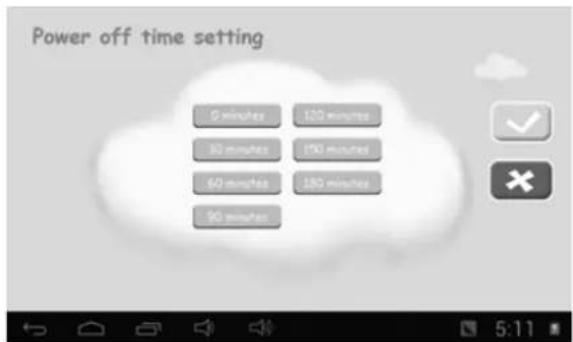
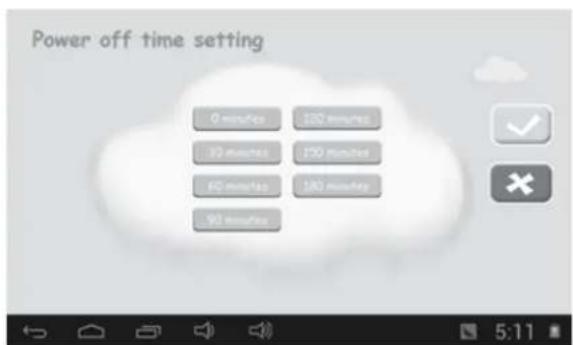
1.4.1.1: Power off time setting
• This is to choose the power off time of the Kids Tablet.
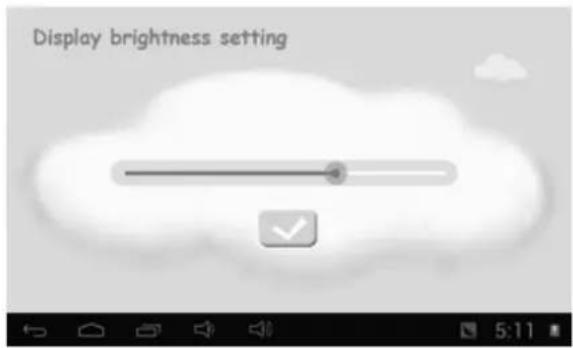
1.4.1.2: Display brightness setting
• To adjust the brightness of the display.
1.4.1.3: App Manage
- These Apps are installed under Android Operation System or Children Mode Tick (√) any Apps you want your children to access.
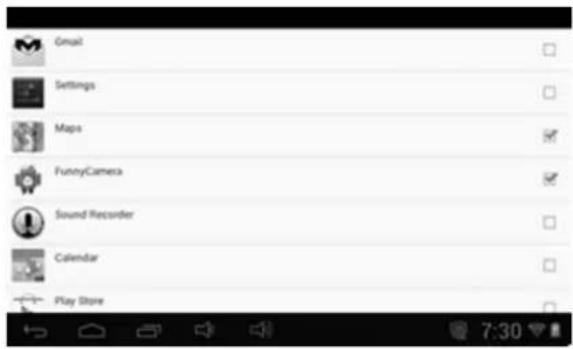
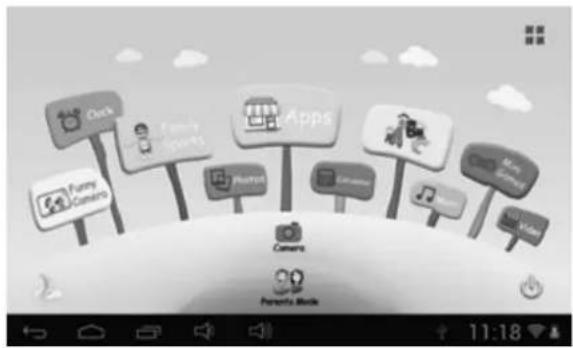
- Chosen Apps will be seen in Children Mode at
1.4.1.4: Parents Passcode Manage
1.4.1.4.1: Parents Passcode Change – First time
- For the first time Parents Passcode change. You are requested to set Reset Code. You will need the Reset Code to reset the Parent Passcode if you forget your Parents Passcode. Please don't lose the Reset Code.
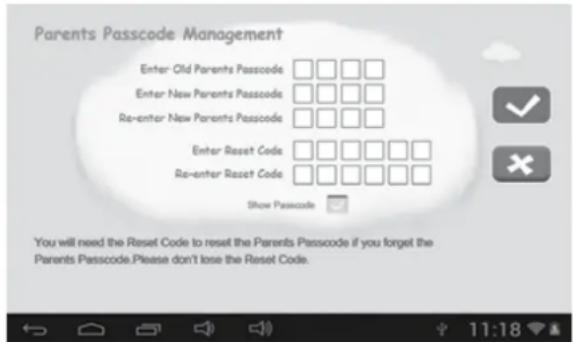
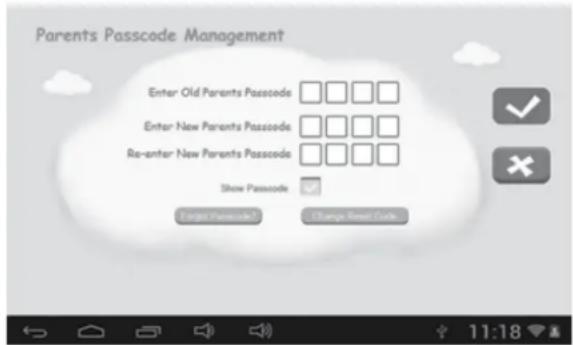
1.4.1.4.2: Parents Passcode Change – After first time change
- Change your Parents Passcode after first time change.
1.4.1.4.3: Forgot Parents Passcode
- If you forget the Parents Passcode, please enter the Reset Code
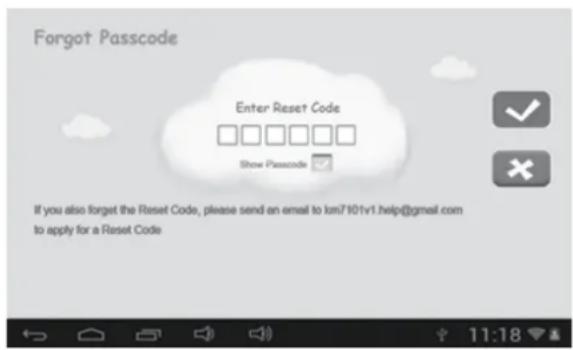
- Once you enter the Reset code. Your Parents Passcode will automatically reset to factory Passcode 8888
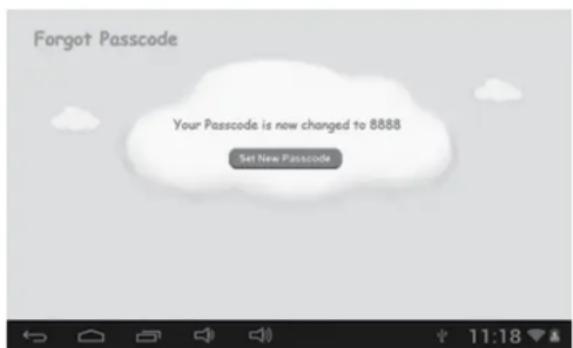
1.4.1.4.4: Forgot Reset Code
- If you also forget the Reset Code. Please send an email to info@gogen.cz to apply for a Reset Code
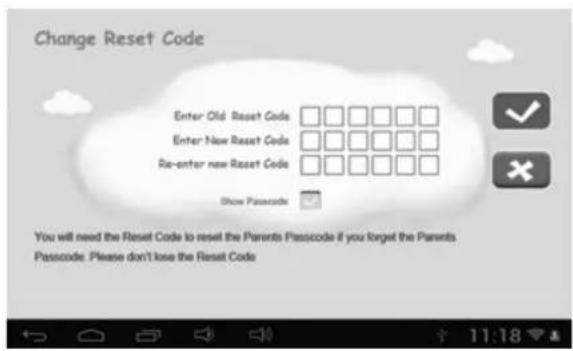
1.4.1.4.5: Change Reset Code
- Change your Reset code (either your own Reset Code or the Reset Code you got from info@gogen.cz).
1.4.1.5: Kids Passcode Manage
1.4.1.5.1: Kids Passcode Change
- You can change your Kids Passcode.
1.4.1.5.2: Forgot Kids Passcode
- You can change Kids Passcode freely by using Parents Passcode if you forgot your kids Passcode
1.5: CHILDREN MODE
1.5.1: Icons & function
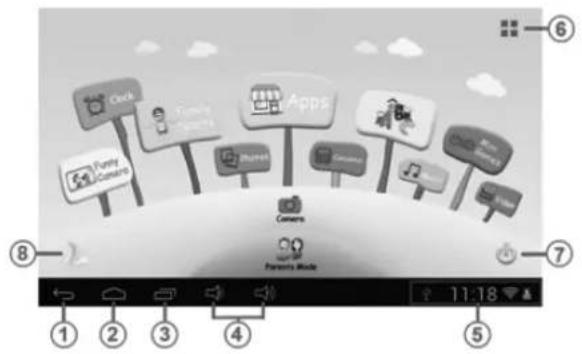
- Back to last menu
- Back to Children Mode Main Menu
- Children Mode: No function Android OS: Go to history window.
- VOL - & VOL +
- Battery Icon, Time Icon
- Apps
- Power Off
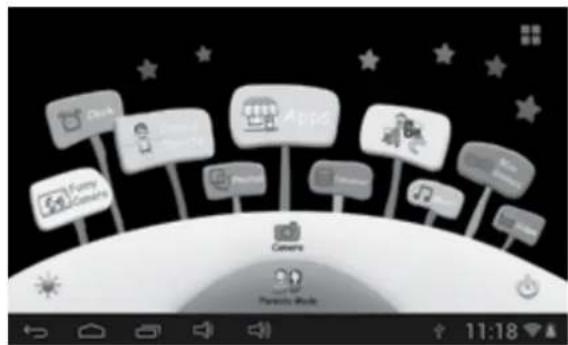
- Background Change

Manually change to day-background.

Manually change to night-background.
It will automatically change to day-background from 6:00am- 18:00p.m and night-background from 18:01pm- 5:59a.m
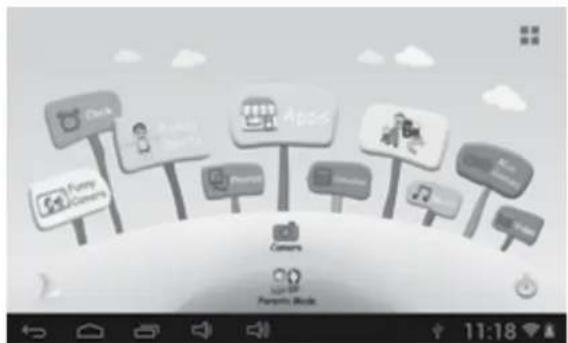
(Day - Background) (Night - background)
1.5.2: User Interface
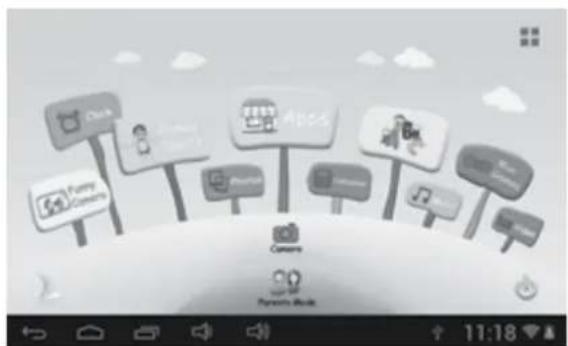
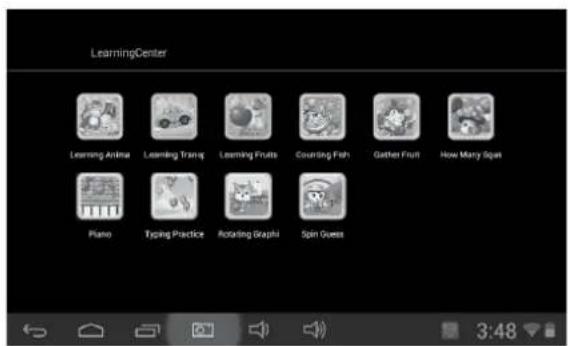
1.5.2.1: ABC

These three educational contents teach children Animals, Transportation and Fruits, etc.
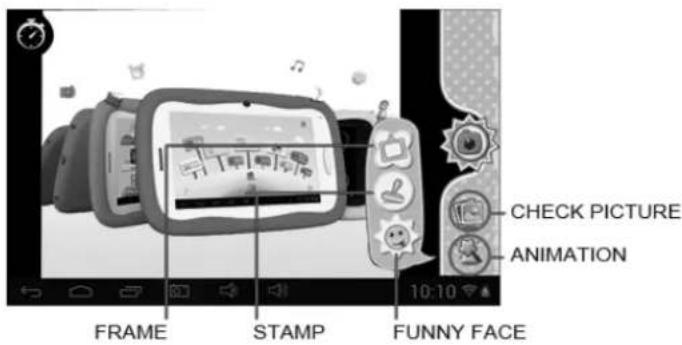
1.5.2.2: Funny Camera

• There are 3 kinds of animation elements for choices
- Photo Frame model: 21 kinds of animation elements for your choice.
- Stamp model: 16 kinds of animation elements for your choice.
- Funny Face model: 11 kinds of animation elements for your choice.
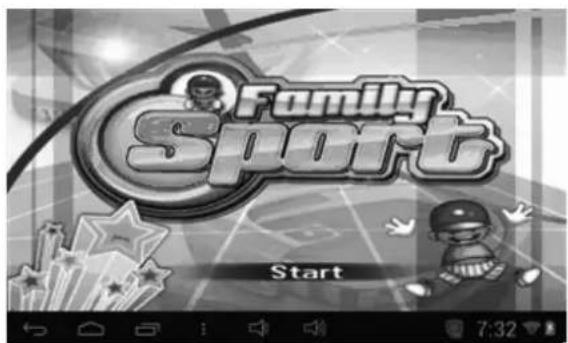
1.5.2.3: Family Sports

There are 9 Sport games pre-loaded. All these 9 games are fantastic Olympic games
1.5.2.4: Mini Games

There are 50 mini games pre-loaded.
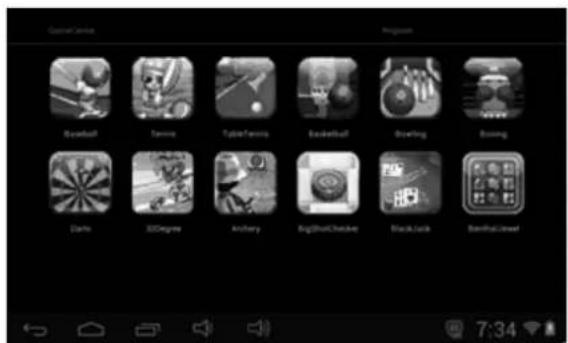
1.5.2.5: Apps

Apps is the manager of all the Apps selected by Parents and allowed children to use it Explained more in 1.4.1.3 App Manager
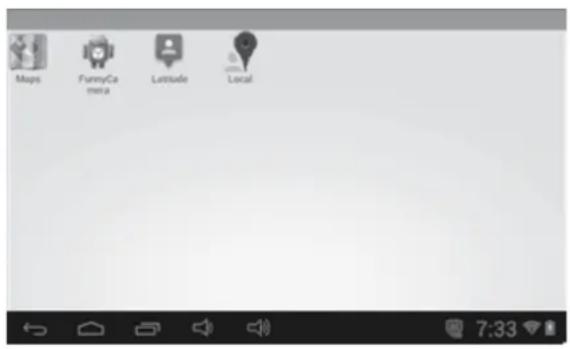
1.5.2.6: Photos

- Choose to enter the picture viewer interface
- If there are no files in the photo list, the system will automatically load the image files from the memory card to the photo list when the picture viewer is started.
- Open the corresponding folder, find the image file and add the picture you want
- Browse through the lists of music and tap the selected song to start playing it.
1.5.2.7: Music

- Choose to enter music player interface.
- Browse through the lists of music and tap the selected song to start playing it.
1.5.2.8: Video

- Choose to enter the video player interface.
- If there are no video files in the video player playlist yet, the system will automatically load the video files from the memory card to the playlist when the video player is started.
- Drag the playback progress bar to adjust video playback progress.
1.5.2.9: Camera

Features a 0.3 Megapixel front camera. Can use it for video conference through Skype, MSN or any other instant messenger. Easy to shoot and share photos and videos wherever you are.
1.5.2.10: Calculator

1.5.2.11: Parents Mode

1.6: FACTORY RESET
• We strongly suggest you not to factory reset your kids tablet
- If for any reason you have to factory reset your kids tablet.
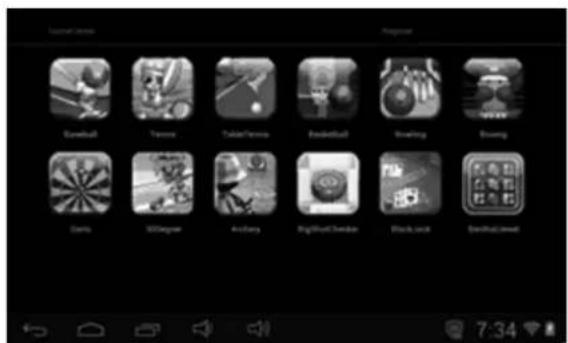
you are required to re-register Family Sports, ABC, Mini Games where under Children Mode
- Following steps will teach you how to re-register them,
Step 1: Parents Mode → Android OS → Setting → WIFI → Put "ON" → Back
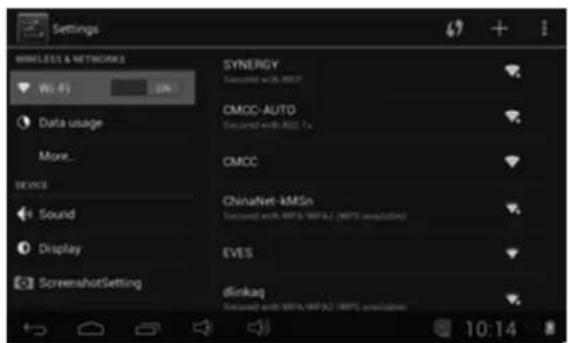
Step 2: Enter Family Sports or ABC or Mini Games. It will show below, Choose" Exit"
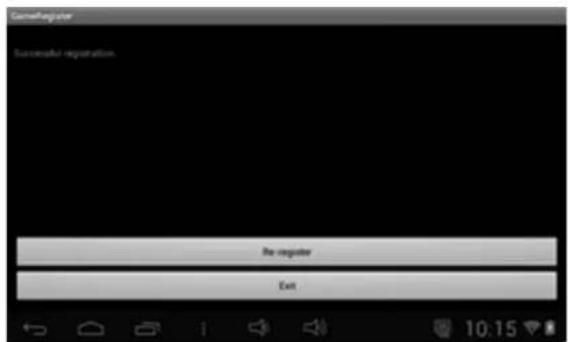
Step 3: Re-register is finished (example below)
1.7: WIFI CONNECTION
- The device support Wi-Fi network and external 3G network.
- Turn on Wi-Fi, and Press Wi-Fi settings. The device will scans automatically for available Wi-Fi Network.
- Choose the Wi-Fi network that you want to connect to.
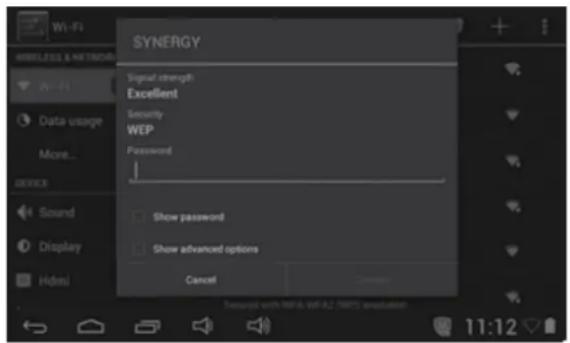
- Press Connect. Some network may need you input the password.
- On the Wi-Fi settings screen, press the Menu key, touch Advanced, you will get more settings for Wi-Fi.
- WIFI connection is not available under Children Mode. WIFI connection can only be used under Children Mode once Parents ticked WIFI APK and allowed Children to use it (check 1.4.1.3: App Manager)
1.8: USB HOST (OTG)
- The Mini USB on the device can be used as USB Host.
- Read U-disk:
Insert the U-disk into the HOST port, press the Resource manager in the desktop, press USB enter into u-disk.
1.9: FILE COPY/TRANSFER
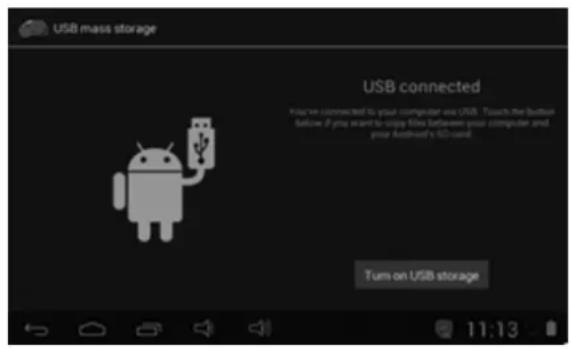
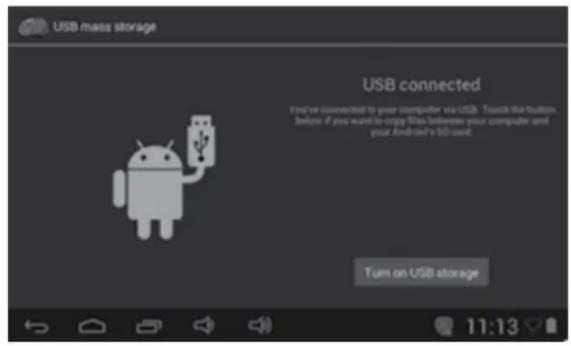
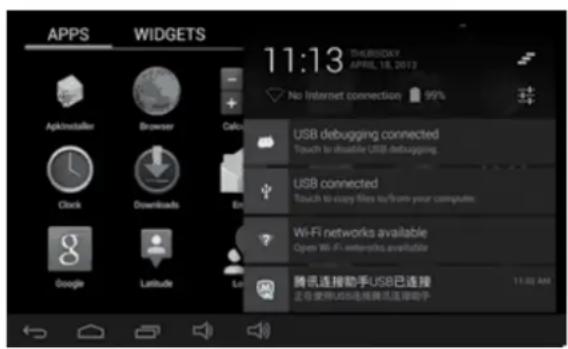
- Connect the device to computer by USB Cable, there will be notification in the status bar that USB connected.

- Choose USB Connected
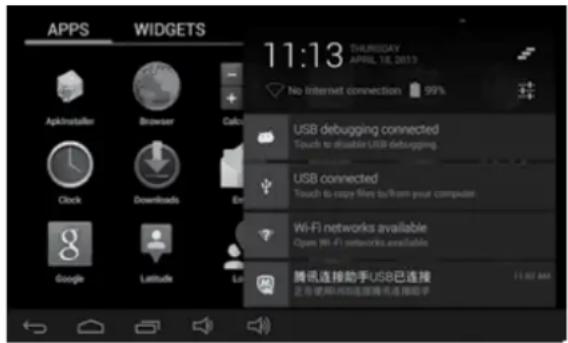
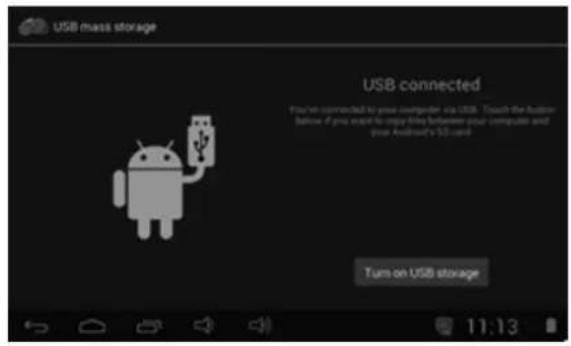
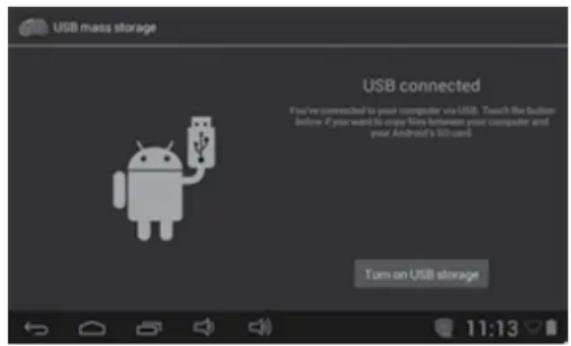
- Choose USB Connected. Then, Turn on USB storage.
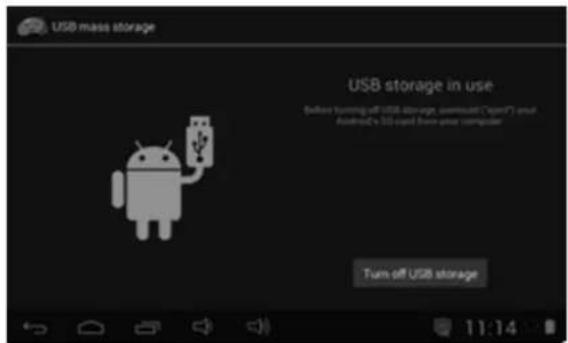
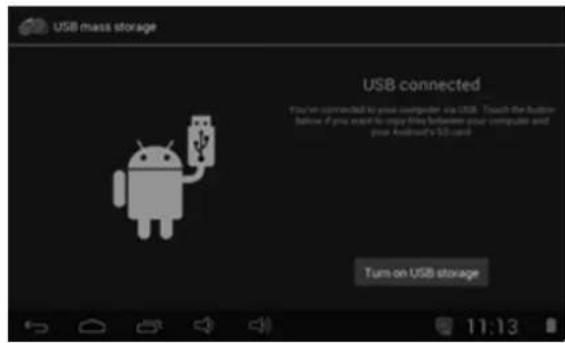
- The left picture shows that device storage content could be viewed and modified from computer.
- The right picture means that device storage content could NOT be viewed or modified from computer.
1.10: SYSTEM SETTINGS
Click setting icon 📄 to enter system settings, then you can change wireless & networks, sound, display, location & security, Applications, Storage, language & input, voice input & output, and date & time.
- Wireless & Networks Setting: Please refer to "7- Internet Access"
- Sound Setting: You can adjust Silent mode, Volume, Notification ringtone, Audible selection, Screen lock sounds, and Haptic feedback.
• Display Setting: You can adjust Brightness, Auto-rotate screen, Animation, Screen timeout. - Storage Setting: In this setting, you can check storage use and Mount & Erase TF cards.
- Battery Setting: check storage battery usage.
- Apps Setting: You can manage applications here, and check storage & battery usage.
- Security Setting: In this Setting, you can set up screen lock and device administrators, as well as TF card password.
- Privacy Setting: In this setting, you can back up data, and reset factory default.
- Language & input: In this setting, you can change the language of system, and choose Keyboard inputs.
Notice: If you have installed an input and you want to use it, please remember to turn on it in this setting (All inputs could be turned on here). Long Press the blank where you want to type, there will be popup to choose inputs.
- Date & time Setting: In this setting, you can adjust date and time.
- About tablet: Check device information.

WARNING: Do not use this product near water, in wet areas to avoid fire or injury of electric current. Always turn off the product when you don't use it or before a revision. There aren't any parts in this appliance which are reparable by consumer. Always appeal to a qualified authorized service. The product is under a dangerous tention.
Old electrical appliances, used batteries and accumulators disposal
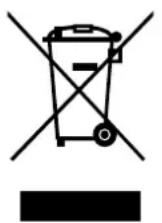
This symbol appearing on the product, on the product accessories or on the product packing means that the product must not be disposed as household waste. When the product/ battery durability is over, please, deliver the product or battery (if it is enclosed) to the respective collection point, where the electrical appliances or batteries will be recycled. The places, where the used electrical appliances are collected, exist in the European Union and in other European countries as well. By proper disposal of the product you can prevent possible negative impact on environment and human health, which might otherwise occur as a consequence of improper manipulation with the product or battery/ accumulator. Recycling of materials contributes to protection of natural resources. Therefore, please, do not throw the old electrical appliances and batteries/ accumulators in the household waste. Information, where it is possible to leave the old electrical appliances for free, is provided at your local authority, at the store where you have bought the product. Information, where you can leave the batteries and accumulators for free, is provided to you at the store, at your local authority.
CE DECLARATION OF CONFORMITY
The manufacturer (authorised representative):
ETA a. s., Zelený pruh 95/97, 147 00 Praha 4 – Braník, Company Identification No.: 275 44 001,
hereby declares that the hereinafter described product:
Tablet (Mobile Internet Device)
types: Gogen MAXPAD7
Purpose of use: signal transmission from the transmitting device to the receiving device in the Czech Republic and in the EU member states, used frequency 2412 – 2472 MHz band
is in conformance with the provisions of the GD No. 426/2000 Coll. that is in conformity with the R&TTE Directive 1999/5/EC concerning radio and telecommunication devices and in accordance with the provisions of Government Decree No. 481/2012 Coll., which is in accordance with the Directive 2011/65/EU on the restriction of the use of certain hazardous substances in electrical and electronic equipment.
The following technical regulations have been applied in assessing the conformance:
Harmonised standards:
EN 300 328 V1.7.1 (2006-10)
EN 301 489-1 V1.9.2 (2011-09)
EN 301 489-17 V2.2.1 (2012-09)
EN 62479:2010
EN 55022:2010
EN 55024:2010
EN 60950-1:2006+A11:2009+A1:2010+A12:2011
The test results are provided in the Test Reports No. NTEK-2013NT0427065H, No. NTEK-2013NT0427065S, No. NTEK-2013NT0427065R, No. NTEK-2013NT0427065E, No. NTEK-2013NT0427066R issued by the Shenzhen NTEK Testing Technology Co., Ltd, China.
We declare that the product complies with the basic requirements of the above-mentioned GD, i.e. the user safety and health protection, electromagnetic compatibility and effective utilisation of the spectrum.
Declaration issuance date and venue: 30. 7. 2013, Zlín
Authorised person's stamp:
MÜKÖDÉS
ÓVINTÉZKEDÉSEK 70
JELLEMZÖK 71
GOMBOK 72
MÜKÖDÉS 72
1.3.1: Szülői mód
1.5.2.1: ABC

natural_image
Cartoon illustration of a smiling character riding a car with a girl waving nearby (no text or symbols)DOPRAVNI VYCHOVA PRO DĚTI
natural_image
Cartoon illustration of two smiling characters interacting with a bowl and apple (no text or symbols)MALÝ ZÁCHRANÁŘ
natural_image
Cartoon character with a large black-and-white dog face and raised hand, wearing a vest (no text or symbols)ANIMOVANÁ PRVNÍ POMOC
natural_image
Abstract black and white logo with a stylized white 'S' inside a circle (no text or symbols)GoGEN
natural_image
Simple line drawing of a girl riding a large dog with a bow (no text or symbols)- GoGEN
- OBSAH
- BEZPEČNOSTNÍ UPOZORNĚNÍ 3
- FUNKCE 4
- TLAČÍTKA 5
- PROVOZ
- 1.4: RODIČOVSKÉ NASTAVENÍ
- 1.4.1.3: Správa aplikací
- 1.5.2.1: Abeceda
- 1.5.2.4: Minihry
- 1.2.2: Režim šetrenia energii a uzamknutia obrazovky.
- 1.4: RODIČOVSKÉ NASTAVENIE
- 1.4.1.1: Nastavenie doby pre vypnutie
- 1.4.1.2: Nastavenie jasu displeja
- 1.4.1.4.3: Zabudnutie rodičovského hesla
- 1.4.1.4.4: Zabudnutie resetovacieho kódu
- 1.4.1.4.5: Zmena resetovacieho kódu
- 1.4: USTAWIENIA RODZICIELSKIE
- 1.5.2.1: ABC
- 1.5.2.4: Mini gry
- 1.4.1: Parents Setting
- 1.4.1.4: Parents Passcode Manage
- 1.4.1.5: Kids Passcode Manage
- 1.5.2: User Interface
- PRECAUTIONS
- FEATURES
- Operation System
- Wireless
- Display
- Cameras and Photos
- Parental Controls
- Video
- Music Player
- Power and Battery
- Input/Output
- Windows System Requirements
- Size and Weight
- BUTTONS
- OPERATION
- 1.1: LED INDICATOR
- 1.2: SWITCH ON/OFF
- 1.2.1: Switch On and Unlock:
- 1.2.2: Power Saving Modes and lock screen:
- 1.3: MAIN MENU
- 1.3.1: Parents Mode Enter
- Parents Mode Login:
- 1.3.2: Children Mode Enter
- Children Mode Login:
- 1.4: PARENTS SETTING
- 1.4.1.1: Power off time setting
- 1.4.1.2: Display brightness setting
- 1.4.1.3: App Manage
- 1.4.1.4.1: Parents Passcode Change – First time
- 1.4.1.4.2: Parents Passcode Change – After first time change
- 1.4.1.4.3: Forgot Parents Passcode
- 1.4.1.4.4: Forgot Reset Code
- 1.4.1.4.5: Change Reset Code
- 1.4.1.5.1: Kids Passcode Change
- 1.4.1.5.2: Forgot Kids Passcode
- 1.5: CHILDREN MODE
- 1.5.1: Icons & function
- 1.5.2.2: Funny Camera
- 1.5.2.3: Family Sports
- 1.5.2.4: Mini Games
- 1.5.2.5: Apps
- 1.5.2.6: Photos
- 1.5.2.7: Music
- 1.5.2.8: Video
- 1.5.2.9: Camera
- 1.5.2.10: Calculator
- 1.5.2.11: Parents Mode
- 1.6: FACTORY RESET
- 1.7: WIFI CONNECTION
- 1.8: USB HOST (OTG)
- 1.9: FILE COPY/TRANSFER
- 1.10: SYSTEM SETTINGS
- Old electrical appliances, used batteries and accumulators disposal
- CE DECLARATION OF CONFORMITY
- MÜKÖDÉS
- ÓVINTÉZKEDÉSEK 70
- JELLEMZÖK 71
- GOMBOK 72
- MÜKÖDÉS 72
- 1.3.1: Szülői mód
- DOPRAVNI VYCHOVA PRO DĚTI
- MALÝ ZÁCHRANÁŘ
- ANIMOVANÁ PRVNÍ POMOC
Brand : GoGen
Model : MAXPAD 7O
Category : Tablet