MAXPAD9G3 - Tablet GoGen - Free user manual and instructions
Find the device manual for free MAXPAD9G3 GoGen in PDF.


| Product Type | Kids Tablet |
| Model | MAXPAD9G3 |
| Brand | GoGen |
| Operating System | Android 4.4.4 |
| Display | 9-inch HD capacitive touch screen, 1024x600 pixels (16:9) |
| Front Camera | 0.3 Megapixels |
| Rear Camera | 2.0 Megapixels |
| Battery | 3500 mAh Li-Polymer; up to 3 hours gaming/video (Wi-Fi off) |
| Wireless Connectivity | Wi-Fi 802.11b/g/n, supports USB LAN |
| Ports | Micro USB 2.0 (OTG), 3.5 mm headphone jack, T-Flash card slot |
| Dimensions | 246.5 x 156.5 x 11.6 mm |
| Weight | 485 g |
| Power Adapter | Input: 100-240V 50/60Hz; Output: 5V, 2000 mA |
| Parental Controls | SIMBA™ – up to 4 child accounts, time limits, app selection, web filtering |
| Pre-loaded Content | 15 educational apps, 9 sport games, 50 mini games, funny camera, drawing tools |
| Kids Mode Interfaces | Two user interface types (day/night background) |
| Video Playback | Supports HD 1080p (AVI, MP4, MOV, etc.) |
| Audio Playback | MP3, WMA, OGG, AAC, FLAC, APE, WAV |
| Certifications | Compliant with R&TTE directive 1999/5/EC |
Frequently Asked Questions - MAXPAD9G3 GoGen
User questions about MAXPAD9G3 GoGen
0 question about this device. Answer the ones you know or ask your own.
Ask a new question about this device
Download the instructions for your Tablet in PDF format for free! Find your manual MAXPAD9G3 - GoGen and take your electronic device back in hand. On this page are published all the documents necessary for the use of your device. MAXPAD9G3 by GoGen.
USER MANUAL MAXPAD9G3 GoGen
natural_image
Abstract logo design with white stylized 'S' inside a circle on black background (no text or symbols)MAXPAD9G3
GoGEN
natural_image
Cartoon illustration of a dog wearing a striped shirt, sitting with one hand pointing at it (no text or symbols present)
natural_image
Cartoon illustration of a person falling with balloons, no text or symbols present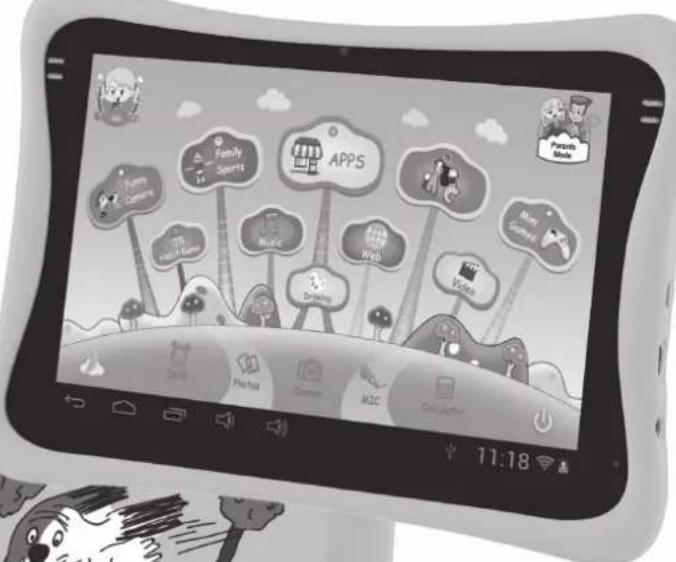
natural_image
Cartoon illustration of a dog driving on a car with motion lines and trees (no text or symbols)
TABLET
TABLET
TABLET
TABLET
TÁBLAGÉP
NÁVOD K POUŽITÍ
NÁVOD NA POUŽITIE
INSTRUKCJA OBSŁUGI
USER MANUAL
HASZNÁLATI UTASÍTÁS
OBSAH
BEZPEČNOSTNÍ UPOZORNĚNÍ 3
FUNKCE....3
TLAČÍTKA....5
PROVOZ 5


- Datum narození:
- Avatar

1.4.3: Nastavení
1.4.3.1: Wi-Fi
1.4.3.2: Jas displeje
1.4.4: Jazyk
1.5: DĚTSKÝ REŽIM
1.5.3.1: ABC

1.5.3.4: Minihry

1.5.3.5: Kreslení

natural_image
Illustration of a game controller with icons and control buttons (no text or symbols)1.5.3.6: Aplikace

1.5.3.7: Internet

1.5.3.8: Hudba

1.6: RESETOVÁNÍ NA NASTAVENÍ Z VÝROBY

1.4.1.1: Informácie o diet'ati
• Dátum narodenia:
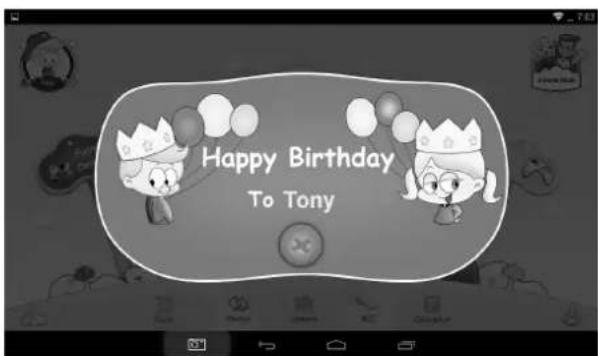
- Pri narodeninách diet'at'a tabliet automaticky prehrá melódiu „Happy Birthday“ spolu s dialógovým oknom s prianím diet'at'u.
- Avatar
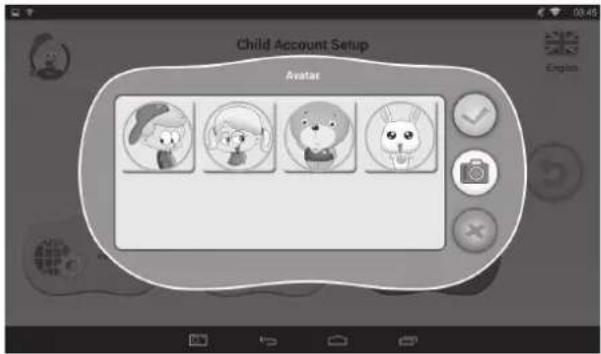

yberte jeden obrázok a potvrd'te.

končit' a zavriet' dialógové okno.

1.4.2.3: Zabudnuté rodičovské heslo
1.4.3: Nastaveni
1.4.3.1: Wi-Fi
1.4.4: Jazyk
1.5: DETSKÝ REŽIM
1.5.1: Užívatel'ské rozhranie – typ 1
1.5.3.1: ABC
1.5.3.4: Minihry

1.5.3.5: Kreslenie

natural_image
Illustration of a game controller with icons on the screen and toolbar, no text or symbols present.1.5.3.6: Aplikácie

1.5.3.7: Internet

1.5.3.8: Hudba

1.6: RESETOVANIE NA NASTAVENIE Z VÝROBY
Krok 2: Rodičovský režim → OS Android → Nastavenie → WIFI → Nastavenie „Zap.“ → Spät’.
- Vyberte Pripojenie USB. Potom zapnite pamät'ové zariadenie USB.


• Data urodzenia:
- Avatar

1.4.3: Ustawienia
1.4.3.1: Wi-Fi
1.4.4: Język
1.5: TRYB DZIECIĘCY
1.5.3.1: ABC
1.5.3.2: Zabawny aparat

1.5.3.4: Gry mini

1.5.3.5: Rysowanie

natural_image
Illustration of a game controller with icons and control buttons (no text or symbols)1.5.3.6: Aplikacje

1.5.3.9: Muzyka

1.6: PRZYWRACANIE USTAWIEN FABRYCZNYCH
1.9: KOPIOWANIE / TRANSFER PLIKÓW
1.2.1: Switch On and Unlock 65
1.2.2: Power Saving Mode and Lock Screen 66
1.2.3: Switch Off....66
1.2.4: Low Battery 66
1.3: Main Menu 66
1.3.1: Entering Children Mode 66
1.3.2: Entering Parents Mode 67
1.4: Parents Mode 67
1.4.1: Children Accounts Setup 68
1.4.1.1: Child Information....68
1.4.1.2: Apps Selection 69
1.4.1.3: Internet Access 70
1.4.1.4: Time Limits....70
1.4.1.5: Statistics 71
1.4.2: Parents Passcode Management....71
1.4.2.1: Parents Passcode Change – the first time 71
1.4.2.2: Parents Passcode Change – after the first time 71
1.4.2.3: Forgot Parents Passcode 72
1.4.2.4: Forgot Reset Code 72
1.4.2.5: Change Reset Code 72
1.4.3: Settings 72
1.4.3.1: Wi-Fi 73
1.4.3.2: Display Brightness 73
1.4.3.3: Date & Time 73
1.4.3.4: Connection (Children Mode)....73
1.4.4: Language 74
1.4.5: Exit to Android 74
1.5: Children Mode 74
1.5.1: User Interface – Type 1....74
1.5.2: User Interface – Type 2....75
1.5.3: Kids Contents 75
1.5.3.1: ABC 76
1.5.3.2: Funny Camera 76
1.5.3.3: Family Sports....76
1.5.3.4: Mini Games....77
1.5.3.5: Drawing....77
1.5.3.6: Apps....77
1.5.3.7: Web....77
1.5.3.8: Music 78
1.5.3.9: Video....78
1.5.3.10: Clock/Mic/Calculator/Photos 78
1.5.3.11: Parents Mode....78
1.5.3.12: Children Mode 78
1.5.4: Exit Children Mode 78
1.6: Factory Reset 78
1.7: Wi-Fi Connection 78
1.8: USB host (OTG) 79
1.9: File Copy/Transfer 79
1.10: System Settings....80
PRECAUTIONS
Follow these tips to preserve the operational lifespan of your Kids Tablet.
- This device is neither break-proof nor water-proof. Please handle with care.
- It is recommended that you charge the device around 12 hours before using the device for the first time.
- Do not allow young children to charge your Kids Tablet.
- Recommended AC adaptor spec: Input: 100 – 240 V 50/60 Hz and Output: 5 V, 2000 mA
- Please don't charge the Kids Tablet if the temperature is too high.
- If the device is nearly running out the battery, please charge it immediately.
- To keep the battery in good condition, please make sure to charge the power once per two weeks if you don't use this device for a long time.
- Do not use this Kids Tablet in extreme temperatures. Keep away from extreme hot, cold, dry, or damp areas. Also keep away from water, fire, and radiation.
- Do not disassemble your Kids Tablet.
- Never force any cable connectors into the ports of your Kids Tablet or computer. Always make sure that your cable connectors are identical in shape and size before attempting to connect.
- When disconnecting your Kids Tablet from a computer, use the Safely Remove Device function on your computer. Do not disconnect your Kids Tablet while it is still transmitting data.
FEATURES
Operation System
- Android 4.4.4
Wireless
• Built-in Wi-Fi 802.11b/g/n. Support USB LAN.
Display
• 9-inch Digital High Definition capacitive touch screen
• 1024 x 600 pixels (16:9) display resolution
Cameras and Photos
- Features a 0.3 Megapixel front camera.
- Can use it for video conference through Skype, MSN or any other instant messenger. Easy to shoot and share photos and videos wherever you are.
- Features a 2.0 Mega pixels rear camera. Easy to shoot and share photos and videos wherever you are. Tap to control exposure for video or stills.
Parental Controls
- SIMBA™ Parental Controls: Most advanced yet user-friendly parental controls software.
- Up to 4 children accounts are supported. Parents can set specific time limits on each child's tablet use.
- Parents can also pick and choose which Apps or games each child is allowed to run.
- Web filtering allows parents to limit which websites each child can visit.
- Provide two different User Interfaces for choice
- Pre-loaded with 15x educational software, 9x Sport Games, 1x Photography game and 50x mini games.
- Parents Mode: parents can unlock device and turn it into a full-featured Android tablet.
Video
- Supports all major video formats such as Flash player 10.1, Plays Flash player 10.1, AVI, WMV, MOV, MP4, DAT (VCD), MPEG, MPG, FLV, ASF, TS, 3GP, MPG etc HD 1080p, video format files.
Music Player
• The best music player ever.
• Gives music lovers an all-new audio and visual experience.
- Simply glide through favorite music by album covers and tap on the track list to play. Support all major music MP3,WMA, OGG,AAC, FLAC,APE, WAV.
Power and Battery
• Built-in 3500 mAh Li-poly Battery.
- Up to 3 hours playing games or watching video, without Wi-Fi.
- Charging via power adapter or USB to computer system (not recommended).
Input / Output
- T-Flash Card slot
• USB 2.0 Micro USB / USB OTG port
• 3.5-mm stereo headphone mini jacket
Windows System Requirements
• PC with USB 2.0 port
- Windows 7; Windows Vista; or Windows XP Home or Professional with Service Pack 3 or later
- Internet access
Size and Weight
• Size: 246.5 mm x 156.5 mm x 11.6 mm
- Weight: 485 g
We reserve the right to change technical specifications.
BUTTONS
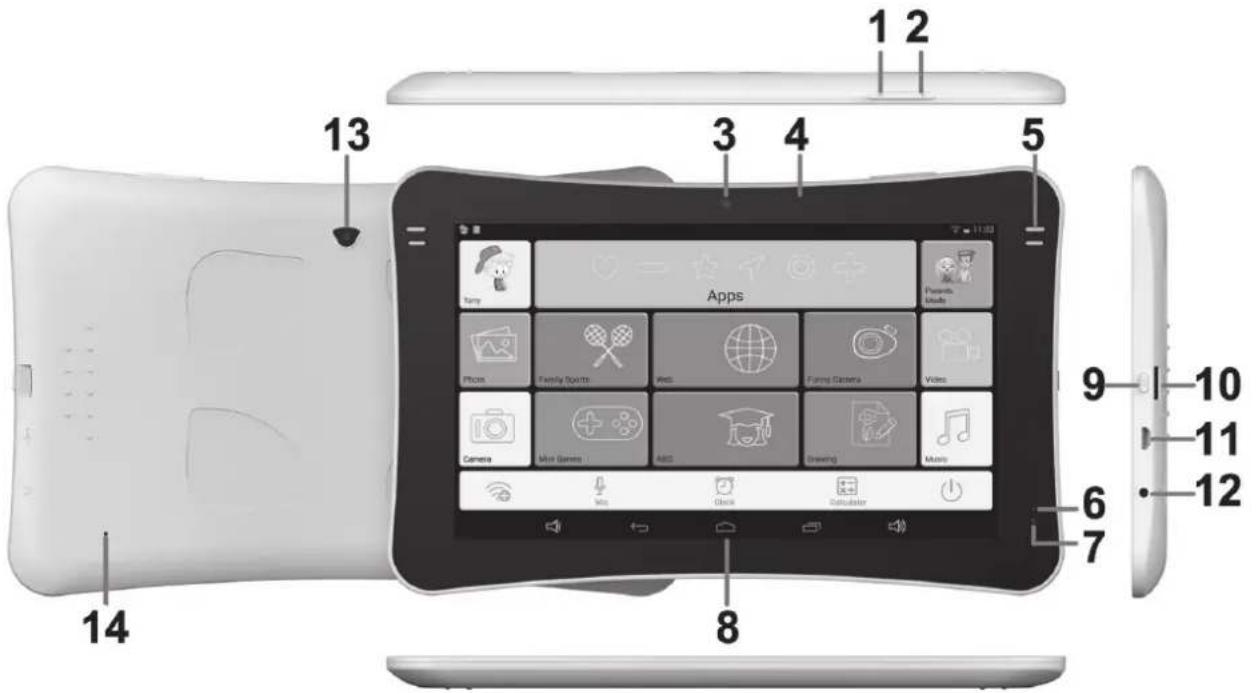
- VOL -
- VOL +
- 0.3 Megapixel front camera
- Display
- Speaker
- MIC
-
LED Indicator
-
Screen
- Power
- T-flash card slot
- USB 2.0 Micro USB / USB OTG port
- Earphone Jacket
- 2.0 Mega pixels rear camera
- RESET
OPERATION
1.1: LED INDICATOR
• Working: Red LED indicator
1.2: SWITCH ON / OFF
1.2.1: Switch On and Unlock
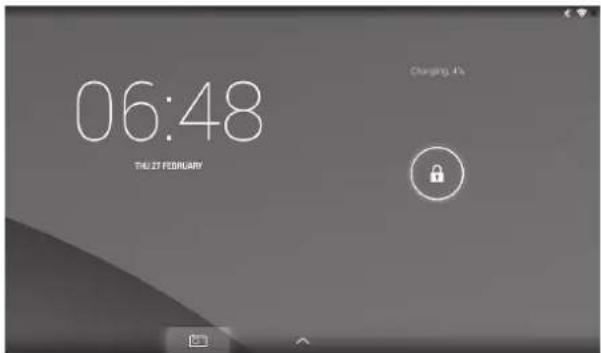
- When the device is in the OFF mode, press and hold "Power" button for 3 seconds to enter the Android startup progress bar. It takes about 28 seconds to enter the system desktop.
- When the LCD screen is under LOCK mode, press and slide the icon towards the icon to unlock the LCD screen, See the figure below:
1.2.2: Power Saving Mode and Lock Screen
- While the screen is on, press the "POWER" button briefly and the tablet will sleep (Power Saving Mode) and the screen will be locked.
- While the tablet is in Power Saving Mode, press the "POWER" button briefly and the screen will turn on again.
- When the tablet enters Power Saving Mode, only the screen is off. The primary operation of the tablet will not stop (e.g. playing music, movie, etc).
1.2.3: Switch Off
- While the tablet is on, press and hold the "POWER" button for 3 seconds and the Power Off interface will appear. Tap the Power Off interface once to confirm and the tablet will shut down automatically.
1.2.4: Low Battery
- When the battery is low, a low-battery warning will appear.
- When the battery is critically low, the tablet will shut down automatically if not being recharged.
- If the tablet cannot turn on due to low battery, please recharge it and try again later.
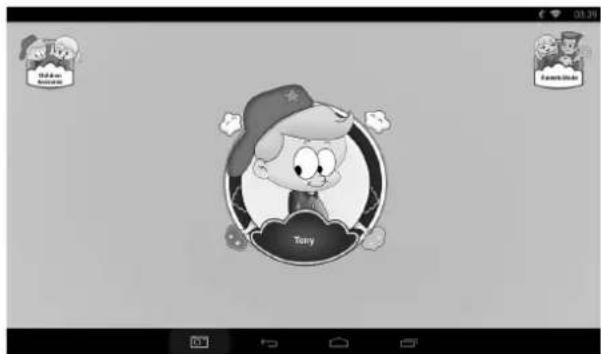
1.3: MAIN MENU
1.3.1: Entering Children Mode
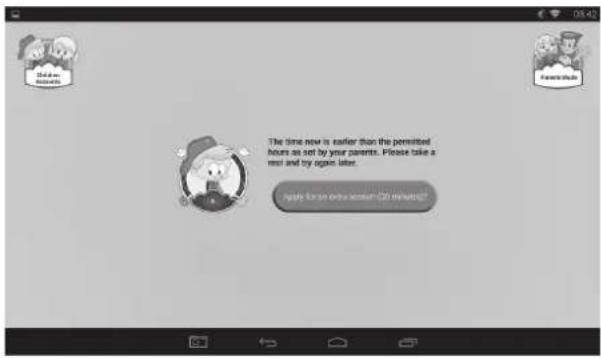
- On the Main Menu, tap the "Children Accounts" icon to see a list of Children Accounts.
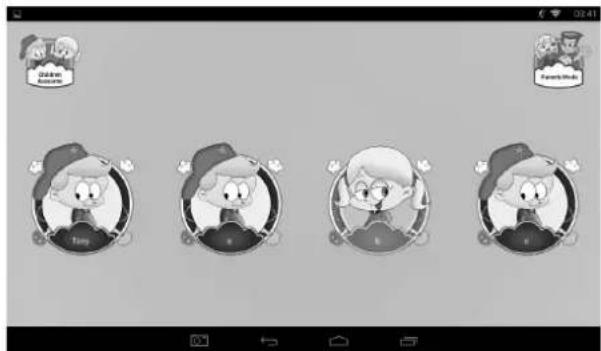
- Tap one account to login and enter Children Mode.
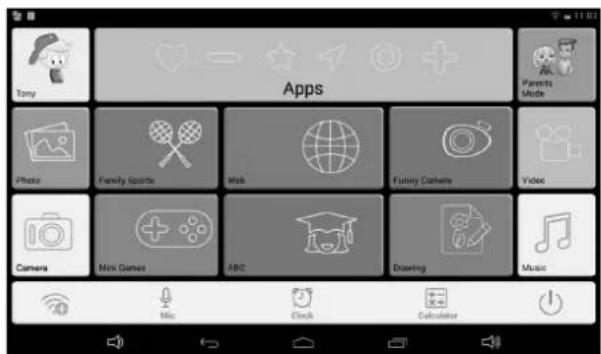
- If the time now is for rest as set by the parents, the child should take a rest and try again later. Or, the child can apply for an extra session (30 minutes) with parents' approval.
1.3.2: Entering Parents Mode
- Tap the "Parents Mode" icon, and then enter the 4-digit Parents Passcode to login and enter Parents Mode.
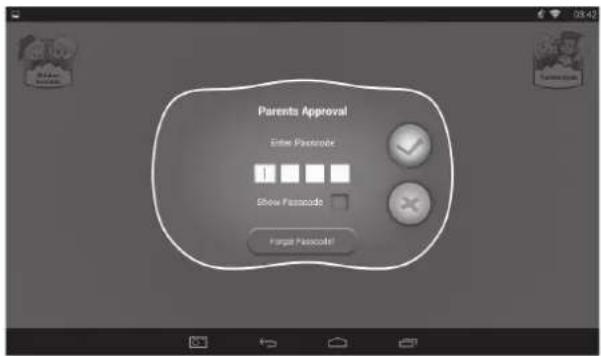


- Factory default Parents Passcode8888
- . please tick to show the Passcode while entering.
1.4: PARENTS MODE
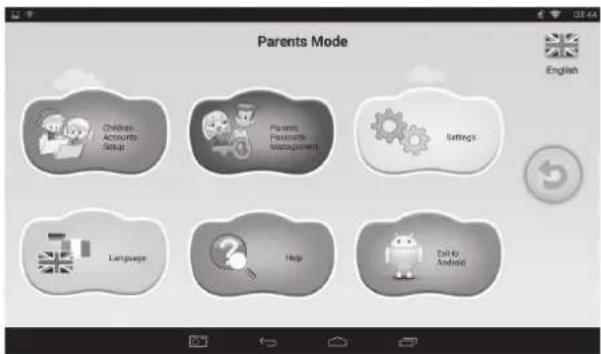


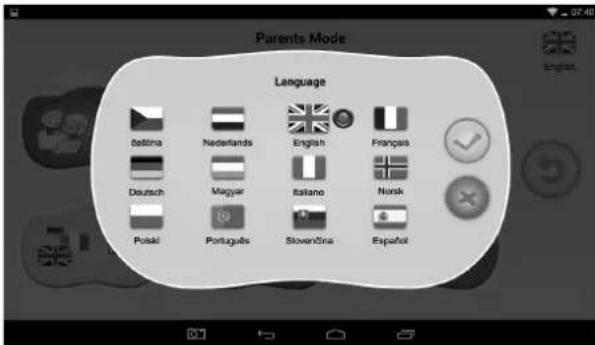
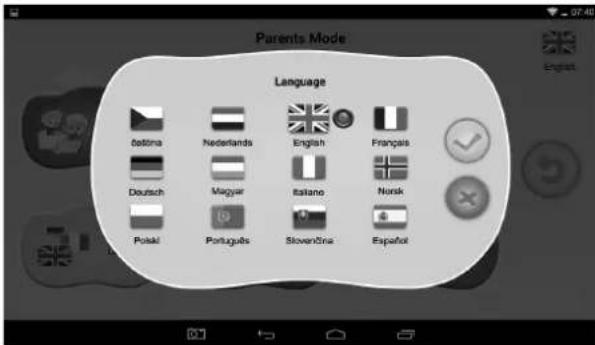
-English Current language
- Exit from Parents Mode
1.4.1: Children Accounts Setup
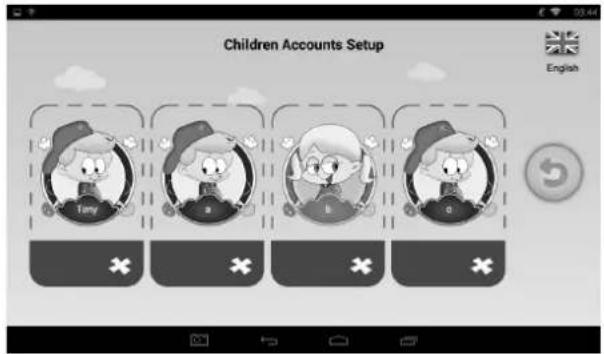

dd a child account

delete a child account
- Tap and choose any account to update the account setup.
Child Account Setup
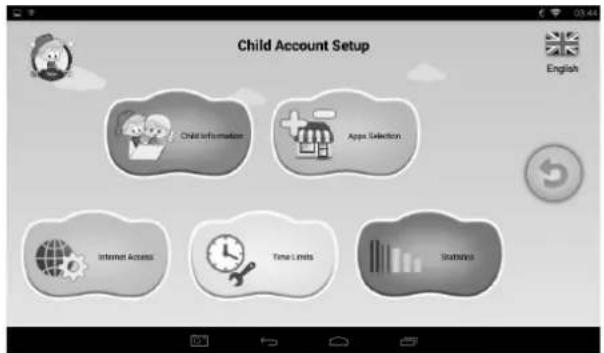
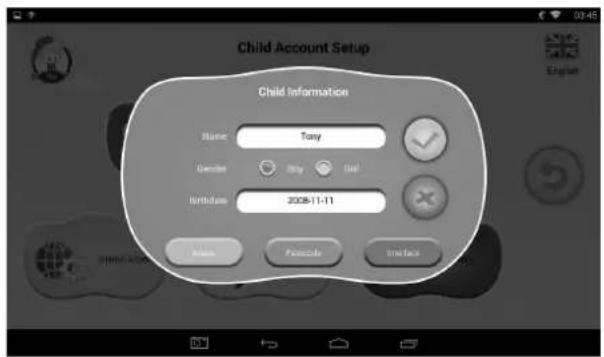
1.4.1.1: Child Information
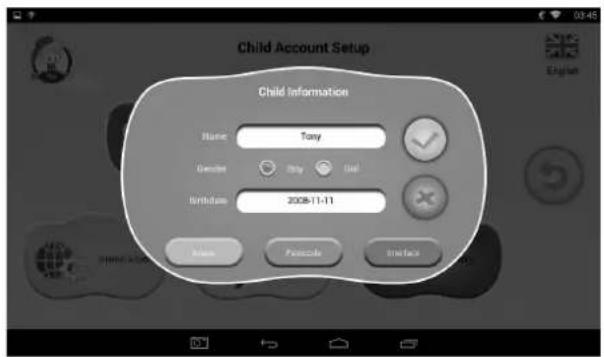
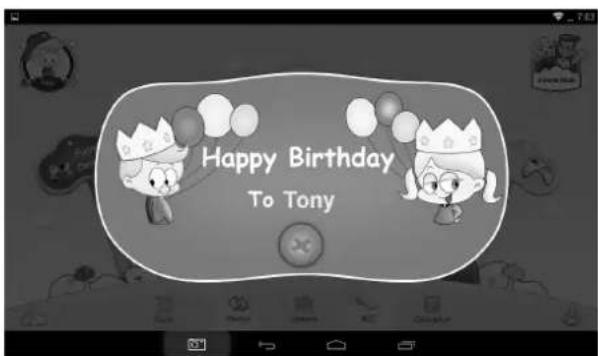
- Birthdate:
- On the child's birthday, the tablet will automatically play the "Happy Birthday" music together with a greeting dialog box to greet the child.
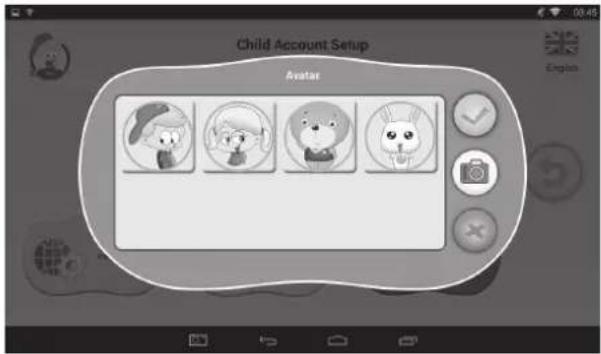
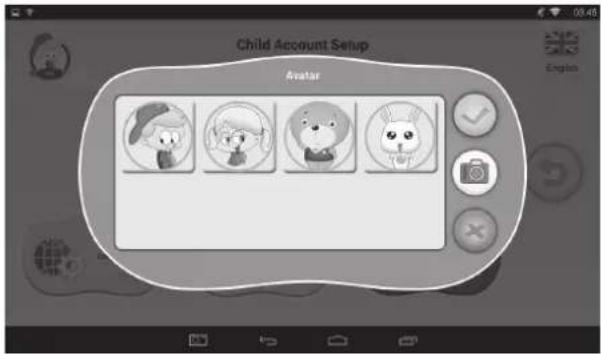
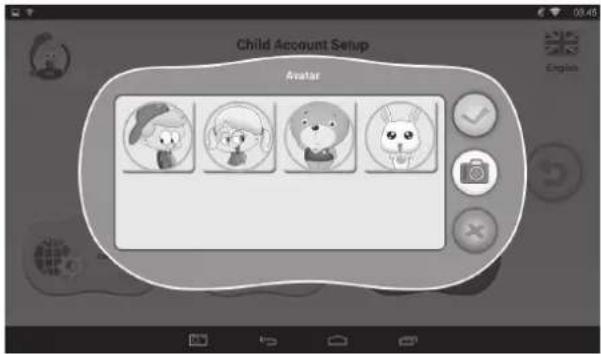
- Avatar
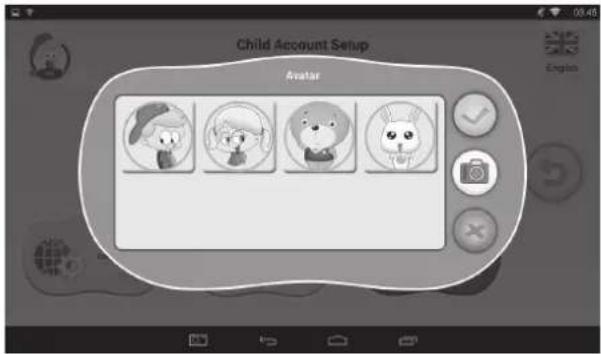

choose one picture and confirm

ive up and close the dialog box

make a photo now as the picture of the child account
- Passcode
There are 3 types of passcode:
- No Passcode: the child can enter Children Mode directly.
- Pattern Passcode: draw an unlock pattern connecting at least 4 dots.
- Number Passcode: choose a 4-digit number.
- Interface
Two different user interfaces for choice.
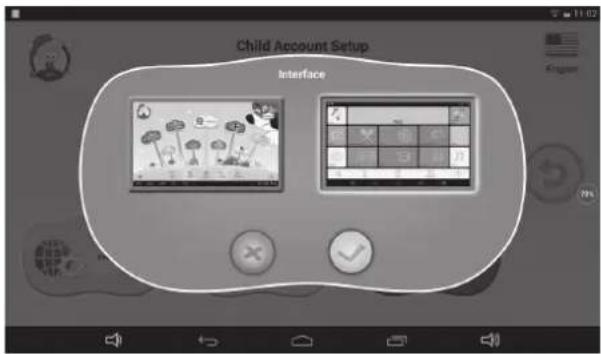
1.4.1.2: Apps Selection
- Parents can pick and choose (with a tick √) which Apps or games a child is allowed to run.
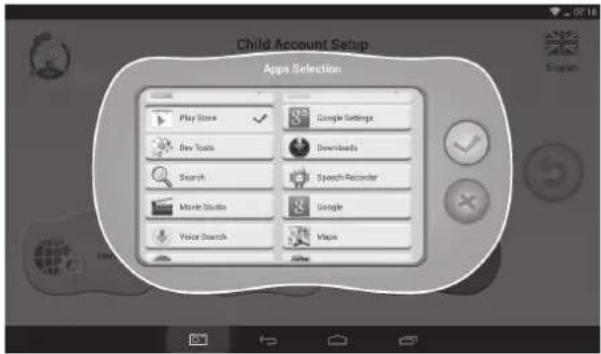
- Chosen Apps will appear inside

1.4.1.3: Internet Access
There are 3 options:
• Full Internet Access:
- Children are allowed full internet access without any web filtering. - Note: Parents need to make sure that Wi-Fi is turned on.
• No Internet Access
- Children are not allowed to access the web browsing.
- Setup child-safe internet web filter
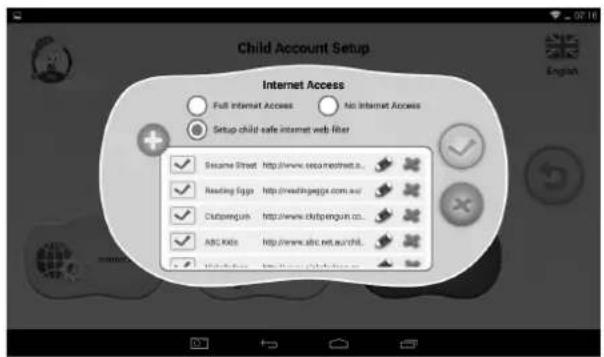
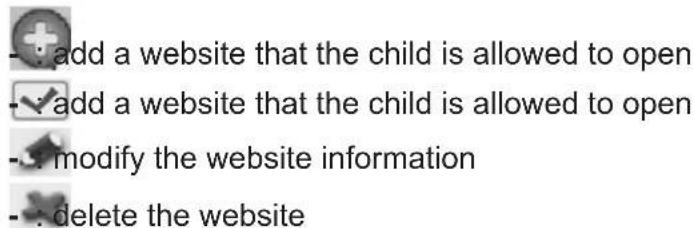
1.4.1.4: Time Limits
There are two different modes of Time Limits control:
- Whole Week: one set of rules for the whole week everyday; - Day-of-week: seven sets of rules for the seven days of week.
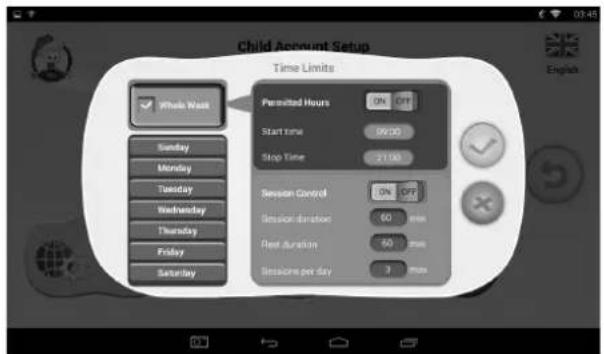
Under each mode, there are 3 types of rules:
- Can Play / Cannot Play:
- ☑: Can play, but still subject to "Permitted Hours" and "Session Control" rules - ✗: Cannot play completely
- Permitted Hours:
- ON OFF : Control is on. Play is NOT allowed before the Start Time or after the End Time of the day.
- Session Control:

. Control is on.
- Session duration: maximum duration of a session.
- Rest duration: minimum duration of rest between sessions.
- Sessions per day: maximum number of sessions per day.
: Control is off.
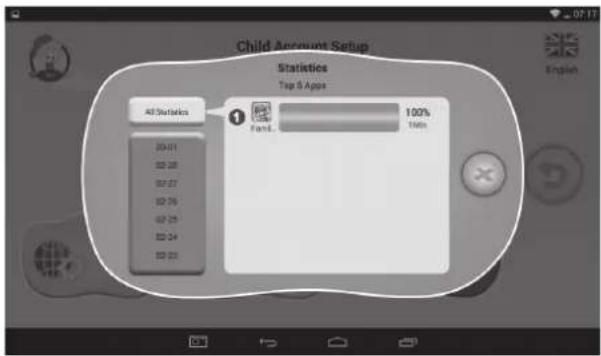
1.4.1.5: Statistics
Statistics function lists out the Top 5 APPS that are most frequently used by each child over the past seven days overall or on a daily basis. Parents can better understand each child's preference and interests.
1.4.2: Parents Passcode Management
1.4.2.1: Parents Passcode Change – the first time
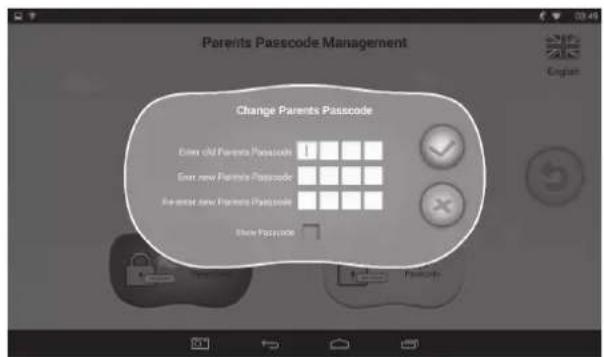
- When you change the parents passcode for the first time, you are requested to set the Reset Code as well. You will need the Reset Code to reset the Parent Passcode if you forget your Parents Passcode. Please don't lose the Reset Code.
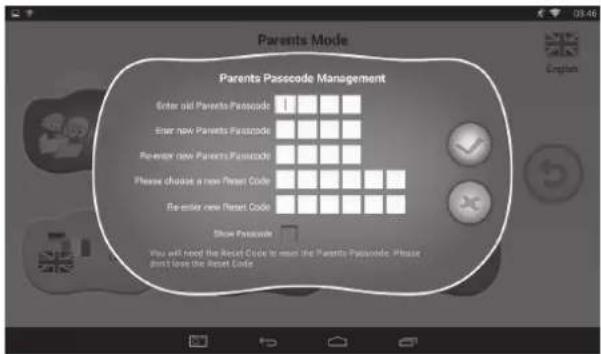
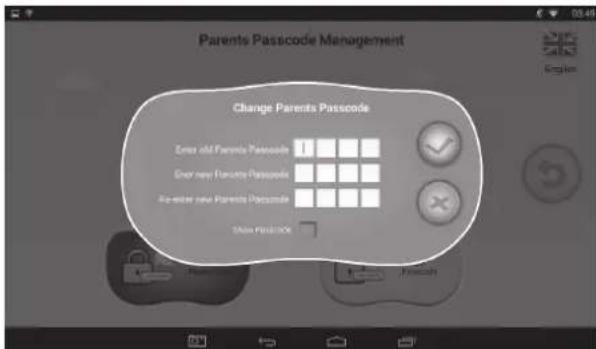
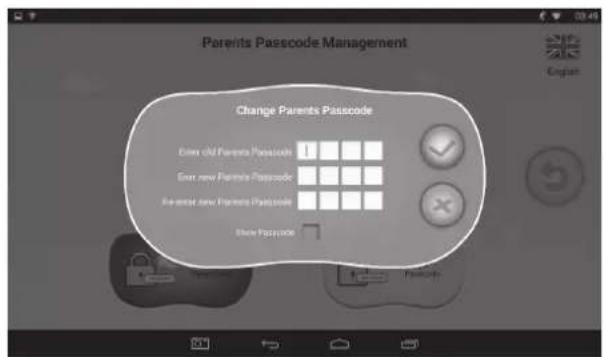
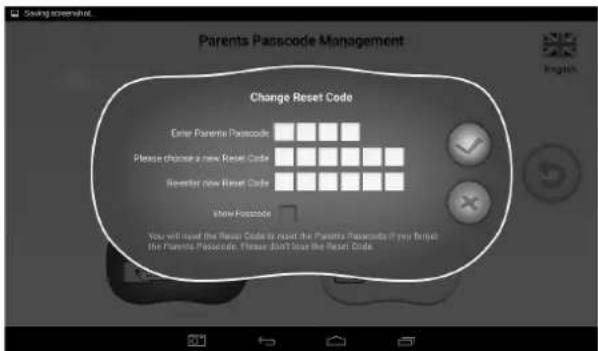
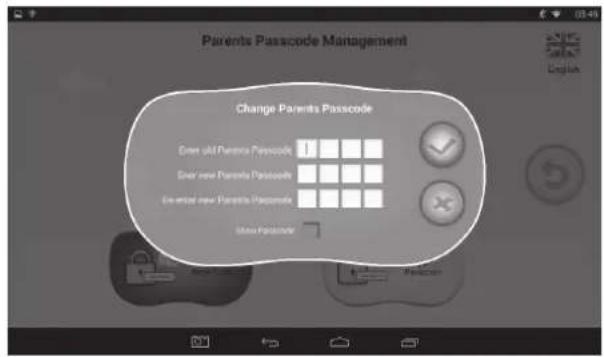
1.4.2.2: Parents Passcode Change – after the first time
- When you change the parents passcode again (after the first time), you will see the following screens.
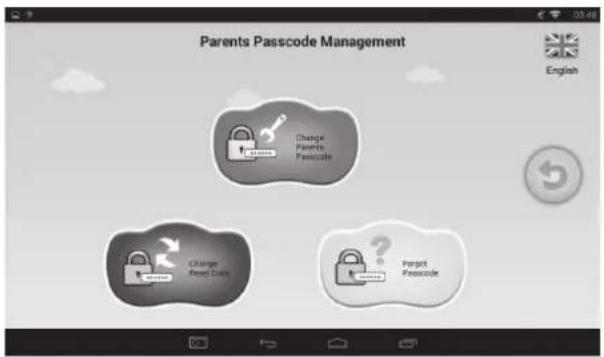
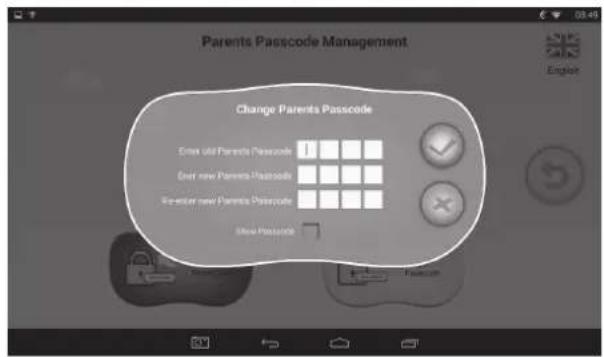
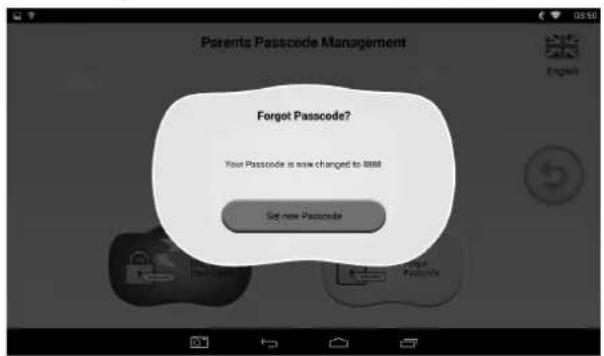
1.4.2.3: Forgot Parents Passcode
- If you forget the Parents Passcode, please enter the Reset Code to rest the Parents Passcode.
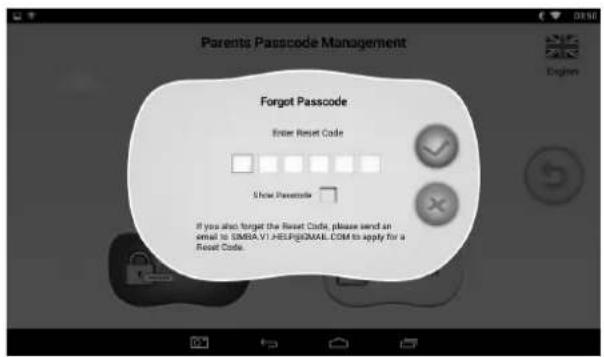
- Once you enter the Reset code, your Parents Passcode will be automatically reset to factory default Passcode 8888
1.4.2.4: Forgot Reset Code
- If you also forget the Reset Code, please send an email to resetcode@gogen.cz to apply for a Reset Code.
1.4.2.5: Change Reset Code
- Change your Reset Code (either your own Reset Code or the Reset Code you got from resetcode@gogen.cz).
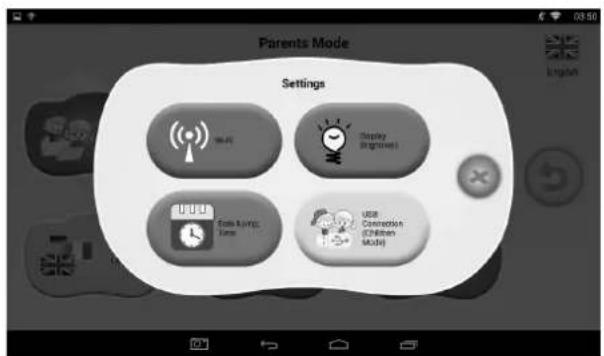
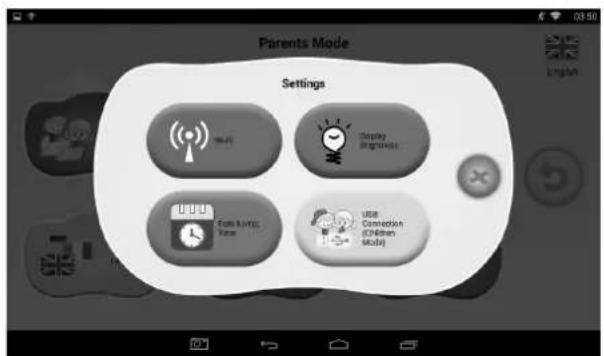
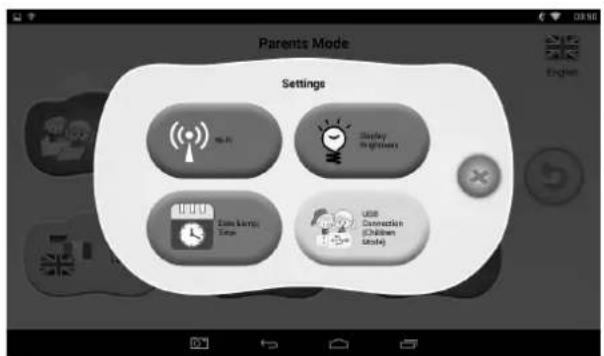
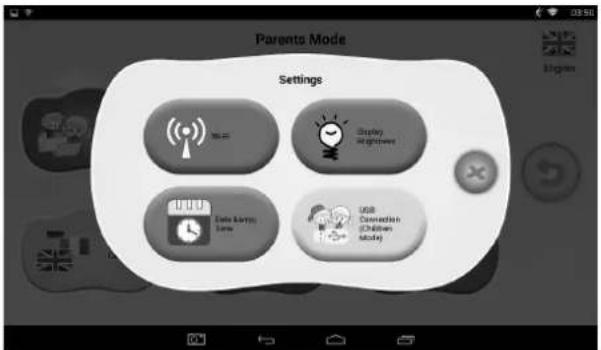
1.4.3: Settings
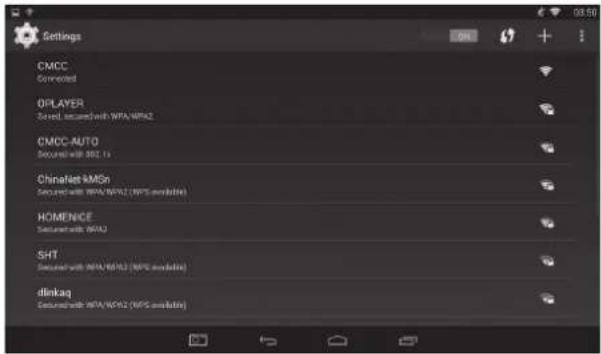
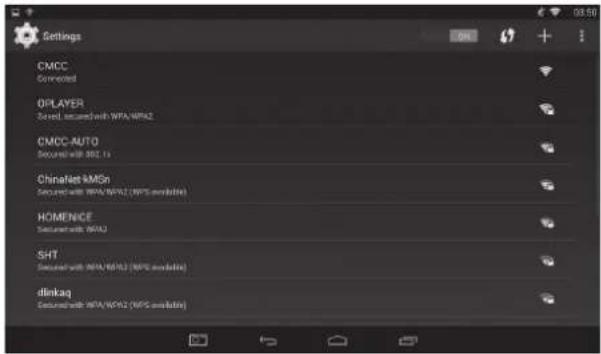
1.4.3.1: Wi-Fi
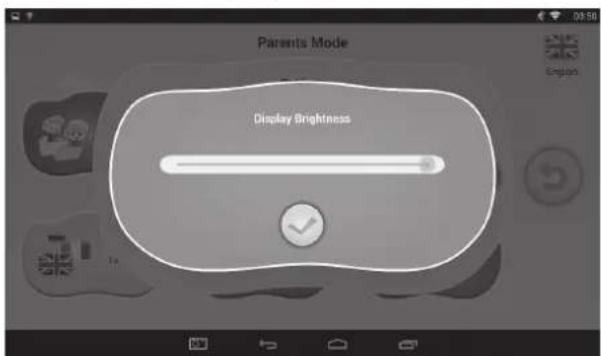
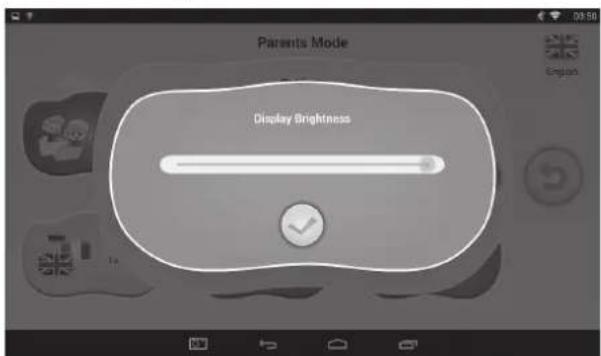
1.4.3.2: Display Brightness
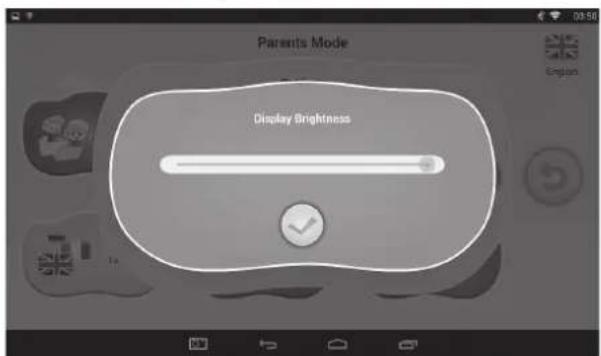
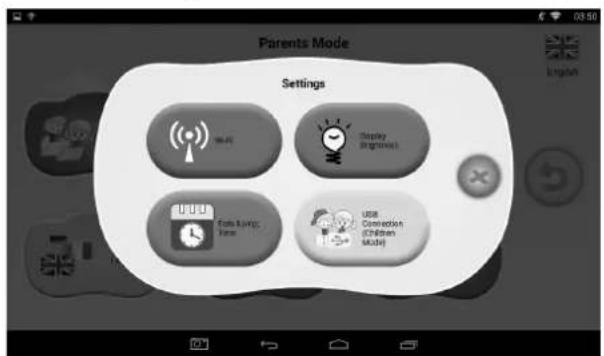
1.4.3.3: Date & Time
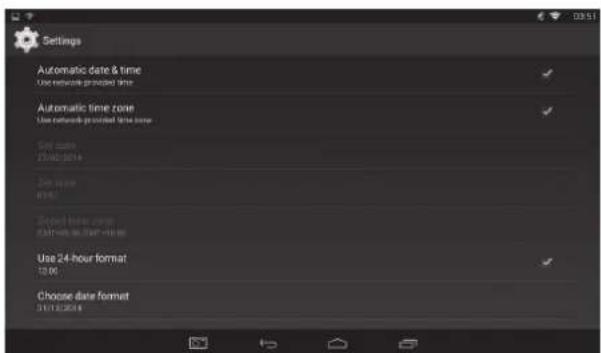
1.4.3.4: Connection (Children Mode)
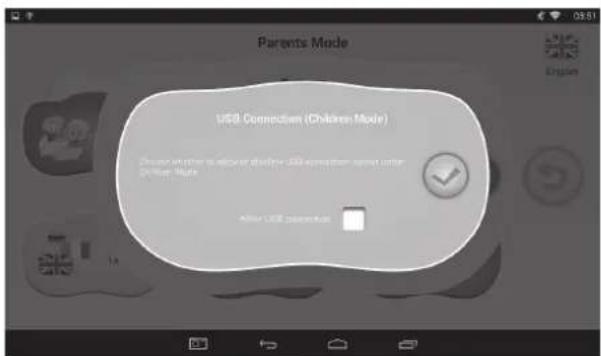
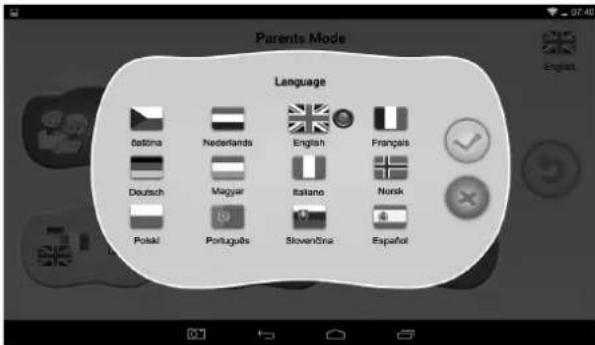
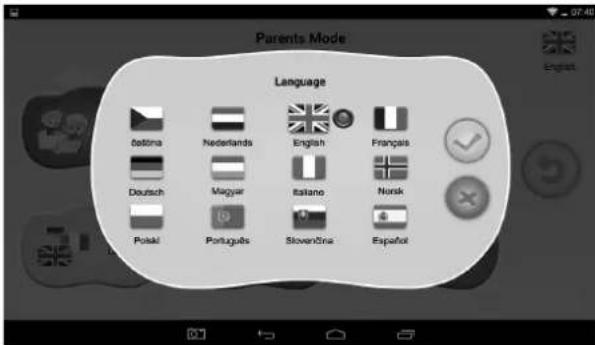
1.4.4: Language
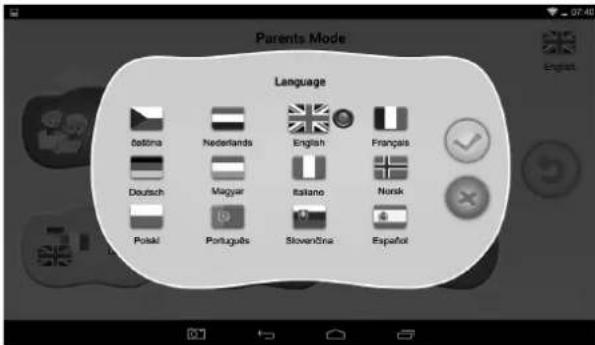
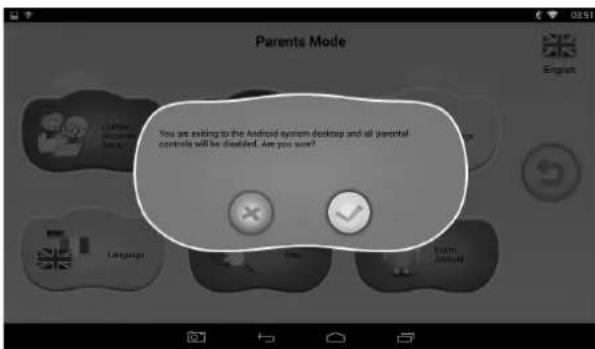
1.4.5: Exit to Android
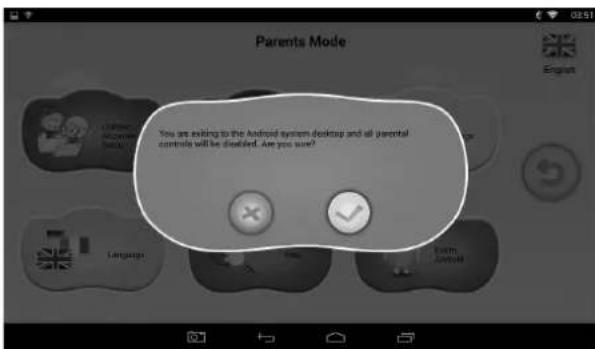
1.5: CHILDREN MODE
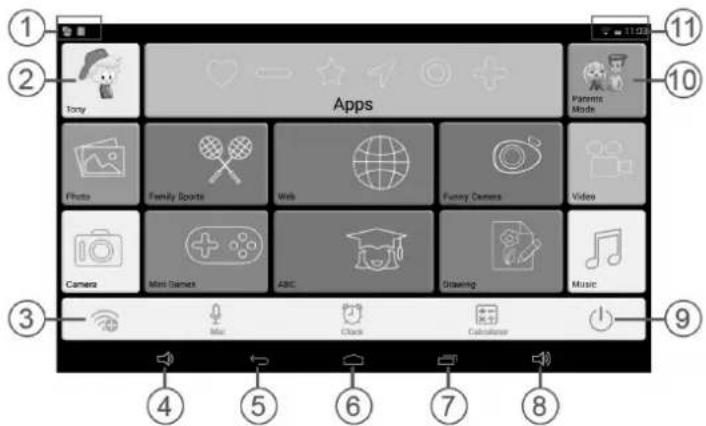
1.5.1: User Interface – Type 1
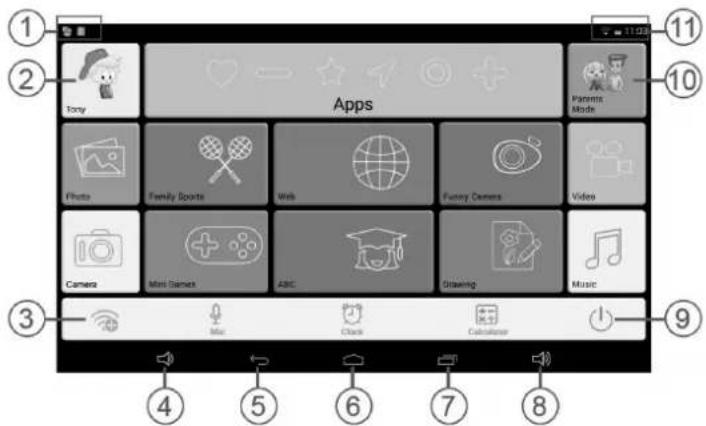
- APK update prompt, USB Connection Icon
- Exit from Children Mode
- Wi-Fi Setting
- VOL -
-
Back to last menu
-
Back to Children Mode Main Menu
- Go to history window
- VOL +
- Power Off
- Enter Parents Mode
- Battery Icon, Time Icon, Wi-Fi Icon
1.5.2: User Interface – Type 2
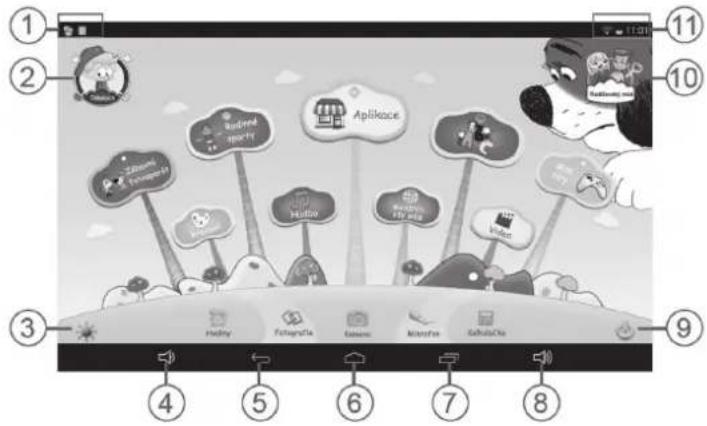
- APK update prompt, USB Connection Icon
- Exit from Children Mode
- Wi-Fi Setting
- VOL -
-
Back to last menu
-
Back to Children Mode Main Menu
- Go to history window
- VOL +
- Power Off
- Enter Parents Mode
- Battery Icon, Time Icon, Wi-Fi Icon

Manually change to Night-background. Manually change to day-background.
It will automatically change to day-background from 6.00 a.m. – 6.00 p.m. and night-background from 6.01 p.m. – 5.59 a.m.
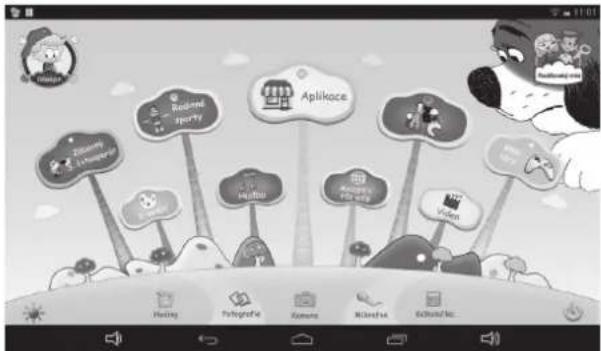
(Day- Background) (Night-background)
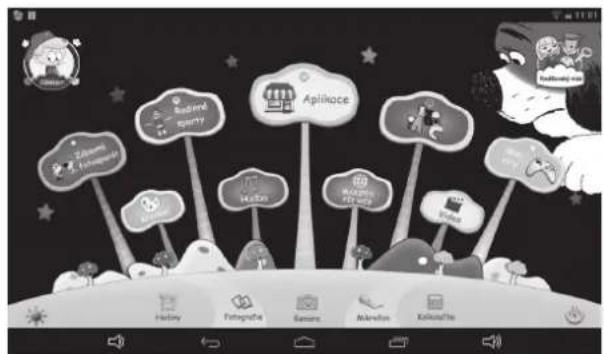
1.5.3: Kids Contents
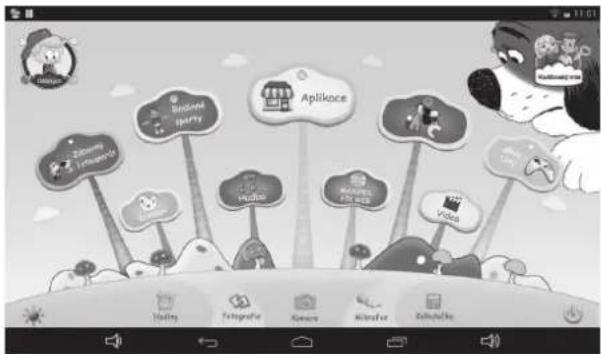
User Interface (Type 1) User Interface (Type 2)
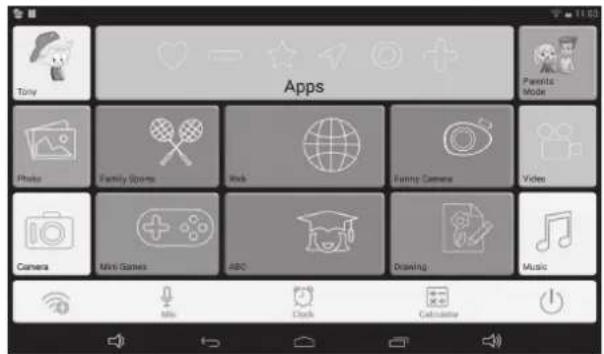
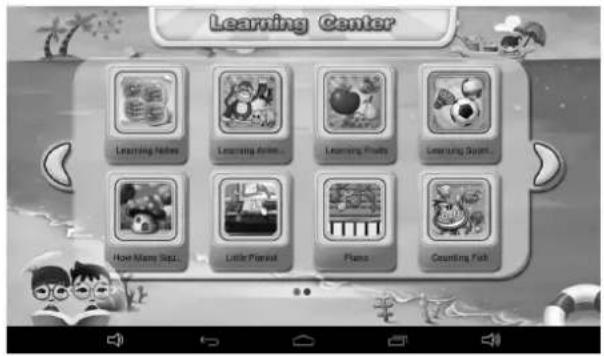
1.5.3.1: ABC
These 15 educational contents teach children Animals, Transportation and Fruits.
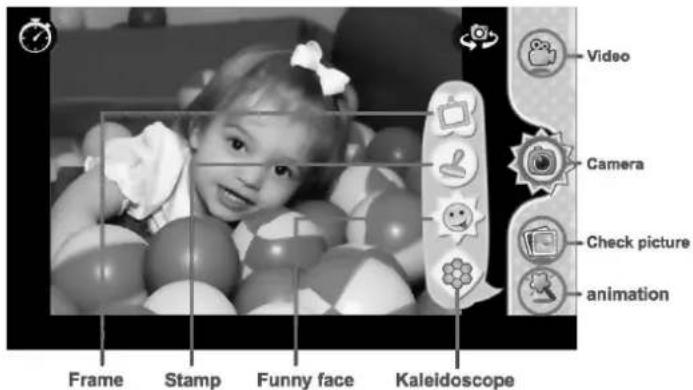
1.5.3.2: Funny Camera

• There are 4 kinds of animation elements for choices
- Photo Frame model : 11 kinds of animation elements for your choice.
- Stamp model : 16 kinds of animation elements for your choice.
- Funny Face model : 11 kinds of animation elements for your choice.
- Kaleidoscope model : 9 kinds of animation elements for your choice.
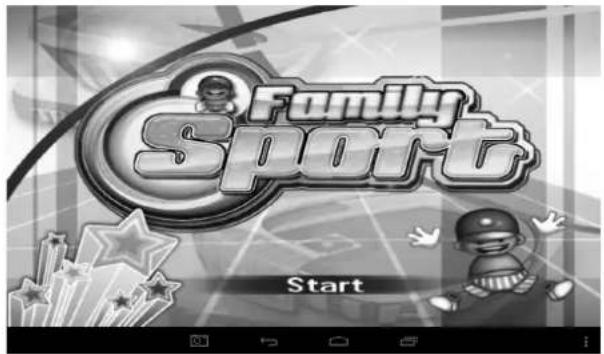
1.5.3.3: Family Sports

There are 9 Sport games pre-loaded. All these 9 games are fantastic Olympic games.
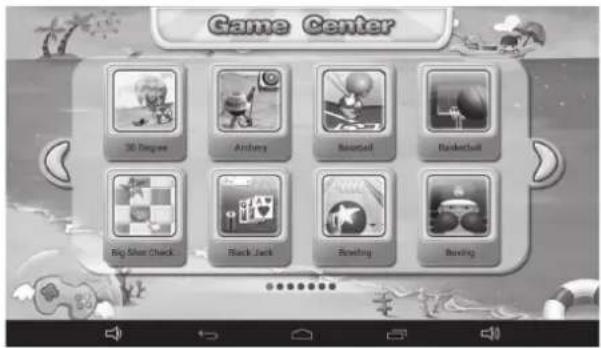
1.5.3.4: Mini Games

There are 50 mini games pre-loaded.
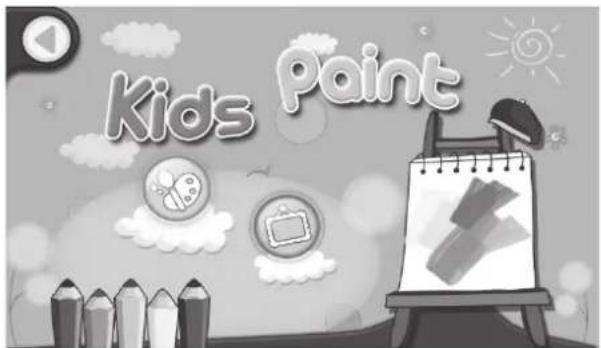
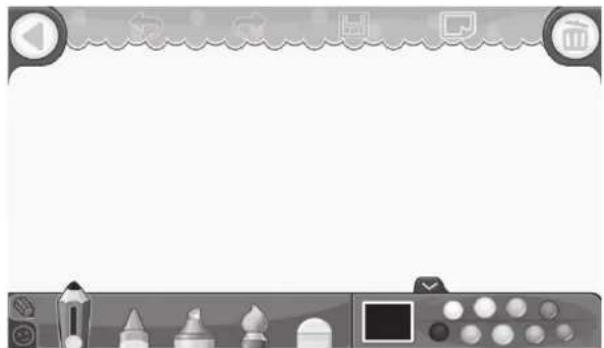
1.5.3.5: Drawing

Provides draw, stamp, picture save function etc. available with 16 cartoon material and 6 different background offering the best experience for kids.
natural_image
Game interface with toolbar icons and frame controls (no readable text or symbols)1.5.3.6: Apps

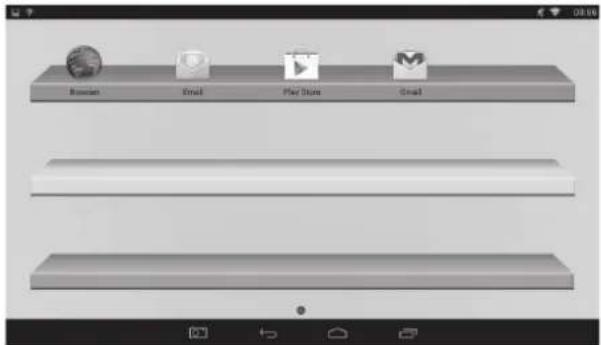
Apps is the manager of all the Apps selected by Parents and allowed children to use it. Explained more in 1.4.1.2: Apps Selection.
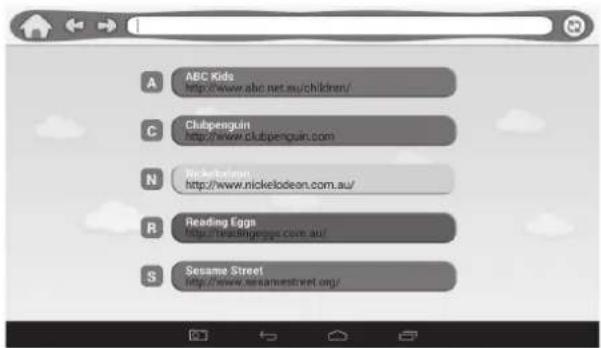
1.5.3.7: Web

- Full Internet Access
- No Internet Access
- Setup child-safe internet web filter
1.5.3.8: Music

- Choose to enter music player interface.
- Browse through the lists of music and tap the selected song to start playing it.
1.5.3.9: Video

- Choose to enter the video player interface.
- If there are no video files in the video player playlist yet, the system will automatically load the video files from the memory card to the playlist when the video player is started.
- Drag the playback progress bar to adjust video playback progress.
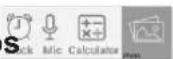
1.5.3.10: Clock / Mic / Calculator / Photos
1.5.3.11: Parents Mode

1.5.3.12: Children Mode

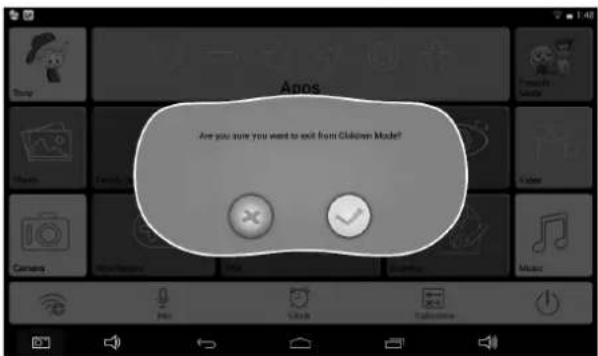
1.5.4: Exit Children Mode

1.6: FACTORY RESET
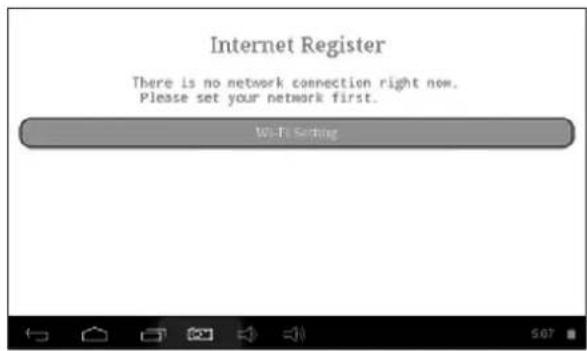
- We strongly suggest you not to factory reset your kids tablet. - If for any reason you have to factory reset your kids tablet, there is a chance that you may be required to re-register SIMBA. If that happens, please follow the following steps to re-register these software:
Step 1: Open the SIMBA App. When the following screen apperas, please choose" Wi-Fi Setting".
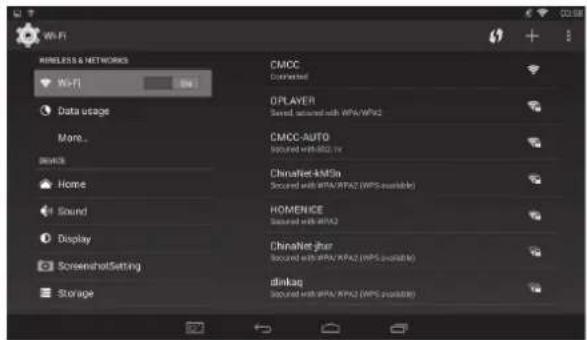
Step 2: Parents Mode → Android OS → Setting → WIFI → Put "ON" → Back
Step 3: Re-register is finished
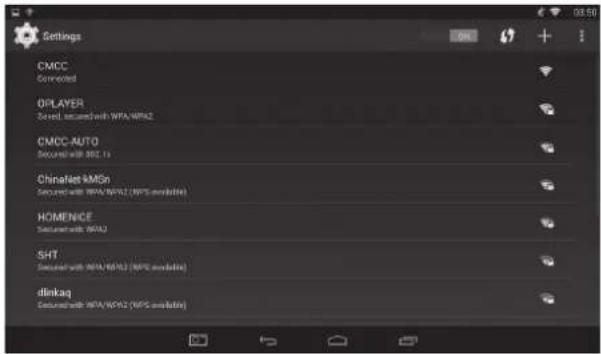
1.7: WI-FI CONNECTION
• The device support Wi-Fi network and external 3G network.
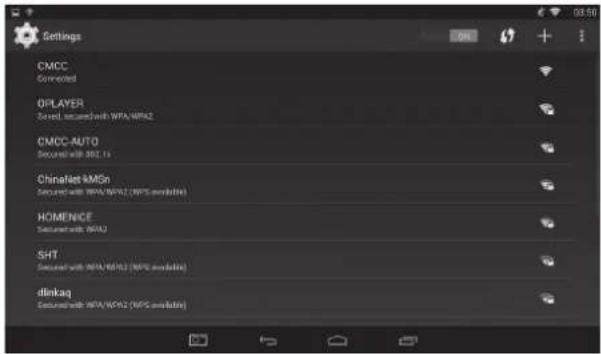
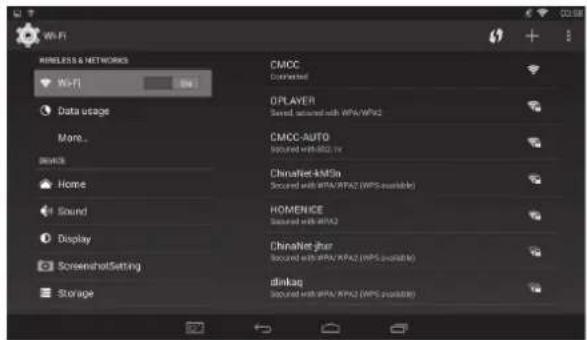
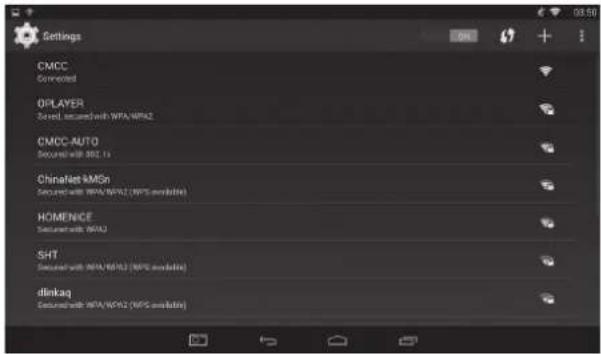
- Turn on Wi-Fi, and Press Wi-Fi settings. The device will scans automatically for available Wi-Fi Network.
- Choose the Wi-Fi network that you want to connect to.
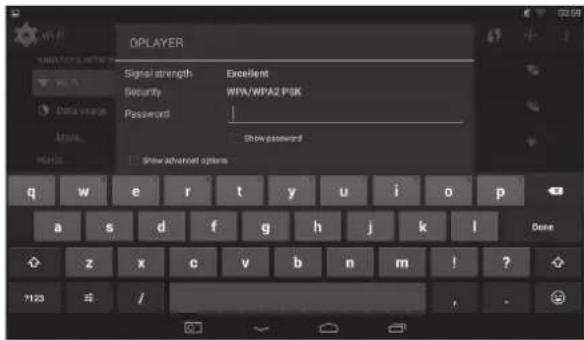
- Press Connect. Some network may need you input the password.
- On the Wi-Fi settings screen, press the Menu key, touch Advanced, you will get more settings for Wi-Fi.
- WIFI connection is not available under Children Mode.
1.8: USB HOST (OTG)
- The Mini USB on the device can be used as USB Host.
- Read U-disk:
Insert the U-disk into the HOST port, press the Explorer in the desktop, press USB enter into u-disk.
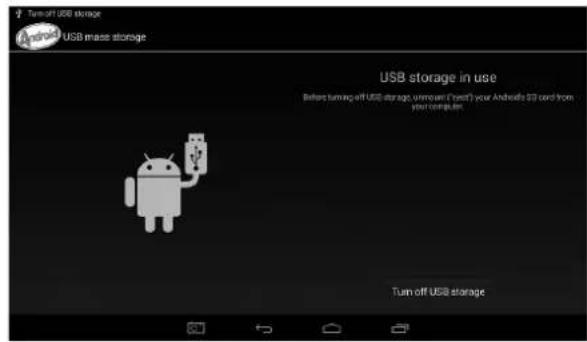
1.9: FILE COPY / TRANSFER
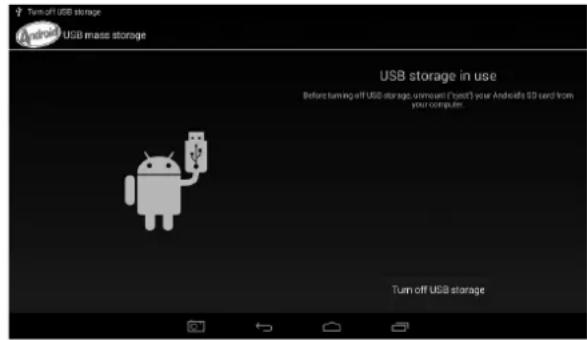
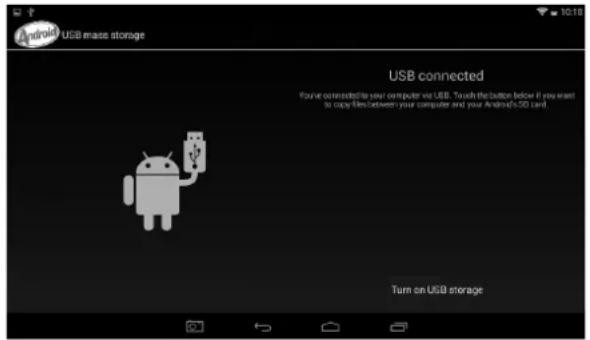
- Connect the device to computer by USB Cable, there will be notification in the status bar that USB connected. (Children Mode Explained more in 1.4.3.4: USB Connection).

- Choose USB Connected
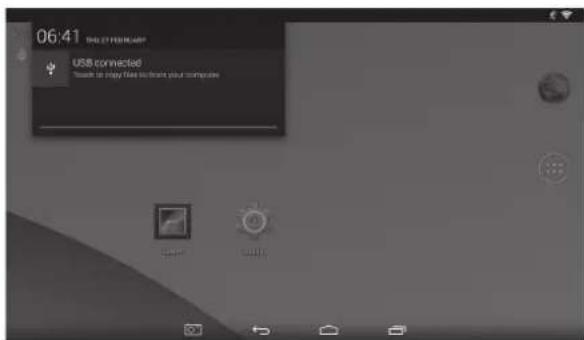
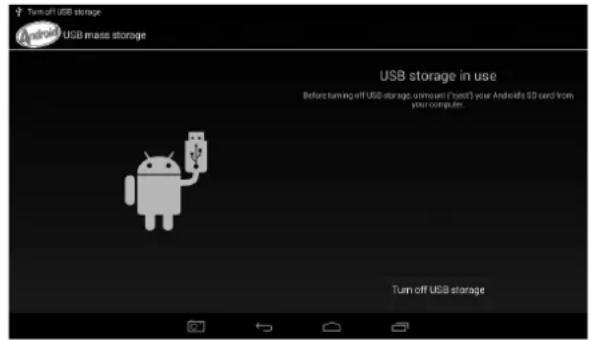
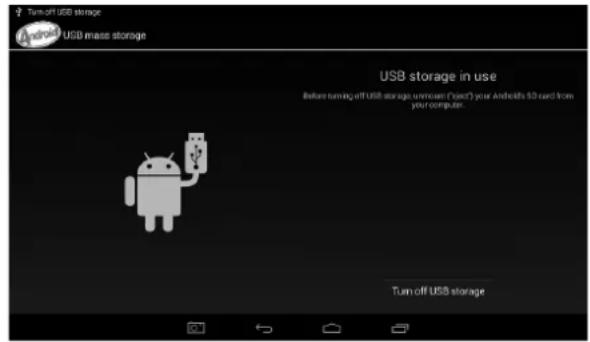
- Choose USB Connected. Then, Turn on USB storage.
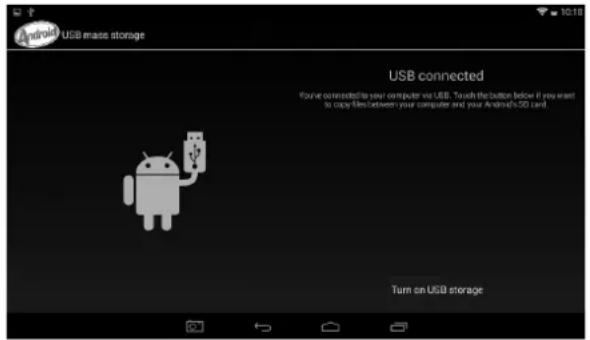
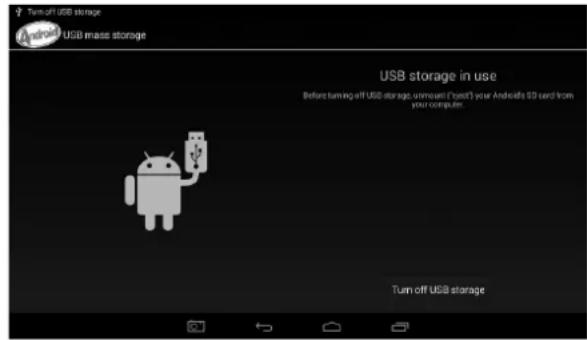
- The left picture shows that device storage content could be viewed and modified from computer. The right picture means that device storage content could NOT be viewed or modified from computer.
1.10: SYSTEM SETTINGS
Click setting icon [icon] center system settings, then you can change wireless & networks, sound, display, location & security, Applications, Storage, language & input, voice input & output, and date & time.
- Wireless & Networks Setting: Please refer to 1.7 "Internet Access".
- Sound Setting: You can adjust S Sound volume, Default notification sound, Touch sounds and Screen lock sound.
- Display Setting: You can adjust Brightness, wallpaper, Auto-rotate screen, Sleep, Daydream, Font Size and Wireless display.
- Storage Setting: In this setting, you can check storage use and Mount & Erase TF cards.
- Battery Setting: check storage battery usage.
- Apps Setting: You can manage applications here, and check storage.
- Security Setting: In this Setting, you can set up screen lock and device administrators, as well as TF card password.
- Language & input: In this setting, you can change the language of system, and choose Keyboard inputs.
- Backup&reset: In this setting, you can back up data, and reset factory default.
- Date & time Setting: In this setting, you can adjust date and time.
- Developer Options: it provides some items by USB adjustment.
- About tablet: Check device information.

WARNING: Do not use this product near water, in wet areas to avoid fire or injury of electric current. Always turn off the product when you don't use it or before a revision. There aren't any parts in this appliance which are reparable by consumer. Always appeal to a qualified authorized service. The product is under a dangerous tention.
Old electrical appliances, used batteries and accumulators disposal
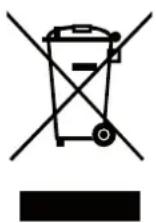
This symbol appearing on the product, on the product accessories or on the product packing means that the product must not be disposed as household waste. When the product/ battery durability is over, please, deliver the product or battery (if it is enclosed) to the respective collection point, where the electrical appliances or batteries will be recycled. The places, where the used electrical appliances are collected, exist in the European Union and in other European countries as well. By proper disposal of the product you can prevent possible negative impact on environment and human health, which might otherwise occur as a consequence of improper manipulation with the product or battery / accumulator. Recycling of materials contributes to protection of natural resources. Therefore, please, do not throw the old electrical appliances and batteries/ accumulators in the household waste. Information, where it is possible to leave the old electrical appliances for free, is provided at your local authority, at the store where you have bought the product. Information, where you can leave the batteries and accumulators for free, is provided to you at the store, at your local authority.
ETA Inc. hereby declares that the product MAXPAD9G3 is in compliance with requirements and other relevant provisions of the R&TTE directive 1999/5/EC. The complete Declaration of Conformity can be found at http://www.gogen.cz/declaration_of_conformity
TARTALOM
ÓVINTÉZKEDÉSEK....83
JELLEMZÖK....83
GOMBOK 85
MÜKÖDÉS 85


- Születési dátum:
- Avatar


1.4.3: Beállítás
1.4.3.1: Wi-Fi
1.4.3.2: Fényerő
1.4.4: Nyelv
1.4.5: Kilépés
1.5: GYEREK MÓD
1.5.3.1: ABC
1.5.3.5: Rajzolás

natural_image
Blank game interface with navigation tabs, icons, and a toolbar (no text or symbols)1.5.3.6: Aplikációk

1.5.3.8: Zene

1.6: ALAPÉRTELMEZETT
natural_image
Abstract black and white logo with a stylized white 'S' inside a circle (no text or symbols)GoGEN
natural_image
Simple line drawing of a girl sitting on a large dog with a bow, no text or symbols present- GoGEN
- OBSAH
- BEZPEČNOSTNÍ UPOZORNĚNÍ 3
- FUNKCE....3
- TLAČÍTKA....5
- PROVOZ 5
- - Datum narození:
- - Avatar
- 1.4.3: Nastavení
- 1.4.3.1: Wi-Fi
- 1.4.3.2: Jas displeje
- 1.4.4: Jazyk
- 1.5: DĚTSKÝ REŽIM
- 1.5.3.1: ABC
- 1.5.3.4: Minihry
- 1.5.3.5: Kreslení
- 1.5.3.6: Aplikace
- 1.5.3.7: Internet
- 1.5.3.8: Hudba
- 1.6: RESETOVÁNÍ NA NASTAVENÍ Z VÝROBY
- 1.4.1.1: Informácie o diet'ati
- • Dátum narodenia:
- 1.4.2.3: Zabudnuté rodičovské heslo
- 1.4.3: Nastaveni
- 1.5: DETSKÝ REŽIM
- 1.5.1: Užívatel'ské rozhranie – typ 1
- 1.5.3.5: Kreslenie
- 1.5.3.6: Aplikácie
- 1.6: RESETOVANIE NA NASTAVENIE Z VÝROBY
- • Data urodzenia:
- 1.4.3: Ustawienia
- 1.4.4: Język
- 1.5: TRYB DZIECIĘCY
- 1.5.3.2: Zabawny aparat
- 1.5.3.4: Gry mini
- 1.5.3.5: Rysowanie
- 1.5.3.6: Aplikacje
- 1.5.3.9: Muzyka
- 1.6: PRZYWRACANIE USTAWIEN FABRYCZNYCH
- 1.9: KOPIOWANIE / TRANSFER PLIKÓW
- PRECAUTIONS
- FEATURES
- Operation System
- Wireless
- Display
- Cameras and Photos
- Parental Controls
- Video
- Music Player
- Power and Battery
- Input / Output
- Windows System Requirements
- Size and Weight
- BUTTONS
- OPERATION
- 1.1: LED INDICATOR
- 1.2: SWITCH ON / OFF
- 1.2.1: Switch On and Unlock
- 1.2.2: Power Saving Mode and Lock Screen
- 1.2.3: Switch Off
- 1.2.4: Low Battery
- 1.3: MAIN MENU
- 1.3.1: Entering Children Mode
- 1.3.2: Entering Parents Mode
- 1.4: PARENTS MODE
- 1.4.1: Children Accounts Setup
- Child Account Setup
- 1.4.1.1: Child Information
- - Birthdate:
- - Passcode
- - Interface
- 1.4.1.2: Apps Selection
- 1.4.1.3: Internet Access
- • Full Internet Access:
- • No Internet Access
- - Setup child-safe internet web filter
- 1.4.1.4: Time Limits
- - Can Play / Cannot Play:
- - Permitted Hours:
- - Session Control:
- 1.4.1.5: Statistics
- 1.4.2: Parents Passcode Management
- 1.4.2.1: Parents Passcode Change – the first time
- 1.4.2.2: Parents Passcode Change – after the first time
- 1.4.2.3: Forgot Parents Passcode
- 1.4.2.4: Forgot Reset Code
- 1.4.2.5: Change Reset Code
- 1.4.3: Settings
- 1.4.3.2: Display Brightness
- 1.4.3.3: Date & Time
- 1.4.3.4: Connection (Children Mode)
- 1.4.4: Language
- 1.4.5: Exit to Android
- 1.5: CHILDREN MODE
- 1.5.1: User Interface – Type 1
- 1.5.2: User Interface – Type 2
- 1.5.3: Kids Contents
- 1.5.3.2: Funny Camera
- 1.5.3.3: Family Sports
- 1.5.3.4: Mini Games
- 1.5.3.5: Drawing
- 1.5.3.6: Apps
- 1.5.3.7: Web
- 1.5.3.8: Music
- 1.5.3.9: Video
- 1.5.3.10: Clock / Mic / Calculator / Photos
- 1.5.3.11: Parents Mode
- 1.5.3.12: Children Mode
- 1.5.4: Exit Children Mode
- 1.6: FACTORY RESET
- 1.7: WI-FI CONNECTION
- 1.8: USB HOST (OTG)
- 1.9: FILE COPY / TRANSFER
- 1.10: SYSTEM SETTINGS
- Old electrical appliances, used batteries and accumulators disposal
- TARTALOM
- ÓVINTÉZKEDÉSEK....83
- JELLEMZÖK....83
- GOMBOK 85
- MÜKÖDÉS 85
- - Születési dátum:
- 1.4.3: Beállítás
- 1.4.3.2: Fényerő
- 1.4.4: Nyelv
- 1.4.5: Kilépés
- 1.5: GYEREK MÓD
- 1.5.3.5: Rajzolás
- 1.5.3.6: Aplikációk
- 1.5.3.8: Zene
- 1.6: ALAPÉRTELMEZETT
Brand : GoGen
Model : MAXPAD9G3
Category : Tablet