
TSA5030 - Vacuum Cleaner Teesa - Free user manual and instructions
Find the device manual for free TSA5030 Teesa in PDF.


| Product Type | Robot Vacuum Cleaner |
| Brand | Teesa |
| Model | TSA5030 |
| Power Source | AC adapter (included) |
| Battery Type | Rechargeable (internal) |
| Charging Time | 3–4 hours |
| Runtime | 80–100 minutes (full charge), 45 minutes (quick mode) |
| Cleaning Modes | Spot, Random Edge, Automatic |
| Filtration System | Washable filter |
| Side Brushes | 2 detachable side brushes |
| Sensors | Cliff sensors (anti-drop), touch bumper |
| Anti-tangle System | Yes |
| Suitable Floor Types | Hard floors, low pile carpets |
| Special Features | Automatic cleaning, anti-tangle, touch bumper technology |
| Maintenance | Empty dust bin after each use; clean filter, sensors, and side brushes regularly |
| Replacement Parts | Side brushes, filter |
| Included Accessories | AC adapter, user manual |
Frequently Asked Questions - TSA5030 Teesa
User questions about TSA5030 Teesa
0 question about this device. Answer the ones you know or ask your own.
Ask a new question about this device
Download the instructions for your Vacuum Cleaner in PDF format for free! Find your manual TSA5030 - Teesa and take your electronic device back in hand. On this page are published all the documents necessary for the use of your device. TSA5030 by Teesa.
USER MANUAL TSA5030 Teesa
Robot vacuum cleaner
SMART VAC
TSA5030
Bedienungsanleitung
Owner's manual
Εγχειρίδιο χρήσης
Instrukcja obsługi
Manual de utilizare
Návod na použitie
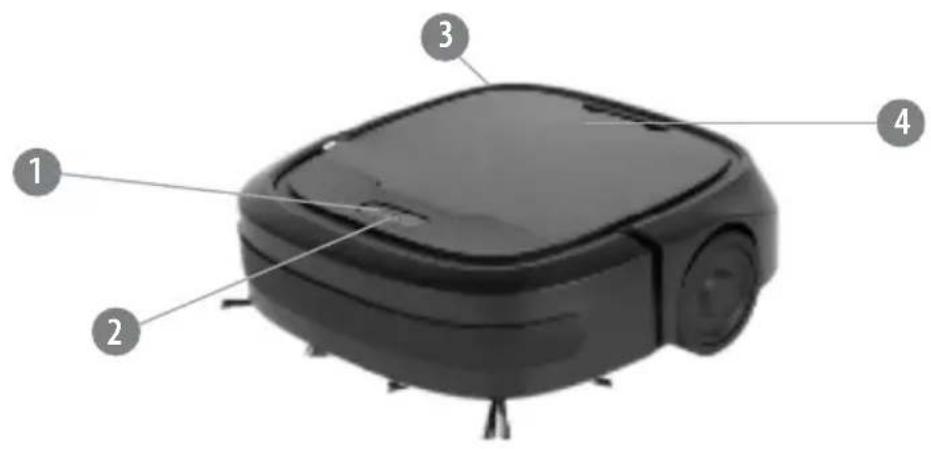
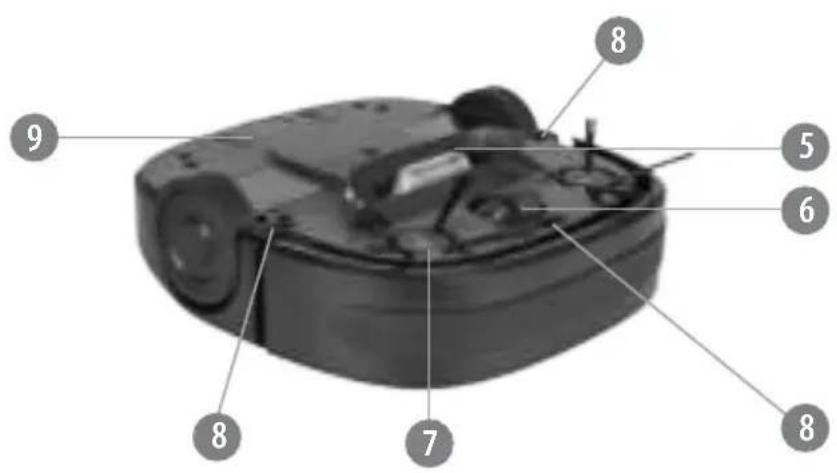
| DE EN GR PL RO SK | |||||
| Taste Ein/Aus Power button Kouμπί λειτουργίας Przycisk zasilania Buton alimentare Tlačidlo napájania | |||||
| Ladeanzeige | Charging indicator | 'Ενδειξη φόρτισης | Wskaźnik ładowania | Indicator încărcare | Indikátor nabíjania |
| Ladeanschluss | Charging socket | Υποδοχή φόρτισης | Gniazdo ładowania | Mufă de încărcare | Zásuvka nabíjania |
| Oberer Deckel | Top Cover | 'Ανω κάλυμμα | Górna pokrywa | Capac superior | Horné veko |
| Ansaugöffnung | Suction intake | Είσοδος αναρρόφησης | Wlot ssący | Gură de aspirare | Nasávací otvor |
| Räder | Rotary wheel | Περιστροφικός τροχός | Obrotowe koło | Rotiţă pivotantă | Otočné koliesko |
| Seitenbürsten | Side brushes | Πλευρικές βούρτσες | Szczotki boczne | Perii laterale | Bočné kefky |
| Steilwandsensoren | Cliff sensors | Αισθητήρες Γκρεμού | Czujniki uskoku podłoża | Senzori pentru colțuri | Senzory proti pádu |
| Batteriefach | Battery compartment | Θήκ η μπαταριών | Gniazdo akumulatora | Compartiment baterii | Priestor pre akumulátor |
Thank you for purchasing TEESA appliance. Please read this operation instruction carefully before use, and d keep it for future use.
Distributor does not take responsibility for damages caused by inappropriate handling and use of the product.
SAFETY INSTRUCTIONS
In order to reduce the injuries or damages, follow basic safety precautions applied when using any electrical device, including the following:
- Read this instruction manual carefully, even if you are familiar with the appliance. Keep the manual for future reference.
- Before connecting the appliance to power supply socket, make sure the voltage indicated on the appliance corresponds to the voltage in the power supply socket.
- Product intended for household use only.
- Clean and store this appliance in accordance to instructions listed in "Cleaning and storage" section.
-
ALWAYS turn off the appliance and disconnect it from the mains supply:
-
if it's not operating correctly,
- if there's an uncommon voice when using,
• before disassembling the device, - before cleaning,
-
when not in use.
-
When you disconnect the power cord of the appliance, grasp and pull the plug, not the cord/cable.
- This appliance may be used by children who are above 8 years old and by persons with reduced physical, sensory or mental capabilities, or lack of experience and knowledge, if they are supervised and guided by a person who is responsible for their safety in a cautious manner, and all the safety precautions are understood and followed. Children should not play with this device. Children should not perform cleaning and servicing of the device unsupervised.
- Keep the appliance out of the reach of children.
- Use only the included AC charger to charge the device.
- Keep the appliance and its cord/cable away from heat, water, moisture, sharp edges and any other factor which may damage the appliance or its cord.
- Make sure the power cord does not touch any hot or sharp elements.
- Do not use the product for purposes different from displayed in this operating manual.
- Do not place the appliance in water or any liquid; nor handle/use it
with wet or moist hands.
-
DO NOT use this appliance if the cord or the plug is damaged, or the appliance is broken.
-
Do not attempt to repair this appliance yourself. Only authorized and qualified personnel may repair this appliance. Never disassemble this appliance.
-
Do not use unauthorized accessories.
IMPORTANT!
-
Do not use the appliance to vacuum up:
-
large, sharp-edged objects which could block and damage the appliance;
- harming or erodent liquids or inflammable and explosive substances, as this could cause a fire;
• hot or burning substances; -
wet surfaces or wet objects;
• water or any other liquid -
Use the robot vacuum cleaner on hard floors and low pile carpets only.
-
Use the appliance only on dry surfaces.
-
The appliance is suitable for indoor use only.
-
Do not insert any objects into the ventilation slots or openings.
-
Do not obstruct the airflow.
-
Do not cover the sensors in any way.
-
Keep hair, loose clothing and any other part of body away from the openings and moving parts.
-
Do not place the appliance on stairs or furniture.
-
Do not sit, stand or put any objects on the appliance.
-
Remember that the robot moves on its own. Exercise caution when walking in the area where the appliance is operating to avoid stepping on it or tripping over it.
- Make sure to turn off the appliance before installing or removing brushes.
- Do not use the appliance if dust bin and filter are not mounted.
- Prior to using the robot vacuum cleaner, prepare the room to be cleaned properly. Please be sure that there are no cables, clothes, curtain belts or any other material scattered in the cleaning area
to avoid tangling or trapping the appliance during cleaning.
- Make sure that there are no fragile or small objects, lit candles, etc. on the surface to be cleaned or on the furniture in the room to be cleaned to avoid damage.
- If the room to be cleaned contains a balcony, a physical barrier should be used to prevent access to the balcony and ensure safe operation.
- Make sure that children and pets do not have an access to the room where the appliance is operating.
*** Environmental conditions such as exposure to sunlight may influence cliff sensor operation. Therefore it is important to ensure safe operation for the robot vacuum cleaner. If in the room to be cleaned there are stairs, balcony or any other places where the appliance is exposed to a fall, use a physical barrier so that in case of cliff sensor malfunction, the appliance will not get damaged.
CONNECTING THE BATTERY
Prior to using the appliance, connect the battery to the appliance.
- Connect the battery plug with the socket inside the battery compartment.
- Make sure the battery and its cable is inserted correctly inside the battery compartment.
CHARGING
- Connect one plug of the AC adapter to the charging socket; connect the other plug to the power supply socket.
- When the appliance is charging, charging indicator flashes red.
- When the appliance is fully charged, blue charging indicator is on.
- It takes about 3 to 4 hours to fully charge the appliance.
Note:
• Make sure to fully charge the appliance before first use.
- When the battery level is low, charging indicator flashes red.
- It is normal for the AC adapter to warm up during charging.
- Leaks from the battery can occur under extreme conditions. If the liquid gets on the skin, wash it quickly with plenty of water. If the liquid gets into eyes, keep flushing them immediately with clean water for at least 10 minutes. Afterwards, consult a doctor.
OPERATION
-
Press the Power button:
-
once to turn on the appliance. It will clean for 80 – 100 minutes until fully discharged, afterwards it will turn off automatically.
- twice to turn on the appliance. It will clean for 45 minutes and then it will stop automatically.
* Ensure the appliance operates in closed area. Otherwise, it will move to another room and clean until out of power.
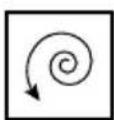
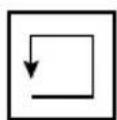
- The appliance has an automatic cleaning system which means that it is not available for choosing by the user- the robot changes mode automatically according to the detected dirt and surroundings. As it cleans it switches between three cleaning modes to achieve the best results:
SPOT
RANDOMEDGE

- Turn off the appliance by pressing the Power button.
- Empty the dust bin after each use as described below.
Emptying the dust bin
Empty and clean the dust bin regularly as dirty dust bin will reduce the
cleaning power and efficiency.
Make sure the appliance is turned off before removing and emptying the dust bin.
- Remove the top cover.
- Remove the filter cover.
- Take out the dust bin.
- Remove the filter.
- Empty the dust bin.
- Reassemble all the parts and put back into the appliance.
CLEANING
Prior to cleaning, make sure the appliance is turned off.
Suction intake
Check regularly for any dust and debris in the suction intake. It is important to keep it clean to maintain peak performance.
Side brushes
To clean the side brush, you have to detach if from the appliance first.
- Use a suitable screwdriver and remove the screw from the middle of the side brush shaft.
- Remove the side brush from the appliance.
- Clean the side brush from any hair, debris or threads which have been entangled around the shaft.
- The bristle of the side brush may sometimes be deformed for example due to transportation. If this happens, put the brush in hot water so that it can return to its original shape.
-
When the side brush is clean, reassemble it properly.
-
If the side brush is worn and as a consequence cleaning performance deteriorates, replace it with a new one.
Sensors
Clean the sensors with a soft and dry cloth.
Dust bin and filter
Empty and clean the dust bin regularly as dirt accumulated in the dust bin will reduce cleaning power and efficiency.
Clean the dust bin by rinsing it under running water, then wipe dry.
Clean the filter by tapping out dirt. If the filter is heavily soiled and as a consequence cleaning performance deteriorates, replace it with a new one.
Prior to reassembly, make sure that all the components are completely dry! Do not insert wet or slightly moist parts into the appliance as this brings the risk of electric shock and can damage the appliance.
ANTI-TANGLE SYSTEM
The robot vacuum cleaner is equipped with anti-tangle system which prevents it from getting entangled in cords or tassels. When the appliance detects that it picked up a cord or tassel, it will stop its side brushes and try to escape. A clicking sound may appear when anti-tangle system is activated.
TOUCH BUMPER
The appliance uses touch bumper technology to identify walls and other obstacles, allowing it to slow down and gently touch the obstacle with its bumper before changing direction. It may be less effective at sensing objects and slowing down when used on extremely dark or black surfaces or when the obstacles are less than 5 cm wide.
TROUBLESHOOTING
| Problem Possible solutions | |
| The appliance does not work Check if the appliance is turned on | |
| Cleaning performance is weak Empty the dust bin | |
| Suction power is weak Empty the dust bin | |
| Check and clean the filter | |
| The appliance is very noisy during cleaning C | lean the dust bin and filter |
| Check the side brushes and wheels for dirt and debris | |
| The appliance stops working/ cleans intermittently | Check if the appliance was set to clean until out of power or for 45 minutes |
| Battery level is low; charge the appliance | |
| The appliance is tangled with an obstacle; manually remove the obstacle | |
| The appliance does not detect stairs Check and clean the sensors | |
| The appliance is trapped The appliance will try to free itself but in some cases assist the appliance manually | |
| Side brush occasionally spins backwards When the appliance is caught on items such as carpet tassels or cables, side brush may spin slowly or spin backwards to free itself (this may also occur on high-pile carpets). If this situation occurs on hard floors or when no tassels or cables are present, clean the side brushes as described in the section „Cleaning – Side brushes” | |
English Correct Disposal of This Product (Waste Electrical & Electronic Equipment)

(Applicable in the European Union and other European countries with separate collection systems) This marking shown on the product or Its literature, indicates that It should not be disposed with other household wastes at the end of its working life. To prevent possible harm to the environment or human health from uncontrolled waste disposal, please separate this from other types of wastes and recycle it responsibly to promote the sustainable reuse of material resources. Household users should contact either the retailer where they purchased this product, or their local government office, for details of where and how they can take this item for environmentally safe recycling. Business users should contact their supplier and check the terms and conditions of the purchase contract This product should not be mixed with other commercial wastes for disposal.
Made in China for LECHPOL ELECTRONICS Sp. z o.o. Sp.k., ul. Garwolińska 1, 08-400 Miętne.

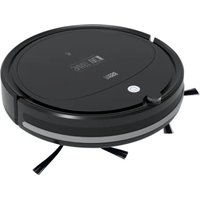
- Robot vacuum cleaner
- SMART VAC
- TSA5030
- SAFETY INSTRUCTIONS
- In order to reduce the injuries or damages, follow basic safety precautions applied when using any electrical device, including the following:
- IMPORTANT!
- CONNECTING THE BATTERY
- CHARGING
- Note:
- OPERATION
- Emptying the dust bin
- CLEANING
- Suction intake
- Side brushes
- Sensors
- Dust bin and filter
- ANTI-TANGLE SYSTEM
- TOUCH BUMPER
- TROUBLESHOOTING
- English Correct Disposal of This Product (Waste Electrical & Electronic Equipment)
Brand : Teesa
Model : TSA5030
Category : Vacuum Cleaner