
LC50-SP - Laser pointer Cocraft - Free user manual and instructions
Find the device manual for free LC50-SP Cocraft in PDF.


| Product Type | Cross-Line Laser Level |
| Model | LC50-SP |
| Brand | Cocraft |
| Laser Class | II (IEC 60825-1) |
| Wavelength | 630–650 nm, < 1 mW |
| Accuracy | ± 0.2 mm/m |
| Self-Levelling Range | ± 5° |
| Laser Lines | Cross, Horizontal, Vertical |
| Indoor Range | 15 m |
| Outdoor Range (with receiver) | 50 m |
| Power Supply | 3 × AA/LR6 batteries |
| Battery Life | Up to 20 hours (alkaline) |
| Operating Temperature | -10 to +45 °C |
| Storage Temperature | -20 to +55 °C |
| IP Rating | IP54 |
| Tripod Thread | 1/4" |
| Dimensions (L×W×H) | 10 × 8.2 × 10.4 cm (3.9 × 3.2 × 4.1 in) |
| Weight (with batteries) | 620 g |
| Modes | Self-levelling, Manual levelling, Pulse mode |
| Manual Levelling | Disengages self-levelling for angled placement |
| Pulse Mode | For use with optional laser receiver (40-9978) |
| Safety Features | Lock mechanism when off; auto shut-off if tilted >5° |
| Cleaning | Use a lightly moistened cloth; mild detergent only |
| Battery Replacement | Remove cover (3), insert 3×AA |
Frequently Asked Questions - LC50-SP Cocraft
User questions about LC50-SP Cocraft
0 question about this device. Answer the ones you know or ask your own.
Ask a new question about this device
Download the instructions for your Laser pointer in PDF format for free! Find your manual LC50-SP - Cocraft and take your electronic device back in hand. On this page are published all the documents necessary for the use of your device. LC50-SP by Cocraft.
USER MANUAL LC50-SP Cocraft
Read the entire instruction manual carefully and make sure that you fully understand it before you use the equipment. Keep the manual for future reference.
Viktig information:
Original instructions
Bruksanvisning i original
Originalbruksanvisning
Cross-Line Laser Level
Art.no 40-9873 Model 892N Cross-Line Laser
Please read the entire instruction manual before using the product and then save it for future reference. We reserve the right for any errors in text or images and any necessary changes made to technical data. In the event of technical problems or other queries, please contact our Customer Services (see address details on the back).
Safety
- Keep the laser level's warning labels in readable condition.
- Never point the laser towards people or animals and never look into the laser yourself. Even low intensity lasers can cause permanent eye damage.
- This product contains no parts that you can repair yourself. Warning! The laser level may not be disassembled, opened or modified in any way. Doing so may expose the user to harmful laser beams.
- The laser may not be used for purposes other than to project laser lines for the purposes of measuring.
- This laser level generates laser beams in accordance with IEC 60825-1, class II standards. Laser beams always pose a risk of blinding both people and pets.
- Only let qualified tradesmen repair this instrument and only using original parts.
- Never point the laser onto reflective material.
- This product is not a toy. Never let children use the laser level without supervision. The possible risk of inadvertently blinding someone is always present.
- Never position the laser level in such a way that the beam projects at eye level and could possibly shine into someone's eyes.
- Never leave the laser level on and unattended. Always turn it off after use. There is always a possible risk that someone could be blinded by the laser beam.
Extra safety regulations specifically for lasers
- Warning! Laser emissions.
- Laser class II, 630–650 nm.
- Never look directly into the laser beam.
- Never look into the laser beam using optical instruments.
Product description
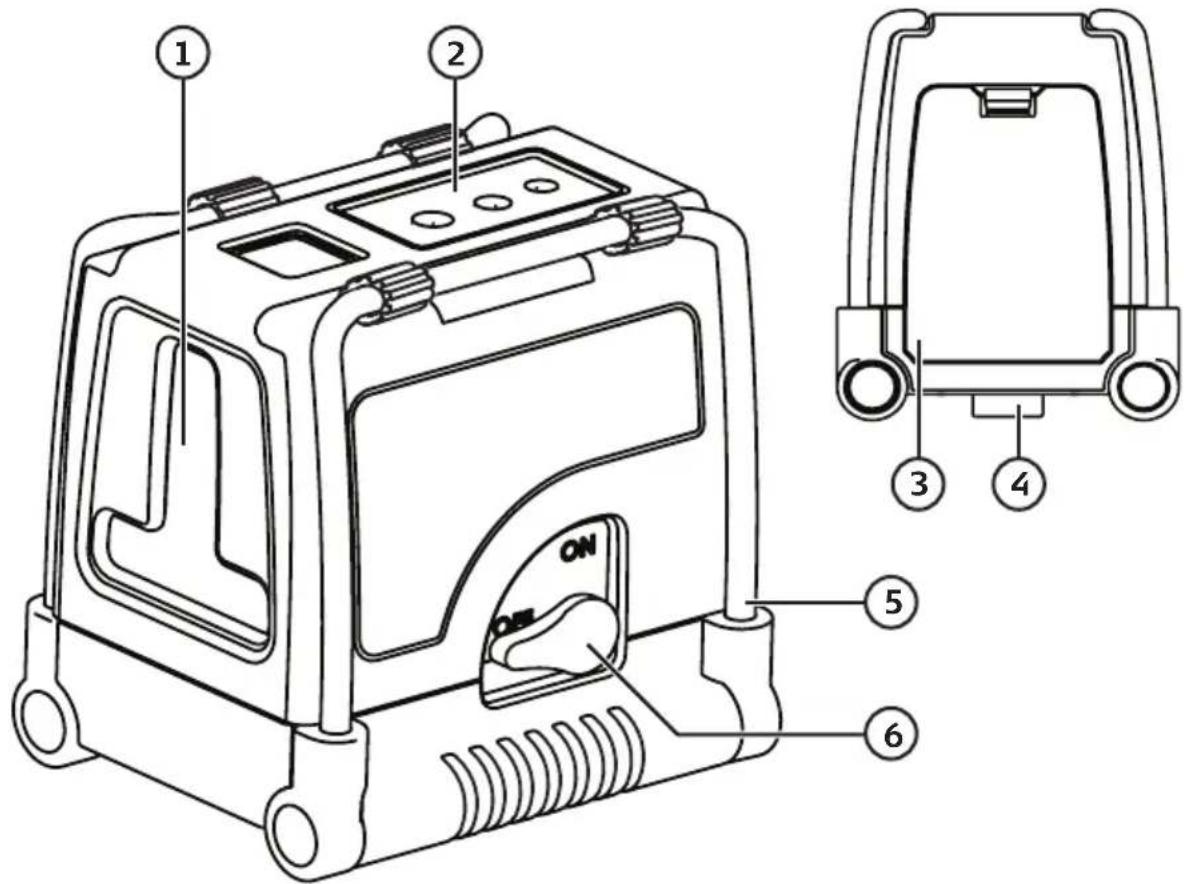
- Laser window
- Control panel
- Battery cover
- 14 " tripod adaptor
- Adjustable metal legs
- ON/OFF power switch
Control panel
- [ ] Manual levelling
- [v]Laser line selector
- [ ] Pulse mode
- Indicator – lights when manual mode is activated
- Indicator – lights when the laser line is projected
- Indicator – lights when pulse mode is activated
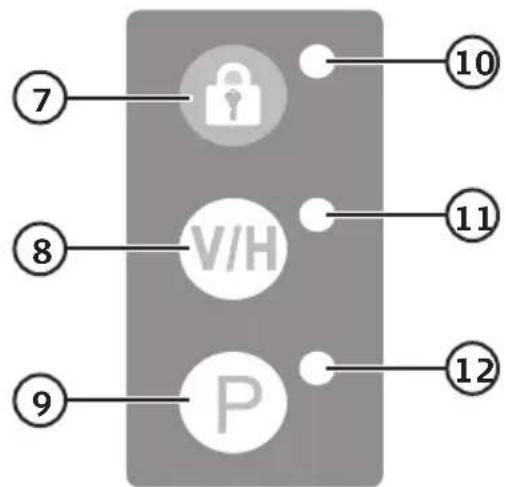
flowchart
graph TD
    A["7"] --> B["Lock"]
    C["8"] --> D["V/H"]
    E["9"] --> F["P"]
    B --> G["10"]
    D --> H["11"]
    F --> I["12"]
Operating instructions
Batteries
- Remove the battery cover (3) and insert three batteries (AA/LR6). Note the polarity markings on the bottom of the battery compartment to ensure correct insertion.
- Refit the battery cover.
Self-levelling
Note: The laser line will flash and the laser level will emit an audible signal when the laser level is inclined too much (more than 5°) while it is in self-levelling mode.
- Place the laser level on a firm, flat and vibration-free surface. The laser can also be stood on its folding metal legs or fastened to a tripod using the 14 " tripod adaptor.
- Turn on the laser using the power switch (6).
- Press [V/H] (8) repeatedly to select the type of laser line: Cross, horizontal or vertical.
- Switch the laser off using the on/off switch after use.
Note: Always switch the laser off after you have finished levelling or when moving to a different location. When the laser level is switched off, a built-in lock mechanism is engaged to protect the levelling mechanism.
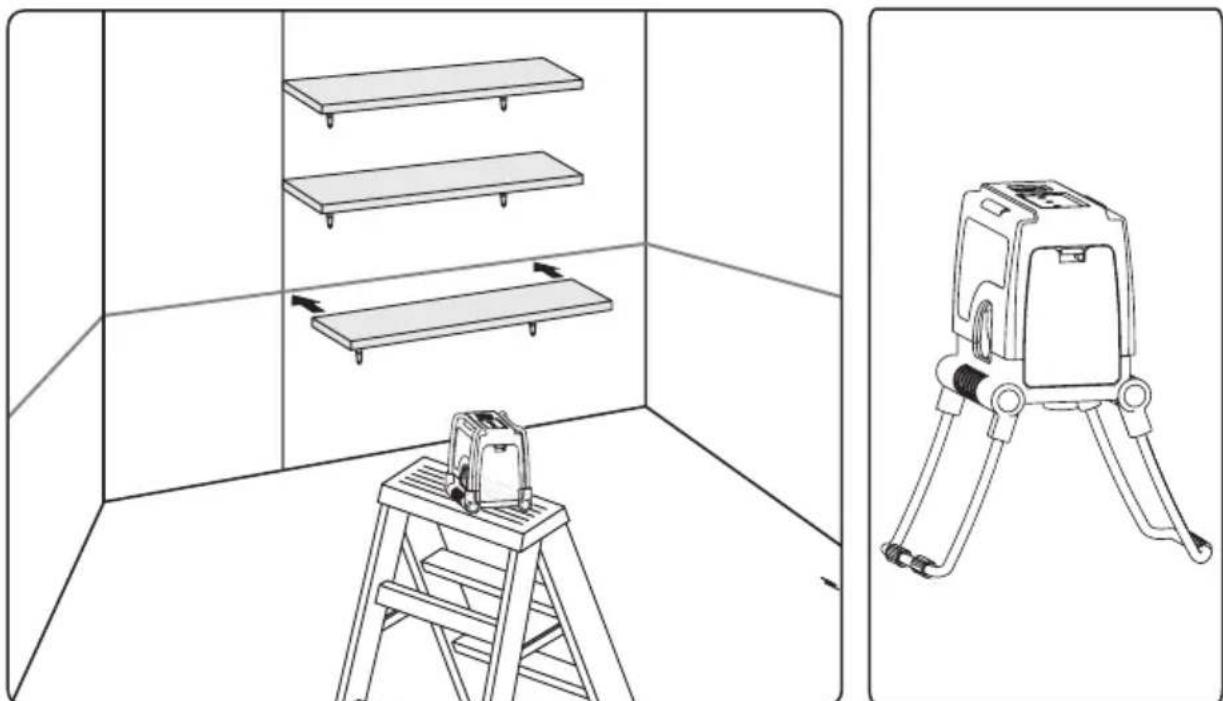
natural_image
Technical line drawing showing a ladder setup with three shelves and a separate robotic device (no text or symbols present)Manual levelling
In manual levelling mode, the self-levelling mechanism is disengaged so that you can place the laser level at any angle you like.
- Place the laser level on a firm, flat and vibration-free surface. The laser can also be stood on its folding metal legs or fastened to a tripod using the 14 " tripod adaptor.
- Activate the manual levelling mode by pressing [ ] (7). The power switch must be set to OFF in order for the manual levelling mode to be activated.
- Press [VH] (8) repeatedly to select the type of laser line: Cross, horizontal or vertical.
- Use the adjustable metal legs to stand the laser level at the desired angle.
- Press [ ] to deactivate the manual levelling mode.
Note: Always switch the laser off after you have finished levelling or when moving to a different location. When the laser level is switched off, a built-in lock mechanism is engaged to protect the levelling mechanism.
natural_image
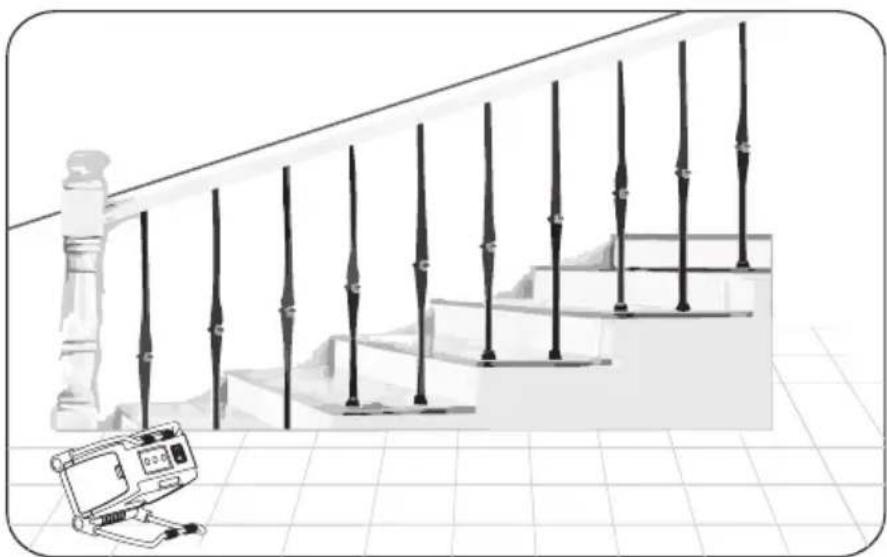
Illustration of a staircase with vertical metal railings and a small electronic device on the left (no text or symbols)Pulse mode
The pulse mode is for use outdoors together with a laser receiver (Clas Ohlson art.no: 40-9978).
Care and maintenance
- Always switch the laser level off before cleaning it, moving it, and after you have finished levelling.
- Clean the laser using a lightly moistened cloth. Use only mild cleaning agents, never solvents or corrosive chemicals.
- Replace the batteries if the projected laser line becomes unclear.
• Always handle the laser level with the care of the precision optical instrument that it is. - Do not expose the laser level to impacts, vibrations, extremely high or low temperatures.
- Remove the batteries and store the laser level in a dry, dust-free environment, out of children's reach whenever it is not to be used for an extended period.
Troubleshooting guide
| The laser will not switch on. | Check the capacity of the batteries and make sure that they are inserted correctly. Follow the markings on the bottom of the battery compartment. |
| The manual levelling mode will not activate. | The power switch must be set to OFF in order for the manual levelling mode to be activated. |
| The laser line flashes and the laser level emits an audible signal during self-levelling. | The laser level is at too much of an angle (more than 5°), place it on a level surface. |
| The laser line is not very visible. | Check the batteries and replace if necessary.Check the laser window; clean it with a soft cloth if necessary.Ambient light level too high. |
Responsible disposal
This symbol indicates that this product should not be disposed of with general household waste. This applies throughout the entire EU. In order to prevent any harm to the environment or health hazards caused by incorrect waste disposal, the product must be handed in for recycling so that the material can be disposed of in a responsible manner. When recycling your product, take it to your local collection facility or contact the place of purchase. They will ensure that the product is disposed of in an environmentally sound manner.

natural_image
Symbol of a trash bin with no text or labels, featuring a crossed-out box and a solid rectangle below (no readable text or symbols)Specifications
Laser range indoor 15 m, outdoor with receiver (sold separately): 50 m
Laser line output Cross, vertical, horizontal
Accuracy ± 0.2 mm/m
Self-levelling control ± 5°
Wavelength 630–650 nm, P < 1 mW
Laser class ||
Operating temperature -10 to +45 °C
Storage temperature -20 to +55 °C
Tripod thread 1/4"
Power supply 3 × AA/LR6 batteries
Battery life Up to 20 hours of use (alkaline batteries)
IP rating IP54
Size 10 × 8.2 × 10.4 cm (3.9 × 3.2 × 4.1")
Weight with batteries 620 g
Krysslaser
Art.nr 40-9873 Modell 892N Cross Laser
natural_image
Technical illustration showing a ladder setup with a laptop and three shelves, alongside a separate mechanical device (no text or symbols present)Manuell nivellering
natural_image
Illustration of a staircase with vertical metal railings and a small electronic device on the right (no text or symbols)Pulsläge
natural_image
Symbol of a trash bin crossed with no text or labels, accompanied by a solid black rectangle below (no text or symbols present)Specifikationer
- Laservindu
- Manøvreringspanel
- Batterilokk
- Stativfeste 1/4"
- Justerbare metallbein
- ON/OFF (på/av)
Manøvreringspanel
natural_image
Technical line drawing showing a ladder setup with a laptop and two labeled views of a mechanical device (no text or symbols present)Manuell nivellering
natural_image
Illustration of a staircase with vertical metal railings and a small electronic device on the floor (no text or symbols)Pulsmodus
Pulsmodus brukes utendørs sammen med en laserdetektor (vårt artikkelnummer 40-9978).
natural_image
Symbol of a trash bin crossed with no visible text or labelsSpesifikasjoner
natural_image
Technical line drawing showing a ladder setup with three shelves and a separate robotic device (no text or symbols present)Manuaalinen tasaus
natural_image
Illustration of a staircase with vertical metal posts and a small electronic device on the right (no text or symbols)Pulssitoiminto
natural_image
Technical line drawing showing a ladder setup with three shelves and a separate mechanical device (no text or symbols)natural_image
Illustration of a staircase with vertical metal railings and a small electronic device on the floor (no text or symbols)Impulsfunktion
natural_image
Symbol of a trash bin crossed with no visible text or labelsTechnische Daten
Postal 10 - 13 Market Place
Kingston upon Thames
Surrey
KT1 1JZ
Deutschland
Kundenservice Hotline: 040 2999 78111
E-Mail: kundenservice@clasohlson.de
Homepage
www.clasohlson.de


- Viktig information:
- Cross-Line Laser Level
- Safety
- Extra safety regulations specifically for lasers
- Product description
- Control panel
- Operating instructions
- Batteries
- Self-levelling
- Manual levelling
- Pulse mode
- Care and maintenance
- Responsible disposal
- Specifications
- Krysslaser
- Manuell nivellering
- Pulsläge
- Specifikationer
- Manøvreringspanel
- Pulsmodus
- Spesifikasjoner
- Manuaalinen tasaus
- Pulssitoiminto
- Impulsfunktion
- Technische Daten
- Deutschland
Brand : Cocraft
Model : LC50-SP
Category : Laser pointer