
HD 10.8-LI - Tower Cocraft - Free user manual and instructions
Find the device manual for free HD 10.8-LI Cocraft in PDF.


| Product Type | Cordless Drill/Driver |
| Brand | Cocraft |
| Model | HD 10.8-LI (DJC152-SZ20-UK / DJC152-SZ20) |
| Motor Voltage | 10.8 V |
| No-Load Speed | 0–350 / 0–1050 rpm (2-speed gearbox) |
| Max Torque | 22 Nm |
| Drilling Capacity (Wood) | 16 mm |
| Drilling Capacity (Steel) | 10 mm |
| Chuck Type | Keyless chuck, 10 mm capacity |
| Weight | 1 kg |
| Battery Type | Lithium-ion (Li-Ion) |
| Battery Voltage | 10.8 V |
| Battery Capacity | 1.5 Ah |
| Charger Input | 100–240 V AC, 50/60 Hz, 30 W |
| Charger Output | DC 12.6 V, 1.5 A |
| Charging Time | 80 minutes |
| Sound Pressure Level (LpA) | 64.3 dB(A) (K=3 dB(A)) |
| Sound Power Level (LwA) | 75.3 dB(A) (K=3 dB(A)) |
| Vibration Emission | aₕ = 0.577 m/s², ah,D = 0.592 m/s² (K=1.5 m/s²) |
| Key Features | Variable speed trigger, forward/reverse, torque dial (21+1 settings), gear selector, LED light, overload/overheat/low-voltage protection |
| Maintenance | Keep ventilation openings clean; wipe with damp cloth; only use mild detergents |
| Spare Parts & Repairability | Contact Customer Services for worn brushes, faulty switch, etc.; use only original spare parts |
| Safety Certifications | CE marked; double insulation; indoor use only; wear ear and eye protection |
Frequently Asked Questions - HD 10.8-LI Cocraft
User questions about HD 10.8-LI Cocraft
0 question about this device. Answer the ones you know or ask your own.
Ask a new question about this device
Download the instructions for your Tower in PDF format for free! Find your manual HD 10.8-LI - Cocraft and take your electronic device back in hand. On this page are published all the documents necessary for the use of your device. HD 10.8-LI by Cocraft.
USER MANUAL HD 10.8-LI Cocraft
Read the entire instruction manual carefully and make sure that you fully understand it before you use the equipment. Keep the manual for future reference.
Viktig information:
natural_image
Blue and black Cocralf HD 10.8-U power drill tool against a textured gray background (no text or symbols on the device body)Art.no Model
18-3553
40-8751
DJC152-SZ20-UK
DJC152-SZ20
Ver. 20161123
Original instructions
Bruksanvisning i original
Originalbruksanvisning
Cordless Drill/Driver
Art.no 18-3553
40-8751
Model DJC152-SZ20-UK
DJC152-SZ20
Please read the entire instruction manual before using the product and save it for future reference. We reserve the right for any errors in text or images and any necessary changes made to technical data. If you have any questions concerning technical problems please contact our Customer Services.
Safety
General safety instructions for cordless power tools
Warning: Read all the instructions. Failure to comply with the following instructions can lead to electric shocks, fires and/or serious injury. The term “power tools” in the following warning text refers to your handheld mains operated or battery operated tool.
SAVE THESE INSTRUCTIONS.
1) Work area
a) Keep the work area clean and well illuminated. Cluttered and poorly lit areas increase the risk of accidents.
b) Do not use power tools in explosive environments, e.g. near flammable liquids, gases or dust. Power tools generate sparks that can easily ignite dust or fumes.
c) Keep children and other bystanders away from the area where you will be using the power tool. Distractions can cause you to lose concentration and control of the tool.
2) Electrical safety
a) The power tool's plug must fit correctly into the wall socket. Never modify the plug in any way. Never use an adaptor together with earthed power tools. Unmodified plugs and suitable wall sockets minimize the risk of electric shocks.
b) Avoid physical contact with earthed objects such as pipes, radiators, ovens or refrigerators. There is an increased risk of receiving an electrical shock if your body is earthed.
c) Do not expose the power tool to rain or other wet conditions. If water gets inside, it increases the risk of electric shock.
d) Make sure that the mains lead is not damaged during use. Never use the mains lead to pull or carry the tool or for pulling the plug out of the wall socket. Keep the lead away from heat, oil, sharp edges and moving parts. Damaged or tangled leads increase the risk of electric shock.
e) When using power tools outdoors, use an extension lead that is suitable for the purpose. The use of an extension lead designed for outdoor use decreases the risk of electric shocks.
f) If for some reason you must use a power tool in a wet environment, always connect it to the mains via an earth-fault circuit breaker such as an RCD (residual current device). Using an RCD significantly reduces the chances of you receiving an electric shock.
3) Personal safety
a) Pay attention to what you are doing and use common sense when using power tools. Never use power tools if you are tired or under the influence of drugs, alcohol or medication. One moment of inattention while using a power tool may result in serious injury.
b) Wear protective clothing. Always wear safety glasses. Using protective clothing such as dust masks, non-slip safety shoes, helmets and ear defenders when needed decreases the risk of injury.
c) Avoid accidental starts. Make sure that the power switch is set to OFF before plugging the power tool into a wall socket. Never carry a power tool with your finger on the trigger and never connect the power tool to a wall socket when the switch is set to ON. Doing so increases the risk of an accident occurring.
d) Remove all service tools/spanners before switching the power tool on. A service tool left on any of the power tool's rotating parts may result in injury.
e) Do not overreach. Make sure you stand steady and well balanced at all times. This will allow you to have more control in unexpected situations.
f) Wear suitable clothing. Do not wear loose-fitting clothing or jewellery. Keep hair, clothes and gloves away from moving parts. Loose-fitting clothes, jewellery or long hair could potentially become caught in any moving parts.
g) If equipment for dust extraction or collection is available, make sure it is connected and used properly. The use of such equipment can decrease dust-related hazards.
4) Use and maintenance of the power tool
a) Do not force the power tool. Use a power tool suitable for the work you are about to perform. The proper power tool will perform the task better and safer if used at the correct feed rate.
b) Never use the power tool if the power switch does not switch the tool on and off properly. All power tools that cannot be controlled by the power switch are dangerous and must be repaired.
c) Unplug the lead from the wall socket before making any adjustments, changing accessories or storing the power tool. These precautions reduce the risk of the power tool starting unexpectedly.
d) Store power tools that are not being used out of children's reach. Do not allow people who are unfamiliar with the tool or its functions to operate it. Power tools can be dangerous if they fall into the hands of inexperienced users.
e) Maintaining power tools. Check for any incorrect settings, parts that catch, broken parts or anything else which may cause the power tool to malfunction. If something is damaged it must be repaired before use. Many accidents are caused by poorly maintained power tools.
f) Keep tools sharp and clean. Properly maintained cutting tools with sharp blades are less likely to jam and are easier to control.
g) Use the power tool, accessories and similar according to instructions and in an appropriate manner suitable for the type of power tool used. Also, take into consideration your work environment and the type of work to be done. Using the power tool for a purpose other than that for which it is intended could result in a dangerous situation.
5) Use and maintenance of cordless power tools
a) Make sure that the power switch is set to OFF before fitting the battery. Attaching a battery to a power tool when the power switch set to ON increases the risk of an accident occurring.
b) Only charge the battery using a charger approved by the manufacturer.
A charger suitable for one type of battery can pose a fire hazard if used for another type of battery.
c) Only use rechargeable batteries that are strictly compatible for those particular drill/drivers. The use of other types of batteries might cause damage or fire.
d) When the battery is not in use, store it at a safe distance away from metal objects such as paper clips, coins, keys, screws and other small metal objects that can bridge the gap between the battery terminals. Short circuiting the battery terminals can cause burn injuries or fires.
e) If the battery is damaged it can leak acid; avoid contact with this acid. If you accidentally come into contact with the acid; rinse with water. Consult a doctor if the acid comes into contact with your eyes. Battery acid can cause burns and irritation to the skin and eyes.
6) Service
a) Repairs and service should only be performed by qualified tradesmen, and only with original spare parts. This guarantees that the power tool is safely maintained.
General safety instructions for batteries and chargers
- Never attempt to open a battery.
- Never store a battery in direct sunlight or at temperatures above 40 °C.
- Only charge the battery when the ambient temperature is between 4 and 40^ .
- Never expose the battery or charger to water.
Product safety symbols

Read the entire instruction manual.

Always use ear protection.

Always use safety glasses.

For indoor use only.
Product description
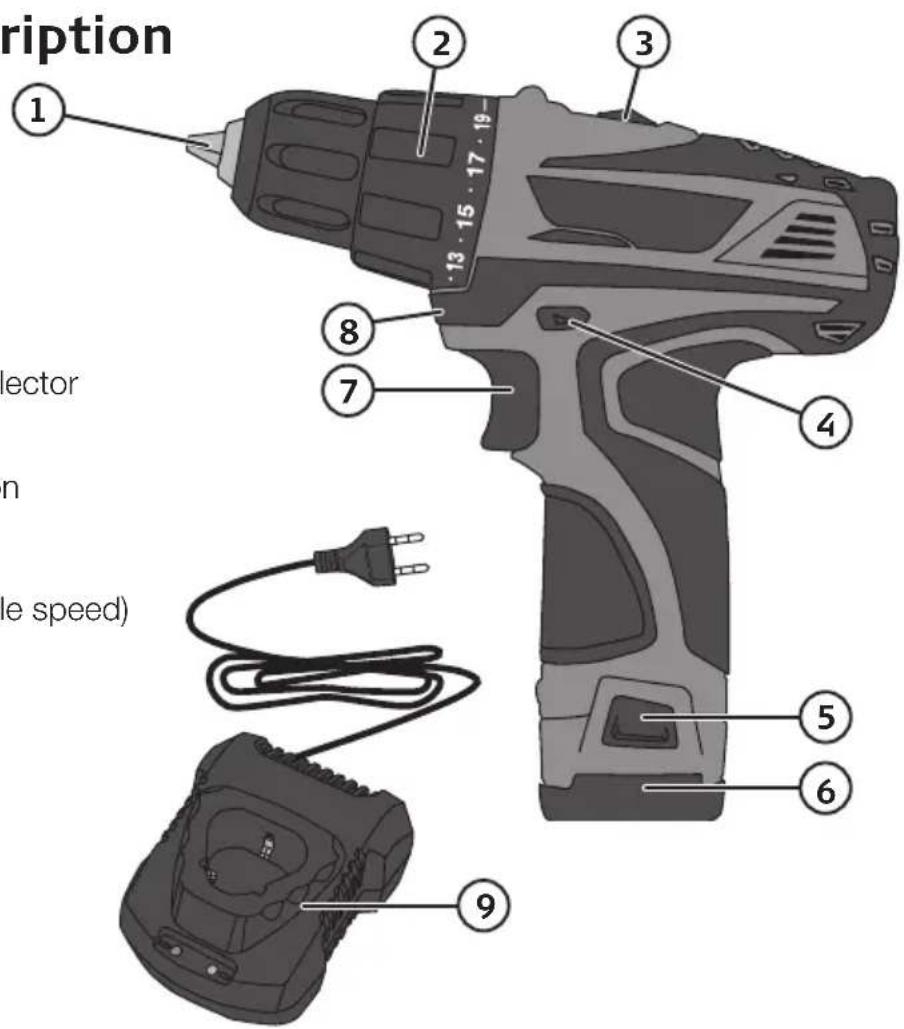
- Keyless chuck
- Torque dial
- Gear selector
- Rotation direction selector (forward /reverse)
- Battery release button
- Battery
- Power trigger (variable speed)
- Light
- Quick charger
Charging
- Remove the battery from the drill/driver by pressing the battery release button (5) and pulling out the battery.
- Connect the charger to a wall socket. The green LED will come on.
- Insert the battery into the charger. The green LED will turn off and the red LED will light during charging.
- When the battery is fully charged the red LED will turn off and the green LED will light.
- Unplug the charger from the wall socket and remove the battery from the charger when the charging process is complete.
- Steady green light – Battery fully charged/Charger connected to mains.
- Steady red light – Charging in progress.
- The charging time is about 80 minutes for normal use.
- The battery may become hot whilst it is being charged. This is completely normal.
- The battery and charger work best at normal room temperature. Do not charge the battery in direct sunlight or cold temperatures. The temperature range for charging is 5–40 °C.
- Electronics within the battery will automatically switch the power tool off as soon as the battery becomes discharged.
- For long-term storage (months) the battery should first be fully charged.
Functions
Power trigger
Select forward or reverse using the rotation selector (4). The rotation selector even has a centre position which locks the power trigger. When the selector is set to the centre position the drill/driver cannot be operated. The drill/driver is started and stopped by holding or releasing the power trigger (7).
The drill/driver is equipped with a variable speed control, which makes it extremely practical for driving screws. The more the power trigger is squeezed, the higher the speed of the chuck.
Screwdriver mode
Use the torque dial (2) to set a suitable torque setting. The correct torque setting will disengage the drive at the preset torque to prevent screws from being over-tightened or driven in too far. The torque setting should be based upon the type of screw, its size and the type of material being screwed into. Always start on a low torque setting and increase in stages until a suitable setting is reached.
Drill mode
Set the torque dial (2) to drill mode.
High / Low gear
The gear selector (3) has two settings: Position 1: 0–350 rpm, position 2: 0–1050 rpm.
Changing drill and screwdriver bits
The drill/driver has a keyless chuck which enables drill or screwdriver bits to be changed with one hand. Twist the chuck to the left to tighten, to the right to untighten. Make sure that the bit is tight and centred in the chuck.
Overload protection and other safety features
The drill/driver and battery have a number of safety features that prevent damage to the drill/driver and battery during use.
- During short high-load situations the overload protection may turn off the drill/driver and battery. This protection resets automatically. Release the trigger, wait a few seconds, ensure that there is no load and restart the drill/driver. The drill/driver should now function normally again.
- During high-load for extended periods the overheating protection may turn off the drill/driver/battery. The protection resets itself but the drill/driver cannot be restarted until it has returned to normal operating temperature. Let it cool before attempting to use it again. Adverse temperatures can occur in direct sunlight and should therefore be avoided.
- The battery has a low-voltage protection which operates when the battery becomes discharged. The low-voltage protection turns off the drill/driver automatically and the battery then needs to be recharged.
Drilling tips and advice
- When drilling into slippery materials, like tiles, you should place a strong piece of tape on the area in which you wish to drill to prevent the bit from wandering.
- When drilling into metal you should first use a centre punch to make a small indentation at the spot where you wish to drill. This indentation will help hold the bit in place and prevents it from wandering when you drill.
- When drilling into metal you should also use cutting oil to assist in drilling and to preserve the drill/driver and drill bit.
• Always use a clamp or vice to hold the workpiece. - When drilling into walls, make sure not to damage water pipes, electricity cables or gas pipes.
Care and cleaning
- Always keep the motor's ventilation openings free of dust and debris.
- Clean the product using a lightly moistened cloth. Only use mild cleaning agents, never solvents or corrosive chemicals.
- For long-term storage (months) the battery should first be fully charged.
Troubleshooting guide
| Problem Possible cause Action | ||
| The drill/driver does not start. | Battery discharged. Recharge the battery. | |
| The battery is overheated. Let the battery cool down. | ||
| Worn brushes. Contact our Customer Services. | ||
| Faulty power trigger. Contact our Customer Services. | ||
| The drill/driver is sluggish and cuts out. | Blunt or damaged drill bit. Replace the drill bit. | |
| Too much pressure applied. Decrease applied pressure. | ||
| Battery discharged. Recharge the battery. | ||
| The battery is overheated. Let the battery cool down. | ||
| The motor is overheated. Let the motor cool down. | ||
| Unusual sounds or strong vibrations. | The drill/bit is not centred or fitted correctly. | Make sure that the drill/bit is centred, correctly fitted and tight. |
| Sparks in the motor. | Faulty brushes. Contact our Customer Services. | |
| Winding short circuited. | ||
| Dirty commutator. | ||
Responsible disposal
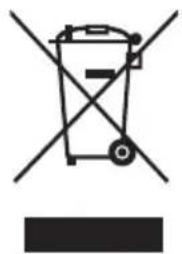
This symbol indicates that this product should not be disposed of with general household waste. This applies throughout the entire EU. In order to prevent any harm to the environment or health hazards caused by incorrect waste disposal, the product must be handed in for recycling so that the material can be disposed of in a responsible manner. When recycling your product, take it to your local collection facility or contact the place of purchase. They will ensure that the product is disposed of in an environmentally sound manner.
natural_image
Symbol of a trash bin with crossed lines indicating no waste or restriction, and a solid black rectangle below (no text or labels)Specifications
No-load speed 0–350/0–1050 rpm
Motor voltage 10.8 V
Max torque 22 Nm
Drilling capacity ∅ In wood: 16 mm, steel: 10 mm
Keyless chuck 10 mm
Weight 1 kg
Sound
(Uncertainty K: 3 dB (A)) LpA 64.3 dB(A)
LwA 75.3 dB(A)
Vibration value
(Uncertainty K: 1.5 m/s²) aₕ 0.577 m/s²
ah,D 0.592 m/s²
Rechargeable battery
Type Lithium-ion (Li-Ion)
Voltage 10.8 V
Capacity 1.5 Ah
Charger
Input 100–240 V AC, 50/60 Hz, 30 W
Output DC 12.6 V, 1.5 A
Charging time 80 minutes
Skruvdragare
Art.nr 18-3553 Modell DJC152-SZ20-UK 40-8751 DJC152-SZ20
natural_image
Symbol of a trash bin crossed with no text or labels, accompanied by a black rectangle below (no readable text or symbols)Specifikationer
natural_image
Symbol of a trash bin crossed with a diagonal line and a horizontal bar below (no text or labels)Spesifikasjoner
Turtall, trinnløst 0–350/1050 o/min
Spenning 10,8 V
Maks dreiemoment 22 Nm
Borekapasitet Tre ∅ 16 mm, stål ∅ 10 mm
natural_image
Symbol of a trash bin with crossed lines indicating no waste or restriction, and a solid black rectangle below (no text or labels)Tekniset tiedot
natural_image
Symbol of a trash bin crossed with no visible text or labelsTechnische Daten
Declaration of Conformity
Postal 10 - 13 Market Place
Kingston Upon Thames
Surrey
KT1 1JZ
Deutschland
Kundenservice Hotline: 040 2999 78111
E-Mail: kundenservice@clasohlson.de
Homepage
www.clasohlson.de


- Viktig information:
- Cordless Drill/Driver
- Safety
- General safety instructions for cordless power tools
- 1) Work area
- 2) Electrical safety
- 3) Personal safety
- 4) Use and maintenance of the power tool
- General safety instructions for batteries and chargers
- Product safety symbols
- Product description
- Charging
- Functions
- Power trigger
- Screwdriver mode
- Drill mode
- High / Low gear
- Changing drill and screwdriver bits
- Overload protection and other safety features
- Drilling tips and advice
- Care and cleaning
- Troubleshooting guide
- Responsible disposal
- Specifications
- Sound
- Rechargeable battery
- Charger
- Skruvdragare
- Specifikationer
- Spesifikasjoner
- Tekniset tiedot
- Technische Daten
- Declaration of Conformity
- Deutschland
Brand : Cocraft
Model : HD 10.8-LI
Category : Tower