
Pure Passion - Headphones HAMA - Free user manual and instructions
Find the device manual for free Pure Passion HAMA in PDF.


| Product Type | Over-ear headphones |
| Brand | Hama |
| Model | Pure Passion |
| Driver Size | 40 mm |
| Impedance | 32 Ω |
| Frequency Response | 20 Hz – 20 kHz |
| Sensitivity | 100 dB |
| Maximum Input Power | 100 mW |
| Cable Length | 1.2 m |
| Connection Type | 3.5 mm jack |
| Weight | 200 g |
| Dimensions (W x H x D) | 170 x 180 x 80 mm |
| Color | Black/Red |
| Ear Cushions | Velour / Leatherette |
| Headband Padding | Padded |
| Foldable | Yes |
| Controls | In-line volume control |
| Microphone | Yes, in-line |
| Warranty | 2 years |
| Power Source | Passive (no battery) |
| Cleaning | Wipe with dry cloth |
| Safety | Do not expose to liquids |
Frequently Asked Questions - Pure Passion HAMA
User questions about Pure Passion HAMA
0 question about this device. Answer the ones you know or ask your own.
Ask a new question about this device
Download the instructions for your Headphones in PDF format for free! Find your manual Pure Passion - HAMA and take your electronic device back in hand. On this page are published all the documents necessary for the use of your device. Pure Passion by HAMA.
USER MANUAL Pure Passion HAMA
Bluetooth® In-EarStereoHeadset
OperatingInstructions
Bedienungsanleitung
Instruccionesdeuso
natural_image
Line drawing of a pair of earbuds connected via cables, no text or symbols present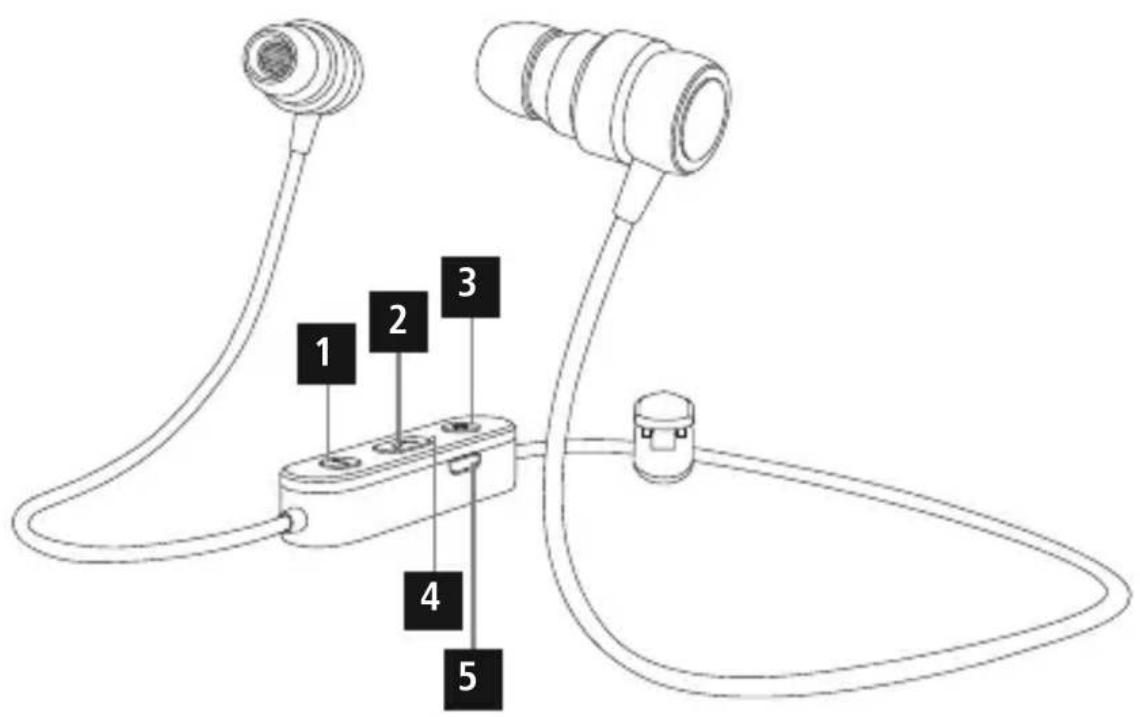
ControlsandDisplays
- Volume- / Previoustrack
- MFB: Power / Play / Pause / Accept, end call
3.Volume+ / Nexttrack
4.LEDindicator - Micro-USBchargingsocket
Thankyouforchoosinga H amaproduct. Takeyourtimeandreadthefollowinginstructions andinformationcompletely. P leasekeepthese instructions in a safe place for future reference. If yousellthedevice,pleasepasstheseoperating instructionsontothenewowner.
1. ExplanationofWarningSymbolsandNotes

Warning
This symbol is used to indicate safety instructions ortodraw your attention to specific hazard and risks.

Note
This symbolised to indicate additional information or important notes.
2.PackageContents
• 1 x Bluetooth StereoHeadset "PURE"
• 1 x Micro-USBchargingcable
- 1 x cableclip
• 3 pairsofsiliconeearpadsinvarioussizes (S/M/L – size M is currently attached)
• T heseoperatinginstructions
3. SafetyNotes
- T heproductisintendedforprivate,non-commercialuseonly.
- P rotectheproductfromdirt,moisture a n d overheating,andonlyuseitina d ryenvironment.
- D o n otdroptheproductanddonotexposeitto anymajorshocks.
- D o n otoperatetheproductoutsidethepower limitsgiveninthespecifications.
- Do not openthedeviceorcontinuetooperateitif itbecomesdamaged.
- S incethebatteryisintegratedandcannotberemoved, youwillneedtodisposeoftheproductasa w hole.Do thisincompliancewiththelegalrequirements.
• D isposeofpackagingmaterialimmediately accordingtolocallyapplicableregulations.
- Do not modify the product in any way. Doing so voidsthewarranty.

Warning-Battery
- O nlyusesuitablechargingdevicesorUSB connectionsforcharging.
- A s a r ule, donotchargedevicesorUSB connectionsthatare d effectiveanddonottry torepairthemyourself.
- D o n otoverchargetheproductorallowthe batterytocompletelydischarge.
- A voidstoring, chargingorusingbatteriesin extremetemperatures.
- W henstoredovera longperiodoftime, batteriesshouldbechargedregularly(atleast everythreemonths).

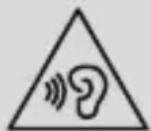
Warning- H ighvolumes
- U singthisproductlimitsyourperception ofambientnoise. For thisreason, donot operateanyvehiclesormachineswhileusing thisproduct.
- A lwayskeepthevolumeata reasonablelevel.Loudvolumes, evenovershortperiods, cancausehearingloss.
4. Getting Started
- The headsetsetisequipped with a rechargeable battery. The battery must be fully charged before using the device for the first time.
- Ensure that the headset is switched off before chargingit.
- B eginchargingbyconnectingtheincludedUSB chargingcabletothechargingsocket(5)as wellastotheUSBconnectionofa P C/laptop.
- Alternatively, you can charge the headset using a suitableUSBcharger. P leaserefertotheoperating instructionsfortheUSBchargerused.
- The LED (4) remains red during charging.
- I t t akesaround2-3hoursuntilthebatteryis completelycharged.
- O ncethechargingprocessiscomplete,thered lightoftheLED(4)turnstobluelight.
- D isconnectallcableandmainsconnections afteruse.
5.Operation
Switchingtheheadsetoff/on
- Press and hold the MFB button (2) for about 3 seconds until a voice says 'PowerON' and the LED(4) flashes bluethreetimes.
- To switch the device off, press and hold the MFB button (2) for about 5 seconds until a voice says 'Power OFF' and the LED (4) flashes red three timesandgoesout.

Note
The functions described in this section are only available for Bluetooth ^ -capable terminal devices.
5.1. Bluetooth ^® pairing

Note- Pairing
- M akesure t hatyourBluetooth®-capable terminaldeviceisonandBluetooth ® is activated.
- M akesure t hatyourBluetooth®-capable terminaldeviceisvisibleforotherBluetooth® devices.
-
Formore information, pleaserefertothe operatinginstructionsofyourterminaldevice.
-
T heheadsetandtheterminaldevices should not be any further than 1 metre away from each other. T hesmallerthedistance, the better.
- S witchtheheadsetonusingtheMFBbutton(2).
- Press and hold the MFB button (2) for about 3 secondsuntila v oicesays'PAIRING'andthe LED (4) emits flashes of alternating red and blue light. Theheadsetissearchingfora B l u e t o o t R connection.
- O pentheBluetooth® settingsonyourterminal deviceandwaituntil HamaBTHPURE appears in thelistofBluetooth® devicesfound.
- Se lHemaBTHPURE andwaituntiltheheadset islistedasconnectedintheBluetooth® settings onyourterminaldevice.

Note- Bluetooth®password
Someterminaldevicesrequire a p password in ordertoconnecttoanotherBluetooth ^ device.
- If your terminal device requests a password for connection with the headset, enter 0000.

Note
- I f t heconnectionwassuccessful,theLED(4) flashesblue.
- I f t heconnectionattempttakeslongerthan 300secondstocomplete,itiscancelled andtheLEDsgoout.Inthiscase,repeathe stepslistedpreviouslyunder5.1Bluetooth® pairing.
5.2.AutomaticBluetooth ^® connection(after successfulpairing)

Note
- M akesure thatyourBluetooth®-capable terminaldeviceisonandBluetooth ® is activated.
- M akesure t hatyourBluetooth®-capable terminaldeviceisvisibleforotherBluetooth® devices.
- Formore information, pleaserefertothe operatinginstructionsofyourterminaldevice.
- S witchtheheadsetonusingtheMFBbutton(2). TheblueLEDbeginstoflashandtheheadset automaticallyconnectswiththelastterminal deviceused.

Note
- I f t heconnectionwassuccessful,theLED(4) flashesblue.
- I f t heconnectionattempttakeslongerthan 300secondstocomplete, itiscancelledand theLEDsgoout. In this case, repeatthesteps listedpreviouslyunder5.1.
- I t m aybenecessarytomakesettingson yourterminaldevicetoenableautomatic connectionwiththepairedheadset.

Note— C onnectionimpaired
Aftertheheadsetandterminaldevicehavebeen paired, a c onnectionisestablishedautomatically. IftheBluetooth ^® connectionisnotestablished automatically, c heckthefollowing:
- C hecktheBluetooth® settingsofyourterminal deviceetoseewhether HamaBTHPURE is connected.Ifnot,repeatthestepslistedunder
5.1. Bluetooth ^® pairing.
- Checkwhetherobstaclesare i mpairingthe range.Ifso,movethedevicesclosertogether.
- T heperformancecanalsobeaffectedbya weakbattery.
5.3. Bluetooth ^® multipointconnection
ThisheadsetcanbeconnectedwithtwoBluetooth enabledterminaldevicessimultaneously.
- First connect the headset with the first terminal device as described in 5.1.
- T hendisableBluetooth® onthatterminaldevice.
- N ext, connecttheheadsetwiththesecondterminal deviceasdescribedin5.1.
- A ctivateBluetooth® onthefirstterminaldeviceonce more.Theheadsetnowconnectstothatterminal deviceautomatically.
5.4.Audioplayback

Note
- N otethatthefunctionsdescribedunder5.3. and 5.4. are only possible with an active Bluetooth® connection.
- Y ourterminaldevicemustalsosupportthe individualfunctions.
- Formore information, pleaserefertothe operatinginstructionsofyourterminaldevice.
-
Functionscanstillbecontrolleddirectlyviathe terminaldevice.
-
S etthevolumeonyourterminaldevicetoa lowlevel.
- S witchtheheadsetonusingtheMFBbutton(2).
- S tartaudioplaybackontheconnectedterminal device.
-
Press and hold Volume + (3) to increase the volume. A signaltone indicates ifthemaximum volume is reached.
-
Press and hold Volume - (1) to reduce the volume. A signaltone indicates iftheminimum volume is reached.
- Press the MFB button (2) to start or pause audio playback.
- Press Volume + (3) to skip to the next track.
- Press Volume - (1) to skip back to the previous track.
5.5.Hands-freefunction
- Voicedialling:PressandholdtheMFBbutton(2) for about 1 second until you hear a signal tone. Thensaythenameornumberyouwishyoucall.
- A ccept/endcall:PresstheMFBbutton(2)onceto answeranincomingcallortoenda c all.
- R ejectcall:PresstheMFBbutton(2)twiceoruse yourtelephonetorejectanincomingcall.
- Press the MFB button (2) twice to call the number ofthelastcall.

Note
The 'Callnumberoflastcall' function is available only forth the device that was connected first in multi-pairing.

Note- C allquality
To increase the call quality, make sure that you are n eartheheadsetwithyourmobilephone duringthecall.
5.6.Disconnectingtheheadset
- S witchtheheadsetoff.
- D isconnecttheheadsetviatheBluetooth® settingsyourterminaldevice.
5.7.Batterycapacity
- An announcement is made and the display flashes inred w henthebatteryislow
- C hargetheheadsetasdescribedin4.Getting Started.
6.CareandMaintenance
Onlycleanthisproductwitha s lightlydamp,lint-free clothanddonotuseaggressivecleaningagents.
Makesure t hatwaterdoesnotgetintotheproduct.
7.WarrantyDisclaimer
HamaGmbH& C o KGassumesnoliabilityand providesnowarrantyfordamageresultingfrom improperinstallation/mounting,improperuseof theproductorfromfailure t o o bservetheoperating instructionsand/orsafetynotes.
8. Service and Support
PleasecontactHamaProductConsultingify you have any questions about this product.
Hotline:+499091502-115(German/English)
Furthersupportinformationcanbefoundhere: www.hama.com
9.TechnicalData
| Bluetooth® Headset | |
| Earphone/microphone impedance | 16Ω/ < 2 .2kΩ |
| Earphone/microphone frequency | 20Hz- 2 0 kHz/ 2 0 Hz - 1 0 kHz |
| Earphone/microphone sensitivity | 92dB± 3 dB/ - 4 2 dB ± 3 dB |
| WBCV≥75mV | |
| Rangemax.10m | |
| Bluetooth® technologyv4.1+ E D R | |
| Profile | HFPV1.6/ HSPV1.2/ A2DPV1.2/AVRCPV1.4 |
| Transmissionfrequency2.4- 2 .48GHz | |
| BatteryLi-Po 3 .7V | |
| Batterycapacity90mAh | |
| Currentconsumptionmax.75mA | |
| Chargingvoltagemax.5 V USB | |
| Totalweight | 20g |
| Standby/talkingtime | 200h / 6 h |
10. Recycling Information
Noteonenvironmentalprotection:
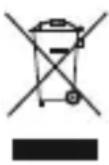
Aftertheimplementationofthe EuropeanDirective2012/19/EUand 2006/66/EUinthenationallegal system, the following applies: Electric and electronic devices as wellas
batteriesmustnotbedisposedofwithhousehold waste. Consumers are obliged by law to return electrical and electronic devices as well as batteries at the end of their service to the public collecting points setup forth a purpose or point of sale. Details to this are defined by the national law of the respective country. This symbol on the product, the instruction manual or the package indicates that a product subject to the regulations. By recycling, reusing thematerials or other forms of utilising old devices/Batteries, you are making an important contribution to protecting our environment.
11. Declaration of Conformity

Hereby, Hama GmbH & Co KG declares thattheradioequipmenttype [00184030] is in compliance with
Directive2014/53/EU. ThefulltextoftheEU declarationofconformityisavailableatthefollowing internetaddress: www.hama.com->00184030->Downloads.
| Frequencyband(s) | 2402MHz–2480MHz |
| Maximumradio-frequency powertransmitted | 0.55mWE.I.R.P. |
The Bluetooth® word mark and logos are registered trademarks owned by Bluetooth SIG, Inc. and any use of such marks by Hama GmbH & Co KG is under license. Other trademarks and trade names are those of their respective owners.
All listed brands are trademarks of the corresponding companies. Errors and omissions excepted, and subject to technical changes. Our general terms of delivery and payment are applied.