
BVX100WTS - Fan GORENJE - Free user manual and instructions
Find the device manual for free BVX100WTS GORENJE in PDF.


| Product Type | Axial Fan |
| Model | BVX100WTS |
| Manufacturer | Gorenje |
| Voltage | 220-240 V / 50 Hz |
| Rated Power | 15 W |
| Airflow | 70 m³/h |
| Speed | 2300 rpm |
| Duct Diameter | 100 mm |
| Protection Class | Class II (double insulation) |
| Timer Range | 1 to 25 minutes |
| Mounting Options | Wall, ceiling, window |
| Minimum Installation Height | 2.3 m from floor |
| Max Room Temperature | 40 °C |
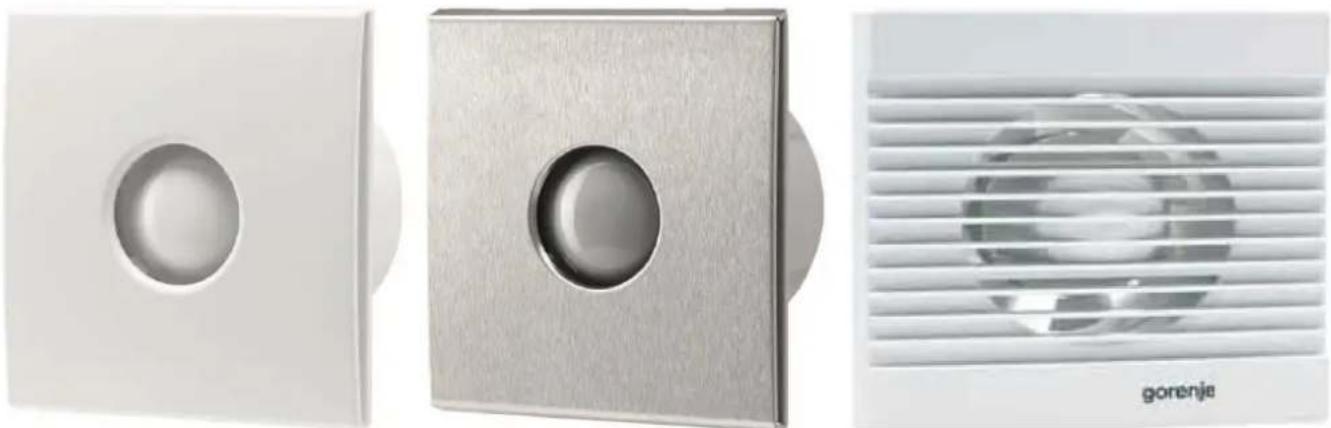
| Housing Material | White plastic |
| Net Weight | ~1.5 kg |
| Dimensions (W x H x D) | ~200 x 200 x 120 mm |
| Control Type | Bipolar wall switch (not included) |
| Maintenance | Wipe with damp cloth; no chemicals |
| Safety Features | Disconnect power before cleaning; no earth wire required |
| Included Accessories | Mounting kit, cable gland |
Frequently Asked Questions - BVX100WTS GORENJE
User questions about BVX100WTS GORENJE
0 question about this device. Answer the ones you know or ask your own.
Ask a new question about this device
Download the instructions for your Fan in PDF format for free! Find your manual BVX100WTS - GORENJE and take your electronic device back in hand. On this page are published all the documents necessary for the use of your device. BVX100WTS by GORENJE.
USER MANUAL BVX100WTS GORENJE
FAN – INSTRUCTIONS FOR INSTALLATION AND USE
GB
VENTILATOR – UPUTE ZA MONTAŽU I UPORABU
HR BIH
VENTILATOR – UPUTSTVO ZA MONTAŽU I UPOTREBU
SRB MK
Read these instructions
INSTALLATION ON GLASS WINDOW
ELECTRICAL CONNECTION
Before using the device for the first time, please read these instructions carefully and save them for future use.
FAN
INSTRUCTIONS FOR INSTALLATION AND USE
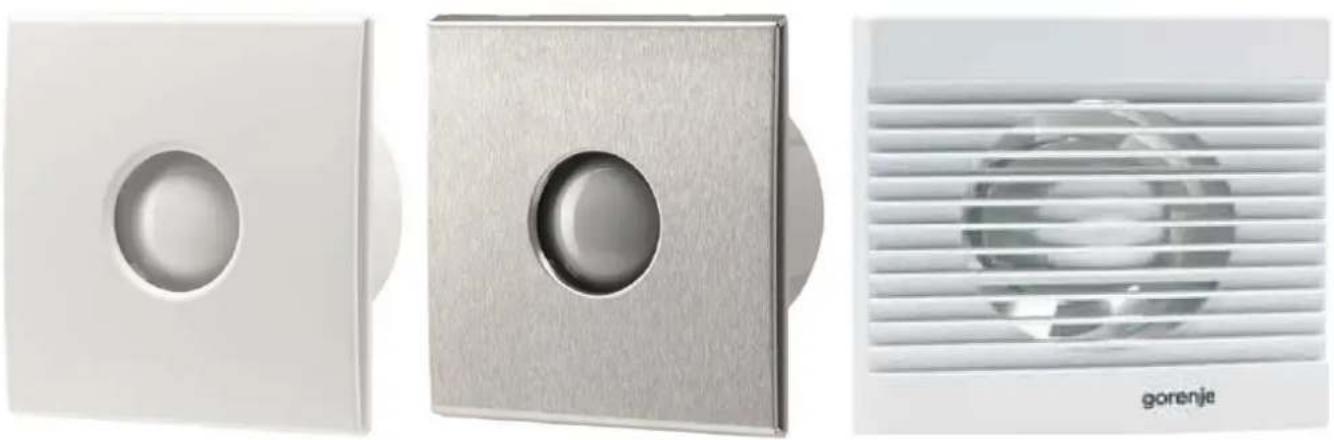
Please read these instructions
They contain many useful tips on the proper use and maintenance of the fan.
SAFETY WARNINGS
- Remove the packaging and make sure the device is undamaged. In case of doubt, consult the service centre.
Keep the packaging out of the reach of children and persons with disabilities.
- The device may only be used for applications specified in these instructions.
- INSTALLATION
The device can be mounted on the ceiling, wall or window. Use the attached mounting equipment. The fan's exhaust must be vented out of the room or into the building's ventilation system.
Installation must be carried out by qualified personnel.
- ELECTRICAL CONNECTION
The fan motor must be connected to a single phase power supply as indicated on the nameplate. Connectors for the switch are located on the fan housing. To ensure adequate IP protection, use appropriate fittings for electrical cables. The fan must be securely mounted and connected with electric cables with minimum cross-section of 1 mm². The fan does not need an earth wire, as it is specified as a device with double insulation (class 2).
The device must be connected to the power supply by a qualified electrician.
Connect the cable to the fan via a bipolar switch which must have a minimum spacing of 3 mm in all poles.
The device must be connected in accordance with national standards. Do not touch the device with moist or wet hands!
Do not touch the device while barefoot! Before cleaning or maintenance, turn off the mains power supply by means of the bipolar switch or disconnect the plug.
- In the event of a breakdown or malfunction, switch off the device and do not tamper with it. If repairs are needed, please contact the service centre. Always insist on genuine spare parts
- When the device is not in use, disconnect it from the mains power supply.
- The maximum permitted temperature of the room where the device is installed is 40°C.
- The device should not be used unattended by children, disabled persons or persons with reduced capabilities.
Children should always be supervised to ensure they do not play with the device.
- Do not use near flammable materials or their vapours (gasoline, alcohol, insecticides).
- Prevent the inflow of flue gas in the room in the case of installed devices with an open combustion chamber.
- Do not modify the device.
- Do not expose the device to weather conditions (rain, sun, etc.).
- Inspect the device regularly. In the event of identified defects, stop using the device.
- In the event of a fall or strong impact, the device must be checked by qualified personnel.
- The room where the fan is installed must have an adequate supply of air to ensure efficient operation.
- Do not cover the humidity sensor or motion sensor.
MODELS
- Standard models
This model is turned on/off via a supply voltage switch.
Models: V-100, V-200, V-300, BVN ____ WS, BVX ____ SS, BVX ____ WS.
• Model with timer (T - timer)
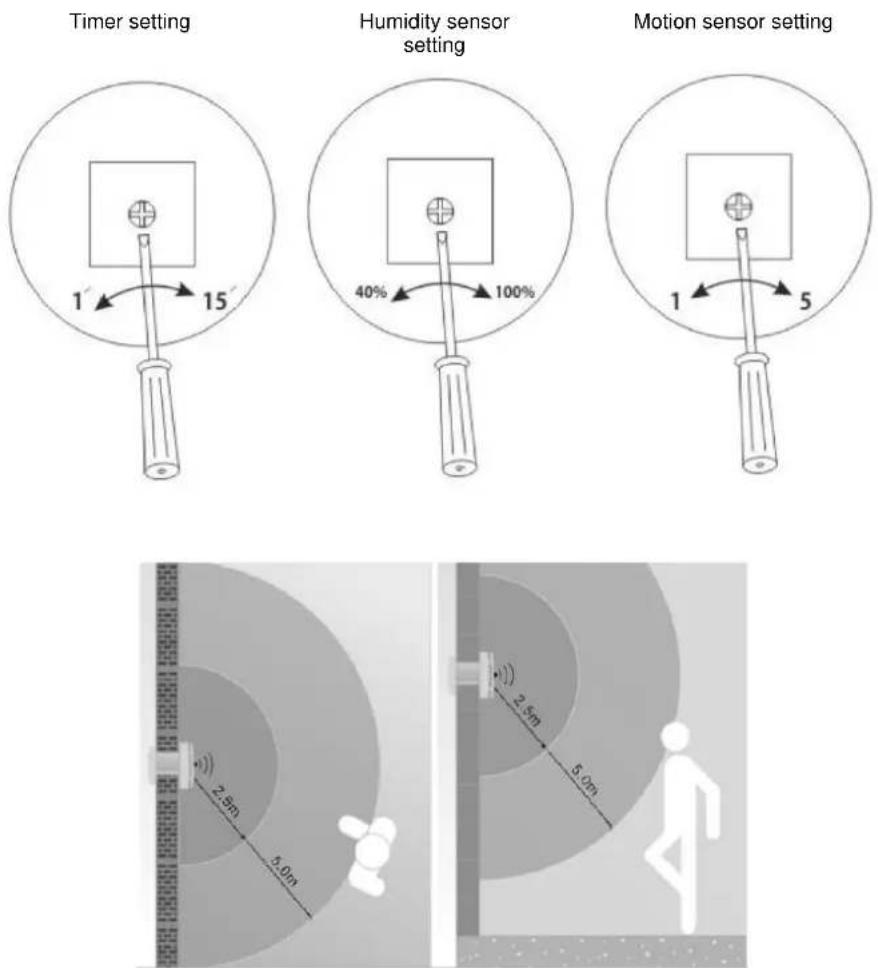
This model is equipped with a timer which allows the operation of the fan after turning off the switch. The default delay time is about 3 minutes. The timer can be set in the range from 1 to 25 minutes.
Models: BVX ____ WTS, BVX__STS.
• Model with humidity sensor (H - humidity)
This model is equipped with a humidity sensor that is activated when the relative humidity in the room exceeds the pre-set value. Possible adjustment is between 40% and 90%. This model is also equipped with a timer which allows power off delay ranging from 1 to 25 minutes.
Models: BVX ____ WHS, BVX ____ SHS.
- Module with a motion sensor to turn on the fan
The module is equipped with an infrared sensor which turns on the fan in case of detecting a person in the room. Sensitivity of person detection can be set between 1 and 5 m. This module is equipped with a timer which allows power off delay ranging from 1 to 25 minutes.
Model: BV MSS.
PLACEMENT AND MOUNTING
- Mount the fan as high as possible in the room. The minimum height is 2.3 m from the ground.
- Mount the fan opposite the main source of air that needs to be exchanged, at least 30 mm from the edge of the wall and ceiling.
- Mount the fan as close as possible to the source of vapour or odour, but far enough away that cannot be touched by a person in the shower or bath.
- If the fan is installed in a room with gas heating, electric heater, etc., the installer must ensure that there is sufficient replacement air to prevent the fan from sucking the air back through the cap (the cap can be supplied as additional equipment).
- Observe the national building laws.
WARNING: Before installation, the power supply must be disconnected.
NOTE: The electrical connection should be carried out by a qualified electrician.
MOUNTING ON A WALL
- Before connecting to power supply, make sure that the voltage corresponds to the value indicated on the nameplate.
- Make sure that there are no water installations or electrical installations in the wall, and then prepare a hole of appropriate size. The channel should be slightly inclined towards the outer wall, thus enabling the discharge of any potential rainwater. Make a hole and wait for it to set before carrying out the connection.
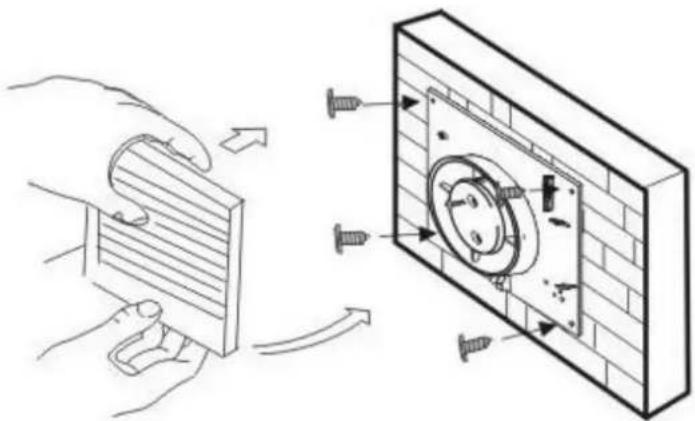
- Remove the front fan cover. Place the fan on the wall and mark four points for mounting and the cable gland. Drill the holes.
- Connect the cable to the fan via a bipolar switch which must have a minimum spacing of 3 mm in all poles.
- Pull the cable through the cable gland and fix the fan to the wall.
- Replace the front cover and the outer cap (the outer cap is not included).
- Before connecting to power supply, make sure that the voltage corresponds to the value indicated on the nameplate.
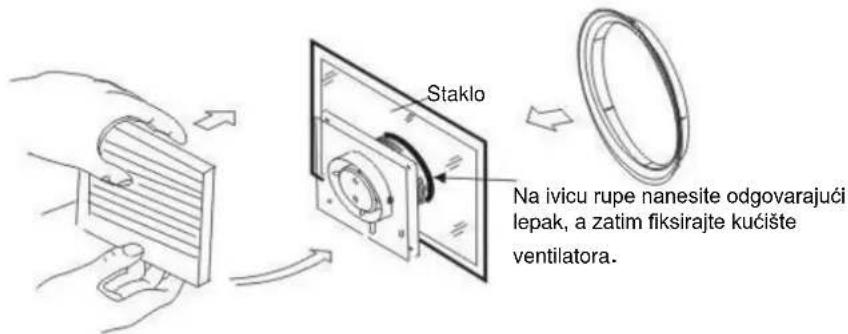
- Check that there are no obstacles in the window, such as window frames, joints. Provide sufficient space for the housing.
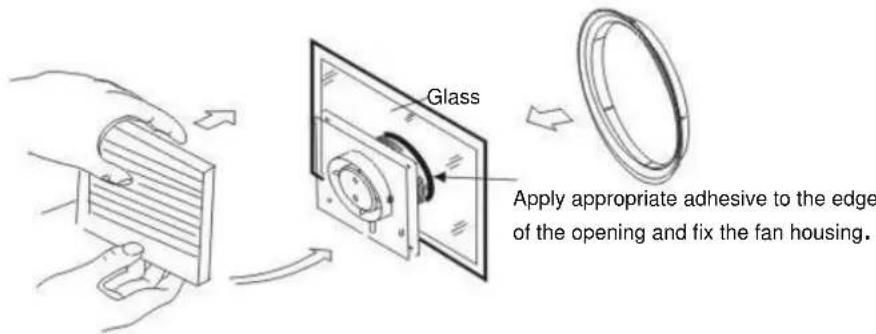
- Remove the front fan cover. Place the fan on the glass, mark and cut out the necessary opening.
- Connect the cable to the fan via a bipolar switch which must have a minimum spacing of 3 mm in all poles.
- Pull the cable through the cable gland and fix the fan to the wall.
- Use the appropriate adhesive for fixing the fan housing to the glass surface.
- Replace the front cover of the fan.
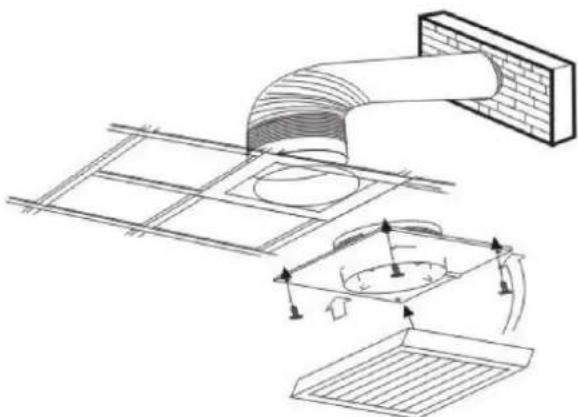
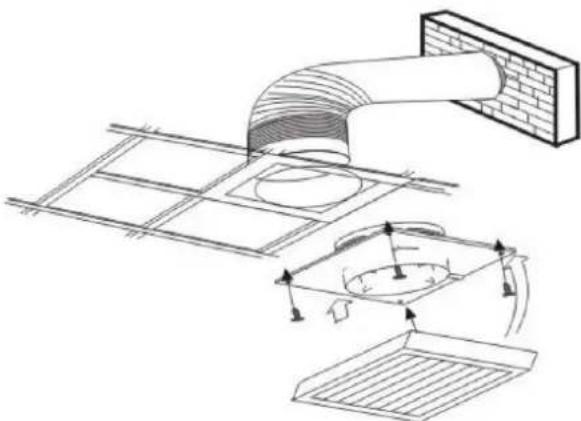
MOUNTING ON THE CEILING
- Before connecting to power supply, make sure that the voltage corresponds to the value indicated on the nameplate.
- Select the appropriate location for the fan and cut out an appropriate opening.
- Remove the front fan cover. Place the fan on the ceiling and mark four points for mounting and the cable gland. Drill the holes.
- Connect the cable to the fan via a bipolar switch which must have a minimum spacing of 3 mm in all poles.
- Pull the cable through the cable gland and fix the fan to the ceiling.
- Replace the front cover
- The fan's exhaust must be vented out of the building through the ventilation pipes. Install the outer cap (not supplied).
ELECTRICAL CONNECTION
- Fans have double insulation and do not require grounding
- In the fans mounted on partition walls, make sure that there are no gases returning into the room from heating appliances or any other appliances.
- L - connect the phase wire
N - connect the neutral wire
T - connect the voltage for the light or for the switch (fan with a timer or fan with humidity sensor)
Electrical wiring diagrams
With light:
Wiring diagram – standard models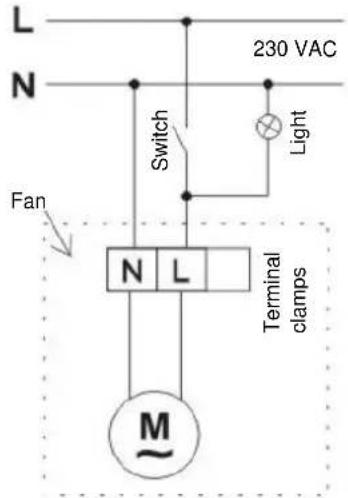
Wiring diagram – models with timer / humidity sensor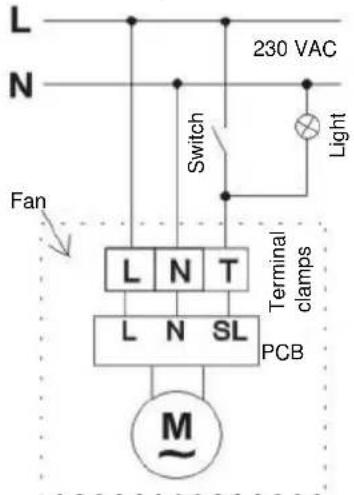
Wiring diagram with motion sensor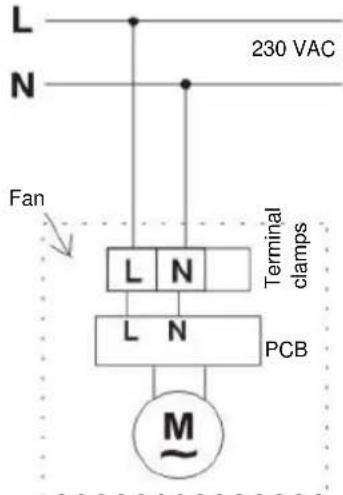
Without light:
Wiring diagram – standard models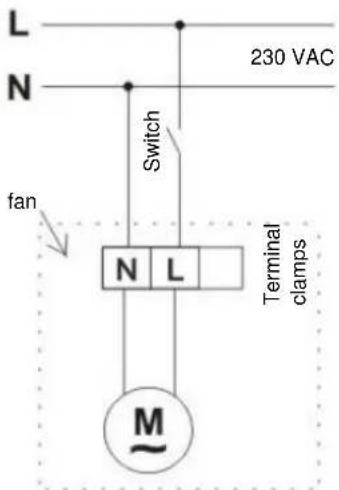
Wiring diagram – models with timer / humidity sensor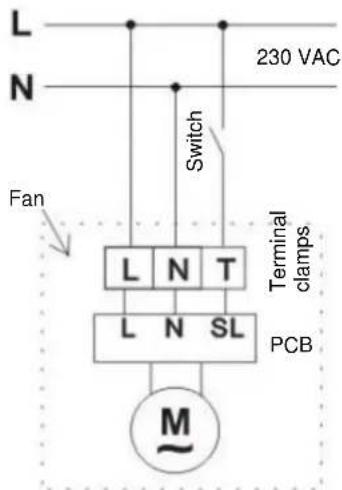
MAINTENANCE
- Before cleaning, turn off the fan.
- Do not use gasoline, benzene or any other chemicals.
- Make sure that water does not come into contact with electrical components such as switch or motor.
- Do not immerse blades or other parts made of synthetic resins, in water of more than 60° C.
- Do not expose the fan to high temperatures and direct sunlight.
FEATURES
| MODEL | VOLTAGE (V/Hz) | SPEED (rot./min.) | AIR FLOW (m3/h) | POWER (W) | SIZE (mm) |
| Air flow 100 | 220-240/50 | 2450 | 100 | 15 | 100 |
| Air flow 200 | 220-240/50 | 2250 | 195 | 20 | 120 |
| Air flow 300 | 220-240/50 | 1450 | 320 | 25 | 150 |
| Diameter 100 White | 220-240/50 | 2300 | 70 | 15 | 100 |
| Diameter 100 White with timer | 220-240/50 | 2300 | 70 | 15 | 100 |
| Diameter 120 White with humidity / timer sensor | 220-240/50 | 2100 | 120 | 20 | 120 |
| Diameter 150 Stainless steel with humidity / timer sensor | 220-240/50 | 1600 | 210 | 25 | 150 |
| BV MSS* | 220-240/50 | / | / | / | / |
*Optional movement sensor for switching on Gorenje fans
HR, BIH
BVN ____ WS, BVX ____ WS, BVX ____ SS, BVX ____ WTS, BVX ____ STS, BVX ____ WHS, BVX ____ SHS, BV MSS
Before first use of the air conditioner, carefully read these instructions and keep them for future reference.
FAN
INSTALLATION AND USE INSTRUCTIONS
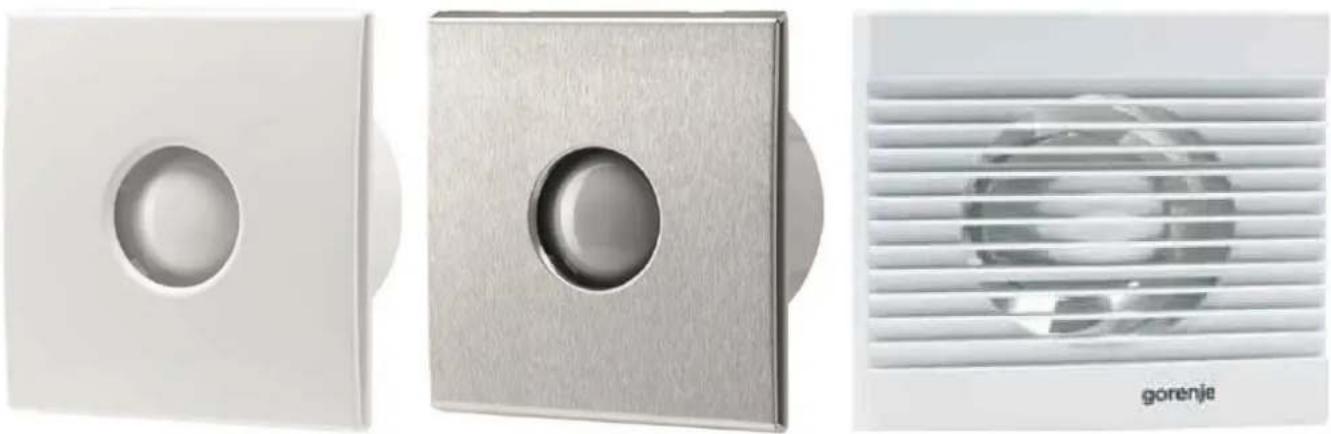
WALL WINDOW MOUNTING
- Before connecting to the power supply, check that the voltage matches the value indicated on the rating plate.
- Check that there are no obstructions on the window, such as window frames or joints. Ensure sufficient space for the housing.
- Remove the front cover of the fan. Place the fan on the glass, mark the required cutout, and cut the necessary opening.
- Connect the cable to the fan via a double-pole switch that must have a minimum contact gap of 3 mm on all poles.
- Pull the cable through the cable entry and secure the fan to the wall.
- Use appropriate adhesive to fix the fan housing to the glass.
- Refit the front cover of the fan.
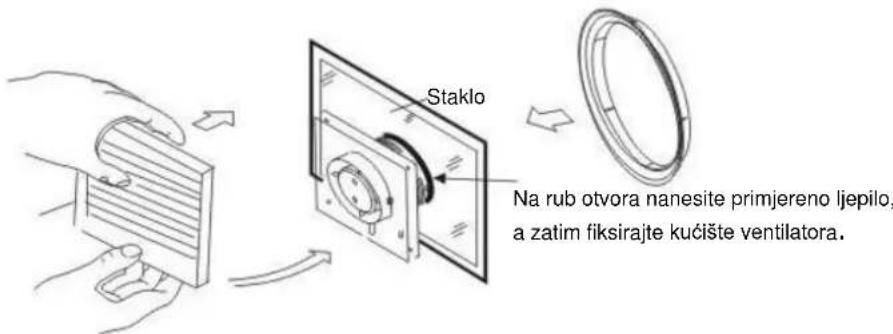
CEILING MOUNTING
- Before connecting to the power supply, check that the voltage matches the value indicated on the rating plate.
- Choose a suitable location for the fan and cut an appropriate opening.
- Remove the front cover of the fan. Place the fan on the ceiling and mark the four fixing points and the cable entry. Then drill the holes.
- Connect the cable to the fan via a double-pole switch that must have a minimum contact gap of 3 mm on all poles.
- Pull the cable through the cable entry and secure the fan to the ceiling.
- Refit the front cover.
- The fan exhaust should be routed outside the building through ventilation ducts. Install the external shutter (not supplied).
ELECTRICAL INSTALLATION
- The fans are double insulated and do not require earthing.
- For fans installed on partition walls, care must be taken to avoid backflow of gases into the room from heating appliances or other devices.
- L - connect to the phase conductor.
N - connect to the neutral conductor.
T - connect to the light supply or switch supply (for timer fan or humidity sensor fan).
INSTALLATION AND USE INSTRUCTIONS
SAFETY INSTRUCTIONS
INSTALLATION ON GLASS WINDOW
- Before connecting to the power supply, check that the voltage matches the value indicated on the rating plate.
- Check that there are no obstacles on the window, such as window frames or joints. Ensure sufficient space for the housing.
- Remove the front cover of the fan. Place the fan on the glass, mark the required cutout, and cut the necessary opening.
- Connect the cable to the fan via a double-pole switch that must have a minimum contact gap of 3 mm on all poles.
- Pull the cable through the cable gland and secure the fan to the wall.
- Use an appropriate adhesive to fix the fan housing to the glass.
- Put the front cover of the fan back on.
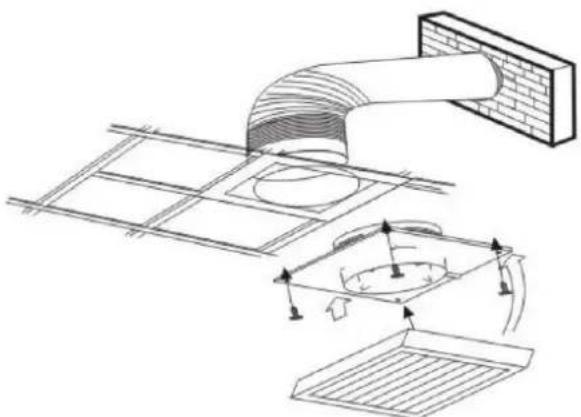
CEILING MOUNTING
- Before connecting to the power supply, check that the voltage matches the value indicated on the rating plate.
- Choose a suitable location for the fan and cut an appropriate hole.
- Remove the front cover of the fan. Place the fan on the ceiling and mark the four fixing points and the cable gland. Then drill the holes.
- Connect the cable to the fan via a double-pole switch that must have a minimum contact gap of 3 mm on all poles.
- Pull the cable through the cable gland and secure the fan to the ceiling.
- Replace the front cover of the fan.
- The fan exhaust must be routed outside the building using ventilation ducts. Install the external shutter (not supplied).
ELECTRICAL CONNECTION
- The fans have double insulation and do not require grounding.
- For fans mounted on partition walls, care must be taken to prevent backflow of gases into the room from heating appliances or other devices.
- L - connect to the phase conductor.
N - connect to the neutral conductor.
T - connect to the light supply or switch supply (fan with timer or fan with humidity sensor).
Electrical wiring diagrams
With light:
Wiring diagram – standard models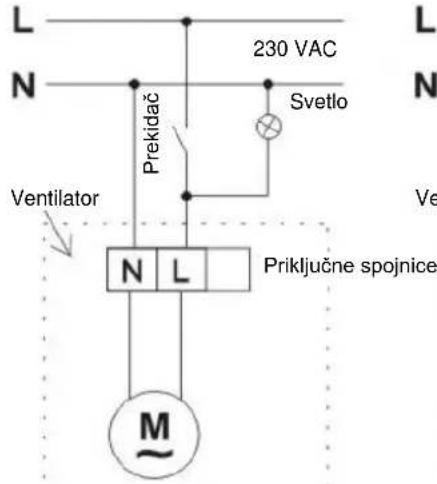
Wiring diagram - models with timer / humidity sensor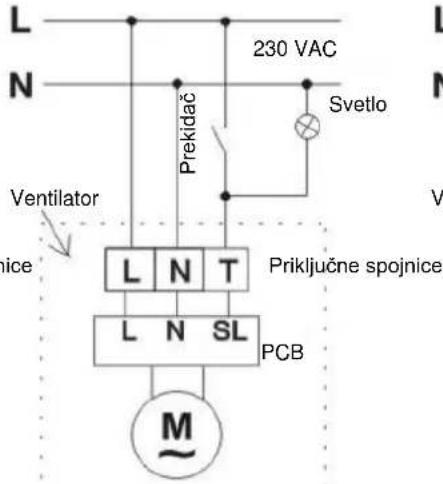
Wiring diagram with motion sensor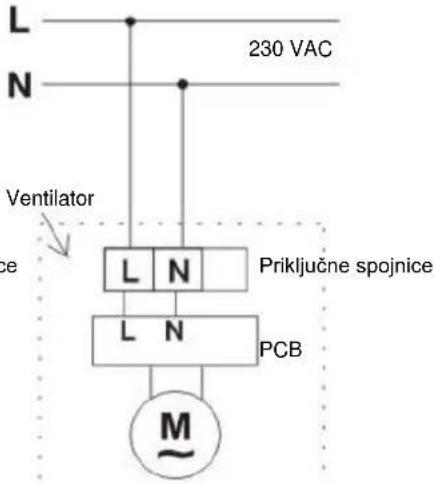
Without light:
Wiring diagram – standard models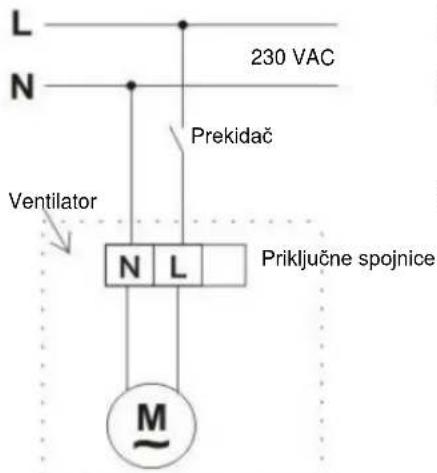
Installation diagram - models with timer / humidity sensor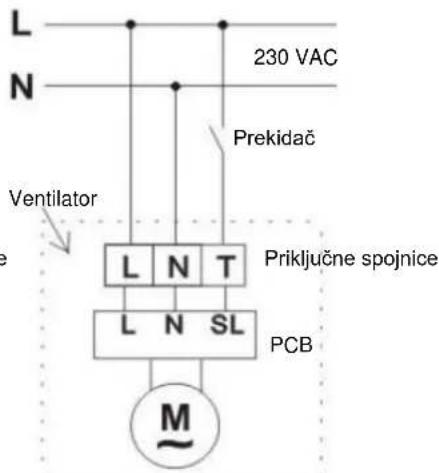
MAINTENANCE
- Disconnect the fan before cleaning.
- Do not use gasoline, benzene, or any other chemicals for cleaning.
- Make sure water does not come into contact with electrical parts, such as the switch or motor.
- Do not immerse blades or other parts made of synthetic resins in water hotter than 60°C.
- Do not expose the fan to high temperatures or direct sunlight.
FEATURES
| MODEL | NAPON (V/Hz) | BRZINA (okr./min.) | PROTOK VAZDUHA ( m3/h ) | SNA GA (W) | VELIČINA (mm) |
| Protok 100 | 220-240/50 | 2450 | 100 | 15 | 100 |
| Protok 200 | 220-240/50 | 2250 | 195 | 20 | 120 |
| Protok 300 | 220-240/50 | 1450 | 320 | 25 | 150 |
| Diameter 100 Bijela | 220-240/50 | 2300 | 70 | 15 | 100 |
| Diameter 100 Bijela sa timerom | 220-240/50 | 2300 | 70 | 15 | 100 |
| Diameter 120 Bijela sa senzorom vlage / tajmerom | 220-240/50 | 2100 | 120 | 20 | 120 |
| Diameter 150 Metalni sa senzorom vlage / tajmerom | 220-240/50 | 1600 | 210 | 25 | 150 |
| BV MSS* | 220-240/50 | / | / | / | / |
*Optional motion sensor for turning on the Gorenje fan
Ukrainian
BVN ____ WS, BVX ____ WS, BVX ____ SS, BVX ____ WTS, BVX ____ STS, BVX ____ WHS, BVX ____ SHS, BV MSS
WINDOW MOUNTING
ELECTRICAL CONNECTION
Please read these instructions
WINDOW MOUNTING
ELECTRICAL CONNECTION
ELECTRICAL CONNECTION


- READ THESE INSTRUCTIONS
- INSTALLATION ON GLASS WINDOW
- ELECTRICAL CONNECTION
- FAN
- INSTRUCTIONS FOR INSTALLATION AND USE
- PLEASE READ THESE INSTRUCTIONS
- SAFETY WARNINGS
- MODELS
- PLACEMENT AND MOUNTING
- MOUNTING ON A WALL
- MOUNTING ON THE CEILING
- MAINTENANCE
- INSTALLATION AND USE INSTRUCTIONS
- WALL WINDOW MOUNTING
- CEILING MOUNTING
- ELECTRICAL INSTALLATION
- SAFETY INSTRUCTIONS
- ELECTRICAL WIRING DIAGRAMS
- WITH LIGHT
- WITHOUT LIGHT
- WINDOW MOUNTING
Brand : GORENJE
Model : BVX100WTS
Category : Fan