
SHU 3.1 A1 - Switch SILVERCREST - Free user manual and instructions
Find the device manual for free SHU 3.1 A1 SILVERCREST in PDF.


| Product Type | HDMI Switch |
| Brand | SilverCrest |
| Model | SHU 3.1 A1 |
| Inputs | 3 x HDMI ports |
| Output | 1 x HDMI plug |
| Max Resolution | 1080p Full HD / 12 bit |
| Supported Formats | HD Dolby®, True HD, HDCP 2.0 |
| HDMI Standard | High Speed HDMI |
| Dimensions (W x H x D) | 75 x 20 x 76 mm |
| Weight | 85 g |
| Cable Length | 50 cm |
| Operating Temperature | 5 °C to 35 °C |
| Operating Humidity | Max. 85% relative humidity |
| Power Supply | Via HDMI bus (no external power) |
| Channel Selection | Automatic or manual via Select button |
| Indicator LEDs | Power (ON) and channel LEDs (H1, H2, H3) |
| Intended Use | Private indoor use only; not for commercial or outdoor use |
| Cleaning | Damp cloth only; no solvents or corrosive agents |
| Safety Warnings | Avoid heat sources, water, magnetic fields; keep away from children |
| Warranty | 36 months from date of purchase (batteries: 12 months) |
| Compliance | CE, EMC Directive 2004/108/EC |
Frequently Asked Questions - SHU 3.1 A1 SILVERCREST
User questions about SHU 3.1 A1 SILVERCREST
0 question about this device. Answer the ones you know or ask your own.
Ask a new question about this device
Download the instructions for your Switch in PDF format for free! Find your manual SHU 3.1 A1 - SILVERCREST and take your electronic device back in hand. On this page are published all the documents necessary for the use of your device. SHU 3.1 A1 by SILVERCREST.
USER MANUAL SHU 3.1 A1 SILVERCREST
User manual and service information

PT
Dear Customer,
Please find the English version of the User Manual and Service Information for this product in pdf format on the following website: www.lidl-service.com
TARGA GMBH
Lange Wende 41
D-59494 Soest
Cables
Cleaning
Make sure that...
Cables
Cleaning
Cables
Cleaning
Safety instructions....3
Operating environment ....3
Cables....4
Children and persons with disabilities....5
Cleaning....5
Intended use....5
Copyright 6
Note on conformity....6
Disposal of old devices....6
Introduction....7
Supplied items....7
Overview 8
Connecting the HDMI switch 8
Using the HDMI switch....9
Appendix 10
Troubleshooting....10
Technical data 10
Warranty information 11
Safety instructions
Before using this device for the first time, please read the following instructions carefully and take note of the safety warnings, even if you are familiar with the use of electronic devices. Please keep this manual safe for future reference. If you sell the device or pass it on, always include this manual.

This symbol indicates important information for safe operation of the device and the safety of the user.

This symbol indicates other important information on the topic.
Operating environment
Never place any heavy objects on the device. The device is not designed for use in environments with a high temperature or humidity (e.g., bathrooms), and must be kept free from dust. Operating temperature and operating air humidity: 5 °C to 35 °C, max. 85 % rel. air humidity.

Ensure that
- no direct heat sources (e.g., heating) can affect the device;
- no direct sunlight or bright artificial light reaches the device;
- contact with sprayed and dripping water and corrosive liquids is prevented and the device is never operated near water; in particular, it should never be immersed (do not place any
objects filled with liquids such as vases or drinks on or near the device);
- the device is not in the immediate vicinity of magnetic fields (e.g., speakers);
- no fire sources (e.g., burning candles) are placed on or near the device;
- no foreign objects penetrate the device;
- the device is not subjected to any extreme temperature fluctuations, as this may result in moisture caused by condensation and therefore a short circuit;
- the device is never subjected to excessive shocks and vibrations;

Cables
Always handle the cables by the plug and do not pull on the cables themselves. Do not place items of furniture or any other heavy objects on the cables and ensure that they are not kinked, especially near the plug and the connection ports. Never make knots in any of the cables or tie them together with other cables. Ensure that all cables are placed so that no one can trip over them and they do not cause an obstruction.

Children and persons with disabilities
Electrical devices do not belong in the hands of children. Persons with disabilities should also only use electrical devices appropriately. Never allow children or persons with disabilities to use electrical devices unsupervised. They may not recognise potential risks. Small parts can be fatal if swallowed. Also always keep plastic packaging out of reach, as it poses a suffocation risk.

Cleaning
Warning! This device does not contain any parts that require servicing or cleaning. Never open the housing of the device to avoid hazards. Ensure that the device does not become dirty. Do not use any solvents, corrosive or gaseous cleaning agents. Clean the device with a damp cloth if it becomes dirty.
Intended use
The SilverCrest HDMI switch enables you to connect three source devices to one HDMI port on your TV or digital projector. It is only designed for private use and not for industrial or commercial purposes. Furthermore, the device may not be used outdoors or in tropical climates. This device meets all relevant norms and standards in conjunction with CE conformity. Compliance with these standards is no longer guaranteed in the event of unauthorised modifications to the device. The manufacturer does not accept any liability for any resulting damage or faults in such cases. Any other use is not as intended.
Copyright
All information contained in this user manual is subject to copyright and is provided for information purposes only. It is only permitted to copy or duplicate data and information with the express and written consent of the author. This also includes commercial use of the content and data. The text and illustrations are based on the state-of-the-art at the time of printing.
Note on conformity

This device conforms with the basic requirements and other required provisions of the EMC Directive 2004/108/EC. The Declaration of Conformity can be found at the end of this manual.
Disposal of old devices
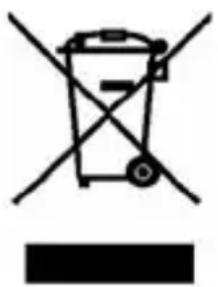
When this symbol appears on a product, this indicates that the product is subject to the European Directive 2002/96/EC. All electrical and electronic devices must be disposed of separately from household waste at designated disposal points. The correct disposal of old devices in this manner will prevent environmental pollution and human health hazards. For further information about proper disposal contact your local authorities, waste disposal office or the shop where you bought the device.
Dispose of the packaging in an environmentally compatible manner. Cardboard can be put out for municipal paper collections or brought to public collection points for recycling. Films and plastic used for packaging the device are collected by your local disposal services and disposed of in an environmentally compatible manner.
Introduction
Thank you for purchasing the SilverCrest HDMI switch. The HDMI switch communicates the HD signals of the connected source devices (e.g. satellite receiver, Blu-ray/DVD player or HD camera) to an output device (e.g. TV or digital projector). You can therefore run three source devices on one HDMI port of your output device. The HDMI switch cannot be used to distribute one source device among three output devices, as only one output device can be connected.
Supplied items
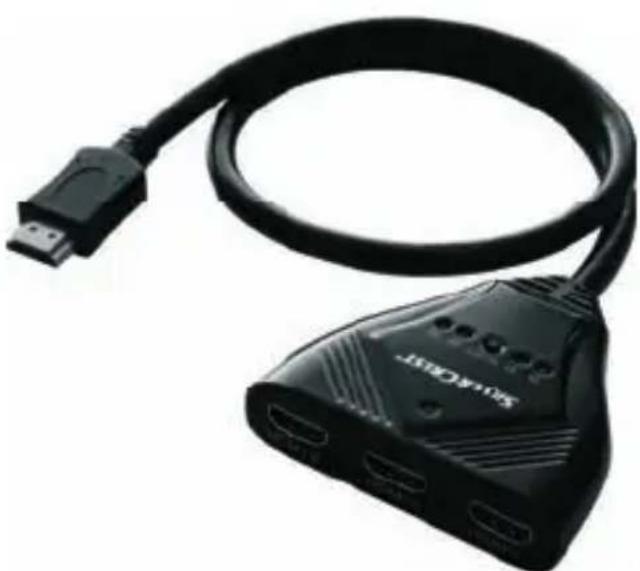
HDMI switch User manual (not illustrated)
Overview
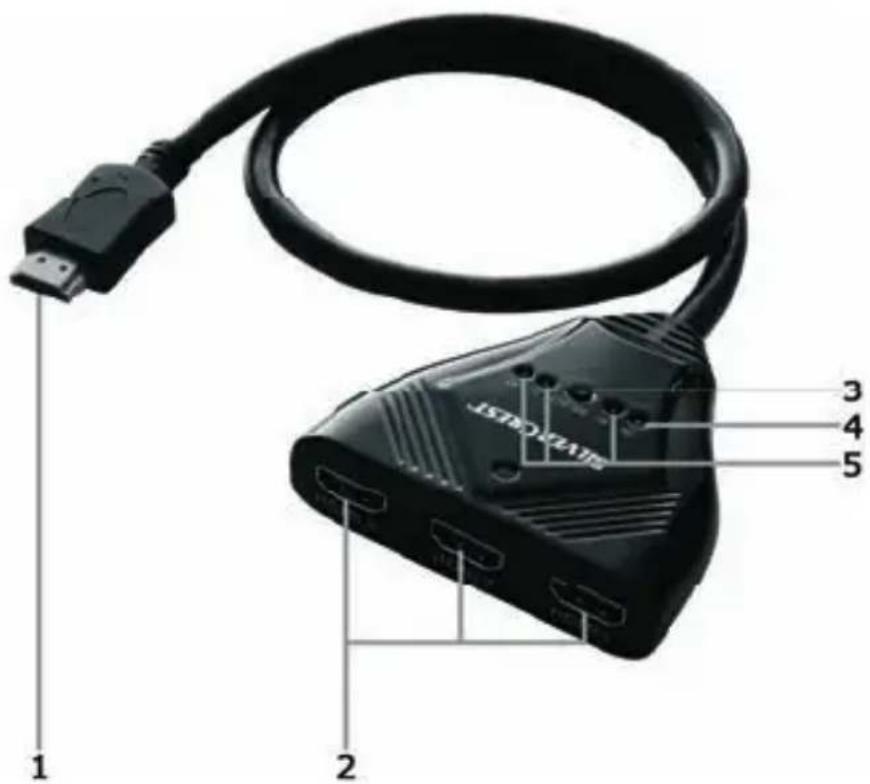
1 HDMI plug For connecting an output device 2 HDMI input For connecting up to three source devices 3 Select button Manual channel selection 4 ON LED Power indicator 5 H1, H2, H3 LED Channel LEDs
Connecting the HDMI switch
A Connect the HDMI plug (1) to your output device (e.g. TV or digital projector). B Connect your source devices (e.g. satellite receiver, Blu-ray/DVD player or HD camera) to the HDMI input ports (2). Use a conventional HDMI connection cable.
8 - English
Using the HDMI switch
Switch on your output device (e.g. TV or digital projector) and activate the HDMI input to which the HDMI switch was connected. Please read the user manual of your output device.
Switch on the source device you wish to use. The HDMI switch then automatically switches to the correct channel. The selected channel is indicated by the LEDs H1 to H3 (5).
Press the Select button (3) to manually activate a channel. Each time the Select button (3) is pressed, the HDMI switch goes to the next active source device in descending order. The selected channel is indicated by the LEDs H1 to H3 (5).
If one source device is switched off, the HDMI switch automatically goes to the next active source device in descending order.

As some source devices also emit a signal on the HDMI output when they are in standby mode, automatic switchover is not always possible. In this case switch the channel manually.
Appendix
Troubleshooting
| No picture | 1. Check all the connections.2. Check whether all devices are switched on. |
| No sound | 1. Check whether your source device is transmitting sound. When using a DVI-HDMI adapter, no sound is being transmitted. |
Technical data
| Model SilverCrest SHU 3.1 | A1HDMI switch |
| Resolution/colour depth Up | to 1080p full HD/12 bit |
| Supported formats HD Dolby | ®, True HD,HDCP 2.0 copy protection |
| HDMI standard High speed | HDMI |
| Inputs 3 x HDMI ports | |
| Outputs 1 x HDMI plug | |
| Weight | 85 g |
| Dimensions (W x H x D) 75 | x 20 x 76 mm |
| Cable length 50 cm | |
| Operating temperature 5 °C | to 35 °C(max. 85 % rel. air humidity) |
Warranty information
36 month warranty from date of purchase
Please read the enclosed documentation or online help carefully before using the product for the first time. If there is a problem which can not be solved in this way, please contact our hotline.
If we are unable to solve the problem over the telephone, our hotline will arrange a further service dependant on the cause of the problem. This will comprise the elimination of production and material defects free of charge.
This warranty is valid in the United Kingdom / Ireland / Malta / Cyprus.
Please note that the warranty period for rechargeable batteries is 12 months. Consumables such as batteries and bulbs are excluded from this warranty.
Your statutory guarantees from the seller are in addition to this warranty and are not limited by it.
Hotline:

0207 - 36 50 744

01 - 242 15 83

800 - 62 175
800 - 92 496
Manufacturer:
TARGA GmbH
Postfach 22 44
D-59482 Soest
www.targa.de
Please have your EAN / serial number ready
CE
EC-Declaration of Conformity
Address:
Targa GmbH
Lange Wende 41
59494 Soest, Germany
Brand:
SilverCrest
Product:
HDMI Switch
Model:
SHU 3.1 A1
The product complies with the requirements of the following European directives:
2004/108/EC
Electromagnetic Compatibility
Compliance was proved by the application of the following standards:
EMC:
EN 55022: 2006 +A1: 2007
EN 55024: 1998+A1: 2001+A2: 2003
Year of CE marking: 2011
Matthias Klauke, Managing Director



- CABLES
- CLEANING
- MAKE SURE THAT
- SAFETY INSTRUCTIONS
- INTRODUCTION
- SUPPLIED ITEMS
- OVERVIEW
- CONNECTING THE HDMI SWITCH
- USING THE HDMI SWITCH
- APPENDIX
- OPERATING ENVIRONMENT
- ENSURE THAT
- CHILDREN AND PERSONS WITH DISABILITIES
- INTENDED USE
- COPYRIGHT
- NOTE ON CONFORMITY
- DISPOSAL OF OLD DEVICES
- ENGLISH
- WARRANTY INFORMATION
- MONTH WARRANTY FROM DATE OF PURCHASE
- HOTLINE
- CE
- EC-DECLARATION OF CONFORMITY
Brand : SILVERCREST
Model : SHU 3.1 A1
Category : Switch