
IAN 270525 - Watch AURIOL - Free user manual and instructions
Find the device manual for free IAN 270525 AURIOL in PDF.


| Product Type | Wristwatch |
| Brand | Auriol |
| Model | IAN 270525 |
| Power Supply | 1 battery (button cell, replace by specialist) |
| Water Resistance | Up to 3 bar (DIN 8310) |
| Main Functions | Time, date, alarm, stopwatch, backlight, hourly chime, snooze |
| Date Display | Press START button in time mode |
| Alarm | Configurable hour and minute; alarm symbol when active |
| Stopwatch | Start/stop/reset; intermediate time measurement |
| Backlight | Press and hold LIGHT button for approx. 3 seconds |
| Hourly Chime | Toggle on/off by pressing RESET + MODE button |
| Snooze Function | Press START button during alarm; repeats after 4-5 minutes |
| Cleaning and Care | Use a dry, fluff-free cloth (e.g., spectacles cloth) |
| Safety Warnings | Keep batteries away from children; do not recharge; dispose properly; avoid contact with battery acid |
| Battery Replacement | Have replaced by a specialist to avoid damage |
| Repairs | Only by qualified personnel; opening voids warranty |
| Warranty | 3 years from date of purchase; covers material/manufacturing defects; excludes normal wear and water tightness degradation |
| Disposal | Recycle with local facilities; do not dispose with household waste; batteries per Directive 2006/66/EC |
| Certifications | CE |
Frequently Asked Questions - IAN 270525 AURIOL
User questions about IAN 270525 AURIOL
0 question about this device. Answer the ones you know or ask your own.
Ask a new question about this device
Download the instructions for your Watch in PDF format for free! Find your manual IAN 270525 - AURIOL and take your electronic device back in hand. On this page are published all the documents necessary for the use of your device. IAN 270525 by AURIOL.
USER MANUAL IAN 270525 AURIOL
GB
WRISTWATCH
Operation and safety notes
PL
ZEGAREK NA REKE
natural_image
Simple icon set with a lowercase 'i' and a decorative open book (no text or symbols)| GB Page 5 |
| PL Strona 16 |
| HU Oldal 27 |
| SI Stran 38 |
| CZ Strana 50 |
| SK Strana 60 |
| DE/AT/CH Seite 70 |
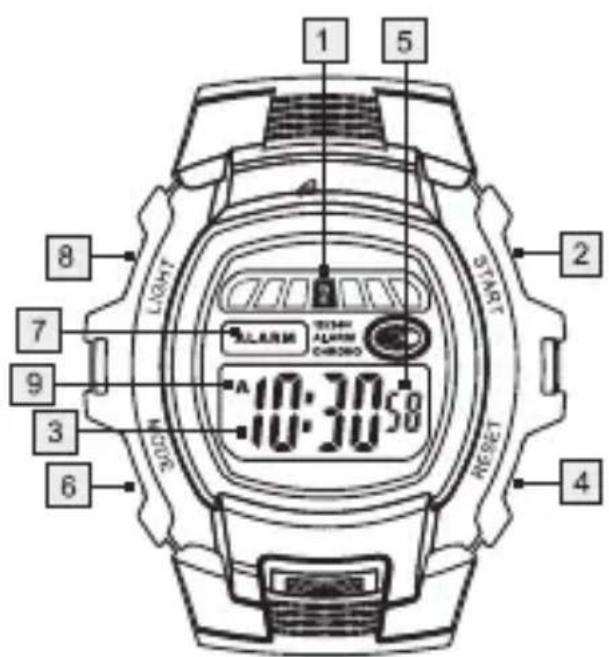
HG00160A/E
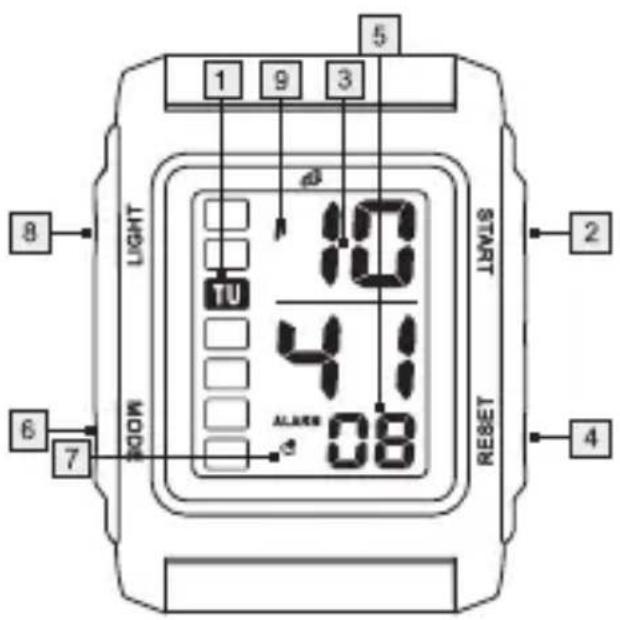
HG00160B/D
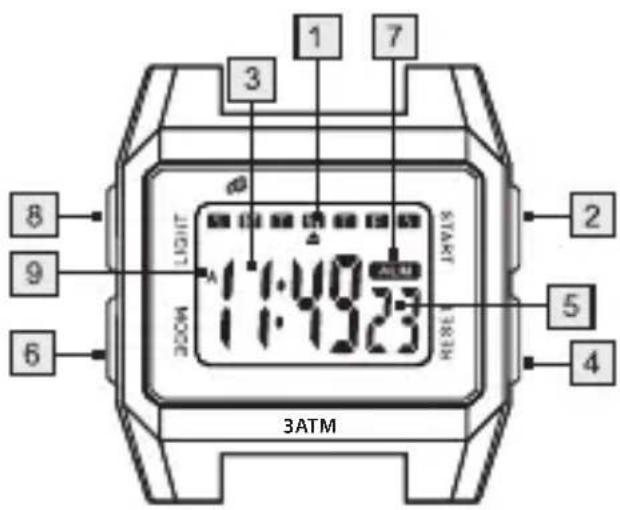
HG00160C
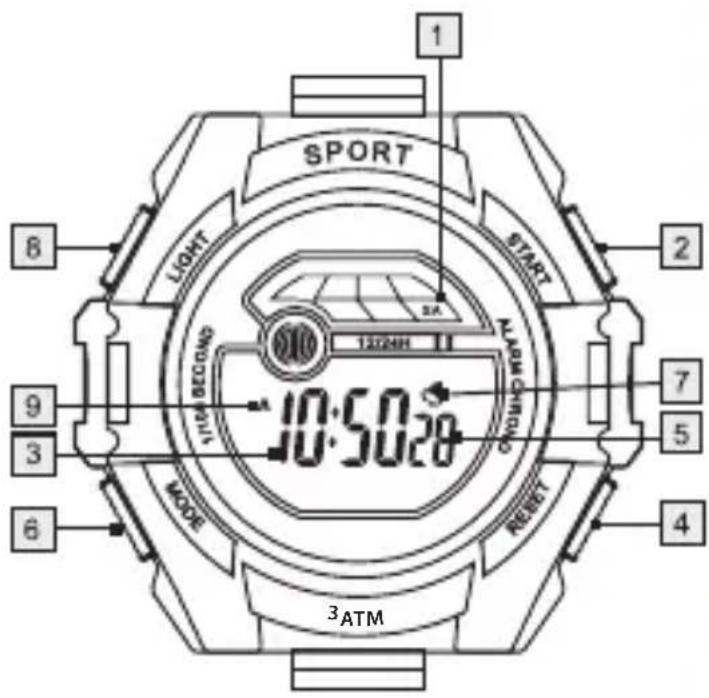
HG00160F
WRISTWATCH
Proper use
The wrist watch displays the time and date. It also has an alarm and can be used as a stopwatch. The product is not intended for commercial use.
• Description of parts
1 Day of the week display field
2 START button
3 Time field
4 RESET button
5 Second field / "H" indicator
6 MODE button
7 Alarm symbol
8 LIGHT button
9 "A" / "P" indicator

General Safety Instructions
KEEP ALL THE SAFETY ADVICE AND INSTRUCTIONS IN A SAFE PLACE FOR FUTURE REFERENCE!
natural_image
Simple line drawing of a person standing next to a vertical structure (no text or symbols)WARNING! DANGER TO LIFE AND RISK OF ACCIDENTS FOR INFANTS AND CHILDREN! Never leave
children unattended with the
packaging material. Packaging material can cause suffocation.
WARNING! DANGER TO LIFE! Batteries
can be swallowed, which can prove fatal.
Consult a doctor immediately if anyone swallows a battery.
- Never take the product apart on any account. Improper repairs could cause considerable danger for the user. Only let qualified people carry out any repairs.

Battery Safety Instructions
CAUTION! RISK OF

EXPLOSION! Never recharge the batteries.
- Have a spent battery removed from the instrument immediately. There is an increased risk of leakage.
■ Batteries must not be disposed of in household waste.
■ Consumers are under a legal obligation to dispose of batteries in the proper way.
- Keep the battery out of the reach of children, do not dispose of the battery in fire, do not short-circuit it, and do not take it apart.
Failure to observe these instructions may result in the battery discharging beyond its end voltage, which poses a risk of leakage. If the battery in your instrument has leaked, have it removed immediately to prevent damage to the instrument.
- Avoid contact with skin, eyes and mucous membrane. In the event of contact with battery acid, rinse the affected area with plenty of water and /or consult a doctor.
Water resistance
This watch is water-resistant up to 3 bar in accordance with DIN 8310.
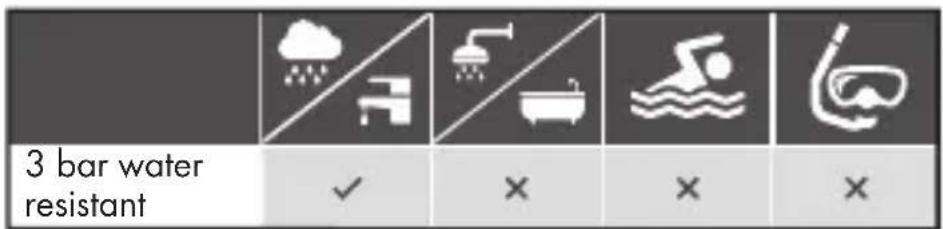
- Do not press any buttons if the watch comes into contact with water.
Replacing the battery
Note: Have batteries changed in a specialist shop.
- Have any repairs or battery replacements carried out by a suitably experienced specialist in order to avoid damaging the insides of the watch.
- Dispose of used batteries in an environmentally compatible manner.
- Do not dispose of the watch with the household rubbish.
Operation
Press the MODE button to set the desired mode: Time mode > Stop watch > Alarm > Setting the time > Time mode.
- Setting the time and date
- Press the MODE button 6 three times. The second field 5 and the day of the week field 1 flash in the display.
- Press the START button 2 to set the second field 5 to 0.
- Press the RESET button 4 to confirm your setting. The minute field flashes in the display.
-
Press the START button 2 to set the desired minute value.
-
Press the RESET button 4 to confirm your setting. The hour field flashes in the display.
-
Press the START button 2 to set the desired hour value.
Note: Pay attention to the symbols A, P 9 and H 5 in the display when setting the hour value. A and P (A = a.m. / P = p.m.) are used for the 12-hour time format. H is used for the 24-hour format. Press the START button 2 to set the desired value and format. Press the RESET button 4 to confirm your setting.
-
Press the RESET button 4 to confirm your setting. The date field flashes in the display.
-
Press the START button 2 to set the desired date value.
-
Press the RESET button 4 to confirm your setting. The month field flashes in the display.
-
Press the START button2 to set the desired month value.
-
Repeat steps 8 and 9 to set the day of the week 1 field. The names of the days of the week are shortened as follows:
$$ \begin{array}{l} M O = M o n d a y \ T U = T u e s d a y \ \mathrm{WE} = \text { W e d n e s d a y } \ \mathrm{TH} = \text { Thursday } \ F R = F r i d a y \ S A = S a t u r d a y \ S U = S u n d a y \ \end{array} $$
- Press the MODE button6 to enter the default display.
● Lighting the display
■ Press and keep pressed the LIGHT button to switch on the light.
■ Release the LIGHT button8 and the light will switch off after approx. 3 seconds.
- Displaying the date
Press the START button2 while the watch is in time mode. The date appears on the display.
■ Release the START button to return to time mode.
Setting the alarm
Press the MODE button twice to enter the alarm mode. The hour field of the alarm time flashes in the display.
■ Press the START button2 to set the desired hour value.
Press the RESET button to confirm your setting. The minute field flashes in the display.
Press the START button2 to set the desired minute value.
■ Press the RESET button4 to confirm your setting.
- Press the MODE button to enter the time mode.
Switching the alarm on / off
Switch the alarm on by pressing and keeping pressed the START button 2 and the RESET button 4 while in time mode. If the alarm is switched on, the alarm symbol 7 appears in the display.
When the alarm sounds, you can activate the Snooze function by pressing the START button ②. The alarm sounds again after 4 to 5 minutes. The alarm will keep on sounding as many times as you press the START button ②.
Press the RESET button to stop the alarm. The alarm will keep on sounding for approx. 1 minute if you don't press any button.
Press the RESET button when the watch is in time mode to display the alarm time.
If the watch is in time mode, press and keep pressed the RESET button 4. Press the START button 2 to switch off the alarm. The alarm symbol 7 disappears.
- Activating/deactivating the acoustic signal
Note: An acoustic signal will sound every hour on the hour.
Press the MODE button6 repeatedly until the time field 3 appears in the display.
Press and keep pressed the RESET button and while doing this, press the MODE button 6. All the day of the week fields 1 appear. The audible signal function is activated.
Press and keep pressed the RESET button 4 and while doing this, press the MODE button 6. All the day of the week fields 1 disappear. The audible signal function is deactivated.
- Using the stopwatch
Press the MODE button repeatedly until the time field 3 appears in the display.
- Press the MODE button once to enter the stopwatch mode.
■ Press the START button to start the stopwatch.
■ Press the START button again to stop the stopwatch.
- Press the RESET button4 to set the stopwatch to 0.
Measuring an intermediate time:
Press the MODE button repeatedly until the time field 3 appears in the display.
- Press the MODE button once to enter the stopwatch mode.
■ Press the START button to start the stopwatch.
- Press the RESET button4 to display the intermediate time. The stopwatch continues to run in the background.
- Press the RESET button to return to the stopwatch time.
■ Press the START button to stop the stopwatch.
■ Press the RESET button4 to set the stopwatch to 0.
- Cleaning and care
- Clean the product with a dry, fluff-free cloth. A spectacles cloth is ideal.
Disposal

The packaging is made entirely of recyclable materials, which you may dispose of at local recycling facilities.
Contact your local refuse disposal authority for more details of how to dispose of your worn-out product.
To help protect the environment, please dispose of the product properly when it has reached the end of its useful life and not in the household waste. Information on collection points and their opening hours can be obtained from your local authority.
Faulty or used batteries must be recycled in accordance with Directive 2006/66/EC. Please return the batteries and / or the device to the available collection points.
Environmental damage through incorrect disposal of the batteries!
Batteries may not be disposed of with the usual domestic waste. They may contain toxic heavy metals and are subject to hazardous waste treatment rules and regulations. The chemical symbols for heavy metals are as follows: Cd = cadmium, Hg = mercury, Pb = lead. That is why you should dispose of used batteries at a local collection point.
WARRANTY
The device has been manufactured to strict quality guidelines and meticulously examined before delivery. In the event of product defects you have legal rights against the retailer of this product. Your legal rights are not limited in any way by our warranty detailed below.
The warranty for this device is 3 years from the date of purchase. Should this device show any fault in materials or manufacture within three years from the date of purchase, we will repair or replace it - at our choice - free of charge to you.
The warranty period begins on the date of purchase. Please keep the original sales receipt in a safe location. This document is required as your proof of purchase. This warranty becomes void if the device has been damaged or improperly used or maintained.
The warranty applies to faults in material or manufacture. This warranty does not cover product parts subject to normal wear, thus possibly considered consumables (e.g. batteries) or for damage to fragile parts, e.g. switches, rechargeable batteries or glass parts.
The warranty further excludes a reduction in water tightness. The state of water tightness is not a permanent property and should therefore be regularly maintained. Please note, opening and repairs performed by unauthorized individuals will void any warranty.
CE
ZEGAREK NA REKE
$$ M O = \text { Poniedziatek } $$
$$ T U = W t o r e k $$
$$ \mathrm{WE} = \acute {\mathrm{Sroda}} $$
$$ \mathrm{TH} = \text { Czwartek } $$
$$ F R = P i q t e k $$
$$ S A = S o b o t a $$
$$ \mathrm{SU} = \text { N i e d z i e l a } $$
$$ W E = s r e d a $$
$$ \mathrm{TH} = \check {\mathrm{cetrtek}} $$
$$ F R = p e t e k $$
$$ S A = \text { s o b o t a } $$
$$ \mathrm{SU} = \text { n e d e l j a } $$
- Pritisnite tipko MODE 6, da pridete v standardni prikaz.
$$ F R = p a t e k $$
$$ S A = \text { s o b o t a } $$
$$ S U = n e d \check {e} l e $$
EXPLOSIONSGEFAHR! Laden
MO = Montag
TU = Dienstag
WE = Mittwoch
TH = Donnerstag
FR = Freitag
SA = Samstag
SU = Sonntag
- WRISTWATCH
- ZEGAREK NA REKE
- Proper use
- • Description of parts
- General Safety Instructions
- WARNING! DANGER TO LIFE AND RISK OF ACCIDENTS FOR INFANTS AND CHILDREN! Never leave
- WARNING! DANGER TO LIFE! Batteries
- Battery Safety Instructions
- CAUTION! RISK OF
- Water resistance
- Replacing the battery
- Operation
- - Setting the time and date
- ● Lighting the display
- - Displaying the date
- Setting the alarm
- Switching the alarm on / off
- - Activating/deactivating the acoustic signal
- - Using the stopwatch
- Measuring an intermediate time:
- - Cleaning and care
- Disposal
- Environmental damage through incorrect disposal of the batteries!
- WARRANTY
- EXPLOSIONSGEFAHR! Laden
Brand : AURIOL
Model : IAN 270525
Category : Watch