
PP 480 HF - Leaf blower HUSQVARNA - Free user manual and instructions
Find the device manual for free PP 480 HF HUSQVARNA in PDF.


| Product Type | Hydraulic power unit for wall saw |
| Brand | HUSQVARNA |
| Model | PP 480 HF |
| Weight | 23 kg (51 lb) |
| Input voltage | 380-480 V, 50-60 Hz |
| Rated current | 16-32 A |
| Max. output power | 20 kW (32 A) |
| Output voltage | 340 V, 0-500 Hz |
| Secondary output voltage | 24 V, 0-1500 Hz |
| Electrical connection | 3P+PE (4 pins) or 3P+N+PE (5 pins) |
| Single-phase output | 1 x 230 V (5-pin machines only) |
| Cooling water max. pressure | 7 bar |
| Cooling water min. flow rate | 3.5 l/min |
| Cooling water max. temperature | 25 °C |
| Speed range | 600-900 rpm (speed 1), 800-1200 rpm (speed 2) |
| Main functions | Remote control with display, fuse selection, power display, time measurement, rotation direction control, automatic water cooling |
| Safety | Emergency stop, earth leakage circuit breaker, start button with delay, safety device control |
| Maintenance and cleaning | Clean connectors with a cloth or brush; do not use a high-pressure cleaner; service after 100 hours of use |
| Included accessories | 1 power unit, 1 remote control, 1 power cable, 1 CAN-Bus cable, 1 water hose, transport cases, DVD with user manual |
| Intended use | Power supply for Husqvarna WS 482 HF wall saw |
Frequently Asked Questions - PP 480 HF HUSQVARNA
User questions about PP 480 HF HUSQVARNA
0 question about this device. Answer the ones you know or ask your own.
Ask a new question about this device
Download the instructions for your Leaf blower in PDF format for free! Find your manual PP 480 HF - HUSQVARNA and take your electronic device back in hand. On this page are published all the documents necessary for the use of your device. PP 480 HF by HUSQVARNA.
USER MANUAL PP 480 HF HUSQVARNA
Operator's manual Please read the operator's manual carefully and make sure you understand the instructions before using the machine.
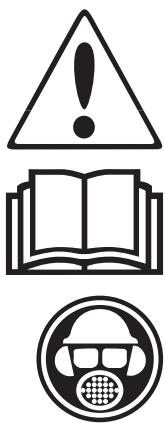
Symbols on the machine:
WARNING! The machine can be a dangerous tool if used incorrectly or carelessly, which can cause serious or fatal injury to the operator or others.
Please read the operator's manual carefully and make sure you understand the instructions before using the machine.
Always wear:
Approved protective helmet
Approved hearing protection
- Protective goggles or a visor
- Breathing mask
This product is in accordance with applicable EC directives.
WARNING! High current.
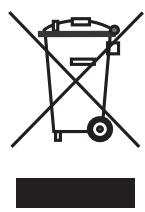
Environmental marking. Symbols on the product or its packaging indicate that this product cannot be handled as domestic waste. It must instead be submitted to an appropriate recycling station for the recovery of electrical and electronic equipment.
By ensuring that this product is taken care of correctly, you can help to counteract the
potential negative impact on the environment and people that can otherwise result through the incorrect waste management of this product.
For more detailed information about recycling this product, contact your municipality, your domestic waste service or the shop from where you purchased the product.

Symbols in the operator's manual:
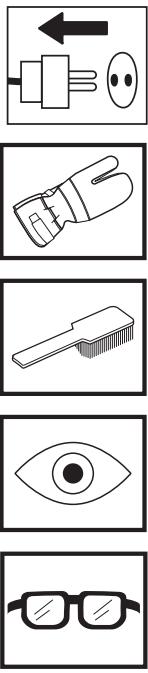
Inspection and/or maintenance should be carried out with the motor switched off and the plug disconnected.
Always wear approved protective gloves.
Regular cleaning is required.
Visual check.
Protective goggles or a visor must be worn.
Contents
KEY TO SYMBOLS
Symbols on the machine: 2
Symbols in the operator's manual: 2
CONTENTS
WHAT IS WHAT?
What is what on the power unit? 4
SAFETY INSTRUCTIONS
Steps before using a new power unit 5
Personal protective equipment 5
Machine's safety equipment 6
General safety precautions 7
General working instructions 7
PRESENTATION
PP480HF 8
ASSEMBLY
Assembling/Installing equipment 9
SETTINGS AND ADJUSTMENTS
Start menu 10
Operations menu 10
STARTING AND STOPPING
Before starting 11
Starting 11
Stopping 12
After work is completed 12
MAINTENANCE
Service 13
Daily maintenance 13
TECHNICAL DATA
PP 480 HF 14
EC-declaration of conformity 15
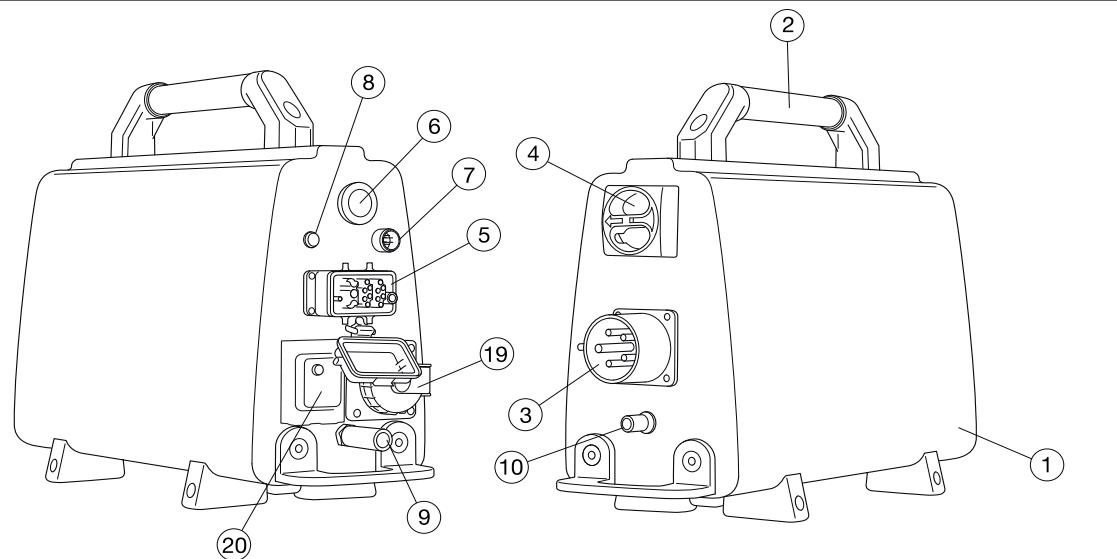
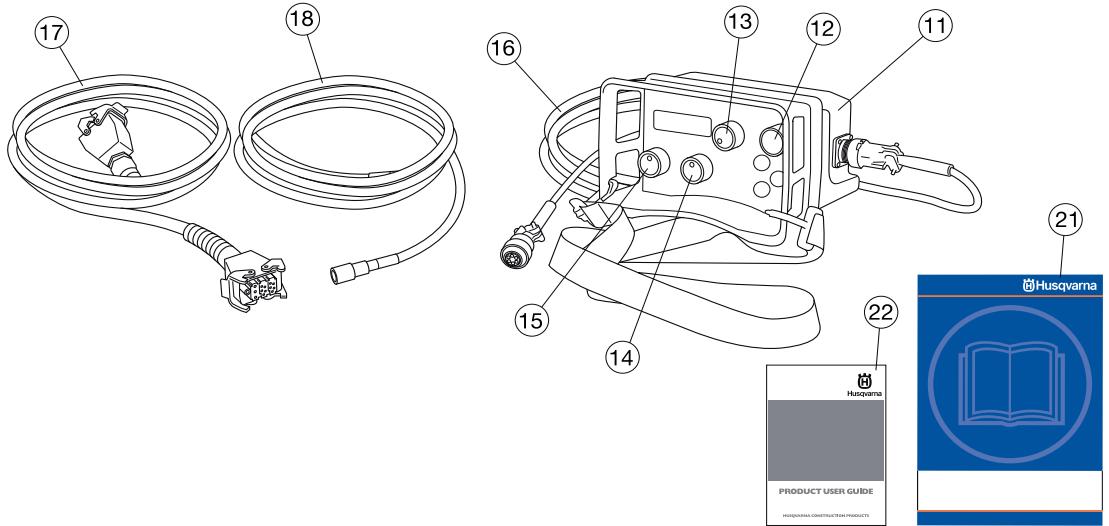
What is what on the power unit?
1 Power unit
2 Handle
3 Electrical socket
4 Main switch
5 Cable connection
6 Emergency stop
7Canbus port
8 Power indicator
9 Water connector, out
10 Water connector, in
11 Remote control
12 Start button
13 Blade rotation and start water coolant
14 Travel feed
15 Depth feed
16Canbus cable
17 Power cable
18 Water hose
19 Single phase socket - Only 5-pin machines
20 Ground-fault circuit breaker - Only 5-pin machines
21 Operator's manual
22 DVD - Product user guide
Steps before using a new power unit
- Please read the operator's manual carefully and make sure you understand the instructions before using the machine.
See the supplied DVD for working technique tips.
This machine is only intended for use together with a Husqvarna WS 482 HF. All other use is forbidden. - Read through the manual supplied with the wall saw before starting to use the hydraulic unit.
- The machine can cause serious personal injury. Read the safety instructions carefully. Learn how to use the machine.
Always use common sense
It is not possible to cover every conceivable situation you can face. Always exercise care and use your common sense. Avoid all situations which you consider to be beyond your capability. If you still feel uncertain about operating procedures after reading these instructions, you should consult an expert before continuing.
Do not hesitate to contact your dealer if you have any more questions about the use of the machine. We will willingly be of service and provide you with advice as well as help you to use your machine both efficiently and safely.
Let your Husqvarna dealer regularly check the machine and make essential adjustments and repairs.
All information and all data in the Operator's Manual were applicable at the time the Operator's Manual was sent to print.

WARNING! Under no circumstances should you modify the original design of the machine without approval from the manufacturer. Always use original spare parts. Unauthorized modifications and/or accessories may lead to serious injury or death to the user or others.
Personal protective equipment

WARNING! You must use approved personal protective equipment whenever you use the machine. Personal protective equipment cannot eliminate the risk of injury but it will reduce the degree of injury if an accident does happen. Ask your dealer for help in choosing the right equipment.
- Protective helmet
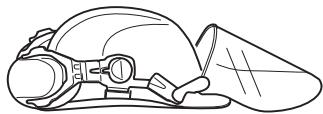
Hearing protection - Protective goggles or a visor
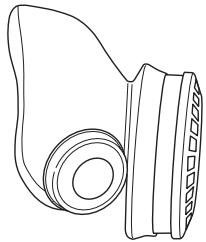
- Breathing mask
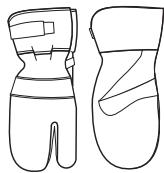
- Heavy-duty, firm grip gloves.
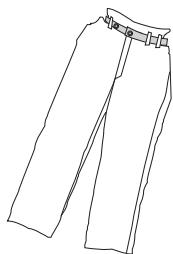
- Tight-fitting, heavy-duty and comfortable clothing that permits full freedom of movement.
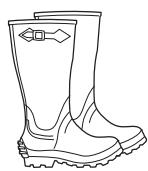
- Boots with steel toe-caps and non-slip sole.
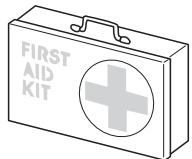
Always have a first aid kit nearby.
Machine's safety equipment
This section describes the machine's safety equipment, its purpose, and how checks and maintenance should be carried out to ensure that it operates correctly. See the "What is what?" section to locate where this equipment is positioned on your machine.

WARNING! Never use a machine with faulty safety equipment. The machine's safety equipment must be checked and maintained as described in this section. If your machine fails any of these checks contact your service agent to get it repaired.
IMPORTANT! All servicing and repair work on the machine requires special training. This is especially true of the machine's safety equipment. If your machine fails any of the checks described below you must contact your service agent. When you buy any of our products we guarantee the availability of professional repairs and service. If the retailer who sells your machine is not a servicing dealer, ask him for the address of your nearest service agent.
Start button
The start button must be pushed and held to be able to start the blade rotation. This in order to prevent unintended starting of the blade rotation.
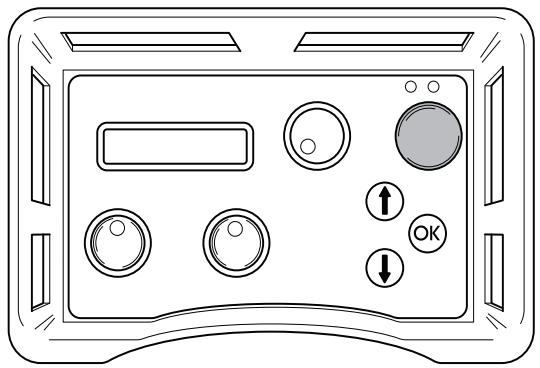
Checking the start button
- Turn the knob for blade rotation without pushing and holding the start button.
The blade rotation must not start.
- Push and hold the start button and turn the knob for blade rotation.
Now the blade rotation shall start.
Emergency stop and stop button
The power unit is equipped with an emergency stop and the remote control with a stop button. These are used to be able to quickly shut down the power unit.
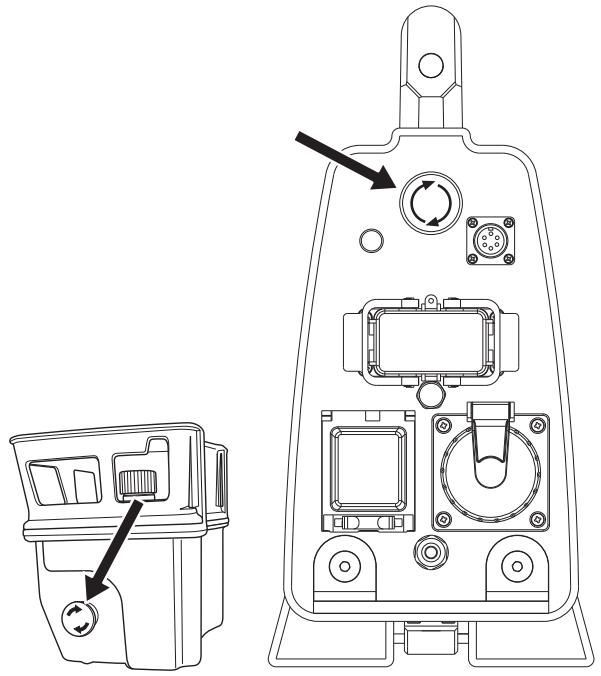
Check the emergency stop and stop button
Start the blade rotation.
- Push the emergency stop on the power unit and check that the blade rotation stops. Check the stop button on the remote control in the same way.
Main switch
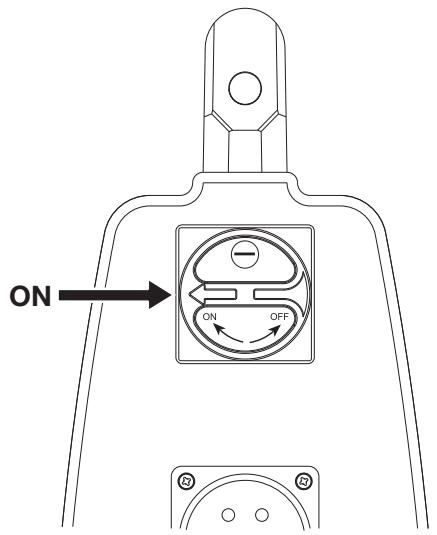
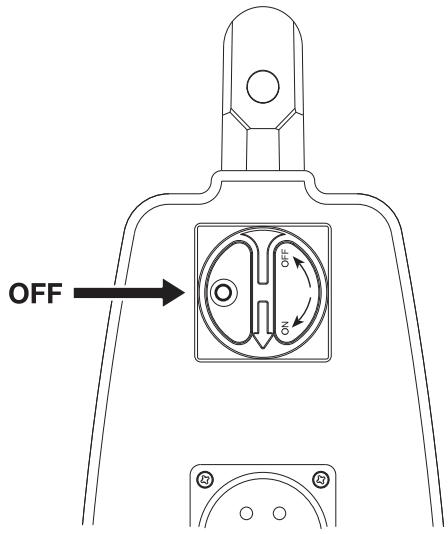
The main switch is used to switch the electricity supply to the power unit on and off. The main switch must be in the "0"-position when the incoming cable is connected.
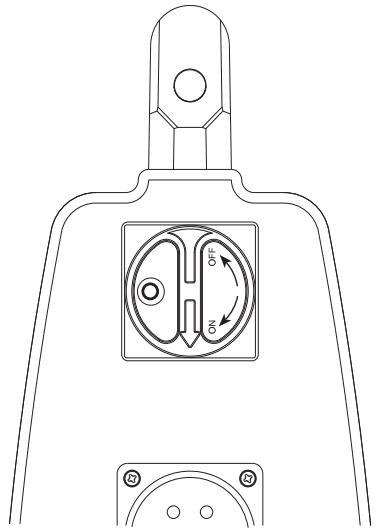
Checking the main power switch
- Turn the main switch to the "0"-position.
Try to start the saw.
The saw must not start.
General safety precautions

WARNING! Do not use the machine without first reading and understanding the contents of this Operator's Manual.
There is always a risk of shocks from electrically powered machines. Avoid unfavourable weather conditions and body contact with lightning conductors and metal objects. Always follow the instructions in the Operator's manual to avoid damage.
- Never use the machine if you are tired, if you have drunk alcohol, or if you are taking medication that could affect your vision, your judgement or your co-ordination.
- Wear personal protective equipment. See instructions under the heading "Personal protective equipment".
- Never carry the machine by holding the cable and never pull the plug by pulling the cable.
- Keep all cables away of water, oil and sharp edges. Make sure the cable is not pinched in doors, fences or the like. It can cause the object to become live.
- Check that the cables are intact and in good condition. Never use the machine if any cable is damaged, but hand it in to an authorized service workshop for repair.
- Do not use an extension cord while it is rolled up to avoid overheating.
- The machine should be connected to an earthed outlet socket.
- Always connect the machine through an ground fault circuit interrupter with personal protection, i.e. an ground fault circuit interrupter that trips at an ground fault of 30 mA.
- Check that the mains voltage corresponds with that stated on the rating plate on the machine.
- Keep all parts in good working order and ensure that all fixtures are properly tightened.
- Never use a machine that is faulty. Carry out the checks, maintenance and service instructions described in this manual. Some maintenance and service measures must be carried out by trained and qualified specialists. See instructions under the heading Maintenance.
- Do not modify safety equipment. Check regularly that they function as they should. The machine must not be run with defective or disassembled safety equipment.
- Never allow anyone else to use the machine without first ensuring that they have understood the contents of the operator's manual.
- People and animals can distract you causing you to lose control of the machine. For this reason, always remain concentrated and focused on the task.
- Be careful as clothing, long hair, and jewellery can get caught in moving parts.
- Observe care when lifting. You are handling heavy parts, which implies the risk of pinch injuries or other injuries.
Transport and storage
- Always switch of the power unit and pull out the electric cable before moving the equipment.
- Store the equipment in a lockable area so that it is out of reach of children and unauthorized persons.
-
Store the machine and its equipment in a dry and frost proof place. If there is a risk of freezing, the machine must be drained of any remaining water coolant.
-
Use the cases provided to store the equipment.
- Do not expose the machine to temperatures exceeding 45^ or to direct sunlight.
General working instructions

WARNING! This section describes basic safety directions for using the machine. This information is never a substitute for professional skills and experience. If you get into a situation where you feel unsafe, stop and seek expert advice. Contact your dealer, service agent or an experienced user. Do not attempt any task that you feel unsure of!
- All operators shall be trained in the use of the machine. The owner is responsible for ensuring that the operators receive training.
- Check that all couplings, connections and cables are intact and free from dirt.
- Check that all cables and the water supply are correctly connected to the machine before starting it.
- Never pull out the power cable without first switching off the power unit and waiting for the engine to come to a complete halt.
If an emergency situation should arise anyway, push the red emergency stop button on the power unit or the stop button on the remote control. - Always check and mark out where gas pipes are routed. Cutting close to gas pipes always entails danger. Make sure that sparks are not caused when cutting in view of the risk of explosion. Remain concentrated and focused on the task. Carelessness can result in serious personal injury or death.
- Make sure that no pipes or electrical cables are routed in the area to be cut.
- Check that electrical cables within the working area are not live.
- Never leave the machine unsupervised with the motor running.
- Always saw in a manner that permits easy access to the emergency stop.
- Make sure that there is always another person close at hand when you use the machines, so that you can call for help if an accident should occur.
- Do not use the machine in bad weather, such as dense fog, rain, strong wind, intense cold, etc. Working in bad weather is tiring and can lead to dangerous conditions, e.g. slippery surfaces.
- Ensure that the working area is sufficiently illuminated to create a safe working environment.
Always ensure you have a safe and stable working position. - Observe care when lifting. You are handling heavy parts, which implies the risk of pinch injuries or other injuries.
- Do not expose the machine to temperatures exceeding 45^ or to direct sunlight.
- Do not use the machine in wet or humid surroundings, close to water, in the rain or snow.
- Do not wash the machine with water, as water can enter the electrical system or the engine and cause damage to the machine or short circuit.
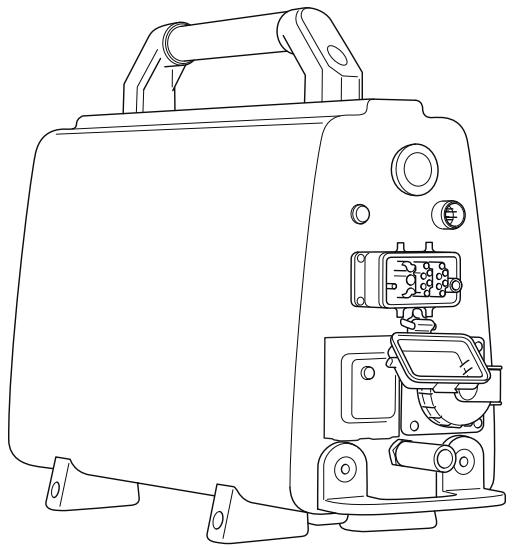
PP 480 HF
It is our wish that you will be satisfied with your product and that it will be your companion for a long time. Think of this operator's manual as a valuable document. By following its content (using, service, maintenance etc) the life span and the second-hand value of the machine can be extended. If you will sell this machine, make sure that the buyer will get the operator's manual.
A purchase of one of our products gives you access to professional help with repairs and services. If the retailer who sells your machine is not one of our authorised dealers, ask him for the address of your nearest service workshop.
Husqvarna Construction Products has a policy of continuous product development. Husqvarna reserves the right to modify the design and appearance of products without prior notice and without further obligation introduce design modifications.
General
- PP 480 HF is a power unit specially developed to be used with the electric wall saw WS 482 HF.
It has a compact design and weighs just 23kg (51 lb).
Use 32 A for a 400V system for full power. - The power unit is connected to the saw with only a power lead and a water coolant hose.
- Equipped with a 230 V power outlet and a terminal for Canbus-cable.
- Equipped with an electric water valve which is controlled from the remote control.
- Through the remote control the operator receives information on power output, can measure the time and other things about the sawing process.
PP 480 HF is supplied with the following equipment:
1x power unit
1xremotecontrol
1xpowerlead
1xCanbus cable
1xwater hose
- Transport boxes for smooth transport.
DVD - Product user guide
Assembling/Installing equipment
When the machine has been transported to a suitable site, it should be connected:
- Turn the main switch to the "0"-position.
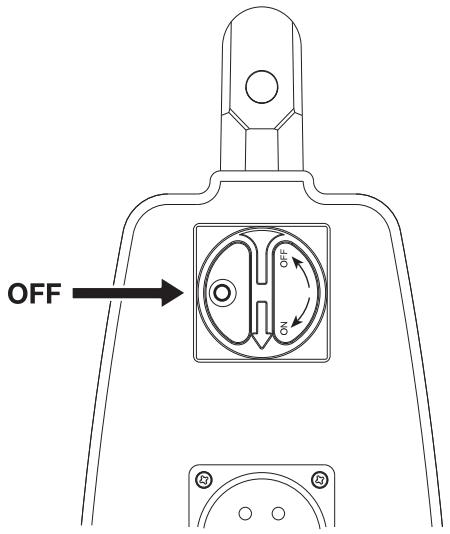
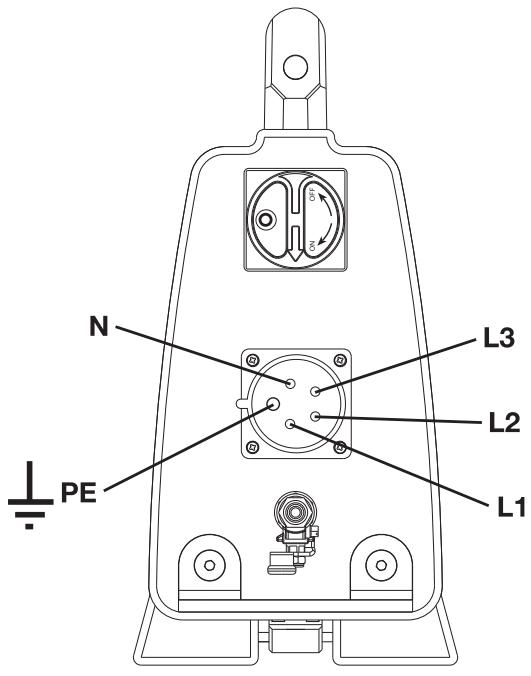
- Connect the incoming power cable (380-480 V, 32 A European connector). Power units equipped with a single phase socket (230 V) must also have a neutral wire in order for the socket to work. The power pack functions even if there is no neutral wire present.
To be able to use full power output, the power unit must be connected to a 32 A fuse. With a 16 A or 25 A fuse the power output is lower so as not to overload the fuse. This is selected when starting up the power unit.
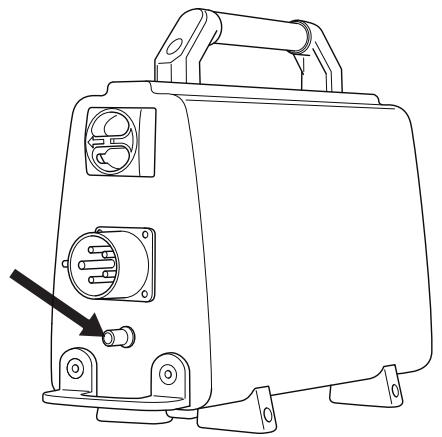
- Connect the water hose to the incoming water connector.
The power unit is equipped with an electric water valve, which is closed when the power pack is activated. When the power pack is without electricity, the valve is open to be able to drain water coolant if there is a risk of freezing.
- Connect the supplied power lead and water hose from the power unit to the saw unit.
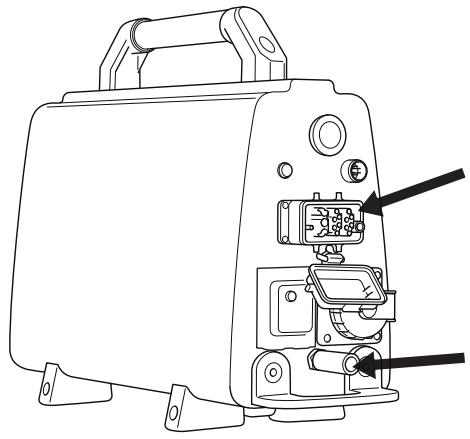
- Connect the remote control using the supplied Canbus cable. Tighten the cable connector screws by hand.
Start menu
The start menu is shown each time the power to the hydraulic unit is switched on.
- The remote control display shows "SELECT FUSE". The last alternative used is preset. Choose another gear using the arrow keys. Press OK to confirm the selection.
With a 25 A fuse you can use approx. 70% of the full output. With 16 A you can use approx. 50% of full output. The function is intended to obtain as high output as possible without overloading the fuse. - The remote control display shows "SELECT GEAR". The last alternative used is preset. Choose another gear using the arrow keys. Press OK to confirm the selection.
On gear 1, the speed range is 600-900 rpm and on gear 2 the speed range is 800-1200 rpm. Check that the mechanical gear on the saw unit is corresponding with the electrically set gear in the remote control. - The display now shows "HUSQVARNA PP-480 HF PRESS START".
Operations menu
As long as the power unit has voltage but the blade rotation stands still, the display shows "Husqvarna PP-480 HF PRESS START".
Before starting, all controls must be turned to zero position. If this is not done, a message in the display will prompt this when the start button is pushed. "TURN OFF TRAVEL FEEDING" or "TURN OFF DEPTH FEEDING" or "TURN OFF BLADE".
When the blade rotation is started, the display shows "X RPM, Y%, Z A", where X equals the engine speed, Y equals the output percentage of the maximum effect, and Z equals the selected fuse.
By navigating with the arrow keys, the following settings can be reached:
Water coolant
- Select language
Id power unit
Time
Total machine time
Rotation direction
Battery status
Water coolant
Select mode AUTO or ON. If AUTO is selected the water cooling is activated when the blade rotation starts. If ON is selected the water valve is always open. The water can be switched of manually with the water tap. The default mode at startup is AUTO. Selected mode is shown in the display. Change mode by pressing OK.
Select language
Using this sub-menu you can set the language you wish to use on the display.
Scroll using the arrow keys until the required language is shown. Confirm with 'OK'.
ld power unit
The display shows the identity number for the power unit.
Time
The function is used to measure the amount of time a job takes. The time is counted from when the saw starts working.
Select:
- ON, to enable.
OFF, to disable. - RESET TIME, to reset.
Browse with the arrow keys and confirm with "OK".
Total machine time
Here the total operation time of the power unit is shown. The time is shown in hours and minutes (hhhh:mm).
Rotation direction
Here you can set the rotation direction of the blade. Select standard or backwards by pressing "OK".
Battery status
Here you can see the battery status of the remote control for machines with radio communication.
- "NO BATT. CONNECT" - The machine does not have radio communication.
- "CHARGING BATTERY" - The CAN cable is connected and the battery is charging.
- "0% BATTERY 100%" - The bar shows the battery status.
"BATTERY FULL" - The battery is fully charged.
Before starting

Before starting the saw, check that:
- The incoming electrical cable has been connected to a fuse rated at least 16A .
The power lead is connected to the saw unit. - All controls on the remote control have been set to zero position. If this is not done, a message in the display will prompt this when the start button is pushed.
- Enclose the area to be cut so that unauthorised persons can not be injured or disturb the operator.
IMPORTANT! A higher speed than the recommended speed can result in personal injury and damage to the equipment.
Starting

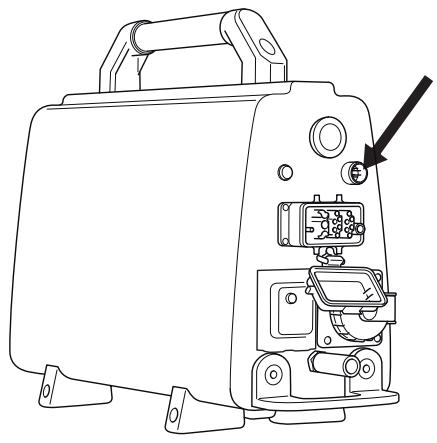
- Check that the emergency stop button on the power unit and the stop button on the remote control are not pressed by turning the them clockwise.
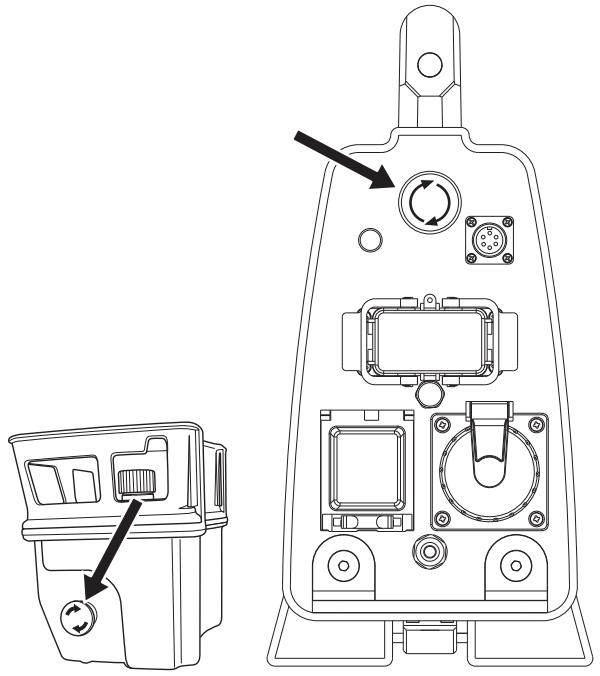
- Turn the main switch to "1"-position.
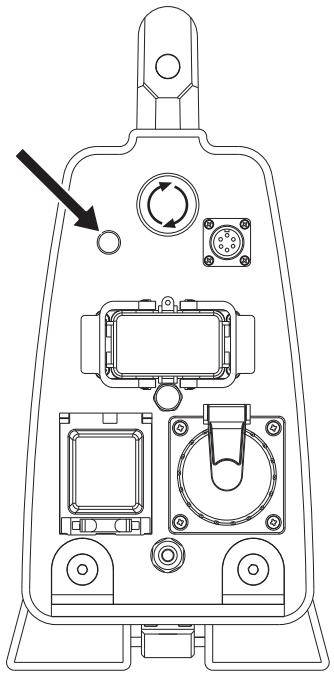
- The power unit is activated and this is shown by the indicator light shining.
The water valve in the power unit is now closed. This valve opens again when the blade rotation is started.
- The remote control display shows "SELECT FUSE". The last alternative used is preset. Choose another gear using the arrow keys. Press OK to confirm the selection.
With a 25 A fuse you can use approx. 70% of the full output. With 16 A you can use approx. 50% of full output. The function is intended to obtain as high output as possible without overloading the fuse.
The power output for the chosen fuse is shown in percent on the display.
- The remote control display shows "SELECT GEAR". The last alternative used is preset. Choose another gear using the arrow keys. Press OK to confirm the selection.
Check that the mechanical gear on the saw unit is corresponding with the electrically set gear in the remote control. On gear 1, the speed range is 600-900 rpm and on gear 2 the speed range is 800-1200 rpm. For more information on recommended blades and speeds, see "Recommended blade speeds" in the "Technical data" section.
- The display now shows "HUSQVARNA PP-480 HF PRESS START".
- On the saw unit WS 480 HF, the blade's rotation direction is adjustable.
Press "arrow up" on the remote control unit's membrane key to select the direction. The display shows "BLADE ROTATION STANDARD" or "BLADE ROTATION REVERSE". To change the current selection, press "OK". This must only be done when the blade is not moving.
- Start the blade rotation by pushing and holding the green start button while turning the control for rotation direction clockwise. There is a three seconds delay before the blade rotation starts. You can follow the countdown in the display. The delay is to cool down the power unit which can get hot when active and no cooling water is circulating.
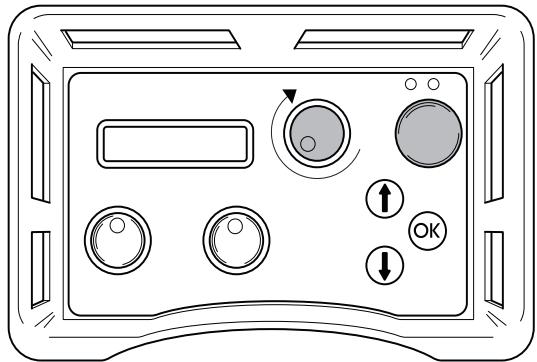
- There is no delay If selected mode for water coolant is ON.
- The water cooling starts automatically when the knob for blade rotation is turned from its zero position. NOTE! Applies only if the water coolant mode is set to AUTO. The water flow is adjusted with the ball valve at the incoming water connector on the power unit.
- Start the depth feeding of the blade by turning the depth feeding control in the desired direction.
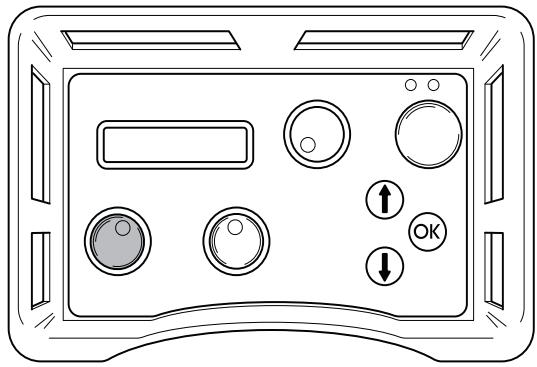
- Start the saw unit's travel feed by turning the travel feed control in the desired direction.
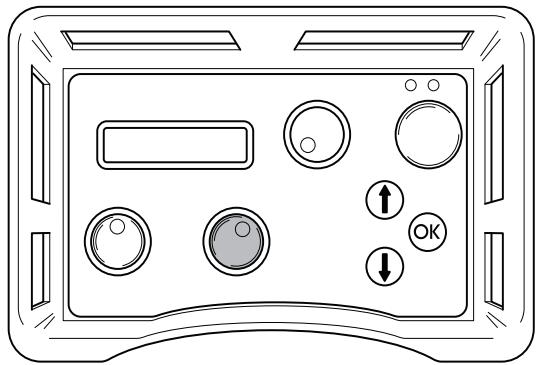
- Read through the manual supplied with the wall saw for further instructions in sawing technique.
Stopping

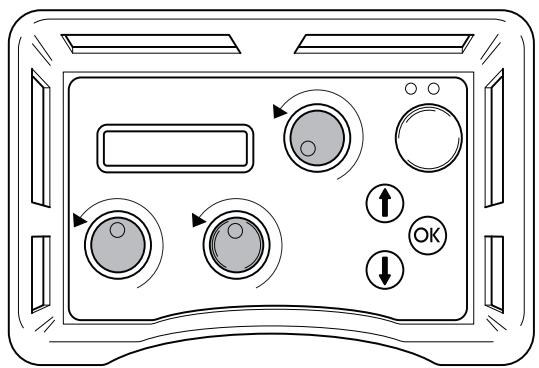
- To switch off the blade rotation, turn the blade rotation control anti-clockwise back to its zero position.
- The water coolant is turned off automatically with a 3 sec delay. NOTE! Applies only if the water coolant mode is set to AUTO.
Also turn the depth feeding and travel feeding controls to their zero positions.
- Turn the main switch on the power unit to "0"-position.
After work is completed
Dismantling the equipment
- Disconnect the incoming power lead and incoming water hose.
- Disconnect the power lead and water hose between the power unit and the saw unit.
- If there is a risk of freezing, the machine must be drained of any remaining water coolant.
Cleaning
Make sure to keep the connectors and pins clean. Clean with a rag or brush.
Do not use a high pressure washer to clean the power unit.
Service
IMPORTANT! All types of repairs may only be carried out by authorised repairmen. This is so that the operators are not exposed to great risks.
After 100 hours of operation, the message "Time for servicing" is displayed. The entire equipment shall then be taken to an authorized Husqvarna dealer for servicing. The message reappears 100 hours after each service.
Error messages
In case of any defects, an error message appears on the display. Follow the directions supplied or contact an authorized dealer.
| Fault Code | Error message | Procedure | Steps |
| F01 | MOTOR OVERHEATED | Water coolant lacking/insufficient to saw motor. | Check that the water coolant flows to the saw motor and that it is max. 25°C and min 3.5 l/min. |
| F02 | POWER OVERHEATED | Water coolant lacking/insufficient to power unit. | Check that the water coolant flows to the power unit and that it is max 25°C and min 3.5 l/min. If the message pops up when the blade rotation is started - go to the operations menu and "Water coolant" and select "ON". Let the water coolant circulate the power unit for a minute before you turn the blade rotation on again. |
| F03 | LOW VOLTAGE | Low voltage supply to the power unit. | Check the voltage during operation. Check that all three phases exist. Check that incoming cables have sufficient cross-sectional area. |
| F04 | HIGH VOLTAGE | High voltage to the power unit. | Check the voltage during operation. This message is shown mainly when using a generator as power source. |
| F05 | OVER CURRENT | Over current to saw motor | Check that the power lead is fitted correctly and that it is not damaged. The message can appear in case of a loose contact. |
| F06 | NO HALL SENS. TRAVEL MOTOR | Fault on HALL-sensor card for travel feed | Take the equipment to an authorized service shop. |
| F07 | NO HALL SENS. DEPTH MOTOR | Fault on HALL-sensor card for depth feeding | Take the equipment to an authorized service shop. |
| F08 | TRAVEL MOTOR OVERLOADED | Travel motor overloaded. | To reset, reverse the feeding function. If the fault message returns, grease the feeder gears, clean the rails and adjust the saw carriage. If this does not help, hand in the equipment to an authorized Husqvarna service workshop. |
| F09 | DEPTH MOTOR OVERLOADED | Depth motor overloaded. | To reset, reverse the feeding function. If the fault message returns, grease the feeder gears. If this does not help, hand in the equipment to an authorized Husqvarna service workshop. |
| F10 | BLADE JAM | Blade can not rotate. | Remove the blade from the cut and start the blade rotation. |
| F11 | GROUND FAULT OR NO SAW HEAD | Incorrect earthing of power pack/saw or no saw unit connected to the power pack. | Check the incoming electrical connection to the power pack and that the saw unit is connected to the power pack. If this does not help, hand in the equipment to an authorized Husqvarna service workshop. |
| F12 | NON-COMPATIBLE SAW UNIT | Incorrect saw unit connected to the power pack. | Connect a compatible saw unit to the power pack. |
| F13 | NO CONTACT CHECK CAN-CABLE | No contact between power unit and remote control | Replace the Canbus-cable. |
| F14 | NO RADIO CONTACT | No radio contact between remote control and power unit. | Check that the power pack is activated and that the green indicator light is on. If this does not help, hand in the equipment to a Husqvarna service workshop. The machine can be used with the Canbus cable between the power pack and remote control. |
Daily maintenance
Regularly check:
Any abnormal noises.
- Make sure to keep the connectors and pins clean. Clean with a rag or brush.
- Do not use a high pressure washer to clean the power unit.
PP 480 HF
Max. output, kW 20 (32 A)
Rated current, A 16-32
Input voltage, V 380-480 V, 50-60 Hz
Output voltage, V 340 V, 0-500 Hz
Sec. output voltage, V 24 V, 0-1500 Hz
Power supply 3P + PE (4-pin) / 3P+N+PE (5-pin)
1x230V one phase outlet Only 5-pin machines
Effect generator - min., kWA
400V, 16A 12
400V, 25A 20
400V, 32A 24
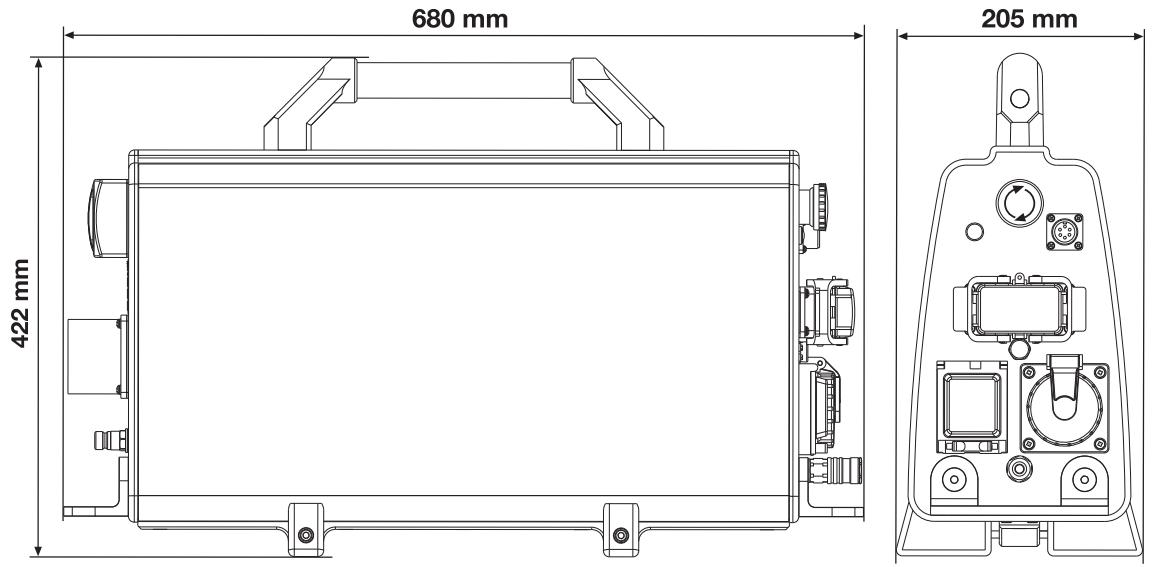
Weight, kg/lbs 23/51
Cooling water pressure - max, bar 7
Water coolant flow min., l/min 3,5
Max cooling water temperature at 3,5 l/min, °C 25
Dimensions
Blade
Recommended blade speed

WARNING! Cutting at too high revs can cause damage to the blade and lead to personal injury.
| Speed, rpm | |
| Gear 1 | 600-900 |
| Gear 2 | 800-1200 |
When sawing at 800-900 rpm, a higher sawing output is obtained if gear 1 is used.
Follow the blade manufacture's recommendations regarding material and blade speed when choosing blade. When cutting in hard concrete, a lower speed or a more shallow cut is required compared to cutting in soft concrete.
| 600 mm (24") | 800 mm (32") | 1000 mm (40") | 1200 mm (48") | 1600 mm (63") | |||
| 600 rpm | |||||||
| 700 rpm | |||||||
| 800 rpm | |||||||
| 900 rpm | |||||||
| 1000 rpm | |||||||
| 1100 rpm | |||||||
| 1200 rpm | |||||||
| Concrete | |
| Hard | |
| Medium | |
| Soft |
EC-declaration of conformity
(Appplies to Europe only)
Husqvarna AB, SE-433 81 Gothenburg, Sweden, tel: +46-31-949000, declares under sole responsibility that the power unit Husqvarna PP 480 HF from 2010's serial numbers and onwards (the year is clearly stated in plain text on the type plate with subsequent serial number) is in conformity with the requirements of the COUNCIL'S DIRECTIVES:
of May 17, 2006 "relating to machinery" 2006/42/EC
of December 15, 2004 "relating to electromagnetic compatibility" 2004/108/EC.
of December 12, 2006 "relating to electrical equipment" 2006/95/EC.
The following standards have been applied: EN ISO 12100:2003, EN 55014-1:2006, EN 55014-2/A1:2001, EN 61000-3-11:2000, EN 60204-1:2006.
Göteborg December 29, 2009
Henric Andersson
Vice President, Head of Power Cutters and Construction Equipment
Husqvarna AB
(Authorized representative for Husqvarna AB and responsible for technical documentation.)
Simbolos en laquina:
Interruptor principal
Vice President, Head of Power Cutters and Construction Equipment
Husqvarna AB
Vitesse lame recommandaee


- Symbols on the machine:
- Symbols in the operator's manual:
- Contents
- KEY TO SYMBOLS
- WHAT IS WHAT?
- SAFETY INSTRUCTIONS
- PRESENTATION
- ASSEMBLY
- SETTINGS AND ADJUSTMENTS
- STARTING AND STOPPING
- MAINTENANCE
- TECHNICAL DATA
- What is what on the power unit?
- Steps before using a new power unit
- Always use common sense
- Personal protective equipment
- Machine's safety equipment
- Start button
- Checking the start button
- Emergency stop and stop button
- Check the emergency stop and stop button
- Main switch
- Checking the main power switch
- General safety precautions
- Transport and storage
- General working instructions
- General
- PP 480 HF is supplied with the following equipment:
- Assembling/Installing equipment
- Start menu
- Operations menu
- Water coolant
- Select language
- ld power unit
- Time
- Total machine time
- Rotation direction
- Battery status
- Before starting
- Starting
- Stopping
- After work is completed
- Dismantling the equipment
- Cleaning
- Service
- Error messages
- Daily maintenance
- PP 480 HF
- Effect generator - min., kWA
- Dimensions
- Blade
- Recommended blade speed
- EC-declaration of conformity
- Simbolos en laquina:
- Interruptor principal
Brand : HUSQVARNA
Model : PP 480 HF
Category : Leaf blower