
EL-2902E - Calculator SHARP - Free user manual and instructions
Find the device manual for free EL-2902E SHARP in PDF.



| Product type | Printing calculator |
| Brand | SHARP |
| Model | EL-2902E |
| Working capacity | 12 digits |
| Power supply | AC 220-230V, 50Hz |
| Dimensions (W × D × H) | 200 mm × 251 mm × 62 mm |
| Weight | Approx. 910 g |
| Print type | Mechanical printer |
| Print speed | Approx. 3.0 lines/s |
| Print paper | Width 57-58 mm, max. diameter 80 mm |
| Main functions | Four operations, constant multiplication/division, power, markup, memory calculation, grand total, item count, euro/local currency conversion |
| Display | LCD with backlight |
| Selectors | Decimal mode (F, A, 3, 2, 1, 0), rounding (5/4, ↓, ↑), print/count (P, P·IC, etc.) |
| Maintenance | Clean with a soft dry cloth, do not use solvents |
| Paper roll replacement | Insert the end and advance with the feed key |
| Ink roller replacement | Types EA-781R-BK (black) or EA-781R-RD (red) |
| Supplied accessories | 1 paper roll, 2 ink rollers, instruction manual |
| Repairs | Contact an authorized SHARP dealer |
| Compliance | Regulation (EC) No 1103/97 |
Frequently Asked Questions - EL-2902E SHARP
User questions about EL-2902E SHARP
0 question about this device. Answer the ones you know or ask your own.
Ask a new question about this device
Download the instructions for your Calculator in PDF format for free! Find your manual EL-2902E - SHARP and take your electronic device back in hand. On this page are published all the documents necessary for the use of your device. EL-2902E by SHARP.
USER MANUAL EL-2902E SHARP
The socket outlet shall be installed near the equipment and shall be easily accessible.
Caution!
Thank you for your purchase of the SHARP electronic calculator, model EL-2902E. Your SHARP calculator is specially designed to save work and increase efficiency in all business applications and general office calculations. Careful reading of this manual will enable you to use your new SHARP calculator to its fullest capability.
CONTENTS
Page
OPERATING CONTROLS 2 PAPER ROLL REPLACEMENT 5 - INK ROLLER REPLACEMENT 5 - ERRORS 6 SPECIFICATIONS 7 CALCULATION EXAMPLES 50 - EUROCONVERSION 62
OPERATIONAL NOTES
To insure trouble-free operation of your SHARP calculator, we recommend the following:
- The calculator should be kept in areas free from extreme temperature changes, moisture, and dust.
- A soft, dry cloth should be used to clean the calculator. Do not use solvents or a wet cloth.
- Since this product is not waterproof, do not use it or store it where fluids, for example water, can splash onto it. Raindrops, water spray, juice, coffee, steam, perspiration, etc. will also cause malfunction.
- If service should be required, use only a SHARP servicing dealer, a SHARP approved service facility or SHARP repair service.
- If you pull out the power cord to cut electricity completely, the presently stored exchange rate will be cleared.
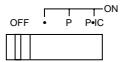
POWER SWITCH; PRINT / ITEM COUNT MODE SELECTOR:
"OFF": Power OFF
Power ON. Set to the non-print mode.
"P": Power ON. Set to the print mode.
"P·IC": Power ON. Set to the print and item count mode.
For addition or subtraction, each time + is pressed, 1 is added to the item counter, and each time - is pressed, 1 is subtracted.
- The count is printed when the calculated result is obtained.
- Pressing of *, CCE CCE clears the counter.
- The built-in LCD backlight turns on when the calculator's power is on and turns off when the power is off.
Note: The counter has a maximum capacity of 3 digits (up to ± 999 ). If the count exceeds the maximum, the counter will recount from zero.
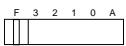
DECIMAL / ADD MODE SELECTOR:
3,2,1,0 : Presets the number of decimal places in the answer.
"F": The answer is displayed in the floating decimal system.
"A": The decimal point in addition and subtraction entries is automatically positioned to the 2nd digit from the lowest digit of entry number. Use of the add mode permits addition and subtraction of numbers without entry of the decimal point. Use of · , and ÷ will automatically override the add mode and decimally correct answers will be printed.

ROUNDING SELECTOR:
Set Decimal Selector to 2.
4 ÷ 9 = 0.444..., 5 ÷ 9 = 0.555...
| 4÷9= | 5÷9= | |
| 5/4 | 0.44 | 0.56 |
| ↓ | 0.44 | 0.55 |
Note: The decimal point floats during successive calculation by the use of or .
If the decimal selector is set to "F" then the answer is always rounded down () .

GRAND TOTAL MODE SELECTOR:
"GT": This selector will accumulate the following:
( + will be printed.)
- Addition and subtraction totals obtained with * .
- Product and quotient totals obtained with + or - .
- Answers obtained with % or MU.
Neutral
PAPER FEED KEY
LAST DIGIT CORRECTION KEY
GT GRAND TOTAL KEY:
Prints and clears the "GT" memory contents.
NON-ADD/SUBTOTAL KEY:
Non-add — When this key is pressed right after an entry of a number in the Print mode, the entry is printed on the left-hand side with "#".
This key is used to print out numbers not subject to calculation such as code, date, etc.
Subtotal - Used to get subtotal(s) of additions and/or subtractions. When pressed following + or -, the subtotal is printed with "◇" and the calculation may be continued.
% CE CLEAR / CLEAR ENTRY KEY:
Clear — This key also serves as a clear key for the calculation register and resets an error condition.
Clear entry — When pressed after a number and before a function, clear the number.
* TOTAL KEY:
When pressed after + or -, prints the total of addition and subtraction with "*".
EQUAL KEY:
Gives the results of multiplication and division and performs repeat calculation with a constant.
Multiplication:
The calculator will automatically remember the first number entered (the multiplicand) and the multiplication instruction.
Division:
The calculator will automatically remember the second number entered (the divisor) and the division instruction.

CHANGE SIGN KEY:
Changes the algebraic sign of a number (i.e., positive to negative or negative to positive).

MARKUP KEY:
Used to perform mark-ups, percent change and automatic add-on/discount.

RECALL AND CLEAR MEMORY KEY

RECALL MEMORY KEY

STORE KEY:
This key is used to store an exchange rate.
- A maximum of 6 digits can be stored (decimal point is not counted as a digit).
- Only one rate can be stored. If you enter a new rate, the previous rate will be cleared.

CONVERSION KEY (TO A NATIONAL CURRENCY)

CONVERSION KEY (TO THE EURO CURRENCY)
DISPLAY SYMBOLS:
M : Memory symbol
Appears when a number is in the memory.
- : Minus symbol
Appears when a number is negative.
E: Error symbol
Appears when an overflow or other error is detected.
G: Grand total memory symbol
Appears when a number is in the grand total memory.
□: National Currency symbol
Appears when an entered value is converted to present national currency.
This symbol also appears when an exchange rate is stored.
€: Euro Currency symbol
Appears when an entered value is converted to Euro currency.
This symbol also appears when an exchange rate is stored.
PAPER ROLL REPLACEMENT
Never insert paper roll if torn. Doing so will cause paper to jam. Always cut leading edge with scissors first.
1) Insert the leading edge of the paper roll into the opening. (Fig.1) 2) Turn the power on and feed the paper by pressing [4]. (Fig.2) 3) Lift the attached metal paper holder up and insert the paper roll to the paper holder. (Fig.3)

Fig. 1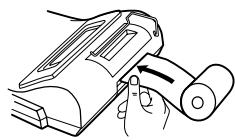
Fig. 2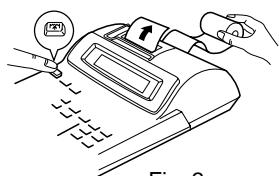
Fig. 3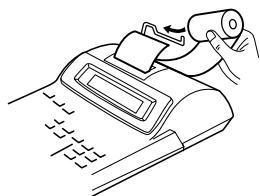
DO NOT PULL PAPER BACKWARDS AS THIS MAY CAUSE DAMAGE TO PRINTING MECHANISM.
INK ROLLER REPLACEMENT
If printing is blurry even when the ink roller is in the proper position, replace the roller.
Ink roller: Type EA-781R-BK (Black) Type EA-781R-RD (Red)
WARNING
APPLYING INK TO WORN INK ROLLER OR USE OF UNAPPROVED INK ROLLER MAY CAUSE SERIOUS DAMAGE TO PRINTER.
1) Set the power switch to OFF. 2) Remove the printer cover. (Fig. 1) 3) Remove the ink roller by turning it counterclockwise and pulling it upward. (Fig. 2) 4) Install the correct color new ink roller and press it in the correct position. Make sure that the ink roller is securely in place. (Fig. 3) 5) Put back the printer cover.
Fig. 1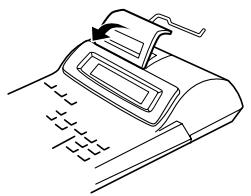
Fig. 2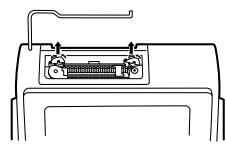
Fig. 3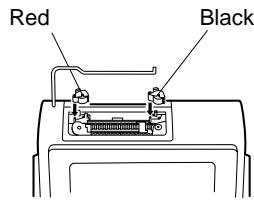
Cleaning the printing mechanism
If the print becomes dull after long time usage, clean the printing wheel according to the following procedures:
1) Remove the printer cover and the ink roller. 2) Install the paper roll and feed it until it comes out of the front of the printing mechanism. 3) Lightly brush the printing wheel with a small brush (like a toothbrush) and clean it by pressing 4 . 4) Put back the ink roller and the printer cover.
Notes: - Do not rotate the printing mechanism manually, this may damage the printer.
- Never attempt to turn the printing belt or restrict its movement while printing. This may cause incorrect printing.
ERRORS
There are several situations which will cause an overflow or an error condition. When this occurs, "E" will be displayed. The contents of the memory at the time of the error are retained.
If “0 • E” is displayed at the time of the error, “- - - - - - ” will be printed in red and %E must be used to clear the calculator.
Error conditions:
- When the integer portion of an answer exceeds 12 digits.
- When the integer portion of the contents of the memory exceeds 12 digits.
(Ex. 999999999999 + 1 [M + ]
- When any number is divided by zero. (Ex. 5 0 = ).
SPECIFICATIONS
Operating capacity:
Power supply:
Calculations:
12 digits
AC:220-230V,50Hz
Four arithmetic, constant multiplication and division, power, add-on, repeat addition and subtraction, reciprocal, grand total, item count calculation, markup, memory, conversion between a national and the euro currency, etc.
PRINTING SECTION
Printer:
Mechanical printer
Printing speed:
Approx. 3.0 lines/sec.
Printing paper:
57 mm (2-1/4") - 58 mm (2-9/32") wide
80 mm (3-5/32") in diameter (max.)
Operating temperature:
0°C - 40°C (32°F - 104°F)
Power consumption:
33 mA
Dimensions:
200 mm W × 251 mm D × 62 mm H
(7-7/8" (W) × 9-7/8" (D) × 2-7/16" (H))
Weight:
Approx. 910 g (2.01 lb.)
Accessories:
1 paper roll, 2 ink rollers (installed), and operation manual
INTRODUCTION
"OFF": Power off.
MU MULTIPLE USE KEY:
TOTAL CALCULATION SELECTOR:
* M KEY FOR RECALL AND MEMORY CLEAR
MEMORY RECALL KEY
STR STORAGE KEY:
CORRECTION KEY FOR LAST DIGIT

FINAL TOTAL TEST:
Approx. 3.0 lines/sec.
Paper:
57 mm - 58 mm wide
80 mm diameter (max.)
- Set the decimal selector as specified in each example. The rounding selector should be in the "5/4" position unless otherwise specified.
- The grand total mode selector should be in the "·" position (off position) unless otherwise specified.
- The print / item count mode selector should be in the "P·IC" position unless otherwise specified.
- Press \boxed{C_{CE}} prior to beginning any calculation.
- If an error is made while entering a number, press \frac{\%}{\text{CE}} or \frac{\%}{\text{E}} and enter the correct number.
CALCULATION EXAMPLES
B. 11.11 ÷ 77.77 = ①
2 2. 2 2 ÷ 7 7. 7 7 = ②
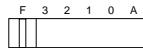
| 11.11 | 11.11 | 11·11 | + | |
| 77.77 | 0.14285714285 | 77·77 | = | |
| 0·14285714285 | * | ① | ||
| 22.22 | 0.28571428571 | 22·22 | = | |
| 0·28571428571 | * | ② |
POWER / POTENZBERECHNUNGEN / PUISSANCE / POTENCIA CALCOLI DELLE / POTENZE / POTENSRÄKNING / MACHTSVERHEFFEN
| 53210A | ||
| 5× | 5. | 5·× |
| = | 25. | 5·= |
| 25·* | ||
| = | 125. | 25·= |
| 125·* F 3 2 1 0 A | ||
| 5× | 5. | 5·× |
| × | 25. | 5·× |
| = | 125. | 5·= |
| 125·* | ||
PERCENT / PROZENT / POURCENTAGE / PORCENTAJES / PERCENTUALI / PROCENT / PROCENTBEREKENINGEN
| 100 × 25 % = | ||
| 100 × 25 % | 100. | 100·× 25·% |
| 25.00 | 25.00 * | |
RECIPROCAL / RECIPROCALS / INVERSES / RECIPROCOS / RECIPROCI / CALCULATION / RECIPROCAL CALCULATIONS
| 1/7 = | F 3 2 1 0 A 5/4 | |
| 7 | 7. | 7. + |
| 1. | 7. + | |
| 7. = | ||
| 0.14285714285 | 0.14285714285 * | |
ADD-ON AND DISCOUNT / ADD-ON AND DISCOUNT / ADD-ON AND DISCOUNT / ADD-ON AND DISCOUNT / ADD-ON AND DISCOUNT / ADD-ON AND DISCOUNT / ADD-ON AND DISCOUNT
A. 5% add-on to 100. / A 5% add-on to 100. / A 5% add-on to 100. / A 5% add-on to 100. / A 5% add-on to 100. / A 5% add-on to 100. / A 5% add-on to 100.
| 100 × 5 MU | 100. | 100. × 5. % 5-00 | Increased amount Zusatzbetrag Majoration Incremento Maggiorazione Tilläggsbelopp Extra bedrag |
| 105.00 | 105.00 * |
B. 10% discount on 100. / A 10% discount on 100. / A 10% discount on 100. / A 10% discount on 100. / A 10% discount on 100. / A 10% discount on 100. / A 10% discount on 100.
Markup and Profit Margin are both ways of calculating percent profit.
Profit margin is percent profit vs. selling price. - Markup is percent profit vs. cost. Cost is the cost. - Sell is the selling price. GP is the gross profit. - Mkup is the percent profit based on cost. - Mrgn is the percent profit based on selling price.
| Cost | 200 |
| Sell | 250 |
| GP | $50 |
| Mkup | 25% |
| Mrgn | 20% |
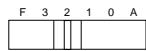
200 20 MU
200.
50.00
200·Cost
- % M Mrgn 250.00* Sell
50·00 GP
PERCENT CHANGE / PERCENT CHANGE / PERCENT CHANGE / PERCENT CHANGE / PERCENT CHANGE / PERCENT CHANGE / PERCENT CHANGE
- Calculate the dollar difference (a) and the percent change (b) between two yearly sales figures 1,500 in one year and1,300 in the previous.
- Calculation of the dollar difference (a) and the percentage change (b) between the two annual sales figures of 1,500 in one year and1,300 in the previous year.
- Calculate the difference in dollars (a) and the percentage change (b) between two prices: 1,500 for this year and1,300 for the previous year.
- Calculate the difference in dollars (a) and the percentage change (b) between two annual sales figures: 1,500 in one year and1,300 in the previous year.
- Calculate the difference in dollars (a) and the percentage change (b) between two annual sales figures: 1,500 in one year and1,300 in the previous year. Calculate the difference in value (a) and the percentage change (b) with two annual sales figures: 1,500 in one year and1,300 in the previous year.
- Calculate the difference in dollars (a) and the percentage change (b) between two annual sales figures: 1,500 in one year and1,300 in the year before.
| 1500 + | 1'500.00 | 1,500.00 + |
| 1300 - | 200.00 | 1,300.00 - |
| MU | 200.00 * (a) | |
| 15.38 | 15.38 % (b) |
PERCENT PRORATION / PROZENTUALES VERHÄLTNIS / DISTRIBUTION PROPORTIONNELLE EN POURCENTAGE / DISTRIBUTION PROPORCIONAL DE PORCENTAJE / DISTRIBUTIONE PERCENTUALE / PROCENTUELL PROPORTION / PROCENTUELE VERHOUDING
Calculate the percentage of each of the parts to the whole. - Determine the percentage of expenses relative to total expenses. - Calculate the percentage that each item represents relative to the whole. - Calculate the percentage of each item. - Calculate the percentage of each individual part relative to the total. Calculate the percentage parts in relation to the whole. - Calculate the percentage of each expense relative to the total.
| ExpensesAufwandDépensesGastosCostiUtgifterUitgaven | % |
| $123456789 | (a)(b)(c) |
| (D) | (d) |
| *2 | *M | |||
| 123 | 123.00 | 123·00 + | ||
| 456 | 579.00 | 456·00 + | ||
| 789 | 1'368.00 | 789·00 + | ||
| 123 | MU | 003 | ||
| 1·368·00 * | (D) | |||
| 123·= | ||||
| 8·99 % | (a) | |||
| M+ | 8·99 M | 8·99 +M | ||
| 456 | MU | 456·= | ||
| 33·33 % | (b) | |||
| M+ | 33·33 M | 33·33 +M | ||
| 789 | MU | 789·= | ||
| 57·68 % | (c) | |||
| M+ | 57·68 M | 57·68 +M | ||
| ◇M | 100·00 ◇M | |||
| *M+ | 100·00 M | 100·00 *M |
2: Press [M] to clear the memory before starting a memory calculation. 2: To clear all previous entries from memory, press [M]. 2: Clear the memory (M) before proceeding with a memory calculation. 2: Press [M] to cancel the memory before starting a calculation with memory. 2: Before performing the calculation with memory, press M to reset it. 2: Press M to clear the memory before starting calculations with memory. 2: Press [M] to clear the memory before starting a memory calculation.
ITEM COUNT CALCULATION / RECHNEN MIT POSTENZÄHLER / CALCUL DE COMPTE D'ARTICLES / CALCULO DE CUYNTA DE ARTICULOS / CALCOLI CON FUNZIONE / CONTADDENDI POSTRÄKNING / REKENEN MET DE POSTENTELLER
| Bill No. Rechnungs-Nr. Facture n° N.° de factura Fattura No. Räkningsnr Rekeningnr. | Number of bills Anzahl der Rechnungen Nbre de factures Cantidad de facturasNumero di fatumur Antal rǎkningar Aantal rekeningen | Amount Betrag Montant Importe Ammontare Belopp Bedrag |
| 1 | 1 | 100.55 |
| 2 | 1 | 200.00 |
| 3 | 1 | 200.00 |
| 4 | 1 | 400.55 |
| 5 | 1 | $500.65 |
| Total Total Total Total Totale Totalt(a) | (b) | |
| %CE | %CE | |||
| 100.55 | + | 100.55 | 100.55 | + |
| 200 | + | 300.55 | 200.00 | + |
| + | 500.55 | 200.00 | + | |
| 400.55 | + | 901.10 | 400.55 | + |
| 500.65 | + | 1'401.75 | 500.65 | + |
| * | 005 | (a) | ||
| 1'401.75 | 1'401.75 | *(b) |
GRAND TOTAL / ENDSUMME / TOTAL GÉNÉRAL / TOTAL GLOBAL / TOTALE FINALE / SLUTSVAR / EINDTOTAAL
1 0 0 + 2 0 0 + 3 0 0 = ① +) 3 0 0 + 4 0 0 + 5 0 0 = (2) +) 5 0 0 - 6 0 0 + 7 0 0 = ③
Grand total / Endsumme / Total général / Total global / Totale finale /
EXAMPLE 1: Set the following rate provisionally: 1 euro = 1.95583 DEM.
- Convert 1,000 DEM to the euro currency.
(1 euro = 1.95583 DEM, provisionally.)
- CONTENTS
- OPERATIONAL NOTES
- POWER SWITCH; PRINT / ITEM COUNT MODE SELECTOR
- DECIMAL / ADD MODE SELECTOR
- ROUNDING SELECTOR
- GRAND TOTAL MODE SELECTOR
- PAPER FEED KEY
- LAST DIGIT CORRECTION KEY
- GT GRAND TOTAL KEY
- NON-ADD/SUBTOTAL KEY
- CE CLEAR / CLEAR ENTRY KEY
- TOTAL KEY
- EQUAL KEY
- MULTIPLICATION
- DIVISION
- CHANGE SIGN KEY
- MARKUP KEY
- RECALL AND CLEAR MEMORY KEY
- RECALL MEMORY KEY
- STORE KEY
- CONVERSION KEY (TO A NATIONAL CURRENCY)
- CONVERSION KEY (TO THE EURO CURRENCY)
- DISPLAY SYMBOLS
- PAPER ROLL REPLACEMENT
- INK ROLLER REPLACEMENT
- WARNING
- CLEANING THE PRINTING MECHANISM
- IF THE PRINT BECOMES DULL AFTER LONG TIME USAGE, CLEAN THE PRINTING WHEEL ACCORDING TO THE FOLLOWING PROCEDURES
- ERRORS
- ERROR CONDITIONS
- SPECIFICATIONS
- PRINTING SECTION
- INTRODUCTION
- MU MULTIPLE USE KEY
- TOTAL CALCULATION SELECTOR
- M KEY FOR RECALL AND MEMORY CLEAR
- MEMORY RECALL KEY
- STR STORAGE KEY
- CORRECTION KEY FOR LAST DIGIT
- FINAL TOTAL TEST
- CALCULATION EXAMPLES
- POWER / POTENZBERECHNUNGEN / PUISSANCE / POTENCIA CALCOLI DELLE / POTENZE / POTENSRÄKNING / MACHTSVERHEFFEN
- PERCENT / PROZENT / POURCENTAGE / PORCENTAJES / PERCENTUALI / PROCENT / PROCENTBEREKENINGEN
- RECIPROCAL / RECIPROCALS / INVERSES / RECIPROCOS / RECIPROCI / CALCULATION / RECIPROCAL CALCULATIONS
- ADD-ON AND DISCOUNT / ADD-ON AND DISCOUNT / ADD-ON AND DISCOUNT / ADD-ON AND DISCOUNT / ADD-ON AND DISCOUNT / ADD-ON AND DISCOUNT / ADD-ON AND DISCOUNT
- PERCENT CHANGE / PERCENT CHANGE / PERCENT CHANGE / PERCENT CHANGE / PERCENT CHANGE / PERCENT CHANGE / PERCENT CHANGE
- PERCENT PRORATION / PROZENTUALES VERHÄLTNIS / DISTRIBUTION PROPORTIONNELLE EN POURCENTAGE / DISTRIBUTION PROPORCIONAL DE PORCENTAJE / DISTRIBUTIONE PERCENTUALE / PROCENTUELL PROPORTION / PROCENTUELE VERHOUDING
- GRAND TOTAL / ENDSUMME / TOTAL GÉNÉRAL / TOTAL GLOBAL / TOTALE FINALE / SLUTSVAR / EINDTOTAAL
Brand : SHARP
Model : EL-2902E
Category : Calculator