
EL-2135 - Calculator SHARP - Free user manual and instructions
Find the device manual for free EL-2135 SHARP in PDF.




| Product type | Electronic calculator |
| Brand | SHARP |
| Model | EL-2135 |
| Display capacity | 12 digits |
| Main power source | Built-in solar cell |
| Backup battery | Lithium 3V (CR2032 x 1) |
| Auto power off | Approximately 7 minutes of inactivity |
| Operating temperature | 0°C to 40°C |
| Dimensions (L x D x H) | 190 x 154 x 42 mm |
| Weight (with battery) | Approximately 330 g |
| Included accessories | Lithium battery (installed), instruction manual |
| Memory functions | Independent memory (M), grand total memory (GT) |
| Percentage calculations | Markup and profit margin |
| Maintenance | Clean with a soft, dry cloth; avoid solvents and damp cloth |
| Usage precautions | Protect from extreme temperature variations, humidity and dust; do not touch the solar cell |
| Repairability | Repair exclusively by a qualified Sharp dealer or authorized center |
| Display symbols | M, G, -, E, ×, ÷, +, —, = |
| Error clearing | CE or C ON key |
| Environmental protection | Used battery to be recycled at the dealer or after-sales service |
| Compliance | Directives 89/336/EEC and 93/68/EEC |
Frequently Asked Questions - EL-2135 SHARP
User questions about EL-2135 SHARP
0 question about this device. Answer the ones you know or ask your own.
Ask a new question about this device
Download the instructions for your Calculator in PDF format for free! Find your manual EL-2135 - SHARP and take your electronic device back in hand. On this page are published all the documents necessary for the use of your device. EL-2135 by SHARP.
USER MANUAL EL-2135 SHARP
This equipment complies with the requirements of Directive 89/336/EEC as amended by 93/68/EEC.
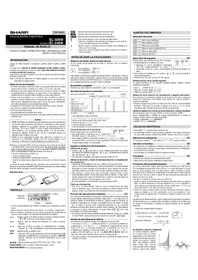
Thank you for your purchase of the SHARP electronic calculator, model EL-2135.
To ensure trouble-free operation of your SHARP calculator, we recommend the following:
- The calculator should be kept in areas free from extreme temperature changes, moisture, and dust.
- A soft, dry cloth should be used to clean the calculator. Do not use solvents or wet cloth.
- The solar cell is delicate. It should not be pressed or tampered with.
- If service should be required on this equipment, use only a SHARP servicing dealer, a SHARP approved service facility or SHARP repair service where available.
POWER SUPPLY
Backup Battery
If the light exposed to the solar cell is insufficient, the backup battery is turned on automatically to operate the calculator.
Automatic Power-Off function:
This calculator is automatically turned off approximately 7 minutes after the last key operation to save the battery.
◆ Please press the C ON key when you see no indication.
CLEAR AND CORRECT
- Clear number entered
- Correct function
- Clear the calculator (except memory)
- Clear the memory
- Clear the grand total memory
- Clear error conditions
1 2 + 3 5 → 1 2 + 3 4 ⇒ 1 2 + 3 5 CE 3 4
(1 2 + 3 5 → 4)
1 2 3 × → 1 2 3 ÷ 4 ⇒ 1 2 3 × ÷ 4
Press C _ ON key.
Press CM key.
Press GT key twice.
Press C _ ON or CA key.
(In the case of pressing the CA key the contents of the memory and grand total memory is cleared.)
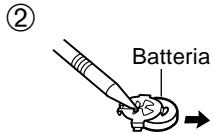
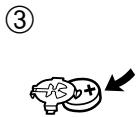
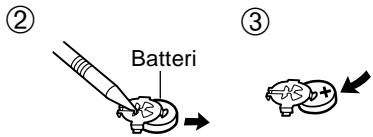
BATTERY REPLACEMENT
When to Replace:
- The display dims in dark places.
- The display will not appear by pressing the key after the power is automatically turned off.
< Replacement procedure >
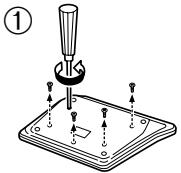
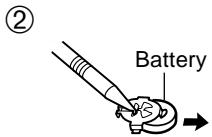
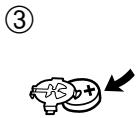
SPECIFICATIONS
Type:
Operating capacity:
Power supply:
Automatic power-off:
Operating temperature:
Dimensions:
Weight:
Accessories:
Electronic calculator
12 digits
Built-in solar cell and Lithium battery
(3 V (DC) CR2032 × 1)
Approx. 7 min.
0 °C to 40 °C (32 °F to 104 °F)
190 (W) × 154 (D) × 42 (H) mm
7-15/32" (W) × 6-1/16" (D) × 1-21/32" (H)
Approx. 330 g (0.73 lb.) (with battery)
Lithium battery (installed), Operation manual
For calculation examples, see page 24.

Type:
Operating capacity:
Power supply:
TECHNICAL DATA
Type:
Capacity:
Power source:
②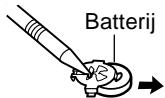
③

TECHNICAL DATA
Type:
Capacity:
Power supply:
Electronic calculator
12 digits
G : Grand total memory symbol
- : Minus symbol
E: Error symbol
×: Multiplication symbol
÷: Division symbol
+: Addition symbol
-: Minus symbol
=: Equal symbol
Press the C ON CM keys prior to beginning any calculation.
NOTE:
Markup and Profit Margin are both ways of calculating percent profit.
The difference is:
– Profit margin is percent profit vs. selling price. – Markup is percent profit vs. cost.
(2) ● Calculate the profit margin of a 65.00 item being sold at89.00.
- Calculate the profit margin of an item costing 65.00 and selling for89.00.
- Calculate the profit margin on an item costing 65.00 and selling for89.00.
- Calculate the profit margin for an item costing 65.00 and selling for89.00.
- Calculate the profit margin on an item purchased for 65.00 and resold for89.00.
- Calculate the profit margin on an item for 65.00 with a selling price of89.00.
- Calculate the profit margin of an item of 65.00, sold for89.00.
| GT· | F 3 2 0 A | 5/4 ↓ | (6) | (7) |
| ● | 2 | 5/4 | 65 - 89 MU | = -26.97 |
(1) ■ SELLING PRICE (USING MARGIN)
(2) ● Calculate the cost (a) and the gross profit (b) from a selling price of $500 on the basis of a 35% profit on the selling price.
(2) ● Calculate the markup of a 150.00 item being sold at200.00.
- Calculate the markup of an item for 150.00, sold for200.00.
- Calculate the markup on an item of 150.00 sold for200.00.
- Calculate the percentage increase corresponding to an item of 150.00 sold for200.00.
- Calculate the markup on an item purchased for 150.00 and resold for200.00.
- Calculate the markup for an item for 150.00 sold for200.00.
- Calculate the percentage price increase of an item of 150.00, sold for200.00.
| [4485] | [ADMA] | [IZDKA] | mm | (###) |
| ● | 2 | 150 (###) | = 33.33 |
(1) ■ SELLING PRICE (USING MARKUP)
(2) Calculate the selling price (a) and gross profit (b) from a cost of $6,950 on the basis of a 25% profit on the cost.
(2) Calculate the cost (a) and the gross profit (b) from a selling price of $9,780 on the basis of a 20% profit on the cost.
- Calculate the purchase price (a) and the gross profit (b) from a selling price of $9,780 based on a 20% profit on the purchase price.
- Calculate the purchase price (a) and the gross margin (b) from a selling price of $9,780 and a margin of 20% on the purchase price.
- Calculate the cost (a) and the gross profit (b) given a selling price of $9,780 and a base of 20% profit on cost.
- Calculate the cost (a) and the gross profit (b) on a selling price of US$9,780 based on a gain of 20% on cost.
- Calculate the cost (a) and the gross profit (b) for a selling price of $9,780 based on a 20% profit on cost.
- Calculate the purchase price (a) and the gross profit (b) for a selling price of $9,780 based on a 20% profit on the purchase price.
| GT· | F 3 2 0 A | 5/4 ↓ | (6) | (7) |
| ● | 2 | 9780 ÷ 20 +/- MU MU | = 8'150.00 (a) = 1'630.00 (b) |
(1) ■ PERCENT CHANGE
■ PERCENT CHANGE ■ PROZENTUALE VERÄNDERUNG ■ VARIATION EN POURCENT ■ CAMBIO PORCENTUAL ■ CAMBIO DI PERCENTUALE ■ PROCENTUELL FÖRÄNDRING ■ PROCENTUELE VERANDERING
(2) ● Calculate the percent change (a) and the dollar difference (b) between two yearly sales figures: 1,500 in 1999 and1,300 in 1998.
- Calculate the percent change (a) and the dollar difference (b) between the two annual sales figures: 1,500 for 1999 and1,300 for 1998.
- Calculate the percent change (a) and the dollar difference (b) between two prices: 1,500 in 1999 and1,300 in 1998.
- Calculate the percent change (a) and the dollar difference (b) between two annual sales figures: 1,500 in 1999 and1,300 in 1998.
- Calculate the percent change (a) and the dollar difference (b) between two annual sales figures: US1,500 in 1999 and US1,300 in 1998.
- Calculate the percentage change (a) and the difference in value (b) using two years of sales figures: \1,500 in 1999 and \1,300 in 1998.
- Calculate the dollar difference (a) and the percent change (b) between two annual sales figures: 1,500 in 1999 and1,300 in 1998.
| GT· | F 3 2 0 A | 5/4 ↓ | (6) | (7) |
| • | 2 | 1500 - 1300 MU MU | = 15.38 (a) = 200.00 (b) |
FOR GERMANY ONLY
Environmental protection
Brand : SHARP
Model : EL-2135
Category : Calculator