
EL-2901RC - Calculator SHARP - Free user manual and instructions
Find the device manual for free EL-2901RC SHARP in PDF.

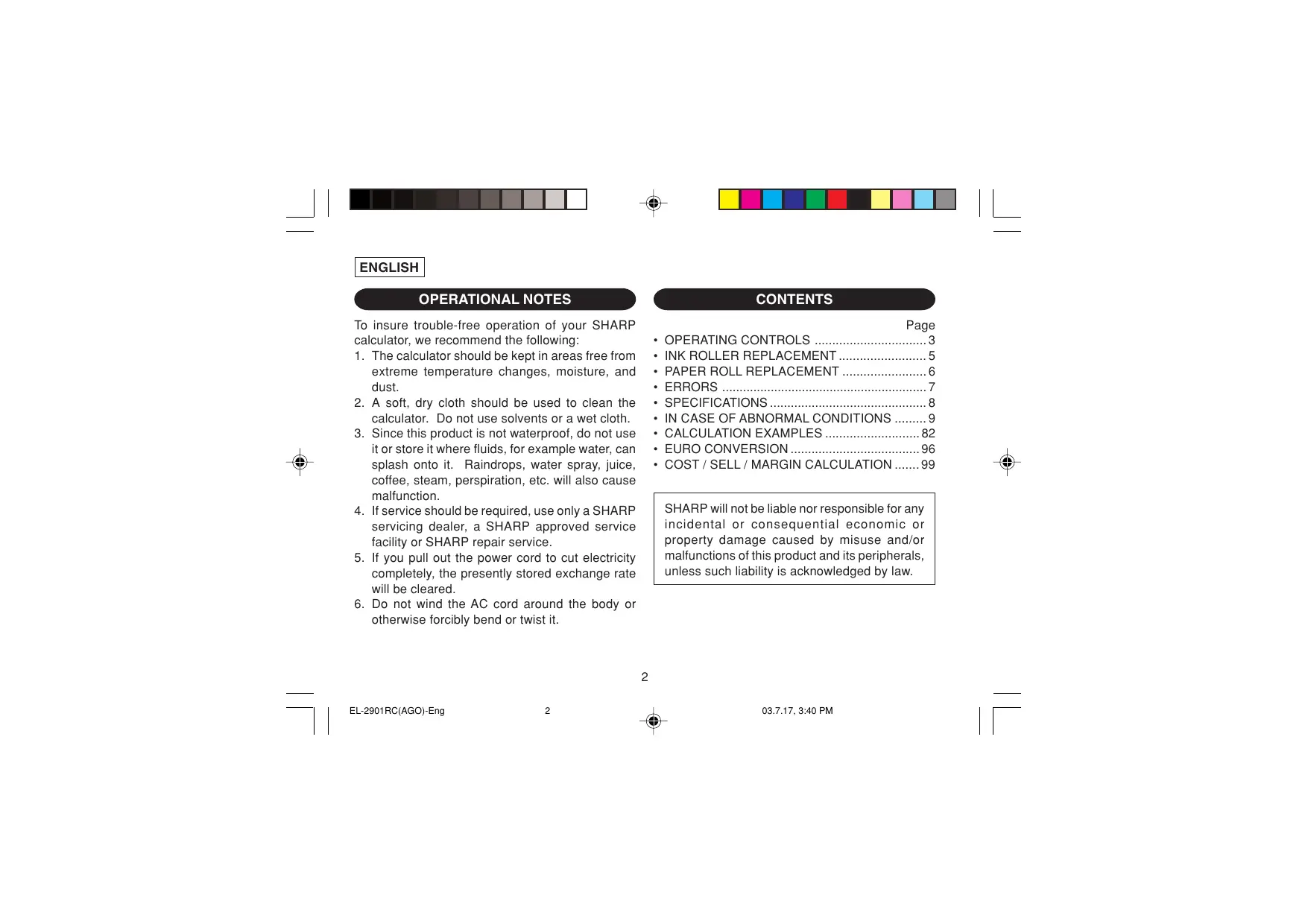


| Product Type | Printing Calculator |
| Brand | SHARP |
| Model | EL-2901RC |
| Dimensions (W × D × H) | 193 mm × 256 mm × 62.5 mm |
| Weight | Approximately 1.0 kg |
| Power Supply | AC 220 V – 230 V, 50 Hz |
| Display Capacity | 12 digits |
| Print Type | Mechanical |
| Print Speed | Approximately 2.1 lines/s |
| Paper Width | 57 mm – 58 mm |
| Max Roll Diameter | 80 mm |
| Ink Roller | Type EA-772R |
| Main Functions | Basic calculations, euro conversion, cost/sell/margin calculation, memory, grand total, item count |
| Selectors | Print mode (OFF/P/P·IC), round (↑/5/4/↓), decimal (63210/F/A), grand total/rate |
| Supplied Accessories | 1 paper roll, 1 ink roller (installed), instruction manual |
| Maintenance and Cleaning | Soft dry cloth; do not use solvents or damp cloth |
| Safety | Do not expose to humidity, dust, or large temperature variations; unplug if abnormal |
| Spare Parts and Repairability | Ink roller EA-772R; repair by authorized SHARP distributor |
Frequently Asked Questions - EL-2901RC SHARP
User questions about EL-2901RC SHARP
0 question about this device. Answer the ones you know or ask your own.
Ask a new question about this device
Download the instructions for your Calculator in PDF format for free! Find your manual EL-2901RC - SHARP and take your electronic device back in hand. On this page are published all the documents necessary for the use of your device. EL-2901RC by SHARP.
USER MANUAL EL-2901RC SHARP
The socket outlet shall be installed near the equipment and shall be easily accessible.
Caution!
To ensure trouble-free operation of your SHARP calculator, we recommend the following:
- The calculator should be kept in areas free from extreme temperature changes, moisture, and dust.
- A soft, dry cloth should be used to clean the calculator. Do not use solvents or a wet cloth.
- Since this product is not waterproof, do not use it or store it where fluids, for example water, can splash onto it. Raindrops, water spray, juice, coffee, steam, perspiration, etc. will also cause malfunction.
- If service should be required, use only a SHARP servicing dealer, a SHARP approved service facility or SHARP repair service.
- If you pull out the power cord to cut electricity completely, the presently stored exchange rate will be cleared.
- Do not wind the AC cord around the body or otherwise forcibly bend or twist it.
CONTENTS
Page
OPERATING CONTROLS 3 - INK ROLLER REPLACEMENT 5 PAPER ROLL REPLACEMENT 6 - ERRORS 7 SPECIFICATIONS 8 - IN CASE OF ABNORMAL CONDITIONS ......9 CALCULATION EXAMPLES 82 - EURO CONVERSION 96 COST/SELL/MARGIN CALCULATION.99
SHARP will not be liable nor responsible for any incidental or consequential economic or property damage caused by misuse and/or malfunctions of this product and its peripherals, unless such liability is acknowledged by law.
OPERATING CONTROLS
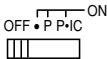
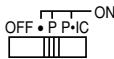
POWER SWITCH; PRINT / ITEM COUNT MODE SELECTOR:
"OFF": Power OFF
"": Power ON. Set to the non print mode.
"P": Power ON. Set to the print mode.
"P·IC": Power ON. Set to the print and item count mode.
For addition or subtraction, each time + is pressed, 1 is added to the item counter, and each time - is pressed, 1 is subtracted.
- The count is printed when the calculated result is obtained.
- Pressing of * , 9 / 2 clears the counter.
Note: The counter has a maximum capacity of 3 digits (up to ± 999 ). If the count exceeds the maximum, the counter will recount from zero.

ROUNDING SELECTOR:
Example: Set Decimal Selector to 2.
4 ÷ 9 = 0. 4 4 4 ... , 5 ÷ 9 = 0. 5 5 5 ...
| 4÷9= | 5÷9= | |
| ↑ | 0.45 | 0.56 |
| 5/4 | 0.44 | 0.56 |
| ↓ | 0.44 | 0.55 |
Note: The decimal point floats during successive calculation by the use of × or ÷ .
If the decimal selector is set to "F" then the answer is always rounded down (↓).

GRAND TOTAL / RATE SETTING MODE SELECTOR:
"GT": Grand Total
"": Neutral
"RATE SET": Rate setting
- Enter the adding exchange rate, then press
- A maximum of 6 digits can be stored (decimal point is not counted as a digit).
- Only one rate can be stored. If you enter a new rate, the previous rate will be cleared.

DECIMAL / ADD MODE SELECTOR:
"63210": Presets the number of decimal places in the answer.
"F": The answer is displayed in the floating decimal system.
"A": The decimal point in addition and subtraction entries is automatically positioned to the 2nd digit from the lowest digit of entry number. Use of the add mode permits addition and subtraction of numbers without entry of the decimal point. Use of · , × and ÷ will automatically override the add mode and decimally correct answers will be printed.

PAPER FEED KEY

NON-ADD / SUBTOTAL KEY

CLEAR / CLEAR ENTRY KEY

TOTAL KEY

EQUAL KEY

CHANGE SIGN KEY:
Changes the algebraic sign of a number (i.e., positive to negative or negative to positive).

RECALL AND CLEAR MEMORY KEY

RECALL MEMORY KEY

CONVERSION KEY (TO A NATIONAL CURRENCY)

CONVERSION KEY (TO THE EURO CURRENCY)

GRAND TOTAL KEY

COST PRICE ENTRY KEY:
Press this key to enter the cost price.

SELLING PRICE ENTRY KEY:
Press this key to enter the selling price.

MARGIN ENTRY KEY:
Press this key to enter the margin.
DISPLAY
Display format:
123,456,789.0 12%
Symbols:
M: Appears when a number is in the memory. -: Appears when a number is negative. : Appears when a number is in the grand total memory. E: Appears when an overflow or other error is detected. * Although all available symbols are shown here for instruction purposes, these symbols will not appear on the screen simultaneously.
INK ROLLER REPLACEMENT
If printing is blurry even when the ink roller is in the proper position, replace the roller.
Ink roller: Type EA-772R
WARNING
APPLYING INK TO WORN INK ROLLER OR USE OF UNAPPROVED INK ROLLER MAY CAUSE SERIOUS DAMAGE TO PRINTER.
1) Set the power switch to OFF. 2) Remove the printer cover. (Fig. 1) 3) Hold the top of the ink roller and remove the roller by pulling it toward you and then upward. (Fig. 2) 4) Install the new ink roller in the correct position. Make sure that the roller is securely in place. (Fig. 3) 5) Put back the printer cover.
Fig. 1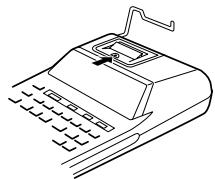
Fig. 2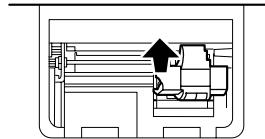
Fig. 3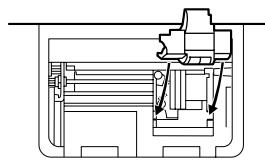
Cleaning the printing mechanism If the print becomes dull after long time usage, clean the printing wheel according to the following procedures:
1) Remove the printer cover and the ink roller. 2) Install the paper roll and feed it until it comes out of the front of the printing mechanism. 3) Put a small brush (like a tooth brush) lightly to
the printing wheel and clean it by pressing 4) Put back the ink roller and the printer cover.
Note: Do not rotate the printing mechanism manually, this may damage the printer.
PAPER ROLL REPLACEMENT
Never insert a paper roll if it is torn. Doing so will cause the paper to jam.
Always cut the leading edge with scissors first.
1) Insert the leading edge of the paper roll into the opening. (Fig. 1) 2) Turn the power on and feed the paper by pressing the [FEED] key. (Fig. 2) 3) Lift the attached metal paper holder up and insert the paper roll onto the paper holder. (Fig. 3)
Fig. 1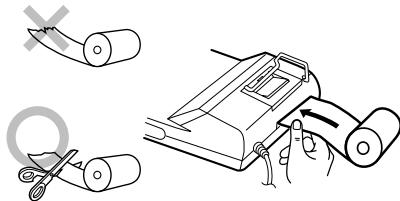
Fig. 2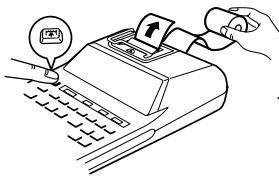
Fig. 3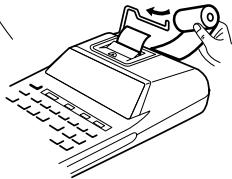
DO NOT PULL PAPER BACKWARDS AS THIS MAY CAUSE DAMAGE TO THE PRINTING MECHANISM.
ERRORS
There are several situations which will cause an overflow or an error condition. When this occurs, "E" will be displayed. The contents of the memory at the time of the error are retained.
Also, in rare cases, printing may stop midway and the indication "E" may appear on the display. This is not a malfunction but is caused when the calculator is exposed to strong electromagnetic noise or static electricity from an external source. Should this occur, press the [CE] key and then repeat the calculation from the beginning.
Error conditions:
- When the integer portion of an answer exceeds 12 digits.
- When the integer portion of the contents of the memory exceeds 12 digits.
Ex. 9999999999999 + 1 +
- When any number is divided by zero. (Ex. 5 0 = )
SPECIFICATIONS
Operating capacity: 12 digits Power source: AC: 220V-230V, 50Hz
PRINTING SECTION
Printer: Mechanical printer Printing speed: Approx. 2.1 lines/sec. (At temperature 25°C (77°F) , when "741.9 + " is printed. The printing speed will vary with the number of rows and the figure types to be printed.)
Printing paper: 57 mm (2-1/4") - 58 mm (2-9/32") wide 80 mm (3-5/32") in diameter (max.)
Operating temperature: 0°C - 40°C (32°F - 104°F)
Power consumption: 41 mA
Dimensions: 193 mm (W) × 256 mm (D) × 62.5 mm (H) (7-19/32" (W) × 10-3/32" (D) × 2-15/32" (H))
Weight: Approx. 1.0kg (2.20 lb.)
Accessories:
1 paper roll, 1 ink roller (installed), and operation manual
WARNING
THE VOLTAGE USED MUST BE THE SAME AS SPECIFIED ON THIS CALCULATOR. USING THIS CALCULATOR WITH A HIGHER VOLTAGE THAN THAT WHICH IS SPECIFIED IS DANGEROUS AND MAY RESULT IN A FIRE OR OTHER TYPE OF ACCIDENT CAUSING DAMAGE. WE ARE NOT RESPONSIBLE FOR ANY DAMAGE RESULTING FROM USE OF THIS CALCULATOR WITH A VOLTAGE OTHER THAN THAT WHICH IS SPECIFIED.
IN CASE OF ABNORMAL CONDITIONS
When this unit is exposed to strong RF noise and/or extreme physical shock during operation, or when the power cord is plugged into the AC outlet, the unit may start functioning abnormally. In some rare cases, all keys - including the power key and the CE key - may cease to respond.
If such abnormal conditions are observed, unplug the AC cord from the socket. Keep the unit unplugged for about 5 seconds, reconnect the AC plug, then turn on the power.
"OFF": Power off.
4 ÷ 9 = 0.444..., 5 ÷ 9 = 0.555...
| 4÷9= | 5÷9= | |
| ↑ | 0.45 | 0.56 |
| 5/4 | 0.44 | 0.56 |
| ↓ | 0.44 | 0.55 |
DECIMAL SELECTOR/ADD MODE:
"63210": Setting the number of decimal places in the answer.
"F": The answer is displayed with a floating decimal point.
RECALL AND MEMORY CLEAR KEY

MEMORY RECALL KEY

CONVERSION KEY (TO A NATIONAL CURRENCY)

CONVERSION KEY (TO EURO)

EQUAL SIGN KEY

COST PRICE ENTRY KEY:
WINSTMARGE-INVOERTOETS:
BIJ EEN ABNORMALE WERKING
TECLA DE SEM ADICÇÃO/SUBTOTAL

TECLA DE CANCELAR/LIMPAR

TECLA DE TOTAL

TECLA DE IGUAL
TECLA DE MUDAR SINAL:
Muda o sinal algébrico de um número (isto é, positivo para negativo ou negativo para positivo).

TECLA DE CHAMAR E LIMPAR MEMÓRIA

TECLA DE CHAMAR MEMORIA

TECLA DE CONVERSão (PARA UMA MOEDA NACIONAL)

TECLA DE CONVERSÉO (PARA A MOEDA EURO)

TECLA DE TOTAL GERAL

TECLA DE ENTRADA DE PRECO DE CUSTO:
193 mm (L) × 256 mm (P)
× 62.5 mm (A)
Approx. 1.0kg
REPLACING THE FESTÉKHENGER
- Set the decimal selector as specified in each example. The rounding selector should be in the "5/4" position unless otherwise specified.
- The grand total/rate set mode selector should be in the "●" position (off) unless otherwise specified.
- The print / item count mode selector should be in the "P" position unless otherwise specified.
- Press 9 / 0 prior to beginning any calculation.
- If an error is made while entering a number, press 9 / 6 or → and enter the correct number.
- After entering a value, press COST, SELL or MON to activate the Cost/Sell/Margin Calculation mode. In case of performing different calculation tasks, %CE key must be pressed first to cancel the Cost/Sell/Margin mode.
- Example procedures are listed in the following manner unless otherwise specified.
CALCULATION EXAMPLES
| (1) | (2) | (3) |
| *1245 + | 12.45 | 12·45 + |
| 1624 + | 28.69 | 16·24 + |
| 1935 + | 48.04 | 19·35 + |
| 521 - | 42.83 | 5·21 - |
| * | 002········································································································································································································. - | |
| 42.83 | 42·83 * |
1: was not used in the entries. 1: The □ was not used in the entries. 1: The □ was not used in the entries. 1: The □ was not used in the entries. 1: The □ was not used in the entries. 1: The □ was not used in the entries. 1: The □ was not used in the entries. 1: The □ was not used in the entries. 1: The □ was not used in the entries. 1: The □ was not used in the entries.
MIXED CALCULATIONS / MIXED CALCULATIONS / COMPLEX CALCULATION / MIXED CALCULATIONS / MIXED CALCULATIONS / MIXED CALCULATIONS / MIXED CALCULATIONS / MIXED CALCULATIONS / MIXED CALCULATIONS / MIXED CALCULATIONS
| A. 5×2+12= | OFF·PP+IC ON F63210A | ||
| (1) | (2) | (3) | |
| 5×2 | 5. | 5·× | |
| 2·= | |||
| 10. | 10·* | ||
| +12 | 10. | 10·+ | |
| 22. | 12·+ | ||
| 002········································································································································································································. 22. | 22·* | ||
B. (10 + 2) × 5 =
F63210A
| (1) | (2) | (3) |
| 10 + | 10. | 10·+ |
| 2 + | 12. | 2·+ |
| × | 12. | 12·× |
| 5 = | 5·= | |
| 60. | 60·* |
CONSTANT / KONSTANTE / CALCULS AVEC CONSTANTE / CONSTANTES / COSTANTE / KONSTANTRÄKNING / CONSTANTE / CONSTANTE / VAKIO / KONSTANS SZÁMÍTÁSOK
A. 62.35 × 11.11 = ①
6 2. 3 5 × 2 2. 2 2 = ②
F63210A

| (1) | (2) | (3) |
| 62.35 × 11.11 = | 62.35 | 62·35 × 11·11 = |
| 692.7085 | 692·7085 * ① | |
| 22.22 = | 1,385.417 | 22·22 = 1,385·417 * ② |
B. 11.11 ÷ 77.77 = ①
2 2. 2 2 ÷ 7 7. 7 7 = ②
F63210A

| (1) | (2) | (3) |
| 11.11 ÷ 77.77 = | 11.11 | 11·11 ÷ 77·77 = |
| 0.14285714285 | 0·14285714285 * ① | |
| 22.22 = | 0.28571428571 | 22·22 = 0·28571428571 * ② |
POWER / POTENZ / PUISSANCE / POTENCIA / POTENZA / POTENSRÄKNING / MACHTSVERHEFFEN / POTÊNCIA / POTENSSI / HATVÁNYOZÁS
| (1) | (2) | (3) |
| 5.25 × = | 5.25 | 5·25 × 5·25 = 27·563 * |
| 27.563 |
B. 53 =
F63210A

(1) (2) (3)
| 5 × = | 5. | 5·× |
| 5·= | ||
| 25·* | ||
| 25. | ||
| 25·= | ||
| 125·* | ||
| 125. | ||
| F63210A | ||
| 5 × × = | 5. | 5·× |
| 25. | 5·× | |
| 5·= | ||
| 125·* | ||
| 125. |
PERCENT / PROZENT / POURCENTAGE / PORCENTAJES / PERCENTUALE / PROCENTRÄKNING / PERCENTAGE / PORCENTAGEM / PROSENTTI / SZÁZALEKSZÁMITÁS
A. 100 × 25% =
F63210A
| (1) | (2) | (3) |
| 100 × 25 | 100. | 100·× 25·% |
| 25.00 | 25·00 * |
| (1) | (2) | (3) |
| 123 ÷ 1368 | 123. | 123·÷ |
| 1·368·% | ||
| 8.99 | 8·99 * |
RECIPROCAL / KEHRWERT / INVERSES / RECIPROCOS / RECIPROCO / RECIPROKA TAL / RECIPROQUE / RECIPROCA / KÄANTEISARVO / RECIPROK SZÁMÍTÁS
| 1/7 = | ↑5/4 ↓ F63210A | ||
| (1) | (2) | (3) | |
| 7 ÷ | 7. | 7·÷ | |
| ÷ | 1. | 7·÷ | |
| = | 7·= | ||
| 0.14285714285 * | |||
ITEM COUNT CALCULATION / BERECHNUNG MIT DEM POSTENZÄHLER / CALCUL DE COMPTE D'ARTICLES / CALCULO DE CUENTA DE ARTICULOS / CALCOLO CONTEGGIO VOCI / RÄKNING MED POSTRÄKNAREN / REKENEN MET DE POSTENTELLER / CALCULO DA CONTAGEM DE ITENS / TEKIJALASKURI / SZÁMITÁS A TÉTELSZÁMLÁLÓVAL
| Bill No. Rechnung Nr. Facture n° N° de factura Numero di fattura Fakturanr. Rekeningnr. N° da fattura Laskunr. Számlaszám | Number of bills Anzahl der Rechnungen Nbre de factures Cantidad de facturas Numero delle fatture Antal fakturor Aantal rekeningen Número de fatturas Laskujen lukumäärä A számlák száma | Amount Betrag Montant Importe Importo Belopp Bedrag Quantia Māárä Összug |
| 1 | 1 | 100.55 |
| 2 | 1 | 200.00 |
| 3 | 1 | 200.00 |
| 4 | 1 | 400.55 |
| 5 | 1 | $500.65 |
| Total / Summe / Total Total / Totale / Svar Totaal / Total / Summa / Összenen | (a) | (b) |
| (1) | (2) | (3) | ||||
| %CE | %CE | |||||
| 100.55 | + | 100.55 | 100·55 | + | ||
| 200 | + | 300.55 | 200·00 | + | ||
| + | 500.55 | 200·00 | + | |||
| 400.55 | + | 901.10 | 400·55 | + | ||
| 500.65 | + | 1,401.75 | 500·65 | + | ||
| * | 005········································································································································································································. (a) | |||||
| 1,401.75 | 1,401·75 | *(b) | ||||
GRAND TOTAL / ENDSUMME / TOTAL GÉNÉRAL / TOTAL GLOBAL / TOTALE GENERALE / SLUTSVAR / EINDTOTAAL / TOTAL GERAL / KOKONAISSUMMA / VÉGÖSSZEG
1 0 0 + 2 0 0 + 3 0 0 = ① +) 3 0 0 + 4 0 0 + 5 0 0 = ②
Grand total / Endsumme / Total général / Total global / Totale generale / Slutsvar / ③ Eindtolal / Total geral / Kokonaissumma / Végösszeg
| (1) | (2) | (3) |
| GT | ||
| 100+ | 100. | 100·+ |
| 200+ | 300. | 200·+ |
| 300+ | 600. | 300·+ |
| * | 600·*+ ① | |
| 600. | ||
| 300+ | 300. | 300·+ |
| 400+ | 700. | 400·+ |
| 500+ | 1,200. | 500·+ |
| * | 1,200·*+ ② | |
| 1,200. | ||
| GT | 1,800·** ③ | |
| 1,800. |
MEMORY / SPEICHER / MÉMOIRE / MEMORIA / MEMORIA / MINNE / GEHEUGEN / MEMORIA / MUISTILASKENTA / MEMORIA
| 46 × 78 = ① +) 125 ÷ 5 = ② - ) 72 × 8 = ③ | ||
| Total / Summe / Total Total / Totale / Svar 4 Totaal / Total / Summa / Összesen | F63210A GT • SET | |
| (1) | (2) | (3) |
| *2 | *M | |
| 46 | × | 46. |
| 78 | M+ | 78. = |
| 3,588.M | ||
| 125 | ÷ | 125.M |
| 5 | M+ | 5. = |
| 25.M | ||
| 72 | × | 72.M |
| 8 | M- | 8. = |
| 576.M | ||
| VM | 3,037.◇M | |
| 4 | ||
2: Press [+M] to clear the memory before starting a memory calculation. 2: Before starting a memory calculation, press [M+] to clear the memory. 2: Clear the memory ([M]) before proceeding with a memory calculation. 2: Press [M] to clear the memory before starting a memory calculation. 2: Press [M] to clear the memory before starting a memory calculation. 2: Press [M] to clear the memory before starting a memory calculation. 2: Press [M] to clear the memory before starting a memory calculation. 2: Press [M] to clear the memory before starting a memory calculation. 2: Clear the memory by pressing [M] before starting a memory calculation. 2: Press [M] to clear the memory before starting a memory calculation. 3: A memory is a memory of the past. 4: A memory is a memory of the future.
EURO CONVERSION / EURO-UMRECHNUNG / CONVERSION EURO / CONVERSION DE EUROS / CONVERSIONE DI EURO / OMVANDLING AV EURO / EUROCONVERSIE / CONVERSAO DE EUROS / EURO-MUUNTO / EUROATVALTAS
EXAMPLE 1: Set the following rate provisionally: 1 euro = 1.95583 DEM.
Convert 1,000 euro to DEM.
EXAMPLE 2: Convert 1,000 DEM to the euro currency.
(1 euro = 1.95583 DEM, provisionally.)
EXAMPLE 1: Determine the cost price for 30% margin when the selling price is set at 500.
① Selling Price ② Margin ③ Cost Price
EXAMPLE 2: Determine the selling price for 30% margin when the cost price is set at 350.
① Cost Price ② Margin ③ Selling Price
EXAMPLE 3: Determine the margin when the cost price is set at 350, and the selling price at500.
① Cost Price ② Selling Price ③ Margin
EXAMPLE 3:
Also, obtain the margin when the cost price is set to $250.
This equipment complies with the requirements of Directives 89/336/EEC and 73/23/EEC as amended by 93/68/EEC.
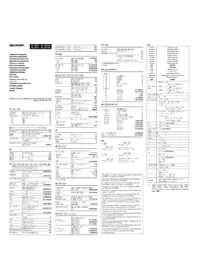
- CAUTION
- CONTENTS
- OPERATING CONTROLS
- POWER SWITCH; PRINT / ITEM COUNT MODE SELECTOR
- ROUNDING SELECTOR
- GRAND TOTAL / RATE SETTING MODE SELECTOR
- DECIMAL / ADD MODE SELECTOR
- PAPER FEED KEY
- NON-ADD / SUBTOTAL KEY
- CLEAR / CLEAR ENTRY KEY
- TOTAL KEY
- EQUAL KEY
- CHANGE SIGN KEY
- RECALL AND CLEAR MEMORY KEY
- RECALL MEMORY KEY
- CONVERSION KEY (TO A NATIONAL CURRENCY)
- CONVERSION KEY (TO THE EURO CURRENCY)
- GRAND TOTAL KEY
- COST PRICE ENTRY KEY
- SELLING PRICE ENTRY KEY
- MARGIN ENTRY KEY
- DISPLAY
- DISPLAY FORMAT
- SYMBOLS
- INK ROLLER REPLACEMENT
- WARNING
- PAPER ROLL REPLACEMENT
- ERRORS
- ERROR CONDITIONS
- SPECIFICATIONS
- PRINTING SECTION
- IN CASE OF ABNORMAL CONDITIONS
- DECIMAL SELECTOR/ADD MODE
- RECALL AND MEMORY CLEAR KEY
- MEMORY RECALL KEY
- CONVERSION KEY (TO EURO)
- EQUAL SIGN KEY
- WINSTMARGE-INVOERTOETS
- BIJ EEN ABNORMALE WERKING
- TECLA DE SEM ADICÇÃO/SUBTOTAL
- TECLA DE CANCELAR/LIMPAR
- TECLA DE TOTAL
- TECLA DE IGUAL
- TECLA DE CHAMAR E LIMPAR MEMÓRIA
- TECLA DE CHAMAR MEMORIA
- TECLA DE CONVERSÃO (PARA UMA MOEDA NACIONAL)
- TECLA DE CONVERSÉO (PARA A MOEDA EURO)
- TECLA DE TOTAL GERAL
- TECLA DE ENTRADA DE PRECO DE CUSTO
- REPLACING THE FESTÉKHENGER
- CALCULATION EXAMPLES
- CONSTANT / KONSTANTE / CALCULS AVEC CONSTANTE / CONSTANTES / COSTANTE / KONSTANTRÄKNING / CONSTANTE / CONSTANTE / VAKIO / KONSTANS SZÁMÍTÁSOK
- PERCENT / PROZENT / POURCENTAGE / PORCENTAJES / PERCENTUALE / PROCENTRÄKNING / PERCENTAGE / PORCENTAGEM / PROSENTTI / SZÁZALEKSZÁMITÁS
- MEMORY / SPEICHER / MÉMOIRE / MEMORIA / MEMORIA / MINNE / GEHEUGEN / MEMORIA / MUISTILASKENTA / MEMORIA
- EURO CONVERSION / EURO-UMRECHNUNG / CONVERSION EURO / CONVERSION DE EUROS / CONVERSIONE DI EURO / OMVANDLING AV EURO / EUROCONVERSIE / CONVERSAO DE EUROS / EURO-MUUNTO / EUROATVALTAS
- EXAMPLE
Brand : SHARP
Model : EL-2901RC
Category : Calculator