
PARTY Boss 200W - Loudspeaker Niceboy - Free user manual and instructions
Find the device manual for free PARTY Boss 200W Niceboy in PDF.


| Product Type | Portable PA Speaker |
| Brand | Niceboy |
| Model | PARTY Boss 200W |
| Power Output | 200W RMS |
| Battery Capacity | 7.4V / 4400mAh |
| Playback Time | Up to 6 hours |
| Charging Time | Approx. 4 hours |
| Bluetooth Version | 5.0 |
| Frequency Response | 50Hz - 20kHz |
| Impedance | 4 ohms |
| Driver Size | 8" woofer + 2" tweeter |
| Number of Channels | 2 (L/R) |
| Inputs | AUX, USB, SD, Bluetooth, Microphone (2x 6.3mm) |
| Outputs | None (speaker only) |
| Dimensions (W x H x D) | 300 x 500 x 270 mm |
| Weight | 8.5 kg |
| Power Supply | AC 100-240V 50/60Hz or built-in battery |
| Included Accessories | Remote control, 2 microphones, power cable, audio cable |
| Maintenance | Wipe with dry cloth; avoid moisture |
| Safety | Do not expose to rain; keep away from children under 3 years |
| Spare Parts / Repairability | Contact Niceboy service for replacement parts |
| General Info | Bluetooth range up to 10m; supports TWS pairing |
Frequently Asked Questions - PARTY Boss 200W Niceboy
User questions about PARTY Boss 200W Niceboy
0 question about this device. Answer the ones you know or ask your own.
Ask a new question about this device
Download the instructions for your Loudspeaker in PDF format for free! Find your manual PARTY Boss 200W - Niceboy and take your electronic device back in hand. On this page are published all the documents necessary for the use of your device. PARTY Boss 200W by Niceboy.
USER MANUAL PARTY Boss 200W Niceboy
User Manual / Party Speaker

CZ
NAPÁJENÍ A NABÍJENÍ
Impedance: 3Ω, ± 10%
Citlivost: 88db, ±2dB
Tweeter: 2x2"
Citlivost: 85dB,±3dB
Citlivost: 88 db, ±2 dB
Tweeter: 2 × 2"
POWER SUPPLY AND CHARGING
- Connect the supplied cable to the socket (3) on the rear panel of the speaker.
- If the speaker is connected to the mains, the integrated battery will start charging.
- Battery charging is indicated by a red LED (8) on the top panel. When fully charged, the LED will turn green.
SWITCHING ON
- Turn the main volume knob on the top panel (18) all the way to the left.
- Connect all input devices and tools that you plan to use.
- Turn on the speaker with the power switch on the rear panel (1). The speaker is now in BT mode. After switching to the desired mode, you can slowly increase the volume.
PRODUCT DESCRIPTION
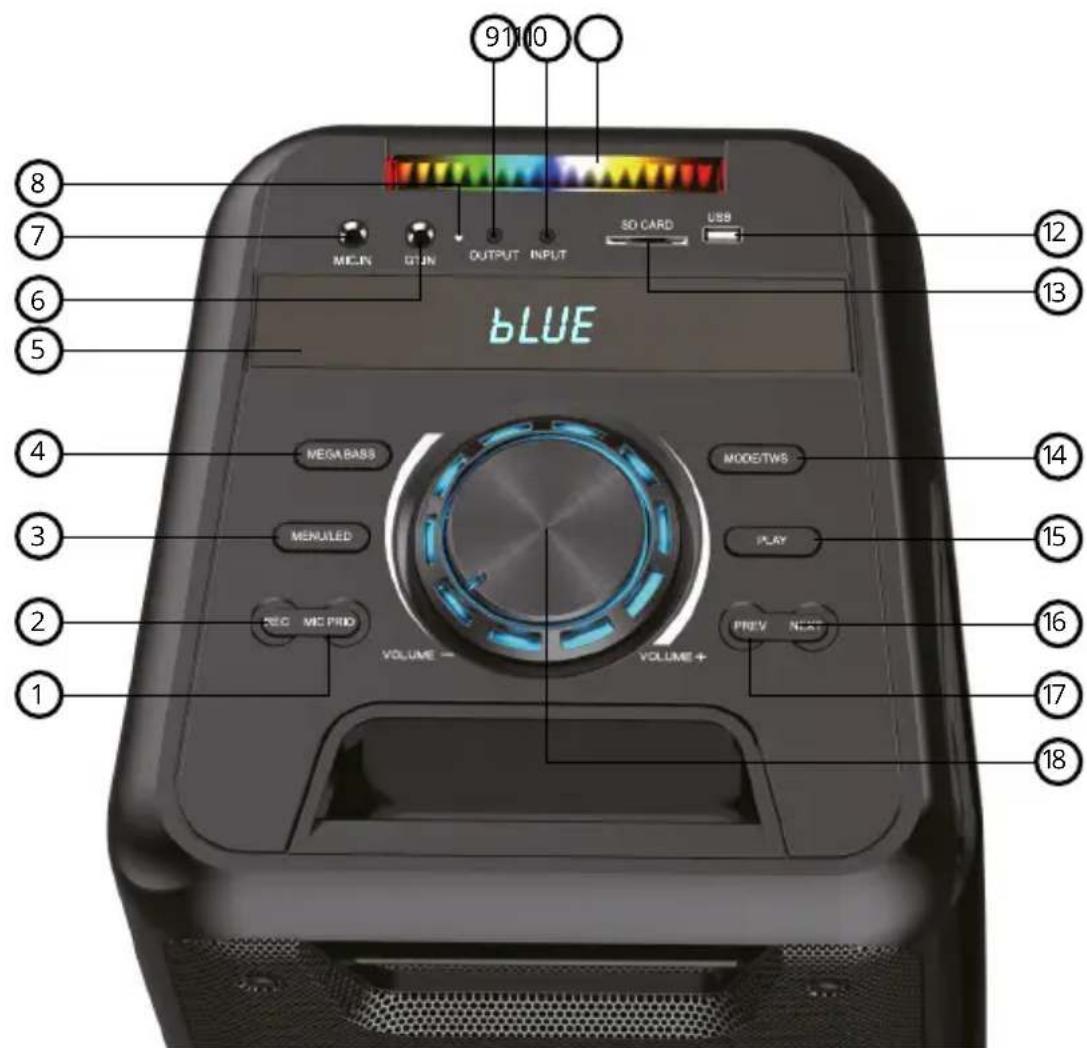
UPPER PANEL
- MIC PRIO - When the button is on, it prefers the microphone by muting the music when you speak into the microphone. When this function is off, the volume of the played music remains unchanged.
- REC - Activates the recording function when using either a wired or wireless microphone.
- MENU / LED - Press this button to adjust bass, treble, microphone volume and echo effects. Press and hold the button to turn on / off the LED illumination effect.
- MEGABASS - Press this button to turn on / off the mega bass effect.
- LED display - This screen shows the selected input mode: Bluetooth, USB, AUX, SD and FM radio. It also shows the volume level, the song being played and the selected FM station.
- GT.IN - Input for guitar or another musical instrument.
- MIC.IN - Input for microphone or another musical instrument.
- Charging LED - The LED remains red during charging and turns green when fully charged.
- OUTPUT - Output for connection to another speaker. The volume level is controlled by using the VOLUME main knob (18).
- LED lights - Colours: purple, green, yellow, red, light blue white.
- INPUT - 3,5mm jack input for AUX cable.
- USB - Allows you to play audio using MP3 and WAV music files stored on a USB memory device. The USB socket can also be used as an output power supply. In such a case, the speaker acts as a power bank.
- SD CARD - Input for inserting an SD card for playing MP3 and WAV music files.
- MODE / TWS - while pressed briefly: audio source selection between Bluetooth, USB, SD, Line-In (AUX), FM.
Pressing and holding: TWS mode for pairing two Niceboy PARTY Boss 200W speakers.
- PLAY - In USB, SD or Bluetooth mode, briefly press this button to start and pause media playback. In FM radio mode, press this button to search for channels from the lowest to the highest frequency and automatically store them as presets.
Note: This button does not work in the LINE IN (AUX) mode.
-
NEXT - Press this button to select another song from the playlist. Available in BT, SD, USB and FM modes.
-
PREV - Press this button to select the previous song from the playlist. Available in BT, SD, USB and FM modes.
-
VOLUME - The knob increases or decreases the speaker volume level. The volume can also be adjusted directly from any of the sources connected to the speaker.
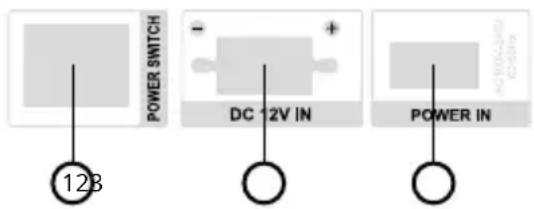
REAR PANEL
- POWER SWITCH: Turns the speaker on and off.
- DC 12V IN: For connecting an external 12V battery.
- POWER IN: Plug the supplied AC power cord into this connector.
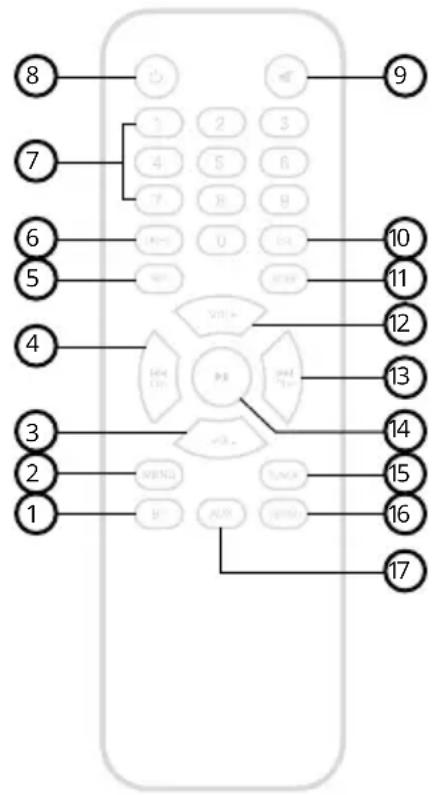
REMOTE CONTROLLER
Before using the controller, open the bottom cover and insert the supplied AAA batteries.
- BT - Switches the speaker to BT mode.
- MENU - Press this button to adjust the bass, treble, microphone volume and echo effects. Use the „+“ and „-“ buttons to set the values.
- VOL-- Reduces the volume.
- CH- - Plays the previous track in Bluetooth, USB or SD mode. In FM mode, go to the previous station.
- REPEAT - Repeats a track on a USB or SD card.
- LIGHT - Turn on / off the illumination effects.
- NUMBER BUTTONS - In USB and SD modes, press any key from 0 to 9 to directly select the tracks you want to play. In FM mode, this allows you to enter frequencies manually.
- Power - Turns the speaker on and off.
- Mute - Turns the speaker sound on and off.
- EQ - Switches between preset equalizer values.
- SCAN - In FM mode, automatically searches for and stores available stations from the lowest to the highest frequency.
- VOL+ - Increases the volume.
- CH+ - Plays the next track in Bluetooth, USB or SD mode. In FM mode, go to the next station.
- PLAY - Plays or pauses the track in Bluetooth, USB or SD mode.
- TUNER - Switches the speaker to FM radio mode.
- USB / SD - Switches the speaker to USB or SD card mode.
- AUX - Switches the speaker to AUX mode.
BT MODE
- The speaker is by default in BT mode after being switched on. If the speaker is in another mode, it is necessary to activate the BT mode by briefly pressing the MODE button. The Bluetooth pairing mode is indicated on the display by a flashing word BLUE.
- Activate Bluetooth on your device. Select "Niceboy PARTY Boss 200W" in the list of available devices.
- The device will connect to the loudspeaker. A successful pairing is announced by an acoustic prompt and the word BLUE is permanently lit on the display.
- After switching it on again, the speaker automatically connects to the last paired device.
AUX MODE
- The speaker must be turned off.
- Insert the included 3.5mm jack cable into the INPUT audio input (11).
- Switch the speaker on and then briefly the MODE button (14) to switch to AUX mode.
- AUX mode is indicated on the display by LINE.
- Use the device to which you have connected the loudspeaker to control the music being played.
You can control the speaker volume with the VOLUME knob (18) on the top panel.
USB MODE
- After inserting the USB device into the USB slot (12), the speaker will automatically switch to the appropriate mode. This is indicated on the display by the word USB.
- To start or pause a track, briefly press the PLAY button (15).
You can control the volume with the VOLUME knob (18) on the upper panel. Briefly press the NEXT (16) and PREV (17) buttons to skip to the next or previous track.
The device supports data storage devices with a maximum capacity of 32GB and MP3 and WAV audio formats. The USB socket can also be used as an output power supply. In such a case, the speaker acts as a power bank.
SD CARD MODE
-
- After inserting the SD card, the speaker will automatically switch to the appropriate mode. This is indicated on the display by the word SD.
- To start or pause a track, briefly press the PLAY button (15).
You can control the volume with the VOLUME knob (18) on the upper panel. Briefly press the NEXT (16) and PREV (17) buttons to skip to the next or previous track.
The device supports data storage devices with a maximum capacity of 32GB and MP3 and WAV audio formats.
FM RADIO MODE
For audio input (11), insert the enclosed audio cable which will serve as an antenna. Place the speaker in an open area so that the radio signal strength is sufficient. The speaker is equipped with an integrated antenna.
- Briefly press the MODE button (14) to find the FM radio mode. This is indicated on the display by the FM station number, for example, 90.3.
- Briefly press the PLAY button (15) to start scanning for the available stations. The device automatically stores the discovered stations in preset channels.
- When the scanning is finished, you can switch between FM stations with the NEXT (16) and PREV (17) buttons, or with the number buttons on the remote control.
EQUALIZER
The speaker has two basic equalizer settings, which you can switch between with the MEGA-BASS button (4). To customize this function, briefly press the MENU / LED button (3) to find L (bass) and H (treble) on the display. Use the NEXT (16) and PREV (17) buttons to set the values from -8 to 8.
WIRELESS MICROPHONE
Unscrew the bottom cover of the microphone and insert the supplied AA batteries. Screw on the cover again and turn the microphone back on by using the switch on top. The microphone automatically connects with the speaker, provided the speaker is on. To adjust the microphone volume and echo effect, briefly press the MENU / LED button (3) to find N (volume) and E (echo) on the display. Use the NEXT (16) and PREV (17) buttons to set the values from 0 to 10 for volume and 0 to 12 for echo.
RECORDING
When wireless or wired microphone or musical instrument is connected via the microphone inputs, you can record the singing / musical instrument to a USB drive or SD memory card.
The storage medium must contain at least one mp3 or WAV audio file in order to be detected by the device.
-
Turn the speaker off and connect other instruments to the MIC.IN or GT.IN inputs.
-
Turn the speaker on.
-
Insert a USB drive or SD card into the appropriate USB or SD CARD slots.
-
The speaker will switch to the appropriate storage media mode.
-
Briefly press the REC button to start recording your audio track. The recording is indicated on the display by REC.
-
To end the recording, press the REC button briefly again.
-
The speaker will automatically play the recorded audio track.
-
To delete a track, press and hold the REC button.
-
Use the PREV and NEXT buttons to switch between the recorded tracks.
PACKAGE CONTENTS
Niceboy PARTY Boss 200W speaker
Power cable
Wireless microphone
Remote control
3.5 mm jack cable
2x AA batteries
2x AAA batteries
Operating instructions
PARAMETERS
BT version: 5.0
Frequency band: 2.4GHz
Radio frequency power: ≤ 2,5mW
RMS performance: 200W
Power supply: 100-240V, 60/50Hz
Battery: 4A 12V
Charging time until charged: 4 hours
Battery life: 8 hours
Woofer: 2 x 8"
Frequency range: 20 Hz-6 kHz
Impedance: 3Ω, ± 10%
Sensitivity: 88db, ±2dB
Tweeter: 2x2"
Frequency range: 40Hz - 20kHz
Impedance: 4Ω, ±15%
Sensitivity: 85dB,±3dB
Microphone: wireless, directional
Frequency: 40 Hz-15 kHz
Impedance: 10kΩ / 1kHz
Sensitivity: 5dB
SAFETY INFORMATION
Listening to music at excessive volume can damage your hearing. Do not subject the equipment to fluids and moisture. Do not expose the device to excessively high/low temperatures, and do not attempt to disassemble it. Protect the device from sharp objects and falls from height. Batteries - Improper handling (prolonged charging, short circuit, breakage by other objects, etc.) may result in fire, overheating or battery leakage.
The battery or accumulator that may be included with the product has a life of six months because it is a consumable item.
Information on all frequency bands in which the radio equipment operates and intentionally transmits radio waves as well as the maximum radio frequency power transmitted in the frequency band in which the radio equipment is operated is included in the instructions and safety information.
NICEBOY s.r.o. hereby declares that the type of radio equipment NICEBOY PARTY BOSS 200W complies with Directives 2014/53 / EU, 2014/30 / EU, 2014/35 / EU, and 2011/65 / EU. The full content of EU Declaration of Conformity is available on the following websites: https://niceboy.eu/en/declaration/party-boss-200w
USER INFORMATION FOR DISPOSING ELECTRICAL AND ELECTRONIC DEVICES (HOME USE)
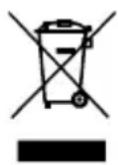
This symbol located on a product or in the product's original documentation means that the used electrical or electronic products may not be disposed together with the communal waste. In order to dispose of these products correctly, take them to a designated collection site, where they will be accepted for free. By disposing of a product in this way, you are helping to protect precious natural resources and helping to prevent any potential negative impacts on the environment and human health, which could be the result of incorrect waste disposal. You may receive more detailed information from your local authority or nearest collection site. According to national regulations, fines may also be given out to anyone who disposes of this type of waste incorrectly. User information for disposing electrical and electronic devices.
(Business and corporate use)
In order to correctly dispose of electrical and electronic devices for business and corporate use, refer to the product's manufacturer or importer. They will provide you with information regarding all disposal methods and, according to the date stated on the electrical or electronic device on the market, they will tell you who is responsible for financing the disposal of this electrical or electronic device. Information regarding disposal processes in other countries outside the EU. The symbol displayed above is only valid for countries within the European Union. For the correct disposal of electrical and electronic devices, request the relevant information from your local authorities or the device seller.
DE
RMS performanse: 200 W
Napajanje: 100 – 240 V, 60/50 Hz
Baterija: 4 A 12 V
https://niceboy.eu/hr/declaration/party-boss-200w
INFORMACIJE ZA KORISNIKA O NAČINU ZBRINJAVANJA ELEKTRIČNIH I ELEKTRONSKIH UREĐAJA (DOMĆINSTVA)
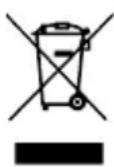
Simbol naveden na proizvodu ili u popratnoj dokumentaciji znači da je zabranje-no odlagati električne ili elektroničke proizvode zajedno s komunalnim otpadom. Pobrinite se za pravilnu likvidaciju otpada: dotrajali proizvod predajte besplatno u ovlašteni centar za skupljanje otpada. Propisnom likvidacijom dotrajalog proizvoda ćete doprinijeti očuvanju skupocjenih prirodnih izvora te prevenciji negativnih utjecaja na okoliš i ljudsko zdravlje zbog nepravilne likvidacije otpada. Za više informacija obratite se nadležnom lokalnom uredu ili mjestu zbrinjavanja. Nepravilno zbrinjavanje ove vrste otpada kažnjava se sukladno nacionalnim propisima. Informacije za korisnika o načinu zbrinjavanja električnih i elektronskih uređaja
(Poslovna uporaba)
Vezano za pravilno zbrinjavanje dotrajale električne/elektronske opreme za poslovnu upotrebu i upotrebu u tvorničkim pogonima obratite se proizvođaču ili uvozniku ovog proizvoda. Proizvođač će Vam pružiti informacije o načinu zbrinjavanja proizvoda i obavijestit će vas o tome tko je dužan osigurati zbrinjavanje ovog električnog uređaja ovisno o datumu uvođenja proizvoda na tržište. Informacije o zbrinjavanju dotrajalog proizvoda u ostalim zemljama (izvan EU). Gore navedeni simbol važi samo u Europskoj uniji. Za više informacija o pravilnom zbrinjavanju električnih i elektronskih uređaja se obratite prodavatelju ili dobavljaču.
PL
ZASILANIE I ŁADOWANIE
https://niceboy.eu/sl/declaration/party-boss-200w
INFORMACIJE ZA UPORABNIKE GLEDE ODSTRANJEVANJA ELEKTRIČNE IN ELEKTRON-SKE OPREME (GOSPODINJSTVA)
Sensibilitate: 88db, ±2dB
Tweeter: 2x2"
Nusle, 140 00, Czech Republic, ID: 294 16 876,
Made in China.
RoHS


- User Manual / Party Speaker
- CZ
- NAPÁJENÍ A NABÍJENÍ
- POWER SUPPLY AND CHARGING
- SWITCHING ON
- UPPER PANEL
- REAR PANEL
- REMOTE CONTROLLER
- BT MODE
- AUX MODE
- USB MODE
- SD CARD MODE
- FM RADIO MODE
- EQUALIZER
- WIRELESS MICROPHONE
- RECORDING
- PACKAGE CONTENTS
- PARAMETERS
- SAFETY INFORMATION
- USER INFORMATION FOR DISPOSING ELECTRICAL AND ELECTRONIC DEVICES (HOME USE)
- (Business and corporate use)
- DE
- INFORMACIJE ZA KORISNIKA O NAČINU ZBRINJAVANJA ELEKTRIČNIH I ELEKTRONSKIH UREĐAJA (DOMĆINSTVA)
- (Poslovna uporaba)
- PL
- ZASILANIE I ŁADOWANIE
- INFORMACIJE ZA UPORABNIKE GLEDE ODSTRANJEVANJA ELEKTRIČNE IN ELEKTRON-SKE OPREME (GOSPODINJSTVA)
Brand : Niceboy
Model : PARTY Boss 200W
Category : Loudspeaker