
PARTY Boss 2 200W - Loudspeaker Niceboy - Free user manual and instructions
Find the device manual for free PARTY Boss 2 200W Niceboy in PDF.


| Product Type | Portable Party Speaker |
| Model | PARTY Boss 2 200W |
| Brand | Niceboy |
| Power Output | 200W RMS |
| Drivers | 8" woofer + tweeter |
| Frequency Response | 40 Hz - 20 kHz |
| Battery | Rechargeable Li-Ion, up to 8 hours playtime |
| Charging | DC 5V via USB-C (cable included) |
| Connectivity | Bluetooth 5.0, USB, AUX, Micro SD |
| Microphone Input | 6.35mm (1/4") for karaoke |
| Lighting | Multi-color LED party lights, sound-active |
| IP Rating | IPX4 (splash-proof) |
| Dimensions (W x H x D) | 280 x 460 x 270 mm |
| Weight | 5.2 kg |
| Material | ABS plastic with fabric grille |
| Included Accessories | USB-C charging cable, AUX cable, user manual |
| Control | Buttons on top panel, remote control (optional) |
| Additional Features | True Wireless Stereo (TWS) pairing, FM radio |
| Safety | Do not expose to water beyond IPX4; keep away from heat; use only supplied charger |
| Maintenance | Wipe with dry cloth; store in dry place; avoid dust |
| Repairability | Spare parts available via Niceboy service centers |
Frequently Asked Questions - PARTY Boss 2 200W Niceboy
User questions about PARTY Boss 2 200W Niceboy
0 question about this device. Answer the ones you know or ask your own.
Ask a new question about this device
Download the instructions for your Loudspeaker in PDF format for free! Find your manual PARTY Boss 2 200W - Niceboy and take your electronic device back in hand. On this page are published all the documents necessary for the use of your device. PARTY Boss 2 200W by Niceboy.
USER MANUAL PARTY Boss 2 200W Niceboy
User Manual / Party Speaker

NAPÁJENÍ A NABÍJENÍ
Citlivost: 88 db, ±2 dB
Tweeter: 1 × 2"
Impedance: 10 kΩ / 1 kHz
Citlivost: 5 dB
BEZPEČNOSTNÍ INFORMACE
Citlivost: 88 db, ±2 dB
POWER SUPPLY AND CHARGING
- Plug the supplied cable into the socket (4) on the rear panel of the speaker.
- If the speaker is connected to the network, the built-in battery will start charging.
- Battery charging is indicated by a light on the display (16).
SWITCHING ON
- Turn the main volume wheel on the top panel (8) all the way to the left.
- Connect all input devices and instruments you will be using.
- Turn on the speaker with the switch on the top panel (6). The speaker is now located in BT mode. After switching to the mode you will use, you can slowly increase the volume.
PRODUCT DESCRIPTION
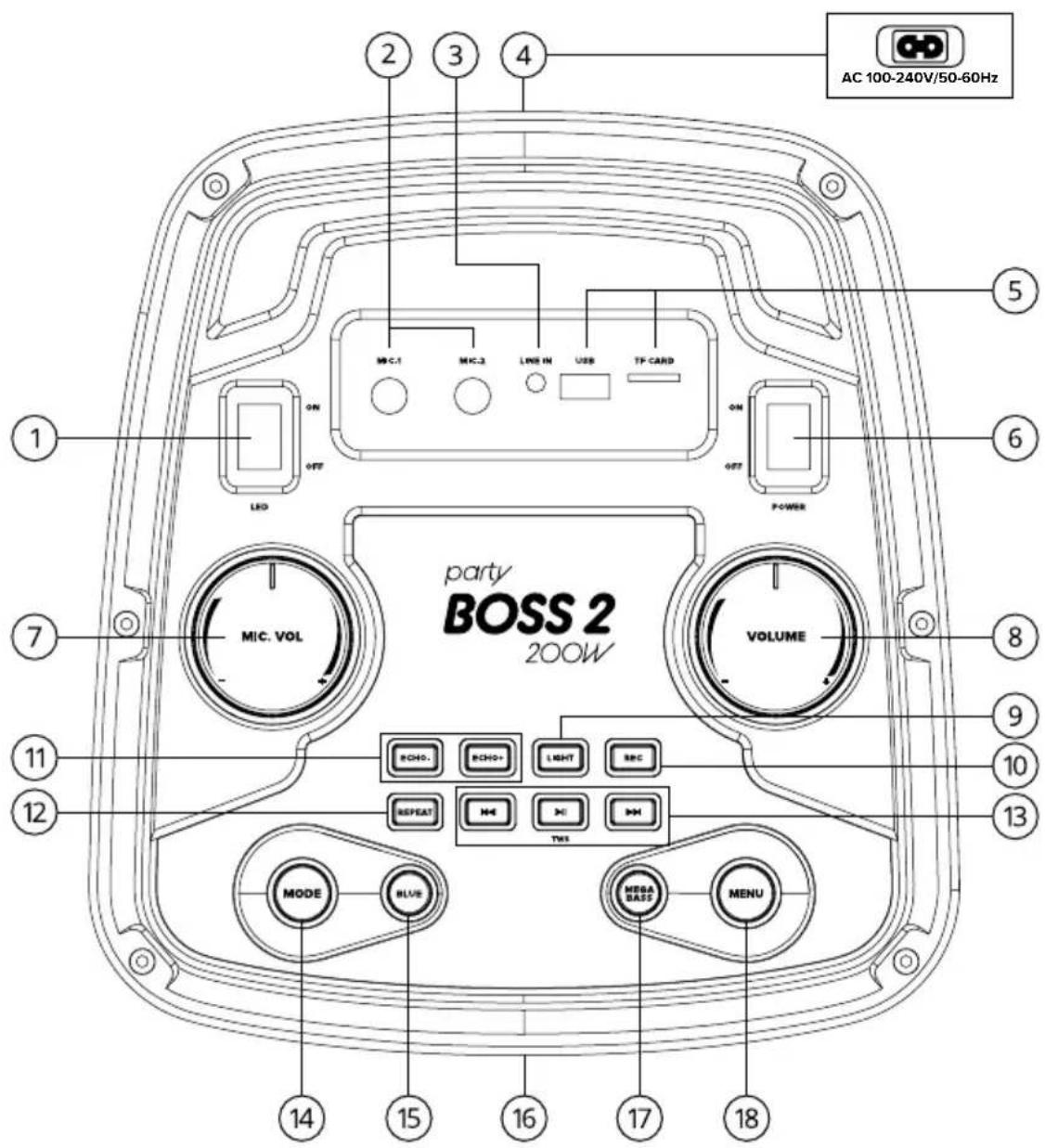
TOP PANEL
- LED ON/OFF button
- Microphone inputs
- 3.5mm AUX input
- Charging port
- USB/SD input ports
- Power button
- Microphone volume
- Master volume
- Light: Short press to change the lighting mode (LED 1 to LED 10) and turn off the light.
- REC- Record your sound through the microphone to a USB flash / Micro SD card.
- Echo- / Echo+: use these buttons to set the microphone echo effect.
- Repeat: Repeats a single track or plays a track from a USB / Micro SD storage in a loop.
- Play / Pause button: Press this button to pause or resume audio playback in USB / SD and Bluetooth mode.
TWS: Long press in Bluetooth mode to activate wireless stereo mode of two Niceboy PARTY Boss 2 speakers.
Previous / Next buttons: During USB / SD and Bluetooth playback, use these buttons to go to the previous or next track. - MODE button: Press to switch between input modes: Bluetooth, USB / SD / FM and AUX input. Long press the "MODE" button to mute the voice prompt. ("U-OFF": voice prompt off; "U-ON": voice prompt on)
- BLUE: Switch directly to Bluetooth mode.
- LED display (on the front of the unit)
- Mega bass: This button boosts low frequencies to increase bass response.
- Menu Button: Press to access Bass (-07\~07), Treble (-07\~07), EQ (EQ01-EQ06) and Microphone Volume controls.
Press the "MENU" button, the LED display will show "B / T / V / EQ":
„B“ stands for bass control. When you see „B“ and turn the main Volume +/- knob, the BASS effect can be adjusted from „-07“ to „07“
T" stands for treble control: when you see „T" and turn the main Volume +/- knob, the treble / mid-treble frequencies can be adjusted from „-07" to „07".
„V“ means volume, the volume can be adjusted from „0“ to „60“.
„EQ“ stands for Equalizer: EQ01-EQ06
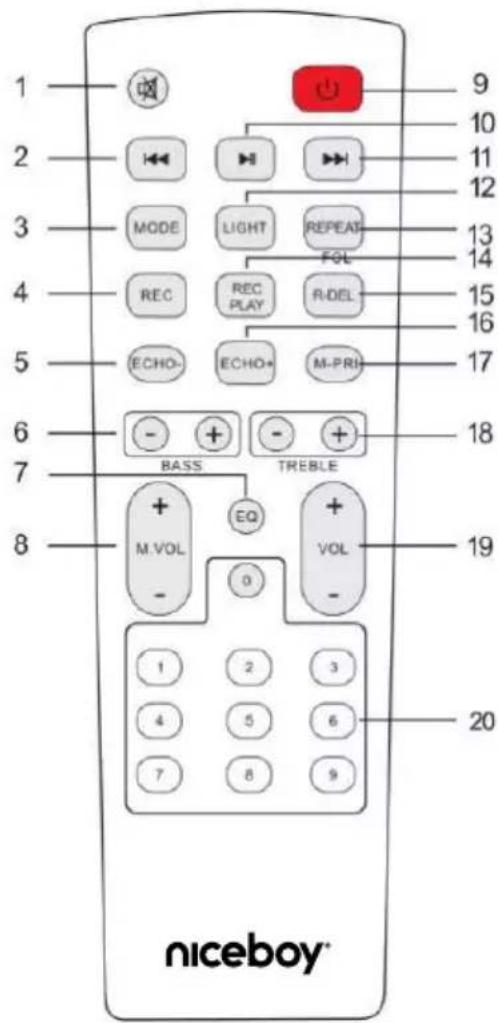
REMOTE CONTROL
Before using the controller, open the bottom cover and insert the included AAA batteries.
- Mute: Option to mute in any mode.
- Previous track
In USB/TF (Micro SD card) mode - previous track.
In Bluetooth connection mode - previous track.
In FM mode - Previous channel. - MODE: Short press to go to Bluetooth / AUX / USB / SD mode.
Long press to mute the voice prompt - Recording function: In USB / SD mode, press „REC“ button to record songs to USB / Micro SD card.
- Echo - Reduction of the echo effect.
- BASS + / - Adjust the bass effect.
-
EQ function - EQ1 - Normal, EQ2- Rock, EQ3- Fashion, EQ4- Classic,
EQ5- Country, EQ6- Jazz -
Microphone volume + / -
-
POWER
-
Pause / Play
-
Next track
In USB / SD mode - next track
In BT mode - next track
In FM mode - next channel
-
Light mode switch: Short press to change the lighting mode (LED 1 to LED 10) and turn off the light.
-
REPEAT: Repeat playback of a single song or a loop of a song on USB / SD storage.
-
Playback of recording
-
Deletion of Record
-
Echo + Increase the echo effect.
-
Microphone Priority - If the button is on, it prioritizes the microphone by muting the music when speaking into the microphone. When this switch is off, the volume of the played music remains unchanged.
-
Treble + / - Setting the treble effect.
-
Master volume
-
Number buttons
In USB/TF (Micro SD card) mode to select songs.
In FM mode to select automatically stored stations.
BT MODE
- After switching on, the speaker is automatically in BT mode. In case the speaker is in other mode, it is necessary to put it in bluetooth mode by briefly pressing the MODE button (14). The BT pairing mode is indicated on the display by a flashing BLUE sign.
- Activate Bluetooth on your device. Then select „Niceboy PARTY Boss 2 200W“ in the list of available devices.
- The device connects to the speaker. Successful pairing will be announced by an acoustic prompt and on the display the inscription BLUE lights up permanently.
- After powering on again, the speaker will automatically connect to the last paired one device.
AUX MODE
- The speaker must be turned off.
- Insert 3.5mm jack cable into the INPUT audio input (3).
- Turn on the speaker and then briefly press the MODE button (14) to switch to AUX mode.
- AUX mode is indicated on the display by the inscription LINE.
- Use the device you connected the speaker to to control the music being played.
You can control the volume of the speaker with the VOLUME wheel (8) on the top panel.
USB MODE
- After connecting the USB disk to the USB socket (5), the speaker automatically switches to the appropriate mode. This is indicated on the display by the inscription USB.
- Start or pause the song by briefly pressing the PLAY button (13). You control the volume with the VOLUME wheel (8) on the top panel. By briefly pressing the NEXT buttons and PREV (13) to go to the next or previous track. The device supports data carriers with a maximum capacity of 32GB and audio formats MP3 and WAV. The USB socket can also be used as an output power supply. The speaker thus fulfills the function of a power bank.
SD CARD MODE
- After connecting the SD card to the TF CARD slot (5), the speaker automatically switches to the appropriate mode. This is indicated on the display by the inscription SD.
- Start or pause the song by briefly pressing the PLAY button (13). You control the volume with the VOLUME wheel (8) on the top panel. By briefly pressing the NEXT buttons and PREV (13) to go to the next or previous track. The device supports data carriers with a maximum capacity of 32GB and audio formats MP3 and WAV.
FM RADIO MODE
Place the speaker in an open area so that the radio signal strength is sufficient.
The speaker is equipped with an integrated antenna.
- Search for the FM radio mode by briefly pressing the MODE button (14). This is indicated on the display FM station number, e.g. 90.3.
- Briefly press the PLAY button (13) to start scanning available stations. The device automatically saves the found stations to the default channels.
- After scanning is complete, you can switch between FM stations with the NEXT and PREV buttons (13), or using the number buttons on the remote control.
TWS MODE:
Using True Wireless (TWS) technology, you can connect two Niceboy PARTY Boss 2 200W speakers and play music at the same time.
- Turn on both speakers and make sure they are not connected to any Bluetooth device (mobile phone, laptop, etc.).
- Press and hold the TWS button (13) for 3 seconds on the control panel of one of the speakers to pair with the other speaker. „tUS“ will appear on the display. A tone will be heard from the main speaker and the second speaker after successful pairing.
- Open Bluetooth settings on your device. Then select „Niceboy PARTY Boss 2 200W“ from the list of available devices. A successful pairing will be announced by an acoustic prompt. When you turn off or change the playback mode, the speakers will automatically disconnect from each other.
WIRELESS MICROPHONE
Unscrew the bottom cover of the microphone and insert the included AA batteries. Screw the cap back on a switch on the top of the microphone to turn it on. The microphone will automatically connect to the powered speaker. Use the MIC wheel to adjust the microphone volume. VOL. (7) You control the echo effect by briefly pressing the ECHO+, ECHO- buttons
RECORDING
When connecting a wireless or wired microphone or a musical instrument via the microphone inputs can record vocals / musical instruments to a USB disk or SD memory card. The storage media must contain at least one audio file in mp3 or wav format to be detected by the device.
- Turn off the speaker and connect other instruments to the MIC.IN or GT.IN inputs.
- Turn on the speaker.
- Insert the USB disk or SD card into the respective USB or TF CARD slots.
- The speaker will switch to the appropriate storage media mode.
- Press the REC button briefly to start recording your audio track. Recording is indicated on the display by REC.
- End recording by long pressing the REC button.
PACKAGE CONTENTS
Speaker Niceboy PARTY Boss 2 200W
Mains power cable
Wireless microphone
Remote control
2x AA batteries
2x AAA batteries
Instructions for use
SPECIFICATION
BT version: 5 . 0
Frequency band: 2.4GHz
Radio frequency power: ≤ 2.5 mW
RMS power: 200 W
Power supply: 100V-240V, 60/50 Hz
Battery: 4.5Ah 12V
Charging time: 4 hours
Durability: 8 hours
Woofer: 2 × 8"
Frequency range: 50 Hz - 18 kHz
Impedance: 4Ω, ±10%
Sensitivity: 88 db, ±2 dB
Tweeter: 1 x 2"
Frequency range: 3 kHz - 18 kHz
Impedance: 8Ω, ±15%
Sensitivity: 85 dB, ±3 dB
Microphone: wireless, directional
Frequency: 40 Hz - 15 kHz
Impedance: 10 kΩ / 1 kHz
Sensitivity: 5 dB
SAFETY INFORMATION
Listening to music at excessive volume can damage your hearing. Do not subject the equipment to fluids and moisture. Do not expose the device to excessively high/low temperatures, and do not attempt to disassemble it. Protect the device from sharp objects and falls from height. Batteries - Improper handling (prolonged charging, short circuit, breakage by other objects, etc.) may result in fire, overheating or battery leakage. The battery or accumulator that may be included with the product has a life of six months because it is a consumable item.
Information on all frequency bands in which the radio equipment operates and intentionally transmits radio waves as well as the maximum radio frequency power transmitted in the frequency band in which the radio equipment is operated is included in the instructions and safety information.
NICEBOY s.r.o. hereby declares that the type of radio equipment NICEBOY PARTY BOSS 2 200W complies with Directives 2014/53 / EU, 2014/30 / EU, 2014/35 / EU, and 2011/65 / EU. The full content of EU Declaration of Conformity is available on the following websites: https://niceboy.eu/en/declaration/party-boss-2-200w
USER INFORMATION FOR DISPOSING ELECTRICAL AND ELECTRONIC DEVICES (HOME USE)

This symbol located on a product or in the product's original documentation means that the used electrical or electronic products may not be disposed together with the communal waste. In order to dispose of these products correctly, take them to a designated collection where they will be accepted for free. By disposing of a product in this way, you are helping to elect precious natural resources and helping to prevent any potential negative impacts on the environment and human health, which could be the result of incorrect waste disposal. You may have more detailed information from your local authority or nearest collection site. According to national regulations, fines may also be given out to anyone who disposes of this type of waste directly. User information for disposing electrical and electronic devices. (Business and corporate) in order to correctly dispose of electrical and electronic devices for business and corporate use, to the product's manufacturer or importer. They will provide you with information regarding disposal methods and, according to the date stated on the electrical or electronic device on the market, they will tell you who is responsible for financing the disposal of thiselectrical or electronic device. Information regarding disposal processes in other countriesoutside the EU. The symbol layed above is only valid for countries within the European Union. For the correct disposal of electrical and electronic devices, request the relevant information from your local authorities or the seller.
Akumulator: 4,5Ah 12V
https://niceboy.eu/en/declaration/party-boss-2-200w
INFORMACJA DLA UŻYTKOWNIKÓW DOTYCZĄCA UTYLIZACJI SPRZĘTU ELEKTRYCZNEGO I ELEKTRONICZNEGO (GOSPODARSTWA DOMOWE)
Nusle, 140 00, Prague 4, Czech Republic, ID: 294 16 876
Made in China.


- User Manual / Party Speaker
- NAPÁJENÍ A NABÍJENÍ
- BEZPEČNOSTNÍ INFORMACE
- POWER SUPPLY AND CHARGING
- SWITCHING ON
- PRODUCT DESCRIPTION
- TOP PANEL
- REMOTE CONTROL
- BT MODE
- AUX MODE
- USB MODE
- SD CARD MODE
- FM RADIO MODE
- TWS MODE:
- WIRELESS MICROPHONE
- RECORDING
- PACKAGE CONTENTS
- SPECIFICATION
- SAFETY INFORMATION
- USER INFORMATION FOR DISPOSING ELECTRICAL AND ELECTRONIC DEVICES (HOME USE)
- INFORMACJA DLA UŻYTKOWNIKÓW DOTYCZĄCA UTYLIZACJI SPRZĘTU ELEKTRYCZNEGO I ELEKTRONICZNEGO (GOSPODARSTWA DOMOWE)
Brand : Niceboy
Model : PARTY Boss 2 200W
Category : Loudspeaker